

Come integrare i dati del WiFi ospiti con il tuo CRM
This guide provides a comprehensive technical reference for IT managers, network architects, and marketing leaders on integrating guest WiFi analytics with CRM platforms such as Salesforce and HubSpot. It covers the strategic rationale, core architectural patterns (Direct API and Webhooks), available data fields, and step-by-step deployment guidance. Venue operators in hospitality, retail, and events will find actionable frameworks for building a compliant, scalable, first-party data pipeline that drives measurable marketing ROI.
🎧 Ascolta questa guida
Visualizza trascrizione

Sintesi esecutiva
Connettere l'infrastruttura del WiFi ospiti a un sistema di Customer Relationship Management (CRM) non è più una tattica di nicchia: è un componente critico di una moderna strategia di digital engagement per qualsiasi sede fisica. Per i responsabili IT, gli architetti di rete e i direttori operativi di hotel, catene di vendita al dettaglio, stadi e grandi luoghi pubblici, questa integrazione rappresenta un metodo potente per convertire il traffico anonimo dei visitatori in un ricco patrimonio di dati di prima parte.
Acquisendo e analizzando i dati degli utenti del WiFi ospiti — come la frequenza delle visite, il tempo di permanenza e i dettagli demografici di base — le organizzazioni possono sbloccare un ROI significativo attraverso una maggiore personalizzazione del marketing, una migliore fedeltà dei clienti e decisioni operative basate sui dati. Questa guida fornisce un modello tecnico indipendente dal fornitore per ottenere un'integrazione di successo. Delinea i modelli architetturali principali, dalle connessioni API dirette allo streaming di eventi basato su webhook, e dettaglia i campi dati tipicamente disponibili per la sincronizzazione. Esploriamo le best practice per garantire la qualità dei dati, mantenere la conformità al GDPR e al PCI DSS e mitigare i rischi di sicurezza comuni. L'obiettivo è fornire ai leader tecnici le conoscenze pratiche necessarie per progettare, implementare e gestire un'integrazione CRM del WiFi ospiti robusta, scalabile e sicura, in grado di generare un impatto aziendale misurabile.
Ascolta il nostro briefing audio di 10 minuti sull'integrazione CRM del WiFi ospiti: la prospettiva di un consulente senior su strategia, architettura e implementazione.
Approfondimento tecnico
L'integrazione dei dati del WiFi ospiti con un CRM comporta diversi componenti tecnici chiave e decisioni architetturali. Fondamentalmente, il processo consiste nell'acquisire i dati di autenticazione e di sessione dell'utente dal controller di accesso della rete WiFi o dal Captive Portal e nell'inviarli al CRM in un formato strutturato e convalidato. I meccanismi principali per farlo sono le integrazioni API dirette, i webhook e i connettori dati intermedi.
Modelli architetturali
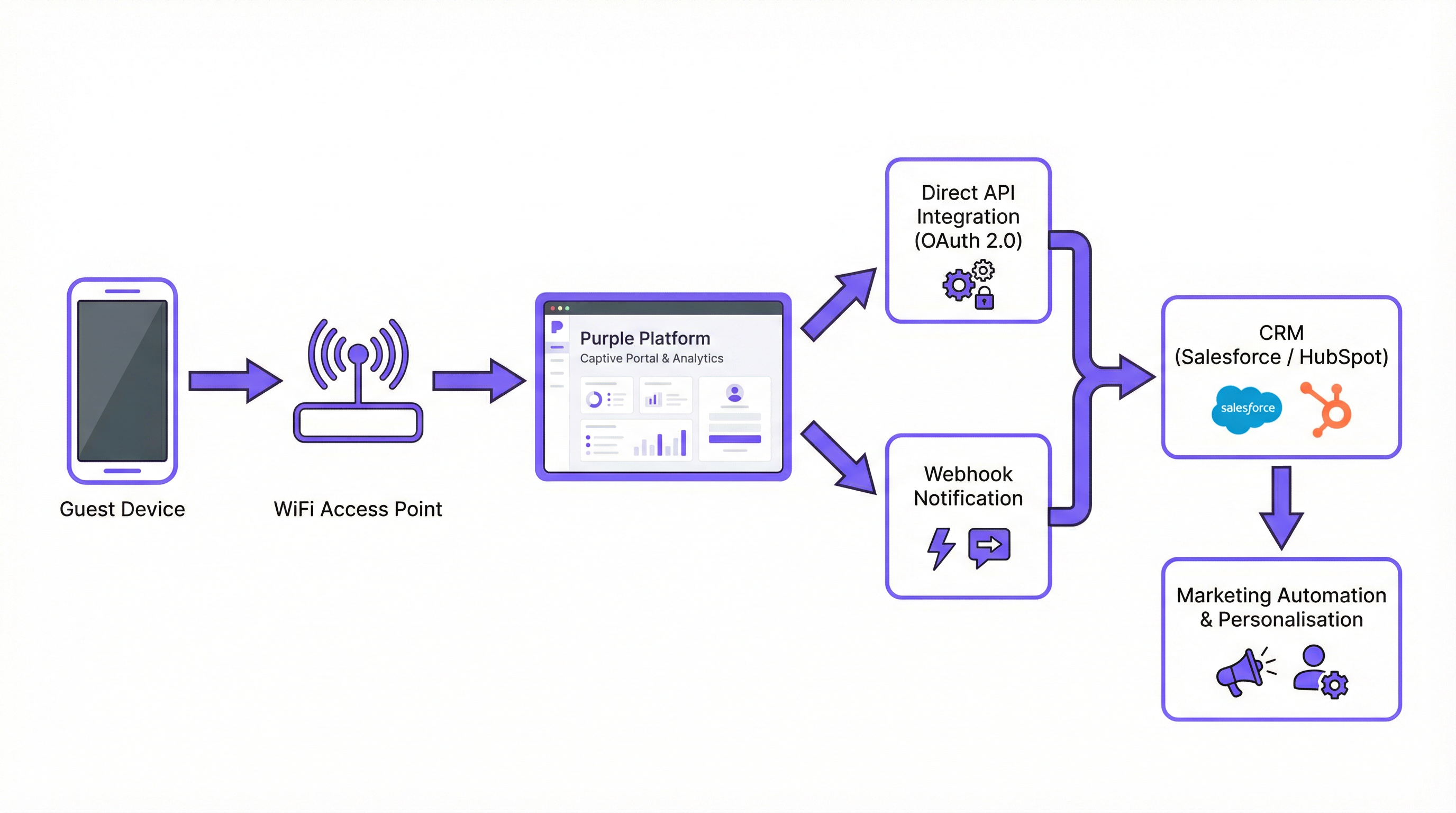
L'integrazione API diretta è il metodo più comune e consigliato per le moderne implementazioni enterprise. La piattaforma WiFi — come Purple — effettua chiamate API autenticate direttamente all'API REST del CRM. Si tratta di una connessione server-to-server. Quando un utente si autentica sul WiFi ospiti, il controller WiFi raccoglie i dati e li invia al CRM in tempo reale. Questo modello è ideale per le implementazioni in cui l'aggiornamento dei dati è fondamentale, come l'attivazione di un'e-mail di benvenuto immediata o l'aggiornamento del saldo di un programma fedeltà.
I webhook offrono un'alternativa leggera e basata sugli eventi. In questo modello, la piattaforma WiFi invia una notifica HTTP POST in tempo reale a un URL preconfigurato — un endpoint nel CRM o un servizio intermediario — nel momento in cui si verifica un evento specifico. Un evento guest_connected, ad esempio, potrebbe attivare un webhook che crea o aggiorna un contatto nel CRM. Questo approccio è altamente efficiente e particolarmente adatto per i sistemi basati su un'architettura event-driven.
I connettori middleware come Zapier, MuleSoft o un livello di integrazione personalizzato sono appropriati per scenari complessi in cui l'integrazione diretta non è disponibile o in cui è richiesta una trasformazione significativa dei dati prima che questi raggiungano il CRM. Questo approccio aggiunge complessità operativa ma offre la massima flessibilità.
| Modello | Latenza | Complessità | Ideale per |
|---|---|---|---|
| API diretta | Tempo reale | Bassa–Media | La maggior parte dei CRM moderni (Salesforce, HubSpot) |
| Webhook | Tempo reale | Bassa | Architetture event-driven |
| Middleware | Quasi in tempo reale | Alta | CRM personalizzati, trasformazioni complesse |
Campi dati e payload
I dati disponibili dall'autenticazione al WiFi ospiti sono notevolmente più ricchi di un semplice indirizzo e-mail. Un tipico payload JSON inviato a un CRM in seguito a una nuova connessione ospite include le seguenti categorie:
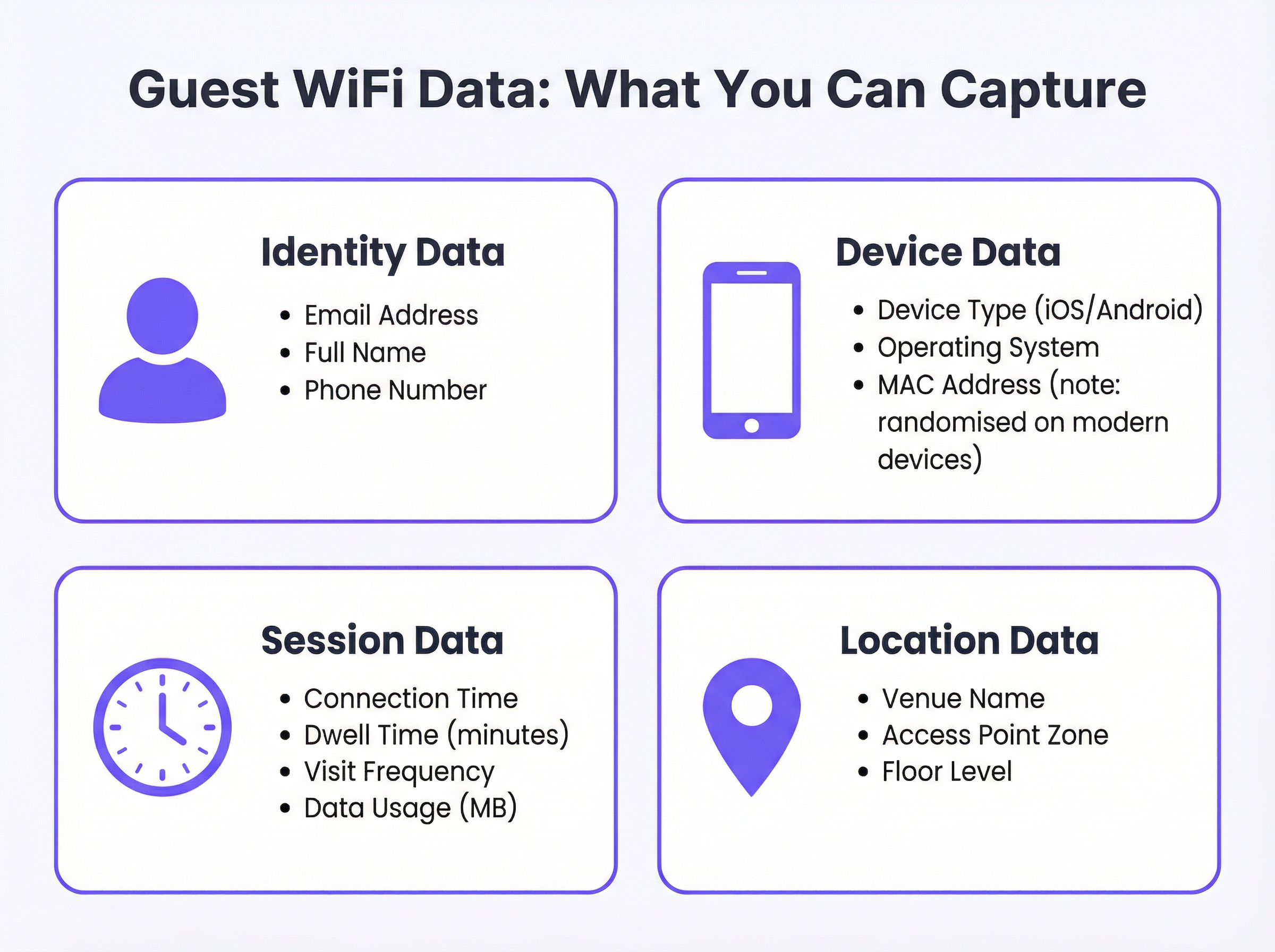
Un payload API rappresentativo potrebbe essere strutturato come segue:
{
  "email": "guest@example.com",
  "full_name": "Jane Smith",
  "phone": "+44 7700 900000",
  "device_type": "iPhone",
  "os": "iOS 17",
  "connect_time": "2025-03-15T14:32:00Z",
  "dwell_time_minutes": 47,
  "visit_count": 3,
  "venue_name": "The Grand Hotel - Manchester",
  "access_point_zone": "Lobby",
  "marketing_consent": true
}
Nota il campo booleano marketing_consent. Si tratta di un campo obbligatorio in qualsiasi implementazione conforme al GDPR e deve essere impostato esplicitamente in base all'azione dell'utente sul Captive Portal.
Architettura di autenticazione e sicurezza
La sicurezza non è negoziabile. Tutte le trasmissioni di dati devono avvenire tramite HTTPS utilizzando TLS 1.2 o versioni successive. L'autenticazione con l'API del CRM deve utilizzare OAuth 2.0, che fornisce un accesso sicuro e delegato senza esporre le credenziali. Le chiavi API e i token OAuth devono essere archiviati in un sistema di gestione dei segreti dedicato, mai codificati (hardcoded) nei file di configurazione o nelle variabili d'ambiente su server condivisi.
Sul lato rete, l'adesione a IEEE 802.1X per il controllo degli accessi di rete basato su porta e a WPA3 per la crittografia WiFi garantisce che i dati degli utenti siano protetti nel punto di connessione. Per le sedi che elaborano i dati delle carte di pagamento, deve essere mantenuta la segmentazione di rete richiesta dal PCI DSS, assicurando che la rete WiFi ospiti sia isolata da qualsiasi ambiente contenente i dati dei titolari di carta.
Guida all'implementazione
Fase 1: Discovery e allineamento dei requisiti
Prima di iniziare qualsiasi configurazione tecnica, convoca un gruppo di lavoro interdipartimentale che includa IT, Marketing e Ufficio Legale/Compliance. Il Marketing deve definire i campi dati specifici richiesti e i casi d'uso previsti. L'IT deve valutare le capacità dell'infrastruttura WiFi esistente e del CRM di destinazione. L'Ufficio Legale deve esaminare il testo proposto per il Captive Portal e il meccanismo di consenso per garantire la conformità al GDPR. Documenta i risultati di questo incontro come una specifica formale dei requisiti.
Fase 2: Selezione del modello di integrazione
In base alle capacità dell'API del CRM e alla tua infrastruttura, seleziona il modello architetturale appropriato. Per Salesforce, utilizza l'API REST con OAuth 2.0 e il framework Connected App. Per HubSpot, utilizza il connettore nativo Purple, che sfrutta l'API Contacts di HubSpot. Per altre piattaforme, verifica l'esistenza di un connettore nativo; in caso contrario, valuta le opzioni middleware.
Fase 3: Configurazione della piattaforma WiFi
Nel portale Purple, vai su Connectors & Integrations (Connettori e integrazioni). Seleziona il CRM di destinazione. Ti verrà richiesto di:
- Autenticazione: fai clic su 'Connect' (Connetti) per avviare il flusso OAuth 2.0. Verrai reindirizzato alla pagina di autorizzazione del tuo CRM per concedere a Purple l'autorizzazione a creare e aggiornare i contatti.
- Configurazione della mappatura dei dati: definisci quali campi dati di Purple corrispondono a quali campi del CRM. Presta particolare attenzione ai campi personalizzati. Ad esempio,
dwell_time_minutespotrebbe dover essere mappato a un campo personalizzato creato nel tuo CRM, comeLast_Visit_Duration__cin Salesforce. - Impostazione delle condizioni di attivazione: definisci quali eventi attivano una sincronizzazione dei dati. In genere, si tratta di
on_login(quando un utente si autentica per la prima volta) e, facoltativamente,on_return_visit(per le visite successive di un utente noto).
Fase 4: Test e convalida
Utilizzando un dispositivo di test, connettiti alla rete WiFi ospiti e completa l'accesso al Captive Portal. Vai al tuo CRM e conferma che sia stato creato un nuovo contatto con i valori dei campi corretti. Testa i seguenti casi limite: un utente di ritorno (dovrebbe aggiornare, non duplicare), un utente che rifiuta il consenso al marketing (dovrebbe essere creato ma non aggiunto alle liste di marketing) e un evento di connessione durante uno scenario simulato di limite di frequenza (rate limit) dell'API.
Fase 5: Implementazione e monitoraggio
Abilita l'integrazione per le sedi in produzione. Stabilisci dashboard di monitoraggio che traccino le metriche di salute dell'integrazione: tasso di successo delle chiamate API, tasso di errore, latenza media di sincronizzazione e numero di nuovi contatti creati al giorno. Imposta avvisi per tassi di errore che superano una soglia definita (es. più dell'1% dei tentativi di sincronizzazione falliti). Rivedi la qualità dei dati nel CRM su base settimanale per il primo mese successivo all'implementazione.
Best Practice
Minimizzazione dei dati e consenso. Raccogli solo i dati strettamente necessari per i casi d'uso definiti. Il tuo Captive Portal deve presentare un'informativa sulla privacy chiara e in linguaggio semplice, oltre a una casella di controllo esplicita e non spuntata per il consenso al marketing. Le caselle preselezionate non sono conformi al GDPR. Il record del consenso — inclusi il timestamp e la formulazione esatta della dichiarazione di consenso — deve essere archiviato insieme al record del contatto nel tuo CRM.
Qualità e igiene dei dati. Implementa la convalida lato server prima che i dati vengano scritti nel CRM. Come minimo, convalida che gli indirizzi e-mail siano conformi al formato RFC 5322. Implementa una strategia di deduplicazione per impedire la creazione di più record di contatto per lo stesso individuo. Un approccio comune consiste nell'utilizzare l'indirizzo e-mail come identificatore univoco principale e configurare l'integrazione CRM per eseguire un 'upsert' (aggiorna se esiste, crea se non esiste) anziché una semplice creazione.
Pianificazione della scalabilità. Progetta per il traffico di picco fin dal primo giorno. Uno stadio che ospita un evento tutto esaurito può registrare decine di migliaia di connessioni simultanee. Implementa il batching per le chiamate API: la maggior parte delle API dei CRM supporta operazioni in blocco che consentono di creare o aggiornare più contatti in un'unica richiesta, riducendo significativamente il numero di chiamate API necessarie. Prendi in considerazione una coda di elaborazione asincrona (come AWS SQS o RabbitMQ) per memorizzare nel buffer gli eventi durante i picchi di traffico.
Conformità e verificabilità. Mantieni una mappa dei dati completa che documenti ogni sistema in cui sono archiviati i dati del WiFi ospiti. Ciò è essenziale per rispondere alle richieste di accesso degli interessati e alle richieste di diritto all'oblio previste dal GDPR entro la finestra legale di 30 giorni. Automatizza il flusso di lavoro di eliminazione in tutti i sistemi — CRM, piattaforma WiFi, strumenti di e-mail marketing — per garantire una cancellazione completa e verificabile.
Risoluzione dei problemi e mitigazione dei rischi
Limitazione della frequenza API (Rate Limiting). La modalità di guasto tecnico più comune. I CRM impongono limiti rigorosi alle chiamate API: Salesforce, ad esempio, impone limiti in base al livello di licenza. Il superamento di questi limiti comporta errori HTTP 429 e perdita di dati. Mitigazione: implementa il batching e una logica di riprova con back-off esponenziale. Monitora l'utilizzo dell'API rispetto ai limiti assegnati in tempo reale.
Mappatura dei dati errata. Una mappatura dei campi configurata in modo errato può far sì che i dati vengano scritti nel campo CRM sbagliato o che la sincronizzazione fallisca silenziosamente. Mitigazione: utilizza un livello di convalida dello schema che controlli il payload in uscita rispetto alle definizioni dei campi del CRM prima della trasmissione. Implementa una registrazione (logging) completa di tutte le richieste e risposte API.
Dati obsoleti o in conflitto. Se un cliente aggiorna i propri dettagli direttamente nel CRM (es. un nuovo numero di telefono), un successivo accesso al WiFi potrebbe sovrascriverli con dati obsoleti. Mitigazione: definisci una chiara 'fonte di verità' per ogni campo dati. Per i dati di identità come e-mail e nome, il CRM è in genere il master. Per i dati comportamentali come il tempo di permanenza e la frequenza delle visite, la piattaforma WiFi è il master. Configura l'integrazione per aggiornare solo i campi in cui la piattaforma WiFi è la fonte autorevole.
Fallimenti nella cancellazione GDPR. Una richiesta di diritto all'oblio che non viene eseguita completamente in tutti i sistemi crea un rischio legale significativo. Mitigazione: implementa un flusso di lavoro di cancellazione automatizzato end-to-end attivato da un portale centrale di gestione della privacy. Il flusso di lavoro deve effettuare chiamate API di eliminazione a ogni sistema nella mappa dei dati e registrare la conferma di ogni eliminazione.
ROI e impatto aziendale
La giustificazione principale per questo investimento di integrazione è la generazione di un rendimento positivo e misurabile. Le organizzazioni che hanno implementato con successo un'integrazione CRM del WiFi ospiti riportano in genere risultati in diverse dimensioni.
Aumento del Customer Lifetime Value (CLV). Utilizzando i dati del WiFi per identificare i visitatori fedeli e frequenti e inviare loro offerte personalizzate, le sedi possono aumentare la frequenza e il valore delle visite ripetute. Una catena alberghiera che identifica un ospite che ha soggiornato tre volte in sei mesi può offrirgli in modo proattivo una tariffa fedeltà, convertendo un ospite occasionale in un cliente fedele.
Miglioramento dell'attribuzione marketing. Per gli operatori del settore retail, la capacità di correlare la connessione WiFi di un ospite con la sua precedente esposizione a una campagna pubblicitaria digitale fornisce prove concrete della conversione online-to-offline: una delle metriche più preziose e sfuggenti nel marketing moderno. Questi dati informano direttamente le decisioni di allocazione del budget pubblicitario.
Efficienza operativa. I dati sul tempo di permanenza e sull'affluenza, derivati dall'analisi delle sessioni WiFi, possono essere utilizzati per ottimizzare i livelli di personale, il layout dei negozi e l'erogazione dei servizi. Una sede che identifica un picco costante nel tempo di permanenza tra le 12:00 e le 14:00 può garantire un personale adeguato durante quella fascia oraria.
Valore del patrimonio di dati. Un database CRM ben mantenuto, basato sul consenso e popolato con dati WiFi di prima parte, è un asset strategico a lungo termine. Con la deprecazione dei cookie di terze parti e l'aumento dei costi della pubblicità digitale, i dati di prima parte diventano sempre più preziosi come base per tutte le attività di marketing.
Termini chiave e definizioni
Captive Portal
The web page that a user is redirected to and must interact with before being granted access to a public or guest WiFi network. It is the primary point of data capture, consent collection, and brand presentation.
IT teams configure the captive portal to enforce network access policies and present authentication options. Marketing teams design its user experience to maximise data capture rates while maintaining brand consistency. Legal teams review its copy to ensure the privacy notice and consent mechanism are compliant with GDPR.
Guest WiFi CRM Integration
The technical process of connecting a venue's guest WiFi platform to a Customer Relationship Management system, enabling the automated transfer of visitor authentication and session data to build and enrich customer profiles.
This is the central topic of this guide. It is the mechanism by which anonymous venue visitors are converted into known, actionable contacts in the organisation's marketing and sales systems.
API (Application Programming Interface)
A defined set of protocols and data formats that allows different software systems to communicate with each other programmatically. In this context, it refers to the CRM's REST API, which the WiFi platform uses to create and update contact records.
The CRM's API is the technical gateway for your guest WiFi data. Understanding the API's capabilities — particularly its rate limits, supported operations, and authentication requirements — is essential for designing a reliable integration.
Webhook
An automated, event-driven HTTP POST notification sent from one application to another when a specific event occurs. Unlike polling (where one system repeatedly asks another for updates), webhooks push data in real-time only when there is something to report.
Webhooks are an efficient alternative to direct API polling for real-time event notification. A 'guest_connected' webhook, for example, allows the WiFi platform to instantly notify the CRM or a middleware system the moment a new visitor authenticates, without the CRM needing to continuously query the WiFi platform.
OAuth 2.0
An industry-standard authorisation protocol that allows a user or application to grant a third-party service limited, scoped access to resources on another service, without exposing the primary credentials (username and password).
When connecting your WiFi platform to your CRM, OAuth 2.0 is the mandatory authentication mechanism. It ensures that the WiFi platform can create and update contacts in the CRM without ever having access to your CRM administrator's password. Always use OAuth 2.0; never use basic authentication for production integrations.
GDPR (General Data Protection Regulation)
A regulation in EU law (effective May 2018) governing the collection, processing, storage, and transfer of personal data for all individuals within the European Union and the European Economic Area. It applies to any organisation that processes the data of EU residents, regardless of where the organisation is based.
GDPR is the primary legal framework governing guest WiFi data collection in the UK and EU. Key requirements include lawful basis for processing (typically consent for marketing), data minimisation, the right of access, and the right to erasure. Non-compliance can result in fines of up to €20 million or 4% of global annual turnover, whichever is higher.
Dwell Time
The duration for which a specific device, and by extension a visitor, remains connected to the WiFi network within a venue. Measured in minutes or hours.
Dwell time is one of the most operationally valuable metrics derived from guest WiFi data. In retail, it correlates with customer engagement and purchase likelihood. In hospitality, it can indicate satisfaction levels. In transport hubs, it supports passenger flow analysis and resource optimisation.
MAC Address Randomisation
A privacy feature implemented in modern mobile operating systems (iOS 14+ and Android 10+) that causes the device to present a different, randomly generated MAC address to each WiFi network it connects to, rather than its permanent hardware MAC address.
This feature significantly limits the ability to use MAC addresses as a persistent identifier for tracking individual users across sessions. IT teams and data architects must account for this when designing analytics pipelines. The correct response is to rely on authenticated identifiers — specifically, the email address provided during captive portal login — rather than device-level identifiers.
Upsert
A database and API operation that combines 'update' and 'insert'. It updates an existing record if one is found matching a specified key (e.g., email address), or creates a new record if no match is found.
Configuring your CRM integration to use upsert operations rather than simple inserts is a critical data quality practice. It prevents the creation of duplicate contact records for returning visitors, which is one of the most common and damaging issues in WiFi-to-CRM integrations.
Casi di studio
A 250-room luxury hotel wants to increase direct bookings and build a loyalty programme. The majority of their guests book through online travel agencies (OTAs), meaning the hotel has no direct relationship with them. How can they use guest WiFi to populate their new Salesforce CRM and begin building that direct relationship?
1. Infrastructure and Portal Design. The hotel deploys Purple across the property. The captive portal is designed to reflect the hotel's premium brand identity. It offers two login options: a quick-access option requiring only an email address and acceptance of the terms of service, and a 'Loyalty Club' sign-up option that offers premium, higher-speed internet in exchange for additional details — name, birthday, and marketing consent. This tiered approach creates a tangible incentive for guests to share more data.
2. Salesforce Integration. In the Purple dashboard, the Salesforce connector is configured using OAuth 2.0. A custom 'Guest WiFi' record type is created in Salesforce, linked to the standard Contact object. Data mapping is configured as follows: email maps to Email, full_name maps to Name, connect_time maps to First_WiFi_Connect_Date__c, and dwell_time_minutes is aggregated to a Total_Stay_Duration__c field.
3. Marketing Automation. A Salesforce Flow is triggered upon the creation of a new Guest record with marketing_consent = true. The flow sends a branded 'Welcome to our Loyalty Club' email within 15 minutes of check-in, containing a special offer for their next direct booking — bypassing the OTA commission entirely.
4. Measurement. The hotel tracks new CRM contacts generated per month, the open rate and conversion rate of the welcome email, and the revenue attributable to direct bookings made by guests who were first acquired via the WiFi loyalty programme.
A large retail chain with 100 stores wants to measure the effectiveness of their digital advertising campaigns in driving in-store visits. They are using HubSpot for marketing automation. How can they leverage guest WiFi data to build an online-to-offline attribution model?
1. Goal Definition. The primary objective is to determine whether customers who were exposed to a digital ad campaign subsequently visited a physical store. This requires correlating an online event (ad click or impression) with an offline event (in-store WiFi connection).
2. HubSpot Integration. The chain activates Purple's native HubSpot connector. Authentication is completed via OAuth 2.0. The integration is configured to create or update a HubSpot Contact upon each guest WiFi login, with the venue_name mapped to a custom contact property called Last_Visited_Store.
3. Attribution Workflow. In HubSpot, a workflow is configured as follows: when a contact connects to in-store WiFi (trigger: Last_Visited_Store property is set), the workflow checks whether the contact's email address exists in the active list of users who clicked on the current Facebook or Google ad campaign. If a match is found, the contact is enrolled in a 'Confirmed In-Store Visitor — Ad Attributed' list. This list is then used to calculate the campaign's true cost-per-store-visit.
4. Post-Visit Engagement. A second workflow sends a post-visit survey 24 hours after the WiFi connection, asking about the in-store experience and offering a discount code for the next visit. This closes the loop between the digital campaign and in-store behaviour.
5. Reporting. The marketing team builds a HubSpot report comparing the in-store visit rate for contacts who were exposed to the ad campaign versus those who were not. This provides a clear, data-driven view of the campaign's incremental impact.
Analisi degli scenari
Q1. Your organisation is a fast-food chain with 500 small locations. You want to build a simple, opt-in email marketing list of customers. Your CRM is a custom-built system with a basic REST API that supports a single endpoint for creating new contacts. Which integration pattern would you recommend, and what is the most critical technical risk to mitigate at this scale?
💡 Suggerimento:Consider both the simplicity of the CRM's API and the aggregate volume of connections across 500 locations during peak hours.
Mostra l'approccio consigliato
A direct API integration is the most suitable pattern. The custom CRM has a REST API for creating contacts, which is exactly what the Purple platform's direct API connector requires. Middleware would add unnecessary cost and complexity for a straightforward contact creation task.
However, the most critical risk at this scale is API rate limiting. With 500 locations, even a modest average of 20 new opt-in connections per hour per location generates 10,000 API calls per hour. Most APIs cannot sustain this volume of individual calls. The mitigation is to implement batching — configuring the integration to accumulate connections over a short window (e.g., 60 seconds) and then submit them as a single bulk API request. This reduces the call volume by orders of magnitude and is the single most important architectural decision for a deployment of this scale.
Q2. You are the IT Director for a large conference centre. You are hosting a major technology conference with 8,000 attendees over two days. You need to provide guest WiFi and also want to share attendee connection data with three event sponsors in near real-time. What are the key scalability and compliance challenges you must address before the event?
💡 Suggerimento:Consider both the burst traffic pattern of a conference registration period and the legal requirements for sharing personal data with third-party sponsors.
Mostra l'approccio consigliato
Scalability: The primary challenge is the burst traffic pattern. At a conference, the majority of attendees will attempt to connect within the first 30–60 minutes of the event opening. This creates a massive, simultaneous spike — potentially thousands of authentication events in minutes. A synchronous, direct API integration will almost certainly hit rate limits and cause data loss during this window.
The correct architecture is asynchronous: implement a message queue (e.g., AWS SQS) between the Purple platform and the downstream systems. Authentication events are written to the queue immediately, and a consumer process reads from the queue and makes API calls at a controlled, sustainable rate. This decouples the ingestion rate from the processing rate and ensures no data is lost during the spike.
Compliance: Sharing personal data with sponsors is a significant GDPR risk. You cannot share attendee data with sponsors simply because they have agreed to it commercially. You must have explicit, granular consent from each attendee. The captive portal must present a separate, clearly labelled, unticked checkbox for each sponsor (e.g., 'I consent to my data being shared with [Sponsor Name] for marketing purposes'). You cannot bundle this into the general terms of service. You must also have a Data Processing Agreement (DPA) in place with each sponsor before any data is shared, clearly defining their obligations as a data processor or controller.
Q3. A hotel guest who previously consented to marketing and logged into your guest WiFi three months ago now submits a formal 'right to erasure' request under GDPR Article 17. Describe the complete technical process you must execute to fulfil this request within the 30-day statutory deadline.
💡 Suggerimento:The erasure must be comprehensive and auditable. Consider every system in which this individual's data may reside as a result of the WiFi integration.
Mostra l'approccio consigliato
The process must be systematic, automated where possible, and fully auditable.
1. Intake and Verification. The request is received via the designated privacy channel. The individual's identity is verified against the email address used for the WiFi login.
2. Data Discovery. Using the centralised data map, identify every system in which this individual's data resides as a result of the WiFi integration. This will typically include: the Purple platform (authentication history, profile data), the CRM (contact record, interaction history), the email marketing platform (contact record, campaign history), and any analytics or data warehouse systems.
3. Automated Deletion Workflow. Trigger an automated workflow that makes deletion API calls to each identified system in sequence: a) Purple platform: delete the user's authentication history and profile via the Purple API. b) CRM (e.g., Salesforce): delete the Contact record via the REST API. c) Email marketing platform (e.g., Mailchimp): delete the subscriber record via the API. d) Analytics/data warehouse: execute a DELETE statement targeting the user's email address across all relevant tables.
4. Confirmation and Audit Log. Each system must return a confirmation of deletion. These confirmations are logged in the privacy management system with timestamps, creating an auditable record that the erasure was completed. A confirmation email is sent to the individual.
5. Deadline Management. The entire process must be completed within 30 calendar days of the request. Automated workflows with SLA monitoring should alert the Data Protection Officer if any step fails or is approaching the deadline.
Punti chiave
- ✓A guest WiFi CRM integration converts anonymous venue visitors into first-party CRM contacts, enabling personalised marketing, loyalty programme development, and online-to-offline advertising attribution.
- ✓The two primary integration patterns are Direct API Integration (real-time, server-to-server, ideal for Salesforce and HubSpot) and Webhooks (event-driven, lightweight, ideal for event-based architectures).
- ✓Available data fields span four categories: Identity (email, name, phone), Device (type, OS), Session (dwell time, visit frequency, data usage), and Location (venue, access point zone, floor level).
- ✓GDPR compliance is non-negotiable: your captive portal must present explicit, unticked marketing consent checkboxes, and you must have an automated, auditable process for handling right-to-erasure requests across all integrated systems.
- ✓Design for peak traffic from the outset: implement API call batching and asynchronous message queuing to prevent data loss during high-traffic events such as conferences or stadium events.
- ✓Use 'upsert' operations (not simple inserts) in your CRM integration to prevent duplicate contact records for returning visitors — the most common data quality failure in WiFi-to-CRM deployments.
- ✓Measure ROI through downstream commercial metrics: direct booking conversion rates, cost-per-store-visit from ad campaigns, and customer lifetime value growth among WiFi-acquired contacts.




