

Jamf e RADIUS: Autenticação WiFi Baseada em Certificados para Frotas de Dispositivos Apple
Este guia de referência técnica fornece aos gestores de TI, arquitetos de rede e CTOs passos práticos para implementar a autenticação WiFi 802.1X baseada em certificados para frotas de dispositivos Apple utilizando o Jamf Pro e RADIUS. Abrange o fluxo de trabalho completo de provisionamento de certificados SCEP, a estrutura do perfil de configuração WiFi, os requisitos de integração RADIUS e cenários de implementação reais em ambientes de saúde e empresariais. O guia é essencial para qualquer organização que pretenda eliminar vulnerabilidades de WiFi baseadas em palavras-passe, reduzir a carga de trabalho do helpdesk e alcançar a conformidade com as normas de acesso à rede PCI DSS e GDPR.
🎧 Ouça este Guia
Ver Transcrição

Resumo Executivo
Gerir o acesso WiFi seguro para uma frota de dispositivos Apple num ambiente empresarial apresenta um desafio operacional e de segurança significativo quando se depende da autenticação tradicional baseada em palavras-passe. Os utilizadores alteram as suas credenciais de Active Directory e, imediatamente, os seus iPhones, iPads e MacBooks perdem a ligação à rede — gerando pedidos de suporte ao helpdesk, interrompendo fluxos de trabalho e expondo a organização a ataques baseados em credenciais.
Para gestores de TI, arquitetos de rede e CTOs em hotéis, cadeias de retalho, estádios e organizações do setor público, a solução é a autenticação 802.1X baseada em certificados utilizando EAP-TLS. Ao tirar partido do Jamf Pro para distribuir certificados criptográficos únicos via SCEP (Simple Certificate Enrollment Protocol) e integrando com um servidor RADIUS, as organizações podem obter um acesso WiFi contínuo e sem palavras-passe para cada dispositivo Apple gerido. Este guia fornece uma abordagem prática e neutra em termos de fornecedor para implementar a autenticação de certificados WiFi Jamf RADIUS, garantindo uma segurança robusta, conformidade com normas como PCI DSS e GDPR, e uma redução mensurável nos custos de suporte.
Aprofundamento Técnico
A Arquitetura 802.1X EAP-TLS
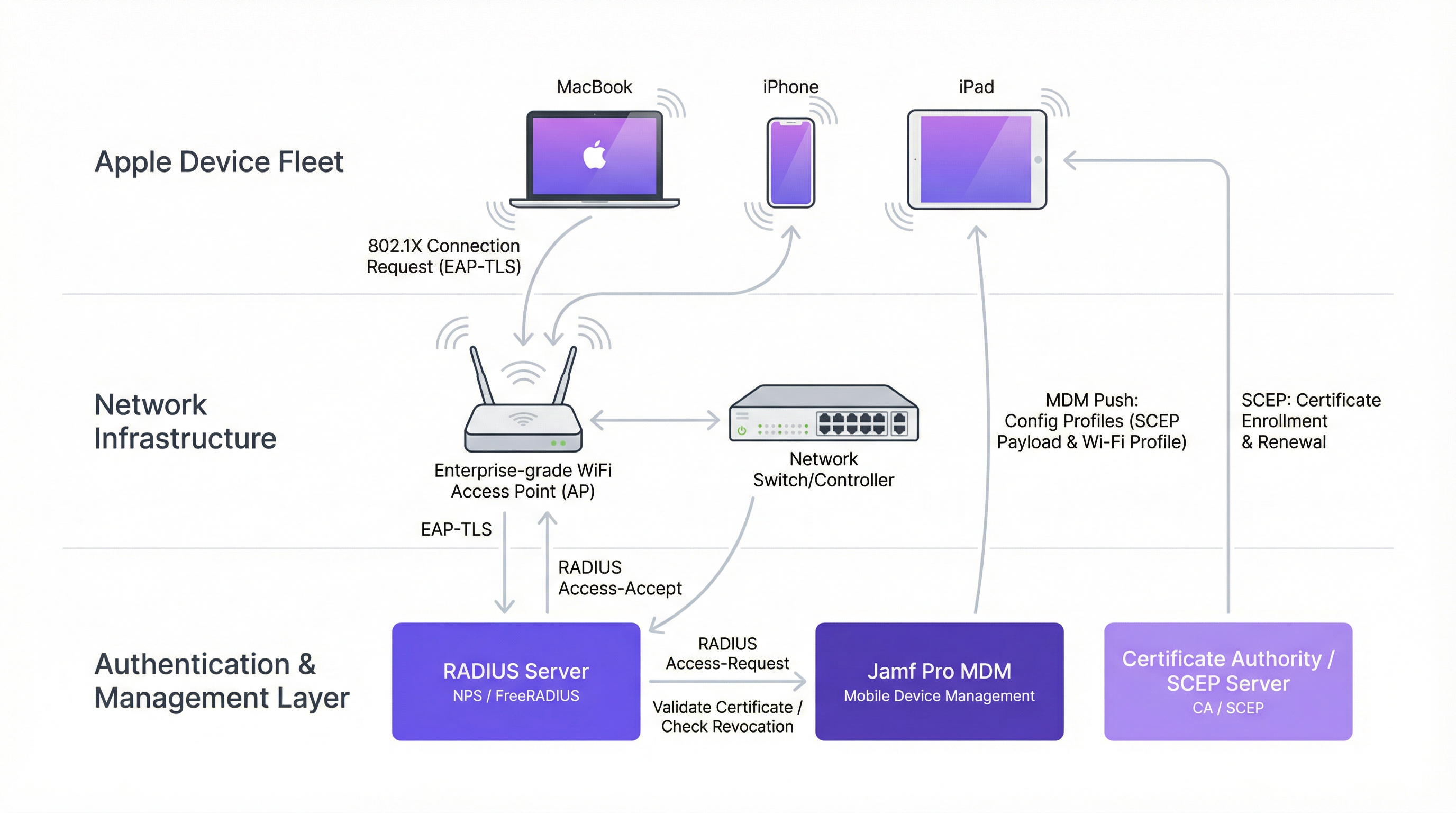
A base da autenticação WiFi baseada em certificados é a norma IEEE 802.1X combinada com o protocolo EAP-TLS (Extensible Authentication Protocol-Transport Layer Security). Para uma introdução detalhada sobre a própria norma 802.1X, consulte o nosso guia sobre Autenticação 802.1X: Proteger o Acesso à Rede em Dispositivos Modernos .
Ao contrário do PEAP (Protected EAP), que depende de um nome de utilizador e palavra-passe, o EAP-TLS exige que tanto o dispositivo cliente como o servidor de autenticação provem as suas identidades utilizando certificados digitais. Esta autenticação mútua é o que torna o EAP-TLS o padrão de excelência para implementações empresariais. O modelo de três partes consiste nos seguintes componentes.
| Componente | Função | Exemplos |
|---|---|---|
| Suplicante | O dispositivo Apple que solicita acesso à rede | MacBook, iPhone, iPad |
| Autenticador | O dispositivo de extremidade da rede que aplica o controlo de acesso | Ponto de Acesso WiFi, WLC |
| Servidor de Autenticação | Valida certificados e autoriza o acesso | FreeRADIUS, Cisco ISE, Microsoft NPS |
O Ponto de Acesso atua como um guardião, bloqueando todo o tráfego até que o servidor RADIUS envie uma mensagem Access-Accept. Este é o núcleo do modelo de Controlo de Acesso à Rede baseado em porta (PNAC) IEEE 802.1X.
SCEP e Jamf Pro: Distribuição de Certificados Escalável
O desafio do EAP-TLS à escala é a distribuição de certificados. Instalar manualmente um certificado único em 500 iPads não é uma operação viável. É aqui que a integração Jamf Pro e SCEP Jamf se torna o facilitador crítico.
SCEP (Simple Certificate Enrollment Protocol) é um protocolo leve que permite que um dispositivo solicite e receba automaticamente um certificado assinado de uma Autoridade de Certificação (CA). O Jamf Pro atua como o orquestrador, enviando um Perfil de Configuração para cada dispositivo Apple. Este perfil contém um payload SCEP que instrui o dispositivo a contactar o servidor SCEP, fornece uma palavra-passe de desafio dinâmica e especifica os atributos de certificado necessários — como o Subject Alternative Name (SAN), que é normalmente mapeado para o endereço MAC ou número de série do dispositivo.
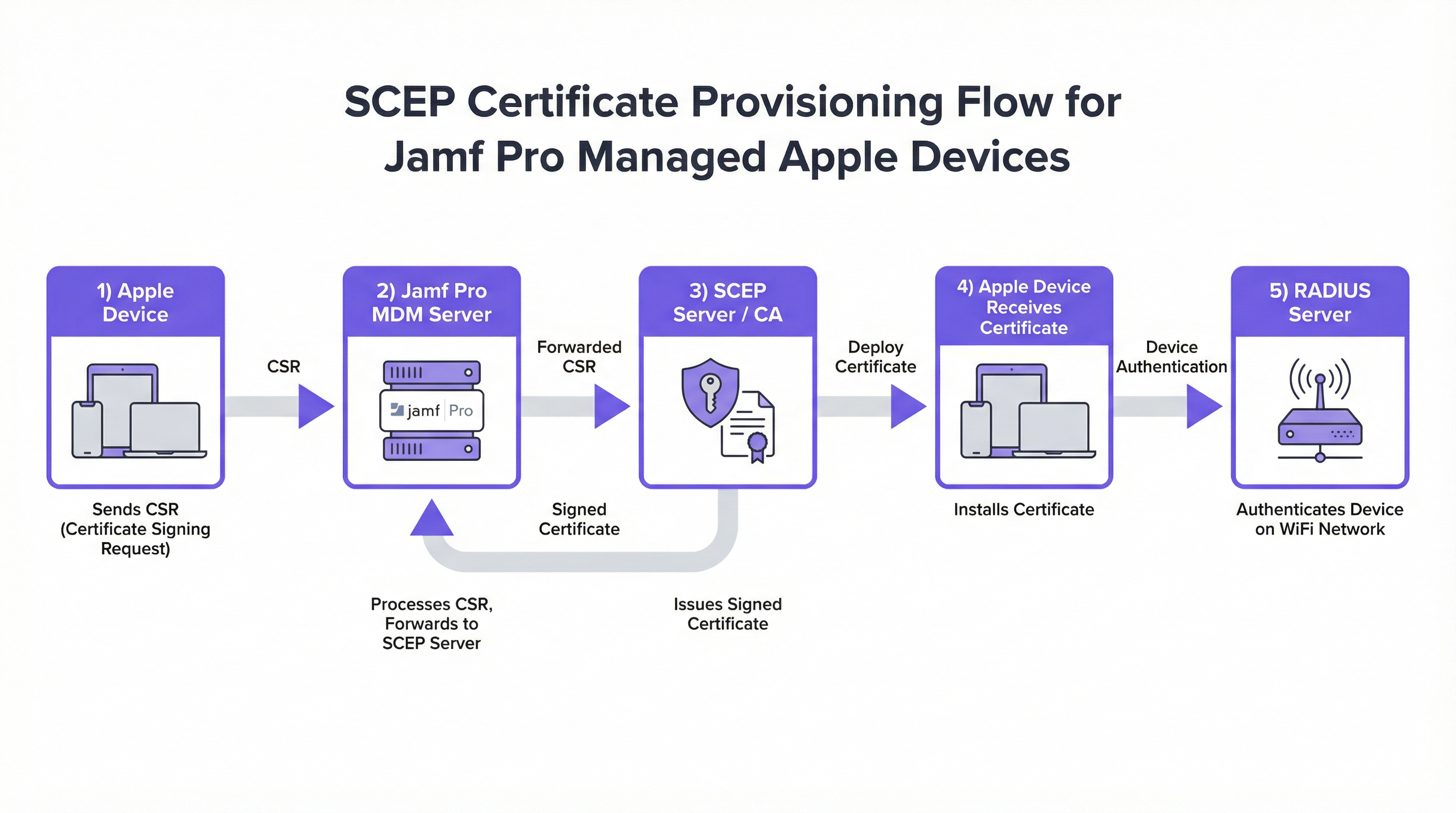
O mecanismo de palavra-passe de desafio dinâmica é particularmente importante. Numa implementação SCEP integrada com o Jamf, o Jamf gera uma palavra-passe de desafio única e de utilização única para cada dispositivo. Isto garante que apenas os dispositivos inscritos no Jamf Pro — e, portanto, geridos corporativamente — possam obter com sucesso um certificado da CA. Este é um controlo de segurança crítico que impede a inscrição de dispositivos não autorizados.
Atributos RADIUS para Autenticação de Dispositivos Apple
Quando o servidor RADIUS recebe um Access-Request do Ponto de Acesso, avalia vários atributos para tomar a sua decisão de autorização. Para implementações Apple 802.1X, os atributos RADIUS mais relevantes são os seguintes.
| Atributo RADIUS | Descrição | Relevância Apple |
|---|---|---|
User-Name (Attr 1) |
A identidade apresentada pelo suplicante | Normalmente o Subject CN ou SAN do certificado |
NAS-IP-Address (Attr 4) |
O IP do Ponto de Acesso | Utilizado para políticas específicas de AP |
Called-Station-Id (Attr 30) |
O BSSID e SSID do AP | Permite a aplicação de políticas baseadas em SSID |
EAP-Message (Attr 79) |
O pacote EAP encapsulado | Contém os dados do handshake TLS |
Tunnel-Type (Attr 64) |
Especifica o tipo de atribuição de VLAN | Utilizado para atribuição dinâmica de VLAN pós-autenticação |
Tunnel-Medium-Type (Attr 65) |
Especifica o meio para o túnel | Necessário para marcação de VLAN 802.1Q |
Tunnel-Private-Group-Id (Attr 81) |
O ID da VLAN a atribuir | Permite a segmentação de rede baseada em funções |
O atributo Tunnel-Private-Group-Id é particularmente poderoso em implementações empresariais. Ao devolver diferentes IDs de VLAN com base nos atributos do certificado (ex: departamento, tipo de dispositivo), o servidor RADIUS pode segmentar dinamicamente a rede sem necessitar de SSIDs separados.
Guia de Implementação
A implementação da autenticação WiFi Apple por certificado via Jamf Pro segue uma sequência estruturada. Desviar-se desta ordem é a principal causa de falhas nas implementações.
Passo 1: Estabeleça a sua Infraestrutura de Autoridade de Certificação
Antes de mexer no Jamf, a sua infraestrutura de CA deve estar operacional. Para ambientes Microsoft, isto é normalmente o Active Directory Certificate Services (AD CS) com a função Network Device Enrollment Service (NDES), que atua como o servidor SCEP. Para ambientes não-Microsoft, as opções incluem EJBCA, HashiCorp Vault PKI ou CAs baseadas na nuvem, como a AWS Private CA.
Garante que a hierarquia da sua CA é clara: uma Root CA mantida offline e uma ou mais CAs emissoras que assinam os certificados dos dispositivos. O servidor RADIUS precisará do seu próprio certificado assinado por esta mesma hierarquia de CA.
Passo 2: Configure o Payload SCEP no Jamf Pro
Navegue até Computadores (ou Dispositivos Móveis) > Perfis de Configuração > Novo. Adicione um payload de Certificado e selecione SCEP como a fonte do certificado. Os campos críticos são os seguintes.
- URL: O endpoint SCEP (ex:
http://ndes.oseudominio.com/certsrv/mscep/mscep.dll). - Nome: Um nome descritivo que aparecerá no Keychain do dispositivo.
- Subject: O Distinguished Name do certificado. Utilize variáveis do Jamf como
CN=$COMPUTERNAMEpara computadores ouCN=$JSSIDpara dispositivos móveis. - Subject Alternative Name (SAN): Defina o Tipo de SAN como
RFC 822 Namecom o valor$MACADDRESS@oseudominio.com, ouDNS Namecom$COMPUTERNAME.oseudominio.com. Isto é o que o servidor RADIUS lerá para identificar o dispositivo. - Tipo de Desafio: Selecione Dinâmico para utilizar o proxy SCEP integrado do Jamf, que gera palavras-passe de desafio por dispositivo.
- Tamanho da Chave: Mínimo de 2048 bits RSA. 4096 bits é recomendado para novas implementações.
- Uso da Chave: Ative tanto Assinatura como Encriptação.
Passo 3: Configure o Payload WiFi
No mesmo Perfil de Configuração, adicione um payload Wi-Fi. As definições principais para Apple 802.1X são as seguintes.
- SSID: O nome exato do seu SSID corporativo seguro.
- Tipo de Segurança: WPA2 Enterprise ou WPA3 Enterprise (recomendado onde o hardware o suporte).
- Protocolos — Tipos de EAP Aceites: Selecione apenas TLS. Desmarque PEAP, TTLS e todos os outros tipos para impor exclusivamente o EAP-TLS.
- Autenticação — Certificado de Identidade: Selecione o payload SCEP que criou no Passo 2. Esta é a ligação crítica entre o certificado e a ligação WiFi.
- Confiança — Nomes de Certificados de Servidor Confiáveis: Introduza o Common Name (CN) exato do certificado do seu servidor RADIUS (ex:
radius.oseudominio.com). Este é o item de configuração mais frequentemente esquecido. - Confiança — Certificados Confiáveis: Carregue a Root CA e quaisquer certificados de CA Intermédia que tenham assinado o certificado do servidor RADIUS.
Passo 4: Configure o Servidor RADIUS
No seu servidor RADIUS, crie uma política de rede que corresponda aos atributos de certificado que definiu no Jamf. Para o Microsoft NPS, isto significa criar uma Política de Pedido de Ligação que corresponda ao SSID via atributo Called-Station-Id, e uma Política de Rede que valide o certificado contra a sua CA e, opcionalmente, atribua uma VLAN via atributos de Túnel.
Para o FreeRADIUS, configure o módulo eap para utilizar tls e aponte para o seu certificado de CA, certificado de servidor e chave privada. O ficheiro users ou o backend SQL deve ser configurado para corresponder ao SAN do certificado com o seu inventário de dispositivos.
Passo 5: Defina o Âmbito e Implemente o Perfil
No Jamf Pro, defina o âmbito do Perfil de Configuração para os grupos de dispositivos apropriados — por exemplo, todos os dispositivos no Smart Group "Frota Corporativa". O perfil será enviado automaticamente via MDM. Os dispositivos que estiverem online recebê-lo-ão em minutos; os dispositivos offline recebê-lo-ão na próxima vez que comunicarem com o servidor.
Boas Práticas
Implemente WPA3 Enterprise sempre que possível. O WPA3 Enterprise com modo de 192 bits fornece uma força criptográfica melhorada utilizando GCMP-256 e HMAC-SHA-384, oferecendo uma proteção significativamente mais forte do que o WPA2 Enterprise. Para ambientes de Hospitalidade e organizações de Saúde que lidam com dados sensíveis, esta atualização é cada vez mais um requisito de conformidade do que apenas uma boa prática.
Aproveite os certificados baseados no dispositivo para hardware partilhado. Para dispositivos partilhados — como iPads de ponto de venda no retalho, tablets de concierge de hotel ou dispositivos clínicos — utilize certificados vinculados ao dispositivo em vez de certificados vinculados ao utilizador. Isto garante que o dispositivo se liga à rede no arranque, antes de qualquer utilizador iniciar sessão, permitindo que as comunicações de MDM, atualizações de aplicações e notificações push funcionem corretamente. Esta é uma consideração crítica para implementações de Retalho onde os dispositivos podem ser partilhados entre turnos.
Integre o acesso à rede com a sua postura de segurança mais ampla. Enquanto os funcionários utilizam o 802.1X para acesso interno seguro, garanta que as suas redes públicas são geridas através de uma solução robusta de Guest WiFi para manter uma separação clara de tráfego. Combinar a autenticação de funcionários baseada em certificados com WiFi Analytics fornece visibilidade total tanto sobre o comportamento dos dispositivos autenticados como sobre a atividade na rede de convidados.
Automatize a renovação de certificados. Configure o payload SCEP no Jamf para desencadear a renovação automática quando um certificado estiver a 14 ou 30 dias de expirar. Isto evita o cenário em que um dispositivo perde silenciosamente o acesso à rede porque o seu certificado expirou durante a noite. No Jamf Pro, isto é controlado através da definição Renewal Threshold no payload SCEP.
Mantenha uma Lista de Revogação de Certificados (CRL) ou um respondedor OCSP. Quando um dispositivo é desativado, roubado ou removido do Jamf, o seu certificado deve ser revogado ao nível da CA. Configure o seu servidor RADIUS para verificar o endpoint CRL ou OCSP em cada tentativa de autenticação. Sem isto, um dispositivo roubado com um certificado válido ainda pode autenticar-se na rede.
Para mais contexto sobre decisões de infraestrutura de rede moderna, o guia Os Principais Benefícios do SD WAN para Empresas Modernas fornece contexto útil sobre como a autenticação baseada em certificados se integra com arquiteturas overlay SD-WAN.
Resolução de Problemas e Mitigação de Riscos
O Problema de Provisionamento do Ovo e da Galinha. Os dispositivos precisam de uma ligação à rede para alcançar o servidor SCEP e descarregar o seu certificado, mas precisam do certificado para se ligarem ao WiFi seguro. Este é o bloqueador de implementação mais comum. As estratégias de mitigação recomendadas são: provisionamento via Ethernet utilizando adaptadores USB-C ou Lightning para Ethernet; utilização de dados móveis em iPhones e iPads com rede móvel; ou criação de um SSID de integração temporário e restrito com regras de firewall que permitam apenas tráfego SCEP e MDM.
Falhas Silenciosas de EAP-TLS no macOS. Se a cadeia de confiança estiver incompleta, o macOS pode falhar silenciosamente a ligação sem apresentar um erro significativo na interface. A única indicação está no log do sistema. Utilize log stream --predicate 'subsystem == "com.apple.network"' para capturar eventos de autenticação em tempo real. Verifique sempre se o array Trusted Server Certificate Names no perfil do Jamf corresponde exatamente ao CN no certificado do servidor RADIUS.
Tempo de Espera (Timeout) do RADIUS Durante Eventos de Alta Carga. Em ambientes como estádios ou centros de conferências, pedidos de autenticação simultâneos de centenas de dispositivos podem sobrecarregar o servidor RADIUS. Mitigue isto implementando o RADIUS num par de alta disponibilidade, ajustando o parâmetro max_requests no FreeRADIUS e garantindo que o servidor RADIUS tem CPU e memória suficientes para a carga de autenticação concorrente esperada. Para implementações em recintos de grande escala, reveja a nossa orientação sobre Definição de Pontos de Acesso Sem Fios: O Seu Guia Definitivo para 2026 para considerações de planeamento de capacidade.
Incompatibilidade de Atributos de Certificado. Se o SAN no certificado do dispositivo não corresponder ao que a Política de Rede RADIUS espera, a autenticação falhará. Isto é particularmente comum ao migrar de uma CA para outra, ou quando as variáveis do Jamf são resolvidas de forma diferente do esperado. Teste sempre com um único dispositivo e inspecione os logs do servidor RADIUS para confirmar a string de identidade exata que está a ser apresentada antes de implementar em toda a frota.
ROI e Impacto no Negócio
A transição para a autenticação de certificados WiFi Jamf RADIUS proporciona um valor de negócio mensurável em várias dimensões.
| Métrica | Resultado Típico |
|---|---|
| Redução de pedidos ao helpdesk | Redução de 60–85% nos pedidos de suporte relacionados com WiFi |
| Tempo de integração por dispositivo | Reduzido de 15–30 minutos para menos de 2 minutos (zero-touch) |
| Risco de incidentes de segurança | Quase eliminação de ataques de WiFi baseados em credenciais |
| Postura de conformidade | Cumpre o Requisito 1.3 do PCI DSS e os controlos de rede do Artigo 32 do GDPR |
| Ciclo de vida do certificado | A renovação automatizada elimina a gestão manual de certificados |
O principal impulsionador do ROI é a eliminação das interrupções causadas pela rotação de palavras-passe. Numa frota de 500 dispositivos onde 10% dos dispositivos perdem a ligação à rede trimestralmente devido a alterações de palavras-passe, e cada incidente requer 20 minutos de tempo de TI para ser resolvido, a poupança anual em custos de suporte por si só pode justificar o investimento na implementação logo no primeiro ano.
Para operadores de Transporte e ambientes de grandes recintos, o caso de negócio é reforçado pela capacidade de aplicar a atribuição dinâmica de VLAN — garantindo que os dispositivos operacionais, os dispositivos dos funcionários e os sistemas de gestão são segmentados automaticamente sem reconfiguração manual da rede.
Termos-Chave e Definições
EAP-TLS (Extensible Authentication Protocol-Transport Layer Security)
The most secure 802.1X authentication method, requiring both the client device and the RADIUS server to authenticate each other using digital certificates. No password is exchanged or transmitted.
When IT teams need to eliminate password-based WiFi and enforce strict device compliance, EAP-TLS is the mandatory standard. It is the only EAP type that provides mutual authentication.
SCEP (Simple Certificate Enrollment Protocol)
A protocol that allows devices to securely and automatically request digital certificates from a Certificate Authority using a challenge-response mechanism.
Essential for scaling certificate deployments via Jamf Pro without requiring IT staff to manually install certificates on thousands of devices. Jamf's dynamic SCEP proxy generates per-device challenge passwords.
RADIUS (Remote Authentication Dial-In User Service)
A networking protocol providing centralised Authentication, Authorisation, and Accounting (AAA) management for devices connecting to a network service.
The central decision engine that tells the WiFi Access Point whether a Jamf-managed device is allowed on the network, and optionally which VLAN to assign.
Configuration Profile
An XML file (.mobileconfig) deployed by Jamf Pro that contains one or more payloads to manage settings on Apple devices, including certificates, WiFi, VPN, and restrictions.
This is the vehicle used to push the SCEP settings, WiFi SSID configuration, and certificate trust chain to the iPhone, iPad, or Mac.
CSR (Certificate Signing Request)
A block of encoded text generated by the Apple device containing the public key and identity information, sent to the Certificate Authority to apply for a signed digital certificate.
The first step in the SCEP process. The device generates the CSR locally, ensuring the private key never leaves the device — a fundamental principle of PKI security.
Subject Alternative Name (SAN)
An extension to an X.509 certificate that allows multiple identity values to be associated with the certificate, such as email addresses, DNS names, IP addresses, or MAC addresses.
Crucial for RADIUS authentication. The RADIUS server reads the SAN to identify the device or user. In Jamf deployments, the SAN is typically set to the device's MAC address or the user's UPN.
Root CA (Certificate Authority)
The top-most certificate in a PKI hierarchy, the private key of which is used to sign subordinate CA certificates. The Root CA certificate must be trusted by all parties in the authentication chain.
Must be deployed to Apple devices via Jamf so they trust the certificates presented by the RADIUS server during the EAP-TLS handshake. Without it, the handshake fails.
IEEE 802.1X
An IEEE standard for port-based Network Access Control (PNAC), providing an authentication mechanism to devices wishing to attach to a LAN or WLAN before network access is granted.
The overarching framework that blocks network traffic at the Access Point until the RADIUS server validates the Jamf-provisioned certificate. All enterprise WiFi security is built on this standard.
Dynamic VLAN Assignment
A RADIUS feature that assigns a connecting device to a specific VLAN based on policy attributes returned in the Access-Accept message, using RADIUS Tunnel attributes 64, 65, and 81.
Enables network segmentation without multiple SSIDs. A single corporate SSID can automatically place clinical iPads on VLAN 20, executive MacBooks on VLAN 30, and guest devices on VLAN 100.
Estudos de Caso
A 500-bed hospital needs to deploy 1,200 shared iPads for clinical staff. They currently use PEAP with Active Directory credentials, resulting in hundreds of disconnected devices every 90 days when passwords expire. How should they redesign their authentication architecture?
The hospital should migrate to EAP-TLS using device-based certificates managed through Jamf Pro. The implementation involves four key steps. First, deploy AD CS with the NDES role to act as the SCEP server, issuing certificates from a dedicated 'Clinical Device' certificate template. Second, configure a Jamf Configuration Profile with a SCEP payload using $MACADDRESS as the SAN, and a WiFi payload targeting the clinical SSID with EAP-TLS only, explicitly trusting the RADIUS server certificate. Third, configure Microsoft NPS with a Network Policy that matches the 'Clinical Device' certificate template and assigns devices to the Clinical VLAN (Tunnel-Private-Group-Id = 20). Fourth, set the SCEP renewal threshold to 30 days to ensure automatic certificate renewal without IT intervention. Devices should be provisioned via Ethernet during the initial rollout to resolve the onboarding network challenge.
A creative agency with 300 MacBooks is moving to a new office. They want zero-touch WiFi provisioning — new MacBooks should automatically connect to the secure corporate SSID when unboxed by end-users at their desks, with no IT intervention. How do they achieve this?
The agency must combine Apple Automated Device Enrollment (ADE) with Jamf Pro and a carefully sequenced Configuration Profile. During the macOS Setup Assistant, the MacBook connects to the internet via a temporary open onboarding SSID (restricted by firewall to permit only Apple activation, Jamf MDM, and SCEP traffic). It contacts Apple, recognises it belongs to the agency via ADE, and automatically enrolls in Jamf Pro. Jamf Pro immediately pushes a pre-staged Configuration Profile containing the SCEP payload and the corporate WiFi payload. The SCEP enrollment completes over the onboarding SSID, the certificate is installed in the Keychain, and the WiFi payload activates. The MacBook then automatically transitions to the secure 802.1X corporate SSID. From the user's perspective, they simply complete the Setup Assistant and the laptop is on the corporate network.
Análise de Cenários
Q1. You have deployed a Jamf Configuration Profile with a SCEP payload and a WiFi payload to 50 MacBooks. The SCEP certificates are successfully installed in the Keychain, but the MacBooks are prompting users with a 'Verify Certificate' dialogue when attempting to connect to the corporate SSID. What configuration element is missing or incorrect?
💡 Dica:Think about what information the Apple device needs to automatically trust the RADIUS server's identity without user interaction.
Mostrar Abordagem Recomendada
The WiFi payload in the Jamf Configuration Profile is missing either the 'Trusted Server Certificate Names' entry (which must exactly match the CN in the RADIUS server's certificate), or the Root CA and Intermediate CA certificates that signed the RADIUS server's certificate are not included in the profile's Trust payload. Without explicit trust defined by the MDM, macOS and iOS require the user to manually verify and accept the RADIUS server's certificate during the EAP-TLS handshake. Both fields must be populated: the Trusted Certificates array (containing the CA chain) and the Trusted Server Certificate Names array (containing the RADIUS server's CN).
Q2. A retail chain wants their point-of-sale iPads to connect to the secure corporate WiFi immediately upon boot, before any staff member logs into the POS application. The current deployment uses user certificates tied to individual employee UPNs. Devices frequently fail to connect at the start of a shift. What is the root cause and what is the correct architectural change?
💡 Dica:Consider when different types of certificates become available to the iOS network stack relative to the user authentication lifecycle.
Mostrar Abordagem Recomendada
The root cause is that user certificates (tied to a UPN) are stored in the user's keychain and are only accessible after the user has authenticated to the device. At boot or at the iOS lock screen, the user keychain is locked, so the WiFi stack cannot access the certificate to perform EAP-TLS. The correct architectural change is to switch to device certificates, where the SAN is set to the device's MAC address or serial number. Device certificates are stored in the system keychain, which is accessible at boot time before any user logs in. The RADIUS Network Policy must be updated to match device certificates rather than user certificates, and the Jamf SCEP payload must be updated to use device-level variables such as $MACADDRESS or $SERIALNUMBER as the SAN.
Q3. Your organisation uses Microsoft NPS as the RADIUS server. You are configuring a new Jamf SCEP payload for 200 MacBooks. The NPS Network Policy is configured to require that the certificate's Subject Alternative Name matches a computer account in Active Directory. What SAN value should you configure in the Jamf SCEP payload, and what format does NPS expect?
💡 Dica:NPS computer certificate authentication requires the SAN to match the computer's identity in Active Directory in a specific format.
Mostrar Abordagem Recomendada
For NPS computer certificate authentication, the SAN must be set to the DNS Name type with the value $COMPUTERNAME.yourdomain.com (using the Jamf variable for the computer's hostname). NPS expects the SAN DNS Name to match the computer's fully qualified domain name (FQDN) as it appears in Active Directory. Alternatively, if using the User Principal Name SAN type, the format should be host/$ COMPUTERNAME@YOURDOMAIN.COM . The NPS Network Policy's condition should be set to match the 'Client Certificate SAN' attribute. Ensure the MacBooks are bound to Active Directory, or that the computer names in Jamf match the computer objects in AD, otherwise the NPS lookup will fail even if the certificate is valid.
Principais Conclusões
- ✓EAP-TLS is the gold standard for enterprise WiFi authentication — it eliminates passwords entirely and requires both the device and the RADIUS server to prove their identity using digital certificates.
- ✓Jamf Pro automates certificate distribution to Apple fleets at scale using the SCEP protocol, with dynamic per-device challenge passwords ensuring only managed devices can enrol.
- ✓A successful Jamf WiFi deployment requires two linked payloads in a single Configuration Profile: a SCEP payload to obtain the certificate, and a WiFi payload that references that certificate as the identity.
- ✓The most common deployment failure is an incomplete certificate trust chain — the Jamf WiFi profile must explicitly include the Root CA and specify the RADIUS server's CN in the Trusted Server Certificate Names field.
- ✓Device-based certificates (SAN = MAC address) are essential for shared hardware, ensuring network connectivity at boot before any user logs in.
- ✓Plan the onboarding network carefully — devices need a network path to the SCEP server before they can receive their certificate and join the secure 802.1X SSID.
- ✓Automated certificate renewal (configured at 30 days before expiration) and immediate revocation upon device decommissioning are non-negotiable operational requirements for a secure, resilient deployment.




