

Cisco Meraki-Integration mit Purple WiFi
This guide provides a definitive technical reference for deploying Purple WiFi on Cisco Meraki infrastructure, covering the dual-layer integration architecture — Dashboard API provisioning and Captive Portal API authentication — alongside step-by-step RADIUS and splash page configuration. It is designed for network engineers and IT managers who need to move from a functional guest WiFi deployment to a strategic guest intelligence platform, with measurable ROI outcomes drawn from live enterprise deployments including McDonald's Belgium, Harrods, and AGS Airports.
🎧 Diesen Leitfaden anhören
Transkript anzeigen

Executive Summary
Cisco Meraki ist das bevorzugte Infrastruktur-Rückgrat für Tausende von Unternehmensstandorten – Hotels, Einzelhandelsketten, Stadien und Einrichtungen des öffentlichen Sektors. Seine Cloud-verwaltete Architektur bietet operative Einfachheit in großem Maßstab, aber seine nativen Gast-WiFi-Funktionen bleiben weit hinter dem zurück, was ein moderner Standortbetreiber benötigt: Erfassung von First-Party-Daten, GDPR-konformes Einwilligungsmanagement, Echtzeit-Frequenzanalysen und die Integration von Marketing-Automatisierung. Purple WiFi schließt diese Lücke entscheidend.
Die Integration von Purple und Meraki funktioniert auf zwei technischen Ebenen. Die Meraki Dashboard API ermöglicht eine automatisierte Massenbereitstellung – den Import von Hunderten von Access Points aus einer Meraki-Organisation in das Purple-Portal in einem einzigen Vorgang. Die Meraki Captive Portal API bietet in Kombination mit der RADIUS-Authentifizierung das Gästeerlebnis: eine vollständig gebrandete Splash-Page, flexible Authentifizierungsoptionen und ein Session-Accounting, das die Analyse-Engine von Purple speist. Für wiederkehrende Gäste nutzt die PurpleConnex (SecurePass) SSID Hotspot 2.0 (Passpoint, IEEE 802.11u) für eine nahtlose automatische Wiederverbindung, wodurch die Reibung durch wiederholte Authentifizierung entfällt.
Bereitstellungen dieser Integration sind in großem Maßstab live: McDonald's Belgien, Walmart Kanada, Harrods (57-facher ROI bei 600.000 Logins) und AGS Airports (842 % ROI). Für jedes IT-Team, das eine Meraki-Umgebung verwaltet und einen messbaren geschäftlichen Mehrwert aus dem Gast-WiFi nachweisen möchte, ist diese Integration der operativ effizienteste Weg zu diesem Ergebnis.
Technischer Deep-Dive
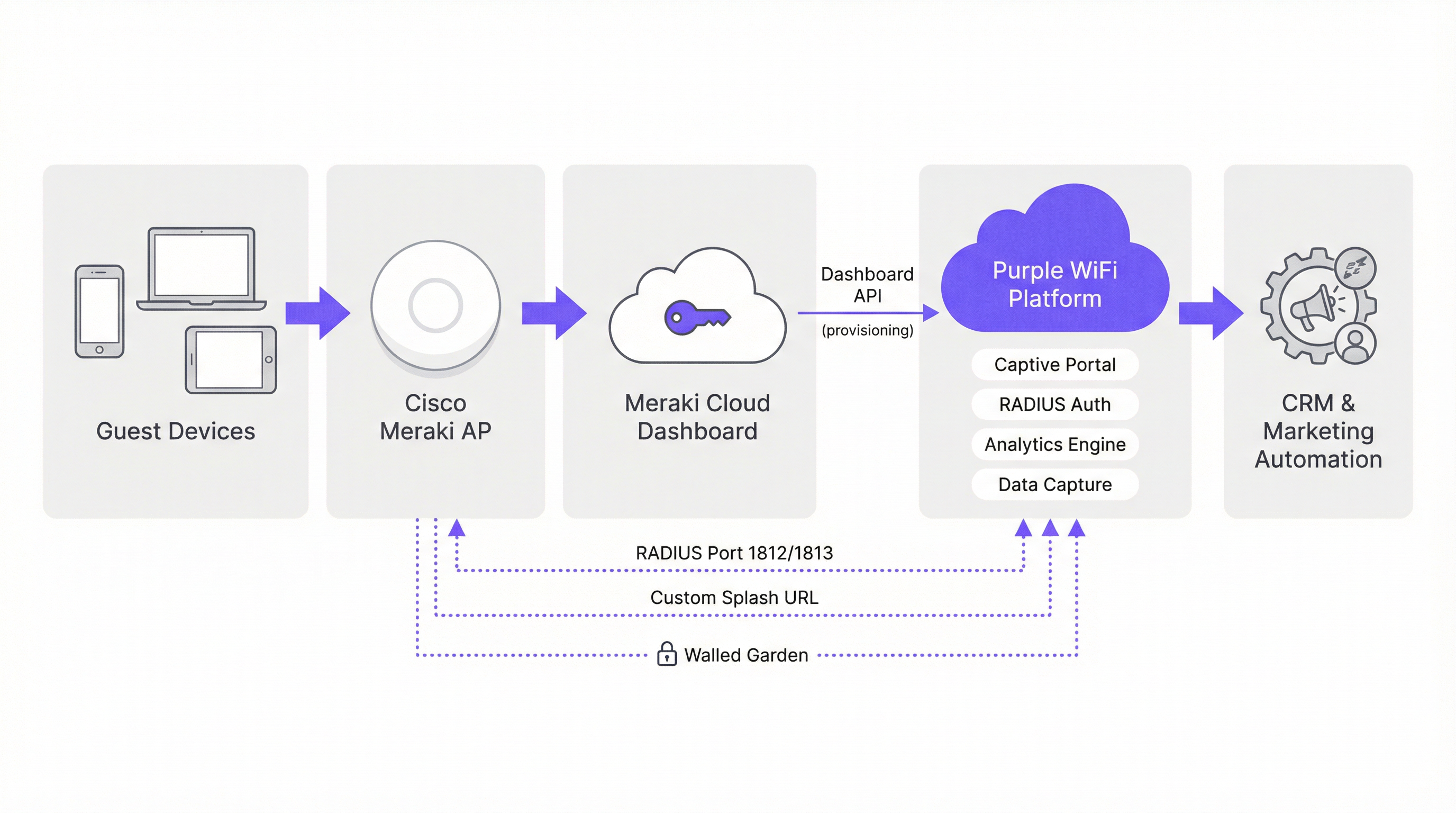
Integrationsarchitektur
Die Integration von Purple und Meraki lässt sich am besten als zwei parallele API-Beziehungen verstehen, die auf verschiedenen Ebenen des Netzwerk-Stacks operieren. Die erste ist eine Management-Plane-Integration über die Meraki Dashboard REST API, die ausschließlich für Bereitstellung und Konfiguration verwendet wird. Die zweite ist eine Data-Plane-Integration über die Meraki Captive Portal API und das RADIUS-Protokoll, welche den Live-Authentifizierungsfluss der Gäste steuert.
Management-Plane: Dashboard API-Bereitstellung
Meraki stellt eine umfassende REST API unter api.meraki.com/api/v1 zur Verfügung. Der Hardware-Import-Assistent von Purple authentifiziert sich an dieser API mithilfe eines organisationsbezogenen API-Schlüssels und listet dann alle Netzwerke, SSIDs und Access Points innerhalb der Meraki-Organisation auf. Dies ermöglicht es einem Netzwerkingenieur, eine Umgebung von über 300 Access Points an 50 Standorten in einem einzigen Batch-Vorgang zu importieren – ein Prozess, der andernfalls eine manuelle Eingabe für jedes Gerät erfordern würde. Die Zwei-Wege-Integrationsfunktion von Purple ermöglicht es der Plattform zudem, Captive Portal-, Walled Garden- und RADIUS-Konfigurationen an Meraki zurückzusenden, was den manuellen Konfigurationsaufwand weiter reduziert.
Um den erforderlichen API-Schlüssel zu generieren, navigieren Sie im Meraki-Dashboard zu Organisation > API & Webhooks > API Keys und wählen Sie Generate API Key. Dieser Schlüssel sollte als privilegierte Anmeldeinformation behandelt werden – speichern Sie ihn in einem Secrets-Management-System und rotieren Sie ihn gemäß dem Standard-Lebenszyklus für Anmeldeinformationen Ihrer Organisation.
Data-Plane: Captive Portal API und RADIUS
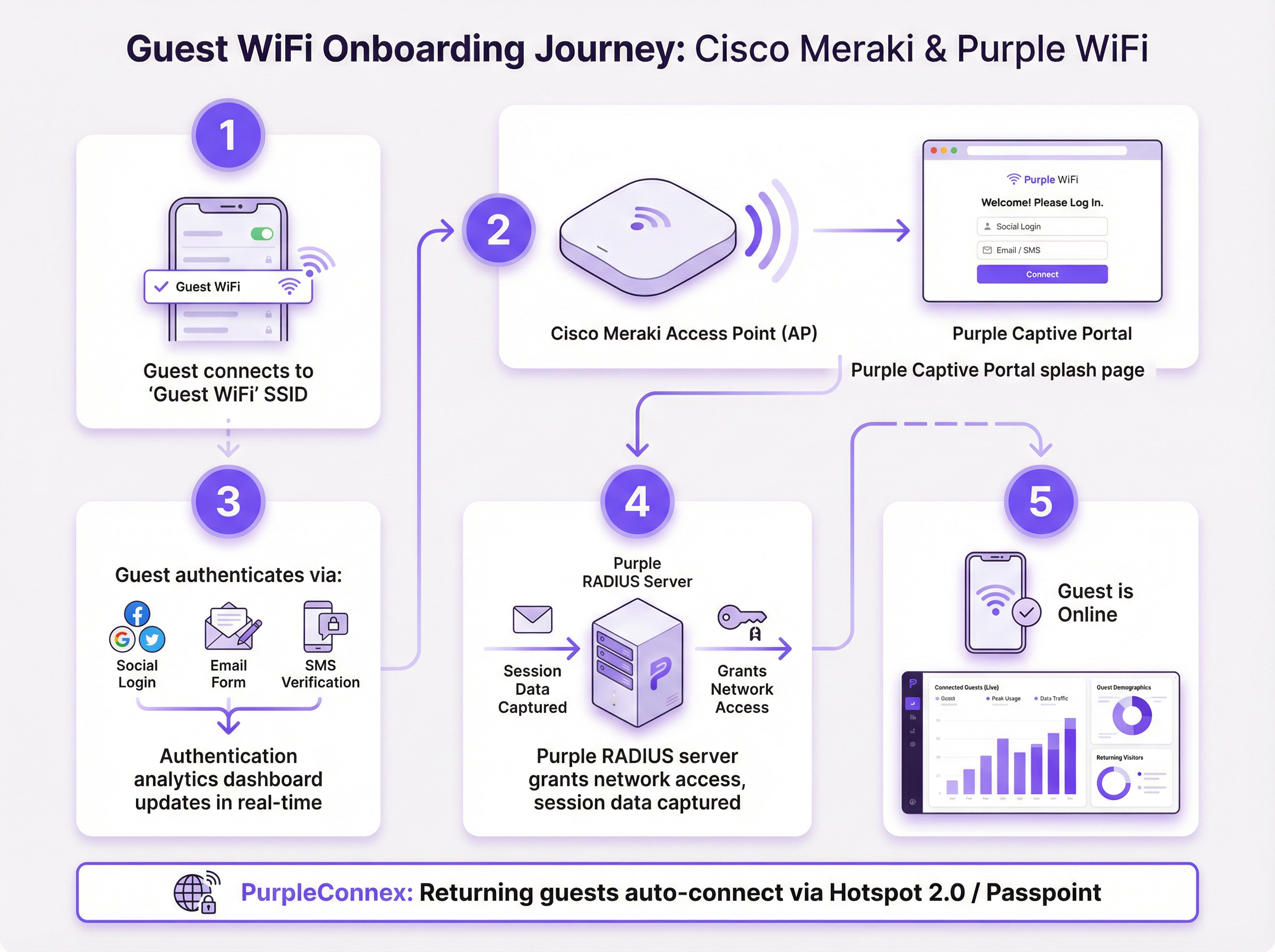
Der Gast-Authentifizierungsfluss verwendet die Captive Portal API von Meraki im Sign-on-Modus. Wenn sich ein Gast mit der Gast-SSID verbindet, fängt die Zugriffskontroll-Engine von Meraki die erste HTTP-Anfrage ab und gibt eine 302-Weiterleitung an die von Purple gehostete Splash-Page-URL aus. Die Splash-Page wird über die CDN-Infrastruktur von Purple bereitgestellt; die Walled-Garden-Konfiguration stellt sicher, dass die Domains von Purple erreichbar sind, bevor die Authentifizierung abgeschlossen ist.
Sobald der Gast die Authentifizierung auf der Splash-Page abgeschlossen hat, sendet die Purple-Plattform eine RADIUS Access-Accept-Nachricht an den Meraki AP auf Port 1812. Meraki gewährt dem Gerät daraufhin vollen Netzwerkzugriff. RADIUS-Accounting-Nachrichten auf Port 1813 liefern Session-Start-, Interim-Update- (alle 4 Minuten) und Session-Stop-Ereignisse an die Analyse-Engine von Purple, was genaue Berechnungen von Verweildauer, Sitzungsdauer und wiederholten Besuchen ermöglicht.
Authentifizierungsmethoden
Das Captive Portal von Purple unterstützt mehrere Authentifizierungsmechanismen, die jeweils unterschiedliche Auswirkungen auf die Datenerfassung haben:
| Methode | Erfasste Daten | GDPR-Einwilligung | Empfohlener Anwendungsfall |
|---|---|---|---|
| Social Login (Facebook, Google) | Name, E-Mail, Profildaten | Inline-Einwilligungs-Kontrollkästchen | Gastgewerbe, Einzelhandelsbindung |
| E-Mail-Formular | E-Mail, benutzerdefinierte Felder | Inline-Einwilligungs-Kontrollkästchen | Jeder Standort, maximale Datenkontrolle |
| SMS-Verifizierung | Handynummer | Inline-Einwilligungs-Kontrollkästchen | Hochsicherheits- oder altersbeschränkte Standorte |
| Click-through (nur AGB) | Geräte-MAC, Sitzungsdaten | Akzeptanz der Nutzungsbedingungen | Reibungsloser öffentlicher Zugang |
PurpleConnex: SecurePass und Hotspot 2.0
PurpleConnex ist eine zweite SSID, die neben der primären Gast-SSID bereitgestellt wird. Sie ist als WPA2 Enterprise-Netzwerk konfiguriert, mit den RadSec RADIUS-Servern von Purple (rad1-secure.purple.ai und rad2-secure.purple.ai) auf Port 2083 mit TLS-Transport. Hotspot 2.0 (Passpoint) ist auf dieser SSID aktiviert und kündigt die Domain securewifi.purple.ai sowie die Purple Roaming Consortium OIs an. Wenn das Gerät eines wiederkehrenden Gastes zuvor ein Purple Passpoint-Profil heruntergeladen hat, verbindet es sich automatisch mit PurpleConnex und authentifiziert sich im Hintergrund – keine Splash-Page, kein manueller Login. Dies ist besonders in Hotelumgebungen von Bedeutung, wo ein Gast, der für einen mehrtägigen Aufenthalt eincheckt, sich nicht bei jeder erneuten Geräteverbindung neu authentifizieren müssen sollte.
Die Hotspot 2.0-Konfiguration löst auch die Herausforderung der MAC-Adressen-Randomisierung, die mit iOS 14 und Android 10+ eingeführt wurde. Da die PurpleConnex-Authentifizierung auf Anmeldeinformationen und nicht auf MAC-Adressen basiert, kann Purple einen konsistenten Identitätsdatensatz für den Gast beibehalten, selbst wenn das Gerät bei jedem Verbindungsversuch eine andere randomisierte MAC-Adresse präsentiert.
Implementierungsleitfaden
Checkliste vor der Bereitstellung
Bevor Sie mit der Konfiguration beginnen, stellen Sie sicher, dass die folgenden Voraussetzungen erfüllt sind. Für Ihre Meraki-Organisation muss der API-Zugriff aktiviert sein – dies ist eine Einstellung auf Organisationsebene unter Organisation > Settings > Dashboard API Access. Sie benötigen ein Purple-Portal-Konto, in dem Ihre Standorte erstellt und Ihre SSIDs konfiguriert sind. Beschaffen Sie sich die folgenden Werte aus dem Purple-Portal, bevor Sie das Meraki-Dashboard bearbeiten: die Hostnamen und das Shared Secret des RADIUS-Servers, die benutzerdefinierte Splash-URL, die Redirect-URL nach der Authentifizierung und die aktuelle Walled-Garden-Domain-Whitelist.
Schritt 1: Meraki API-Schlüssel generieren und Access Points importieren
Navigieren Sie im Meraki-Dashboard zu Organisation > API & Webhooks > API Keys und generieren Sie einen neuen API-Schlüssel. Kopieren Sie diesen Schlüssel sofort – er wird nur einmal angezeigt. Navigieren Sie im Purple-Portal zu Venue Management > Import Hardware > Third Party API, wählen Sie Cisco Meraki aus und fügen Sie Ihren API-Schlüssel ein. Purple listet Ihre gesamte Access Point-Umgebung auf. Wählen Sie die Access Points aus, die Sie jedem Purple-Standort zuordnen möchten, und bestätigen Sie den Import.
Schritt 2: Gast-SSID konfigurieren — Zugriffskontrolle
Navigieren Sie im Meraki-Dashboard zu Wireless > Access Control. Wählen Sie Ihre Gast-SSID aus dem Dropdown-Menü und wenden Sie die folgenden Einstellungen an:
| Parameter | Wert |
|---|---|
| SSID Status | Aktiviert |
| Security | Offen |
| Splash Page | Sign-on mit meinem RADIUS-Server |
| Captive Portal Strength | Gesamten Zugriff blockieren, bis das Sign-on abgeschlossen ist |
| Walled Garden | Aktiviert (alle Purple-Domain-Einträge hinzufügen) |
| Simultaneous Logins | Zulassen |
| Controller Disconnection Behaviour | Standard |
| Client IP and VLAN | Meraki DHCP (NAT-Modus) |
| Data-Carrier Detect | Deaktiviert |
Fügen Sie unter RADIUS Servers zwei Authentifizierungsserver (primär und sekundär) auf Port 1812 mit dem Shared Secret aus Ihrem Purple-Portal hinzu. Fügen Sie entsprechende Accounting-Server auf Port 1813 hinzu. Setzen Sie das Accounting-Interim-Intervall auf 4 Minuten, das Server-Timeout auf 5 Sekunden und die Anzahl der Wiederholungsversuche auf 3.
Setzen Sie unter Advanced RADIUS Settings sowohl die Called-Station-ID als auch die NAS-ID auf AP MAC address. Entfernen Sie alle anderen Werte aus diesen Feldern.
Schritt 3: Splash-Page konfigurieren
Navigieren Sie zu Wireless > Splash Page. Geben Sie die Custom Splash URL aus Ihrem Purple-Portal ein. Legen Sie das Ziel für die Weiterleitung nach dem Splash auf die URL Ihrer Wahl fest – typischerweise die Website Ihres Standorts oder eine spezielle Werbe-Landingpage. Speichern Sie die Änderungen.
Schritt 4: PurpleConnex (SecurePass SSID) konfigurieren
Erstellen Sie eine neue SSID namens PurpleConnex. Setzen Sie die Sicherheit auf WPA2 Enterprise. Deaktivieren Sie Wi-Fi Personal Network (WPN). Fügen Sie unter RADIUS-Server rad1-secure.purple.ai und rad2-secure.purple.ai auf Port 2083 hinzu, wobei RadSec (RADIUS over TLS) aktiviert und das Shared Secret radsec ist. Setzen Sie das RADSec TLS-Idle-Timeout auf 15 Minuten. Deaktivieren Sie die RADIUS CoA-Unterstützung. Aktivieren Sie den RADIUS-Proxy.
Navigieren Sie zu Wireless > Hotspot 2.0. Wählen Sie die PurpleConnex SSID aus und konfigurieren Sie sie wie folgt:
| Parameter | Wert |
|---|---|
| Hotspot 2.0 | Aktiviert |
| Operator Name | PURPLE:GB |
| Network Type | Kostenloses öffentliches Netzwerk |
| Domain List | securewifi.purple.ai |
| Roaming Consortium OIs | 5A03BA0000, 004096 |
| NAI Realm | securewifi.purple.ai (EAP-TTLS / PAP) |
Schritt 5: Validieren und Testen
Bevor Sie die Bereitstellung für abgeschlossen erklären, testen Sie die gesamte Guest Journey von einem Endgerät in einem separaten Netzwerksegment. Überprüfen Sie, ob die Splash-Page korrekt geladen wird, ob alle Authentifizierungsmethoden funktionieren, ob der Netzwerkzugriff nach der Authentifizierung innerhalb von 3–5 Sekunden gewährt wird und ob die Sitzungsdaten innerhalb von 5 Minuten im Purple-Analyse-Dashboard erscheinen. Testen Sie den automatischen Wiederverbindungsfluss von PurpleConnex, indem Sie das Passpoint-Profil herunterladen und die nahtlose Wiederverbindung bei einem zweiten Besuch bestätigen.
Best Practices
Netzwerksegmentierung und PCI DSS-Konformität. Der Gast-WiFi-Datenverkehr sollte in einem dedizierten VLAN isoliert werden, wobei Firewall-Regeln laterale Bewegungen in Unternehmensnetzwerksegmente verhindern. Wenn Ihr Standort Zahlungskartendaten auf derselben physischen Netzwerkinfrastruktur verarbeitet, ist eine formelle PCI DSS-Scoping-Übung erforderlich. Der NAT-Modus von Meraki bietet Client-Isolation auf AP-Ebene, aber die VLAN-Segmentierung auf der Switching-Ebene ist die geeignete Kontrolle für das PCI-Scope-Management.
GDPR- und CCPA-Data Governance. Das Captive Portal von Purple bietet einen Einwilligungsmechanismus zum Zeitpunkt der Authentifizierung, der ein explizites Opt-in für Marketingkommunikation erfasst. Stellen Sie sicher, dass die Einstellungen zur Datenaufbewahrung in Ihrem Purple-Portal mit der Data-Governance-Richtlinie Ihrer Organisation übereinstimmen. Die Plattform von Purple unterstützt nativ Anfragen auf Auskunft von betroffenen Personen und Workflows für das Recht auf Löschung, was einen wesentlichen Compliance-Vorteil gegenüber maßgeschneiderten Captive Portal-Lösungen darstellt.
Walled Garden-Wartung. Die Walled Garden-Domainliste ist ein lebendiges Konfigurationselement. Die CDN- und Plattforminfrastruktur von Purple kann sich im Laufe der Zeit ändern, und ein veralteter Walled Garden führt zu einer fehlerhaften Splash-Page-Erfahrung. Abonnieren Sie die Release Notes von Purple und überprüfen Sie die Walled Garden-Liste als Teil Ihres standardmäßigen Change-Management-Prozesses.
Redundanz und Failover. Purple stellt zwei RADIUS-Server-Endpunkte sowohl für die Gast-SSID als auch für PurpleConnex zur Verfügung. Beide sollten immer konfiguriert sein. Konfigurieren Sie im Falle eines Ausfalls der Purple-Plattform das Controller-Trennungsverhalten von Meraki auf Standard – dies ermöglicht die Fortsetzung zuvor authentifizierter Sitzungen, während neue Authentifizierungen in der Warteschlange auf einen erneuten Versuch warten.
Wi-Fi 6 und Durchsatzoptimierung. Für Standorte mit hoher Dichte wie Stadien und Konferenzzentren bieten die Wi-Fi 6 (802.11ax) Access Points von Meraki den erforderlichen Durchsatzspielraum für gleichzeitige Gastsitzungen. Die Integration von Purple ist unabhängig von der Hardware-Generation – die RADIUS- und Captive Portal-Konfiguration ist über alle AP-Produktgenerationen von Meraki hinweg identisch.
Fehlerbehebung und Risikominderung

Die folgende Tabelle fasst die häufigsten Fehlermodi zusammen, die bei Meraki- und Purple-Bereitstellungen auftreten, sowie deren Ursachen und die empfohlene Behebung.
| Symptom | Ursache | Behebung |
|---|---|---|
| Splash-Page lädt nicht (leer oder fehlerhaft) | Unvollständiger Walled Garden | Alle Purple-Domain-Einträge zur Walled Garden-Whitelist hinzufügen |
| Authentifizierung erfolgreich, aber kein Netzwerkzugriff gewährt | RADIUS-Timeout zu niedrig | Server-Timeout auf 5s, Wiederholungsversuche auf 3 setzen |
| Analysen zeigen keine Pro-AP-Daten | NAS-ID / Called-Station-ID falsch konfiguriert | Beide Felder in den Advanced RADIUS Settings auf AP MAC address setzen |
| Sporadische Authentifizierungsfehler bei Spitzenlast | Nur ein RADIUS-Server konfiguriert | Sowohl primäre als auch sekundäre Purple RADIUS-Endpunkte hinzufügen |
| PurpleConnex verbindet sich nicht automatisch | Hotspot 2.0 falsch konfiguriert | Roaming Consortium OIs und NAI Realm-Einstellungen überprüfen |
| Wiederkehrende Gäste werden zur erneuten Authentifizierung aufgefordert | PurpleConnex SSID nicht bereitgestellt | PurpleConnex SSID mit Passpoint-Konfiguration bereitstellen |
| GDPR-Einwilligung nicht erfasst | Einwilligungsfelder auf der Splash-Page deaktiviert | Marketing-Opt-in-Felder im Splash-Editor des Purple-Portals aktivieren |
MAC-Adressen-Randomisierung. Moderne iOS- und Android-Geräte präsentieren standardmäßig randomisierte MAC-Adressen. Dies beeinträchtigt die Fähigkeit von Purple, wiederkehrende Besucher auf der Gast-SSID zu identifizieren. Die PurpleConnex / SecurePass-Lösung behebt dies durch die Verwendung einer auf Anmeldeinformationen basierenden Authentifizierung anstelle einer MAC-basierten Identifikation. Für Standorte, an denen die Bereitstellung von PurpleConnex nicht machbar ist, wendet die Purple-Plattform ein probabilistisches Matching unter Verwendung von Sitzungsmetadaten an, um die Auswirkungen teilweise abzumildern.
Meraki-Firmware-Kompatibilität. Stellen Sie sicher, dass auf Ihren Meraki APs eine Firmware-Version ausgeführt wird, die die für PurpleConnex erforderlichen Hotspot 2.0- und RadSec-Funktionen unterstützt. Der stabile Firmware-Kanal von Meraki wird für Produktionsbereitstellungen empfohlen; Beta-Firmware sollte in Live-Gast-WiFi-Umgebungen nicht verwendet werden.
ROI und geschäftliche Auswirkungen
Der Business Case für die Bereitstellung von Purple in einer Meraki-Umgebung ist durch Live-Bereitstellungen in verschiedenen Branchen gut belegt. Die folgenden Ergebnisse stammen aus veröffentlichten Purple-Fallstudien.
| Organisation | Branche | Ergebnis |
|---|---|---|
| Harrods | Luxuseinzelhandel | 57-facher ROI bei 600.000 WiFi-Logins |
| AGS Airports | Reise & Transport | 842 % ROI durch gestaffelte Bandbreiteneinnahmen |
| McDonald's Belgien | Systemgastronomie | Live-Bereitstellung von Purple + Cisco Meraki + Socialspot |
| Walmart Kanada | Großflächeneinzelhandel | Gast-WiFi im Unternehmensmaßstab mit Purple und Cisco |
| Miami HEAT (Kaseya Center) | Sport & Unterhaltung | 290.000 Verbindungen, durchschnittlich 28.000 pro Monat |
| c2c Rail | Transport | 81.601 WiFi-Nutzer → 151 % ROI |
Der ROI-Mechanismus ist unkompliziert. Purple wandelt Gast-WiFi-Authentifizierungsereignisse in First-Party-Datenprofile um – E-Mail-Adressen, demografische Informationen, Besuchshäufigkeit, Verweildauer und Verhaltensmuster. Diese Daten fließen über die API-Konnektoren von Purple direkt in CRM- und Marketing-Automatisierungsplattformen ein und ermöglichen zielgerichtete Kampagnen, die Third-Party-Zielgruppendaten sowohl bei der Konversionsrate als auch bei den Kosten pro Akquisition nachweislich übertreffen.
Für ein Hotel mit 200 Zimmern, das zu 70 % ausgelastet ist und durchschnittlich 1,8 Gäste pro Zimmer hat, erfasst eine Purple-Bereitstellung in einer Meraki-Umgebung typischerweise 250–300 neue First-Party-Profile pro Tag. Bei einer branchenüblichen E-Mail-Marketing-Konversionsrate von 3–5 % und einem durchschnittlichen inkrementellen Buchungswert von 150 £ übersteigt die jährliche Umsatzzuordnung allein aus dem E-Mail-Re-Engagement in der Regel die Gesamtkosten der Purple-Plattformlizenz bereits im ersten Betriebsjahr.
Die operativen Effizienzgewinne durch die automatisierte Meraki-Bereitstellung sind ein sekundärer, aber bedeutsamer Vorteil. Für einen Multi-Site-Betreiber, der 50 Standorte verwaltet, stellt die Reduzierung der manuellen Konfigurationszeit – von geschätzten 3–4 Stunden pro Standort auf unter 30 Minuten – eine wesentliche Einsparung bei den Kosten für Engineering-Ressourcen dar.
Schlüsselbegriffe & Definitionen
Captive Portal
A web-based authentication gateway that intercepts a guest device's initial HTTP request and redirects it to a login or terms-acceptance page before granting network access. In the Meraki-Purple integration, the captive portal is hosted by Purple and delivered via a custom splash URL configured in the Meraki dashboard.
IT teams encounter this when configuring the Splash Page settings in the Meraki dashboard. The choice between Click-through (terms acceptance only) and Sign-on (RADIUS authentication) determines the level of data capture and security the deployment provides.
RADIUS (Remote Authentication Dial-In User Service)
A networking protocol (RFC 2865) that provides centralised authentication, authorisation, and accounting (AAA) for network access. In the Meraki-Purple integration, Purple operates RADIUS servers that receive authentication requests from Meraki APs on port 1812 and return Access-Accept or Access-Reject responses. Accounting data is sent to port 1813.
RADIUS is the backbone of the guest authentication flow. Network engineers need to configure the RADIUS server IP addresses, shared secret, and port numbers in the Meraki Access Control settings. Incorrect RADIUS configuration is the most common cause of guest authentication failure.
Walled Garden
A list of network destinations (IP addresses, domain names, or CIDR blocks) that a guest device is permitted to reach before completing captive portal authentication. In the Meraki-Purple integration, the walled garden must include all domains required by Purple's splash page — CDN assets, authentication provider endpoints, and the Purple platform itself.
IT teams must maintain this list as a living configuration item. An incomplete walled garden results in a broken splash page experience for guests. Purple publishes and maintains a current whitelist of required domains in their support documentation.
RadSec (RADIUS over TLS)
An extension to the RADIUS protocol (RFC 6614) that transports RADIUS messages over a TLS-encrypted TCP connection, providing confidentiality and integrity for authentication traffic. Purple's PurpleConnex SSID uses RadSec on port 2083, replacing the standard UDP transport used by the guest SSID RADIUS configuration.
RadSec is required for the PurpleConnex SecurePass SSID. Network engineers must enable the RadSec toggle in Meraki's RADIUS server configuration and use port 2083 rather than the standard 1812/1813. Failure to enable RadSec will prevent PurpleConnex authentication from functioning.
Hotspot 2.0 / Passpoint (IEEE 802.11u)
A Wi-Fi Alliance certification programme based on the IEEE 802.11u standard that enables automatic, secure network discovery and association. A device with a Passpoint profile will automatically connect to a compatible network without user intervention, using EAP-based authentication rather than a captive portal.
In the Meraki-Purple integration, Hotspot 2.0 is configured on the PurpleConnex SSID to enable seamless auto-reconnection for returning guests. This is particularly valuable in hospitality and retail environments where repeat authentication friction reduces guest satisfaction.
NAS-ID (Network Access Server Identifier)
A RADIUS attribute (Attribute 32) that identifies the network access server — in this context, the Meraki access point — that is sending the authentication request. Purple uses the NAS-ID to attribute guest sessions to specific physical access points, enabling floor-level location analytics.
This is one of the most commonly misconfigured parameters in Meraki-Purple deployments. It must be set to AP MAC address in the Meraki Advanced RADIUS Settings. Any other value (such as SSID name or a static string) will prevent Purple from generating per-AP analytics.
Meraki Dashboard API
A RESTful API provided by Cisco Meraki that allows programmatic access to the Meraki cloud management platform. It supports read and write operations across organisations, networks, devices, and configuration objects. Purple uses this API to import access point data and push SSID/RADIUS configuration during the provisioning phase.
IT teams need to generate an API key from the Meraki dashboard (Organisation > API & Webhooks) and provide it to the Purple Portal's Hardware Import Wizard. This key should be treated as a privileged credential and stored securely.
GDPR (General Data Protection Regulation)
EU Regulation 2016/679, which governs the collection, processing, and storage of personal data of EU residents. In the context of guest WiFi, GDPR requires that venues obtain explicit, informed consent before collecting personal data (such as email addresses) through a captive portal, and provide mechanisms for data subjects to access, correct, or delete their data.
Purple was among the first WiFi providers to achieve GDPR compliance. The Purple captive portal presents a consent mechanism at the point of authentication, and the platform supports data subject access requests and right-to-erasure workflows natively. IT teams should ensure that the Purple Portal's data retention settings align with their organisation's data governance policy.
PurpleConnex (SecurePass)
Purple's seamless reconnection solution, implemented as a second SSID configured with WPA2 Enterprise security, RadSec RADIUS transport, and Hotspot 2.0 (Passpoint) advertisement. Returning guests whose devices have downloaded a Purple Passpoint profile will automatically associate with PurpleConnex without seeing a captive portal.
PurpleConnex is deployed alongside the primary guest SSID and is invisible to first-time visitors. It resolves two key challenges: repeat authentication friction for returning guests, and MAC address randomisation (iOS 14+, Android 10+) which breaks MAC-based guest identification on the primary SSID.
Called-Station-ID (RADIUS Attribute 30)
A RADIUS attribute that identifies the access point or network access server that the client connected to, typically expressed as the AP's MAC address. Purple uses this attribute in conjunction with NAS-ID to map guest sessions to specific physical access points for location analytics.
Must be set to AP MAC address in Meraki's Advanced RADIUS Settings. This attribute works in tandem with NAS-ID — both must be correctly configured for Purple's floor-level analytics to function accurately.
Fallstudien
A 250-room four-star hotel group with 12 properties across the UK has a fully deployed Cisco Meraki estate (MR46 and MR57 APs, MX68 security appliances). They currently offer open guest WiFi with no captive portal. The IT Director wants to implement Purple WiFi to capture guest email addresses for the hotel's CRM, comply with GDPR, and generate analytics on peak-hour network usage. The deployment must be completed with minimal disruption to existing guests and must not require on-site engineer visits to any of the 12 properties. How should this deployment be structured?
The deployment should proceed in three phases, leveraging the Meraki Dashboard API for remote, zero-touch provisioning across all 12 properties.
Phase 1: Provisioning (Day 1, remote) Generate a Meraki API key scoped to the hotel group's Meraki organisation. In the Purple Portal, use the Hardware Import Wizard with the Third Party API option to import all access points across all 12 networks in a single batch. Assign each network to the corresponding Purple venue. This operation typically completes in under 20 minutes for an estate of this size.
Phase 2: SSID and RADIUS Configuration (Days 1–2, remote via Meraki dashboard) For each of the 12 Meraki networks, configure the existing guest SSID with the Sign-on with my RADIUS server splash page type. Add Purple's primary and secondary RADIUS servers on ports 1812 and 1813 with the shared secret from the Purple Portal. Set captive portal strength to Block all access, enable the walled garden with Purple's domain whitelist, and configure the custom splash URL. Set NAS-ID and Called-Station-ID to AP MAC address. Because Meraki's dashboard supports configuration templates, a single template can be applied across all 12 networks simultaneously, reducing per-site configuration time to near zero.
Phase 3: PurpleConnex Deployment (Days 2–3, remote) Create the PurpleConnex SSID on each network with WPA2 Enterprise and RadSec RADIUS configuration. Enable Hotspot 2.0 with the Purple operator name and domain settings. This SSID is invisible to guests who have not previously authenticated — it will auto-connect returning guests silently on subsequent visits.
Validation: Test the full guest journey remotely using a 4G-connected mobile device at one property before rolling the configuration live across all 12. Monitor the Purple analytics dashboard for session data ingestion within the first 24 hours of go-live.
The entire deployment is achievable in 2–3 days of engineering time with zero on-site visits, leveraging Meraki's cloud management and Purple's API provisioning.
A 60,000-capacity football stadium uses Cisco Meraki MR45 access points throughout the concourse, seating bowl, and hospitality suites. They want to deploy Purple WiFi to capture fan data, run in-venue surveys during matches, and integrate with their existing Salesforce CRM. The primary concern is scale: on match days, up to 35,000 concurrent WiFi sessions are expected. The stadium's IT team is concerned about RADIUS authentication performance under peak load. How should the RADIUS configuration be optimised for high-concurrency environments?
For a high-concurrency stadium deployment, the RADIUS configuration requires specific attention to redundancy, timeout parameters, and session management.
RADIUS Server Configuration for Scale: Configure both Purple RADIUS endpoints (primary and secondary) on every Meraki AP and MX in the estate. This is non-negotiable for a stadium deployment — a single RADIUS server configuration will create a single point of failure that will manifest as authentication failures precisely at kick-off, when concurrent connection attempts peak.
Set the RADIUS server timeout to 5 seconds and retry count to 3. This gives each authentication attempt up to 15 seconds before failing over to the secondary server, which is sufficient for a cloud-hosted RADIUS service under normal conditions. Do not reduce the timeout below 5 seconds in a stadium environment — the additional latency from concurrent load means that aggressive timeout values will cause false failures.
Set the accounting interim interval to 4 minutes. This generates a RADIUS Accounting-Interim-Update message every 4 minutes per active session, which Purple uses to calculate dwell time. In a stadium with 35,000 concurrent sessions, this generates approximately 145 accounting messages per second — well within Purple's platform capacity.
SSID and Network Segmentation: Deploy the guest SSID on a dedicated VLAN with a sufficiently large DHCP scope. A /16 subnet (65,534 addresses) is recommended for a 60,000-capacity venue. Ensure the DHCP lease time is set to match the expected session duration — for a 2-hour match, a 3-hour lease is appropriate. Short lease times will cause unnecessary DHCP churn and add load to the authentication infrastructure.
Salesforce CRM Integration: Purple's platform supports native Salesforce connector integration. Configure the CRM connector in the Purple Portal to push new guest profiles and session events to Salesforce in real time. Map Purple's data fields (email, visit count, dwell time, authentication method) to the corresponding Salesforce Contact and Campaign Member objects. This enables the stadium's marketing team to trigger automated post-match email campaigns within minutes of the final whistle.
In-Venue Surveys: Purple's MicroSurvey feature can be triggered post-authentication, presenting a 1–3 question survey on the splash page redirect. For a stadium deployment, configure the survey to trigger for a random 20% sample of authenticated guests to avoid survey fatigue while maintaining statistical significance.
Szenarioanalyse
Q1. A retail chain with 80 stores has deployed Cisco Meraki MR33 access points throughout their estate. They want to implement Purple WiFi but their security team has raised concerns about deploying an Open SSID for guest access. The security team argues that all SSIDs should use WPA2 encryption at minimum. How do you address this concern, and what is the correct security architecture for the guest WiFi deployment?
💡 Hinweis:Consider the difference between link-layer encryption (WPA2) and application-layer authentication (captive portal + RADIUS). Also consider what the PurpleConnex SSID provides.
Empfohlenen Ansatz anzeigen
The security team's concern is valid in principle but reflects a conflation of two different security objectives. WPA2 encryption protects the radio link between the client device and the access point — it prevents eavesdropping on the wireless medium. However, for a public guest network, WPA2 Personal (PSK) provides minimal practical security because the pre-shared key is, by definition, publicly known to all guests. Any guest who knows the PSK can decrypt other guests' traffic using a passive capture attack.
The correct architecture is: deploy the guest SSID as Open (no WPA2) with a captive portal for authentication. This is the industry-standard approach for public guest WiFi because it allows the captive portal to function without requiring guests to know a password before they can reach the splash page. The security model relies on application-layer controls (HTTPS on the splash page, RADIUS authentication, VLAN isolation) rather than link-layer encryption.
For guests who require encrypted transport, the PurpleConnex SSID provides WPA2 Enterprise security with RadSec RADIUS — this is genuinely secure because each client receives a unique encryption key derived from their EAP credentials. Returning guests who have the PurpleConnex Passpoint profile will automatically connect to this encrypted SSID.
The complete security architecture is therefore: Open SSID for first-time guest onboarding (captive portal + RADIUS authentication + VLAN isolation) + WPA2 Enterprise PurpleConnex SSID for returning guests (RadSec + Passpoint). This satisfies both the guest experience requirement and the security team's encryption requirement for repeat visitors.
Q2. A conference centre is deploying Purple WiFi on their Meraki estate for the first time. Three weeks after go-live, the marketing team reports that the Purple analytics dashboard shows total session counts but no per-room or per-zone data — all sessions appear to be attributed to a single location. The network engineer who performed the configuration has left the organisation. What is the most likely cause, and how do you diagnose and resolve it?
💡 Hinweis:Think about which RADIUS attribute Purple uses to map sessions to physical locations, and what the default Meraki configuration for that attribute is.
Empfohlenen Ansatz anzeigen
The most likely cause is that the NAS-ID and/or Called-Station-ID RADIUS attributes are not configured to use AP MAC address. When these fields are set to a static string, SSID name, or left at default, every access point in the estate sends the same identifier in its RADIUS messages. Purple's analytics engine receives identical location identifiers from all APs and cannot distinguish between them, resulting in all sessions being attributed to a single (or unknown) location.
Diagnosis: In the Meraki dashboard, navigate to Wireless > Access Control for the guest SSID. Scroll to Advanced RADIUS Settings. Check the values for Called-Station-ID and NAS-ID. If either field shows anything other than AP MAC address — such as SSID name, a static string, or multiple values — this is the root cause.
Resolution: Set both Called-Station-ID and NAS-ID to AP MAC address only. Remove any other values from these fields. Save the configuration. Note that this change takes effect for new sessions — existing active sessions will not be retroactively re-attributed. Within 5–10 minutes of the configuration change, new session data in the Purple analytics dashboard should begin showing per-AP attribution.
If the issue persists after correcting the RADIUS attribute configuration, verify that the Purple Portal has the correct AP MAC addresses imported and associated with the correct floor plan zones. If APs were imported before floor plans were configured, the MAC-to-zone mapping may need to be updated in the Purple Portal's venue management settings.
Q3. A 500-bed NHS hospital trust wants to deploy Purple WiFi on their existing Cisco Meraki infrastructure to provide patient and visitor WiFi. Key requirements are: GDPR compliance for data collection, content filtering to block inappropriate content on the patient network, seamless connectivity for long-stay patients (multi-day admissions), and integration with their existing patient engagement platform via API. What Purple features and Meraki configuration elements address each requirement?
💡 Hinweis:Consider Purple's compliance features, Purple Shield DNS filtering, PurpleConnex for long-stay patients, and Purple's API/connector capabilities for the patient engagement platform integration.
Empfohlenen Ansatz anzeigen
Each requirement maps to a specific combination of Purple features and Meraki configuration:
GDPR Compliance: Purple's captive portal presents a consent mechanism at authentication, capturing explicit opt-in for data processing. The Purple Portal's data governance settings allow configuration of data retention periods aligned with NHS data governance policies. Purple supports data subject access requests and right-to-erasure natively. The splash page should be configured to present clear, plain-language consent language — not buried in terms and conditions — to meet the GDPR requirement for informed, unambiguous consent.
Content Filtering: Purple Shield is Purple's cloud-native DNS filtering service. It operates at the infrastructure level, filtering DNS queries before they resolve, and can be configured with category-based blocking (adult content, gambling, malware, etc.) appropriate for a patient environment. This is configured within the Purple Portal and applies to all authenticated sessions on the guest SSID without requiring additional hardware.
Seamless Connectivity for Long-Stay Patients: Deploy PurpleConnex with Hotspot 2.0 (Passpoint) configuration. Once a patient has authenticated once and downloaded the Passpoint profile, their device will auto-connect on subsequent associations — including after the device wakes from sleep, moves between wards, or reconnects after a brief disconnection. This eliminates the daily re-authentication friction that is a common complaint in hospital WiFi deployments.
Patient Engagement Platform Integration: Purple's platform exposes a REST API and supports pre-built connectors for major CRM and engagement platforms. Configure the Purple Portal's API connector to push authenticated session events (patient ID if captured at login, session start/end, ward-level location data) to the patient engagement platform in real time. If the engagement platform is not in Purple's pre-built connector library, the REST API allows custom integration development.
Wichtigste Erkenntnisse
- ✓The Purple and Meraki integration operates across two distinct layers: the Meraki Dashboard REST API for automated bulk provisioning of access points, and the Captive Portal API with RADIUS authentication (ports 1812/1813) for the live guest experience — understanding this separation is essential for both deployment planning and troubleshooting.
- ✓The three most critical configuration parameters are: NAS-ID and Called-Station-ID set to AP MAC address (required for per-zone analytics), RADIUS server timeout of 5 seconds with retry count of 3 (required for reliability under load), and a complete walled garden domain whitelist (required for the splash page to load correctly).
- ✓PurpleConnex (SecurePass) deploys a second WPA2 Enterprise SSID with RadSec RADIUS and Hotspot 2.0 (Passpoint/IEEE 802.11u), enabling returning guests to auto-reconnect without a captive portal — this also resolves the MAC address randomisation challenge introduced by iOS 14+ and Android 10+.
- ✓GDPR and CCPA compliance is built into Purple's captive portal by design, with explicit consent capture at authentication, data subject access request workflows, and configurable data retention — making Purple a materially lower compliance risk than bespoke captive portal solutions.
- ✓The business case is well-evidenced: Harrods achieved 57× ROI on 600,000 WiFi logins, AGS Airports achieved 842% ROI, and McDonald's Belgium, Walmart Canada, and the Miami HEAT are all live Cisco Meraki and Purple deployments at enterprise scale.
- ✓For multi-site deployments, the Meraki Dashboard API enables batch import of entire access point estates into the Purple Portal in a single operation, reducing a multi-day manual configuration exercise to under an hour — the operational efficiency gain is a significant secondary benefit beyond the guest intelligence value.
- ✓Network segmentation is a non-negotiable prerequisite: guest WiFi traffic must be isolated on a dedicated VLAN with firewall rules preventing lateral movement to corporate segments, and any PCI DSS scoping implications of shared physical infrastructure must be formally assessed before go-live.




