

Integração Cisco Meraki com Purple WiFi
This guide provides a definitive technical reference for deploying Purple WiFi on Cisco Meraki infrastructure, covering the dual-layer integration architecture — Dashboard API provisioning and Captive Portal API authentication — alongside step-by-step RADIUS and splash page configuration. It is designed for network engineers and IT managers who need to move from a functional guest WiFi deployment to a strategic guest intelligence platform, with measurable ROI outcomes drawn from live enterprise deployments including McDonald's Belgium, Harrods, and AGS Airports.
🎧 Ouça este Guia
Ver Transcrição

Resumo Executivo
A Cisco Meraki é a infraestrutura de base de eleição para milhares de espaços empresariais — hotéis, cadeias de retalho, estádios e instalações do setor público. A sua arquitetura gerida na cloud oferece simplicidade operacional à escala, mas as suas capacidades nativas de WiFi para convidados ficam muito aquém do que um operador de espaços moderno exige: recolha de dados primários (first-party data), gestão de consentimento em conformidade com o GDPR, análises de tráfego pedonal em tempo real e integração de automação de marketing. O Purple WiFi colmata essa lacuna de forma decisiva.
A integração entre a Purple e a Meraki opera em duas camadas técnicas. A Meraki Dashboard API permite o aprovisionamento automático em massa — importando centenas de pontos de acesso de uma organização Meraki para o Portal Purple numa única operação. A Meraki Captive Portal API, combinada com a autenticação RADIUS, proporciona a experiência direcionada ao convidado: uma splash page totalmente personalizada, opções de autenticação flexíveis e a contabilização de sessões que alimenta o motor de análise da Purple. Para os convidados recorrentes, o SSID PurpleConnex (SecurePass) tira partido do Hotspot 2.0 (Passpoint, IEEE 802.11u) para uma religação automática e contínua, eliminando a fricção da autenticação repetida.
As implementações desta integração estão ativas à escala: McDonald's Bélgica, Walmart Canadá, Harrods (57× ROI em 600.000 inícios de sessão) e AGS Airports (842% ROI). Para qualquer equipa de TI que gira um parque Meraki e procure demonstrar um valor comercial mensurável a partir do WiFi para convidados, esta integração é o caminho operacionalmente mais eficiente para esse resultado.
Análise Técnica Aprofundada
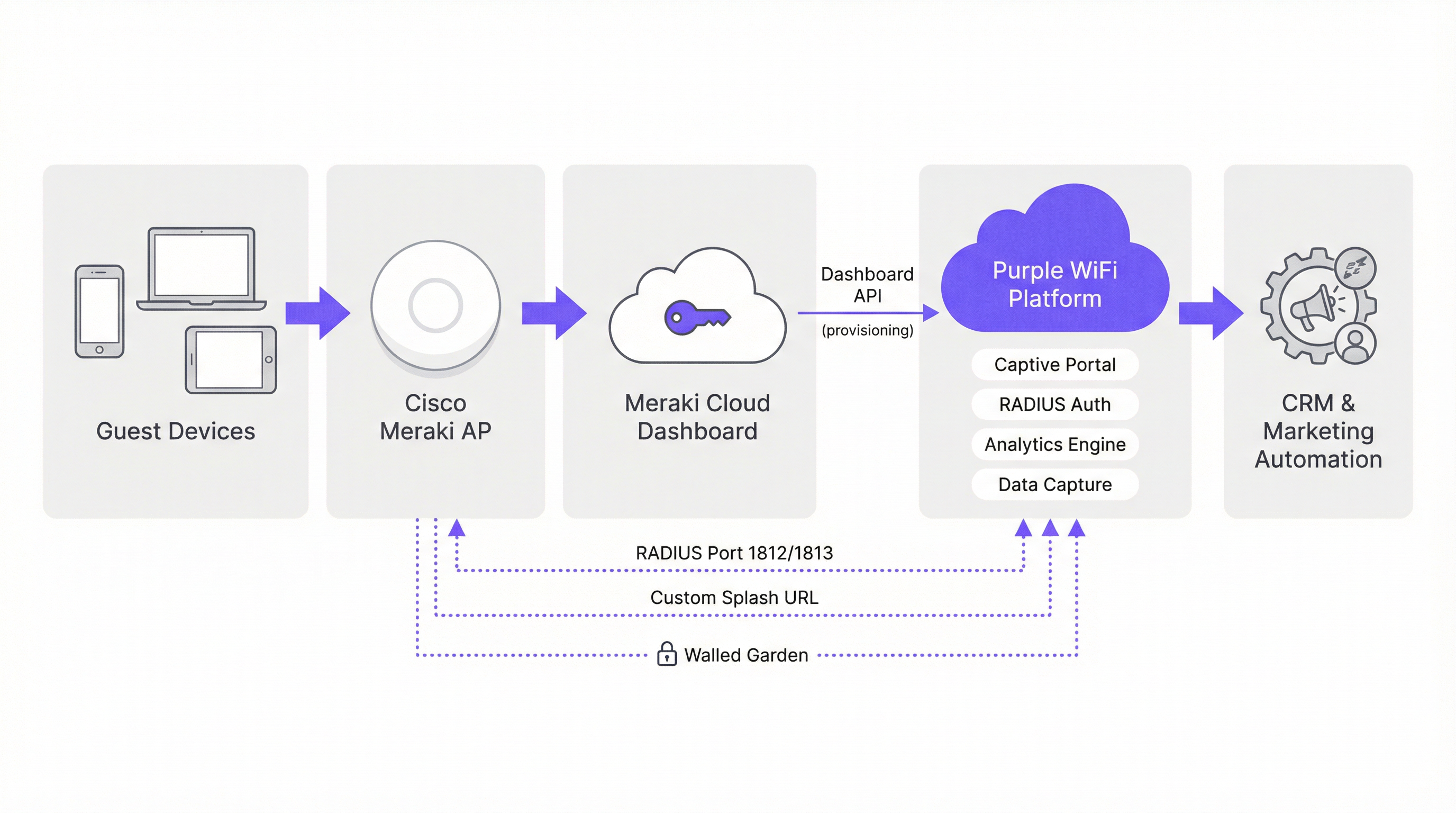
Arquitetura de Integração
A integração entre a Purple e a Meraki é melhor compreendida como duas relações de API paralelas que operam em diferentes camadas da pilha de rede. A primeira é uma integração no plano de gestão através da Meraki Dashboard REST API, utilizada exclusivamente para aprovisionamento e configuração. A segunda é uma integração no plano de dados através da Meraki Captive Portal API e do protocolo RADIUS, que rege o fluxo de autenticação de convidados em tempo real.
Plano de Gestão: Aprovisionamento da Dashboard API
A Meraki expõe uma REST API abrangente em api.meraki.com/api/v1. O Assistente de Importação de Hardware da Purple autentica-se nesta API utilizando uma chave de API com âmbito de organização e, em seguida, enumera todas as redes, SSIDs e pontos de acesso dentro da organização Meraki. Isto permite que um engenheiro de redes importe um parque de mais de 300 pontos de acesso em 50 locais numa única operação em lote — um processo que, de outra forma, exigiria a introdução manual de cada dispositivo. A capacidade de integração bidirecional da Purple também permite que a plataforma envie as configurações do Captive Portal, walled garden e RADIUS de volta para a Meraki, reduzindo ainda mais a sobrecarga de configuração manual.
Para gerar a chave de API necessária, navegue até Organização > API & Webhooks > Chaves de API no painel da Meraki e selecione Gerar Chave de API (Generate API Key). Esta chave deve ser tratada como uma credencial privilegiada — armazene-a num sistema de gestão de segredos e proceda à sua rotação de acordo com o ciclo de vida padrão de credenciais da sua organização.
Plano de Dados: Captive Portal API e RADIUS
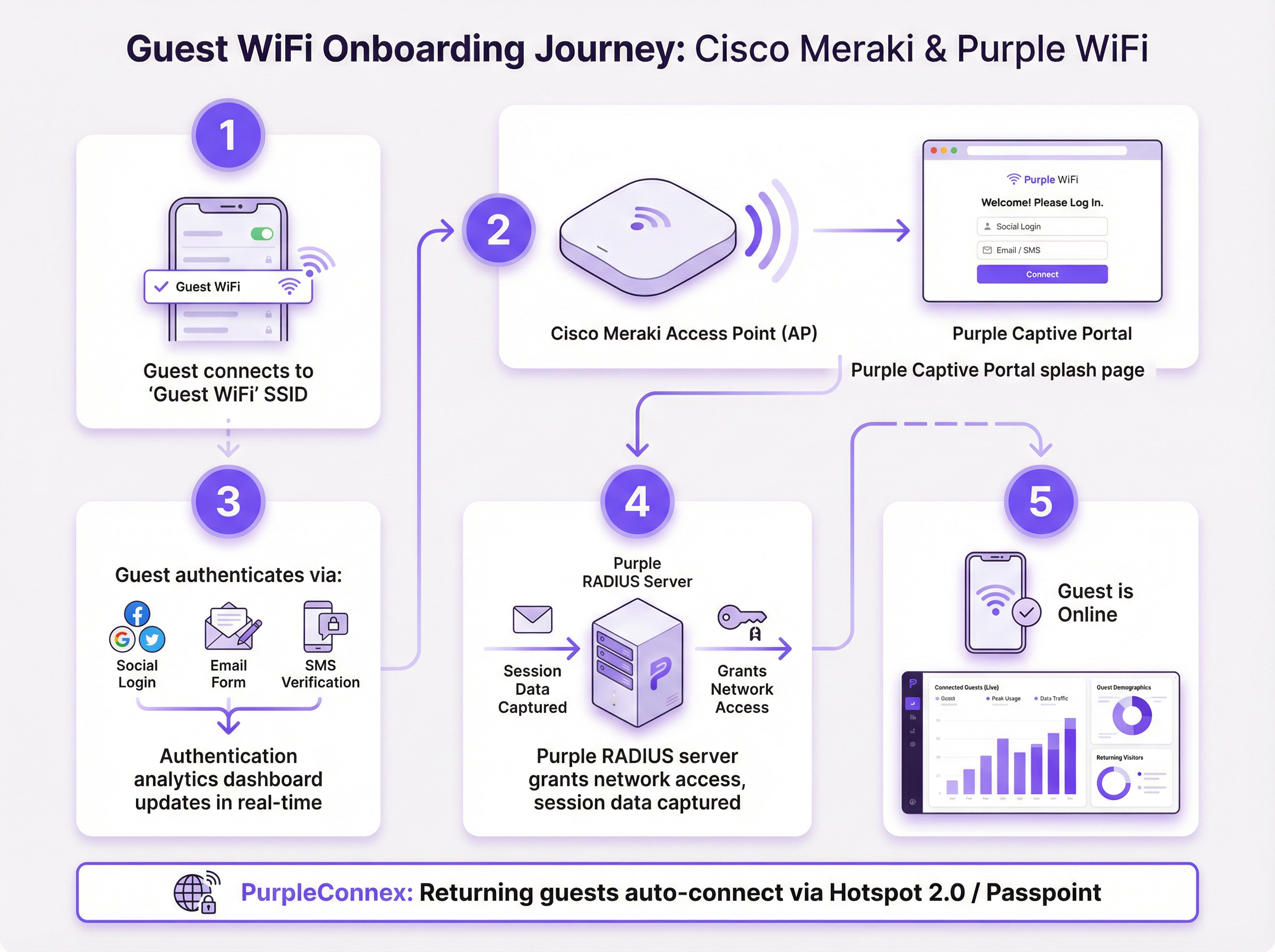
O fluxo de autenticação de convidados utiliza a Meraki Captive Portal API no modo Sign-on. Quando um convidado se associa ao SSID de convidados, o motor de controlo de acesso da Meraki interceta o primeiro pedido HTTP e emite um redirecionamento 302 para o URL da splash page alojada pela Purple. A splash page é servida a partir da infraestrutura CDN da Purple; a configuração do walled garden garante que os domínios da Purple estão acessíveis antes da conclusão da autenticação.
Assim que o convidado conclui a autenticação na splash page, a plataforma da Purple emite uma mensagem RADIUS Access-Accept para o AP Meraki na porta 1812. A Meraki concede então ao dispositivo acesso total à rede. As mensagens de contabilização RADIUS na porta 1813 fornecem eventos de início de sessão, atualização intermédia (a cada 4 minutos) e fim de sessão ao motor de análise da Purple, permitindo cálculos precisos do tempo de permanência, duração da sessão e visitas repetidas.
Métodos de Autenticação
O Captive Portal da Purple suporta múltiplos mecanismos de autenticação, cada um com diferentes implicações na recolha de dados:
| Método | Dados Recolhidos | Consentimento GDPR | Caso de Uso Recomendado |
|---|---|---|---|
| Login Social (Facebook, Google) | Nome, e-mail, dados de perfil | Caixa de verificação de consentimento inline | Hotelaria, fidelização no retalho |
| Formulário de E-mail | E-mail, campos personalizados | Caixa de verificação de consentimento inline | Qualquer espaço, controlo máximo de dados |
| Verificação por SMS | Número de telemóvel | Caixa de verificação de consentimento inline | Espaços de alta segurança ou com restrição de idade |
| Click-through (apenas Termos de Serviço) | MAC do dispositivo, dados de sessão | Aceitação de termos | Acesso público de baixa fricção |
PurpleConnex: SecurePass e Hotspot 2.0
O PurpleConnex é um segundo SSID implementado em conjunto com o SSID principal de convidados. Está configurado como uma rede WPA2 Enterprise, com os servidores RADIUS RadSec da Purple (rad1-secure.purple.ai e rad2-secure.purple.ai) na porta 2083 com transporte TLS. O Hotspot 2.0 (Passpoint) está ativado neste SSID, anunciando o domínio securewifi.purple.ai e os OIs do Purple Roaming Consortium. Quando o dispositivo de um convidado recorrente já descarregou previamente um perfil Purple Passpoint, associar-se-á automaticamente ao PurpleConnex e autenticar-se-á silenciosamente — sem splash page, sem login manual. Isto tem um impacto particular em ambientes hoteleiros, onde um hóspede que faz o check-in para uma estadia de várias noites não deve ser obrigado a reautenticar-se a cada religação do dispositivo.
A configuração do Hotspot 2.0 também resolve o desafio da aleatorização de endereços MAC introduzido pelo iOS 14 e Android 10+. Como a autenticação do PurpleConnex é baseada em credenciais em vez de baseada em MAC, a Purple consegue manter um registo de identidade de convidado consistente, mesmo quando o dispositivo apresenta um endereço MAC aleatório diferente em cada tentativa de ligação.
Guia de Implementação
Lista de Verificação Pré-Implementação
Antes de iniciar a configuração, confirme se os seguintes pré-requisitos estão reunidos. A sua organização Meraki deve ter o acesso à API ativado — esta é uma definição ao nível da organização em Organização > Definições > Acesso à Dashboard API. Precisará de uma conta no Portal Purple com o(s) seu(s) espaço(s) criado(s) e o(s) seu(s) SSID(s) configurado(s). Obtenha os seguintes valores do Portal Purple antes de aceder ao painel da Meraki: os hostnames dos servidores RADIUS e o segredo partilhado (shared secret), o URL personalizado da splash page, o URL de redirecionamento pós-autenticação e a atual lista de permissões (whitelist) de domínios do walled garden.
Passo 1: Gerar a Chave de API da Meraki e Importar Pontos de Acesso
No painel da Meraki, navegue até Organização > API & Webhooks > Chaves de API e gere uma nova chave de API. Copie esta chave imediatamente — ela é apresentada apenas uma vez. No Portal Purple, navegue até Gestão de Espaços > Importar Hardware > API de Terceiros, selecione Cisco Meraki e cole a sua chave de API. A Purple irá enumerar todo o seu parque de pontos de acesso. Selecione os pontos de acesso que pretende associar a cada espaço Purple e confirme a importação.
Passo 2: Configurar o SSID de Convidados — Controlo de Acesso
No painel da Meraki, navegue até Wireless > Controlo de Acesso. Selecione o seu SSID de convidados no menu pendente e aplique as seguintes definições:
| Parâmetro | Valor |
|---|---|
| Estado do SSID | Ativado (Enabled) |
| Segurança | Aberta (Open) |
| Splash Page | Sign-on com o meu servidor RADIUS |
| Força do Captive Portal | Bloquear todo o acesso até que o sign-on esteja concluído |
| Walled Garden | Ativado (adicionar todas as entradas de domínio da Purple) |
| Logins Simultâneos | Permitir (Allow) |
| Comportamento de Desligamento do Controlador | Predefinição (Default) |
| IP do Cliente e VLAN | Meraki DHCP (modo NAT) |
| Deteção de Portadora de Dados | Desativado (Disabled) |
Em Servidores RADIUS, adicione dois servidores de autenticação (primário e secundário) na porta 1812 com o segredo partilhado do seu Portal Purple. Adicione os servidores de contabilização correspondentes na porta 1813. Defina o intervalo intermédio de contabilização para 4 minutos, o tempo limite do servidor para 5 segundos e a contagem de tentativas para 3.
Em Definições Avançadas de RADIUS, defina tanto o Called-Station-ID como o NAS-ID para o endereço MAC do AP. Remova quaisquer outros valores destes campos.
Passo 3: Configurar a Splash Page
Navegue até Wireless > Splash Page. Introduza o URL Personalizado da Splash Page a partir do seu Portal Purple. Defina o destino de redirecionamento pós-splash para o URL da sua escolha — normalmente o website do seu espaço ou uma landing page promocional específica. Guarde as alterações.
Passo 4: Configurar o PurpleConnex (SSID SecurePass)
Crie um novo SSID com o nome PurpleConnex. Defina a segurança para WPA2 Enterprise. Desative a Wi-Fi Personal Network (WPN). Em servidores RADIUS, adicione rad1-secure.purple.ai e rad2-secure.purple.ai na porta 2083 com o RadSec (RADIUS sobre TLS) ativado e o segredo partilhado radsec. Defina o tempo limite de inatividade do TLS RadSec para 15 minutos. Desative o suporte a RADIUS CoA. Ative o proxy RADIUS.
Navegue até Wireless > Hotspot 2.0. Selecione o SSID PurpleConnex e configure da seguinte forma:
| Parâmetro | Valor |
|---|---|
| Hotspot 2.0 | Ativado (Enabled) |
| Nome do Operador | PURPLE:GB |
| Tipo de Rede | Rede pública gratuita |
| Lista de Domínios | securewifi.purple.ai |
| OIs do Roaming Consortium | 5A03BA0000, 004096 |
| NAI Realm | securewifi.purple.ai (EAP-TTLS / PAP) |
Passo 5: Validar e Testar
Antes de declarar a implementação como concluída, teste todo o percurso do convidado a partir de um dispositivo de consumidor num segmento de rede separado. Verifique se a splash page carrega corretamente, se todos os métodos de autenticação funcionam, se o acesso à rede pós-autenticação é concedido dentro de 3 a 5 segundos e se os dados da sessão aparecem no painel de análise da Purple dentro de 5 minutos. Teste o fluxo de religação automática do PurpleConnex descarregando o perfil Passpoint e confirmando a religação contínua numa segunda visita.
Melhores Práticas
Segmentação de Rede e Conformidade PCI DSS. O tráfego de WiFi para convidados deve ser isolado numa VLAN dedicada, com regras de firewall a impedir o movimento lateral para segmentos da rede corporativa. Se o seu espaço processa dados de cartões de pagamento na mesma infraestrutura de rede física, é necessário um exercício formal de definição de âmbito PCI DSS. O modo NAT da Meraki fornece isolamento de clientes ao nível do AP, mas a segmentação de VLAN na camada de switching é o controlo adequado para a gestão do âmbito PCI.
Governação de Dados GDPR e CCPA. O Captive Portal da Purple apresenta um mecanismo de consentimento no momento da autenticação, capturando o opt-in explícito para comunicações de marketing. Certifique-se de que as definições de retenção de dados do seu Portal Purple estão alinhadas com a política de governação de dados da sua organização. A plataforma da Purple suporta nativamente pedidos de acesso de titulares de dados e fluxos de trabalho de direito ao apagamento, o que constitui uma vantagem material de conformidade em relação a soluções de Captive Portal feitas à medida.
Manutenção do Walled Garden. A lista de domínios do walled garden é um item de configuração vivo. A infraestrutura de plataforma e CDN da Purple pode mudar ao longo do tempo, e um walled garden desatualizado resultará numa experiência de splash page deficiente. Subscreva as notas de lançamento da Purple e reveja a lista do walled garden como parte do seu processo padrão de gestão de alterações.
Redundância e Failover. A Purple fornece dois endpoints de servidor RADIUS tanto para o SSID de convidados como para o PurpleConnex. Ambos devem estar sempre configurados. Na eventualidade de uma falha na plataforma da Purple, configure o comportamento de desligamento do controlador da Meraki para Predefinição (Default) — isto permite que as sessões previamente autenticadas continuem enquanto as novas autenticações aguardam na fila para nova tentativa.
Wi-Fi 6 e Otimização de Débito. Para espaços de alta densidade, como estádios e centros de conferências, os pontos de acesso Wi-Fi 6 (802.11ax) da Meraki fornecem a margem de débito necessária para sessões simultâneas de convidados. A integração da Purple é agnóstica em relação à geração de hardware — a configuração do RADIUS e do Captive Portal é idêntica em todas as gerações de produtos AP da Meraki.
Resolução de Problemas e Mitigação de Riscos

A tabela seguinte resume os modos de falha mais comuns encontrados em implementações da Meraki e da Purple, as suas causas principais e a resolução recomendada.
| Sintoma | Causa Principal | Resolução |
|---|---|---|
| A splash page não carrega (em branco ou com erro) | Walled garden incompleto | Adicionar todas as entradas de domínio da Purple à whitelist do walled garden |
| A autenticação é bem-sucedida, mas o acesso à rede não é concedido | Tempo limite do RADIUS demasiado baixo | Definir o tempo limite do servidor para 5s e a contagem de tentativas para 3 |
| As análises não mostram dados por AP | NAS-ID / Called-Station-ID mal configurados | Definir ambos os campos para o endereço MAC do AP nas Definições Avançadas de RADIUS |
| Falhas de autenticação intermitentes no pico de carga | Apenas um servidor RADIUS configurado | Adicionar os endpoints RADIUS primário e secundário da Purple |
| O PurpleConnex não se liga automaticamente | Hotspot 2.0 mal configurado | Verificar os OIs do Roaming Consortium e as definições do NAI Realm |
| Convidados recorrentes são solicitados a reautenticar-se | SSID PurpleConnex não implementado | Implementar o SSID PurpleConnex com configuração Passpoint |
| Consentimento GDPR não recolhido | Campos de consentimento da splash page desativados | Ativar os campos de opt-in de marketing no editor de splash do Portal Purple |
Aleatorização de Endereços MAC. Os dispositivos iOS e Android modernos apresentam endereços MAC aleatórios por predefinição. Isto afeta a capacidade da Purple de identificar visitantes recorrentes no SSID de convidados. A solução PurpleConnex / SecurePass resolve esta questão utilizando a autenticação baseada em credenciais em vez da identificação baseada em MAC. Para espaços onde a implementação do PurpleConnex não é viável, a plataforma da Purple aplica uma correspondência probabilística utilizando metadados de sessão para mitigar parcialmente o impacto.
Compatibilidade de Firmware da Meraki. Certifique-se de que os seus APs Meraki estão a executar uma versão de firmware que suporta as funcionalidades Hotspot 2.0 e RadSec necessárias para o PurpleConnex. O canal de firmware estável da Meraki é recomendado para implementações em produção; o firmware beta não deve ser utilizado em ambientes de WiFi para convidados em tempo real.
ROI e Impacto no Negócio
O business case para a implementação da Purple num parque Meraki é bem evidenciado por implementações ativas em vários setores verticais. Os seguintes resultados são retirados de estudos de caso publicados pela Purple.
| Organização | Setor | Resultado |
|---|---|---|
| Harrods | Retalho de Luxo | 57× ROI em 600.000 logins de WiFi |
| AGS Airports | Viagens e Transportes | 842% ROI através de receitas de largura de banda por níveis |
| McDonald's Bélgica | Restaurante de Serviço Rápido | Implementação ativa da Purple + Cisco Meraki + Socialspot |
| Walmart Canadá | Retalho de Grande Superfície | WiFi para convidados à escala empresarial com a Purple e a Cisco |
| Miami HEAT (Kaseya Center) | Desporto e Entretenimento | 290.000 ligações, média de 28.000 por mês |
| c2c Rail | Transportes | 81.601 utilizadores de WiFi → 151% ROI |
O mecanismo de ROI é simples. A Purple converte eventos de autenticação de WiFi para convidados em perfis de dados primários (first-party data) — endereços de e-mail, informações demográficas, frequência de visitas, tempo de permanência e padrões comportamentais. Estes dados alimentam diretamente as plataformas de CRM e de automação de marketing através dos conectores de API da Purple, permitindo campanhas direcionadas que superam comprovadamente os dados de audiência de terceiros, tanto na taxa de conversão como no custo por aquisição.
Para um hotel de 200 quartos a funcionar com 70% de ocupação e uma média de 1,8 hóspedes por quarto, uma implementação da Purple num parque Meraki irá tipicamente capturar 250 a 300 novos perfis de dados primários por dia. Com uma taxa de conversão de e-mail marketing padrão do setor de 3 a 5% e um valor médio de reserva incremental de £150, a atribuição de receitas anuais proveniente apenas do re-engagement por e-mail excede tipicamente o custo total da licença da plataforma Purple no primeiro ano de operação.
Os ganhos de eficiência operacional resultantes do aprovisionamento automático da Meraki são um benefício secundário, mas significativo. Para um operador com vários locais que gere 50 localizações, a redução no tempo de configuração manual — de cerca de 3 a 4 horas por local para menos de 30 minutos — representa uma poupança material nos custos de recursos de engenharia.
Termos-Chave e Definições
Captive Portal
A web-based authentication gateway that intercepts a guest device's initial HTTP request and redirects it to a login or terms-acceptance page before granting network access. In the Meraki-Purple integration, the captive portal is hosted by Purple and delivered via a custom splash URL configured in the Meraki dashboard.
IT teams encounter this when configuring the Splash Page settings in the Meraki dashboard. The choice between Click-through (terms acceptance only) and Sign-on (RADIUS authentication) determines the level of data capture and security the deployment provides.
RADIUS (Remote Authentication Dial-In User Service)
A networking protocol (RFC 2865) that provides centralised authentication, authorisation, and accounting (AAA) for network access. In the Meraki-Purple integration, Purple operates RADIUS servers that receive authentication requests from Meraki APs on port 1812 and return Access-Accept or Access-Reject responses. Accounting data is sent to port 1813.
RADIUS is the backbone of the guest authentication flow. Network engineers need to configure the RADIUS server IP addresses, shared secret, and port numbers in the Meraki Access Control settings. Incorrect RADIUS configuration is the most common cause of guest authentication failure.
Walled Garden
A list of network destinations (IP addresses, domain names, or CIDR blocks) that a guest device is permitted to reach before completing captive portal authentication. In the Meraki-Purple integration, the walled garden must include all domains required by Purple's splash page — CDN assets, authentication provider endpoints, and the Purple platform itself.
IT teams must maintain this list as a living configuration item. An incomplete walled garden results in a broken splash page experience for guests. Purple publishes and maintains a current whitelist of required domains in their support documentation.
RadSec (RADIUS over TLS)
An extension to the RADIUS protocol (RFC 6614) that transports RADIUS messages over a TLS-encrypted TCP connection, providing confidentiality and integrity for authentication traffic. Purple's PurpleConnex SSID uses RadSec on port 2083, replacing the standard UDP transport used by the guest SSID RADIUS configuration.
RadSec is required for the PurpleConnex SecurePass SSID. Network engineers must enable the RadSec toggle in Meraki's RADIUS server configuration and use port 2083 rather than the standard 1812/1813. Failure to enable RadSec will prevent PurpleConnex authentication from functioning.
Hotspot 2.0 / Passpoint (IEEE 802.11u)
A Wi-Fi Alliance certification programme based on the IEEE 802.11u standard that enables automatic, secure network discovery and association. A device with a Passpoint profile will automatically connect to a compatible network without user intervention, using EAP-based authentication rather than a captive portal.
In the Meraki-Purple integration, Hotspot 2.0 is configured on the PurpleConnex SSID to enable seamless auto-reconnection for returning guests. This is particularly valuable in hospitality and retail environments where repeat authentication friction reduces guest satisfaction.
NAS-ID (Network Access Server Identifier)
A RADIUS attribute (Attribute 32) that identifies the network access server — in this context, the Meraki access point — that is sending the authentication request. Purple uses the NAS-ID to attribute guest sessions to specific physical access points, enabling floor-level location analytics.
This is one of the most commonly misconfigured parameters in Meraki-Purple deployments. It must be set to AP MAC address in the Meraki Advanced RADIUS Settings. Any other value (such as SSID name or a static string) will prevent Purple from generating per-AP analytics.
Meraki Dashboard API
A RESTful API provided by Cisco Meraki that allows programmatic access to the Meraki cloud management platform. It supports read and write operations across organisations, networks, devices, and configuration objects. Purple uses this API to import access point data and push SSID/RADIUS configuration during the provisioning phase.
IT teams need to generate an API key from the Meraki dashboard (Organisation > API & Webhooks) and provide it to the Purple Portal's Hardware Import Wizard. This key should be treated as a privileged credential and stored securely.
GDPR (General Data Protection Regulation)
EU Regulation 2016/679, which governs the collection, processing, and storage of personal data of EU residents. In the context of guest WiFi, GDPR requires that venues obtain explicit, informed consent before collecting personal data (such as email addresses) through a captive portal, and provide mechanisms for data subjects to access, correct, or delete their data.
Purple was among the first WiFi providers to achieve GDPR compliance. The Purple captive portal presents a consent mechanism at the point of authentication, and the platform supports data subject access requests and right-to-erasure workflows natively. IT teams should ensure that the Purple Portal's data retention settings align with their organisation's data governance policy.
PurpleConnex (SecurePass)
Purple's seamless reconnection solution, implemented as a second SSID configured with WPA2 Enterprise security, RadSec RADIUS transport, and Hotspot 2.0 (Passpoint) advertisement. Returning guests whose devices have downloaded a Purple Passpoint profile will automatically associate with PurpleConnex without seeing a captive portal.
PurpleConnex is deployed alongside the primary guest SSID and is invisible to first-time visitors. It resolves two key challenges: repeat authentication friction for returning guests, and MAC address randomisation (iOS 14+, Android 10+) which breaks MAC-based guest identification on the primary SSID.
Called-Station-ID (RADIUS Attribute 30)
A RADIUS attribute that identifies the access point or network access server that the client connected to, typically expressed as the AP's MAC address. Purple uses this attribute in conjunction with NAS-ID to map guest sessions to specific physical access points for location analytics.
Must be set to AP MAC address in Meraki's Advanced RADIUS Settings. This attribute works in tandem with NAS-ID — both must be correctly configured for Purple's floor-level analytics to function accurately.
Estudos de Caso
A 250-room four-star hotel group with 12 properties across the UK has a fully deployed Cisco Meraki estate (MR46 and MR57 APs, MX68 security appliances). They currently offer open guest WiFi with no captive portal. The IT Director wants to implement Purple WiFi to capture guest email addresses for the hotel's CRM, comply with GDPR, and generate analytics on peak-hour network usage. The deployment must be completed with minimal disruption to existing guests and must not require on-site engineer visits to any of the 12 properties. How should this deployment be structured?
The deployment should proceed in three phases, leveraging the Meraki Dashboard API for remote, zero-touch provisioning across all 12 properties.
Phase 1: Provisioning (Day 1, remote) Generate a Meraki API key scoped to the hotel group's Meraki organisation. In the Purple Portal, use the Hardware Import Wizard with the Third Party API option to import all access points across all 12 networks in a single batch. Assign each network to the corresponding Purple venue. This operation typically completes in under 20 minutes for an estate of this size.
Phase 2: SSID and RADIUS Configuration (Days 1–2, remote via Meraki dashboard) For each of the 12 Meraki networks, configure the existing guest SSID with the Sign-on with my RADIUS server splash page type. Add Purple's primary and secondary RADIUS servers on ports 1812 and 1813 with the shared secret from the Purple Portal. Set captive portal strength to Block all access, enable the walled garden with Purple's domain whitelist, and configure the custom splash URL. Set NAS-ID and Called-Station-ID to AP MAC address. Because Meraki's dashboard supports configuration templates, a single template can be applied across all 12 networks simultaneously, reducing per-site configuration time to near zero.
Phase 3: PurpleConnex Deployment (Days 2–3, remote) Create the PurpleConnex SSID on each network with WPA2 Enterprise and RadSec RADIUS configuration. Enable Hotspot 2.0 with the Purple operator name and domain settings. This SSID is invisible to guests who have not previously authenticated — it will auto-connect returning guests silently on subsequent visits.
Validation: Test the full guest journey remotely using a 4G-connected mobile device at one property before rolling the configuration live across all 12. Monitor the Purple analytics dashboard for session data ingestion within the first 24 hours of go-live.
The entire deployment is achievable in 2–3 days of engineering time with zero on-site visits, leveraging Meraki's cloud management and Purple's API provisioning.
A 60,000-capacity football stadium uses Cisco Meraki MR45 access points throughout the concourse, seating bowl, and hospitality suites. They want to deploy Purple WiFi to capture fan data, run in-venue surveys during matches, and integrate with their existing Salesforce CRM. The primary concern is scale: on match days, up to 35,000 concurrent WiFi sessions are expected. The stadium's IT team is concerned about RADIUS authentication performance under peak load. How should the RADIUS configuration be optimised for high-concurrency environments?
For a high-concurrency stadium deployment, the RADIUS configuration requires specific attention to redundancy, timeout parameters, and session management.
RADIUS Server Configuration for Scale: Configure both Purple RADIUS endpoints (primary and secondary) on every Meraki AP and MX in the estate. This is non-negotiable for a stadium deployment — a single RADIUS server configuration will create a single point of failure that will manifest as authentication failures precisely at kick-off, when concurrent connection attempts peak.
Set the RADIUS server timeout to 5 seconds and retry count to 3. This gives each authentication attempt up to 15 seconds before failing over to the secondary server, which is sufficient for a cloud-hosted RADIUS service under normal conditions. Do not reduce the timeout below 5 seconds in a stadium environment — the additional latency from concurrent load means that aggressive timeout values will cause false failures.
Set the accounting interim interval to 4 minutes. This generates a RADIUS Accounting-Interim-Update message every 4 minutes per active session, which Purple uses to calculate dwell time. In a stadium with 35,000 concurrent sessions, this generates approximately 145 accounting messages per second — well within Purple's platform capacity.
SSID and Network Segmentation: Deploy the guest SSID on a dedicated VLAN with a sufficiently large DHCP scope. A /16 subnet (65,534 addresses) is recommended for a 60,000-capacity venue. Ensure the DHCP lease time is set to match the expected session duration — for a 2-hour match, a 3-hour lease is appropriate. Short lease times will cause unnecessary DHCP churn and add load to the authentication infrastructure.
Salesforce CRM Integration: Purple's platform supports native Salesforce connector integration. Configure the CRM connector in the Purple Portal to push new guest profiles and session events to Salesforce in real time. Map Purple's data fields (email, visit count, dwell time, authentication method) to the corresponding Salesforce Contact and Campaign Member objects. This enables the stadium's marketing team to trigger automated post-match email campaigns within minutes of the final whistle.
In-Venue Surveys: Purple's MicroSurvey feature can be triggered post-authentication, presenting a 1–3 question survey on the splash page redirect. For a stadium deployment, configure the survey to trigger for a random 20% sample of authenticated guests to avoid survey fatigue while maintaining statistical significance.
Análise de Cenários
Q1. A retail chain with 80 stores has deployed Cisco Meraki MR33 access points throughout their estate. They want to implement Purple WiFi but their security team has raised concerns about deploying an Open SSID for guest access. The security team argues that all SSIDs should use WPA2 encryption at minimum. How do you address this concern, and what is the correct security architecture for the guest WiFi deployment?
💡 Dica:Consider the difference between link-layer encryption (WPA2) and application-layer authentication (captive portal + RADIUS). Also consider what the PurpleConnex SSID provides.
Mostrar Abordagem Recomendada
The security team's concern is valid in principle but reflects a conflation of two different security objectives. WPA2 encryption protects the radio link between the client device and the access point — it prevents eavesdropping on the wireless medium. However, for a public guest network, WPA2 Personal (PSK) provides minimal practical security because the pre-shared key is, by definition, publicly known to all guests. Any guest who knows the PSK can decrypt other guests' traffic using a passive capture attack.
The correct architecture is: deploy the guest SSID as Open (no WPA2) with a captive portal for authentication. This is the industry-standard approach for public guest WiFi because it allows the captive portal to function without requiring guests to know a password before they can reach the splash page. The security model relies on application-layer controls (HTTPS on the splash page, RADIUS authentication, VLAN isolation) rather than link-layer encryption.
For guests who require encrypted transport, the PurpleConnex SSID provides WPA2 Enterprise security with RadSec RADIUS — this is genuinely secure because each client receives a unique encryption key derived from their EAP credentials. Returning guests who have the PurpleConnex Passpoint profile will automatically connect to this encrypted SSID.
The complete security architecture is therefore: Open SSID for first-time guest onboarding (captive portal + RADIUS authentication + VLAN isolation) + WPA2 Enterprise PurpleConnex SSID for returning guests (RadSec + Passpoint). This satisfies both the guest experience requirement and the security team's encryption requirement for repeat visitors.
Q2. A conference centre is deploying Purple WiFi on their Meraki estate for the first time. Three weeks after go-live, the marketing team reports that the Purple analytics dashboard shows total session counts but no per-room or per-zone data — all sessions appear to be attributed to a single location. The network engineer who performed the configuration has left the organisation. What is the most likely cause, and how do you diagnose and resolve it?
💡 Dica:Think about which RADIUS attribute Purple uses to map sessions to physical locations, and what the default Meraki configuration for that attribute is.
Mostrar Abordagem Recomendada
The most likely cause is that the NAS-ID and/or Called-Station-ID RADIUS attributes are not configured to use AP MAC address. When these fields are set to a static string, SSID name, or left at default, every access point in the estate sends the same identifier in its RADIUS messages. Purple's analytics engine receives identical location identifiers from all APs and cannot distinguish between them, resulting in all sessions being attributed to a single (or unknown) location.
Diagnosis: In the Meraki dashboard, navigate to Wireless > Access Control for the guest SSID. Scroll to Advanced RADIUS Settings. Check the values for Called-Station-ID and NAS-ID. If either field shows anything other than AP MAC address — such as SSID name, a static string, or multiple values — this is the root cause.
Resolution: Set both Called-Station-ID and NAS-ID to AP MAC address only. Remove any other values from these fields. Save the configuration. Note that this change takes effect for new sessions — existing active sessions will not be retroactively re-attributed. Within 5–10 minutes of the configuration change, new session data in the Purple analytics dashboard should begin showing per-AP attribution.
If the issue persists after correcting the RADIUS attribute configuration, verify that the Purple Portal has the correct AP MAC addresses imported and associated with the correct floor plan zones. If APs were imported before floor plans were configured, the MAC-to-zone mapping may need to be updated in the Purple Portal's venue management settings.
Q3. A 500-bed NHS hospital trust wants to deploy Purple WiFi on their existing Cisco Meraki infrastructure to provide patient and visitor WiFi. Key requirements are: GDPR compliance for data collection, content filtering to block inappropriate content on the patient network, seamless connectivity for long-stay patients (multi-day admissions), and integration with their existing patient engagement platform via API. What Purple features and Meraki configuration elements address each requirement?
💡 Dica:Consider Purple's compliance features, Purple Shield DNS filtering, PurpleConnex for long-stay patients, and Purple's API/connector capabilities for the patient engagement platform integration.
Mostrar Abordagem Recomendada
Each requirement maps to a specific combination of Purple features and Meraki configuration:
GDPR Compliance: Purple's captive portal presents a consent mechanism at authentication, capturing explicit opt-in for data processing. The Purple Portal's data governance settings allow configuration of data retention periods aligned with NHS data governance policies. Purple supports data subject access requests and right-to-erasure natively. The splash page should be configured to present clear, plain-language consent language — not buried in terms and conditions — to meet the GDPR requirement for informed, unambiguous consent.
Content Filtering: Purple Shield is Purple's cloud-native DNS filtering service. It operates at the infrastructure level, filtering DNS queries before they resolve, and can be configured with category-based blocking (adult content, gambling, malware, etc.) appropriate for a patient environment. This is configured within the Purple Portal and applies to all authenticated sessions on the guest SSID without requiring additional hardware.
Seamless Connectivity for Long-Stay Patients: Deploy PurpleConnex with Hotspot 2.0 (Passpoint) configuration. Once a patient has authenticated once and downloaded the Passpoint profile, their device will auto-connect on subsequent associations — including after the device wakes from sleep, moves between wards, or reconnects after a brief disconnection. This eliminates the daily re-authentication friction that is a common complaint in hospital WiFi deployments.
Patient Engagement Platform Integration: Purple's platform exposes a REST API and supports pre-built connectors for major CRM and engagement platforms. Configure the Purple Portal's API connector to push authenticated session events (patient ID if captured at login, session start/end, ward-level location data) to the patient engagement platform in real time. If the engagement platform is not in Purple's pre-built connector library, the REST API allows custom integration development.
Principais Conclusões
- ✓The Purple and Meraki integration operates across two distinct layers: the Meraki Dashboard REST API for automated bulk provisioning of access points, and the Captive Portal API with RADIUS authentication (ports 1812/1813) for the live guest experience — understanding this separation is essential for both deployment planning and troubleshooting.
- ✓The three most critical configuration parameters are: NAS-ID and Called-Station-ID set to AP MAC address (required for per-zone analytics), RADIUS server timeout of 5 seconds with retry count of 3 (required for reliability under load), and a complete walled garden domain whitelist (required for the splash page to load correctly).
- ✓PurpleConnex (SecurePass) deploys a second WPA2 Enterprise SSID with RadSec RADIUS and Hotspot 2.0 (Passpoint/IEEE 802.11u), enabling returning guests to auto-reconnect without a captive portal — this also resolves the MAC address randomisation challenge introduced by iOS 14+ and Android 10+.
- ✓GDPR and CCPA compliance is built into Purple's captive portal by design, with explicit consent capture at authentication, data subject access request workflows, and configurable data retention — making Purple a materially lower compliance risk than bespoke captive portal solutions.
- ✓The business case is well-evidenced: Harrods achieved 57× ROI on 600,000 WiFi logins, AGS Airports achieved 842% ROI, and McDonald's Belgium, Walmart Canada, and the Miami HEAT are all live Cisco Meraki and Purple deployments at enterprise scale.
- ✓For multi-site deployments, the Meraki Dashboard API enables batch import of entire access point estates into the Purple Portal in a single operation, reducing a multi-day manual configuration exercise to under an hour — the operational efficiency gain is a significant secondary benefit beyond the guest intelligence value.
- ✓Network segmentation is a non-negotiable prerequisite: guest WiFi traffic must be isolated on a dedicated VLAN with firewall rules preventing lateral movement to corporate segments, and any PCI DSS scoping implications of shared physical infrastructure must be formally assessed before go-live.




