

Google Workspace WiFi-Authentifizierung: Chromebook- und LDAP-Integration
A definitive technical reference for IT administrators deploying secure WiFi in Google Workspace environments. This guide covers 802.1X certificate deployment to managed Chromebooks via Google Admin Console, Google Secure LDAP integration as a RADIUS backend, and architecture decisions for education, media, and enterprise venues. It provides actionable implementation steps, real-world case studies, and a direct comparison of EAP methods to help teams move from vulnerable shared PSKs to robust, identity-based network access control.
🎧 Diesen Leitfaden anhören
Transkript anzeigen
Executive Summary
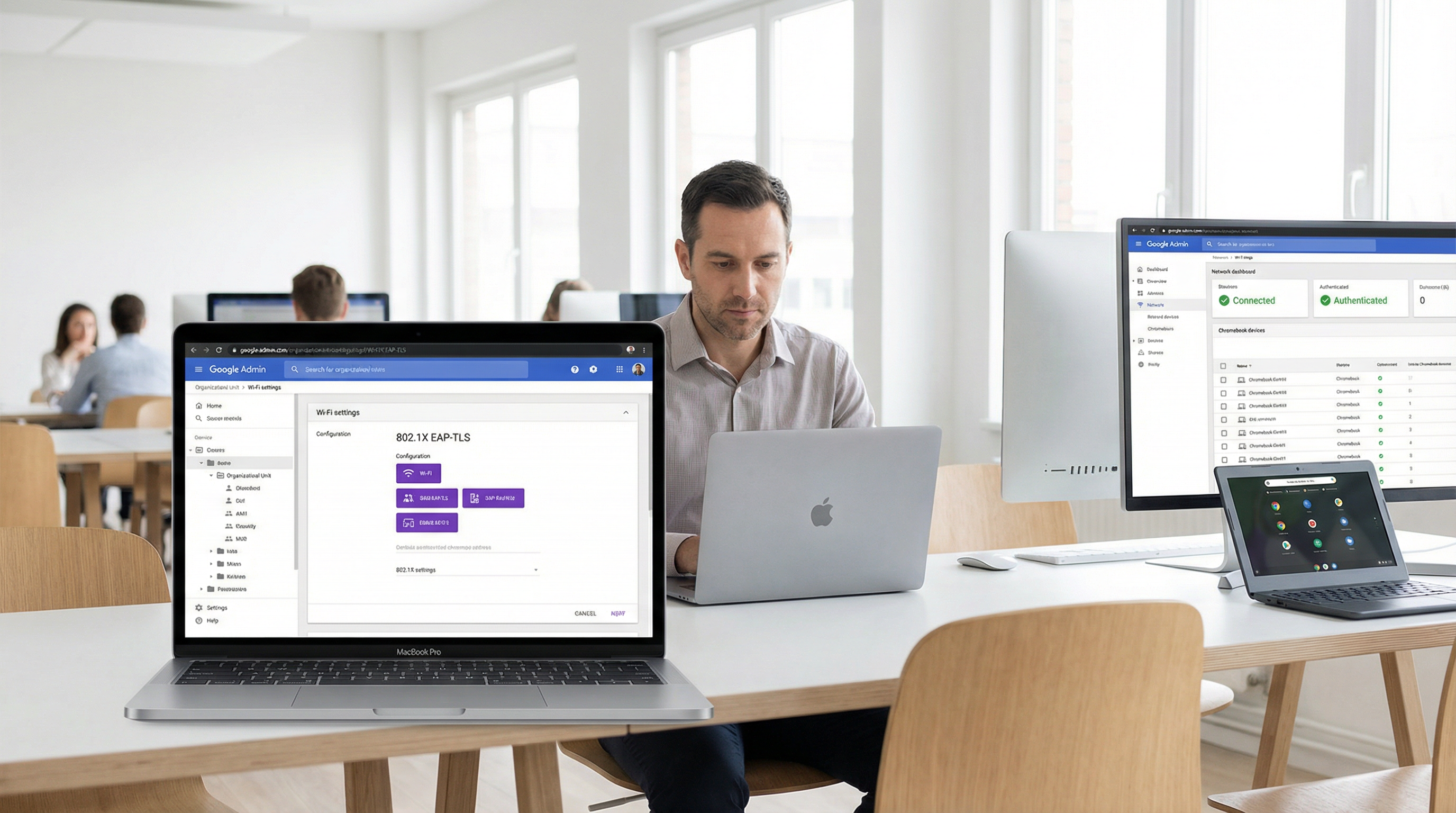
Für Unternehmensstandorte, Bildungseinrichtungen und Gastgewerbe-Anbieter, die auf Google Workspace standardisiert sind, stellte die Implementierung einer sicheren, nahtlosen WiFi-Authentifizierung im Vergleich zu Microsoft Active Directory-Umgebungen in der Vergangenheit eine Herausforderung dar. Dieser Leitfaden beschreibt die Architektur und Bereitstellung der Google Workspace WiFi-Authentifizierung, mit besonderem Fokus auf die Bereitstellung von Chromebook 802.1X-Zertifikaten und die Google Secure LDAP-Integration für RADIUS-Backends.
IT-Manager und Netzwerkarchitekten müssen ein Gleichgewicht zwischen Sicherheit (WPA3-Enterprise, IEEE 802.1X) und Benutzerfreundlichkeit finden. Während Pre-Shared Keys (PSKs) leicht kompromittiert werden können und schwer zu rotieren sind, bietet eine zertifikatsbasierte Authentifizierung (EAP-TLS) oder eine anmeldeinformationsbasierte Authentifizierung (PEAP-MSCHAPv2), die direkt an die Google Workspace-Identität eines Benutzers gebunden ist, eine robuste Zugriffskontrolle, granulare Richtliniendurchsetzung und nahtloses Roaming über Gäste-WiFi und Unternehmensnetzwerke hinweg.
Diese technische Referenz skizziert die genauen Schritte zur Konfiguration der Google Admin-Konsole für die automatisierte Zertifikatsverteilung, die Bereitstellung von Google Secure LDAP und die Integration dieser Identitätsquellen mit Enterprise-RADIUS-Servern. Durch die Befolgung dieser herstellerneutralen Best Practices können Unternehmen den Diebstahl von Anmeldeinformationen eindämmen, Helpdesk-Tickets reduzieren und die Einhaltung von GDPR und PCI DSS sicherstellen.
Technischer Deep-Dive
Die Architektur der Google Workspace WiFi-Authentifizierung
Die Authentifizierung drahtloser Clients gegenüber Google Workspace erfordert die Überbrückung der Lücke zwischen Cloud-nativer Identität (SAML/OAuth) und älteren Netzwerkprotokollen (RADIUS/802.1X). Im Gegensatz zu Active Directory, das nativ LDAP spricht und sich nahtlos in den Network Policy Server (NPS) integriert, erfordert Google Workspace eine bewusste Zwischenschicht.
Es gibt zwei primäre Architekturen, um dies zu erreichen:
Architektur 1 — Google Secure LDAP (Cloud Identity Premium / Google Workspace Enterprise): Google bietet eine verwaltete LDAP-Schnittstelle zu Ihrem Cloud-Verzeichnis. Ihr RADIUS-Server (z. B. FreeRADIUS, Cisco ISE, Aruba ClearPass) verbindet sich über Client-Zertifikate sicher mit ldap.google.com. Wenn ein Benutzer versucht, sich mit dem WiFi zu verbinden, validiert der RADIUS-Server seine Anmeldeinformationen über den LDAP-Dienst von Google.
Architektur 2 — SAML-basierte Captive Portals / RadSec: Für BYOD- (Bring Your Own Device) oder Gästeszenarien verbinden sich Benutzer mit einem offenen oder PSK-Netzwerk, das sie zu einem Captive Portal umleitet. Das Portal authentifiziert den Benutzer über Google SSO (SAML/OAuth). Nach der Authentifizierung kann das System dynamisch eindeutige Anmeldeinformationen (z. B. einen dynamischen PSK oder ein temporäres Zertifikat) für nachfolgende Verbindungen bereitstellen.
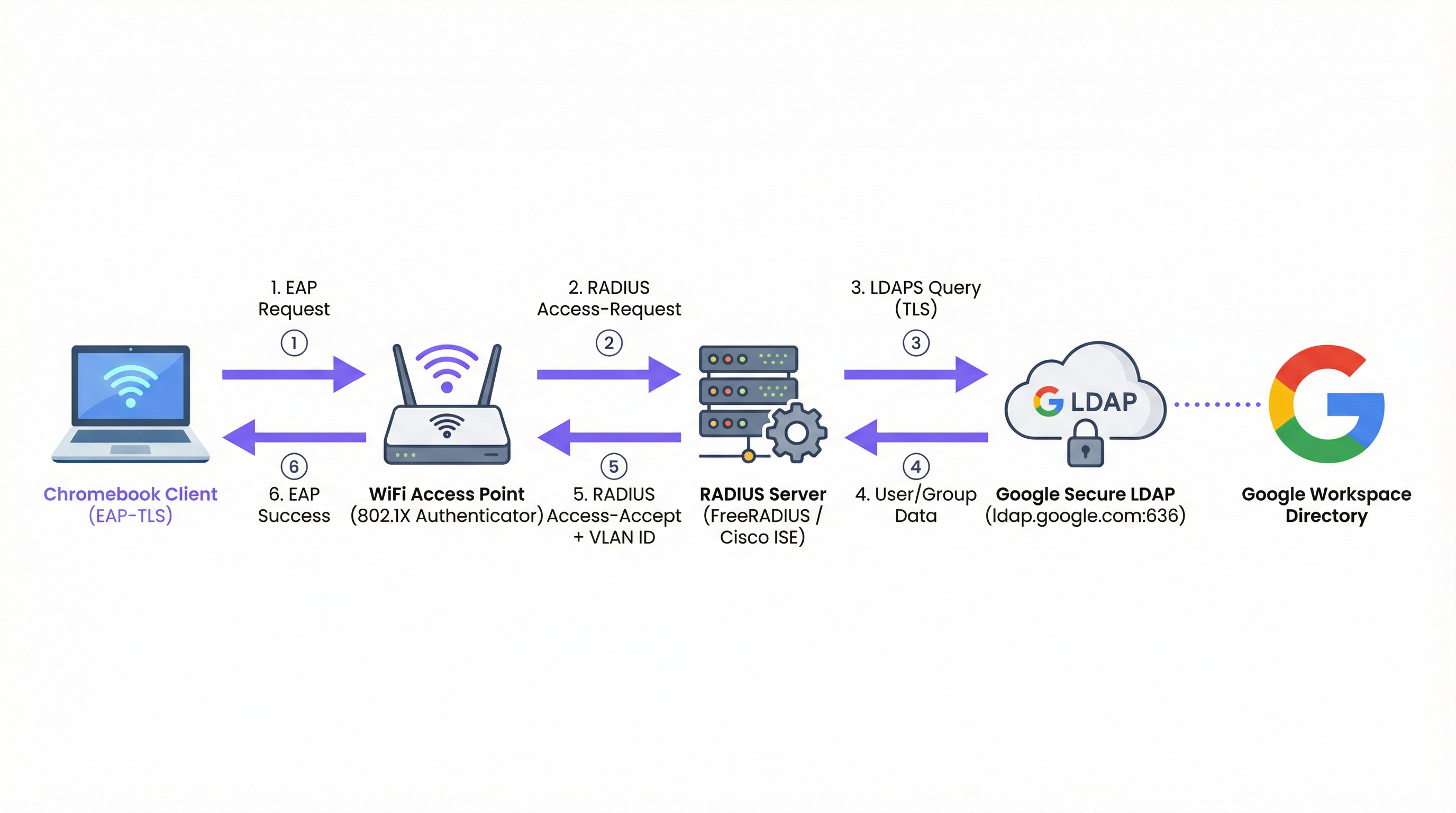
Abbildung 1: Der 802.1X-Authentifizierungsablauf für Google Workspace-Umgebungen, der den RADIUS-Server als Vermittler zwischen dem Access Point und Google Secure LDAP zeigt.
EAP-Typen und Chromebook-Unterstützung
Chromebooks unterstützen nativ mehrere Extensible Authentication Protocol (EAP)-Typen für 802.1X. Die Wahl des EAP-Typs bestimmt die Sicherheitslage und die Komplexität der Bereitstellung. Einen umfassenden Überblick über die Grundlagen von 802.1X finden Sie unter 802.1X-Authentifizierung: Sicherung des Netzwerkzugriffs auf modernen Geräten .
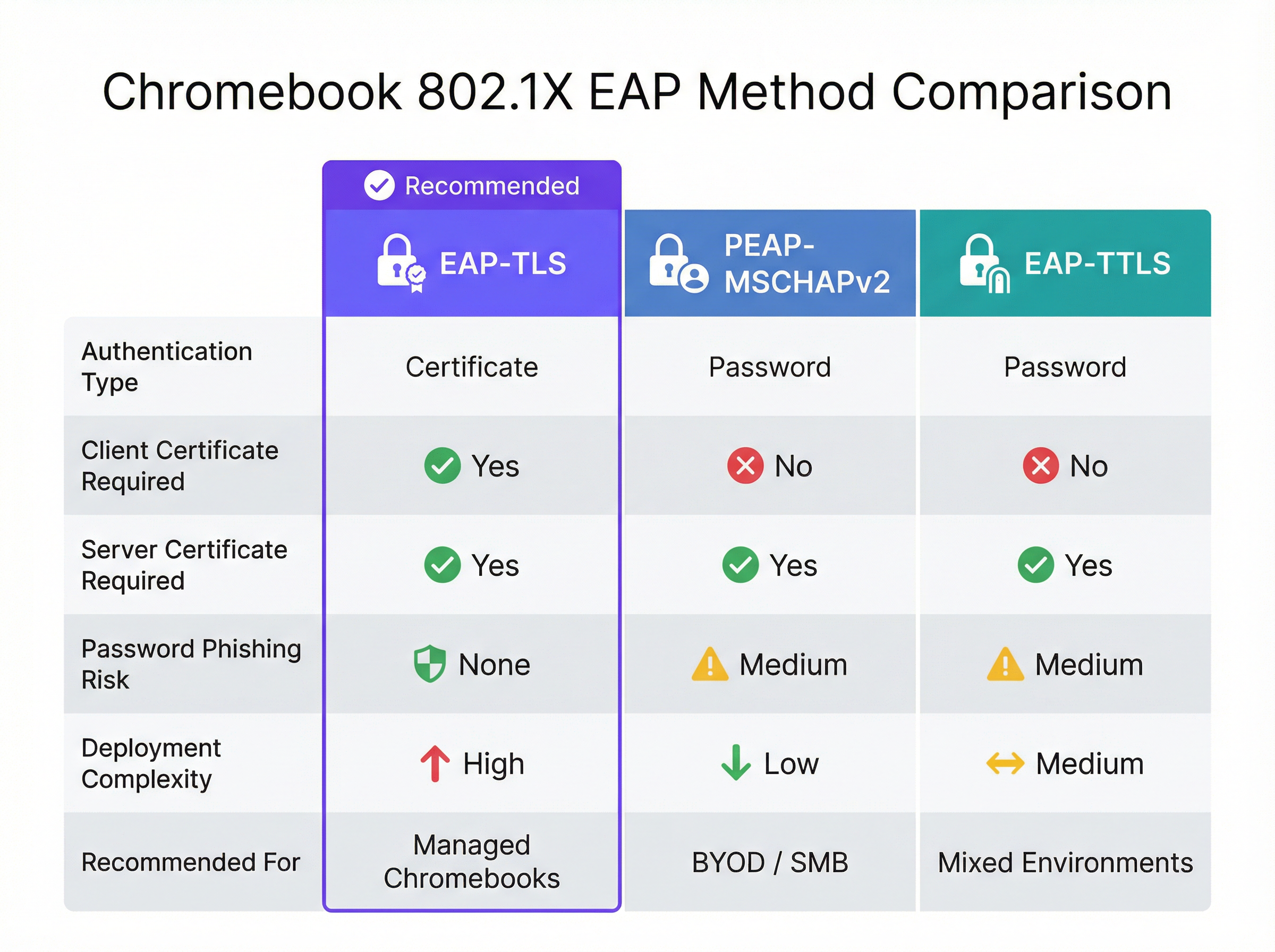
Abbildung 2: Ein direkter Vergleich der von Chromebooks unterstützten EAP-Methoden, der die Kompromisse zwischen Sicherheit und Komplexität hervorhebt.
| EAP-Methode | Authentifizierungstyp | Client-Zertifikat erforderlich | Phishing-Risiko | Empfohlen für |
|---|---|---|---|---|
| EAP-TLS | Zertifikat | Ja | Keines | Verwaltete Chromebooks |
| PEAP-MSCHAPv2 | Passwort | Nein | Mittel | BYOD / KMU-Bereitstellungen |
| EAP-TTLS | Passwort | Nein | Mittel | Gemischte Umgebungen |
EAP-TLS (Transport Layer Security): Der Goldstandard für Enterprise-WiFi. Es erfordert sowohl ein Serverzertifikat (auf dem RADIUS-Server) als auch ein Client-Zertifikat (auf dem Chromebook). Dies macht Passwörter überflüssig und mindert Phishing-Risiken. Die Google Admin-Konsole kann Client-Zertifikate über den Google Cloud Certificate Connector oder SCEP/EST-Integrationen von Drittanbietern automatisch auf verwaltete Chromebooks pushen.
PEAP-MSCHAPv2 / EAP-TTLS: Diese Protokolle verwenden ein Serverzertifikat, um einen sicheren Tunnel aufzubauen, innerhalb dessen der Benutzername und das Passwort des Benutzers ausgetauscht werden. Obwohl sie für nicht verwaltete Geräte einfacher bereitzustellen sind, sind sie anfällig für den Diebstahl von Anmeldeinformationen, wenn das Client-Gerät das Serverzertifikat nicht streng validiert.
Berücksichtigen Sie beim Netzwerkdesign, wie diese Authentifizierungsereignisse mit nachgelagerten Systemen wie WiFi Analytics -Plattformen korrelieren, die auf stabile MAC-Adressen oder authentifizierte Benutzernamen angewiesen sind, um User Journeys und Besucherfrequenzen zu verfolgen.
Google Workspace vs. Microsoft und Okta: Eine vergleichende Bewertung
Unternehmen, die Identitätsplattformen für die Enterprise-WiFi-Authentifizierung evaluieren, sollten die damit verbundenen Kompromisse verstehen. Microsoft Active Directory bleibt aufgrund seiner nativen LDAP-Unterstützung und der engen NPS-Integration die am nahtlosesten integrierte Option. Okta bietet über seinen RADIUS-Agenten eine robuste RADIUS-as-a-Service-Funktion, wodurch die Notwendigkeit einer selbstverwalteten RADIUS-Infrastruktur entfällt. Google Workspace ist über Secure LDAP eine solide Option, erfordert jedoch eine bewusstere Architektur — Sie benötigen immer einen zwischengeschalteten RADIUS-Server, und der Secure LDAP-Dienst ist nur in höherwertigen Lizenzen verfügbar.
| Funktion | Google Workspace | Microsoft AD/Entra | Okta |
|---|---|---|---|
| Native RADIUS-Unterstützung | Nein (erfordert RADIUS-Server) | Über NPS | Über RADIUS-Agent |
| LDAP-Schnittstelle | Google Secure LDAP | Natives AD LDAP | LDAP Interface Agent |
| EAP-TLS-Unterstützung | Ja (über PKI-Integration) | Ja (nativ) | Ja |
| Zertifikats-Push für verwaltete Geräte | Google Admin-Konsole | Intune / GPO | MDM-Integration |
| Lizenzanforderung | Enterprise / Cloud Identity Premium | In AD enthalten | Workforce Identity |
Implementierungsleitfaden
Bereitstellung von 802.1X für verwaltete Chromebooks
Die Bereitstellung von sicherem WiFi für verwaltete Chromebooks umfasst die Konfiguration der Google Admin-Konsole, um die erforderlichen Netzwerkprofile und Zertifikate zu pushen. Dies stellt sicher, dass sich Geräte ohne Benutzereingriff automatisch verbinden.
Schritt 1: Konfigurieren Sie den RADIUS-Server
Stellen Sie einen RADIUS-Server (z. B. FreeRADIUS) bereit, der EAP-TLS oder PEAP unterstützt. Installieren Sie ein vertrauenswürdiges Serverzertifikat auf dem RADIUS-Server. Wenn Sie eine private CA verwenden, stellen Sie sicher, dass das Root-CA-Zertifikat für die Bereitstellung auf Clients exportiert wird. Konfigurieren Sie den RADIUS-Server so, dass er Google Secure LDAP abfragt (bei anmeldeinformationsbasierter Authentifizierung) oder Client-Zertifikate gegen Ihre CA validiert (bei Verwendung von EAP-TLS).
Schritt 2: Richten Sie Google Secure LDAP ein (für PEAP/EAP-TTLS)
Navigieren Sie in der Google Admin-Konsole zu Apps > LDAP. Fügen Sie einen neuen LDAP-Client hinzu (z. B. „Enterprise RADIUS“). Konfigurieren Sie die Zugriffsberechtigungen (Benutzerinformationen lesen, Passwörter überprüfen). Laden Sie das generierte Client-Zertifikat und den Schlüssel herunter. Installieren Sie diese Anmeldeinformationen auf Ihrem RADIUS-Server und konfigurieren Sie ihn für die Verbindung mit ldap.google.com:636.
Schritt 3: Stellen Sie Zertifikate auf Chromebooks bereit (für EAP-TLS)
Navigieren Sie in der Google Admin-Konsole zu Geräte > Netzwerke > Zertifikate. Laden Sie Ihr Root-CA-Zertifikat hoch und markieren Sie es als „Vertrauenswürdige Zertifizierungsstelle“. Konfigurieren Sie einen Mechanismus zur Ausstellung von Client-Zertifikaten für Geräte über den Google Cloud Certificate Connector oder einen Cloud-basierten PKI-Anbieter, der die SCEP/EST-Integration unterstützt.
Schritt 4: Erstellen Sie das WiFi-Profil in der Google Admin-Konsole
Navigieren Sie zu Geräte > Netzwerke > Wi-Fi. Erstellen Sie ein neues Wi-Fi-Netzwerkprofil. Legen Sie die SSID fest und wählen Sie WPA/WPA2/WPA3-Enterprise als Sicherheitstyp. Wählen Sie den entsprechenden EAP-Typ aus. Wenn Sie EAP-TLS verwenden, wählen Sie das bereitgestellte Client-Zertifikat aus. Wenn Sie PEAP verwenden, konfigurieren Sie es so, dass die Anmeldeinformationen des angemeldeten Benutzers verwendet werden. Entscheidend ist, dass Sie das vertrauenswürdige Root-CA-Zertifikat auswählen, um sicherzustellen, dass das Chromebook den RADIUS-Server validiert. Wenden Sie das Profil auf die entsprechenden Organisationseinheiten (OUs) an.
Best Practices
Strenge Validierung von Serverzertifikaten: Erzwingen Sie immer die Validierung von Serverzertifikaten auf Client-Geräten. Andernfalls sind Benutzer Evil-Twin-Angriffen ausgesetzt, bei denen ein Angreifer dieselbe SSID ausstrahlt und Anmeldeinformationen abfängt. Diese einzige Konfigurationsentscheidung macht den Unterschied zwischen einer sicheren und einer anfälligen Bereitstellung aus. Eine tiefere Untersuchung der 802.1X-Sicherheitsarchitektur finden Sie unter 802.1X-Authentifizierung: Sicherung des Netzwerkzugriffs auf modernen Geräten .
Netzwerke nach Rolle segmentieren: Verwenden Sie RADIUS-Attribute (z. B. Filter-Id, Tunnel-Private-Group-Id), die von Google LDAP zurückgegeben werden, um Benutzern basierend auf ihrer Google Workspace-Gruppenmitgliedschaft (z. B. Mitarbeiter vs. Studenten) dynamisch verschiedene VLANs zuzuweisen. Dies schränkt laterale Bewegungen ein und verbessert die Sicherheitslage erheblich.
Überwachung und Auditierung: Überprüfen Sie regelmäßig RADIUS-Authentifizierungsprotokolle und Google Workspace-Auditprotokolle. Integrieren Sie diese Protokolle in ein SIEM-System, um anomale Authentifizierungsmuster oder Brute-Force-Versuche zu erkennen. Berücksichtigen Sie, wie diese Daten in breitere Network-Intelligence-Plattformen einfließen.
Planung für BYOD: Während verwaltete Chromebooks EAP-TLS verwenden können, benötigen nicht verwaltete Geräte (private Telefone von Mitarbeitern, Gästegeräte) einen anderen Ansatz. Implementieren Sie ein sicheres Onboarding-Portal oder verwenden Sie dynamische PSKs für diese Geräte. Für öffentliche Zugangsbereiche in Gastgewerbe - oder Einzelhandel -Umgebungen sollten Sie Standard- Gäste-WiFi -Lösungen mit Captive Portals in Betracht ziehen, die die Zustimmung erfassen und die GDPR-Konformität sicherstellen.
Infrastrukturredundanz: Stellen Sie mehrere RADIUS-Server bereit und konfigurieren Sie Access Points für ein automatisches Failover. Ein einzelner RADIUS-Server ist ein kritischer Single Point of Failure — wenn er ausfällt, können sich keine verwalteten Geräte mit dem Netzwerk verbinden.
Fehlerbehebung & Risikominderung
Häufige Fehlerquellen
Zertifikatsablauf ist die häufigste Ursache für EAP-TLS-Fehler in Produktionsumgebungen. Implementieren Sie eine automatisierte Überwachung und Alarmierung für Zertifikatsgültigkeitsdauern bei 90, 30 und 7 Tagen vor Ablauf. Dies gilt sowohl für das RADIUS-Serverzertifikat als auch für alle Zwischen-CA-Zertifikate.
Zeitabweichungen (Clock Skew) sind eine häufig übersehene Ursache für zeitweilige Authentifizierungsfehler. EAP-TLS ist für die Zertifikatsvalidierung auf eine genaue Zeitmessung angewiesen. Stellen Sie sicher, dass der RADIUS-Server, die Zertifizierungsstelle und die Chromebooks alle über NTP synchronisiert werden. Eine Abweichung von mehr als ein paar Minuten kann dazu führen, dass gültige Zertifikate abgelehnt werden.
LDAP-Verbindungsprobleme: Wenn Sie Google Secure LDAP verwenden, stellen Sie sicher, dass der RADIUS-Server ldap.google.com über den TCP-Port 636 erreichen kann und dass das zur Authentifizierung verwendete Client-Zertifikat in der Google Admin-Konsole nicht abgelaufen ist oder widerrufen wurde.
Falsche OU-Anwendung: Stellen Sie sicher, dass das WiFi-Profil und die Zertifikate auf die richtigen Organisationseinheiten in der Google Admin-Konsole angewendet werden. Ein häufiger Fehler ist die Anwendung eines Gerätezertifikatsprofils auf eine Benutzer-OU, was bedeutet, dass das Zertifikat niemals auf das Gerät gepusht wird.
Strategien zur Risikominderung
Ein phasenweiser Rollout ist unerlässlich. Stellen Sie eine neue 802.1X-Konfiguration niemals sofort für das gesamte Unternehmen bereit. Beginnen Sie mit einer kleinen Pilotgruppe (z. B. dem IT-Team) und weiten Sie diese dann auf eine einzelne Abteilung oder einen Standort aus, bevor ein globaler Rollout erfolgt. Richten Sie eine versteckte, stark eingeschränkte Fallback-SSID ein, die IT-Mitarbeiter zur Fehlerbehebung bei Geräten verwenden können, die sich nicht über 802.1X authentifizieren lassen.
Für Unternehmen in regulierten Sektoren ist sicherzustellen, dass Ihre 802.1X-Bereitstellung mit den relevanten Compliance-Frameworks übereinstimmt. In Gesundheitswesen -Umgebungen unterstützt die Netzwerksegmentierung über dynamische VLAN-Zuweisung direkt die HIPAA-Anforderungen zur Isolierung klinischer Systeme. Im Einzelhandel schreibt PCI DSS die Netzwerktrennung zwischen Karteninhaber-Datenumgebungen und allgemeinen Unternehmensnetzwerken vor — eine Anforderung, die durch dynamische VLAN-Zuweisung elegant erfüllt wird.
ROI & Geschäftliche Auswirkungen
Der Übergang von PSK-basierten Netzwerken zu 802.1X mit Google Workspace-Integration bietet signifikante, messbare Vorteile, die die Implementierungsinvestition rechtfertigen.
Reduzierter Helpdesk-Aufwand: Die automatisierte Zertifikatsbereitstellung über die Google Admin-Konsole macht die manuelle WiFi-Konfiguration auf verwalteten Geräten überflüssig. Unternehmen berichten in der Regel von einer 40- bis 60-prozentigen Reduzierung der WiFi-bezogenen Helpdesk-Tickets nach einem EAP-TLS-Rollout, da keine Passwörter vergessen oder rotiert werden können.
Verbesserte Sicherheitslage: EAP-TLS eliminiert die passwortbasierte Authentifizierung und neutralisiert Phishing- und Credential-Stuffing-Angriffe. Dies reduziert das Risiko von Datenschutzverletzungen und die damit verbundenen finanziellen und Reputationskosten. Die durchschnittlichen Kosten einer Datenschutzverletzung überstiegen im Jahr 2024 4,8 Millionen US-Dollar — eine Zahl, die die Investition in eine ordnungsgemäße Authentifizierungsarchitektur leicht rechtfertigen lässt.
Optimiertes Offboarding: Wenn ein Mitarbeiter das Unternehmen verlässt, wird durch die Deaktivierung seines Google Workspace-Kontos sofort sein WiFi-Zugriff entzogen. Es ist nicht erforderlich, einen gemeinsamen PSK im gesamten Unternehmen zu rotieren, wodurch das Zeitfenster der Verwundbarkeit zwischen dem Ausscheiden eines Mitarbeiters und einer PSK-Rotation entfällt.
Verbesserte Analysen und Intelligenz: Durch die Bindung der Netzwerkauthentifizierung an eine eindeutige Identität können Standorte Plattformen wie Wayfinding und WiFi Analytics nutzen, um die Raumnutzung und das Benutzerverhalten genauer zu verstehen. Diese Daten können Infrastrukturinvestitionen fundieren und die Immobiliennutzung in komplexen Umgebungen wie Transport -Knotenpunkten oder großen Konferenzzentren optimieren. Für Unternehmen, die untersuchen möchten, wie Network Intelligence breitere operative Ziele unterstützt, bietet der Artikel Moderne Hospitality-WiFi-Lösungen, die Ihre Gäste verdienen relevanten Kontext.
Für Unternehmen, die den breiteren Kontext der Netzwerkarchitektur berücksichtigen, bieten die Artikel Definition von Wireless Access Points: Ihr ultimativer Leitfaden für 2026 und Die wichtigsten SD-WAN-Vorteile für moderne Unternehmen ergänzende Anleitungen zu Infrastrukturentscheidungen, die einer erfolgreichen 802.1X-Bereitstellung zugrunde liegen.
Schlüsselbegriffe & Definitionen
802.1X
An IEEE standard for port-based Network Access Control (PNAC). It provides an authentication mechanism to devices wishing to attach to a LAN or WLAN, requiring each device to authenticate before being granted network access.
The foundational protocol for enterprise WiFi security, replacing shared passwords (PSKs) with individual, identity-based authentication. Supported natively by Chromebooks and all modern WiFi access points.
EAP-TLS (Extensible Authentication Protocol - Transport Layer Security)
An EAP method that uses PKI (Public Key Infrastructure) to authenticate both the client and the server using digital certificates. No passwords are exchanged during authentication.
The gold standard for managed device WiFi authentication. Requires a client certificate on the Chromebook (deployed via Google Admin Console) and a server certificate on the RADIUS server.
Google Secure LDAP
A managed service from Google that exposes a traditional LDAP interface to the Google Workspace cloud directory, allowing legacy systems like RADIUS servers to authenticate users against Google's identity platform.
Essential for organisations that want to use their Google credentials for 802.1X WiFi authentication. Available on Cloud Identity Premium and Google Workspace Enterprise licences.
RADIUS (Remote Authentication Dial-In User Service)
A networking protocol that provides centralised Authentication, Authorization, and Accounting (AAA) management for users connecting to a network service. Access points communicate with a RADIUS server to verify user or device credentials.
The intermediary server that bridges the gap between WiFi access points and identity providers like Google Workspace. Common implementations include FreeRADIUS, Cisco ISE, and Aruba ClearPass.
PEAP-MSCHAPv2 (Protected Extensible Authentication Protocol)
An EAP method that uses a server certificate to create a secure TLS tunnel, inside of which the user's username and password are validated using the MSCHAPv2 protocol.
A common alternative to EAP-TLS for BYOD or SMB environments where deploying client certificates to every device is impractical. Requires strict server certificate validation to prevent credential theft.
Dynamic VLAN Assignment
The process of placing a user or device into a specific Virtual Local Area Network (VLAN) based on their identity or group membership, determined during the 802.1X authentication process via RADIUS attributes.
Allows network administrators to segment traffic (e.g., keeping students and staff on different subnets) using a single SSID, based on Google Workspace group membership returned via Secure LDAP.
SCEP (Simple Certificate Enrollment Protocol)
A protocol designed to automate the issuance and revocation of digital certificates at scale, commonly used in MDM and device management platforms.
Used in conjunction with Google Admin Console to automatically push client certificates to managed Chromebooks for EAP-TLS authentication, without requiring manual certificate installation.
Evil Twin Attack
A fraudulent Wi-Fi access point that appears to be legitimate by broadcasting the same SSID as a trusted network, designed to intercept user credentials or traffic.
The primary threat mitigated by enforcing strict server certificate validation in 802.1X configurations. Without certificate validation, a PEAP user's Google credentials can be captured by a rogue access point.
WPA3-Enterprise
The latest generation of the Wi-Fi Protected Access security protocol for enterprise networks, providing stronger encryption (192-bit minimum in WPA3-Enterprise 192-bit mode) and improved protection against offline dictionary attacks.
The recommended security protocol for all new 802.1X deployments. Fully supported by modern Chromebooks and access points, and configurable via the Google Admin Console WiFi profile.
Fallstudien
A 2,000-student university campus needs to deploy secure WiFi to both university-owned Chromebooks (managed via Google Admin) and student BYOD devices (phones, laptops). They use Google Workspace for Education as their sole identity provider and have no on-premise Active Directory.
For the managed Chromebooks, the university should deploy EAP-TLS. They configure a cloud-based PKI integrated with Google Workspace via SCEP. The Google Admin Console pushes the Root CA, the SCEP payload, and the WiFi profile (WPA3-Enterprise, EAP-TLS) to the Chromebook OUs. Devices authenticate silently and securely without any user interaction.
For BYOD devices, they deploy a secure onboarding portal. Students connect to an open 'Onboarding' SSID, authenticate via Google SAML SSO on a captive portal, and are then provisioned with a unique, device-specific certificate (or dynamic PSK) for the main 'Campus-Secure' SSID. This separates managed and unmanaged traffic while leveraging the same Google identity. The RADIUS server uses Google Secure LDAP to validate credentials and assigns students and staff to separate VLANs based on their Google Workspace group membership.
A retail chain with 50 locations uses Google Workspace. They want to provide staff WiFi on corporate-owned devices and separate Guest WiFi for customers. They currently use a single PSK for staff, which hasn't been changed in three years. A former employee is known to have the PSK.
The retail chain should implement Google Secure LDAP immediately. They deploy a central RADIUS server in the cloud, configured to authenticate against Google Secure LDAP. In the Google Admin Console, they create a WiFi profile using PEAP-MSCHAPv2, enforcing strict server certificate validation. The access points at all 50 locations point to this central RADIUS server. Staff connect using their Google Workspace credentials — no new passwords to distribute.
For customers, they deploy a separate captive portal solution on a segregated VLAN, which captures marketing consent and ensures GDPR compliance, completely isolated from the staff network. The former employee's Google account is disabled, immediately revoking their network access without requiring a PSK rotation across 50 sites.
Szenarioanalyse
Q1. Your organisation is deploying 802.1X to 500 managed Chromebooks. You want the highest level of security and want to avoid users ever needing to type a password to connect to the WiFi. Which EAP method should you configure in the Google Admin Console, and what additional infrastructure component must you deploy?
💡 Hinweis:Which method relies entirely on certificates rather than credentials, and what must be deployed on the client device?
Empfohlenen Ansatz anzeigen
EAP-TLS. It requires a client certificate to be pushed to the Chromebook via the Google Admin Console (using SCEP or the Google Cloud Certificate Connector) and a server certificate on the RADIUS server. This eliminates password-based authentication entirely. The additional infrastructure required is a PKI (Certificate Authority) to issue and manage client certificates.
Q2. You have configured Google Secure LDAP and a FreeRADIUS server. Users can authenticate successfully, but they are all being placed on the same default VLAN regardless of whether they are staff or students. You want staff and students to be on separate VLANs. Where must this configuration be applied, and what data source enables it?
💡 Hinweis:Which component bridges the identity data from Google to the network equipment, and what protocol attributes carry VLAN information?
Empfohlenen Ansatz anzeigen
The RADIUS server must be configured to query the user's group membership from Google Secure LDAP and then return the appropriate RADIUS attributes (specifically Tunnel-Private-Group-Id and Tunnel-Type) back to the Access Point. The Access Point uses these attributes to place the client on the correct VLAN. The data source enabling this is the Google Workspace group membership, retrieved via the Secure LDAP query.
Q3. A user reports they cannot connect to the new 802.1X network on their BYOD Android phone. They are prompted for a username and password (PEAP), but the connection fails silently after entering them. The RADIUS logs show no authentication attempt was received. What is the most likely cause, and how do you resolve it?
💡 Hinweis:Think about what the client device must do before it sends the user's credentials, and what configuration is required on the device.
Empfohlenen Ansatz anzeigen
The client device is failing to validate the RADIUS server's certificate. In modern Android versions, strict certificate validation is enforced by default. If the user hasn't installed the Root CA certificate on their device, or if the domain name on the server certificate doesn't match what the device expects, the client will terminate the connection before sending credentials. Resolution: the user must install the Root CA certificate on their Android device and configure the WiFi profile to specify the CA and the expected server domain name.
Q4. A retail chain is considering moving from a static PSK to 802.1X using Google Secure LDAP. The CFO asks for the business case. What are the three most compelling financial and operational arguments you would present?
💡 Hinweis:Consider the costs associated with PSK management, the risk of credential exposure, and the operational overhead of distributed site management.
Empfohlenen Ansatz anzeigen
- Elimination of PSK rotation costs: With a static PSK, any staff departure requires a key rotation across all sites — a costly, disruptive operation. With identity-based auth, disabling a Google account instantly revokes access at all locations. 2. Reduced breach risk: A compromised PSK grants network access to anyone with the key. Identity-based auth limits exposure to individual accounts, which can be disabled immediately. The average cost of a data breach exceeds $4.8M, making the infrastructure investment straightforward to justify. 3. Reduced helpdesk overhead: Automated credential management via Google Workspace eliminates WiFi-related password reset tickets and manual device configuration, typically reducing WiFi helpdesk volume by 40-60%.
Wichtigste Erkenntnisse
- ✓Google Workspace requires an intermediary RADIUS server plus Google Secure LDAP to enable native 802.1X WiFi authentication — there is no direct integration between Google and access points.
- ✓EAP-TLS is the gold standard for managed Chromebooks: it uses certificates instead of passwords, eliminating phishing risk and helpdesk overhead from password resets.
- ✓Google Admin Console automates the deployment of WiFi profiles and client certificates to managed Chromebooks via SCEP or the Google Cloud Certificate Connector.
- ✓For BYOD and guest devices, SAML-based captive portals provide a secure onboarding path tied to Google SSO, avoiding the complexity of manual certificate deployment on unmanaged devices.
- ✓Enforcing strict server certificate validation is the single most critical security configuration when using credential-based EAP methods (PEAP/EAP-TTLS) — without it, Evil Twin attacks can capture user credentials.
- ✓Dynamic VLAN assignment via RADIUS attributes enables granular network segmentation based on Google Workspace group membership, supporting compliance requirements and limiting lateral movement.
- ✓The primary business case for 802.1X over PSK is instant offboarding: disabling a Google Workspace account immediately revokes network access at all locations, eliminating the PSK rotation problem.




