

Autenticação WiFi no Google Workspace: Integração com Chromebook e LDAP
Uma referência técnica definitiva para administradores de TI que implementam WiFi seguro em ambientes Google Workspace. Este guia abrange a implementação de certificados 802.1X em Chromebooks geridos através da Google Admin Console, a integração do Google Secure LDAP como backend RADIUS e decisões de arquitetura para recintos de educação, media e empresas. Fornece passos de implementação práticos, casos de estudo reais e uma comparação direta de métodos EAP para ajudar as equipas a transitar de PSKs partilhadas vulneráveis para um controlo de acesso à rede robusto e baseado na identidade.
🎧 Ouça este Guia
Ver Transcrição
Resumo Executivo
Para recintos empresariais, instituições de ensino e fornecedores de hotelaria padronizados no Google Workspace, a implementação de uma autenticação WiFi segura e fluida tem sido historicamente um desafio em comparação com ambientes Microsoft Active Directory. Este guia detalha a arquitetura e a implementação da autenticação WiFi no Google Workspace, focando-se especificamente na implementação de certificados 802.1X em Chromebook e na integração do Google Secure LDAP para backends RADIUS.
Os gestores de TI e arquitetos de rede devem equilibrar a segurança (WPA3-Enterprise, IEEE 802.1X) com a fricção do utilizador. Embora as chaves pré-partilhadas (PSKs) sejam facilmente comprometidas e difíceis de rodar, a autenticação baseada em certificados (EAP-TLS) ou em credenciais (PEAP-MSCHAPv2) ligada diretamente à identidade do utilizador no Google Workspace proporciona um controlo de acesso robusto, aplicação de políticas granulares e roaming fluido entre o Guest WiFi e as redes corporativas.
Esta referência técnica descreve os passos exatos para configurar a Google Admin Console para a distribuição automatizada de certificados, implementar o Google Secure LDAP e integrar estas fontes de identidade com servidores RADIUS empresariais. Ao seguir estas melhores práticas independentes de fornecedor, as organizações podem mitigar o roubo de credenciais, reduzir os pedidos de suporte e garantir a conformidade com o GDPR e o PCI DSS.
Análise Técnica Aprofundada
A Arquitetura da Autenticação WiFi no Google Workspace
A autenticação de clientes sem fios no Google Workspace requer a ponte entre a identidade nativa na nuvem (SAML/OAuth) e os protocolos de rede legados (RADIUS/802.1X). Ao contrário do Active Directory, que comunica nativamente via LDAP e se integra perfeitamente com o Network Policy Server (NPS), o Google Workspace requer uma camada intermediária deliberada.
Existem duas arquiteturas principais para o conseguir:
Arquitetura 1 — Google Secure LDAP (Cloud Identity Premium / Google Workspace Enterprise): A Google fornece uma interface LDAP gerida para o seu diretório na nuvem. O seu servidor RADIUS (ex: FreeRADIUS, Cisco ISE, Aruba ClearPass) liga-se de forma segura a ldap.google.com utilizando certificados de cliente. Quando um utilizador tenta ligar-se ao WiFi, o servidor RADIUS valida as suas credenciais no serviço LDAP da Google.
Arquitetura 2 — Captive Portals baseados em SAML / RadSec: Para cenários de BYOD (Bring Your Own Device) ou convidados, os utilizadores ligam-se a uma rede aberta ou PSK, que os redireciona para um Captive Portal. O portal autentica o utilizador via Google SSO (SAML/OAuth). Uma vez autenticado, o sistema pode fornecer dinamicamente uma credencial única (ex: uma PSK dinâmica ou um certificado temporário) para ligações subsequentes.
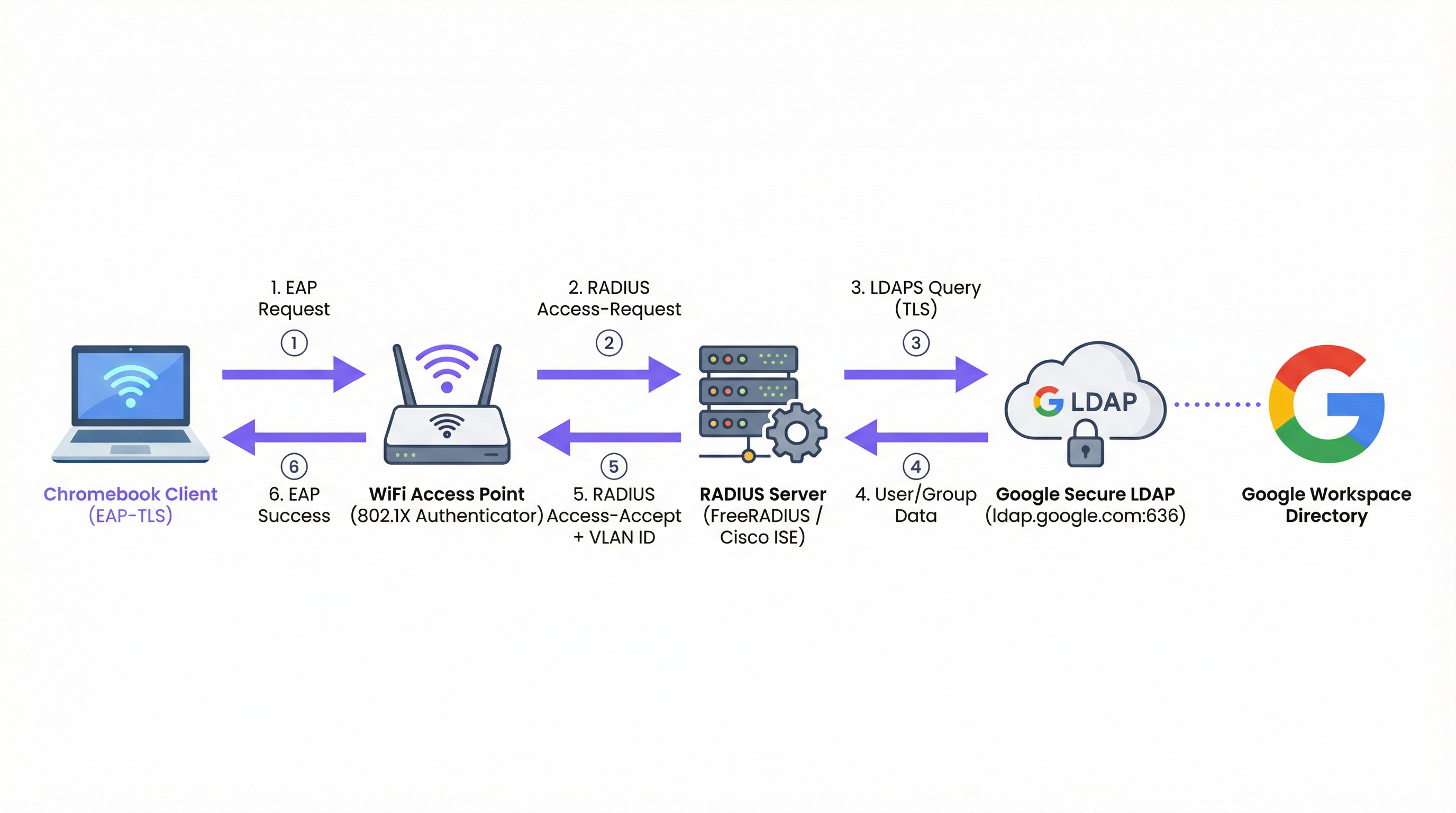
Figura 1: O fluxo de autenticação 802.1X para ambientes Google Workspace, mostrando o servidor RADIUS como o intermediário entre o ponto de acesso e o Google Secure LDAP.
Tipos de EAP e Suporte para Chromebook
Os Chromebooks suportam nativamente vários tipos de Extensible Authentication Protocol (EAP) para 802.1X. A escolha do tipo de EAP dita a postura de segurança e a complexidade da implementação. Para uma visão abrangente dos fundamentos do 802.1X, consulte Autenticação 802.1X: Proteger o Acesso à Rede em Dispositivos Modernos .
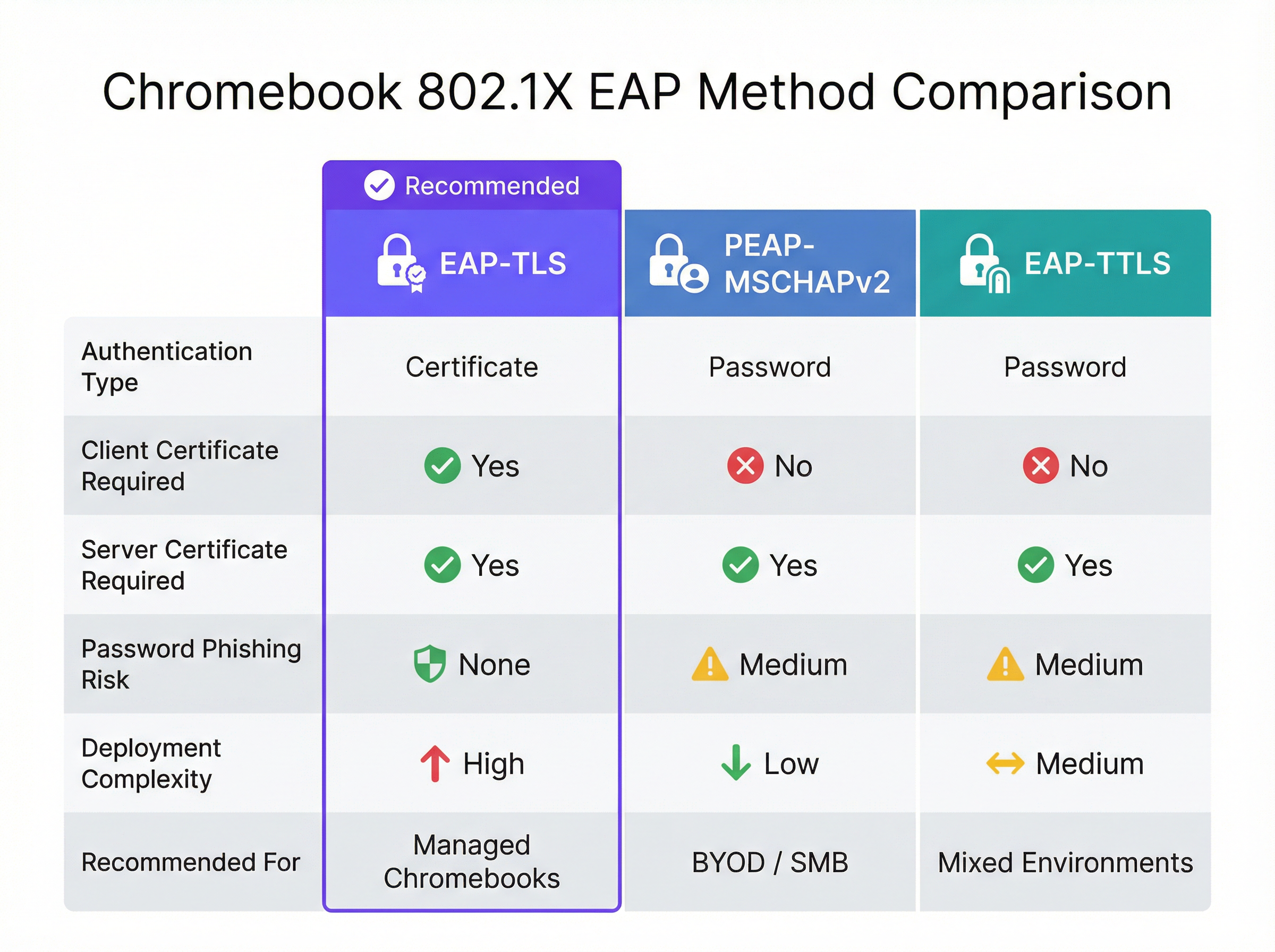
Figura 2: Uma comparação direta dos métodos EAP suportados por Chromebooks, destacando as compensações entre segurança e complexidade.
| Método EAP | Tipo de Autenticação | Cert. de Cliente Necessário | Risco de Phishing | Recomendado Para |
|---|---|---|---|---|
| EAP-TLS | Certificado | Sim | Nenhum | Chromebooks Geridos |
| PEAP-MSCHAPv2 | Palavra-passe | Não | Médio | Implementações BYOD / PME |
| EAP-TTLS | Palavra-passe | Não | Médio | Ambientes mistos |
EAP-TLS (Transport Layer Security): O padrão de excelência para WiFi empresarial. Requer tanto um certificado de servidor (no servidor RADIUS) como um certificado de cliente (no Chromebook). Isto elimina a necessidade de palavras-passe, mitigando riscos de phishing. A Google Admin Console pode enviar automaticamente certificados de cliente para Chromebooks geridos através do Google Cloud Certificate Connector ou integrações SCEP/EST de terceiros.
PEAP-MSCHAPv2 / EAP-TTLS: Estes protocolos utilizam um certificado de servidor para estabelecer um túnel seguro, dentro do qual o nome de utilizador e a palavra-passe são trocados. Embora sejam mais fáceis de implementar para dispositivos não geridos, são vulneráveis ao roubo de credenciais se o dispositivo cliente não validar rigorosamente o certificado do servidor.
Ao desenhar a rede, considere como estes eventos de autenticação se correlacionam com sistemas a jusante, como plataformas de WiFi Analytics , que dependem de endereços MAC estáveis ou nomes de utilizador autenticados para acompanhar as jornadas dos utilizadores e a afluência.
Google Workspace vs. Microsoft e Okta: Uma Avaliação Comparativa
As organizações que avaliam plataformas de identidade para autenticação WiFi empresarial devem compreender as compensações inerentes. O Microsoft Active Directory continua a ser a opção mais perfeitamente integrada, dada a sua compatibilidade nativa com LDAP e a integração estreita com o NPS. A Okta fornece uma capacidade robusta de RADIUS-as-a-Service através do seu RADIUS Agent, eliminando a necessidade de infraestrutura RADIUS autogerida. O Google Workso ritmo, via Secure LDAP, é uma opção sólida mas requer uma arquitetura mais deliberada — é sempre necessário um servidor RADIUS intermediário, e o serviço Secure LDAP só está disponível em licenças de nível superior.
| Capacidade | Google Workspace | Microsoft AD/Entra | Okta |
|---|---|---|---|
| Suporte RADIUS Nativo | Não (requer servidor RADIUS) | Via NPS | Via Agente RADIUS |
| Interface LDAP | Google Secure LDAP | LDAP AD Nativo | Agente de Interface LDAP |
| Suporte EAP-TLS | Sim (via integração PKI) | Sim (nativo) | Sim |
| Envio de Certificados de Dispositivos Geridos | Google Admin Console | Intune / GPO | Integração MDM |
| Requisito de Licença | Enterprise / Cloud Identity Premium | Incluído no AD | Workforce Identity |
Guia de Implementação
Implementar 802.1X em Chromebooks Geridos
A implementação de Wi-Fi seguro em Chromebooks geridos envolve a configuração do Google Admin Console para enviar os perfis de rede e certificados necessários. Isto garante que os dispositivos se liguem automaticamente sem intervenção do utilizador.
Passo 1: Configurar o Servidor RADIUS
Implemente um servidor RADIUS (ex: FreeRADIUS) capaz de EAP-TLS ou PEAP. Instale um certificado de servidor fidedigno no servidor RADIUS. Se utilizar uma CA privada, certifique-se de que o certificado Root CA é exportado para implementação nos clientes. Configure o servidor RADIUS para consultar o Google Secure LDAP (se utilizar autenticação baseada em credenciais) ou validar certificados de cliente face à sua CA (se utilizar EAP-TLS).
Passo 2: Configurar o Google Secure LDAP (Para PEAP/EAP-TTLS)
No Google Admin Console, navegue até Apps > LDAP. Adicione um novo cliente LDAP (ex: "Enterprise RADIUS"). Configure as permissões de acesso (ler informações do utilizador, verificar palavras-passe). Transfira o certificado de cliente e a chave gerados. Instale estas credenciais no seu servidor RADIUS e configure-o para se ligar a ldap.google.com:636.
Passo 3: Implementar Certificados nos Chromebooks (Para EAP-TLS)
No Google Admin Console, navegue até Devices > Networks > Certificates. Carregue o seu certificado Root CA e marque-o como uma "Autoridade de Certificação Fidedigna". Configure um mecanismo para emitir certificados de cliente para dispositivos através do Google Cloud Certificate Connector ou de um fornecedor de PKI na nuvem que suporte integração SCEP/EST.
Passo 4: Criar o Perfil de Wi-Fi no Google Admin Console
Navegue até Devices > Networks > Wi-Fi. Crie um novo perfil de rede Wi-Fi. Defina o SSID e selecione WPA/WPA2/WPA3-Enterprise como o Tipo de Segurança. Selecione o tipo de EAP apropriado. Se utilizar EAP-TLS, selecione o certificado de cliente implementado. Se utilizar PEAP, configure-o para utilizar as credenciais de início de sessão do utilizador. Crucialmente, selecione o certificado Root CA fidedigno para garantir que o Chromebook valida o servidor RADIUS. Aplique o perfil às Unidades Organizacionais (OUs) apropriadas.
Melhores Práticas
Validação Estrita de Certificados de Servidor: Imponha sempre a validação de certificados de servidor nos dispositivos cliente. A falha em fazê-lo expõe os utilizadores a ataques Evil Twin, onde um atacante transmite o mesmo SSID e captura credenciais. Esta decisão de configuração única é a diferença entre uma implementação segura e uma vulnerável. Para uma exploração mais aprofundada da arquitetura de segurança 802.1X, consulte Autenticação 802.1X: Proteger o Acesso à Rede em Dispositivos Modernos .
Segmentar Redes por Função: Utilize atributos RADIUS (ex: Filter-Id, Tunnel-Private-Group-Id) retornados do Google LDAP para atribuir dinamicamente utilizadores a diferentes VLANs com base na sua pertença a grupos do Google Workspace (ex: Funcionários vs. Alunos). Isto limita o movimento lateral e melhora significativamente a postura de segurança.
Monitorizar e Auditar: Reveja regularmente os registos de autenticação RADIUS e os registos de auditoria do Google Workspace. Integre estes registos num sistema SIEM para detetar padrões de autenticação anómalos ou tentativas de força bruta. Considere como estes dados alimentam plataformas de inteligência de rede mais amplas.
Planear para BYOD: Embora os Chromebooks geridos possam utilizar EAP-TLS, os dispositivos não geridos (telemóveis pessoais de funcionários, dispositivos de convidados) necessitam de uma abordagem diferente. Implemente um portal de integração seguro ou utilize PSKs dinâmicos para estes dispositivos. Para áreas de acesso público em ambientes de Hospitalidade ou Retalho , considere soluções padrão de Guest WiFi com Captive Portals que recolham o consentimento e garantam a conformidade com o GDPR.
Redundância de Infraestrutura: Implemente múltiplos servidores RADIUS e configure os pontos de acesso para failover automático. Um único servidor RADIUS é um ponto crítico único de falha — se este falhar, nenhum dispositivo gerido conseguirá ligar-se à rede.
Resolução de Problemas e Mitigação de Riscos
Modos de Falha Comuns
Expiração de Certificados é a causa mais comum de falha de EAP-TLS em ambientes de produção. Implemente monitorização e alertas automatizados para períodos de validade de certificados aos 90, 30 e 7 dias antes da expiração. Isto aplica-se tanto ao certificado do servidor RADIUS como a quaisquer certificados de CA intermédios.
Desvio de Relógio (Clock Skew) é uma causa frequentemente negligenciada de falhas de autenticação intermitentes. O EAP-TLS depende de uma cronometragem precisa para a validação de certificados. Certifique-se de que o servidor RADIUS, a Autoridade de Certificação e os Chromebooks sincronizam todos via NTP. Um desvio de mais de alguns minutos pode fazer com que certificados válidos sejam rejeitados.
Problemas de Conetividade LDAP: Se utilizar o Google Secure LDAP, certifique-se de que o servidor RADIUS consegue aceder a ldap.google.com na porta TCP 636 e que o certificado de cliente utilizado para autenticação não expirou nem foi revogado no Google Admin Console.
Aplicação Incorreta de OU: Certifique-se de que o perfil de Wi-Fi e os certificados são aplicados às Unidades Organizacionais corretas no Google Admin Console. Um erro comum é aplicar um perfil de certificado de dispositivo a uma OU de utilizador, o que significa que o certificado nunca é enviado para o dispositivo.
Estratégias de Mitigação de Riscos
Uma implementação faseada é essencial. Nunca implemente uma nova configuração 802.1X em toda a organização de uma só vez.Comece com um pequeno grupo-piloto (ex.: a equipa de TI) e, em seguida, expanda para um único departamento ou local antes de uma implementação global. Mantenha um SSID de reserva oculto e altamente restrito que a equipa de TI possa utilizar para resolver problemas em dispositivos que não consigam autenticar-se via 802.1X.
Para organizações em setores regulamentados, certifique-se de que a sua implementação de 802.1X está alinhada com as estruturas de conformidade relevantes. Em ambientes de Saúde , a segmentação de rede através da atribuição dinâmica de VLAN suporta diretamente os requisitos da HIPAA para o isolamento de sistemas clínicos. No retalho, o PCI DSS exige a separação de rede entre ambientes de dados de titulares de cartões e redes corporativas gerais — um requisito que a atribuição dinâmica de VLAN satisfaz de forma elegante.
ROI e Impacto no Negócio
A transição de redes baseadas em PSK para 802.1X integrado com o Google Workspace proporciona benefícios significativos e mensuráveis que justificam o investimento na implementação.
Redução da Carga de Trabalho do Helpdesk: A implementação automatizada de certificados através da Google Admin Console elimina a configuração manual de WiFi em dispositivos geridos. As organizações reportam tipicamente uma redução de 40-60% nos pedidos de suporte de WiFi após uma implementação de EAP-TLS, uma vez que não existem palavras-passe para esquecer ou renovar.
Postura de Segurança Reforçada: O EAP-TLS elimina a autenticação baseada em palavras-passe, neutralizando ataques de phishing e de "credential stuffing". Isto reduz o risco de violações de dados e os custos financeiros e reputacionais associados. O custo médio de uma violação de dados em 2024 excedeu os 4,8 milhões de dólares — um valor que torna o investimento numa arquitetura de autenticação adequada fácil de justificar.
Offboarding Simplificado: Quando um colaborador sai, a desativação da sua conta do Google Workspace revoga imediatamente o seu acesso ao WiFi. Não há necessidade de renovar uma PSK partilhada em toda a organização, eliminando a janela de vulnerabilidade que existe entre a saída de um colaborador e a renovação da PSK.
Análises e Inteligência Melhoradas: Ao associar a autenticação de rede a uma identidade única, os espaços podem tirar partido de plataformas como Wayfinding e WiFi Analytics para compreender a utilização do espaço e o comportamento do utilizador com maior precisão. Estes dados podem informar investimentos em infraestrutura e otimizar a utilização de ativos imobiliários em ambientes complexos, como centros de Transporte ou grandes centros de conferências. Para organizações que exploram como a inteligência de rede suporta objetivos operacionais mais amplos, o artigo Soluções de WiFi Modernas para Hotelaria que os Seus Hóspedes Merecem fornece o contexto relevante.
Para organizações que consideram o contexto mais amplo da arquitetura de rede, os artigos Definição de Pontos de Acesso Sem Fios: O Seu Guia Definitivo para 2026 e Os Principais Benefícios do SD WAN para Empresas Modernas fornecem orientações complementares sobre decisões de infraestrutura que sustentam uma implementação de 802.1X bem-sucedida.
Termos-Chave e Definições
802.1X
An IEEE standard for port-based Network Access Control (PNAC). It provides an authentication mechanism to devices wishing to attach to a LAN or WLAN, requiring each device to authenticate before being granted network access.
The foundational protocol for enterprise WiFi security, replacing shared passwords (PSKs) with individual, identity-based authentication. Supported natively by Chromebooks and all modern WiFi access points.
EAP-TLS (Extensible Authentication Protocol - Transport Layer Security)
An EAP method that uses PKI (Public Key Infrastructure) to authenticate both the client and the server using digital certificates. No passwords are exchanged during authentication.
The gold standard for managed device WiFi authentication. Requires a client certificate on the Chromebook (deployed via Google Admin Console) and a server certificate on the RADIUS server.
Google Secure LDAP
A managed service from Google that exposes a traditional LDAP interface to the Google Workspace cloud directory, allowing legacy systems like RADIUS servers to authenticate users against Google's identity platform.
Essential for organisations that want to use their Google credentials for 802.1X WiFi authentication. Available on Cloud Identity Premium and Google Workspace Enterprise licences.
RADIUS (Remote Authentication Dial-In User Service)
A networking protocol that provides centralised Authentication, Authorization, and Accounting (AAA) management for users connecting to a network service. Access points communicate with a RADIUS server to verify user or device credentials.
The intermediary server that bridges the gap between WiFi access points and identity providers like Google Workspace. Common implementations include FreeRADIUS, Cisco ISE, and Aruba ClearPass.
PEAP-MSCHAPv2 (Protected Extensible Authentication Protocol)
An EAP method that uses a server certificate to create a secure TLS tunnel, inside of which the user's username and password are validated using the MSCHAPv2 protocol.
A common alternative to EAP-TLS for BYOD or SMB environments where deploying client certificates to every device is impractical. Requires strict server certificate validation to prevent credential theft.
Dynamic VLAN Assignment
The process of placing a user or device into a specific Virtual Local Area Network (VLAN) based on their identity or group membership, determined during the 802.1X authentication process via RADIUS attributes.
Allows network administrators to segment traffic (e.g., keeping students and staff on different subnets) using a single SSID, based on Google Workspace group membership returned via Secure LDAP.
SCEP (Simple Certificate Enrollment Protocol)
A protocol designed to automate the issuance and revocation of digital certificates at scale, commonly used in MDM and device management platforms.
Used in conjunction with Google Admin Console to automatically push client certificates to managed Chromebooks for EAP-TLS authentication, without requiring manual certificate installation.
Evil Twin Attack
A fraudulent Wi-Fi access point that appears to be legitimate by broadcasting the same SSID as a trusted network, designed to intercept user credentials or traffic.
The primary threat mitigated by enforcing strict server certificate validation in 802.1X configurations. Without certificate validation, a PEAP user's Google credentials can be captured by a rogue access point.
WPA3-Enterprise
The latest generation of the Wi-Fi Protected Access security protocol for enterprise networks, providing stronger encryption (192-bit minimum in WPA3-Enterprise 192-bit mode) and improved protection against offline dictionary attacks.
The recommended security protocol for all new 802.1X deployments. Fully supported by modern Chromebooks and access points, and configurable via the Google Admin Console WiFi profile.
Estudos de Caso
A 2,000-student university campus needs to deploy secure WiFi to both university-owned Chromebooks (managed via Google Admin) and student BYOD devices (phones, laptops). They use Google Workspace for Education as their sole identity provider and have no on-premise Active Directory.
For the managed Chromebooks, the university should deploy EAP-TLS. They configure a cloud-based PKI integrated with Google Workspace via SCEP. The Google Admin Console pushes the Root CA, the SCEP payload, and the WiFi profile (WPA3-Enterprise, EAP-TLS) to the Chromebook OUs. Devices authenticate silently and securely without any user interaction.
For BYOD devices, they deploy a secure onboarding portal. Students connect to an open 'Onboarding' SSID, authenticate via Google SAML SSO on a captive portal, and are then provisioned with a unique, device-specific certificate (or dynamic PSK) for the main 'Campus-Secure' SSID. This separates managed and unmanaged traffic while leveraging the same Google identity. The RADIUS server uses Google Secure LDAP to validate credentials and assigns students and staff to separate VLANs based on their Google Workspace group membership.
A retail chain with 50 locations uses Google Workspace. They want to provide staff WiFi on corporate-owned devices and separate Guest WiFi for customers. They currently use a single PSK for staff, which hasn't been changed in three years. A former employee is known to have the PSK.
The retail chain should implement Google Secure LDAP immediately. They deploy a central RADIUS server in the cloud, configured to authenticate against Google Secure LDAP. In the Google Admin Console, they create a WiFi profile using PEAP-MSCHAPv2, enforcing strict server certificate validation. The access points at all 50 locations point to this central RADIUS server. Staff connect using their Google Workspace credentials — no new passwords to distribute.
For customers, they deploy a separate captive portal solution on a segregated VLAN, which captures marketing consent and ensures GDPR compliance, completely isolated from the staff network. The former employee's Google account is disabled, immediately revoking their network access without requiring a PSK rotation across 50 sites.
Análise de Cenários
Q1. Your organisation is deploying 802.1X to 500 managed Chromebooks. You want the highest level of security and want to avoid users ever needing to type a password to connect to the WiFi. Which EAP method should you configure in the Google Admin Console, and what additional infrastructure component must you deploy?
💡 Dica:Which method relies entirely on certificates rather than credentials, and what must be deployed on the client device?
Mostrar Abordagem Recomendada
EAP-TLS. It requires a client certificate to be pushed to the Chromebook via the Google Admin Console (using SCEP or the Google Cloud Certificate Connector) and a server certificate on the RADIUS server. This eliminates password-based authentication entirely. The additional infrastructure required is a PKI (Certificate Authority) to issue and manage client certificates.
Q2. You have configured Google Secure LDAP and a FreeRADIUS server. Users can authenticate successfully, but they are all being placed on the same default VLAN regardless of whether they are staff or students. You want staff and students to be on separate VLANs. Where must this configuration be applied, and what data source enables it?
💡 Dica:Which component bridges the identity data from Google to the network equipment, and what protocol attributes carry VLAN information?
Mostrar Abordagem Recomendada
The RADIUS server must be configured to query the user's group membership from Google Secure LDAP and then return the appropriate RADIUS attributes (specifically Tunnel-Private-Group-Id and Tunnel-Type) back to the Access Point. The Access Point uses these attributes to place the client on the correct VLAN. The data source enabling this is the Google Workspace group membership, retrieved via the Secure LDAP query.
Q3. A user reports they cannot connect to the new 802.1X network on their BYOD Android phone. They are prompted for a username and password (PEAP), but the connection fails silently after entering them. The RADIUS logs show no authentication attempt was received. What is the most likely cause, and how do you resolve it?
💡 Dica:Think about what the client device must do before it sends the user's credentials, and what configuration is required on the device.
Mostrar Abordagem Recomendada
The client device is failing to validate the RADIUS server's certificate. In modern Android versions, strict certificate validation is enforced by default. If the user hasn't installed the Root CA certificate on their device, or if the domain name on the server certificate doesn't match what the device expects, the client will terminate the connection before sending credentials. Resolution: the user must install the Root CA certificate on their Android device and configure the WiFi profile to specify the CA and the expected server domain name.
Q4. A retail chain is considering moving from a static PSK to 802.1X using Google Secure LDAP. The CFO asks for the business case. What are the three most compelling financial and operational arguments you would present?
💡 Dica:Consider the costs associated with PSK management, the risk of credential exposure, and the operational overhead of distributed site management.
Mostrar Abordagem Recomendada
- Elimination of PSK rotation costs: With a static PSK, any staff departure requires a key rotation across all sites — a costly, disruptive operation. With identity-based auth, disabling a Google account instantly revokes access at all locations. 2. Reduced breach risk: A compromised PSK grants network access to anyone with the key. Identity-based auth limits exposure to individual accounts, which can be disabled immediately. The average cost of a data breach exceeds $4.8M, making the infrastructure investment straightforward to justify. 3. Reduced helpdesk overhead: Automated credential management via Google Workspace eliminates WiFi-related password reset tickets and manual device configuration, typically reducing WiFi helpdesk volume by 40-60%.
Principais Conclusões
- ✓Google Workspace requires an intermediary RADIUS server plus Google Secure LDAP to enable native 802.1X WiFi authentication — there is no direct integration between Google and access points.
- ✓EAP-TLS is the gold standard for managed Chromebooks: it uses certificates instead of passwords, eliminating phishing risk and helpdesk overhead from password resets.
- ✓Google Admin Console automates the deployment of WiFi profiles and client certificates to managed Chromebooks via SCEP or the Google Cloud Certificate Connector.
- ✓For BYOD and guest devices, SAML-based captive portals provide a secure onboarding path tied to Google SSO, avoiding the complexity of manual certificate deployment on unmanaged devices.
- ✓Enforcing strict server certificate validation is the single most critical security configuration when using credential-based EAP methods (PEAP/EAP-TTLS) — without it, Evil Twin attacks can capture user credentials.
- ✓Dynamic VLAN assignment via RADIUS attributes enables granular network segmentation based on Google Workspace group membership, supporting compliance requirements and limiting lateral movement.
- ✓The primary business case for 802.1X over PSK is instant offboarding: disabling a Google Workspace account immediately revokes network access at all locations, eliminating the PSK rotation problem.




