

So integrieren Sie Gäste-WiFi-Daten in Ihr CRM
This guide provides a comprehensive technical reference for IT managers, network architects, and marketing leaders on integrating guest WiFi analytics with CRM platforms such as Salesforce and HubSpot. It covers the strategic rationale, core architectural patterns (Direct API and Webhooks), available data fields, and step-by-step deployment guidance. Venue operators in hospitality, retail, and events will find actionable frameworks for building a compliant, scalable, first-party data pipeline that drives measurable marketing ROI.
🎧 Diesen Leitfaden anhören
Transkript anzeigen

Executive Summary
Die Anbindung der Gäste-WiFi-Infrastruktur an ein Customer Relationship Management (CRM)-System ist längst keine Nischentaktik mehr – sie ist ein entscheidender Bestandteil einer modernen digitalen Engagement-Strategie für jeden physischen Standort. Für IT-Manager, Netzwerkarchitekten und Operations Directors in Hotels, Einzelhandelsketten, Stadien und großen öffentlichen Veranstaltungsorten stellt diese Integration eine leistungsstarke Methode dar, um anonymen Besucherverkehr in einen wertvollen First-Party-Datenbestand zu verwandeln.
Durch die Erfassung und Analyse von Daten der Gäste-WiFi-Nutzer – wie Besuchshäufigkeit, Verweildauer und grundlegende demografische Details – können Unternehmen durch verbesserte Marketing-Personalisierung, höhere Kundenbindung und datengesteuerte operative Entscheidungen einen signifikanten ROI erzielen. Dieser Leitfaden bietet einen herstellerneutralen technischen Entwurf für eine erfolgreiche Integration. Er skizziert die zentralen Architekturmuster, von direkten API-Verbindungen bis hin zu Webhook-basiertem Event-Streaming, und detailliert die Datenfelder, die typischerweise für die Synchronisierung zur Verfügung stehen. Wir untersuchen Best Practices zur Sicherstellung der Datenqualität, zur Einhaltung von GDPR und PCI DSS sowie zur Minderung allgemeiner Sicherheitsrisiken. Ziel ist es, technische Führungskräfte mit dem praxisnahen Wissen auszustatten, das erforderlich ist, um eine robuste, skalierbare und sichere Gäste-WiFi-CRM-Integration zu entwerfen, bereitzustellen und zu verwalten, die messbare geschäftliche Auswirkungen liefert.
Hören Sie sich unser 10-minütiges Audio-Briefing zur Gäste-WiFi-CRM-Integration an – die Perspektive eines Senior Consultants zu Strategie, Architektur und Implementierung.
Technischer Deep-Dive
Die Integration von Gäste-WiFi-Daten in ein CRM umfasst mehrere wichtige technische Komponenten und architektonische Entscheidungen. Im Kern geht es bei dem Prozess darum, Benutzerauthentifizierungs- und Sitzungsdaten vom Access Controller oder Captive Portal des WiFi-Netzwerks zu erfassen und in einem strukturierten, validierten Format an das CRM zu übertragen. Die primären Mechanismen hierfür sind direkte API-Integrationen, Webhooks und zwischengeschaltete Datenkonnektoren.
Architekturmuster
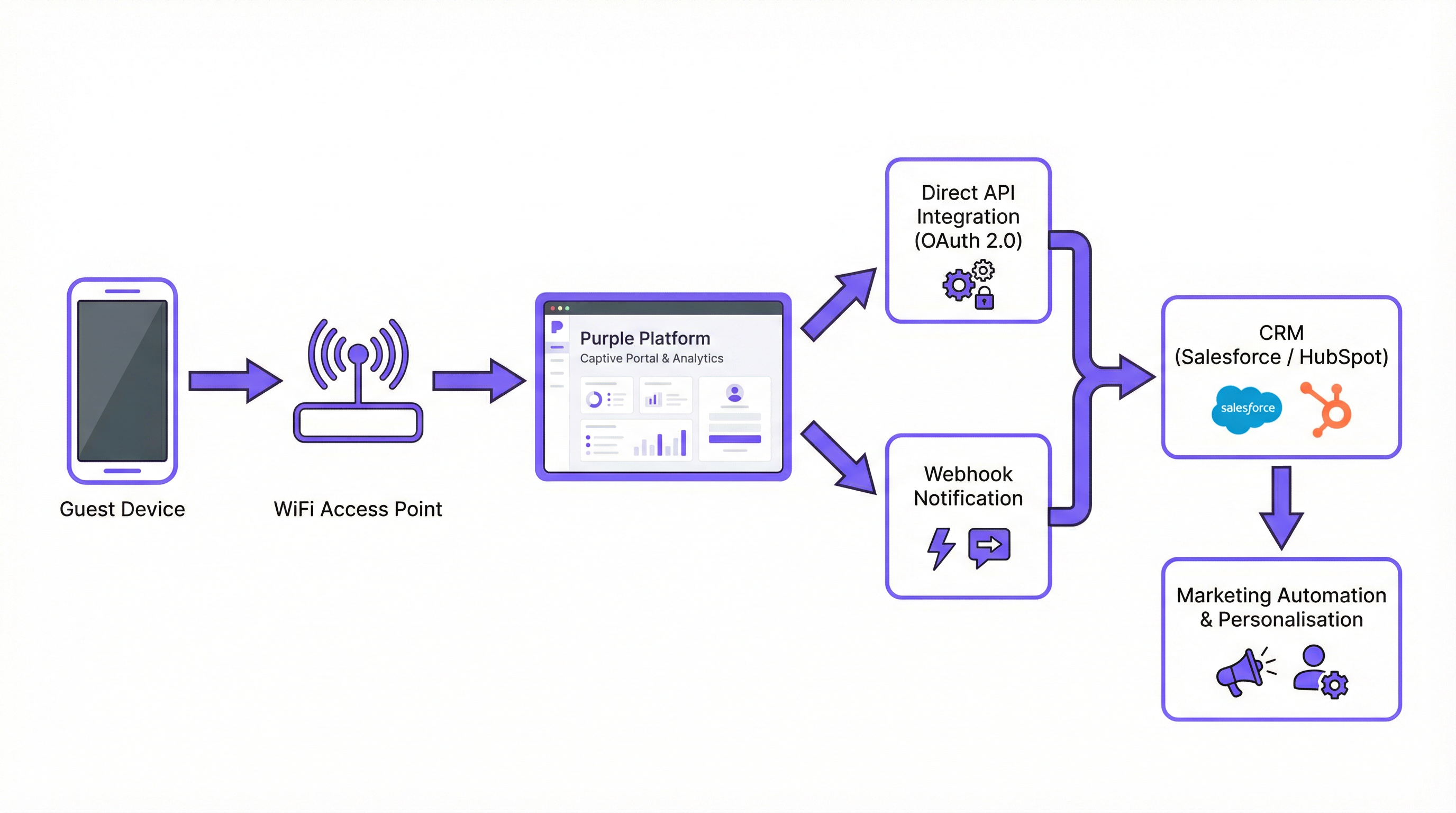
Direkte API-Integration ist die häufigste und empfohlene Methode für moderne Enterprise-Bereitstellungen. Die WiFi-Plattform – wie Purple – führt authentifizierte API-Aufrufe direkt an die REST-API des CRMs durch. Dies ist eine Server-zu-Server-Verbindung. Wenn sich ein Benutzer im Gäste-WiFi authentifiziert, erfasst der WiFi-Controller die Daten und sendet sie in Echtzeit an das CRM. Dieses Muster ist ideal für Bereitstellungen, bei denen die Aktualität der Daten von entscheidender Bedeutung ist, wie z. B. das Auslösen einer sofortigen Willkommens-E-Mail oder die Aktualisierung des Kontostands eines Treueprogramms.
Webhooks bieten eine ressourcenschonende, ereignisgesteuerte Alternative. In diesem Modell sendet die WiFi-Plattform eine HTTP-POST-Benachrichtigung in Echtzeit an eine vorkonfigurierte URL – einen Endpunkt im CRM oder einen Vermittlungsdienst – sobald ein bestimmtes Ereignis eintritt. Ein guest_connected-Ereignis könnte beispielsweise einen Webhook auslösen, der einen Kontakt im CRM erstellt oder aktualisiert. Dies ist äußerst effizient und gut geeignet für Systeme, die auf einer ereignisgesteuerten Architektur basieren.
Middleware-Konnektoren wie Zapier, MuleSoft oder eine maßgeschneiderte Integrationsschicht eignen sich für komplexe Szenarien, in denen keine direkte Integration verfügbar ist oder in denen eine erhebliche Datentransformation erforderlich ist, bevor die Daten das CRM erreichen. Dieser Ansatz erhöht die betriebliche Komplexität, bietet jedoch maximale Flexibilität.
| Muster | Latenz | Komplexität | Am besten für |
|---|---|---|---|
| Direkte API | Echtzeit | Niedrig–Mittel | Die meisten modernen CRMs (Salesforce, HubSpot) |
| Webhooks | Echtzeit | Niedrig | Ereignisgesteuerte Architekturen |
| Middleware | Nahezu Echtzeit | Hoch | Benutzerdefinierte CRMs, komplexe Transformationen |
Datenfelder und Payloads
Die Daten, die aus der Gäste-WiFi-Authentifizierung verfügbar sind, sind wesentlich umfangreicher als eine einfache E-Mail-Adresse. Ein typischer JSON-Payload, der bei einer neuen Gästeverbindung an ein CRM gesendet wird, umfasst die folgenden Kategorien:
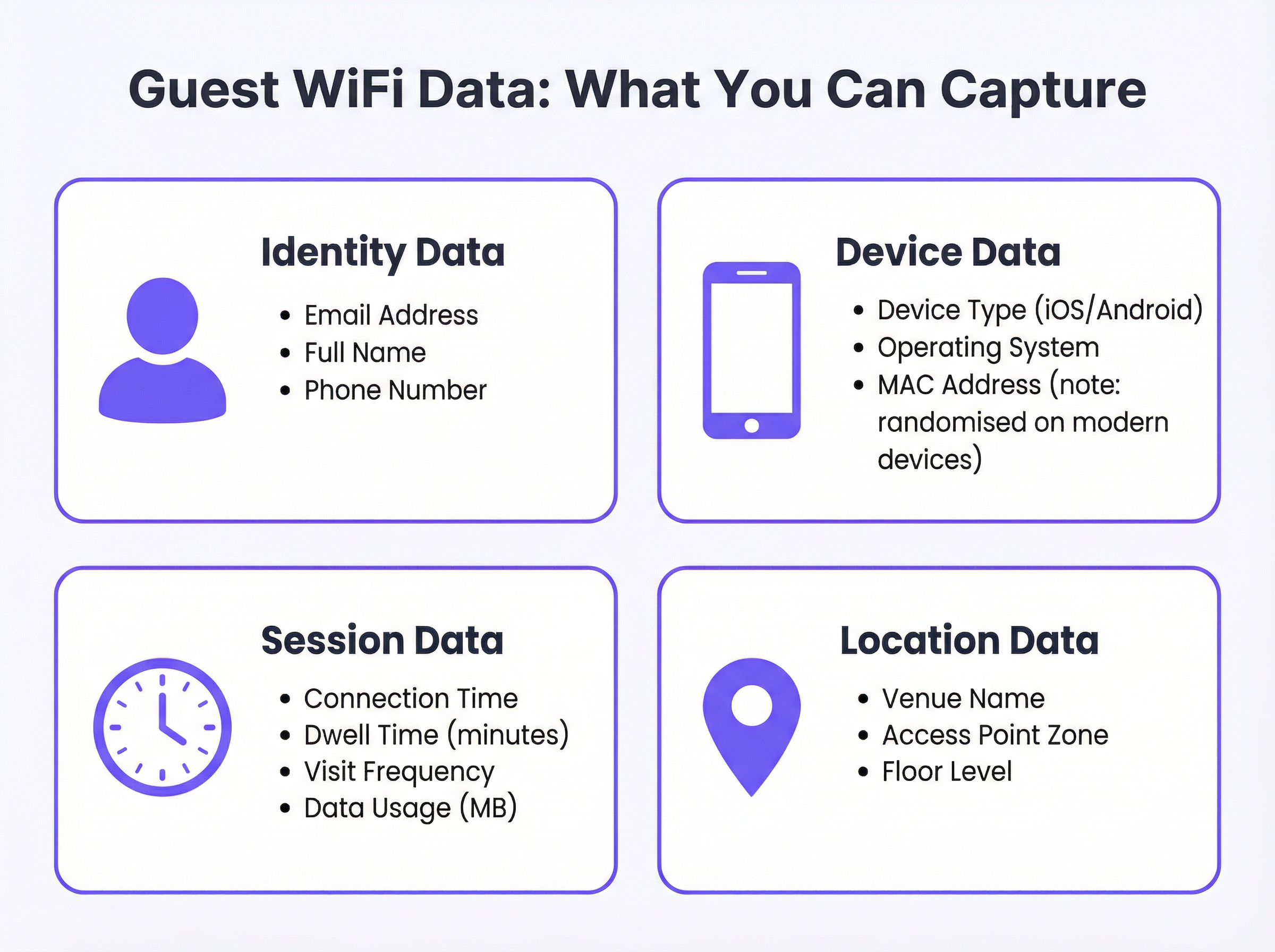
Ein repräsentativer API-Payload könnte wie folgt strukturiert sein:
{
  "email": "guest@example.com",
  "full_name": "Jane Smith",
  "phone": "+44 7700 900000",
  "device_type": "iPhone",
  "os": "iOS 17",
  "connect_time": "2025-03-15T14:32:00Z",
  "dwell_time_minutes": 47,
  "visit_count": 3,
  "venue_name": "The Grand Hotel - Manchester",
  "access_point_zone": "Lobby",
  "marketing_consent": true
}
Beachten Sie das boolesche Feld marketing_consent. Dies ist ein Pflichtfeld in jeder GDPR-konformen Bereitstellung und muss basierend auf der Aktion des Benutzers im Captive Portal explizit festgelegt werden.
Authentifizierungs- und Sicherheitsarchitektur
Sicherheit ist nicht verhandelbar. Die gesamte Datenübertragung muss über HTTPS unter Verwendung von TLS 1.2 oder höher erfolgen. Die Authentifizierung bei der CRM-API muss OAuth 2.0 verwenden, was einen sicheren, delegierten Zugriff bietet, ohne Anmeldeinformationen preiszugeben. API-Schlüssel und OAuth-Token müssen in einem dedizierten Secrets-Management-System gespeichert werden – niemals fest codiert in Konfigurationsdateien oder Umgebungsvariablen auf gemeinsam genutzten Servern.
Auf der Netzwerkseite stellt die Einhaltung von IEEE 802.1X für die portbasierte Netzwerkzugriffskontrolle und WPA3 für die WiFi-Verschlüsselung sicher, dass Benutzerdaten am Verbindungspunkt geschützt sind. Für Veranstaltungsorte, die Zahlungskartendaten verarbeiten, muss die durch PCI DSS vorgeschriebene Netzwerksegmentierung aufrechterhalten werden, um sicherzustellen, dass das Gäste-WiFi-Netzwerk von jeglicher Karteninhaber-Datenumgebung isoliert ist.
Implementierungsleitfaden
Schritt 1: Discovery und Anforderungsabgleich
Bevor eine technische Konfiguration beginnt, sollte eine abteilungsübergreifende Arbeitsgruppe aus IT, Marketing und Recht/Compliance einberufen werden. Das Marketing muss die spezifischen erforderlichen Datenfelder und die beabsichtigten Anwendungsfälle definieren. Die IT muss die Fähigkeiten der bestehenden WiFi-Infrastruktur und des Ziel-CRMs bewerten. Die Rechtsabteilung muss den vorgeschlagenen Text für das Captive Portal und den Einwilligungsmechanismus überprüfen, um die GDPR-Konformität sicherzustellen. Dokumentieren Sie die Ergebnisse dieses Meetings als formales Anforderungsprofil.
Schritt 2: Wählen Sie Ihr Integrationsmuster
Wählen Sie basierend auf den API-Fähigkeiten des CRMs und Ihrer Infrastruktur das geeignete Architekturmuster aus. Verwenden Sie für Salesforce die REST-API mit OAuth 2.0 und dem Connected App-Framework. Verwenden Sie für HubSpot den nativen Purple-Konnektor, der die Contacts-API von HubSpot nutzt. Prüfen Sie bei anderen Plattformen, ob ein nativer Konnektor existiert; falls nicht, evaluieren Sie Middleware-Optionen.
Schritt 3: Konfigurieren Sie die WiFi-Plattform
Navigieren Sie im Purple-Portal zu Connectors & Integrations. Wählen Sie Ihr Ziel-CRM aus. Sie werden zu Folgendem aufgefordert:
- Authentifizieren: Klicken Sie auf 'Verbinden', um den OAuth 2.0-Flow zu initiieren. Sie werden zur Autorisierungsseite Ihres CRMs weitergeleitet, um Purple die Berechtigung zum Erstellen und Aktualisieren von Kontakten zu erteilen.
- Daten-Mapping konfigurieren: Definieren Sie, welche Purple-Datenfelder welchen CRM-Feldern zugeordnet werden. Achten Sie besonders auf benutzerdefinierte Felder. Beispielsweise muss
dwell_time_minutesmöglicherweise einem benutzerdefinierten Feld zugeordnet werden, das Sie in Ihrem CRM erstellt haben, wie z. B.Last_Visit_Duration__cin Salesforce. - Trigger-Bedingungen festlegen: Definieren Sie, welche Ereignisse eine Datensynchronisierung auslösen. Typischerweise ist dies
on_login(wenn sich ein Benutzer zum ersten Mal authentifiziert) und optionalon_return_visit(für nachfolgende Besuche eines bekannten Benutzers).
Schritt 4: Testen und Validieren
Verbinden Sie sich mit einem Testgerät mit dem Gäste-WiFi-Netzwerk und schließen Sie die Anmeldung im Captive Portal ab. Navigieren Sie zu Ihrem CRM und bestätigen Sie, dass ein neuer Kontakt mit den korrekten Feldwerten erstellt wurde. Testen Sie die folgenden Randfälle: einen wiederkehrenden Benutzer (sollte aktualisiert, nicht dupliziert werden), einen Benutzer, der die Marketing-Einwilligung ablehnt (sollte erstellt, aber nicht zu Marketinglisten hinzugefügt werden), und ein Verbindungsereignis während eines simulierten API-Rate-Limit-Szenarios.
Schritt 5: Bereitstellen und Überwachen
Aktivieren Sie die Integration für Produktionsstandorte. Richten Sie Monitoring-Dashboards ein, die Metriken zum Integrationsstatus verfolgen: Erfolgsquote der API-Aufrufe, Fehlerrate, durchschnittliche Synchronisierungslatenz und die Anzahl der pro Tag erstellten neuen Kontakte. Richten Sie Warnmeldungen für Fehlerraten ein, die einen definierten Schwellenwert überschreiten (z. B. wenn mehr als 1 % der Synchronisierungsversuche fehlschlagen). Überprüfen Sie die Datenqualität im CRM im ersten Monat nach der Bereitstellung wöchentlich.
Best Practices
Datenminimierung und Einwilligung. Erfassen Sie nur die Daten, die für Ihre definierten Anwendungsfälle unbedingt erforderlich sind. Ihr Captive Portal muss eine klare, verständliche Datenschutzerklärung und ein explizites, nicht angekreuztes Kontrollkästchen für die Marketing-Einwilligung aufweisen. Vorab angekreuzte Kästchen sind nicht GDPR-konform. Der Einwilligungsnachweis – einschließlich des Zeitstempels und des genauen Wortlauts der Einwilligungserklärung – sollte zusammen mit dem Kontaktdatensatz in Ihrem CRM gespeichert werden.
Datenqualität und -hygiene. Implementieren Sie eine serverseitige Validierung, bevor Daten in das CRM geschrieben werden. Validieren Sie mindestens, dass E-Mail-Adressen dem RFC 5322-Format entsprechen. Implementieren Sie eine Deduplizierungsstrategie, um die Erstellung mehrerer Kontaktdatensätze für dieselbe Person zu verhindern. Ein gängiger Ansatz besteht darin, die E-Mail-Adresse als primären eindeutigen Identifikator zu verwenden und die CRM-Integration so zu konfigurieren, dass ein 'Upsert' (aktualisieren, falls vorhanden, andernfalls erstellen) anstelle einer einfachen Erstellung durchgeführt wird.
Skalierbarkeitsplanung. Planen Sie vom ersten Tag an für Spitzenlasten. Ein Stadion, das eine ausverkaufte Veranstaltung ausrichtet, kann Zehntausende gleichzeitiger Verbindungen verzeichnen. Implementieren Sie Batching für API-Aufrufe – die meisten CRM-APIs unterstützen Bulk-Operationen, mit denen Sie mehrere Kontakte in einer einzigen Anfrage erstellen oder aktualisieren können, was die Anzahl der erforderlichen API-Aufrufe erheblich reduziert. Ziehen Sie eine asynchrone Verarbeitungswarteschlange (wie AWS SQS oder RabbitMQ) in Betracht, um Ereignisse bei Verkehrsspitzen zu puffern.
Compliance und Auditierbarkeit. Pflegen Sie eine umfassende Datenkarte, die jedes System dokumentiert, in dem Gäste-WiFi-Daten gespeichert sind. Dies ist unerlässlich, um auf GDPR-Auskunftsersuchen von betroffenen Personen und auf Löschungsanfragen innerhalb der gesetzlichen 30-Tage-Frist zu reagieren. Automatisieren Sie den Lösch-Workflow über alle Systeme hinweg – CRM, WiFi-Plattform, E-Mail-Marketing-Tools – um eine vollständige und überprüfbare Löschung sicherzustellen.
Fehlerbehebung und Risikominderung
API Rate Limiting. Die häufigste technische Fehlerquelle. CRMs erzwingen strenge Limits für API-Aufrufe – Salesforce beispielsweise erzwingt Limits basierend auf Ihrer Lizenzstufe. Das Überschreiten dieser Limits führt zu HTTP 429-Fehlern und Datenverlust. Minderung: Implementieren Sie Batching und eine exponentielle Back-off-Wiederholungslogik. Überwachen Sie Ihre API-Nutzung in Echtzeit im Abgleich mit Ihren zugewiesenen Limits.
Fehlerhaftes Daten-Mapping. Ein falsch konfiguriertes Feld-Mapping kann dazu führen, dass Daten in das falsche CRM-Feld geschrieben werden oder die Synchronisierung unbemerkt fehlschlägt. Minderung: Verwenden Sie eine Schema-Validierungsschicht, die den ausgehenden Payload vor der Übertragung gegen die Felddefinitionen des CRMs prüft. Implementieren Sie eine umfassende Protokollierung aller API-Anfragen und -Antworten.
Veraltete oder widersprüchliche Daten. Wenn ein Kunde seine Daten direkt im CRM aktualisiert (z. B. eine neue Telefonnummer), kann ein anschließender WiFi-Login diese mit veralteten Daten überschreiben. Minderung: Definieren Sie eine klare 'Single Source of Truth' für jedes Datenfeld. Für Identitätsdaten wie E-Mail und Name ist das CRM typischerweise der Master. Für Verhaltensdaten wie Verweildauer und Besuchshäufigkeit ist die WiFi-Plattform der Master. Konfigurieren Sie Ihre Integration so, dass nur Felder aktualisiert werden, bei denen die WiFi-Plattform die maßgebliche Quelle ist.
Fehler bei der GDPR-Löschung. Ein Recht-auf-Löschung-Antrag, der nicht vollständig über alle Systeme hinweg ausgeführt wird, birgt ein erhebliches rechtliches Risiko. Minderung: Implementieren Sie einen automatisierten End-to-End-Lösch-Workflow, der von einem zentralen Datenschutz-Management-Portal ausgelöst wird. Der Workflow muss Lösch-API-Aufrufe an jedes System in der Datenkarte durchführen und die Bestätigung jeder Löschung protokollieren.
ROI und geschäftliche Auswirkungen
Die primäre Rechtfertigung für diese Integrationsinvestition ist die Generierung einer positiven, messbaren Rendite. Unternehmen, die erfolgreich eine Gäste-WiFi-CRM-Integration bereitgestellt haben, berichten typischerweise von Ergebnissen in mehreren Dimensionen.
Gesteigerter Customer Lifetime Value (CLV). Durch die Nutzung von WiFi-Daten zur Identifizierung loyaler, häufiger Besucher und den Versand personalisierter Angebote können Veranstaltungsorte die Häufigkeit und den Wert von Wiederholungsbesuchen steigern. Eine Hotelkette, die einen Gast identifiziert, der in sechs Monaten dreimal übernachtet hat, kann ihm proaktiv einen Treuetarif anbieten und so einen Gelegenheitsgast in einen loyalen Kunden verwandeln.
Verbesserte Marketing-Attribution. Für Einzelhandelsbetreiber liefert die Möglichkeit, die WiFi-Verbindung eines Gastes mit seinem vorherigen Kontakt mit einer digitalen Werbekampagne zu korrelieren, konkrete Beweise für die Online-zu-Offline-Konvertierung – eine der wertvollsten und am schwersten fassbaren Metriken im modernen Marketing. Diese Daten fließen direkt in Entscheidungen zur Zuweisung von Werbebudgets ein.
Betriebliche Effizienz. Daten zu Verweildauer und Besucherfrequenz, die aus der WiFi-Sitzungsanalyse abgeleitet werden, können zur Optimierung von Personalbestand, Ladenlayouts und Servicebereitstellung genutzt werden. Ein Veranstaltungsort, der zwischen 12:00 und 14:00 Uhr einen konstanten Höhepunkt der Verweildauer feststellt, kann in diesem Zeitfenster eine angemessene Personalbesetzung sicherstellen.
Wert des Datenbestands. Eine gut gepflegte, einwilligungsbasierte CRM-Datenbank, die mit First-Party-WiFi-Daten gefüllt ist, stellt einen langfristigen strategischen Vermögenswert dar. Da Third-Party-Cookies abgeschafft werden und digitale Werbung teurer wird, gewinnen First-Party-Daten als Grundlage für alle Marketingaktivitäten zunehmend an Wert.
Schlüsselbegriffe & Definitionen
Captive Portal
The web page that a user is redirected to and must interact with before being granted access to a public or guest WiFi network. It is the primary point of data capture, consent collection, and brand presentation.
IT teams configure the captive portal to enforce network access policies and present authentication options. Marketing teams design its user experience to maximise data capture rates while maintaining brand consistency. Legal teams review its copy to ensure the privacy notice and consent mechanism are compliant with GDPR.
Guest WiFi CRM Integration
The technical process of connecting a venue's guest WiFi platform to a Customer Relationship Management system, enabling the automated transfer of visitor authentication and session data to build and enrich customer profiles.
This is the central topic of this guide. It is the mechanism by which anonymous venue visitors are converted into known, actionable contacts in the organisation's marketing and sales systems.
API (Application Programming Interface)
A defined set of protocols and data formats that allows different software systems to communicate with each other programmatically. In this context, it refers to the CRM's REST API, which the WiFi platform uses to create and update contact records.
The CRM's API is the technical gateway for your guest WiFi data. Understanding the API's capabilities — particularly its rate limits, supported operations, and authentication requirements — is essential for designing a reliable integration.
Webhook
An automated, event-driven HTTP POST notification sent from one application to another when a specific event occurs. Unlike polling (where one system repeatedly asks another for updates), webhooks push data in real-time only when there is something to report.
Webhooks are an efficient alternative to direct API polling for real-time event notification. A 'guest_connected' webhook, for example, allows the WiFi platform to instantly notify the CRM or a middleware system the moment a new visitor authenticates, without the CRM needing to continuously query the WiFi platform.
OAuth 2.0
An industry-standard authorisation protocol that allows a user or application to grant a third-party service limited, scoped access to resources on another service, without exposing the primary credentials (username and password).
When connecting your WiFi platform to your CRM, OAuth 2.0 is the mandatory authentication mechanism. It ensures that the WiFi platform can create and update contacts in the CRM without ever having access to your CRM administrator's password. Always use OAuth 2.0; never use basic authentication for production integrations.
GDPR (General Data Protection Regulation)
A regulation in EU law (effective May 2018) governing the collection, processing, storage, and transfer of personal data for all individuals within the European Union and the European Economic Area. It applies to any organisation that processes the data of EU residents, regardless of where the organisation is based.
GDPR is the primary legal framework governing guest WiFi data collection in the UK and EU. Key requirements include lawful basis for processing (typically consent for marketing), data minimisation, the right of access, and the right to erasure. Non-compliance can result in fines of up to €20 million or 4% of global annual turnover, whichever is higher.
Dwell Time
The duration for which a specific device, and by extension a visitor, remains connected to the WiFi network within a venue. Measured in minutes or hours.
Dwell time is one of the most operationally valuable metrics derived from guest WiFi data. In retail, it correlates with customer engagement and purchase likelihood. In hospitality, it can indicate satisfaction levels. In transport hubs, it supports passenger flow analysis and resource optimisation.
MAC Address Randomisation
A privacy feature implemented in modern mobile operating systems (iOS 14+ and Android 10+) that causes the device to present a different, randomly generated MAC address to each WiFi network it connects to, rather than its permanent hardware MAC address.
This feature significantly limits the ability to use MAC addresses as a persistent identifier for tracking individual users across sessions. IT teams and data architects must account for this when designing analytics pipelines. The correct response is to rely on authenticated identifiers — specifically, the email address provided during captive portal login — rather than device-level identifiers.
Upsert
A database and API operation that combines 'update' and 'insert'. It updates an existing record if one is found matching a specified key (e.g., email address), or creates a new record if no match is found.
Configuring your CRM integration to use upsert operations rather than simple inserts is a critical data quality practice. It prevents the creation of duplicate contact records for returning visitors, which is one of the most common and damaging issues in WiFi-to-CRM integrations.
Fallstudien
A 250-room luxury hotel wants to increase direct bookings and build a loyalty programme. The majority of their guests book through online travel agencies (OTAs), meaning the hotel has no direct relationship with them. How can they use guest WiFi to populate their new Salesforce CRM and begin building that direct relationship?
1. Infrastructure and Portal Design. The hotel deploys Purple across the property. The captive portal is designed to reflect the hotel's premium brand identity. It offers two login options: a quick-access option requiring only an email address and acceptance of the terms of service, and a 'Loyalty Club' sign-up option that offers premium, higher-speed internet in exchange for additional details — name, birthday, and marketing consent. This tiered approach creates a tangible incentive for guests to share more data.
2. Salesforce Integration. In the Purple dashboard, the Salesforce connector is configured using OAuth 2.0. A custom 'Guest WiFi' record type is created in Salesforce, linked to the standard Contact object. Data mapping is configured as follows: email maps to Email, full_name maps to Name, connect_time maps to First_WiFi_Connect_Date__c, and dwell_time_minutes is aggregated to a Total_Stay_Duration__c field.
3. Marketing Automation. A Salesforce Flow is triggered upon the creation of a new Guest record with marketing_consent = true. The flow sends a branded 'Welcome to our Loyalty Club' email within 15 minutes of check-in, containing a special offer for their next direct booking — bypassing the OTA commission entirely.
4. Measurement. The hotel tracks new CRM contacts generated per month, the open rate and conversion rate of the welcome email, and the revenue attributable to direct bookings made by guests who were first acquired via the WiFi loyalty programme.
A large retail chain with 100 stores wants to measure the effectiveness of their digital advertising campaigns in driving in-store visits. They are using HubSpot for marketing automation. How can they leverage guest WiFi data to build an online-to-offline attribution model?
1. Goal Definition. The primary objective is to determine whether customers who were exposed to a digital ad campaign subsequently visited a physical store. This requires correlating an online event (ad click or impression) with an offline event (in-store WiFi connection).
2. HubSpot Integration. The chain activates Purple's native HubSpot connector. Authentication is completed via OAuth 2.0. The integration is configured to create or update a HubSpot Contact upon each guest WiFi login, with the venue_name mapped to a custom contact property called Last_Visited_Store.
3. Attribution Workflow. In HubSpot, a workflow is configured as follows: when a contact connects to in-store WiFi (trigger: Last_Visited_Store property is set), the workflow checks whether the contact's email address exists in the active list of users who clicked on the current Facebook or Google ad campaign. If a match is found, the contact is enrolled in a 'Confirmed In-Store Visitor — Ad Attributed' list. This list is then used to calculate the campaign's true cost-per-store-visit.
4. Post-Visit Engagement. A second workflow sends a post-visit survey 24 hours after the WiFi connection, asking about the in-store experience and offering a discount code for the next visit. This closes the loop between the digital campaign and in-store behaviour.
5. Reporting. The marketing team builds a HubSpot report comparing the in-store visit rate for contacts who were exposed to the ad campaign versus those who were not. This provides a clear, data-driven view of the campaign's incremental impact.
Szenarioanalyse
Q1. Your organisation is a fast-food chain with 500 small locations. You want to build a simple, opt-in email marketing list of customers. Your CRM is a custom-built system with a basic REST API that supports a single endpoint for creating new contacts. Which integration pattern would you recommend, and what is the most critical technical risk to mitigate at this scale?
💡 Hinweis:Consider both the simplicity of the CRM's API and the aggregate volume of connections across 500 locations during peak hours.
Empfohlenen Ansatz anzeigen
A direct API integration is the most suitable pattern. The custom CRM has a REST API for creating contacts, which is exactly what the Purple platform's direct API connector requires. Middleware would add unnecessary cost and complexity for a straightforward contact creation task.
However, the most critical risk at this scale is API rate limiting. With 500 locations, even a modest average of 20 new opt-in connections per hour per location generates 10,000 API calls per hour. Most APIs cannot sustain this volume of individual calls. The mitigation is to implement batching — configuring the integration to accumulate connections over a short window (e.g., 60 seconds) and then submit them as a single bulk API request. This reduces the call volume by orders of magnitude and is the single most important architectural decision for a deployment of this scale.
Q2. You are the IT Director for a large conference centre. You are hosting a major technology conference with 8,000 attendees over two days. You need to provide guest WiFi and also want to share attendee connection data with three event sponsors in near real-time. What are the key scalability and compliance challenges you must address before the event?
💡 Hinweis:Consider both the burst traffic pattern of a conference registration period and the legal requirements for sharing personal data with third-party sponsors.
Empfohlenen Ansatz anzeigen
Scalability: The primary challenge is the burst traffic pattern. At a conference, the majority of attendees will attempt to connect within the first 30–60 minutes of the event opening. This creates a massive, simultaneous spike — potentially thousands of authentication events in minutes. A synchronous, direct API integration will almost certainly hit rate limits and cause data loss during this window.
The correct architecture is asynchronous: implement a message queue (e.g., AWS SQS) between the Purple platform and the downstream systems. Authentication events are written to the queue immediately, and a consumer process reads from the queue and makes API calls at a controlled, sustainable rate. This decouples the ingestion rate from the processing rate and ensures no data is lost during the spike.
Compliance: Sharing personal data with sponsors is a significant GDPR risk. You cannot share attendee data with sponsors simply because they have agreed to it commercially. You must have explicit, granular consent from each attendee. The captive portal must present a separate, clearly labelled, unticked checkbox for each sponsor (e.g., 'I consent to my data being shared with [Sponsor Name] for marketing purposes'). You cannot bundle this into the general terms of service. You must also have a Data Processing Agreement (DPA) in place with each sponsor before any data is shared, clearly defining their obligations as a data processor or controller.
Q3. A hotel guest who previously consented to marketing and logged into your guest WiFi three months ago now submits a formal 'right to erasure' request under GDPR Article 17. Describe the complete technical process you must execute to fulfil this request within the 30-day statutory deadline.
💡 Hinweis:The erasure must be comprehensive and auditable. Consider every system in which this individual's data may reside as a result of the WiFi integration.
Empfohlenen Ansatz anzeigen
The process must be systematic, automated where possible, and fully auditable.
1. Intake and Verification. The request is received via the designated privacy channel. The individual's identity is verified against the email address used for the WiFi login.
2. Data Discovery. Using the centralised data map, identify every system in which this individual's data resides as a result of the WiFi integration. This will typically include: the Purple platform (authentication history, profile data), the CRM (contact record, interaction history), the email marketing platform (contact record, campaign history), and any analytics or data warehouse systems.
3. Automated Deletion Workflow. Trigger an automated workflow that makes deletion API calls to each identified system in sequence: a) Purple platform: delete the user's authentication history and profile via the Purple API. b) CRM (e.g., Salesforce): delete the Contact record via the REST API. c) Email marketing platform (e.g., Mailchimp): delete the subscriber record via the API. d) Analytics/data warehouse: execute a DELETE statement targeting the user's email address across all relevant tables.
4. Confirmation and Audit Log. Each system must return a confirmation of deletion. These confirmations are logged in the privacy management system with timestamps, creating an auditable record that the erasure was completed. A confirmation email is sent to the individual.
5. Deadline Management. The entire process must be completed within 30 calendar days of the request. Automated workflows with SLA monitoring should alert the Data Protection Officer if any step fails or is approaching the deadline.
Wichtigste Erkenntnisse
- ✓A guest WiFi CRM integration converts anonymous venue visitors into first-party CRM contacts, enabling personalised marketing, loyalty programme development, and online-to-offline advertising attribution.
- ✓The two primary integration patterns are Direct API Integration (real-time, server-to-server, ideal for Salesforce and HubSpot) and Webhooks (event-driven, lightweight, ideal for event-based architectures).
- ✓Available data fields span four categories: Identity (email, name, phone), Device (type, OS), Session (dwell time, visit frequency, data usage), and Location (venue, access point zone, floor level).
- ✓GDPR compliance is non-negotiable: your captive portal must present explicit, unticked marketing consent checkboxes, and you must have an automated, auditable process for handling right-to-erasure requests across all integrated systems.
- ✓Design for peak traffic from the outset: implement API call batching and asynchronous message queuing to prevent data loss during high-traffic events such as conferences or stadium events.
- ✓Use 'upsert' operations (not simple inserts) in your CRM integration to prevent duplicate contact records for returning visitors — the most common data quality failure in WiFi-to-CRM deployments.
- ✓Measure ROI through downstream commercial metrics: direct booking conversion rates, cost-per-store-visit from ad campaigns, and customer lifetime value growth among WiFi-acquired contacts.




