

Netzwerk-Onboarding UX: Gestaltung eines reibungslosen WiFi-Setup-Erlebnisses
This guide provides a comprehensive technical framework for designing a frictionless WiFi network onboarding UX, covering captive portal detection mechanics across iOS, Android, Windows, and macOS, and detailing self-service certificate enrolment for 802.1X staff networks. It equips IT managers, network architects, and venue operations directors with actionable strategies to reduce helpdesk overhead, improve first-connection success rates, and maintain GDPR and PCI DSS compliance across hospitality, retail, and campus environments.
🎧 Diesen Leitfaden anhören
Transkript anzeigen
Executive Summary
Das Onboarding-Erlebnis ist der entscheidende erste Berührungspunkt zwischen einem Nutzer und Ihrer Netzwerkinfrastruktur. Für Betreiber von Veranstaltungsorten und Enterprise-IT-Teams ist eine reibungslose WiFi-Netzwerk-Onboarding-UX nicht nur eine Annehmlichkeit – sie ist eine grundlegende betriebliche Anforderung, die sich direkt auf den Support-Aufwand und die Nutzerzufriedenheit auswirkt. Wenn Gäste oder Mitarbeiter Probleme bei der Verbindung haben, ist die unmittelbare Folge eine Flut von Helpdesk-Tickets, abgebrochene Verbindungen und eine verschlechterte Wahrnehmung des Standorts oder der Organisation.
Dieser Leitfaden bietet ein umfassendes technisches Framework für die Gestaltung eines nahtlosen WiFi-Setup-Erlebnisses. Er behandelt die Komplexität der Captive Portal-Erkennung unter iOS, Android, Windows und macOS und detailliert die Implementierung der Self-Service-Zertifikatsregistrierung für 802.1X-Netzwerke. Durch die Anwendung der hier skizzierten Strategien können IT-Leiter den Support-Aufwand erheblich reduzieren, die Security-Compliance verbessern und eine robuste Erfolgsquote bei der Erstverbindung über alle Gerätetypen hinweg sicherstellen. Unabhängig davon, ob Sie Hospitality -Immobilien, Retail -Umgebungen oder Einrichtungen des öffentlichen Sektors verwalten, bleiben die Prinzipien konsistent: Design für das Gerät, Design für Compliance und Design für den Nutzer.
Technischer Deep-Dive: Die Mechanik der Captive Portal-Erkennung
Das Verständnis dafür, wie verschiedene Betriebssysteme die Captive Portal-Erkennung handhaben, ist für die Gestaltung eines zuverlässigen Onboarding-Flows unerlässlich. Die zugrunde liegenden Mechanismen variieren je nach Plattform erheblich, was oft zu inkonsistenten Nutzererlebnissen führt, wenn sie nicht richtig verwaltet werden.
Windows: Network Connectivity Status Indicator (NCSI)
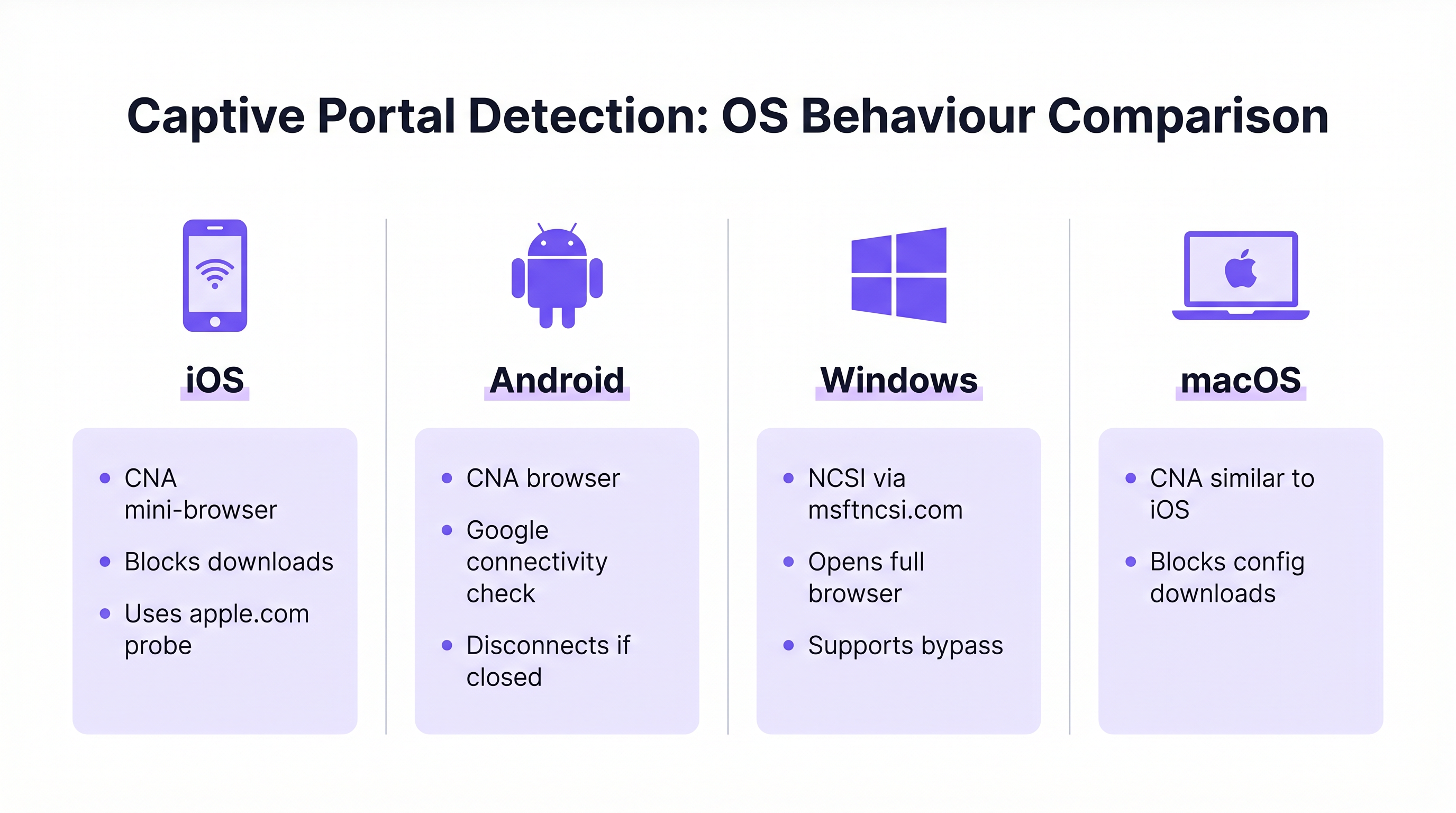
Windows verwendet den Network Connectivity Status Indicator (NCSI), um den Internetzugang zu bewerten. Nach der Verbindung mit einem Netzwerk versucht Windows, eine spezifische Microsoft-Domain aufzulösen und darauf zuzugreifen, typischerweise www.msftncsi.com. Wenn diese Anfrage vom Netzwerk abgefangen und umgeleitet wird, erkennt Windows das Vorhandensein eines Captive Portal und startet sofort den Standard-Webbrowser, um die Portalseite anzuzeigen. [^1]
Eine kritische Best Practice besteht darin, sicherzustellen, dass das Captive Portal den gesamten Datenverkehr konsequent umleitet, bis die Authentifizierung abgeschlossen ist. Ein vorzeitiger Zugriff auf die NCSI-Domain führt zu einer falsch-positiven Konnektivitätsprüfung, die das Erscheinen des Portals verhindert und den Nutzer in einem Status „Verbunden, kein Internet“ ohne sichtbaren Lösungsweg belässt. Darüber hinaus unterstützt Windows Bereitstellungsdateien (Provisioning Files), die eine automatische Wiederverbindung mit zukünftigen Netzwerken ermöglichen und so das Erlebnis für wiederkehrende Nutzer verbessern. [^1]
iOS und macOS: Captive Network Assistant (CNA)
Apple-Geräte nutzen den Captive Network Assistant (CNA), einen spezialisierten Mini-Browser mit eingeschränkter Funktionalität, der speziell für die Handhabung von Captive Portals entwickelt wurde. Wenn sich ein iOS- oder macOS-Gerät mit einem offenen Netzwerk verbindet, prüft es spezifische Apple-URLs (z. B. captive.apple.com). Wird die erwartete Antwort nicht empfangen, präsentiert der CNA automatisch die Portal-Oberfläche.
Während der CNA für einfache Splash-Pages effektiv ist, stellt er für das Enterprise-Onboarding eine erhebliche Herausforderung dar: Er verbietet strikt Datei-Downloads und Profilinstallationen. Diese Sicherheitsmaßnahme verhindert das direkte Herunterladen von Konfigurations-Payloads, die für das 802.1X-Zertifikats-Onboarding erforderlich sind. Um diese Einschränkung zu überwinden, müssen Enterprise-Bereitstellungen die CNA Breakout-Technologie implementieren, welche die CNA-Umgebung erkennt und den Nutzer auffordert, zu einem vollständigen Browser (wie Safari) zu wechseln, um den Zertifikatsregistrierungsprozess abzuschließen. [^2]
Android: Google Connectivity Checks
Android-Geräte führen ähnliche Konnektivitätsprüfungen über von Google gehostete URLs durch. Wie iOS nutzt auch Android oft eine eingeschränkte Browser-Umgebung für Captive Portals. Ein bemerkenswertes Verhalten in modernen Android-Versionen ist, dass sich der Captive Portal-Browser automatisch schließt, sobald er vollständigen Internetzugang erkennt. Wenn ein Nutzer das Portal-Fenster jedoch manuell schließt, bevor die Authentifizierung abgeschlossen ist, trennt Android in der Regel die Verbindung zum Netzwerk vollständig, sodass der Nutzer den Verbindungsprozess neu starten muss. Portal-Designs müssen dies berücksichtigen, indem sie die Abschlussaktion klar und prominent hervorheben.
| OS | Erkennungsmechanismus | Portal-Browser | Datei-Downloads | Hauptrisiko |
|---|---|---|---|---|
| Windows | NCSI via msftncsi.com | Vollständiger Browser | Erlaubt | Falsch-positiv, wenn NCSI-Domain nicht blockiert ist |
| iOS | Apple-Probe (captive.apple.com) | CNA Mini-Browser | Blockiert | Profil-Download schlägt ohne CNA Breakout fehl |
| macOS | Apple-Probe (captive.apple.com) | CNA Mini-Browser | Blockiert | Profil-Download schlägt ohne CNA Breakout fehl |
| Android | Google-Konnektivitätsprüfung | Eingeschränkter Browser | Beschränkt | Trennt Verbindung, wenn Portal-Fenster zu früh geschlossen wird |
Implementierungsleitfaden: Gestaltung des Onboarding-Flows
Die Gestaltung eines effektiven Onboarding-Flows erfordert ein strategisches Gleichgewicht zwischen Sicherheit, Compliance und Nutzerkomfort. Der Ansatz unterscheidet sich erheblich, je nachdem, ob die Zielgruppe aus temporären Gästen oder festem Personal besteht.
Guest WiFi: Das Captive Portal-Erlebnis
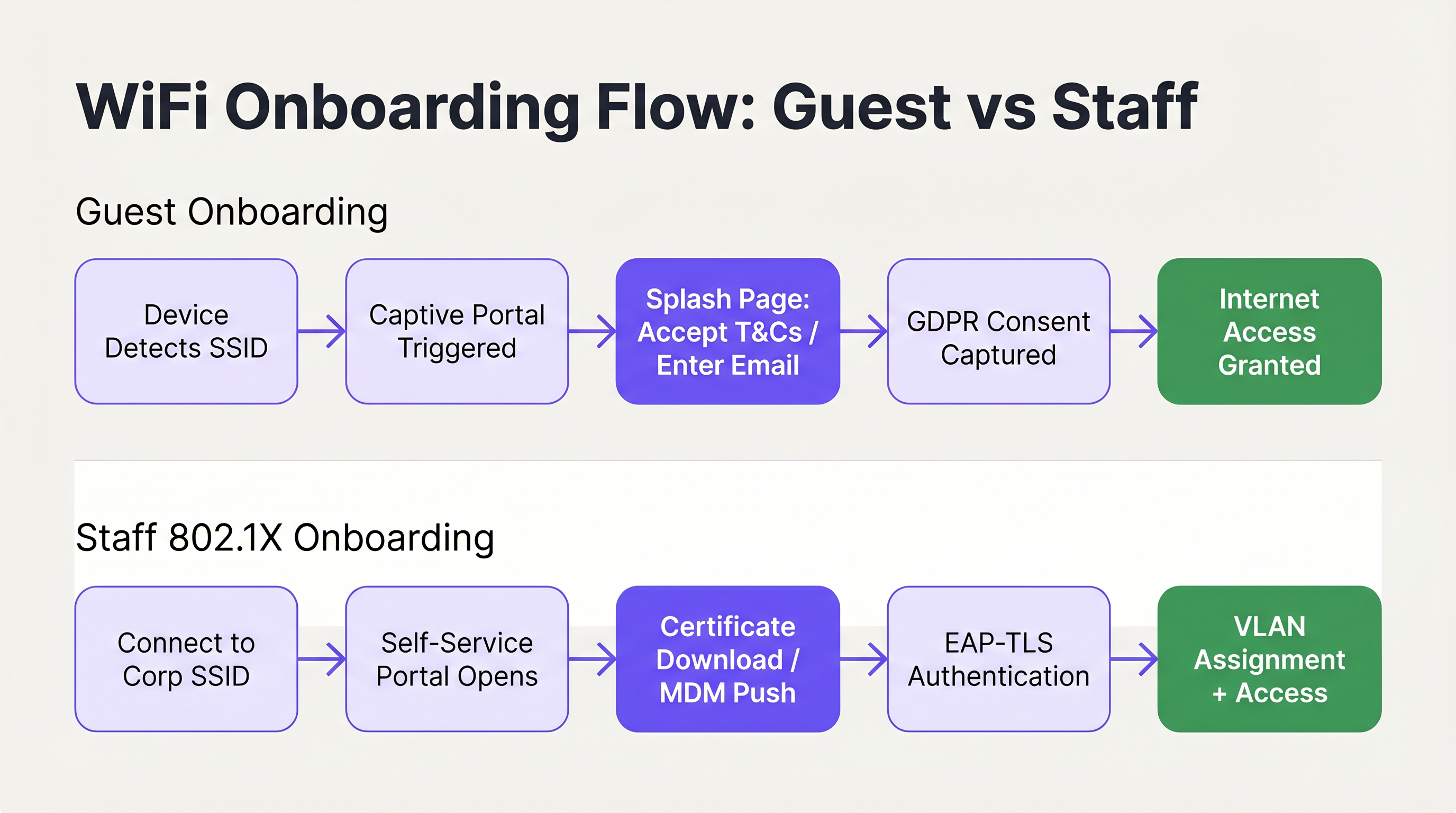
Für den Gastzugang besteht das primäre Ziel darin, eine schnelle, intuitive Verbindung zu ermöglichen, während gleichzeitig notwendige Daten erfasst und die Compliance sichergestellt werden. Die Bereitstellung eines gebrandeten Captive Portal ist der Standardansatz. Die Benutzeroberfläche muss übersichtlich, touch-freundlich sein und die erforderlichen Aktionen klar kommunizieren. Die Nutzung von Lösungen wie Guest WiFi ermöglicht es Veranstaltungsorten, eine professionelle Splash-Page zu präsentieren, die Nutzer nahtlos durch die Akzeptanz der Allgemeinen Geschäftsbedingungen oder die Angabe einer E-Mail-Adresse führt.
Entscheidend ist, dass der Onboarding-Flow mit Datenschutzrichtlinien wie der GDPR übereinstimmt. Das Portal sollte explizit die Zustimmung des Nutzers zur Datenverarbeitung und zu Marketingkommunikationen einholen, um sicherzustellen, dass die Datenerfassung transparent und minimal ist. Die Marketing-Zustimmung muss als Opt-in erfolgen und darf nicht vorausgewählt sein, und die Datenschutzrichtlinie muss klar zugänglich sein. Darüber hinaus ist die Netzwerksegmentierung eine zwingende Anforderung, insbesondere für die PCI DSS-Compliance in Retail- und Hospitality-Umgebungen. Der Gast-Traffic muss strikt von internen Unternehmensnetzwerken und Point-of-Sale-Systemen isoliert werden, um Sicherheitsrisiken zu minimieren. [^3]
Die für das Portal gewählte Authentifizierungsmethode wirkt sich direkt auf das Nutzererlebnis und die Qualität der erfassten Daten aus. Die gängigsten Ansätze sind E-Mail-Registrierung (geringe Reibung, moderate Datenqualität), Social Login via OAuth (moderate Reibung, hohe Datenqualität) und SMS-Verifizierung (höhere Reibung, höchste Datenqualität). Für die meisten Hospitality- und Retail-Bereitstellungen stellt die E-Mail-Registrierung mit einem optionalen Social-Login-Fallback die optimale Balance dar. Die SMS-Verifizierung ist am besten für Umgebungen reserviert, in denen die Datengenauigkeit ein primäres kommerzielles Ziel ist, wie z. B. bei der Integration von Treueprogrammen.
Speziell bei Hospitality -Bereitstellungen ist die Weiterleitung nach der Authentifizierung eine bedeutende Umsatzchance. Anstatt einfach nur Zugang zu gewähren und den Nutzer auf einer leeren Seite zu belassen, leiten Sie auf eine gebrandete Willkommensseite, ein Werbeangebot oder eine Aufforderung zur Anmeldung für ein Treueprogramm weiter. Hier beginnt die Investition in Guest WiFi, direkten geschäftlichen Mehrwert über die reine Konnektivität hinaus zu generieren. Weitere Hinweise zu diesem Thema finden Sie unter Moderne Hospitality WiFi-Lösungen, die Ihre Gäste verdienen .
Das Session-Management ist ein weiterer häufig übersehener Aspekt der Guest-Onboarding-UX. Konfigurieren Sie Ihr Portal so, dass wiederkehrende Geräte anhand der MAC-Adresse erkannt werden und der Zugang automatisch gewährt wird, ohne dass die Zugangsdaten erneut eingegeben werden müssen. Dies verbessert das Erlebnis für wiederkehrende Besucher drastisch und ist besonders in Retail-Umgebungen wertvoll, in denen Kunden häufig zu Besuch sind. Die Session-Dauer und das Re-Authentifizierungsintervall sollten auf die Art des Veranstaltungsortes abgestimmt sein: Ein Hotel könnte eine 24-Stunden-Session passend zum Check-in-Zyklus festlegen, während ein Café eine 4-Stunden-Session nutzen könnte, um die Netzwerkauslastung während der Stoßzeiten zu steuern.
Staff WiFi: Self-Service-Zertifikatsregistrierung
Das Onboarding von Mitarbeitergeräten, insbesondere in Bring Your Own Device (BYOD)-Szenarien, erfordert eine robustere Sicherheitslage, die typischerweise IEEE 802.1X und EAP-TLS für die zertifikatsbasierte Authentifizierung nutzt. Die Herausforderung besteht darin, diese Zertifikate auf nicht verwalteten Geräten bereitzustellen, ohne den IT-Helpdesk zu überlasten.
Die empfohlene Architektur ist ein Self-Service-Onboarding-Portal. Nutzer verbinden sich zunächst mit einer offenen, eingeschränkten Onboarding-SSID. Dieses Netzwerk ist durch VLAN-Segmentierung und Access Control Lists (ACLs) isoliert und erlaubt nur den Zugriff auf das Registrierungsportal und die notwendigen Identitätsanbieter. Das Portal führt den Nutzer durch die Authentifizierung mit seinen Unternehmensanmeldeinformationen, woraufhin ein eindeutiges Client-Zertifikat und ein Netzwerkkonfigurationsprofil generiert und auf das Gerät heruntergeladen werden. Sobald das Profil installiert ist, wechselt das Gerät automatisch zur sicheren Unternehmens-SSID (unter Verwendung von WPA3-Enterprise) und authentifiziert sich transparent über das Zertifikat.
Für eine detaillierte technische Anleitung zur Integration dieser Flows mit Microsoft-Identitätsdiensten lesen Sie den Azure AD und Entra ID WiFi-Authentifizierung: Integrations- und Konfigurationsleitfaden . Es ist auch relevant zu verstehen, wie SD-WAN und moderne Netzwerkarchitekturen mit diesen Onboarding-Flows interagieren; siehe Die zentralen SD-WAN-Vorteile für moderne Unternehmen für den Kontext zur breiteren Netzwerkinfrastruktur.
Best Practices für eine reibungslose UX
Um eine hohe Erfolgsquote bei der Erstverbindung sicherzustellen, sollten IT-Architekten die folgenden herstellerneutralen Best Practices befolgen, die aus Bereitstellungen in Enterprise-, Hospitality- und Public-Sector-Umgebungen stammen.
Priorisieren Sie eine klare und prägnante Kommunikation. Visuelle Elemente innerhalb des Portals sollten den Nutzer intuitiv führen und die kognitive Belastung minimieren. Stellen Sie sicher, dass Kontaktinformationen für Hilfe und Support prominent angezeigt werden, damit Nutzer Probleme schnell und ohne Frustration lösen können. [^2] Fortschrittsanzeigen sind besonders wertvoll in mehrstufigen Flows wie der Zertifikatsregistrierung.
Implementieren Sie CNA Breakout für alle 802.1X Self-Service-Portale. Der Versuch, Profil-Downloads über den iOS oder macOS Captive Network Assistant zu erzwingen, wird unweigerlich fehlschlagen und zu sofortigen Support-Anrufen führen. Das Portal muss die CNA-Umgebung intelligent erkennen und klare Anweisungen zum Öffnen eines vollständigen Browsers geben. Dies ist keine optionale Erweiterung; es ist eine Voraussetzung für ein funktionierendes iOS-Onboarding-Erlebnis. [^2]
Nutzen Sie versteckte SSIDs, um Verwirrung zu reduzieren. Indem Sie nur die primären Gast- und sicheren Unternehmensnetzwerke ausstrahlen und die temporäre Onboarding-SSID verbergen, verringern Sie das Risiko, dass Nutzer versuchen, sich mit dem falschen Netzwerk zu verbinden. Die Onboarding-SSID kann über einen QR-Code oder eine Willkommensdokumentation kommuniziert werden.
Designen Sie für Touch-First-Interaktion. Da die Mehrheit der Gastverbindungen von Smartphones stammt, müssen Portal-Layouts große, leicht antippbare Steuerelemente verwenden, übermäßiges Scrollen vermeiden und komplexe Flows in mehrere kurze Seiten unterteilen. [^1]
Nutzen Sie WiFi Analytics zur kontinuierlichen Optimierung. Das Tracking von Portal-Abbruchraten, Gerätetyp-Verteilungen und Verbindungs-Erfolgsquoten liefert die erforderlichen Daten, um Reibungspunkte in der Onboarding-Journey zu identifizieren und zu beheben. Für Umgebungen, die auch eine physische Wayfinding-Integration erfordern, können Wayfinding und Sensors die WiFi-Analytics-Ebene ergänzen, um ein umfassendes Bild der Venue Intelligence zu liefern.
Fehlerbehebung & Risikominderung
Selbst bei einem gut gestalteten Onboarding-Flow können Probleme auftreten. Das Verständnis häufiger Fehlermodi ist für eine schnelle Fehlerbehebung und proaktive Risikominderung unerlässlich.
Captive Portal erscheint nicht. Dies wird fast immer durch eine zu durchlässige Pre-Authentication-ACL verursacht. Wenn ein Gerät seine OS-spezifischen Konnektivitätsprüfungs-URLs vor der Authentifizierung erfolgreich erreichen kann, geht das OS davon aus, dass es vollen Internetzugang hat, und löst das Portal nicht aus. Überprüfen Sie die Walled-Garden-Konfiguration und stellen Sie sicher, dass NCSI- und Apple-Probe-Domains abgefangen und umgeleitet werden, bis sich der Nutzer vollständig authentifiziert hat.
Zertifikatsvertrauensfehler in 802.1X-Bereitstellungen. Wenn das Gerät dem Zertifikat des RADIUS-Servers nicht vertraut, schlägt die EAP-TLS-Authentifizierung stillschweigend fehl. Der Nutzer sieht eine generische Meldung „Verbindung nicht möglich“ ohne handlungsweisende Anleitung. Das Self-Service-Onboarding-Profil muss explizit die vollständige Root-CA-Zertifikatskette enthalten, um Vertrauen herzustellen. Dies ist die häufigste Ursache für stille 802.1X-Fehler in BYOD-Bereitstellungen.
iOS-Nutzer können keine Konfigurationsprofile herunterladen. Dies ist das oben beschriebene CNA-Problem. Wenn das Portal keinen CNA Breakout implementiert hat, können iOS-Nutzer nicht fortfahren. Überprüfen Sie, ob der Breakout-Mechanismus korrekt funktioniert, indem Sie ihn auf einem physischen iOS-Gerät testen, nicht nur in einem Simulator.
Inkonsistentes Portal-Verhalten beim SSID-Roaming. Stellen Sie in Multi-Site- oder Multi-Controller-Bereitstellungen sicher, dass die Umleitungslogik des Captive Portal über alle Access Points hinweg konsistent ist. Inkonsistentes Verhalten – bei dem einige APs umleiten und andere nicht – führt zu einem verwirrenden und unvorhersehbaren Nutzererlebnis. Dies ist besonders relevant für Retail -Ketten und Transport -Knotenpunkte, an denen Nutzer über mehrere Standorte hinweg roamen und ein konsistentes Erlebnis erwarten.
ROI & Business Impact
Die geschäftlichen Auswirkungen der Optimierung der WiFi-Onboarding-UX gehen weit über den Nutzerkomfort hinaus. Für Enterprise-IT-Abteilungen wird der primäre Return on Investment durch eine signifikante Reduzierung des Support-Aufwands erzielt. WiFi-bezogene Helpdesk-Tickets gehören zu den teuersten in der Lösung, da sie die Zeit von technischem Personal für Probleme beanspruchen, die in den meisten Fällen durch ein besseres Portal-Design und eine bessere Konfiguration vermeidbar wären.

Für Veranstaltungsorte, die WiFi Analytics nutzen, erhöht ein nahtloser Onboarding-Prozess direkt das Volumen der verbundenen Nutzer und bereichert so die verfügbaren Daten für Frequenzanalysen, Verweildauermessungen und Customer-Engagement-Strategien. In Retail -Umgebungen führt dies direkt zu genaueren Customer-Journey-Daten und effektiverem zielgerichtetem Marketing. In Hospitality -Umgebungen trägt ein reibungsloses Verbindungserlebnis messbar zu den Werten der Gästezufriedenheit bei. Auch das Gesundheitswesen profitiert erheblich; für den Kontext zur WiFi-Bereitstellung in regulierten Umgebungen siehe die Branchenressourcen für Healthcare .
Die folgenden Metriken bilden den Rahmen für die Quantifizierung der Onboarding-Performance und den Nachweis des ROI:
| Metrik | Definition | Ziel-Benchmark |
|---|---|---|
| Erfolgsquote der Erstverbindung | % der Nutzer, die sich beim ersten Versuch erfolgreich verbinden | > 95% |
| Portal-Abbruchrate | % der Nutzer, die den Portal-Flow starten, aber nicht abschließen | < 10% |
| Zeit bis zur Verbindung | Durchschnittliche Zeit von der SSID-Auswahl bis zum Internetzugang | < 45 Sekunden |
| WiFi-Support-Ticket-Volumen | Monatliche Helpdesk-Tickets, die auf das WiFi-Onboarding zurückzuführen sind | Monat für Monat rückläufig |
| Auto-Connect-Rate wiederkehrender Besucher | % der wiederkehrenden Geräte, die sich ohne erneute Portal-Eingabe wieder verbinden | > 80% |
Indem das Netzwerk-Onboarding als kritische User-Experience-Journey und nicht nur als bloße technische Notwendigkeit behandelt wird, können Organisationen eine sichere, konforme und reibungslose Konnektivität bereitstellen, die sowohl operative Ziele als auch messbare Geschäftsergebnisse unterstützt. Für weiteren Kontext dazu, wie die Access-Point-Infrastruktur diese Erlebnisse untermauert, siehe Wireless Access Points Definition: Ihr ultimativer Leitfaden für 2026 .
[^1]: Microsoft Learn. „Captive Portal Detection and User Experience in Windows.“ https://learn.microsoft.com/en-us/windows-hardware/drivers/mobilebroadband/captive-portals [^2]: SecureW2. „Wi-Fi Onboarding and Captive Portal Best Practices.“ https://securew2.com/blog/wi-fi-onboarding-captive-portal [^3]: Purple. „Guest WiFi vs Staff WiFi: Network Segmentation Best Practices.“ https://www.purple.ai/en-GB/guides/guest-wifi-vs-staff-wifi-segmentation
Schlüsselbegriffe & Definitionen
Captive Portal
A web page that a user of a public-access network is obliged to view and interact with before internet access is granted. It is used to enforce acceptable use policies, capture consent, authenticate users, or present branded content.
IT teams deploy captive portals as the primary gateway for guest network access to ensure compliance, gather analytics, and deliver branded experiences.
NCSI (Network Connectivity Status Indicator)
A Windows feature that performs active and passive tests to determine internet connectivity, primarily by attempting to reach specific Microsoft domains such as msftncsi.com.
Understanding NCSI is crucial for ensuring that Windows devices correctly detect and display the captive portal rather than reporting a false positive 'connected' status.
CNA (Captive Network Assistant)
A limited-functionality mini-browser utilised by iOS and macOS to display captive portals. It intentionally restricts features including file downloads, cookie persistence, and JavaScript execution for security reasons.
The CNA is the primary technical hurdle when deploying 802.1X configuration profiles to Apple devices, necessitating specific CNA Breakout strategies.
CNA Breakout
A technical mechanism used within a captive portal to detect the presence of a limited CNA browser and prompt the user to open the portal page in a fully featured browser such as Safari or Chrome.
This is a mandatory requirement for any self-service onboarding flow that requires the user to download and install a network configuration profile on an iOS or macOS device.
IEEE 802.1X
An IEEE Standard for port-based Network Access Control (PNAC) that provides an authentication mechanism to devices wishing to attach to a LAN or WLAN, requiring successful authentication before network access is granted.
This is the enterprise standard for securing staff and corporate networks, moving beyond shared passwords to individual identity verification via RADIUS.
EAP-TLS (Extensible Authentication Protocol - Transport Layer Security)
A highly secure authentication protocol used within 802.1X that requires both the client device and the authentication server to verify each other using digital certificates, providing mutual authentication.
Considered the gold standard for enterprise WiFi security, it eliminates credential theft risks by relying on cryptographic certificates rather than passwords.
VLAN (Virtual Local Area Network)
A logical subnetwork that groups a collection of devices from different physical LANs, allowing network administrators to partition a single switched network to match functional and security requirements.
VLANs are essential for segmenting guest traffic from corporate traffic, ensuring PCI DSS compliance and overall network security in multi-tenant environments.
Walled Garden
A restricted pre-authentication network environment that controls which IP addresses or domains a user can reach before they have fully authenticated through the captive portal.
Configuring the walled garden correctly is vital: it must allow access to the portal server and identity providers while blocking general internet access to ensure OS portal detection triggers correctly.
WPA3-Enterprise
The latest generation of the Wi-Fi Protected Access security protocol for enterprise networks, offering enhanced protection through 192-bit security mode and improved key establishment mechanisms.
WPA3-Enterprise is the recommended security protocol for corporate SSIDs, particularly when combined with 802.1X and EAP-TLS for certificate-based authentication.
RADIUS (Remote Authentication Dial-In User Service)
A networking protocol that provides centralised authentication, authorisation, and accounting (AAA) management for users who connect to a network service.
The RADIUS server is the backbone of 802.1X deployments, validating client certificates and determining which VLAN to assign to each authenticated device.
Fallstudien
A 400-room luxury hotel is deploying a new guest WiFi network and a secure staff network. They currently experience high volumes of support calls from guests unable to see the login page, and staff struggle to configure their personal phones for the secure network. How should the IT architect design the onboarding flow to resolve both issues?
For the guest network, the architect must audit the Walled Garden settings on the wireless controller. Pre-authentication ACLs must strictly block access to OS connectivity check URLs — specifically msftncsi.com for Windows devices and captive.apple.com for Apple devices — and redirect all HTTP and HTTPS traffic to the Purple captive portal. This guarantees the portal triggers reliably across all device types. The portal itself should be branded to the hotel, require only an email address and terms acceptance, and redirect post-authentication to a welcome page with the hotel's amenity information.
For the staff network, the architect should implement a self-service onboarding portal on an isolated VLAN. Staff connect to a hidden onboarding SSID, authenticate via the portal using their Active Directory or Entra ID credentials, and download a configuration profile. The portal must implement CNA Breakout to ensure iOS users are prompted to open Safari to download the profile, bypassing the restrictive Apple mini-browser. The profile must include the Root CA certificate for the RADIUS server. Once installed, the device auto-connects to the WPA3-Enterprise staff SSID using EAP-TLS and is assigned to the appropriate VLAN based on their identity group.
A national retail chain with 200 stores is updating its in-store WiFi to provide seamless guest access that encourages loyalty app downloads, while ensuring strict compliance with PCI DSS for their point-of-sale systems. What architectural decisions must be made regarding the onboarding UX?
The architecture must enforce strict network segmentation as its foundation. The guest WiFi must operate on a dedicated VLAN, completely isolated from the corporate and POS VLANs through both VLAN tagging and ACL enforcement at the distribution layer. No routing path should exist between the guest VLAN and the PCI-regulated environment.
The guest onboarding flow will utilise a captive portal that captures GDPR-compliant consent before granting access. The form should be minimal — email address, opt-in marketing consent checkbox, and terms acceptance. The post-authentication redirect should send users directly to the relevant app store page for the loyalty application, with a clear call to action. The captive portal traffic itself must be served over HTTPS to protect any user data entered during the onboarding process. Returning customers should be recognised by MAC address and granted access without re-entering details, improving the repeat-visit experience.
Szenarioanalyse
Q1. Your helpdesk is receiving reports that users on Windows laptops are connecting to the guest network, but the splash page never appears. They see a 'Connected, no internet' status in the system tray. What is the most likely configuration error, and how do you resolve it?
💡 Hinweis:Consider how Windows determines whether it is behind a captive portal or simply offline — and what specific domain it uses to make that determination.
Empfohlenen Ansatz anzeigen
The most likely cause is an overly permissive Walled Garden configuration. If the pre-authentication ACLs allow traffic to Microsoft's NCSI domain (msftncsi.com), Windows successfully resolves the connectivity check and assumes it has full internet access, so the captive portal browser is never launched. The resolution is to tighten the Walled Garden ACLs to intercept and redirect requests to msftncsi.com until the user has completed portal authentication. Only the portal server, identity provider, and essential CDN resources should be whitelisted in the pre-auth policy.
Q2. You are designing a self-service onboarding flow for university students to connect their personal iPhones to the secure eduroam (802.1X) network. What specific technical mechanism must you include in the portal design, and why is it necessary?
💡 Hinweis:Think about the limitations of the default browser that automatically appears on iOS when connecting to an open network.
Empfohlenen Ansatz anzeigen
You must implement CNA Breakout technology. When an iPhone connects to an open network, iOS automatically opens the Captive Network Assistant (CNA), a restricted mini-browser that intentionally blocks file downloads and profile installations as a security measure. Without CNA Breakout, the student will be unable to download the 802.1X configuration profile, and the onboarding will fail silently. The portal must detect the CNA environment and present a clear prompt instructing the user to open the portal URL in Safari, where the full browser allows the profile to be downloaded and installed.
Q3. A retail client wants to use their guest WiFi to collect customer emails for marketing, but they are concerned about PCI DSS compliance regarding their in-store payment terminals on the same physical network infrastructure. What architectural requirement is mandatory, and what specific control enforces it?
💡 Hinweis:How do you ensure that a compromised guest device cannot reach the payment systems, even if they share the same physical access points?
Empfohlenen Ansatz anzeigen
Strict network segmentation is mandatory. The guest WiFi network must be placed on a completely separate VLAN from the corporate and point-of-sale (POS) networks. Access Control Lists (ACLs) must be applied at the distribution or core layer to ensure that no traffic can route between the guest VLAN and the PCI-regulated environment. This isolation must be enforced at the network layer, not merely at the SSID level, since SSID-only separation is insufficient for PCI DSS compliance. The guest VLAN should only have outbound internet access, with no routing paths to any internal subnets.
Q4. After deploying a self-service 802.1X onboarding portal, staff members report that their personal Android phones successfully downloaded and installed the configuration profile, but their iPhones show 'Unable to join the network' when attempting to connect to the corporate SSID. What is the most likely cause?
💡 Hinweis:The profile installed successfully, so the issue is not with the download. Think about what happens during the EAP-TLS handshake when the device attempts to authenticate.
Empfohlenen Ansatz anzeigen
The most likely cause is a missing Root CA certificate in the configuration profile. During EAP-TLS authentication, the device must trust the certificate presented by the RADIUS server. If the Root CA that signed the RADIUS server certificate is not included in the onboarding profile, iOS will reject the RADIUS certificate and fail the authentication silently. Android may have the Root CA in its system trust store by default, which is why Android devices succeed while iOS devices fail. The resolution is to update the configuration profile to include the complete certificate trust chain, including the Root CA, before redistributing it to iOS users.
Wichtigste Erkenntnisse
- ✓A frictionless WiFi network onboarding UX is a measurable operational requirement: poor onboarding directly increases helpdesk ticket volume and reduces guest engagement.
- ✓Windows, iOS, Android, and macOS use fundamentally different mechanisms to detect captive portals — designing and testing for each OS is non-negotiable.
- ✓The iOS Captive Network Assistant (CNA) blocks file downloads, making CNA Breakout technology a prerequisite for any 802.1X certificate-based onboarding flow on Apple devices.
- ✓Guest onboarding must balance rapid access with GDPR-compliant consent capture and PCI DSS-mandated network segmentation.
- ✓Staff BYOD onboarding should leverage self-service portals with EAP-TLS certificate deployment to eliminate helpdesk calls and achieve zero-touch provisioning.
- ✓The three most common onboarding failures are: misconfigured walled gardens, missing CNA Breakout, and incomplete certificate trust chains — all preventable through proper design and pre-launch testing.
- ✓Track first-connection success rate, portal abandonment rate, and WiFi support ticket volume as the core KPIs for onboarding performance and ROI justification.




