

UX de Onboarding de Rede: Projetar uma Experiência de Configuração WiFi Sem Atritos
Este guia fornece uma estrutura técnica abrangente para projetar uma UX de onboarding de rede WiFi sem atritos, abrangendo a mecânica de deteção de Captive Portal em iOS, Android, Windows e macOS, e detalhando a inscrição de certificados em regime de self-service para redes de funcionários 802.1X. Equipar gestores de TI, arquitetos de rede e diretores de operações de espaços com estratégias práticas para reduzir a carga do helpdesk, melhorar as taxas de sucesso da primeira ligação e manter a conformidade com o GDPR e PCI DSS em ambientes de hotelaria, retalho e campus.
🎧 Ouça este Guia
Ver Transcrição
Resumo Executivo
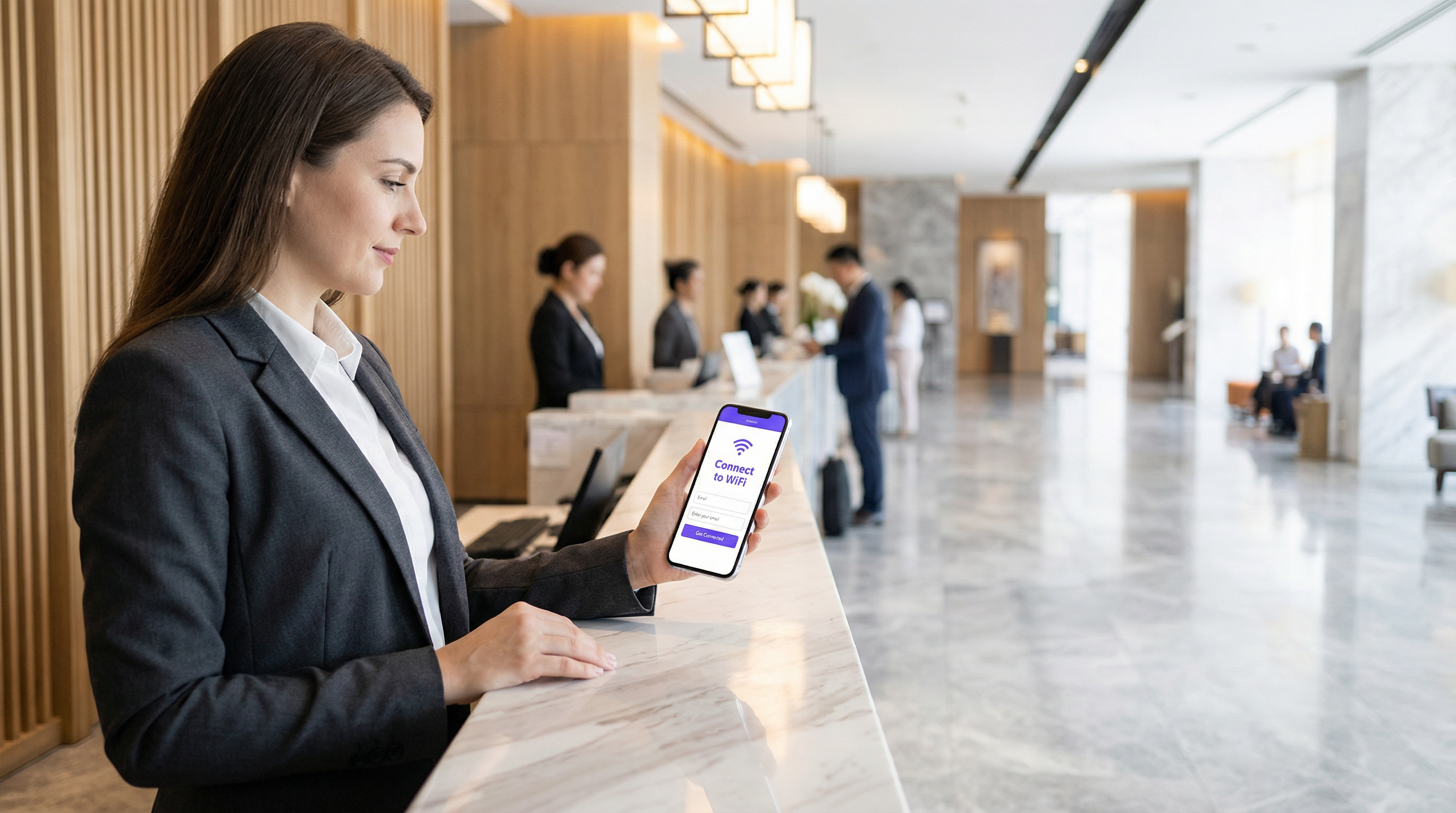
A experiência de onboarding é o primeiro ponto de contacto crítico entre um utilizador e a sua infraestrutura de rede. Para operadores de espaços e equipas de TI empresariais, uma UX de onboarding de rede WiFi sem atritos não é apenas uma conveniência — é um requisito operacional fundamental que impacta diretamente a carga de suporte e a satisfação do utilizador. Quando convidados ou funcionários têm dificuldade em ligar-se, a consequência imediata é um afluxo de pedidos de suporte, ligações abandonadas e uma perceção degradada do espaço ou organização.
Este guia fornece uma estrutura técnica abrangente para projetar uma experiência de configuração WiFi simples, abordando as complexidades da deteção de Captive Portal em iOS, Android, Windows e macOS, enquanto detalha a implementação da inscrição de certificados em regime de self-service para redes 802.1X. Ao adotar as estratégias aqui delineadas, os líderes de TI podem reduzir significativamente a carga de suporte, reforçar a conformidade de segurança e garantir uma taxa robusta de sucesso na primeira ligação em todos os tipos de dispositivos. Quer esteja a gerir propriedades de Hotelaria , ambientes de Retalho ou campus do setor público, os princípios permanecem consistentes: projetar para o dispositivo, projetar para a conformidade e projetar para o utilizador.
Análise Técnica Aprofundada: A Mecânica de Deteção de Captive Portal
Compreender como os diferentes sistemas operativos lidam com a deteção de Captive Portal é essencial para projetar um fluxo de onboarding fiável. Os mecanismos subjacentes variam significativamente entre plataformas, levando frequentemente a experiências de utilizador inconsistentes quando não são geridos adequadamente.
Windows: Network Connectivity Status Indicator (NCSI)
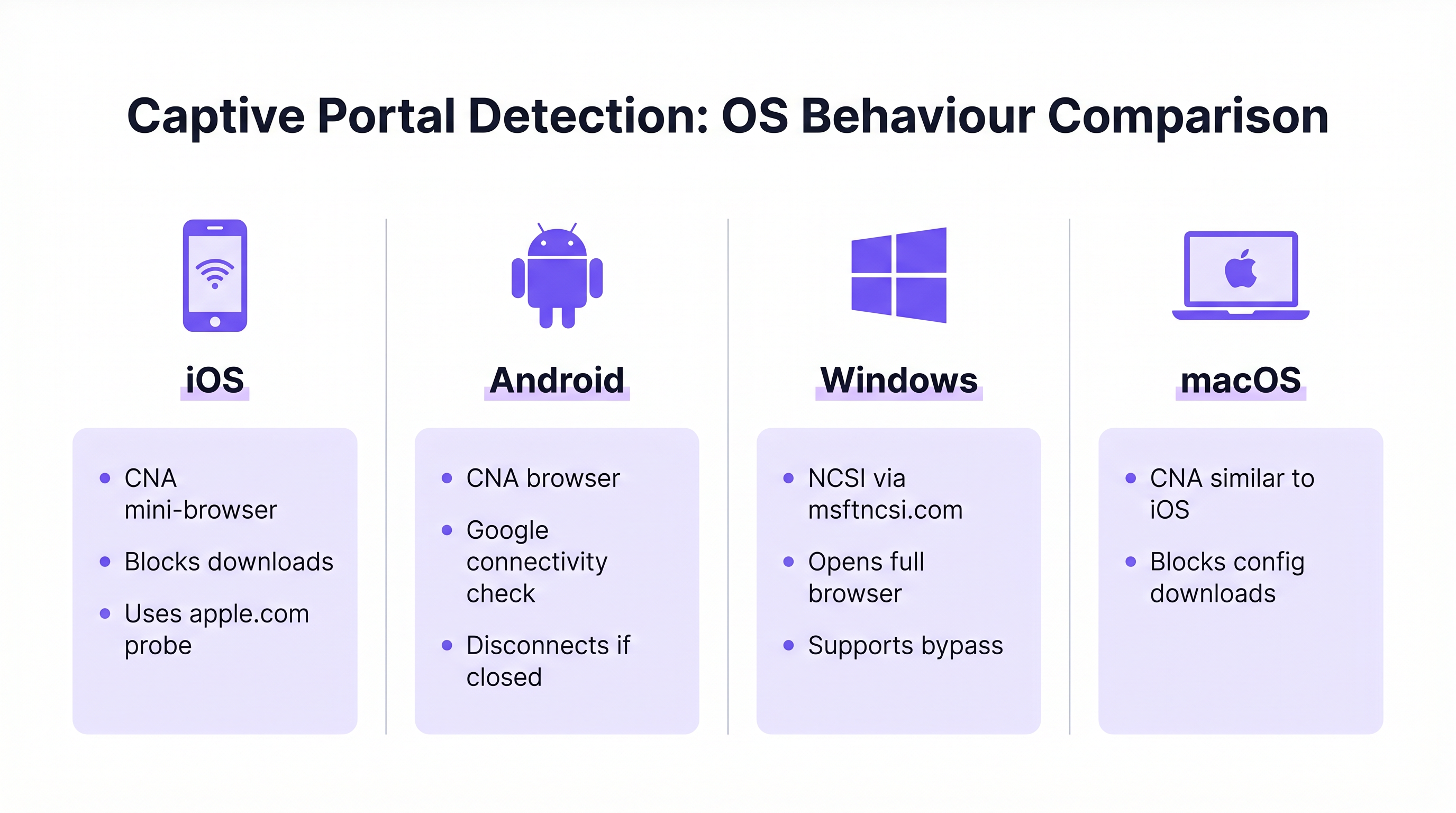
O Windows utiliza o Network Connectivity Status Indicator (NCSI) para avaliar o acesso à Internet. Ao ligar-se a uma rede, o Windows tenta resolver e aceder a um domínio específico da Microsoft, normalmente www.msftncsi.com. Se este pedido for intercetado e redirecionado pela rede, o Windows identifica a presença de um Captive Portal e inicia imediatamente o navegador web predefinido para exibir a página do portal. [^1]
Uma boa prática crítica é garantir que o Captive Portal redireciona consistentemente todo o tráfego até que a autenticação esteja concluída. Permitir o acesso prematuro ao domínio NCSI resulta numa verificação de conectividade falso-positiva, impedindo a exibição do portal e deixando o utilizador num estado de "Ligado, sem internet" sem um caminho visível para a resolução. Além disso, o Windows suporta ficheiros de aprovisionamento que permitem a religação automática a redes futuras, melhorando a experiência para utilizadores recorrentes. [^1]
iOS e macOS: Captive Network Assistant (CNA)
Os dispositivos Apple utilizam o Captive Network Assistant (CNA), um mini-navegador especializado de funcionalidade limitada, concebido especificamente para lidar com Captive Portals. Quando um dispositivo iOS ou macOS se liga a uma rede aberta, sonda URLs específicos da Apple (ex: captive.apple.com). Se a resposta esperada não for recebida, o CNA apresenta automaticamente a interface do portal.
Embora eficaz para páginas de boas-vindas básicas, o CNA representa um desafio significativo para o onboarding empresarial: proíbe estritamente downloads de ficheiros e instalações de perfis. Esta medida de segurança impede o download direto de payloads de configuração necessários para o onboarding de certificados 802.1X. Para ultrapassar esta limitação, as implementações empresariais devem implementar a tecnologia CNA Breakout, que deteta o ambiente CNA e solicita ao utilizador que transite para um navegador completo (como o Safari) para concluir o processo de inscrição de certificados. [^2]
Android: Verificações de Conectividade da Google
Os dispositivos Android realizam verificações de conectividade semelhantes utilizando URLs alojados pela Google. Tal como o iOS, o Android utiliza frequentemente um ambiente de navegador limitado para Captive Portals. Um comportamento notável nas versões modernas do Android é que o navegador do Captive Portal se fecha automaticamente assim que deteta acesso total à Internet. No entanto, se um utilizador fechar manualmente a janela do portal antes de concluir a autenticação, o Android irá normalmente desligar-se da rede por completo, exigindo que o utilizador reinicie o processo de ligação. O design do portal deve ter isto em conta, tornando a ação de conclusão clara e proeminente.
| SO | Mecanismo de Deteção | Navegador do Portal | Downloads de Ficheiros | Risco Principal |
|---|---|---|---|---|
| Windows | NCSI via msftncsi.com | Navegador completo | Permitido | Falso positivo se o domínio NCSI não estiver bloqueado |
| iOS | Sonda Apple (captive.apple.com) | Mini-navegador CNA | Bloqueado | Falha no download do perfil sem CNA Breakout |
| macOS | Sonda Apple (captive.apple.com) | Mini-navegador CNA | Bloqueado | Falha no download do perfil sem CNA Breakout |
| Android | Verificação de conectividade Google | Navegador limitado | Restrito | Desliga-se se a janela do portal for fechada precocemente |
Guia de Implementação: Projetar o Fluxo de Onboarding
Projetar um fluxo de onboarding eficaz requer um equilíbrio estratégico entre segurança, conformidade e conveniência do utilizador. A abordagem difere significativamente dependendo se o público-alvo consiste em convidados temporários ou funcionários permanentes.
WiFi de Convidados: A Experiência de Captive Portal
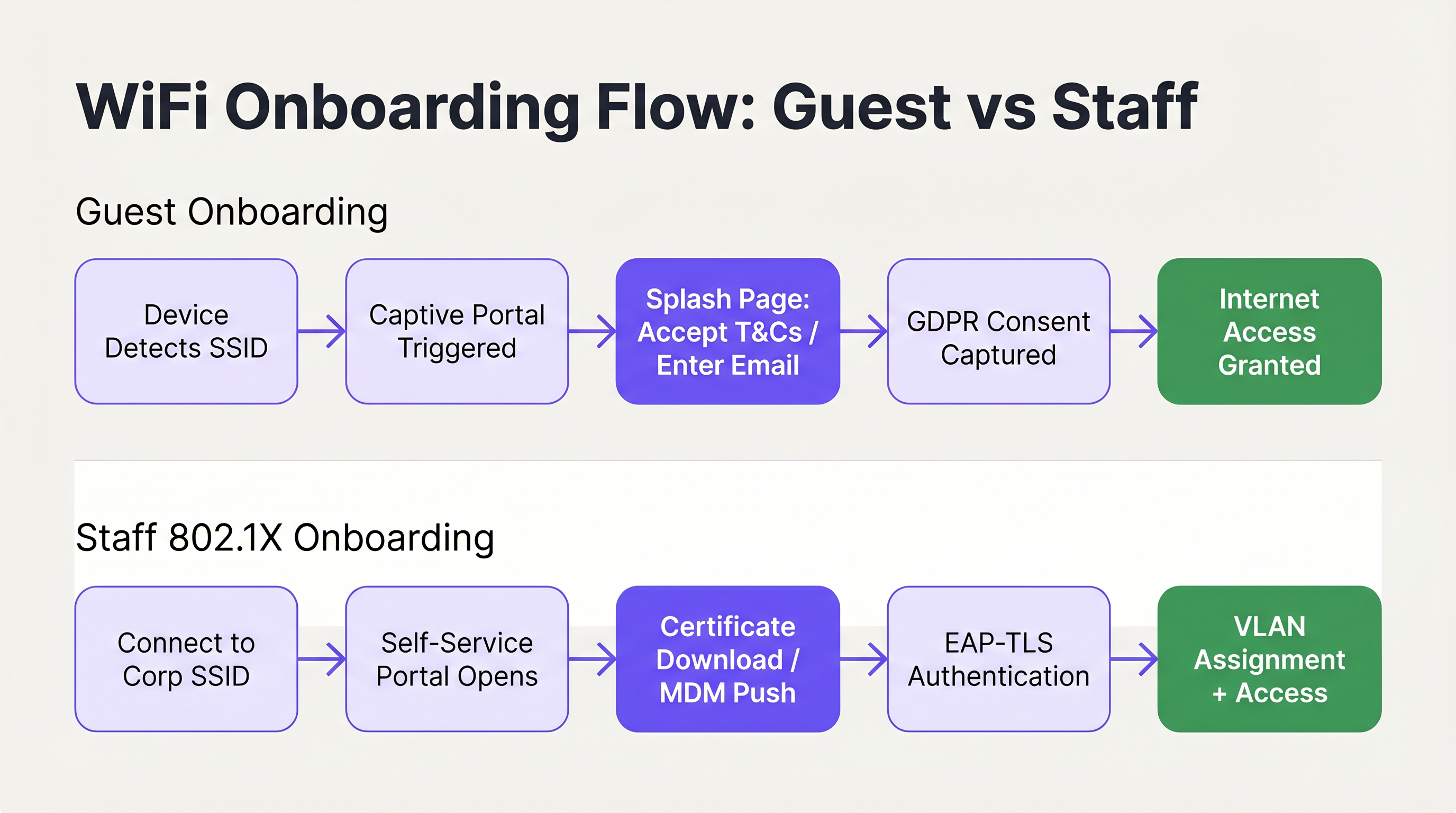
Para o acesso de convidados, o objetivo principal é facilitar uma ligação rápida e intuitiva, capturando os dados necessários e garantindo a conformidade. A implementação de um Captive Portal personalizado é a abordagem padrão. A interface do utilizador deve ser limpa, adaptada ao toque e comunicar claramente as ações necessárias. A utilização de soluções como o Guest WiFi permite que os espaços apresentem uma página de boas-vindas profissional que guia os utilizadores de forma simples através da aceitação dos termos e condições ou do fornecimento de um endereço de e-mail.
Crucialmente, o fluxo de onboarding deve estar alinhado com os regulamentos de privacidade de dados, como o GDPR. O portal deve capturar explicitamente o consentimento do utilizador para o processamento de dados e comunicações de marketing, garantindo que a recolha de dados seja transparente e mínima. O consentimento de marketing deve ser por opção ativa (opt-in) em vez de pré-selecionado, e a política de privacidade deve estar claramente acessível. Além disso, a segmentação de rede é um requisito obrigatório, particularmente para a conformidade com o PCI DSS em ambientes de retalho e hotelaria. O tráfego de convidados deve ser estritamente isolado das redes corporativas internas e dos sistemas de ponto de venda para mitigar riscos de segurança. [^3]
O método de autenticação escolhido para o portal impacta diretamente tanto a experiência do utilizador como a qualidade dos dados capturados. As abordagens mais comuns são o registo por e-mail (baixo atrito, qualidade de dados moderada), login social via OAuth (atrito moderado, alta qualidade de dados) e verificação por SMS (maior atrito, qualidade de dados mais elevada). Para a maioria das implementações em hotelaria e retalho, o registo por e-mail com uma opção alternativa de login social representa o equilíbrio ideal. A verificação por SMS deve ser reservada para ambientes onde a precisão dos dados é um objetivo comercial primário, como integrações de programas de fidelização.
Especificamente para implementações de Hotelaria , o redirecionamento pós-autenticação é uma oportunidade significativa de receita. Em vez de simplesmente conceder acesso e deixar o utilizador numa página em branco, redirecione para uma página de boas-vindas personalizada, uma oferta promocional ou um convite para inscrição num programa de fidelização. É aqui que o investimento em WiFi de convidados começa a gerar valor comercial direto além da conectividade. Para mais orientações sobre este tópico, consulte Soluções Modernas de WiFi para Hotelaria que os Seus Convidados Merecem .
A gestão de sessões é outro aspeto frequentemente negligenciado da UX de onboarding de convidados. Configure o seu portal para reconhecer dispositivos recorrentes pelo endereço MAC e conceder acesso automaticamente sem exigir a reintrodução de credenciais. Isto melhora drasticamente a experiência para visitantes repetidos e é particularmente valioso em ambientes de retalho onde os clientes visitam com frequência. A duração da sessão e o intervalo de reautenticação devem ser calibrados de acordo com o tipo de espaço: um hotel pode definir uma sessão de 24 horas alinhada com o ciclo de check-in, enquanto um café pode utilizar uma sessão de 4 horas para gerir o congestionamento da rede durante os períodos de pico.
WiFi de Funcionários: Inscrição de Certificados em Self-Service
O onboarding de dispositivos de funcionários, particularmente em cenários de Bring Your Own Device (BYOD), requer uma postura de segurança mais robusta, tirando partido normalmente de IEEE 802.1X e EAP-TLS para autenticação baseada em certificados. O desafio reside em implementar estes certificados em dispositivos não geridos sem sobrecarregar o helpdesk de TI.
A arquitetura recomendada é um portal de onboarding em regime de self-service. Os utilizadores ligam-se inicialmente a um SSID de onboarding aberto e restrito. Esta rede é isolada através de segmentação VLAN e Listas de Controlo de Acesso (ACLs), permitindo o acesso apenas ao portal de inscrição e aos fornecedores de identidade necessários. O portal guia o utilizador através da autenticação com as suas credenciais corporativas, após o que um certificado de cliente único e um perfil de configuração de rede são gerados e descarregados para o dispositivo. Uma vez instalado o perfil, o dispositivo transita automaticamente para o SSID corporativo seguro (utilizando WPA3-Enterprise) e autentica-se de forma transparente utilizando o certificado.
Para um guia técnico detalhado sobre a integração destes fluxos com os serviços de identidade da Microsoft, consulte o Guia de Configuração e Integração de Autenticação WiFi Azure AD e Entra ID . Compreender como o SD-WAN e a arquitetura de rede moderna interagem com estes fluxos de onboarding também é relevante; consulte Os Principais Benefícios do SD WAN para Empresas Modernas para obter contexto sobre o panorama mais amplo da infraestrutura de rede.
Boas Práticas para uma UX Sem Atritos
Para garantir uma elevada taxa de sucesso na primeira ligação, os arquitetos de TI devem aderir às seguintes boas práticas independentes de fornecedor, extraídas de implementações em ambientes empresariais, de hotelaria e do setor público.
Priorize uma comunicação clara e concisa. Os elementos visuais dentro do portal devem guiar o utilizador de forma intuitiva, minimizando a carga cognitiva. Garanta que as informações de contacto de ajuda e suporte sejam exibidas de forma proeminente, permitindo que os utilizadores resolvam problemas rapidamente sem frustração. [^2] Os indicadores de progresso são particularmente valiosos em fluxos de várias etapas, como a inscrição de certificados.
Implemente o CNA Breakout para todos os portais de self-service 802.1X. Tentar forçar o download de perfis através do Captive Network Assistant do iOS ou macOS irá invariavelmente falhar, levando a chamadas de suporte imediatas. O portal deve detetar inteligentemente o ambiente CNA e fornecer instruções para abrir um navegador completo. Esta não é uma melhoria opcional; é um pré-requisito para uma experiência de onboarding funcional em iOS. [^2]
Utilize SSIDs ocultos para reduzir a confusão. Ao transmitir apenas as redes principais de convidados e corporativas seguras, e ocultando o SSID de onboarding temporário, reduz o risco de os utilizadores tentarem ligar-se à rede errada. O SSID de onboarding pode ser comunicado via código QR ou documentação de boas-vindas.
Projete para interação prioritária ao toque. Com a maioria das ligações de convidados a ter origem em smartphones, os layouts do portal devem utilizar controlos grandes e fáceis de tocar, evitar o deslocamento excessivo e dividir fluxos complexos em várias páginas curtas. [^1]
Aproveite o WiFi Analytics para uma otimização contínua. Acompanhar as taxas de abandono do portal, as distribuições de tipos de dispositivos e as taxas de sucesso de ligação fornece os dados necessários para identificar e resolver pontos de atrito na jornada de onboarding. Para ambientes que também requerem integração de orientação física, o Wayfinding e os Sensors podem complementar a camada de WiFi analytics para fornecer uma visão abrangente da inteligência do espaço.
Resolução de Problemas e Mitigação de Riscos
Mesmo com um fluxo de onboarding bem projetado, podem surgir problemas. Compreender os modos de falha comuns é essencial para uma resolução de problemas rápida e mitigação proativa de riscos.
O Captive Portal não aparece. Isto é quase sempre causado por uma ACL de pré-autenticação excessivamente permissiva. Se um dispositivo conseguir alcançar com sucesso os URLs de verificação de conectividade específicos do seu SO antes de se autenticar, o SO assumirá que tem acesso total à Internet e não ativará o portal. Audite a configuração do walled garden e garanta que os domínios de sonda NCSI e Apple sejam intercetados e redirecionados até que o utilizador esteja totalmente autenticado.
Falhas de confiança de certificado em implementações 802.1X. Se o dispositivo não confiar no certificado do servidor RADIUS, a autenticação EAP-TLS falhará silenciosamente. O utilizador verá uma mensagem genérica de "incapaz de ligar" sem qualquer orientação prática. O perfil de onboarding em self-service deve incluir explicitamente a cadeia completa de certificados da Root CA para estabelecer confiança. Esta é a causa individual mais comum de falhas silenciosas de 802.1X em implementações BYOD.
Utilizadores de iOS incapazes de descarregar perfis de configuração. Este é o problema do CNA descrito acima. Se o portal não tiver implementado o CNA Breakout, os utilizadores de iOS não conseguirão prosseguir. Verifique se o mecanismo de breakout está a funcionar corretamente testando num dispositivo iOS físico, não apenas num simulador.
Comportamento inconsistente do portal em roaming de SSID. Em implementações de vários locais ou vários controladores, garanta que a lógica de redirecionamento do Captive Portal seja consistente em todos os pontos de acesso. Um comportamento inconsistente — onde alguns APs redirecionam e outros não — cria uma experiência de utilizador confusa e imprevisível. Isto é particularmente relevante para cadeias de Retalho e centros de Transporte hubs onde os utilizadores circulam por vários locais e esperam uma experiência consistente.
ROI e Impacto Comercial
O impacto comercial da otimização da UX de onboarding WiFi estende-se muito além da conveniência do utilizador. Para os departamentos de TI empresariais, o principal retorno sobre o investimento é realizado através de uma redução significativa na carga de suporte. Os pedidos de suporte relacionados com WiFi estão entre os mais caros de resolver, exigindo tempo da equipa técnica para problemas que são, na maioria dos casos, evitáveis através de um melhor design e configuração do portal.

Para espaços que utilizam o WiFi Analytics , um processo de onboarding simples aumenta diretamente o volume de utilizadores ligados, enriquecendo assim os dados disponíveis para análise de fluxo de pessoas, medição do tempo de permanência e estratégias de envolvimento do cliente. Em ambientes de Retalho , isto traduz-se diretamente em dados mais precisos sobre a jornada do cliente e um marketing direcionado mais eficaz. Em ambientes de Hotelaria , uma experiência de ligação fluida contribui de forma mensurável para as pontuações de satisfação dos hóspedes. Os ambientes de saúde também beneficiam significativamente; para contexto sobre a implementação de WiFi em ambientes regulados, consulte os recursos da indústria de Saúde .
As seguintes métricas fornecem a estrutura para quantificar o desempenho do onboarding e demonstrar o ROI:
| Métrica | Definição | Referência Alvo |
|---|---|---|
| Taxa de Sucesso na Primeira Ligação | % de utilizadores que se ligam com sucesso na primeira tentativa | > 95% |
| Taxa de Abandono do Portal | % de utilizadores que iniciam mas não concluem o fluxo do portal | < 10% |
| Tempo para Ligar | Tempo médio desde a seleção do SSID até ao acesso à Internet | < 45 segundos |
| Volume de Pedidos de Suporte WiFi | Pedidos de suporte mensais atribuíveis ao onboarding WiFi | Decrescente mês a mês |
| Taxa de Ligação Automática de Visitantes Recorrentes | % de dispositivos recorrentes que se voltam a ligar sem reintrodução no portal | > 80% |
Ao tratar o onboarding de rede como uma jornada crítica de experiência do utilizador, em vez de uma mera necessidade técnica, as organizações podem oferecer uma conectividade segura, em conformidade e sem atritos que suporte tanto os objetivos operacionais como os resultados comerciais mensuráveis. Para mais contexto sobre como a infraestrutura de pontos de acesso sustenta estas experiências, consulte Definição de Pontos de Acesso Sem Fios: O Seu Guia Definitivo para 2026 .
[^1]: Microsoft Learn. "Deteção de Captive Portal e Experiência do Utilizador no Windows." https://learn.microsoft.com/en-us/windows-hardware/drivers/mobilebroadband/captive-portals [^2]: SecureW2. "Boas Práticas de Onboarding Wi-Fi e Captive Portal." https://securew2.com/blog/wi-fi-onboarding-captive-portal [^3]: Purple. "WiFi de Convidados vs WiFi de Funcionários: Boas Práticas de Segmentação de Rede." https://www.purple.ai/en-GB/guides/guest-wifi-vs-staff-wifi-segmentation
Termos-Chave e Definições
Captive Portal
A web page that a user of a public-access network is obliged to view and interact with before internet access is granted. It is used to enforce acceptable use policies, capture consent, authenticate users, or present branded content.
IT teams deploy captive portals as the primary gateway for guest network access to ensure compliance, gather analytics, and deliver branded experiences.
NCSI (Network Connectivity Status Indicator)
A Windows feature that performs active and passive tests to determine internet connectivity, primarily by attempting to reach specific Microsoft domains such as msftncsi.com.
Understanding NCSI is crucial for ensuring that Windows devices correctly detect and display the captive portal rather than reporting a false positive 'connected' status.
CNA (Captive Network Assistant)
A limited-functionality mini-browser utilised by iOS and macOS to display captive portals. It intentionally restricts features including file downloads, cookie persistence, and JavaScript execution for security reasons.
The CNA is the primary technical hurdle when deploying 802.1X configuration profiles to Apple devices, necessitating specific CNA Breakout strategies.
CNA Breakout
A technical mechanism used within a captive portal to detect the presence of a limited CNA browser and prompt the user to open the portal page in a fully featured browser such as Safari or Chrome.
This is a mandatory requirement for any self-service onboarding flow that requires the user to download and install a network configuration profile on an iOS or macOS device.
IEEE 802.1X
An IEEE Standard for port-based Network Access Control (PNAC) that provides an authentication mechanism to devices wishing to attach to a LAN or WLAN, requiring successful authentication before network access is granted.
This is the enterprise standard for securing staff and corporate networks, moving beyond shared passwords to individual identity verification via RADIUS.
EAP-TLS (Extensible Authentication Protocol - Transport Layer Security)
A highly secure authentication protocol used within 802.1X that requires both the client device and the authentication server to verify each other using digital certificates, providing mutual authentication.
Considered the gold standard for enterprise WiFi security, it eliminates credential theft risks by relying on cryptographic certificates rather than passwords.
VLAN (Virtual Local Area Network)
A logical subnetwork that groups a collection of devices from different physical LANs, allowing network administrators to partition a single switched network to match functional and security requirements.
VLANs are essential for segmenting guest traffic from corporate traffic, ensuring PCI DSS compliance and overall network security in multi-tenant environments.
Walled Garden
A restricted pre-authentication network environment that controls which IP addresses or domains a user can reach before they have fully authenticated through the captive portal.
Configuring the walled garden correctly is vital: it must allow access to the portal server and identity providers while blocking general internet access to ensure OS portal detection triggers correctly.
WPA3-Enterprise
The latest generation of the Wi-Fi Protected Access security protocol for enterprise networks, offering enhanced protection through 192-bit security mode and improved key establishment mechanisms.
WPA3-Enterprise is the recommended security protocol for corporate SSIDs, particularly when combined with 802.1X and EAP-TLS for certificate-based authentication.
RADIUS (Remote Authentication Dial-In User Service)
A networking protocol that provides centralised authentication, authorisation, and accounting (AAA) management for users who connect to a network service.
The RADIUS server is the backbone of 802.1X deployments, validating client certificates and determining which VLAN to assign to each authenticated device.
Estudos de Caso
A 400-room luxury hotel is deploying a new guest WiFi network and a secure staff network. They currently experience high volumes of support calls from guests unable to see the login page, and staff struggle to configure their personal phones for the secure network. How should the IT architect design the onboarding flow to resolve both issues?
For the guest network, the architect must audit the Walled Garden settings on the wireless controller. Pre-authentication ACLs must strictly block access to OS connectivity check URLs — specifically msftncsi.com for Windows devices and captive.apple.com for Apple devices — and redirect all HTTP and HTTPS traffic to the Purple captive portal. This guarantees the portal triggers reliably across all device types. The portal itself should be branded to the hotel, require only an email address and terms acceptance, and redirect post-authentication to a welcome page with the hotel's amenity information.
For the staff network, the architect should implement a self-service onboarding portal on an isolated VLAN. Staff connect to a hidden onboarding SSID, authenticate via the portal using their Active Directory or Entra ID credentials, and download a configuration profile. The portal must implement CNA Breakout to ensure iOS users are prompted to open Safari to download the profile, bypassing the restrictive Apple mini-browser. The profile must include the Root CA certificate for the RADIUS server. Once installed, the device auto-connects to the WPA3-Enterprise staff SSID using EAP-TLS and is assigned to the appropriate VLAN based on their identity group.
A national retail chain with 200 stores is updating its in-store WiFi to provide seamless guest access that encourages loyalty app downloads, while ensuring strict compliance with PCI DSS for their point-of-sale systems. What architectural decisions must be made regarding the onboarding UX?
The architecture must enforce strict network segmentation as its foundation. The guest WiFi must operate on a dedicated VLAN, completely isolated from the corporate and POS VLANs through both VLAN tagging and ACL enforcement at the distribution layer. No routing path should exist between the guest VLAN and the PCI-regulated environment.
The guest onboarding flow will utilise a captive portal that captures GDPR-compliant consent before granting access. The form should be minimal — email address, opt-in marketing consent checkbox, and terms acceptance. The post-authentication redirect should send users directly to the relevant app store page for the loyalty application, with a clear call to action. The captive portal traffic itself must be served over HTTPS to protect any user data entered during the onboarding process. Returning customers should be recognised by MAC address and granted access without re-entering details, improving the repeat-visit experience.
Análise de Cenários
Q1. Your helpdesk is receiving reports that users on Windows laptops are connecting to the guest network, but the splash page never appears. They see a 'Connected, no internet' status in the system tray. What is the most likely configuration error, and how do you resolve it?
💡 Dica:Consider how Windows determines whether it is behind a captive portal or simply offline — and what specific domain it uses to make that determination.
Mostrar Abordagem Recomendada
The most likely cause is an overly permissive Walled Garden configuration. If the pre-authentication ACLs allow traffic to Microsoft's NCSI domain (msftncsi.com), Windows successfully resolves the connectivity check and assumes it has full internet access, so the captive portal browser is never launched. The resolution is to tighten the Walled Garden ACLs to intercept and redirect requests to msftncsi.com until the user has completed portal authentication. Only the portal server, identity provider, and essential CDN resources should be whitelisted in the pre-auth policy.
Q2. You are designing a self-service onboarding flow for university students to connect their personal iPhones to the secure eduroam (802.1X) network. What specific technical mechanism must you include in the portal design, and why is it necessary?
💡 Dica:Think about the limitations of the default browser that automatically appears on iOS when connecting to an open network.
Mostrar Abordagem Recomendada
You must implement CNA Breakout technology. When an iPhone connects to an open network, iOS automatically opens the Captive Network Assistant (CNA), a restricted mini-browser that intentionally blocks file downloads and profile installations as a security measure. Without CNA Breakout, the student will be unable to download the 802.1X configuration profile, and the onboarding will fail silently. The portal must detect the CNA environment and present a clear prompt instructing the user to open the portal URL in Safari, where the full browser allows the profile to be downloaded and installed.
Q3. A retail client wants to use their guest WiFi to collect customer emails for marketing, but they are concerned about PCI DSS compliance regarding their in-store payment terminals on the same physical network infrastructure. What architectural requirement is mandatory, and what specific control enforces it?
💡 Dica:How do you ensure that a compromised guest device cannot reach the payment systems, even if they share the same physical access points?
Mostrar Abordagem Recomendada
Strict network segmentation is mandatory. The guest WiFi network must be placed on a completely separate VLAN from the corporate and point-of-sale (POS) networks. Access Control Lists (ACLs) must be applied at the distribution or core layer to ensure that no traffic can route between the guest VLAN and the PCI-regulated environment. This isolation must be enforced at the network layer, not merely at the SSID level, since SSID-only separation is insufficient for PCI DSS compliance. The guest VLAN should only have outbound internet access, with no routing paths to any internal subnets.
Q4. After deploying a self-service 802.1X onboarding portal, staff members report that their personal Android phones successfully downloaded and installed the configuration profile, but their iPhones show 'Unable to join the network' when attempting to connect to the corporate SSID. What is the most likely cause?
💡 Dica:The profile installed successfully, so the issue is not with the download. Think about what happens during the EAP-TLS handshake when the device attempts to authenticate.
Mostrar Abordagem Recomendada
The most likely cause is a missing Root CA certificate in the configuration profile. During EAP-TLS authentication, the device must trust the certificate presented by the RADIUS server. If the Root CA that signed the RADIUS server certificate is not included in the onboarding profile, iOS will reject the RADIUS certificate and fail the authentication silently. Android may have the Root CA in its system trust store by default, which is why Android devices succeed while iOS devices fail. The resolution is to update the configuration profile to include the complete certificate trust chain, including the Root CA, before redistributing it to iOS users.
Principais Conclusões
- ✓A frictionless WiFi network onboarding UX is a measurable operational requirement: poor onboarding directly increases helpdesk ticket volume and reduces guest engagement.
- ✓Windows, iOS, Android, and macOS use fundamentally different mechanisms to detect captive portals — designing and testing for each OS is non-negotiable.
- ✓The iOS Captive Network Assistant (CNA) blocks file downloads, making CNA Breakout technology a prerequisite for any 802.1X certificate-based onboarding flow on Apple devices.
- ✓Guest onboarding must balance rapid access with GDPR-compliant consent capture and PCI DSS-mandated network segmentation.
- ✓Staff BYOD onboarding should leverage self-service portals with EAP-TLS certificate deployment to eliminate helpdesk calls and achieve zero-touch provisioning.
- ✓The three most common onboarding failures are: misconfigured walled gardens, missing CNA Breakout, and incomplete certificate trust chains — all preventable through proper design and pre-launch testing.
- ✓Track first-connection success rate, portal abandonment rate, and WiFi support ticket volume as the core KPIs for onboarding performance and ROI justification.




