

PKI-Grundlagen für WiFi-Administratoren: Zertifikate, CAs und Vertrauensketten
Dieser technische Leitfaden erläutert die grundlegenden Konzepte der Public Key Infrastructure (PKI) für WiFi-Administratoren in Unternehmen und deckt Zertifizierungsstellen, Vertrauensketten sowie X.509-Zertifikate ab. Er beschreibt detailliert, wie PKI die gegenseitige EAP-TLS-Authentifizierung unterstützt, und bietet praxisnahe Implementierungshilfen für IT-Teams in den Bereichen Gastgewerbe, Einzelhandel und im öffentlichen Sektor. Das Verständnis von PKI ist eine zwingende Voraussetzung für die Bereitstellung der zertifikatsbasierten WiFi-Authentifizierung für Mitarbeiter mit Purple.
🎧 Diesen Leitfaden anhören
Transkript anzeigen

Management-Zusammenfassung
Für IT-Manager, Netzwerkarchitekten und Leiter des Standortbetriebs ist die Absicherung von Unternehmens- und Mitarbeiter-WiFi-Netzwerken eine kritische Compliance- und Betriebsanforderung. Veraltete Authentifizierungsmethoden wie Pre-Shared Keys (PSKs) oder MAC-Adressfilterung reichen für moderne Unternehmensumgebungen nicht mehr aus und machen Netzwerke anfällig für den Diebstahl von Zugangsdaten und Geräte-Spoofing. Um eine robuste, prüffähige Sicherheit zu erreichen, müssen Unternehmen auf eine zertifikatsbasierte Authentifizierung umstellen – insbesondere auf EAP-TLS (Extensible Authentication Protocol-Transport Layer Security).
Die Bereitstellung von EAP-TLS erfordert ein fundiertes Verständnis der Public Key Infrastructure (PKI). Dieser Leitfaden entmystifiziert PKI für WiFi-Administratoren und erläutert die Rollen von Zertifizierungsstellen (CAs), die Mechanik der Vertrauenskette und die praktischen Unterschiede zwischen Server- und Client-Zertifikaten. Durch die Beherrschung dieser Grundlagen können IT-Teams sicher skalierbare Netzwerkzugangslösungen für das Gastgewerbe , den Einzelhandel und öffentliche Einrichtungen entwerfen und implementieren. Dies gewährleistet die Einhaltung von Standards wie PCI DSS und GDPR und bietet gleichzeitig eine nahtlose, passwortfreie Konnektivität für verwaltete Geräte. Das Verständnis von PKI ist zudem die grundlegende Voraussetzung für die Einführung der zertifikatsbasierten WiFi-Authentifizierung für Mitarbeiter mit Purple.
Technischer Deep-Dive
Die Architektur des Vertrauens: Was ist eine Public Key Infrastructure?
Die Public Key Infrastructure (PKI) ist ein kryptografisches Framework, das eine sichere Kommunikation und gegenseitige Authentifizierung über ein nicht vertrauenswürdiges Netzwerk ermöglicht. Im Kontext von Unternehmens-WiFi fungiert PKI als digitales Passsystem, das die Identität sowohl des Client-Geräts (des Supplicants) als auch des Netzwerk-Authentifizierungsservers (des RADIUS-Servers) überprüft, bevor Daten ausgetauscht werden.
Dieses System stützt sich auf X.509-Zertifikate, die einen öffentlichen Schlüssel an eine verifizierte Identität binden – wie einen Server-Hostnamen oder die E-Mail-Adresse eines Benutzers – und von einer vertrauenswürdigen dritten Partei, der Zertifizierungsstelle (CA), digital signiert werden. Die Signatur der CA ist die kryptografische Garantie dafür, dass der Identitätsanspruch legitim ist.
Die Zertifikatshierarchie und Vertrauenskette
Die Stärke der PKI liegt in ihrer hierarchischen Struktur, der sogenannten Vertrauenskette. Diese Hierarchie stellt sicher, dass jedes von einem Gerät oder Server vorgelegte Zertifikat kryptografisch auf eine universell vertrauenswürdige Quelle zurückgeführt werden kann. Die drei Ebenen sind wie folgt aufgebaut.
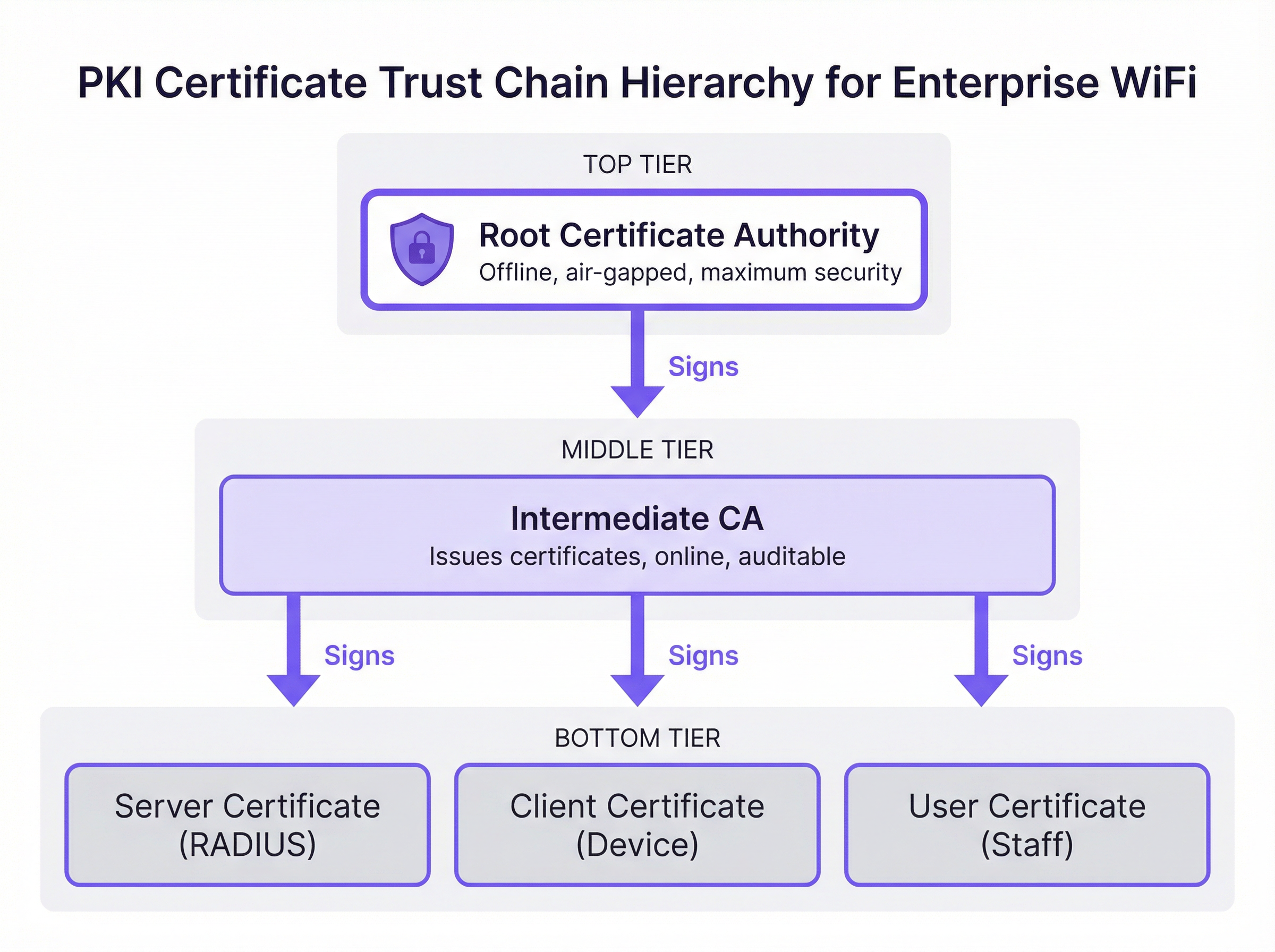
Root-Zertifizierungsstelle (Root CA): Die Root CA ist der kryptografische Anker des gesamten PKI-Ökosystems. Sie stellt ein selbstsigniertes Zertifikat aus, dem Client-Geräte und Server von Natur aus vertrauen. In einer sicheren Unternehmensumgebung wird die Root CA offline und physisch vom Netzwerk getrennt (air-gapped) aufbewahrt, um ihren privaten Schlüssel vor netzwerkbasierten Angriffen zu schützen. Ihr einziger betrieblicher Zweck besteht darin, die Zertifikate von Intermediate CAs zu signieren.
Zwischenzertifizierungsstelle (Intermediate CA): Die Intermediate CA fungiert als Puffer zwischen der hochsicheren Root CA und der Betriebsumgebung. Sie ist online und übernimmt die tägliche Ausstellung und den Widerruf von Leaf-Zertifikaten. Diese Trennung ist eine kritische Strategie zur Risikominderung: Falls eine Intermediate CA kompromittiert wird, kann sie von der Root CA widerrufen werden, ohne die gesamte PKI-Infrastruktur ungültig zu machen oder eine Neukonfiguration jedes Client-Geräts zu erfordern.
Leaf-Zertifikate (Endentitätszertifikate): Dies sind die Zertifikate, die auf einzelnen Servern und Client-Geräten installiert werden. Sie befinden sich am Ende der Vertrauenskette und können selbst keine weiteren Zertifikate signieren. Für die WiFi-Bereitstellung sind zwei Haupttypen relevant. Das Server-Zertifikat wird auf dem RADIUS-Server installiert und ermöglicht es Client-Geräten zu verifizieren, dass sie sich mit dem legitimen Unternehmensnetzwerk verbinden. Das Client-Zertifikat wird auf Laptops von Mitarbeitern, mobilen Geräten oder Point-of-Sale-Terminals installiert, sodass der RADIUS-Server die Identität jedes spezifischen Geräts oder Benutzers überprüfen kann.
Wie PKI die EAP-TLS-Authentifizierung unterstützt
EAP-TLS ist der Goldstandard für die sichere WiFi-Authentifizierung, da es eine gegenseitige zertifikatsbasierte Authentifizierung vorschreibt. Das bedeutet, dass sowohl das Client-Gerät als auch der RADIUS-Server ihre Identität gegenseitig mithilfe von Zertifikaten nachweisen müssen, die gegen die PKI-Vertrauenskette validiert wurden – wodurch die mit passwortbasierten Ansätzen verbundenen Risiken eliminiert werden.
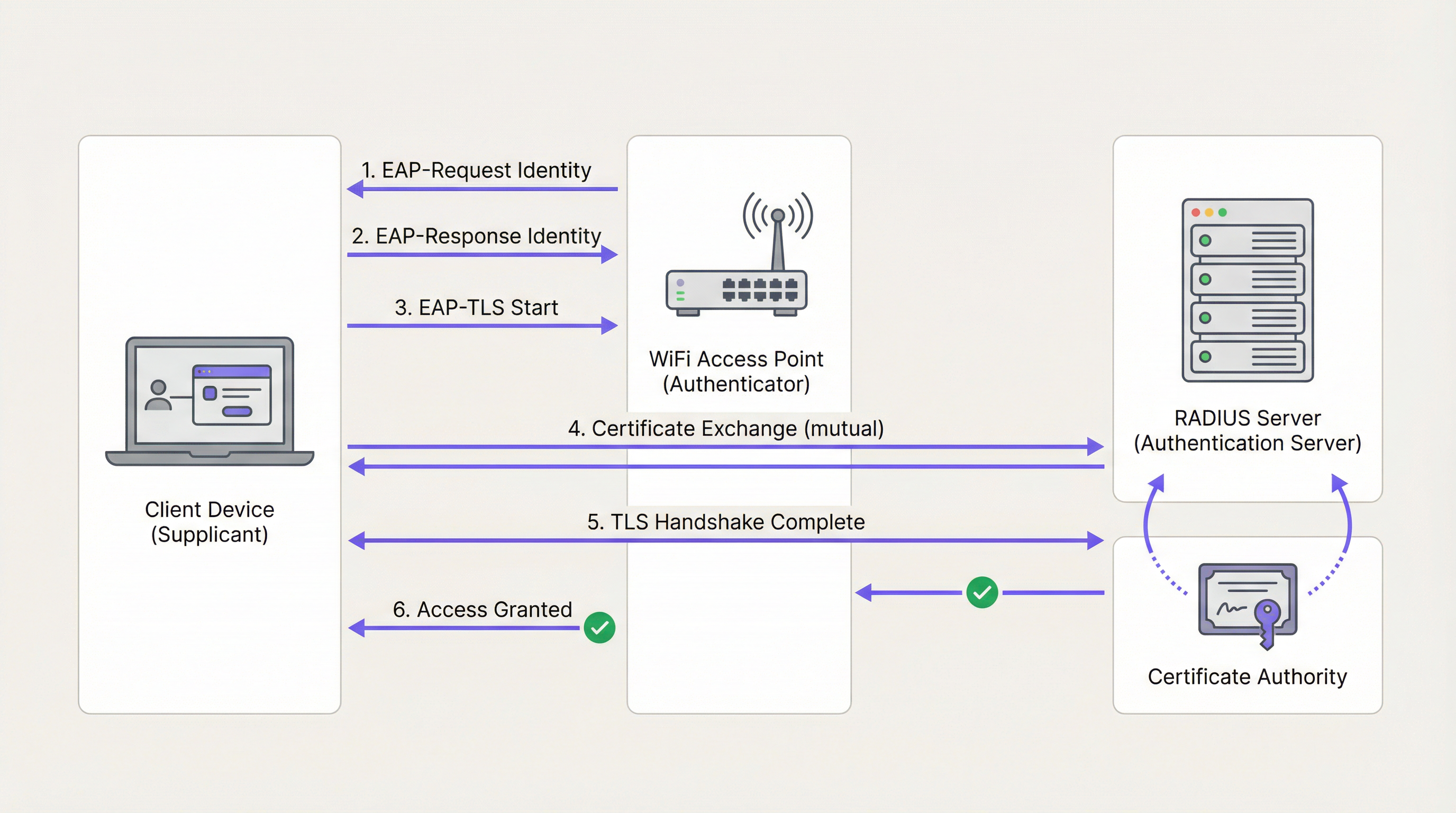
Während des EAP-TLS-Handshakes, der innerhalb des IEEE 802.1X-Frameworks erfolgt, präsentiert der RADIUS-Server dem Client-Gerät zunächst sein Server-Zertifikat. Das Gerät validiert die Signatur des Zertifikats gegen seinen Speicher für vertrauenswürdige Root CAs. Wenn es gültig ist, hat das Gerät den kryptografischen Beweis, dass es sich mit dem legitimen Unternehmensnetzwerk verbindet – und nicht mit einem nicht autorisierten Access Point oder einem Evil Twin. Das Client-Gerät präsentiert dann sein eigenes Client-Zertifikat dem RADIUS-Server, der es gegen die CA validiert. Sobald beide Parteien authentifiziert sind, wird ein sicherer TLS-Tunnel aufgebaut und der Netzwerkzugriff gewährt. Es werden keine Passwörter übertragen, und es existieren keine gemeinsamen Geheimnisse, die gestohlen werden könnten.
Diese Architektur ist auch die Grundlage für WPA3-Enterprise, das den 192-Bit-Sicherheitsmodus vorschreibt und auf denselben PKI- und 802.1X-Grundlagen basiert. Für Organisationen, die Wireless Access Points in Hochsicherheitsumgebungen einsetzen, stellt WPA3-Enterprise mit EAP-TLS die aktuelle Best Practice dar.
Öffentliche CA vs. Private CA: Die Bereitstellungsentscheidung
Eine der eine der folgenreichsten Architekturentscheidungen bei einer PKI-Bereitstellung ist die Wahl zwischen einer Public CA und einer Private CA. Die folgende Tabelle fasst die Vor- und Nachteile zusammen.
| Kriterium | Public CA | Private CA |
|---|---|---|
| Kosten | Gebühr pro Zertifikat (rentabel für eine geringe Anzahl von Servern) | Infrastrukturkosten, aber keine Gebühren pro Zertifikat bei Skalierung |
| Geräte-Vertrauen | Standardmäßig vertrauenswürdig auf den meisten Betriebssystemen und Geräten | Erfordert die Verteilung der Root CA auf alle Geräte via MDM |
| Kontrolle | Begrenzt; CA kontrolliert die Ausstellungsrichtlinien | Vollständige Kontrolle über Ausstellung, Widerruf und Lebenszyklus |
| Bester Anwendungsfall | RADIUS-Serverzertifikat | Client-Zertifikate für verwaltete Unternehmensgeräte |
| Compliance | Prüfbar über öffentliche CT-Logs | Erfordert interne Audit-Prozesse |
Der empfohlene Ansatz für die meisten Enterprise-WiFi-Bereitstellungen ist ein Hybridmodell: Verwenden Sie eine Public CA für das RADIUS-Serverzertifikat, um eine breite Kompatibilität zu gewährleisten, und stellen Sie eine Private CA bereit (wie Microsoft Active Directory Certificate Services oder einen cloudbasierten PKI-Anbieter), um Client-Zertifikate für verwaltete Geräte in großem Umfang auszustellen.
Implementierungsleitfaden
Schritt 1: Design der CA-Architektur
Beginnen Sie mit der Erfassung Ihrer Zertifikatsanforderungen. Identifizieren Sie die Anzahl der verwalteten Geräte, die verwendeten Betriebssysteme und die verfügbare MDM-Plattform. Bestimmen Sie, ob eine zwei-stufige (Root CA + Intermediate CA) oder drei-stufige Hierarchie für die Größe und das Risikoprofil Ihres Unternehmens angemessen ist.
Schritt 2: Bereitstellung und Absicherung der Root- und Intermediate-CAs
Richten Sie die Offline-Root CA auf einem dedizierten Air-Gapped-Rechner ein. Verwenden Sie die Root CA, um das Intermediate CA-Zertifikat zu signieren. Stellen Sie sicher, dass die Intermediate CA sicher in Ihrem Rechenzentrum oder Ihrer Cloud-Umgebung bereitgestellt und in Ihren Identity Provider (IdP) oder Ihre MDM-Lösung integriert ist. Speichern Sie den privaten Schlüssel der Root CA in einem Hardware-Sicherheitsmodul (HSM), sofern das Budget dies zulässt.
Schritt 3: Konfiguration des RADIUS-Servers
Installieren Sie das Serverzertifikat auf Ihrem RADIUS-Server. Konfigurieren Sie den Server so, dass er EAP-TLS für die sichere Unternehmens-SSID erfordert. Stellen Sie sicher, dass der RADIUS-Server der Intermediate CA vertraut, die die Client-Zertifikate ausgestellt hat, und konfigurieren Sie ihn so, dass er die Widerrufsprüfung via OCSP durchführt.
Schritt 4: Zertifikatsverteilung via MDM
Versuchen Sie niemals eine manuelle Zertifikatsinstallation in großem Umfang. Verwenden Sie eine MDM-Plattform wie Microsoft Intune oder Jamf, um das Root CA-Zertifikat, das Intermediate CA-Zertifikat und eindeutige Client-Zertifikate über automatisierte Richtlinien auf alle verwalteten Geräte zu verteilen. Dies gewährleistet eine konsistente Bereitstellung und ermöglicht eine automatisierte Erneuerung.
Schritt 5: Implementierung und Test von Widerrufsmechanismen
Konfigurieren Sie Zertifikatssperrlisten (CRLs) oder das Online Certificate Status Protocol (OCSP). Testen Sie den Widerrufs-Workflow durchgängig, indem Sie ein Testzertifikat widerrufen und bestätigen, dass der RADIUS-Server den Zugriff innerhalb des erwarteten Zeitrahmens verweigert. Für Umgebungen, die einen nahezu sofortigen Widerruf erfordern – wie Einzelhandel POS-Netzwerke – ist OCSP obligatorisch.
Schritt 6: Überwachung und Automatisierung des Lifecycle-Managements
Implementieren Sie eine automatisierte Überwachung des Zertifikatsablaufs auf allen Ebenen der Hierarchie. Konfigurieren Sie Warnmeldungen 90, 60 und 30 Tage vor Ablauf. Automatisieren Sie die Erneuerung nach 60 Tagen. Dies ist der wichtigste operative Schritt zur Vermeidung von Netzwerkausfällen.
Best Practices
Gegenseitige Authentifizierung ausnahmslos erzwingen: Stellen Sie sicher, dass Client-Geräte so konfiguriert sind, dass sie das Zertifikat des RADIUS-Servers strikt validieren. Das Deaktivieren der Serverzertifikatsvalidierung – eine häufige Abkürzung bei der Erstbereitstellung – macht Geräte anfällig für Man-in-the-Middle-Angriffe und das Abgreifen von Zugangsdaten und verstößt gegen PCI-DSS-Anforderungen.
Netzwerktrennung nach Authentifizierungsmethode: Verwenden Sie EAP-TLS für Unternehmens- und Mitarbeitergeräte auf einer dedizierten SSID. Für den öffentlichen Besucherzugang stellen Sie eine robuste Captive Portal-Lösung wie Guest WiFi in einem vollständig getrennten Netzwerk bereit. Versuchen Sie nicht, PKI auf nicht verwalteten Gastgeräten bereitzustellen.
Regelmäßige Audits der PKI-Infrastruktur: Führen Sie vierteljährliche Audits der CA-Zugriffskontrollen, Sperrlisten und Zertifikatsausstellungsprotokolle durch. In Gesundheitswesen - und Einzelhandel -Umgebungen ist dies eine Compliance-Anforderung gemäß HIPAA bzw. PCI DSS.
Integration mit Network Analytics: Sobald die sichere Authentifizierung eingerichtet ist, nutzen Sie WiFi Analytics , um Einblicke in das Geräteverhalten, Verbindungsmuster und potenzielle Anomalien zu erhalten. Ein sicheres Netzwerk ist die Grundlage für vertrauenswürdige Daten.
SD-WAN-Integration in Betracht ziehen: Für standortübergreifende Bereitstellungen in Hotelketten oder Einzelhandelsstandorten lässt sich PKI natürlich in SD-WAN-Architekturen integrieren. Weitere Informationen dazu, wie sich diese Technologien ergänzen, finden Sie unter Die wichtigsten SD-WAN-Vorteile für moderne Unternehmen .
Fehlerbehebung & Risikominderung
Die folgende Tabelle ordnet gängige Fehlermodi ihren Grundursachen und empfohlenen Abhilfemaßnahmen zu.
| Symptom | Ursache | Abhilfe |
|---|---|---|
| Geräte können keine Verbindung herstellen; RADIUS-Logs zeigen 'Unknown CA' | Client-Gerät vertraut der CA nicht, die das RADIUS-Serverzertifikat ausgestellt hat | Verteilen Sie die Root CA via MDM auf alle Geräte |
| Plötzlicher netzwerkweiter Ausfall für alle Unternehmensgeräte | RADIUS-Serverzertifikat oder Intermediate CA-Zertifikat ist abgelaufen | Implementieren Sie eine automatisierte Überwachung und Erneuerung; Warnmeldung bei 90/60/30 Tagen |
| Gestohlener Laptop hat weiterhin Netzwerkzugriff | CRL ist veraltet oder OCSP ist nicht konfiguriert | Wechseln Sie zu OCSP für die Widerrufsprüfung in Echtzeit |
| Neue Geräte können nach der MDM-Registrierung keine Verbindung herstellen | Client-Zertifikat wurde noch nicht per MDM-Richtlinie verteilt | Überprüfen Sie die MDM-Richtlinienzuweisung und erzwingen Sie eine Gerätesynchronisierung |
| Sporadische Authentifizierungsfehler | Zeitversatz zwischen Client und RADIUS-Server | Stellen Sie sicher, dass alle Geräte die NTP-Zeitsynchronisation verwenden |
Für ein tieferes Verständnis der 802.1X-Konfiguration und Fehlerbehebung finden Sie im Leitfaden 802.1X-Authentifizierung: Absicherung des Netzwerkzugriffs auf modernen Geräten bietet detaillierte, herstellerneutrale Konfigurationsanleitungen.
ROI & geschäftliche Auswirkungen
Der Übergang zu einer PKI-gestützten EAP-TLS-Architektur liefert messbaren Geschäftswert für Standortbetreiber in mehreren Dimensionen.
Risikominderung und Compliance: Die Eliminierung der passwortbasierten Authentifizierung entfernt den häufigsten Angriffsvektor für Netzwerkkompromittierungen. Dies reduziert direkt die Wahrscheinlichkeit kostspieliger Datenschutzverletzungen und vereinfacht die Einhaltung von PCI DSS (erforderlich für die Zahlungsabwicklung), GDPR (für den Datenschutz) und branchenspezifischen Vorschriften. Für Standorte, die IoT- Sensors oder standortbasierte Wayfinding -Systeme einsetzen, ist ein kryptografisch gesichertes Netzwerk eine Voraussetzung für vertrauenswürdige Datenintegrität.
Operative Effizienz: Die Automatisierung der Zertifikatsbereitstellung über MDM eliminiert den operativen Aufwand der Passwortverwaltung und reduziert IT-Helpdesk-Tickets im Zusammenhang mit der WiFi-Konnektivität. In Umgebungen mit hoher Fluktuation wie Hotels und dem Einzelhandel, in denen das Onboarding und Offboarding von Mitarbeitern häufig vorkommt, bietet die automatisierte Ausstellung und der Widerruf von Zertifikaten erhebliche Zeiteinsparungen im Vergleich zur Verwaltung gemeinsam genutzter Anmeldedaten.
Grundlage für fortschrittliche Dienste: Ein sicheres, authentifiziertes Unternehmensnetzwerk ist die vertrauenswürdige Grundlage, auf der fortschrittliche operative Dienste aufgebaut werden. Ob beim Einsatz von WiFi Analytics für Besucherfrequenz-Analysen, Sensors für Echtzeit-Belegungsdaten oder Wayfinding für große Veranstaltungsorte – jede dieser Funktionen profitiert von den Integritätsgarantien, die PKI bietet.
Speziell für Betreiber im Bereich Hospitality stellt die Kombination aus einem sicheren Mitarbeiternetzwerk und einem gut gestalteten Gästeportal – wie in Modern Hospitality WiFi Solutions Your Guests Deserve beschrieben – die vollständige Enterprise-WiFi-Architektur dar. Für Transport -Knotenpunkte und große öffentliche Veranstaltungsorte gelten dieselben Prinzipien in entsprechendem Umfang.
Schlüsselbegriffe & Definitionen
Public Key Infrastructure (PKI)
A framework of roles, policies, hardware, software, and procedures needed to create, manage, distribute, use, store, and revoke digital certificates and manage public-key encryption.
The foundational architecture that must be in place before an IT team can deploy secure, certificate-based WiFi authentication using EAP-TLS.
Certificate Authority (CA)
A trusted entity that issues digital certificates, verifying the identity of the certificate subject and binding that identity to a public key with a cryptographic signature.
The central authority in your network that acts as the source of truth for all device and server identities. Without a trusted CA, no certificate-based authentication is possible.
X.509 Certificate
The standard format for public key certificates, defined in RFC 5280. Contains the subject identity, public key, issuer identity, validity period, and the CA's digital signature.
The actual digital passport installed on a laptop or server that proves its identity during the EAP-TLS handshake.
EAP-TLS (Extensible Authentication Protocol-Transport Layer Security)
An 802.1X authentication method that requires mutual certificate-based authentication between the client device (supplicant) and the authentication server (RADIUS). Defined in RFC 5216.
The most secure method for authenticating corporate devices to a WiFi network. Eliminates the need for passwords and provides cryptographic proof of identity for both parties.
Trust Chain
A hierarchical sequence of certificates used to authenticate an entity, starting from the leaf certificate and tracing upward through the Intermediate CA to the Root CA.
The mechanism by which a laptop verifies that a RADIUS server's certificate is legitimate. Each link in the chain is validated until a trusted Root CA is reached.
Certificate Revocation List (CRL)
A periodically published list of digital certificates that have been revoked by the issuing CA before their scheduled expiration date and should no longer be trusted.
A mechanism for blocking access from lost or stolen devices. CRLs are cached and updated on a schedule, meaning revocation may not be immediate — a limitation addressed by OCSP.
Online Certificate Status Protocol (OCSP)
An internet protocol (RFC 6960) used for obtaining the real-time revocation status of an X.509 digital certificate by querying the CA's OCSP responder.
The preferred revocation mechanism for high-security environments. Enables the RADIUS server to check certificate validity in real-time during each authentication attempt, providing near-instant revocation enforcement.
RADIUS (Remote Authentication Dial-In User Service)
A networking protocol that provides centralised Authentication, Authorisation, and Accounting (AAA) management for users and devices connecting to a network.
The central server in an enterprise WiFi deployment that validates certificates and makes the final access control decision. The RADIUS server is the operational core of an EAP-TLS deployment.
IEEE 802.1X
An IEEE standard for port-based Network Access Control (PNAC) that provides an authentication mechanism for devices wishing to attach to a LAN or WLAN.
The overarching framework within which EAP-TLS operates. Understanding 802.1X is essential for configuring access points and switches to enforce certificate-based authentication.
Mobile Device Management (MDM)
A software platform used by IT administrators to remotely manage, configure, and secure mobile devices and laptops across an organisation.
The essential operational tool for deploying certificates at scale. MDM platforms such as Microsoft Intune and Jamf automate the distribution of Root CA certificates, Intermediate CA certificates, and Client Certificates to all managed devices.
Fallstudien
A 500-room luxury hotel in London needs to secure its staff WiFi network for housekeeping tablets and point-of-sale (POS) terminals. Currently, they use a single Pre-Shared Key (PSK) that has not been rotated in three years and is known to all permanent and agency staff. The IT Director has been tasked with transitioning to a certificate-based architecture before the next PCI DSS audit. How should this be approached?
Phase 1 — Architecture Design: Deploy a cloud-based Private PKI (e.g., Microsoft NDES via Intune, or a dedicated cloud PKI provider) integrated with the hotel's MDM platform. Obtain a RADIUS Server Certificate from a Public CA such as DigiCert.
Phase 2 — Infrastructure Deployment: Configure the RADIUS server with the new Server Certificate and enable EAP-TLS on a new hidden SSID designated for staff devices. Configure OCSP for real-time revocation checking.
Phase 3 — Device Enrolment: Use the MDM platform to push the Private Root CA, the Intermediate CA, and unique Client Certificates to all housekeeping tablets and POS terminals. Verify successful certificate installation on a pilot group of 20 devices before full rollout.
Phase 4 — Migration and Decommission: Migrate all devices to the new EAP-TLS SSID via MDM policy. Confirm connectivity across all device types. After a two-week parallel running period, decommission the legacy PSK network.
Phase 5 — Operational Handover: Document the certificate lifecycle, revocation procedures, and MDM policies. Configure automated expiry alerts and schedule quarterly PKI audits.
A national retail chain is deploying EAP-TLS across 200 stores. During pilot testing across five stores, the IT team discovers that when a store manager's laptop is reported stolen and the certificate is revoked in the PKI system, the device can still successfully authenticate to the corporate WiFi for up to 18 hours after revocation. The security team considers this an unacceptable risk given that the device may have access to inventory management systems. How should this be resolved?
The 18-hour delay is caused by the RADIUS server relying on a cached, infrequently downloaded Certificate Revocation List (CRL). CRLs are typically published on a schedule (e.g., every 24 hours) and cached by the RADIUS server, meaning revocation is not reflected in real-time.
The resolution is to reconfigure the RADIUS server to use the Online Certificate Status Protocol (OCSP) as the primary revocation checking mechanism. OCSP allows the RADIUS server to query the CA's OCSP responder in real-time during each EAP-TLS handshake, receiving an immediate 'good', 'revoked', or 'unknown' response for the specific certificate being presented.
Configuration steps: (1) Ensure the Private CA is configured with an OCSP responder endpoint. (2) Update the RADIUS server configuration to query the OCSP endpoint for every authentication attempt. (3) Configure OCSP stapling where supported to reduce latency. (4) Test by revoking a certificate and confirming the RADIUS server denies access within 60 seconds.
Szenarioanalyse
Q1. Your organisation is migrating from PEAP-MSCHAPv2 (username and password) to EAP-TLS for the corporate WiFi. The network team proposes using the existing Active Directory Certificate Services (AD CS) infrastructure to issue certificates to both the RADIUS servers and all corporate laptops. A member of the team points out that the organisation also has 50 contractor laptops that are not domain-joined. What is the primary compatibility risk, and how should it be addressed?
💡 Hinweis:Consider how non-domain joined devices will validate the RADIUS server's identity when it presents a certificate signed by your Private AD CS Root CA.
Empfohlenen Ansatz anzeigen
The primary risk is that the 50 non-domain joined contractor laptops will not have the private AD CS Root CA in their trusted certificate store. When the RADIUS server presents its Server Certificate during the EAP-TLS handshake, these devices will receive an 'Untrusted Certificate' error and fail to connect. The recommended resolution is to obtain the RADIUS Server Certificate from a Public CA (such as DigiCert or Sectigo) rather than the private AD CS. Public CA roots are pre-installed in the trust stores of all major operating systems, ensuring compatibility with both domain-joined and non-domain joined devices. The private AD CS should be retained solely for issuing Client Certificates to managed, domain-joined devices.
Q2. During a compliance audit for a large NHS hospital trust, the auditor notes that the Root CA is running as a virtual machine in the primary data centre and is permanently connected to the hospital's internal network. The auditor flags this as a critical finding. What architectural change must be implemented, and why is the current configuration a significant risk?
💡 Hinweis:Consider what would happen to every certificate in the organisation if the Root CA's private key were compromised by a ransomware attack or insider threat.
Empfohlenen Ansatz anzeigen
The Root CA must be immediately taken offline and air-gapped. The current configuration is a critical risk because the Root CA's private key is exposed to network-based attacks, including ransomware, lateral movement from a compromised domain account, or insider threats. If the Root CA's private key is stolen or used to sign malicious certificates, the entire PKI infrastructure — and therefore every certificate-authenticated system in the trust — is compromised. Recovery would require revoking the Root CA and re-issuing every certificate in the organisation, a catastrophic operational event. The correct architecture requires the Root CA to be powered on only when signing or revoking an Intermediate CA certificate, with all day-to-day issuance handled by an online Intermediate CA. The Root CA's private key should be stored in a Hardware Security Module (HSM).
Q3. A large conference centre operator wants to implement certificate-based authentication for both their permanent IT staff and the thousands of exhibitors and visitors who attend events. They ask you to design a single PKI infrastructure to serve both groups. What is your recommendation, and why?
💡 Hinweis:Consider the operational feasibility of distributing certificates to thousands of unmanaged, temporary visitors who may attend an event for a single day.
Empfohlenen Ansatz anzeigen
You should strongly advise against using PKI and EAP-TLS for public visitors and exhibitors. Certificate-based authentication requires installing a Client Certificate and often a Root CA profile on the end-user device, which is operationally impossible for unmanaged, temporary devices and creates an extremely poor user experience. EAP-TLS should be strictly reserved for permanent IT staff using managed corporate devices enrolled in the organisation's MDM platform. For exhibitors and visitors, a captive portal solution should be deployed on a completely separate, segregated SSID. This two-network architecture — secure EAP-TLS for staff, captive portal for guests — is the industry standard for venue operators and is the model supported by Purple's platform.
Q4. An IT manager at a retail chain has successfully deployed EAP-TLS across all 150 stores. Six months later, the RADIUS server at 12 stores simultaneously stops accepting client connections. Investigation reveals no certificate revocations have occurred. What is the most likely cause, and what process failure allowed this to happen?
💡 Hinweis:Consider what all 12 affected stores might have in common from a certificate perspective, and what event could cause simultaneous failures.
Empfohlenen Ansatz anzeigen
The most likely cause is that the Intermediate CA certificate — or the RADIUS Server Certificate — has expired. If all 12 stores were configured using the same Intermediate CA or the same batch of RADIUS Server Certificates issued at the same time, they would all expire simultaneously. This is a lifecycle management failure: the organisation did not implement automated certificate expiry monitoring and alerting. The resolution requires renewing the expired certificate(s) and immediately implementing automated monitoring with alerts at 90, 60, and 30 days before expiry for all certificates in the hierarchy, including the Intermediate CA, the RADIUS Server Certificate, and the Root CA.
Wichtigste Erkenntnisse
- ✓PKI is the cryptographic trust framework that must be in place before deploying EAP-TLS or WPA3-Enterprise certificate-based WiFi authentication.
- ✓The trust chain has three tiers: an offline Root CA (the trust anchor), an online Intermediate CA (the operational issuer), and Leaf Certificates installed on servers and client devices.
- ✓EAP-TLS provides mutual authentication — the client verifies the network and the network verifies the client — eliminating the password-based attack surface entirely.
- ✓Use a Public CA for your RADIUS Server Certificate (for broad device compatibility) and a Private CA for Client Certificates (for cost control and lifecycle management at scale).
- ✓Always keep the Root CA offline and air-gapped; if it is compromised, the entire PKI infrastructure must be rebuilt from scratch.
- ✓Implement OCSP for real-time certificate revocation checking — CRL-based revocation introduces unacceptable delays in high-security environments.
- ✓Automate certificate lifecycle management via MDM and monitoring tools; expired certificates are the leading cause of EAP-TLS network outages.




