

Fundamentos de PKI para Administradores de WiFi: Certificados, CAs e Cadeias de Confiança
Este guia de referência técnica explica os conceitos fundamentais de Public Key Infrastructure (PKI) para administradores de WiFi empresariais, abrangendo autoridades de certificação, cadeias de confiança e certificados X.509. Detalha como a PKI sustenta a autenticação mútua EAP-TLS e fornece orientações de implementação práticas para equipas de TI em ambientes de hotelaria, retalho e setor público. Compreender a PKI é um pré-requisito obrigatório para implementar a autenticação de WiFi para funcionários baseada em certificados com a Purple.
🎧 Ouça este Guia
Ver Transcrição

Resumo Executivo
Para gestores de TI, arquitetos de rede e diretores de operações de espaços, proteger as redes WiFi corporativas e de funcionários é um requisito crítico de conformidade e operacional. Métodos de autenticação legados, como Pre-Shared Keys (PSKs) ou filtragem de endereços MAC, são insuficientes para ambientes empresariais modernos, deixando as redes vulneráveis ao roubo de credenciais e à falsificação de dispositivos. Para alcançar uma segurança robusta e auditável, as organizações devem transitar para a autenticação baseada em certificados — especificamente EAP-TLS (Extensible Authentication Protocol-Transport Layer Security).
A implementação de EAP-TLS requer uma compreensão sólida de Public Key Infrastructure (PKI). Este guia desmistifica a PKI para administradores de WiFi, explicando as funções das Autoridades de Certificação (CAs), a mecânica da cadeia de confiança e as diferenças práticas entre certificados de servidor e de cliente. Ao dominar estes fundamentos, as equipas de TI podem projetar e implementar com confiança soluções de acesso à rede seguras e escaláveis em espaços de Hotelaria , Retalho e do setor público, garantindo a conformidade com normas como PCI DSS e GDPR, ao mesmo tempo que proporcionam conectividade contínua e sem palavras-passe para dispositivos geridos. Compreender a PKI é também o pré-requisito fundamental para implementar a autenticação de WiFi para funcionários baseada em certificados com a Purple.
Análise Técnica Aprofundada
A Arquitetura de Confiança: O que é a Public Key Infrastructure?
A Public Key Infrastructure (PKI) é uma estrutura criptográfica que permite a comunicação segura e a autenticação mútua numa rede não confiável. No contexto do WiFi empresarial, a PKI atua como um sistema de passaporte digital, verificando a identidade tanto do dispositivo cliente (o suplicante) como do servidor de autenticação de rede (o servidor RADIUS) antes de qualquer dado ser trocado.
Este sistema baseia-se em certificados X.509, que vinculam uma chave pública a uma identidade verificada — como um hostname de servidor ou um endereço de e-mail de utilizador — e são assinados digitalmente por uma entidade terceira confiável conhecida como Autoridade de Certificação (CA). A assinatura da CA é a garantia criptográfica de que a reivindicação de identidade é legítima.
A Hierarquia de Certificados e a Cadeia de Confiança
A força da PKI reside na sua estrutura hierárquica, conhecida como cadeia de confiança. Esta hierarquia garante que qualquer certificado apresentado por um dispositivo ou servidor possa ser rastreado criptograficamente até uma fonte universalmente confiável. Os três níveis são os seguintes.
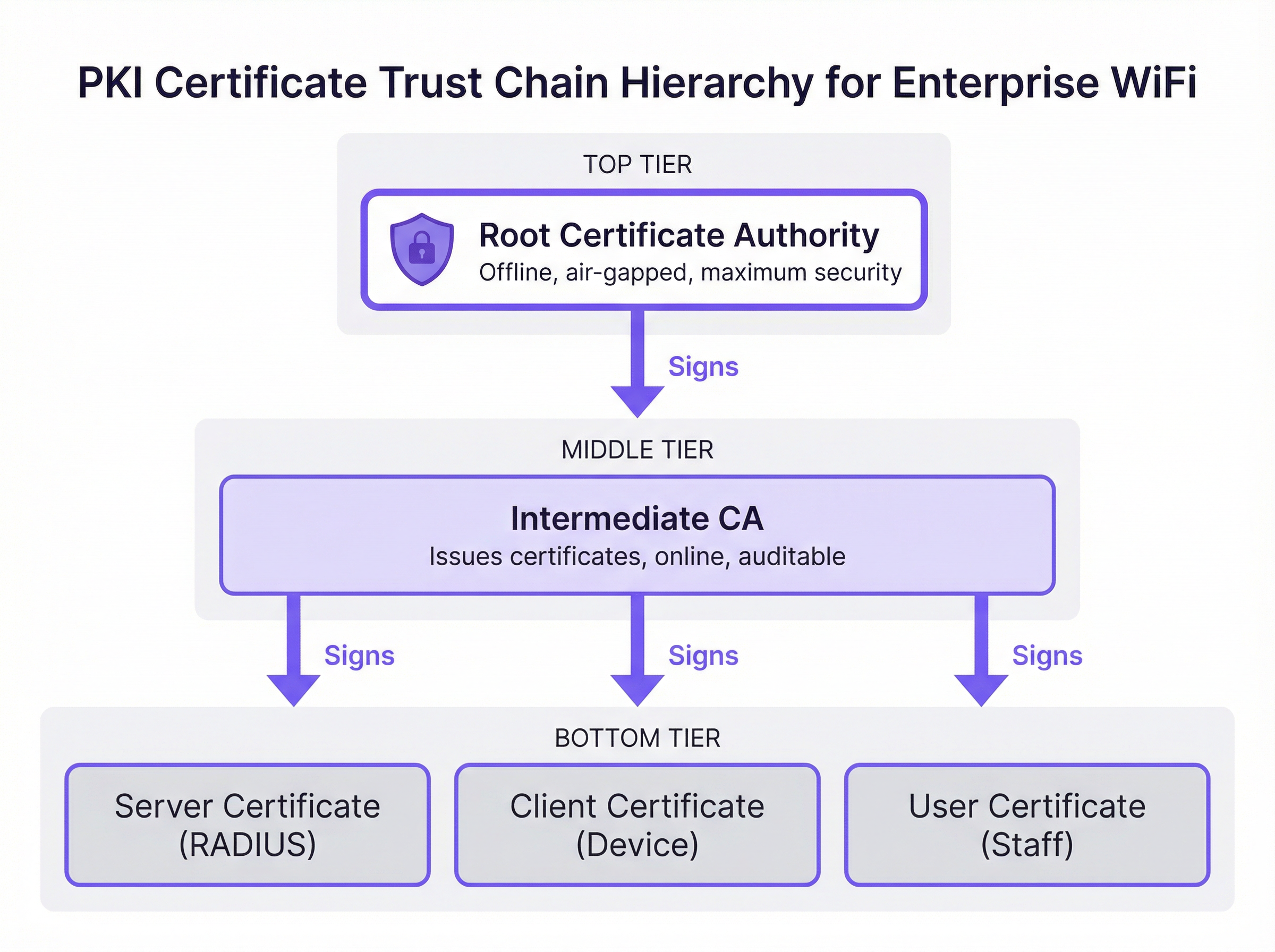
Autoridade de Certificação Raiz (Root CA): A Root CA é a âncora criptográfica de todo o ecossistema PKI. Emite um certificado autoassinado e é inerentemente confiável para dispositivos cliente e servidores. Numa implementação empresarial segura, a Root CA é mantida offline e isolada (air-gapped) para proteger a sua chave privada de comprometimento via rede. O seu único propósito operacional é assinar os certificados das CAs Intermédias.
Autoridade de Certificação Intermédia (Intermediate CA): A CA Intermédia atua como um buffer entre a Root CA altamente segura e o ambiente operacional. Está online e gere a emissão e revogação diária de certificados de folha. Esta separação é uma estratégia crítica de mitigação de risco: se uma CA Intermédia for comprometida, pode ser revogada pela Root CA sem invalidar toda a infraestrutura PKI ou exigir que todos os dispositivos cliente sejam reconfigurados.
Certificados de Folha (Certificados de Entidade Final): Estes são os certificados instalados em servidores individuais e dispositivos cliente. Estão na base da cadeia de confiança e não podem, por si só, assinar outros certificados. Existem dois tipos principais relevantes para a implementação de WiFi. O Certificado de Servidor é instalado no servidor RADIUS, permitindo que os dispositivos cliente verifiquem que se estão a ligar à rede corporativa legítima. O Certificado de Cliente é instalado em computadores portáteis de funcionários, dispositivos móveis ou terminais de ponto de venda, permitindo que o servidor RADIUS verifique a identidade de cada dispositivo ou utilizador específico.
Como a PKI Sustenta a Autenticação EAP-TLS
O EAP-TLS é o padrão de ouro para a autenticação WiFi segura porque exige a autenticação mútua baseada em certificados. Isto significa que tanto o dispositivo cliente como o servidor RADIUS devem provar as suas identidades um ao outro utilizando certificados validados contra a cadeia de confiança PKI — eliminando os riscos inerentes às abordagens baseadas em palavras-passe.
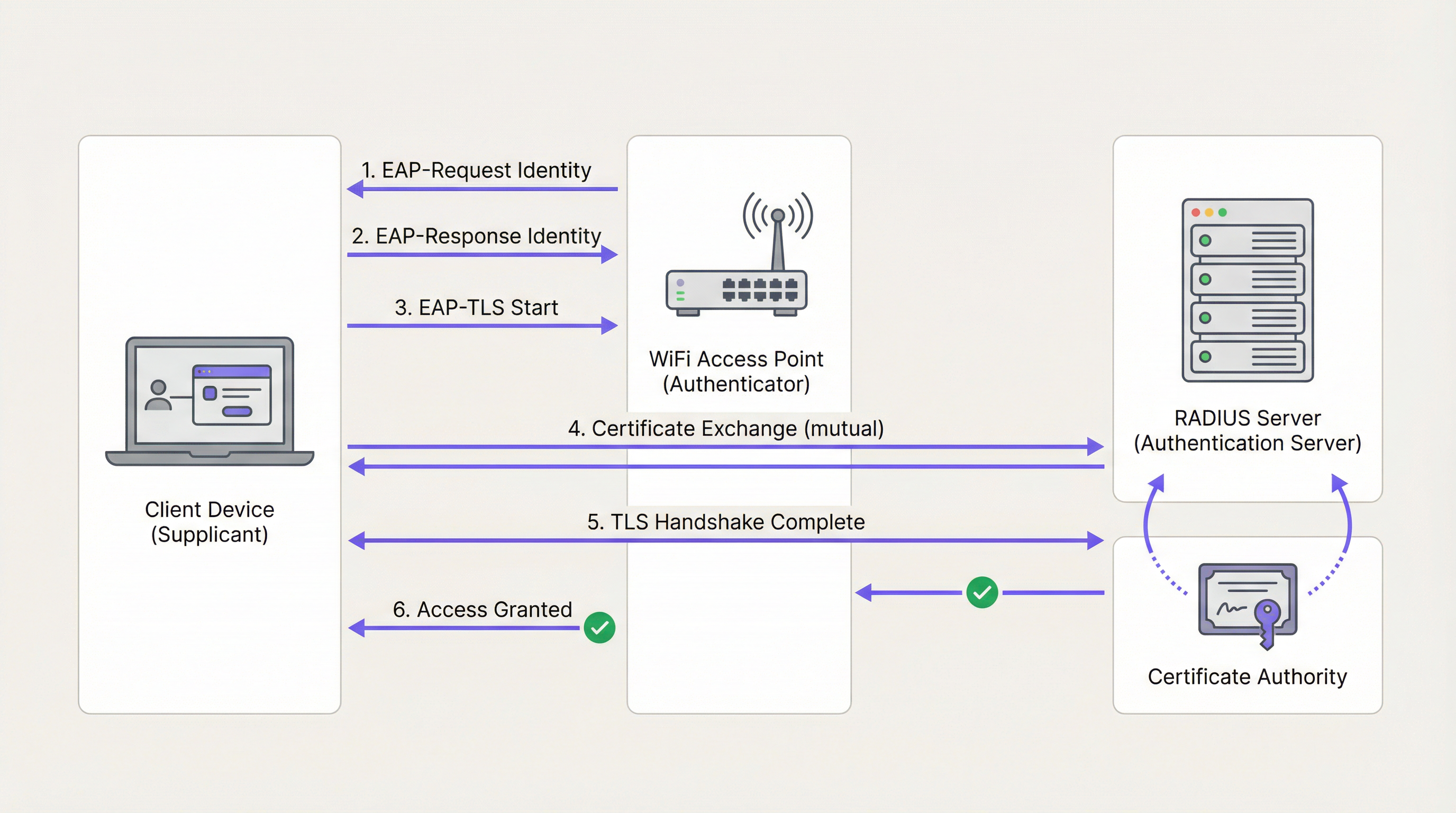
Durante o handshake EAP-TLS, que opera dentro da estrutura IEEE 802.1X, o servidor RADIUS apresenta primeiro o seu Certificado de Servidor ao dispositivo cliente. O dispositivo valida a assinatura do certificado contra o seu armazenamento de Root CA confiável. Se for válido, o dispositivo tem prova criptográfica de que se está a ligar à rede corporativa legítima — e não a um ponto de acesso não autorizado ou "evil twin". O dispositivo cliente apresenta então o seu próprio Certificado de Cliente ao servidor RADIUS, que o valida contra a CA. Uma vez autenticadas ambas as partes, é estabelecido um túnel TLS seguro e o acesso à rede é concedido. Não são transmitidas palavras-passe e não existem segredos partilhados que possam ser roubados.
Esta arquitetura é também a base do WPA3-Enterprise, que exige o modo de segurança de 192 bits e depende dos mesmos fundamentos de PKI e 802.1X. Para organizações que implementam Pontos de Acesso Wireless em ambientes de alta segurança, o WPA3-Enterprise com EAP-TLS representa a melhor prática atual.
CA Pública vs. CA Privada: A Decisão de Implementação
Uma das decisões arquitetónicas mais consequentes numa implementação de PKI é a escolha entre uma CA Pública e uma CA Privada. A tabela abaixo resume as compensações.
| Critério | CA Pública | CA Privada |
|---|---|---|
| Custo | Taxa por certificado (viável para um pequeno número de servidores) | Custo de infraestrutura, mas sem taxa por certificado em escala |
| Confiança do Dispositivo | Confiável por predefinição na maioria dos SOs e dispositivos | Requer que a Root CA seja enviada para todos os dispositivos via MDM |
| Controlo | Limitado; a CA controla as políticas de emissão | Controlo total sobre emissão, revogação e ciclo de vida |
| Melhor Caso de Uso | Certificado de Servidor RADIUS | Certificados de Cliente para dispositivos corporativos geridos |
| Conformidade | Auditável através de registos públicos de CT | Requer processos de auditoria interna |
A abordagem recomendada para a maioria das implementações de WiFi empresarial é um modelo híbrido: utilizar uma CA Pública para o Certificado de Servidor RADIUS para garantir uma ampla compatibilidade, e implementar uma CA Privada (como o Microsoft Active Directory Certificate Services ou um fornecedor de PKI na nuvem) para emitir Certificados de Cliente para dispositivos geridos em escala.
Guia de Implementação
Passo 1: Projetar a Arquitetura da CA
Comece por mapear os seus requisitos de certificados. Identifique o número de dispositivos geridos, os sistemas operativos em uso e a plataforma de MDM disponível. Determine se uma hierarquia de dois níveis (Root CA + CA Intermédia) ou de três níveis é apropriada para a escala e o perfil de risco da sua organização.
Passo 2: Implementar e Proteger as CAs Raiz e Intermédia
Estabeleça a Root CA offline numa máquina dedicada e isolada. Utilize a Root CA para assinar o certificado da CA Intermédia. Certifique-se de que a CA Intermédia é implementada de forma segura no seu centro de dados ou ambiente de nuvem e integrada com o seu fornecedor de identidade (IdP) ou solução de MDM. Armazene a chave privada da Root CA num Hardware Security Module (HSM) onde o orçamento o permitir.
Passo 3: Configurar o Servidor RADIUS
Instale o Certificado de Servidor no seu servidor RADIUS. Configure o servidor para exigir EAP-TLS para o SSID corporativo seguro. Certifique-se de que o servidor RADIUS confia na CA Intermédia que emitiu os Certificados de Cliente e configure-o para realizar a verificação de revogação via OCSP.
Passo 4: Distribuir Certificados via MDM
Nunca tente a instalação manual de certificados em escala. Utilize uma plataforma de MDM como o Microsoft Intune ou Jamf para enviar o certificado da Root CA, o certificado da CA Intermédia e os Certificados de Cliente únicos para todos os dispositivos geridos através de política automatizada. Isto garante uma implementação consistente e permite a renovação automatizada.
Passo 5: Implementar e Testar Mecanismos de Revogação
Configure Listas de Revogação de Certificados (CRLs) ou o Online Certificate Status Protocol (OCSP). Teste o fluxo de trabalho de revogação de ponta a ponta, revogando um certificado de teste e confirmando que o servidor RADIUS nega o acesso dentro do prazo esperado. Para ambientes que exigem revogação quase instantânea — como redes de POS de Retalho — o OCSP é obrigatório.
Passo 6: Monitorizar e Automatizar a Gestão do Ciclo de Vida
Implemente a monitorização automatizada para a expiração de certificados em todos os níveis da hierarquia. Configure alertas aos 90, 60 e 30 dias antes da expiração. Automatize a renovação aos 60 dias. Este é o passo operacional individual com maior impacto para evitar interrupções de rede.
Boas Práticas
Impor Autenticação Mútua Sem Exceção: Garanta que os dispositivos cliente estão configurados para validar rigorosamente o certificado do servidor RADIUS. Desativar a validação do certificado do servidor — um atalho comum durante a implementação inicial — deixa os dispositivos vulneráveis a ataques de man-in-the-middle e recolha de credenciais, e viola os requisitos do PCI DSS.
Segregar Redes por Método de Autenticação: Utilize EAP-TLS para dispositivos corporativos e de funcionários num SSID dedicado. Para acesso de visitantes públicos, implemente uma solução robusta de Captive Portal como o Guest WiFi numa rede totalmente segregada. Não tente implementar PKI em dispositivos de convidados não geridos.
Auditar a Infraestrutura PKI Regularmente: Realize auditorias trimestrais aos controlos de acesso da CA, listas de revogação e registos de emissão de certificados. Em ambientes de Saúde e Retalho , este é um requisito de conformidade sob HIPAA e PCI DSS, respetivamente.
Integrar com Network Analytics: Assim que a autenticação segura estiver em vigor, adicione uma camada de WiFi Analytics para obter visibilidade sobre o comportamento dos dispositivos, padrões de ligação e potenciais anomalias. Uma rede segura é a base para dados confiáveis.
Considerar a Integração com SD-WAN: Para implementações em vários locais, como cadeias de hotéis ou propriedades de retalho, a PKI integra-se naturalmente com arquiteturas SD-WAN. Para contexto sobre como estas tecnologias se complementam, consulte Os Principais Benefícios do SD-WAN para Empresas Modernas .
Resolução de Problemas e Mitigação de Riscos
A tabela abaixo mapeia modos de falha comuns para as suas causas raiz e mitigações recomendadas.
| Sintoma | Causa Raiz | Mitigação |
|---|---|---|
| Dispositivos não conseguem ligar-se; registos RADIUS mostram 'Unknown CA' | O dispositivo cliente não confia na CA que emitiu o certificado do servidor RADIUS | Enviar a Root CA para todos os dispositivos via MDM |
| Interrupção súbita em toda a rede para todos os dispositivos corporativos | O Certificado de Servidor RADIUS ou o certificado da CA Intermédia expirou | Implementar monitorização e renovação automatizadas; alertar aos 90/60/30 dias |
| Computador portátil roubado ainda consegue aceder à rede | A CRL está desatualizada ou o OCSP não está configurado | Mudar para OCSP para verificação de revogação em tempo real |
| Novos dispositivos não conseguem ligar-se após o registo no MDM | Certificado de Cliente ainda não enviado pela política de MDM | Verificar a atribuição da política de MDM e forçar uma sincronização do dispositivo |
| Falhas de autenticação intermitentes | Desvio de relógio (clock skew) entre o cliente e o servidor RADIUS | Garantir que todos os dispositivos utilizam sincronização de tempo NTP |
Para uma compreensão mais aprofundada da configuração e resolução de problemas de 802.1X, o guia Autenticação 802.1X: Proteger o Acesso à Rede em Dispositivos Modernos fornece orientações de configuração detalhadas e neutras em relação ao fornecedor.
ROI e Impacto no Negócio
A transição para uma arquitetura EAP-TLS apoiada por PKI proporciona um valor de negócio mensurável para os operadores de espaços em múltiplas dimensões.
Mitigação de Risco e Conformidade: A eliminação da autenticação baseada em palavras-passe remove o vetor de ataque mais comum para o comprometimento da rede. Isto reduz diretamente a probabilidade de violações de dados dispendiosas e simplifica a conformidade com o PCI DSS (necessário para processamento de pagamentos), GDPR (para proteção de dados) e regulamentos específicos do setor. Para espaços que implementam Sensores IoT ou sistemas de Wayfinding baseados em localização, uma rede protegida criptograficamente é um pré-requisito para a integridade de dados confiáveis.
Eficiência Operacional: A automatização da implementação de certificados via MDM elimina a sobrecarga operacional da gestão de palavras-passe, reduzindo os pedidos de suporte de TI relacionados com a conectividade WiFi. Em ambientes de alta rotatividade, como hotéis e retalho, onde a entrada e saída de funcionários é frequente, a emissão e revogação automatizada de certificados proporciona economias de tempo significativas em comparação com a gestão de credenciais partilhadas.
Base para Serviços Avançados: Uma rede corporativa segura e autenticada é a base confiável sobre a qual são construídos serviços operacionais avançados. Quer se trate de implementar WiFi Analytics para inteligência de afluência, Sensores para dados de ocupação em tempo real ou Wayfinding para grandes espaços, cada uma destas capacidades beneficia das garantias de integridade que a PKI proporciona.
Para operadores de Hotelaria especificamente, a combinação de uma rede de funcionários segura e um portal de convidados bem desenhado — como explorado em Soluções Modernas de WiFi para Hotelaria que os seus Hóspedes Merecem — representa a arquitetura completa de WiFi empresarial. Para centros de Transportes e grandes espaços públicos, os mesmos princípios aplicam-se em escala.
Termos-Chave e Definições
Public Key Infrastructure (PKI)
A framework of roles, policies, hardware, software, and procedures needed to create, manage, distribute, use, store, and revoke digital certificates and manage public-key encryption.
The foundational architecture that must be in place before an IT team can deploy secure, certificate-based WiFi authentication using EAP-TLS.
Certificate Authority (CA)
A trusted entity that issues digital certificates, verifying the identity of the certificate subject and binding that identity to a public key with a cryptographic signature.
The central authority in your network that acts as the source of truth for all device and server identities. Without a trusted CA, no certificate-based authentication is possible.
X.509 Certificate
The standard format for public key certificates, defined in RFC 5280. Contains the subject identity, public key, issuer identity, validity period, and the CA's digital signature.
The actual digital passport installed on a laptop or server that proves its identity during the EAP-TLS handshake.
EAP-TLS (Extensible Authentication Protocol-Transport Layer Security)
An 802.1X authentication method that requires mutual certificate-based authentication between the client device (supplicant) and the authentication server (RADIUS). Defined in RFC 5216.
The most secure method for authenticating corporate devices to a WiFi network. Eliminates the need for passwords and provides cryptographic proof of identity for both parties.
Trust Chain
A hierarchical sequence of certificates used to authenticate an entity, starting from the leaf certificate and tracing upward through the Intermediate CA to the Root CA.
The mechanism by which a laptop verifies that a RADIUS server's certificate is legitimate. Each link in the chain is validated until a trusted Root CA is reached.
Certificate Revocation List (CRL)
A periodically published list of digital certificates that have been revoked by the issuing CA before their scheduled expiration date and should no longer be trusted.
A mechanism for blocking access from lost or stolen devices. CRLs are cached and updated on a schedule, meaning revocation may not be immediate — a limitation addressed by OCSP.
Online Certificate Status Protocol (OCSP)
An internet protocol (RFC 6960) used for obtaining the real-time revocation status of an X.509 digital certificate by querying the CA's OCSP responder.
The preferred revocation mechanism for high-security environments. Enables the RADIUS server to check certificate validity in real-time during each authentication attempt, providing near-instant revocation enforcement.
RADIUS (Remote Authentication Dial-In User Service)
A networking protocol that provides centralised Authentication, Authorisation, and Accounting (AAA) management for users and devices connecting to a network.
The central server in an enterprise WiFi deployment that validates certificates and makes the final access control decision. The RADIUS server is the operational core of an EAP-TLS deployment.
IEEE 802.1X
An IEEE standard for port-based Network Access Control (PNAC) that provides an authentication mechanism for devices wishing to attach to a LAN or WLAN.
The overarching framework within which EAP-TLS operates. Understanding 802.1X is essential for configuring access points and switches to enforce certificate-based authentication.
Mobile Device Management (MDM)
A software platform used by IT administrators to remotely manage, configure, and secure mobile devices and laptops across an organisation.
The essential operational tool for deploying certificates at scale. MDM platforms such as Microsoft Intune and Jamf automate the distribution of Root CA certificates, Intermediate CA certificates, and Client Certificates to all managed devices.
Estudos de Caso
A 500-room luxury hotel in London needs to secure its staff WiFi network for housekeeping tablets and point-of-sale (POS) terminals. Currently, they use a single Pre-Shared Key (PSK) that has not been rotated in three years and is known to all permanent and agency staff. The IT Director has been tasked with transitioning to a certificate-based architecture before the next PCI DSS audit. How should this be approached?
Phase 1 — Architecture Design: Deploy a cloud-based Private PKI (e.g., Microsoft NDES via Intune, or a dedicated cloud PKI provider) integrated with the hotel's MDM platform. Obtain a RADIUS Server Certificate from a Public CA such as DigiCert.
Phase 2 — Infrastructure Deployment: Configure the RADIUS server with the new Server Certificate and enable EAP-TLS on a new hidden SSID designated for staff devices. Configure OCSP for real-time revocation checking.
Phase 3 — Device Enrolment: Use the MDM platform to push the Private Root CA, the Intermediate CA, and unique Client Certificates to all housekeeping tablets and POS terminals. Verify successful certificate installation on a pilot group of 20 devices before full rollout.
Phase 4 — Migration and Decommission: Migrate all devices to the new EAP-TLS SSID via MDM policy. Confirm connectivity across all device types. After a two-week parallel running period, decommission the legacy PSK network.
Phase 5 — Operational Handover: Document the certificate lifecycle, revocation procedures, and MDM policies. Configure automated expiry alerts and schedule quarterly PKI audits.
A national retail chain is deploying EAP-TLS across 200 stores. During pilot testing across five stores, the IT team discovers that when a store manager's laptop is reported stolen and the certificate is revoked in the PKI system, the device can still successfully authenticate to the corporate WiFi for up to 18 hours after revocation. The security team considers this an unacceptable risk given that the device may have access to inventory management systems. How should this be resolved?
The 18-hour delay is caused by the RADIUS server relying on a cached, infrequently downloaded Certificate Revocation List (CRL). CRLs are typically published on a schedule (e.g., every 24 hours) and cached by the RADIUS server, meaning revocation is not reflected in real-time.
The resolution is to reconfigure the RADIUS server to use the Online Certificate Status Protocol (OCSP) as the primary revocation checking mechanism. OCSP allows the RADIUS server to query the CA's OCSP responder in real-time during each EAP-TLS handshake, receiving an immediate 'good', 'revoked', or 'unknown' response for the specific certificate being presented.
Configuration steps: (1) Ensure the Private CA is configured with an OCSP responder endpoint. (2) Update the RADIUS server configuration to query the OCSP endpoint for every authentication attempt. (3) Configure OCSP stapling where supported to reduce latency. (4) Test by revoking a certificate and confirming the RADIUS server denies access within 60 seconds.
Análise de Cenários
Q1. Your organisation is migrating from PEAP-MSCHAPv2 (username and password) to EAP-TLS for the corporate WiFi. The network team proposes using the existing Active Directory Certificate Services (AD CS) infrastructure to issue certificates to both the RADIUS servers and all corporate laptops. A member of the team points out that the organisation also has 50 contractor laptops that are not domain-joined. What is the primary compatibility risk, and how should it be addressed?
💡 Dica:Consider how non-domain joined devices will validate the RADIUS server's identity when it presents a certificate signed by your Private AD CS Root CA.
Mostrar Abordagem Recomendada
The primary risk is that the 50 non-domain joined contractor laptops will not have the private AD CS Root CA in their trusted certificate store. When the RADIUS server presents its Server Certificate during the EAP-TLS handshake, these devices will receive an 'Untrusted Certificate' error and fail to connect. The recommended resolution is to obtain the RADIUS Server Certificate from a Public CA (such as DigiCert or Sectigo) rather than the private AD CS. Public CA roots are pre-installed in the trust stores of all major operating systems, ensuring compatibility with both domain-joined and non-domain joined devices. The private AD CS should be retained solely for issuing Client Certificates to managed, domain-joined devices.
Q2. During a compliance audit for a large NHS hospital trust, the auditor notes that the Root CA is running as a virtual machine in the primary data centre and is permanently connected to the hospital's internal network. The auditor flags this as a critical finding. What architectural change must be implemented, and why is the current configuration a significant risk?
💡 Dica:Consider what would happen to every certificate in the organisation if the Root CA's private key were compromised by a ransomware attack or insider threat.
Mostrar Abordagem Recomendada
The Root CA must be immediately taken offline and air-gapped. The current configuration is a critical risk because the Root CA's private key is exposed to network-based attacks, including ransomware, lateral movement from a compromised domain account, or insider threats. If the Root CA's private key is stolen or used to sign malicious certificates, the entire PKI infrastructure — and therefore every certificate-authenticated system in the trust — is compromised. Recovery would require revoking the Root CA and re-issuing every certificate in the organisation, a catastrophic operational event. The correct architecture requires the Root CA to be powered on only when signing or revoking an Intermediate CA certificate, with all day-to-day issuance handled by an online Intermediate CA. The Root CA's private key should be stored in a Hardware Security Module (HSM).
Q3. A large conference centre operator wants to implement certificate-based authentication for both their permanent IT staff and the thousands of exhibitors and visitors who attend events. They ask you to design a single PKI infrastructure to serve both groups. What is your recommendation, and why?
💡 Dica:Consider the operational feasibility of distributing certificates to thousands of unmanaged, temporary visitors who may attend an event for a single day.
Mostrar Abordagem Recomendada
You should strongly advise against using PKI and EAP-TLS for public visitors and exhibitors. Certificate-based authentication requires installing a Client Certificate and often a Root CA profile on the end-user device, which is operationally impossible for unmanaged, temporary devices and creates an extremely poor user experience. EAP-TLS should be strictly reserved for permanent IT staff using managed corporate devices enrolled in the organisation's MDM platform. For exhibitors and visitors, a captive portal solution should be deployed on a completely separate, segregated SSID. This two-network architecture — secure EAP-TLS for staff, captive portal for guests — is the industry standard for venue operators and is the model supported by Purple's platform.
Q4. An IT manager at a retail chain has successfully deployed EAP-TLS across all 150 stores. Six months later, the RADIUS server at 12 stores simultaneously stops accepting client connections. Investigation reveals no certificate revocations have occurred. What is the most likely cause, and what process failure allowed this to happen?
💡 Dica:Consider what all 12 affected stores might have in common from a certificate perspective, and what event could cause simultaneous failures.
Mostrar Abordagem Recomendada
The most likely cause is that the Intermediate CA certificate — or the RADIUS Server Certificate — has expired. If all 12 stores were configured using the same Intermediate CA or the same batch of RADIUS Server Certificates issued at the same time, they would all expire simultaneously. This is a lifecycle management failure: the organisation did not implement automated certificate expiry monitoring and alerting. The resolution requires renewing the expired certificate(s) and immediately implementing automated monitoring with alerts at 90, 60, and 30 days before expiry for all certificates in the hierarchy, including the Intermediate CA, the RADIUS Server Certificate, and the Root CA.
Principais Conclusões
- ✓PKI is the cryptographic trust framework that must be in place before deploying EAP-TLS or WPA3-Enterprise certificate-based WiFi authentication.
- ✓The trust chain has three tiers: an offline Root CA (the trust anchor), an online Intermediate CA (the operational issuer), and Leaf Certificates installed on servers and client devices.
- ✓EAP-TLS provides mutual authentication — the client verifies the network and the network verifies the client — eliminating the password-based attack surface entirely.
- ✓Use a Public CA for your RADIUS Server Certificate (for broad device compatibility) and a Private CA for Client Certificates (for cost control and lifecycle management at scale).
- ✓Always keep the Root CA offline and air-gapped; if it is compromised, the entire PKI infrastructure must be rebuilt from scratch.
- ✓Implement OCSP for real-time certificate revocation checking — CRL-based revocation introduces unacceptable delays in high-security environments.
- ✓Automate certificate lifecycle management via MDM and monitoring tools; expired certificates are the leading cause of EAP-TLS network outages.




