

SAML-Authentifizierung für Mitarbeiter-WiFi
This guide provides a technical deep-dive into leveraging SAML 2.0 for enterprise-grade staff WiFi authentication, covering protocol architecture, Identity Provider integration, and deployment best practices. It equips IT leaders and network architects with actionable guidance on connecting Azure AD or Okta to the Purple WiFi intelligence platform to replace insecure pre-shared keys with robust, identity-driven access control. The result is a measurable improvement in security posture, compliance readiness, and operational efficiency across hotels, retail chains, stadiums, and public-sector venues.
🎧 Diesen Leitfaden anhören
Transkript anzeigen

Executive Summary
Für Betreiber großer Veranstaltungsorte – Hotelketten, Einzelhandelsimperien, große Eventlocations und Einrichtungen des öffentlichen Sektors – ist die Sicherung des drahtlosen Mitarbeiternetzwerks ein entscheidender Faktor für die Risikominderung und betriebliche Effizienz. Herkömmliche PSK-Netzwerke (Pre-Shared Key) weisen erhebliche Sicherheitslücken und einen hohen Verwaltungsaufwand auf: Ein einziges kompromittiertes Passwort gefährdet das gesamte Netzwerk, und die Zugriffsverwaltung erfordert bei jedem Personalwechsel manuelle Eingriffe. Dieser Leitfaden beschreibt einen überlegenen Ansatz: die Implementierung einer auf Security Assertion Markup Language (SAML) 2.0 basierenden Authentifizierung für das Mitarbeiter-WiFi. Durch die Integration Ihres bestehenden Identity Providers (IdP) – wie Microsoft Azure Active Directory oder Okta – in die Purple WiFi Intelligence-Plattform ersetzen Sie unsichere, gemeinsam genutzte Passwörter durch eine robuste, identitätsgesteuerte Zugriffskontrolle. Dieses Bereitstellungsmodell verbessert Ihre Sicherheitslage in Übereinstimmung mit den PCI DSS- und GDPR-Anforderungen und vereinfacht das User Lifecycle Management drastisch. Die Mitarbeiter authentifizieren sich mit ihren primären Unternehmensanmeldedaten. Dies ermöglicht Single Sign-On (SSO) und stellt sicher, dass Zugriffsrechte bei Beendigung des Arbeitsverhältnisses automatisch entzogen werden. Für den CTO bedeutet dies eine messbare Reduzierung der IT-Support-Tickets, eine verbesserte Compliance und eine stärkere, besser geschützte Netzwerkarchitektur.
Technischer Deep-Dive
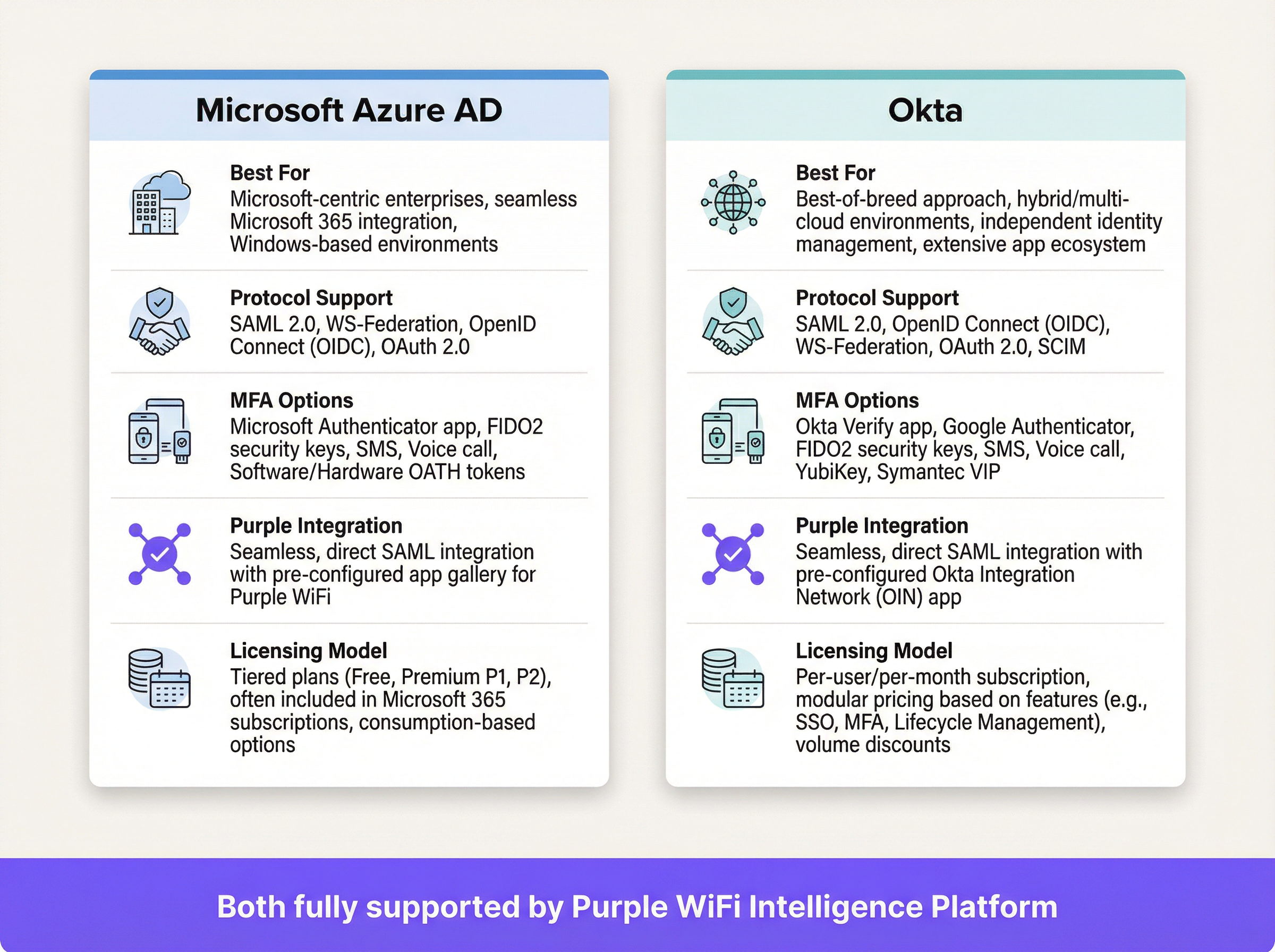
SAML ist ein offener Standard für den Austausch von Authentifizierungs- und Autorisierungsdaten zwischen Parteien – insbesondere zwischen einem Identity Provider (IdP) und einem Service Provider (SP). In diesem Kontext ist der IdP Ihr zentrales Benutzerverzeichnis (Azure AD, Okta, Ping Identity oder ADFS), und die Purple-Plattform fungiert als SP, der den Zugriff auf das physische WiFi-Netzwerk vermittelt.
Der SAML 2.0-Authentifizierungsablauf
Der Prozess ermöglicht eine sichere, browserbasierte Authentifizierung für WiFi-Nutzer, ohne dass eine clientseitige Softwareinstallation erforderlich ist. Wenn sich ein Mitarbeiter mit der designierten Mitarbeiter-SSID verbindet, wird sein Gerät auf ein Captive Portal umgeleitet. Anstelle eines einfachen Passwortfeldes initiiert dieses Portal einen mehrstufigen kryptografischen Handshake mit dem IdP, um die Identität des Nutzers zu überprüfen.
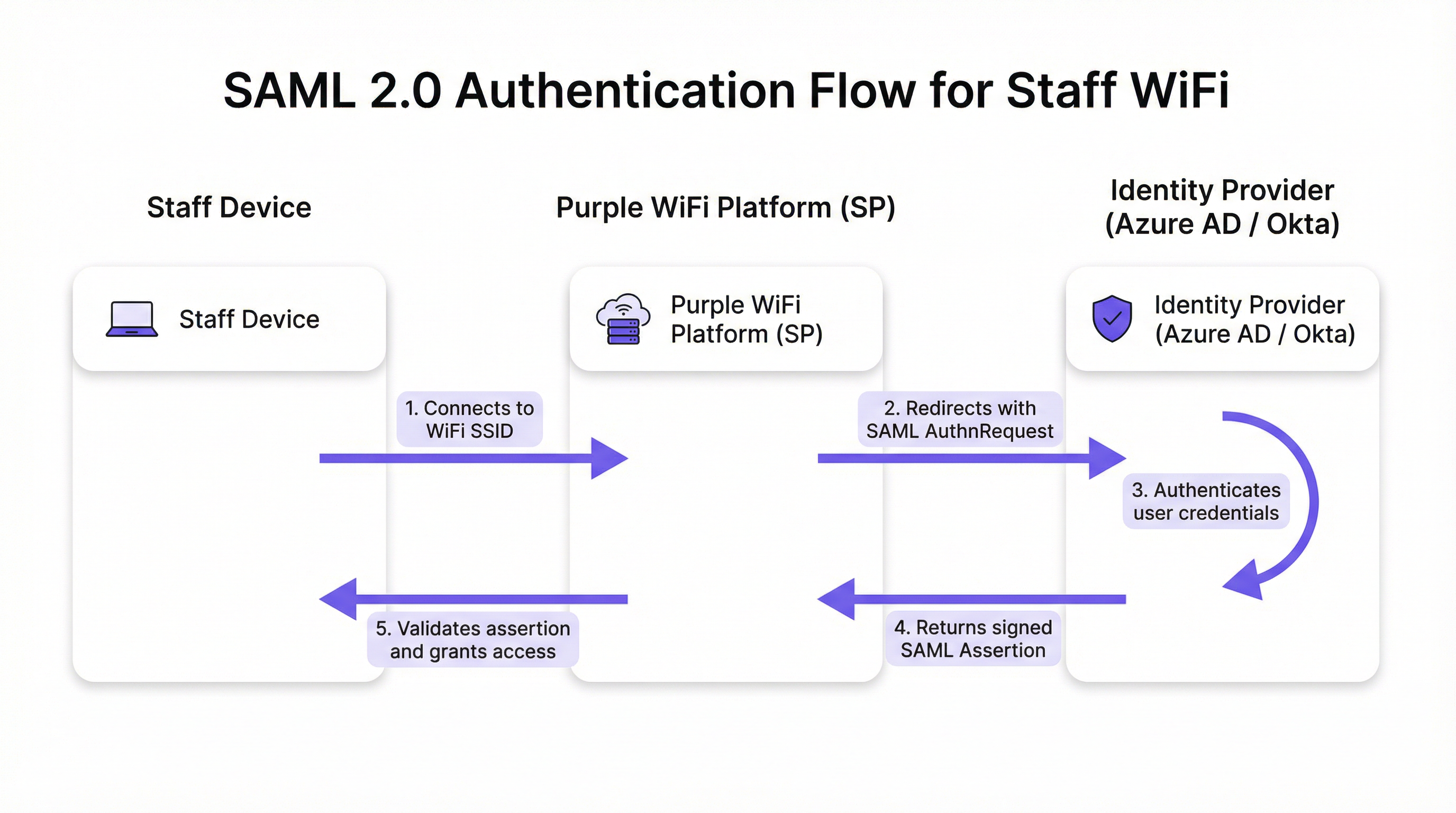
Der Ablauf erfolgt in fünf separaten Phasen. Erstens: Der Nutzer verbindet sein Gerät – Laptop, Tablet oder Mobiltelefon – mit der Mitarbeiter-WiFi-SSID, und die Purple-Plattform präsentiert ein Captive Portal. Zweitens: Purple (in der Rolle des SP) generiert eine SAML-Authentifizierungsanfrage (AuthnRequest), ein XML-Dokument, das Informationen über den SP und die gewünschten Authentifizierungsparameter enthält. Der Browser des Nutzers wird mit dieser eingebetteten Anfrage an die SSO-URL des IdP weitergeleitet. Drittens: Der Nutzer gelangt auf die vertraute Anmeldeseite des IdP – seinen Microsoft 365- oder Okta-Bildschirm – und gibt seine Unternehmensanmeldedaten ein. Der IdP wendet hier seine gesamten Sicherheitsrichtlinien an, einschließlich Multi-Faktor-Authentifizierung (MFA), Device-Trust-Prüfungen und Conditional-Access-Regeln. Viertens: Nach erfolgreicher Authentifizierung generiert der IdP eine SAML-Antwort, die eine digital signierte Assertion enthält. Diese Assertion wird mit dem privaten Schlüssel des IdP signiert und enthält wichtige Informationen über den authentifizierten Nutzer, einschließlich Benutzername, E-Mail und Gruppenmitgliedschaften. Der Browser des Nutzers wird mit dieser signierten Antwort zurück zur Assertion Consumer Service (ACS)-URL von Purple geleitet. Fünftens: Purple empfängt die SAML-Antwort, verifiziert die digitale Signatur mithilfe des vorkonfigurierten öffentlichen Zertifikats des IdP, parst die Assertion zur Bestätigung der Autorisierung und weist den Netzwerk-Controller an, dem Gerät vollen Netzwerkzugriff zu gewähren.
Relevante Standards und Protokolle
SAML 2.0 ist das grundlegende Protokoll, das die XML-basierten Nachrichten für Assertions, Protokolle, Bindings und Profile definiert. IEEE 802.1X bietet einen ergänzenden Standard für die portbasierte Netzwerkzugriffskontrolle; der Captive Portal-SAML-Ansatz bietet jedoch universelle Gerätekompatibilität, ohne dass eine komplexe Supplicant-Konfiguration auf jedem Endpunkt erforderlich ist, was ihn ideal für BYOD-Umgebungen macht. WPA3-Enterprise bietet in Kombination mit SAML Defense-in-Depth: WPA3 verschlüsselt den Datenverkehr über die Luftschnittstelle, während SAML die Identitätsprüfung auf der Anwendungsebene übernimmt. PCI DSS-Anforderung 8 schreibt die Identifizierung und Authentifizierung des Zugriffs auf Systemkomponenten vor – eine Anforderung, die durch diese Architektur direkt erfüllt wird.
Implementierungsleitfaden
Die Bereitstellung der SAML-Authentifizierung für Ihr Mitarbeiter-WiFi erfordert den Aufbau einer kryptografischen Vertrauensbeziehung zwischen Ihrem IdP und der Purple-Plattform. Die folgenden Schritte sind herstellerneutral, auch wenn spezifische UI-Elemente je nach IdP variieren.
Checkliste vor der Bereitstellung
Bevor Sie mit der Konfiguration beginnen, stellen Sie sicher, dass Sie über einen SAML 2.0-kompatiblen IdP (Azure AD, Okta, Ping Identity, ADFS) verfügen. Stellen Sie sicher, dass Sie sowohl in Ihrem IdP-Portal als auch auf der Purple-Plattform über Administratorrechte verfügen. Definieren Sie Ihre Benutzergruppen – zum Beispiel 'All-Staff', 'IT-Admins', 'Store-Managers' –, da diese die rollenbasierten Zugriffsrichtlinien steuern. Überprüfen Sie, ob Ihre WiFi-Hardware (Access Points und Controller) die Captive Portal-Umleitung unterstützt.
Schritt 1 – Konfigurieren der Anwendung in Ihrem IdP
Erstellen Sie in Ihrem IdP eine neue SAML-basierte Anwendung für Purple. Navigieren Sie zu 'Unternehmensanwendungen' in Azure AD oder 'Anwendungen' in Okta und wählen Sie eine benutzerdefinierte SAML-App aus. Sie müssen Ihrem IdP zwei Werte aus der Purple-Plattform zur Verfügung stellen: die Assertion Consumer Service (ACS) URL und die Entity ID. Purple stellt diese im Bereich für die Authentifizierungseinrichtung zur Verfügung. Ihr IdP generiert im Gegenzug eigene Metadaten – typischerweise eine XML-Datei oder URL –, die die SSO-URL, die Entity ID und das X.509-Signaturzertifikat des IdP enthalten. Bewahren Sie diese für den nächsten Schritt auf.
Schritt 2 – Konfigurieren von Claims
Dies ist der betrieblich wichtigste Konfigurationsschritt. Sie müssen den IdP so konfigurieren, dass er spezifische Benutzerattribute in der SAML-Assertion sendet. Purple benötigt einen eindeutigen, persistenten Identifikator für jeden Nutzer als NameID-Claim. Best Practice ist die Verwendung eines unveränderlichen Attributs wie user.objectid in Azure AD oder user.id in Okta anstelle einer veränderlichen E-Mail-Adresse. Konfigurieren Sie zusätzlich Gruppen-Claims, um die Gruppenmitgliedschaften des Nutzers zu übergeben. Dies ermöglicht dynamische, rollenbasierte Zugriffsrichtlinien innerhalb von Purple ohne benutzerbezogene Konfiguration.
Schritt 3 – Konfigurieren der Authentifizierungsmethode in Purple
Navigieren Sie im Purple-Portal zum Bereich für die Authentifizierungsverwaltung und wählen Sie SAML 2.0 als Methodentyp aus. Geben Sie die in Schritt 1 erhaltene SSO-URL, Entity ID und das X.509-Zertifikat des IdP ein. Ordnen Sie die Attributnamen aus der Claims-Konfiguration Ihres IdP den entsprechenden Feldern in Purple zu. Weisen Sie diese Authentifizierungsmethode abschließend der Captive Portal-Journey Ihrer Mitarbeiter zu, um den Ablauf für Nutzer zu aktivieren, die sich mit der Mitarbeiter-SSID verbinden.
Schritt 4 – Tests und schrittweiser Rollout
Weisen Sie die neue SAML-Anwendung einer kleinen Pilotgruppe zu – idealerweise dem IT-Team – und validieren Sie den End-to-End-Ablauf auf verschiedenen Gerätetypen (Windows, macOS, iOS, Android). Überwachen Sie die SAML-Anmeldeprotokolle in Ihrem IdP und die Authentifizierungsprotokolle in Purple, um eventuelle Fehler zu diagnostizieren. Sobald die Validierung erfolgreich war, erweitern Sie die Benutzerzuweisung in Ihrem IdP schrittweise, um alle relevanten Mitarbeitergruppen abzudecken. Kommunizieren Sie die Änderung klar an die Mitarbeiter und betonen Sie, dass sie nun ihre standardmäßigen Unternehmensanmeldedaten verwenden werden.
Best Practices
Erzwingen Sie MFA für alle WiFi-Authentifizierungen. Dies ist die effektivste Einzelmaßnahme gegen den Diebstahl von Anmeldedaten und sollte bei jeder Unternehmensbereitstellung als nicht verhandelbar gelten. Nutzen Sie die Conditional-Access-Funktionen Ihres IdP, um den Netzwerkzugriff basierend auf dem Compliance-Status des Geräts, dem geografischen Standort oder dem Risikowert einzuschränken. Konfigurieren Sie kurze Sitzungs-Timeouts innerhalb von Purple, um eine regelmäßige Neuauthentifizierung zu erzwingen. Dies stellt sicher, dass Zugriffsrechte regelmäßig mit dem IdP abgeglichen werden, und mindert das Risiko durch verlorene oder gestohlene Geräte. Halten Sie sich an das Prinzip der Attributminimierung: Fügen Sie nur die für Zugriffsentscheidungen erforderlichen Attribute in die SAML-Assertion ein, in Übereinstimmung mit dem Grundsatz der Datenminimierung aus Artikel 5 der GDPR. Für unternehmensverwaltete Geräte sollten Sie in Erwägung ziehen, das SAML-Captive Portal mit WPA3-Enterprise und 802.1X für Defense-in-Depth zu kombinieren; der SAML-Ansatz eignet sich am besten für BYOD oder nicht verwaltete Endpunkte.

Fehlerbehebung & Risikominderung
Die häufigste und folgenreichste Fehlerquelle ist der Ablauf von Zertifikaten. Das X.509-Signaturzertifikat des IdP hat eine feste Gültigkeitsdauer, typischerweise ein bis drei Jahre. Wenn es abläuft, kann Purple keine SAML-Assertions mehr validieren, was zu einem vollständigen Ausfall der Authentifizierung führt. Risikominderung: Richten Sie redundante Kalendererinnerungen 90, 60 und 30 Tage vor Ablauf ein und dokumentieren Sie das Erneuerungsverfahren explizit.
Clock Skew (Zeitabweichung) ist die zweithäufigste Ursache für Authentifizierungsfehler. SAML-Assertions enthalten ein Gültigkeitsfenster. Wenn die Uhren auf dem IdP und der Purple-Plattform um mehr als ein paar Minuten voneinander abweichen, werden Assertions als abgelaufen oder noch nicht gültig abgelehnt. Stellen Sie sicher, dass beide Systeme mit einer zuverlässigen NTP-Quelle synchronisiert sind.
Eine falsche ACS-URL bei der Ersteinrichtung ist ein häufiger Konfigurationsfehler. Ein einziger Tippfehler führt dazu, dass der IdP die signierte Assertion an einen nicht existierenden Endpunkt sendet. Kopieren Sie die ACS-URL immer direkt aus der Purple-Plattform, anstatt sie manuell einzutippen.
Deaktivieren Sie schließlich das IdP-initiierte Login für diese Anwendung. Der Netzwerkzugriff sollte immer nur vom SP (dem WiFi-Verbindungsereignis) initiiert werden. Die Zulassung von IdP-initiierten Abläufen öffnet bestimmten SAML-basierten Injection-Angriffen Tür und Tor und stellt in diesem Bereitstellungsmodell ein unnötiges Sicherheitsrisiko dar.
ROI & Geschäftliche Auswirkungen
Der Business Case für die SAML-basierte Mitarbeiter-WiFi-Authentifizierung ist über alle Arten von Veranstaltungsorten hinweg überzeugend. Durch den Wegfall gemeinsam genutzter Passwörter entfallen regelmäßige, störende Passwortänderungen und die damit verbundenen Helpdesk-Tickets. Unternehmen berichten nach der Bereitstellung typischerweise von einem Rückgang der WiFi-bezogenen IT-Supportanfragen um über 50 %. Die Automatisierung des User Lifecycles ist der größte betriebliche Gewinn: Wenn ein Mitarbeiter das Unternehmen verlässt und sein IdP-Konto deaktiviert wird, wird sein WiFi-Zugriff sofort und automatisch entzogen. Dies schließt eine Sicherheitslücke, die bei PSK-basierten Netzwerken auf unbestimmte Zeit offen bleibt. Aus Compliance-Sicht bietet SAML ein auditierbares Zugriffsprotokoll auf individueller Ebene, das die PCI DSS-Anforderung 8 und die Rechenschaftspflichten der GDPR direkt unterstützt. Das nahtlose SSO-Erlebnis – ein einziger Satz an Anmeldedaten für E-Mail, Anwendungen und WiFi – reduziert Reibungsverluste für die Mitarbeiter und steigert die Produktivität, insbesondere für operative Teams, die sich im Laufe des Tages zwischen verschiedenen Bereichen eines Veranstaltungsortes bewegen.
Referenzen
[1] OASIS Security Services (SAML) TC. "SAML V2.0 Executive Overview." April 2008. https://www.oasis-open.org/committees/download.php/27819/sstc-saml-exec-overview-2.0-cd-01.pdf
[2] General Data Protection Regulation (GDPR). Article 5, Principles relating to processing of personal data. https://gdpr-info.eu/art-5-gdpr/
[3] PCI Security Standards Council. "PCI DSS v4.0 Requirement 8: Identify Users and Authenticate Access to System Components." 2022. https://www.pcisecuritystandards.org/
Schlüsselbegriffe & Definitionen
SAML Assertion
An XML document, digitally signed by the Identity Provider, that declares who a user is and provides additional attributes about them. It is the cryptographic 'digital passport' that the Service Provider trusts to make an access decision.
When troubleshooting authentication failures, IT teams inspect the SAML assertion to verify that the IdP is sending the correct user attributes and that the digital signature is valid. It is the core piece of evidence in every authentication transaction.
Identity Provider (IdP)
The system that manages user identities and authenticates them. It is the authoritative source of truth for user identity within an organisation.
In a corporate environment, this is the central user directory — Azure AD, Okta, Ping Identity, or ADFS. It is where IT teams add, remove, and manage all staff accounts and enforce security policies like MFA.
Service Provider (SP)
The application or service that requires authentication before granting access. It trusts the Identity Provider to perform the authentication and relies on the SAML assertion as proof.
For SAML WiFi authentication, the Purple platform is the Service Provider. It consumes the SAML assertion from the IdP to make a network access control decision for the connecting device.
Assertion Consumer Service (ACS) URL
A specific endpoint on the Service Provider designed to receive and process SAML assertions from the Identity Provider after a successful authentication event.
This is one of the most critical configuration parameters. If the ACS URL is incorrectly entered in the IdP settings, the IdP will not know where to send the user after login, and authentication will fail with a redirect error.
Entity ID
A globally unique identifier for an Identity Provider or Service Provider within the SAML protocol. It acts as a unique name to ensure each party is communicating with the correct counterpart.
Typically formatted as a URL, the Entity ID does not need to resolve to a real webpage. It functions like a unique identifier in a directory, preventing one SP from accidentally consuming assertions intended for another.
SAML Metadata
An XML document containing all necessary configuration information about a SAML party — including its Entity ID, endpoint URLs (such as the ACS URL), and public X.509 signing certificate.
Exchanging metadata files is the most reliable method for configuring a SAML trust relationship. Rather than manually copying individual values, administrators can upload the metadata XML from the other party to auto-populate the configuration, reducing the risk of transcription errors.
Claim
A piece of information about a user — an attribute — that is included in the SAML assertion by the Identity Provider. Common claims include username, email address, department, and group memberships.
IT teams configure claims in the IdP to control what information the SP receives. Sending group membership claims to Purple enables role-based access policies and dynamic VLAN assignment based on a user's job function.
Single Sign-On (SSO)
An authentication scheme that allows a user to authenticate once with a single set of credentials and gain access to multiple independent systems and applications without re-entering credentials for each.
SAML is a primary technical enabler of SSO. By using SAML for WiFi authentication, staff use the same corporate login they use for email, HR systems, and other applications to get online — a seamless experience that reduces friction and eliminates the need for separate WiFi passwords.
X.509 Certificate
A digital certificate standard used to verify the identity of a party and to sign or encrypt data. In SAML, the IdP uses its private key to sign assertions, and the SP uses the IdP's X.509 public certificate to verify those signatures.
This certificate is the foundation of trust in a SAML deployment. Its expiration is the single most common cause of complete authentication outages and must be proactively managed.
Fallstudien
A global hotel chain with 300 properties needs to replace its insecure, single PSK for staff WiFi. The chain uses Microsoft 365 and Azure AD as its corporate identity platform. They need a solution that can be centrally managed, provides a seamless experience for staff, and revokes access immediately when an employee leaves the organisation.
The IT team creates a new Enterprise Application in Azure AD for the Purple platform. They configure the application with the Entity ID and ACS URL from their Purple instance. Critically, they configure the claims to send the user's group membership — for example, 'Hotel-Staff' and 'IT-Admin' — and use user.objectid as the unique NameID to ensure a stable, immutable identifier. In Purple, they create a new SAML authentication method, uploading the Azure AD metadata XML to establish the trust relationship. They then create two access policies: one for 'Hotel-Staff' that grants access to the general staff network VLAN, and a second for 'IT-Admin' that grants privileged access to the management VLAN. This configuration is tied to a single 'Staff' SSID broadcast across all 300 properties via the chain's centralised network management platform. A new staff member at any hotel is automatically granted the correct level of WiFi access as soon as their user account is added to the relevant group in Azure AD — no local IT intervention required. When a staff member leaves, disabling their Azure AD account immediately revokes their WiFi access at all 300 properties simultaneously.
A large conference centre hosts multiple third-party events simultaneously. They need to provide secure WiFi for event staff from different organisations, each with their own identity systems. They cannot issue credentials to external staff and must ensure that staff from one event cannot access the network resources of another.
The conference centre's IT team uses Purple's support for multiple SAML Identity Providers. For each major event organiser, they configure a separate SAML trust relationship within the Purple platform. Organiser A (using Okta) and Organiser B (using Google Workspace) are set up as distinct IdPs. The captive portal is configured to present an organisation selection step, directing users to their respective IdP for authentication. Using group claims passed by each IdP, Purple maps users to event-specific VLANs, ensuring complete network traffic segregation between events. Access for each organiser's staff automatically expires at the end of the event based on pre-set journey rules configured in Purple, requiring no manual deprovisioning.
Szenarioanalyse
Q1. Your CFO has reported that a former employee's personal device was found still connected to the staff WiFi network two weeks after their departure. Your current system uses a single WPA2-PSK that is rotated quarterly. How would a SAML-based approach mitigate this specific risk, and what additional controls would you recommend?
💡 Hinweis:Consider the user lifecycle, the source of authentication authority, and the role of session timeouts.
Empfohlenen Ansatz anzeigen
A SAML-based approach directly links WiFi access to the employee's active status in the central Identity Provider. The moment the employee's account is disabled or deleted as part of the standard offboarding process, their ability to authenticate to any SAML-integrated service — including the WiFi — is instantly and automatically revoked. The IdP will no longer issue a valid SAML assertion for that user, meaning they cannot re-authenticate. To address the specific scenario of a device that is already connected, configure short session timeouts in Purple (e.g., 8-hour sessions aligned with a working day). When the session expires, the device must re-authenticate; the disabled IdP account will prevent this. This eliminates the security gap inherent in long-lived shared secrets like a PSK, where a device that has already connected remains online indefinitely.
Q2. A stadium is implementing SAML authentication for its 500 event-day staff. They want to ensure that cashiers using point-of-sale terminals can only access the PCI-compliant network segment, while operations staff can access the general corporate network. How would you design the SAML claims configuration and network policy to achieve this segmentation?
💡 Hinweis:Think about how to pass role information from the IdP to the network infrastructure via the SAML assertion, and how Purple can act on that information.
Empfohlenen Ansatz anzeigen
The solution is to use group claims and dynamic VLAN assignment. In the IdP (Azure AD or Okta), create two security groups: 'POS-Staff' and 'Ops-Staff'. Configure the SAML application to include the user's group membership as a claim in the assertion. In the Purple platform, create two user access profiles that map to these group names. Configure the 'POS-Staff' profile to assign users to the PCI-compliant VLAN (e.g., VLAN 10) and the 'Ops-Staff' profile to assign users to the corporate VLAN (e.g., VLAN 20). When a user authenticates, Purple reads the group claim from the SAML assertion and instructs the network controller — via RADIUS attributes or API — to place the user's device in the appropriate VLAN. Network traffic is then segregated at the infrastructure level, ensuring POS terminals can only reach the payment processing network, regardless of where they connect in the stadium.
Q3. You are planning a rollout of SAML WiFi authentication to a retail chain with 1,000 stores. The store managers are not technically proficient. What is the single most important operational risk to proactively manage, and what is your communication and contingency plan?
💡 Hinweis:What is the one component in the SAML trust relationship that has a fixed expiry date and whose failure would cause a simultaneous outage across all 1,000 stores?
Empfohlenen Ansatz anzeigen
The single most critical operational risk is the expiration of the IdP's SAML signing certificate. If it expires, all 1,000 stores will lose staff WiFi access simultaneously, as Purple will be unable to validate any SAML assertions. The mitigation plan has two components. Technically: set multiple, redundant calendar reminders for the certificate's expiry date for the entire IT team, starting 90 days out. Document the step-by-step procedure for generating a new certificate in the IdP and updating it in the Purple platform. Ensure at least two team members are trained on this procedure. Aim to complete the renewal at least 30 days before expiry to allow for testing. For communication: proactively inform the retail operations director about the planned maintenance window for the certificate renewal. There is no need to inform individual store managers for a planned renewal, as the goal is a zero-downtime cutover. In the event of an unplanned outage, the communication plan should be to immediately notify the operations director of the issue and provide a realistic ETA for resolution. A temporary fallback — such as a time-limited PSK for critical operations — should be documented in the business continuity plan.
Wichtigste Erkenntnisse
- ✓Replace insecure staff WiFi pre-shared keys with robust, identity-driven SAML 2.0 authentication to eliminate shared credential vulnerabilities.
- ✓Integrate your existing Identity Provider — Azure AD or Okta — with Purple to leverage a single source of truth for user identity across all applications and network access.
- ✓Automate user onboarding and offboarding: WiFi access is granted and revoked automatically as part of your existing IdP user lifecycle management processes.
- ✓Enforce Multi-Factor Authentication and conditional access policies at the IdP level to protect network entry against credential theft and compromised devices.
- ✓Use group claims within the SAML assertion to enable dynamic, role-based network access and VLAN segmentation without per-user configuration in Purple.
- ✓Achieve compliance with PCI DSS Requirement 8 and GDPR accountability obligations through auditable, individual-level access logs tied to verified corporate identities.
- ✓Proactively manage the IdP signing certificate expiry — the number one cause of SAML authentication outages — with redundant reminders and a documented renewal procedure.




