

Autenticação SAML para o WiFi dos Colaboradores
This guide provides a technical deep-dive into leveraging SAML 2.0 for enterprise-grade staff WiFi authentication, covering protocol architecture, Identity Provider integration, and deployment best practices. It equips IT leaders and network architects with actionable guidance on connecting Azure AD or Okta to the Purple WiFi intelligence platform to replace insecure pre-shared keys with robust, identity-driven access control. The result is a measurable improvement in security posture, compliance readiness, and operational efficiency across hotels, retail chains, stadiums, and public-sector venues.
🎧 Ouça este Guia
Ver Transcrição

Resumo Executivo
Para os operadores de recintos de grande escala — cadeias de hotéis, impérios de retalho, grandes espaços de eventos e instalações do setor público — proteger a rede sem fios dos colaboradores é uma componente crítica da mitigação de riscos e da eficiência operacional. As redes tradicionais de chaves pré-partilhadas (PSK) apresentam vulnerabilidades de segurança e sobrecarga administrativa significativas: uma única credencial comprometida expõe toda a rede e a gestão de acessos exige intervenção manual a cada mudança de colaboradores. Este guia detalha uma abordagem superior: a implementação de autenticação baseada em Security Assertion Markup Language (SAML) 2.0 para o WiFi dos colaboradores. Ao integrar o seu Fornecedor de Identidade (IdP) existente — como o Microsoft Azure Active Directory ou o Okta — com a plataforma de inteligência Purple WiFi, substitui as palavras-passe partilhadas inseguras por um controlo de acessos robusto e orientado para a identidade. Este modelo de implementação eleva a sua postura de segurança em conformidade com os requisitos do PCI DSS e do GDPR, e simplifica drasticamente a gestão do ciclo de vida dos utilizadores. Os colaboradores autenticam-se utilizando as suas credenciais corporativas principais, ativando o Single Sign-On (SSO) e garantindo que os direitos de acesso são automaticamente revogados após a rescisão. Para o CTO, isto traduz-se numa redução mensurável dos pedidos de suporte informático, numa maior conformidade e numa arquitetura de rede mais forte e defensável.
Análise Técnica Aprofundada
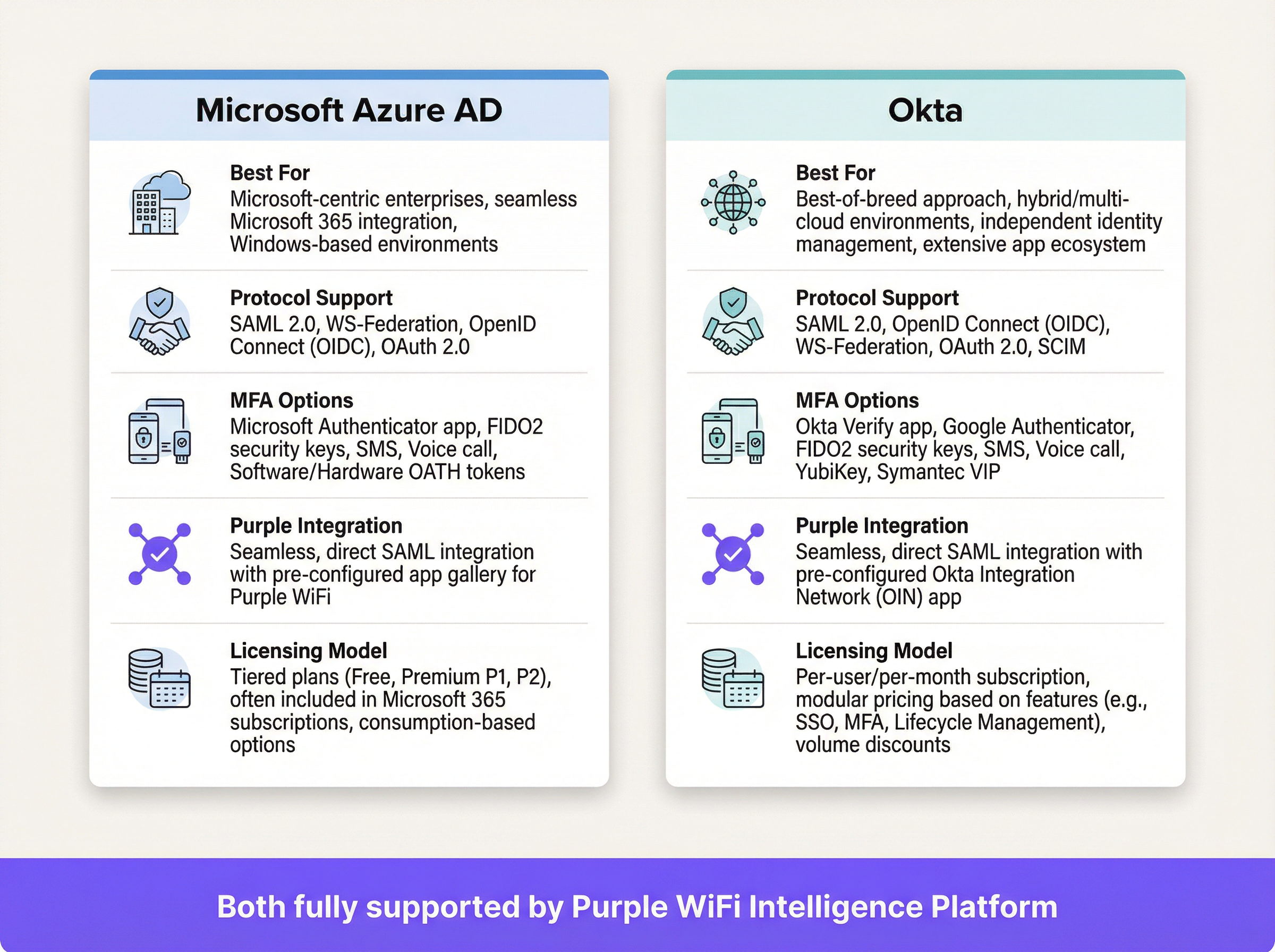
O SAML é uma norma aberta para a troca de dados de autenticação e autorização entre partes — especificamente entre um Fornecedor de Identidade (IdP) e um Fornecedor de Serviços (SP). Neste contexto, o IdP é o seu diretório central de utilizadores (Azure AD, Okta, Ping Identity ou ADFS), e a plataforma Purple atua como o SP, intermediando o acesso à rede física WiFi.
O Fluxo de Autenticação SAML 2.0
O processo permite uma autenticação segura, baseada no browser, para os utilizadores de WiFi, sem exigir qualquer instalação de software do lado do cliente. Quando um colaborador se liga ao SSID designado para os colaboradores, o seu dispositivo é direcionado para um Captive Portal. Em vez de um simples campo de palavra-passe, este portal inicia um handshake criptográfico de várias etapas com o IdP para verificar a identidade do utilizador.
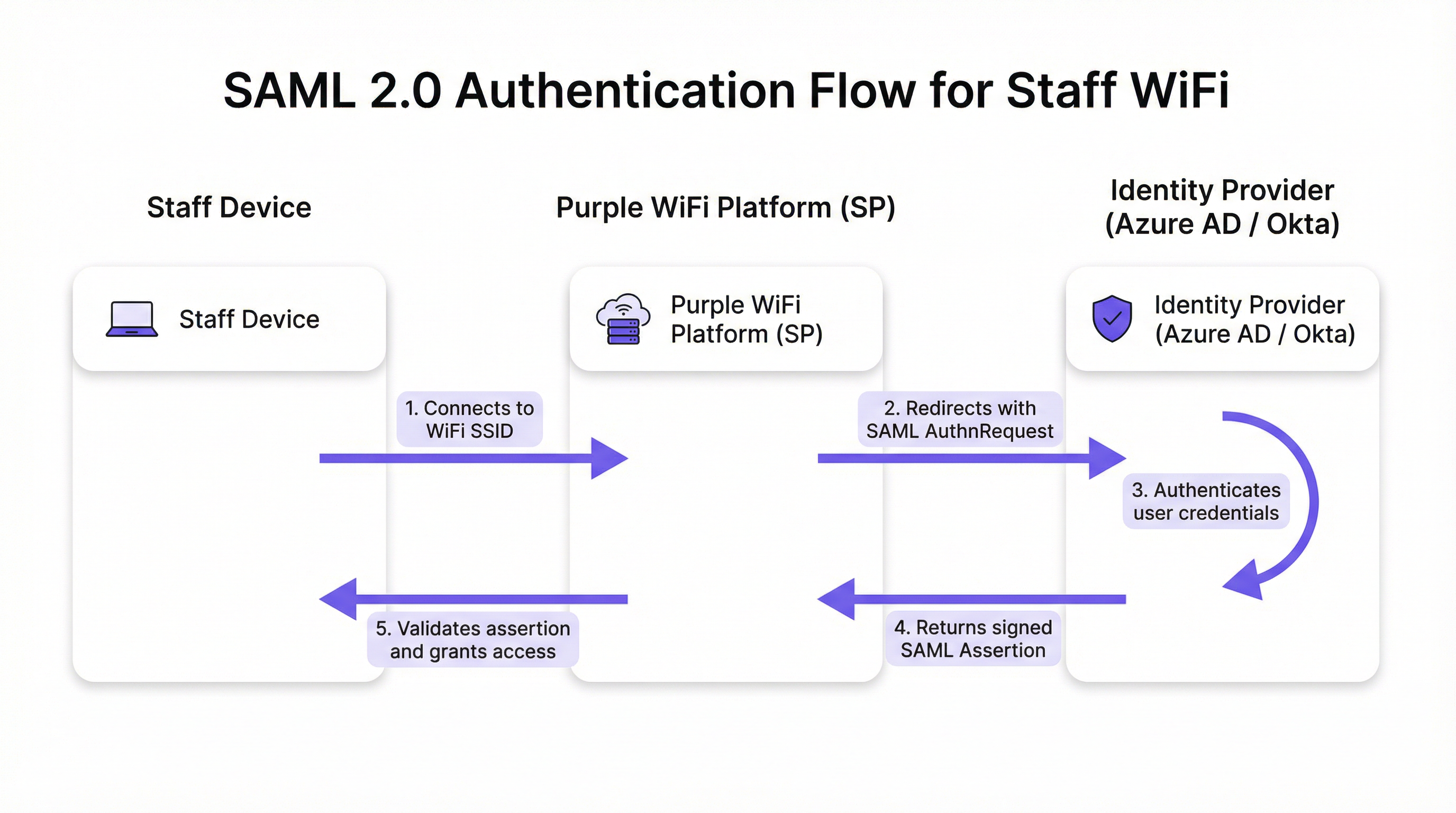
O fluxo decorre em cinco fases distintas. Primeiro, o utilizador liga o seu dispositivo — portátil, tablet ou telemóvel — ao SSID do WiFi dos colaboradores, e a plataforma Purple apresenta um Captive Portal. Segundo, a Purple (atuando como SP) gera um pedido de autenticação SAML (AuthnRequest), um documento XML que contém informações sobre o SP e os parâmetros de autenticação pretendidos. O browser do utilizador é redirecionado para o URL de SSO do IdP com este pedido incorporado. Terceiro, o utilizador chega à página de início de sessão familiar do IdP — o seu ecrã do Microsoft 365 ou Okta — e introduz as suas credenciais corporativas. O IdP aplica aqui toda a sua gama de políticas de segurança, incluindo a Autenticação Multifator (MFA), verificações de confiança do dispositivo e regras de acesso condicional. Quarto, após uma autenticação bem-sucedida, o IdP gera uma resposta SAML que contém uma asserção assinada digitalmente. Esta asserção é assinada com a chave privada do IdP e contém informações essenciais sobre o utilizador autenticado, incluindo o nome de utilizador, e-mail e pertença a grupos. O browser do utilizador é redirecionado de volta para o URL do Assertion Consumer Service (ACS) da Purple com esta resposta assinada. Quinto, a Purple recebe a resposta SAML, verifica a assinatura digital utilizando o certificado público pré-configurado do IdP, analisa a asserção para confirmar a autorização e instrui o controlador de rede a conceder ao dispositivo acesso total à rede.
Normas e Protocolos Relevantes
O SAML 2.0 é o protocolo fundamental, definindo as mensagens baseadas em XML para asserções, protocolos, ligações e perfis. O IEEE 802.1X fornece uma norma complementar de controlo de acesso à rede baseada em portas; no entanto, a abordagem SAML com Captive Portal oferece compatibilidade universal de dispositivos sem exigir uma configuração complexa do suplicante em cada endpoint, tornando-a ideal para ambientes BYOD. O WPA3-Enterprise, quando combinado com o SAML, proporciona uma defesa em profundidade: o WPA3 encripta o tráfego no ar, enquanto o SAML gere a verificação de identidade na camada aplicacional. O Requisito 8 do PCI DSS exige a identificação e autenticação do acesso aos componentes do sistema, um requisito diretamente abordado por esta arquitetura.
Guia de Implementação
A implementação da autenticação SAML para o WiFi dos colaboradores envolve o estabelecimento de uma relação de confiança criptográfica entre o seu IdP e a plataforma Purple. Os passos seguintes são independentes do fornecedor, embora os elementos específicos da interface de utilizador variem consoante o IdP.
Lista de Verificação Pré-Implementação
Antes de iniciar a configuração, confirme que possui um IdP compatível com SAML 2.0 (Azure AD, Okta, Ping Identity, ADFS). Certifique-se de que detém privilégios administrativos tanto no portal do seu IdP como na plataforma Purple. Defina os seus grupos de utilizadores — por exemplo, 'Todos-Colaboradores', 'Admins-TI', 'Gestores-Loja' — uma vez que estes orientam as políticas de acesso baseadas em funções. Verifique se o seu hardware WiFi (pontos de acesso e controladores) suporta o redirecionamento para Captive Portal.
Passo 1 — Configurar a Aplicação no seu IdP
No seu IdP, crie uma nova aplicação baseada em SAML para a Purple. Navegue até 'Aplicações Empresariais' no Azure AD ou 'Aplicações' no Okta e selecione uma aplicação SAML personalizada. Terá de fornecer ao seu IdP dois valores da plataforma Purple: o URL do Assertion Consumer Service (ACS) e o Entity ID. A Purple fornece estes dados na sua secção de configuração de autenticação. O seu IdP irá, em contrapartida, gerar os seus próprios metadados — normalmente um ficheiro XML ou URL — contendo o URL de SSO do IdP, o Entity ID e o certificado de assinatura X.509. Guarde esta informação para o passo seguinte.
Passo 2 — Configurar Claims
Este é o passo de configuração mais significativo a nível operacional. Deve configurar o IdP para enviar atributos de utilizador específicos na asserção SAML. A Purple requer um identificador único e persistente para cada utilizador como a claim NameID. A melhor prática é utilizar um atributo imutável, como user.objectid no Azure AD ou user.id no Okta, em vez de um endereço de e-mail mutável. Adicionalmente, configure as claims de grupo para transmitir as pertenças a grupos do utilizador. Isto permite políticas de acesso dinâmicas e baseadas em funções dentro da Purple, sem necessidade de configuração por utilizador.
Passo 3 — Configurar o Método de Autenticação na Purple
No portal da Purple, navegue até à secção de gestão de autenticação e selecione SAML 2.0 como o tipo de método. Introduza o URL de SSO do IdP, o Entity ID e o certificado X.509 obtidos no Passo 1. Mapeie os nomes dos atributos da configuração de claims do seu IdP para os campos correspondentes na Purple. Por fim, atribua este método de autenticação à jornada do Captive Portal dos colaboradores para ativar o fluxo para os utilizadores que se ligam ao SSID dos colaboradores.
Passo 4 — Testes e Implementação Faseada
Atribua a nova aplicação SAML a um pequeno grupo piloto — idealmente a equipa de TI — e valide o fluxo de ponta a ponta em vários tipos de dispositivos (Windows, macOS, iOS, Android). Monitorize os registos de início de sessão SAML no seu IdP e os registos de autenticação na Purple para diagnosticar quaisquer falhas. Uma vez validado, expanda gradualmente a atribuição de utilizadores no seu IdP para abranger todos os grupos de colaboradores relevantes. Comunique a alteração aos colaboradores de forma clara, enfatizando que passarão a utilizar as suas credenciais de início de sessão corporativas padrão.
Melhores Práticas
Imponha a MFA para todas as autenticações WiFi. Este é o controlo mais eficaz contra o roubo de credenciais e deve ser considerado inegociável para qualquer implementação empresarial. Tire partido das capacidades de acesso condicional do seu IdP para restringir o acesso à rede com base no estado de conformidade do dispositivo, localização geográfica ou pontuação de risco. Configure tempos limite de sessão curtos na Purple para forçar a reautenticação periódica, garantindo que os direitos de acesso são regularmente revalidados junto do IdP e mitigando o risco de dispositivos perdidos ou roubados. Adira ao princípio da minimização de atributos: inclua apenas os atributos necessários para as decisões de acesso na asserção SAML, em conformidade com o princípio da minimização de dados do Artigo 5.º do GDPR. Para dispositivos geridos pela empresa, considere combinar o Captive Portal SAML com o WPA3-Enterprise e o 802.1X para uma defesa em profundidade; a abordagem SAML é mais adequada para BYOD ou endpoints não geridos.

Resolução de Problemas e Mitigação de Riscos
O modo de falha mais comum e com maior impacto é a expiração do certificado. O certificado de assinatura X.509 do IdP tem um período de validade fixo, normalmente de um a três anos. Quando expira, a Purple deixa de conseguir validar as asserções SAML, causando uma interrupção total da autenticação. Mitigação: defina lembretes de calendário redundantes aos 90, 60 e 30 dias antes da expiração e documente o procedimento de renovação de forma explícita.
O desvio do relógio é a segunda causa mais frequente de falhas de autenticação. As asserções SAML contêm uma janela de validade e, se os relógios do IdP e da plataforma Purple divergirem em mais do que alguns minutos, as asserções serão rejeitadas como expiradas ou ainda não válidas. Certifique-se de que ambos os sistemas sincronizam com uma fonte NTP fiável.
Um URL ACS incorreto durante a configuração inicial é um erro de configuração comum. Um erro de digitação de um único caráter significa que o IdP envia a asserção assinada para um endpoint inexistente. Copie e cole sempre o URL ACS diretamente da plataforma Purple, em vez de o digitar manualmente.
Por fim, desative o início de sessão iniciado pelo IdP para esta aplicação. O acesso à rede só deve ser iniciado a partir do SP (o evento de ligação WiFi). Permitir fluxos iniciados pelo IdP abre a porta a determinados ataques de injeção baseados em SAML e constitui um risco de segurança desnecessário neste modelo de implementação.
ROI e Impacto no Negócio
O business case para a autenticação WiFi dos colaboradores baseada em SAML é convincente em todos os tipos de recintos. A eliminação de palavras-passe partilhadas remove a necessidade de rotações de palavras-passe periódicas e disruptivas, bem como os pedidos de helpdesk associados. As organizações reportam normalmente uma redução de mais de 50% nos pedidos de suporte informático relacionados com o WiFi após a implementação. A automatização do ciclo de vida do utilizador é o ganho operacional mais significativo: quando um colaborador sai da empresa e a sua conta no IdP é desativada, o seu acesso ao WiFi é revogado instantânea e automaticamente, fechando uma lacuna de segurança que as redes baseadas em PSK deixam aberta indefinidamente. Numa perspetiva de conformidade, o SAML fornece um registo de acessos auditável a nível individual, suportando diretamente o Requisito 8 do PCI DSS e as obrigações de responsabilidade do GDPR. A experiência SSO perfeita — um conjunto de credenciais para e-mail, aplicações e WiFi — reduz a fricção para os colaboradores e aumenta a produtividade, particularmente para as equipas operacionais que se deslocam entre as áreas de um recinto ao longo do dia.
Referências
[1] OASIS Security Services (SAML) TC. "SAML V2.0 Executive Overview." Abril de 2008. https://www.oasis-open.org/committees/download.php/27819/sstc-saml-exec-overview-2.0-cd-01.pdf
[2] Regulamento Geral sobre a Proteção de Dados (GDPR). Artigo 5.º, Princípios relativos ao tratamento de dados pessoais. https://gdpr-info.eu/art-5-gdpr/
[3] PCI Security Standards Council. "PCI DSS v4.0 Requirement 8: Identify Users and Authenticate Access to System Components." 2022. https://www.pcisecuritystandards.org/
Termos-Chave e Definições
SAML Assertion
An XML document, digitally signed by the Identity Provider, that declares who a user is and provides additional attributes about them. It is the cryptographic 'digital passport' that the Service Provider trusts to make an access decision.
When troubleshooting authentication failures, IT teams inspect the SAML assertion to verify that the IdP is sending the correct user attributes and that the digital signature is valid. It is the core piece of evidence in every authentication transaction.
Identity Provider (IdP)
The system that manages user identities and authenticates them. It is the authoritative source of truth for user identity within an organisation.
In a corporate environment, this is the central user directory — Azure AD, Okta, Ping Identity, or ADFS. It is where IT teams add, remove, and manage all staff accounts and enforce security policies like MFA.
Service Provider (SP)
The application or service that requires authentication before granting access. It trusts the Identity Provider to perform the authentication and relies on the SAML assertion as proof.
For SAML WiFi authentication, the Purple platform is the Service Provider. It consumes the SAML assertion from the IdP to make a network access control decision for the connecting device.
Assertion Consumer Service (ACS) URL
A specific endpoint on the Service Provider designed to receive and process SAML assertions from the Identity Provider after a successful authentication event.
This is one of the most critical configuration parameters. If the ACS URL is incorrectly entered in the IdP settings, the IdP will not know where to send the user after login, and authentication will fail with a redirect error.
Entity ID
A globally unique identifier for an Identity Provider or Service Provider within the SAML protocol. It acts as a unique name to ensure each party is communicating with the correct counterpart.
Typically formatted as a URL, the Entity ID does not need to resolve to a real webpage. It functions like a unique identifier in a directory, preventing one SP from accidentally consuming assertions intended for another.
SAML Metadata
An XML document containing all necessary configuration information about a SAML party — including its Entity ID, endpoint URLs (such as the ACS URL), and public X.509 signing certificate.
Exchanging metadata files is the most reliable method for configuring a SAML trust relationship. Rather than manually copying individual values, administrators can upload the metadata XML from the other party to auto-populate the configuration, reducing the risk of transcription errors.
Claim
A piece of information about a user — an attribute — that is included in the SAML assertion by the Identity Provider. Common claims include username, email address, department, and group memberships.
IT teams configure claims in the IdP to control what information the SP receives. Sending group membership claims to Purple enables role-based access policies and dynamic VLAN assignment based on a user's job function.
Single Sign-On (SSO)
An authentication scheme that allows a user to authenticate once with a single set of credentials and gain access to multiple independent systems and applications without re-entering credentials for each.
SAML is a primary technical enabler of SSO. By using SAML for WiFi authentication, staff use the same corporate login they use for email, HR systems, and other applications to get online — a seamless experience that reduces friction and eliminates the need for separate WiFi passwords.
X.509 Certificate
A digital certificate standard used to verify the identity of a party and to sign or encrypt data. In SAML, the IdP uses its private key to sign assertions, and the SP uses the IdP's X.509 public certificate to verify those signatures.
This certificate is the foundation of trust in a SAML deployment. Its expiration is the single most common cause of complete authentication outages and must be proactively managed.
Estudos de Caso
A global hotel chain with 300 properties needs to replace its insecure, single PSK for staff WiFi. The chain uses Microsoft 365 and Azure AD as its corporate identity platform. They need a solution that can be centrally managed, provides a seamless experience for staff, and revokes access immediately when an employee leaves the organisation.
The IT team creates a new Enterprise Application in Azure AD for the Purple platform. They configure the application with the Entity ID and ACS URL from their Purple instance. Critically, they configure the claims to send the user's group membership — for example, 'Hotel-Staff' and 'IT-Admin' — and use user.objectid as the unique NameID to ensure a stable, immutable identifier. In Purple, they create a new SAML authentication method, uploading the Azure AD metadata XML to establish the trust relationship. They then create two access policies: one for 'Hotel-Staff' that grants access to the general staff network VLAN, and a second for 'IT-Admin' that grants privileged access to the management VLAN. This configuration is tied to a single 'Staff' SSID broadcast across all 300 properties via the chain's centralised network management platform. A new staff member at any hotel is automatically granted the correct level of WiFi access as soon as their user account is added to the relevant group in Azure AD — no local IT intervention required. When a staff member leaves, disabling their Azure AD account immediately revokes their WiFi access at all 300 properties simultaneously.
A large conference centre hosts multiple third-party events simultaneously. They need to provide secure WiFi for event staff from different organisations, each with their own identity systems. They cannot issue credentials to external staff and must ensure that staff from one event cannot access the network resources of another.
The conference centre's IT team uses Purple's support for multiple SAML Identity Providers. For each major event organiser, they configure a separate SAML trust relationship within the Purple platform. Organiser A (using Okta) and Organiser B (using Google Workspace) are set up as distinct IdPs. The captive portal is configured to present an organisation selection step, directing users to their respective IdP for authentication. Using group claims passed by each IdP, Purple maps users to event-specific VLANs, ensuring complete network traffic segregation between events. Access for each organiser's staff automatically expires at the end of the event based on pre-set journey rules configured in Purple, requiring no manual deprovisioning.
Análise de Cenários
Q1. Your CFO has reported that a former employee's personal device was found still connected to the staff WiFi network two weeks after their departure. Your current system uses a single WPA2-PSK that is rotated quarterly. How would a SAML-based approach mitigate this specific risk, and what additional controls would you recommend?
💡 Dica:Consider the user lifecycle, the source of authentication authority, and the role of session timeouts.
Mostrar Abordagem Recomendada
A SAML-based approach directly links WiFi access to the employee's active status in the central Identity Provider. The moment the employee's account is disabled or deleted as part of the standard offboarding process, their ability to authenticate to any SAML-integrated service — including the WiFi — is instantly and automatically revoked. The IdP will no longer issue a valid SAML assertion for that user, meaning they cannot re-authenticate. To address the specific scenario of a device that is already connected, configure short session timeouts in Purple (e.g., 8-hour sessions aligned with a working day). When the session expires, the device must re-authenticate; the disabled IdP account will prevent this. This eliminates the security gap inherent in long-lived shared secrets like a PSK, where a device that has already connected remains online indefinitely.
Q2. A stadium is implementing SAML authentication for its 500 event-day staff. They want to ensure that cashiers using point-of-sale terminals can only access the PCI-compliant network segment, while operations staff can access the general corporate network. How would you design the SAML claims configuration and network policy to achieve this segmentation?
💡 Dica:Think about how to pass role information from the IdP to the network infrastructure via the SAML assertion, and how Purple can act on that information.
Mostrar Abordagem Recomendada
The solution is to use group claims and dynamic VLAN assignment. In the IdP (Azure AD or Okta), create two security groups: 'POS-Staff' and 'Ops-Staff'. Configure the SAML application to include the user's group membership as a claim in the assertion. In the Purple platform, create two user access profiles that map to these group names. Configure the 'POS-Staff' profile to assign users to the PCI-compliant VLAN (e.g., VLAN 10) and the 'Ops-Staff' profile to assign users to the corporate VLAN (e.g., VLAN 20). When a user authenticates, Purple reads the group claim from the SAML assertion and instructs the network controller — via RADIUS attributes or API — to place the user's device in the appropriate VLAN. Network traffic is then segregated at the infrastructure level, ensuring POS terminals can only reach the payment processing network, regardless of where they connect in the stadium.
Q3. You are planning a rollout of SAML WiFi authentication to a retail chain with 1,000 stores. The store managers are not technically proficient. What is the single most important operational risk to proactively manage, and what is your communication and contingency plan?
💡 Dica:What is the one component in the SAML trust relationship that has a fixed expiry date and whose failure would cause a simultaneous outage across all 1,000 stores?
Mostrar Abordagem Recomendada
The single most critical operational risk is the expiration of the IdP's SAML signing certificate. If it expires, all 1,000 stores will lose staff WiFi access simultaneously, as Purple will be unable to validate any SAML assertions. The mitigation plan has two components. Technically: set multiple, redundant calendar reminders for the certificate's expiry date for the entire IT team, starting 90 days out. Document the step-by-step procedure for generating a new certificate in the IdP and updating it in the Purple platform. Ensure at least two team members are trained on this procedure. Aim to complete the renewal at least 30 days before expiry to allow for testing. For communication: proactively inform the retail operations director about the planned maintenance window for the certificate renewal. There is no need to inform individual store managers for a planned renewal, as the goal is a zero-downtime cutover. In the event of an unplanned outage, the communication plan should be to immediately notify the operations director of the issue and provide a realistic ETA for resolution. A temporary fallback — such as a time-limited PSK for critical operations — should be documented in the business continuity plan.
Principais Conclusões
- ✓Replace insecure staff WiFi pre-shared keys with robust, identity-driven SAML 2.0 authentication to eliminate shared credential vulnerabilities.
- ✓Integrate your existing Identity Provider — Azure AD or Okta — with Purple to leverage a single source of truth for user identity across all applications and network access.
- ✓Automate user onboarding and offboarding: WiFi access is granted and revoked automatically as part of your existing IdP user lifecycle management processes.
- ✓Enforce Multi-Factor Authentication and conditional access policies at the IdP level to protect network entry against credential theft and compromised devices.
- ✓Use group claims within the SAML assertion to enable dynamic, role-based network access and VLAN segmentation without per-user configuration in Purple.
- ✓Achieve compliance with PCI DSS Requirement 8 and GDPR accountability obligations through auditable, individual-level access logs tied to verified corporate identities.
- ✓Proactively manage the IdP signing certificate expiry — the number one cause of SAML authentication outages — with redundant reminders and a documented renewal procedure.




