

Best Practices für das Splash-Page-Design von Gäste-WiFi
This guide provides IT managers, network architects, and venue operations directors with a definitive technical reference for designing and deploying high-performance guest WiFi splash pages. It covers the four core pillars of effective captive portal design — brand identity, user experience, data capture, and legal compliance — and translates them into actionable deployment guidance. By following these best practices, organisations can expect measurable improvements in guest connection rates, marketing database growth, and demonstrable ROI from their guest WiFi infrastructure.
🎧 Diesen Leitfaden anhören
Transkript anzeigen
Executive Summary
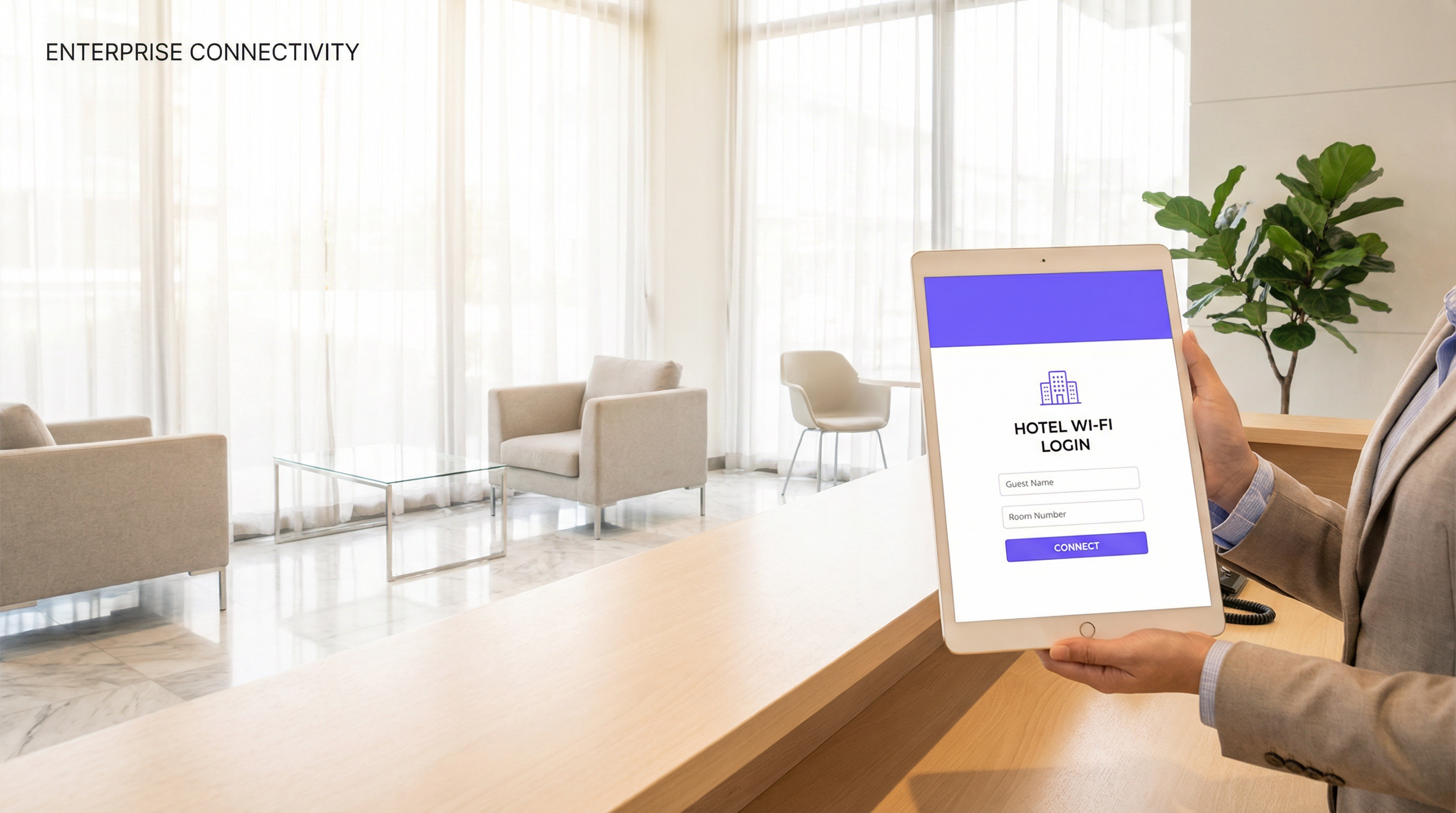
Die Gäste-WiFi-Splash-Page – oder das Captive Portal – ist der wichtigste Touchpoint bei der WLAN-Bereitstellung an jedem Standort. Sie ist die erste Interaktion eines Gastes mit Ihrem Netzwerk und entscheidet darüber, ob er sich überhaupt verbindet. Dennoch bleibt sie eine der am häufigsten vernachlässigten Komponenten der Enterprise-WiFi-Infrastruktur. Eine schlecht gestaltete Splash-Page frustriert nicht nur die Nutzer; sie zerstört aktiv den kommerziellen Wert einer Netzwerkinvestition, die in die Hunderttausende gehen kann.
Dieser Leitfaden richtet sich an Führungskräfte aus den Bereichen IT und Operations, die jetzt Implementierungsentscheidungen treffen müssen. Er behandelt die technische Architektur der Captive Portal-Authentifizierung, die UX-Prinzipien zur Steigerung der Conversion, die rechtlichen und Compliance-Verpflichtungen gemäß GDPR und verwandten Rahmenwerken sowie die Branding-Anforderungen, die einen Anmeldebildschirm in einen umsatzgenerierenden Vermögenswert verwandeln. Praxisnahe Bereitstellungsszenarien aus den Bereichen Gastgewerbe, Einzelhandel und Veranstaltungen sorgen dafür, dass jede Empfehlung in der operativen Realität verankert ist. Das Kernargument ist einfach: Ihre Splash-Page ist keine reine Sicherheitsmaßnahme. Sie ist ein strategisches Business-Tool und sollte entsprechend gestaltet werden.
Technischer Deep-Dive
Wie die Captive Portal-Authentifizierung funktioniert
Ein Captive Portal arbeitet auf der Netzwerkzugriffsschicht, fängt den gesamten HTTP- und HTTPS-Datenverkehr eines nicht authentifizierten Client-Geräts ab und leitet ihn an die Splash-Page-URL weiter. Der zugrunde liegende Mechanismus basiert auf DNS-Hijacking und HTTP-302-Weiterleitungen. Wenn sich ein Gerät mit der Gäste-SSID verbindet, weist ihm der Access Point oder Wireless Controller eine eingeschränkte IP-Adresse zu und leitet den gesamten ausgehenden Datenverkehr an den Portal-Server weiter. Bis der Nutzer den Authentifizierungsprozess auf der Splash-Page abschließt, wird das Gerät in einem Quarantäne-VLAN gehalten, wobei der Zugriff auf die IP-Adresse des Portals und alle vorab autorisierten Walled-Garden-Domains (wie z. B. Social-Login-Anbieter) beschränkt ist.
Nach erfolgreicher Authentifizierung – sei es per E-Mail-Eingabe, Social Login, SMS-OTP oder Voucher-Code – aktualisiert der Controller oder RADIUS-Server den Autorisierungsstatus des Clients, verschiebt ihn in das entsprechende Zugriffs-VLAN und gewährt Internetkonnektivität. Dieser gesamte Ablauf muss transparent und schnell sein. Jede Latenz bei der Portal-Weiterleitung oder der Authentifizierungsantwort wird vom Nutzer als defektes WiFi wahrgenommen.
Aus Sicht der Standards ist die Captive Portal-Architektur herstellerneutral und arbeitet unabhängig vom zugrunde liegenden Wireless-Sicherheitsprotokoll. Die SSID selbst sollte jedoch, sofern die Gerätekompatibilität dies zulässt, gemäß der Spezifikation IEEE 802.11ax (Wi-Fi 6) mit WPA3-Personal oder WPA3-Enterprise konfiguriert werden. Die Captive Portal-Schicht übernimmt das Identity and Access Management, während das zugrunde liegende Wireless-Protokoll die Übertragungssicherheit handhabt. Dies sind unterschiedliche Funktionen, die separat architektonisch geplant werden müssen.
Authentifizierungsmethoden: Eine vergleichende Analyse
Die Wahl der Authentifizierungsmethode ist die folgenreichste Designentscheidung bei jeder Splash-Page-Bereitstellung. Jede Methode hat unterschiedliche Auswirkungen auf die Nutzerreibung (Friction), Datentiefe, den Compliance-Aufwand und die Sicherheitslage.
| Authentifizierungsmethode | Reibungsverlust (Friction) | Datenqualität | GDPR-Komplexität | Idealer Standorttyp |
|---|---|---|---|---|
| Click-through (nur AGB) | Sehr niedrig | Minimal | Niedrig | Flughäfen, öffentliche Verkehrsmittel, Bibliotheken |
| E-Mail-Eingabe | Niedrig | Hoch (E-Mail, Besuchshäufigkeit) | Mittel | Hotels, Einzelhandel, Restaurants |
| Social Login (Facebook/Google) | Niedrig-Mittel | Sehr hoch (Demografie) | Hoch | Bars, Veranstaltungsorte, Einzelhandel |
| SMS / OTP | Mittel | Hoch (verifizierte Handynummer) | Mittel | Premium-Gastgewerbe, Gesundheitswesen |
| Voucher / PIN-Code | Niedrig | Keine (anonym) | Sehr niedrig | Konferenzzentren, Co-Working-Spaces |
| RADIUS / Active Directory | Sehr niedrig (SSO) | Enterprise-Niveau | Niedrig (interne Nutzer) | Unternehmenscampus, Bildungseinrichtungen |
Für die meisten kommerziellen Bereitstellungen stellt die E-Mail-Eingabe die optimale Balance dar. Sie erfasst einen dauerhaften, vermarktbaren Identifikator mit minimaler Reibung und lässt sich im Rahmen der Rechtmäßigkeitsanforderungen der GDPR einfach verwalten. Social Login ist aufgrund der Datentiefe attraktiv, erfordert jedoch ein komplexeres Einwilligungs-Framework und führt eine Abhängigkeit von Drittanbieter-OAuth-Providern ein – ein Risiko, das im Enterprise-Kontext sorgfältig abgewogen werden sollte.
Walled-Garden-Konfiguration
Ein Walled Garden ist die Gruppe von Domains und IP-Adressen, auf die ein nicht authentifizierter Client zugreifen darf, bevor er den Splash-Page-Ablauf abschließt. Dies ist ein kritisches Konfigurationselement. Der Walled Garden muss mindestens den Portal-Server selbst, alle CDN-Endpunkte, die Portal-Assets bereitstellen, sowie die OAuth-Endpunkte für alle verwendeten Social-Login-Anbieter umfassen. Eine fehlerhafte Konfiguration des Walled Gardens ist die häufigste Ursache für fehlgeschlagene Social Logins und eine häufige Quelle für Support-Tickets bei neuen Bereitstellungen.
HTTPS und Zertifikatsmanagement
Alle Splash-Pages müssen über HTTPS bereitgestellt werden. Moderne mobile Betriebssysteme, einschließlich iOS 14+ und Android 11+, zeigen Sicherheitswarnungen an oder blockieren Verbindungen zu HTTP-Captive Portals. Ihr Portal-Server muss ein gültiges TLS-Zertifikat von einer vertrauenswürdigen Zertifizierungsstelle (Certificate Authority) vorweisen. Selbstsignierte Zertifikate sind in Produktionsumgebungen nicht akzeptabel. Der Ablauf von Zertifikaten ist eine häufige betriebliche Fehlerquelle; die automatisierte Erneuerung über Let's Encrypt oder den Managed-Certificate-Service Ihres Plattformanbieters sollte Standardpraxis sein.
Implementierungsleitfaden
Phase 1: Anforderungsdefinition
Bevor ein Design-Tool geöffnet wird, muss sich das Projektteam auf vier Parameter einigen: die Authentifizierungsmethode (basierend auf der obigen vergleichenden Analyse), die zu erfassenden Datenfelder (wenden Sie das Prinzip der Datenminimierung an – sammeln Sie nur, was Sie aktiv nutzen werden), das Marketing-Einwilligungsmodell (Opt-in vs. Opt-out, wobei Opt-in für die GDPR-Compliance dringend empfohlen wird) und die zu integrierenden Marken-Assets (Logo-Dateien im SVG-Format, Hex-Farbcodes, genehmigte Schriftarten).
Phase 2: Splash-Page-Design
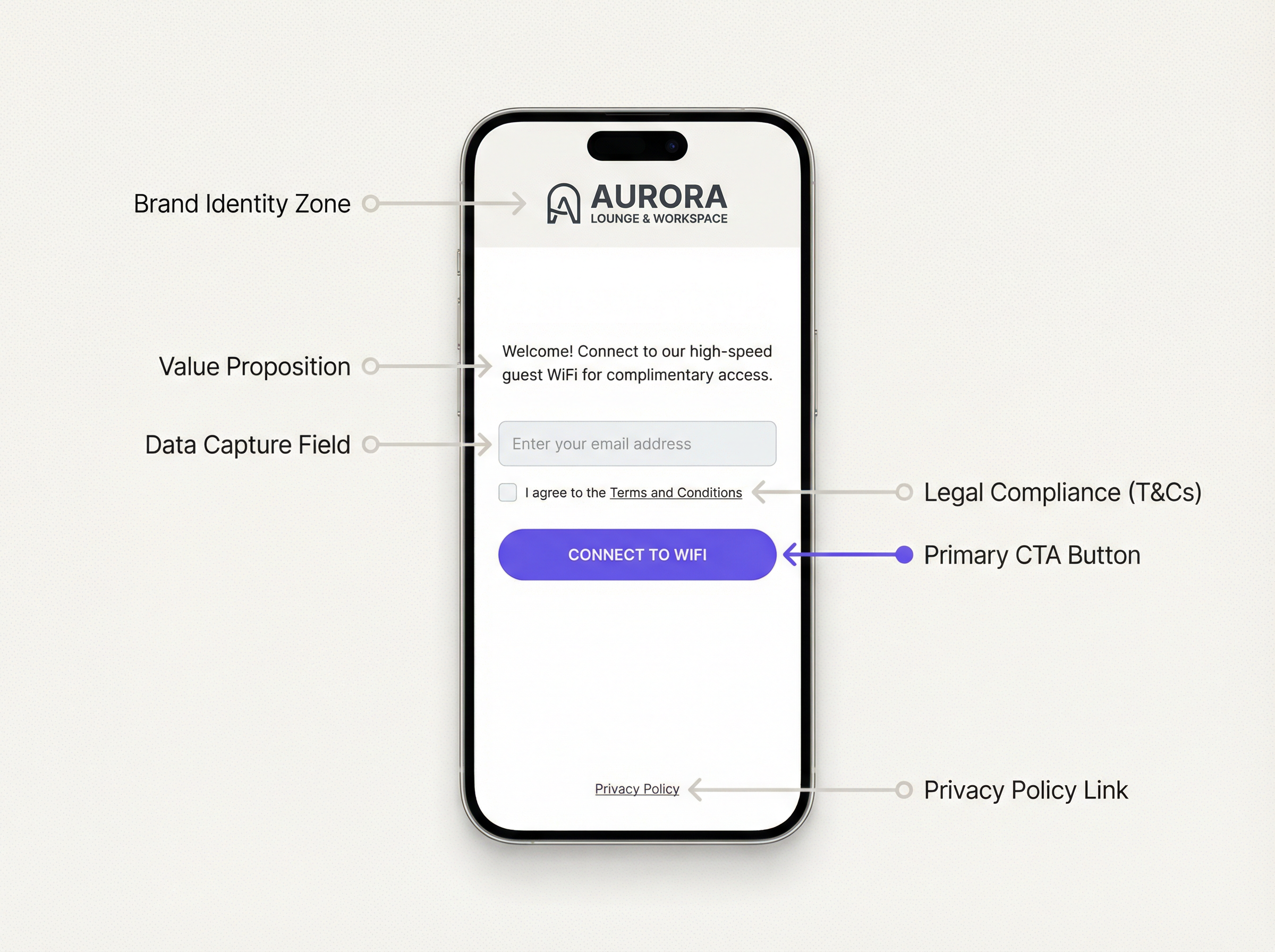
Ein effektives WiFi-Splash-Page-Design folgt einer klaren visuellen Hierarchie. Der Bereich für die Markenidentität befindet sich oben auf der Seite und muss zuerst geladen werden. Darauf folgt unmittelbar ein prägnantes Wertversprechen (Value Proposition) – nicht länger als ein Satz. Das Authentifizierungsformular ist das zentrale Element und muss die visuell auffälligste interaktive Komponente sein. Rechtliche Compliance-Elemente (AGB-Checkbox, Link zur Datenschutzerklärung) befinden sich unterhalb des Formulars. Der Call-to-Action-Button ist das letzte Element und muss groß, kontrastreich und unmissverständlich sein.
Das Seitengewicht ist eine kritische Leistungsvariable. Die unkomprimierte Gesamtgröße aller Splash-Page-Assets – HTML, CSS, JavaScript, Bilder – sollte 200 KB nicht überschreiten. Hintergrundbilder müssen, falls verwendet, komprimiert und in modernen Formaten (bevorzugt WebP) bereitgestellt werden. Eine Seite, die über eine 4G-Verbindung mehr als drei Sekunden zum Laden benötigt, verzeichnet einen messbaren Anstieg der Abbruchraten. Testen Sie die Performance mit Tools wie Google PageSpeed Insights und streben Sie einen Largest Contentful Paint (LCP) von unter 2,5 Sekunden an.
Responsive Design ist nicht verhandelbar. Die Mehrheit der Gäste-WiFi-Verbindungen stammt von Smartphones. Die Splash-Page muss bei Viewport-Breiten von 320px bis 1440px korrekt gerendert werden. Verwenden Sie CSS-Media-Queries und einen Mobile-First-Designansatz. Vermeiden Sie Layouts mit fester Breite.
Phase 3: Plattformkonfiguration
Stellen Sie die Splash-Page über Ihre Gäste-WiFi-Management-Plattform bereit. Eine produktionsreife Plattform wie Purple bietet einen vorlagenbasierten Editor, der es Marketingteams ermöglicht, Markenaktualisierungen ohne Eingreifen der Technikabteilung zu verwalten. Konfigurieren Sie die SSID so, dass sie zur Portal-URL weiterleitet, legen Sie das Session-Timeout und die Bandbreitenrichtlinien fest und definieren Sie die Walled-Garden-Domains. Führen Sie vor dem Go-Live End-to-End-Tests auf mindestens drei Gerätetypen (iOS, Android, Windows-Laptop) durch.
Phase 4: Analytics und Optimierung
Nach der Bereitstellung sollten Sie die Splash-Page mit Conversion-Tracking ausstatten. Die wichtigsten Metriken sind: Impression Rate (Geräte, die die SSID erkannt haben), Portal View Rate (Geräte, die die Splash-Page geladen haben), Completion Rate (Geräte, die sich erfolgreich authentifiziert haben) und Drop-off Rate (die Differenz zwischen Aufrufen und Abschlüssen). Eine gesunde Abschlussrate für einen E-Mail-Erfassungsprozess liegt bei über 65 %. Raten unter 50 % deuten auf ein UX- oder Performance-Problem hin, das untersucht werden sollte.
Best Practices
Die folgenden Empfehlungen stellen die gebündelten Leitlinien aus Enterprise-Bereitstellungen in den Bereichen Gastgewerbe, Einzelhandel und öffentlicher Sektor dar.
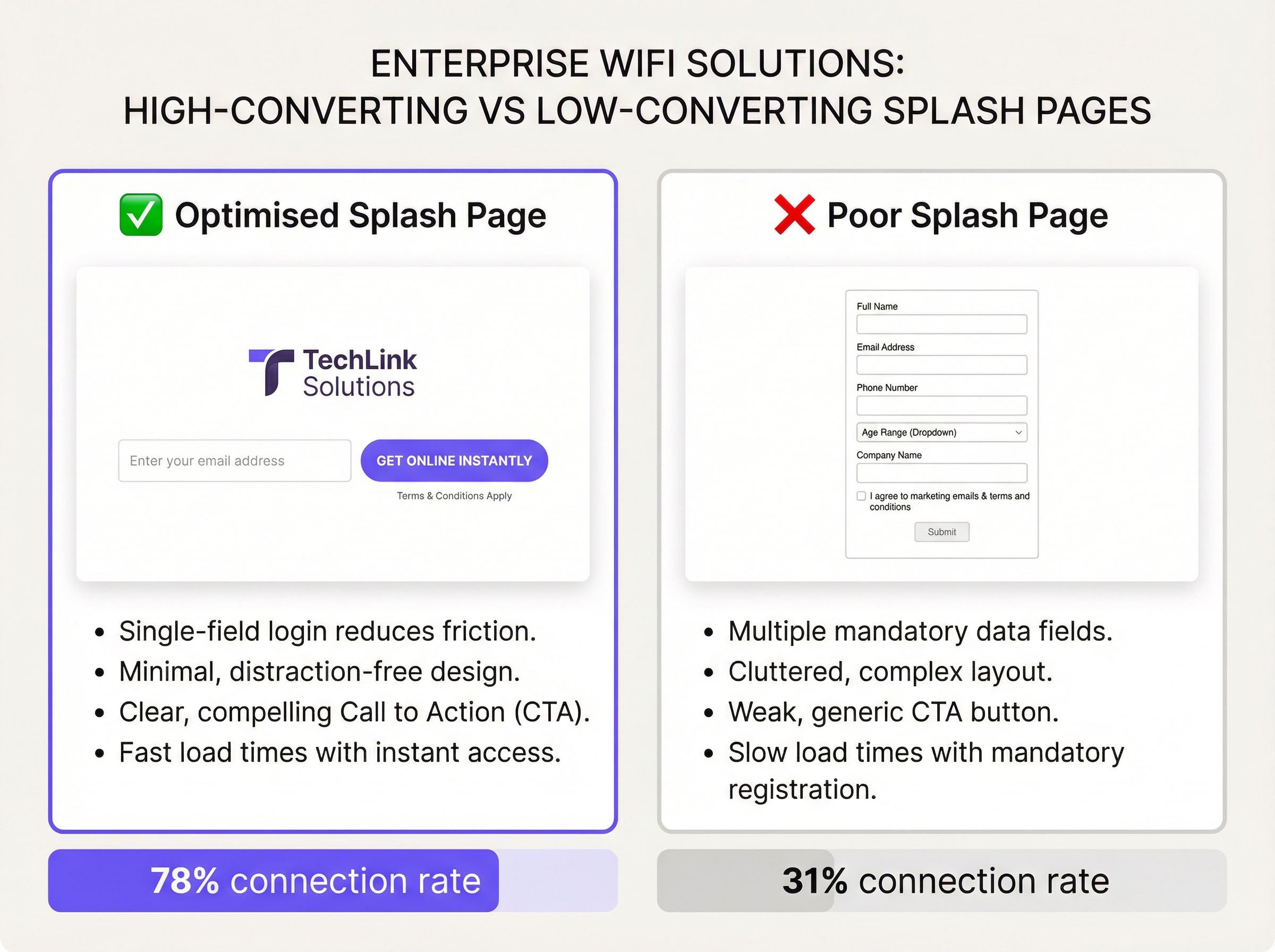
Minimieren Sie Formularfelder. Jedes zusätzliche Feld senkt die Abschlussraten. Zahlreiche A/B-Tests bei groß angelegten Bereitstellungen zeigen durchweg, dass der Wechsel von einem Formular mit zwei Feldern (Name + E-Mail) zu einem Formular mit nur einem Feld (nur E-Mail) die Abschlussraten um 15-25 Prozentpunkte erhöht. Sofern kein spezifischer Business Case eine zusätzliche Datenerfassung rechtfertigt, ist ein einziges E-Mail-Feld der richtige Standard.
Machen Sie das Wertversprechen explizit. Nutzer füllen kein Formular aus, wenn sie nicht verstehen, was sie im Gegenzug erhalten. Eine Überschrift wie „Verbinden Sie sich mit kostenlosem High-Speed-WiFi“ oder „In Sekunden online gehen“ direkt über dem Formularfeld verbessert die Conversion erheblich. Vage oder fehlende Wertversprechen sind eine Hauptursache für hohe Drop-off-Raten.
Sorgen Sie für GDPR-Compliance by Design. Die Splash-Page muss einen klaren, entbündelten Einwilligungsmechanismus für Marketingkommunikation bieten, der von der für den Netzwerkzugang erforderlichen AGB-Zustimmung getrennt ist. Vorab angekreuzte Checkboxen für die Marketing-Einwilligung sind gemäß GDPR Artikel 7 nicht konform. Die Datenschutzerklärung muss über einen klar gekennzeichneten Link zugänglich sein und genau beschreiben, wie aus dem WiFi gewonnene Daten verarbeitet, gespeichert und geteilt werden.
Implementieren Sie das Session-Management korrekt. Definieren Sie angemessene Session-Timeouts und Re-Authentifizierungsintervalle. Eine 24-Stunden-Session für Hotelgäste ist Standard. Eine 2-Stunden-Session für ein Café ist angemessen. Eine erzwungene Re-Authentifizierung alle 30 Minuten an einem Ort, an dem sich Gäste stundenlang aufhalten, ist ein erheblicher UX-Fehler und eine häufige Beschwerde im Gastgewerbe.
Testen Sie über verschiedene Betriebssysteme hinweg. Der iOS Captive Network Assistant (CNA) und der Captive Portal-Erkennungsmechanismus von Android verhalten sich unterschiedlich. iOS öffnet ein Mini-Browser-Fenster (den CNA), um das Portal anzuzeigen, was Einschränkungen mit sich bringt, wie z. B. keine JavaScript-Unterstützung in älteren Versionen und eingeschränktes Cookie-Handling. Stellen Sie sicher, dass Ihr Portal in der CNA-Umgebung ein Graceful Degradation bietet. Testen Sie auf aktuellen und N-1-Versionen von sowohl iOS als auch Android.
Isolieren Sie den Gäste-Datenverkehr. Das Gäste-VLAN muss durch eine Firewall von allen internen Unternehmensnetzwerken, Management-Schnittstellen und POS-Systemen getrennt sein. Dies ist eine grundlegende Anforderung an die Netzwerksicherheit und wird gemäß PCI DSS Anforderung 1.3 für jeden Standort vorgeschrieben, der Kartenzahlungen verarbeitet. Das Versäumnis, den Gäste-Datenverkehr zu segmentieren, stellt eine kritische Sicherheitslücke dar.
Fehlerbehebung & Risikominderung
Häufige Fehlerquellen
Die folgende Tabelle katalogisiert die am häufigsten auftretenden Probleme bei Captive Portal-Bereitstellungen und deren Ursachen.
| Symptom | Ursache | Lösung |
|---|---|---|
| Portal-Seite erscheint nicht | DNS-Hijacking nicht konfiguriert; Client nutzt DoH/DoT | Sicherstellen, dass der Controller DNS abfängt; DNS-over-HTTPS an der Firewall blockieren |
| Social Login schlägt fehl | OAuth-Anbieter nicht im Walled Garden | Alle OAuth-Endpunkte und CDN-Domains zum Walled Garden hinzufügen |
| HTTPS-Warnung auf dem Portal | Abgelaufenes oder selbstsigniertes TLS-Zertifikat | Gültiges Zertifikat bereitstellen; automatisierte Erneuerung implementieren |
| iOS CNA zeigt leere Seite | JavaScript-Abhängigkeit im Portal; CNA-JS-Einschränkungen | Portal auf CNA-Kompatibilität prüfen; Server-Side Rendering verwenden |
| Hohe Drop-off-Rate | Zu viele Formularfelder; langsames Laden der Seite; unklarer CTA | Felder reduzieren; Assets optimieren; A/B-Tests für CTA-Texte |
| Nutzer können sich nach Ablauf der Session nicht erneut verbinden | Session-Token nicht gelöscht; MAC-Adresse nicht neu bewertet | Konfiguration des Session-Managements im Controller überprüfen |
| GDPR-Audit-Feststellung | Vorab angekreuzte Einwilligungsboxen; fehlender Link zur Datenschutzerklärung | Einwilligungs-UX beheben; konformen Link zur Datenschutzerklärung hinzufügen |
Risikominderung: Die Compliance-Audit-Checkliste
Bevor eine Gäste-WiFi-Bereitstellung live geht, müssen die folgenden Compliance-Punkte verifiziert werden: Die Datenschutzerklärung ist aktuell und spiegelt die Datenverarbeitungsaktivitäten genau wider; die Marketing-Einwilligung erfolgt per Opt-in und ist von den AGB entbündelt; Aufbewahrungsfristen für Daten sind definiert und werden durchgesetzt; es existiert ein Prozess zur Bearbeitung von Auskunftsanfragen (Subject Access Requests, SARs) für aus dem WiFi gewonnene Daten; und der Gäste-Datenverkehr ist vollständig von internen Netzwerken und PCI-relevanten Systemen isoliert.
ROI & Business Impact
Der kommerzielle Nutzen einer Investition in eine gut gestaltete Splash-Page liegt auf der Hand. Gäste-WiFi-Daten – in erster Linie E-Mail-Adressen und Daten zur Besuchshäufigkeit – gehören zu den wertvollsten First-Party-Daten, die ein Unternehmen sammeln kann. Da Third-Party-Cookies in den gängigen Browsern veraltet sind und mobile Werbe-IDs zunehmend eingeschränkt werden, ist die am WiFi-Anmeldepunkt erfasste E-Mail-Adresse ein dauerhaftes, einwilligungsbasiertes und unternehmenseigenes Marketing-Asset.
Betrachten Sie die Wirtschaftlichkeit einer Einzelhandelskette mit 200 Standorten. Wenn jeder Standort täglich 300 eindeutige Gäste-WiFi-Nutzer bedient und die aktuelle Abschlussrate bei 35 % liegt, erfasst die Kette täglich etwa 21.000 E-Mail-Adressen. Durch die Optimierung der Splash-Page auf eine Abschlussrate von 70 % – ein realistisches Ziel mit den in diesem Leitfaden beschriebenen Praktiken – verdoppelt sich diese Zahl auf 42.000 pro Tag. Über ein Jahr hinweg bedeutet dies zusätzliche 7,6 Millionen Opt-in-Kontakte, die in die Marketingdatenbank aufgenommen werden. Bei einer konservativen Umsatzrechnung für E-Mail-Marketing von 0,10 £ pro Kontakt und Jahr ist diese Optimierung 760.000 £ an zusätzlichem Jahresumsatz wert – durch eine Designänderung, deren Implementierung nur einen Bruchteil davon kostet.
Über den direkten Marketingwert hinaus ist die Splash-Page der Einstiegspunkt in eine umfassendere Guest-Intelligence-Plattform. Analysen der Verweildauer, Häufigkeit von Wiederholungsbesuchen, Mapping von Besucher-Spitzenzeiten und Customer-Journey-Analysen haben alle ihren Ursprung im Authentifizierungsereignis. Diese Daten bilden die Grundlage für operative Entscheidungen – Personalbesetzung, Ladenlayout, Timing von Werbeaktionen –, die messbare Auswirkungen auf die betriebliche Effizienz und den Umsatz pro Quadratmeter haben.
Die ROI-Berechnung für die Splash-Page-Optimierung ist daher keine reine Marketingübung. Es handelt sich um eine Investition in die Dateninfrastruktur mit sich verzinsenden Erträgen.
Schlüsselbegriffe & Definitionen
Captive Portal
A network access control mechanism that intercepts all HTTP/HTTPS traffic from an unauthenticated client and redirects it to an authentication web page before granting internet access. Operates at the access layer via DNS hijacking and HTTP 302 redirects.
IT teams encounter this term when configuring wireless controllers, access points, and network management platforms. It is the technical term for what marketing teams call a 'splash page' or 'WiFi login page'. Understanding the distinction between the portal mechanism and the page design is essential for effective troubleshooting.
Splash Page
The web page presented to a guest WiFi user via the captive portal mechanism. It is the user-facing interface for authentication and is the primary point of brand expression, data capture, and legal consent in a guest WiFi deployment.
The term is used interchangeably with 'captive portal' in commercial contexts, though strictly speaking the splash page is the front-end design layer and the captive portal is the underlying network mechanism. IT managers should be precise about this distinction when briefing design agencies or platform vendors.
Walled Garden
A defined set of IP addresses, domains, and URLs that an unauthenticated client device is permitted to access before completing the splash page authentication flow. Configured at the wireless controller or firewall level.
Encountered during initial deployment configuration and whenever the splash page design changes. An incorrectly configured walled garden is the most common cause of social login failures and broken portal page rendering. Must be reviewed and updated whenever new authentication methods or third-party scripts are added to the splash page.
GDPR (General Data Protection Regulation)
EU Regulation 2016/679, applicable in the UK as the UK GDPR post-Brexit. Governs the collection, processing, storage, and transfer of personal data. Requires a lawful basis for processing, explicit and unbundled consent for marketing communications, and the right for individuals to access, rectify, and erase their data.
Directly applicable to any splash page that collects personal data (email addresses, names, device identifiers). IT and marketing teams must ensure the splash page's consent mechanism, privacy policy, and data retention practices are compliant. Non-compliance carries fines of up to 4% of global annual turnover under Article 83.
WPA3 (Wi-Fi Protected Access 3)
The current generation wireless security protocol defined by the Wi-Fi Alliance, superseding WPA2. Introduces Simultaneous Authentication of Equals (SAE) for stronger password-based authentication, enhanced protection against offline dictionary attacks, and mandatory use of Protected Management Frames (PMF).
Relevant when specifying SSID security configuration for guest networks. WPA3-Personal is recommended for guest SSIDs where device compatibility allows. Note that WPA3 governs transmission security and is distinct from the captive portal authentication layer, which operates at the application layer.
RADIUS (Remote Authentication Dial-In User Service)
A networking protocol providing centralised Authentication, Authorisation, and Accounting (AAA) management for users connecting to a network. Defined in RFC 2865. Used in enterprise WiFi deployments to validate credentials against a central directory (e.g., Active Directory, LDAP) and enforce access policies.
Encountered in enterprise and education deployments where guest WiFi must integrate with existing identity infrastructure. For pure guest WiFi with email capture, RADIUS is typically not required. It becomes relevant when deploying 802.1X-authenticated SSIDs for staff or when integrating with a centralised policy management platform.
PCI DSS (Payment Card Industry Data Security Standard)
A set of security standards defined by the PCI Security Standards Council, mandating controls for any organisation that stores, processes, or transmits cardholder data. Requirement 1.3 mandates network segmentation to isolate cardholder data environments from all other networks, including guest WiFi.
Directly applicable to hotels, retailers, and any venue that processes card payments on the same physical network infrastructure as the guest WiFi. IT teams must ensure the guest VLAN is fully isolated from POS systems, payment terminals, and any system in scope for PCI DSS. Failure to segment is a critical finding in PCI audits.
Progressive Profiling
A data collection strategy in which additional user attributes are requested incrementally across multiple sessions, rather than all at once during the initial authentication. Each subsequent interaction presents a short, optional prompt to enrich the user's profile.
Highly relevant for retail and hospitality deployments where richer demographic data is commercially valuable but front-loading a long form would suppress connection rates. Implemented at the platform level, with conditional logic that detects returning devices and presents appropriate prompts. Must be clearly disclosed in the privacy policy.
Conversion Rate (WiFi Context)
The percentage of devices that load the splash page and successfully complete the authentication flow, expressed as: (Authenticated Sessions / Portal Page Views) x 100. A key performance indicator for splash page effectiveness.
The primary metric for evaluating splash page performance. IT and marketing teams should establish a baseline conversion rate at deployment and track it continuously. A rate below 50% for an email-capture flow indicates a significant UX or performance issue. Rates above 70% are achievable with optimised single-field designs and clear value propositions.
Fallstudien
A 350-room business hotel in central London is deploying a new guest WiFi infrastructure across its property. The hotel's marketing team wants to capture guest email addresses for post-stay communications, while the IT team is concerned about GDPR compliance and network security. The hotel also hosts corporate events and needs to support conference delegates who expect seamless, fast connectivity. How should the splash page be designed and configured to meet all of these requirements?
The deployment should use a tiered SSID architecture: a primary guest SSID with an email-capture splash page for hotel residents and general guests, and a separate event SSID with voucher-code authentication for conference delegates. This separation allows the marketing team to collect opted-in email addresses from hotel guests without forcing conference delegates — who may be attending a third-party event — through a data-capture flow that could create GDPR complications for the event organiser.
For the primary guest splash page, the design should feature the hotel's logo and brand colours prominently, a single email input field, a clearly labelled opt-in checkbox for marketing communications (unchecked by default), a mandatory T&Cs acceptance checkbox, and a high-contrast 'Connect' CTA button. The page should load in under 2 seconds and be fully responsive. The session timeout should be set to 24 hours, with automatic re-authentication suppressed for returning devices within a 30-day window to reduce friction for repeat guests.
For the event SSID, the hotel's IT team should pre-generate a batch of single-use or time-limited voucher codes that the events coordinator distributes to delegates. This provides controlled access without data capture obligations. The event VLAN should be firewalled from the hotel's PMS (Property Management System) and POS infrastructure in compliance with PCI DSS Requirement 1.3.
All guest traffic must traverse a dedicated guest VLAN, isolated from the hotel's operational network. The splash page must be served over HTTPS with a valid certificate. The privacy policy linked from the splash page must explicitly reference WiFi data collection, retention periods (recommend 24 months), and the right to unsubscribe from marketing communications.
A national retail chain with 180 stores wants to use its guest WiFi network to build a first-party marketing database and gain footfall analytics. The current splash page — provided by the ISP — is unbranded, asks for name, email, date of birth, and postcode, and has a connection rate of 28%. The marketing director has set a target of 65% connection rate and 500,000 new email opt-ins within 12 months. What changes should be made to the splash page, and what supporting infrastructure is required?
The immediate priority is to replace the ISP-provided portal with a branded, platform-managed solution. The form must be reduced to a single email field. Removing name, date of birth, and postcode will be the single most impactful change. These fields add friction without providing data that is immediately actionable in a retail context; email address alone is sufficient to trigger a welcome journey, attribute future purchases, and measure visit frequency.
The new splash page design should incorporate the retailer's brand identity — logo, primary brand colour, approved typeface — and include a value proposition headline such as 'Free WiFi. Connect in seconds.' The T&Cs and privacy policy links must be present and compliant. The marketing opt-in checkbox should be unchecked by default with clear copy such as 'Yes, I'd like to receive exclusive offers by email.'
To achieve the 500,000 opt-in target, the chain should also implement a progressive profiling strategy: on a user's second or third visit, the splash page can present an optional prompt to complete their profile (e.g., add a name or confirm their postcode for localised offers). This approach collects richer data without compromising the initial connection rate.
The supporting infrastructure requires a centralised guest WiFi management platform with multi-site management capabilities, a CRM integration to push captured emails and consent flags directly into the marketing automation platform, and a real-time analytics dashboard to monitor per-store connection rates and identify underperforming locations. A/B testing capability at the platform level is highly desirable to allow ongoing optimisation of CTA copy and page layout.
Projected outcome: based on comparable deployments, moving from a five-field form to a single-field form with a branded design typically increases completion rates from 28% to 65-75%. At 180 stores averaging 250 unique daily visitors, a 65% completion rate generates approximately 29,000 new email opt-ins per day, reaching the 500,000 target in approximately 17 days of operation — well within the 12-month window.
Szenarioanalyse
Q1. You are the IT Manager for a 500-seat stadium that hosts 40 events per year, ranging from football matches (general public) to corporate hospitality events (premium guests). The commercial team wants to use guest WiFi to build a marketing database, while the security team insists on minimal data exposure. The stadium's existing network uses a flat guest VLAN with no segmentation. How do you design the splash page strategy and supporting network architecture to satisfy both teams?
💡 Hinweis:Consider whether a single splash page design can serve both use cases, and think carefully about what network segmentation changes are required before any splash page optimisation is meaningful.
Empfohlenen Ansatz anzeigen
The correct approach is a dual-SSID architecture: a public SSID for general admission guests with an email-capture splash page, and a separate corporate SSID for hospitality guests with a voucher-code or pre-shared key authentication. This satisfies the commercial team's data capture requirement for the general public cohort while giving the security team a controlled, low-data-exposure path for corporate guests. Before any splash page work begins, the flat guest VLAN must be segmented: general guest traffic, corporate guest traffic, and operational/POS traffic must each occupy separate VLANs with appropriate firewall rules between them. This is a prerequisite, not an optional enhancement. The email-capture splash page should use a single field (email), an unchecked marketing opt-in checkbox, and a clear T&Cs link. The privacy policy must reference the stadium operator as data controller and describe the marketing use of captured data. Post-event, the captured emails should be exported to the CRM platform within 24 hours to enable timely follow-up communications.
Q2. A regional library authority is deploying free public WiFi across 22 branches. The authority's legal team has flagged that collecting email addresses from library users may conflict with the authority's obligations under the Public Sector Equality Duty and data minimisation principles. The IT team is under pressure to deploy quickly. What authentication method should be used, and what are the key splash page design requirements for this public-sector context?
💡 Hinweis:Consider the principle of data minimisation under UK GDPR and the specific obligations of a public-sector body. Is email capture necessary to achieve the authority's objectives?
Empfohlenen Ansatz anzeigen
For a public library context, a click-through authentication — requiring only T&Cs acceptance with no data capture — is the most appropriate and legally defensible approach. The authority's primary obligation is to provide equitable access to information; data collection is not a core objective and introduces compliance risk without commensurate benefit. The splash page should be simple and accessible: the authority's branding, a brief welcome message, a T&Cs acceptance checkbox, and a 'Connect' button. The T&Cs must include an acceptable use policy that prohibits illegal activity, in compliance with the authority's obligations under the Computer Misuse Act 1990. If the authority wishes to collect usage analytics, this should be done at the network level (aggregate throughput, peak usage times) rather than at the individual user level. If email capture is later deemed necessary for a specific programme (e.g., a digital skills initiative), it must be implemented as a separate, clearly optional flow with a documented lawful basis under UK GDPR Article 6(1)(e) (public task) or Article 6(1)(a) (consent).
Q3. Your organisation's guest WiFi splash page has a completion rate of 42% against a target of 65%. Analytics show that 85% of users load the splash page, but 43% abandon before clicking 'Connect'. The page currently asks for first name, last name, email address, and date of birth, and includes a 400KB background image. The marketing team does not want to remove the date of birth field as it is used for age verification for an alcohol-related promotion. How do you diagnose and resolve the drop-off issue?
💡 Hinweis:Separate the performance problem from the UX problem. Address them in sequence. Consider whether the age verification requirement can be met by a different mechanism that does not require a form field.
Empfohlenen Ansatz anzeigen
The diagnosis identifies two distinct problems: a performance problem (the 400KB background image is likely causing slow load times, contributing to early abandonment) and a UX problem (four form fields is significantly above the optimal one-field design). Address the performance problem first: compress the background image to under 50KB using WebP format, or replace it with a CSS gradient that loads instantly. This alone may recover 5-10 percentage points of completion rate. For the UX problem, negotiate with the marketing team to remove first name, last name, and date of birth from the standard flow. The age verification requirement for the alcohol promotion can be met more effectively by a separate age-gate mechanism (a simple 'I confirm I am 18 or over' checkbox) rather than a date-of-birth field, which is disproportionate data collection for this purpose and creates a GDPR data minimisation issue. Implement progressive profiling to request additional data on subsequent visits if richer profiling is genuinely required. After these changes, re-measure the completion rate over a 30-day period. If it remains below 65%, conduct user testing to identify any remaining friction points in the authentication flow.
Wichtigste Erkenntnisse
- ✓A guest WiFi splash page is a strategic business asset, not a technical formality — its design directly determines the ROI of your entire guest WiFi investment through connection rates and first-party data capture.
- ✓Apply the One-Field Rule as your default: a single email field consistently outperforms multi-field forms, often doubling completion rates from below 35% to above 70% in comparable deployments.
- ✓Legal compliance is non-negotiable and must be designed in from the start — GDPR requires unbundled, opt-in marketing consent, an accurate privacy policy, and a documented lawful basis for all data processing activities.
- ✓Network segmentation is a prerequisite, not an optional enhancement — guest traffic must be isolated from corporate and POS systems in compliance with PCI DSS Requirement 1.3 before any splash page optimisation work begins.
- ✓Page performance is as important as visual design — a splash page that takes more than three seconds to load will see measurable abandonment; target a total asset weight under 200KB and an LCP under 2.5 seconds.
- ✓Choose your authentication method based on venue type and business objective — email capture is optimal for most commercial venues, while click-through is appropriate for public-sector and high-throughput environments where data collection is not a primary objective.
- ✓Instrument your splash page with conversion analytics from day one — without baseline data on impression rate, portal view rate, and completion rate, you cannot measure the impact of optimisation changes or identify underperforming locations in a multi-site deployment.




