

Melhores Práticas de Design de Splash Page para WiFi de Convidados
This guide provides IT managers, network architects, and venue operations directors with a definitive technical reference for designing and deploying high-performance guest WiFi splash pages. It covers the four core pillars of effective captive portal design — brand identity, user experience, data capture, and legal compliance — and translates them into actionable deployment guidance. By following these best practices, organisations can expect measurable improvements in guest connection rates, marketing database growth, and demonstrable ROI from their guest WiFi infrastructure.
🎧 Ouça este Guia
Ver Transcrição
Resumo Executivo
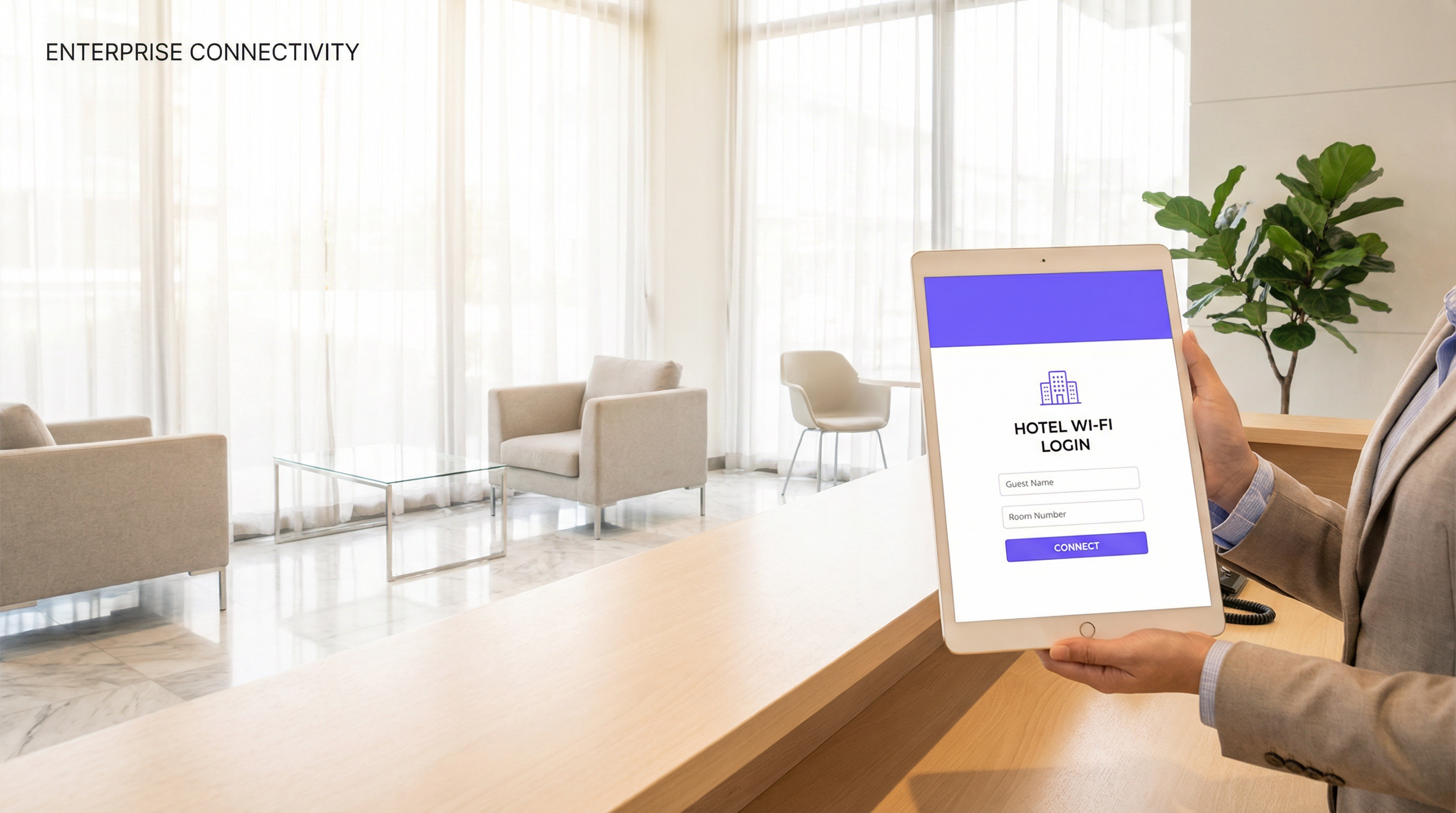
A splash page do WiFi de convidados — ou Captive Portal — é o ponto de contacto mais consequente na implementação de redes sem fios de qualquer espaço. É a primeira interação que um convidado tem com a sua rede e determina se este se chega a ligar. No entanto, continua a ser uma das componentes com menos engenharia aplicada na infraestrutura de WiFi empresarial. Uma splash page mal desenhada não frustra apenas os utilizadores; destrói ativamente o valor comercial de um investimento de rede que pode ascender a centenas de milhares de libras.
Este guia está estruturado para profissionais seniores de TI e operações que precisam de tomar decisões de implementação agora. Abrange a arquitetura técnica da autenticação do Captive Portal, os princípios de UX que impulsionam a conversão, as obrigações legais e de conformidade ao abrigo do GDPR e quadros relacionados, e os requisitos de marca que transformam um ecrã de login num ativo gerador de receitas. São incluídos cenários reais de implementação dos setores da hotelaria, retalho e eventos para fundamentar cada recomendação na realidade operacional. O argumento central é simples: a sua splash page não é uma mera caixa de verificação de segurança. É uma ferramenta de negócio estratégica e deve ser desenhada em conformidade.
Análise Técnica Aprofundada
Como Funciona a Autenticação do Captive Portal
Um Captive Portal opera na camada de acesso à rede, intercetando todo o tráfego HTTP e HTTPS de um dispositivo cliente não autenticado e redirecionando-o para o URL da splash page. O mecanismo subjacente baseia-se em DNS hijacking e redirecionamentos HTTP 302. Quando um dispositivo se associa ao SSID de convidados, o ponto de acesso ou controlador sem fios atribui-lhe um endereço IP restrito e encaminha todo o tráfego de saída para o servidor do portal. Até que o utilizador conclua o fluxo de autenticação na splash page, o dispositivo é mantido numa VLAN de quarentena, com acesso restrito ao endereço IP do portal e a quaisquer domínios walled-garden pré-autorizados (como fornecedores de login social).
Após uma autenticação bem-sucedida — seja através da submissão de e-mail, login social, SMS OTP ou código de voucher — o controlador ou servidor RADIUS atualiza o estado de autorização do cliente, move-o para a VLAN de acesso apropriada e concede conectividade à internet. Todo este fluxo deve ser transparente e rápido. Qualquer latência no redirecionamento do portal ou na resposta de autenticação será percecionada pelo utilizador como uma falha no WiFi.
Do ponto de vista das normas, a arquitetura do Captive Portal é neutra em relação ao fornecedor e opera de forma independente do protocolo de segurança sem fios subjacente. No entanto, o próprio SSID deve ser configurado com WPA3-Personal ou WPA3-Enterprise sempre que a compatibilidade do dispositivo o permita, de acordo com a especificação IEEE 802.11ax (Wi-Fi 6). A camada do Captive Portal gere a gestão de identidade e acessos, enquanto o protocolo sem fios subjacente gere a segurança da transmissão. Estas são funções distintas e devem ser arquitetadas separadamente.
Métodos de Autenticação: Uma Análise Comparativa
A escolha do método de autenticação é a decisão de design mais consequente para qualquer implementação de splash page. Cada método acarreta diferentes implicações ao nível da fricção para o utilizador, riqueza de dados, carga de conformidade e postura de segurança.
| Método de Autenticação | Nível de Fricção | Qualidade dos Dados | Complexidade GDPR | Tipo de Espaço Ideal |
|---|---|---|---|---|
| Click-through (apenas T&C) | Muito Baixo | Mínima | Baixa | Aeroportos, transportes públicos, bibliotecas |
| Submissão de e-mail | Baixo | Alta (e-mail, frequência de visitas) | Média | Hotéis, retalho, restaurantes |
| Login social (Facebook/Google) | Baixo-Médio | Muito Alta (demografia) | Alta | Bares, espaços de entretenimento, retalho |
| SMS / OTP | Médio | Alta (número de telemóvel verificado) | Média | Hotelaria premium, saúde |
| Voucher / Código PIN | Baixo | Nenhuma (anónimo) | Muito Baixa | Centros de conferências, espaços de co-working |
| RADIUS / Active Directory | Muito Baixo (SSO) | Nível empresarial | Baixa (utilizadores internos) | Campus corporativos, educação |
Para a maioria das implementações comerciais, a submissão de e-mail representa o equilíbrio ideal. Captura um identificador duradouro e comercializável com o mínimo de fricção e é simples de gerir ao abrigo dos requisitos de base legal do GDPR. O login social é atrativo pela riqueza de dados, mas requer um quadro de consentimento mais complexo e introduz uma dependência de fornecedores OAuth de terceiros — um risco que vale a pena avaliar cuidadosamente em contextos empresariais.
Configuração de Walled Garden
Um walled garden é o conjunto de domínios e endereços IP aos quais um cliente não autenticado tem permissão de aceder antes de concluir o fluxo da splash page. Este é um elemento de configuração crítico. No mínimo, o walled garden deve incluir o próprio servidor do portal, quaisquer endpoints de CDN que sirvam os ativos do portal e os endpoints OAuth para quaisquer fornecedores de login social em utilização. A falha na configuração correta do walled garden é a causa mais comum de falhas no login social e é uma fonte frequente de pedidos de suporte em novas implementações.
HTTPS e Gestão de Certificados
Todas as splash pages devem ser servidas por HTTPS. Os sistemas operativos móveis modernos, incluindo iOS 14+ e Android 11+, apresentarão avisos de segurança ou bloquearão ligações a Captive Portals HTTP. O servidor do seu portal deve apresentar um certificado TLS válido de uma Autoridade de Certificação fidedigna. Certificados autoassinados não são aceitáveis em implementações de produção. A expiração de certificados é um modo de falha operacional comum; a renovação automatizada através do Let's Encrypt ou do serviço de certificados geridos do fornecedor da sua plataforma deve ser uma prática padrão.
Guia de Implementação
Fase 1: Definição de Requisitos
Antes de abrir uma ferramenta de design, a equipa do projeto deve alinhar-se em quatro parâmetros: o método de autenticação (informado pela análise comparativa acima), os campos de dados a capturar (aplique o princípio da minimização de dados — recolha apenas o que irá utilizar ativamente), o modelo de consentimento de marketing (opt-in vs. opt-out, sendo o opt-in fortemente recomendado para conformidade com o GDPR) e os ativos de marca a incorporar (ficheiros de logótipo em formato SVG, códigos de cores hexadecimais, tipos de letra aprovados).
Fase 2: Design da Splash Page
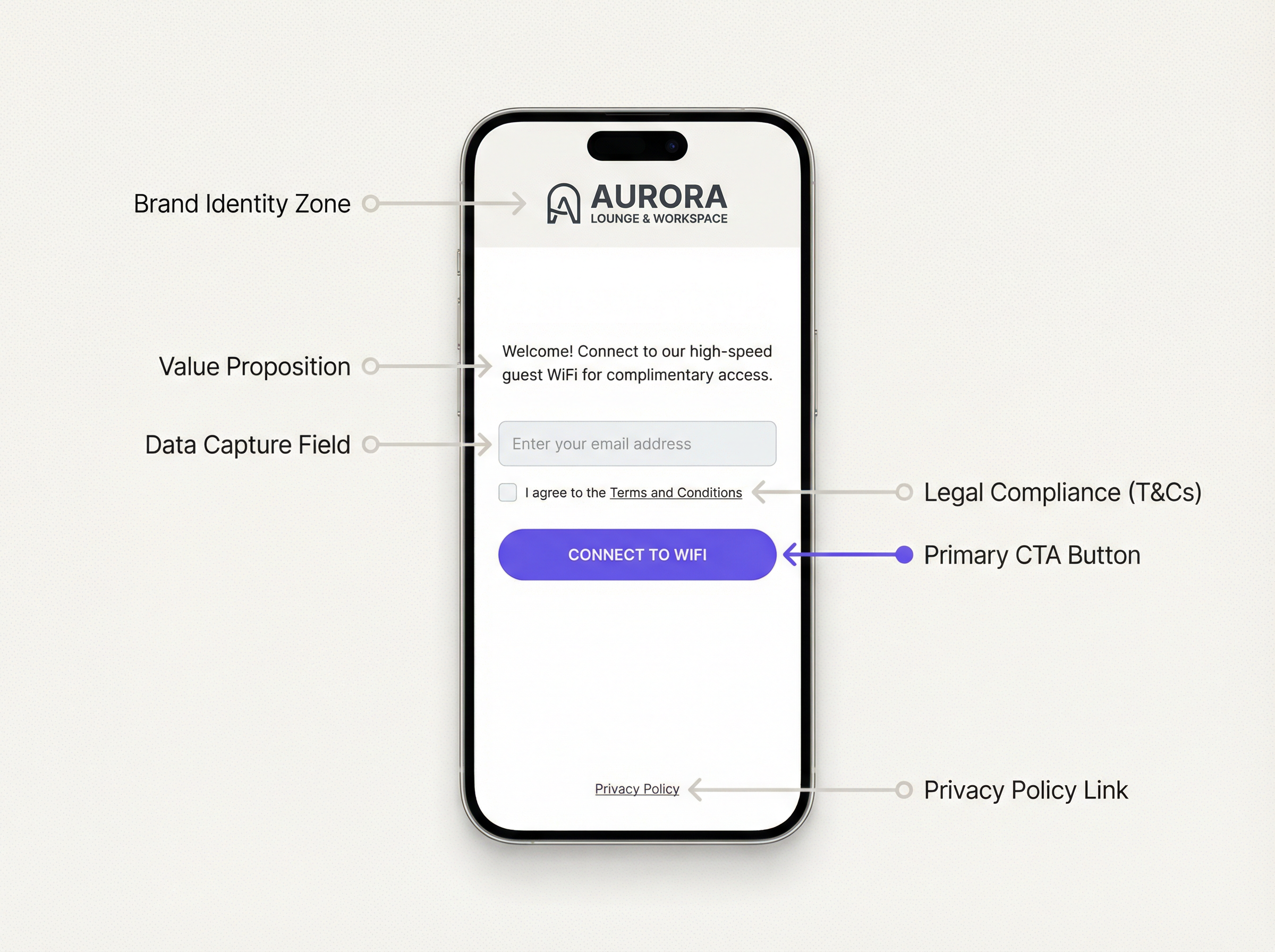
O design eficaz de uma splash page de WiFi segue uma hierarquia visual clara. A zona de identidade da marca ocupa o topo da página e deve carregar primeiro. Segue-se imediatamente uma proposta de valor concisa — não mais do que uma frase. O formulário de autenticação é o elemento central e deve ser a componente interativa com maior destaque visual. Os elementos de conformidade legal (caixa de verificação de T&C, link para a política de privacidade) situam-se abaixo do formulário. O botão de call-to-action é o elemento final e deve ser grande, de alto contraste e inequívoco.
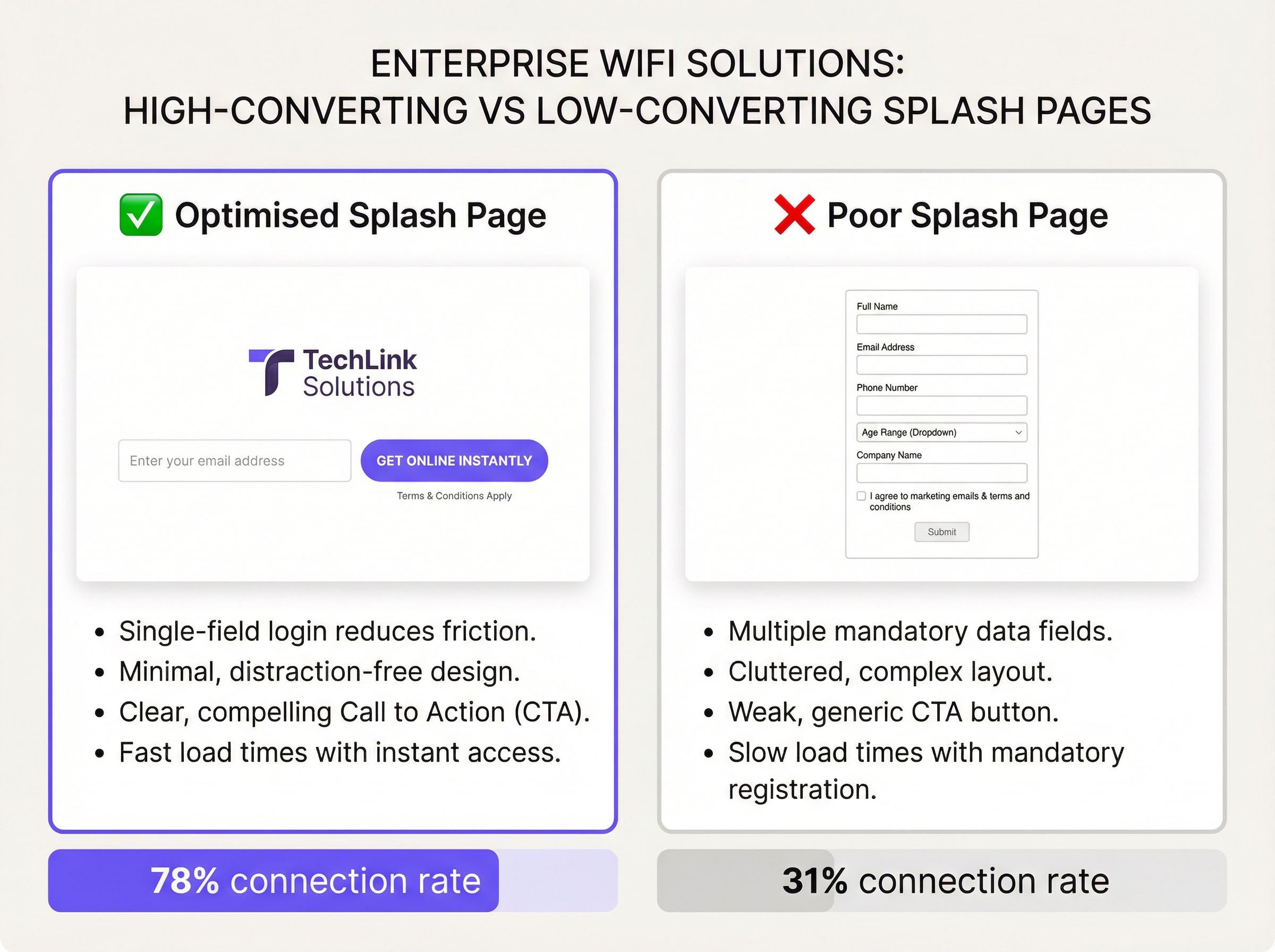
O peso da página é uma variável de desempenho crítica. O tamanho total não comprimido de todos os ativos da splash page — HTML, CSS, JavaScript, imagens — não deve exceder 200 KB. As imagens de fundo, se utilizadas, devem ser comprimidas e servidas em formatos modernos (preferencialmente WebP). Uma página que demore mais de três segundos a carregar numa ligação 4G verá um aumento mensurável nas taxas de abandono. Teste o desempenho utilizando ferramentas como o Google PageSpeed Insights e aponte para um Largest Contentful Paint (LCP) inferior a 2,5 segundos.
O design responsivo é inegociável. A maioria das ligações ao WiFi de convidados tem origem em smartphones. A splash page deve ser renderizada corretamente em larguras de viewport de 320px a 1440px. Utilize media queries CSS e uma abordagem de design mobile-first. Evite layouts de largura fixa.
Fase 3: Configuração da Plataforma
Implemente a splash page através da sua plataforma de gestão de WiFi de convidados. Uma plataforma de nível de produção como a Purple fornece um editor baseado em modelos que permite às equipas de marketing gerir atualizações de marca sem intervenção da engenharia. Configure o SSID para redirecionar para o URL do portal, defina o tempo limite da sessão e as políticas de largura de banda, e defina os domínios do walled garden. Realize testes de ponta a ponta em pelo menos três tipos de dispositivos (iOS, Android, portátil Windows) antes de entrar em produção.
Fase 4: Analítica e Otimização
Após a implementação, instrumente a splash page com o acompanhamento de conversões. As principais métricas são: Taxa de Impressão (dispositivos que detetaram o SSID), Taxa de Visualização do Portal (dispositivos que carregaram a splash page), Taxa de Conclusão (dispositivos que se autenticaram com sucesso) e Taxa de Abandono (o delta entre visualizações e conclusões). Uma taxa de conclusão saudável para um fluxo de captura de e-mail é superior a 65%. Taxas inferiores a 50% indicam um problema de UX ou de desempenho que justifica investigação.
Melhores Práticas
As seguintes recomendações representam a orientação destilada de implementações empresariais em ambientes de hotelaria, retalho e setor público.
Minimize os campos do formulário. Cada campo adicional reduz as taxas de conclusão. Inúmeros testes A/B em implementações de grande escala mostram consistentemente que passar de um formulário de dois campos (nome + e-mail) para um formulário de campo único (apenas e-mail) aumenta as taxas de conclusão em 15 a 25 pontos percentuais. A menos que um caso de negócio específico justifique a recolha de dados adicionais, um único campo de e-mail é a predefinição correta.
Torne a proposta de valor explícita. Os utilizadores não preencherão um formulário sem compreenderem o que recebem em troca. Um título como "Ligue-se ao WiFi gratuito e de alta velocidade" ou "Fique online em segundos" diretamente acima do campo do formulário melhora significativamente a conversão. Propostas de valor vagas ou ausentes são uma das principais causas de elevadas taxas de abandono.
Cumpra o GDPR desde a conceção (by design). A splash page deve apresentar um mecanismo de consentimento claro e desagregado para comunicações de marketing, separado da aceitação dos T&C exigida para o acesso à rede. Caixas de verificação de consentimento de marketing pré-selecionadas não estão em conformidade com o Artigo 7.º do GDPR. A política de privacidade deve estar acessível através de um link claramente rotulado e deve descrever com precisão como os dados derivados do WiFi são processados, armazenados e partilhados.
Implemente a gestão de sessões corretamente. Defina intervalos apropriados de tempo limite de sessão e reautenticação. Uma sessão de 24 horas para hóspedes de hotel é o padrão. Uma sessão de 2 horas para um café é apropriada. Forçar a reautenticação a cada 30 minutos num espaço onde os convidados permanecem durante horas é uma falha significativa de UX e uma queixa comum em ambientes de hotelaria.
Teste em diferentes sistemas operativos. O Captive Network Assistant (CNA) do iOS e o mecanismo de deteção de Captive Portal do Android comportam-se de forma diferente. O iOS abre uma janela de mini-browser (o CNA) para apresentar o portal, que tem limitações, incluindo a ausência de suporte para JavaScript em versões mais antigas e o tratamento restrito de cookies. Garanta que o seu portal se degrada de forma elegante no ambiente CNA. Teste nas versões atuais e N-1 tanto do iOS como do Android.
Isole o tráfego de convidados. A VLAN de convidados deve estar protegida por firewall de todas as redes corporativas internas, interfaces de gestão e sistemas POS. Este é um requisito fundamental de segurança de rede e é obrigatório ao abrigo do Requisito 1.3 do PCI DSS para qualquer espaço que processe pagamentos com cartão. A falha na segmentação do tráfego de convidados é uma vulnerabilidade de segurança crítica.
Resolução de Problemas e Mitigação de Riscos
Modos de Falha Comuns
A tabela abaixo cataloga os problemas encontrados com maior frequência em implementações de Captive Portal e as suas causas raiz.
| Sintoma | Causa Raiz | Resolução |
|---|---|---|
| A página do portal não aparece | DNS hijacking não configurado; cliente a utilizar DoH/DoT | Assegure que o controlador interceta o DNS; bloqueie DNS-over-HTTPS na firewall |
| O login social falha | Fornecedor OAuth não está no walled garden | Adicione todos os endpoints OAuth e domínios CDN ao walled garden |
| Aviso HTTPS no portal | Certificado TLS expirado ou autoassinado | Implemente um certificado válido; implemente a renovação automatizada |
| O CNA do iOS mostra uma página em branco | Dependência de JavaScript no portal; restrições de JS no CNA | Audite o portal para compatibilidade com CNA; utilize renderização do lado do servidor (server-side rendering) |
| Elevada taxa de abandono | Demasiados campos no formulário; carregamento lento da página; CTA pouco claro | Reduza os campos; otimize os ativos; faça testes A/B ao copy do CTA |
| Os utilizadores não conseguem voltar a ligar-se após a expiração da sessão | Token de sessão não limpo; endereço MAC não reavaliado | Reveja a configuração da gestão de sessões no controlador |
| Descoberta em auditoria GDPR | Caixas de consentimento pré-selecionadas; link da política de privacidade em falta | Corrija a UX de consentimento; adicione um link de política de privacidade em conformidade |
Mitigação de Riscos: A Checklist de Auditoria de Conformidade
Antes de qualquer implementação de WiFi de convidados entrar em produção, os seguintes itens de conformidade devem ser verificados: a política de privacidade está atualizada e reflete com precisão as atividades de processamento de dados; o consentimento de marketing é opt-in e desagregado dos T&C; os períodos de retenção de dados estão definidos e são aplicados; existe um processo para lidar com Pedidos de Acesso do Titular (SARs) para dados derivados do WiFi; e o tráfego de convidados está totalmente isolado de redes internas e sistemas no âmbito do PCI.
ROI e Impacto no Negócio
O caso comercial para investir numa splash page bem desenhada é simples. Os dados do WiFi de convidados — principalmente endereços de e-mail e dados de frequência de visitas — estão entre os dados primários (first-party data) mais valiosos que uma organização pode recolher. Com a descontinuação dos cookies de terceiros nos principais browsers e os identificadores de publicidade móvel cada vez mais restritos, o endereço de e-mail capturado no ponto de login do WiFi é um ativo de marketing próprio, duradouro e baseado no consentimento.
Considere a economia de uma cadeia de retalho com 200 localizações. Se cada localização servir 300 utilizadores únicos de WiFi de convidados por dia e a taxa de conclusão atual for de 35%, a cadeia captura aproximadamente 21.000 endereços de e-mail por dia. Ao otimizar a splash page para atingir uma taxa de conclusão de 70% — um objetivo realista com as práticas descritas neste guia — esse valor duplica para 42.000 por dia. Ao longo de um ano, isto representa mais 7,6 milhões de contactos com opt-in a entrar na base de dados de marketing. Com uma atribuição conservadora de receitas de e-mail marketing de £0,10 por contacto por ano, esta otimização vale £760.000 em receitas anuais incrementais — a partir de uma alteração de design que custa uma fração desse valor a implementar.
Para além do valor de marketing direto, a splash page é o ponto de entrada para uma plataforma mais ampla de inteligência de convidados. A analítica de tempo de permanência (dwell time), a frequência de visitas repetidas, o mapeamento de picos de afluência e a análise da jornada do cliente têm todos origem no evento de autenticação. Estes dados informam decisões operacionais — níveis de pessoal, layout da loja, timing promocional — que têm um impacto mensurável na eficiência operacional e na receita por metro quadrado.
O cálculo do ROI para a otimização da splash page não é, portanto, um exercício de marketing. É um investimento em infraestrutura de dados com retornos compostos.
Termos-Chave e Definições
Captive Portal
A network access control mechanism that intercepts all HTTP/HTTPS traffic from an unauthenticated client and redirects it to an authentication web page before granting internet access. Operates at the access layer via DNS hijacking and HTTP 302 redirects.
IT teams encounter this term when configuring wireless controllers, access points, and network management platforms. It is the technical term for what marketing teams call a 'splash page' or 'WiFi login page'. Understanding the distinction between the portal mechanism and the page design is essential for effective troubleshooting.
Splash Page
The web page presented to a guest WiFi user via the captive portal mechanism. It is the user-facing interface for authentication and is the primary point of brand expression, data capture, and legal consent in a guest WiFi deployment.
The term is used interchangeably with 'captive portal' in commercial contexts, though strictly speaking the splash page is the front-end design layer and the captive portal is the underlying network mechanism. IT managers should be precise about this distinction when briefing design agencies or platform vendors.
Walled Garden
A defined set of IP addresses, domains, and URLs that an unauthenticated client device is permitted to access before completing the splash page authentication flow. Configured at the wireless controller or firewall level.
Encountered during initial deployment configuration and whenever the splash page design changes. An incorrectly configured walled garden is the most common cause of social login failures and broken portal page rendering. Must be reviewed and updated whenever new authentication methods or third-party scripts are added to the splash page.
GDPR (General Data Protection Regulation)
EU Regulation 2016/679, applicable in the UK as the UK GDPR post-Brexit. Governs the collection, processing, storage, and transfer of personal data. Requires a lawful basis for processing, explicit and unbundled consent for marketing communications, and the right for individuals to access, rectify, and erase their data.
Directly applicable to any splash page that collects personal data (email addresses, names, device identifiers). IT and marketing teams must ensure the splash page's consent mechanism, privacy policy, and data retention practices are compliant. Non-compliance carries fines of up to 4% of global annual turnover under Article 83.
WPA3 (Wi-Fi Protected Access 3)
The current generation wireless security protocol defined by the Wi-Fi Alliance, superseding WPA2. Introduces Simultaneous Authentication of Equals (SAE) for stronger password-based authentication, enhanced protection against offline dictionary attacks, and mandatory use of Protected Management Frames (PMF).
Relevant when specifying SSID security configuration for guest networks. WPA3-Personal is recommended for guest SSIDs where device compatibility allows. Note that WPA3 governs transmission security and is distinct from the captive portal authentication layer, which operates at the application layer.
RADIUS (Remote Authentication Dial-In User Service)
A networking protocol providing centralised Authentication, Authorisation, and Accounting (AAA) management for users connecting to a network. Defined in RFC 2865. Used in enterprise WiFi deployments to validate credentials against a central directory (e.g., Active Directory, LDAP) and enforce access policies.
Encountered in enterprise and education deployments where guest WiFi must integrate with existing identity infrastructure. For pure guest WiFi with email capture, RADIUS is typically not required. It becomes relevant when deploying 802.1X-authenticated SSIDs for staff or when integrating with a centralised policy management platform.
PCI DSS (Payment Card Industry Data Security Standard)
A set of security standards defined by the PCI Security Standards Council, mandating controls for any organisation that stores, processes, or transmits cardholder data. Requirement 1.3 mandates network segmentation to isolate cardholder data environments from all other networks, including guest WiFi.
Directly applicable to hotels, retailers, and any venue that processes card payments on the same physical network infrastructure as the guest WiFi. IT teams must ensure the guest VLAN is fully isolated from POS systems, payment terminals, and any system in scope for PCI DSS. Failure to segment is a critical finding in PCI audits.
Progressive Profiling
A data collection strategy in which additional user attributes are requested incrementally across multiple sessions, rather than all at once during the initial authentication. Each subsequent interaction presents a short, optional prompt to enrich the user's profile.
Highly relevant for retail and hospitality deployments where richer demographic data is commercially valuable but front-loading a long form would suppress connection rates. Implemented at the platform level, with conditional logic that detects returning devices and presents appropriate prompts. Must be clearly disclosed in the privacy policy.
Conversion Rate (WiFi Context)
The percentage of devices that load the splash page and successfully complete the authentication flow, expressed as: (Authenticated Sessions / Portal Page Views) x 100. A key performance indicator for splash page effectiveness.
The primary metric for evaluating splash page performance. IT and marketing teams should establish a baseline conversion rate at deployment and track it continuously. A rate below 50% for an email-capture flow indicates a significant UX or performance issue. Rates above 70% are achievable with optimised single-field designs and clear value propositions.
Estudos de Caso
A 350-room business hotel in central London is deploying a new guest WiFi infrastructure across its property. The hotel's marketing team wants to capture guest email addresses for post-stay communications, while the IT team is concerned about GDPR compliance and network security. The hotel also hosts corporate events and needs to support conference delegates who expect seamless, fast connectivity. How should the splash page be designed and configured to meet all of these requirements?
The deployment should use a tiered SSID architecture: a primary guest SSID with an email-capture splash page for hotel residents and general guests, and a separate event SSID with voucher-code authentication for conference delegates. This separation allows the marketing team to collect opted-in email addresses from hotel guests without forcing conference delegates — who may be attending a third-party event — through a data-capture flow that could create GDPR complications for the event organiser.
For the primary guest splash page, the design should feature the hotel's logo and brand colours prominently, a single email input field, a clearly labelled opt-in checkbox for marketing communications (unchecked by default), a mandatory T&Cs acceptance checkbox, and a high-contrast 'Connect' CTA button. The page should load in under 2 seconds and be fully responsive. The session timeout should be set to 24 hours, with automatic re-authentication suppressed for returning devices within a 30-day window to reduce friction for repeat guests.
For the event SSID, the hotel's IT team should pre-generate a batch of single-use or time-limited voucher codes that the events coordinator distributes to delegates. This provides controlled access without data capture obligations. The event VLAN should be firewalled from the hotel's PMS (Property Management System) and POS infrastructure in compliance with PCI DSS Requirement 1.3.
All guest traffic must traverse a dedicated guest VLAN, isolated from the hotel's operational network. The splash page must be served over HTTPS with a valid certificate. The privacy policy linked from the splash page must explicitly reference WiFi data collection, retention periods (recommend 24 months), and the right to unsubscribe from marketing communications.
A national retail chain with 180 stores wants to use its guest WiFi network to build a first-party marketing database and gain footfall analytics. The current splash page — provided by the ISP — is unbranded, asks for name, email, date of birth, and postcode, and has a connection rate of 28%. The marketing director has set a target of 65% connection rate and 500,000 new email opt-ins within 12 months. What changes should be made to the splash page, and what supporting infrastructure is required?
The immediate priority is to replace the ISP-provided portal with a branded, platform-managed solution. The form must be reduced to a single email field. Removing name, date of birth, and postcode will be the single most impactful change. These fields add friction without providing data that is immediately actionable in a retail context; email address alone is sufficient to trigger a welcome journey, attribute future purchases, and measure visit frequency.
The new splash page design should incorporate the retailer's brand identity — logo, primary brand colour, approved typeface — and include a value proposition headline such as 'Free WiFi. Connect in seconds.' The T&Cs and privacy policy links must be present and compliant. The marketing opt-in checkbox should be unchecked by default with clear copy such as 'Yes, I'd like to receive exclusive offers by email.'
To achieve the 500,000 opt-in target, the chain should also implement a progressive profiling strategy: on a user's second or third visit, the splash page can present an optional prompt to complete their profile (e.g., add a name or confirm their postcode for localised offers). This approach collects richer data without compromising the initial connection rate.
The supporting infrastructure requires a centralised guest WiFi management platform with multi-site management capabilities, a CRM integration to push captured emails and consent flags directly into the marketing automation platform, and a real-time analytics dashboard to monitor per-store connection rates and identify underperforming locations. A/B testing capability at the platform level is highly desirable to allow ongoing optimisation of CTA copy and page layout.
Projected outcome: based on comparable deployments, moving from a five-field form to a single-field form with a branded design typically increases completion rates from 28% to 65-75%. At 180 stores averaging 250 unique daily visitors, a 65% completion rate generates approximately 29,000 new email opt-ins per day, reaching the 500,000 target in approximately 17 days of operation — well within the 12-month window.
Análise de Cenários
Q1. You are the IT Manager for a 500-seat stadium that hosts 40 events per year, ranging from football matches (general public) to corporate hospitality events (premium guests). The commercial team wants to use guest WiFi to build a marketing database, while the security team insists on minimal data exposure. The stadium's existing network uses a flat guest VLAN with no segmentation. How do you design the splash page strategy and supporting network architecture to satisfy both teams?
💡 Dica:Consider whether a single splash page design can serve both use cases, and think carefully about what network segmentation changes are required before any splash page optimisation is meaningful.
Mostrar Abordagem Recomendada
The correct approach is a dual-SSID architecture: a public SSID for general admission guests with an email-capture splash page, and a separate corporate SSID for hospitality guests with a voucher-code or pre-shared key authentication. This satisfies the commercial team's data capture requirement for the general public cohort while giving the security team a controlled, low-data-exposure path for corporate guests. Before any splash page work begins, the flat guest VLAN must be segmented: general guest traffic, corporate guest traffic, and operational/POS traffic must each occupy separate VLANs with appropriate firewall rules between them. This is a prerequisite, not an optional enhancement. The email-capture splash page should use a single field (email), an unchecked marketing opt-in checkbox, and a clear T&Cs link. The privacy policy must reference the stadium operator as data controller and describe the marketing use of captured data. Post-event, the captured emails should be exported to the CRM platform within 24 hours to enable timely follow-up communications.
Q2. A regional library authority is deploying free public WiFi across 22 branches. The authority's legal team has flagged that collecting email addresses from library users may conflict with the authority's obligations under the Public Sector Equality Duty and data minimisation principles. The IT team is under pressure to deploy quickly. What authentication method should be used, and what are the key splash page design requirements for this public-sector context?
💡 Dica:Consider the principle of data minimisation under UK GDPR and the specific obligations of a public-sector body. Is email capture necessary to achieve the authority's objectives?
Mostrar Abordagem Recomendada
For a public library context, a click-through authentication — requiring only T&Cs acceptance with no data capture — is the most appropriate and legally defensible approach. The authority's primary obligation is to provide equitable access to information; data collection is not a core objective and introduces compliance risk without commensurate benefit. The splash page should be simple and accessible: the authority's branding, a brief welcome message, a T&Cs acceptance checkbox, and a 'Connect' button. The T&Cs must include an acceptable use policy that prohibits illegal activity, in compliance with the authority's obligations under the Computer Misuse Act 1990. If the authority wishes to collect usage analytics, this should be done at the network level (aggregate throughput, peak usage times) rather than at the individual user level. If email capture is later deemed necessary for a specific programme (e.g., a digital skills initiative), it must be implemented as a separate, clearly optional flow with a documented lawful basis under UK GDPR Article 6(1)(e) (public task) or Article 6(1)(a) (consent).
Q3. Your organisation's guest WiFi splash page has a completion rate of 42% against a target of 65%. Analytics show that 85% of users load the splash page, but 43% abandon before clicking 'Connect'. The page currently asks for first name, last name, email address, and date of birth, and includes a 400KB background image. The marketing team does not want to remove the date of birth field as it is used for age verification for an alcohol-related promotion. How do you diagnose and resolve the drop-off issue?
💡 Dica:Separate the performance problem from the UX problem. Address them in sequence. Consider whether the age verification requirement can be met by a different mechanism that does not require a form field.
Mostrar Abordagem Recomendada
The diagnosis identifies two distinct problems: a performance problem (the 400KB background image is likely causing slow load times, contributing to early abandonment) and a UX problem (four form fields is significantly above the optimal one-field design). Address the performance problem first: compress the background image to under 50KB using WebP format, or replace it with a CSS gradient that loads instantly. This alone may recover 5-10 percentage points of completion rate. For the UX problem, negotiate with the marketing team to remove first name, last name, and date of birth from the standard flow. The age verification requirement for the alcohol promotion can be met more effectively by a separate age-gate mechanism (a simple 'I confirm I am 18 or over' checkbox) rather than a date-of-birth field, which is disproportionate data collection for this purpose and creates a GDPR data minimisation issue. Implement progressive profiling to request additional data on subsequent visits if richer profiling is genuinely required. After these changes, re-measure the completion rate over a 30-day period. If it remains below 65%, conduct user testing to identify any remaining friction points in the authentication flow.
Principais Conclusões
- ✓A guest WiFi splash page is a strategic business asset, not a technical formality — its design directly determines the ROI of your entire guest WiFi investment through connection rates and first-party data capture.
- ✓Apply the One-Field Rule as your default: a single email field consistently outperforms multi-field forms, often doubling completion rates from below 35% to above 70% in comparable deployments.
- ✓Legal compliance is non-negotiable and must be designed in from the start — GDPR requires unbundled, opt-in marketing consent, an accurate privacy policy, and a documented lawful basis for all data processing activities.
- ✓Network segmentation is a prerequisite, not an optional enhancement — guest traffic must be isolated from corporate and POS systems in compliance with PCI DSS Requirement 1.3 before any splash page optimisation work begins.
- ✓Page performance is as important as visual design — a splash page that takes more than three seconds to load will see measurable abandonment; target a total asset weight under 200KB and an LCP under 2.5 seconds.
- ✓Choose your authentication method based on venue type and business objective — email capture is optimal for most commercial venues, while click-through is appropriate for public-sector and high-throughput environments where data collection is not a primary objective.
- ✓Instrument your splash page with conversion analytics from day one — without baseline data on impression rate, portal view rate, and completion rate, you cannot measure the impact of optimisation changes or identify underperforming locations in a multi-site deployment.




