

WPA3 Enterprise vs. iPSK: Die Wahl des richtigen Sicherheitsmodells
Dieser Leitfaden bietet einen definitiven technischen Vergleich zwischen WPA3 Enterprise und Identity Pre-Shared Key (iPSK) für WiFi-Netzwerke in Unternehmen. Er befähigt IT-Verantwortliche, das optimale Sicherheitsmodell für ihre Standorte zu wählen und dabei eine robuste 802.1X-Authentifizierung mit der für IoT- und Legacy-Geräte erforderlichen Flexibilität in Einklang zu bringen.
🎧 Diesen Leitfaden anhören
Transkript anzeigen
Management-Zusammenfassung
Für IT-Manager und Netzwerkarchitekten, die komplexe, öffentlich zugängliche Standorte betreiben – von Einzelhandelsketten bis hin zu weitläufigen Konferenzzentren –, ist die Absicherung des Wireless Edge eine ständige Herausforderung. Die Zunahme von IoT-Geräten in Verbindung mit strengen Compliance-Vorgaben wie PCI DSS und GDPR erfordert eine robuste Zugriffskontrolle. In der Vergangenheit war die Wahl binär: komplexes 802.1X (WPA2/WPA3 Enterprise) oder unsichere, leicht zu kompromittierende Pre-Shared Keys (PSK).
Heute konzentriert sich die Entscheidung in der Regel auf WPA3 Enterprise gegenüber Identity PSK (iPSK). WPA3 Enterprise stellt den Goldstandard für die Benutzerauthentifizierung dar und nutzt kryptografische Erweiterungen sowie obligatorischen Management Frame Protection, um von Menschen bediente Geräte zu sichern. Umgekehrt bietet iPSK einen skalierbaren, segmentierten Ansatz für das explosionsartig wachsende Volumen an Headless-IoT-Geräten, die keine 802.1X-Supplicants unterstützen können. Dieser Leitfaden analysiert beide Architekturen und bietet umsetzbare Bereitstellungsstrategien, die Ihnen helfen, das richtige Sicherheitsmodell – oder einen hybriden Ansatz – für Ihre spezifischen betrieblichen Anforderungen zu implementieren. Ganz gleich, ob Sie das Guest WiFi eines Krankenhauses aktualisieren oder Sensoren in einem Smart Stadium absichern, das Verständnis dieser Modelle ist entscheidend für die Aufrechterhaltung eines sicheren und leistungsstarken Netzwerks.

Technischer Deep-Dive
WPA3 Enterprise: Die 802.1X-Evolution
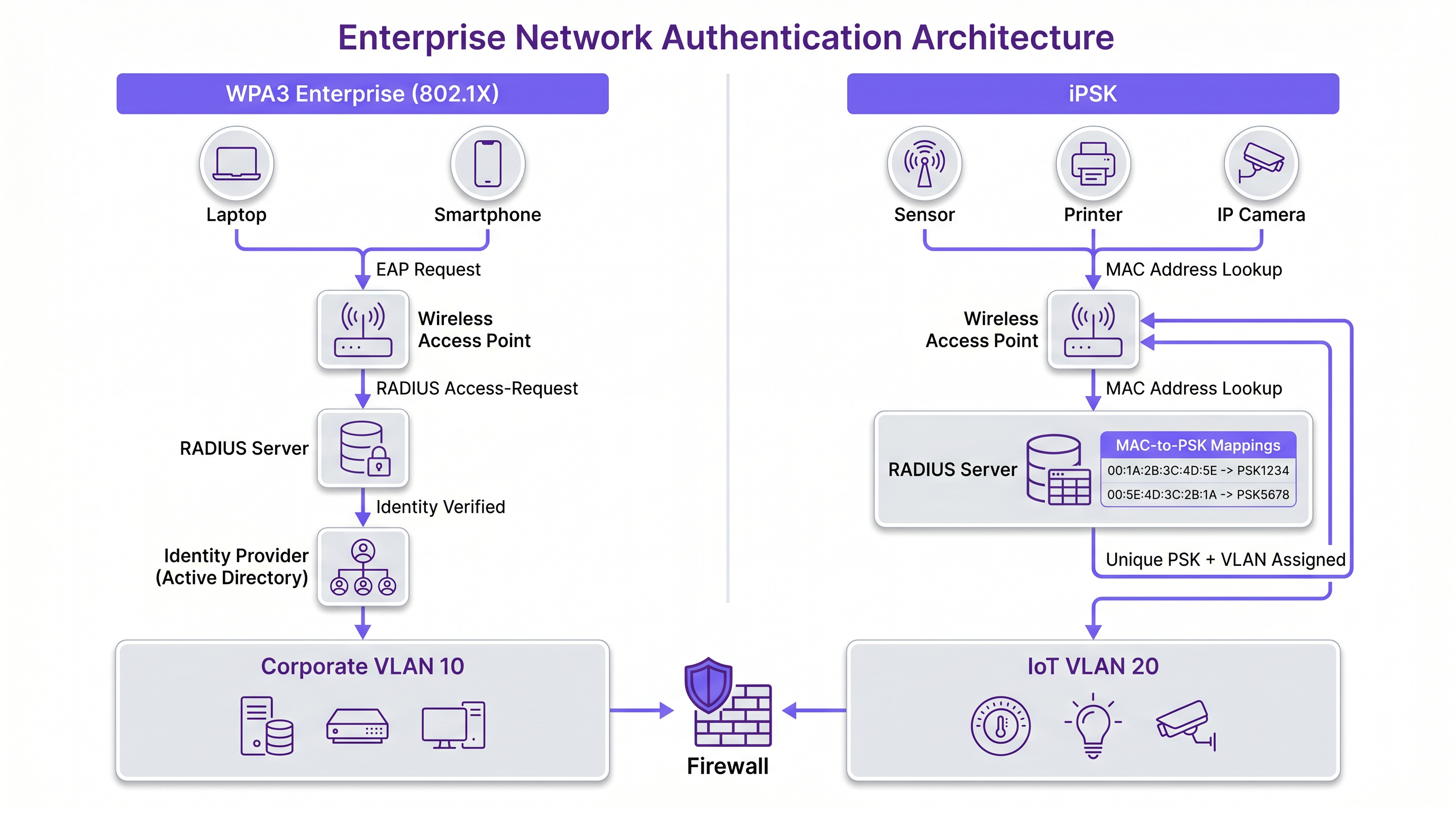
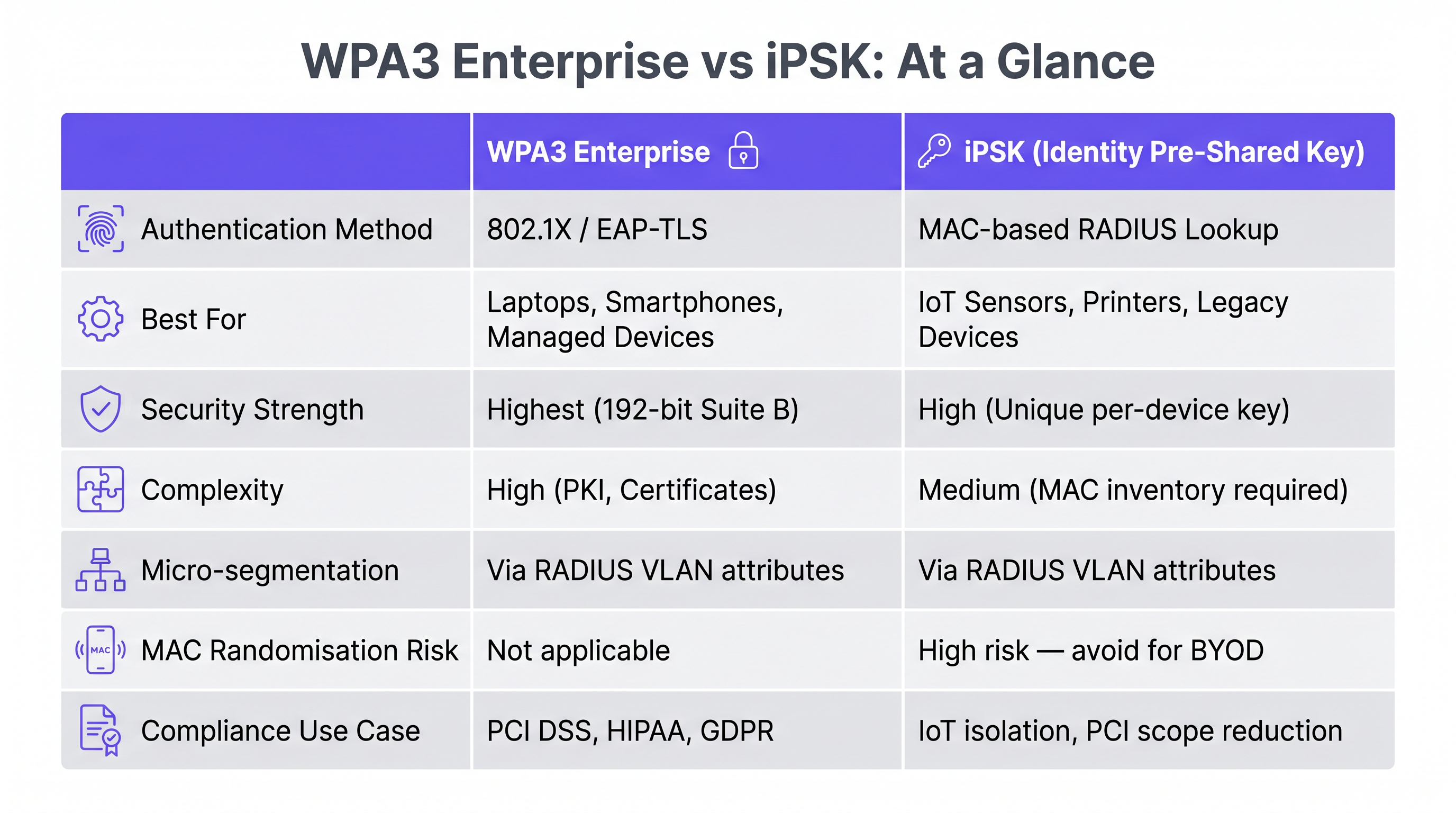
WPA3 Enterprise baut auf der Grundlage der 802.1X/EAP-Authentifizierung auf und ersetzt veraltete kryptografische Protokolle durch eine obligatorische 192-Bit-Security-Suite (oft als Suite B Kryptografie bezeichnet). Dieses Modell erfordert einen RADIUS-Server, um jeden Benutzer einzeln zu authentifizieren, in der Regel gegenüber einem Identity Provider (IdP) wie Active Directory oder Azure AD.
Der primäre technische Vorteil von WPA3 Enterprise ist sein robuster Schutz gegen Offline-Wörterbuchangriffe und die Durchsetzung von Protected Management Frames (PMF). PMF (802.11w) entschärft Deauthentifizierungs- und Disassoziierungsangriffe, die häufige Vektoren sind, um den Betrieb an Standorten zu stören oder Clients auf Rogue Access Points zu zwingen. Für Umgebungen, die mit sensiblen Daten umgehen, wie z. B. Einrichtungen im Gesundheitswesen oder Unternehmensbüros, bietet WPA3 Enterprise die von Auditoren geforderte Nichtabstreitbarkeit und individuelle Verantwortlichkeit.
Die Komplexität der 802.1X-Bereitstellung darf jedoch nicht unterschätzt werden. Sie erfordert ein sorgfältiges Zertifikatsmanagement – ein Thema, das in unserem Leitfaden zu OCSP und Zertifikatswiderruf für die WiFi-Authentifizierung ausführlich behandelt wird. Darüber hinaus kann der Authentifizierungs-Overhead die Roaming-Performance beeinträchtigen, wenn Fast BSS Transition (802.11r) nicht optimal konfiguriert ist.
Identity PSK (iPSK): Segmentierte Einfachheit
iPSK (je nach Anbieter auch als Multiple PSK, Dynamic PSK oder PPSK bekannt) verändert das traditionelle Paradigma des gemeinsamen Passworts grundlegend. Anstelle einer einzigen Passphrase für eine gesamte SSID ermöglicht iPSK dem RADIUS-Server, einzelnen Geräten oder Gerätegruppen basierend auf ihrer MAC-Adresse dynamisch einen eindeutigen Pre-Shared Key zuzuweisen.
Wenn sich ein Gerät verbindet, fragt der Access Point den RADIUS-Server unter Verwendung der MAC-Adresse des Geräts als Identität ab. Der Server antwortet mit dem spezifischen PSK für dieses Gerät und, was entscheidend ist, mit Standard-RADIUS-Attributen wie VLAN-Zuweisungen, QoS-Richtlinien und ACLs. Diese Architektur ermöglicht eine Mikrosegmentierung ohne den Overhead von 802.1X-Supplicants.
Für Einzelhandelsumgebungen , in denen Point-of-Sale-Terminals, Digital Signage und Barcodescanner eingesetzt werden, ist iPSK transformativ. Diese Headless-Geräte unterstützen selten 802.1X, und sie in einem offenen Netzwerk oder einem herkömmlichen monolithischen PSK-Netzwerk zu platzieren, stellt ein inakzeptables Risiko dar. iPSK stellt sicher, dass bei einer Kompromittierung eines Digital-Signage-Bildschirms dessen individueller Schlüssel widerrufen werden kann, ohne dass eine Passwortänderung für den gesamten Standort erforderlich ist.
Implementierungsleitfaden
Schritt 1: Geräte-Profiling und Kategorisierung
Bevor Sie ein Sicherheitsmodell auswählen, führen Sie ein umfassendes Audit aller im Netzwerk erwarteten Endpunkttypen durch. Kategorisieren Sie die Geräte in zwei Hauptgruppen:
- Supplicant-fähige Geräte: Firmen-Laptops, moderne Smartphones und Tablets. Diese sollten für WPA3 Enterprise vorgesehen werden.
- Headless-/Legacy-Geräte: IoT-Sensoren, Drucker, IP-Kameras und veraltete Scanner. Diese sind Kandidaten für iPSK.
Für fortgeschrittenes Profiling sollten Sie ein Device Posture Assessment für die Netzwerkzugriffskontrolle in Betracht ziehen, um sicherzustellen, dass die Geräte die Mindestsicherheitsanforderungen erfüllen, bevor sie zum Netzwerk zugelassen werden.
Schritt 2: Entwurf der SSID-Architektur
Eine Best-Practice-Bereitstellung umfasst oft eine Dual-SSID-Strategie, um Sicherheit und Kompatibilität auszubalancieren:
- Unternehmens-SSID (WPA3 Enterprise): Reserviert für Mitarbeitergeräte. Verwendet EAP-TLS für die zertifikatsbasierte Authentifizierung oder PEAP-MSCHAPv2, wo Zertifikate nicht realisierbar sind. Dies gewährleistet das höchste Maß an Verschlüsselung und Benutzerverantwortung.
- IoT/Geräte-SSID (WPA2/WPA3 iPSK): Reserviert für Headless-Geräte. Der RADIUS-Server weist VLANs basierend auf dem Gerätetyp zu (z. B. VLAN 10 für Drucker, VLAN 20 for HVAC-Sensoren), um sicherzustellen, dass Lateral Movement eingeschränkt wird, selbst wenn ein Gerät kompromittiert wird.
Schritt 3: RADIUS- und Richtlinienkonfiguration
Konfigurieren Sie Ihre RADIUS-Infrastruktur (z. B. Cisco ISE, Aruba ClearPass oder ein Cloud-native NAC), um beide Authentifizierungstypen zu verarbeiten. Stellen Sie bei iPSK sicher, dass die Policy Engine so konfiguriert ist, dass MAC-Adressen spezifischen Schlüsseln und VLAN-Attributen zugeordnet werden. Implementieren Sie ein striktes MAC-Adress-Profiling, um Spoofing-Versuche zu erkennen.
Best Practices
- Zertifikatsbasierte Authentifizierung erzwingen: Priorisieren Sie bei WPA3 Enterprise EAP-TLS gegenüber anmeldedatenbasierten EAP-Methoden. Zertifikate eliminieren das Risiko von Passwortdiebstahl und bieten eine nahtlose Zero-Touch-Authentifizierung für verwaltete Geräte.
- Mikrosegmentierung mit iPSK implementieren: Verwenden Sie iPSK nicht nur für eindeutige Passwörter; nutzen Sie die RADIUS-Attribute, um Geräte isolierten VLANs mit strengen ACLs zuzuweisen. Eine kompromittierte IoT-Kamera sollte niemals in der Lage sein, Datenverkehr an ein Point-of-Sale-Terminal zu leiten.
- Key-Lifecycle-Management automatisieren: Integrieren Sie bei iPSK den Prozess der Schlüsselgenerierung und des Widerrufs in Ihre IT-Service-Management-Plattform (ITSM). Schlüssel sollten automatisch rotiert oder widerrufen werden, wenn ein Gerät außer Betrieb genommen wird.
- Überwachung auf MAC-Spoofing: Da iPSK zur Identifizierung auf MAC-Adressen angewiesen ist, ist es anfällig für MAC-Spoofing. Implementieren Sie Endpunkt-Profiling und Verhaltensanalysen, um Anomalien zu erkennen, wie z. B. eine „IP-Kamera“, die versucht, auf die HR-Datenbank zuzugreifen.
Fehlerbehebung & Risikominimierung
Herausforderungen bei WPA3 Enterprise
- Zertifikatsablauf: Die häufigste Ursache für WPA3 Enterprise-Ausfälle sind abgelaufene RADIUS-Serverzertifikate oder Client-Zertifikate. Implementieren Sie eine robuste Überwachung und automatisierte Erneuerungsprozesse.
- Fehlkonfiguration des Supplicants: Clients können die Authentifizierung fehlschlagen lassen, wenn sie nicht so konfiguriert sind, dass sie das Zertifikat des RADIUS-Servers validieren, was zu potenziellen Man-in-the-Middle-Angriffen (MitM) führen kann. Erzwingen Sie die Supplicant-Konfiguration über MDM-Profile.
Herausforderungen bei iPSK
- MAC-Adress-Randomisierung: Moderne Smartphones verwenden randomisierte MAC-Adressen, um den Datenschutz zu verbessern. Dies unterbricht iPSK, das für die Richtlinienzuweisung auf statische MAC-Adressen angewiesen ist. iPSK sollte strikt für IoT- und firmeneigene Geräte mit statischen MACs reserviert bleiben.
- Administrativer Aufwand: Die manuelle Verwaltung von Tausenden von iPSK-Einträgen ist nicht tragbar. Stellen Sie sicher, dass Ihre NAC-Lösung API-gesteuerte Massenbereitstellung unterstützt und in Ihre Asset-Inventarsysteme integriert ist.
ROI & geschäftliche Auswirkungen
Die Implementierung des richtigen Sicherheitsmodells wirkt sich direkt auf das Ergebnis aus, indem betriebliche Reibungsverluste reduziert und Kosten im Zusammenhang mit Sicherheitsverletzungen minimiert werden.
- Reduzierte Helpdesk-Tickets: Der Verzicht auf komplexes 802.1X für inkompatible Geräte reduziert das Helpdesk-Aufkommen im Zusammenhang mit Konnektivitätsproblemen drastisch. iPSK bietet ein „Plug-and-Play“-Erlebnis für IoT-Bereitstellungen.
- Beschleunigte IoT-Rollouts: Standorte, die Wayfinding -Beacons oder Umgebungssensoren einsetzen, können Geräte mithilfe automatisierter iPSK-Workflows schnell bereitstellen und so die Wertschöpfung für neue Technologieinitiativen beschleunigen.
- Compliance und Risikoreduzierung: WPA3 Enterprise bietet die für die PCI DSS-Compliance erforderlichen Audit-Trails, während die iPSK-Segmentierung potenzielle Sicherheitsverletzungen eindämmt, den Schadensradius begrenzt und den Ruf der Marke schützt.
Wie in unserer umfassenderen Analyse über Die wichtigsten SD WAN-Vorteile für moderne Unternehmen erörtert, ist die Absicherung des Edge eine grundlegende Anforderung für moderne Netzwerkarchitekturen. Durch die durchdachte Anwendung von WPA3 Enterprise und iPSK können IT-Verantwortliche belastbare, konforme Netzwerke aufbauen, die den vielfältigen Anforderungen moderner Standorte gerecht werden.
Schlüsselbegriffe & Definitionen
WPA3 Enterprise
The highest tier of Wi-Fi security, requiring individual user authentication via an 802.1X RADIUS server and enforcing 192-bit cryptographic strength.
Mandatory for securing corporate data and achieving compliance in enterprise environments.
iPSK (Identity Pre-Shared Key)
A security model where a RADIUS server dynamically assigns a unique passphrase to a device based on its MAC address, along with network policies like VLANs.
The standard solution for securing IoT and legacy devices that cannot support 802.1X supplicants.
802.1X
An IEEE standard for port-based network access control, providing an authentication mechanism to devices wishing to attach to a LAN or WLAN.
The underlying framework that powers WPA3 Enterprise authentication.
Supplicant
The software client on an endpoint device (like a laptop or smartphone) that communicates with the RADIUS server to negotiate 802.1X authentication.
IoT devices typically lack supplicants, necessitating the use of iPSK.
RADIUS
Remote Authentication Dial-In User Service; a networking protocol that provides centralized Authentication, Authorization, and Accounting (AAA) management.
The central server that processes authentication requests for both WPA3 Enterprise and iPSK.
Micro-segmentation
The security practice of dividing a network into isolated segments to reduce the attack surface and prevent lateral movement.
Achieved in wireless networks by using iPSK to dynamically assign different IoT devices to isolated VLANs.
EAP-TLS
Extensible Authentication Protocol-Transport Layer Security; an 802.1X method that uses digital certificates for both client and server authentication.
The most secure implementation of WPA3 Enterprise, eliminating the reliance on vulnerable passwords.
Protected Management Frames (PMF)
An IEEE standard (802.11w) that encrypts wireless management frames, preventing attackers from forging deauthentication packets.
Mandatory in WPA3, PMF protects venue networks from disruption and rogue AP attacks.
Fallstudien
A 500-room luxury hotel is upgrading its infrastructure. They need to secure staff corporate laptops, thousands of in-room smart TVs, and staff handheld point-of-sale (POS) terminals. How should they architect the wireless security model?
The optimal approach is a dual-SSID strategy.
- Staff SSID (WPA3 Enterprise): Deployed for corporate laptops and managed staff smartphones. Configured with EAP-TLS using certificates pushed via the hotel's MDM. This ensures robust encryption for sensitive back-office communications.
- Operations SSID (iPSK): Deployed for the smart TVs and POS terminals. The NAC is configured to assign unique PSKs based on MAC addresses. Crucially, the RADIUS server assigns the TVs to an isolated 'Guest Entertainment VLAN' with internet-only access, while the POS terminals are assigned to a strictly controlled 'PCI VLAN' that only routes to the payment gateway.
A large retail chain is deploying new wireless barcode scanners across 50 locations. The scanners support WPA2-PSK but not 802.1X. The CISO mandates that a compromised scanner must not require a global password change across all stores.
The chain must implement iPSK for the barcode scanners.
- The IT team generates a unique PSK for each scanner's MAC address and provisions this via their NAC platform's API.
- The scanners connect to a hidden 'Retail-Ops' SSID.
- If a scanner is lost or stolen, the IT team simply revokes that specific MAC/PSK pairing in the NAC. The device is immediately denied network access, while the thousands of other scanners remain connected and operational.
Szenarioanalyse
Q1. A stadium IT director wants to deploy 500 wireless environmental sensors to monitor temperature and humidity across the concourse. The sensors only support basic WPA2-Personal (PSK). How should they secure these devices while preventing lateral movement if a sensor is physically tampered with?
💡 Hinweis:Consider how to provide unique credentials to devices that don't support 802.1X while enforcing network isolation.
Empfohlenen Ansatz anzeigen
The director should deploy iPSK. Each sensor's MAC address is registered in the NAC, generating a unique PSK. Crucially, the RADIUS server must be configured to assign these MAC addresses to a dedicated, highly restricted 'IoT-Sensor VLAN'. This VLAN should have strict ACLs applied, allowing outbound traffic only to the specific cloud monitoring dashboard, completely blocking lateral movement to the stadium's corporate or POS networks.
Q2. A corporate office is migrating from WPA2 Enterprise (PEAP-MSCHAPv2) to WPA3 Enterprise. During testing, several older laptops fail to connect to the new WPA3 SSID, while modern smartphones connect without issue. What is the most likely cause?
💡 Hinweis:WPA3 mandates certain security features that were optional in WPA2.
Empfohlenen Ansatz anzeigen
The most likely cause is a lack of support for Protected Management Frames (PMF/802.11w) on the older laptops' wireless network interface cards (NICs) or drivers. WPA3 makes PMF mandatory. If the client driver cannot negotiate PMF, the association will fail. The IT team must update the wireless drivers on the legacy laptops or, if the hardware is incompatible, replace the NICs/devices.
Q3. A hospital IT team is designing a new wireless network. They need to support medical staff tablets (which handle patient data) and legacy wireless infusion pumps. What is the recommended SSID and security design?
💡 Hinweis:Different device capabilities require different authentication methods.
Empfohlenen Ansatz anzeigen
A dual-SSID design is required. The staff tablets, which handle sensitive Protected Health Information (PHI), should connect to a 'Clinical-Secure' SSID using WPA3 Enterprise (ideally EAP-TLS with certificates) to ensure maximum encryption and compliance. The legacy infusion pumps, which likely lack 802.1X supplicants, should connect to a separate 'Medical-Device' SSID using iPSK, with RADIUS dynamically assigning them to an isolated VLAN restricted to communicating only with the medical device management server.
Wichtigste Erkenntnisse
- ✓WPA3 Enterprise is the gold standard for human-operated devices, offering 192-bit encryption and robust 802.1X authentication.
- ✓iPSK provides a scalable, secure solution for headless IoT devices that cannot support complex 802.1X supplicants.
- ✓iPSK allows dynamic assignment of unique passwords and VLANs based on device MAC addresses, enabling critical micro-segmentation.
- ✓A dual-SSID strategy (one for WPA3 Enterprise, one for iPSK) is the best practice for modern venues to balance security and compatibility.
- ✓WPA3 mandates Protected Management Frames (PMF), which prevents disruptive deauthentication attacks but may require client driver updates.
- ✓Never use iPSK for BYOD or guest networks, as modern MAC address randomisation breaks the MAC-to-policy mapping.
- ✓Automated key lifecycle management is essential for iPSK deployments to avoid unsustainable administrative overhead.




