

गेस्ट WiFi कैसे काम करता है? एक सरल व्याख्या
एंटरप्राइज़ गेस्ट WiFi आर्किटेक्चर पर एक निश्चित, सरल तकनीकी संदर्भ। यह गाइड नेटवर्क आइसोलेशन, Captive Portal प्रमाणीकरण और सेशन प्रबंधन की कार्यप्रणाली को स्पष्ट करती है, जो IT लीडर्स को सुरक्षित, अनुपालक और डेटा-समृद्ध डिप्लॉयमेंट के लिए कार्रवाई योग्य रणनीतियाँ प्रदान करती है।
🎧 Listen to this Guide
View Transcript
कार्यकारी सारांश
एंटरप्राइज़ स्थानों के लिए—उच्च-घनत्व वाले स्टेडियमों से लेकर विशाल रिटेल फ़्लोर तक—गेस्ट WiFi अब केवल एक सुविधा नहीं है; यह व्यावसायिक बुनियादी ढांचे की एक महत्वपूर्ण परत है। हालांकि, खुले सार्वजनिक एक्सेस और सुरक्षित कॉर्पोरेट नेटवर्किंग के बीच के अंतर को पाटने के लिए सख्त आर्किटेक्चरल अनुशासन की आवश्यकता होती है। यह गाइड एंटरप्राइज़ गेस्ट WiFi की कार्यप्रणाली का विश्लेषण करती है, मार्केटिंग की शब्दावली को हटाकर यह समझाती है कि यह पैकेट स्तर पर कैसे काम करता है। हम मुख्य तकनीकी घटकों को कवर करते हैं: VLAN आइसोलेशन, Captive Portal के लिए DHCP और DNS मैनिपुलेशन, RADIUS प्रमाणीकरण, और बैंडविड्थ शेपिंग।
चाहे आप किसी हॉस्पिटैलिटी चेन के लिए एक नया नेटवर्क डिप्लॉय कर रहे हों या हेल्थकेयर में पुरानी इन्फ्रास्ट्रक्चर को अपग्रेड कर रहे हों, इन कार्यप्रणालियों को समझना जोखिम को कम करने, PCI DSS और GDPR अनुपालन सुनिश्चित करने और WiFi Analytics के माध्यम से कार्रवाई योग्य फर्स्ट-पार्टी डेटा कैप्चर करने के लिए आवश्यक है।
तकनीकी गहन विश्लेषण: गेस्ट WiFi वास्तव में कैसे काम करता है
मौलिक स्तर पर, एक एंटरप्राइज़ गेस्ट WiFi नेटवर्क क्लाइंट डिवाइस को इतना धोखा देकर काम करता है कि उसके ट्रैफ़िक को इंटरसेप्ट कर सके, प्रमाणीकरण को मजबूर कर सके, और फिर कॉर्पोरेट LAN को छुए बिना इसे सुरक्षित रूप से इंटरनेट पर रूट कर सके।
1. VLANs के माध्यम से लॉजिकल आइसोलेशन
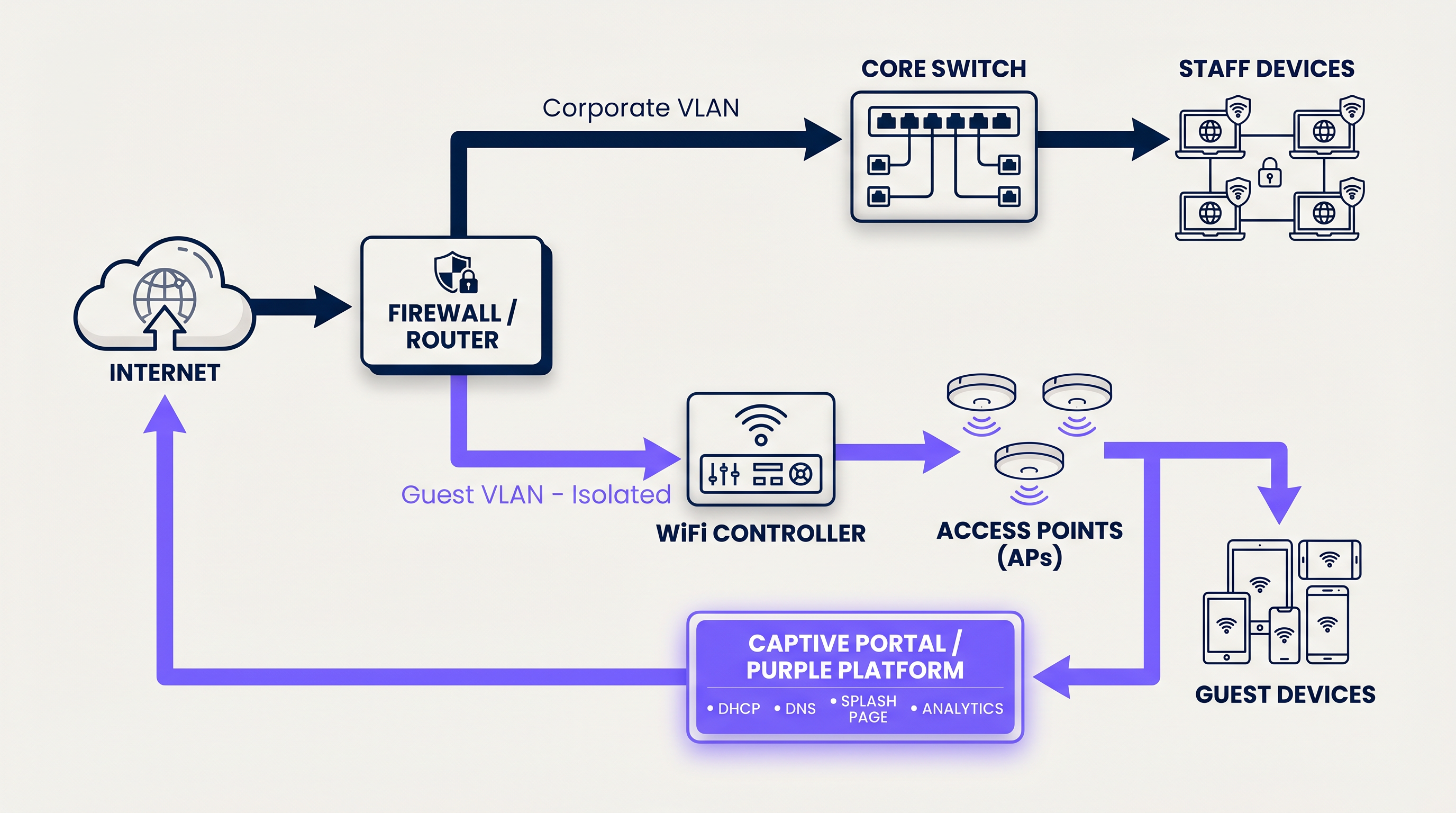
किसी भी सुरक्षित गेस्ट नेटवर्क की नींव लॉजिकल पृथक्करण है। जब कोई उपयोगकर्ता गेस्ट SSID से कनेक्ट होता है, तो एक्सेस पॉइंट उनके ट्रैफ़िक को एक विशिष्ट वर्चुअल लोकल एरिया नेटवर्क (VLAN) ID (जैसे, VLAN 20) के साथ टैग करता है, जबकि कॉर्पोरेट ट्रैफ़िक एक अलग VLAN (जैसे, VLAN 10) पर संचालित होता है।
यह टैगिंग सुनिश्चित करती है कि स्विच और फ़ायरवॉल स्तर पर, गेस्ट ट्रैफ़िक भौतिक रूप से पॉइंट-ऑफ़-सेल सिस्टम या रोगी रिकॉर्ड वाले आंतरिक सबनेट पर रूट करने में असमर्थ है। फ़ायरवॉल को इंटर-VLAN रूटिंग के लिए स्पष्ट अस्वीकृति नियमों के साथ कॉन्फ़िगर किया गया है, जो गेस्ट ट्रैफ़िक को सीधे WAN इंटरफ़ेस से बाहर निकलने के लिए मजबूर करता है।
2. DHCP और IP एड्रेस पूल
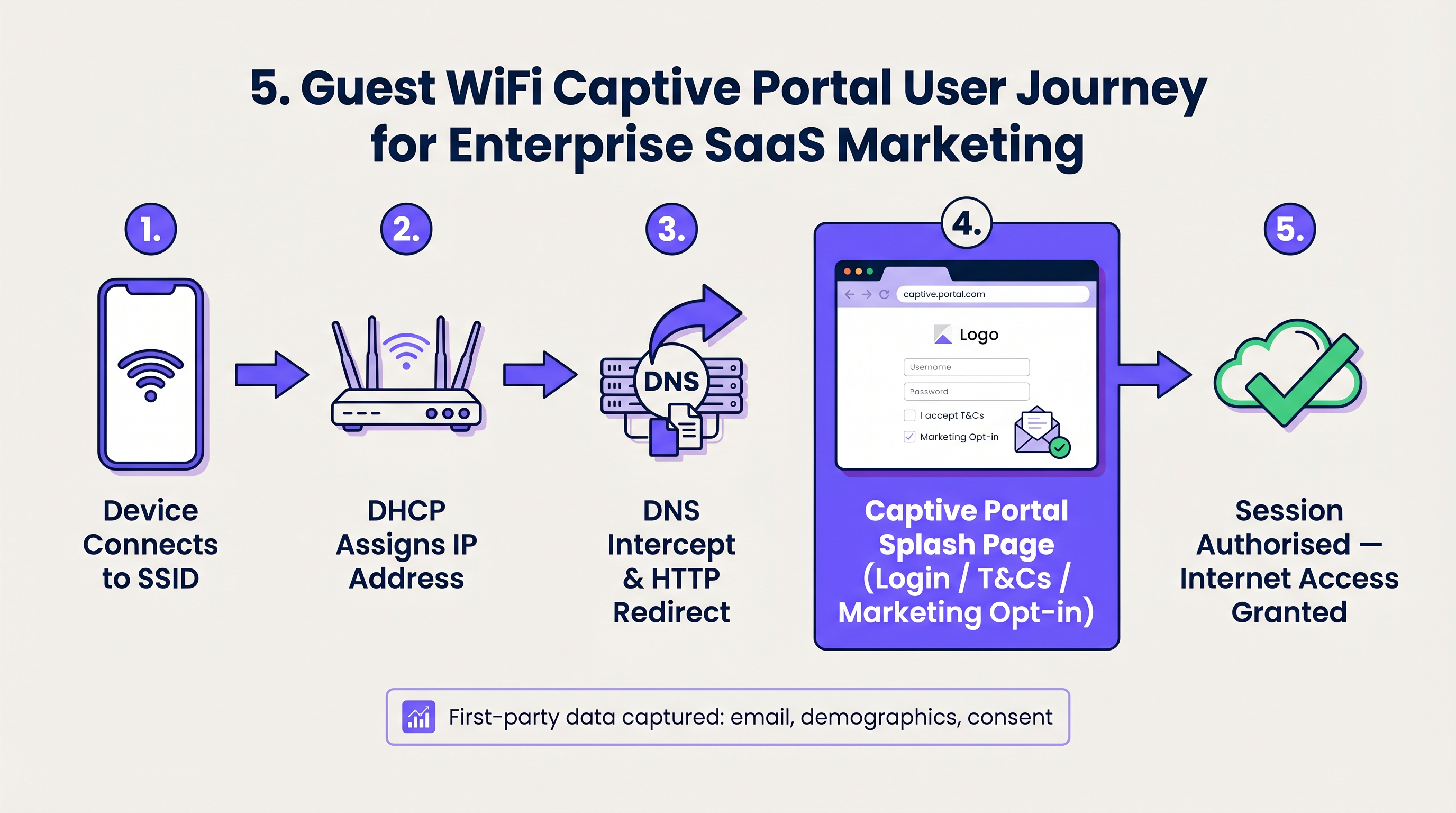
कनेक्शन पर, क्लाइंट डिवाइस एक DHCP डिस्कवर पैकेट प्रसारित करता है। नेटवर्क एक समर्पित गेस्ट सबनेट से एक IP एड्रेस असाइन करके प्रतिक्रिया करता है। यहां एक महत्वपूर्ण तकनीकी अंतर लीज़ टाइम है। जबकि कॉर्पोरेट डिवाइस 8 दिनों के लिए एक IP बनाए रख सकते हैं, गेस्ट नेटवर्क को उच्च-टर्नओवर वाले वातावरण जैसे परिवहन हब में IP पूल की कमी को रोकने के लिए आक्रामक लीज़ टाइम (जैसे, 30 से 60 मिनट) का उपयोग करना चाहिए।
3. DNS इंटरसेप्शन और Captive Portal
यहीं से उपयोगकर्ता अनुभव शुरू होता है। जब नया कनेक्टेड डिवाइस किसी वेबसाइट तक पहुंचने का प्रयास करता है (या जब OS अपनी Captive Portal डिटेक्शन जांच करता है, जैसे Apple का captive.apple.com), तो नेटवर्क DNS अनुरोध को इंटरसेप्ट करता है।
अनुरोधित साइट के वास्तविक IP एड्रेस को हल करने के बजाय, गेटवे Captive Portal के IP एड्रेस के साथ प्रतिक्रिया करता है। क्लाइंट का ब्राउज़र तब गेस्ट WiFi प्लेटफ़ॉर्म द्वारा होस्ट किए गए स्प्लैश पेज पर HTTP-रीडायरेक्ट किया जाता है।
4. प्रमाणीकरण और RADIUS
एक बार जब उपयोगकर्ता Captive Portal के साथ इंटरैक्ट करता है—चाहे नियम और शर्तें स्वीकार करके, ईमेल दर्ज करके, या सोशल लॉगिन का उपयोग करके—तो प्लेटफ़ॉर्म को स्थानीय नेटवर्क कंट्रोलर को ट्रैफ़िक की अनुमति देने के लिए सूचित करना होगा।
यह RADIUS (रिमोट ऑथेंटिकेशन डायल-इन यूजर सर्विस) प्रोटोकॉल के माध्यम से नियंत्रित किया जाता है। Purple प्लेटफ़ॉर्म RADIUS सर्वर के रूप में कार्य करता है, स्थानीय WiFi कंट्रोलर या गेटवे को एक Access-Accept संदेश वापस भेजता है। कंट्रोलर तब उपयोगकर्ता की स्थिति को 'अनधिकृत' (केवल वॉल गार्डन एक्सेस) से 'अधिकृत' में बदल देता है, मानक इंटरनेट एक्सेस के लिए फ़ायरवॉल पोर्ट खोलता है।
5. सेशन प्रबंधन और बैंडविड्थ शेपिंग
किसी एक उपयोगकर्ता को WAN लिंक को संतृप्त करने से रोकने के लिए, नेटवर्क बैंडविड्थ शेपिंग नीतियों को लागू करता है। ये नीतियां प्रति-डिवाइस आधार पर थ्रूपुट को सीमित करती हैं (जैसे, 5 Mbps डाउन / 2 Mbps अप)। इसके अलावा, निष्क्रिय उपयोगकर्ताओं को स्वचालित रूप से डिस्कनेक्ट करने के लिए सेशन टाइमआउट लागू किए जाते हैं, जिससे नेटवर्क संसाधनों और IP एड्रेस का कुशलतापूर्वक पुनर्चक्रण सुनिश्चित होता है।
कार्यान्वयन गाइड: स्केल के लिए निर्माण
गेस्ट WiFi डिप्लॉय करने के लिए उपयोगकर्ता के घर्षण को सुरक्षा और डेटा कैप्चर आवश्यकताओं के साथ संतुलित करना आवश्यक है।
चरण 1: नेटवर्क टोपोलॉजी का आर्किटेक्चर करें
सुनिश्चित करें कि आपके कोर स्विच और फ़ायरवॉल 802.1Q VLAN टैगिंग का समर्थन करते हैं। अपने गेस्ट VLAN को फ़ायरवॉल पर DMZ इंटरफ़ेस पर समाप्त करने के लिए कॉन्फ़िगर करें, आंतरिक रूटिंग तालिकाओं को पूरी तरह से बायपास करते हुए।
चरण 2: वॉल गार्डन कॉन्फ़िगर करें
एक 'वॉल गार्डन' IP एड्रेस और डोमेन की एक सूची है जिसे अप्रमाणित उपयोगकर्ताओं को एक्सेस करने की अनुमति है। इसमें Captive Portal को लोड करने के लिए आवश्यक URL, लोगो के लिए CDN एसेट, और सोशल लॉगिन (जैसे, Facebook, Google) के लिए प्रमाणीकरण एंडपॉइंट शामिल होने चाहिए। यदि वॉल गार्डन गलत तरीके से कॉन्फ़िगर किया गया है, तो स्प्लैश पेज लोड होने में विफल रहेगा, जिसके परिणामस्वरूप उपयोगकर्ता के लिए एक गतिरोध उत्पन्न होगा।
चरण 3: क्लाइंट आइसोलेशन लागू करें
अपने एक्सेस पॉइंट पर 'क्लाइंट आइसोलेशन' (या AP आइसोलेशन) सक्षम करें। यह कनेक्टेड गेस्ट डिवाइस को वायरलेस माध्यम पर एक-दूसरे के साथ सीधे संचार करने से रोकता है, जिससे गेस्ट सबनेट के भीतर पीयर-टू-पीयर हमलों और मैलवेयर के प्रसार को प्रभावी ढंग से कम किया जा सकता है।
चरण 4: पहचान प्रबंधन को एकीकृत करें
साझा PSKs (प्री-शेयर्ड कीज़) से दूर हटें। एक प्रबंधित Captive Portal लागू करें जो फर्स्ट-पार्टी डेटा कैप्चर करता है। निर्बाध, सुरक्षित ऑनबोर्डिंग के लिए, iOpenRoaming को लागू करना। कनेक्ट लाइसेंस के तहत Purple OpenRoaming के लिए एक मुफ्त पहचान प्रदाता के रूप में कार्य करता है, जो उपकरणों को पारंपरिक स्प्लैश पेज के बिना प्रमाणपत्रों के माध्यम से सुरक्षित रूप से प्रमाणित करने की अनुमति देता है।
सर्वोत्तम अभ्यास और उद्योग मानक
- सुविधा से अधिक अनुपालन: हमेशा उपयोग की शर्तों की नीति की स्वीकृति अनिवार्य करें। यह अवैध ऑनलाइन गतिविधि के लिए दायित्व को स्थल संचालक से दूर करता है। सुनिश्चित करें कि डेटा कैप्चर स्थानीय गोपनीयता नियमों (GDPR, CCPA) का अनुपालन करता है।
- DHCP पूल को अनुकूलित करें: अपने अपेक्षित अधिकतम समवर्ती उपयोगकर्ताओं की गणना करें और तदनुसार अपने सबनेट का आकार निर्धारित करें (उदाहरण के लिए, एक /22 सबनेट 1,022 उपयोग योग्य IP प्रदान करता है)। इसे कम लीज समय के साथ जोड़ें।
- QoS प्राथमिकता: गेस्ट ब्राउज़िंग पर महत्वपूर्ण कॉर्पोरेट ट्रैफ़िक (VoIP, POS) को प्राथमिकता देने के लिए गेटवे पर क्वालिटी ऑफ़ सर्विस (QoS) नियम लागू करें, यह सुनिश्चित करते हुए कि आधुनिक व्यवसायों के लिए मुख्य SD WAN लाभ गेस्ट ट्रैफ़िक स्पाइक्स से प्रभावित न हों।
समस्या निवारण और जोखिम न्यूनीकरण
जब गेस्ट नेटवर्क विफल होते हैं, तो यह आमतौर पर तीन सामान्य विफलता मोड के कारण होता है:
- कैप्टिव पोर्टल पॉप अप नहीं होता है: यह लगभग हमेशा एक DNS समस्या या गलत कॉन्फ़िगर किया गया 'वॉल्ड गार्डन' होता है। यदि क्लाइंट डिवाइस पोर्टल URL को हल नहीं कर सकता है या उसके आवश्यक एसेट तक पहुंच नहीं बना सकता है, तो OS कैप्टिव पोर्टल मिनी-ब्राउज़र को ट्रिगर नहीं करेगा।
- IP समाप्त होना: उपयोगकर्ता SSID से कनेक्ट हो सकते हैं लेकिन उन्हें एक स्व-असाइन किया गया IP (169.254.x.x) प्राप्त होता है और इंटरनेट नहीं मिलता है। समाधान: DHCP स्कोप का विस्तार करें या लीज समय कम करें।
- धीमी गति: यह प्रति-उपयोगकर्ता बैंडविड्थ शेपिंग की कमी या उच्च चैनल उपयोग (RF हस्तक्षेप) के कारण होता है। सह-चैनल हस्तक्षेप को कम करने के लिए AP ट्रांसमिट पावर को सही ढंग से ट्यून किया गया है, यह सुनिश्चित करें।
ROI और व्यावसायिक प्रभाव
एक मजबूत गेस्ट नेटवर्क बनाने का प्रयास क्यों करें? क्योंकि एक प्रबंधित गेस्ट WiFi समाधान एक डूबी हुई बुनियादी ढांचा लागत को राजस्व-उत्पादक संपत्ति में बदल देता है।
एक ब्रांडेड कैप्टिव पोर्टल के पीछे पहुंच को नियंत्रित करके, रिटेल और हॉस्पिटैलिटी में स्थल सत्यापित फर्स्ट-पार्टी डेटा—ईमेल, जनसांख्यिकी और विज़िट आवृत्ति—कैप्चर करते हैं। यह डेटा सीधे CRM सिस्टम में जाता है, जिससे लक्षित मार्केटिंग अभियान, स्वचालित समीक्षा अनुरोध और व्यक्तिगत ग्राहक जुड़ाव संभव होता है। जब आप समझते हैं कि गेस्ट WiFi नेटवर्क और आपके मुख्य नेटवर्क के बीच क्या अंतर है? , तो आपको एहसास होता है कि गेस्ट नेटवर्क भौतिक आगंतुकों के लिए आपका प्राथमिक डिजिटल टचपॉइंट है।
Key Terms & Definitions
VLAN (Virtual Local Area Network)
A logical grouping of network devices that behave as if they are on their own independent network, even if they share the same physical infrastructure.
Used to separate guest traffic from sensitive corporate traffic.
Captive Portal
A web page that a user of a public access network is obliged to view and interact with before access is granted.
The primary interface for capturing user data and enforcing Terms of Use.
Walled Garden
A restricted environment that allows unauthenticated users access to specific, pre-approved websites or IP addresses.
Essential for allowing the captive portal and its associated assets (logos, social login APIs) to load before the user has full internet access.
RADIUS
Remote Authentication Dial-In User Service. A networking protocol that provides centralized Authentication, Authorization, and Accounting management.
The protocol used by the Purple platform to tell the local WiFi hardware that a user has successfully logged in and should be granted access.
Client Isolation
A wireless network security feature that prevents connected devices from communicating directly with one another.
Crucial for public networks to prevent guests from hacking or spreading malware to other guests.
DHCP Lease Time
The amount of time a network device is allowed to keep an assigned IP address before it must request a renewal.
Must be tuned aggressively on guest networks to prevent IP pool exhaustion.
SSID
Service Set Identifier. The technical term for a WiFi network's name.
What the user sees and selects on their device to initiate the connection.
OpenRoaming
A wireless industry standard that allows users to automatically and securely connect to guest WiFi networks without needing a captive portal or passwords.
Provides a seamless, cellular-like experience for guests while maintaining enterprise-grade security via certificate-based authentication.
Case Studies
A 200-room hotel is experiencing complaints that guests cannot connect to the WiFi in the lobby during peak check-in hours. Devices show 'Connected without internet' and have 169.254.x.x IP addresses.
This is a classic case of DHCP pool exhaustion. The hotel was likely using a standard /24 subnet (254 usable IPs) with a default 24-hour lease time. During peak hours, the lobby sees high foot traffic. Even if a guest only stays in the lobby for 10 minutes, their device holds that IP address for 24 hours. The solution is two-fold: 1) Expand the DHCP scope to a /22 (1,022 IPs) for the guest VLAN. 2) Reduce the DHCP lease time from 24 hours to 60 minutes.
A large retail chain wants to offer free WiFi to capture customer emails, but their IT security team is blocking the project, fearing that guest devices could introduce ransomware to the corporate network.
Implement strict logical isolation. Configure the wireless access points to broadcast a dedicated Guest SSID. Tag all traffic from this SSID with a unique VLAN ID (e.g., VLAN 50). Configure the core switch to trunk this VLAN directly to the perimeter firewall. On the firewall, create a rule that explicitly denies any routing between VLAN 50 and the corporate VLANs. Finally, enable 'Client Isolation' on the access points to prevent guest devices from communicating with each other.
Scenario Analysis
Q1. You are deploying guest WiFi in a high-density sports stadium. Management wants to offer a 'VIP' WiFi tier that requires a paid upgrade, alongside a free, slower tier. How do you architect this at the network level?
💡 Hint:Consider how RADIUS attributes can dynamically assign policies.
Show Recommended Approach
Configure a single Guest SSID. When the user connects, they are presented with a captive portal offering the free or paid tiers. Upon selection and authentication, the Purple platform (acting as the RADIUS server) sends an Access-Accept message to the controller. Crucially, this message includes specific RADIUS attributes (like Vendor-Specific Attributes or standard bandwidth limits) that dynamically apply the correct bandwidth shaping policy to that specific MAC address—e.g., 2Mbps for free users, 20Mbps for VIP users.
Q2. A client complains that their guest WiFi splash page takes over 30 seconds to load, leading to high abandonment rates. The internet connection itself is a 1Gbps fiber line. What is the most likely architectural cause?
💡 Hint:Think about what must happen before the splash page can be displayed to an unauthenticated user.
Show Recommended Approach
The most likely cause is an overly restrictive or misconfigured Walled Garden. If the splash page relies on external assets (like heavy images hosted on an external CDN, or scripts from a third-party service) that are not whitelisted in the walled garden, the client device will attempt to load them, time out, and eventually render a broken or delayed page. The solution is to use browser developer tools to identify the blocked domains and add them to the walled garden whitelist on the gateway.
Q3. A hospital IT director wants to implement guest WiFi but insists on using a single, shared WPA2 password (PSK) printed on a sign at reception, arguing that captive portals are 'too much friction'. How do you counter this from a security and compliance perspective?
💡 Hint:Focus on accountability and liability.
Show Recommended Approach
A shared PSK provides encryption over the air, but zero accountability. If a guest uses the network to download illegal content or launch an attack, the traffic originates from the hospital's public IP address, making the hospital liable. A captive portal mitigates this risk by forcing the user to accept a Terms of Use policy, legally shifting liability to the individual user. Furthermore, a captive portal allows the hospital to capture identity data (for contact tracing or feedback) and easily revoke access for malicious actors by blacklisting their MAC address, which is impossible with a shared PSK.




