

How Does Guest WiFi Work? A Plain-English Explainer
A definitive, plain-English technical reference on enterprise guest WiFi architecture. This guide unpacks the mechanics of network isolation, captive portal authentication, and session management, providing IT leaders with actionable strategies for secure, compliant, and data-rich deployments.
🎧 Listen to this Guide
View Transcript
Executive Summary
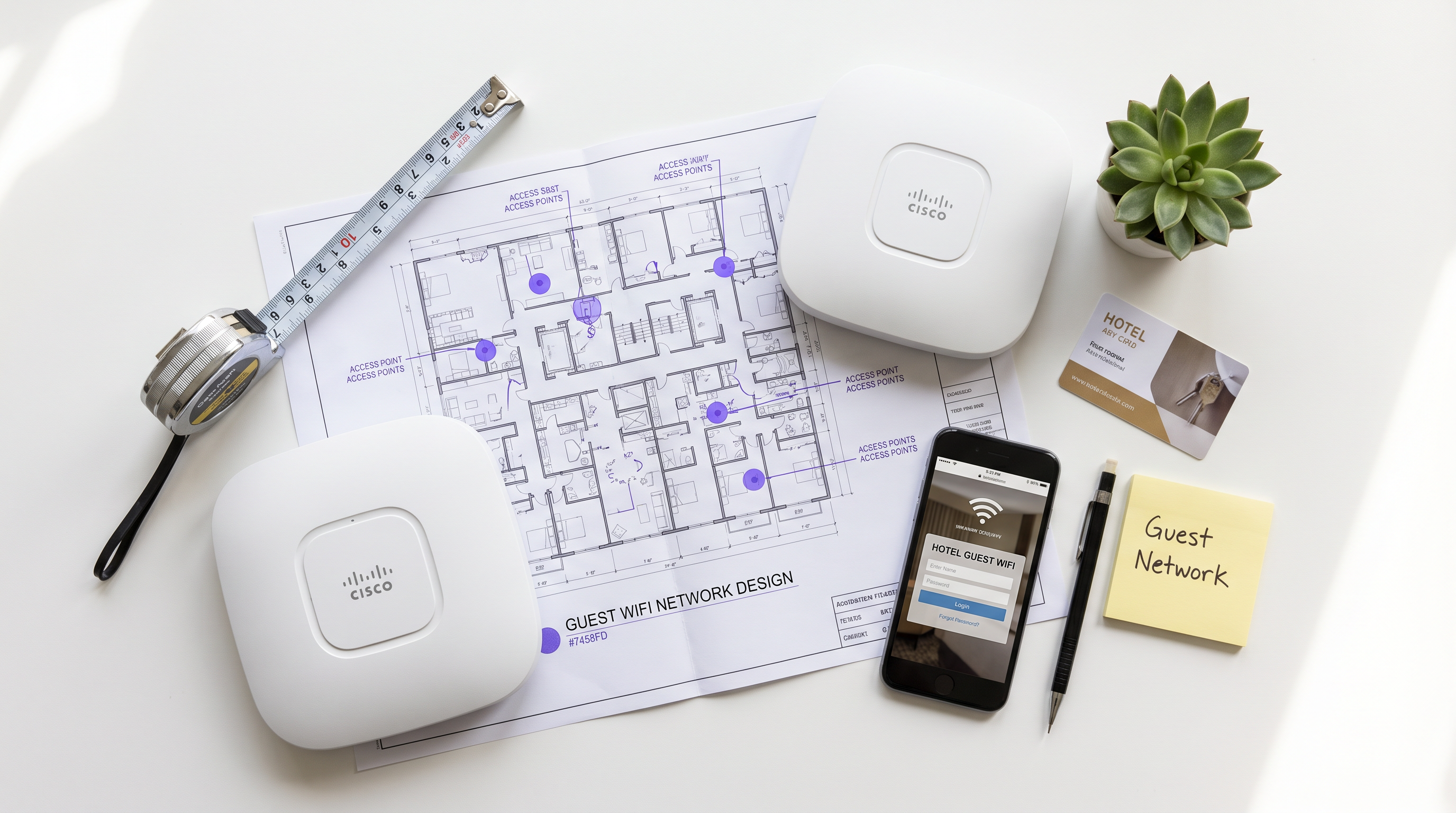
For enterprise venues—from high-density stadiums to sprawling retail floors—guest WiFi is no longer a simple convenience; it is a critical layer of business infrastructure. However, bridging the gap between open public access and secure corporate networking requires strict architectural discipline. This guide dissects the mechanics of enterprise guest WiFi, stripping away the marketing jargon to explain exactly how it works at the packet level. We cover the core technical components: VLAN isolation, DHCP and DNS manipulation for captive portals, RADIUS authentication, and bandwidth shaping.
Whether you are deploying a new network for a Hospitality chain or upgrading legacy infrastructure in Healthcare , understanding these mechanics is essential for mitigating risk, ensuring PCI DSS and GDPR compliance, and capturing actionable first-party data via WiFi Analytics .
Technical Deep-Dive: How Guest WiFi Actually Works
At a fundamental level, an enterprise guest WiFi network operates by deceiving the client device just enough to intercept its traffic, force authentication, and then route it securely to the internet without ever touching the corporate LAN.
1. Logical Isolation via VLANs
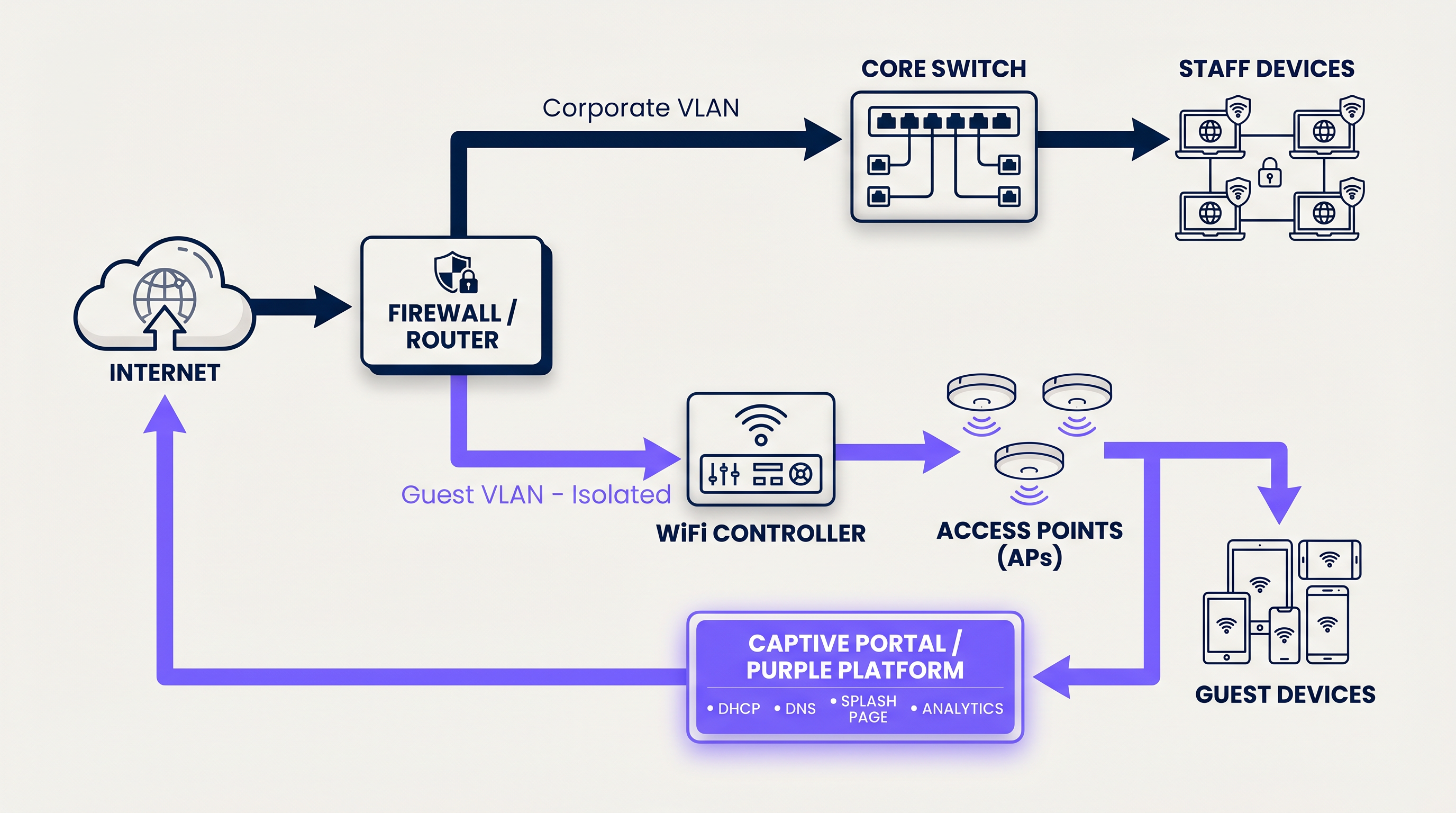
The foundation of any secure guest network is logical separation. When a user connects to the guest SSID, the access point tags their traffic with a specific Virtual Local Area Network (VLAN) ID (e.g., VLAN 20), while corporate traffic operates on a separate VLAN (e.g., VLAN 10).
This tagging ensures that at the switch and firewall level, guest traffic is physically incapable of routing to internal subnets containing point-of-sale systems or patient records. The firewall is configured with explicit deny rules for inter-VLAN routing, forcing guest traffic directly out the WAN interface.
2. DHCP and the IP Address Pool
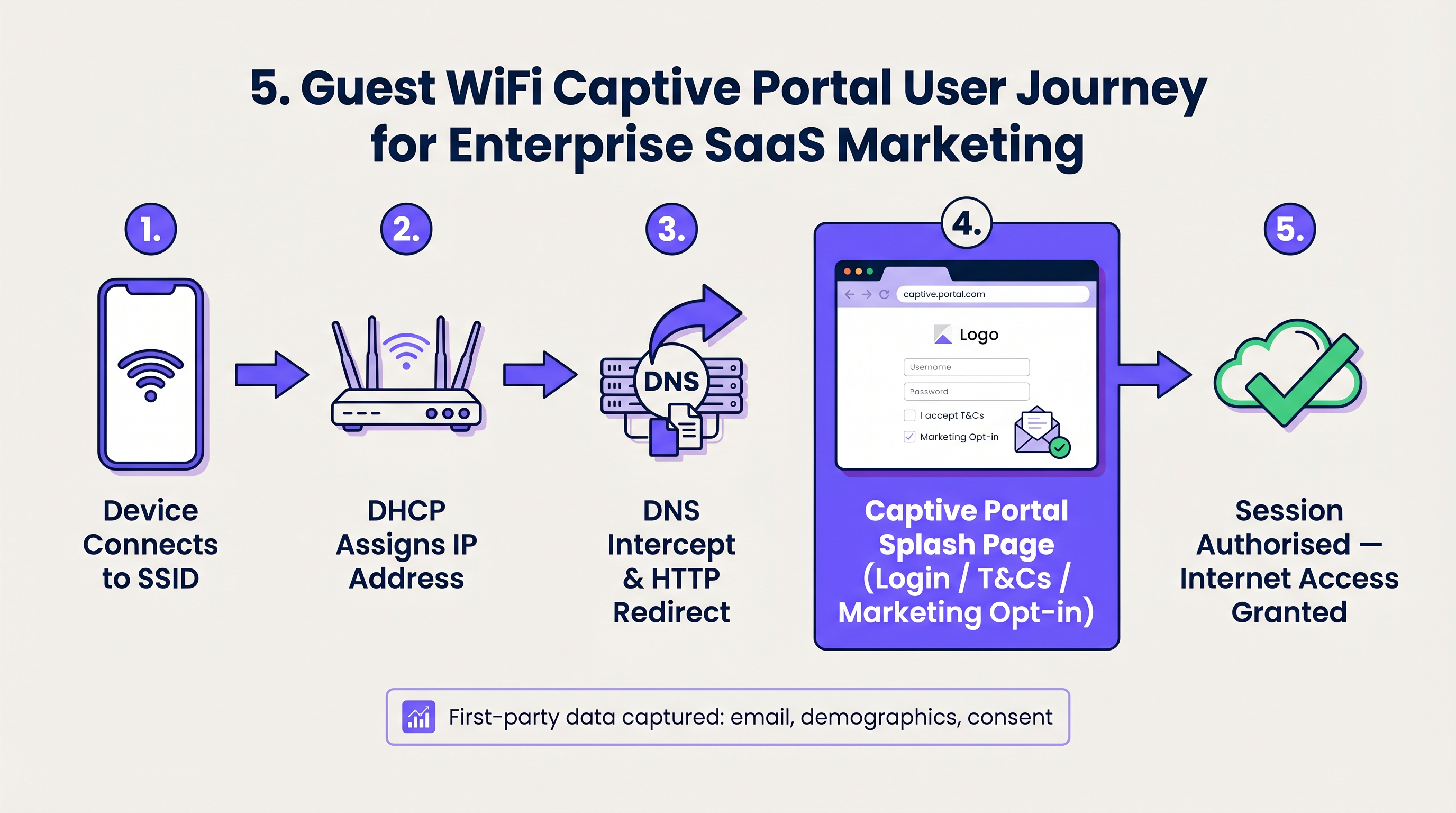
Upon connection, the client device broadcasts a DHCP Discover packet. The network responds by assigning an IP address from a dedicated guest subnet. A critical technical distinction here is the lease time. While corporate devices might retain an IP for 8 days, guest networks must use aggressive lease times (e.g., 30 to 60 minutes) to prevent IP pool exhaustion in high-turnover environments like Transport hubs.
3. DNS Interception and the Captive Portal
This is where the user experience begins. When the newly connected device attempts to reach a website (or when the OS performs its captive portal detection check, like Apple's captive.apple.com), the network intercepts the DNS request.
Instead of resolving the actual IP address of the requested site, the gateway responds with the IP address of the captive portal. The client's browser is then HTTP-redirected to the splash page hosted by the Guest WiFi platform.
4. Authentication and RADIUS
Once the user interacts with the captive portal—whether by accepting terms and conditions, entering an email, or using a social login—the platform must inform the local network controller to allow the traffic.
This is handled via the RADIUS (Remote Authentication Dial-In User Service) protocol. The Purple platform acts as the RADIUS server, sending an Access-Accept message back to the local WiFi controller or gateway. The controller then changes the user's state from 'unauthorised' (walled garden access only) to 'authorised', opening the firewall ports for standard internet access.
5. Session Management and Bandwidth Shaping
To prevent a single user from saturating the WAN link, the network enforces bandwidth shaping policies. These policies limit throughput on a per-device basis (e.g., 5 Mbps down / 2 Mbps up). Furthermore, session timeouts are enforced to automatically disconnect idle users, ensuring network resources and IP addresses are recycled efficiently.
Implementation Guide: Building for Scale
Deploying guest WiFi requires balancing user friction with security and data capture requirements.
Step 1: Architect the Network Topology
Ensure your core switches and firewalls support 802.1Q VLAN tagging. Configure your guest VLAN to terminate at a DMZ interface on the firewall, completely bypassing internal routing tables.
Step 2: Configure the Walled Garden
A 'Walled Garden' is a list of IP addresses and domains that unauthenticated users are allowed to access. This must include the URLs required to load the captive portal, CDN assets for logos, and the authentication endpoints for social logins (e.g., Facebook, Google). If the walled garden is misconfigured, the splash page will fail to load, resulting in a dead end for the user.
Step 3: Implement Client Isolation
Enable 'Client Isolation' (or AP Isolation) on your access points. This prevents connected guest devices from communicating directly with one another over the wireless medium, effectively mitigating peer-to-peer attacks and malware propagation within the guest subnet.
Step 4: Integrate Identity Management
Move away from shared PSKs (Pre-Shared Keys). Implement a managed captive portal that captures first-party data. For seamless, secure onboarding, consider implementing OpenRoaming. Purple acts as a free identity provider for OpenRoaming under the Connect license, allowing devices to authenticate securely via certificates without a traditional splash page.
Best Practices & Industry Standards
- Compliance over Convenience: Always mandate the acceptance of a Terms of Use policy. This shifts liability for illicit online activity away from the venue operator. Ensure data capture complies with local privacy regulations (GDPR, CCPA).
- Optimise the DHCP Pool: Calculate your expected peak concurrent users and size your subnet accordingly (e.g., a /22 subnet provides 1,022 usable IPs). Pair this with short lease times.
- QoS Prioritisation: Implement Quality of Service (QoS) rules at the gateway to prioritise critical corporate traffic (VoIP, POS) over guest browsing, ensuring that The Core SD WAN Benefits for Modern Businesses are not compromised by guest traffic spikes.
Troubleshooting & Risk Mitigation
When guest networks fail, it usually comes down to three common failure modes:
- The Captive Portal Doesn't Pop Up: This is almost always a DNS issue or a misconfigured walled garden. If the client device cannot resolve the portal URL or access its required assets, the OS will not trigger the captive portal mini-browser.
- IP Exhaustion: Users can connect to the SSID but receive a self-assigned IP (169.254.x.x) and no internet. Solution: Expand the DHCP scope or reduce the lease time.
- Slow Speeds: Caused by either a lack of per-user bandwidth shaping or high channel utilisation (RF interference). Ensure AP transmit power is tuned correctly to minimise co-channel interference.
ROI & Business Impact
Why go through the effort of building a robust guest network? Because a managed guest WiFi solution transforms a sunk infrastructure cost into a revenue-generating asset.
By gating access behind a branded captive portal, venues in Retail and hospitality capture verified first-party data—emails, demographics, and visit frequency. This data feeds directly into CRM systems, enabling targeted marketing campaigns, automated review requests, and personalised customer engagement. When you understand What Is the Difference Between a Guest WiFi Network and Your Main Network? , you realise that the guest network is your primary digital touchpoint for physical visitors.
Key Terms & Definitions
VLAN (Virtual Local Area Network)
A logical grouping of network devices that behave as if they are on their own independent network, even if they share the same physical infrastructure.
Used to separate guest traffic from sensitive corporate traffic.
Captive Portal
A web page that a user of a public access network is obliged to view and interact with before access is granted.
The primary interface for capturing user data and enforcing Terms of Use.
Walled Garden
A restricted environment that allows unauthenticated users access to specific, pre-approved websites or IP addresses.
Essential for allowing the captive portal and its associated assets (logos, social login APIs) to load before the user has full internet access.
RADIUS
Remote Authentication Dial-In User Service. A networking protocol that provides centralized Authentication, Authorization, and Accounting management.
The protocol used by the Purple platform to tell the local WiFi hardware that a user has successfully logged in and should be granted access.
Client Isolation
A wireless network security feature that prevents connected devices from communicating directly with one another.
Crucial for public networks to prevent guests from hacking or spreading malware to other guests.
DHCP Lease Time
The amount of time a network device is allowed to keep an assigned IP address before it must request a renewal.
Must be tuned aggressively on guest networks to prevent IP pool exhaustion.
SSID
Service Set Identifier. The technical term for a WiFi network's name.
What the user sees and selects on their device to initiate the connection.
OpenRoaming
A wireless industry standard that allows users to automatically and securely connect to guest WiFi networks without needing a captive portal or passwords.
Provides a seamless, cellular-like experience for guests while maintaining enterprise-grade security via certificate-based authentication.
Case Studies
A 200-room hotel is experiencing complaints that guests cannot connect to the WiFi in the lobby during peak check-in hours. Devices show 'Connected without internet' and have 169.254.x.x IP addresses.
This is a classic case of DHCP pool exhaustion. The hotel was likely using a standard /24 subnet (254 usable IPs) with a default 24-hour lease time. During peak hours, the lobby sees high foot traffic. Even if a guest only stays in the lobby for 10 minutes, their device holds that IP address for 24 hours. The solution is two-fold: 1) Expand the DHCP scope to a /22 (1,022 IPs) for the guest VLAN. 2) Reduce the DHCP lease time from 24 hours to 60 minutes.
A large retail chain wants to offer free WiFi to capture customer emails, but their IT security team is blocking the project, fearing that guest devices could introduce ransomware to the corporate network.
Implement strict logical isolation. Configure the wireless access points to broadcast a dedicated Guest SSID. Tag all traffic from this SSID with a unique VLAN ID (e.g., VLAN 50). Configure the core switch to trunk this VLAN directly to the perimeter firewall. On the firewall, create a rule that explicitly denies any routing between VLAN 50 and the corporate VLANs. Finally, enable 'Client Isolation' on the access points to prevent guest devices from communicating with each other.
Scenario Analysis
Q1. You are deploying guest WiFi in a high-density sports stadium. Management wants to offer a 'VIP' WiFi tier that requires a paid upgrade, alongside a free, slower tier. How do you architect this at the network level?
💡 Hint:Consider how RADIUS attributes can dynamically assign policies.
Show Recommended Approach
Configure a single Guest SSID. When the user connects, they are presented with a captive portal offering the free or paid tiers. Upon selection and authentication, the Purple platform (acting as the RADIUS server) sends an Access-Accept message to the controller. Crucially, this message includes specific RADIUS attributes (like Vendor-Specific Attributes or standard bandwidth limits) that dynamically apply the correct bandwidth shaping policy to that specific MAC address—e.g., 2Mbps for free users, 20Mbps for VIP users.
Q2. A client complains that their guest WiFi splash page takes over 30 seconds to load, leading to high abandonment rates. The internet connection itself is a 1Gbps fiber line. What is the most likely architectural cause?
💡 Hint:Think about what must happen before the splash page can be displayed to an unauthenticated user.
Show Recommended Approach
The most likely cause is an overly restrictive or misconfigured Walled Garden. If the splash page relies on external assets (like heavy images hosted on an external CDN, or scripts from a third-party service) that are not whitelisted in the walled garden, the client device will attempt to load them, time out, and eventually render a broken or delayed page. The solution is to use browser developer tools to identify the blocked domains and add them to the walled garden whitelist on the gateway.
Q3. A hospital IT director wants to implement guest WiFi but insists on using a single, shared WPA2 password (PSK) printed on a sign at reception, arguing that captive portals are 'too much friction'. How do you counter this from a security and compliance perspective?
💡 Hint:Focus on accountability and liability.
Show Recommended Approach
A shared PSK provides encryption over the air, but zero accountability. If a guest uses the network to download illegal content or launch an attack, the traffic originates from the hospital's public IP address, making the hospital liable. A captive portal mitigates this risk by forcing the user to accept a Terms of Use policy, legally shifting liability to the individual user. Furthermore, a captive portal allows the hospital to capture identity data (for contact tracing or feedback) and easily revoke access for malicious actors by blacklisting their MAC address, which is impossible with a shared PSK.




