

¿Cómo funciona el WiFi para invitados? Una explicación sencilla
Una referencia técnica definitiva y sencilla sobre la arquitectura WiFi para invitados en empresas. Esta guía desglosa la mecánica del aislamiento de red, la autenticación de Captive Portal y la gestión de sesiones, proporcionando a los líderes de IT estrategias prácticas para implementaciones seguras, conformes y ricas en datos.
🎧 Escuchar esta guía
Ver transcripción
Resumen ejecutivo
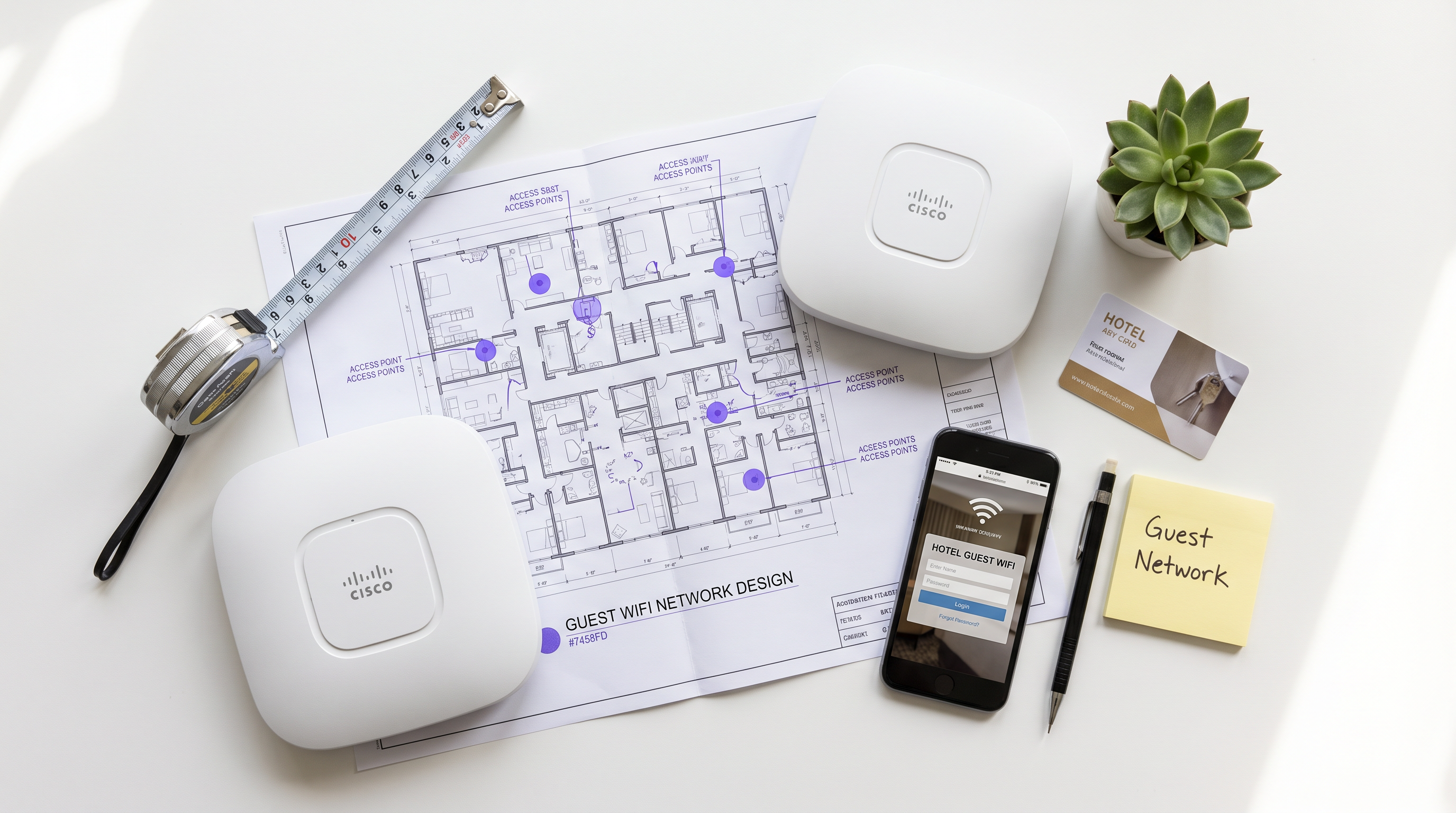
Para los recintos empresariales —desde estadios de alta densidad hasta grandes superficies comerciales— el WiFi para invitados ya no es una simple comodidad; es una capa crítica de la infraestructura empresarial. Sin embargo, tender un puente entre el acceso público abierto y la red corporativa segura requiere una estricta disciplina arquitectónica. Esta guía disecciona la mecánica del WiFi para invitados en empresas, eliminando la jerga de marketing para explicar exactamente cómo funciona a nivel de paquete. Cubrimos los componentes técnicos principales: aislamiento de VLAN, manipulación de DHCP y DNS para Captive Portals, autenticación RADIUS y modelado de ancho de banda.
Ya sea que esté implementando una nueva red para una cadena de Hospitality o actualizando la infraestructura heredada en Healthcare , comprender estos mecanismos es esencial para mitigar riesgos, garantizar el cumplimiento de PCI DSS y GDPR, y capturar datos de primera parte procesables a través de WiFi Analytics .
Análisis técnico en profundidad: Cómo funciona realmente el WiFi para invitados
En un nivel fundamental, una red WiFi para invitados de una empresa opera engañando al dispositivo cliente lo suficiente como para interceptar su tráfico, forzar la autenticación y luego enrutarlo de forma segura a Internet sin tocar nunca la LAN corporativa.
1. Aislamiento lógico mediante VLANs
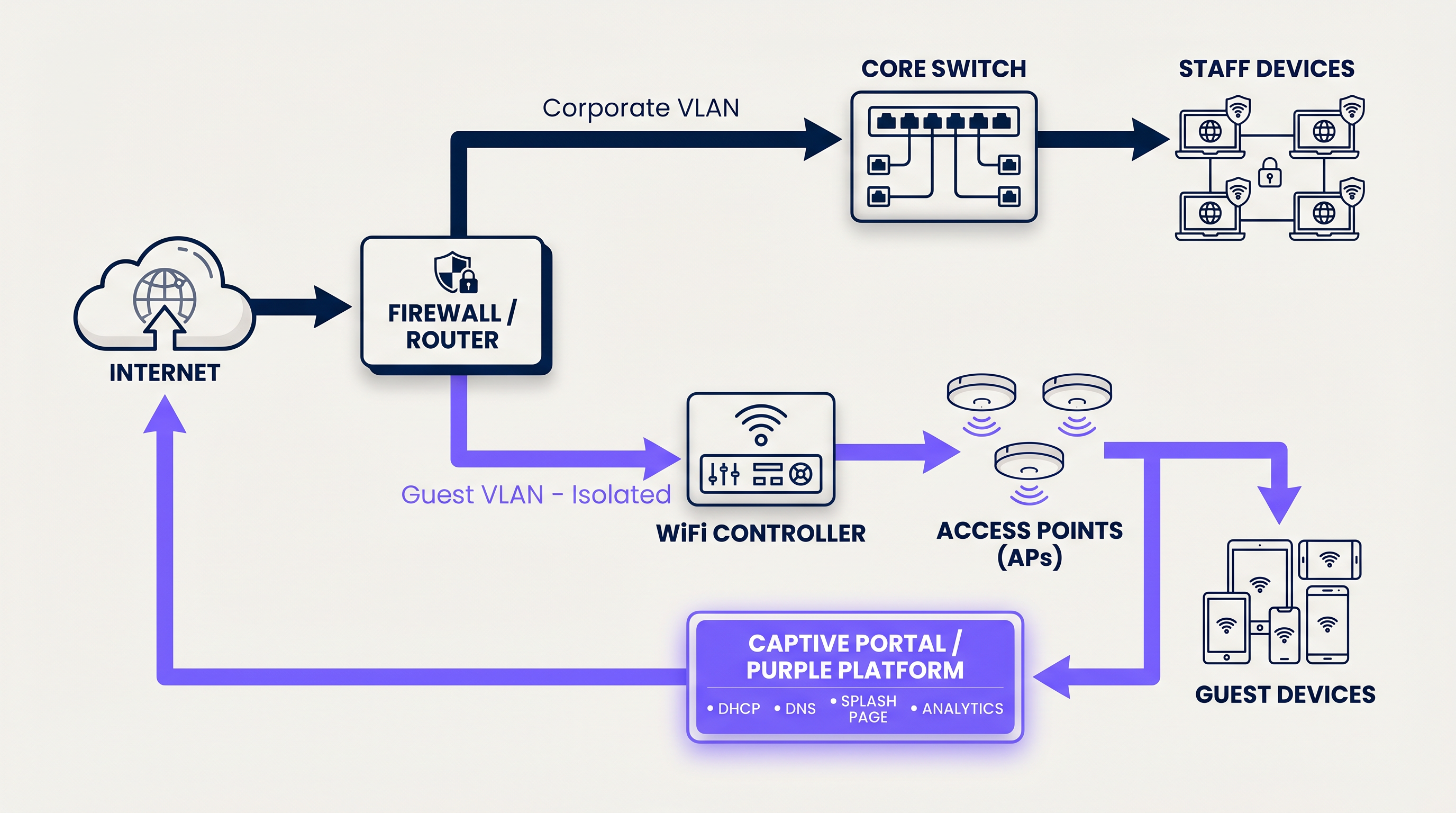
La base de cualquier red de invitados segura es la separación lógica. Cuando un usuario se conecta al SSID de invitados, el punto de acceso etiqueta su tráfico con una ID de Virtual Local Area Network (VLAN) específica (por ejemplo, VLAN 20), mientras que el tráfico corporativo opera en una VLAN separada (por ejemplo, VLAN 10).
Este etiquetado garantiza que, a nivel de switch y firewall, el tráfico de invitados sea físicamente incapaz de enrutarse a subredes internas que contengan sistemas de punto de venta o registros de pacientes. El firewall está configurado con reglas de denegación explícitas para el enrutamiento entre VLAN, forzando el tráfico de invitados directamente a través de la interfaz WAN.
2. DHCP y el pool de direcciones IP
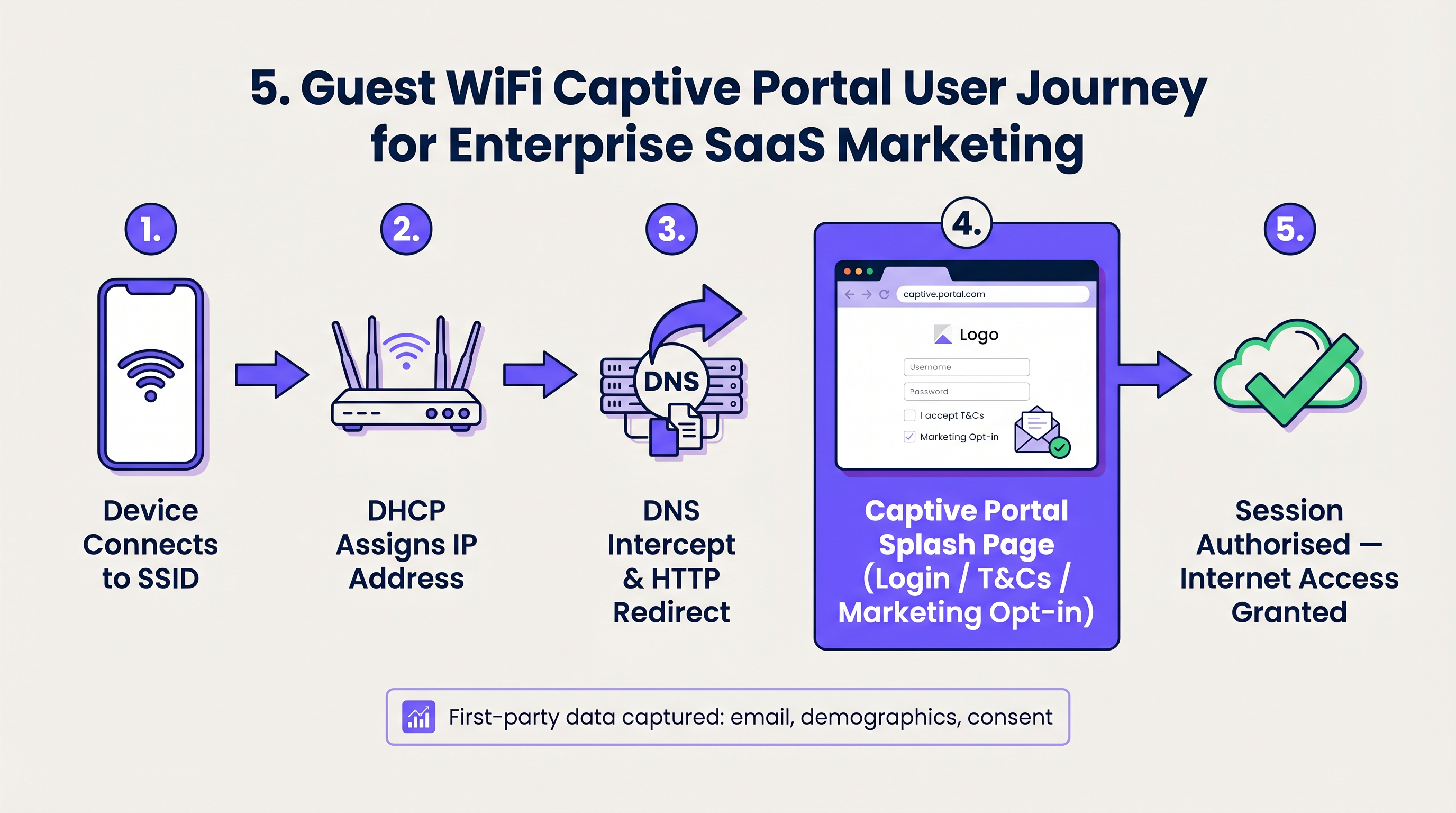
Al conectarse, el dispositivo cliente emite un paquete DHCP Discover. La red responde asignando una dirección IP de una subred de invitados dedicada. Una distinción técnica crítica aquí es el tiempo de concesión. Mientras que los dispositivos corporativos pueden retener una IP durante 8 días, las redes de invitados deben usar tiempos de concesión agresivos (por ejemplo, de 30 a 60 minutos) para evitar el agotamiento del pool de IP en entornos de alta rotación como los centros de Transport .
3. Intercepción de DNS y el Captive Portal
Aquí es donde comienza la experiencia del usuario. Cuando el dispositivo recién conectado intenta acceder a un sitio web (o cuando el OS realiza su comprobación de detección de Captive Portal, como captive.apple.com de Apple), la red intercepta la solicitud de DNS.
En lugar de resolver la dirección IP real del sitio solicitado, la puerta de enlace responde con la dirección IP del Captive Portal. El navegador del cliente es entonces redirigido por HTTP a la página de bienvenida alojada por la plataforma Guest WiFi .
4. Autenticación y RADIUS
Una vez que el usuario interactúa con el Captive Portal —ya sea aceptando los términos y condiciones, introduciendo un correo electrónico o utilizando un inicio de sesión social— la plataforma debe informar al controlador de red local para que permita el tráfico.
Esto se gestiona a través del protocolo RADIUS (Remote Authentication Dial-In User Service). La plataforma Purple actúa como servidor RADIUS, enviando un mensaje Access-Accept de vuelta al controlador WiFi local o a la puerta de enlace. El controlador cambia entonces el estado del usuario de 'no autorizado' (solo acceso a jardín vallado) a 'autorizado', abriendo los puertos del firewall para el acceso estándar a Internet.
5. Gestión de sesiones y modelado de ancho de banda
Para evitar que un solo usuario sature el enlace WAN, la red aplica políticas de modelado de ancho de banda. Estas políticas limitan el rendimiento por dispositivo (por ejemplo, 5 Mbps de bajada / 2 Mbps de subida). Además, se aplican tiempos de espera de sesión para desconectar automáticamente a los usuarios inactivos, asegurando que los recursos de red y las direcciones IP se reciclen de manera eficiente.
Guía de implementación: Construyendo para escalar
La implementación de WiFi para invitados requiere equilibrar la fricción del usuario con los requisitos de seguridad y captura de datos.
Paso 1: Diseñar la topología de red
Asegúrese de que sus switches y firewalls principales admitan el etiquetado 802.1Q VLAN. Configure su VLAN de invitados para que termine en una interfaz DMZ en el firewall, omitiendo completamente las tablas de enrutamiento internas.
Paso 2: Configurar el jardín vallado
Un 'Jardín vallado' es una lista de direcciones IP y dominios a los que los usuarios no autenticados pueden acceder. Esto debe incluir las URLs necesarias para cargar el Captive Portal, los activos CDN para logotipos y los puntos finales de autenticación para inicios de sesión sociales (por ejemplo, Facebook, Google). Si el jardín vallado está mal configurado, la página de bienvenida no se cargará, lo que resultará en un callejón sin salida para el usuario.
Paso 3: Implementar el aislamiento de cliente
Habilite el 'Aislamiento de cliente' (o Aislamiento de AP) en sus puntos de acceso. Esto evita que los dispositivos de invitados conectados se comuniquen directamente entre sí a través del medio inalámbrico, mitigando eficazmente los ataques peer-to-peer y la propagación de malware dentro de la subred de invitados.
Paso 4: Integrar la gestión de identidades
Aléjese de las PSKs (Pre-Shared Keys) compartidas. Implemente un Captive Portal gestionado que capture datos de primera parte. Para una incorporación segura y sin interrupciones, considere iImplementando OpenRoaming. Purple actúa como un proveedor de identidad gratuito para OpenRoaming bajo la licencia Connect, permitiendo que los dispositivos se autentiquen de forma segura mediante certificados sin una página de inicio de sesión tradicional.
Mejores Prácticas y Estándares de la Industria
- Cumplimiento sobre Conveniencia: Exija siempre la aceptación de una política de Términos de Uso. Esto traslada la responsabilidad por actividades ilícitas en línea del operador del local. Asegúrese de que la captura de datos cumpla con las regulaciones de privacidad locales (GDPR, CCPA).
- Optimice el Pool DHCP: Calcule sus usuarios concurrentes máximos esperados y dimensione su subred en consecuencia (por ejemplo, una subred /22 proporciona 1.022 IPs utilizables). Combine esto con tiempos de concesión cortos.
- Priorización QoS: Implemente reglas de Calidad de Servicio (QoS) en la puerta de enlace para priorizar el tráfico corporativo crítico (VoIP, POS) sobre la navegación de invitados, asegurando que Los Beneficios Clave de SD WAN para Empresas Modernas no se vean comprometidos por picos de tráfico de invitados.
Resolución de Problemas y Mitigación de Riesgos
Cuando las redes de invitados fallan, generalmente se debe a tres modos de fallo comunes:
- El Captive Portal no aparece: Esto es casi siempre un problema de DNS o un "walled garden" mal configurado. Si el dispositivo cliente no puede resolver la URL del portal o acceder a sus activos requeridos, el sistema operativo no activará el mini-navegador del Captive Portal.
- Agotamiento de IP: Los usuarios pueden conectarse al SSID pero reciben una IP autoasignada (169.254.x.x) y no tienen internet. Solución: Ampliar el alcance DHCP o reducir el tiempo de concesión.
- Velocidades Lentas: Causado por la falta de modelado de ancho de banda por usuario o por una alta utilización del canal (interferencia de RF). Asegúrese de que la potencia de transmisión del AP esté ajustada correctamente para minimizar la interferencia cocanal.
ROI e Impacto Empresarial
¿Por qué esforzarse en construir una red de invitados robusta? Porque una solución gestionada de WiFi para invitados transforma un coste de infraestructura hundido en un activo generador de ingresos.
Al restringir el acceso detrás de un Captive Portal de marca, los locales en Retail y hostelería capturan datos verificados de primera mano: correos electrónicos, datos demográficos y frecuencia de visitas. Estos datos se introducen directamente en los sistemas CRM, lo que permite campañas de marketing dirigidas, solicitudes de reseñas automatizadas y una interacción personalizada con el cliente. Cuando comprende ¿Cuál es la Diferencia entre una Red WiFi de Invitados y su Red Principal? , se da cuenta de que la red de invitados es su principal punto de contacto digital para los visitantes físicos.
Términos clave y definiciones
VLAN (Virtual Local Area Network)
A logical grouping of network devices that behave as if they are on their own independent network, even if they share the same physical infrastructure.
Used to separate guest traffic from sensitive corporate traffic.
Captive Portal
A web page that a user of a public access network is obliged to view and interact with before access is granted.
The primary interface for capturing user data and enforcing Terms of Use.
Walled Garden
A restricted environment that allows unauthenticated users access to specific, pre-approved websites or IP addresses.
Essential for allowing the captive portal and its associated assets (logos, social login APIs) to load before the user has full internet access.
RADIUS
Remote Authentication Dial-In User Service. A networking protocol that provides centralized Authentication, Authorization, and Accounting management.
The protocol used by the Purple platform to tell the local WiFi hardware that a user has successfully logged in and should be granted access.
Client Isolation
A wireless network security feature that prevents connected devices from communicating directly with one another.
Crucial for public networks to prevent guests from hacking or spreading malware to other guests.
DHCP Lease Time
The amount of time a network device is allowed to keep an assigned IP address before it must request a renewal.
Must be tuned aggressively on guest networks to prevent IP pool exhaustion.
SSID
Service Set Identifier. The technical term for a WiFi network's name.
What the user sees and selects on their device to initiate the connection.
OpenRoaming
A wireless industry standard that allows users to automatically and securely connect to guest WiFi networks without needing a captive portal or passwords.
Provides a seamless, cellular-like experience for guests while maintaining enterprise-grade security via certificate-based authentication.
Casos de éxito
A 200-room hotel is experiencing complaints that guests cannot connect to the WiFi in the lobby during peak check-in hours. Devices show 'Connected without internet' and have 169.254.x.x IP addresses.
This is a classic case of DHCP pool exhaustion. The hotel was likely using a standard /24 subnet (254 usable IPs) with a default 24-hour lease time. During peak hours, the lobby sees high foot traffic. Even if a guest only stays in the lobby for 10 minutes, their device holds that IP address for 24 hours. The solution is two-fold: 1) Expand the DHCP scope to a /22 (1,022 IPs) for the guest VLAN. 2) Reduce the DHCP lease time from 24 hours to 60 minutes.
A large retail chain wants to offer free WiFi to capture customer emails, but their IT security team is blocking the project, fearing that guest devices could introduce ransomware to the corporate network.
Implement strict logical isolation. Configure the wireless access points to broadcast a dedicated Guest SSID. Tag all traffic from this SSID with a unique VLAN ID (e.g., VLAN 50). Configure the core switch to trunk this VLAN directly to the perimeter firewall. On the firewall, create a rule that explicitly denies any routing between VLAN 50 and the corporate VLANs. Finally, enable 'Client Isolation' on the access points to prevent guest devices from communicating with each other.
Análisis de escenarios
Q1. You are deploying guest WiFi in a high-density sports stadium. Management wants to offer a 'VIP' WiFi tier that requires a paid upgrade, alongside a free, slower tier. How do you architect this at the network level?
💡 Sugerencia:Consider how RADIUS attributes can dynamically assign policies.
Mostrar enfoque recomendado
Configure a single Guest SSID. When the user connects, they are presented with a captive portal offering the free or paid tiers. Upon selection and authentication, the Purple platform (acting as the RADIUS server) sends an Access-Accept message to the controller. Crucially, this message includes specific RADIUS attributes (like Vendor-Specific Attributes or standard bandwidth limits) that dynamically apply the correct bandwidth shaping policy to that specific MAC address—e.g., 2Mbps for free users, 20Mbps for VIP users.
Q2. A client complains that their guest WiFi splash page takes over 30 seconds to load, leading to high abandonment rates. The internet connection itself is a 1Gbps fiber line. What is the most likely architectural cause?
💡 Sugerencia:Think about what must happen before the splash page can be displayed to an unauthenticated user.
Mostrar enfoque recomendado
The most likely cause is an overly restrictive or misconfigured Walled Garden. If the splash page relies on external assets (like heavy images hosted on an external CDN, or scripts from a third-party service) that are not whitelisted in the walled garden, the client device will attempt to load them, time out, and eventually render a broken or delayed page. The solution is to use browser developer tools to identify the blocked domains and add them to the walled garden whitelist on the gateway.
Q3. A hospital IT director wants to implement guest WiFi but insists on using a single, shared WPA2 password (PSK) printed on a sign at reception, arguing that captive portals are 'too much friction'. How do you counter this from a security and compliance perspective?
💡 Sugerencia:Focus on accountability and liability.
Mostrar enfoque recomendado
A shared PSK provides encryption over the air, but zero accountability. If a guest uses the network to download illegal content or launch an attack, the traffic originates from the hospital's public IP address, making the hospital liable. A captive portal mitigates this risk by forcing the user to accept a Terms of Use policy, legally shifting liability to the individual user. Furthermore, a captive portal allows the hospital to capture identity data (for contact tracing or feedback) and easily revoke access for malicious actors by blacklisting their MAC address, which is impossible with a shared PSK.




