

Wie funktioniert Gast-WiFi? Eine verständliche Erklärung
Eine definitive, leicht verständliche technische Referenz zur Architektur von Unternehmens-Gast-WiFi. Dieser Leitfaden beleuchtet die Mechanismen der Netzwerkisolation, der Captive Portal-Authentifizierung und des Sitzungsmanagements und bietet IT-Führungskräften umsetzbare Strategien für sichere, konforme und datenreiche Implementierungen.
🎧 Diesen Leitfaden anhören
Transkript anzeigen
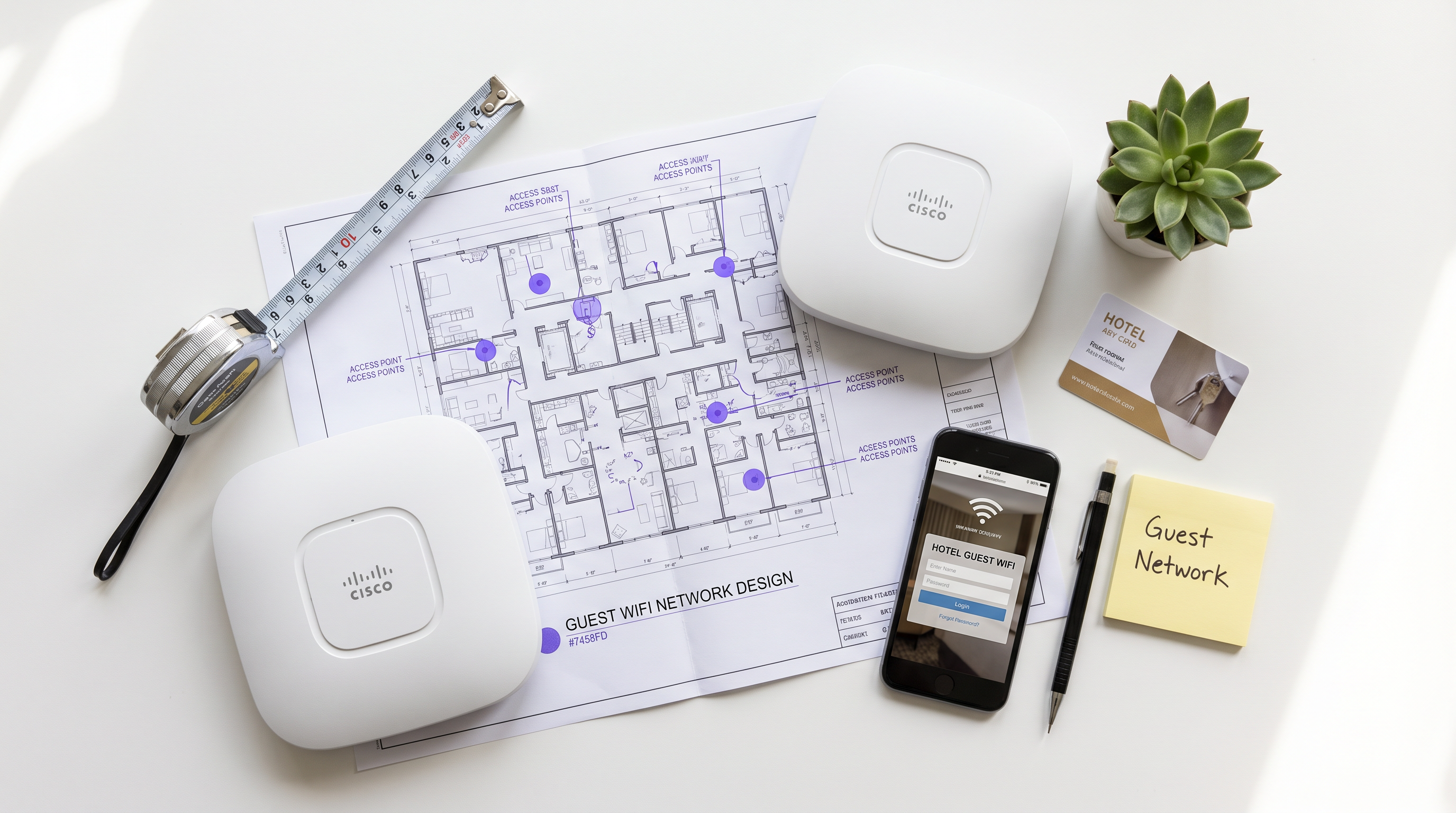
Zusammenfassung für Führungskräfte
Für Unternehmensstandorte – von dicht besiedelten Stadien bis hin zu weitläufigen Einzelhandelsflächen – ist Gast-WiFi nicht länger nur eine einfache Annehmlichkeit; es ist eine kritische Schicht der Geschäftsinfrastruktur. Die Überbrückung der Lücke zwischen offenem öffentlichem Zugang und sicherer Unternehmensnetzwerken erfordert jedoch eine strenge architektonische Disziplin. Dieser Leitfaden zerlegt die Mechanismen von Unternehmens-Gast-WiFi, indem er den Marketingjargon entfernt, um genau zu erklären, wie es auf Paketebene funktioniert. Wir behandeln die technischen Kernkomponenten: VLAN-Isolation, DHCP- und DNS-Manipulation für Captive Portals, RADIUS-Authentifizierung und Bandbreitenformung.
Ob Sie ein neues Netzwerk für eine Hospitality -Kette bereitstellen oder die bestehende Infrastruktur im Healthcare -Bereich aufrüsten, das Verständnis dieser Mechanismen ist unerlässlich, um Risiken zu mindern, die PCI DSS- und GDPR-Konformität sicherzustellen und umsetzbare Erstanbieterdaten über WiFi Analytics zu erfassen.
Technischer Deep-Dive: Wie Gast-WiFi tatsächlich funktioniert
Auf einer grundlegenden Ebene funktioniert ein Unternehmens-Gast-WiFi-Netzwerk, indem es das Client-Gerät gerade so weit täuscht, dass es dessen Datenverkehr abfangen, eine Authentifizierung erzwingen und diesen dann sicher ins Internet leiten kann, ohne jemals das Unternehmens-LAN zu berühren.
1. Logische Isolation über VLANs
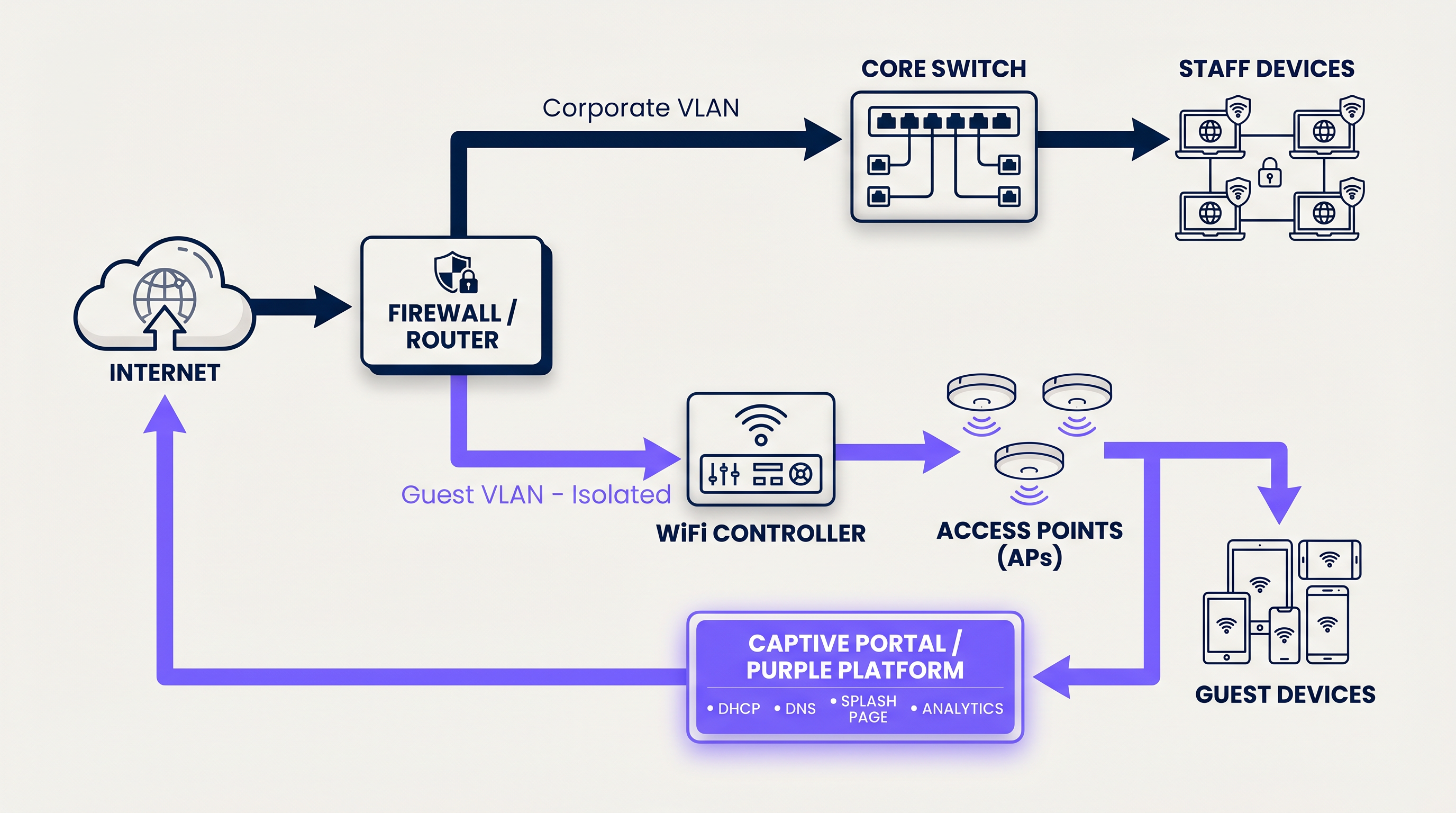
Die Grundlage jedes sicheren Gastnetzwerks ist die logische Trennung. Wenn ein Benutzer sich mit der Gast-SSID verbindet, versieht der Access Point seinen Datenverkehr mit einer spezifischen Virtual Local Area Network (VLAN) ID (z.B. VLAN 20), während der Unternehmensdatenverkehr auf einem separaten VLAN (z.B. VLAN 10) läuft.
Diese Kennzeichnung stellt sicher, dass auf Switch- und Firewall-Ebene der Gastdatenverkehr physisch nicht in der Lage ist, zu internen Subnetzen zu routen, die Kassensysteme oder Patientenakten enthalten. Die Firewall ist mit expliziten Ablehnungsregeln für das Inter-VLAN-Routing konfiguriert, wodurch der Gastdatenverkehr direkt über die WAN-Schnittstelle geleitet wird.
2. DHCP und der IP-Adresspool
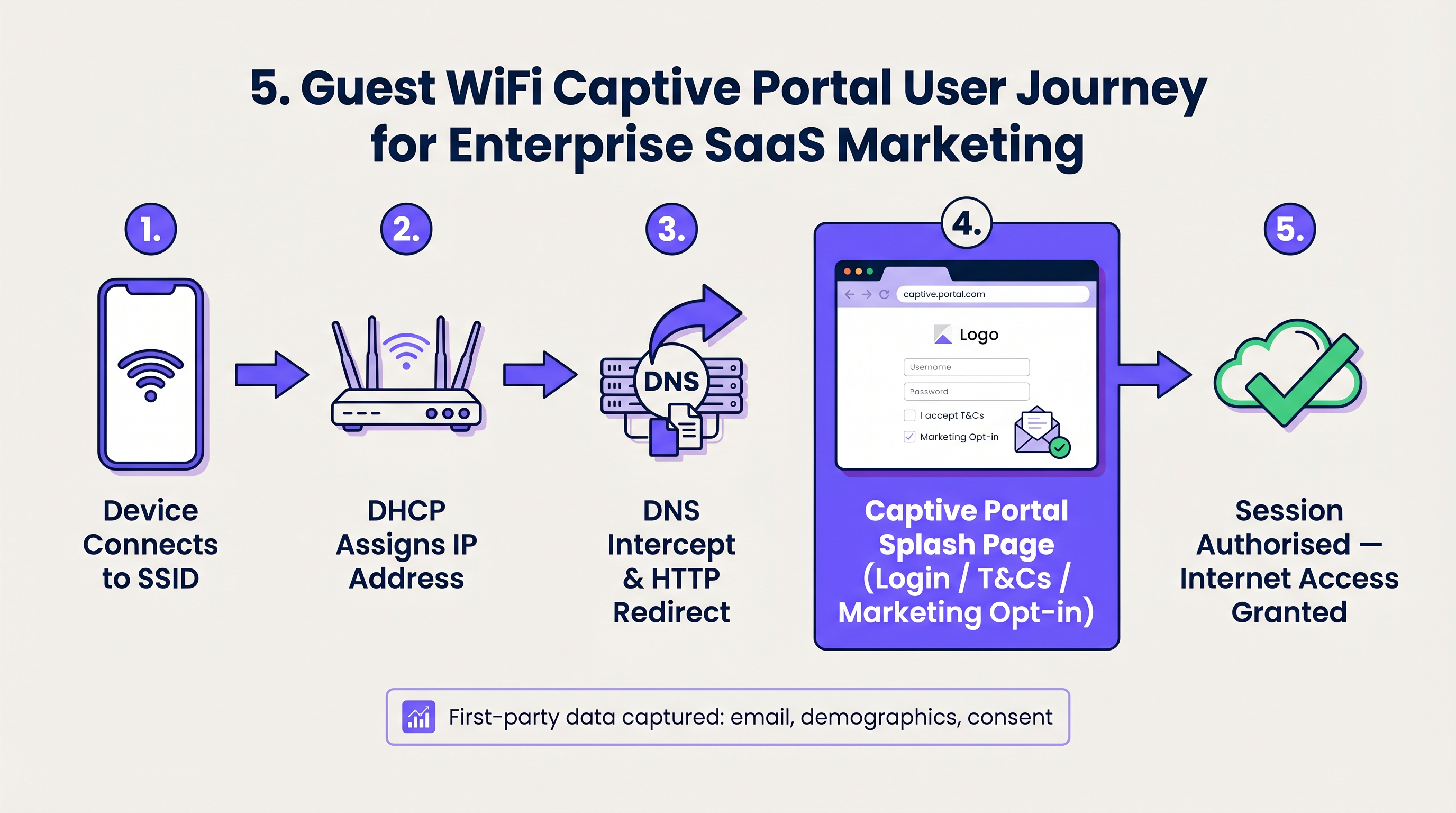
Beim Verbindungsaufbau sendet das Client-Gerät ein DHCP Discover-Paket. Das Netzwerk antwortet, indem es eine IP-Adresse aus einem dedizierten Gast-Subnetz zuweist. Ein kritischer technischer Unterschied hier ist die Lease-Zeit. Während Unternehmensgeräte eine IP für 8 Tage behalten könnten, müssen Gastnetzwerke aggressive Lease-Zeiten (z.B. 30 bis 60 Minuten) verwenden, um eine Erschöpfung des IP-Pools in Umgebungen mit hoher Fluktuation wie Transport -Hubs zu verhindern.
3. DNS-Abfangen und das Captive Portal
Hier beginnt das Benutzererlebnis. Wenn das neu verbundene Gerät versucht, eine Website zu erreichen (oder wenn das OS seine Captive Portal-Erkennung durchführt, wie z.B. Apples captive.apple.com), fängt das Netzwerk die DNS-Anfrage ab.
Anstatt die tatsächliche IP-Adresse der angeforderten Seite aufzulösen, antwortet das Gateway mit der IP-Adresse des Captive Portals. Der Browser des Clients wird dann per HTTP auf die Splash-Seite umgeleitet, die von der Guest WiFi -Plattform gehostet wird.
4. Authentifizierung und RADIUS
Sobald der Benutzer mit dem Captive Portal interagiert – sei es durch Akzeptieren der Geschäftsbedingungen, Eingabe einer E-Mail-Adresse oder Nutzung eines Social Logins – muss die Plattform den lokalen Netzwerk-Controller informieren, um den Datenverkehr zuzulassen.
Dies wird über das RADIUS (Remote Authentication Dial-In User Service)-Protokoll abgewickelt. Die Purple-Plattform fungiert als RADIUS-Server und sendet eine Access-Accept-Nachricht zurück an den lokalen WiFi-Controller oder das Gateway. Der Controller ändert dann den Status des Benutzers von 'nicht autorisiert' (nur Walled Garden-Zugang) zu 'autorisiert' und öffnet die Firewall-Ports für den Standard-Internetzugang.
5. Sitzungsmanagement und Bandbreitenformung
Um zu verhindern, dass ein einzelner Benutzer die WAN-Verbindung überlastet, erzwingt das Netzwerk Bandbreitenformungsrichtlinien. Diese Richtlinien begrenzen den Durchsatz pro Gerät (z.B. 5 Mbit/s Download / 2 Mbit/s Upload). Darüber hinaus werden Sitzungs-Timeouts erzwungen, um inaktive Benutzer automatisch zu trennen und so sicherzustellen, dass Netzwerkressourcen und IP-Adressen effizient wiederverwendet werden.
Implementierungsleitfaden: Für Skalierbarkeit bauen
Die Bereitstellung von Gast-WiFi erfordert ein Gleichgewicht zwischen Benutzerfreundlichkeit, Sicherheit und den Anforderungen an die Datenerfassung.
Schritt 1: Netzwerk-Topologie entwerfen
Stellen Sie sicher, dass Ihre Core-Switches und Firewalls 802.1Q VLAN-Tagging unterstützen. Konfigurieren Sie Ihr Gast-VLAN so, dass es an einer DMZ-Schnittstelle der Firewall endet und interne Routing-Tabellen vollständig umgeht.
Schritt 2: Den Walled Garden konfigurieren
Ein 'Walled Garden' ist eine Liste von IP-Adressen und Domains, auf die nicht authentifizierte Benutzer zugreifen dürfen. Dies muss die URLs umfassen, die zum Laden des Captive Portals, CDN-Assets für Logos und die Authentifizierungsendpunkte für soziale Logins (z.B. Facebook, Google) erforderlich sind. Wenn der Walled Garden falsch konfiguriert ist, wird die Splash-Seite nicht geladen, was für den Benutzer eine Sackgasse bedeutet.
Schritt 3: Client-Isolation implementieren
Aktivieren Sie die 'Client-Isolation' (oder AP-Isolation) auf Ihren Access Points. Dies verhindert, dass verbundene Gastgeräte direkt miteinander über das drahtlose Medium kommunizieren, wodurch Peer-to-Peer-Angriffe und die Verbreitung von Malware innerhalb des Gast-Subnetzes effektiv gemindert werden.
Schritt 4: Identitätsmanagement integrieren
Verabschieden Sie sich von geteilten PSKs (Pre-Shared Keys). Implementieren Sie ein verwaltetes Captive Portal, das Erstanbieterdaten erfasst. Für ein nahtloses, sicheres Onboarding ziehen Sie iImplementierung von OpenRoaming. Purple fungiert als kostenloser Identitätsanbieter für OpenRoaming unter der Connect-Lizenz, wodurch sich Geräte sicher über Zertifikate authentifizieren können, ohne eine traditionelle Splash-Seite zu benötigen.
Best Practices & Industriestandards
- Compliance vor Bequemlichkeit: Bestehen Sie immer auf der Annahme einer Nutzungsbedingungen-Richtlinie. Dies verlagert die Haftung für illegale Online-Aktivitäten vom Betreiber des Veranstaltungsortes weg. Stellen Sie sicher, dass die Datenerfassung den lokalen Datenschutzbestimmungen (GDPR, CCPA) entspricht.
- DHCP-Pool optimieren: Berechnen Sie Ihre erwartete maximale Anzahl gleichzeitiger Benutzer und dimensionieren Sie Ihr Subnetz entsprechend (z. B. bietet ein /22-Subnetz 1.022 nutzbare IPs). Kombinieren Sie dies mit kurzen Lease-Zeiten.
- QoS-Priorisierung: Implementieren Sie Quality of Service (QoS)-Regeln am Gateway, um kritischen Unternehmensverkehr (VoIP, POS) gegenüber dem Surfen von Gästen zu priorisieren und sicherzustellen, dass Die wichtigsten SD-WAN-Vorteile für moderne Unternehmen durch Gastverkehrsspitzen nicht beeinträchtigt werden.
Fehlerbehebung & Risikominderung
Wenn Gastnetzwerke ausfallen, liegt dies meist an drei häufigen Fehlerursachen:
- Das Captive Portal wird nicht angezeigt: Dies ist fast immer ein DNS-Problem oder ein falsch konfigurierter Walled Garden. Wenn das Client-Gerät die Portal-URL nicht auflösen oder auf die benötigten Assets zugreifen kann, löst das Betriebssystem den Captive Portal Mini-Browser nicht aus.
- IP-Erschöpfung: Benutzer können sich mit der SSID verbinden, erhalten aber eine selbst zugewiesene IP (169.254.x.x) und keinen Internetzugang. Lösung: Erweitern Sie den DHCP-Bereich oder reduzieren Sie die Lease-Zeit.
- Langsame Geschwindigkeiten: Verursacht entweder durch fehlendes Bandbreiten-Shaping pro Benutzer oder hohe Kanalnutzung (RF-Interferenz). Stellen Sie sicher, dass die Sendeleistung des APs korrekt eingestellt ist, um Gleichkanalstörungen zu minimieren.
ROI & Geschäftsauswirkungen
Warum den Aufwand betreiben, ein robustes Gastnetzwerk aufzubauen? Weil eine verwaltete Gast WiFi-Lösung eine versunkene Infrastrukturinvestition in ein umsatzgenerierendes Asset verwandelt.
Durch die Zugangsbeschränkung hinter einem gebrandeten Captive Portal erfassen Veranstaltungsorte im Einzelhandel und im Gastgewerbe verifizierte Erstanbieterdaten – E-Mails, demografische Merkmale und Besuchshäufigkeit. Diese Daten fließen direkt in CRM-Systeme ein und ermöglichen gezielte Marketingkampagnen, automatisierte Bewertungsanfragen und personalisierte Kundenbindung. Wenn Sie verstehen, Was ist der Unterschied zwischen einem Gast-WiFi-Netzwerk und Ihrem Hauptnetzwerk? , erkennen Sie, dass das Gastnetzwerk Ihr primärer digitaler Berührungspunkt für physische Besucher ist.
Schlüsselbegriffe & Definitionen
VLAN (Virtual Local Area Network)
A logical grouping of network devices that behave as if they are on their own independent network, even if they share the same physical infrastructure.
Used to separate guest traffic from sensitive corporate traffic.
Captive Portal
A web page that a user of a public access network is obliged to view and interact with before access is granted.
The primary interface for capturing user data and enforcing Terms of Use.
Walled Garden
A restricted environment that allows unauthenticated users access to specific, pre-approved websites or IP addresses.
Essential for allowing the captive portal and its associated assets (logos, social login APIs) to load before the user has full internet access.
RADIUS
Remote Authentication Dial-In User Service. A networking protocol that provides centralized Authentication, Authorization, and Accounting management.
The protocol used by the Purple platform to tell the local WiFi hardware that a user has successfully logged in and should be granted access.
Client Isolation
A wireless network security feature that prevents connected devices from communicating directly with one another.
Crucial for public networks to prevent guests from hacking or spreading malware to other guests.
DHCP Lease Time
The amount of time a network device is allowed to keep an assigned IP address before it must request a renewal.
Must be tuned aggressively on guest networks to prevent IP pool exhaustion.
SSID
Service Set Identifier. The technical term for a WiFi network's name.
What the user sees and selects on their device to initiate the connection.
OpenRoaming
A wireless industry standard that allows users to automatically and securely connect to guest WiFi networks without needing a captive portal or passwords.
Provides a seamless, cellular-like experience for guests while maintaining enterprise-grade security via certificate-based authentication.
Fallstudien
A 200-room hotel is experiencing complaints that guests cannot connect to the WiFi in the lobby during peak check-in hours. Devices show 'Connected without internet' and have 169.254.x.x IP addresses.
This is a classic case of DHCP pool exhaustion. The hotel was likely using a standard /24 subnet (254 usable IPs) with a default 24-hour lease time. During peak hours, the lobby sees high foot traffic. Even if a guest only stays in the lobby for 10 minutes, their device holds that IP address for 24 hours. The solution is two-fold: 1) Expand the DHCP scope to a /22 (1,022 IPs) for the guest VLAN. 2) Reduce the DHCP lease time from 24 hours to 60 minutes.
A large retail chain wants to offer free WiFi to capture customer emails, but their IT security team is blocking the project, fearing that guest devices could introduce ransomware to the corporate network.
Implement strict logical isolation. Configure the wireless access points to broadcast a dedicated Guest SSID. Tag all traffic from this SSID with a unique VLAN ID (e.g., VLAN 50). Configure the core switch to trunk this VLAN directly to the perimeter firewall. On the firewall, create a rule that explicitly denies any routing between VLAN 50 and the corporate VLANs. Finally, enable 'Client Isolation' on the access points to prevent guest devices from communicating with each other.
Szenarioanalyse
Q1. You are deploying guest WiFi in a high-density sports stadium. Management wants to offer a 'VIP' WiFi tier that requires a paid upgrade, alongside a free, slower tier. How do you architect this at the network level?
💡 Hinweis:Consider how RADIUS attributes can dynamically assign policies.
Empfohlenen Ansatz anzeigen
Configure a single Guest SSID. When the user connects, they are presented with a captive portal offering the free or paid tiers. Upon selection and authentication, the Purple platform (acting as the RADIUS server) sends an Access-Accept message to the controller. Crucially, this message includes specific RADIUS attributes (like Vendor-Specific Attributes or standard bandwidth limits) that dynamically apply the correct bandwidth shaping policy to that specific MAC address—e.g., 2Mbps for free users, 20Mbps for VIP users.
Q2. A client complains that their guest WiFi splash page takes over 30 seconds to load, leading to high abandonment rates. The internet connection itself is a 1Gbps fiber line. What is the most likely architectural cause?
💡 Hinweis:Think about what must happen before the splash page can be displayed to an unauthenticated user.
Empfohlenen Ansatz anzeigen
The most likely cause is an overly restrictive or misconfigured Walled Garden. If the splash page relies on external assets (like heavy images hosted on an external CDN, or scripts from a third-party service) that are not whitelisted in the walled garden, the client device will attempt to load them, time out, and eventually render a broken or delayed page. The solution is to use browser developer tools to identify the blocked domains and add them to the walled garden whitelist on the gateway.
Q3. A hospital IT director wants to implement guest WiFi but insists on using a single, shared WPA2 password (PSK) printed on a sign at reception, arguing that captive portals are 'too much friction'. How do you counter this from a security and compliance perspective?
💡 Hinweis:Focus on accountability and liability.
Empfohlenen Ansatz anzeigen
A shared PSK provides encryption over the air, but zero accountability. If a guest uses the network to download illegal content or launch an attack, the traffic originates from the hospital's public IP address, making the hospital liable. A captive portal mitigates this risk by forcing the user to accept a Terms of Use policy, legally shifting liability to the individual user. Furthermore, a captive portal allows the hospital to capture identity data (for contact tracing or feedback) and easily revoke access for malicious actors by blacklisting their MAC address, which is impossible with a shared PSK.




