

Windows 11 802.1X प्रमाणीकरण संबंधी समस्याओं का निवारण
यह तकनीकी संदर्भ मार्गदर्शिका Windows 11 802.1X प्रमाणीकरण विफलताओं के लिए एक निश्चित निदान और समाधान मार्ग प्रदान करती है। यह विस्तार से बताता है कि कैसे OS अपग्रेड प्रमाणपत्र विश्वास श्रृंखलाओं और क्रेडेंशियल गार्ड प्रवर्तन को बाधित करते हैं, एंटरप्राइज़ IT टीमों के लिए कार्रवाई योग्य GPO कॉन्फ़िगरेशन और वास्तुशिल्प सर्वोत्तम प्रथाओं की पेशकश करते हुए।
🎧 Listen to this Guide
View Transcript
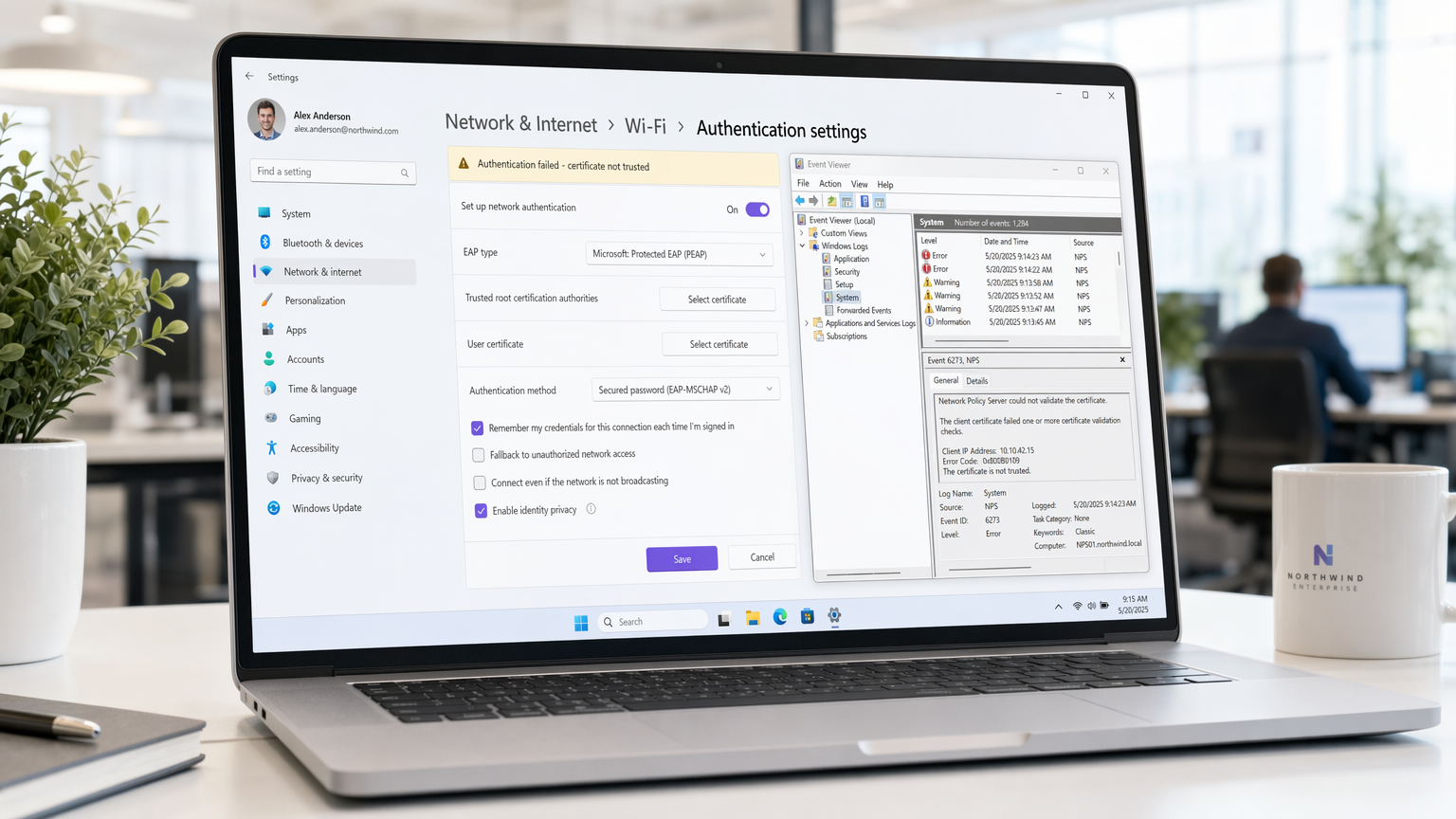
कार्यकारी सारांश
बड़े पैमाने पर परिनियोजन का प्रबंधन करने वाली एंटरप्राइज़ IT टीमों के लिए, हॉस्पिटैलिटी , रिटेल , और कॉर्पोरेट परिसरों में, Windows 11 के रोलआउट ने 802.1X वायरलेस प्रमाणीकरण में महत्वपूर्ण व्यवधान उत्पन्न किए हैं। मुख्य समस्या इस बात से उत्पन्न होती है कि Windows 11 लेगेसी क्रेडेंशियल स्टोरेज (क्रेडेंशियल गार्ड के माध्यम से) को कैसे संभालता है और वायरलेस प्रोफाइल के भीतर विश्वसनीय रूट प्रमाणपत्रों का माइग्रेशन कैसे होता है। जब कोई डिवाइस अपग्रेड होता है, तो पहले से मौजूद PEAP-MSCHAPv2 या EAP-TLS कॉन्फ़िगरेशन अक्सर नेटवर्क पॉलिसी सर्वर (NPS) प्रमाणपत्र को मान्य करने में विफल रहते हैं, जिसके परिणामस्वरूप TLS टनल तुरंत, चुपचाप बंद हो जाता है।
यह मार्गदर्शिका इन विफलताओं के निदान के लिए एक विक्रेता-तटस्थ, वास्तुशिल्प दृष्टिकोण प्रदान करती है। हम निगरानी के लिए सटीक इवेंट व्यूअर लॉग का विवरण देते हैं, विश्वास बहाल करने के लिए आवश्यक विशिष्ट ग्रुप पॉलिसी ऑब्जेक्ट (GPO) संशोधनों का, और PCI DSS और GDPR के अनुपालन को बनाए रखने के लिए EAP-TLS की ओर आवश्यक दीर्घकालिक रणनीतिक बदलाव का। स्थान संचालन निदेशकों और नेटवर्क आर्किटेक्ट्स के लिए, इसे हल करना केवल एक हेल्पडेस्क समस्या नहीं है—यह सुरक्षित थ्रूपुट और परिचालन निरंतरता बनाए रखने के लिए एक महत्वपूर्ण आवश्यकता है।
तकनीकी गहन विश्लेषण
802.1X प्रमाणीकरण फ्रेमवर्क सप्लिकेंट (Windows 11 एंडपॉइंट), ऑथेंटिकेटर (वायरलेस एक्सेस पॉइंट), और प्रमाणीकरण सर्वर (आमतौर पर एक RADIUS/NPS सर्वर) के बीच विश्वास की एक जटिल श्रृंखला पर निर्भर करता है। Windows 11 में विफलता तंत्र मुख्य रूप से सप्लिकेंट की ऑथेंटिकेटर की पहचान को मान्य करने में असमर्थता को शामिल करता है।
प्रमाणपत्र विश्वास का टूटना
एक मानक PEAP (प्रोटेक्टेड एक्सटेंसिबल ऑथेंटिकेशन प्रोटोकॉल) परिनियोजन में, सर्वर एक एन्क्रिप्टेड TLS टनल स्थापित करने के लिए क्लाइंट को एक प्रमाणपत्र प्रस्तुत करता है। क्लाइंट को यह सत्यापित करना होगा कि यह प्रमाणपत्र एक विश्वसनीय रूट सर्टिफिकेशन अथॉरिटी (CA) द्वारा जारी किया गया था।
Windows 11 अपग्रेड के दौरान, अक्सर दो महत्वपूर्ण परिवर्तन होते हैं:
- प्रोफ़ाइल माइग्रेशन विफलताएँ: वायरलेस प्रोफ़ाइल के भीतर की विशिष्ट सेटिंग जो RADIUS सर्वर के रूट CA पर स्पष्ट रूप से भरोसा करती है, अक्सर हटा दी जाती है या दूषित हो जाती है।
- क्रेडेंशियल गार्ड प्रवर्तन: Windows 11 संगत हार्डवेयर पर डिफ़ॉल्ट रूप से Windows Defender Credential Guard को सक्षम करता है। यह वर्चुअलाइज़ेशन-आधारित सुरक्षा NTLM पासवर्ड हैश और केर्बेरोस टिकट ग्रांटिंग टिकटों को अलग करती है। जबकि पास-द-हैश हमलों को कम करने के लिए उत्कृष्ट है, यह इस बात में हस्तक्षेप कर सकता है कि लेगेसी MS-CHAPv2 क्रेडेंशियल 802.1X सप्लिकेंट को कैसे पास किए जाते हैं, जिससे प्रमाणपत्र विश्वसनीय होने पर भी चुपचाप प्रमाणीकरण विफलताएं होती हैं।
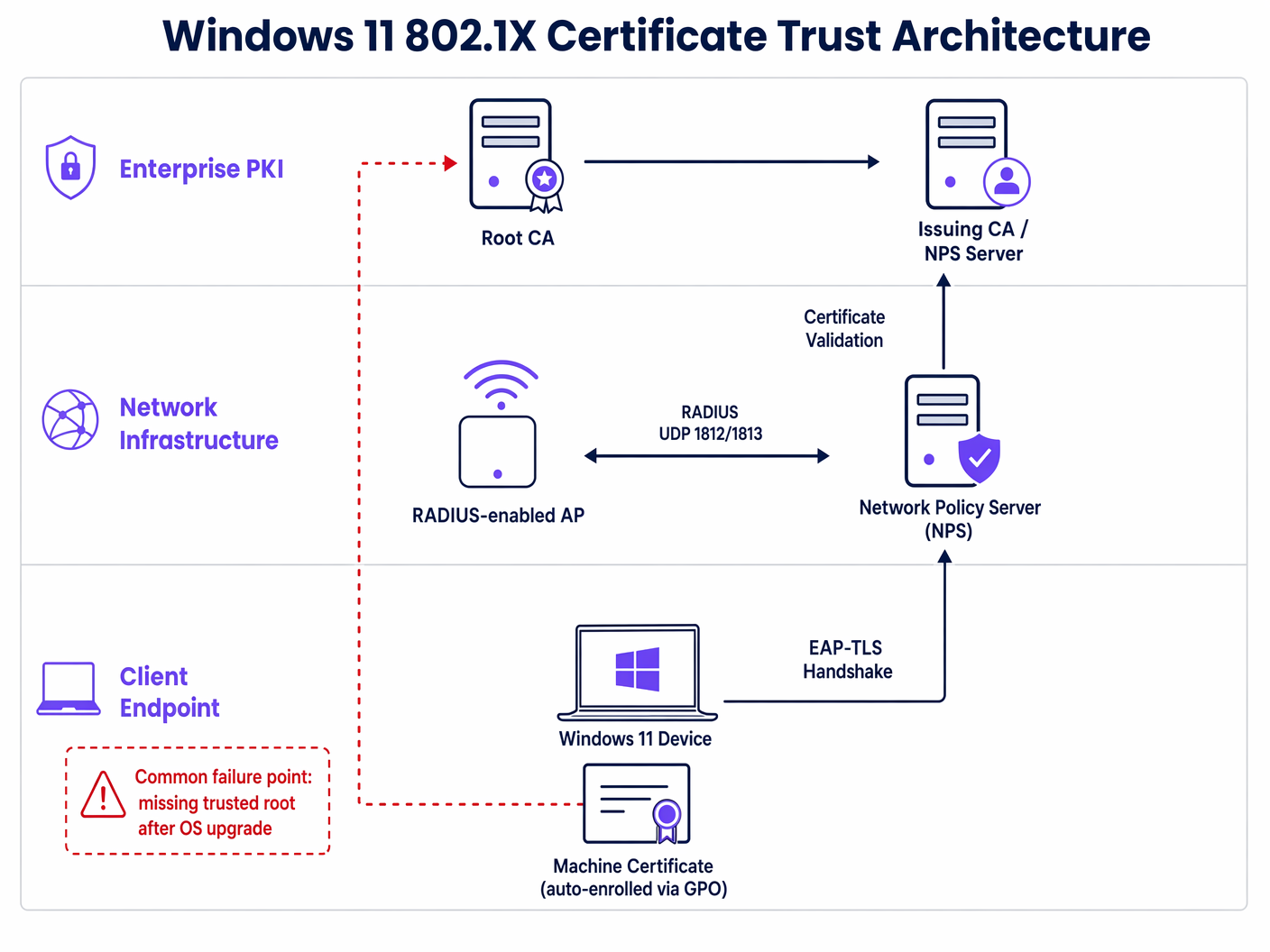
लॉग विश्लेषण और त्रुटि कोड
समस्या का निदान करने के लिए Windows इवेंट व्यूअर के भीतर WLAN-AutoConfig परिचालन लॉग की जांच करना आवश्यक है। प्रमाणपत्र विश्वास विफलता के सबसे सामान्य संकेतक हैं:
- त्रुटि 11: नेटवर्क ने प्रतिक्रिया देना बंद कर दिया है।
- त्रुटि 15: प्रमाणपत्र श्रृंखला एक ऐसे प्राधिकरण द्वारा जारी की गई थी जिस पर भरोसा नहीं किया जाता है।
ये त्रुटियाँ पुष्टि करती हैं कि वास्तविक उपयोगकर्ता या मशीन क्रेडेंशियल सत्यापित होने से पहले TLS हैंडशेक विफल हो रहा है।
कार्यान्वयन मार्गदर्शिका
Windows 11 802.1X समस्या को हल करने के लिए आपके एंडपॉइंट प्रबंधन बेसलाइन में एक समन्वित अपडेट की आवश्यकता है। निम्नलिखित चरण एक्टिव डायरेक्टरी ग्रुप पॉलिसी के माध्यम से आवश्यक समाधान की रूपरेखा प्रस्तुत करते हैं।
चरण 1: रूट CA परिनियोजन सत्यापित करें
सुनिश्चित करें कि आपके NPS सर्वर का प्रमाणपत्र जारी करने वाला रूट CA प्रमाणपत्र सभी क्लाइंट मशीनों पर Trusted Root Certification Authorities स्टोर में परिनियोजित है। यह आमतौर पर Computer Configuration > Policies > Windows Settings > Security Settings > Public Key Policies के माध्यम से नियंत्रित किया जाता है।
चरण 2: वायरलेस नेटवर्क (IEEE 802.11) नीति को पुन: कॉन्फ़िगर करें
महत्वपूर्ण समाधान वायरलेस प्रोफ़ाइल के भीतर विश्वास संबंध को स्पष्ट रूप से परिभाषित करने में निहित है।
- संबंधित GPO खोलें और
Computer Configuration > Policies > Windows Settings > Security Settings > Wireless Network (IEEE 802.11) Policiesपर नेविगेट करें। - अपनी कॉर्पोरेट SSID प्रोफ़ाइल के गुणों को संपादित करें।
- सुरक्षा टैब पर नेविगेट करें और अपनी चुनी हुई नेटवर्क प्रमाणीकरण विधि (उदाहरण के लिए, Microsoft: प्रोटेक्टेड EAP (PEAP)) के लिए गुण का चयन करें।
- PEAP गुण विंडो में, प्रमाणपत्र को मान्य करके सर्वर की पहचान सत्यापित करें के लिए बॉक्स को चेक करें।
- महत्वपूर्ण रूप से, विश्वसनीय रूट सर्टिफिकेशन अथॉरिटीज सूची में, आपको उस CA के बगल में स्थित बॉक्स को स्पष्ट रूप से चेक करना होगा जिसने आपका NPS प्रमाणपत्र जारी किया था।
- रोमिंग प्रदर्शन को अनुकूलित करने के लिए फास्ट रीकनेक्ट सक्षम करें चेक किया गया है, यह सुनिश्चित करें।
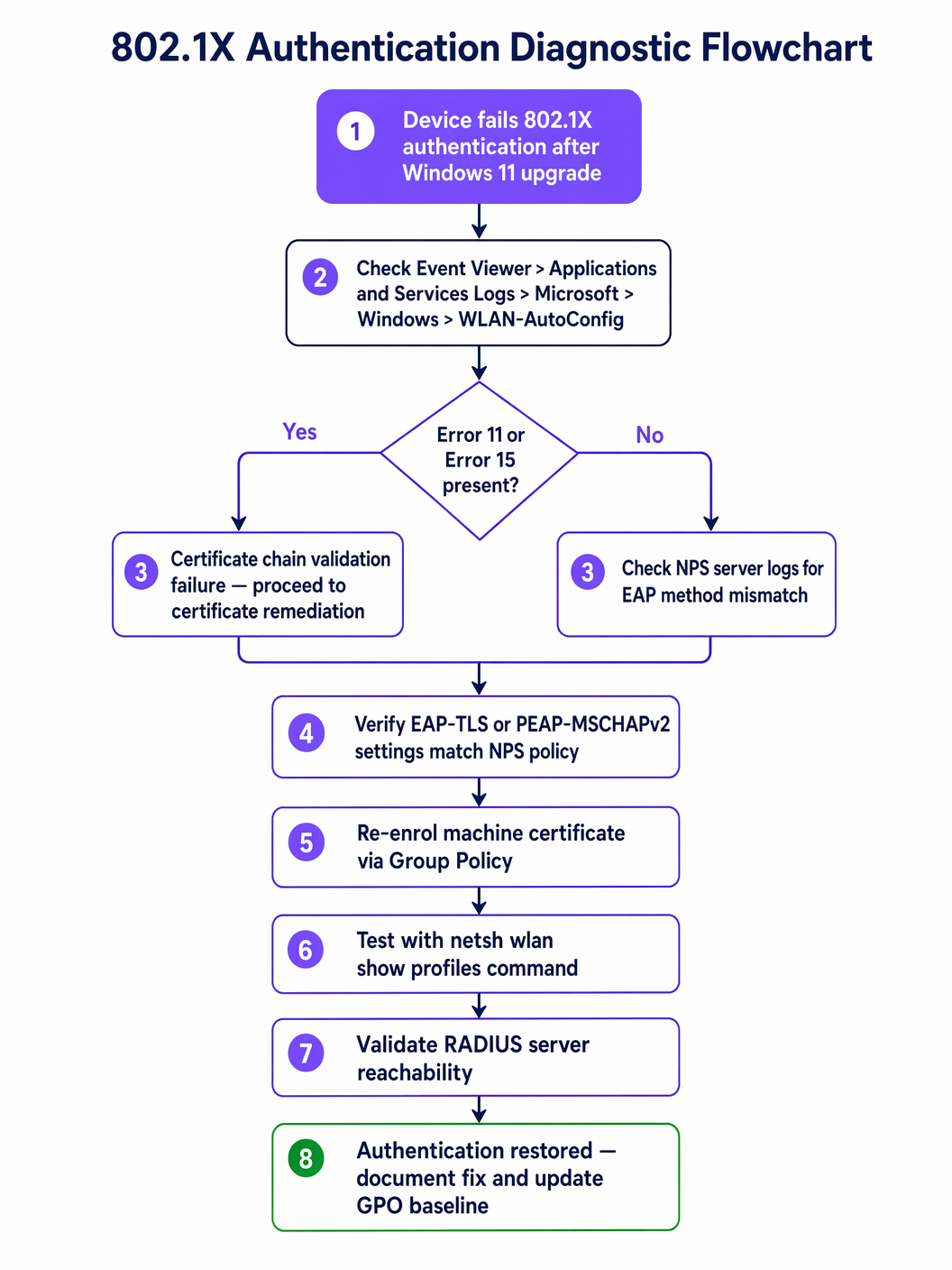
चरण 3: क्रेडेंशियल गार्ड संघर्षों का समाधान करें
यदि प्रमाणपत्र विश्वास सत्यापित है लेकिन PEAP-MSCHAPv2 प्रमाणीकरण अभी भी विफल रहता है, तो क्रेडेंशियल गार्ड संभवतः हस्तक्षेप कर रहा है। दीर्घकालिक वास्तुशिल्प समाधान पासवर्ड-आधारित प्रमाणीकरण से पूरी तरह से दूर जाना है। EAP-TLS (मशीन और उपयोगकर्ता दोनों के लिए प्रमाणपत्र-आधारित प्रमाणीकरण) पर स्विच करने से MS-CHAPv2 क्रेडेंशियल स्टोरेज की समस्या पूरी तरह से दूर हो जाती है। अपनी सुरक्षा स्थिति को आधुनिक बनाने पर विस्तृत मार्गदर्शन के लिए, उन्नत वायरलेस सुरक्षा के लिए WPA3-एंटरप्राइज़ लागू करना पर हमारी मार्गदर्शिका की समीक्षा करें।
सर्वोत्तम प्रथाएँ
एंटरप्राइज़ वायरलेस इन्फ्रास्ट्रक्चर का प्रबंधन करते समय, विशेष रूप से उच्च-घनत्व वाले वातावरण में जैसे स्वास्थ्य सेवा या बड़े पैमाने पर परिवहन हब, जोखिम कम करने के लिए विक्रेता-तटस्थ मानकों का पालन करना आवश्यक है।
- **प्रमाणपत्र सत्यापन को कभी अक्षम न करें:**सबसे आम—और खतरनाक—समाधान जो IT टीमें अपनाती हैं, वह है "सर्वर की पहचान सत्यापित करें" बॉक्स को अनचेक करना। यह नेटवर्क को ईविल ट्विन हमलों और क्रेडेंशियल हार्वेस्टिंग के प्रति संवेदनशील बनाता है, जो सीधे PCI DSS अनुपालन का उल्लंघन करता है। हमेशा अंतर्निहित ट्रस्ट चेन को ठीक करें।
- मशीन प्रमाणीकरण लागू करें: केवल उपयोगकर्ता क्रेडेंशियल्स पर निर्भर रहने का मतलब है कि उपयोगकर्ता के लॉग इन करने से पहले डिवाइस नेटवर्क से कनेक्ट नहीं हो सकते, जिससे GPO अपडेट और रिमोट प्रबंधन बाधित होता है। यह सुनिश्चित करने के लिए मशीन प्रमाणीकरण (EAP-TLS का उपयोग करके) लागू करें कि डिवाइस हमेशा कनेक्टेड और प्रबंधनीय रहें।
- EAP-TLS पर मानकीकृत करें: पासवर्ड-आधारित 802.1X (PEAP) OS-स्तर के सुरक्षा परिवर्तनों के खिलाफ तेजी से कमजोर हो रहा है। EAP-TLS मजबूत सुरक्षा, सहज उपयोगकर्ता अनुभव (कोई पासवर्ड प्रॉम्प्ट नहीं), और क्रेडेंशियल गार्ड संघर्षों से मुक्ति प्रदान करता है।
समस्या निवारण और जोखिम न्यूनीकरण
प्राथमिक प्रमाणपत्र ट्रस्ट समस्या से परे, नेटवर्क आर्किटेक्ट्स को Windows 11 रोलआउट के दौरान माध्यमिक विफलता मोड के लिए तैयार रहना चाहिए।
RADIUS सर्वर ओवरलोड
जब मशीनों का एक बड़ा बैच अपग्रेड किया जाता है और उसके बाद प्रमाणीकरण विफल हो जाता है, तो वे लगातार कनेक्शन को फिर से प्रयास करेंगे। इससे RADIUS स्टॉर्म हो सकता है, जिससे NPS सर्वर ओवरलोड हो जाएंगे और पूरे वायरलेस नेटवर्क के लिए सेवा-से-इनकार की स्थिति उत्पन्न हो सकती है।
न्यूनीकरण: वायरलेस LAN कंट्रोलर (WLCs) पर आक्रामक RADIUS टाइमआउट और पुनः प्रयास सीमाएं लागू करें। NPS सर्वर CPU और मेमोरी उपयोग की निगरानी के लिए OS अपग्रेड रोलआउट को चरणबद्ध करें।
Captive Portal फॉलबैक
उन डिवाइसों के लिए जिन्हें GPO के माध्यम से बिल्कुल भी ठीक नहीं किया जा सकता (उदाहरण के लिए, अप्रबंधित BYOD या ठेकेदार डिवाइस), एक सुरक्षित फॉलबैक तंत्र प्रदान करें। Captive Portal के साथ एक मजबूत Guest WiFi समाधान का उपयोग करने से इन उपयोगकर्ताओं को आंतरिक कॉर्पोरेट नेटवर्क से अलग रहते हुए इंटरनेट एक्सेस प्राप्त करने की अनुमति मिलती है। यह सुनिश्चित करता है कि IT टीम 802.1X विफलता की जांच करते समय उत्पादकता बाधित न हो।
ROI और व्यावसायिक प्रभाव
802.1X प्रमाणीकरण समस्याओं को हल करना केवल एक तकनीकी आवश्यकता नहीं है; इसके सीधे व्यावसायिक निहितार्थ हैं।
- हेल्पडेस्क लागत में कमी: एक सक्रिय GPO फिक्स सैकड़ों टियर-1 सपोर्ट टिकटों को रोकता है, जिससे IT परिचालन व्यय में उल्लेखनीय कमी आती है।
- परिचालन निरंतरता: Retail जैसे क्षेत्रों में, जहाँ मोबाइल पॉइंट-ऑफ-सेल (mPOS) डिवाइस सुरक्षित Wi-Fi पर निर्भर करते हैं, प्रमाणीकरण विफलताएँ सीधे राजस्व सृजन को प्रभावित करती हैं।
- अनुपालन स्थिति: सख्त प्रमाणपत्र सत्यापन बनाए रखना नियामक ढाँचों के साथ निरंतर अनुपालन सुनिश्चित करता है, जिससे डेटा उल्लंघनों से जुड़े संभावित जुर्माने और प्रतिष्ठा को नुकसान से बचा जा सकता है।
Windows 11 प्रमाणीकरण विफलताओं के मूल कारण को संबोधित करके और मजबूत EAP-TLS आर्किटेक्चर की ओर बढ़कर, IT लीडर यह सुनिश्चित कर सकते हैं कि उनका वायरलेस इंफ्रास्ट्रक्चर एक सुरक्षित, उच्च-प्रदर्शन वाली संपत्ति बना रहे।
Key Terms & Definitions
802.1X
An IEEE standard for port-based network access control, providing an authentication mechanism to devices wishing to attach to a LAN or WLAN.
The foundational security protocol for enterprise wireless networks, ensuring only authorized devices and users can access corporate resources.
PEAP (Protected Extensible Authentication Protocol)
An authentication protocol that encapsulates the EAP within an encrypted and authenticated TLS tunnel.
The most common legacy 802.1X deployment, relying on a server-side certificate and client-side passwords (MS-CHAPv2). It is highly susceptible to Windows 11 upgrade issues.
EAP-TLS (Extensible Authentication Protocol-Transport Layer Security)
An EAP method that relies on client and server certificates to establish a secure connection.
The recommended architectural standard for modern enterprise wireless, providing the highest level of security and immunity to password-related OS conflicts.
RADIUS (Remote Authentication Dial-In User Service)
A networking protocol that provides centralized Authentication, Authorization, and Accounting (AAA) management.
The server component (often Microsoft NPS) that processes the 802.1X authentication requests from the wireless access points.
Supplicant
The client device (e.g., a Windows 11 laptop) attempting to access the network.
The endpoint that must be correctly configured via GPO to trust the RADIUS server's certificate.
Authenticator
The network device (e.g., a wireless access point or switch) that facilitates the authentication process between the supplicant and the RADIUS server.
The infrastructure component that enforces the 802.1X policy, blocking access until authentication is successful.
Credential Guard
A Windows security feature that uses virtualization-based security to isolate secrets so that only privileged system software can access them.
A common cause of PEAP-MSCHAPv2 failures in Windows 11, as it alters how legacy passwords are handled during the authentication process.
Group Policy Object (GPO)
A collection of settings that define what a system will look like and how it will behave for a defined group of users or computers in Active Directory.
The primary mechanism for deploying the required certificate trust and wireless profile configurations to resolve Windows 11 802.1X issues at scale.
Case Studies
A large retail chain with 500 locations is rolling out Windows 11 to all store manager laptops. After the first 50 upgrades, managers report they cannot connect to the 'Corp-Secure' SSID. The helpdesk confirms the devices are receiving the correct GPO, but the connection drops silently. How should the network architect resolve this?
The architect must first verify the specific error in the WLAN-AutoConfig logs on a failing device. If Error 11 or 15 is present, the issue is certificate trust. The architect must edit the 'Wireless Network (IEEE 802.11) Policies' GPO. Within the PEAP properties for the 'Corp-Secure' profile, they must explicitly check the box next to the specific Root CA that issued the RADIUS server's certificate. Once the GPO is updated and pushed via gpupdate /force, the laptops will successfully validate the server and connect.
A hospital IT team has updated their GPO to explicitly trust the RADIUS server's Root CA, but Windows 11 devices using PEAP-MSCHAPv2 are still failing to authenticate. The NPS logs show 'Authentication failed due to a user credentials mismatch.' What is the likely cause and the recommended long-term solution?
The likely cause is Windows Defender Credential Guard, which is enabled by default in Windows 11 and can interfere with legacy MS-CHAPv2 credential handling. The immediate fix is to disable Credential Guard via GPO for those specific devices, but this weakens the endpoint security posture. The recommended long-term architectural solution is to migrate the wireless network to EAP-TLS using machine and user certificates. This eliminates the reliance on passwords and bypasses the Credential Guard conflict entirely.
Scenario Analysis
Q1. A CTO asks you to resolve a widespread 802.1X failure immediately by unchecking 'Verify the server's identity' in the GPO to get the sales team back online. How do you respond?
💡 Hint:Consider the compliance and security implications of disabling certificate validation.
Show Recommended Approach
I would advise against this approach. Disabling certificate validation exposes the network to Evil Twin attacks and credential harvesting, which directly violates PCI DSS and GDPR compliance. The correct approach is to identify the missing Root CA and explicitly trust it within the GPO. If immediate access is required, we can route affected users through a secure Guest WiFi captive portal as a temporary fallback while the GPO propagates.
Q2. You are designing the wireless architecture for a new corporate campus and must choose between PEAP-MSCHAPv2 and EAP-TLS. Given the recent Windows 11 upgrade issues, which do you recommend and why?
💡 Hint:Evaluate the impact of OS-level security features like Credential Guard on legacy authentication methods.
Show Recommended Approach
I strongly recommend EAP-TLS. While PEAP-MSCHAPv2 is easier to deploy initially (relying on AD passwords), it is highly susceptible to OS-level changes like Credential Guard and profile migration failures. EAP-TLS uses machine and user certificates, eliminating password-related vulnerabilities, providing a seamless user experience, and ensuring long-term architectural stability against future OS updates.
Q3. After deploying the correct GPO to explicitly trust the Root CA, several machines still fail to connect. You notice these machines have not been on the network for several weeks. What is the likely issue and how do you resolve it?
💡 Hint:Consider how Group Policy updates are delivered to endpoints.
Show Recommended Approach
The likely issue is that these machines have not received the updated GPO because they cannot connect to the network to pull the policy. This is a classic 'chicken-and-egg' problem. To resolve it, the machines must be temporarily connected via a wired Ethernet connection or a secure VPN to authenticate to the domain and run gpupdate /force to receive the new wireless profile configuration.




