

Evaluación de la postura del dispositivo para el control de acceso a la red
Esta guía técnica explica cómo funciona la evaluación de la postura del dispositivo para el control de acceso a la red (NAC), detallando la arquitectura, la integración con MDM y los flujos de remediación necesarios para implementar WiFi Zero Trust en entornos empresariales y recintos.
🎧 Escucha esta guía
Ver transcripción
Resumen ejecutivo
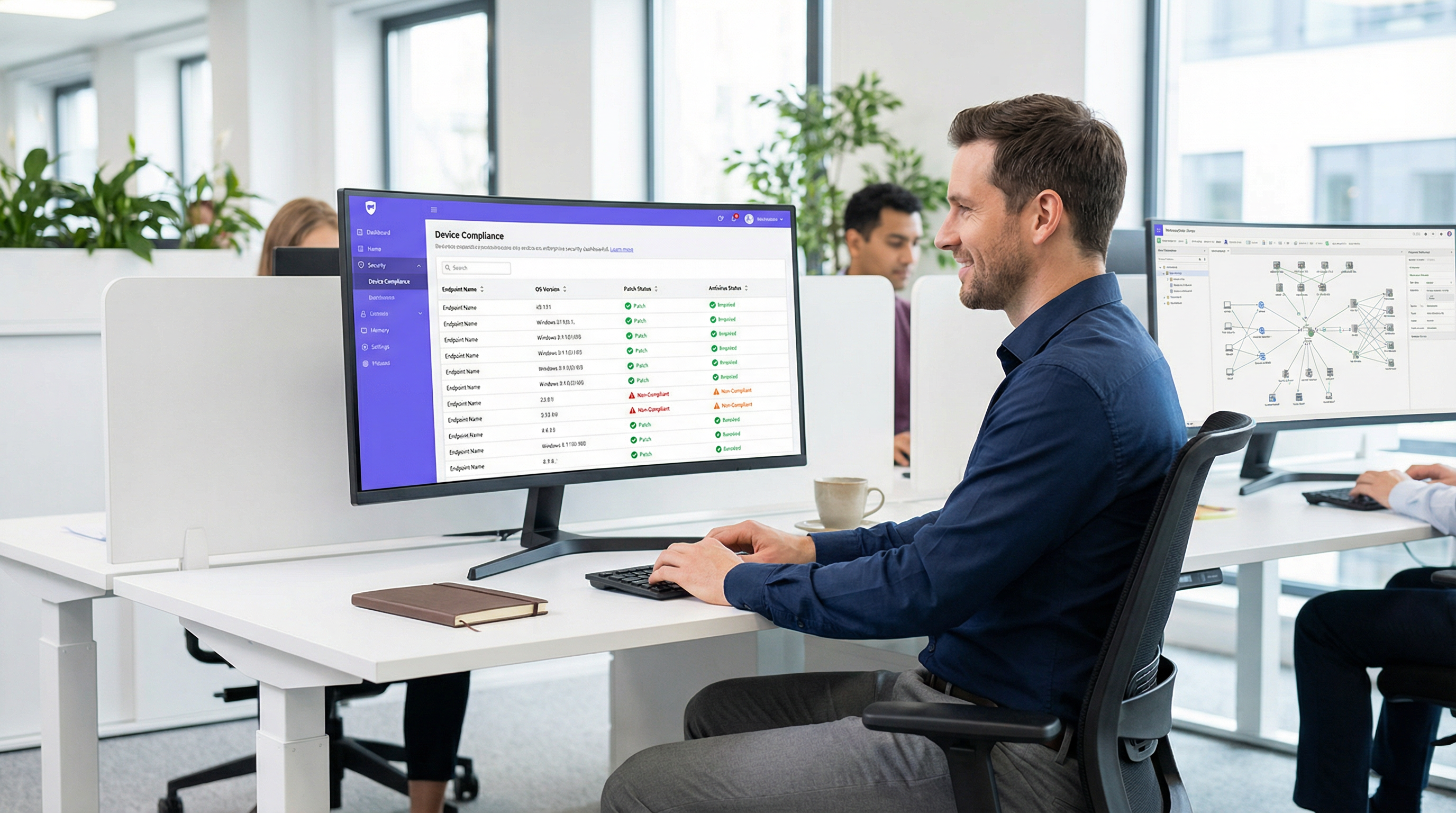
A medida que el perímetro de la red empresarial se disuelve, la autenticación tradicional basada en la identidad ya no es suficiente. Validar que un usuario es quien dice ser a través de 802.1X o un Captive Portal no aborda el riesgo que representa el dispositivo que está utilizando. La evaluación de la postura del dispositivo es la siguiente capa crítica de defensa en una arquitectura Zero Trust, interrogando el estado de salud y cumplimiento de un endpoint antes de otorgar acceso a la red.
Para los gerentes de TI y arquitectos de red que gestionan entornos complejos como hoteles, cadenas de retail, estadios e instalaciones del sector público, el acceso a la red basado en la postura garantiza que los dispositivos sin parches, no gestionados o comprometidos no puedan moverse lateralmente a través de las VLANs corporativas. Esta guía proporciona un modelo práctico y neutral respecto al proveedor para implementar la evaluación de la postura del dispositivo para el control de acceso a la red. Cubre los modelos arquitectónicos, los puntos de integración con RADIUS y las plataformas de gestión de dispositivos móviles (MDM), y los flujos de trabajo de remediación críticos necesarios para manejar dispositivos no conformes sin saturar el soporte técnico de TI. Al final de esta guía, tendrá un marco claro para desplegar verificaciones de cumplimiento de endpoints a través de WiFi, reduciendo su superficie de ataque y manteniendo el cumplimiento continuo con marcos como PCI DSS y GDPR.
Análisis técnico profundo: La arquitectura de la evaluación de la postura
La evaluación de la postura del dispositivo altera fundamentalmente el flujo tradicional de autenticación de red. En lugar de una decisión binaria de permitir/denegar basada en credenciales, el sistema de control de acceso a la red (NAC) introduce un estado condicional donde el acceso depende de que el dispositivo cumpla con criterios de salud específicos.
Los tres modelos arquitectónicos
Implementar la evaluación de la postura del dispositivo requiere elegir un modelo arquitectónico que se alinee con su estrategia de gestión de endpoints. Existen tres enfoques principales:
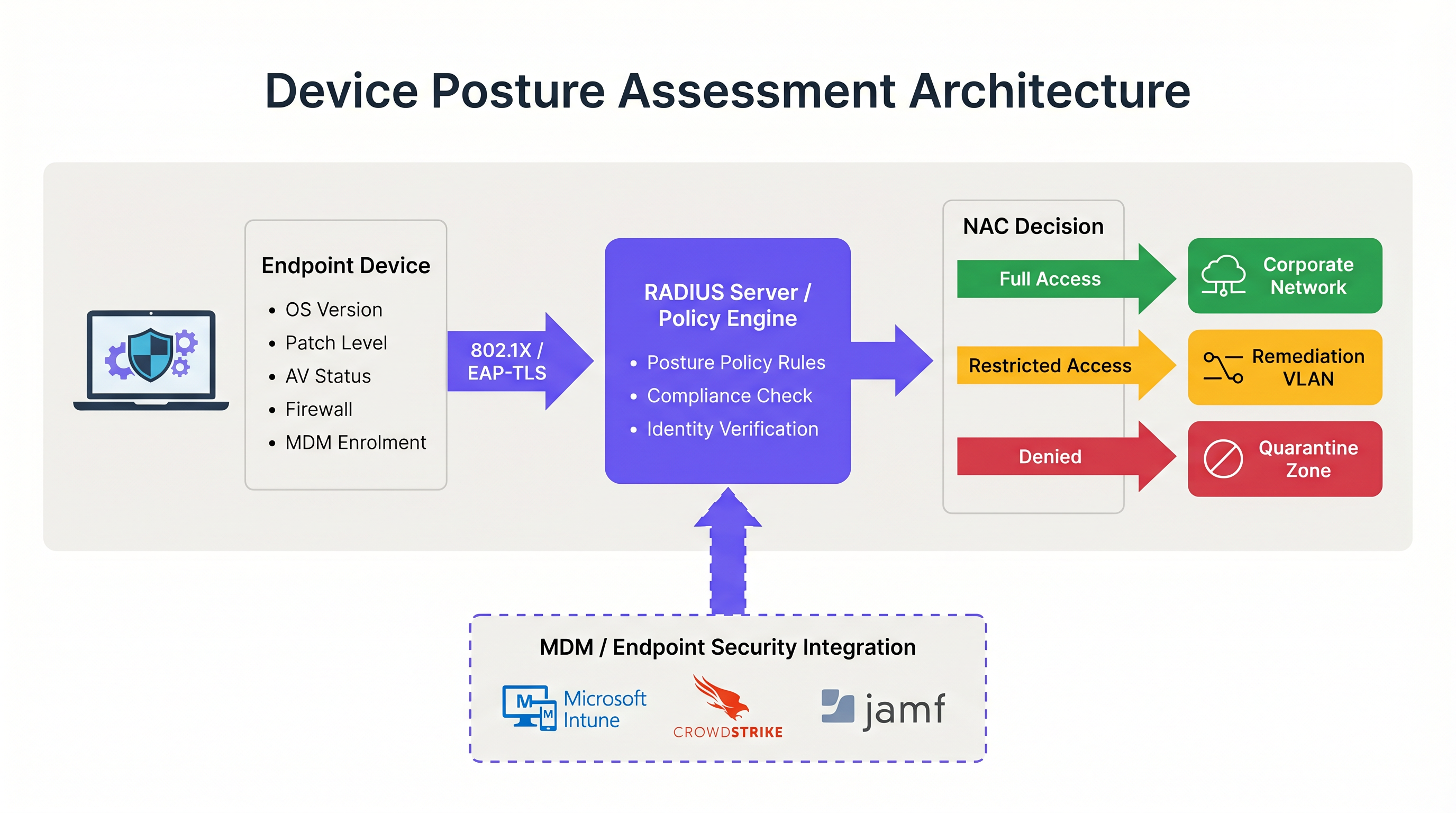
- Evaluación de postura basada en agentes: Este es el método más completo. Un agente de software ligero instalado en el endpoint recopila telemetría detallada —como la versión del SO, el nivel de parches, el estado del antivirus y los procesos en ejecución— y transmite estos datos al motor de políticas de NAC. La comunicación suele ocurrir a través de un protocolo seguro o API inmediatamente después de la autenticación inicial 802.1X. Si bien la evaluación basada en agentes proporciona los datos de mayor fidelidad, requiere control administrativo sobre el endpoint para desplegar el agente, lo que la hace inadecuada para entornos no gestionados o BYOD.
- Evaluación de postura sin agentes (integrada con MDM): En este modelo, el sistema NAC infiere la salud del dispositivo consultando una plataforma de gestión de dispositivos móviles (MDM) o de gestión unificada de endpoints (UEM) a través de una API. Cuando un dispositivo se autentica, el servidor RADIUS llama a plataformas como Microsoft Intune o Jamf para recuperar el registro de cumplimiento del dispositivo. Este enfoque es altamente efectivo para dispositivos corporativos gestionados y elimina la necesidad de un agente NAC dedicado. Sin embargo, depende de que la plataforma MDM tenga información actualizada; si el dispositivo ha estado fuera de línea, el estado de cumplimiento puede estar desactualizado.
- Evaluación basada en la red: Este enfoque pasivo implica que el sistema NAC escanee el dispositivo que se conecta utilizando técnicas como consultas SNMP, llamadas WMI o huellas de tráfico. No requiere agente ni inscripción en MDM, lo que lo hace útil para perfilar dispositivos IoT o sistemas heredados. Sin embargo, la profundidad de la información es significativamente limitada en comparación con los otros modelos, y no puede determinar de manera confiable los niveles de parches o la vigencia de las firmas de antivirus.
El flujo de integración de RADIUS y 802.1X
La integración de la evaluación de la postura con la autenticación 802.1X es donde la arquitectura se vuelve operativa. El proceso depende en gran medida del protocolo RADIUS y, específicamente, del mecanismo de cambio de autorización (CoA) definido en RFC 5176.
Cuando un suplicante (el dispositivo) inicia una conexión 802.1X, presenta las credenciales al autenticador (el punto de acceso inalámbrico o switch). El autenticador las reenvía al servidor RADIUS. Tras la verificación exitosa de la identidad, el servidor RADIUS devuelve un mensaje Access-Accept. Sin embargo, en un entorno consciente de la postura, esta aceptación inicial coloca al dispositivo en un estado restringido, a menudo una VLAN de cuarentena o de postura dedicada.
Mientras está en esta VLAN restringida, ocurre la evaluación de la postura. El motor de políticas evalúa el dispositivo frente al conjunto de reglas configurado. Si el dispositivo pasa, el motor de políticas emite un mensaje RADIUS CoA al autenticador, indicándole que mueva el dispositivo de la VLAN de postura a la VLAN de producción adecuada. Si el dispositivo falla, permanece en la VLAN restringida o se mueve a una VLAN de remediación donde puede acceder a los servidores de actualización necesarios.
Para una seguridad óptima, este flujo debe utilizar EAP-TLS. EAP-TLS proporciona autenticación mutua basada en certificados, lo que permite al servidor RADIUS verificar criptográficamente la identidad del dispositivo antes de que comience la verificación de la postura. Esto garantiza que los datos de postura provengan de un endpoint conocido y confiable en lugar de una dirección MAC suplantada. Para leer más sobre cómo asegurar el acceso a los dispositivos, consulte nuestra guía sobre Autenticación 802.1X: Asegurando el acceso a la red en dispositivos modernos .
Guía de implementación: Despliegue del acceso basado en la postura
Desplegar la evaluación de la postura del dispositivo en un entorno empresarial real requiere una planificación meticulosa para evitar interrumpir las operaciones comerciales. Se recomienda el siguiente enfoque por fases para entornos que van desde oficinas corporativas hasta recintos de Hospitalidad .
Fase 1: Visibilidad de línea base (Modo de monitoreo)
El paso más crítico en el despliegue es establecer una línea base. Nunca habilite políticas de bloqueo o remediación el primer día. En su lugar, configure el sistema NAC para ejecutar verificaciones de postura en un modo de solo monitoreo. Durante esta fase, el sistema evalúa los dispositivos y registra los resultados, pero no altera las asignaciones de VLAN ni restringe el acceso.
Ejecute esta fase durante un mínimo de cuatro semanas. Analice los registros para identificar el porcentaje de dispositivos no conformes, los atributos específicos que fallan con más frecuencia (por ejemplo, SO desactualizado frente a firewall desactivado) y la distribución de fallas en diferentes tipos de dispositivos. Estos datos le permiten calibrar sus umbrales de política. Por ejemplo, si el 40% de su flota falla en un requisito de parche de 14 días, es posible que deba ajustar el umbral a 30 días inicialmente para evitar saturar el soporte técnico.
Fase 2: Diseño de segmentación de VLAN
Antes de aplicar las políticas, debe diseñar los segmentos de red que manejarán los diferentes estados de postura. Una arquitectura robusta de acceso a la red basada en la postura requiere al menos tres VLANs distintas:
- VLAN de producción: Acceso total a los recursos corporativos para dispositivos gestionados y conformes.
- VLAN de remediación: Acceso restringido que permite la comunicación solo con servidores de actualización (por ejemplo, Windows Update, WSUS), plataformas MDM y el portal de remediación de NAC. Sin acceso a subredes internas ni navegación general por internet.
- VLAN de invitados/BYOD: Acceso segmentado solo a internet para dispositivos personales no gestionados que no pueden ser verificados por postura.
Asegúrese de que sus puntos de acceso inalámbricos y switches centrales estén configurados para admitir la asignación dinámica de VLAN a través de atributos RADIUS. Comprender el papel de sus puntos de acceso es crucial aquí; para un repaso, consulte Definición de puntos de acceso inalámbricos: Su guía definitiva para 2026 .
Fase 3: Definición del conjunto de reglas de postura
Desarrolle un conjunto de reglas pragmático basado en sus datos del modo de monitoreo y los requisitos de cumplimiento. Una línea base empresarial estándar incluye:
- Sistema operativo: Debe ser una versión compatible (por ejemplo, Windows 10 22H2 o posterior, macOS 13 o posterior).
- Nivel de parches: Actualizaciones de seguridad críticas aplicadas en los últimos 30 días.
- Protección de endpoints: Agente de antivirus/EDR reconocido instalado, en ejecución y firmas actualizadas en los últimos 7 días.
- Firewall de host: Habilitado para todos los perfiles de red.
- Cifrado de disco: BitLocker o FileVault habilitado para la unidad del sistema.
Fase 4: Aplicación de flujos de trabajo de remediación
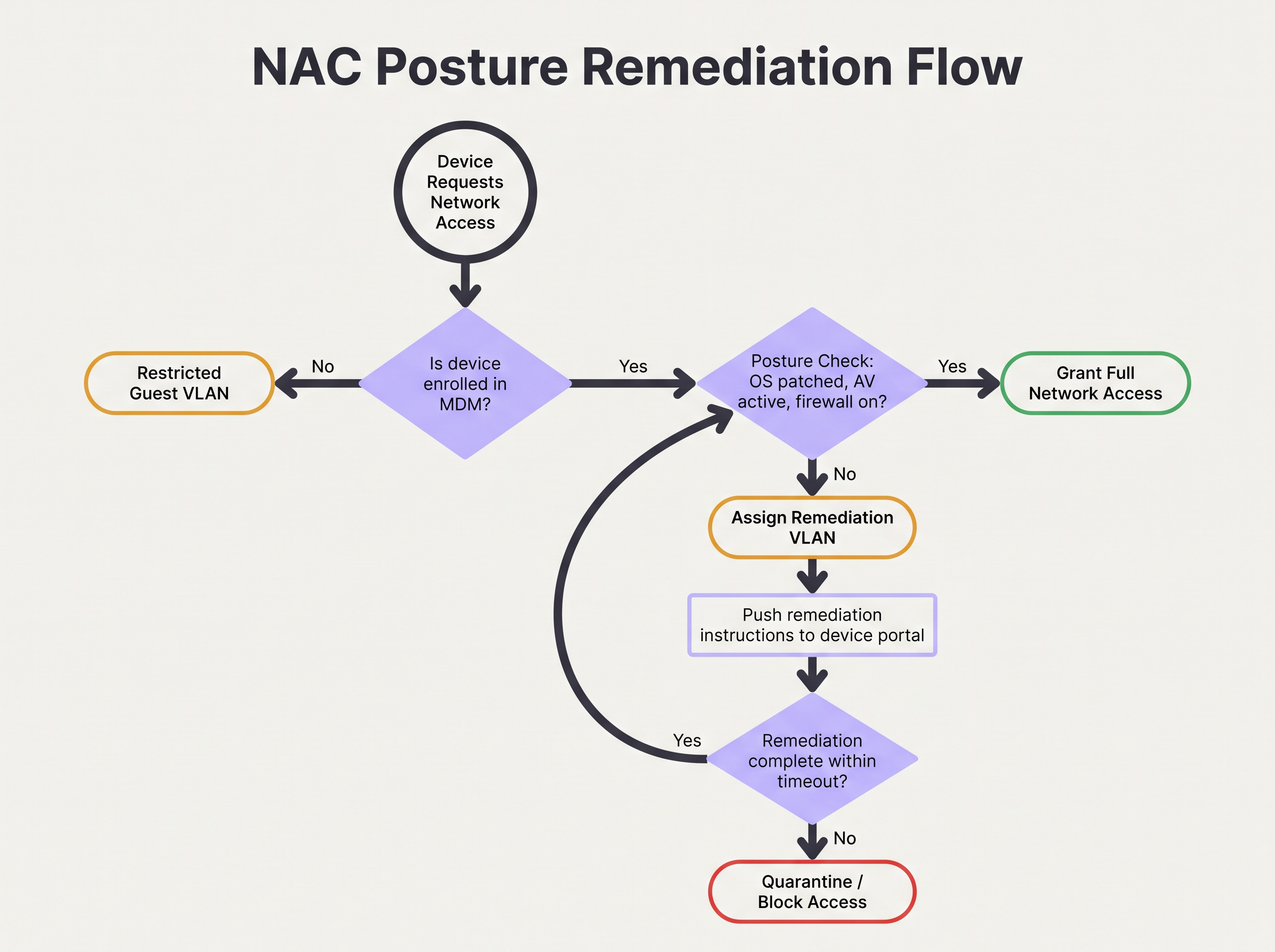
Cuando un dispositivo falla la verificación de postura, el flujo de trabajo de remediación debe ser automatizado y claro para el usuario. El dispositivo se asigna a la VLAN de remediación y el tráfico HTTP/HTTPS debe redirigirse a un Captive Portal. Este portal debe informar explícitamente al usuario por qué su dispositivo fue puesto en cuarentena (por ejemplo, "Su antivirus está desactualizado") y proporcionar pasos o enlaces accionables para resolver el problema.
Configure un tiempo de espera de remediación. Por ejemplo, a un dispositivo se le podrían permitir 24 horas en la VLAN de remediación para descargar los parches necesarios. Si el dispositivo no logra el cumplimiento dentro de este plazo, debe moverse a una VLAN de cuarentena estricta con todo el acceso bloqueado hasta la intervención de TI.
Mejores prácticas para entornos complejos
Implementar la evaluación de la postura en entornos complejos como el Retail o grandes recintos públicos introduce desafíos únicos, particularmente en lo que respecta a la diversidad y escala de los dispositivos.
Manejo de BYOD e IoT
En entornos con altos volúmenes de dispositivos no gestionados, como centros de Transporte o espacios de retail que ofrecen Guest WiFi , intentar aplicar verificaciones de postura en cada dispositivo es operativamente inviable. Debe establecer políticas explícitas para los dispositivos que no pueden ser evaluados.
La mejor práctica es utilizar MAC Authentication Bypass (MAB) o el perfilado de identidad para categorizar estos dispositivos al principio del flujo de autenticación. Los dispositivos BYOD no gestionados deben dirigirse automáticamente a la VLAN de invitados. Los dispositivos IoT (sensores, pantallas) deben colocarse en VLANs dedicadas y microsegmentadas con listas de control de acceso (ACLs) estrictas que limiten su comunicación a controladores específicos. La plataforma de Purple puede ayudar a identificar y gestionar estos diversos tipos de dispositivos; explore nuestras capacidades de Sensores para obtener más información.
Optimización para recintos de alta densidad
En entornos de alta densidad como estadios, la latencia introducida por la evaluación de la postura puede causar tiempos de espera de autenticación y fallas de conexión. Las verificaciones basadas en agentes pueden agregar varios segundos al proceso de conexión.
Para mitigar esto, implemente el almacenamiento en caché de la postura. Configure el motor de políticas de NAC para almacenar en caché el estado de cumplimiento de un dispositivo durante un período definido (por ejemplo, de 4 a 8 horas). Cuando un dispositivo se desplaza entre puntos de acceso o se desconecta brevemente, el servidor RADIUS puede utilizar el resultado de la postura almacenado en caché para otorgar acceso inmediato, evitando la sobrecarga de la evaluación completa. Esto es esencial para mantener el rendimiento y una experiencia de usuario positiva. La arquitectura de red subyacente también juega un papel; considere los beneficios discutidos en Los beneficios principales de SD WAN para las empresas modernas .
Resolución de problemas y mitigación de riesgos
Incluso con una planificación cuidadosa, el control de acceso basado en la postura puede fallar. Comprender los modos de falla comunes es crítico para mantener la disponibilidad de la red.
Fallas de CoA
El problema técnico más frecuente es la falla del mensaje de cambio de autorización (CoA) de RADIUS. Si el sistema NAC determina que un dispositivo cumple con los requisitos pero el punto de acceso descarta o ignora el paquete CoA, el dispositivo permanece atascado en la VLAN restringida.
Mitigación: Asegúrese de que el CoA esté habilitado explícitamente en todos los dispositivos de acceso a la red y que el servidor RADIUS esté configurado como un cliente CoA confiable. Verifique que el puerto UDP 3799 (el puerto CoA estándar) no esté bloqueado por firewalls entre el servidor RADIUS y los puntos de acceso. Monitoree las tasas de reconocimiento (ACK) de CoA en sus registros de RADIUS.
Limitación de tasa de la API de MDM
En despliegues sin agentes, una afluencia repentina de dispositivos que se autentican (por ejemplo, empleados que llegan a las 9:00 AM) puede hacer que el sistema NAC inunde la plataforma MDM con solicitudes de API. Esto puede activar la limitación de tasa de la API, lo que provoca que las verificaciones de postura fallen o agoten el tiempo de espera.
Mitigación: Implemente el procesamiento por lotes de solicitudes de API o el almacenamiento en caché dentro de la plataforma NAC. Si el MDM admite webhooks, configure el MDM para enviar proactivamente los cambios de estado de cumplimiento al sistema NAC, en lugar de que el sistema NAC consulte al MDM en cada autenticación.
ROI e impacto empresarial
El impacto empresarial de implementar la evaluación de la postura del dispositivo se extiende más allá de la reducción inmediata del riesgo. Altera fundamentalmente la postura de seguridad de la organización y proporciona retornos medibles.
Mitigación de riesgos y cumplimiento
El ROI principal es la prevención del movimiento lateral por parte de endpoints comprometidos. Al garantizar que solo los dispositivos saludables accedan a la red corporativa, las organizaciones reducen significativamente la probabilidad de propagación de ransomware. Además, la evaluación automatizada de la postura proporciona el monitoreo continuo necesario para satisfacer los requisitos de auditoría de PCI DSS, HIPAA y GDPR, reduciendo el costo y el esfuerzo de los informes de cumplimiento manuales.
Eficiencia operativa
Si bien el despliegue inicial requiere esfuerzo, un sistema de evaluación de postura bien ajustado reduce la carga operativa de TI. Los flujos de trabajo de remediación automatizados permiten a los usuarios resolver problemas menores de cumplimiento (como firmas desactualizadas) sin generar tickets de soporte técnico. Al integrar las verificaciones de postura con análisis de red más amplios —como WiFi Analytics — los equipos de TI obtienen una visibilidad sin precedentes de la salud de su parque de dispositivos, lo que permite una gestión proactiva en lugar de reactiva. Para los recintos que buscan mejorar su experiencia de red general, consulte nuestras perspectivas sobre Soluciones modernas de WiFi para hospitalidad que sus huéspedes merecen .
Términos clave y definiciones
Device Posture Assessment
The process of evaluating an endpoint's security and compliance state (e.g., OS version, patch level, antivirus status) before or during network authentication.
Crucial for Zero Trust architecture, ensuring that compromised or vulnerable devices cannot access sensitive network segments even if the user has valid credentials.
RADIUS CoA (Change of Authorization)
An extension to the RADIUS protocol (RFC 5176) that allows a RADIUS server to dynamically modify the authorization attributes of an active session, such as changing a device's VLAN.
The essential mechanism in posture assessment that moves a device from a quarantine/remediation VLAN to a production VLAN once the health check passes.
Remediation VLAN
A restricted network segment designed specifically for devices that fail posture checks. It provides limited access only to the resources needed to fix the compliance issue (e.g., update servers, MDM).
Used to isolate vulnerable devices while allowing them to self-correct without requiring manual IT intervention.
Agentless Posture Assessment
Evaluating device health without installing dedicated NAC software on the endpoint, typically by querying an MDM/UEM platform via API for the device's compliance record.
Preferred for corporate environments with robust MDM deployments as it reduces endpoint software bloat and simplifies management.
Dissolvable Agent
A temporary, lightweight application downloaded via a captive portal that performs a posture check and then removes itself from the device.
Commonly used in BYOD or guest environments where permanent agent installation is impossible or unacceptable to the user.
EAP-TLS (Extensible Authentication Protocol-Transport Layer Security)
An 802.1X authentication method that requires both the server and the client (device) to present valid digital certificates for mutual authentication.
The most secure foundation for posture assessment, as it cryptographically proves the device identity before health checks are evaluated.
Posture Caching
Storing the result of a successful posture check for a defined period so that subsequent authentications (e.g., roaming between APs) do not require a full re-evaluation.
Vital for maintaining network performance and reducing latency in high-density environments like stadiums or large offices.
Zero Trust Network Access (ZTNA)
A security framework requiring all users and devices, whether inside or outside the organization's network, to be authenticated, authorized, and continuously validated before being granted access.
Device posture assessment is a foundational pillar of ZTNA, providing the 'continuous validation' of the device state.
Casos de éxito
A 500-user corporate office is implementing device posture assessment. They currently use 802.1X (PEAP-MSCHAPv2) for all corporate laptops. They want to ensure no laptop connects unless its CrowdStrike Falcon agent is running and Windows is fully patched. How should they design the integration and remediation flow?
- Architecture Selection: Since all laptops are corporate-managed, an agentless approach via MDM integration (e.g., Intune) is recommended to avoid deploying a separate NAC agent. The NAC policy engine will query Intune for compliance status.
- VLAN Design: Create three VLANs: VLAN 10 (Corporate Production), VLAN 20 (Remediation), VLAN 30 (Guest).
- Policy Configuration: Configure Intune compliance policies to require CrowdStrike running and Windows updates within 30 days. Configure the NAC policy engine to map Intune 'Compliant' status to VLAN 10, and 'Non-Compliant' to VLAN 20.
- Authentication Flow: When a laptop authenticates via PEAP, the RADIUS server places it in VLAN 20 and queries Intune. If Intune returns 'Compliant', the RADIUS server sends a CoA message to the access point to switch the port/session to VLAN 10.
- Remediation: If Intune returns 'Non-Compliant', the laptop remains in VLAN 20. DHCP provides an IP, and DNS/firewall rules redirect HTTP traffic to a portal explaining the failure and allowing access only to CrowdStrike and Windows Update servers.
A large university campus wants to implement posture checks, but 80% of the devices are student BYOD laptops and phones. They cannot force MDM enrolment on these devices. How should they approach posture assessment?
- Architecture Selection: A hybrid approach is necessary. Use agentless/MDM checks for staff/faculty corporate devices, and a captive portal with a dissolvable agent or network-based assessment for student BYOD.
- BYOD Flow: Students connect to the 'Student-WiFi' SSID. They authenticate via a captive portal using university credentials.
- Dissolvable Agent: Upon login, the portal prompts the user to run a lightweight, temporary applet (dissolvable agent) that checks basic posture (e.g., minimum OS version, active firewall) without requiring admin rights or permanent installation.
- Enforcement: If the dissolvable agent reports a pass, the device is granted access to the student VLAN. If it fails, the portal displays instructions on how to update their OS.
- Alternative (Network-based): If dissolvable agents cause too much friction, use passive network profiling (DHCP fingerprinting, HTTP user-agent parsing) to detect grossly outdated OS versions and block them, accepting a lower level of assurance for BYOD.
Análisis de escenarios
Q1. Your organisation is rolling out posture assessment for 2,000 corporate laptops. You have configured the policy to require Windows 11 and an active EDR agent. On Monday morning, you plan to enable the policy in enforcement mode. What critical step have you missed?
💡 Sugerencia:Consider the impact on the helpdesk if your assumptions about the fleet's health are wrong.
Mostrar enfoque recomendado
You have missed the 'Monitor Mode' phase. Before enforcing a blocking policy, the system must run in monitor-only mode for several weeks to establish a baseline of compliance. Enabling enforcement on day one without this data will likely result in a massive spike in helpdesk tickets from users who unexpectedly fail the posture check.
Q2. A device successfully authenticates via 802.1X and passes the MDM posture check. The RADIUS server logs show an Access-Accept and a successful posture evaluation, but the user reports they still cannot access the internet or corporate resources. What is the most likely point of failure in the architecture?
💡 Sugerencia:Think about how the network access device (the AP or switch) is instructed to change the user's access level after the posture check completes.
Mostrar enfoque recomendado
The most likely failure is the RADIUS Change of Authorization (CoA). The device was likely placed in a restricted posture VLAN initially. Even though the posture check passed on the server side, if the CoA message was dropped, blocked by a firewall, or not processed by the access point, the device will remain stuck in the restricted VLAN.
Q3. You manage the WiFi for a retail chain. Corporate devices are managed via Intune, but store managers often connect personal iPads to the staff network. You want to implement posture checks for corporate devices. How should you handle the personal iPads?
💡 Sugerencia:Consider whether you can perform agentless or agent-based checks on devices you don't own.
Mostrar enfoque recomendado
You cannot reliably perform deep posture checks on unmanaged personal devices without causing significant user friction. The best approach is to use identity profiling or MAB to identify the personal iPads and automatically route them to a segmented Guest or BYOD VLAN with internet-only access, bypassing the strict posture requirements applied to the corporate devices.
Conclusiones clave
- ✓Device posture assessment evaluates endpoint health (OS, patches, AV) before granting network access, moving beyond simple identity verification.
- ✓It is a foundational element of Zero Trust architecture, preventing vulnerable devices from moving laterally on the network.
- ✓Architectures include agent-based (deepest visibility), agentless via MDM integration (best for corporate fleets), and network-based profiling.
- ✓The process relies heavily on RADIUS Change of Authorization (CoA) to dynamically move devices between Posture, Remediation, and Production VLANs.
- ✓Always deploy posture policies in monitor-only mode for several weeks to establish a baseline before enforcing blocking rules.
- ✓Robust remediation workflows are essential to allow users to self-correct compliance issues without overwhelming the IT helpdesk.
- ✓For BYOD and high-density environments, utilize posture caching and explicit routing to guest VLANs to minimize user friction and latency.




