

Valutazione della Postura dei Dispositivi per il Network Access Control
Questa guida tecnica spiega come funziona la valutazione della postura dei dispositivi per il Network Access Control (NAC), descrivendo l'architettura, l'integrazione MDM e i flussi di remediation necessari per implementare il WiFi Zero Trust in ambienti aziendali e grandi strutture.
🎧 Ascolta questa guida
Visualizza trascrizione
Sintesi Operativa
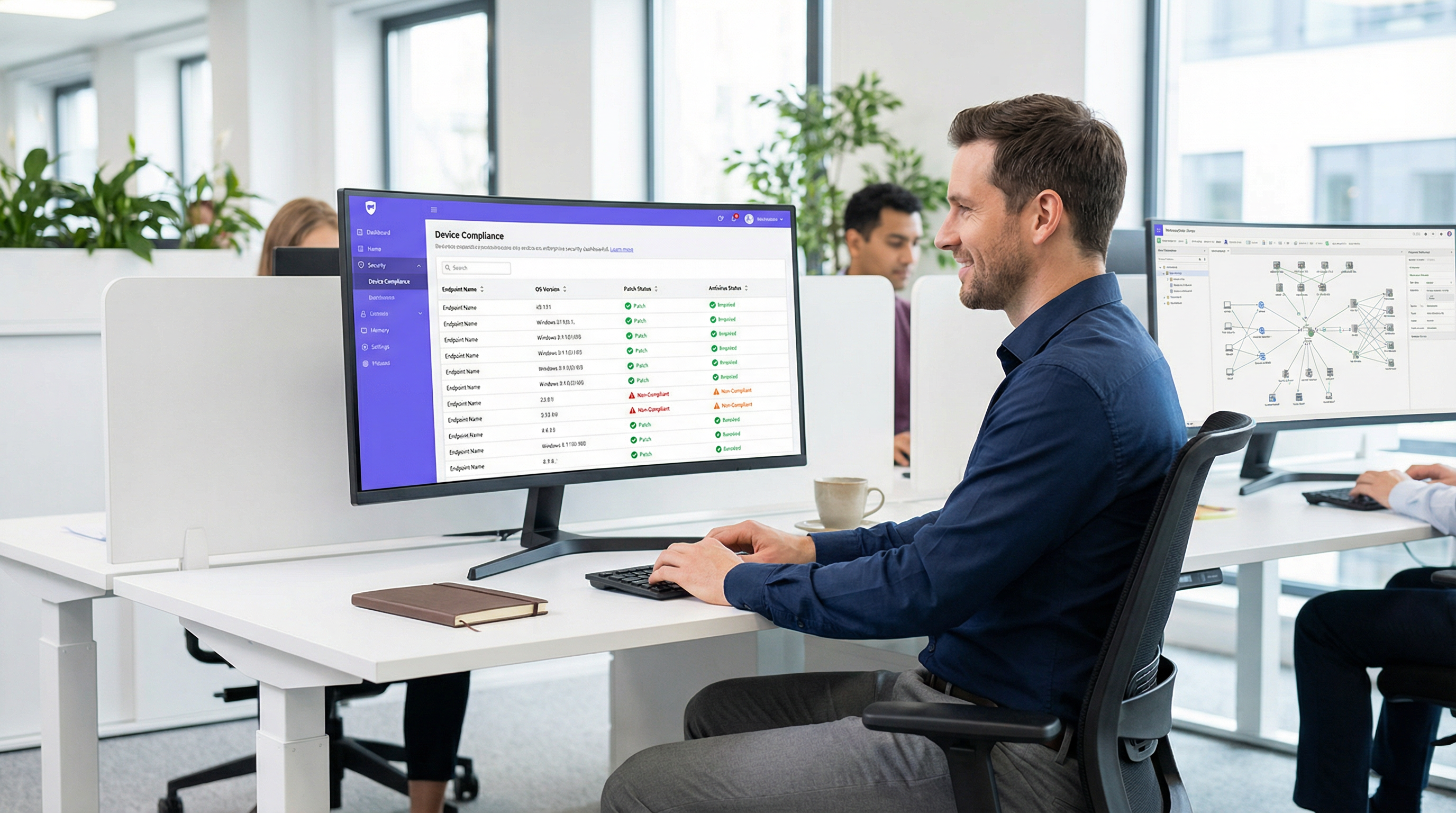
Mentre il perimetro della rete aziendale si dissolve, l'autenticazione tradizionale basata sull'identità non è più sufficiente. Convalidare che un utente sia chi dichiara di essere tramite 802.1X o un Captive Portal non affronta il rischio rappresentato dal dispositivo utilizzato. La valutazione della postura del dispositivo è il livello critico di difesa successivo in un'architettura Zero Trust, interrogando lo stato di salute e conformità di un endpoint prima di concedere l'accesso alla rete.
Per i responsabili IT e gli architetti di rete che gestiscono ambienti complessi come hotel, catene retail, stadi e strutture del settore pubblico, l'accesso alla rete basato sulla postura garantisce che i dispositivi non aggiornati, non gestiti o compromessi non possano spostarsi lateralmente tra le VLAN aziendali. Questa guida fornisce un modello pratico e neutrale rispetto ai fornitori per implementare la valutazione della postura dei dispositivi per il controllo dell'accesso alla rete. Copre i modelli architetturali, i punti di integrazione con RADIUS e le piattaforme di Mobile Device Management (MDM), e i flussi di lavoro critici di remediation necessari per gestire i dispositivi non conformi senza sovraccaricare l'helpdesk IT. Al termine di questa guida, avrai un framework chiaro per implementare i controlli di conformità degli endpoint su WiFi, riducendo la superficie di attacco e mantenendo la conformità continua con framework come PCI DSS e GDPR.
Approfondimento Tecnico: L'Architettura della Valutazione della Postura
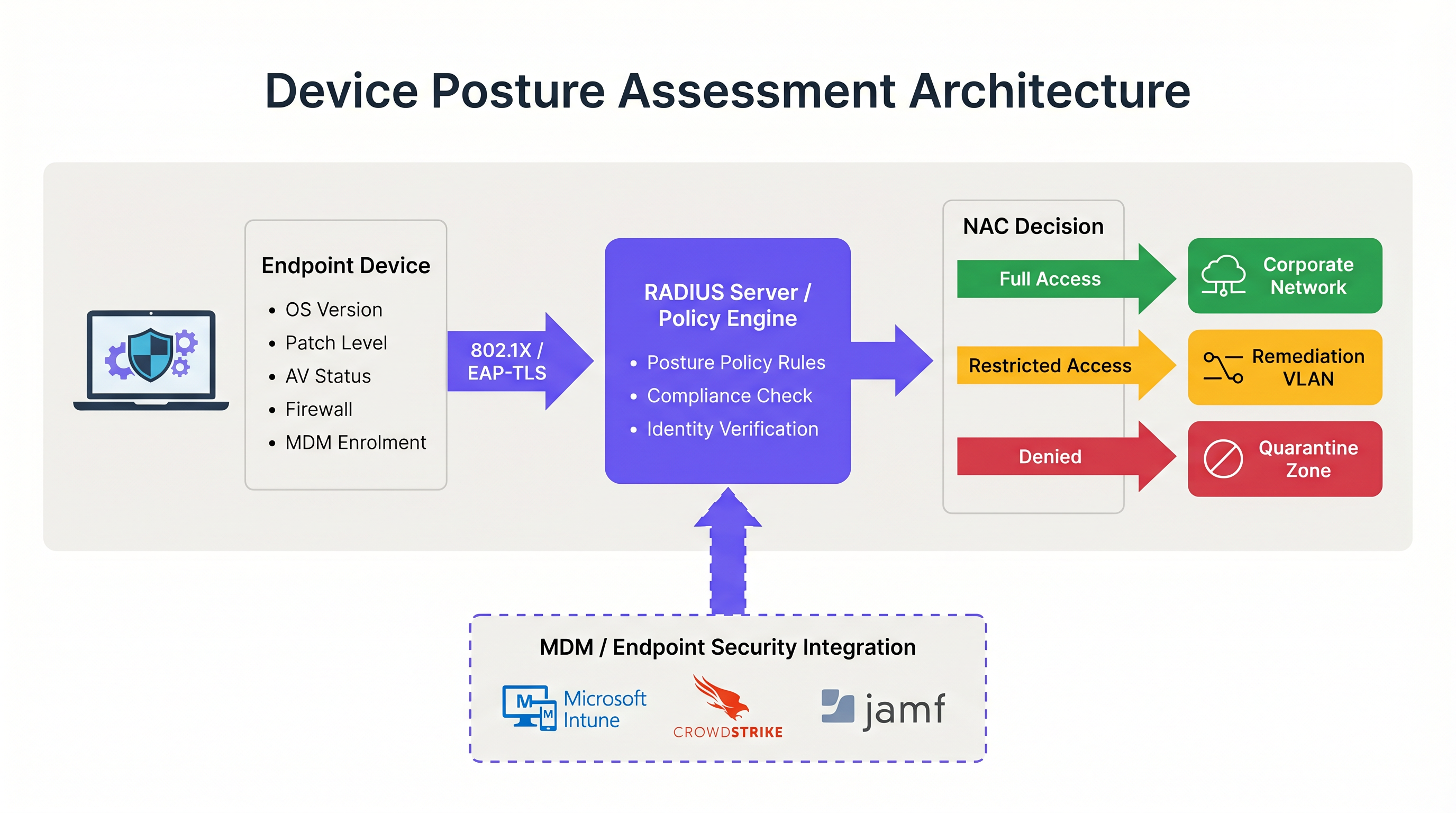
La valutazione della postura del dispositivo altera fondamentalmente il tradizionale flusso di autenticazione di rete. Invece di una decisione binaria consenti/nega basata sulle credenziali, il sistema di Network Access Control (NAC) introduce uno stato condizionale in cui l'accesso è subordinato al soddisfacimento di specifici criteri di salute da parte del dispositivo.
I Tre Modelli Architetturali
L'implementazione della valutazione della postura del dispositivo richiede la scelta di un modello architetturale in linea con la strategia di gestione degli endpoint. Esistono tre approcci principali:
- Valutazione della Postura Basata su Agente: Questo è il metodo più completo. Un agente software leggero installato sull'endpoint raccoglie telemetria dettagliata, come la versione del sistema operativo, il livello di patch, lo stato dell'antivirus e i processi in esecuzione, e trasmette questi dati al motore di policy NAC. La comunicazione avviene tipicamente tramite un protocollo sicuro o API immediatamente dopo l'autenticazione 802.1X iniziale. Sebbene la valutazione basata su agente fornisca i dati con la massima fedeltà, richiede il controllo amministrativo sull'endpoint per distribuire l'agente, rendendola inadatta per ambienti non gestiti o BYOD.
- Valutazione della Postura Senza Agente (Integrata con MDM): In questo modello, il sistema NAC deduce la salute del dispositivo interrogando una piattaforma di Mobile Device Management (MDM) o Unified Endpoint Management (UEM) tramite API. Quando un dispositivo si autentica, il server RADIUS contatta piattaforme come Microsoft Intune o Jamf per recuperare il record di conformità del dispositivo. Questo approccio è altamente efficace per i dispositivi aziendali gestiti ed elimina la necessità di un agente NAC dedicato. Tuttavia, si affida alla piattaforma MDM per avere informazioni aggiornate; se il dispositivo è stato offline, lo stato di conformità potrebbe essere obsoleto.
- Valutazione Basata sulla Rete: Questo approccio passivo prevede che il sistema NAC scansioni il dispositivo che si connette utilizzando tecniche come query SNMP, chiamate WMI o fingerprinting del traffico. Non richiede alcun agente o registrazione MDM, il che lo rende utile per profilare dispositivi IoT o sistemi legacy. Tuttavia, la profondità delle informazioni è significativamente limitata rispetto agli altri modelli e non può determinare in modo affidabile i livelli di patch o l'aggiornamento delle firme antivirus.
Il Flusso di Integrazione RADIUS e 802.1X
L'integrazione della valutazione della postura con l'autenticazione 802.1X è il punto in cui l'architettura diventa operativa. Il processo si basa pesantemente sul protocollo RADIUS e, in particolare, sul meccanismo di Change of Authorization (CoA) definito in RFC 5176.
Quando un supplicant (il dispositivo) avvia una connessione 802.1X, presenta le credenziali all'authenticator (l'access point wireless o lo switch). L'authenticator le inoltra al server RADIUS. In seguito alla verifica dell'identità, il server RADIUS restituisce un messaggio di Access-Accept. Tuttavia, in un ambiente consapevole della postura, questa accettazione iniziale colloca il dispositivo in uno stato limitato, spesso una VLAN dedicata di quarantena o di postura.
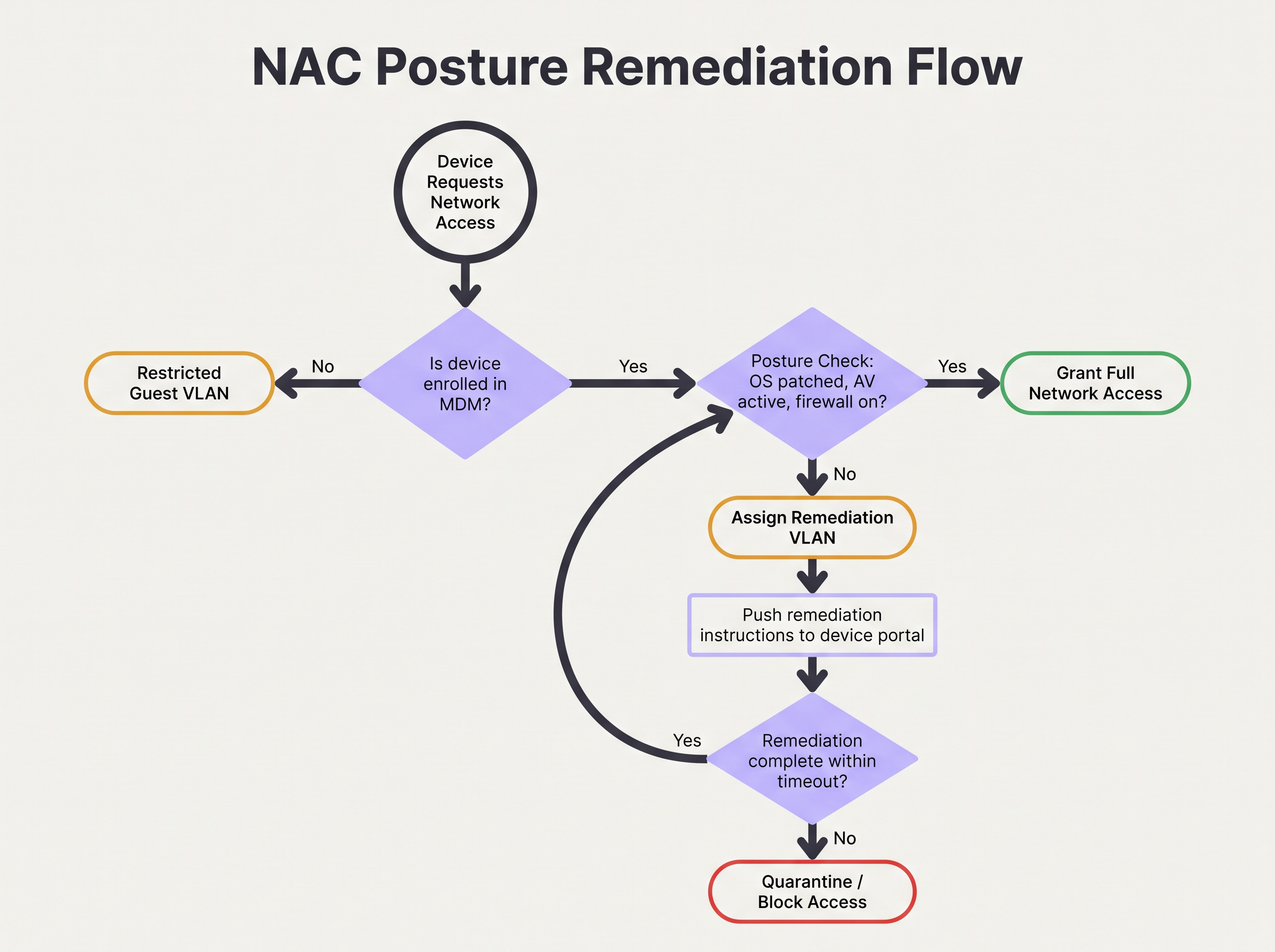
Mentre si trova in questa VLAN limitata, avviene la valutazione della postura. Il motore di policy valuta il dispositivo rispetto al set di regole configurato. Se il dispositivo supera il controllo, il motore di policy invia un messaggio RADIUS CoA all'authenticator, istruendolo a spostare il dispositivo dalla VLAN di postura alla VLAN di produzione appropriata. Se il dispositivo fallisce, rimane nella VLAN limitata o viene spostato in una VLAN di remediation dove può accedere ai server di aggiornamento necessari.
Per una sicurezza ottimale, questo flusso dovrebbe utilizzare EAP-TLS. EAP-TLS fornisce un'autenticazione reciproca basata su certificati, consentendo al server RADIUS di verificare crittograficamente l'identità del dispositivo prima ancora che inizi il controllo della postura. Ciò garantisce che i dati sulla postura provengano da un endpoint noto e affidabile piuttosto che da un indirizzo MAC contraffatto. Per ulteriori approfondimenti sulla protezione dell'accesso ai dispositivi, consulta la nostra guida su Autenticazione 802.1X: Proteggere l'Accesso alla Rete sui Dispositivi Moderni .
Guida all'Implementazione: Distribuire l'Accesso Basato sulla Postura
La distribuzione della valutazione della postura dei dispositivi in un ambiente aziendale reale richiede una pianificazione meticolosa per evitare di interrompere le operazioni aziendali. Si raccomanda il seguente approccio graduale per ambienti che vanno dagli uffici aziendali alle strutture Hospitality .
Fase 1: Visibilità di Base (Modalità Monitor)
Il passo più critico nella distribuzione è stabilire una base di riferimento. Non abilitare mai policy di blocco o remediation il primo giorno. Configura invece il sistema NAC per eseguire i controlli della postura in modalità solo monitoraggio. Durante questa fase, il sistema valuta i dispositivi e registra i risultati, ma non altera le assegnazioni VLAN né limita l'accesso.
Esegui questa fase per un minimo di quattro settimane. Analizza i log per identificare la percentuale di dispositivi non conformi, gli attributi specifici che falliscono più frequentemente (ad esempio, sistema operativo obsoleto rispetto a firewall disabilitato) e la distribuzione dei fallimenti tra i diversi tipi di dispositivi. Questi dati consentono di calibrare le soglie delle policy. Ad esempio, se il 40% del parco dispositivi fallisce un requisito di patch di 14 giorni, potrebbe essere necessario regolare inizialmente la soglia a 30 giorni per evitare di sovraccaricare l'helpdesk.
Fase 2: Progettazione della Segmentazione VLAN
Prima di applicare le policy, è necessario progettare i segmenti di rete che gestiranno i diversi stati di postura. Una solida architettura di accesso alla rete basata sulla postura richiede almeno tre VLAN distinte:
- VLAN di Produzione: Accesso completo alle risorse aziendali per dispositivi conformi e gestiti.
- VLAN di Remediation: Accesso limitato che consente la comunicazione solo con i server di aggiornamento (ad esempio, Windows Update, WSUS), le piattaforme MDM e il portale di remediation NAC. Nessun accesso alle sottoreti interne o alla navigazione internet generale.
- VLAN Guest/BYOD: Accesso segmentato solo a internet per dispositivi personali non gestiti che non possono essere sottoposti a controllo della postura.
Assicurati che i tuoi access point wireless e gli switch core siano configurati per supportare l'assegnazione dinamica della VLAN tramite attributi RADIUS. Comprendere il ruolo dei tuoi access point è fondamentale qui; per un ripasso, vedi Definizione di Wireless Access Points: La Tua Guida Definitiva 2026 .
Fase 3: Definizione del Set di Regole di Postura
Sviluppa un set di regole pragmatico basato sui dati della modalità monitor e sui requisiti di conformità. Una base aziendale standard include:
- Sistema Operativo: Deve essere una versione supportata (ad esempio, Windows 10 22H2 o successivo, macOS 13 o successivo).
- Livello di Patch: Aggiornamenti di sicurezza critici applicati negli ultimi 30 giorni.
- Protezione Endpoint: Agente antivirus/EDR riconosciuto installato, in esecuzione e firme aggiornate negli ultimi 7 giorni.
- Host Firewall: Abilitato per tutti i profili di rete.
- Crittografia del Disco: BitLocker o FileVault abilitato per l'unità di sistema.
Fase 4: Applicazione dei Flussi di Lavoro di Remediation
Quando un dispositivo fallisce il controllo della postura, il flusso di lavoro di remediation deve essere automatizzato e chiaro per l'utente. Il dispositivo viene assegnato alla VLAN di Remediation e il traffico HTTP/HTTPS deve essere reindirizzato a un Captive Portal. Questo portale deve informare esplicitamente l'utente sul motivo per cui il suo dispositivo è stato messo in quarantena (ad esempio, "Il tuo antivirus non è aggiornato") e fornire passaggi o link utili per risolvere il problema.
Configura un timeout di remediation. Ad esempio, a un dispositivo potrebbero essere concesse 24 ore nella VLAN di remediation per scaricare le patch necessarie. Se il dispositivo non raggiunge la conformità entro questa finestra, dovrebbe essere spostato in una VLAN di Quarantena rigorosa con tutto l'accesso bloccato fino all'intervento dell'IT.
Best Practice per Ambienti Complessi
L'implementazione della valutazione della postura in ambienti complessi come il Retail o grandi spazi pubblici introduce sfide uniche, in particolare per quanto riguarda la diversità e la scala dei dispositivi.
Gestione di BYOD e IoT
In ambienti con volumi elevati di dispositivi non gestiti, come gli hub di Trasporto o gli spazi retail che offrono WiFi Guest , tentare di imporre controlli della postura su ogni dispositivo è operativamente impraticabile. È necessario stabilire policy esplicite per i dispositivi che non possono essere valutati.
La best practice consiste nell'utilizzare il MAC Authentication Bypass (MAB) o la profilazione dell'identità per categorizzare questi dispositivi all'inizio del flusso di autenticazione. I dispositivi BYOD non gestiti dovrebbero essere indirizzati automaticamente alla VLAN Guest. I dispositivi IoT (sensori, display) dovrebbero essere collocati in VLAN dedicate e micro-segmentate con Access Control Lists (ACL) rigorose che limitano la loro comunicazione a controller specifici. La piattaforma di Purple può assistere nell'identificazione e nella gestione di questi diversi tipi di dispositivi; esplora le nostre funzionalità per i Sensori per maggiori informazioni.
Ottimizzazione per Strutture ad Alta Densità
In ambienti ad alta densità come gli stadi, la latenza introdotta dalla valutazione della postura può causare timeout di autenticazione e fallimenti di connessione. I controlli basati su agente possono aggiungere diversi secondi al processo di connessione.
Per mitigare questo problema, implementa il caching della postura. Configura il motore di policy NAC per memorizzare nella cache lo stato di conformità di un dispositivo per un periodo definito (ad esempio, da 4 a 8 ore). Quando un dispositivo si sposta tra gli access point o si disconnette brevemente, il server RADIUS può utilizzare il risultato della postura memorizzato nella cache per concedere l'accesso immediato, bypassando il sovraccarico della valutazione completa. Questo è essenziale per mantenere il throughput e un'esperienza utente positiva. Anche l'architettura di rete sottostante gioca un ruolo; considera i vantaggi discussi in I Principali Vantaggi di SD WAN per le Aziende Moderne .
Risoluzione dei Problemi e Mitigazione dei Rischi
Anche con una pianificazione accurata, il controllo dell'accesso basato sulla postura può fallire. Comprendere le modalità di guasto comuni è fondamentale per mantenere la disponibilità della rete.
Errori CoA
Il problema tecnico più frequente è il fallimento del messaggio RADIUS Change of Authorization (CoA). Se il sistema NAC determina che un dispositivo è conforme ma l'access point scarta o ignora il pacchetto CoA, il dispositivo rimane bloccato nella VLAN limitata.
Mitigazione: Assicurati che il CoA sia esplicitamente abilitato su tutti i dispositivi di accesso alla rete e che il server RADIUS sia configurato come client CoA affidabile. Verifica che la porta UDP 3799 (la porta CoA standard) non sia bloccata dai firewall tra il server RADIUS e gli access point. Monitora i tassi di riconoscimento (ACK) del CoA nei log RADIUS.
Rate Limiting delle API MDM
Nelle distribuzioni senza agente, un improvviso afflusso di dispositivi in fase di autenticazione (ad esempio, dipendenti che arrivano alle 9:00) può causare l'invio massivo di richieste API dal sistema NAC alla piattaforma MDM. Ciò può attivare il rate limiting delle API, causando il fallimento o il timeout dei controlli della postura.
Mitigazione: Implementa il batching delle richieste API o il caching all'interno della piattaforma NAC. Se l'MDM supporta i webhook, configura l'MDM per inviare proattivamente i cambiamenti dello stato di conformità al sistema NAC, invece di far interrogare l'MDM dal sistema NAC a ogni autenticazione.
ROI e Impatto sul Business
L'impatto aziendale dell'implementazione della valutazione della postura dei dispositivi va oltre la riduzione immediata del rischio. Altera fondamentalmente la postura di sicurezza dell'organizzazione e fornisce ritorni misurabili.
Mitigazione del Rischio e Conformità
Il ROI principale è la prevenzione del movimento laterale da parte di endpoint compromessi. Garantendo che solo i dispositivi sani accedano alla rete aziendale, le organizzazioni riducono significativamente la probabilità di propagazione di ransomware. Inoltre, la valutazione automatizzata della postura fornisce il monitoraggio continuo richiesto per soddisfare i requisiti di audit per PCI DSS, HIPAA e GDPR, riducendo i costi e lo sforzo della reportistica manuale sulla conformità.
Efficienza Operativa
Sebbene la distribuzione iniziale richieda impegno, un sistema di valutazione della postura ben tarato riduce l'onere operativo sull'IT. I flussi di lavoro di remediation automatizzati consentono agli utenti di risolvere problemi minori di conformità (come firme non aggiornate) senza aprire ticket all'helpdesk. Integrando i controlli della postura con analisi di rete più ampie, come WiFi Analytics , i team IT ottengono una visibilità senza precedenti sullo stato di salute del proprio parco dispositivi, consentendo una gestione proattiva piuttosto che reattiva. Per le strutture che desiderano migliorare la propria esperienza di rete complessiva, consulta i nostri approfondimenti sulle Soluzioni WiFi Moderne per l'Hospitality che i Tuoi Ospiti Meritano .
Termini chiave e definizioni
Device Posture Assessment
The process of evaluating an endpoint's security and compliance state (e.g., OS version, patch level, antivirus status) before or during network authentication.
Crucial for Zero Trust architecture, ensuring that compromised or vulnerable devices cannot access sensitive network segments even if the user has valid credentials.
RADIUS CoA (Change of Authorization)
An extension to the RADIUS protocol (RFC 5176) that allows a RADIUS server to dynamically modify the authorization attributes of an active session, such as changing a device's VLAN.
The essential mechanism in posture assessment that moves a device from a quarantine/remediation VLAN to a production VLAN once the health check passes.
Remediation VLAN
A restricted network segment designed specifically for devices that fail posture checks. It provides limited access only to the resources needed to fix the compliance issue (e.g., update servers, MDM).
Used to isolate vulnerable devices while allowing them to self-correct without requiring manual IT intervention.
Agentless Posture Assessment
Evaluating device health without installing dedicated NAC software on the endpoint, typically by querying an MDM/UEM platform via API for the device's compliance record.
Preferred for corporate environments with robust MDM deployments as it reduces endpoint software bloat and simplifies management.
Dissolvable Agent
A temporary, lightweight application downloaded via a captive portal that performs a posture check and then removes itself from the device.
Commonly used in BYOD or guest environments where permanent agent installation is impossible or unacceptable to the user.
EAP-TLS (Extensible Authentication Protocol-Transport Layer Security)
An 802.1X authentication method that requires both the server and the client (device) to present valid digital certificates for mutual authentication.
The most secure foundation for posture assessment, as it cryptographically proves the device identity before health checks are evaluated.
Posture Caching
Storing the result of a successful posture check for a defined period so that subsequent authentications (e.g., roaming between APs) do not require a full re-evaluation.
Vital for maintaining network performance and reducing latency in high-density environments like stadiums or large offices.
Zero Trust Network Access (ZTNA)
A security framework requiring all users and devices, whether inside or outside the organization's network, to be authenticated, authorized, and continuously validated before being granted access.
Device posture assessment is a foundational pillar of ZTNA, providing the 'continuous validation' of the device state.
Casi di studio
A 500-user corporate office is implementing device posture assessment. They currently use 802.1X (PEAP-MSCHAPv2) for all corporate laptops. They want to ensure no laptop connects unless its CrowdStrike Falcon agent is running and Windows is fully patched. How should they design the integration and remediation flow?
- Architecture Selection: Since all laptops are corporate-managed, an agentless approach via MDM integration (e.g., Intune) is recommended to avoid deploying a separate NAC agent. The NAC policy engine will query Intune for compliance status.
- VLAN Design: Create three VLANs: VLAN 10 (Corporate Production), VLAN 20 (Remediation), VLAN 30 (Guest).
- Policy Configuration: Configure Intune compliance policies to require CrowdStrike running and Windows updates within 30 days. Configure the NAC policy engine to map Intune 'Compliant' status to VLAN 10, and 'Non-Compliant' to VLAN 20.
- Authentication Flow: When a laptop authenticates via PEAP, the RADIUS server places it in VLAN 20 and queries Intune. If Intune returns 'Compliant', the RADIUS server sends a CoA message to the access point to switch the port/session to VLAN 10.
- Remediation: If Intune returns 'Non-Compliant', the laptop remains in VLAN 20. DHCP provides an IP, and DNS/firewall rules redirect HTTP traffic to a portal explaining the failure and allowing access only to CrowdStrike and Windows Update servers.
A large university campus wants to implement posture checks, but 80% of the devices are student BYOD laptops and phones. They cannot force MDM enrolment on these devices. How should they approach posture assessment?
- Architecture Selection: A hybrid approach is necessary. Use agentless/MDM checks for staff/faculty corporate devices, and a captive portal with a dissolvable agent or network-based assessment for student BYOD.
- BYOD Flow: Students connect to the 'Student-WiFi' SSID. They authenticate via a captive portal using university credentials.
- Dissolvable Agent: Upon login, the portal prompts the user to run a lightweight, temporary applet (dissolvable agent) that checks basic posture (e.g., minimum OS version, active firewall) without requiring admin rights or permanent installation.
- Enforcement: If the dissolvable agent reports a pass, the device is granted access to the student VLAN. If it fails, the portal displays instructions on how to update their OS.
- Alternative (Network-based): If dissolvable agents cause too much friction, use passive network profiling (DHCP fingerprinting, HTTP user-agent parsing) to detect grossly outdated OS versions and block them, accepting a lower level of assurance for BYOD.
Analisi degli scenari
Q1. Your organisation is rolling out posture assessment for 2,000 corporate laptops. You have configured the policy to require Windows 11 and an active EDR agent. On Monday morning, you plan to enable the policy in enforcement mode. What critical step have you missed?
💡 Suggerimento:Consider the impact on the helpdesk if your assumptions about the fleet's health are wrong.
Mostra l'approccio consigliato
You have missed the 'Monitor Mode' phase. Before enforcing a blocking policy, the system must run in monitor-only mode for several weeks to establish a baseline of compliance. Enabling enforcement on day one without this data will likely result in a massive spike in helpdesk tickets from users who unexpectedly fail the posture check.
Q2. A device successfully authenticates via 802.1X and passes the MDM posture check. The RADIUS server logs show an Access-Accept and a successful posture evaluation, but the user reports they still cannot access the internet or corporate resources. What is the most likely point of failure in the architecture?
💡 Suggerimento:Think about how the network access device (the AP or switch) is instructed to change the user's access level after the posture check completes.
Mostra l'approccio consigliato
The most likely failure is the RADIUS Change of Authorization (CoA). The device was likely placed in a restricted posture VLAN initially. Even though the posture check passed on the server side, if the CoA message was dropped, blocked by a firewall, or not processed by the access point, the device will remain stuck in the restricted VLAN.
Q3. You manage the WiFi for a retail chain. Corporate devices are managed via Intune, but store managers often connect personal iPads to the staff network. You want to implement posture checks for corporate devices. How should you handle the personal iPads?
💡 Suggerimento:Consider whether you can perform agentless or agent-based checks on devices you don't own.
Mostra l'approccio consigliato
You cannot reliably perform deep posture checks on unmanaged personal devices without causing significant user friction. The best approach is to use identity profiling or MAB to identify the personal iPads and automatically route them to a segmented Guest or BYOD VLAN with internet-only access, bypassing the strict posture requirements applied to the corporate devices.
Punti chiave
- ✓Device posture assessment evaluates endpoint health (OS, patches, AV) before granting network access, moving beyond simple identity verification.
- ✓It is a foundational element of Zero Trust architecture, preventing vulnerable devices from moving laterally on the network.
- ✓Architectures include agent-based (deepest visibility), agentless via MDM integration (best for corporate fleets), and network-based profiling.
- ✓The process relies heavily on RADIUS Change of Authorization (CoA) to dynamically move devices between Posture, Remediation, and Production VLANs.
- ✓Always deploy posture policies in monitor-only mode for several weeks to establish a baseline before enforcing blocking rules.
- ✓Robust remediation workflows are essential to allow users to self-correct compliance issues without overwhelming the IT helpdesk.
- ✓For BYOD and high-density environments, utilize posture caching and explicit routing to guest VLANs to minimize user friction and latency.




