

Avaliação de Postura de Dispositivos para Controle de Acesso à Rede
Este guia técnico explica como a avaliação de postura de dispositivos funciona para o Controle de Acesso à Rede (NAC), detalhando a arquitetura, a integração com MDM e os fluxos de remediação necessários para implementar o WiFi Zero Trust em ambientes corporativos e locais de grande circulação.
🎧 Ouça este Guia
Ver Transcrição
Resumo Executivo
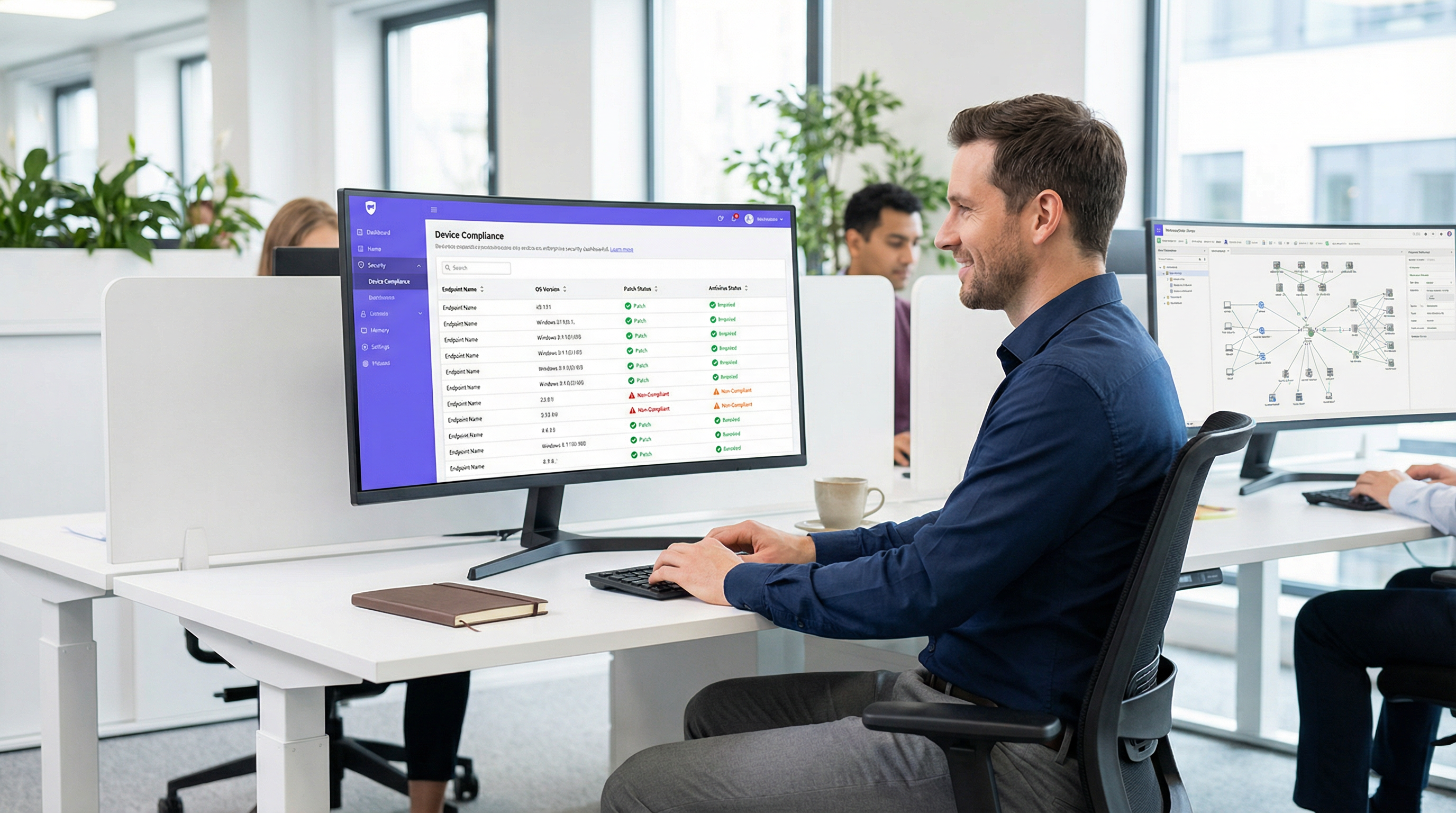
À medida que o perímetro da rede corporativa se dissolve, a autenticação tradicional baseada em identidade já não é suficiente. Validar que um usuário é quem afirma ser via 802.1X ou um Captive Portal não aborda o risco representado pelo dispositivo que ele está usando. A avaliação de postura de dispositivos é a próxima camada crítica de defesa em uma arquitetura Zero Trust, interrogando o estado de integridade e conformidade de um endpoint antes de conceder acesso à rede.
Para gerentes de TI e arquitetos de rede que gerenciam ambientes complexos como hotéis, redes de varejo, estádios e instalações do setor público, o acesso à rede baseado em postura garante que dispositivos não corrigidos, não gerenciados ou comprometidos não possam se mover lateralmente pelas VLANs corporativas. Este guia fornece um plano prático e neutro em relação ao fornecedor para implementar a avaliação de postura de dispositivos para controle de acesso à rede. Ele abrange os modelos arquitetônicos, os pontos de integração com RADIUS e plataformas de Gerenciamento de Dispositivos Móveis (MDM), e os fluxos de trabalho de remediação críticos necessários para lidar com dispositivos não conformes sem sobrecarregar o suporte de TI. Ao final deste guia, você terá uma estrutura clara para implantar verificações de conformidade de endpoint via WiFi, reduzindo sua superfície de ataque e mantendo a conformidade contínua com frameworks como PCI DSS e GDPR.
Mergulho Técnico: A Arquitetura da Avaliação de Postura
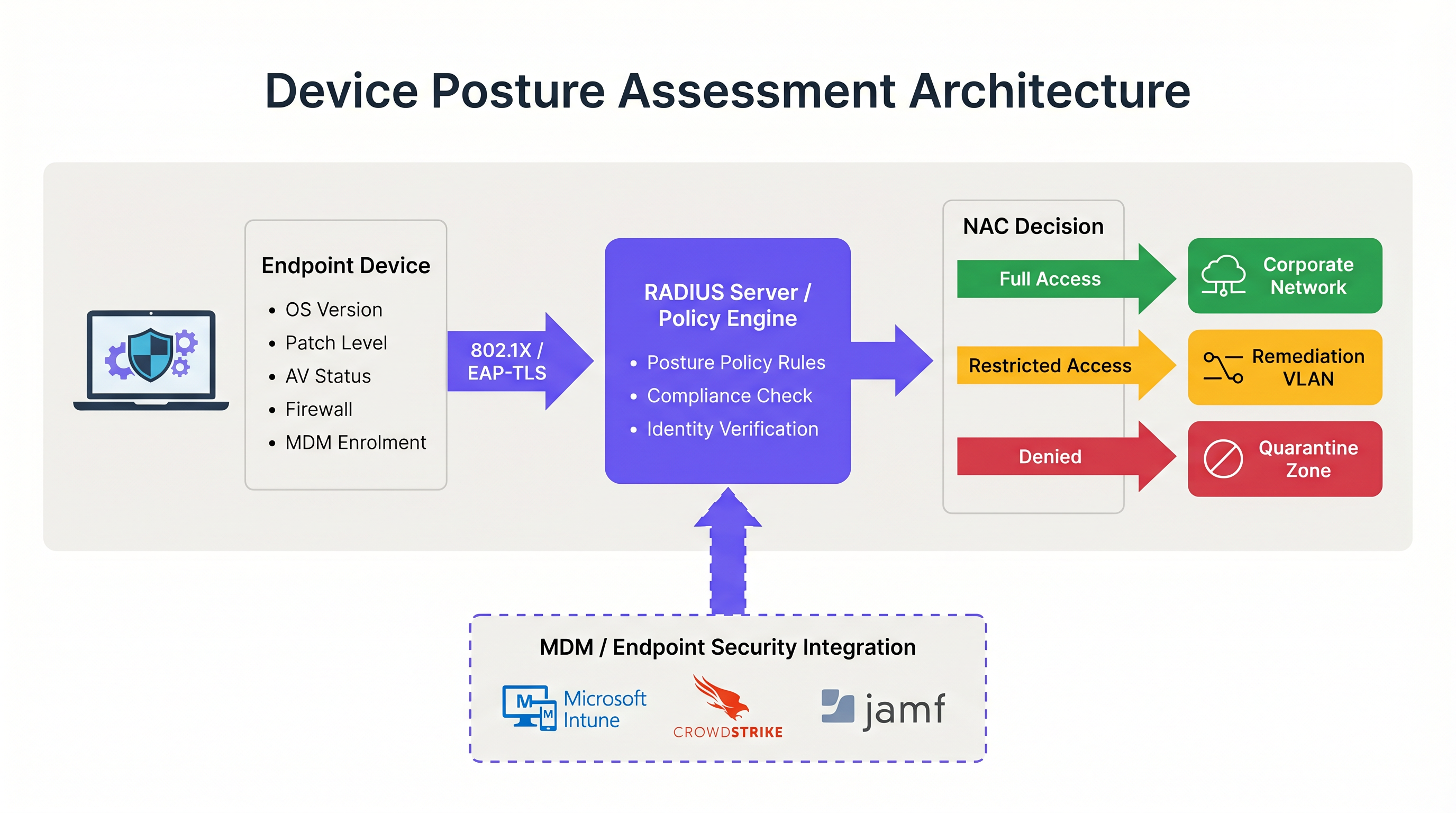
A avaliação de postura de dispositivos altera fundamentalmente o fluxo tradicional de autenticação de rede. Em vez de uma decisão binária de permitir/negar baseada em credenciais, o sistema de Controle de Acesso à Rede (NAC) introduz um estado condicional onde o acesso depende do dispositivo atender a critérios de integridade específicos.
Os Três Modelos Arquitetônicos
Implementar a avaliação de postura de dispositivos requer a escolha de um modelo arquitetônico que se alinhe à sua estratégia de gerenciamento de endpoints. Existem três abordagens principais:
- Avaliação de Postura Baseada em Agente: Este é o método mais abrangente. Um agente de software leve instalado no endpoint coleta telemetria detalhada — como versão do SO, nível de patch, status do antivírus e processos em execução — e transmite esses dados para o mecanismo de política do NAC. A comunicação normalmente ocorre via um protocolo seguro ou API imediatamente após a autenticação 802.1X inicial. Embora a avaliação baseada em agente forneça dados de maior fidelidade, ela requer controle administrativo sobre o endpoint para implantar o agente, tornando-a inadequada para ambientes não gerenciados ou BYOD.
- Avaliação de Postura Sem Agente (Integrada ao MDM): Neste modelo, o sistema NAC infere a integridade do dispositivo consultando uma plataforma de Gerenciamento de Dispositivos Móveis (MDM) ou Gerenciamento Unificado de Endpoints (UEM) via API. Quando um dispositivo se autentica, o servidor RADIUS consulta plataformas como Microsoft Intune ou Jamf para recuperar o registro de conformidade do dispositivo. Esta abordagem é altamente eficaz para dispositivos corporativos gerenciados e elimina a necessidade de um agente NAC dedicado. No entanto, ela depende de a plataforma MDM ter informações atualizadas; se o dispositivo estiver offline, o estado de conformidade pode estar desatualizado.
- Avaliação Baseada na Rede: Esta abordagem passiva envolve o sistema NAC escaneando o dispositivo de conexão usando técnicas como consultas SNMP, chamadas WMI ou fingerprinting de tráfego. Não requer agente ou registro no MDM, o que a torna útil para traçar o perfil de dispositivos IoT ou sistemas legados. No entanto, a profundidade da análise é significativamente limitada em comparação com os outros modelos e não pode determinar com confiabilidade os níveis de patch ou a atualização das assinaturas de antivírus.
O Fluxo de Integração RADIUS e 802.1X
A integração da avaliação de postura com a autenticação 802.1X é onde a arquitetura se torna operacional. O processo depende fortemente do protocolo RADIUS e, especificamente, do mecanismo de Mudança de Autorização (CoA) definido na RFC 5176.
Quando um suplicante (o dispositivo) inicia uma conexão 802.1X, ele apresenta credenciais ao autenticador (o ponto de acesso sem fio ou switch). O autenticador as encaminha para o servidor RADIUS. Após a verificação de identidade bem-sucedida, o servidor RADIUS retorna uma mensagem Access-Accept. No entanto, em um ambiente ciente da postura, essa aceitação inicial coloca o dispositivo em um estado restrito — geralmente uma VLAN de quarentena ou de postura dedicada.
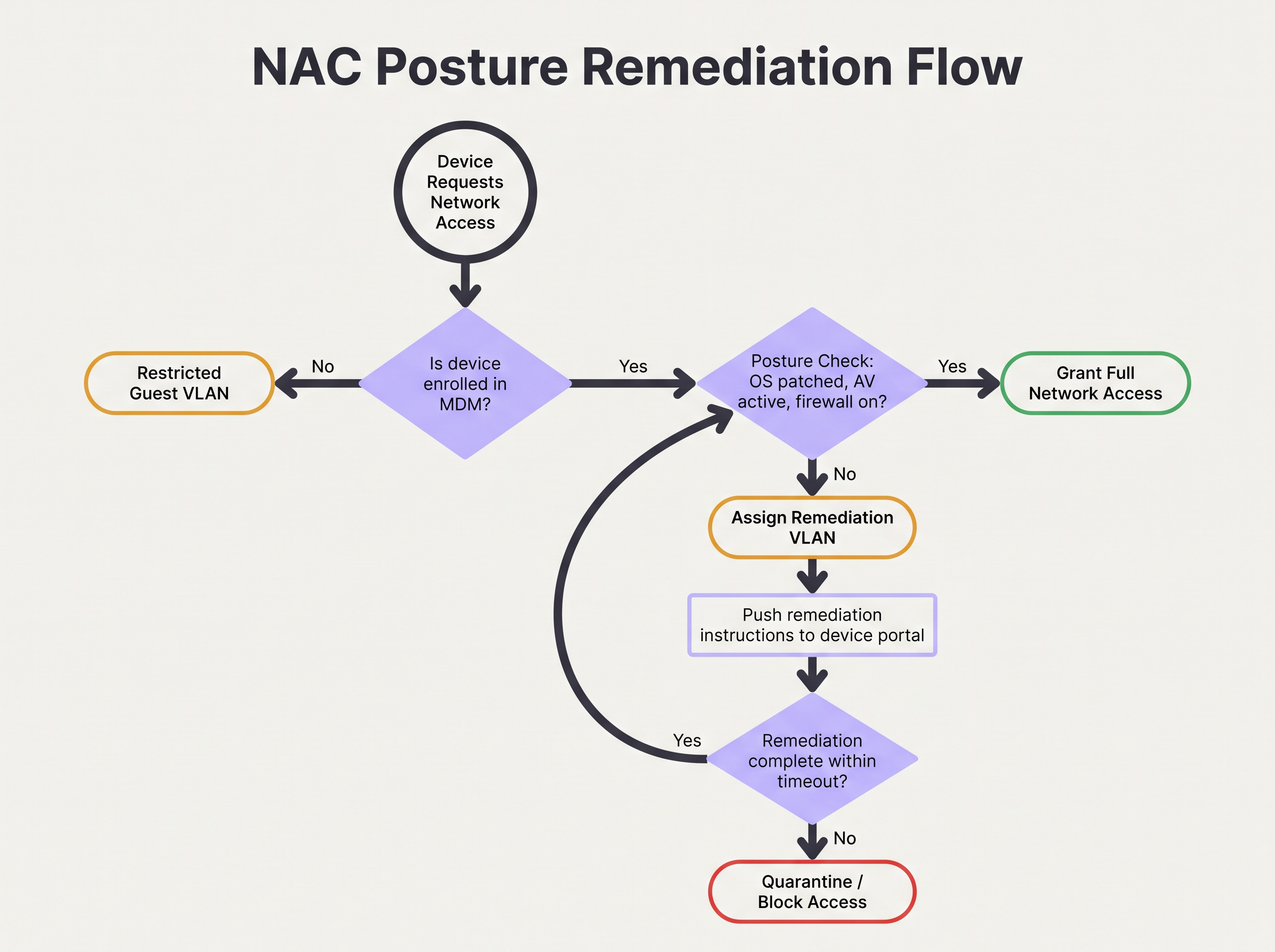
Enquanto estiver nesta VLAN restrita, ocorre a avaliação de postura. O mecanismo de política avalia o dispositivo em relação ao conjunto de regras configurado. Se o dispositivo passar, o mecanismo de política emite uma mensagem RADIUS CoA para o autenticador, instruindo-o a mover o dispositivo da VLAN de postura para a VLAN de produção apropriada. Se o dispositivo falhar, ele permanece na VLAN restrita ou é movido para uma VLAN de remediação onde pode acessar os servidores de atualização necessários.
Para segurança ideal, este fluxo deve utilizar EAP-TLS. O EAP-TLS fornece autenticação mútua baseada em certificado, permitindo que o servidor RADIUS verifique criptograficamente a identidade do dispositivo antes mesmo do início da verificação de postura. Isso garante que os dados de postura venham de um endpoint conhecido e confiável, em vez de um endereço MAC falsificado. Para mais informações sobre como proteger o acesso a dispositivos, consulte nosso guia sobre Autenticação 802.1X: Protegendo o Acesso à Rede em Dispositivos Modernos .
Guia de Implementação: Implantando o Acesso Baseado em Postura
A implantação da avaliação de postura de dispositivos em um ambiente corporativo real exige um planejamento meticuloso para evitar a interrupção das operações comerciais. A seguinte abordagem em fases é recomendada para ambientes que variam de escritórios corporativos a locais de Hospitalidade .
Fase 1: Visibilidade de Linha de Base (Modo de Monitoramento)
A etapa mais crítica na implantação é estabelecer uma linha de base. Nunca ative políticas de bloqueio ou remediação no primeiro dia. Em vez disso, configure o sistema NAC para executar verificações de postura em um modo apenas de monitoramento. Durante esta fase, o sistema avalia os dispositivos e registra os resultados, mas não altera as atribuições de VLAN nem restringe o acesso.
Execute esta fase por um período mínimo de quatro semanas. Analise os logs para identificar a porcentagem de dispositivos não conformes, os atributos específicos que falham com mais frequência (por exemplo, SO desatualizado vs. firewall desativado) e a distribuição de falhas entre diferentes tipos de dispositivos. Esses dados permitem calibrar seus limites de política. Por exemplo, se 40% da sua frota falhar em um requisito de patch de 14 dias, você pode precisar ajustar o limite para 30 dias inicialmente para evitar sobrecarregar o suporte.
Fase 2: Design de Segmentação de VLAN
Antes de aplicar as políticas, você deve projetar os segmentos de rede que lidarão com os diferentes estados de postura. Uma arquitetura robusta de acesso à rede baseada em postura requer pelo menos três VLANs distintas:
- VLAN de Produção: Acesso total aos recursos corporativos para dispositivos gerenciados e em conformidade.
- VLAN de Remediação: Acesso restrito que permite a comunicação apenas com servidores de atualização (por exemplo, Windows Update, WSUS), plataformas MDM e o portal de remediação do NAC. Sem acesso a sub-redes internas ou navegação geral na internet.
- VLAN de Visitantes/BYOD: Acesso segmentado apenas à internet para dispositivos pessoais não gerenciados que não podem ser verificados quanto à postura.
Certifique-se de que seus pontos de acesso sem fio e switches principais estejam configurados para suportar a atribuição dinâmica de VLAN via atributos RADIUS. Compreender o papel dos seus pontos de acesso é crucial aqui; para uma revisão, consulte Definição de Pontos de Acesso Sem Fio: Seu Guia Definitivo para 2026 .
Fase 3: Definindo o Conjunto de Regras de Postura
Desenvolva um conjunto de regras pragmático baseado em seus dados do modo de monitoramento e requisitos de conformidade. Uma linha de base corporativa padrão inclui:
- Sistema Operacional: Deve ser uma versão suportada (por exemplo, Windows 10 22H2 ou posterior, macOS 13 ou posterior).
- Nível de Patch: Atualizações de segurança críticas aplicadas nos últimos 30 dias.
- Proteção de Endpoint: Agente de antivírus/EDR reconhecido instalado, em execução e assinaturas atualizadas nos últimos 7 dias.
- Host Firewall: Ativado para todos os perfis de rede.
- Criptografia de Disco: BitLocker ou FileVault ativado para a unidade do sistema.
Fase 4: Aplicando Fluxos de Trabalho de Remediação
Quando um dispositivo falha na verificação de postura, o fluxo de trabalho de remediação deve ser automatizado e claro para o usuário. O dispositivo é atribuído à VLAN de Remediação e o tráfego HTTP/HTTPS deve ser redirecionado para um Captive Portal. Este portal deve informar explicitamente ao usuário por que seu dispositivo foi colocado em quarentena (por exemplo, "Seu antivírus está desatualizado") e fornecer etapas acionáveis ou links para resolver o problema.
Configure um tempo limite de remediação. Por exemplo, um dispositivo pode ter permissão de 24 horas na VLAN de remediação para baixar os patches necessários. Se o dispositivo não atingir a conformidade dentro desta janela, ele deve ser movido para uma VLAN de Quarentena estrita com todo o acesso bloqueado até a intervenção da TI.
Melhores Práticas para Ambientes Complexos
A implementação da avaliação de postura em ambientes complexos como o Varejo ou grandes locais públicos introduz desafios únicos, particularmente em relação à diversidade e escala de dispositivos.
Lidando com BYOD e IoT
Em ambientes com grandes volumes de dispositivos não gerenciados, como hubs de Transporte ou espaços de varejo que oferecem WiFi para Visitantes , tentar aplicar verificações de postura em todos os dispositivos é operacionalmente inviável. Você deve estabelecer políticas explícitas para dispositivos que não podem ser avaliados.
A melhor prática é utilizar o MAC Authentication Bypass (MAB) ou o perfil de identidade para categorizar esses dispositivos no início do fluxo de autenticação. Dispositivos BYOD não gerenciados devem ser roteados automaticamente para a VLAN de Visitantes. Dispositivos IoT (sensores, displays) devem ser colocados em VLANs dedicadas e microssegmentadas com Listas de Controle de Acesso (ACLs) estritas, limitando sua comunicação a controladores específicos. A plataforma da Purple pode auxiliar na identificação e gerenciamento desses diversos tipos de dispositivos; explore nossos recursos de Sensores para mais informações.
Otimizando para Locais de Alta Densidade
Em ambientes de alta densidade, como estádios, a latência introduzida pela avaliação de postura pode causar tempos de espera de autenticação e falhas de conexão. Verificações baseadas em agentes podem adicionar vários segundos ao processo de conexão.
Para mitigar isso, implemente o cache de postura. Configure o mecanismo de política do NAC para armazenar em cache o status de conformidade de um dispositivo por um período definido (por exemplo, 4 a 8 horas). Quando um dispositivo faz roaming entre pontos de acesso ou se desconecta brevemente, o servidor RADIUS pode usar o resultado da postura em cache para conceder acesso imediato, ignorando a sobrecarga da avaliação completa. Isso é essencial para manter o rendimento e uma experiência positiva para o usuário. A arquitetura de rede subjacente também desempenha um papel; considere os benefícios discutidos em Os Principais Benefícios do SD WAN para Empresas Modernas .
Solução de Problemas e Mitigação de Riscos
Mesmo com um planejamento cuidadoso, o controle de acesso baseado em postura pode falhar. Compreender os modos de falha comuns é crítico para manter a disponibilidade da rede.
Falhas de CoA
O problema técnico mais frequente é a falha da mensagem de Mudança de Autorização (CoA) do RADIUS. Se o sistema NAC determinar que um dispositivo está em conformidade, mas o ponto de acesso descartar ou ignorar o pacote CoA, o dispositivo permanecerá preso na VLAN restrita.
Mitigação: Certifique-se de que o CoA esteja explicitamente ativado em todos os dispositivos de acesso à rede e que o servidor RADIUS esteja configurado como um cliente CoA confiável. Verifique se a porta UDP 3799 (a porta CoA padrão) não está bloqueada por firewalls entre o servidor RADIUS e os pontos de acesso. Monitore as taxas de confirmação (ACK) de CoA em seus logs do RADIUS.
Limitação de Taxa de API do MDM
Em implantações sem agente, um influxo repentino de dispositivos se autenticando (por exemplo, funcionários chegando às 9h) pode fazer com que o sistema NAC inunde a plataforma MDM com solicitações de API. Isso pode acionar a limitação de taxa da API, fazendo com que as verificações de postura falhem ou expirem.
Mitigação: Implemente o agrupamento de solicitações de API ou o cache dentro da plataforma NAC. Se o MDM suportar webhooks, configure o MDM para enviar proativamente as alterações de estado de conformidade para o sistema NAC, em vez de fazer com que o sistema NAC consulte o MDM em cada autenticação.
ROI e Impacto nos Negócios
O impacto nos negócios da implementação da avaliação de postura de dispositivos vai além da redução imediata de riscos. Ele altera fundamentalmente a postura de segurança da organização e fornece retornos mensuráveis.
Mitigação de Riscos e Conformidade
O principal ROI é a prevenção do movimento lateral por endpoints comprometidos. Ao garantir que apenas dispositivos íntegros acessem a rede corporativa, as organizações reduzem significativamente a probabilidade de propagação de ransomware. Além disso, a avaliação de postura automatizada fornece o monitoramento contínuo necessário para satisfazer os requisitos de auditoria para PCI DSS, HIPAA e GDPR, reduzindo o custo e o esforço dos relatórios de conformidade manuais.
Eficiência Operacional
Embora a implantação inicial exija esforço, um sistema de avaliação de postura bem ajustado reduz a carga operacional da TI. Fluxos de trabalho de remediação automatizados capacitam os usuários a resolver problemas menores de conformidade (como assinaturas desatualizadas) sem abrir chamados no suporte. Ao integrar as verificações de postura com análises de rede mais amplas — como o WiFi Analytics — as equipes de TI ganham uma visibilidade sem precedentes sobre a integridade de seu parque de dispositivos, permitindo um gerenciamento proativo em vez de reativo. Para locais que buscam atualizar sua experiência de rede geral, veja nossos insights sobre Soluções Modernas de WiFi para Hospitalidade que Seus Hóspedes Merecem .
Termos-Chave e Definições
Device Posture Assessment
The process of evaluating an endpoint's security and compliance state (e.g., OS version, patch level, antivirus status) before or during network authentication.
Crucial for Zero Trust architecture, ensuring that compromised or vulnerable devices cannot access sensitive network segments even if the user has valid credentials.
RADIUS CoA (Change of Authorization)
An extension to the RADIUS protocol (RFC 5176) that allows a RADIUS server to dynamically modify the authorization attributes of an active session, such as changing a device's VLAN.
The essential mechanism in posture assessment that moves a device from a quarantine/remediation VLAN to a production VLAN once the health check passes.
Remediation VLAN
A restricted network segment designed specifically for devices that fail posture checks. It provides limited access only to the resources needed to fix the compliance issue (e.g., update servers, MDM).
Used to isolate vulnerable devices while allowing them to self-correct without requiring manual IT intervention.
Agentless Posture Assessment
Evaluating device health without installing dedicated NAC software on the endpoint, typically by querying an MDM/UEM platform via API for the device's compliance record.
Preferred for corporate environments with robust MDM deployments as it reduces endpoint software bloat and simplifies management.
Dissolvable Agent
A temporary, lightweight application downloaded via a captive portal that performs a posture check and then removes itself from the device.
Commonly used in BYOD or guest environments where permanent agent installation is impossible or unacceptable to the user.
EAP-TLS (Extensible Authentication Protocol-Transport Layer Security)
An 802.1X authentication method that requires both the server and the client (device) to present valid digital certificates for mutual authentication.
The most secure foundation for posture assessment, as it cryptographically proves the device identity before health checks are evaluated.
Posture Caching
Storing the result of a successful posture check for a defined period so that subsequent authentications (e.g., roaming between APs) do not require a full re-evaluation.
Vital for maintaining network performance and reducing latency in high-density environments like stadiums or large offices.
Zero Trust Network Access (ZTNA)
A security framework requiring all users and devices, whether inside or outside the organization's network, to be authenticated, authorized, and continuously validated before being granted access.
Device posture assessment is a foundational pillar of ZTNA, providing the 'continuous validation' of the device state.
Estudos de Caso
A 500-user corporate office is implementing device posture assessment. They currently use 802.1X (PEAP-MSCHAPv2) for all corporate laptops. They want to ensure no laptop connects unless its CrowdStrike Falcon agent is running and Windows is fully patched. How should they design the integration and remediation flow?
- Architecture Selection: Since all laptops are corporate-managed, an agentless approach via MDM integration (e.g., Intune) is recommended to avoid deploying a separate NAC agent. The NAC policy engine will query Intune for compliance status.
- VLAN Design: Create three VLANs: VLAN 10 (Corporate Production), VLAN 20 (Remediation), VLAN 30 (Guest).
- Policy Configuration: Configure Intune compliance policies to require CrowdStrike running and Windows updates within 30 days. Configure the NAC policy engine to map Intune 'Compliant' status to VLAN 10, and 'Non-Compliant' to VLAN 20.
- Authentication Flow: When a laptop authenticates via PEAP, the RADIUS server places it in VLAN 20 and queries Intune. If Intune returns 'Compliant', the RADIUS server sends a CoA message to the access point to switch the port/session to VLAN 10.
- Remediation: If Intune returns 'Non-Compliant', the laptop remains in VLAN 20. DHCP provides an IP, and DNS/firewall rules redirect HTTP traffic to a portal explaining the failure and allowing access only to CrowdStrike and Windows Update servers.
A large university campus wants to implement posture checks, but 80% of the devices are student BYOD laptops and phones. They cannot force MDM enrolment on these devices. How should they approach posture assessment?
- Architecture Selection: A hybrid approach is necessary. Use agentless/MDM checks for staff/faculty corporate devices, and a captive portal with a dissolvable agent or network-based assessment for student BYOD.
- BYOD Flow: Students connect to the 'Student-WiFi' SSID. They authenticate via a captive portal using university credentials.
- Dissolvable Agent: Upon login, the portal prompts the user to run a lightweight, temporary applet (dissolvable agent) that checks basic posture (e.g., minimum OS version, active firewall) without requiring admin rights or permanent installation.
- Enforcement: If the dissolvable agent reports a pass, the device is granted access to the student VLAN. If it fails, the portal displays instructions on how to update their OS.
- Alternative (Network-based): If dissolvable agents cause too much friction, use passive network profiling (DHCP fingerprinting, HTTP user-agent parsing) to detect grossly outdated OS versions and block them, accepting a lower level of assurance for BYOD.
Análise de Cenário
Q1. Your organisation is rolling out posture assessment for 2,000 corporate laptops. You have configured the policy to require Windows 11 and an active EDR agent. On Monday morning, you plan to enable the policy in enforcement mode. What critical step have you missed?
💡 Dica:Consider the impact on the helpdesk if your assumptions about the fleet's health are wrong.
Mostrar Abordagem Recomendada
You have missed the 'Monitor Mode' phase. Before enforcing a blocking policy, the system must run in monitor-only mode for several weeks to establish a baseline of compliance. Enabling enforcement on day one without this data will likely result in a massive spike in helpdesk tickets from users who unexpectedly fail the posture check.
Q2. A device successfully authenticates via 802.1X and passes the MDM posture check. The RADIUS server logs show an Access-Accept and a successful posture evaluation, but the user reports they still cannot access the internet or corporate resources. What is the most likely point of failure in the architecture?
💡 Dica:Think about how the network access device (the AP or switch) is instructed to change the user's access level after the posture check completes.
Mostrar Abordagem Recomendada
The most likely failure is the RADIUS Change of Authorization (CoA). The device was likely placed in a restricted posture VLAN initially. Even though the posture check passed on the server side, if the CoA message was dropped, blocked by a firewall, or not processed by the access point, the device will remain stuck in the restricted VLAN.
Q3. You manage the WiFi for a retail chain. Corporate devices are managed via Intune, but store managers often connect personal iPads to the staff network. You want to implement posture checks for corporate devices. How should you handle the personal iPads?
💡 Dica:Consider whether you can perform agentless or agent-based checks on devices you don't own.
Mostrar Abordagem Recomendada
You cannot reliably perform deep posture checks on unmanaged personal devices without causing significant user friction. The best approach is to use identity profiling or MAB to identify the personal iPads and automatically route them to a segmented Guest or BYOD VLAN with internet-only access, bypassing the strict posture requirements applied to the corporate devices.
Principais Conclusões
- ✓Device posture assessment evaluates endpoint health (OS, patches, AV) before granting network access, moving beyond simple identity verification.
- ✓It is a foundational element of Zero Trust architecture, preventing vulnerable devices from moving laterally on the network.
- ✓Architectures include agent-based (deepest visibility), agentless via MDM integration (best for corporate fleets), and network-based profiling.
- ✓The process relies heavily on RADIUS Change of Authorization (CoA) to dynamically move devices between Posture, Remediation, and Production VLANs.
- ✓Always deploy posture policies in monitor-only mode for several weeks to establish a baseline before enforcing blocking rules.
- ✓Robust remediation workflows are essential to allow users to self-correct compliance issues without overwhelming the IT helpdesk.
- ✓For BYOD and high-density environments, utilize posture caching and explicit routing to guest VLANs to minimize user friction and latency.




