

नेटवर्क एक्सेस कंट्रोल के लिए डिवाइस पोस्चर असेसमेंट
यह तकनीकी मार्गदर्शिका बताती है कि नेटवर्क एक्सेस कंट्रोल (NAC) के लिए डिवाइस पोस्चर असेसमेंट कैसे काम करता है, जिसमें एंटरप्राइज और वेन्यू वातावरण में Zero Trust WiFi लागू करने के लिए आवश्यक आर्किटेक्चर, MDM इंटीग्रेशन और रेमेडिएशन फ्लो का विवरण दिया गया है।
🎧 इस गाइड को सुनें
ट्रांसक्रिप्ट देखें

कार्यकारी सारांश
जैसे-जैसे एंटरप्राइज नेटवर्क की परिधि समाप्त हो रही है, पारंपरिक पहचान-आधारित ऑथेंटिकेशन अब पर्याप्त नहीं है। 802.1X या Captive Portal के माध्यम से यह प्रमाणित करना कि उपयोगकर्ता वही है जिसका वह दावा करता है, उस डिवाइस द्वारा उत्पन्न जोखिम का समाधान नहीं करता है जिसका वे उपयोग कर रहे हैं। डिवाइस पोस्चर असेसमेंट Zero Trust आर्किटेक्चर में सुरक्षा की अगली महत्वपूर्ण परत है, जो नेटवर्क एक्सेस देने से पहले एंडपॉइंट के स्वास्थ्य और अनुपालन स्थिति की जांच करती है।
होटल, रिटेल चेन, स्टेडियम और सार्वजनिक क्षेत्र की सुविधाओं जैसे जटिल वातावरण का प्रबंधन करने वाले IT प्रबंधकों और नेटवर्क आर्किटेक्ट्स के लिए, पोस्चर-आधारित नेटवर्क एक्सेस यह सुनिश्चित करता है कि अनपैच्ड, अनमैनेज्ड या समझौता किए गए डिवाइस कॉर्पोरेट VLANs में लेटरल मूवमेंट न कर सकें। यह मार्गदर्शिका नेटवर्क एक्सेस कंट्रोल के लिए डिवाइस पोस्चर असेसमेंट को लागू करने के लिए एक व्यावहारिक, वेंडर-न्यूट्रल ब्लूप्रिंट प्रदान करती है। इसमें आर्किटेक्चरल मॉडल, RADIUS और मोबाइल डिवाइस मैनेजमेंट (MDM) प्लेटफॉर्म के साथ इंटीग्रेशन पॉइंट्स और IT हेल्पडेस्क को ओवरलोड किए बिना गैर-अनुपालन वाले डिवाइसों को संभालने के लिए आवश्यक महत्वपूर्ण रेमेडिएशन वर्कफ़्लो शामिल हैं। इस गाइड के अंत तक, आपके पास WiFi पर एंडपॉइंट अनुपालन जांच तैनात करने, अपने अटैक सरफेस को कम करने और PCI DSS और GDPR जैसे फ्रेमवर्क के साथ निरंतर अनुपालन बनाए रखने के लिए एक स्पष्ट ढांचा होगा।
तकनीकी गहन विश्लेषण: पोस्चर असेसमेंट का आर्किटेक्चर
डिवाइस पोस्चर असेसमेंट मौलिक रूप से पारंपरिक नेटवर्क ऑथेंटिकेशन फ्लो को बदल देता है। क्रेडेंशियल्स के आधार पर बाइनरी अनुमति/अस्वीकार निर्णय के बजाय, नेटवर्क एक्सेस कंट्रोल (NAC) सिस्टम एक सशर्त स्थिति पेश करता है जहां एक्सेस डिवाइस के विशिष्ट स्वास्थ्य मानदंडों को पूरा करने पर निर्भर होता है।
तीन आर्किटेक्चरल मॉडल
डिवाइस पोस्चर असेसमेंट को लागू करने के लिए एक आर्किटेक्चरल मॉडल चुनने की आवश्यकता होती है जो आपकी एंडपॉइंट प्रबंधन रणनीति के साथ संरेखित हो। इसके तीन प्राथमिक दृष्टिकोण हैं:
- एजेंट-आधारित पोस्चर असेसमेंट: यह सबसे व्यापक तरीका है। एंडपॉइंट पर इंस्टॉल किया गया एक लाइटवेट सॉफ्टवेयर एजेंट विस्तृत टेलीमेट्री एकत्र करता है—जैसे OS वर्जन, पैच लेवल, एंटीवायरस स्थिति और चल रही प्रक्रियाएं—और इस डेटा को NAC पॉलिसी इंजन तक पहुंचाता है। संचार आमतौर पर प्रारंभिक 802.1X ऑथेंटिकेशन के तुरंत बाद एक सुरक्षित प्रोटोकॉल या API के माध्यम से होता है। जबकि एजेंट-आधारित असेसमेंट उच्चतम निष्ठा वाला डेटा प्रदान करता है, इसके लिए एजेंट को तैनात करने के लिए एंडपॉइंट पर प्रशासनिक नियंत्रण की आवश्यकता होती है, जो इसे अनमैनेज्ड या BYOD वातावरण के लिए अनुपयुक्त बनाता है।
- एजेंटलेस (MDM-इंटीग्रेटेड) पोस्चर असेसमेंट: इस मॉडल में, NAC सिस्टम API के माध्यम से मोबाइल डिवाइस मैनेजमेंट (MDM) या यूनिफाइड एंडपॉइंट मैनेजमेंट (UEM) प्लेटफॉर्म से पूछताछ करके डिवाइस के स्वास्थ्य का अनुमान लगाता है। जब कोई डिवाइस ऑथेंटिकेट होता है, तो RADIUS सर्वर डिवाइस के अनुपालन रिकॉर्ड को प्राप्त करने के लिए Microsoft Intune या Jamf जैसे प्लेटफॉर्म को कॉल करता है। यह दृष्टिकोण प्रबंधित कॉर्पोरेट डिवाइसों के लिए अत्यधिक प्रभावी है और एक समर्पित NAC एजेंट की आवश्यकता को समाप्त करता है। हालांकि, यह MDM प्लेटफॉर्म के पास अप-टू-डेट जानकारी होने पर निर्भर करता है; यदि डिवाइस ऑफलाइन रहा है, तो अनुपालन स्थिति पुरानी हो सकती है।
- नेटवर्क-आधारित असेसमेंट: इस पैसिव दृष्टिकोण में NAC सिस्टम SNMP क्वेरी, WMI कॉल या ट्रैफिक फिंगरप्रिंटिंग जैसी तकनीकों का उपयोग करके कनेक्टिंग डिवाइस को स्कैन करता है। इसमें किसी एजेंट या MDM नामांकन की आवश्यकता नहीं होती है, जो इसे IoT डिवाइस या लीगेसी सिस्टम की प्रोफाइलिंग के लिए उपयोगी बनाता है। हालांकि, अन्य मॉडलों की तुलना में अंतर्दृष्टि की गहराई काफी सीमित है, और यह पैच लेवल या एंटीवायरस सिग्नेचर की वर्तमान स्थिति को विश्वसनीय रूप से निर्धारित नहीं कर सकता है।
RADIUS और 802.1X इंटीग्रेशन फ्लो
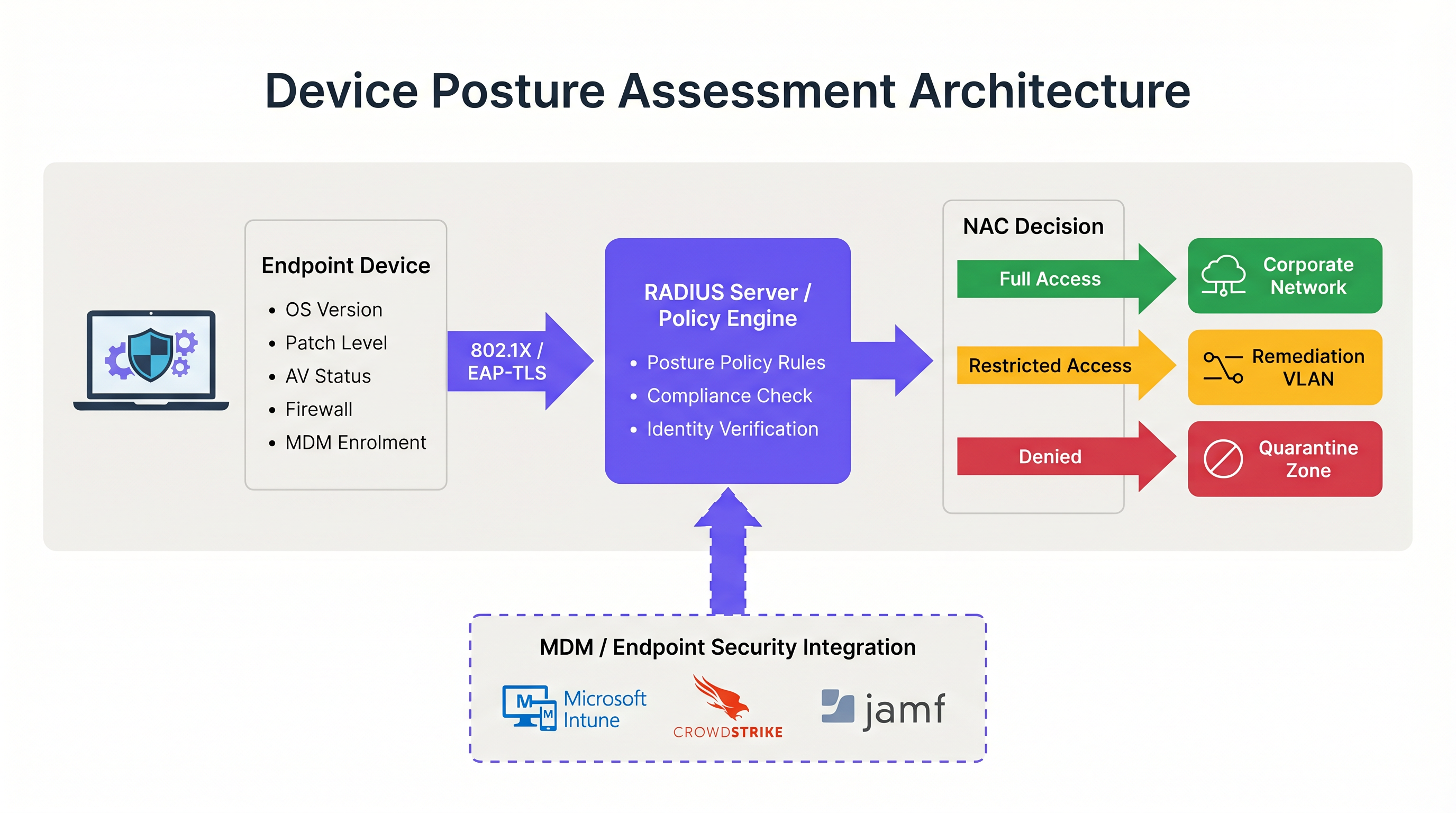
802.1X ऑथेंटिकेशन के साथ पोस्चर असेसमेंट का एकीकरण वह जगह है जहां आर्किटेक्चर चालू होता है। यह प्रक्रिया RADIUS प्रोटोकॉल और विशेष रूप से RFC 5176 में परिभाषित चेंज ऑफ ऑथराइजेशन (CoA) तंत्र पर बहुत अधिक निर्भर करती है।
जब एक सप्लीकेंट (डिवाइस) 802.1X कनेक्शन शुरू करता है, तो वह ऑथेंटिकेटर (वायरलेस एक्सेस पॉइंट या स्विच) को क्रेडेंशियल प्रस्तुत करता है। ऑथेंटिकेटर इन्हें RADIUS सर्वर को फॉरवर्ड करता है। सफल पहचान सत्यापन पर, RADIUS सर्वर Access-Accept संदेश लौटाता है। हालांकि, पोस्चर-अवेयर वातावरण में, यह प्रारंभिक स्वीकृति डिवाइस को एक प्रतिबंधित स्थिति में रखती है—अक्सर एक समर्पित क्वारंटाइन या पोस्चर VLAN।
इस प्रतिबंधित VLAN में रहते हुए, पोस्चर असेसमेंट होता है। पॉलिसी इंजन कॉन्फ़िगर किए गए नियमसेट के विरुद्ध डिवाइस का मूल्यांकन करता है। यदि डिवाइस पास हो जाता है, तो पॉलिसी इंजन ऑथेंटिकेटर को एक RADIUS CoA संदेश जारी करता है, जो उसे डिवाइस को पोस्चर VLAN से उपयुक्त प्रोडक्शन VLAN में ले जाने का निर्देश देता है। यदि डिवाइस विफल हो जाता है, तो वह प्रतिबंधित VLAN में रहता है या उसे रेमेडिएशन VLAN में ले जाया जाता है जहां वह आवश्यक अपडेट सर्वर तक पहुंच सकता है।
इष्टतम सुरक्षा के लिए, इस फ्लो को EAP-TLS का उपयोग करना चाहिए। EAP-TLS म्यूचुअल सर्टिफिकेट-आधारित ऑथेंटिकेशन प्रदान करता है, जिससे RADIUS सर्वर पोस्चर चेक शुरू होने से पहले ही डिवाइस की पहचान को क्रिप्टोग्राफिक रूप से सत्यापित कर सकता है। यह सुनिश्चित करता है कि पोस्चर डेटा किसी स्पूफ किए गए MAC एड्रेस के बजाय एक ज्ञात, विश्वसनीय एंडपॉइंट से आ रहा है। डिवाइस एक्सेस को सुरक्षित करने पर अधिक पढ़ने के लिए, 802.1X Authentication: Securing Network Access on Modern Devices पर हमारी मार्गदर्शिका देखें।
कार्यान्वयन मार्गदर्शिका: पोस्चर-आधारित एक्सेस को तैनात करना
एक लाइव एंटरप्राइज वातावरण में डिवाइस पोस्चर असेसमेंट को तैनात करने के लिए व्यावसायिक संचालन को बाधित करने से बचने के लिए सावधानीपूर्वक योजना की आवश्यकता होती है। कॉर्पोरेट कार्यालयों से लेकर Hospitality वेन्यू तक के वातावरण के लिए निम्नलिखित चरणबद्ध दृष्टिकोण की सिफारिश की जाती है।
चरण 1: बेसलाइन विजिबिलिटी (मॉनिटर मोड)
तैनाती में सबसे महत्वपूर्ण कदम बेसलाइन स्थापित करना है। पहले दिन कभी भी ब्लॉकिंग या रेमेडिएशन नीतियां सक्षम न करें। इसके बजाय, केवल मॉनिटर मोड में पोस्चर चेक चलाने के लिए NAC सिस्टम को कॉन्फ़िगर करें। इस चरण के दौरान, सिस्टम डिवाइसों का मूल्यांकन करता है और परिणामों को लॉग करता है लेकिन VLAN असाइनमेंट को नहीं बदलता है या एक्सेस को प्रतिबंधित नहीं करता है।
इस चरण को कम से कम चार सप्ताह तक चलाएं। गैर-अनुपालन वाले डिवाइसों के प्रतिशत, सबसे अधिक बार विफल होने वाले विशिष्ट गुणों (जैसे, पुराना OS बनाम अक्षम फ़ायरवॉल), और विभिन्न डिवाइस प्रकारों में विफलताओं के वितरण की पहचान करने के लिए लॉग का विश्लेषण करें। यह डेटा आपको अपनी पॉलिसी थ्रेशोल्ड को कैलिब्रेट करने की अनुमति देता है। उदाहरण के लिए, यदि आपके बेड़े का 40% हिस्सा 14-दिन की पैच आवश्यकता में विफल रहता है, तो आपको हेल्पडेस्क को ओवरलोड होने से बचाने के लिए शुरू में थ्रेशोल्ड को 30 दिनों तक समायोजित करने की आवश्यकता हो सकती है।
चरण 2: VLAN सेगमेंटेशन डिजाइन
पॉलिसी लागू करने से पहले, आपको उन नेटवर्क सेगमेंट को डिजाइन करना होगा जो विभिन्न पोस्चर स्थितियों को संभालेंगे। एक मजबूत पोस्चर-आधारित नेटवर्क एक्सेस आर्किटेक्चर के लिए कम से कम तीन अलग-अलग VLAN की आवश्यकता होती है:
- प्रोडक्शन VLAN: अनुपालन करने वाले, प्रबंधित डिवाइसों के लिए कॉर्पोरेट संसाधनों तक पूर्ण पहुंच।
- रेमेडिएशन VLAN: प्रतिबंधित पहुंच जो केवल अपडेट सर्वर (जैसे, Windows Update, WSUS), MDM प्लेटफॉर्म और NAC रेमेडिएशन पोर्टल के साथ संचार की अनुमति देती है। आंतरिक सबनेट या सामान्य इंटरनेट ब्राउजिंग तक कोई पहुंच नहीं।
- गेस्ट/BYOD VLAN: अनमैनेज्ड व्यक्तिगत डिवाइसों के लिए सेगमेंटेड इंटरनेट-ओनली एक्सेस जिन्हें पोस्चर-चेक नहीं किया जा सकता है।
सुनिश्चित करें कि आपके वायरलेस एक्सेस पॉइंट और कोर स्विच RADIUS गुणों के माध्यम से डायनेमिक VLAN असाइनमेंट का समर्थन करने के लिए कॉन्फ़िगर किए गए हैं। यहां आपके एक्सेस पॉइंट्स की भूमिका को समझना महत्वपूर्ण है; रिफ्रेशर के लिए, Wireless Access Points Definition Your Ultimate 2026 Guide देखें।
चरण 3: पोस्चर नियमसेट को परिभाषित करना
अपने मॉनिटर-मोड डेटा और अनुपालन आवश्यकताओं के आधार पर एक व्यावहारिक नियमसेट विकसित करें। एक मानक एंटरप्राइज बेसलाइन में शामिल हैं:
- ऑपरेटिंग सिस्टम: एक समर्थित वर्जन होना चाहिए (जैसे, Windows 10 22H2 या बाद का, macOS 13 या बाद का)।
- पैच लेवल: पिछले 30 दिनों के भीतर लागू किए गए महत्वपूर्ण सुरक्षा अपडेट।
- एंडपॉइंट प्रोटेक्शन: मान्यता प्राप्त एंटीवायरस/EDR एजेंट इंस्टॉल, चालू और पिछले 7 दिनों के भीतर अपडेट किए गए सिग्नेचर।
- होस्ट फ़ायरवॉल: सभी नेटवर्क प्रोफाइल के लिए सक्षम।
- डिस्क एन्क्रिप्शन: सिस्टम ड्राइव के लिए BitLocker या FileVault सक्षम।
चरण 4: रेमेडिएशन वर्कफ़्लो लागू करना
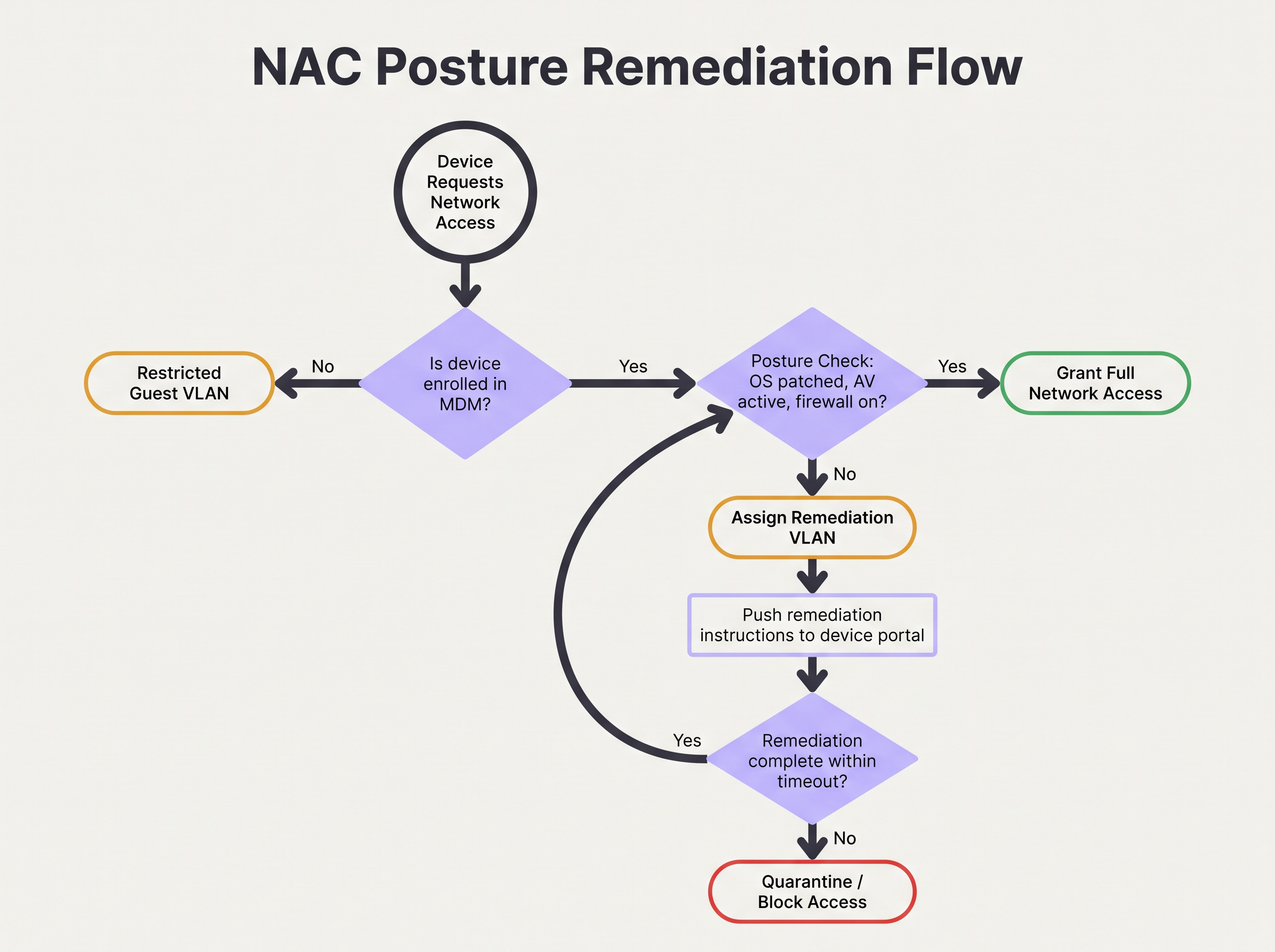
जब कोई डिवाइस पोस्चर चेक में विफल हो जाता है, तो रेमेडिएशन वर्कफ़्लो स्वचालित और उपयोगकर्ता के लिए स्पष्ट होना चाहिए। डिवाइस को रेमेडिएशन VLAN को सौंपा गया है, और HTTP/HTTPS ट्रैफिक को एक Captive Portal पर रीडायरेक्ट किया जाना चाहिए। यह पोर्टल उपयोगकर्ता को स्पष्ट रूप से सूचित करना चाहिए कि उनके डिवाइस को क्वारंटाइन क्यों किया गया था (जैसे, "आपका एंटीवायरस पुराना है") और समस्या को हल करने के लिए कार्रवाई योग्य कदम या लिंक प्रदान करना चाहिए।
एक रेमेडिएशन टाइमआउट कॉन्फ़िगर करें। उदाहरण के लिए, एक डिवाइस को आवश्यक पैच प्राप्त करने के लिए रेमेडिएशन VLAN में 24 घंटे की अनुमति दी जा सकती है। यदि डिवाइस इस विंडो के भीतर अनुपालन प्राप्त नहीं करता है, तो उसे IT हस्तक्षेप तक सभी एक्सेस ब्लॉक के साथ एक सख्त क्वारंटाइन VLAN में ले जाया जाना चाहिए।
जटिल वातावरण के लिए सर्वोत्तम प्रथाएं
Retail या बड़े सार्वजनिक वेन्यू जैसे जटिल वातावरण में पोस्चर असेसमेंट लागू करना अद्वितीय चुनौतियां पेश करता है, विशेष रूप से डिवाइस विविधता और पैमाने के संबंध में।
BYOD और IoT को संभालना
बड़ी मात्रा में अनमैनेज्ड डिवाइसों वाले वातावरण में, जैसे Transport हब या Guest WiFi की पेशकश करने वाले रिटेल स्पेस, हर डिवाइस पर पोस्चर चेक लागू करने का प्रयास करना परिचालन रूप से अव्यवहार्य है। आपको उन डिवाइसों के लिए स्पष्ट नीतियां स्थापित करनी चाहिए जिनका मूल्यांकन नहीं किया जा सकता है।
सबसे अच्छी प्रथा ऑथेंटिकेशन फ्लो में इन डिवाइसों को जल्दी वर्गीकृत करने के लिए MAC Authentication Bypass (MAB) या पहचान प्रोफाइलिंग का उपयोग करना है। अनमैनेज्ड BYOD डिवाइसों को स्वचालित रूप से गेस्ट VLAN पर रूट किया जाना चाहिए। IoT डिवाइसों (सेंसर, डिस्प्ले) को समर्पित, माइक्रो-सेगमेंटेड VLAN में रखा जाना चाहिए, जिसमें सख्त एक्सेस कंट्रोल लिस्ट (ACLs) उनके संचार को विशिष्ट कंट्रोलर तक सीमित करती हैं। Purple का प्लेटफॉर्म इन विविध डिवाइस प्रकारों की पहचान करने और उन्हें प्रबंधित करने में सहायता कर सकता है; अधिक जानकारी के लिए हमारी Sensors क्षमताओं का पता लगाएं।
हाई-डेंसिटी वेन्यू के लिए अनुकूलन
स्टेडियम जैसे हाई-डेंसिटी वातावरण में, पोस्चर असेसमेंट द्वारा पेश की गई लेटेंसी ऑथेंटिकेशन टाइमआउट और कनेक्शन विफलताओं का कारण बन सकती है। एजेंट-आधारित चेक कनेक्शन प्रक्रिया में कई सेकंड जोड़ सकते हैं।
इसे कम करने के लिए, पोस्चर कैशिंग लागू करें। एक निश्चित अवधि (जैसे, 4 से 8 घंटे) के लिए डिवाइस की अनुपालन स्थिति को कैश करने के लिए NAC पॉलिसी इंजन को कॉन्फ़िगर करें। जब कोई डिवाइस एक्सेस पॉइंट्स के बीच रोम करता है या संक्षेप में डिस्कनेक्ट होता है, तो RADIUS सर्वर तत्काल एक्सेस देने के लिए कैश किए गए पोस्चर परिणाम का उपयोग कर सकता है, जिससे पूर्ण असेसमेंट ओवरहेड से बचा जा सकता है। थ्रूपुट और सकारात्मक उपयोगकर्ता अनुभव बनाए रखने के लिए यह आवश्यक है। अंतर्निहित नेटवर्क आर्किटेक्चर भी एक भूमिका निभाता है; The Core SD WAN Benefits for Modern Businesses में चर्चा किए गए लाभों पर विचार करें।
ट्रबलशूटिंग और जोखिम न्यूनीकरण
सावधानीपूर्वक योजना बनाने के बाद भी, पोस्चर-आधारित एक्सेस कंट्रोल विफल हो सकता है। नेटवर्क उपलब्धता बनाए रखने के लिए सामान्य विफलता मोड को समझना महत्वपूर्ण है।
CoA विफलताएं
सबसे आम तकनीकी समस्या RADIUS चेंज ऑफ ऑथराइजेशन (CoA) संदेश की विफलता है। यदि NAC सिस्टम यह निर्धारित करता है कि एक डिवाइस अनुपालन करता है लेकिन एक्सेस पॉइंट CoA पैकेट को छोड़ देता है या अनदेखा कर देता है, तो डिवाइस प्रतिबंधित VLAN में फंसा रहता है।
न्यूनीकरण: सुनिश्चित करें कि सभी नेटवर्क एक्सेस डिवाइसों पर CoA स्पष्ट रूप से सक्षम है और RADIUS सर्वर को एक विश्वसनीय CoA क्लाइंट के रूप में कॉन्फ़िगर किया गया है। सत्यापित करें कि UDP पोर्ट 3799 (मानक CoA पोर्ट) RADIUS सर्वर और एक्सेस पॉइंट्स के बीच फ़ायरवॉल द्वारा ब्लॉक नहीं किया गया है। अपने RADIUS लॉग में CoA पावती (ACK) दरों की निगरानी करें।
MDM API रेट लिमिटिंग
एजेंटलेस परिनियोजन में, ऑथेंटिकेट करने वाले डिवाइसों की अचानक आमद (जैसे, सुबह 9:00 बजे पहुंचने वाले कर्मचारी) NAC सिस्टम को API अनुरोधों के साथ MDM प्लेटफॉर्म को फ्लड करने का कारण बन सकती है। यह API रेट लिमिटिंग को ट्रिगर कर सकता है, जिससे पोस्चर चेक विफल हो सकते हैं या टाइम आउट हो सकते हैं।
न्यूनीकरण: NAC प्लेटफॉर्म के भीतर API अनुरोध बैचिंग या कैशिंग लागू करें। यदि MDM वेबहुक का समर्थन करता है, तो NAC सिस्टम द्वारा हर ऑथेंटिकेशन पर MDM को पोल करने के बजाय, अनुपालन स्थिति परिवर्तनों को सक्रिय रूप से NAC सिस्टम पर पुश करने के लिए MDM को कॉन्फ़िगर करें।
ROI और व्यावसायिक प्रभाव
डिवाइस पोस्चर असेसमेंट लागू करने का व्यावसायिक प्रभाव तत्काल जोखिम न्यूनीकरण से परे है। यह संगठन की सुरक्षा स्थिति को मौलिक रूप से बदल देता है और मापने योग्य रिटर्न प्रदान करता है।
जोखिम न्यूनीकरण और अनुपालन
प्राथमिक ROI समझौता किए गए एंडपॉइंट्स द्वारा लेटरल मूवमेंट की रोकथाम है। यह सुनिश्चित करके कि केवल स्वस्थ डिवाइस ही कॉर्पोरेट नेटवर्क तक पहुंचें, संगठन रैनसमवेयर प्रसार की संभावना को काफी कम कर देते हैं। इसके अलावा, स्वचालित पोस्चर असेसमेंट PCI DSS, HIPAA और GDPR के लिए ऑडिट आवश्यकताओं को पूरा करने के लिए आवश्यक निरंतर निगरानी प्रदान करता है, जिससे मैन्युअल अनुपालन रिपोर्टिंग की लागत और प्रयास कम हो जाते हैं।
परिचालन दक्षता
जबकि प्रारंभिक तैनाती के लिए प्रयास की आवश्यकता होती है, एक अच्छी तरह से ट्यून किया गया पोस्चर असेसमेंट सिस्टम IT पर परिचालन बोझ को कम करता है। स्वचालित रेमेडिएशन वर्कफ़्लो उपयोगकर्ताओं को हेल्पडेस्क टिकट उठाए बिना मामूली अनुपालन मुद्दों (जैसे पुराने सिग्नेचर) को हल करने के लिए सशक्त बनाते हैं। पोस्चर चेक को व्यापक नेटवर्क एनालिटिक्स—जैसे WiFi Analytics —के साथ एकीकृत करके, IT टीमों को अपने डिवाइस एस्टेट के स्वास्थ्य के बारे में अभूतपूर्व दृश्यता प्राप्त होती है, जिससे प्रतिक्रियाशील के बजाय सक्रिय प्रबंधन सक्षम होता है। अपने समग्र नेटवर्क अनुभव को अपग्रेड करने की तलाश में वेन्यू के लिए, Modern Hospitality WiFi Solutions Your Guests Deserve पर हमारी अंतर्दृष्टि देखें।
मुख्य शब्द और परिभाषाएं
Device Posture Assessment
The process of evaluating an endpoint's security and compliance state (e.g., OS version, patch level, antivirus status) before or during network authentication.
Crucial for Zero Trust architecture, ensuring that compromised or vulnerable devices cannot access sensitive network segments even if the user has valid credentials.
RADIUS CoA (Change of Authorization)
An extension to the RADIUS protocol (RFC 5176) that allows a RADIUS server to dynamically modify the authorization attributes of an active session, such as changing a device's VLAN.
The essential mechanism in posture assessment that moves a device from a quarantine/remediation VLAN to a production VLAN once the health check passes.
Remediation VLAN
A restricted network segment designed specifically for devices that fail posture checks. It provides limited access only to the resources needed to fix the compliance issue (e.g., update servers, MDM).
Used to isolate vulnerable devices while allowing them to self-correct without requiring manual IT intervention.
Agentless Posture Assessment
Evaluating device health without installing dedicated NAC software on the endpoint, typically by querying an MDM/UEM platform via API for the device's compliance record.
Preferred for corporate environments with robust MDM deployments as it reduces endpoint software bloat and simplifies management.
Dissolvable Agent
A temporary, lightweight application downloaded via a captive portal that performs a posture check and then removes itself from the device.
Commonly used in BYOD or guest environments where permanent agent installation is impossible or unacceptable to the user.
EAP-TLS (Extensible Authentication Protocol-Transport Layer Security)
An 802.1X authentication method that requires both the server and the client (device) to present valid digital certificates for mutual authentication.
The most secure foundation for posture assessment, as it cryptographically proves the device identity before health checks are evaluated.
Posture Caching
Storing the result of a successful posture check for a defined period so that subsequent authentications (e.g., roaming between APs) do not require a full re-evaluation.
Vital for maintaining network performance and reducing latency in high-density environments like stadiums or large offices.
Zero Trust Network Access (ZTNA)
A security framework requiring all users and devices, whether inside or outside the organization's network, to be authenticated, authorized, and continuously validated before being granted access.
Device posture assessment is a foundational pillar of ZTNA, providing the 'continuous validation' of the device state.
केस स्टडीज
A 500-user corporate office is implementing device posture assessment. They currently use 802.1X (PEAP-MSCHAPv2) for all corporate laptops. They want to ensure no laptop connects unless its CrowdStrike Falcon agent is running and Windows is fully patched. How should they design the integration and remediation flow?
- Architecture Selection: Since all laptops are corporate-managed, an agentless approach via MDM integration (e.g., Intune) is recommended to avoid deploying a separate NAC agent. The NAC policy engine will query Intune for compliance status.
- VLAN Design: Create three VLANs: VLAN 10 (Corporate Production), VLAN 20 (Remediation), VLAN 30 (Guest).
- Policy Configuration: Configure Intune compliance policies to require CrowdStrike running and Windows updates within 30 days. Configure the NAC policy engine to map Intune 'Compliant' status to VLAN 10, and 'Non-Compliant' to VLAN 20.
- Authentication Flow: When a laptop authenticates via PEAP, the RADIUS server places it in VLAN 20 and queries Intune. If Intune returns 'Compliant', the RADIUS server sends a CoA message to the access point to switch the port/session to VLAN 10.
- Remediation: If Intune returns 'Non-Compliant', the laptop remains in VLAN 20. DHCP provides an IP, and DNS/firewall rules redirect HTTP traffic to a portal explaining the failure and allowing access only to CrowdStrike and Windows Update servers.
A large university campus wants to implement posture checks, but 80% of the devices are student BYOD laptops and phones. They cannot force MDM enrolment on these devices. How should they approach posture assessment?
- Architecture Selection: A hybrid approach is necessary. Use agentless/MDM checks for staff/faculty corporate devices, and a captive portal with a dissolvable agent or network-based assessment for student BYOD.
- BYOD Flow: Students connect to the 'Student-WiFi' SSID. They authenticate via a captive portal using university credentials.
- Dissolvable Agent: Upon login, the portal prompts the user to run a lightweight, temporary applet (dissolvable agent) that checks basic posture (e.g., minimum OS version, active firewall) without requiring admin rights or permanent installation.
- Enforcement: If the dissolvable agent reports a pass, the device is granted access to the student VLAN. If it fails, the portal displays instructions on how to update their OS.
- Alternative (Network-based): If dissolvable agents cause too much friction, use passive network profiling (DHCP fingerprinting, HTTP user-agent parsing) to detect grossly outdated OS versions and block them, accepting a lower level of assurance for BYOD.
परिदृश्य विश्लेषण
Q1. Your organisation is rolling out posture assessment for 2,000 corporate laptops. You have configured the policy to require Windows 11 and an active EDR agent. On Monday morning, you plan to enable the policy in enforcement mode. What critical step have you missed?
💡 संकेत:Consider the impact on the helpdesk if your assumptions about the fleet's health are wrong.
अनुशंसित दृष्टिकोण दिखाएं
You have missed the 'Monitor Mode' phase. Before enforcing a blocking policy, the system must run in monitor-only mode for several weeks to establish a baseline of compliance. Enabling enforcement on day one without this data will likely result in a massive spike in helpdesk tickets from users who unexpectedly fail the posture check.
Q2. A device successfully authenticates via 802.1X and passes the MDM posture check. The RADIUS server logs show an Access-Accept and a successful posture evaluation, but the user reports they still cannot access the internet or corporate resources. What is the most likely point of failure in the architecture?
💡 संकेत:Think about how the network access device (the AP or switch) is instructed to change the user's access level after the posture check completes.
अनुशंसित दृष्टिकोण दिखाएं
The most likely failure is the RADIUS Change of Authorization (CoA). The device was likely placed in a restricted posture VLAN initially. Even though the posture check passed on the server side, if the CoA message was dropped, blocked by a firewall, or not processed by the access point, the device will remain stuck in the restricted VLAN.
Q3. You manage the WiFi for a retail chain. Corporate devices are managed via Intune, but store managers often connect personal iPads to the staff network. You want to implement posture checks for corporate devices. How should you handle the personal iPads?
💡 संकेत:Consider whether you can perform agentless or agent-based checks on devices you don't own.
अनुशंसित दृष्टिकोण दिखाएं
You cannot reliably perform deep posture checks on unmanaged personal devices without causing significant user friction. The best approach is to use identity profiling or MAB to identify the personal iPads and automatically route them to a segmented Guest or BYOD VLAN with internet-only access, bypassing the strict posture requirements applied to the corporate devices.
मुख्य निष्कर्ष
- ✓Device posture assessment evaluates endpoint health (OS, patches, AV) before granting network access, moving beyond simple identity verification.
- ✓It is a foundational element of Zero Trust architecture, preventing vulnerable devices from moving laterally on the network.
- ✓Architectures include agent-based (deepest visibility), agentless via MDM integration (best for corporate fleets), and network-based profiling.
- ✓The process relies heavily on RADIUS Change of Authorization (CoA) to dynamically move devices between Posture, Remediation, and Production VLANs.
- ✓Always deploy posture policies in monitor-only mode for several weeks to establish a baseline before enforcing blocking rules.
- ✓Robust remediation workflows are essential to allow users to self-correct compliance issues without overwhelming the IT helpdesk.
- ✓For BYOD and high-density environments, utilize posture caching and explicit routing to guest VLANs to minimize user friction and latency.




