

El futuro de la conectividad fluida: Passpoint y OpenRoaming explicados
Esta guía de referencia técnica ofrece información práctica para líderes de TI sobre la transición de los Captive Portal tradicionales a Passpoint y OpenRoaming. Detalla los estándares subyacentes IEEE 802.11u y WPA3, flujos de autenticación seguros y estrategias de implementación en el mundo real para mejorar la conectividad fluida, aumentar la seguridad e impulsar un ROI medible en recintos empresariales.
🎧 Escucha esta guía
Ver transcripción

Resumen ejecutivo
Durante la última década, el WiFi para invitados ha dependido de los Captive Portal: un modelo con mucha fricción que frustra a los usuarios, degrada la experiencia de marca e introduce vulnerabilidades de seguridad significativas. A medida que los recintos en los sectores de Hospitality , Retail y el sector público exigen mayores tasas de conexión para potenciar el WiFi Analytics y los servicios basados en la ubicación, la industria se está desplazando hacia una conectividad fluida, similar a la celular.
Passpoint (Hotspot 2.0) y OpenRoaming representan el futuro definitivo del acceso inalámbrico empresarial. Basado en el estándar IEEE 802.11u y gestionado por la Wireless Broadband Alliance (WBA), este ecosistema permite una autenticación segura (WPA3) sin intervención. Al federar proveedores de identidad (como Apple, Google y operadores móviles) con redes de acceso, los recintos pueden incorporar invitados automáticamente sin la selección manual de SSID o páginas de bienvenida. Esta guía proporciona una hoja de ruta práctica y neutral respecto al proveedor para que los gerentes de TI y arquitectos de red evalúen, diseñen e implementen Passpoint y OpenRoaming, transformando el WiFi para invitados de un centro de costos en un activo seguro y rico en datos.
Inmersión técnica profunda
La arquitectura de Passpoint y OpenRoaming
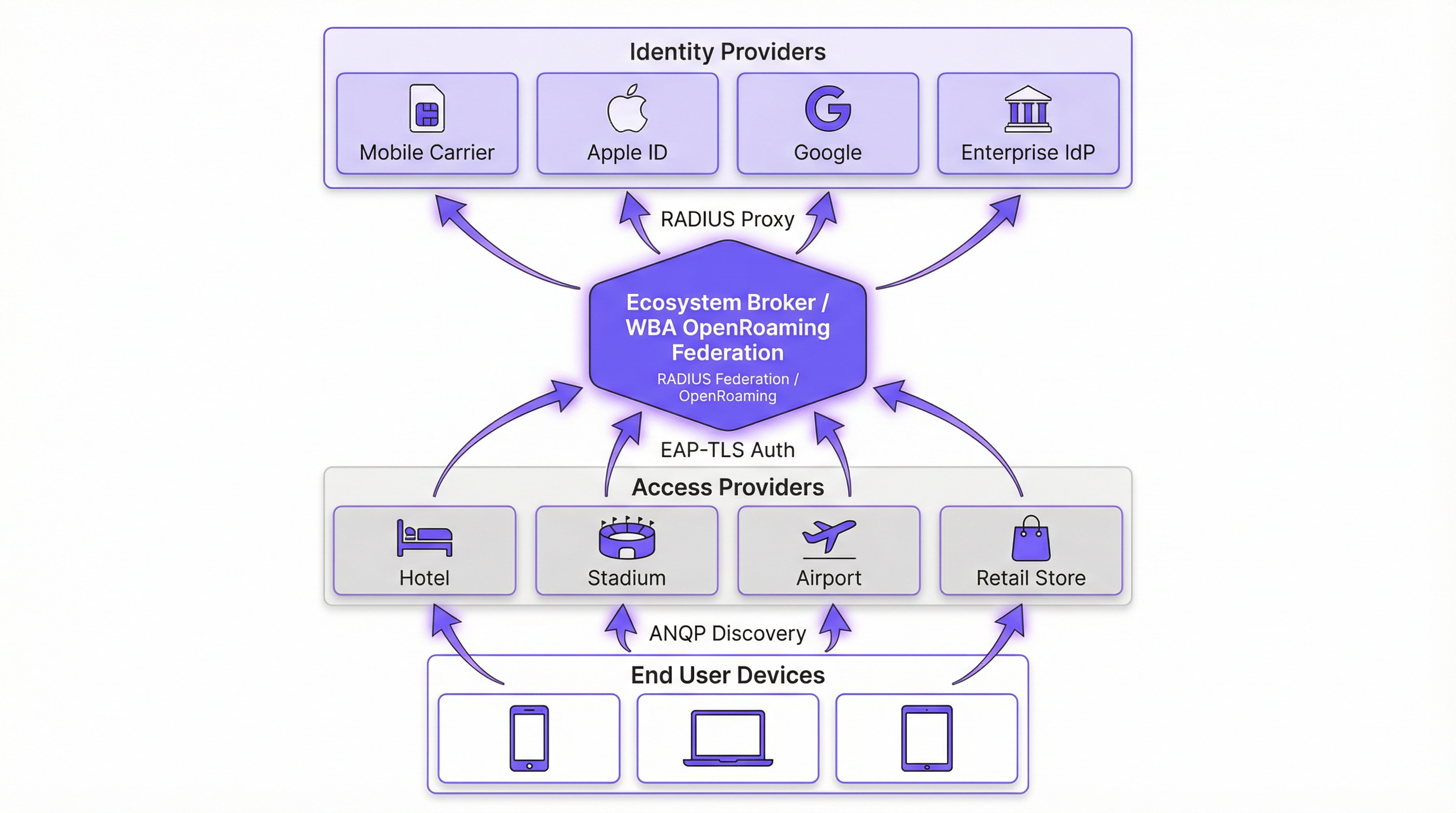
Para entender el cambio, debemos distinguir entre la tecnología subyacente y la federación que la escala.
Passpoint (Hotspot 2.0) es una certificación de la Wi-Fi Alliance basada en el estándar IEEE 802.11u. Define el mecanismo para que los dispositivos descubran y se autentiquen en las redes automáticamente. El protocolo central es el Access Network Query Protocol (ANQP), que permite a un dispositivo cliente interrogar a un Access Point (AP) antes de asociarse. El dispositivo verifica los Roaming Consortium Organizationally Unique Identifiers (OUIs) anunciados por el AP frente a sus perfiles provistos localmente. Si se encuentra una coincidencia, el dispositivo inicia una conexión de Extensible Authentication Protocol (EAP) (normalmente EAP-TLS o EAP-TTLS).
OpenRoaming es la federación global construida sobre Passpoint. Mientras que Passpoint maneja la interacción local entre el dispositivo y el AP, OpenRoaming proporciona la infraestructura de proxy RADIUS que conecta millones de AP con miles de proveedores de identidad (IdP). Esto elimina la necesidad de que los recintos negocien acuerdos de roaming individuales o gestionen una infraestructura de clave pública (PKI) compleja para invitados externos.
Cambio de paradigma de seguridad
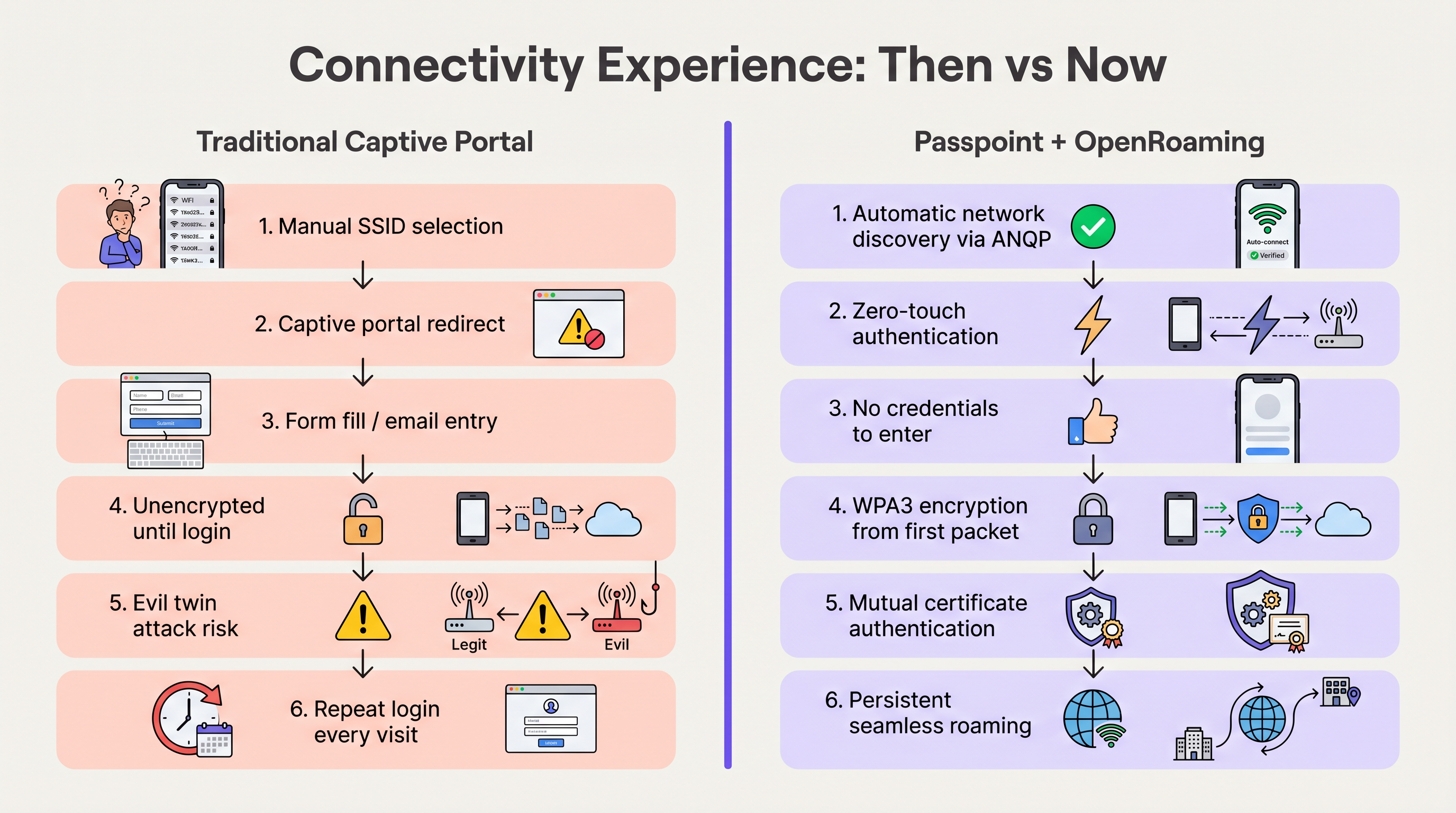
Las redes abiertas tradicionales con Captive Portal transmiten datos sin cifrar hasta que el usuario completa el proceso de inicio de sesión. Esto expone a los usuarios a ataques de "gemelo malvado" (evil twin), donde actores maliciosos suplantan el SSID del recinto para recolectar credenciales.
Passpoint altera fundamentalmente este perfil de riesgo. Debido a que la autenticación ocurre a través de 802.1X, la conexión se asegura con cifrado WPA2-Enterprise o WPA3-Enterprise desde el primer paquete. Además, la autenticación mutua inherente a EAP-TLS significa que el dispositivo verifica el certificado de la red antes de enviar cualquier credencial, neutralizando eficazmente las vulnerabilidades de gemelo malvado. Como se detalla en nuestra guía sobre Evaluación de la postura del dispositivo para el control de acceso a la red , establecer la confianza del dispositivo es primordial, y Passpoint lo aplica en el borde.
Guía de implementación
La implementación de OpenRoaming requiere la coordinación entre su Wireless LAN Controller (WLC), su infraestructura RADIUS y la federación WBA. Los siguientes pasos neutrales respecto al proveedor describen una implementación empresarial estándar.
Fase 1: Evaluación de la preparación de la infraestructura
Antes de la configuración, verifique que su hardware existente sea compatible con los estándares requeridos. La mayoría de los AP empresariales (por ejemplo, Cisco, Aruba, Ruckus) lanzados en los últimos cinco años admiten 802.11u y Passpoint de forma nativa. Asegúrese de que el firmware de su WLC esté actualizado para admitir WPA3 y Protected Management Frames (PMF), que son obligatorios para Passpoint Release 3.
Fase 2: Integración de RADIUS y la federación
El punto de integración crítico es conectar su red local a la federación OpenRoaming. Esto se logra estableciendo una conexión proxy RADIUS segura.
- Seleccione un proveedor de RADIUS en la nube: Elija un proveedor que sea un OpenRoaming Ecosystem Broker certificado (por ejemplo, IronWiFi, Cisco Spaces).
- Establezca túneles RadSec: Configure su WLC para reenviar solicitudes de autenticación al servidor RADIUS en la nube utilizando RadSec (RADIUS sobre TLS). Esto asegura el tráfico de autenticación a través de Internet. Para una configuración detallada, consulte RadSec: Asegurando el tráfico de autenticación RADIUS con TLS .
- Configure el enrutamiento de dominios (Realm Routing): Establezca reglas de enrutamiento en el servidor RADIUS para reenviar solicitudes que coincidan con los dominios de OpenRoaming (por ejemplo,
apple.openroaming.net) a la federación WBA.
Fase 3: Configuración de WLAN
Configure el SSID específico en su WLC para transmitir los elementos ANQP necesarios.
- Habilite 802.11u: Active las funciones de Hotspot 2.0/Passpoint para la WLAN de destino.
- Defina los OUI del Roaming Consortium: Agregue los OUI específicos proporcionados por la WBA (por ejemplo,
5A-03-BApara OpenRoaming-Settlement-Free) al beacon del AP. - Configure la seguridad: Establezca la seguridad de Capa 2 en WPA2/WPA3-Enterprise con autenticación 802.1X.
Fase 4: Estrategia de incorporación de usuarios
Si bien los usuarios federados (por ejemplo, aquellos con perfiles de Apple o Google) se conectarán automáticamente, debe planificar para los usuarios que no tienen perfiles preexistentes. Implemente un servidor de registro en línea (OSU) o integre la provisión de perfiles en la aplicación móvil de su recinto. Esto permite a los usuarios descargar un perfil de Passpoint durante su primera visita, garantizando una conectividad fluida para todas las visitas posteriores.
Mejores prácticas
- Mantenga un enfoque híbrido durante la transición: No desactive inmediatamente su Captive Portal heredado. Ejecute el SSID habilitado para Passpoint simultáneamente con su red de WiFi para invitados abierta para dar cabida a dispositivos heredados y usuarios sin perfiles. Supervise las tasas de conexión para determinar cuándo se puede retirar la red abierta de forma segura.
- Priorice RadSec: Nunca transmita tráfico RADIUS a través de Internet sin cifrar. Utilice siempre RadSec para asegurar la comunicación entre su WLC y el proveedor de RADIUS en la nube.
- Aproveche la integración con aplicaciones: Para recintos de hospitality y retail, integre la provisión del perfil Passpoint dentro de la aplicación de lealtad de su marca. Esto garantiza que el usuario se autentique de forma segura mientras vincula directamente la presencia en la red con su perfil de cliente.
- Supervise los vencimientos de certificados: Passpoint depende en gran medida de la PKI. Implemente monitoreo y alertas automatizadas para todos los certificados de servidores RADIUS y web para evitar fallas repentinas de autenticación.
Resolución de problemas y mitigación de riesgos
Al implementar Passpoint, los equipos de TI suelen encontrar modos de falla específicos. Comprender estos riesgos es crucial para un despliegue sin problemas.
- Problemas de tiempo de espera de ANQP: Si los AP están sobrecargados o el controlador es lento, las respuestas ANQP pueden agotar el tiempo de espera, lo que impide que los dispositivos descubran la red. Mitigación: Asegúrese de que los AP estén provistos adecuadamente y supervise la utilización de la CPU del plano de control. Para entornos de alta densidad, considere optimizar los intervalos de beacon.
- Fallas de confianza en los certificados: Si el dispositivo cliente no confía en la CA raíz que firmó el certificado del servidor RADIUS, el protocolo de enlace EAP-TLS fallará silenciosamente. Mitigación: Utilice siempre certificados emitidos por autoridades de certificación públicas ampliamente reconocidas (por ejemplo, DigiCert, Let's Encrypt) para servidores RADIUS orientados al público. Evite los certificados autofirmados para el acceso de invitados.
- Caídas de conectividad RadSec: Los firewalls o los problemas de enrutamiento intermedio pueden cortar la conexión TCP requerida para RadSec. Mitigación: Implemente un monitoreo robusto del estado del túnel RadSec y configure servidores RADIUS secundarios para la conmutación por error.
ROI e impacto empresarial
La transición a Passpoint y OpenRoaming no es simplemente una actualización de TI; es un habilitador de negocios estratégico. Al eliminar la fricción de los Captive Portal, los recintos ven mejoras inmediatas en las métricas clave.
- Aumento de las tasas de conexión: Los recintos suelen observar un aumento del 40 al 60% en el número de dispositivos que se conectan a la red. Esto amplía directamente el tamaño de la muestra para WiFi Analytics y Sensors , proporcionando datos más precisos sobre la afluencia y el tiempo de permanencia.
- Mejora del compromiso del cliente: En retail y hospitality, la conectividad fluida permite a los recintos activar notificaciones basadas en la ubicación a través de sus aplicaciones en el momento en que un invitado cruza la puerta, impulsando un compromiso inmediato.
- Reducción de los gastos generales de soporte: La eliminación de los Captive Portal reduce drásticamente los tickets de soporte relacionados con fallas de inicio de sesión, redireccionamientos del navegador y contraseñas olvidadas, liberando recursos de TI.
- Monetización de datos: Al integrarse con plataformas de Wayfinding y lealtad, los recintos pueden correlacionar la presencia física con el comportamiento de compra, proporcionando información práctica que justifica la inversión en la red.
Escuche nuestro informe completo sobre este tema:
Términos clave y definiciones
Passpoint (Hotspot 2.0)
A Wi-Fi Alliance certification based on the IEEE 802.11u standard that enables devices to automatically discover and securely connect to Wi-Fi networks without user intervention.
IT teams deploy Passpoint to replace legacy captive portals, providing a cellular-like roaming experience for enterprise and guest WiFi.
OpenRoaming
A global roaming federation managed by the Wireless Broadband Alliance (WBA) that connects Identity Providers (IdPs) with Access Networks using Passpoint technology.
Venues join OpenRoaming to allow guests to authenticate using existing credentials (e.g., Apple ID, Google, Carrier SIM) without managing local accounts.
ANQP (Access Network Query Protocol)
A Layer 2 protocol defined in 802.11u that allows a client device to request information from an Access Point (such as supported roaming partners) before associating with the network.
ANQP is the mechanism that allows a smartphone to 'know' if it can connect to a Passpoint network silently in the background.
RadSec (RADIUS over TLS)
A protocol that secures RADIUS authentication traffic by wrapping it in a TLS tunnel, typically using TCP port 2083.
Essential for OpenRoaming deployments to ensure that authentication requests sent from the venue to the cloud RADIUS provider cannot be intercepted.
OUI (Organizationally Unique Identifier)
A 24-bit number that uniquely identifies a vendor, manufacturer, or organization, used in Passpoint to identify supported roaming consortiums.
Network admins configure specific OUIs on their WLCs to broadcast which identity providers or federations (like OpenRoaming) are supported at the venue.
EAP-TLS (Extensible Authentication Protocol - Transport Layer Security)
A highly secure authentication framework that requires mutual certificate-based authentication between the client and the server.
The gold standard for Passpoint authentication, ensuring that both the user's device and the venue's network verify each other's identities before connecting.
OSU (Online Sign-Up)
A standardized mechanism in Passpoint Release 2 and later that allows a device to securely obtain network credentials and a profile from a provisioning server.
Used to onboard new guests who do not already have a Passpoint profile installed on their device.
Evil Twin Attack
A wireless attack where a malicious actor sets up a rogue Access Point broadcasting the same SSID as a legitimate network to intercept user traffic and credentials.
Passpoint eliminates this risk by requiring the network to present a valid certificate (mutual authentication) before the device will connect.
Casos de éxito
A global hotel chain with 200 properties wants to improve guest connectivity and increase the adoption of its loyalty app. Guests currently complain about having to log in to the captive portal every day of their stay, and attach rates are low.
The hotel deploys Passpoint across all properties. Instead of a captive portal, they integrate Passpoint profile provisioning into their loyalty app. When a guest downloads the app and logs in, a Passpoint profile is silently installed on their device. The APs are configured to broadcast the hotel's specific Roaming Consortium OUI. The WLC uses RadSec to forward authentication requests to a cloud RADIUS provider. When the guest arrives at any property globally, their device detects the OUI, authenticates via EAP-TLS using the profile, and connects instantly with WPA3 encryption.
A large conference centre needs to provide secure WiFi for 10,000 attendees. Managing temporary credentials for a 3-day event via a captive portal is operationally heavy and insecure.
The venue implements OpenRoaming. They configure their WLC to broadcast the WBA OpenRoaming OUIs and establish a RadSec connection to an OpenRoaming Ecosystem Broker. Attendees arriving at the venue who already have an OpenRoaming profile (e.g., via their mobile carrier or a previous venue) connect automatically. For attendees without a profile, the venue provides QR codes around the concourse that direct users to an Online Sign-Up (OSU) server to download a temporary event profile.
Análisis de escenarios
Q1. You are the IT Director for a retail chain. Marketing wants to track repeat customer visits accurately using WiFi analytics, but the current open guest network with a captive portal has a 15% attach rate. Customers complain the login takes too long. How do you redesign the network access strategy to meet Marketing's goals while improving the customer experience?
💡 Sugerencia:Consider how you can tie network authentication to an asset the customer already values, removing the friction of the captive portal entirely.
Mostrar enfoque recomendado
Implement Passpoint and integrate the profile provisioning into the retailer's existing mobile loyalty app. When customers download or update the app, the Passpoint profile is silently installed. Upon entering any store, their device authenticates automatically via EAP-TLS. This removes the captive portal friction, dramatically increases the attach rate (providing Marketing with accurate repeat visit data), and secures the connection with WPA3.
Q2. During a pilot deployment of OpenRoaming at a stadium, the network team notices that while authentication requests are reaching the local WLC, they are failing to reach the cloud RADIUS provider. The firewall team confirms that standard RADIUS ports (UDP 1812/1813) are open outbound. What is the most likely cause of the failure?
💡 Sugerencia:OpenRoaming Ecosystem Brokers mandate secure communication for authentication traffic over the internet.
Mostrar enfoque recomendado
The WLC is likely attempting to send standard, unencrypted RADIUS traffic, but OpenRoaming deployments require RadSec (RADIUS over TLS) for communication with the cloud broker. The firewall team needs to ensure that TCP port 2083 (the standard port for RadSec) is open outbound, and the WLC must be configured to establish the TLS tunnel using the correct certificates.
Q3. A hospital wants to deploy Passpoint to provide seamless roaming for doctors moving between the main campus and satellite clinics. However, the Information Security Officer (ISO) is concerned about 'evil twin' attacks where a malicious actor might spoof the hospital's SSID at a nearby coffee shop to steal credentials. How does Passpoint address this specific concern?
💡 Sugerencia:Focus on the specific EAP methods used in Passpoint and how the client device verifies the network before transmitting data.
Mostrar enfoque recomendado
Passpoint mitigates the evil twin risk through mutual authentication, typically using EAP-TLS or EAP-TTLS. Before the doctor's device sends any authentication credentials, the AP (via the RADIUS server) must present a valid digital certificate. The device verifies this certificate against its trusted Root CAs. If a malicious actor spoofs the SSID, they will not possess the valid private key/certificate for the hospital's RADIUS server, and the device will silently abort the connection before any credentials are exchanged.
Conclusiones clave
- ✓Passpoint (802.11u) eliminates captive portals by enabling devices to discover and connect to networks automatically and securely.
- ✓OpenRoaming scales Passpoint by creating a global federation, allowing users to authenticate using existing trusted identities (Apple, Google, Carriers).
- ✓Security is drastically improved through WPA3 encryption from the first packet and mutual certificate authentication, neutralizing 'evil twin' attacks.
- ✓Deploying Passpoint requires WPA3-capable access points, a cloud RADIUS provider, and RadSec (RADIUS over TLS) for secure external communication.
- ✓Integrating Passpoint profile provisioning into venue loyalty apps drives higher network attach rates and richer location-based analytics.
- ✓Venues should run a hybrid model during transition, broadcasting both the legacy captive portal SSID and the Passpoint SSID until adoption reaches critical mass.
- ✓OpenRoaming simplifies GDPR compliance by relying on anonymised persistent tokens rather than collecting personal data via splash pages.




