

निर्बाध कनेक्टिविटी का भविष्य: Passpoint और OpenRoaming का विवरण
यह तकनीकी संदर्भ मार्गदर्शिका IT लीडर्स को पारंपरिक Captive Portal से Passpoint और OpenRoaming पर ट्रांज़िशन करने के लिए व्यावहारिक अंतर्दृष्टि प्रदान करती है। यह निर्बाध कनेक्टिविटी में सुधार करने, सुरक्षा बढ़ाने और एंटरप्राइज वेन्यू में मापने योग्य ROI प्राप्त करने के लिए अंतर्निहित IEEE 802.11u और WPA3 मानकों, सुरक्षित प्रमाणीकरण प्रवाह और वास्तविक दुनिया की परिनियोजन रणनीतियों का विवरण देती है।
🎧 इस गाइड को सुनें
ट्रांसक्रिप्ट देखें

कार्यकारी सारांश
पिछले एक दशक से, गेस्ट WiFi Captive Portal पर निर्भर रहा है—एक घर्षण-भारी मॉडल जो उपयोगकर्ताओं को निराश करता है, ब्रांड अनुभव को खराब करता है, और महत्वपूर्ण सुरक्षा कमजोरियां पैदा करता है। चूंकि Hospitality , Retail , और सार्वजनिक क्षेत्रों के वेन्यू WiFi Analytics और स्थान-आधारित सेवाओं को बढ़ावा देने के लिए उच्च अटैच रेट्स की मांग कर रहे हैं, उद्योग निर्बाध, सेलुलर जैसी कनेक्टिविटी की ओर बढ़ रहा है।
Passpoint (Hotspot 2.0) और OpenRoaming एंटरप्राइज वायरलेस एक्सेस के निश्चित भविष्य का प्रतिनिधित्व करते हैं। IEEE 802.11u मानक पर निर्मित और वायरलेस ब्रॉडबैंड एलायंस (WBA) द्वारा प्रबंधित, यह इकोसिस्टम जीरो-टच, सुरक्षित (WPA3) प्रमाणीकरण सक्षम बनाता है। पहचान प्रदाताओं (जैसे Apple, Google और मोबाइल कैरियर) को एक्सेस नेटवर्क के साथ संघबद्ध करके, वेन्यू बिना मैन्युअल SSID चयन या स्प्लैश पेज के मेहमानों को स्वचालित रूप से ऑनबोर्ड कर सकते हैं। यह मार्गदर्शिका IT प्रबंधकों और नेटवर्क आर्किटेक्ट्स के लिए Passpoint और OpenRoaming का मूल्यांकन, डिजाइन और परिनियोजन करने के लिए एक व्यावहारिक, वेंडर-न्यूट्रल रोडमैप प्रदान करती है, जो गेस्ट WiFi को लागत केंद्र से एक सुरक्षित, डेटा-समृद्ध संपत्ति में बदल देती है।
तकनीकी गहन विश्लेषण
Passpoint और OpenRoaming आर्किटेक्चर
इस बदलाव को समझने के लिए, हमें अंतर्निहित तकनीक और इसे स्केल करने वाले संघ (federation) के बीच अंतर करना चाहिए।
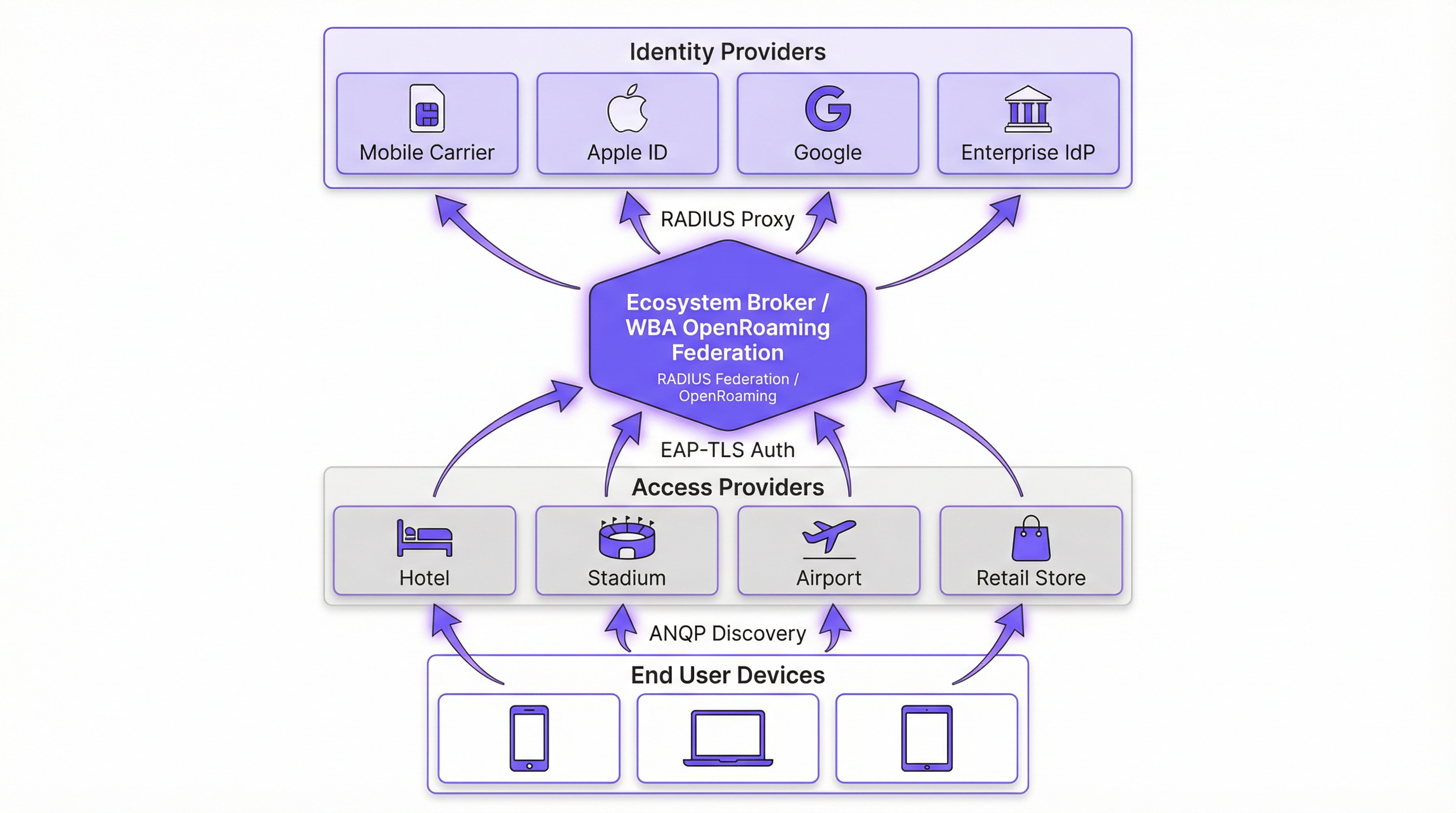
Passpoint (Hotspot 2.0) IEEE 802.11u मानक पर आधारित एक Wi-Fi एलायंस प्रमाणन है। यह उपकरणों के लिए नेटवर्क को स्वचालित रूप से खोजने और प्रमाणित करने के तंत्र को परिभाषित करता है। इसका मुख्य प्रोटोकॉल एक्सेस नेटवर्क क्वेरी प्रोटोकॉल (ANQP) है, जो क्लाइंट डिवाइस को जुड़ने से पहले एक्सेस पॉइंट (AP) से पूछताछ करने की अनुमति देता है। डिवाइस AP के विज्ञापित रोमिंग कंसोर्टियम ऑर्गनाइजेशनली यूनिक आइडेंटिफायर्स (OUIs) की जांच अपने स्थानीय रूप से प्रावधानित प्रोफाइल के साथ करता है। यदि कोई मिलान मिलता है, तो डिवाइस एक एक्सटेंसिबल ऑथेंटिकेशन प्रोटोकॉल (EAP) कनेक्शन (आमतौर पर EAP-TLS या EAP-TTLS) शुरू करता है।
OpenRoaming Passpoint के ऊपर बनाया गया वैश्विक संघ है। जबकि Passpoint स्थानीय डिवाइस-टू-AP इंटरैक्शन को संभालता है, OpenRoaming RADIUS प्रॉक्सी इंफ्रास्ट्रक्चर प्रदान करता है जो लाखों AP को हजारों पहचान प्रदाताओं (IdPs) से जोड़ता है। यह वेन्यू के लिए व्यक्तिगत रोमिंग समझौतों पर बातचीत करने या बाहरी मेहमानों के लिए जटिल पब्लिक की इंफ्रास्ट्रक्चर (PKI) प्रबंधित करने की आवश्यकता को समाप्त करता है।
सुरक्षा प्रतिमान में बदलाव
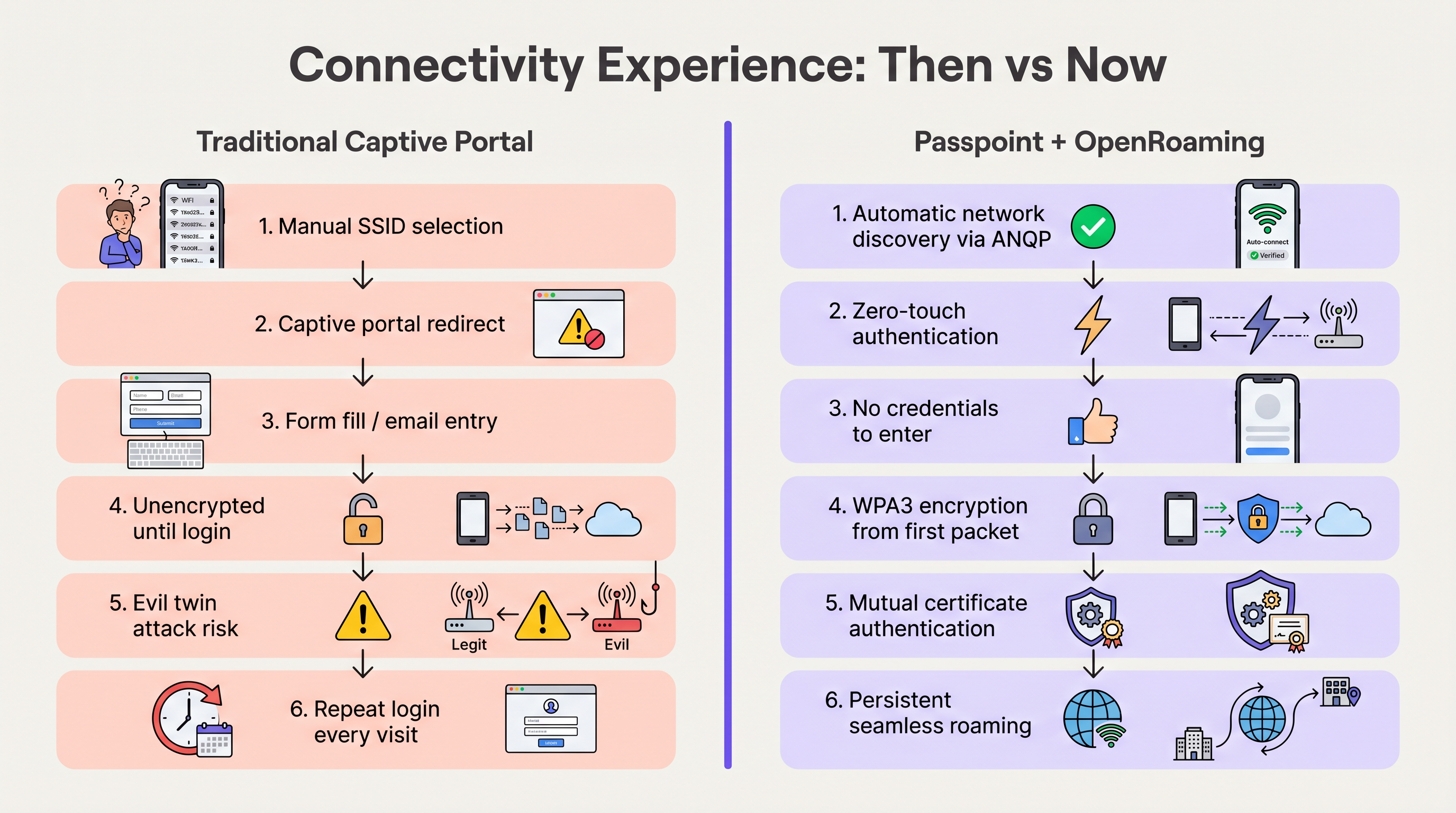
Captive Portal वाले पारंपरिक ओपन नेटवर्क तब तक डेटा को अनएन्क्रिप्टेड प्रसारित करते हैं जब तक कि उपयोगकर्ता लॉगिन प्रक्रिया पूरी नहीं कर लेता। यह उपयोगकर्ताओं को "ईविल ट्विन" हमलों के प्रति संवेदनशील बनाता है, जहाँ दुर्भावनापूर्ण तत्व क्रेडेंशियल चुराने के लिए वेन्यू के SSID को स्पूफ करते हैं।
Passpoint मौलिक रूप से इस जोखिम प्रोफाइल को बदल देता है। चूंकि प्रमाणीकरण 802.1X के माध्यम से होता है, इसलिए कनेक्शन पहले पैकेट से ही WPA2-Enterprise या WPA3-Enterprise एन्क्रिप्शन के साथ सुरक्षित होता है। इसके अलावा, EAP-TLS में निहित पारस्परिक प्रमाणीकरण का अर्थ है कि डिवाइस किसी भी क्रेडेंशियल को भेजने से पहले नेटवर्क के प्रमाणपत्र को सत्यापित करता है, जिससे ईविल ट्विन कमजोरियां प्रभावी रूप से बेअसर हो जाती हैं। जैसा कि Device Posture Assessment for Network Access Control पर हमारी मार्गदर्शिका में विस्तृत है, डिवाइस ट्रस्ट स्थापित करना सर्वोपरि है, और Passpoint इसे किनारे (edge) पर लागू करता है।
कार्यान्वयन मार्गदर्शिका
OpenRoaming को तैनात करने के लिए आपके वायरलेस LAN कंट्रोलर (WLC), आपके RADIUS इंफ्रास्ट्रक्चर और WBA संघ के बीच समन्वय की आवश्यकता होती है। निम्नलिखित वेंडर-न्यूट्रल चरण एक मानक एंटरप्राइज परिनियोजन की रूपरेखा तैयार करते हैं।
चरण 1: इंफ्रास्ट्रक्चर तत्परता मूल्यांकन
कॉन्फ़िगरेशन से पहले, सत्यापित करें कि आपका मौजूदा हार्डवेयर आवश्यक मानकों का समर्थन करता है। पिछले पांच वर्षों में जारी किए गए अधिकांश एंटरप्राइज AP (जैसे, Cisco, Aruba, Ruckus) मूल रूप से 802.11u और Passpoint का समर्थन करते हैं। सुनिश्चित करें कि आपका WLC फर्मवेयर WPA3 और प्रोटेक्टेड मैनेजमेंट फ्रेम्स (PMF) का समर्थन करने के लिए अपडेट किया गया है, जो Passpoint रिलीज़ 3 के लिए अनिवार्य हैं।
चरण 2: RADIUS और संघ एकीकरण
महत्वपूर्ण एकीकरण बिंदु आपके स्थानीय नेटवर्क को OpenRoaming संघ से जोड़ना है। यह एक सुरक्षित RADIUS प्रॉक्सी कनेक्शन स्थापित करके प्राप्त किया जाता है।
- एक क्लाउड RADIUS प्रदाता चुनें: ऐसा प्रदाता चुनें जो प्रमाणित OpenRoaming इकोसिस्टम ब्रोकर हो (जैसे, IronWiFi, Cisco Spaces)।
- RadSec टनल स्थापित करें: RadSec (TLS पर RADIUS) का उपयोग करके क्लाउड RADIUS सर्वर पर प्रमाणीकरण अनुरोधों को अग्रेषित करने के लिए अपने WLC को कॉन्फ़िगर करें। यह इंटरनेट पर प्रमाणीकरण ट्रैफ़िक को सुरक्षित करता है। विस्तृत कॉन्फ़िगरेशन के लिए, RadSec : Sécurisation du trafic d'authentification RADIUS avec TLS देखें।
- रेल्म रूटिंग कॉन्फ़िगर करें: OpenRoaming डोमेन (जैसे,
apple.openroaming.net) से मेल खाने वाले अनुरोधों को WBA संघ को अग्रेषित करने के लिए RADIUS सर्वर पर रूटिंग नियम सेट करें।
चरण 3: WLAN कॉन्फ़िगरेशन
आवश्यक ANQP तत्वों को प्रसारित करने के लिए अपने WLC पर विशिष्ट SSID कॉन्फ़िगर करें।
- 802.11u सक्षम करें: लक्षित WLAN के लिए Hotspot 2.0/Passpoint सुविधाओं को चालू करें।
- रोमिंग कंसोर्टियम OUIs परिभाषित करें: AP के बीकन में WBA द्वारा प्रदान किए गए विशिष्ट OUIs (जैसे, OpenRoaming-Settlement-Free के लिए
5A-03-BA) जोड़ें। - सुरक्षा कॉन्फ़िगर करें: लेयर 2 सुरक्षा को 802.1X प्रमाणीकरण के साथ WPA2/WPA3-Enterprise पर सेट करें।
चरण 4: उपयोगकर्ता ऑनबोर्डिंग रणनीति
जबकि संघबद्ध उपयोगकर्ता (जैसे, Apple या Google प्रोफाइल वाले) स्वचालित रूप से कनेक्ट हो जाएंगे, आपको उन उपयोगकर्ताओं के लिए योजना बनानी चाहिए जिनके पास पहले से मौजूद प्रोफाइल नहीं हैं। एक ऑनलाइन साइन-अप लागू करें (OSU) सर्वर या अपने वेन्यू के मोबाइल ऐप में प्रोफाइल प्रोविजनिंग को एकीकृत करें। यह उपयोगकर्ताओं को उनकी पहली विज़िट के दौरान Passpoint प्रोफाइल डाउनलोड करने की अनुमति देता है, जिससे बाद की सभी विज़िट के लिए निर्बाध कनेक्टिविटी सुनिश्चित होती है।
सर्वोत्तम प्रथाएं
- ट्रांजिशन के दौरान हाइब्रिड दृष्टिकोण बनाए रखें: अपने पुराने Captive Portal को तुरंत अक्षम न करें। पुराने डिवाइस और बिना प्रोफाइल वाले उपयोगकर्ताओं को समायोजित करने के लिए अपने ओपन Guest WiFi नेटवर्क के साथ Passpoint-सक्षम SSID को समानांतर रूप से चलाएं। यह निर्धारित करने के लिए अटैच रेट की निगरानी करें कि ओपन नेटवर्क को कब सुरक्षित रूप से बंद किया जा सकता है।
- RadSec को प्राथमिकता दें: इंटरनेट पर कभी भी अनएन्क्रिप्टेड RADIUS ट्रैफ़िक प्रसारित न करें। अपने WLC और क्लाउड RADIUS प्रदाता के बीच संचार को सुरक्षित करने के लिए हमेशा RadSec का उपयोग करें।
- ऐप एकीकरण का लाभ उठाएं: हॉस्पिटैलिटी और रिटेल वेन्यू के लिए, अपने ब्रांड के लॉयल्टी ऐप के भीतर Passpoint प्रोफाइल प्रोविजनिंग को एम्बेड करें। यह गारंटी देता है कि उपयोगकर्ता सुरक्षित रूप से प्रमाणित है और साथ ही नेटवर्क उपस्थिति को सीधे उनके कस्टमर प्रोफाइल से जोड़ता है।
- सर्टिफिकेट की समाप्ति की निगरानी करें: Passpoint भारी मात्रा में PKI पर निर्भर करता है। अचानक प्रमाणीकरण विफलताओं को रोकने के लिए सभी RADIUS और वेब सर्वर सर्टिफिकेट के लिए स्वचालित निगरानी और अलर्ट लागू करें।
समस्या निवारण और जोखिम शमन
Passpoint को तैनात करते समय, IT टीमों को आमतौर पर विशिष्ट विफलता मोड का सामना करना पड़ता है। इन जोखिमों को समझना एक सुचारू रोलआउट के लिए महत्वपूर्ण है।
- ANQP टाइमआउट समस्याएं: यदि APs ओवरलोडेड हैं या कंट्रोलर धीमा है, तो ANQP प्रतिक्रियाएं टाइम आउट हो सकती हैं, जिससे डिवाइस नेटवर्क को खोजने में असमर्थ हो जाते हैं। शमन: सुनिश्चित करें कि APs पर्याप्त रूप से प्रोविजन्ड हैं और कंट्रोल प्लेन CPU उपयोग की निगरानी करें। उच्च-घनत्व वाले वातावरण के लिए, बीकन अंतराल को अनुकूलित करने पर विचार करें।
- सर्टिफिकेट ट्रस्ट विफलताएं: यदि क्लाइंट डिवाइस उस Root CA पर भरोसा नहीं करता है जिसने RADIUS सर्वर के सर्टिफिकेट पर हस्ताक्षर किए हैं, तो EAP-TLS हैंडशेक चुपचाप विफल हो जाएगा। शमन: सार्वजनिक-सामना वाले RADIUS सर्वर के लिए हमेशा व्यापक रूप से मान्यता प्राप्त सार्वजनिक सर्टिफिकेट अथॉरिटी (जैसे, DigiCert, Let's Encrypt) द्वारा जारी सर्टिफिकेट का उपयोग करें। गेस्ट एक्सेस के लिए स्व-हस्ताक्षरित सर्टिफिकेट से बचें।
- RadSec कनेक्टिविटी ड्रॉप: फ़ायरवॉल या मध्यवर्ती रूटिंग समस्याएं RadSec के लिए आवश्यक TCP कनेक्शन को तोड़ सकती हैं। शमन: RadSec टनल स्थिति पर मजबूत निगरानी लागू करें और फेलओवर के लिए सेकेंडरी RADIUS सर्वर कॉन्फ़िगर करें।
ROI और व्यावसायिक प्रभाव
Passpoint और OpenRoaming में ट्रांजिशन केवल एक IT अपग्रेड नहीं है; यह एक रणनीतिक व्यावसायिक इनेबलर है। Captive Portal की बाधाओं को दूर करके, वेन्यू प्रमुख मेट्रिक्स में तत्काल सुधार देखते हैं।
- बढ़ी हुई अटैच दरें: वेन्यू आमतौर पर नेटवर्क से जुड़ने वाले डिवाइसों की संख्या में 40-60% की वृद्धि देखते हैं। यह सीधे WiFi Analytics और Sensors के लिए सैंपल साइज का विस्तार करता है, जिससे अधिक सटीक फुटफॉल और ड्वेल टाइम डेटा मिलता है।
- बेहतर ग्राहक जुड़ाव: रिटेल और हॉस्पिटैलिटी में, निर्बाध कनेक्टिविटी वेन्यू को उनके ऐप के माध्यम से स्थान-आधारित नोटिफिकेशन ट्रिगर करने की अनुमति देती है जैसे ही कोई मेहमान दरवाजे से अंदर आता है, जिससे तत्काल जुड़ाव बढ़ता है।
- कम सपोर्ट ओवरहेड: Captive Portal को समाप्त करने से लॉगिन विफलताओं, ब्राउज़र रीडायरेक्ट और भूले हुए पासवर्ड से संबंधित हेल्पडेस्क टिकटों में भारी कमी आती है, जिससे IT संसाधन मुक्त होते हैं।
- डेटा मुद्रीकरण: Wayfinding और लॉयल्टी प्लेटफॉर्म के साथ एकीकृत करके, वेन्यू भौतिक उपस्थिति को खरीदारी व्यवहार के साथ सहसंबंधित कर सकते हैं, जो नेटवर्क निवेश को सही ठहराने वाले कार्रवाई योग्य अंतर्दृष्टि प्रदान करते हैं।
इस विषय पर हमारी व्यापक ब्रीफिंग सुनें:
मुख्य शब्द और परिभाषाएं
Passpoint (Hotspot 2.0)
A Wi-Fi Alliance certification based on the IEEE 802.11u standard that enables devices to automatically discover and securely connect to Wi-Fi networks without user intervention.
IT teams deploy Passpoint to replace legacy captive portals, providing a cellular-like roaming experience for enterprise and guest WiFi.
OpenRoaming
A global roaming federation managed by the Wireless Broadband Alliance (WBA) that connects Identity Providers (IdPs) with Access Networks using Passpoint technology.
Venues join OpenRoaming to allow guests to authenticate using existing credentials (e.g., Apple ID, Google, Carrier SIM) without managing local accounts.
ANQP (Access Network Query Protocol)
A Layer 2 protocol defined in 802.11u that allows a client device to request information from an Access Point (such as supported roaming partners) before associating with the network.
ANQP is the mechanism that allows a smartphone to 'know' if it can connect to a Passpoint network silently in the background.
RadSec (RADIUS over TLS)
A protocol that secures RADIUS authentication traffic by wrapping it in a TLS tunnel, typically using TCP port 2083.
Essential for OpenRoaming deployments to ensure that authentication requests sent from the venue to the cloud RADIUS provider cannot be intercepted.
OUI (Organizationally Unique Identifier)
A 24-bit number that uniquely identifies a vendor, manufacturer, or organization, used in Passpoint to identify supported roaming consortiums.
Network admins configure specific OUIs on their WLCs to broadcast which identity providers or federations (like OpenRoaming) are supported at the venue.
EAP-TLS (Extensible Authentication Protocol - Transport Layer Security)
A highly secure authentication framework that requires mutual certificate-based authentication between the client and the server.
The gold standard for Passpoint authentication, ensuring that both the user's device and the venue's network verify each other's identities before connecting.
OSU (Online Sign-Up)
A standardized mechanism in Passpoint Release 2 and later that allows a device to securely obtain network credentials and a profile from a provisioning server.
Used to onboard new guests who do not already have a Passpoint profile installed on their device.
Evil Twin Attack
A wireless attack where a malicious actor sets up a rogue Access Point broadcasting the same SSID as a legitimate network to intercept user traffic and credentials.
Passpoint eliminates this risk by requiring the network to present a valid certificate (mutual authentication) before the device will connect.
केस स्टडीज
A global hotel chain with 200 properties wants to improve guest connectivity and increase the adoption of its loyalty app. Guests currently complain about having to log in to the captive portal every day of their stay, and attach rates are low.
The hotel deploys Passpoint across all properties. Instead of a captive portal, they integrate Passpoint profile provisioning into their loyalty app. When a guest downloads the app and logs in, a Passpoint profile is silently installed on their device. The APs are configured to broadcast the hotel's specific Roaming Consortium OUI. The WLC uses RadSec to forward authentication requests to a cloud RADIUS provider. When the guest arrives at any property globally, their device detects the OUI, authenticates via EAP-TLS using the profile, and connects instantly with WPA3 encryption.
A large conference centre needs to provide secure WiFi for 10,000 attendees. Managing temporary credentials for a 3-day event via a captive portal is operationally heavy and insecure.
The venue implements OpenRoaming. They configure their WLC to broadcast the WBA OpenRoaming OUIs and establish a RadSec connection to an OpenRoaming Ecosystem Broker. Attendees arriving at the venue who already have an OpenRoaming profile (e.g., via their mobile carrier or a previous venue) connect automatically. For attendees without a profile, the venue provides QR codes around the concourse that direct users to an Online Sign-Up (OSU) server to download a temporary event profile.
परिदृश्य विश्लेषण
Q1. You are the IT Director for a retail chain. Marketing wants to track repeat customer visits accurately using WiFi analytics, but the current open guest network with a captive portal has a 15% attach rate. Customers complain the login takes too long. How do you redesign the network access strategy to meet Marketing's goals while improving the customer experience?
💡 संकेत:Consider how you can tie network authentication to an asset the customer already values, removing the friction of the captive portal entirely.
अनुशंसित दृष्टिकोण दिखाएं
Implement Passpoint and integrate the profile provisioning into the retailer's existing mobile loyalty app. When customers download or update the app, the Passpoint profile is silently installed. Upon entering any store, their device authenticates automatically via EAP-TLS. This removes the captive portal friction, dramatically increases the attach rate (providing Marketing with accurate repeat visit data), and secures the connection with WPA3.
Q2. During a pilot deployment of OpenRoaming at a stadium, the network team notices that while authentication requests are reaching the local WLC, they are failing to reach the cloud RADIUS provider. The firewall team confirms that standard RADIUS ports (UDP 1812/1813) are open outbound. What is the most likely cause of the failure?
💡 संकेत:OpenRoaming Ecosystem Brokers mandate secure communication for authentication traffic over the internet.
अनुशंसित दृष्टिकोण दिखाएं
The WLC is likely attempting to send standard, unencrypted RADIUS traffic, but OpenRoaming deployments require RadSec (RADIUS over TLS) for communication with the cloud broker. The firewall team needs to ensure that TCP port 2083 (the standard port for RadSec) is open outbound, and the WLC must be configured to establish the TLS tunnel using the correct certificates.
Q3. A hospital wants to deploy Passpoint to provide seamless roaming for doctors moving between the main campus and satellite clinics. However, the Information Security Officer (ISO) is concerned about 'evil twin' attacks where a malicious actor might spoof the hospital's SSID at a nearby coffee shop to steal credentials. How does Passpoint address this specific concern?
💡 संकेत:Focus on the specific EAP methods used in Passpoint and how the client device verifies the network before transmitting data.
अनुशंसित दृष्टिकोण दिखाएं
Passpoint mitigates the evil twin risk through mutual authentication, typically using EAP-TLS or EAP-TTLS. Before the doctor's device sends any authentication credentials, the AP (via the RADIUS server) must present a valid digital certificate. The device verifies this certificate against its trusted Root CAs. If a malicious actor spoofs the SSID, they will not possess the valid private key/certificate for the hospital's RADIUS server, and the device will silently abort the connection before any credentials are exchanged.
मुख्य निष्कर्ष
- ✓Passpoint (802.11u) eliminates captive portals by enabling devices to discover and connect to networks automatically and securely.
- ✓OpenRoaming scales Passpoint by creating a global federation, allowing users to authenticate using existing trusted identities (Apple, Google, Carriers).
- ✓Security is drastically improved through WPA3 encryption from the first packet and mutual certificate authentication, neutralizing 'evil twin' attacks.
- ✓Deploying Passpoint requires WPA3-capable access points, a cloud RADIUS provider, and RadSec (RADIUS over TLS) for secure external communication.
- ✓Integrating Passpoint profile provisioning into venue loyalty apps drives higher network attach rates and richer location-based analytics.
- ✓Venues should run a hybrid model during transition, broadcasting both the legacy captive portal SSID and the Passpoint SSID until adoption reaches critical mass.
- ✓OpenRoaming simplifies GDPR compliance by relying on anonymised persistent tokens rather than collecting personal data via splash pages.




