

O Futuro da Conectividade Sem Interrupções: Passpoint e OpenRoaming Explicados
Este guia de referência técnica fornece insights práticos para líderes de TI sobre a transição de Captive Portals tradicionais para Passpoint e OpenRoaming. Ele detalha os padrões subjacentes IEEE 802.11u e WPA3, fluxos de autenticação seguros e estratégias de implantação no mundo real para melhorar a conectividade contínua, aumentar a segurança e impulsionar um ROI mensurável em locais corporativos.
🎧 Ouça este Guia
Ver Transcrição

Resumo Executivo
Na última década, o WiFi para convidados dependeu de Captive Portals — um modelo com alto atrito que frustra os usuários, degrada a experiência da marca e introduz vulnerabilidades de segurança significativas. À medida que locais em Hospitalidade , Varejo e setores públicos exigem taxas de adesão mais altas para alimentar o WiFi Analytics e serviços baseados em localização, a indústria está migrando para uma conectividade contínua, semelhante à celular.
Passpoint (Hotspot 2.0) e OpenRoaming representam o futuro definitivo do acesso sem fio corporativo. Construído sobre o padrão IEEE 802.11u e gerenciado pela Wireless Broadband Alliance (WBA), este ecossistema permite a autenticação zero-touch e segura (WPA3). Ao federar provedores de identidade (como Apple, Google e operadoras móveis) com redes de acesso, os locais podem integrar convidados automaticamente sem a seleção manual de SSID ou splash pages. Este guia fornece um roteiro prático e neutro em relação a fornecedores para que gerentes de TI e arquitetos de rede avaliem, projetem e implantem Passpoint e OpenRoaming, transformando o WiFi de convidados de um centro de custo em um ativo seguro e rico em dados.
Aprofundamento Técnico
A Arquitetura Passpoint e OpenRoaming
Para entender a mudança, devemos distinguir entre a tecnologia subjacente e a federação que a escala.
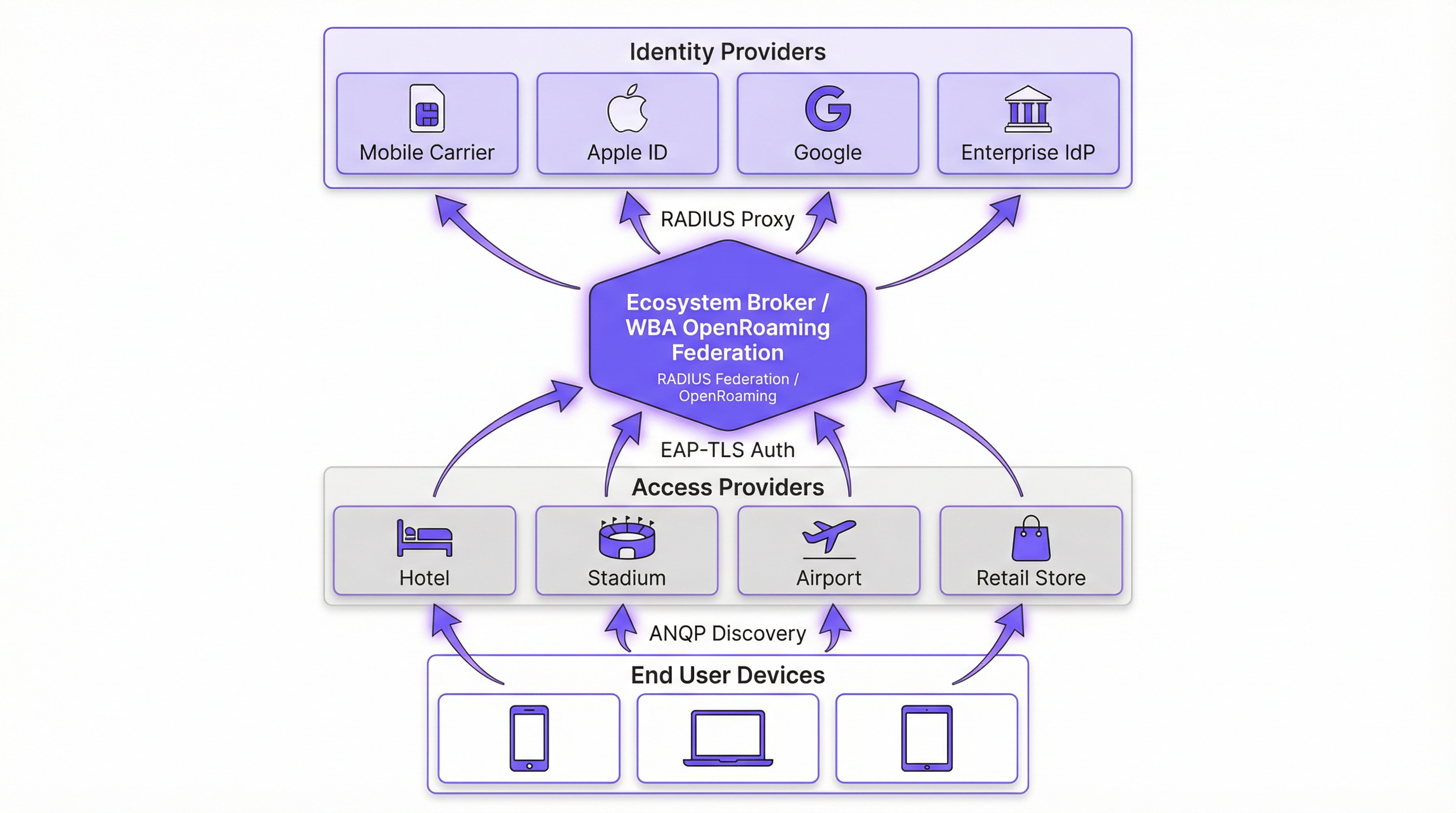
Passpoint (Hotspot 2.0) é uma certificação da Wi-Fi Alliance baseada no padrão IEEE 802.11u. Ele define o mecanismo para que os dispositivos descubram e se autentiquem em redes automaticamente. O protocolo principal é o Access Network Query Protocol (ANQP), que permite que um dispositivo cliente interrogue um Access Point (AP) antes de se associar. O dispositivo verifica os Roaming Consortium Organizationally Unique Identifiers (OUIs) anunciados pelo AP em relação aos seus perfis provisionados localmente. Se uma correspondência for encontrada, o dispositivo inicia uma conexão Extensible Authentication Protocol (EAP) (normalmente EAP-TLS ou EAP-TTLS).
OpenRoaming é a federação global construída sobre o Passpoint. Enquanto o Passpoint lida com a interação local entre dispositivo e AP, o OpenRoaming fornece a infraestrutura de proxy RADIUS que conecta milhões de APs a milhares de Provedores de Identidade (IdPs). Isso elimina a necessidade de os locais negociarem acordos de roaming individuais ou gerenciarem uma infraestrutura de chave pública (PKI) complexa para convidados externos.
Mudança de Paradigma de Segurança
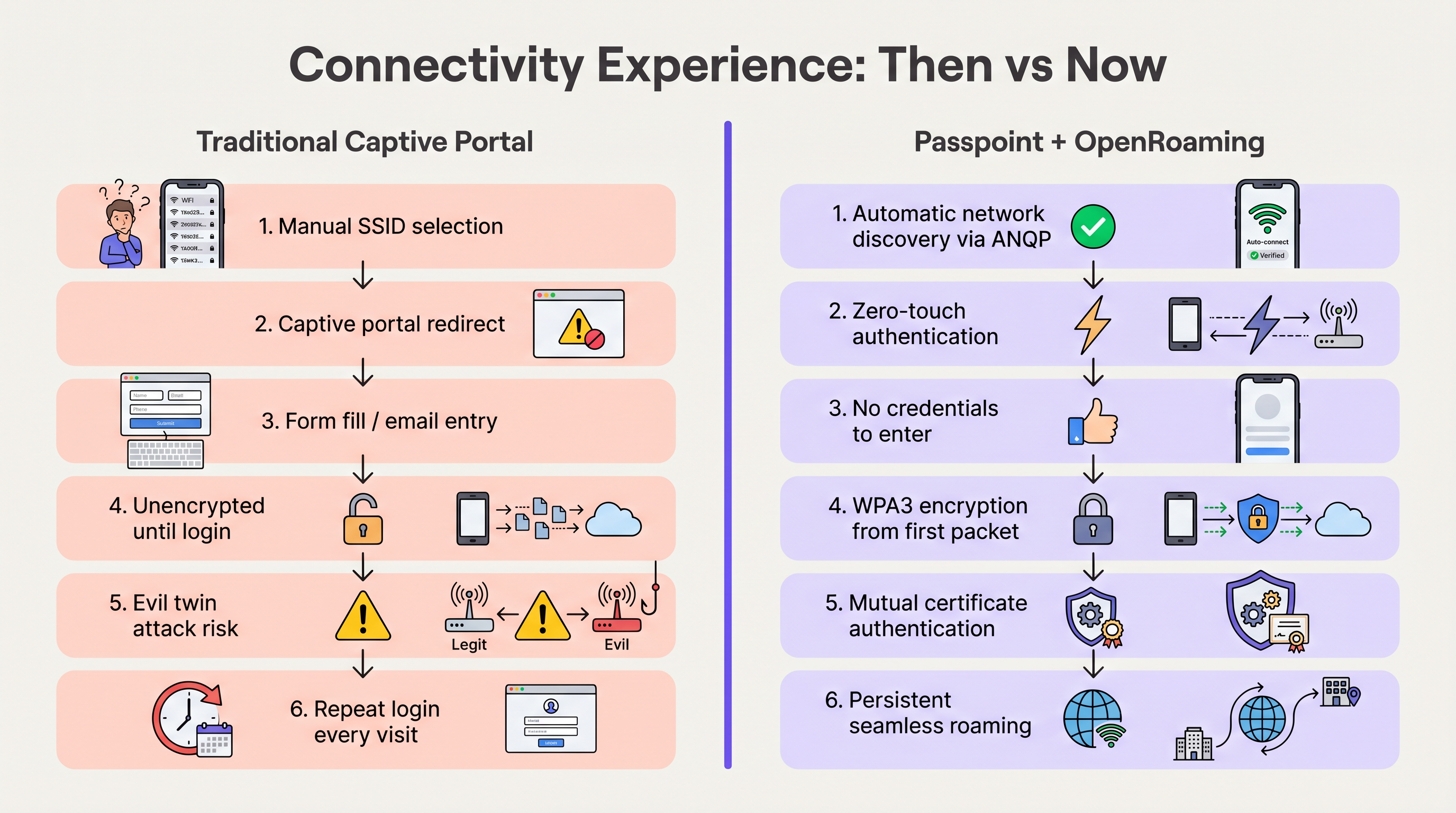
As redes abertas tradicionais com Captive Portals transmitem dados sem criptografia até que o usuário conclua o processo de login. Isso expõe os usuários a ataques de "evil twin", onde agentes maliciosos falsificam o SSID do local para coletar credenciais.
O Passpoint altera fundamentalmente esse perfil de risco. Como a autenticação ocorre via 802.1X, a conexão é protegida com criptografia WPA2-Enterprise ou WPA3-Enterprise desde o primeiro pacote. Além disso, a autenticação mútua inerente ao EAP-TLS significa que o dispositivo verifica o certificado da rede antes de enviar qualquer credencial, neutralizando efetivamente as vulnerabilidades de evil twin. Conforme detalhado em nosso guia sobre Avaliação de Postura de Dispositivo para Controle de Acesso à Rede , estabelecer a confiança do dispositivo é primordial, e o Passpoint impõe isso na borda.
Guia de Implementação
A implantação do OpenRoaming requer coordenação entre seu Wireless LAN Controller (WLC), sua infraestrutura RADIUS e a federação WBA. As etapas neutras em relação ao fornecedor a seguir descrevem uma implantação corporativa padrão.
Fase 1: Avaliação de Prontidão da Infraestrutura
Antes da configuração, verifique se o hardware existente suporta os padrões exigidos. A maioria dos APs corporativos (ex: Cisco, Aruba, Ruckus) lançados nos últimos cinco anos suporta 802.11u e Passpoint nativamente. Certifique-se de que o firmware do seu WLC esteja atualizado para suportar WPA3 e Protected Management Frames (PMF), que são obrigatórios para o Passpoint Release 3.
Fase 2: Integração de RADIUS e Federação
O ponto crítico de integração é conectar sua rede local à federação OpenRoaming. Isso é alcançado estabelecendo uma conexão de proxy RADIUS segura.
- Selecione um Provedor de RADIUS em Nuvem: Escolha um provedor que seja um OpenRoaming Ecosystem Broker certificado (ex: IronWiFi, Cisco Spaces).
- Estabeleça Túneis RadSec: Configure seu WLC para encaminhar solicitações de autenticação para o servidor RADIUS na nuvem usando RadSec (RADIUS sobre TLS). Isso protege o tráfego de autenticação pela internet. Para configuração detalhada, consulte RadSec : Sécurisation du trafic d'authentification RADIUS avec TLS .
- Configure o Roteamento de Realm: Configure regras de roteamento no servidor RADIUS para encaminhar solicitações que correspondam aos domínios OpenRoaming (ex:
apple.openroaming.net) para a federação WBA.
Fase 3: Configuração da WLAN
Configure o SSID específico em seu WLC para transmitir os elementos ANQP necessários.
- Habilite 802.11u: Ative os recursos Hotspot 2.0/Passpoint para a WLAN de destino.
- Defina os OUIs do Roaming Consortium: Adicione os OUIs específicos fornecidos pela WBA (ex:
5A-03-BApara OpenRoaming-Settlement-Free) ao beacon do AP. - Configure a Segurança: Defina a segurança de Camada 2 para WPA2/WPA3-Enterprise com autenticação 802.1X.
Fase 4: Estratégia de Integração de Usuários
Embora os usuários federados (ex: aqueles com perfis Apple ou Google) se conectem automaticamente, você deve planejar para usuários que não possuem perfis pré-existentes. Implemente um servidor de Online Sign-Up (OSU) ou integre o provisionamento de perfil ao aplicativo móvel do seu local. Isso permite que os usuários baixem um perfil Passpoint durante sua primeira visita, garantindo conectividade contínua para todas as visitas subsequentes.
Melhores Práticas
- Mantenha uma Abordagem Híbrida Durante a Transição: Não desative imediatamente seu Captive Portal legado. Execute o SSID habilitado para Passpoint simultaneamente com sua rede aberta de Guest WiFi para acomodar dispositivos legados e usuários sem perfis. Monitore as taxas de adesão para determinar quando a rede aberta pode ser desativada com segurança.
- Priorize o RadSec: Nunca transmita tráfego RADIUS pela internet sem criptografia. Sempre use RadSec para proteger a comunicação entre seu WLC e o provedor de RADIUS na nuvem.
- Aproveite a Integração com Aplicativos: Para locais de hospitalidade e varejo, incorpore o provisionamento de perfil Passpoint no aplicativo de fidelidade da sua marca. Isso garante que o usuário seja autenticado com segurança, vinculando diretamente a presença na rede ao seu perfil de cliente.
- Monitore Expirações de Certificados: O Passpoint depende fortemente de PKI. Implemente monitoramento e alertas automatizados para todos os certificados de servidores RADIUS e web para evitar falhas repentinas de autenticação.
Solução de Problemas e Mitigação de Riscos
Ao implantar o Passpoint, as equipes de TI normalmente encontram modos de falha específicos. Entender esses riscos é crucial para uma implementação tranquila.
- Problemas de Timeout de ANQP: Se os APs estiverem sobrecarregados ou o controlador estiver lento, as respostas ANQP podem expirar, impedindo que os dispositivos descubram a rede. Mitigação: Certifique-se de que os APs estejam provisionados adequadamente e monitore a utilização da CPU do plano de controle. Para ambientes de alta densidade, considere otimizar os intervalos de beacon.
- Falhas de Confiança de Certificado: Se o dispositivo cliente não confiar na CA Raiz que assinou o certificado do servidor RADIUS, o handshake EAP-TLS falhará silenciosamente. Mitigação: Sempre use certificados emitidos por Autoridades Certificadoras públicas amplamente reconhecidas (ex: DigiCert, Let's Encrypt) para servidores RADIUS voltados para o público. Evite certificados autoassinados para acesso de convidados.
- Quedas de Conectividade RadSec: Firewalls ou problemas de roteamento intermediário podem romper a conexão TCP necessária para o RadSec. Mitigação: Implemente um monitoramento robusto no status do túnel RadSec e configure servidores RADIUS secundários para failover.
ROI e Impacto nos Negócios
A transição para Passpoint e OpenRoaming não é meramente uma atualização de TI; é um facilitador de negócios estratégico. Ao remover o atrito dos Captive Portals, os locais veem melhorias imediatas em métricas-chave.
- Aumento nas Taxas de Adesão: Os locais normalmente observam um aumento de 40-60% no número de dispositivos que se conectam à rede. Isso expande diretamente o tamanho da amostra para WiFi Analytics e Sensores , fornecendo dados mais precisos de fluxo de pessoas e tempo de permanência.
- Engajamento do Cliente Aprimorado: No varejo e na hospitalidade, a conectividade contínua permite que os locais acionem notificações baseadas em localização por meio de seus aplicativos no momento em que um convidado entra pela porta, gerando engajamento imediato.
- Redução de Custos de Suporte: A eliminação de Captive Portals reduz drasticamente os chamados de suporte relacionados a falhas de login, redirecionamentos de navegador e senhas esquecidas, liberando recursos de TI.
- Monetização de Dados: Ao integrar com plataformas de Wayfinding e fidelidade, os locais podem correlacionar a presença física com o comportamento de compra, fornecendo insights acionáveis que justificam o investimento na rede.
Ouça nosso briefing abrangente sobre este tópico:
Termos-Chave e Definições
Passpoint (Hotspot 2.0)
A Wi-Fi Alliance certification based on the IEEE 802.11u standard that enables devices to automatically discover and securely connect to Wi-Fi networks without user intervention.
IT teams deploy Passpoint to replace legacy captive portals, providing a cellular-like roaming experience for enterprise and guest WiFi.
OpenRoaming
A global roaming federation managed by the Wireless Broadband Alliance (WBA) that connects Identity Providers (IdPs) with Access Networks using Passpoint technology.
Venues join OpenRoaming to allow guests to authenticate using existing credentials (e.g., Apple ID, Google, Carrier SIM) without managing local accounts.
ANQP (Access Network Query Protocol)
A Layer 2 protocol defined in 802.11u that allows a client device to request information from an Access Point (such as supported roaming partners) before associating with the network.
ANQP is the mechanism that allows a smartphone to 'know' if it can connect to a Passpoint network silently in the background.
RadSec (RADIUS over TLS)
A protocol that secures RADIUS authentication traffic by wrapping it in a TLS tunnel, typically using TCP port 2083.
Essential for OpenRoaming deployments to ensure that authentication requests sent from the venue to the cloud RADIUS provider cannot be intercepted.
OUI (Organizationally Unique Identifier)
A 24-bit number that uniquely identifies a vendor, manufacturer, or organization, used in Passpoint to identify supported roaming consortiums.
Network admins configure specific OUIs on their WLCs to broadcast which identity providers or federations (like OpenRoaming) are supported at the venue.
EAP-TLS (Extensible Authentication Protocol - Transport Layer Security)
A highly secure authentication framework that requires mutual certificate-based authentication between the client and the server.
The gold standard for Passpoint authentication, ensuring that both the user's device and the venue's network verify each other's identities before connecting.
OSU (Online Sign-Up)
A standardized mechanism in Passpoint Release 2 and later that allows a device to securely obtain network credentials and a profile from a provisioning server.
Used to onboard new guests who do not already have a Passpoint profile installed on their device.
Evil Twin Attack
A wireless attack where a malicious actor sets up a rogue Access Point broadcasting the same SSID as a legitimate network to intercept user traffic and credentials.
Passpoint eliminates this risk by requiring the network to present a valid certificate (mutual authentication) before the device will connect.
Estudos de Caso
A global hotel chain with 200 properties wants to improve guest connectivity and increase the adoption of its loyalty app. Guests currently complain about having to log in to the captive portal every day of their stay, and attach rates are low.
The hotel deploys Passpoint across all properties. Instead of a captive portal, they integrate Passpoint profile provisioning into their loyalty app. When a guest downloads the app and logs in, a Passpoint profile is silently installed on their device. The APs are configured to broadcast the hotel's specific Roaming Consortium OUI. The WLC uses RadSec to forward authentication requests to a cloud RADIUS provider. When the guest arrives at any property globally, their device detects the OUI, authenticates via EAP-TLS using the profile, and connects instantly with WPA3 encryption.
A large conference centre needs to provide secure WiFi for 10,000 attendees. Managing temporary credentials for a 3-day event via a captive portal is operationally heavy and insecure.
The venue implements OpenRoaming. They configure their WLC to broadcast the WBA OpenRoaming OUIs and establish a RadSec connection to an OpenRoaming Ecosystem Broker. Attendees arriving at the venue who already have an OpenRoaming profile (e.g., via their mobile carrier or a previous venue) connect automatically. For attendees without a profile, the venue provides QR codes around the concourse that direct users to an Online Sign-Up (OSU) server to download a temporary event profile.
Análise de Cenário
Q1. You are the IT Director for a retail chain. Marketing wants to track repeat customer visits accurately using WiFi analytics, but the current open guest network with a captive portal has a 15% attach rate. Customers complain the login takes too long. How do you redesign the network access strategy to meet Marketing's goals while improving the customer experience?
💡 Dica:Consider how you can tie network authentication to an asset the customer already values, removing the friction of the captive portal entirely.
Mostrar Abordagem Recomendada
Implement Passpoint and integrate the profile provisioning into the retailer's existing mobile loyalty app. When customers download or update the app, the Passpoint profile is silently installed. Upon entering any store, their device authenticates automatically via EAP-TLS. This removes the captive portal friction, dramatically increases the attach rate (providing Marketing with accurate repeat visit data), and secures the connection with WPA3.
Q2. During a pilot deployment of OpenRoaming at a stadium, the network team notices that while authentication requests are reaching the local WLC, they are failing to reach the cloud RADIUS provider. The firewall team confirms that standard RADIUS ports (UDP 1812/1813) are open outbound. What is the most likely cause of the failure?
💡 Dica:OpenRoaming Ecosystem Brokers mandate secure communication for authentication traffic over the internet.
Mostrar Abordagem Recomendada
The WLC is likely attempting to send standard, unencrypted RADIUS traffic, but OpenRoaming deployments require RadSec (RADIUS over TLS) for communication with the cloud broker. The firewall team needs to ensure that TCP port 2083 (the standard port for RadSec) is open outbound, and the WLC must be configured to establish the TLS tunnel using the correct certificates.
Q3. A hospital wants to deploy Passpoint to provide seamless roaming for doctors moving between the main campus and satellite clinics. However, the Information Security Officer (ISO) is concerned about 'evil twin' attacks where a malicious actor might spoof the hospital's SSID at a nearby coffee shop to steal credentials. How does Passpoint address this specific concern?
💡 Dica:Focus on the specific EAP methods used in Passpoint and how the client device verifies the network before transmitting data.
Mostrar Abordagem Recomendada
Passpoint mitigates the evil twin risk through mutual authentication, typically using EAP-TLS or EAP-TTLS. Before the doctor's device sends any authentication credentials, the AP (via the RADIUS server) must present a valid digital certificate. The device verifies this certificate against its trusted Root CAs. If a malicious actor spoofs the SSID, they will not possess the valid private key/certificate for the hospital's RADIUS server, and the device will silently abort the connection before any credentials are exchanged.
Principais Conclusões
- ✓Passpoint (802.11u) eliminates captive portals by enabling devices to discover and connect to networks automatically and securely.
- ✓OpenRoaming scales Passpoint by creating a global federation, allowing users to authenticate using existing trusted identities (Apple, Google, Carriers).
- ✓Security is drastically improved through WPA3 encryption from the first packet and mutual certificate authentication, neutralizing 'evil twin' attacks.
- ✓Deploying Passpoint requires WPA3-capable access points, a cloud RADIUS provider, and RadSec (RADIUS over TLS) for secure external communication.
- ✓Integrating Passpoint profile provisioning into venue loyalty apps drives higher network attach rates and richer location-based analytics.
- ✓Venues should run a hybrid model during transition, broadcasting both the legacy captive portal SSID and the Passpoint SSID until adoption reaches critical mass.
- ✓OpenRoaming simplifies GDPR compliance by relying on anonymised persistent tokens rather than collecting personal data via splash pages.




