

Il futuro della connettività fluida: Passpoint e OpenRoaming spiegati
Questa guida tecnica di riferimento fornisce approfondimenti operativi per i leader IT sulla transizione dai Captive Portal tradizionali a Passpoint e OpenRoaming. Dettaglia gli standard IEEE 802.11u e WPA3 sottostanti, i flussi di autenticazione sicuri e le strategie di implementazione reali per migliorare la connettività fluida, potenziare la sicurezza e generare un ROI misurabile nelle sedi aziendali.
🎧 Ascolta questa guida
Visualizza trascrizione

Sintesi operativa
Nell'ultimo decennio, il WiFi per gli ospiti si è basato sui Captive Portal: un modello ad alto attrito che frustra gli utenti, degrada l'esperienza del brand e introduce significative vulnerabilità di sicurezza. Mentre le sedi nei settori Hospitality , Retail e pubblico richiedono tassi di connessione più elevati per alimentare WiFi Analytics e servizi basati sulla posizione, il settore si sta spostando verso una connettività fluida, simile a quella cellulare.
Passpoint (Hotspot 2.0) e OpenRoaming rappresentano il futuro definitivo dell'accesso wireless aziendale. Basato sullo standard IEEE 802.11u e gestito dalla Wireless Broadband Alliance (WBA), questo ecosistema consente un'autenticazione sicura (WPA3) zero-touch. Federando i provider di identità (come Apple, Google e gli operatori mobili) con le reti di accesso, le sedi possono registrare automaticamente gli ospiti senza la selezione manuale del SSID o splash page. Questa guida fornisce una roadmap pratica e neutrale rispetto ai fornitori per i responsabili IT e gli architetti di rete per valutare, progettare e implementare Passpoint e OpenRoaming, trasformando il WiFi per gli ospiti da un centro di costo in un asset sicuro e ricco di dati.
Approfondimento tecnico
L'architettura Passpoint e OpenRoaming
Per comprendere il cambiamento, dobbiamo distinguere tra la tecnologia sottostante e la federazione che la scala.
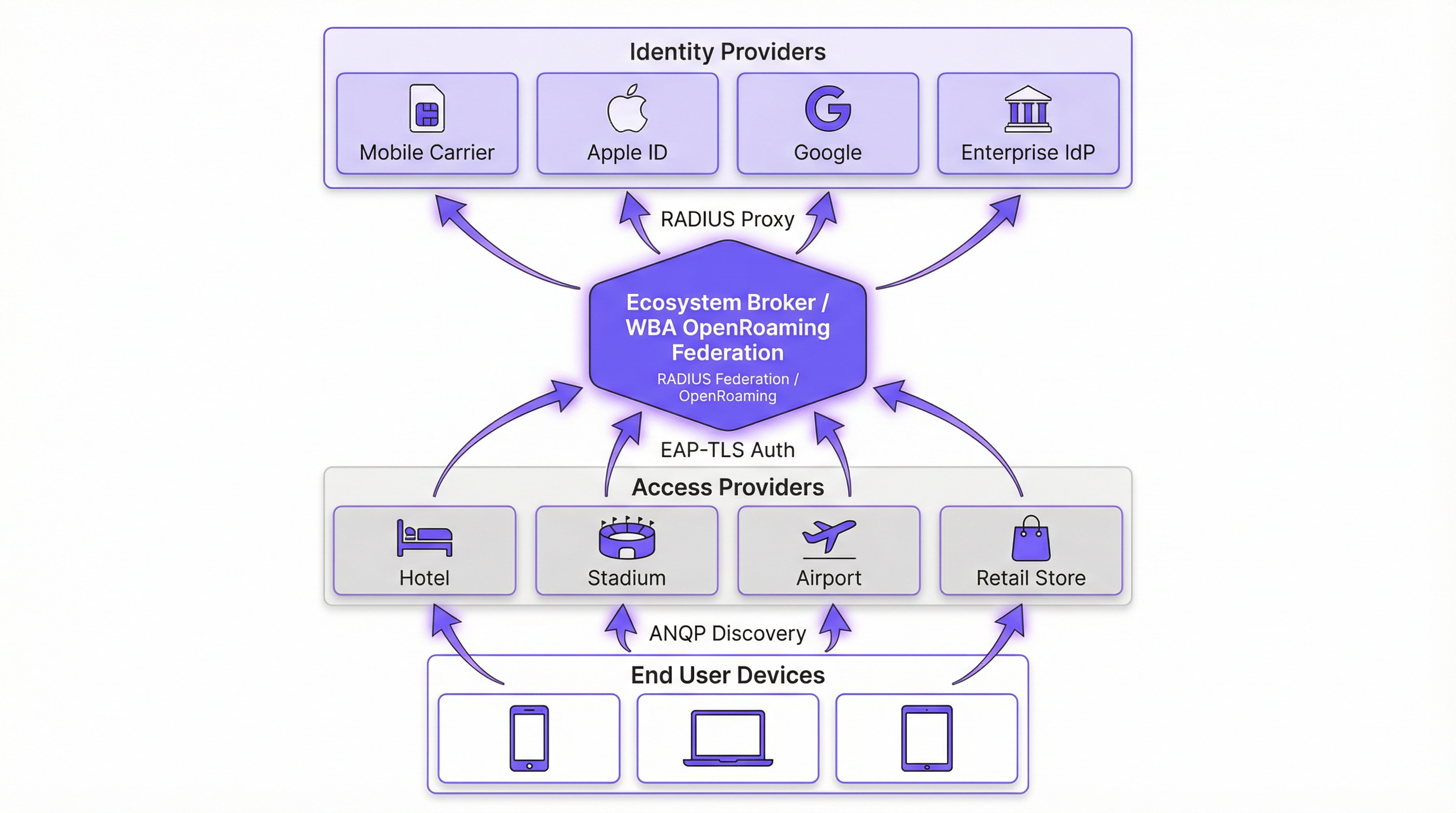
Passpoint (Hotspot 2.0) è una Wi-Fi Alliance certificazione basata sullo standard IEEE 802.11u. Definisce il meccanismo che consente ai dispositivi di scoprire e autenticarsi automaticamente alle reti. Il protocollo principale è l'Access Network Query Protocol (ANQP), che consente a un dispositivo client di interrogare un Access Point (AP) prima dell'associazione. Il dispositivo confronta gli Organizationally Unique Identifiers (OUI) del Roaming Consortium pubblicizzati dall'AP con i propri profili configurati localmente. Se viene trovata una corrispondenza, il dispositivo avvia una connessione Extensible Authentication Protocol (EAP) (solitamente EAP-TLS or EAP-TTLS).
OpenRoaming è la federazione globale costruita sopra Passpoint. Mentre Passpoint gestisce l'interazione locale tra dispositivo e AP, OpenRoaming fornisce l'infrastruttura proxy RADIUS che connette milioni di AP a migliaia di Identity Providers (IdP). Ciò elimina la necessità per le sedi di negoziare singoli accordi di roaming o gestire complesse Public Key Infrastructure (PKI) per gli ospiti esterni.
Cambio di paradigma nella sicurezza
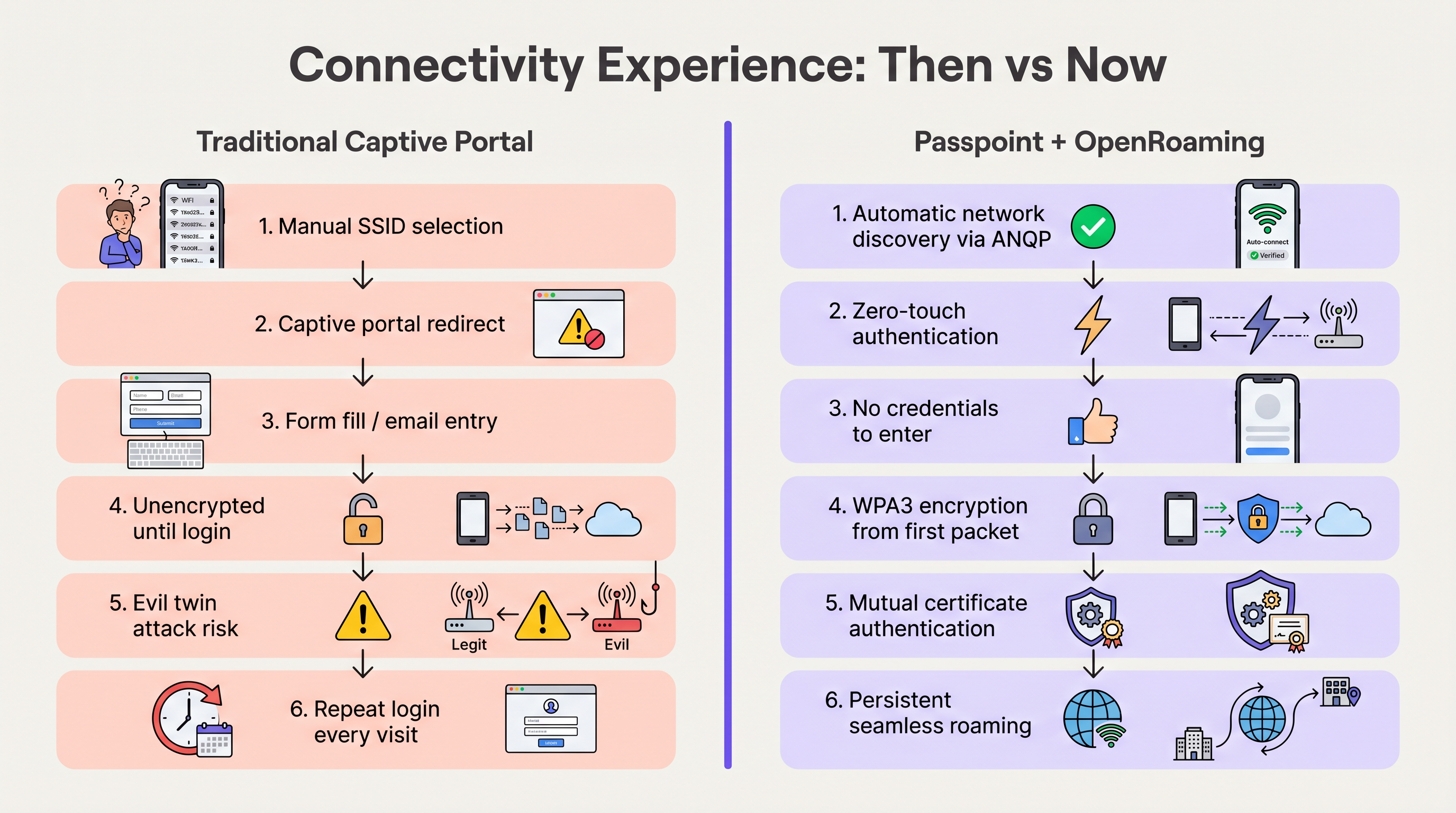
Le reti aperte tradizionali con Captive Portal trasmettono dati non crittografati finché l'utente non completa il processo di accesso. Questo espone gli utenti ad attacchi "evil twin", in cui attori malintenzionati falsificano il SSID della sede per sottrarre credenziali.
Passpoint altera radicalmente questo profilo di rischio. Poiché l'autenticazione avviene tramite 802.1X, la connessione è protetta con crittografia WPA2-Enterprise o WPA3-Enterprise fin dal primo pacchetto. Inoltre, l'autenticazione reciproca intrinseca in EAP-TLS significa che il dispositivo verifica il certificato della rete prima di inviare qualsiasi credenziale, neutralizzando efficacemente le vulnerabilità evil twin. Come dettagliato nella nostra guida su Device Posture Assessment for Network Access Control , stabilire la fiducia del dispositivo è fondamentale e Passpoint la impone all'edge.
Guida all'implementazione
L'implementazione di OpenRoaming richiede il coordinamento tra il Wireless LAN Controller (WLC), l'infrastruttura RADIUS e la federazione WBA. I seguenti passaggi neutrali rispetto ai fornitori delineano un'implementazione aziendale standard.
Fase 1: Valutazione della prontezza dell'infrastruttura
Prima della configurazione, verifica che l'hardware esistente supporti gli standard richiesti. La maggior parte degli AP aziendali (ad es. Cisco, Aruba, Ruckus) rilasciati negli ultimi cinque anni supporta nativamente 802.11u e Passpoint. Assicurati che il firmware del WLC sia aggiornato per supportare WPA3 e Protected Management Frames (PMF), obbligatori per Passpoint Release 3.
Fase 2: Integrazione RADIUS e federazione
Il punto di integrazione critico è la connessione della rete locale alla federazione OpenRoaming. Questo si ottiene stabilendo una connessione proxy RADIUS sicura.
- Seleziona un provider Cloud RADIUS: Scegli un provider che sia un OpenRoaming Ecosystem Broker certificato (ad es. IronWiFi, Cisco Spaces).
- Stabilisci tunnel RadSec: Configura il WLC per inoltrare le richieste di autenticazione al server RADIUS cloud utilizzando RadSec (RADIUS over TLS). Questo protegge il traffico di autenticazione su Internet. Per una configurazione dettagliata, consulta RadSec : Sécurisation du trafic d'authentification RADIUS avec TLS .
- Configura il Realm Routing: Imposta le regole di routing sul server RADIUS per inoltrare le richieste corrispondenti ai domini OpenRoaming (ad es.
apple.openroaming.net) alla federazione WBA.
Fase 3: Configurazione WLAN
Configura lo SSID specifico sul WLC per trasmettere gli elementi ANQP necessari.
- Abilita 802.11u: Attiva le funzionalità Hotspot 2.0/Passpoint per la WLAN di destinazione.
- Definisci gli OUI del Roaming Consortium: Aggiungi gli OUI specifici forniti dalla WBA (ad es.
5A-03-BAper OpenRoaming-Settlement-Free) al beacon dell'AP. - Configura la sicurezza: Imposta la sicurezza Layer 2 su WPA2/WPA3-Enterprise con autenticazione 802.1X.
Fase 4: Strategia di onboarding degli utenti
Mentre gli utenti federati (ad es. quelli con profili Apple o Google) si connetteranno automaticamente, è necessario pianificare per gli utenti che non dispongono di profili preesistenti. Implementa un Online Sign-Up server (OSU) o integra il provisioning del profilo nell'app mobile della tua sede. Ciò consente agli utenti di scaricare un profilo Passpoint durante la loro prima visita, garantendo una connettività fluida per tutte le visite successive.
Best Practice
- Mantieni un approccio ibrido durante la transizione: Non disabilitare immediatamente il tuo Captive Portal legacy. Esegui l'SSID abilitato per Passpoint contemporaneamente alla tua rete Guest WiFi aperta per accogliere i dispositivi legacy e gli utenti senza profili. Monitora i tassi di connessione per determinare quando la rete aperta può essere dismessa in sicurezza.
- Priorità a RadSec: Non trasmettere mai il traffico RADIUS su Internet senza crittografia. Utilizza sempre RadSec per proteggere la comunicazione tra il tuo WLC e il provider RADIUS cloud.
- Sfrutta l'integrazione con l'app: Per le sedi nel settore hospitality e retail, integra il provisioning del profilo Passpoint all'interno dell'app fedeltà del tuo brand. Ciò garantisce che l'utente sia autenticato in modo sicuro, collegando direttamente la presenza in rete al suo profilo cliente.
- Monitora la scadenza dei certificati: Passpoint si basa fortemente sulla PKI. Implementa il monitoraggio e l'avviso automatico per tutti i certificati RADIUS e del server web per prevenire improvvisi errori di autenticazione.
Risoluzione dei problemi e mitigazione dei rischi
Durante l'implementazione di Passpoint, i team IT incontrano solitamente modalità di guasto specifiche. Comprendere questi rischi è fondamentale per un'implementazione senza intoppi.
- Problemi di timeout ANQP: Se gli AP sono sovraccarichi o il controller è lento, le risposte ANQP potrebbero andare in timeout, impedendo ai dispositivi di rilevare la rete. Mitigazione: Assicurati che gli AP siano adeguatamente dimensionati e monitora l'utilizzo della CPU del piano di controllo. Per ambienti ad alta densità, considera l'ottimizzazione degli intervalli di beacon.
- Errori di attendibilità del certificato: Se il dispositivo client non si fida della Root CA che ha firmato il certificato del server RADIUS, l'handshake EAP-TLS fallirà silenziosamente. Mitigazione: Utilizza sempre certificati emessi da Autorità di Certificazione pubbliche ampiamente riconosciute (ad es. DigiCert, Let's Encrypt) per i server RADIUS rivolti al pubblico. Evita certificati auto-firmati per l'accesso guest.
- Interruzioni della connettività RadSec: Firewall o problemi di instradamento intermedio possono interrompere la connessione TCP richiesta per RadSec. Mitigazione: Implementa un monitoraggio robusto dello stato del tunnel RadSec e configura server RADIUS secondari per il failover.
ROI e impatto aziendale
La transizione a Passpoint e OpenRoaming non è solo un aggiornamento IT; è un abilitatore di business strategico. Rimuovendo l'attrito dei Captive Portal, le sedi vedono miglioramenti immediati nelle metriche chiave.
- Aumento dei tassi di connessione: Le sedi osservano solitamente un aumento del 40-60% nel numero di dispositivi che si connettono alla rete. Ciò espande direttamente la dimensione del campione per WiFi Analytics e Sensori , fornendo dati più accurati su affluenza e tempi di permanenza.
- Migliore coinvolgimento del cliente: Nel retail e nell'hospitality, la connettività fluida consente alle sedi di attivare notifiche basate sulla posizione tramite le loro app nel momento in cui un ospite varca la soglia, favorendo un coinvolgimento immediato.
- Riduzione dei costi di supporto: L'eliminazione dei Captive Portal riduce drasticamente i ticket di helpdesk relativi a errori di accesso, reindirizzamenti del browser e password dimenticate, liberando risorse IT.
- Monetizzazione dei dati: Integrandosi con le piattaforme di Wayfinding e fedeltà, le sedi possono correlare la presenza fisica con il comportamento d'acquisto, fornendo insight operativi che giustificano l'investimento nella rete.
Ascolta il nostro briefing completo su questo argomento:
Termini chiave e definizioni
Passpoint (Hotspot 2.0)
A Wi-Fi Alliance certification based on the IEEE 802.11u standard that enables devices to automatically discover and securely connect to Wi-Fi networks without user intervention.
IT teams deploy Passpoint to replace legacy captive portals, providing a cellular-like roaming experience for enterprise and guest WiFi.
OpenRoaming
A global roaming federation managed by the Wireless Broadband Alliance (WBA) that connects Identity Providers (IdPs) with Access Networks using Passpoint technology.
Venues join OpenRoaming to allow guests to authenticate using existing credentials (e.g., Apple ID, Google, Carrier SIM) without managing local accounts.
ANQP (Access Network Query Protocol)
A Layer 2 protocol defined in 802.11u that allows a client device to request information from an Access Point (such as supported roaming partners) before associating with the network.
ANQP is the mechanism that allows a smartphone to 'know' if it can connect to a Passpoint network silently in the background.
RadSec (RADIUS over TLS)
A protocol that secures RADIUS authentication traffic by wrapping it in a TLS tunnel, typically using TCP port 2083.
Essential for OpenRoaming deployments to ensure that authentication requests sent from the venue to the cloud RADIUS provider cannot be intercepted.
OUI (Organizationally Unique Identifier)
A 24-bit number that uniquely identifies a vendor, manufacturer, or organization, used in Passpoint to identify supported roaming consortiums.
Network admins configure specific OUIs on their WLCs to broadcast which identity providers or federations (like OpenRoaming) are supported at the venue.
EAP-TLS (Extensible Authentication Protocol - Transport Layer Security)
A highly secure authentication framework that requires mutual certificate-based authentication between the client and the server.
The gold standard for Passpoint authentication, ensuring that both the user's device and the venue's network verify each other's identities before connecting.
OSU (Online Sign-Up)
A standardized mechanism in Passpoint Release 2 and later that allows a device to securely obtain network credentials and a profile from a provisioning server.
Used to onboard new guests who do not already have a Passpoint profile installed on their device.
Evil Twin Attack
A wireless attack where a malicious actor sets up a rogue Access Point broadcasting the same SSID as a legitimate network to intercept user traffic and credentials.
Passpoint eliminates this risk by requiring the network to present a valid certificate (mutual authentication) before the device will connect.
Casi di studio
A global hotel chain with 200 properties wants to improve guest connectivity and increase the adoption of its loyalty app. Guests currently complain about having to log in to the captive portal every day of their stay, and attach rates are low.
The hotel deploys Passpoint across all properties. Instead of a captive portal, they integrate Passpoint profile provisioning into their loyalty app. When a guest downloads the app and logs in, a Passpoint profile is silently installed on their device. The APs are configured to broadcast the hotel's specific Roaming Consortium OUI. The WLC uses RadSec to forward authentication requests to a cloud RADIUS provider. When the guest arrives at any property globally, their device detects the OUI, authenticates via EAP-TLS using the profile, and connects instantly with WPA3 encryption.
A large conference centre needs to provide secure WiFi for 10,000 attendees. Managing temporary credentials for a 3-day event via a captive portal is operationally heavy and insecure.
The venue implements OpenRoaming. They configure their WLC to broadcast the WBA OpenRoaming OUIs and establish a RadSec connection to an OpenRoaming Ecosystem Broker. Attendees arriving at the venue who already have an OpenRoaming profile (e.g., via their mobile carrier or a previous venue) connect automatically. For attendees without a profile, the venue provides QR codes around the concourse that direct users to an Online Sign-Up (OSU) server to download a temporary event profile.
Analisi degli scenari
Q1. You are the IT Director for a retail chain. Marketing wants to track repeat customer visits accurately using WiFi analytics, but the current open guest network with a captive portal has a 15% attach rate. Customers complain the login takes too long. How do you redesign the network access strategy to meet Marketing's goals while improving the customer experience?
💡 Suggerimento:Consider how you can tie network authentication to an asset the customer already values, removing the friction of the captive portal entirely.
Mostra l'approccio consigliato
Implement Passpoint and integrate the profile provisioning into the retailer's existing mobile loyalty app. When customers download or update the app, the Passpoint profile is silently installed. Upon entering any store, their device authenticates automatically via EAP-TLS. This removes the captive portal friction, dramatically increases the attach rate (providing Marketing with accurate repeat visit data), and secures the connection with WPA3.
Q2. During a pilot deployment of OpenRoaming at a stadium, the network team notices that while authentication requests are reaching the local WLC, they are failing to reach the cloud RADIUS provider. The firewall team confirms that standard RADIUS ports (UDP 1812/1813) are open outbound. What is the most likely cause of the failure?
💡 Suggerimento:OpenRoaming Ecosystem Brokers mandate secure communication for authentication traffic over the internet.
Mostra l'approccio consigliato
The WLC is likely attempting to send standard, unencrypted RADIUS traffic, but OpenRoaming deployments require RadSec (RADIUS over TLS) for communication with the cloud broker. The firewall team needs to ensure that TCP port 2083 (the standard port for RadSec) is open outbound, and the WLC must be configured to establish the TLS tunnel using the correct certificates.
Q3. A hospital wants to deploy Passpoint to provide seamless roaming for doctors moving between the main campus and satellite clinics. However, the Information Security Officer (ISO) is concerned about 'evil twin' attacks where a malicious actor might spoof the hospital's SSID at a nearby coffee shop to steal credentials. How does Passpoint address this specific concern?
💡 Suggerimento:Focus on the specific EAP methods used in Passpoint and how the client device verifies the network before transmitting data.
Mostra l'approccio consigliato
Passpoint mitigates the evil twin risk through mutual authentication, typically using EAP-TLS or EAP-TTLS. Before the doctor's device sends any authentication credentials, the AP (via the RADIUS server) must present a valid digital certificate. The device verifies this certificate against its trusted Root CAs. If a malicious actor spoofs the SSID, they will not possess the valid private key/certificate for the hospital's RADIUS server, and the device will silently abort the connection before any credentials are exchanged.
Punti chiave
- ✓Passpoint (802.11u) eliminates captive portals by enabling devices to discover and connect to networks automatically and securely.
- ✓OpenRoaming scales Passpoint by creating a global federation, allowing users to authenticate using existing trusted identities (Apple, Google, Carriers).
- ✓Security is drastically improved through WPA3 encryption from the first packet and mutual certificate authentication, neutralizing 'evil twin' attacks.
- ✓Deploying Passpoint requires WPA3-capable access points, a cloud RADIUS provider, and RadSec (RADIUS over TLS) for secure external communication.
- ✓Integrating Passpoint profile provisioning into venue loyalty apps drives higher network attach rates and richer location-based analytics.
- ✓Venues should run a hybrid model during transition, broadcasting both the legacy captive portal SSID and the Passpoint SSID until adoption reaches critical mass.
- ✓OpenRoaming simplifies GDPR compliance by relying on anonymised persistent tokens rather than collecting personal data via splash pages.




