

Configuración de Walled Garden para el WiFi de invitados
This guide provides a comprehensive, vendor-neutral technical reference for configuring walled gardens in enterprise guest WiFi deployments. It covers the architecture of pre-authentication access, the critical role of dynamic DNS resolution, social login domain whitelisting, OS captive portal probe requirements, and compliance considerations under PCI DSS and GDPR. Aimed at IT managers, network architects, and venue operations directors, it delivers actionable implementation guidance with real-world case studies from hospitality, retail, and events environments.
🎧 Escucha esta guía
Ver transcripción
Resumen ejecutivo
Un Walled Garden es un componente fundamental de cualquier implementación segura y fácil de usar de WiFi para invitados. Define el conjunto limitado de recursos de red a los que puede acceder un dispositivo invitado antes de completar la autenticación a través de un Captive Portal. Una configuración incorrecta o incompleta del Walled Garden es la principal causa de fallos de inicio de sesión de invitados en las implementaciones empresariales, lo que resulta en una experiencia de usuario degradada, un aumento en los tickets de soporte técnico y un daño reputacional medible en los entornos de hostelería y retail. Para los gerentes de TI y arquitectos de red, dominar la configuración del Walled Garden del WiFi no es simplemente una tarea técnica; es un paso crítico para mitigar los riesgos de seguridad, garantizar el cumplimiento de estándares como PCI DSS v4.0 y GDPR, y maximizar el retorno de la inversión de una infraestructura de WiFi para invitados. Esta guía proporciona un marco de trabajo práctico y neutral en cuanto a proveedores para diseñar, implementar y mantener un Walled Garden robusto que soporte métodos de autenticación modernos (incluidos los inicios de sesión sociales a través de OAuth 2.0, pasarelas de pago y detección de Captive Portal a nivel de sistema operativo) en entornos empresariales como hostelería, retail, eventos y organizaciones del sector público.
Análisis técnico exhaustivo
La anatomía del acceso previo a la autenticación
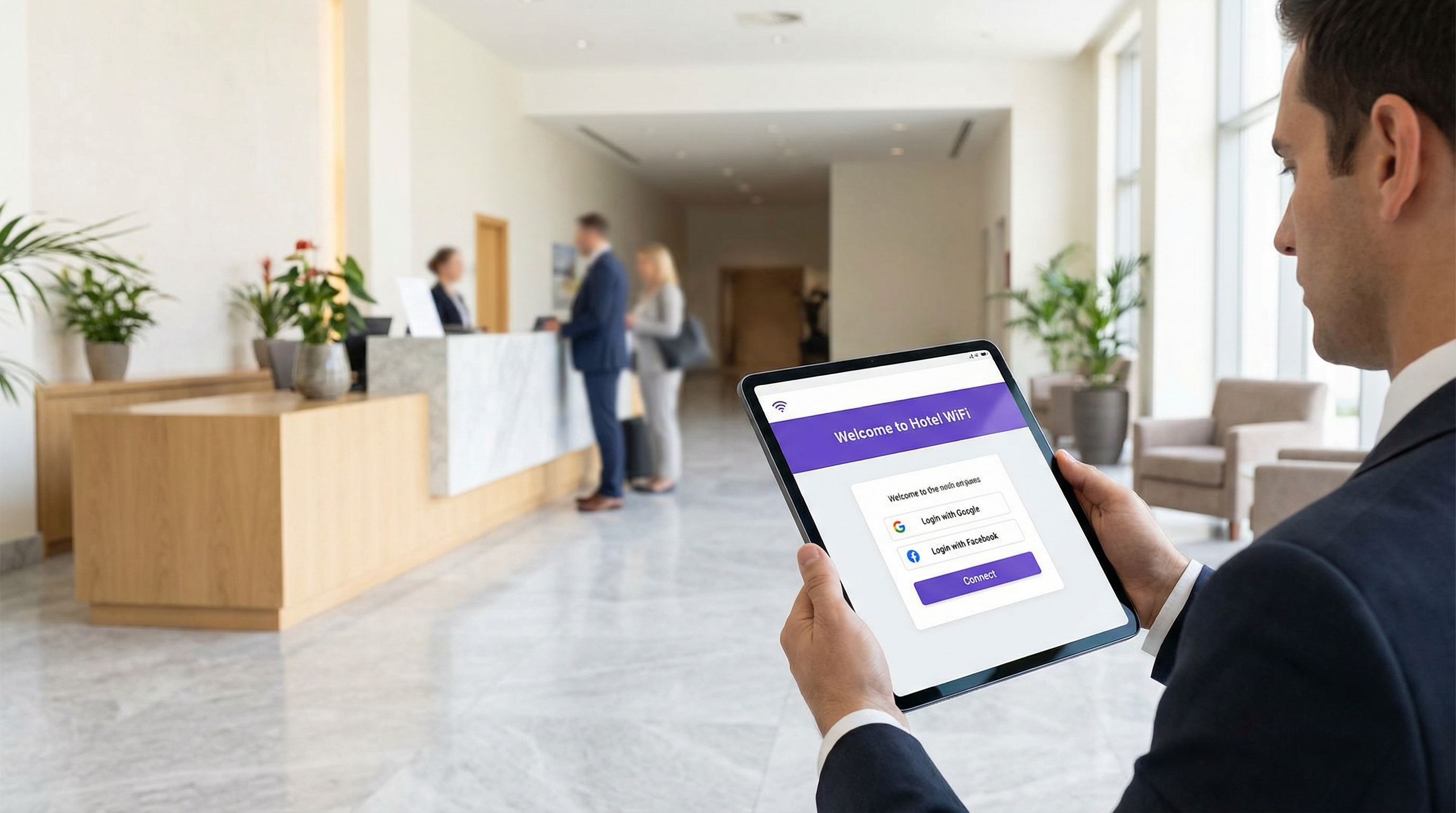
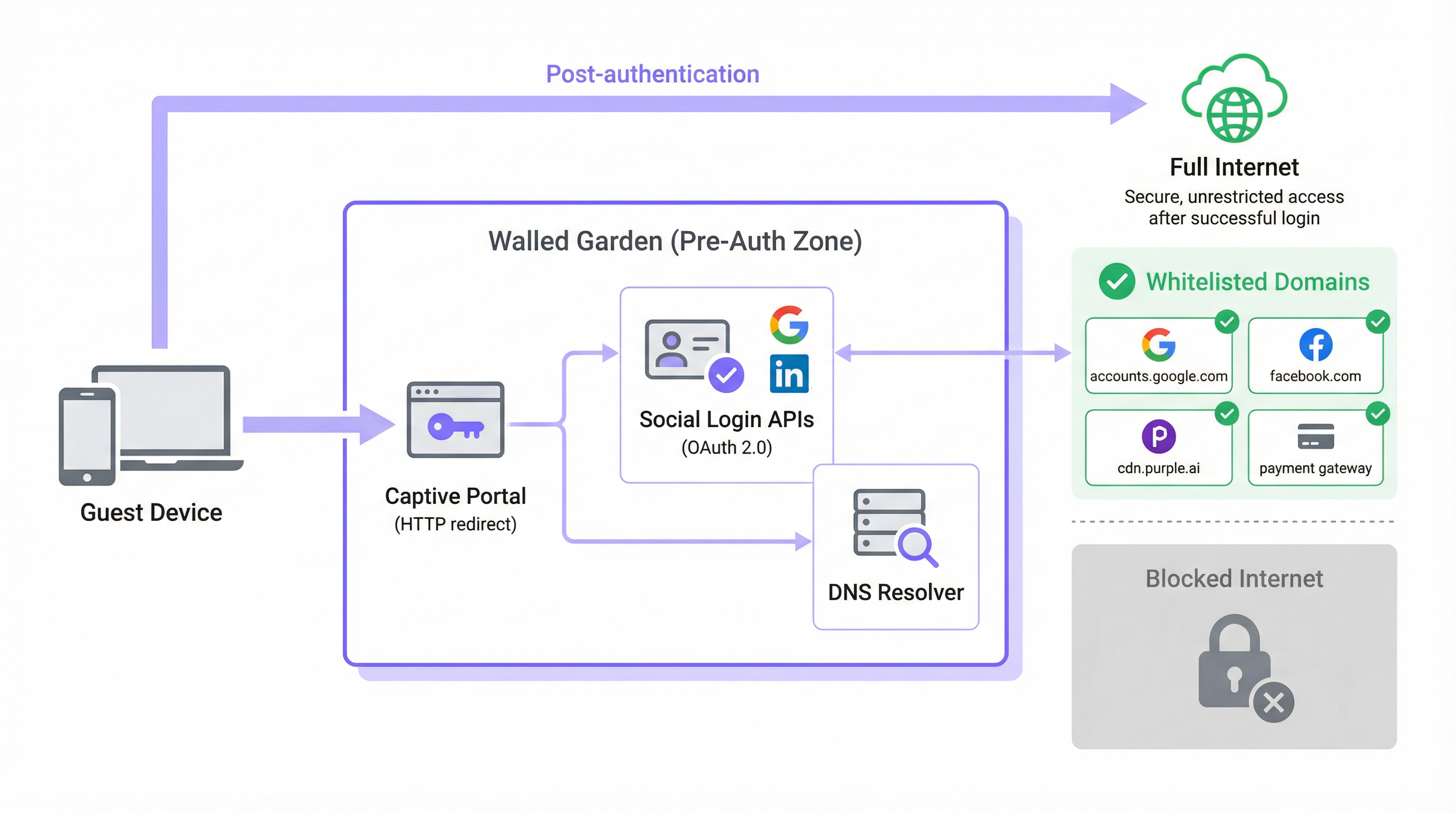
En una arquitectura típica de WiFi para invitados, cuando el dispositivo de un usuario se asocia con un SSID abierto, se le asigna una dirección IP a través de DHCP y el controlador de red lo coloca en un rol previo a la autenticación o en una VLAN aislada. En este estado, el controlador intercepta todo el tráfico HTTP y HTTPS saliente y lo redirige a la página de inicio del Captive Portal. Este es el mecanismo que fuerza al navegador del invitado a ir a la pantalla de inicio de sesión. El Walled Garden es la excepción explícita a esta regla de intercepción: una lista blanca seleccionada de dominios externos y rangos de direcciones IP con los que el dispositivo tiene permitido comunicarse libremente durante la fase previa a la autenticación.
Sin un Walled Garden configurado correctamente, los propios servicios necesarios para completar la autenticación quedan bloqueados. Los Captive Portal modernos no son aplicaciones monolíticas e independientes. Son composiciones de microservicios y API de terceros. Los propios activos del portal (HTML, CSS, JavaScript e imágenes) pueden servirse desde una red de entrega de contenido (CDN) que está completamente separada de la infraestructura local del controlador. La funcionalidad de inicio de sesión social depende de alcanzar los endpoints de OAuth 2.0 en Google, Facebook, Apple o Microsoft. Si se ofrece un nivel de WiFi de pago, el portal debe comunicarse con un procesador de pagos como Stripe o PayPal. Las plataformas de análisis y marketing pueden cargar scripts de seguimiento desde sus propios orígenes de CDN. Cada una de estas dependencias representa un dominio que debe permitirse explícitamente en el Walled Garden, o el flujo de autenticación fallará silenciosamente o con un error confuso.
El problema de la resolución DNS
El aspecto con más matices técnicos de la configuración del Walled Garden es la brecha entre la administración basada en dominios y la aplicación basada en IP. Mientras que los administradores de red configuran el Walled Garden utilizando nombres de dominio legibles por humanos (por ejemplo, accounts.google.com), la mayoría de los controladores de red aplican estas reglas en la capa IP. Cuando se agrega un dominio a la lista blanca, el controlador realiza una búsqueda DNS para resolverlo en una o más direcciones IP y agrega esas IP a una lista de control de acceso (ACL) temporal.
Esto crea un riesgo operativo significativo con los principales proveedores de la nube. Google, Meta, Apple y las principales CDN utilizan enrutamiento anycast y asignación dinámica de direcciones IP. La dirección IP a la que se resuelve accounts.google.com en el momento de la configuración puede ser completamente diferente de la dirección a la que se resuelva seis meses después, o incluso en un segmento de red diferente. Por lo tanto, una lista blanca de IP estáticas no es una configuración sostenible; se degradará con el tiempo a medida que roten los rangos de IP de la CDN.
La solución correcta es la resolución DNS dinámica, donde el controlador de red vuelve a resolver periódicamente cada dominio de la lista blanca y actualiza sus ACL en consecuencia. La mayoría de los controladores de nivel empresarial de Cisco, Aruba, Ruckus y Fortinet admiten esto de forma nativa. Si su controlador no lo hace, está operando con una configuración que producirá fallos intermitentes difíciles de diagnosticar y que empeorarán con el tiempo.
Intercepción HTTPS y cumplimiento de TLS
Una capa adicional de complejidad surge de la prevalencia de HTTPS. Cuando un dispositivo invitado en estado previo a la autenticación intenta cargar un recurso HTTPS que no está en la lista blanca, el controlador debe decidir cómo manejar la solicitud. Existen dos enfoques comunes, ambos con inconvenientes significativos si no se gestionan correctamente.
El primer enfoque es un descarte silencioso (silent drop), donde el controlador simplemente bloquea la conexión. El navegador del invitado muestra un error genérico de "no se puede acceder al sitio", que no proporciona ninguna orientación útil y a menudo se interpreta como un fallo de la red en lugar de un aviso del portal. El segundo enfoque es la intercepción HTTPS, donde el controlador intenta presentar una redirección al Captive Portal. Esto requiere que el controlador actúe como un proxy man-in-the-middle (MITM), presentando su propio certificado TLS. Si el dispositivo del invitado no confía en este certificado (lo cual casi nunca ocurre en una red pública de invitados), el navegador mostrará una advertencia de seguridad, lo cual es alarmante para los usuarios y, en entornos regulados, puede constituir un problema de cumplimiento.
El enfoque arquitectónico correcto es garantizar que todos los dominios necesarios para el flujo de autenticación estén en la lista blanca, permitiendo que su tráfico HTTPS pase intacto. La redirección del Captive Portal debe ser activada por el mecanismo de sondeo a nivel del sistema operativo en lugar de por la intercepción HTTPS. Esto elimina por completo el problema de confianza del certificado. Los navegadores modernos también implementan HTTP Strict Transport Security (HSTS) y, en algunos casos, la fijación de certificados (certificate pinning). Ambos mecanismos harán que la intercepción HTTPS falle por completo para los dominios principales, produciendo una conexión rota en lugar de una redirección: otro argumento sólido a favor de un Walled Garden configurado correctamente en lugar de una política amplia de intercepción HTTPS.
Captive Network Assistant (CNA) y dominios de sondeo del SO
Uno de los aspectos que se pasa por alto con mayor frecuencia en la configuración del Walled Garden es el mecanismo mediante el cual los sistemas operativos modernos detectan la presencia de un Captive Portal. Todos los principales sistemas operativos (iOS, iPadOS, macOS, Android y Windows) implementan un Captive Network Assistant (CNA) que sondea un endpoint HTTP conocido inmediatamente después de conectarse a una nueva red WiFi. Si la respuesta se desvía del valor esperado, el sistema operativo infiere que está detrás de un Captive Portal y abre automáticamente una ventana del navegador para gestionar el inicio de sesión.
Los endpoints de sondeo utilizados por cada plataforma son los siguientes:
| Sistema operativo | Dominio de sondeo | Respuesta esperada |
|---|---|---|
| Apple (iOS, macOS) | captive.apple.com |
HTTP 200 con cuerpo específico |
| Android (Google) | connectivitycheck.gstatic.com |
HTTP 204 Sin contenido |
| Windows | www.msftconnecttest.com |
HTTP 200 con cuerpo específico |
| Firefox / Mozilla | detectportal.firefox.com |
HTTP 200 con cuerpo específico |
Si el Walled Garden bloquea alguno de estos dominios de sondeo, el sistema operativo nunca detectará el Captive Portal. Desde la perspectiva del invitado, la red WiFi simplemente no tiene acceso a Internet. Este es uno de los fallos de configuración errónea más comunes observados en las implementaciones de producción y es totalmente evitable al incluir estos dominios en la lista blanca base.
Guía de implementación
Paso 1: Descubrimiento de dominios base
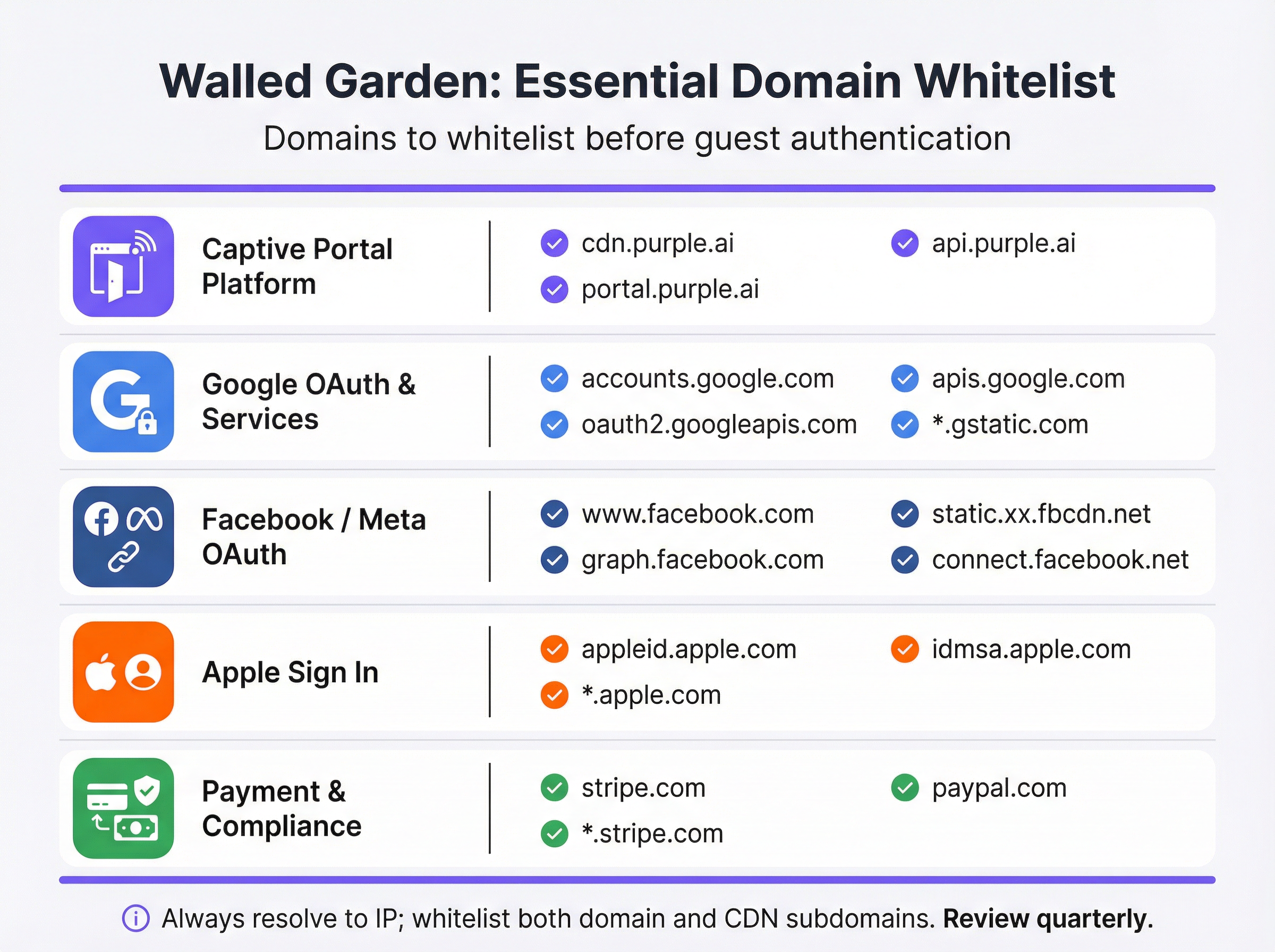
Antes de tocar la configuración de su controlador, realice una auditoría exhaustiva de cada servicio externo del que dependa su Captive Portal. La mejor manera de lograr esto es cargando el portal en un navegador con las herramientas de desarrollador abiertas e inspeccionando la pestaña de red para identificar todas las solicitudes de recursos externos. La lista resultante debe categorizarse de la siguiente manera:
| Categoría | Propósito | Dominios esenciales |
|---|---|---|
| Plataforma de Captive Portal | Sirve los activos de la página de inicio y gestiona la lógica de autenticación. | *.purple.ai, cdn.your-vendor.com |
| Google OAuth | Habilita el inicio de sesión con Google. | accounts.google.com, oauth2.googleapis.com, apis.google.com, *.gstatic.com |
| Facebook / Meta OAuth | Habilita el inicio de sesión con Facebook. | www.facebook.com, graph.facebook.com, connect.facebook.net, *.fbcdn.net |
| Apple Sign In | Habilita el inicio de sesión con Apple. | appleid.apple.com, idmsa.apple.com, *.apple.com |
| Sondeos de Captive Portal del SO | Habilita la detección automática del portal. | captive.apple.com, connectivitycheck.gstatic.com, www.msftconnecttest.com |
| Pasarelas de pago | Procesa pagos para niveles premium. | *.stripe.com, *.paypal.com |
| Análisis / Marketing | Carga scripts de seguimiento y análisis. | Específico del proveedor (por ejemplo, *.segment.com, *.mixpanel.com) |
Paso 2: Configuración del controlador
La implementación varía según el proveedor, pero los principios subyacentes son universales. Navegue a la configuración del Captive Portal o de la página de inicio en la interfaz de administración de su controlador de red: en Cisco Meraki, esto se encuentra en Wireless > Configure > Splash Page; en Aruba Central, es el Captive Portal Profile; en Fortinet, está dentro de Security Policies > Captive Portal. Localice la sección de acceso previo a la autenticación o la lista blanca del Walled Garden y proceda de la siguiente manera:
- Ingrese los dominios por categoría: Agregue cada dominio de su auditoría de manera sistemática, trabajando en cada categoría. Utilice comodines (
*.gstatic.com) donde su controlador los admita y donde el perfil de riesgo sea aceptable. Para entornos de alta seguridad, prefiera subdominios explícitos en lugar de comodines amplios. - Habilite la resolución DNS dinámica: Confirme que su controlador esté configurado para volver a resolver periódicamente los dominios de la lista blanca en lugar de almacenar en caché una lista de IP estáticas. Consulte la documentación de su proveedor para verificar que esto esté activo. Establezca un TTL de DNS de 60 segundos o menos para las entradas del Walled Garden.
- Configure reglas de doble pila (Dual-Stack): Si su red admite IPv6 (y debería hacerlo, dada la escasez de espacio de direcciones IPv4), asegúrese de que las ACL de su Walled Garden se apliquen tanto al tráfico IPv4 como al IPv6. Un dispositivo invitado con una dirección IPv6 eludirá las ACL exclusivas de IPv4.
- Aplicar al SSID de invitados: Asocie el perfil del Captive Portal y su Walled Garden únicamente con el SSID de invitados. Nunca aplique políticas de Walled Garden a nivel de invitado a los SSID corporativos.

Paso 3: Protocolo de pruebas previo al lanzamiento
Las pruebas no son negociables y deben realizarse con dispositivos reales en un estado genuino previo a la autenticación (no con cuentas de administrador que puedan tener acceso elevado, ni con dispositivos que se hayan conectado previamente a la red y puedan tener credenciales almacenadas en caché).
Para cada plataforma de dispositivo (iOS, Android, Windows, macOS), realice lo siguiente:
- Olvide la red en el dispositivo de prueba para garantizar que no haya ningún estado en caché.
- Conéctese al SSID de invitados y observe si el Captive Portal se inicia automáticamente a través del mecanismo CNA.
- Intente todos los métodos de inicio de sesión ofrecidos en el portal (registro por correo electrónico, inicio de sesión con Google, inicio de sesión con Facebook, inicio de sesión con Apple) y confirme que cada uno se complete correctamente.
- Pruebe el flujo de pago si se ofrece un nivel de pago, utilizando un número de tarjeta de prueba del entorno sandbox de su pasarela de pago.
- Inspeccione la consola del navegador en cualquier prueba que falle. La pestaña de red identificará el dominio exacto que se está bloqueando, lo que le permitirá agregarlo a la lista blanca con precisión.
Documente los resultados de este protocolo de pruebas en un registro de configuración que se conserve con fines de cumplimiento.
Mejores prácticas
El Principio de menor privilegio es la regla fundamental para la configuración del Walled Garden. Incluya en la lista blanca solo los dominios que sean demostrablemente necesarios para que funcione el flujo de autenticación. Evite los comodines amplios como *.google.com o *.facebook.com a menos que la implementación de su controlador los requiera; prefiera subdominios específicos. Cada dominio adicional en la lista blanca representa una posible superficie de ataque en la zona previa a la autenticación.
Una Cadencia de revisión trimestral es esencial para mantener un Walled Garden funcional a lo largo del tiempo. Los proveedores de inicio de sesión social y las CDN actualizan su infraestructura con regularidad. Apple modificó la estructura de su dominio de inicio de sesión en 2023. Google ha agregado nuevos subdominios a su flujo de OAuth en múltiples ocasiones. Un Walled Garden que era preciso en el momento de la implementación se desajustará en cuestión de meses sin un mantenimiento activo. Incorpore una revisión trimestral en su calendario operativo, cruzando su lista blanca con la documentación actual de cada proveedor.
La Alineación de cumplimiento requiere que la configuración de su Walled Garden no viole inadvertidamente los requisitos de los estándares aplicables. Bajo PCI DSS v4.0, cualquier red que procese, almacene o transmita datos de titulares de tarjetas debe mantener estrictos controles de acceso. Si su WiFi para invitados incluye un nivel de pago, el Walled Garden debe permitir conexiones TLS 1.2 o superiores a su procesador de pagos sin intercepción. Bajo el GDPR, el aviso de privacidad debe ser accesible para los invitados antes de que proporcionen cualquier dato personal, lo que significa que el enlace a su política de privacidad debe ser accesible desde dentro del Walled Garden, incluso antes de la autenticación.
La Documentación de gestión de cambios es una obligación profesional para cualquier cambio en la red de producción. Cada modificación en el Walled Garden (ya sea agregar un nuevo dominio, eliminar uno obsoleto o actualizar un comodín) debe registrarse con una marca de tiempo, el motivo del cambio y el ingeniero responsable. Este registro de auditoría es invaluable para solucionar fallos intermitentes y para demostrar la debida diligencia en una auditoría de cumplimiento.
Solución de problemas y mitigación de riesgos
La siguiente tabla mapea los modos de fallo más comunes con sus causas raíz y las mitigaciones recomendadas:
| Síntoma | Causa raíz | Mitigación |
|---|---|---|
| El portal no se inicia automáticamente en iOS/Android | Los dominios de sondeo del Captive Portal del SO están bloqueados. | Agregue captive.apple.com y connectivitycheck.gstatic.com al Walled Garden. |
| El botón de inicio de sesión de Google no responde | Faltan uno o más dominios de Google OAuth o CDN. | Agregue accounts.google.com, oauth2.googleapis.com, apis.google.com y *.gstatic.com. |
| El inicio de sesión de Facebook falla con un error de CORS | Los subdominios de la CDN de Facebook (*.fbcdn.net) no están en la lista blanca. |
Agregue entradas comodín para *.fbcdn.net y *.facebook.com. |
| El inicio de sesión funciona inicialmente pero falla de forma intermitente | Lista blanca de IP estáticas; las direcciones IP de la CDN han rotado. | Habilite la resolución DNS dinámica en el controlador. |
| Los invitados ven advertencias de certificado TLS | El controlador está interceptando el tráfico HTTPS hacia dominios que no están en la lista blanca. | Incluya en la lista blanca todos los dominios requeridos para que el tráfico HTTPS pase sin interrupciones. |
| La página de pago no se carga | Los dominios de la CDN o API de la pasarela de pago no están en la lista blanca. | Agregue *.stripe.com o *.paypal.com según corresponda. |
| Los usuarios de IPv6 no pueden acceder al portal | Las ACL del Walled Garden son exclusivas de IPv4. | Amplíe todas las reglas del Walled Garden para cubrir los rangos de direcciones IPv6. |
Mitigación de riesgos: El exceso de listas blancas (Over-Whitelisting) es un riesgo real y subestimado. Cuando ocurren fallos intermitentes, la respuesta tentadora es agregar entradas comodín progresivamente más amplias hasta que el problema desaparezca. Este enfoque puede resultar en un Walled Garden que esté efectivamente abierto, permitiendo a los invitados no autenticados acceder a grandes porciones de Internet sin completar el flujo de inicio de sesión. Esto anula el propósito del Captive Portal, socava la recopilación de datos con fines de marketing y puede crear responsabilidad bajo el GDPR si los invitados pueden acceder a la red sin dar su consentimiento a los términos y condiciones. Diagnostique siempre el dominio bloqueado específico antes de agregar entradas.
ROI e impacto comercial
Un Walled Garden implementado correctamente ofrece un valor comercial medible en múltiples dimensiones. En el sector de la hostelería, una experiencia de inicio de sesión fluida en el WiFi para invitados se correlaciona directamente con las puntuaciones de satisfacción de los huéspedes. Las investigaciones de J.D. Power identifican constantemente el rendimiento del WiFi como uno de los principales impulsores de la satisfacción de los huéspedes de los hoteles. Un portal que no se carga (porque el Walled Garden está mal configurado) crea una primera impresión negativa que afecta toda la experiencia de la estancia.
Para los operadores de retail, el Walled Garden es la puerta de entrada al programa de fidelización. Cada invitado que inicia sesión con éxito a través del Captive Portal proporciona una identidad verificada que puede vincularse al comportamiento de compra, lo que permite campañas de marketing personalizadas con tasas de conversión demostrablemente más altas que la publicidad anónima. Un Walled Garden mal configurado que impide el inicio de sesión reduce directamente el volumen de datos de origen (first-party data) capturados, con un impacto cuantificable en el ROI de marketing.
En el sector de eventos (estadios, centros de conferencias, salas de exposiciones), el Walled Garden debe diseñarse a escala. En la carga máxima, decenas de miles de dispositivos intentarán autenticarse simultáneamente. Un Walled Garden que dependa de un resolutor DNS lento o sobrecargado creará un cuello de botella que se manifestará como un portal lento o que no responde, incluso si la infraestructura de red subyacente tiene el tamaño correcto. Implementar un resolutor DNS de almacenamiento en caché local que sea autoritativo para los dominios del Walled Garden es una práctica estándar para implementaciones de alta densidad.
Para las organizaciones del sector público, el Walled Garden también es un instrumento de cumplimiento. Bajo las Regulaciones de Redes y Sistemas de Información (NIS) del Reino Unido y el marco más amplio del GDPR, las organizaciones deben demostrar que el acceso a las redes orientadas al público está controlado y es auditable. Un Walled Garden configurado correctamente, combinado con un Captive Portal que cumpla con las normativas, proporciona la base técnica para este registro de auditoría.
El costo de configurar mal el Walled Garden no es meramente técnico. Se mide en el volumen de llamadas al servicio de soporte técnico, las puntuaciones de satisfacción de los huéspedes, la pérdida de datos de marketing y la posible exposición regulatoria. La inversión en configurar y mantener un Walled Garden robusto es modesta en relación con estos riesgos, y el retorno (en forma de mayores tasas de adopción del portal, datos de origen más ricos y menor fricción operativa) es tanto medible como significativo.
Términos clave y definiciones
Walled Garden
A controlled set of pre-approved domains and IP address ranges that a guest device can access on a WiFi network before completing authentication. All traffic to domains outside this list is blocked or redirected to the captive portal.
This is the foundational mechanism that allows a captive portal to function. Without it, the portal itself — and all social login providers it depends on — would be unreachable by unauthenticated devices.
Captive Portal
A web page that intercepts the internet traffic of a newly connected WiFi user and requires them to complete an action — such as logging in, accepting terms, or making a payment — before granting full network access.
The captive portal is the primary point of interaction for guests. It is the mechanism through which operators collect first-party data, enforce terms of service, and manage paid access tiers.
OAuth 2.0
An open authorisation standard that allows users to grant a third-party application limited access to their account on another service, without sharing their password. It is the protocol underpinning 'Login with Google' and 'Login with Facebook'.
Every social login option on a captive portal relies on OAuth 2.0. Each provider's OAuth endpoints must be whitelisted in the walled garden for the login flow to complete successfully.
Dynamic DNS Resolution
A network controller feature that periodically re-resolves whitelisted domain names to their current IP addresses and updates the enforcement ACLs accordingly, rather than using a static IP list.
This is essential for walled garden reliability. Without it, the IP addresses cached at deployment time will become stale as CDNs rotate their infrastructure, causing intermittent and hard-to-diagnose login failures.
Content Delivery Network (CDN)
A geographically distributed network of servers that delivers web content to users from the nearest available location, improving performance and availability.
Captive portals and social login providers rely on CDNs to serve scripts, fonts, and images. CDN subdomains (e.g., *.gstatic.com for Google, *.fbcdn.net for Facebook) must be included in the walled garden.
Captive Network Assistant (CNA)
A built-in feature of modern operating systems (iOS, Android, Windows, macOS) that automatically detects the presence of a captive portal by probing a known HTTP endpoint after connecting to a new WiFi network.
The CNA is what causes the portal login window to pop up automatically on a guest's device. If the probe domain is blocked by the walled garden, the CNA cannot detect the portal and the guest sees no login prompt.
Pre-Authentication ACL
An Access Control List applied to a network session before the user has authenticated. It defines which traffic is permitted (the walled garden) and which is blocked or redirected.
This is the technical implementation of the walled garden on enterprise network controllers. IT teams configure Pre-Authentication ACLs in the captive portal settings of their wireless controllers.
PCI DSS
The Payment Card Industry Data Security Standard is a set of security standards designed to ensure that all companies that accept, process, store, or transmit credit card information maintain a secure environment.
Relevant to any guest WiFi deployment with a paid access tier. The walled garden must permit TLS 1.2+ connections to the payment gateway without interception, and the guest network must be segmented from any cardholder data environment.
HTTP Strict Transport Security (HSTS)
A web security policy mechanism that instructs browsers to only interact with a server using HTTPS, preventing protocol downgrade attacks and cookie hijacking.
HSTS causes HTTPS interception by a captive portal controller to fail outright for major domains, as the browser refuses to accept a certificate it does not trust. This reinforces the case for a correctly configured walled garden over an HTTPS interception approach.
Casos de éxito
A 500-room luxury hotel is deploying a new guest WiFi network using Cisco Meraki hardware and the Purple platform. They need to support Google and Facebook logins, and offer a paid premium-speed tier via Stripe. What is the minimum set of domains that must be whitelisted in the Meraki walled garden, and how should they be configured?
The following domains must be entered into the Meraki dashboard under Wireless > Configure > Splash Page > Walled Garden Ranges:
- Purple Platform: *.purple.ai (covers cdn, portal, and api subdomains)
- Google OAuth: accounts.google.com, oauth2.googleapis.com, apis.google.com, *.gstatic.com
- Facebook OAuth: www.facebook.com , graph.facebook.com, connect.facebook.net, *.fbcdn.net
- Stripe Payments: *.stripe.com
- OS Probes: captive.apple.com, connectivitycheck.gstatic.com, www.msftconnecttest.com
Cisco Meraki performs dynamic DNS resolution natively for walled garden entries, so no additional configuration is required for IP resolution. The hotel should also ensure their privacy policy URL is accessible from within the walled garden to comply with GDPR. Post-deployment, the IT team should test with a factory-reset iOS device and a factory-reset Android device to verify the full login flow for both social login methods.
A national retail chain with 200 stores is experiencing intermittent Google login failures on their guest WiFi. The failures are random — some stores are unaffected, others see failures on certain days or at certain times. The network uses Fortinet FortiGate controllers. What is the most likely root cause and how would you resolve it?
The most likely root cause is that the FortiGate walled garden is using a static IP list for Google's OAuth domains, and Google's CDN has rotated its IP addresses at some locations. The intermittent, location-specific nature of the failures is a classic indicator of CDN IP rotation — some stores' cached IP lists are still valid, others have become stale.
Resolution steps:
- Log into the FortiGate management console at an affected store and navigate to the captive portal walled garden configuration.
- Verify whether the Google OAuth domains are configured as domain names or as static IP addresses.
- If static IPs are present, replace them with domain-based entries: accounts.google.com, oauth2.googleapis.com, apis.google.com, *.gstatic.com.
- Enable the FortiGate's FQDN-based address objects with a short refresh interval (recommended: 60 seconds) to ensure dynamic DNS resolution is active.
- Roll this configuration change out to all 200 stores via FortiManager to ensure consistency.
- Monitor the affected stores for 48 hours post-change to confirm resolution.
Análisis de escenarios
Q1. You are designing the guest WiFi for a new international airport terminal. The requirements include login via Google, Apple, and WeChat, plus a premium access tier sold via PayPal. What unique challenges does this scenario present for your walled garden configuration, and how would you address them?
💡 Sugerencia:Consider the geographical and application-specific nature of WeChat's login flow, and the implications of a globally diverse user base for CDN IP resolution.
Mostrar enfoque recomendado
Three unique challenges arise. First, WeChat login: unlike standard web-based OAuth, WeChat's login flow on mobile devices often attempts to open the native WeChat app via a deep link rather than completing the flow in a web browser. This can break the captive portal flow entirely. The solution is to configure the portal to force a web-based QR code flow and whitelist the specific Tencent domains that serve the QR code and handle the authentication handshake (e.g., open.weixin.qq.com, wx.qq.com). Second, global CDN resolution: an international airport serves users from every region. Dynamic DNS resolution is critical, as Google, Apple, and PayPal serve their content from geographically distributed CDN nodes. The controller must re-resolve walled garden domains frequently to ensure the correct regional IP addresses are whitelisted. Third, PayPal localisation: PayPal uses country-specific domains and CDNs for localised payment experiences. In addition to *.paypal.com, you may need to whitelist *.paypalobjects.com and regional variants. A thorough audit of the PayPal checkout flow from multiple device locales is recommended before go-live.
Q2. A 60,000-seat stadium is experiencing widespread portal login failures during the first 15 minutes of every event, after which performance normalises. The infrastructure is correctly sized for the user load. What is the likely bottleneck and how would you resolve it?
💡 Sugerencia:Think about what happens when 60,000 devices all attempt to connect and resolve the same domains simultaneously.
Mostrar enfoque recomendado
The bottleneck is almost certainly DNS resolution. When 60,000 devices connect simultaneously, they all attempt to resolve the same walled garden domains (portal CDN, Google OAuth, Apple Sign In, etc.) at the same time. If the upstream DNS resolver — typically the ISP's recursive resolver or a cloud DNS service — cannot handle this burst of queries, resolution latency spikes, causing the portal to appear slow or unresponsive even though the network itself is performing correctly. The performance normalises after the initial rush because the resolver's cache warms up and subsequent queries are served from cache. The solution is to deploy a local, caching DNS resolver (e.g., Unbound or a dedicated appliance) within the stadium's network infrastructure. This resolver should be pre-seeded with the walled garden domains before the event begins, so that all DNS queries for those domains are answered from local cache with sub-millisecond latency. The controller's DHCP configuration should point guest devices to this local resolver.
Q3. Your company is acquiring a chain of boutique hotels that uses a competitor's captive portal platform. You are tasked with migrating them to Purple. The existing IT team has no documentation of their current walled garden configuration. How would you approach the migration to ensure no guest-facing disruption?
💡 Sugerencia:Before you build the new, you must understand the old. Consider both technical discovery and business requirements.
Mostrar enfoque recomendado
The migration should proceed in four stages. Stage 1 — Discovery: Connect a laptop to the existing guest WiFi in an unauthenticated state and use a packet capture tool (Wireshark) to record all DNS queries and HTTP/HTTPS requests made during the authentication flow. This produces a definitive list of every domain the existing portal depends on, regardless of what is or is not documented. Stage 2 — Categorisation: Map the discovered domains to the standard categories (portal platform, OAuth, CDN, OS probes, payments). Identify any non-standard domains — these may indicate custom integrations (e.g., a loyalty programme API, a local marketing platform) that must be preserved in the new configuration. Stage 3 — Parallel Deployment: Configure the Purple platform with the discovered domain list and deploy it on a test SSID alongside the existing portal. Run the full test protocol on both SSIDs simultaneously to validate that the Purple configuration is functionally equivalent. Stage 4 — Cutover: Once validated, migrate the production SSID to Purple during a low-traffic period (e.g., 3am on a weeknight). Monitor portal adoption rates and helpdesk tickets for the following 48 hours to confirm a clean cutover.
Conclusiones clave
- ✓A walled garden is the whitelist of domains accessible before guest WiFi authentication — it is the mechanism that allows the captive portal itself to function.
- ✓Incorrect walled garden configuration is the leading cause of guest login failures; the most common omission is OS captive portal probe domains (captive.apple.com, connectivitycheck.gstatic.com).
- ✓Every social login method (Google, Facebook, Apple) requires its own set of OAuth and CDN domains to be whitelisted — missing even one will cause silent failures.
- ✓Always use dynamic DNS resolution for walled garden domains; static IP lists will degrade over time as CDN providers rotate their infrastructure.
- ✓Test every login path with real, factory-reset devices before go-live — administrator accounts and previously connected devices will not reveal misconfiguration.
- ✓Schedule a quarterly review of your walled garden whitelist; OAuth providers and CDNs change their domain structures regularly without notice.
- ✓A correctly configured walled garden directly increases portal adoption rates, first-party data capture, and guest satisfaction — making it a measurable driver of marketing and operational ROI.




