

Guest WiFi साठी Walled Garden कॉन्फिगरेशन
This guide provides a comprehensive, vendor-neutral technical reference for configuring walled gardens in enterprise guest WiFi deployments. It covers the architecture of pre-authentication access, the critical role of dynamic DNS resolution, social login domain whitelisting, OS captive portal probe requirements, and compliance considerations under PCI DSS and GDPR. Aimed at IT managers, network architects, and venue operations directors, it delivers actionable implementation guidance with real-world case studies from hospitality, retail, and events environments.
🎧 हे मार्गदर्शक ऐका
ट्रान्सक्रिप्ट पहा
कार्यकारी सारांश
कोणत्याही सुरक्षित आणि वापरकर्ता-अनुकूल Guest WiFi डिप्लॉयमेंटचा Walled Garden हा एक मूलभूत घटक आहे. Captive Portal द्वारे ऑथेंटिकेशन पूर्ण करण्यापूर्वी अतिथी (guest) डिव्हाइस कोणत्या मर्यादित नेटवर्क संसाधनांमध्ये प्रवेश करू शकते हे ते परिभाषित करते. चुकीचे किंवा अपूर्ण Walled Garden कॉन्फिगरेशन हे एंटरप्राइझ डिप्लॉयमेंटमध्ये अतिथी लॉगिन अयशस्वी होण्याचे प्रमुख कारण आहे — ज्यामुळे वापरकर्त्याचा अनुभव खालावतो, हेल्पडेस्क तिकिटांमध्ये वाढ होते आणि हॉस्पिटॅलिटी व रिटेल क्षेत्रात प्रतिष्ठेचे मोजता येण्याजोगे नुकसान होते. IT मॅनेजर आणि नेटवर्क आर्किटेक्ट्ससाठी, Walled Garden WiFi कॉन्फिगरेशनमध्ये प्राविण्य मिळवणे हे केवळ एक तांत्रिक काम नाही; तर सुरक्षा धोके कमी करण्यासाठी, PCI DSS v4.0 आणि GDPR सारख्या मानकांचे पालन सुनिश्चित करण्यासाठी आणि Guest WiFi इस्टेटवरील गुंतवणुकीचा परतावा (ROI) जास्तीत जास्त वाढवण्यासाठी हे एक महत्त्वपूर्ण पाऊल आहे. हे मार्गदर्शक हॉस्पिटॅलिटी, रिटेल, इव्हेंट्स आणि सार्वजनिक क्षेत्रातील संस्थांसह एंटरप्राइझ वातावरणात आधुनिक ऑथेंटिकेशन पद्धतींना (ज्यामध्ये OAuth 2.0 द्वारे सोशल लॉगिन, पेमेंट गेटवे आणि OS-स्तरीय Captive Portal डिटेक्शन समाविष्ट आहे) सपोर्ट करणाऱ्या मजबूत Walled Garden ची रचना, अंमलबजावणी आणि देखभाल करण्यासाठी एक व्हेंडर-न्यूट्रल, कृतीयोग्य फ्रेमवर्क प्रदान करते.
तांत्रिक सखोल माहिती
प्री-ऑथेंटिकेशन ॲक्सेसची रचना
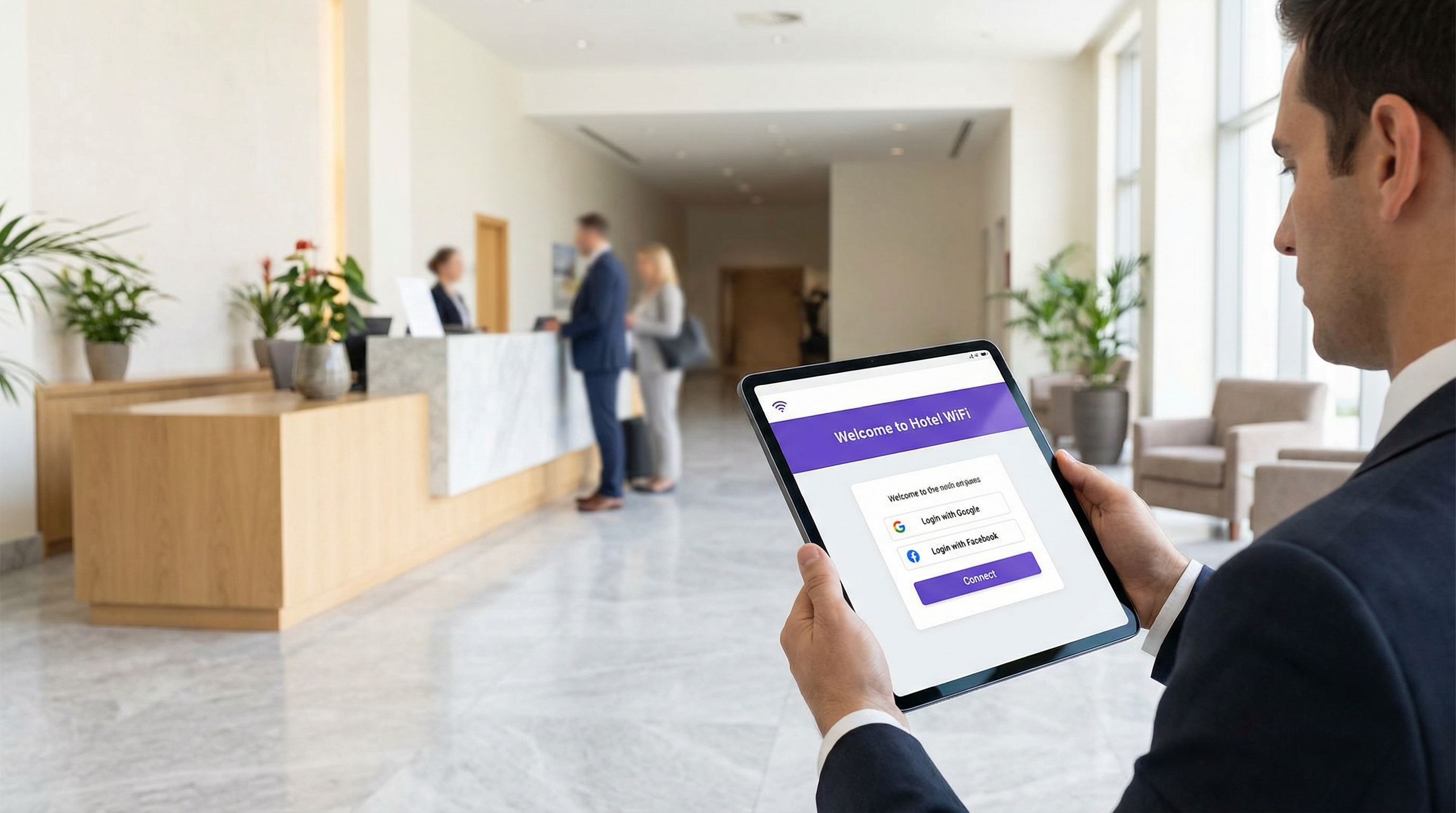
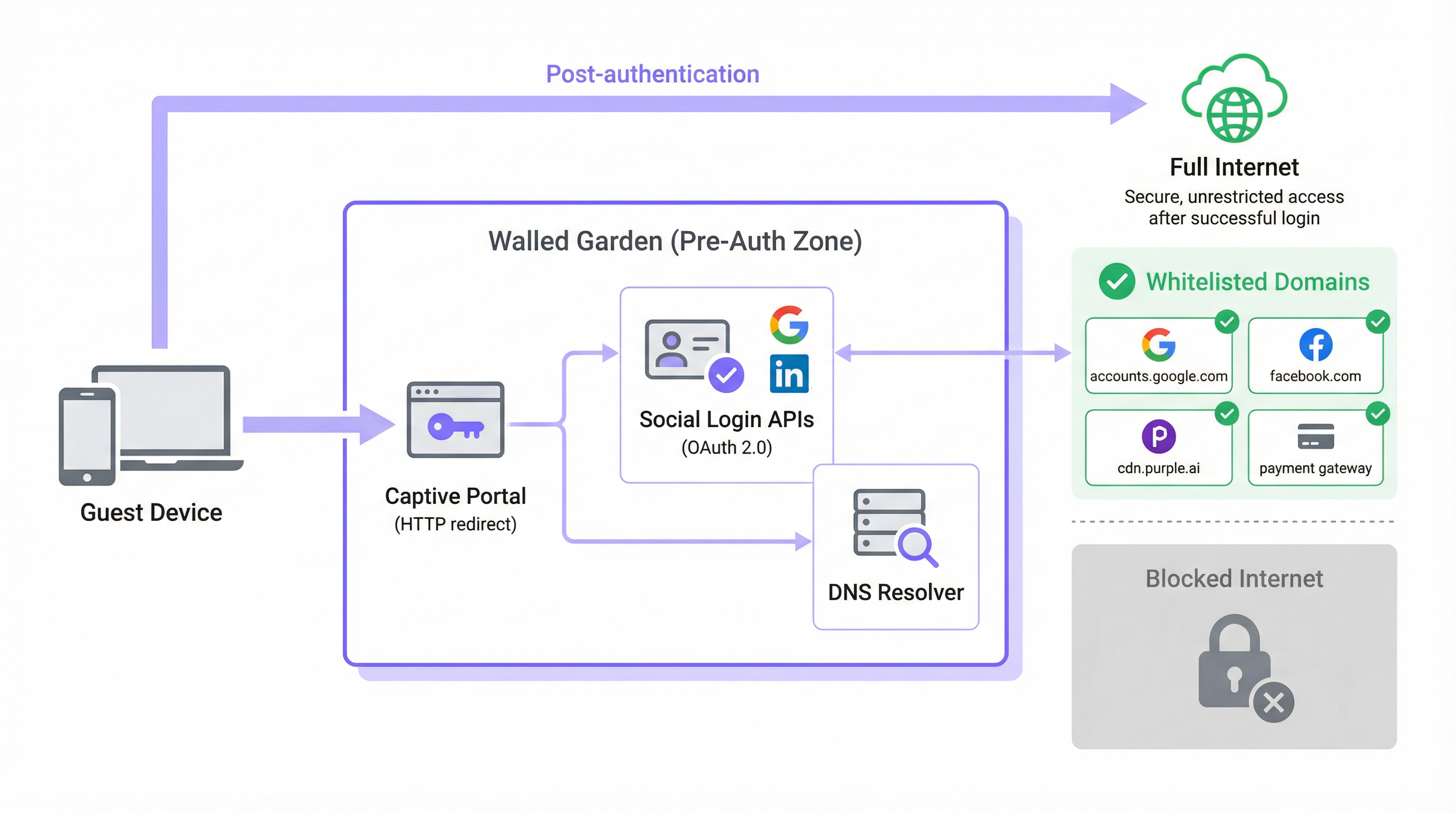
एका ठराविक Guest WiFi आर्किटेक्चरमध्ये, जेव्हा वापरकर्त्याचे डिव्हाइस ओपन SSID शी जोडले जाते, तेव्हा त्याला DHCP द्वारे IP ॲड्रेस दिला जातो आणि नेटवर्क कंट्रोलरद्वारे प्री-ऑथेंटिकेशन रोल किंवा आयसोलेटेड VLAN मध्ये ठेवले जाते. या स्थितीत, कंट्रोलर सर्व आउटबाउंड HTTP आणि HTTPS ट्रॅफिक इंटरसेप्ट करतो आणि ते Captive Portal स्प्लॅश पेजवर रिडायरेक्ट करतो. हीच ती यंत्रणा आहे जी अतिथीच्या ब्राउझरला लॉगिन स्क्रीनवर जाण्यास भाग पाडते. Walled Garden हा या इंटरसेप्शन नियमाला एक स्पष्ट अपवाद आहे: बाह्य डोमेन आणि IP ॲड्रेस रेंजेसची एक क्युरेटेड व्हाइटलिस्ट, ज्यांच्याशी डिव्हाइसला प्री-ऑथेंटिकेशन टप्प्यात मुक्तपणे संवाद साधण्याची परवानगी असते.
योग्यरित्या कॉन्फिगर केलेल्या Walled Garden शिवाय, ऑथेंटिकेशन पूर्ण करण्यासाठी आवश्यक असलेल्या सेवाच ब्लॉक केल्या जातात. आधुनिक Captive Portals हे मोनोलिथिक, स्वयंपूर्ण ॲप्लिकेशन्स नाहीत. ते मायक्रोसर्व्हिसेस आणि थर्ड-पार्टी APIs चे मिश्रण आहेत. पोर्टलचे स्वतःचे ॲसेट्स — HTML, CSS, JavaScript आणि इमेजेस — हे कंट्रोलरच्या स्थानिक इन्फ्रास्ट्रक्चरपासून पूर्णपणे वेगळ्या असलेल्या Content Delivery Network (CDN) वरून सर्व्ह केले जाऊ शकतात. सोशल लॉगिन कार्यक्षमता Google, Facebook, Apple किंवा Microsoft वरील OAuth 2.0 एंडपॉइंट्सपर्यंत पोहोचण्यावर अवलंबून असते. जर सशुल्क WiFi टियर ऑफर केला असेल, तर पोर्टलने Stripe किंवा PayPal सारख्या पेमेंट प्रोसेसरशी संवाद साधणे आवश्यक आहे. ॲनालिटिक्स आणि मार्केटिंग प्लॅटफॉर्म्स त्यांच्या स्वतःच्या CDN ओरिजिनवरून ट्रॅकिंग स्क्रिप्ट्स लोड करू शकतात. यापैकी प्रत्येक डिपेंडन्सी एका डोमेनचे प्रतिनिधित्व करते ज्याला Walled Garden मध्ये स्पष्टपणे परवानगी दिली गेली पाहिजे, अन्यथा ऑथेंटिकेशन फ्लो शांतपणे किंवा गोंधळात टाकणाऱ्या त्रुटीसह अयशस्वी होईल.
DNS रिझोल्यूशनची समस्या
Walled Garden कॉन्फिगरेशनचा सर्वात तांत्रिकदृष्ट्या सूक्ष्म पैलू म्हणजे डोमेन-आधारित प्रशासन आणि IP-आधारित अंमलबजावणी यामधील तफावत. नेटवर्क ॲडमिनिस्ट्रेटर्स मानवांना वाचता येण्याजोग्या डोमेन नावांचा (उदा. accounts.google.com) वापर करून Walled Garden कॉन्फिगर करत असले तरी, बहुतांश नेटवर्क कंट्रोलर्स हे नियम IP लेयरवर लागू करतात. जेव्हा एखादे डोमेन व्हाइटलिस्टमध्ये जोडले जाते, तेव्हा कंट्रोलर त्याला एक किंवा अधिक IP ॲड्रेसमध्ये रिझॉल्व्ह करण्यासाठी DNS लुकअप करतो आणि ते IPs तात्पुरत्या ॲक्सेस कंट्रोल लिस्ट (ACL) मध्ये जोडतो.
यामुळे प्रमुख क्लाउड प्रोव्हायडर्ससोबत एक महत्त्वपूर्ण ऑपरेशनल धोका निर्माण होतो. Google, Meta, Apple आणि आघाडीचे CDNs anycast routing आणि dynamic IP address assignment वापरतात. कॉन्फिगरेशनच्या वेळी accounts.google.com ज्या IP ॲड्रेसवर रिझॉल्व्ह होते, तो ॲड्रेस सहा महिन्यांनंतर किंवा वेगळ्या नेटवर्क सेगमेंटवर रिझॉल्व्ह होणाऱ्या ॲड्रेसपेक्षा पूर्णपणे वेगळा असू शकतो. त्यामुळे स्टॅटिक IP व्हाइटलिस्ट हे शाश्वत कॉन्फिगरेशन नाही; CDN IP रेंजेस रोटेट होत असल्याने ते कालांतराने निकामी होईल.
यावरील योग्य उपाय म्हणजे dynamic DNS resolution, ज्यामध्ये नेटवर्क कंट्रोलर वेळोवेळी प्रत्येक व्हाइटलिस्ट केलेल्या डोमेनला पुन्हा रिझॉल्व्ह करतो आणि त्यानुसार त्याचे ACLs अपडेट करतो. Cisco, Aruba, Ruckus आणि Fortinet चे बहुतांश एंटरप्राइझ-ग्रेड कंट्रोलर्स याला नेटिव्हली सपोर्ट करतात. जर तुमचा कंट्रोलर तसे करत नसेल, तर तुम्ही अशा कॉन्फिगरेशनवर काम करत आहात जे अधूनमधून बिघाड निर्माण करेल ज्याचे निदान करणे कठीण असते आणि ते कालांतराने अधिकच खराब होईल.
HTTPS इंटरसेप्शन आणि TLS कंप्लायन्स
HTTPS च्या वाढत्या वापरामुळे गुंतागुंतीचा आणखी एक स्तर निर्माण होतो. जेव्हा प्री-ऑथेंटिकेशन स्थितीत असलेले अतिथी डिव्हाइस नॉन-व्हाइटलिस्टेड HTTPS रिसोर्स लोड करण्याचा प्रयत्न करते, तेव्हा कंट्रोलरने ती विनंती कशी हाताळायची हे ठरवणे आवश्यक असते. यासाठी दोन सामान्य दृष्टिकोन आहेत, जर ते योग्यरित्या व्यवस्थापित केले नाहीत तर दोघांचेही महत्त्वपूर्ण तोटे आहेत.
पहिला दृष्टिकोन म्हणजे silent drop, ज्यामध्ये कंट्रोलर फक्त कनेक्शन ब्लॉक करतो. अतिथीचा ब्राउझर एक सामान्य "site can't be reached" त्रुटी दर्शवतो, जी कोणतेही उपयुक्त मार्गदर्शन देत नाही आणि अनेकदा पोर्टल प्रॉम्प्ट ऐवजी नेटवर्कमधील बिघाड म्हणून समजली जाते. दुसरा दृष्टिकोन म्हणजे HTTPS interception, ज्यामध्ये कंट्रोलर Captive Portal कडे रिडायरेक्ट करण्याचा प्रयत्न करतो. यासाठी कंट्रोलरला मॅन-इन-द-मिडल (MITM) प्रॉक्सी म्हणून काम करणे आणि स्वतःचे TLS सर्टिफिकेट सादर करणे आवश्यक असते. जर अतिथीच्या डिव्हाइसचा या सर्टिफिकेटवर विश्वास नसेल — जो सार्वजनिक अतिथी नेटवर्कवर जवळजवळ कधीच नसतो — तर ब्राउझर एक सुरक्षा चेतावणी दर्शवेल, जी वापरकर्त्यांसाठी चिंताजनक असते आणि नियंत्रित वातावरणात, ती कंप्लायन्सची समस्या निर्माण करू शकते.
योग्य आर्किटेक्चरल दृष्टिकोन म्हणजे ऑथेंटिकेशन फ्लोसाठी आवश्यक असलेली सर्व डोमेन्स व्हाइटलिस्ट केलेली आहेत याची खात्री करणे, ज्यामुळे त्यांचे HTTPS ट्रॅफिक कोणताही अडथळा न येता पास होऊ शकेल. Captive Portal रिडायरेक्ट हे HTTPS इंटरसेप्शन ऐवजी OS-स्तरीय प्रोब यंत्रणेद्वारे ट्रिगर केले जावे. यामुळे सर्टिफिकेट ट्रस्टची समस्या पूर्णपणे दूर होते. आधुनिक ब्राउझर्स HTTP Strict Transport Security (HSTS) आणि काही प्रकरणांमध्ये, सर्टिफिकेट पिनिंग देखील लागू करतात. या दोन्ही यंत्रणांमुळे प्रमुख डोमेन्ससाठी HTTPS इंटरसेप्शन पूर्णपणे अयशस्वी होईल, ज्यामुळे रिडायरेक्ट ऐवजी तुटलेले कनेक्शन निर्माण होईल — व्यापक HTTPS इंटरसेप्शन पॉलिसीपेक्षा योग्यरित्या कॉन्फिगर केलेल्या Walled Garden च्या बाजूने हा आणखी एक भक्कम युक्तिवाद आहे.
Captive Network Assistant (CNA) आणि OS प्रोब डोमेन्स
Walled Garden कॉन्फिगरेशनच्या सर्वात वारंवार दुर्लक्षित केल्या जाणाऱ्या पैलूंपैकी एक म्हणजे आधुनिक ऑपरेटिंग सिस्टीम्स ज्या यंत्रणेद्वारे Captive Portal ची उपस्थिती शोधतात ती यंत्रणा. सर्व प्रमुख ऑपरेटिंग सिस्टीम्स — iOS, iPadOS, macOS, Android आणि Windows — एक Captive Network Assistant (CNA) लागू करतात जे नवीन WiFi नेटवर्कशी कनेक्ट झाल्यानंतर लगेचच एका ज्ञात HTTP एंडपॉइंटची तपासणी (probe) करते. जर प्रतिसाद अपेक्षित मूल्यापेक्षा वेगळा असेल, तर OS असा निष्कर्ष काढते की ते Captive Portal च्या मागे आहे आणि लॉगिन हाताळण्यासाठी आपोआप ब्राउझर विंडो लाँच करते.
प्रत्येक प्लॅटफॉर्मद्वारे वापरले जाणारे प्रोब एंडपॉइंट्स खालीलप्रमाणे आहेत:
| ऑपरेटिंग सिस्टीम | प्रोब डोमेन | अपेक्षित प्रतिसाद |
|---|---|---|
| Apple (iOS, macOS) | captive.apple.com |
विशिष्ट बॉडीसह HTTP 200 |
| Android (Google) | connectivitycheck.gstatic.com |
HTTP 204 नो कंटेंट |
| Windows | www.msftconnecttest.com |
विशिष्ट बॉडीसह HTTP 200 |
| Firefox / Mozilla | detectportal.firefox.com |
विशिष्ट बॉडीसह HTTP 200 |
जर यापैकी कोणतेही प्रोब डोमेन्स Walled Garden द्वारे ब्लॉक केले गेले, तर OS ला Captive Portal कधीच सापडणार नाही. अतिथीच्या दृष्टिकोनातून, WiFi नेटवर्कला फक्त इंटरनेट ॲक्सेस नाही असे वाटेल. प्रॉडक्शन डिप्लॉयमेंट्समध्ये आढळून येणाऱ्या सर्वात सामान्य मिसकॉन्फिगरेशन बिघाडांपैकी हा एक आहे आणि बेसलाइन व्हाइटलिस्टमध्ये या डोमेन्सचा समावेश करून हे पूर्णपणे टाळता येऊ शकते.
अंमलबजावणी मार्गदर्शक
पायरी 1: बेसलाइन डोमेन डिस्कव्हरी
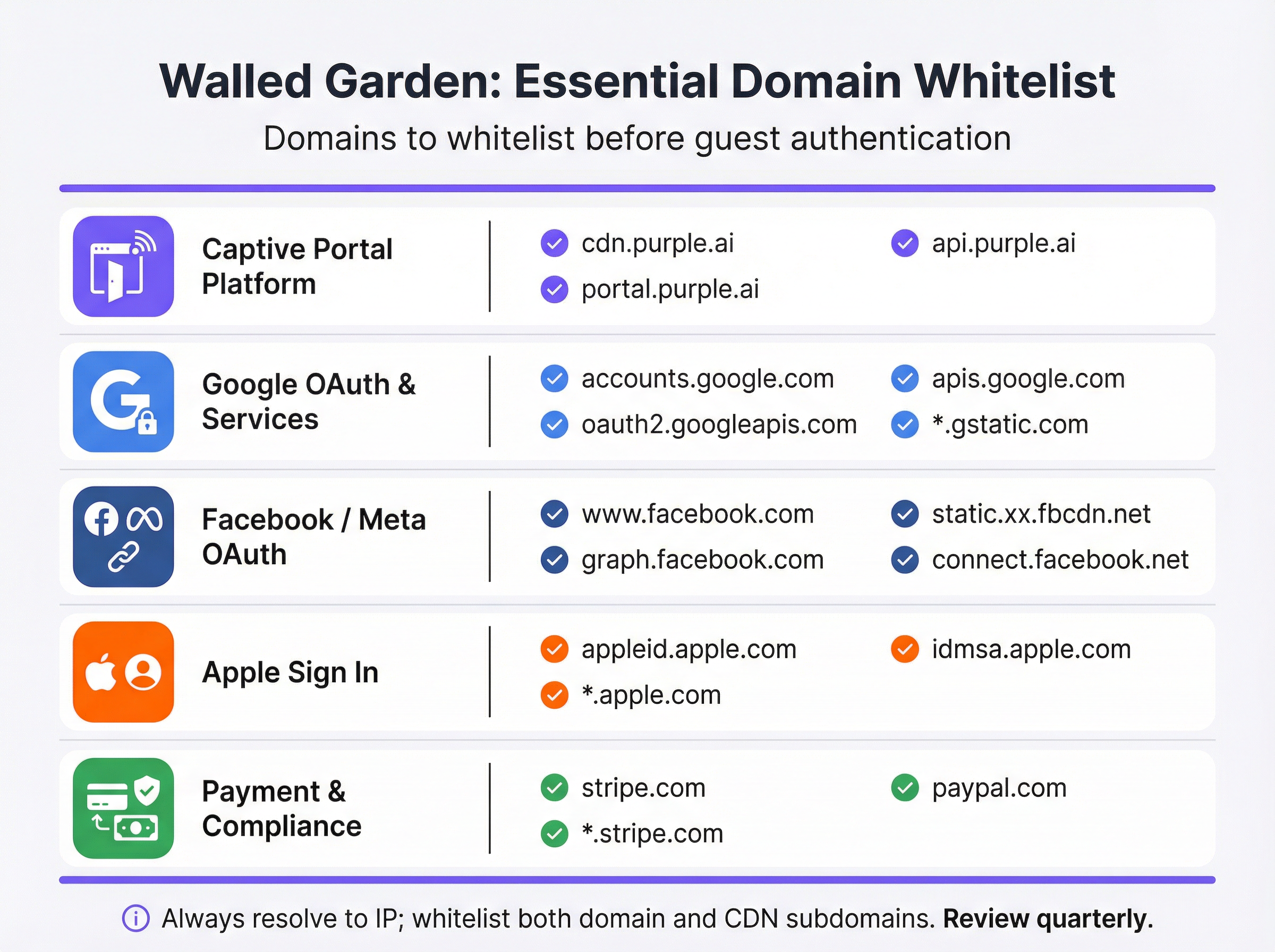
तुमच्या कंट्रोलर कॉन्फिगरेशनला स्पर्श करण्यापूर्वी, तुमचे Captive Portal ज्या प्रत्येक बाह्य सेवेवर अवलंबून आहे त्याचे सखोल ऑडिट करा. हे करण्यासाठी डेव्हलपर टूल्स उघडे ठेवून ब्राउझरमध्ये पोर्टल लोड करणे आणि सर्व बाह्य रिसोर्स विनंत्या ओळखण्यासाठी नेटवर्क टॅबची तपासणी करणे हा सर्वोत्तम मार्ग आहे. परिणामी यादीचे खालीलप्रमाणे वर्गीकरण केले जावे:
| श्रेणी | उद्देश | आवश्यक डोमेन्स |
|---|---|---|
| Captive Portal प्लॅटफॉर्म | स्प्लॅश पेज ॲसेट्स सर्व्ह करते आणि ऑथेंटिकेशन लॉजिक हाताळते. | *.purple.ai, cdn.your-vendor.com |
| Google OAuth | Google Sign-In सक्षम करते. | accounts.google.com, oauth2.googleapis.com, apis.google.com, *.gstatic.com |
| Facebook / Meta OAuth | Facebook Login सक्षम करते. | www.facebook.com, graph.facebook.com, connect.facebook.net, *.fbcdn.net |
| Apple Sign In | Sign in with Apple सक्षम करते. | appleid.apple.com, idmsa.apple.com, *.apple.com |
| OS Captive Portal प्रोब्स | स्वयंचलित पोर्टल डिटेक्शन सक्षम करते. | captive.apple.com, connectivitycheck.gstatic.com, www.msftconnecttest.com |
| पेमेंट गेटवेज | प्रीमियम टियर्ससाठी पेमेंट्स प्रोसेस करते. | *.stripe.com, *.paypal.com |
| ॲनालिटिक्स / मार्केटिंग | ट्रॅकिंग आणि ॲनालिटिक्स स्क्रिप्ट्स लोड करते. | व्हेंडर-विशिष्ट (उदा. *.segment.com, *.mixpanel.com) |
पायरी 2: कंट्रोलर कॉन्फिगरेशन
अंमलबजावणी व्हेंडरनुसार बदलते, परंतु मूळ तत्त्वे सार्वत्रिक आहेत. तुमच्या नेटवर्क कंट्रोलरच्या मॅनेजमेंट इंटरफेसमध्ये Captive Portal किंवा स्प्लॅश पेज कॉन्फिगरेशनवर जा — Cisco Meraki मध्ये, हे Wireless > Configure > Splash Page अंतर्गत आढळते; Aruba Central मध्ये, हे Captive Portal Profile आहे; Fortinet मध्ये, हे Security Policies > Captive Portal मध्ये असते. प्री-ऑथेंटिकेशन ॲक्सेस किंवा Walled Garden व्हाइटलिस्ट विभाग शोधा आणि खालीलप्रमाणे पुढे जा:
- श्रेणीनुसार डोमेन्स एंटर करा: प्रत्येक श्रेणीवर काम करत, तुमच्या ऑडिटमधील प्रत्येक डोमेन पद्धतशीरपणे जोडा. जिथे तुमचा कंट्रोलर त्यांना सपोर्ट करतो आणि जिथे रिस्क प्रोफाइल स्वीकार्य आहे तिथे वाइल्डकार्ड्स (
*.gstatic.com) वापरा. उच्च-सुरक्षा वातावरणासाठी, व्यापक वाइल्डकार्ड्सपेक्षा स्पष्ट सबडोमेन्सला प्राधान्य द्या. - Dynamic DNS Resolution सक्षम करा: तुमचा कंट्रोलर स्टॅटिक IP लिस्ट कॅश करण्याऐवजी व्हाइटलिस्ट केलेल्या डोमेन्सना वेळोवेळी पुन्हा रिझॉल्व्ह करण्यासाठी कॉन्फिगर केलेला असल्याची खात्री करा. हे सक्रिय आहे हे पडताळण्यासाठी तुमच्या व्हेंडरच्या डॉक्युमेंटेशनचा संदर्भ घ्या. Walled Garden एंट्रीजसाठी DNS TTL 60 सेकंद किंवा त्याहून कमी सेट करा.
- ड्युअल-स्टॅक नियम कॉन्फिगर करा: जर तुमचे नेटवर्क IPv6 ला सपोर्ट करत असेल — आणि IPv4 ॲड्रेस स्पेस कमी होत असल्यामुळे ते करायलाच हवे — तर तुमचे Walled Garden ACLs IPv4 आणि IPv6 या दोन्ही ट्रॅफिकला लागू होतील याची खात्री करा. IPv6 ॲड्रेस असलेले अतिथी डिव्हाइस केवळ-IPv4 ACLs बायपास करेल.
- Guest SSID ला लागू करा: Captive Portal प्रोफाइल आणि त्याचे Walled Garden फक्त Guest SSID शी जोडा. कॉर्पोरेट SSIDs वर अतिथी-स्तरीय Walled Garden पॉलिसीज कधीही लागू करू नका.

पायरी 3: प्री-गो-लाइव्ह टेस्टिंग प्रोटोकॉल
टेस्टिंग अनिवार्य आहे आणि ते खऱ्या प्री-ऑथेंटिकेशन स्थितीत असलेल्या वास्तविक डिव्हाइसेससह केले जाणे आवश्यक आहे — ॲडमिनिस्ट्रेटर खात्यांसह नाही ज्यांना उच्च ॲक्सेस असू शकतो, आणि पूर्वी नेटवर्कशी कनेक्ट झालेल्या आणि कॅश केलेले क्रेडेंशियल्स असू शकणाऱ्या डिव्हाइसेससह नाही.
प्रत्येक डिव्हाइस प्लॅटफॉर्मसाठी (iOS, Android, Windows, macOS), खालील गोष्टी करा:
- कोणतीही कॅश केलेली स्थिती नाही याची खात्री करण्यासाठी टेस्ट डिव्हाइसवरील नेटवर्क विसरा (Forget the network).
- Guest SSID शी कनेक्ट करा आणि CNA यंत्रणेद्वारे Captive Portal आपोआप लाँच होते की नाही याचे निरीक्षण करा.
- पोर्टलवर ऑफर केलेल्या प्रत्येक लॉगिन पद्धतीचा प्रयत्न करा — ईमेल नोंदणी, Google Sign-In, Facebook Login, Apple Sign In — आणि प्रत्येक यशस्वीरित्या पूर्ण होते याची खात्री करा.
- जर सशुल्क टियर ऑफर केला असेल, तर तुमच्या पेमेंट गेटवेच्या सँडबॉक्स वातावरणातील टेस्ट कार्ड नंबर वापरून पेमेंट फ्लोची चाचणी करा.
- कोणत्याही अयशस्वी चाचणीवर ब्राउझर कन्सोलची तपासणी करा. नेटवर्क टॅब ब्लॉक केले जात असलेले अचूक डोमेन ओळखेल, ज्यामुळे तुम्हाला ते अचूकतेने व्हाइटलिस्टमध्ये जोडता येईल.
कंप्लायन्सच्या उद्देशाने जतन केलेल्या कॉन्फिगरेशन रेकॉर्डमध्ये या टेस्टिंग प्रोटोकॉलच्या परिणामांचे दस्तऐवजीकरण करा.
सर्वोत्तम पद्धती
प्रिन्सिपल ऑफ लीस्ट प्रिव्हिलेज (Principle of Least Privilege) हा Walled Garden कॉन्फिगरेशनचा मूलभूत नियम आहे. ऑथेंटिकेशन फ्लो कार्य करण्यासाठी स्पष्टपणे आवश्यक असलेल्या डोमेन्सनाच व्हाइटलिस्ट करा. तुमच्या कंट्रोलरच्या अंमलबजावणीसाठी आवश्यक असल्याशिवाय *.google.com किंवा *.facebook.com सारखे व्यापक वाइल्डकार्ड्स टाळा; विशिष्ट सबडोमेन्सला प्राधान्य द्या. प्रत्येक अतिरिक्त व्हाइटलिस्ट केलेले डोमेन प्री-ऑथेंटिकेशन झोनमध्ये संभाव्य ॲटॅक सरफेसचे प्रतिनिधित्व करते.
कालांतराने कार्यशील Walled Garden राखण्यासाठी त्रैमासिक पुनरावलोकन (Quarterly Review Cadence) आवश्यक आहे. सोशल लॉगिन प्रोव्हायडर्स आणि CDNs त्यांचे इन्फ्रास्ट्रक्चर नियमितपणे अपडेट करतात. Apple ने 2023 मध्ये त्याचे Sign In डोमेन स्ट्रक्चर सुधारित केले. Google ने अनेक प्रसंगी त्याच्या OAuth फ्लोमध्ये नवीन सबडोमेन्स जोडले आहेत. डिप्लॉयमेंटच्या वेळी अचूक असलेले Walled Garden सक्रिय देखभालीशिवाय काही महिन्यांतच अलाइनमेंटच्या बाहेर जाईल. प्रत्येक प्रोव्हायडरच्या वर्तमान डॉक्युमेंटेशनशी तुमच्या व्हाइटलिस्टचा क्रॉस-रेफरन्स करून, तुमच्या ऑपरेशनल कॅलेंडरमध्ये त्रैमासिक पुनरावलोकन समाविष्ट करा.
कंप्लायन्स अलाइनमेंट (Compliance Alignment) साठी हे आवश्यक आहे की तुमचे Walled Garden कॉन्फिगरेशन अनावधानाने लागू मानकांच्या आवश्यकतांचे उल्लंघन करत नाही. PCI DSS v4.0 अंतर्गत, कार्डधारकाचा डेटा प्रोसेस, स्टोअर किंवा ट्रान्समिट करणाऱ्या कोणत्याही नेटवर्कने कठोर ॲक्सेस कंट्रोल्स राखले पाहिजेत. जर तुमच्या Guest WiFi मध्ये सशुल्क टियर समाविष्ट असेल, तर Walled Garden ने तुमच्या पेमेंट प्रोसेसरला कोणत्याही इंटरसेप्शनशिवाय TLS 1.2 किंवा उच्च कनेक्शन्सची परवानगी दिली पाहिजे. GDPR अंतर्गत, अतिथींनी कोणताही वैयक्तिक डेटा प्रदान करण्यापूर्वी प्रायव्हसी नोटीस त्यांच्यासाठी ॲक्सेसिबल असणे आवश्यक आहे — याचा अर्थ तुमच्या प्रायव्हसी पॉलिसीची लिंक ऑथेंटिकेशनपूर्वीच Walled Garden मधून पोहोचण्यायोग्य असली पाहिजे.
कोणत्याही प्रॉडक्शन नेटवर्क बदलासाठी चेंज मॅनेजमेंट डॉक्युमेंटेशन (Change Management Documentation) हे एक व्यावसायिक दायित्व आहे. Walled Garden मधील प्रत्येक बदल — मग ते नवीन डोमेन जोडणे असो, जुने काढून टाकणे असो किंवा वाइल्डकार्ड अपडेट करणे असो — टाइमस्टॅम्प, बदलाचे कारण आणि जबाबदार इंजिनिअरसह लॉग केले जावे. अधूनमधून येणाऱ्या बिघाडांचे निवारण करण्यासाठी आणि कंप्लायन्स ऑडिटमध्ये योग्य ती काळजी (due diligence) प्रदर्शित करण्यासाठी हे ऑडिट ट्रेल अमूल्य आहे.
ट्रबलशूटिंग आणि रिस्क मिटिगेशन
खालील तक्ता सर्वात सामान्य बिघाड मोड्स त्यांच्या मूळ कारणांशी आणि शिफारस केलेल्या उपायांशी जोडतो:
| लक्षण | मूळ कारण | उपाय (Mitigation) |
|---|---|---|
| iOS/Android वर पोर्टल आपोआप लाँच होत नाही | OS Captive Portal प्रोब डोमेन्स ब्लॉक केलेले आहेत. | Walled Garden मध्ये captive.apple.com आणि connectivitycheck.gstatic.com जोडा. |
| Google Sign-In बटण प्रतिसाद देत नाही | एक किंवा अधिक Google OAuth किंवा CDN डोमेन्स गहाळ आहेत. | accounts.google.com, oauth2.googleapis.com, apis.google.com, आणि *.gstatic.com जोडा. |
| Facebook लॉगिन CORS त्रुटीसह अयशस्वी होते | Facebook CDN सबडोमेन्स (*.fbcdn.net) व्हाइटलिस्ट केलेले नाहीत. |
*.fbcdn.net आणि *.facebook.com साठी वाइल्डकार्ड एंट्रीज जोडा. |
| लॉगिन सुरुवातीला काम करते पण अधूनमधून अयशस्वी होते | स्टॅटिक IP व्हाइटलिस्ट; CDN IP ॲड्रेसेस रोटेट झाले आहेत. | कंट्रोलरवर Dynamic DNS Resolution सक्षम करा. |
| अतिथींना TLS सर्टिफिकेट चेतावणी दिसतात | कंट्रोलर नॉन-व्हाइटलिस्टेड डोमेन्सवरील HTTPS ट्रॅफिक इंटरसेप्ट करत आहे. | सर्व आवश्यक डोमेन्स व्हाइटलिस्ट करा जेणेकरून HTTPS विनाअडथळा पास होईल. |
| पेमेंट पेज लोड होण्यात अयशस्वी होते | पेमेंट गेटवे CDN किंवा API डोमेन्स व्हाइटलिस्ट केलेले नाहीत. | आवश्यकतेनुसार *.stripe.com किंवा *.paypal.com जोडा. |
| IPv6 वापरकर्ते पोर्टल ॲक्सेस करू शकत नाहीत | Walled Garden ACLs केवळ IPv4 आहेत. | IPv6 ॲड्रेस रेंजेस कव्हर करण्यासाठी सर्व Walled Garden नियम विस्तारित करा. |
रिस्क मिटिगेशन: ओव्हर-व्हाइटलिस्टिंग (Over-Whitelisting) हा एक वास्तविक आणि कमी लेखला जाणारा धोका आहे. जेव्हा अधूनमधून बिघाड होतात, तेव्हा समस्या संपेपर्यंत उत्तरोत्तर व्यापक वाइल्डकार्ड एंट्रीज जोडण्याचा मोह होतो. या दृष्टिकोनामुळे Walled Garden प्रभावीपणे खुले होऊ शकते, ज्यामुळे अनधिकृत अतिथींना लॉगिन फ्लो पूर्ण न करता इंटरनेटच्या मोठ्या भागांमध्ये प्रवेश करण्याची परवानगी मिळते. हे Captive Portal चा उद्देश विफल करते, मार्केटिंगच्या उद्देशाने डेटा संकलनास कमकुवत करते आणि जर अतिथी अटी व शर्तींना संमती न देता नेटवर्क ॲक्सेस करू शकत असतील तर GDPR अंतर्गत दायित्व निर्माण करू शकते. एंट्रीज जोडण्यापूर्वी नेहमी विशिष्ट ब्लॉक केलेल्या डोमेनचे निदान करा.
ROI आणि व्यावसायिक प्रभाव
योग्यरित्या लागू केलेले Walled Garden अनेक आयामांमध्ये मोजता येण्याजोगे व्यावसायिक मूल्य प्रदान करते. हॉस्पिटॅलिटी क्षेत्रात, अखंड Guest WiFi लॉगिन अनुभव थेट अतिथी समाधान स्कोअरशी संबंधित असतो. J.D. Power चे संशोधन सातत्याने WiFi कार्यप्रदर्शनाला हॉटेलमधील अतिथींच्या समाधानाच्या प्रमुख कारणांपैकी एक म्हणून ओळखते. जे पोर्टल लोड होण्यात अयशस्वी होते — कारण Walled Garden चुकीच्या पद्धतीने कॉन्फिगर केलेले असते — ते एक नकारात्मक पहिली छाप निर्माण करते जी संपूर्ण मुक्कामाच्या अनुभवावर परिणाम करते.
रिटेल ऑपरेटर्ससाठी, Walled Garden हे लॉयल्टी प्रोग्रामचे प्रवेशद्वार आहे. Captive Portal द्वारे यशस्वीरित्या लॉग इन करणारा प्रत्येक अतिथी एक सत्यापित ओळख प्रदान करतो जी खरेदी वर्तनाशी जोडली जाऊ शकते, ज्यामुळे निनावी जाहिरातींपेक्षा स्पष्टपणे उच्च रूपांतरण दरांसह (conversion rates) वैयक्तिकृत मार्केटिंग मोहिमा सक्षम होतात. लॉगिनला प्रतिबंध करणारे चुकीच्या पद्धतीने कॉन्फिगर केलेले Walled Garden थेट कॅप्चर केलेल्या फर्स्ट-पार्टी डेटाचे प्रमाण कमी करते, ज्याचा मार्केटिंग ROI वर मोजता येण्याजोगा प्रभाव पडतो.
इव्हेंट्स क्षेत्रात — स्टेडियम्स, कॉन्फरन्स सेंटर्स, एक्झिबिशन हॉल्स — Walled Garden हे मोठ्या प्रमाणासाठी (scale) डिझाइन केलेले असणे आवश्यक आहे. पीक लोडच्या वेळी, हजारो डिव्हाइसेस एकाच वेळी ऑथेंटिकेट करण्याचा प्रयत्न करतील. संथ किंवा ओव्हरलोड झालेल्या DNS रिझॉल्व्हरवर अवलंबून असलेले Walled Garden एक अडथळा निर्माण करेल जो संथ किंवा प्रतिसाद न देणारे पोर्टल म्हणून प्रकट होईल, जरी मूळ नेटवर्क इन्फ्रास्ट्रक्चर योग्य आकाराचे असले तरीही. Walled Garden डोमेन्ससाठी अधिकृत असलेले लोकल, कॅशिंग DNS रिझॉल्व्हर डिप्लॉय करणे ही हाय-डेन्सिटी डिप्लॉयमेंट्ससाठी एक मानक पद्धत आहे.
सार्वजनिक क्षेत्रातील संस्थांसाठी, Walled Garden हे एक कंप्लायन्स साधन देखील आहे. UK च्या Network and Information Systems (NIS) Regulations आणि व्यापक GDPR फ्रेमवर्क अंतर्गत, संस्थांनी हे दाखवून दिले पाहिजे की सार्वजनिक-दर्शनी नेटवर्कचा ॲक्सेस नियंत्रित आणि ऑडिट करण्यायोग्य आहे. कंप्लायंट Captive Portal सह एकत्रित केलेले योग्यरित्या कॉन्फिगर केलेले Walled Garden, या ऑडिट ट्रेलसाठी तांत्रिक पाया प्रदान करते.
Walled Garden चुकीचे असण्याची किंमत केवळ तांत्रिक नाही. हे हेल्पडेस्क कॉल व्हॉल्यूम, अतिथी समाधान स्कोअर, गमावलेला मार्केटिंग डेटा आणि संभाव्य नियामक धोक्यांमध्ये मोजले जाते. या धोक्यांच्या तुलनेत मजबूत Walled Garden कॉन्फिगर आणि राखण्यासाठी केलेली गुंतवणूक माफक आहे, आणि परतावा — उच्च पोर्टल ॲडॉप्शन रेट्स, समृद्ध फर्स्ट-पार्टी डेटा आणि कमी झालेल्या ऑपरेशनल अडचणींच्या स्वरूपात — मोजता येण्याजोगा आणि महत्त्वपूर्ण दोन्ही आहे.
महत्त्वाच्या संज्ञा आणि व्याख्या
Walled Garden
A controlled set of pre-approved domains and IP address ranges that a guest device can access on a WiFi network before completing authentication. All traffic to domains outside this list is blocked or redirected to the captive portal.
This is the foundational mechanism that allows a captive portal to function. Without it, the portal itself — and all social login providers it depends on — would be unreachable by unauthenticated devices.
Captive Portal
A web page that intercepts the internet traffic of a newly connected WiFi user and requires them to complete an action — such as logging in, accepting terms, or making a payment — before granting full network access.
The captive portal is the primary point of interaction for guests. It is the mechanism through which operators collect first-party data, enforce terms of service, and manage paid access tiers.
OAuth 2.0
An open authorisation standard that allows users to grant a third-party application limited access to their account on another service, without sharing their password. It is the protocol underpinning 'Login with Google' and 'Login with Facebook'.
Every social login option on a captive portal relies on OAuth 2.0. Each provider's OAuth endpoints must be whitelisted in the walled garden for the login flow to complete successfully.
Dynamic DNS Resolution
A network controller feature that periodically re-resolves whitelisted domain names to their current IP addresses and updates the enforcement ACLs accordingly, rather than using a static IP list.
This is essential for walled garden reliability. Without it, the IP addresses cached at deployment time will become stale as CDNs rotate their infrastructure, causing intermittent and hard-to-diagnose login failures.
Content Delivery Network (CDN)
A geographically distributed network of servers that delivers web content to users from the nearest available location, improving performance and availability.
Captive portals and social login providers rely on CDNs to serve scripts, fonts, and images. CDN subdomains (e.g., *.gstatic.com for Google, *.fbcdn.net for Facebook) must be included in the walled garden.
Captive Network Assistant (CNA)
A built-in feature of modern operating systems (iOS, Android, Windows, macOS) that automatically detects the presence of a captive portal by probing a known HTTP endpoint after connecting to a new WiFi network.
The CNA is what causes the portal login window to pop up automatically on a guest's device. If the probe domain is blocked by the walled garden, the CNA cannot detect the portal and the guest sees no login prompt.
Pre-Authentication ACL
An Access Control List applied to a network session before the user has authenticated. It defines which traffic is permitted (the walled garden) and which is blocked or redirected.
This is the technical implementation of the walled garden on enterprise network controllers. IT teams configure Pre-Authentication ACLs in the captive portal settings of their wireless controllers.
PCI DSS
The Payment Card Industry Data Security Standard is a set of security standards designed to ensure that all companies that accept, process, store, or transmit credit card information maintain a secure environment.
Relevant to any guest WiFi deployment with a paid access tier. The walled garden must permit TLS 1.2+ connections to the payment gateway without interception, and the guest network must be segmented from any cardholder data environment.
HTTP Strict Transport Security (HSTS)
A web security policy mechanism that instructs browsers to only interact with a server using HTTPS, preventing protocol downgrade attacks and cookie hijacking.
HSTS causes HTTPS interception by a captive portal controller to fail outright for major domains, as the browser refuses to accept a certificate it does not trust. This reinforces the case for a correctly configured walled garden over an HTTPS interception approach.
केस स्टडीज
A 500-room luxury hotel is deploying a new guest WiFi network using Cisco Meraki hardware and the Purple platform. They need to support Google and Facebook logins, and offer a paid premium-speed tier via Stripe. What is the minimum set of domains that must be whitelisted in the Meraki walled garden, and how should they be configured?
The following domains must be entered into the Meraki dashboard under Wireless > Configure > Splash Page > Walled Garden Ranges:
- Purple Platform: *.purple.ai (covers cdn, portal, and api subdomains)
- Google OAuth: accounts.google.com, oauth2.googleapis.com, apis.google.com, *.gstatic.com
- Facebook OAuth: www.facebook.com , graph.facebook.com, connect.facebook.net, *.fbcdn.net
- Stripe Payments: *.stripe.com
- OS Probes: captive.apple.com, connectivitycheck.gstatic.com, www.msftconnecttest.com
Cisco Meraki performs dynamic DNS resolution natively for walled garden entries, so no additional configuration is required for IP resolution. The hotel should also ensure their privacy policy URL is accessible from within the walled garden to comply with GDPR. Post-deployment, the IT team should test with a factory-reset iOS device and a factory-reset Android device to verify the full login flow for both social login methods.
A national retail chain with 200 stores is experiencing intermittent Google login failures on their guest WiFi. The failures are random — some stores are unaffected, others see failures on certain days or at certain times. The network uses Fortinet FortiGate controllers. What is the most likely root cause and how would you resolve it?
The most likely root cause is that the FortiGate walled garden is using a static IP list for Google's OAuth domains, and Google's CDN has rotated its IP addresses at some locations. The intermittent, location-specific nature of the failures is a classic indicator of CDN IP rotation — some stores' cached IP lists are still valid, others have become stale.
Resolution steps:
- Log into the FortiGate management console at an affected store and navigate to the captive portal walled garden configuration.
- Verify whether the Google OAuth domains are configured as domain names or as static IP addresses.
- If static IPs are present, replace them with domain-based entries: accounts.google.com, oauth2.googleapis.com, apis.google.com, *.gstatic.com.
- Enable the FortiGate's FQDN-based address objects with a short refresh interval (recommended: 60 seconds) to ensure dynamic DNS resolution is active.
- Roll this configuration change out to all 200 stores via FortiManager to ensure consistency.
- Monitor the affected stores for 48 hours post-change to confirm resolution.
परिस्थिती विश्लेषण
Q1. You are designing the guest WiFi for a new international airport terminal. The requirements include login via Google, Apple, and WeChat, plus a premium access tier sold via PayPal. What unique challenges does this scenario present for your walled garden configuration, and how would you address them?
💡 संकेत:Consider the geographical and application-specific nature of WeChat's login flow, and the implications of a globally diverse user base for CDN IP resolution.
शिफारस केलेला दृष्टिकोन दाखवा
Three unique challenges arise. First, WeChat login: unlike standard web-based OAuth, WeChat's login flow on mobile devices often attempts to open the native WeChat app via a deep link rather than completing the flow in a web browser. This can break the captive portal flow entirely. The solution is to configure the portal to force a web-based QR code flow and whitelist the specific Tencent domains that serve the QR code and handle the authentication handshake (e.g., open.weixin.qq.com, wx.qq.com). Second, global CDN resolution: an international airport serves users from every region. Dynamic DNS resolution is critical, as Google, Apple, and PayPal serve their content from geographically distributed CDN nodes. The controller must re-resolve walled garden domains frequently to ensure the correct regional IP addresses are whitelisted. Third, PayPal localisation: PayPal uses country-specific domains and CDNs for localised payment experiences. In addition to *.paypal.com, you may need to whitelist *.paypalobjects.com and regional variants. A thorough audit of the PayPal checkout flow from multiple device locales is recommended before go-live.
Q2. A 60,000-seat stadium is experiencing widespread portal login failures during the first 15 minutes of every event, after which performance normalises. The infrastructure is correctly sized for the user load. What is the likely bottleneck and how would you resolve it?
💡 संकेत:Think about what happens when 60,000 devices all attempt to connect and resolve the same domains simultaneously.
शिफारस केलेला दृष्टिकोन दाखवा
The bottleneck is almost certainly DNS resolution. When 60,000 devices connect simultaneously, they all attempt to resolve the same walled garden domains (portal CDN, Google OAuth, Apple Sign In, etc.) at the same time. If the upstream DNS resolver — typically the ISP's recursive resolver or a cloud DNS service — cannot handle this burst of queries, resolution latency spikes, causing the portal to appear slow or unresponsive even though the network itself is performing correctly. The performance normalises after the initial rush because the resolver's cache warms up and subsequent queries are served from cache. The solution is to deploy a local, caching DNS resolver (e.g., Unbound or a dedicated appliance) within the stadium's network infrastructure. This resolver should be pre-seeded with the walled garden domains before the event begins, so that all DNS queries for those domains are answered from local cache with sub-millisecond latency. The controller's DHCP configuration should point guest devices to this local resolver.
Q3. Your company is acquiring a chain of boutique hotels that uses a competitor's captive portal platform. You are tasked with migrating them to Purple. The existing IT team has no documentation of their current walled garden configuration. How would you approach the migration to ensure no guest-facing disruption?
💡 संकेत:Before you build the new, you must understand the old. Consider both technical discovery and business requirements.
शिफारस केलेला दृष्टिकोन दाखवा
The migration should proceed in four stages. Stage 1 — Discovery: Connect a laptop to the existing guest WiFi in an unauthenticated state and use a packet capture tool (Wireshark) to record all DNS queries and HTTP/HTTPS requests made during the authentication flow. This produces a definitive list of every domain the existing portal depends on, regardless of what is or is not documented. Stage 2 — Categorisation: Map the discovered domains to the standard categories (portal platform, OAuth, CDN, OS probes, payments). Identify any non-standard domains — these may indicate custom integrations (e.g., a loyalty programme API, a local marketing platform) that must be preserved in the new configuration. Stage 3 — Parallel Deployment: Configure the Purple platform with the discovered domain list and deploy it on a test SSID alongside the existing portal. Run the full test protocol on both SSIDs simultaneously to validate that the Purple configuration is functionally equivalent. Stage 4 — Cutover: Once validated, migrate the production SSID to Purple during a low-traffic period (e.g., 3am on a weeknight). Monitor portal adoption rates and helpdesk tickets for the following 48 hours to confirm a clean cutover.
महत्त्वाचे निष्कर्ष
- ✓A walled garden is the whitelist of domains accessible before guest WiFi authentication — it is the mechanism that allows the captive portal itself to function.
- ✓Incorrect walled garden configuration is the leading cause of guest login failures; the most common omission is OS captive portal probe domains (captive.apple.com, connectivitycheck.gstatic.com).
- ✓Every social login method (Google, Facebook, Apple) requires its own set of OAuth and CDN domains to be whitelisted — missing even one will cause silent failures.
- ✓Always use dynamic DNS resolution for walled garden domains; static IP lists will degrade over time as CDN providers rotate their infrastructure.
- ✓Test every login path with real, factory-reset devices before go-live — administrator accounts and previously connected devices will not reveal misconfiguration.
- ✓Schedule a quarterly review of your walled garden whitelist; OAuth providers and CDNs change their domain structures regularly without notice.
- ✓A correctly configured walled garden directly increases portal adoption rates, first-party data capture, and guest satisfaction — making it a measurable driver of marketing and operational ROI.




