

Configurazione del Walled Garden per il WiFi Guest
This guide provides a comprehensive, vendor-neutral technical reference for configuring walled gardens in enterprise guest WiFi deployments. It covers the architecture of pre-authentication access, the critical role of dynamic DNS resolution, social login domain whitelisting, OS captive portal probe requirements, and compliance considerations under PCI DSS and GDPR. Aimed at IT managers, network architects, and venue operations directors, it delivers actionable implementation guidance with real-world case studies from hospitality, retail, and events environments.
🎧 Ascolta questa guida
Visualizza trascrizione
Sintesi Esecutiva
Un walled garden è un componente fondamentale di qualsiasi implementazione WiFi guest sicura e user-friendly. Definisce il set limitato di risorse di rete a cui un dispositivo guest può accedere prima di completare l'autenticazione tramite un Captive Portal. Una configurazione errata o incompleta del walled garden è la causa principale dei fallimenti di login guest nelle implementazioni enterprise, con conseguente degrado dell'esperienza utente, aumento dei ticket all'helpdesk e danni reputazionali misurabili negli ambienti hospitality e retail. Per i responsabili IT e gli architetti di rete, padroneggiare la configurazione del walled garden per il WiFi non è solo un'attività tecnica; è un passaggio critico per mitigare i rischi di sicurezza, garantire la conformità a standard come PCI DSS v4.0 e GDPR e massimizzare il ritorno sull'investimento di un'infrastruttura WiFi guest. Questa guida fornisce un framework pratico e vendor-neutral per progettare, implementare e mantenere un walled garden robusto che supporti i moderni metodi di autenticazione — inclusi i social login tramite OAuth 2.0, i gateway di pagamento e il rilevamento del Captive Portal a livello di sistema operativo — in ambienti enterprise come hospitality, retail, eventi e organizzazioni del settore pubblico.
Approfondimento Tecnico
L'Anatomia dell'Accesso Pre-Autenticazione
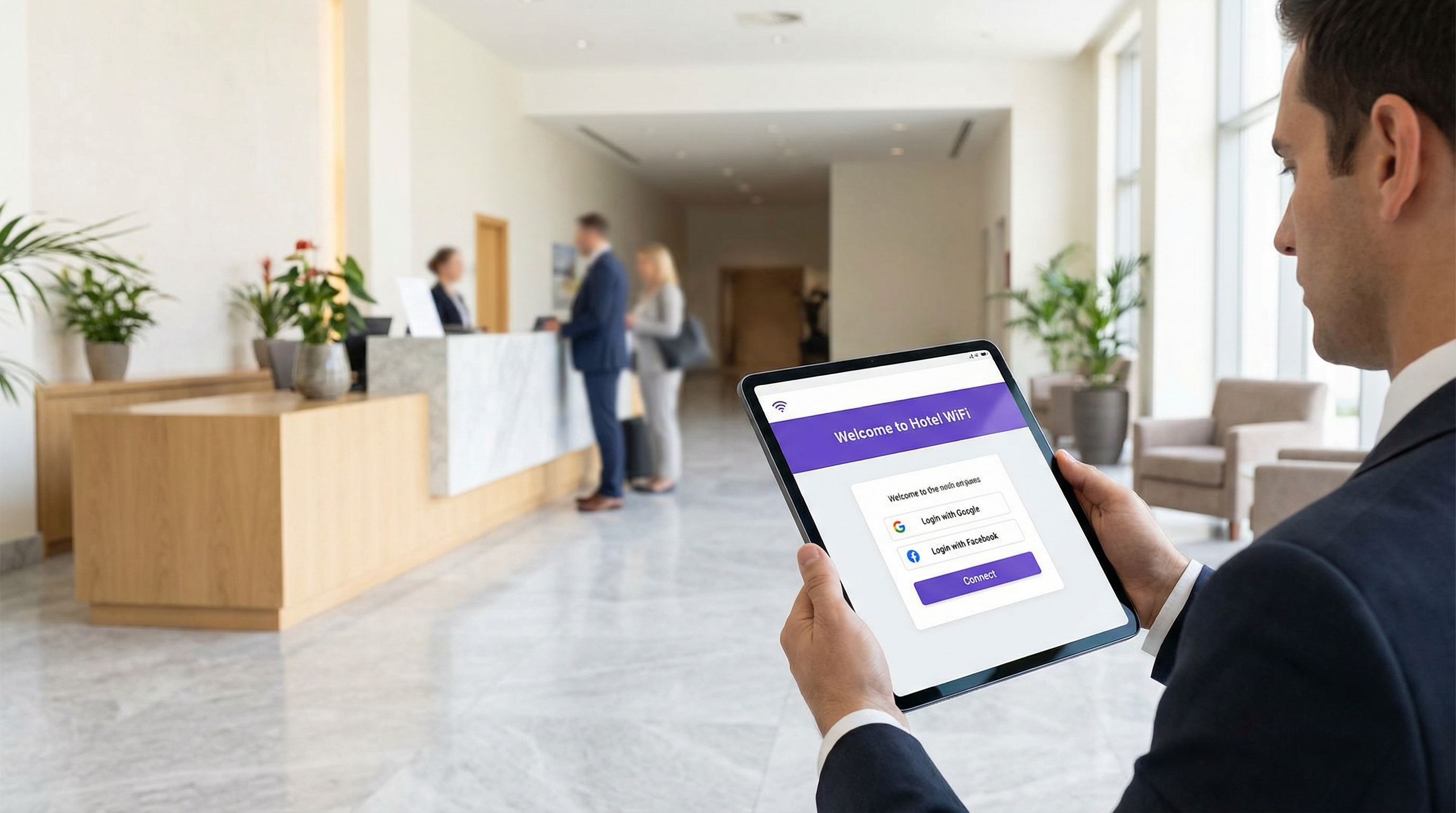
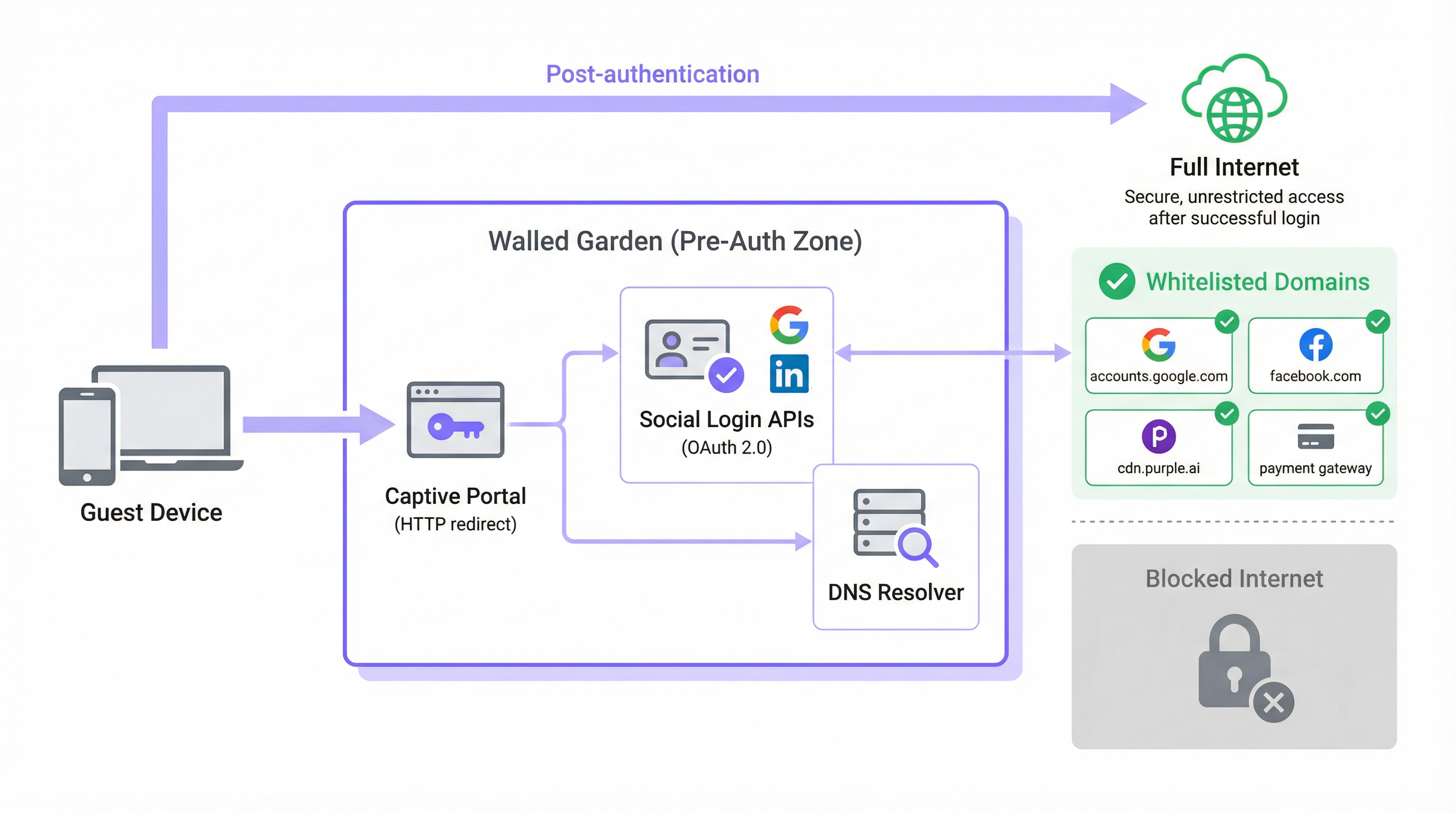
In una tipica architettura WiFi guest, quando il dispositivo di un utente si associa a un SSID aperto, gli viene assegnato un indirizzo IP tramite DHCP e viene inserito in un ruolo di pre-autenticazione o in una VLAN isolata dal controller di rete. In questo stato, il controller intercetta tutto il traffico HTTP e HTTPS in uscita e lo reindirizza alla splash page del Captive Portal. Questo è il meccanismo che forza il browser del guest verso la schermata di login. Il walled garden è l'eccezione esplicita a questa regola di intercettazione: una whitelist curata di domini esterni e intervalli di indirizzi IP con cui il dispositivo è autorizzato a comunicare liberamente durante la fase di pre-autenticazione.
Senza un walled garden configurato correttamente, gli stessi servizi necessari per completare l'autenticazione vengono bloccati. I moderni Captive Portal non sono applicazioni monolitiche e autonome. Sono composti da microservizi e API di terze parti. Gli asset del portale — HTML, CSS, JavaScript e immagini — possono essere distribuiti da una Content Delivery Network (CDN) completamente separata dall'infrastruttura locale del controller. La funzionalità di social login dipende dal raggiungimento degli endpoint OAuth 2.0 di Google, Facebook, Apple o Microsoft. Se viene offerto un livello WiFi a pagamento, il portale deve comunicare con un processore di pagamento come Stripe o PayPal. Le piattaforme di analytics e marketing possono caricare script di tracciamento dalle proprie origini CDN. Ciascuna di queste dipendenze rappresenta un dominio che deve essere esplicitamente consentito nel walled garden, altrimenti il flusso di autenticazione fallirà silenziosamente o con un errore poco chiaro.
Il Problema della Risoluzione DNS
L'aspetto tecnicamente più complesso della configurazione del walled garden è il divario tra l'amministrazione basata sui domini e l'applicazione basata sugli IP. Mentre gli amministratori di rete configurano il walled garden utilizzando nomi di dominio leggibili (es. accounts.google.com), la maggior parte dei controller di rete applica queste regole a livello IP. Quando un dominio viene aggiunto alla whitelist, il controller esegue una query DNS per risolverlo in uno o più indirizzi IP e aggiunge tali IP a una lista di controllo degli accessi (ACL) temporanea.
Ciò crea un rischio operativo significativo con i principali cloud provider. Google, Meta, Apple e le principali CDN utilizzano il routing anycast e l'assegnazione dinamica degli indirizzi IP. L'indirizzo IP in cui si risolve accounts.google.com al momento della configurazione potrebbe essere completamente diverso dall'indirizzo in cui si risolverà sei mesi dopo, o persino su un segmento di rete diverso. Una whitelist IP statica non è quindi una configurazione sostenibile; si degraderà nel tempo con la rotazione degli intervalli IP delle CDN.
La soluzione corretta è la risoluzione DNS dinamica, in cui il controller di rete risolve nuovamente in modo periodico ciascun dominio in whitelist e aggiorna di conseguenza le proprie ACL. La maggior parte dei controller di livello enterprise di Cisco, Aruba, Ruckus e Fortinet supporta questa funzionalità nativamente. Se il tuo controller non lo fa, stai operando con una configurazione che produrrà guasti intermittenti difficili da diagnosticare e che peggioreranno nel tempo.
Intercettazione HTTPS e Conformità TLS
Un ulteriore livello di complessità deriva dalla prevalenza dell'HTTPS. Quando un dispositivo guest nello stato di pre-autenticazione tenta di caricare una risorsa HTTPS non in whitelist, il controller deve decidere come gestire la richiesta. Esistono due approcci comuni, entrambi con svantaggi significativi se non gestiti correttamente.
Il primo approccio è un silent drop (scarto silenzioso), in cui il controller blocca semplicemente la connessione. Il browser del guest visualizza un errore generico "impossibile raggiungere il sito", che non fornisce alcuna indicazione utile e viene spesso interpretato come un guasto di rete piuttosto che come un prompt del portale. Il secondo approccio è l'intercettazione HTTPS, in cui il controller tenta di presentare un reindirizzamento al Captive Portal. Ciò richiede che il controller agisca come proxy man-in-the-middle (MITM), presentando il proprio certificato TLS. Se questo certificato non è considerato attendibile dal dispositivo del guest — cosa che non avviene quasi mai su una rete guest pubblica — il browser visualizzerà un avviso di sicurezza, che allarma gli utenti e, in ambienti regolamentati, può costituire un problema di conformità.
L'approccio architetturale corretto consiste nell'assicurarsi che tutti i domini necessari per il flusso di autenticazione siano in whitelist, consentendo al loro traffico HTTPS di passare inalterato. Il reindirizzamento del Captive Portal dovrebbe essere attivato dal meccanismo di probe a livello di sistema operativo piuttosto che dall'intercettazione HTTPS. Questo elimina completamente il problema dell'attendibilità del certificato. I browser moderni implementano anche l'HTTP Strict Transport Security (HSTS) e, in alcuni casi, il certificate pinning. Entrambi i meccanismi causeranno il fallimento totale dell'intercettazione HTTPS per i domini principali, producendo una connessione interrotta anziché un reindirizzamento: un altro forte argomento a favore di un walled garden configurato correttamente rispetto a un'ampia policy di intercettazione HTTPS.
Captive Network Assistant (CNA) e Domini Probe del Sistema Operativo
Uno degli aspetti più frequentemente trascurati della configurazione del walled garden è il meccanismo con cui i moderni sistemi operativi rilevano la presenza di un Captive Portal. Tutti i principali sistemi operativi — iOS, iPadOS, macOS, Android e Windows — implementano un Captive Network Assistant (CNA) che interroga un endpoint HTTP noto immediatamente dopo la connessione a una nuova rete WiFi. Se la risposta si discosta dal valore atteso, il sistema operativo deduce di trovarsi dietro un Captive Portal e avvia automaticamente una finestra del browser per gestire il login.
Gli endpoint probe utilizzati da ciascuna piattaforma sono i seguenti:
| Sistema Operativo | Dominio Probe | Risposta Attesa |
|---|---|---|
| Apple (iOS, macOS) | captive.apple.com |
HTTP 200 con body specifico |
| Android (Google) | connectivitycheck.gstatic.com |
HTTP 204 Nessun Contenuto |
| Windows | www.msftconnecttest.com |
HTTP 200 con body specifico |
| Firefox / Mozilla | detectportal.firefox.com |
HTTP 200 con body specifico |
Se uno qualsiasi di questi domini probe viene bloccato dal walled garden, il sistema operativo non rileverà mai il Captive Portal. Dal punto di vista del guest, la rete WiFi semplicemente non ha accesso a Internet. Questo è uno degli errori di configurazione più comuni osservati nelle implementazioni in produzione ed è del tutto prevenibile includendo questi domini nella whitelist di base.
Guida all'Implementazione
Fase 1: Individuazione dei Domini di Base
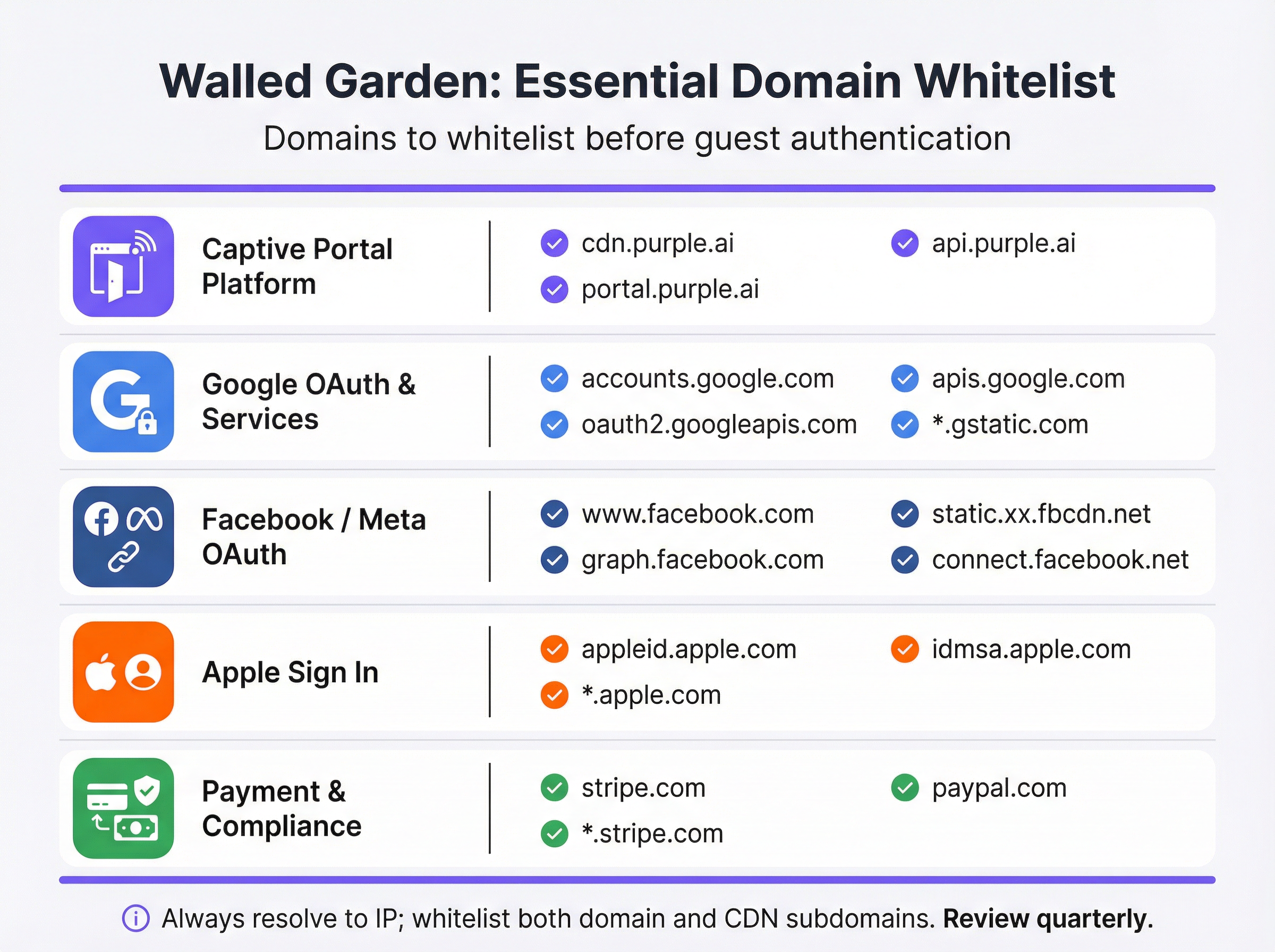
Prima di toccare la configurazione del controller, conduci un audit approfondito di ogni servizio esterno da cui dipende il tuo Captive Portal. Il modo migliore per farlo è caricare il portale in un browser con gli strumenti per sviluppatori aperti e ispezionare la scheda di rete per identificare tutte le richieste di risorse esterne. L'elenco risultante dovrebbe essere categorizzato come segue:
| Categoria | Scopo | Domini Essenziali |
|---|---|---|
| Piattaforma Captive Portal | Fornisce gli asset della splash page e gestisce la logica di autenticazione. | *.purple.ai, cdn.your-vendor.com |
| Google OAuth | Abilita l'accesso con Google. | accounts.google.com, oauth2.googleapis.com, apis.google.com, *.gstatic.com |
| Facebook / Meta OAuth | Abilita il login con Facebook. | www.facebook.com, graph.facebook.com, connect.facebook.net, *.fbcdn.net |
| Apple Sign In | Abilita l'accesso con Apple. | appleid.apple.com, idmsa.apple.com, *.apple.com |
| Probe Captive Portal OS | Abilita il rilevamento automatico del portale. | captive.apple.com, connectivitycheck.gstatic.com, www.msftconnecttest.com |
| Gateway di Pagamento | Elabora i pagamenti per i livelli premium. | *.stripe.com, *.paypal.com |
| Analytics / Marketing | Carica script di tracciamento e analytics. | Specifici del vendor (es. *.segment.com, *.mixpanel.com) |
Fase 2: Configurazione del Controller
L'implementazione varia in base al vendor, ma i principi di base sono universali. Passa alla configurazione del Captive Portal o della splash page nell'interfaccia di gestione del controller di rete: in Cisco Meraki, si trova in Wireless > Configure > Splash Page; in Aruba Central, è il Captive Portal Profile; in Fortinet, si trova in Security Policies > Captive Portal. Individua la sezione di accesso pre-autenticazione o la whitelist del walled garden e procedi come segue:
- Inserisci i Domini per Categoria: Aggiungi sistematicamente ogni dominio dal tuo audit, procedendo per ogni categoria. Utilizza i caratteri jolly (
*.gstatic.com) dove il controller li supporta e dove il profilo di rischio è accettabile. Per gli ambienti ad alta sicurezza, preferisci sottodomini espliciti rispetto a caratteri jolly generici. - Abilita la Risoluzione DNS Dinamica: Conferma che il controller sia configurato per risolvere nuovamente in modo periodico i domini in whitelist anziché memorizzare nella cache un elenco IP statico. Consulta la documentazione del vendor per verificare che sia attiva. Imposta un TTL DNS di 60 secondi o inferiore per le voci del walled garden.
- Configura Regole Dual-Stack: Se la tua rete supporta IPv6 — e dovrebbe, dato l'esaurimento dello spazio degli indirizzi IPv4 — assicurati che le ACL del walled garden si applichino sia al traffico IPv4 che IPv6. Un dispositivo guest con un indirizzo IPv6 aggirerà le ACL solo IPv4.
- Applica all'SSID Guest: Associa il profilo del Captive Portal e il relativo walled garden esclusivamente all'SSID guest. Non applicare mai policy di walled garden a livello guest agli SSID aziendali.

Fase 3: Protocollo di Test Pre-Go-Live
I test non sono negoziabili e devono essere condotti con dispositivi reali in un autentico stato di pre-autenticazione: non account amministratore che potrebbero avere accessi elevati e non dispositivi che si sono precedentemente connessi alla rete e potrebbero avere credenziali memorizzate nella cache.
Per ogni piattaforma di dispositivo (iOS, Android, Windows, macOS), esegui quanto segue:
- Dimentica la rete sul dispositivo di test per garantire l'assenza di stati memorizzati nella cache.
- Connettiti all'SSID guest e osserva se il Captive Portal si avvia automaticamente tramite il meccanismo CNA.
- Prova ogni metodo di login offerto sul portale — registrazione via email, accesso con Google, login con Facebook, accesso con Apple — e conferma che ciascuno venga completato con successo.
- Testa il flusso di pagamento se viene offerto un livello a pagamento, utilizzando un numero di carta di test dall'ambiente sandbox del tuo gateway di pagamento.
- Ispeziona la console del browser in caso di test fallito. La scheda di rete identificherà l'esatto dominio bloccato, consentendoti di aggiungerlo alla whitelist con precisione.
Documenta i risultati di questo protocollo di test in un registro di configurazione da conservare per scopi di conformità.
Best Practice
Il Principio del Minimo Privilegio è la regola fondamentale per la configurazione del walled garden. Inserisci in whitelist solo i domini che sono palesemente necessari per il funzionamento del flusso di autenticazione. Evita caratteri jolly generici come *.google.com o *.facebook.com a meno che l'implementazione del tuo controller non li richieda; preferisci sottodomini specifici. Ogni dominio aggiuntivo in whitelist rappresenta una potenziale superficie di attacco nella zona di pre-autenticazione.
Una Cadenza di Revisione Trimestrale è essenziale per mantenere un walled garden funzionale nel tempo. I provider di social login e le CDN aggiornano regolarmente la loro infrastruttura. Apple ha modificato la struttura del dominio di Sign In nel 2023. Google ha aggiunto nuovi sottodomini al suo flusso OAuth in diverse occasioni. Un walled garden accurato al momento dell'implementazione si disallineerà nel giro di pochi mesi senza una manutenzione attiva. Integra una revisione trimestrale nel tuo calendario operativo, incrociando la tua whitelist con la documentazione aggiornata di ciascun provider.
L'Allineamento alla Conformità richiede che la configurazione del walled garden non violi inavvertitamente i requisiti degli standard applicabili. Ai sensi del PCI DSS v4.0, qualsiasi rete che elabora, archivia o trasmette i dati dei titolari di carta deve mantenere rigorosi controlli di accesso. Se il tuo WiFi guest include un livello a pagamento, il walled garden deve consentire connessioni TLS 1.2 o superiori al tuo processore di pagamento senza intercettazioni. Ai sensi del GDPR, l'informativa sulla privacy deve essere accessibile ai guest prima che forniscano qualsiasi dato personale: ciò significa che il link alla tua privacy policy deve essere raggiungibile dall'interno del walled garden, anche prima dell'autenticazione.
La Documentazione del Change Management è un obbligo professionale per qualsiasi modifica alla rete di produzione. Ogni modifica al walled garden — che si tratti dell'aggiunta di un nuovo dominio, della rimozione di uno deprecato o dell'aggiornamento di un carattere jolly — dovrebbe essere registrata con un timestamp, il motivo della modifica e l'ingegnere responsabile. Questo audit trail è inestimabile per la risoluzione di guasti intermittenti e per dimostrare la due diligence in un audit di conformità.
Risoluzione dei Problemi e Mitigazione dei Rischi
La seguente tabella mappa le modalità di guasto più comuni alle relative cause principali e alle mitigazioni consigliate:
| Sintomo | Causa Principale | Mitigazione |
|---|---|---|
| Il portale non si avvia automaticamente su iOS/Android | I domini probe del Captive Portal del sistema operativo sono bloccati. | Aggiungi captive.apple.com e connectivitycheck.gstatic.com al walled garden. |
| Il pulsante di accesso con Google non risponde | Mancano uno o più domini Google OAuth o CDN. | Aggiungi accounts.google.com, oauth2.googleapis.com, apis.google.com e *.gstatic.com. |
| Il login con Facebook fallisce con un errore CORS | I sottodomini CDN di Facebook (*.fbcdn.net) non sono in whitelist. |
Aggiungi voci con caratteri jolly per *.fbcdn.net e *.facebook.com. |
| Il login funziona inizialmente ma fallisce a intermittenza | Whitelist IP statica; gli indirizzi IP della CDN sono ruotati. | Abilita la risoluzione DNS dinamica sul controller. |
| I guest visualizzano avvisi sul certificato TLS | Il controller sta intercettando il traffico HTTPS verso domini non in whitelist. | Inserisci in whitelist tutti i domini necessari in modo che l'HTTPS passi ininterrotto. |
| La pagina di pagamento non si carica | I domini CDN o API del gateway di pagamento non sono in whitelist. | Aggiungi *.stripe.com o *.paypal.com a seconda dei casi. |
| Gli utenti IPv6 non possono accedere al portale | Le ACL del walled garden sono solo IPv4. | Estendi tutte le regole del walled garden per coprire gli intervalli di indirizzi IPv6. |
Mitigazione dei Rischi: L'Over-Whitelisting è un rischio reale e sottovalutato. Quando si verificano guasti intermittenti, la risposta allettante è aggiungere voci con caratteri jolly progressivamente più ampie finché il problema non scompare. Questo approccio può tradursi in un walled garden di fatto aperto, consentendo ai guest non autenticati di accedere ad ampie porzioni di Internet senza completare il flusso di login. Ciò vanifica lo scopo del Captive Portal, compromette la raccolta dati per scopi di marketing e può creare responsabilità ai sensi del GDPR se i guest possono accedere alla rete senza acconsentire ai termini e alle condizioni. Diagnostica sempre lo specifico dominio bloccato prima di aggiungere voci.
ROI e Impatto sul Business
Un walled garden implementato correttamente offre un valore di business misurabile su più dimensioni. Nel settore dell'hospitality, un'esperienza di login WiFi guest fluida è direttamente correlata ai punteggi di soddisfazione dei clienti. Le ricerche di J.D. Power identificano costantemente le prestazioni del WiFi come uno dei principali fattori di soddisfazione degli ospiti degli hotel. Un portale che non si carica — perché il walled garden è configurato in modo errato — crea una prima impressione negativa che influisce sull'intera esperienza di soggiorno.
Per gli operatori retail, il walled garden è la porta d'accesso al programma fedeltà. Ogni guest che effettua con successo il login tramite il Captive Portal fornisce un'identità verificata che può essere collegata al comportamento di acquisto, abilitando campagne di marketing personalizzate con tassi di conversione palesemente superiori rispetto alla pubblicità anonima. Un walled garden configurato in modo errato che impedisce il login riduce direttamente il volume di dati di prima parte acquisiti, con un impatto quantificabile sul ROI del marketing.
Nel settore degli eventi — stadi, centri congressi, padiglioni fieristici — il walled garden deve essere progettato per la scalabilità. Nei momenti di picco, decine di migliaia di dispositivi tenteranno di autenticarsi contemporaneamente. Un walled garden che si affida a un resolver DNS lento o sovraccarico creerà un collo di bottiglia che si manifesterà come un portale lento o che non risponde, anche se l'infrastruttura di rete sottostante è dimensionata correttamente. L'implementazione di un resolver DNS locale con caching, autorevole per i domini del walled garden, è una pratica standard per le implementazioni ad alta densità.
Per le organizzazioni del settore pubblico, il walled garden è anche uno strumento di conformità. Ai sensi delle normative NIS (Network and Information Systems) del Regno Unito e del più ampio framework GDPR, le organizzazioni devono dimostrare che l'accesso alle reti rivolte al pubblico sia controllato e verificabile. Un walled garden configurato correttamente, combinato con un Captive Portal conforme, fornisce le basi tecniche per questo audit trail.
Il costo di un walled garden errato non è puramente tecnico. Si misura in volume di chiamate all'helpdesk, punteggi di soddisfazione dei guest, perdita di dati di marketing e potenziale esposizione normativa. L'investimento nella configurazione e nel mantenimento di un walled garden robusto è modesto rispetto a questi rischi, e il ritorno — sotto forma di tassi di adozione del portale più elevati, dati di prima parte più ricchi e attrito operativo ridotto — è sia misurabile che significativo.
Termini chiave e definizioni
Walled Garden
A controlled set of pre-approved domains and IP address ranges that a guest device can access on a WiFi network before completing authentication. All traffic to domains outside this list is blocked or redirected to the captive portal.
This is the foundational mechanism that allows a captive portal to function. Without it, the portal itself — and all social login providers it depends on — would be unreachable by unauthenticated devices.
Captive Portal
A web page that intercepts the internet traffic of a newly connected WiFi user and requires them to complete an action — such as logging in, accepting terms, or making a payment — before granting full network access.
The captive portal is the primary point of interaction for guests. It is the mechanism through which operators collect first-party data, enforce terms of service, and manage paid access tiers.
OAuth 2.0
An open authorisation standard that allows users to grant a third-party application limited access to their account on another service, without sharing their password. It is the protocol underpinning 'Login with Google' and 'Login with Facebook'.
Every social login option on a captive portal relies on OAuth 2.0. Each provider's OAuth endpoints must be whitelisted in the walled garden for the login flow to complete successfully.
Dynamic DNS Resolution
A network controller feature that periodically re-resolves whitelisted domain names to their current IP addresses and updates the enforcement ACLs accordingly, rather than using a static IP list.
This is essential for walled garden reliability. Without it, the IP addresses cached at deployment time will become stale as CDNs rotate their infrastructure, causing intermittent and hard-to-diagnose login failures.
Content Delivery Network (CDN)
A geographically distributed network of servers that delivers web content to users from the nearest available location, improving performance and availability.
Captive portals and social login providers rely on CDNs to serve scripts, fonts, and images. CDN subdomains (e.g., *.gstatic.com for Google, *.fbcdn.net for Facebook) must be included in the walled garden.
Captive Network Assistant (CNA)
A built-in feature of modern operating systems (iOS, Android, Windows, macOS) that automatically detects the presence of a captive portal by probing a known HTTP endpoint after connecting to a new WiFi network.
The CNA is what causes the portal login window to pop up automatically on a guest's device. If the probe domain is blocked by the walled garden, the CNA cannot detect the portal and the guest sees no login prompt.
Pre-Authentication ACL
An Access Control List applied to a network session before the user has authenticated. It defines which traffic is permitted (the walled garden) and which is blocked or redirected.
This is the technical implementation of the walled garden on enterprise network controllers. IT teams configure Pre-Authentication ACLs in the captive portal settings of their wireless controllers.
PCI DSS
The Payment Card Industry Data Security Standard is a set of security standards designed to ensure that all companies that accept, process, store, or transmit credit card information maintain a secure environment.
Relevant to any guest WiFi deployment with a paid access tier. The walled garden must permit TLS 1.2+ connections to the payment gateway without interception, and the guest network must be segmented from any cardholder data environment.
HTTP Strict Transport Security (HSTS)
A web security policy mechanism that instructs browsers to only interact with a server using HTTPS, preventing protocol downgrade attacks and cookie hijacking.
HSTS causes HTTPS interception by a captive portal controller to fail outright for major domains, as the browser refuses to accept a certificate it does not trust. This reinforces the case for a correctly configured walled garden over an HTTPS interception approach.
Casi di studio
A 500-room luxury hotel is deploying a new guest WiFi network using Cisco Meraki hardware and the Purple platform. They need to support Google and Facebook logins, and offer a paid premium-speed tier via Stripe. What is the minimum set of domains that must be whitelisted in the Meraki walled garden, and how should they be configured?
The following domains must be entered into the Meraki dashboard under Wireless > Configure > Splash Page > Walled Garden Ranges:
- Purple Platform: *.purple.ai (covers cdn, portal, and api subdomains)
- Google OAuth: accounts.google.com, oauth2.googleapis.com, apis.google.com, *.gstatic.com
- Facebook OAuth: www.facebook.com , graph.facebook.com, connect.facebook.net, *.fbcdn.net
- Stripe Payments: *.stripe.com
- OS Probes: captive.apple.com, connectivitycheck.gstatic.com, www.msftconnecttest.com
Cisco Meraki performs dynamic DNS resolution natively for walled garden entries, so no additional configuration is required for IP resolution. The hotel should also ensure their privacy policy URL is accessible from within the walled garden to comply with GDPR. Post-deployment, the IT team should test with a factory-reset iOS device and a factory-reset Android device to verify the full login flow for both social login methods.
A national retail chain with 200 stores is experiencing intermittent Google login failures on their guest WiFi. The failures are random — some stores are unaffected, others see failures on certain days or at certain times. The network uses Fortinet FortiGate controllers. What is the most likely root cause and how would you resolve it?
The most likely root cause is that the FortiGate walled garden is using a static IP list for Google's OAuth domains, and Google's CDN has rotated its IP addresses at some locations. The intermittent, location-specific nature of the failures is a classic indicator of CDN IP rotation — some stores' cached IP lists are still valid, others have become stale.
Resolution steps:
- Log into the FortiGate management console at an affected store and navigate to the captive portal walled garden configuration.
- Verify whether the Google OAuth domains are configured as domain names or as static IP addresses.
- If static IPs are present, replace them with domain-based entries: accounts.google.com, oauth2.googleapis.com, apis.google.com, *.gstatic.com.
- Enable the FortiGate's FQDN-based address objects with a short refresh interval (recommended: 60 seconds) to ensure dynamic DNS resolution is active.
- Roll this configuration change out to all 200 stores via FortiManager to ensure consistency.
- Monitor the affected stores for 48 hours post-change to confirm resolution.
Analisi degli scenari
Q1. You are designing the guest WiFi for a new international airport terminal. The requirements include login via Google, Apple, and WeChat, plus a premium access tier sold via PayPal. What unique challenges does this scenario present for your walled garden configuration, and how would you address them?
💡 Suggerimento:Consider the geographical and application-specific nature of WeChat's login flow, and the implications of a globally diverse user base for CDN IP resolution.
Mostra l'approccio consigliato
Three unique challenges arise. First, WeChat login: unlike standard web-based OAuth, WeChat's login flow on mobile devices often attempts to open the native WeChat app via a deep link rather than completing the flow in a web browser. This can break the captive portal flow entirely. The solution is to configure the portal to force a web-based QR code flow and whitelist the specific Tencent domains that serve the QR code and handle the authentication handshake (e.g., open.weixin.qq.com, wx.qq.com). Second, global CDN resolution: an international airport serves users from every region. Dynamic DNS resolution is critical, as Google, Apple, and PayPal serve their content from geographically distributed CDN nodes. The controller must re-resolve walled garden domains frequently to ensure the correct regional IP addresses are whitelisted. Third, PayPal localisation: PayPal uses country-specific domains and CDNs for localised payment experiences. In addition to *.paypal.com, you may need to whitelist *.paypalobjects.com and regional variants. A thorough audit of the PayPal checkout flow from multiple device locales is recommended before go-live.
Q2. A 60,000-seat stadium is experiencing widespread portal login failures during the first 15 minutes of every event, after which performance normalises. The infrastructure is correctly sized for the user load. What is the likely bottleneck and how would you resolve it?
💡 Suggerimento:Think about what happens when 60,000 devices all attempt to connect and resolve the same domains simultaneously.
Mostra l'approccio consigliato
The bottleneck is almost certainly DNS resolution. When 60,000 devices connect simultaneously, they all attempt to resolve the same walled garden domains (portal CDN, Google OAuth, Apple Sign In, etc.) at the same time. If the upstream DNS resolver — typically the ISP's recursive resolver or a cloud DNS service — cannot handle this burst of queries, resolution latency spikes, causing the portal to appear slow or unresponsive even though the network itself is performing correctly. The performance normalises after the initial rush because the resolver's cache warms up and subsequent queries are served from cache. The solution is to deploy a local, caching DNS resolver (e.g., Unbound or a dedicated appliance) within the stadium's network infrastructure. This resolver should be pre-seeded with the walled garden domains before the event begins, so that all DNS queries for those domains are answered from local cache with sub-millisecond latency. The controller's DHCP configuration should point guest devices to this local resolver.
Q3. Your company is acquiring a chain of boutique hotels that uses a competitor's captive portal platform. You are tasked with migrating them to Purple. The existing IT team has no documentation of their current walled garden configuration. How would you approach the migration to ensure no guest-facing disruption?
💡 Suggerimento:Before you build the new, you must understand the old. Consider both technical discovery and business requirements.
Mostra l'approccio consigliato
The migration should proceed in four stages. Stage 1 — Discovery: Connect a laptop to the existing guest WiFi in an unauthenticated state and use a packet capture tool (Wireshark) to record all DNS queries and HTTP/HTTPS requests made during the authentication flow. This produces a definitive list of every domain the existing portal depends on, regardless of what is or is not documented. Stage 2 — Categorisation: Map the discovered domains to the standard categories (portal platform, OAuth, CDN, OS probes, payments). Identify any non-standard domains — these may indicate custom integrations (e.g., a loyalty programme API, a local marketing platform) that must be preserved in the new configuration. Stage 3 — Parallel Deployment: Configure the Purple platform with the discovered domain list and deploy it on a test SSID alongside the existing portal. Run the full test protocol on both SSIDs simultaneously to validate that the Purple configuration is functionally equivalent. Stage 4 — Cutover: Once validated, migrate the production SSID to Purple during a low-traffic period (e.g., 3am on a weeknight). Monitor portal adoption rates and helpdesk tickets for the following 48 hours to confirm a clean cutover.
Punti chiave
- ✓A walled garden is the whitelist of domains accessible before guest WiFi authentication — it is the mechanism that allows the captive portal itself to function.
- ✓Incorrect walled garden configuration is the leading cause of guest login failures; the most common omission is OS captive portal probe domains (captive.apple.com, connectivitycheck.gstatic.com).
- ✓Every social login method (Google, Facebook, Apple) requires its own set of OAuth and CDN domains to be whitelisted — missing even one will cause silent failures.
- ✓Always use dynamic DNS resolution for walled garden domains; static IP lists will degrade over time as CDN providers rotate their infrastructure.
- ✓Test every login path with real, factory-reset devices before go-live — administrator accounts and previously connected devices will not reveal misconfiguration.
- ✓Schedule a quarterly review of your walled garden whitelist; OAuth providers and CDNs change their domain structures regularly without notice.
- ✓A correctly configured walled garden directly increases portal adoption rates, first-party data capture, and guest satisfaction — making it a measurable driver of marketing and operational ROI.




