

Réseau basé sur l'identité : Définition et enjeux
This guide provides a comprehensive technical reference on Identity-Based Networking (IBN) — what it is, how it works, and why it is a critical investment for any organisation managing large, diverse user populations across hotels, retail chains, stadiums, and public-sector venues. It covers the core IEEE 802.1X architecture, Purple's cloud-native implementation, real-world deployment scenarios, and a clear ROI framework to support procurement decisions.
🎧 Écouter ce guide
Voir la transcription
Synthèse
Le réseau basé sur l'identité (IBN - Identity-Based Networking) représente un changement fondamental dans la gestion de l'accès au réseau, passant d'un modèle statique basé sur les ports à un modèle dynamique centré sur l'utilisateur. Dans un réseau traditionnel, les droits d'accès sont liés aux ports physiques ou aux adresses MAC, créant un environnement rigide et non sécurisé. L'IBN lie les privilèges d'accès au réseau à l'identité vérifiée d'un utilisateur. Cela signifie que, peu importe comment ou d'où un utilisateur se connecte — via Wi-Fi, Ethernet ou VPN —, son accès aux ressources du réseau est déterminé par qui il est, et non par l'appareil qu'il utilise ou l'endroit où il se branche.
Pour les organisations gérant de vastes bases d'utilisateurs diversifiées dans des environnements tels que les hôtels, les chaînes de vente au détail et les stades, cela change la donne. Cela permet d'adopter par défaut une posture de sécurité Zero Trust, où chaque utilisateur et appareil doit être authentifié et autorisé avant d'obtenir l'accès. Cela simplifie considérablement la segmentation du réseau, renforce la sécurité en contenant les menaces et rationalise la conformité aux réglementations telles que PCI DSS et GDPR.
Pour un CTO, l'IBN offre un ROI significatif en réduisant la charge administrative liée à la gestion des VLAN complexes et des listes de contrôle d'accès (ACL), en atténuant le risque de failles de sécurité et en offrant une visibilité approfondie sur les modèles d'utilisation du réseau pouvant orienter la stratégie commerciale. L'implémentation de l'IBN par Purple tire parti de l'infrastructure existante et s'intègre de manière transparente aux fournisseurs d'identité cloud pour offrir une couche d'accès évolutive, résiliente et intelligente, adaptée à l'entreprise moderne.

Analyse technique approfondie
Des ports aux personnes : Le changement architectural fondamental
Le réseau traditionnel, vestige d'une époque où les appareils étaient statiques et les utilisateurs rivés à leur bureau, fonctionne sur un principe de confiance implicite au sein d'un périmètre réseau. Un appareil authentifié est considéré comme fiable, et son point de connexion physique (un port de commutateur) dicte son accès au réseau. Ce modèle est semé d'embûches à l'ère moderne du BYOD (Bring Your Own Device), de l'IoT et des effectifs mobiles.
Le réseau basé sur l'identité (IBN), souvent mis en œuvre à l'aide de la norme IEEE 802.1X, inverse fondamentalement ce modèle. Il dissocie l'utilisateur du port physique et fait de l'identité le nouveau périmètre. Les composants principaux d'une architecture IBN sont :
Supplicant : L'appareil client (ex. ordinateur portable, smartphone) demandant l'accès au réseau. Il exécute un logiciel qui communique avec l'authentificateur. Les systèmes d'exploitation modernes — Windows, macOS, iOS et Android — incluent un supplicant 802.1X natif, aucune installation de logiciel supplémentaire n'est donc requise pour les utilisateurs finaux.
Authentificateur : L'appareil d'accès au réseau, tel qu'un point d'accès sans fil (WAP) ou un commutateur Ethernet. Il agit comme un gardien, bloquant ou autorisant le trafic provenant du supplicant. L'authentificateur maintient le port dans un état non autorisé jusqu'à ce qu'il reçoive une instruction explicite du serveur d'authentification.
Serveur d'authentification (AS) : Généralement un serveur RADIUS (Remote Authentication Dial-In User Service). Ce serveur constitue la couche intelligente de l'opération. Il reçoit les identifiants du supplicant de la part de l'authentificateur, les valide par rapport à un magasin d'identités (ex. Azure Active Directory, Google Workspace, une base de données locale) et renvoie une décision d'autorisation incluant une politique réseau spécifique.
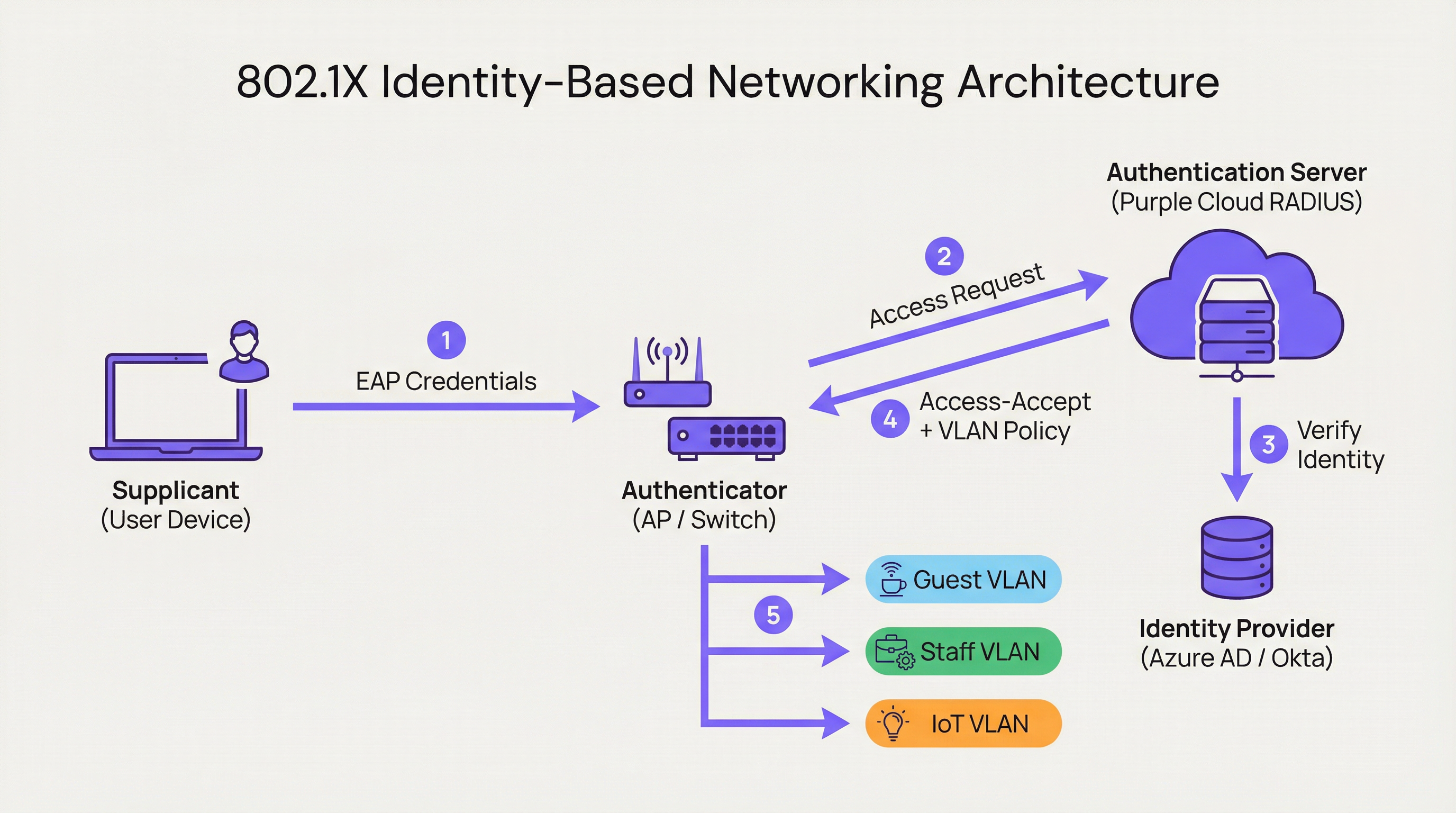
Lorsqu'un utilisateur se connecte, l'authentificateur place le port dans un état non autorisé, bloquant tout le trafic à l'exception des paquets d'authentification 802.1X. Le supplicant fournit ses identifiants, que l'authentificateur transmet au serveur d'authentification. L'AS vérifie l'identité et, sur la base de politiques prédéfinies, indique à l'authentificateur la marche à suivre. Cette instruction n'est pas simplement une autorisation ou un refus binaire ; elle peut inclure l'attribution dynamique de VLAN, des profils de qualité de service (QoS), des délais d'expiration de session et des règles de pare-feu spécifiques. Un utilisateur d'entreprise peut être placé sur le CORP_VLAN avec accès aux serveurs internes, tandis qu'un invité est placé sur le GUEST_VLAN avec un accès Internet uniquement — à partir du même SSID ou port physique.
Comment Purple implémente l'IBN
La plateforme de Purple agit comme un serveur d'authentification cloud-native et un moteur de politiques, conçu pour les complexités des grands lieux publics. Notre approche se concentre sur l'abstraction de la complexité de la configuration RADIUS et 802.1X.
RADIUS Cloud-Native : Nous éliminons le besoin de serveurs d'authentification sur site, en fournissant un service mondialement distribué, hautement disponible et évolutif à la demande. Il n'y a aucun serveur à installer, aucun firmware à corriger et aucun point de défaillance unique.
Intégration de fournisseur d'identité (IdP) : Nous nous connectons de manière transparente aux principaux IdP, notamment Azure AD, Okta et Google Workspace. Cela permet aux organisations d'utiliser leur source unique de vérité existante pour l'identité, garantissant que lorsqu'un compte d'employé est désactivé, son accès au réseau est révoqué instantanément.
Moteur de politiques dynamiques : Notre console de gestion intuitive permet aux responsables informatiques de créer des politiques d'accès granulaires basées sur les attributs des utilisateurs tels que l'appartenance à un groupe, le rôle et le département. Une politique pourrait stipuler : "Tous les utilisateurs du groupe 'Retail-Staff' se connectant au SSID 'Staff-WiFi' entre 9h00 et 17h00 sont affectés au 'POS_VLAN' avec une limite de bande passante de 10 Mbps."
Attribution dynamique de VLAN : C'est la pierre angulaire de notre implémentation IBN. Au lieu de configurer manuellement les VLAN sur chaque port de commutateur, le réseau attribue dynamiquement un utilisateur au bon VLAN en fonction de son identité. Il s'agit d'un gain d'efficacité opérationnelle massif et d'une amélioration significative de la sécurité.

Guide d'implémentation
Le déploiement de l'IBN avec Purple est un processus structuré conçu pour minimiser les perturbations et maximiser la sécurité dès le premier jour.
Étape 1 : Audit de l'infrastructure réseau
Avant le déploiement, vérifiez que votre matériel réseau — commutateurs et points d'accès — prend en charge la norme IEEE 802.1X. C'est le cas de la plupart des équipements d'entreprise fabriqués au cours de la dernière décennie. Cela inclut des fournisseurs tels que Cisco, Meraki, Aruba et Ruckus. Assurez-vous que tous les firmwares sont à jour, car les anciennes versions peuvent présenter des vulnérabilités 802.1X connues.
Étape 2 : Définir les rôles des utilisateurs et les politiques d'accès
C'est la phase la plus critique. Collaborez avec les parties prenantes des RH, des opérations et de la direction pour classer tous les utilisateurs du réseau dans des rôles distincts. Les exemples courants incluent le personnel d'entreprise (accès complet aux ressources internes), les utilisateurs invités (accès Internet uniquement via un Captive Portal), les sous-traitants (accès limité dans le temps à des applications spécifiques) et les appareils IoT (accès très restreint à un VLAN dédié, communiquant uniquement avec leur serveur de gestion spécifique). Pour chaque rôle, définissez explicitement le niveau d'accès requis.
Étape 3 : Configurer Purple comme serveur d'authentification
Dans votre contrôleur réseau — tel que Meraki Dashboard ou Aruba Central — configurez un nouveau profil RADIUS pointant vers les points de terminaison d'authentification Purple avec un secret partagé. Cela établit la relation de confiance entre votre matériel réseau et le cloud Purple. La documentation d'intégration de Purple fournit des guides de configuration étape par étape pour tous les principaux fournisseurs de matériel.
Étape 4 : Déploiement progressif et tests
Ne tentez pas une migration brutale. Commencez par un groupe pilote d'utilisateurs ou une zone spécifique de votre site, comme un seul étage ou un magasin de détail non critique. Créez un nouveau SSID dédié pour l'essai IBN. Intégrez les utilisateurs pilotes et testez tous les rôles définis. Validez que les utilisateurs sont affectés aux bons VLAN et que les autorisations d'accès sont correctement appliquées. Il est essentiel de tester les modes de défaillance : que se passe-t-il si le serveur RADIUS est injoignable ? Configurez le matériel pour une posture de sécurité fermée par défaut (fail-closed).
Étape 5 : Déploiement complet et déclassement de l'ancien système
Une fois le pilote réussi, étendez le déploiement à l'ensemble de l'organisation. Élaborez un plan de communication clair pour guider les utilisateurs tout au long du processus unique de connexion au nouveau réseau sécurisé. Une fois tous les utilisateurs migrés, déclassez les anciens SSID et configurations de ports non sécurisés.
Bonnes pratiques
Exploiter WPA3-Enterprise : Lorsque cela est pris en charge, utilisez WPA3-Enterprise conjointement avec 802.1X. Il offre des améliorations de sécurité significatives par rapport au WPA2, notamment la protection des trames de gestion (802.11w) et des algorithmes de chiffrement plus robustes.
Authentification basée sur des certificats : Pour les appareils d'entreprise, dépassez les identifiants par nom d'utilisateur et mot de passe (EAP-PEAP) et implémentez l'authentification basée sur des certificats (EAP-TLS). C'est la référence en matière de sécurité 802.1X, car elle atténue les risques de phishing et simplifie l'expérience utilisateur en éliminant les invites de mot de passe.
Centraliser l'identité : Maintenez une source de vérité unique et faisant autorité pour l'identité des utilisateurs. Cela empêche la prolifération des identités et garantit que lorsqu'un employé quitte l'organisation, son accès au réseau est révoqué instantanément à la source.
Examen régulier des politiques : Les rôles des utilisateurs et les exigences d'accès évoluent. Effectuez des examens trimestriels de vos politiques IBN pour vous assurer qu'elles correspondent toujours aux besoins de l'entreprise et aux principes de sécurité. Supprimez les rôles inutilisés et renforcez les règles permissives.
| Bonne pratique | Norme / Référence | Priorité |
|---|---|---|
| WPA3-Enterprise | IEEE 802.11ax, Wi-Fi Alliance | Élevée |
| Authentification par certificat (EAP-TLS) | RFC 5216 | Élevée |
| Segmentation dynamique des VLAN | IEEE 802.1Q | Critique |
| Identité centralisée (IdP) | NIST SP 800-63 | Critique |
| Politique RADIUS fermée par défaut (Fail-Closed) | CIS Benchmark | Élevée |
| Examen trimestriel des politiques | ISO 27001 | Moyenne |
Dépannage et atténuation des risques
Mode de défaillance : Serveur RADIUS injoignable
Si l'authentificateur ne peut pas atteindre le cloud Purple, le comportement matériel par défaut peut être d'ouvrir par défaut (fail-open, autoriser tous les accès) ou de fermer par défaut (fail-closed, refuser tous les accès). Configurez votre matériel pour une posture fermée par défaut pour une sécurité maximale. L'infrastructure géo-distribuée de Purple rend les pannes prolongées hautement improbables, mais une défense en profondeur est essentielle. Envisagez de configurer un RADIUS de secours local pour les infrastructures critiques.
Mode de défaillance : Politiques mal configurées
Une politique mal rédigée peut accorder des privilèges excessifs ou refuser un accès légitime. Utilisez un environnement de test ou un groupe pilote pour tester chaque modification de politique avant de la déployer en production. Le simulateur de politiques de Purple vous permet de tester le niveau d'accès attendu d'un utilisateur avant de valider une modification.
Risque : Complexité de l'intégration
Le processus de connexion initial pour les utilisateurs peut être complexe, en particulier avec le déploiement de certificats. Fournissez des guides clairs, étape par étape, avec des captures d'écran et offrez un support d'assistance pendant la période de transition. Envisagez de déployer un outil d'intégration tel que le Network Access Manager de Purple pour automatiser le processus de configuration des appareils.
Risque : Appareils existants sans prise en charge 802.1X
Tous les appareils — en particulier les anciens matériels IoT, les imprimantes et les équipements médicaux — ne prennent pas en charge la norme 802.1X. Utilisez le contournement d'authentification MAC (MAB) pour ces appareils, en pré-enregistrant leurs adresses MAC et en les affectant à des VLAN isolés et hautement restreints avec des règles de pare-feu strictes.
ROI et impact commercial
L'analyse de rentabilisation de l'IBN repose sur trois piliers : la réduction des coûts, l'atténuation des risques et l'habilitation commerciale.
Réduction des coûts : L'économie principale est opérationnelle. L'automatisation de la gestion des VLAN et des ACL réduit considérablement les heures de travail nécessaires à l'administration du réseau. L'attribution dynamique des VLAN peut réduire le temps de provisionnement du réseau de plus de 85 %, selon des références indépendantes en matière d'opérations réseau. Cela libère le personnel informatique qui peut se concentrer sur des initiatives stratégiques plutôt que sur la maintenance de routine.
Atténuation des risques : Le coût d'une violation de données est substantiel — le rapport d'IBM sur le coût d'une violation de données place systématiquement la moyenne mondiale au-dessus de 4 millions de dollars américains. En mettant en œuvre un modèle Zero Trust et la micro-segmentation, l'IBN réduit considérablement la surface d'attaque. Si l'appareil d'un utilisateur est compromis, la violation est contenue dans son segment de réseau spécifique et limité. C'est essentiel pour la conformité PCI DSS dans le commerce de détail et la conformité GDPR dans les organisations du secteur public.
Habilitation commerciale : L'IBN fournit des données riches sur qui utilise le réseau, où ils se trouvent et ce qu'ils font. Cette intelligence est inestimable pour les opérations sur site. Un hôtel peut comprendre les modèles de déplacement des clients, un détaillant peut analyser la fréquentation dans différents départements et un stade peut optimiser le personnel en fonction de la densité de la foule en temps réel. Cela transforme le réseau d'un centre de coûts en un atout commercial stratégique.
| Dimension du ROI | Métrique | Résultat typique |
|---|---|---|
| Efficacité opérationnelle | Heures d'administration informatique économisées par semaine | Réduction de 40 à 60 % |
| Posture de sécurité | Réduction de la surface d'attaque | Significative via la micro-segmentation |
| Conformité | Temps de préparation aux audits | Réduit via la journalisation automatisée |
| Business Intelligence | Taux de capture des données clients | Augmenté via l'intégration du Captive Portal |
| Productivité du personnel | Temps de provisionnement du réseau | Réduction de plus de 85 % |
Termes clés et définitions
Identity-Based Networking (IBN)
An approach to network administration where access to network resources is granted based on the authenticated identity of a user or device, rather than its physical connection point or IP address.
IT teams use IBN to create more secure and flexible networks that can handle BYOD, IoT, and mobile users safely. It is the foundational technology for a Zero Trust network architecture.
IEEE 802.1X
An IEEE standard for Port-Based Network Access Control (PNAC). It provides an authentication mechanism to devices wishing to attach to a LAN or WLAN, using the EAP framework to carry authentication credentials.
This is the primary technical standard that underpins most IBN deployments. Network hardware must support 802.1X to be compatible with an identity-driven access model.
RADIUS
Remote Authentication Dial-In User Service. A networking protocol that provides centralised Authentication, Authorisation, and Accounting (AAA) management for users who connect and use a network service.
The RADIUS server is the brain of an IBN system. It makes the decisions about who gets access and what level of access they receive. Purple provides this as a cloud-native service, eliminating the need for on-premises RADIUS infrastructure.
Dynamic VLAN Assignment
The ability of a network to assign a user to a specific Virtual LAN (VLAN) based on their authenticated identity, regardless of the physical port or SSID they connect to.
This is a key operational benefit of IBN. It automates the process of network segmentation, saving significant administrative time and reducing the risk of misconfiguration that leads to security incidents.
Supplicant
The software on a client device (such as a laptop or smartphone) that provides credentials to the network authenticator as part of the 802.1X authentication process.
Modern operating systems (Windows, macOS, iOS, Android) have a built-in 802.1X supplicant, so end users do not need to install any special software to connect to an IBN-secured network.
EAP (Extensible Authentication Protocol)
An authentication framework that provides a common way for supplicants and authentication servers to negotiate an authentication method. Common EAP types include EAP-TLS (certificate-based) and EAP-PEAP (password-based).
IT teams choose an EAP type based on their desired balance of security and usability. EAP-TLS is the most secure option and is recommended for corporate devices; EAP-PEAP is simpler to deploy but relies on password security.
MAC Authentication Bypass (MAB)
A technique that allows devices without 802.1X supplicant support to be authenticated on an IBN network by pre-registering their hardware MAC address with the authentication server.
MAB is a pragmatic solution for IoT devices, printers, and legacy hardware that cannot participate in 802.1X. It is less secure than full 802.1X authentication and should be combined with strict VLAN isolation and firewall rules.
Zero Trust
A security model based on the principle of 'never trust, always verify.' It requires that all users, whether inside or outside the organisation's network, be authenticated, authorised, and continuously validated before being granted access to applications and data.
IBN is a foundational technology for implementing a Zero Trust architecture. It ensures that the principle of 'always verify' is applied right at the network edge, before any traffic is allowed to flow.
WPA3-Enterprise
The latest generation of the Wi-Fi Protected Access security protocol for enterprise networks. It mandates the use of 802.1X authentication and offers stronger encryption (192-bit security mode) and protection for management frames.
IT teams should target WPA3-Enterprise for all new deployments and hardware refreshes. It provides a significant security uplift over WPA2-Enterprise, particularly in high-density public environments.
Études de cas
A 500-room luxury hotel needs to provide secure, differentiated Wi-Fi access for guests, conference attendees, staff, and back-of-house IoT devices (minibars, smart locks). They currently use a single, shared WPA2-Personal password for everyone, which is a major security and compliance risk.
Role Definition: Define four distinct roles: Guest, Conference, Staff, and IoT.
Policy Creation in Purple:
- Guest: Authenticate via captive portal with room number and surname. Assign to Guest_VLAN with a 20 Mbps bandwidth cap and client isolation enabled to prevent peer-to-peer attacks.
- Conference: Authenticate via a shared, time-limited credential provided by the event organiser. Assign to Conference_VLAN with a 50 Mbps cap, allowing communication between devices within the same conference group.
- Staff: Authenticate via Azure AD credentials. Assign to Staff_VLAN with access to the Property Management System (PMS) and internal servers only.
- IoT: Authenticate using MAC Authentication Bypass (MAB) with a pre-registered list of device MAC addresses. Assign to IoT_VLAN, which has no internet access and can only communicate with the IoT management platform.
Network Configuration: Configure hotel APs to use Purple's cloud RADIUS. Create a single SSID, Hotel_WiFi, using WPA2/WPA3-Enterprise.
Rollout: Pilot the new SSID in a single wing of the hotel before full deployment. Validate each role before expanding.
A retail chain with 150 stores wants to replace its aging guest Wi-Fi and provide secure network access for corporate staff, store associates using handheld scanners, and third-party vendors (merchandisers). They need to achieve and maintain PCI DSS compliance.
Role Definition: Define four roles: Corporate, Store_Associate, Vendor, and Guest.
Policy Creation in Purple:
- Corporate: Authenticate via Okta credentials. Assign to CORP_VLAN with full network access.
- Store_Associate: Authenticate handheld scanners via EAP-TLS (device certificates issued by the company CA). Assign to POS_VLAN, which is fully segmented from all other network traffic and only has access to the payment processing gateway and inventory server. This is the critical control for PCI DSS compliance.
- Vendor: Authenticate via a self-service portal where they register for time-limited access (e.g., 8 hours). Assign to Vendor_VLAN with internet-only access.
- Guest: Authenticate via a social login (Facebook, Google) or email on a branded captive portal. Assign to Guest_VLAN with client isolation.
Network Configuration: Deploy Meraki APs in all stores, managed centrally via Meraki Dashboard. Configure the Retail_Secure SSID to point to Purple for authentication. Centralise all policy management in Purple.
Measurement: Use Purple's analytics to track guest engagement, dwell times, and repeat visits, providing valuable data to the marketing team and demonstrating the commercial value of the Wi-Fi investment.
Analyse de scénario
Q1. A large conference centre is hosting a high-profile tech event with 5,000 attendees, 200 event staff, and a dedicated live-streaming production crew requiring guaranteed bandwidth. How would you design the IBN policy to serve all three groups from a single network infrastructure?
💡 Astuce :Consider the distinct requirements of each group: attendees need basic internet access, staff need access to event management systems, and the production crew needs guaranteed, high-priority bandwidth with no contention.
Afficher l'approche recommandée
Define three distinct roles. Attendees authenticate via a simple captive portal (email address or event registration code). Place them on a Public_VLAN with a strict per-client bandwidth limit (e.g., 5 Mbps) and client isolation enabled to prevent peer-to-peer attacks and ensure fair bandwidth distribution. Event Staff authenticate using pre-shared credentials managed by the event organiser. Place them on a Staff_VLAN with a higher bandwidth limit (e.g., 25 Mbps) and access to event management systems. Production Crew is the most critical group. Authenticate their equipment using EAP-TLS certificates for maximum security. Place them on a dedicated Production_VLAN with the highest QoS priority (DSCP EF marking) and no bandwidth restrictions. This VLAN must be completely isolated from all other traffic to guarantee performance for the live stream. Use Purple's policy engine to set session timeouts for attendee credentials that align with the event schedule.
Q2. Your CFO is questioning the investment in an IBN solution, arguing that the existing WPA2-Personal passwords 'work fine.' How do you construct a compelling business case focused on ROI?
💡 Astuce :Translate the technical benefits — security, automation, compliance — into financial terms: cost savings, risk reduction, and revenue enablement.
Afficher l'approche recommandée
The business case has three parts. First, Operational Savings: calculate the weekly hours your IT team spends on manual network changes (MAC whitelisting, VLAN updates, ACL changes, password resets). Show how automating this with IBN frees up that time for strategic projects. Even recovering five hours per week at a fully-loaded cost of £50/hour represents £13,000 per year in recovered productivity. Second, Risk Reduction: reference industry data on the average cost of a data breach. Frame IBN as an insurance policy that significantly lowers the probability of such an event by implementing micro-segmentation and Zero Trust principles. Third, Compliance Costs: if subject to PCI DSS or GDPR, highlight the cost of failing an audit or the scale of potential regulatory fines (up to 4% of global annual turnover under GDPR). Position IBN as a key enabler for compliance, directly reducing that financial risk.
Q3. You are deploying IBN in a hospital. A critical piece of medical equipment — an MRI scanner — does not support 802.1X. How do you securely connect it to the network while maintaining your Zero Trust posture?
💡 Astuce :The device cannot authenticate itself using standard 802.1X. How can the network authenticate it on its behalf, and what compensating controls are needed?
Afficher l'approche recommandée
This is a classic use case for MAC Authentication Bypass (MAB). Register the MRI scanner's MAC address in the Purple platform and associate it with a Medical_Device access profile. When the switch detects that MAC address, it queries Purple, which instructs the switch to place the device into a highly restricted Medical_VLAN. This VLAN must have a strict firewall policy (implemented at the network layer) that only permits the MRI machine to communicate with its dedicated imaging server on specific ports, and blocks all other traffic. This provides a secure, albeit less ideal, alternative to 802.1X for legacy or non-supplicant devices. Document this as a known exception in your security risk register, and schedule a hardware refresh to a 802.1X-capable model at the next available opportunity. The compensating control of strict VLAN isolation and firewall rules is the key to maintaining your Zero Trust posture.
Points clés à retenir
- ✓Identity-Based Networking (IBN) ties network access to verified user identity, not physical ports or MAC addresses.
- ✓It is a core component of a modern Zero Trust security strategy, operating on the principle of 'never trust, always verify.'
- ✓Key enabling technologies are IEEE 802.1X, RADIUS, EAP, and dynamic VLAN assignment.
- ✓IBN dramatically simplifies network administration by automating VLAN and access rule management.
- ✓It delivers measurable ROI through reduced operational costs, mitigated breach risk, and enhanced regulatory compliance (PCI DSS, GDPR).
- ✓Purple provides a cloud-native RADIUS platform that integrates with existing IdPs (Azure AD, Okta) to implement IBN at scale without on-premises infrastructure.
- ✓Deployment should follow a phased approach: audit infrastructure, define roles, configure Purple, pilot test, then roll out fully.




