

Qu'est-ce que l'authentification RADIUS et comment fonctionne-t-elle ?
This guide provides a definitive technical reference on RADIUS authentication for IT leaders managing enterprise and guest WiFi deployments. It demystifies the AAA protocol, explains how 802.1X and EAP methods work together, and details how Purple's cloud-based platform simplifies deployment for hotels, retail chains, stadiums, and public-sector organisations. Readers will leave with a clear implementation roadmap, real-world case studies, and the decision frameworks needed to migrate from insecure pre-shared keys to a robust, identity-driven network access control architecture.
🎧 Écouter ce guide
Voir la transcription

Synthèse
Pour les responsables informatiques de sites multiples — hôtels, chaînes de magasins, stades et centres de conférence —, fournir un accès WiFi sécurisé et fiable à des milliers d'utilisateurs quotidiens est un service critique qui comporte des risques opérationnels et réglementaires importants. L'approche obsolète consistant à utiliser une clé pré-partagée (PSK) unique pour les réseaux des invités et du personnel n'est plus une posture de sécurité défendable. Elle expose les organisations à des violations de conformité aux normes PCI DSS et GDPR, à des perturbations opérationnelles et à des atteintes à la réputation en cas de violation potentielle.
La solution moderne et standard de l'industrie consiste à centraliser le contrôle d'accès au réseau via le protocole RADIUS (Remote Authentication Dial-In User Service). RADIUS fournit un cadre robuste pour les trois piliers de la sécurité réseau — l'authentification, l'autorisation et la traçabilité (AAA) — en appliquant un accès basé sur l'identité pour chaque utilisateur et appareil. En s'intégrant à un annuaire d'identités existant tel qu'Azure AD, Google Workspace ou Okta, RADIUS garantit que seules les personnes autorisées peuvent se connecter et que leur accès est précisément adapté à leur rôle.
Ce guide fournit un aperçu pratique et exploitable de RADIUS, de la norme sous-jacente IEEE 802.1X, et de la manière dont la plateforme d'intelligence WiFi de Purple fait abstraction de la complexité du déploiement. Il est rédigé à l'intention des architectes réseau et des responsables informatiques qui doivent prendre des décisions de mise en œuvre ce trimestre, et non l'année prochaine.
Analyse technique approfondie
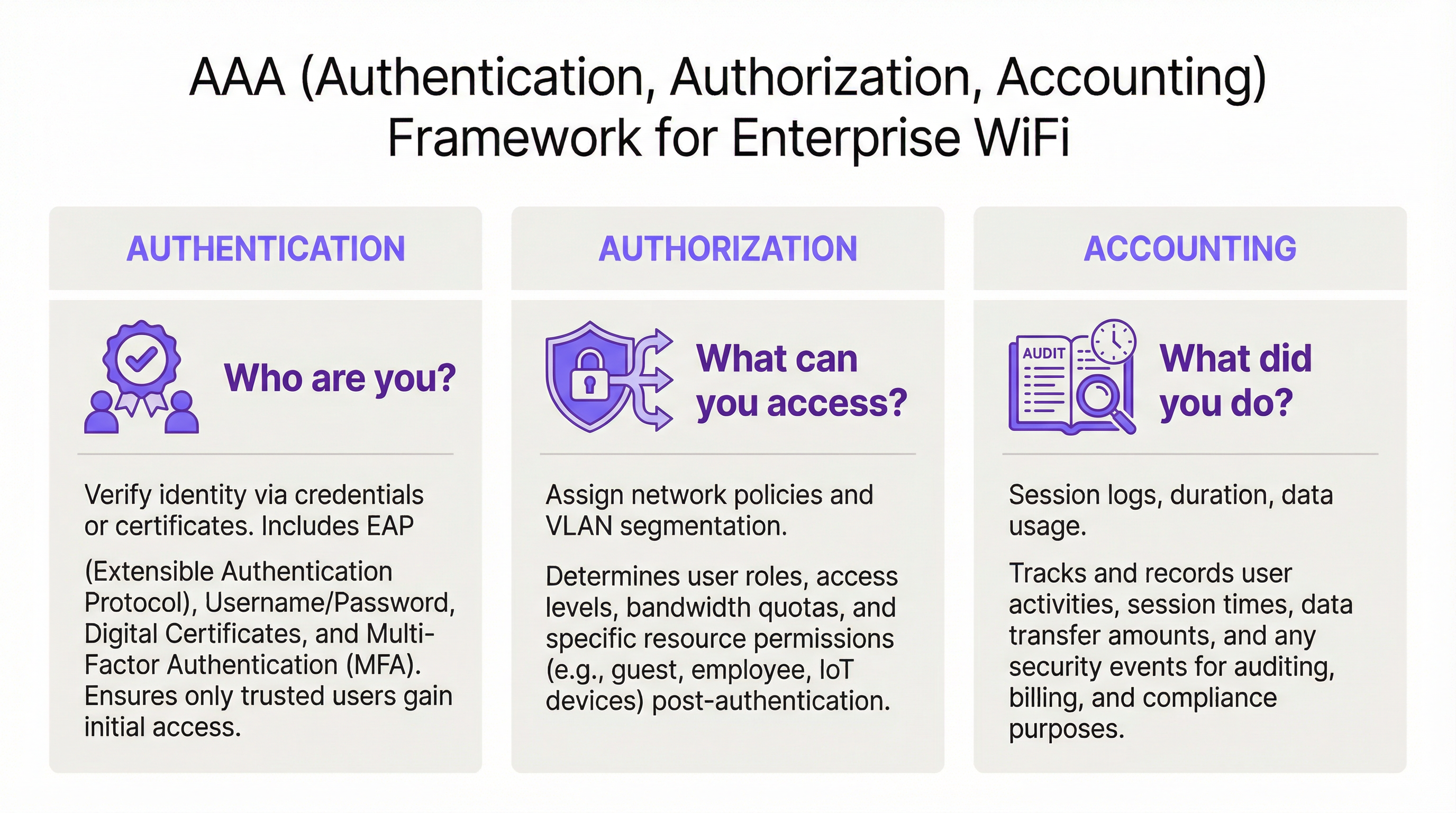
Le framework AAA : Authentification, Autorisation et Traçabilité
RADIUS fonctionne sur le modèle client-serveur et s'articule autour du framework AAA, un concept fondamental de la sécurité réseau. Comprendre chaque composant est essentiel pour un déploiement réussi.
L'authentification est le processus de vérification de l'identité d'un utilisateur. Lorsqu'un utilisateur tente de se connecter à un réseau WiFi sécurisé avec WPA2/WPA3-Enterprise, son appareil — le Supplicant (demandeur) — envoie des identifiants au point d'accès sans fil — l'Authenticator (authentificateur). L'authentificateur ne prend pas la décision d'accès lui-même ; il transmet la demande au serveur RADIUS. Le serveur RADIUS valide ces identifiants par rapport à une source d'identité configurée : Microsoft Active Directory, un fournisseur d'identité (IdP) cloud tel qu'Okta, ou une base de données d'utilisateurs locale. La validation peut utiliser une combinaison de nom d'utilisateur et de mot de passe ou, pour une sécurité nettement supérieure, un certificat numérique via une méthode EAP telle que EAP-TLS.
L'autorisation détermine ce qu'un utilisateur authentifié est autorisé à faire. Sur la base des politiques définies par l'administrateur réseau, le serveur RADIUS renvoie des attributs spécifiques à l'authentificateur. Ces attributs dictent l'attribution du VLAN (séparant le trafic des invités du trafic de l'entreprise), les limites de bande passante et les restrictions d'accès en fonction de l'heure. Cette application granulaire et dynamique des politiques est l'un des principaux avantages de RADIUS par rapport aux systèmes statiques basés sur des clés PSK.
La traçabilité (Accounting) suit l'activité de l'utilisateur tout au long de la session. Le serveur RADIUS enregistre les horodatages de connexion, la durée de la session, les données transférées et les adresses MAC des appareils. Cette piste d'audit est inestimable pour le dépannage, la planification des capacités et les rapports de conformité. En vertu de la norme PCI DSS 4.0, la journalisation et la surveillance de tous les accès aux ressources du réseau constituent un contrôle obligatoire.
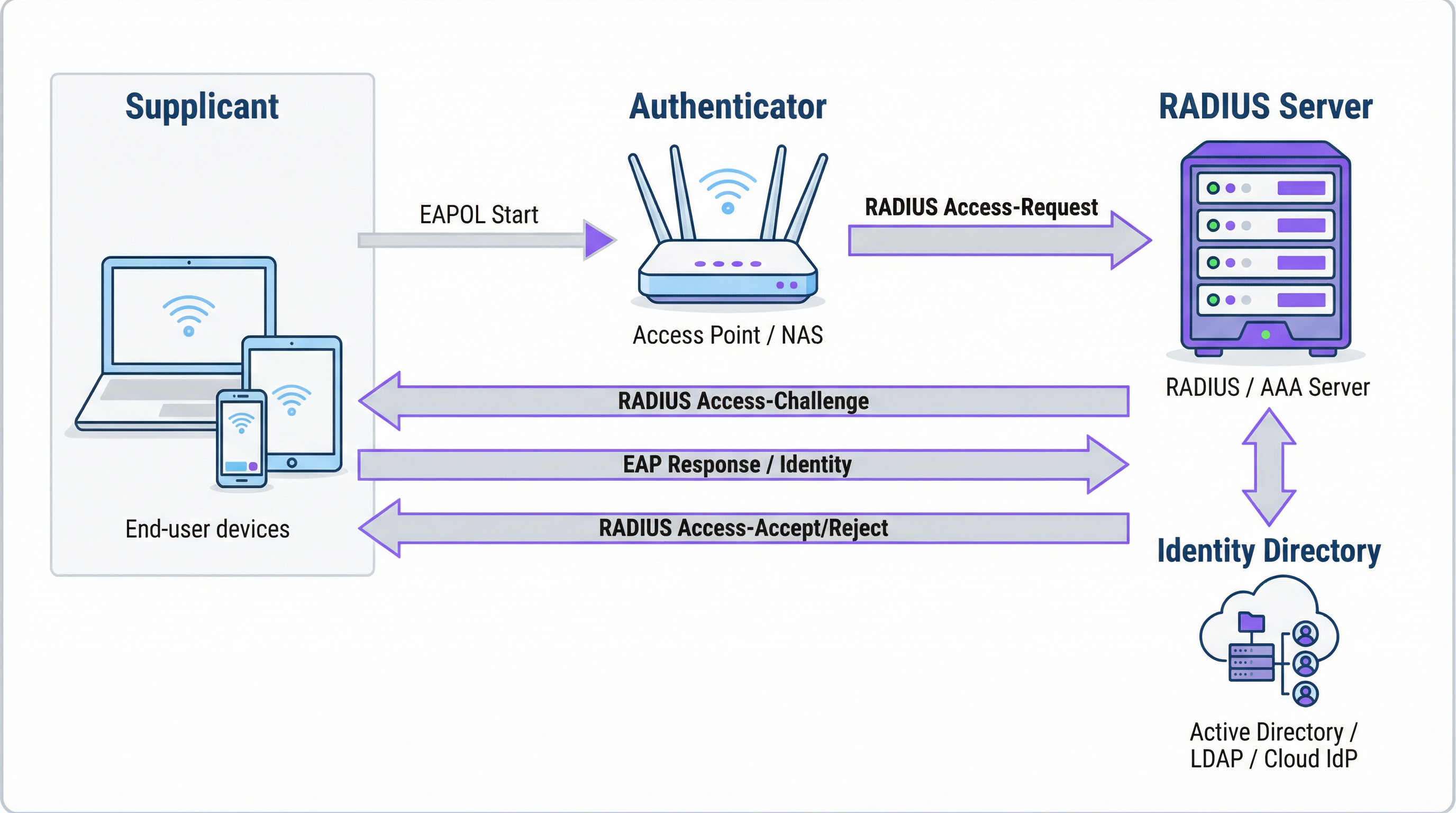
Comment RADIUS et 802.1X fonctionnent ensemble
La norme IEEE 802.1X définit le contrôle d'accès au réseau basé sur les ports. Dans un contexte WiFi, 802.1X permet à un point d'accès de bloquer tout le trafic provenant d'un appareil — à l'exception des messages d'authentification — jusqu'à ce que le serveur RADIUS ait confirmé l'autorisation. La communication entre le Supplicant et l'Authenticator utilise le protocole EAP (Extensible Authentication Protocol), transporté sur le réseau local sous le nom d'EAPOL (EAP over LAN). L'Authenticator relaie ensuite ces informations au serveur RADIUS à l'aide du protocole RADIUS.
Le choix de la méthode EAP est une décision de sécurité critique :
| Méthode EAP | Type d'authentification | Niveau de sécurité | Cas d'usage recommandé |
|---|---|---|---|
| EAP-TLS | Basée sur des certificats | Le plus élevé | Appareils gérés par l'entreprise — la référence absolue |
| PEAP-MSCHAPv2 | Basée sur des identifiants | Moyen | Environnements à forte composante Windows en transition vers les certificats |
| EAP-TTLS/PAP | Basée sur des identifiants | Moyen | Environnements multi-OS avec prise en charge d'appareils existants |
Pour les appareils d'entreprise, EAP-TLS est l'état cible. Il utilise une authentification mutuelle par certificat — le client et le serveur présentent tous deux des certificats — éliminant complètement les mots de passe et les risques associés de vol d'identifiants et de hameçonnage.
Ports et transport RADIUS
Par défaut, RADIUS utilise le port UDP 1812 pour l'authentification et l'autorisation, et le port UDP 1813 pour la traçabilité. Certains déploiements existants utilisent les ports 1645 et 1646. Depuis la RFC 6613, RADIUS peut également fonctionner sur TCP avec TLS (RadSec), ce qui est de plus en plus utilisé dans les déploiements cloud pour une sécurité de transport renforcée.
Guide de mise en œuvre
Transition de PSK à RADIUS : Une feuille de route en cinq étapes
Étape 1 : Sélectionnez votre infrastructure RADIUS. Choisissez entre un serveur sur site (Microsoft NPS pour les environnements Windows, FreeRADIUS pour les déploiements open-source) ou un service RADIUS basé sur le cloud. Pour les organisations multi-sites, une plateforme RADIUS cloud telle que celle de Purple est presque toujours le bon choix. Elle offre une haute disponibilité intégrée, une redondance géographique et élimine la charge opérationnelle liée à la gestion des serveurs.
Étape 2 : Intégrez votre source d'identité. Connectez le serveur RADIUS à l'annuaire d'identités faisant autorité de votre organisation. Les plateformes RADIUS cloud modernes prennent en charge l'intégration directe avec Azure AD, Google Workspace et Okta via SAML ou LDAP. Pour les utilisateurs invités, la source d'identité est généralement un CRM, un système de gestion immobilière (PMS) ou une plateforme WiFi invité spécialement conçue à cet effet.
Étape 3 : Configurez le matériel réseau. Sur votre contrôleur LAN sans fil ou vos points d'accès, créez un nouveau SSID configuré pour WPA2-Enterprise ou WPA3-Enterprise. Pointez le SSID vers l'adresse IP de votre serveur RADIUS et configurez le secret partagé (shared secret) — un mot de passe qui chiffre la communication entre le point d'accès et le serveur RADIUS. Cette valeur doit correspondre exactement des deux côtés ; une non-correspondance est l'une des causes les plus fréquentes d'échec lors du déploiement initial.
Étape 4 : Définissez les politiques d'autorisation. Créez des règles sur le serveur RADIUS associant des groupes d'utilisateurs à des politiques réseau. Un ensemble de politiques typique pour un hôtel pourrait inclure : Le personnel sur le VLAN 10 avec un accès interne complet ; Les prestataires sur le VLAN 30 avec un accès limité et un plafond de bande passante de 50 Mbps ; Les invités sur le VLAN 20 avec un accès Internet uniquement et une limite de session de 8 heures.
Étape 5 : Intégrez les utilisateurs et les appareils. Pour le personnel de l'entreprise, déployez des profils WiFi avec des paramètres 802.1X via votre plateforme MDM. Pour les invités, déployez un Captive Portal. La plateforme de Purple automatise le flux d'intégration des invités — en prenant en charge les connexions via les réseaux sociaux, les formulaires d'inscription et les codes de bons de réduction — et crée des comptes d'utilisateurs RADIUS temporaires qui expirent automatiquement.
Bonnes pratiques
Adoptez WPA3-Enterprise. Lorsque le matériel le prend en charge, WPA3-Enterprise offre des améliorations de sécurité significatives par rapport à WPA2-Enterprise, notamment les trames de gestion protégées (PMF) et un chiffrement plus fort via le mode de sécurité 192 bits. Effectuez un audit matériel pour identifier les points d'accès nécessitant des mises à jour de firmware ou un remplacement.
Implémentez EAP-TLS pour les appareils d'entreprise. L'authentification basée sur des certificats élimine la vulnérabilité liée aux mots de passe. Intégrez votre serveur RADIUS à votre PKI ou utilisez une solution de gestion de certificats basée sur le cloud. Automatisez le déploiement des certificats via le MDM pour minimiser la charge de travail informatique.
Appliquez la segmentation VLAN. L'attribution dynamique de VLAN via RADIUS est non négociable pour la conformité PCI DSS et l'architecture Zero Trust. Assurez-vous que vos commutateurs réseau et pare-feu appliquent des politiques de routage inter-VLAN qui empêchent le trafic des invités d'atteindre les ressources de l'entreprise.
Déployez une infrastructure RADIUS redondante. Configurez au moins un serveur RADIUS primaire et secondaire sur vos points d'accès. Les plateformes RADIUS cloud fournissent généralement cela automatiquement. Testez régulièrement le basculement.
Dépannage et atténuation des risques
| Mode de défaillance | Cause première | Résolution |
|---|---|---|
| Tous les utilisateurs sont rejetés | Non-correspondance du secret partagé entre le point d'accès et le serveur RADIUS | Vérifiez le secret partagé sur la configuration du point d'accès et du serveur RADIUS |
| Erreurs de certificat sur les appareils clients | Le certificat du serveur RADIUS n'est pas approuvé par le client | Installez le certificat de l'autorité de certification racine sur tous les appareils clients via le MDM |
| Échecs d'authentification intermittents | Serveur RADIUS surchargé ou injoignable | Implémentez un serveur RADIUS secondaire ; revoyez la capacité du serveur |
| Le portail invité ne redirige pas | Mauvaise configuration du Walled Garden (jardin clos) | Assurez-vous que l'URL du portail et les domaines des fournisseurs de connexion sociale se trouvent dans le Walled Garden |
| Les utilisateurs ne peuvent pas se reconnecter après l'expiration de la session | La session de traçabilité n'est pas correctement terminée | Revoyez la configuration de traçabilité RADIUS ; vérifiez les sessions obsolètes |
Retour sur investissement et impact commercial
L'analyse de rentabilisation du déploiement de RADIUS est convaincante à plusieurs égards. La réduction des risques de sécurité est l'avantage le plus immédiat : le remplacement d'une clé PSK partagée par un accès basé sur l'identité élimine le vecteur le plus courant d'intrusions réseau basées sur le WiFi, évitant potentiellement des coûts de violation qui s'élèvent en moyenne à 3,4 millions de livres sterling pour les entreprises britanniques. L'assurance de la conformité aux normes PCI DSS, GDPR et aux réglementations sectorielles est obtenue grâce à la combinaison d'un contrôle d'accès basé sur l'identité et de journaux de traçabilité complets. Les gains d'efficacité opérationnelle sont significatifs dans les grands déploiements — la gestion centralisée des politiques signifie que l'intégration d'un nouvel utilisateur ou la révocation de l'accès d'un employé sur le départ est une action unique dans l'annuaire d'identités, et non une reconfiguration manuelle sur des dizaines de points d'accès. Enfin, les données de traçabilité générées par RADIUS fournissent des informations exploitables pour la planification des capacités, permettant aux décisions d'investissement dans l'infrastructure de s'appuyer sur des données d'utilisation réelles plutôt que sur des estimations.
Termes clés et définitions
RADIUS (Remote Authentication Dial-In User Service)
A networking protocol, standardised in RFC 2865, that provides centralised Authentication, Authorization, and Accounting (AAA) management for users connecting to a network service. It operates on a client-server model, where the Network Access Server (NAS) is the client and the RADIUS server is the decision-making authority.
This is the core engine of enterprise WiFi security. When an IT manager talks about 'moving to 802.1X', they are almost always talking about deploying a RADIUS server.
802.1X
An IEEE standard for port-based Network Access Control (PNAC). It defines the encapsulation of the Extensible Authentication Protocol (EAP) over IEEE 802 networks, enabling an authenticator (e.g., a WiFi access point) to enforce authentication before granting network access.
This is the standard that makes RADIUS work for WiFi. When configuring an SSID for 'WPA2-Enterprise', you are enabling 802.1X on that SSID.
AAA (Authentication, Authorization, Accounting)
A security framework for intelligently controlling access to computer resources, enforcing policies, and auditing usage. Authentication verifies identity, Authorization determines permitted actions, and Accounting records activity.
RADIUS servers are often called 'AAA servers'. Understanding this framework is the conceptual foundation for all network access control design.
Supplicant
In the 802.1X framework, the Supplicant is the client device — a laptop, smartphone, or IoT device — that is requesting access to the network. The supplicant software on the device handles the EAP authentication exchange.
When troubleshooting authentication failures, the supplicant configuration (e.g., the WiFi profile on a laptop) is often the source of the problem.
Authenticator
In the 802.1X framework, the Authenticator is the network device — typically a wireless access point or an Ethernet switch — that enforces access control. It relays EAP messages between the Supplicant and the Authentication Server but does not make the authentication decision itself.
The access point is a relay, not a decision-maker. This is a critical distinction: the AP's job is to forward the request to RADIUS and then act on the response.
EAP (Extensible Authentication Protocol)
An authentication framework defined in RFC 3748 that supports multiple authentication methods. EAP itself does not define a specific authentication mechanism; instead, it provides a standard format for negotiating and carrying various EAP methods (e.g., EAP-TLS, PEAP, EAP-TTLS).
When configuring 802.1X, you must choose an EAP method. The choice between EAP-TLS (certificates) and PEAP (passwords) is one of the most consequential security decisions in a WiFi deployment.
EAP-TLS (EAP Transport Layer Security)
A certificate-based EAP method that provides mutual authentication between the client and the RADIUS server using X.509 digital certificates. It is widely regarded as the most secure EAP method, as it eliminates passwords entirely.
EAP-TLS is the gold standard for corporate device authentication. Deploying it requires a Public Key Infrastructure (PKI) to issue and manage client certificates, which is why cloud-based certificate management solutions are increasingly popular.
Captive Portal
A web page that intercepts a user's connection to a public WiFi network, requiring them to complete an action — such as accepting terms of service, entering credentials, or authenticating via a social media account — before internet access is granted.
Captive portals work in conjunction with RADIUS for guest WiFi. The portal is the user-facing interface; RADIUS is the back-end authentication engine that validates the user's session and enforces access policies.
VLAN (Virtual Local Area Network)
A logical network segment created within a physical network infrastructure. VLANs allow network administrators to segregate traffic from different user groups — such as guests, staff, and IoT devices — even when they share the same physical hardware.
Dynamic VLAN assignment via RADIUS is the mechanism that enables network segmentation in enterprise WiFi. It is a fundamental requirement for PCI DSS compliance and Zero Trust architecture.
Shared Secret
A password configured on both the RADIUS client (the access point) and the RADIUS server to authenticate their communication and encrypt RADIUS attribute values. It must be identical on both sides.
A shared secret mismatch is one of the most common causes of RADIUS authentication failures during initial deployment. Always copy-paste rather than manually type this value.
Études de cas
A 500-room hotel needs to provide secure WiFi for guests, conference attendees, and staff. Guests should have a frictionless onboarding experience, while staff require secure access to internal property management and point-of-sale systems. The hotel uses Oracle OPERA as its Property Management System (PMS).
Deploy Purple's cloud RADIUS platform integrated with the hotel's Oracle OPERA PMS. Provision three separate SSIDs: 'Hotel-Guest', 'Conference-WiFi', and 'Staff-Internal'. The 'Staff-Internal' SSID is configured for WPA3-Enterprise with EAP-TLS. Digital certificates are deployed to all hotel-owned devices via an MDM platform (e.g., Jamf or Microsoft Intune), enabling passwordless, seamless authentication for staff. The 'Hotel-Guest' SSID uses a branded captive portal integrated with OPERA. At check-in, OPERA automatically creates a temporary RADIUS user account with credentials valid for the duration of the guest's stay. The guest receives a QR code or a welcome email with a direct connection link. The 'Conference-WiFi' SSID uses a voucher-based system within Purple's platform, allowing event coordinators to generate unique, time-limited access codes for their attendees. All three SSIDs use dynamic VLAN assignment to enforce strict traffic segmentation.
A retail chain with 200 stores across the UK wants to replace its insecure, shared-password guest WiFi network. The marketing team requires opt-in demographic data from store visitors to support targeted campaigns. The IT team uses Azure Active Directory for all corporate identity management.
Deploy Purple's cloud RADIUS and guest WiFi platform across all 200 stores using a centralised, templated configuration. For guest access, configure a branded captive portal on a dedicated guest SSID. The portal offers authentication via social media accounts (Facebook, Google) or a simple registration form, capturing opt-in marketing consent in compliance with GDPR. Purple's platform aggregates this data into a centralised analytics dashboard, providing the marketing team with visitor demographics, dwell times, and repeat visit rates. For corporate staff, integrate the RADIUS server with the existing Azure AD tenant. Staff connect to a separate 'Staff' SSID using their Azure AD credentials via PEAP, with a phased migration plan to EAP-TLS with certificates for the highest-risk roles. All guest traffic is isolated on a dedicated VLAN with no access to the store's internal network or EPOS systems, meeting PCI DSS network segmentation requirements.
Analyse de scénario
Q1. You are the IT architect for a large conference centre. A major technology company is renting your venue for a three-day conference with 5,000 attendees. The client has a hard requirement that attendees can connect to a secure, high-performance WiFi network without manually entering a password each day. The client uses Okta as their identity provider. How would you design the authentication solution?
💡 Astuce :Consider how to provide a seamless, passwordless experience for a large number of users from a single external organisation. Think about certificate-based authentication and how to integrate with a third-party identity provider for a time-limited event.
Afficher l'approche recommandée
The optimal solution is to provision a dedicated SSID for the conference configured for WPA3-Enterprise with EAP-TLS. Integrate your cloud RADIUS platform with the client's Okta tenant via SAML federation for the duration of the event. Before the conference opens, attendees are directed to a one-time onboarding portal where they authenticate with their Okta credentials. Upon successful authentication, a unique digital certificate is generated and installed on their device. For the remainder of the conference, their device automatically and securely connects to the SSID without any further user interaction. The certificates are issued with a validity period matching the conference duration and are automatically revoked at close. This delivers a seamless, passwordless experience while maintaining strong security, and it leverages the client's existing identity infrastructure rather than creating a separate credential system.
Q2. A private hospital needs to provide WiFi for patients and visitors, but must ensure this traffic is completely isolated from the network used for clinical systems, electronic health records, and medical devices, to comply with HIPAA and NHS DSP Toolkit requirements. What RADIUS feature is most critical to achieving this isolation, and how would you configure it?
💡 Astuce :Focus on the Authorization pillar of the AAA framework. The key is not just authenticating users, but controlling what they can reach after authentication. Consider how RADIUS communicates network policy to the access point.
Afficher l'approche recommandée
The most critical feature is dynamic VLAN assignment via RADIUS authorization policies. You would create a dedicated 'Patient-Guest' VLAN (e.g., VLAN 50) on the network infrastructure, configured with firewall rules that permit only internet access and explicitly deny all traffic to the clinical network VLANs. On the RADIUS server, create an authorization policy that assigns any user authenticating to the patient WiFi SSID to VLAN 50, regardless of their credentials. The RADIUS server communicates this assignment to the access point via the Tunnel-Type, Tunnel-Medium-Type, and Tunnel-Private-Group-ID attributes in the Access-Accept message. The access point then places the user's traffic into VLAN 50 at the point of connection. This ensures that even if a patient's device is compromised, it has no network path to clinical systems — a fundamental requirement for HIPAA compliance and clinical network security.
Q3. Your organisation has deployed 802.1X with RADIUS across its corporate estate. An employee reports that they cannot connect to the corporate WiFi from their new laptop, but they can connect successfully from their smartphone and from their previous laptop. The IT helpdesk has confirmed the employee's account is active in Azure AD. What is your diagnostic approach, and what are the three most likely root causes?
💡 Astuce :The issue is device-specific, not user-specific — the user can authenticate from other devices. This narrows the problem to the device configuration, the device's certificate, or the device's supplicant settings. Start with the RADIUS server logs.
Afficher l'approche recommandée
The diagnostic approach is to first examine the RADIUS server's authentication logs for Access-Reject messages corresponding to the MAC address of the new laptop. The rejection reason code will identify the root cause. The three most likely causes are: (1) Missing or invalid client certificate — if the deployment uses EAP-TLS, the new laptop may not yet have had a certificate provisioned via MDM. Check whether the device is enrolled in the MDM platform and whether the certificate deployment policy has been applied. (2) Incorrect WiFi profile — the new laptop may have the wrong 802.1X supplicant settings, such as the wrong EAP method, an incorrect RADIUS server certificate trust configuration, or the wrong username format. Verify the WiFi profile matches the standard corporate template. (3) Device not yet registered in the identity directory — some RADIUS policies perform a device compliance check against Azure AD. If the new laptop has not yet completed Azure AD join and device registration, it may fail this check even though the user's account is active.
Points clés à retenir
- ✓RADIUS is the industry-standard protocol for centralised network access control, implementing the AAA (Authentication, Authorization, Accounting) framework to manage who can access your WiFi, what they can do, and to log all activity.
- ✓It replaces insecure pre-shared keys (PSKs) with robust, identity-based authentication, ensuring every user and device has a unique, verifiable identity on the network.
- ✓IEEE 802.1X is the standard that enables RADIUS to work with WiFi access points, blocking all network traffic from a device until the RADIUS server has confirmed authorisation.
- ✓EAP-TLS (certificate-based authentication) is the gold standard for corporate devices, eliminating passwords entirely and providing the strongest protection against credential theft and phishing.
- ✓Dynamic VLAN assignment via RADIUS authorization policies is the mechanism that enforces network segmentation — a mandatory control for PCI DSS compliance and a cornerstone of Zero Trust architecture.
- ✓For guest WiFi, RADIUS works in conjunction with a captive portal: the portal handles the user-facing onboarding experience, while RADIUS manages the back-end authentication and session policy enforcement.
- ✓Cloud-based RADIUS platforms such as Purple simplify deployment, provide built-in high availability, and integrate directly with modern identity providers (Azure AD, Google Workspace, Okta), making enterprise-grade network access control accessible for organisations of all sizes.




