

802.1X वि PSK वि Open WiFi: तुमच्यासाठी कोणती प्रमाणीकरण पद्धत योग्य आहे?
This guide provides a definitive, vendor-neutral comparison of the three primary WiFi authentication methods—802.1X (WPA2/3-Enterprise), Pre-Shared Key (PSK), and Open WiFi—tailored for IT managers, network architects, and CTOs in hospitality, retail, events, and the public sector. It cuts through technical complexity to deliver actionable deployment guidance, real-world case studies, and a clear decision framework for securing both staff and guest networks. Understanding which authentication model to deploy is not merely a technical choice; it is a strategic business decision with direct implications for security posture, regulatory compliance, operational efficiency, and the ability to extract commercial value from your WiFi infrastructure.

कार्यकारी सारांश
कोणत्याही आधुनिक एंटरप्राइझ, ठिकाण किंवा सार्वजनिक क्षेत्रातील संस्थेसाठी, WiFi प्रमाणीकरण पद्धतीची निवड हा एक मूलभूत निर्णय आहे ज्याचे सुरक्षा, वापरकर्ता अनुभव आणि ऑपरेशनल ओव्हरहेडवर दूरगामी परिणाम होतात. हे मार्गदर्शक तीन प्राथमिक प्रमाणीकरण मॉडेल्सची थेट, व्यावहारिक तुलना प्रदान करते: 802.1X (WPA2/3-Enterprise), Pre-Shared Key (PSK), आणि Open WiFi. आम्ही IT व्यवस्थापक, नेटवर्क आर्किटेक्ट आणि CTOs साठी कृतीयोग्य मार्गदर्शन देण्यासाठी तांत्रिक जड शब्द टाळतो. मुख्य सिद्धांत असा आहे: कोणतीही एक "सर्वोत्तम" पद्धत नाही, तर विशिष्ट वापरासाठी फक्त "योग्य" पद्धत असते. 802.1X विद्यमान ओळख पायाभूत सुविधांशी एकत्रीकरण करून कॉर्पोरेट कर्मचाऱ्यांसाठी सुरक्षेमध्ये सुवर्ण मानक (gold standard) ऑफर करते, परंतु यात गुंतागुंत जास्त असते. PSK आणि Open नेटवर्क्स, जेव्हा Captive Portal सह जोडले जातात, तेव्हा अतिथींसाठी आवश्यक असलेला लवचिक, स्केलेबल ॲक्सेस प्रदान करतात, ज्यामुळे एका मूलभूत सुविधेचे डेटा ॲनालिटिक्स आणि वापरकर्ता प्रतिबद्धतेसाठी एका शक्तिशाली साधनात रूपांतर होते. हा संदर्भ तुम्हाला तुमच्या संस्थेची जोखीम प्रोफाइल, अनुपालन आवश्यकता (जसे की PCI DSS आणि GDPR), आणि व्यावसायिक उद्दिष्टांशी संरेखित असा एक माहितीपूर्ण, धोरणात्मक निर्णय घेण्यास सक्षम करेल, ज्यामुळे तुमचे WiFi नेटवर्क एक सुरक्षित, विश्वासार्ह आणि मौल्यवान संपत्ती असल्याची खात्री होईल.
{{asset:802_1x_vs_psk_vs_open_wifi_which_authentication_method_is_right_for_you__podcast.mp3}}
तांत्रिक सखोल माहिती
माहितीपूर्ण निर्णय घेण्यासाठी 802.1X, PSK आणि Open WiFi मधील आर्किटेक्चरल फरक समजून घेणे महत्त्वाचे आहे. प्रत्येक पद्धत मूलभूत स्तरावर वेगळ्या प्रकारे कार्य करते, सुरक्षा, गुंतागुंत आणि वापरकर्ता अनुभव यांच्यात भिन्न तडजोडी (trade-offs) ऑफर करते.
802.1X: एंटरप्राइझ स्टँडर्ड
IEEE 802.1X स्टँडर्ड हे पोर्ट-आधारित नेटवर्क ॲक्सेस कंट्रोल (PNAC) फ्रेमवर्क आहे. ही स्वतः एन्क्रिप्शनची पद्धत नाही, तर प्रमाणीकरणासाठी एक फ्रेमवर्क आहे जे नंतर WPA2 आणि WPA3-Enterprise सारख्या मजबूत एन्क्रिप्शन प्रोटोकॉलला सक्षम करते. याचे आर्किटेक्चर तीन मुख्य घटकांवर अवलंबून आहे: Supplicant (ॲक्सेसची विनंती करणारे क्लायंट डिव्हाइस), Authenticator (गेटकीपर म्हणून काम करणारा WiFi ॲक्सेस पॉइंट), आणि Authentication Server (क्रेडेन्शियल्स प्रमाणित करणारा केंद्रीकृत RADIUS सर्व्हर).
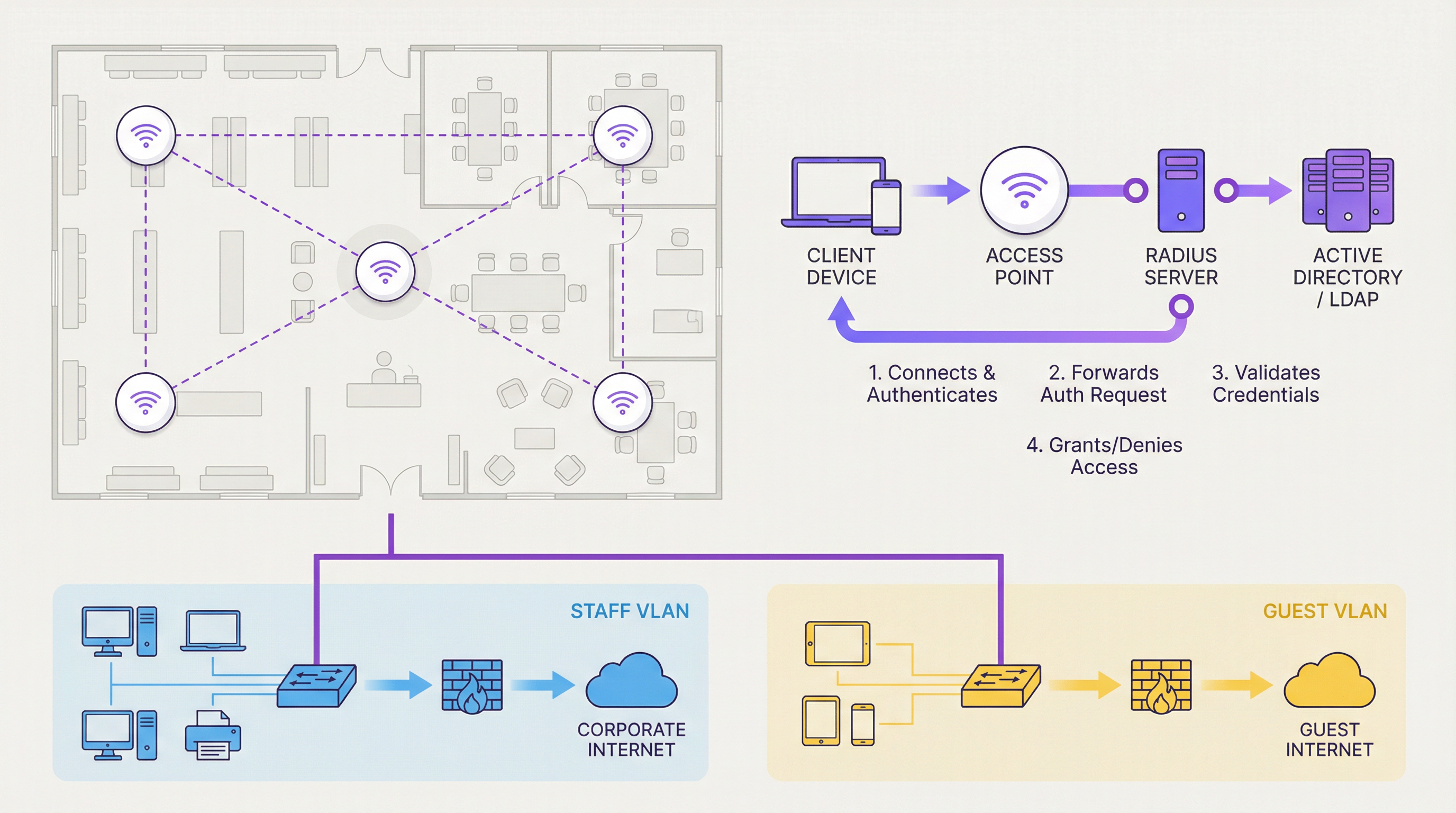
जेव्हा एखादा वापरकर्ता कनेक्ट करण्याचा प्रयत्न करतो, तेव्हा supplicant ऑथेंटिकेटरला क्रेडेन्शियल्स सादर करतो. AP स्वतः या क्रेडेन्शियल्सचे प्रमाणीकरण करत नाही; त्याऐवजी, तो Extensible Authentication Protocol (EAP) मध्ये विनंती एन्कॅप्स्युलेट करतो आणि ती RADIUS सर्व्हरकडे फॉरवर्ड करतो. तो सर्व्हर मध्यवर्ती ओळख डेटाबेस—सामान्यतः Microsoft Active Directory, LDAP, किंवा क्लाउड-आधारित आयडेंटिटी प्रोव्हायडर—विरुद्ध क्रेडेन्शियल्स तपासतो. वैध असल्यास, RADIUS सर्व्हर "Access-Accept" मेसेज जारी करतो, पोर्ट उघडला जातो आणि त्या विशिष्ट वापरकर्त्यासाठी डायनॅमिकली एक युनिक, प्रति-सत्र एन्क्रिप्शन की व्युत्पन्न केली जाते. हे प्रति-वापरकर्ता की जनरेशन 802.1X ला कोणत्याही शेअर्ड-की मॉडेलपेक्षा मूलभूतपणे अधिक सुरक्षित बनवते: जरी एका वापरकर्त्याच्या सत्राशी तडजोड झाली तरीही, इतर कोणत्याही वापरकर्त्याचा ट्रॅफिक धोक्यात येत नाही.
IT व्यवस्थापकांसाठी याचे व्यावहारिक परिणाम महत्त्वपूर्ण आहेत. जेव्हा एखादा कर्मचारी संस्था सोडतो, तेव्हा त्यांचे Active Directory खाते अक्षम केल्याने प्रत्येक साइट आणि प्रत्येक ॲक्सेस पॉइंटवरील त्यांचा नेटवर्क ॲक्सेस त्वरित आणि स्वयंचलितपणे रद्द होतो. कोणतेही मॅन्युअल की रोटेशन नाही, डिव्हाइसेस शोधण्याची गरज नाही. वैयक्तिक उत्तरदायित्वाची (individual accountability) ही पातळी 802.1X ला अर्थपूर्ण सुरक्षा किंवा अनुपालन दायित्वे असलेल्या कोणत्याही संस्थेतील कॉर्पोरेट कर्मचारी नेटवर्क्ससाठी एकमेव योग्य पर्याय बनवते.
PSK: शेअर्ड सिक्रेट
Pre-Shared Key प्रमाणीकरण हे एक अतिशय सोपे मॉडेल आहे. ॲक्सेस पॉइंट आणि सर्व क्लायंट डिव्हाइसेस या दोन्हीवर एकच अल्फान्यूमेरिक पासफ्रेज कॉन्फिगर केले जाते. जेव्हा एखादे डिव्हाइस कनेक्ट होते, तेव्हा ते शेअर्ड की चे ज्ञान सिद्ध करण्यासाठी AP सोबत क्रिप्टोग्राफिक 4-Way Handshake करते. यशस्वी झाल्यास, ॲक्सेस दिला जातो.
ही साधेपणा आकर्षक आहे, परंतु एंटरप्राइझ संदर्भात सुरक्षा मर्यादा लक्षणीय आहेत. प्राथमिक कमकुवतपणा म्हणजे की चे स्टॅटिक, शेअर्ड स्वरूप. यात कोणतेही वैयक्तिक उत्तरदायित्व नाही; ज्याला पासवर्ड माहित आहे त्याला ॲक्सेस मिळतो. एका वापरकर्त्याचा ॲक्सेस रद्द करण्यासाठी AP वरील की बदलणे आणि प्रत्येक अधिकृत डिव्हाइस पुन्हा कॉन्फिगर करणे आवश्यक आहे—जे मोठ्या प्रमाणावर एक लॉजिस्टिक दुःस्वप्न आहे. शिवाय, तडजोड केलेली की (compromised key) सुरुवातीचा हँडशेक कॅप्चर केलेल्या हल्लेखोराला त्याच नेटवर्कवरील इतर वापरकर्त्यांचा ट्रॅफिक डिक्रिप्ट करण्यास अनुमती देते. WPA3 स्टँडर्डचा Simultaneous Authentication of Equals (SAE) प्रोटोकॉल ऑफलाइन डिक्शनरी हल्ल्यांविरुद्ध PSK ला लक्षणीयरीत्या मजबूत करतो, परंतु शेअर्ड, स्टॅटिक सिक्रेटचा मूलभूत धोका कायम राहतो.
Open WiFi: फ्रिक्शनलेस गेटवे
Open नेटवर्कमध्ये कोणतेही प्रमाणीकरण आणि लिंक-लेयर एन्क्रिप्शन नसते. क्लायंट आणि ॲक्सेस पॉइंटमधील सर्व ट्रॅफिक क्लिअरटेक्स्टमध्ये प्रसारित केले जाते, ज्यामुळे रेडिओ रेंजमधील कोणत्याही हल्लेखोराला डेटा रोखणे आणि वाचणे अत्यंत सोपे होते—हा एक क्लासिक मॅन-इन-द-मिडल अटॅक (man-in-the-middle attack) आहे. जेथे वापरकर्त्याच्या गोपनीयतेची अपेक्षा असते अशा कोणत्याही नेटवर्कसाठी Open WiFi कधीही वापरले जाऊ नये. याचा एकमेव वैध व्यावसायिक वापर Captive Portal साठी लाँचपॅड म्हणून आहे, जे नेटवर्क स्टॅकच्या उच्च स्तरावर प्रमाणीकरण आणि धोरण अंमलबजावणी प्रदान करते, ज्यामुळे सुरक्षा दायित्वाचे एका व्यवस्थापित, व्यावसायिकदृष्ट्या मौल्यवान संपत्तीमध्ये रूपांतर होते.
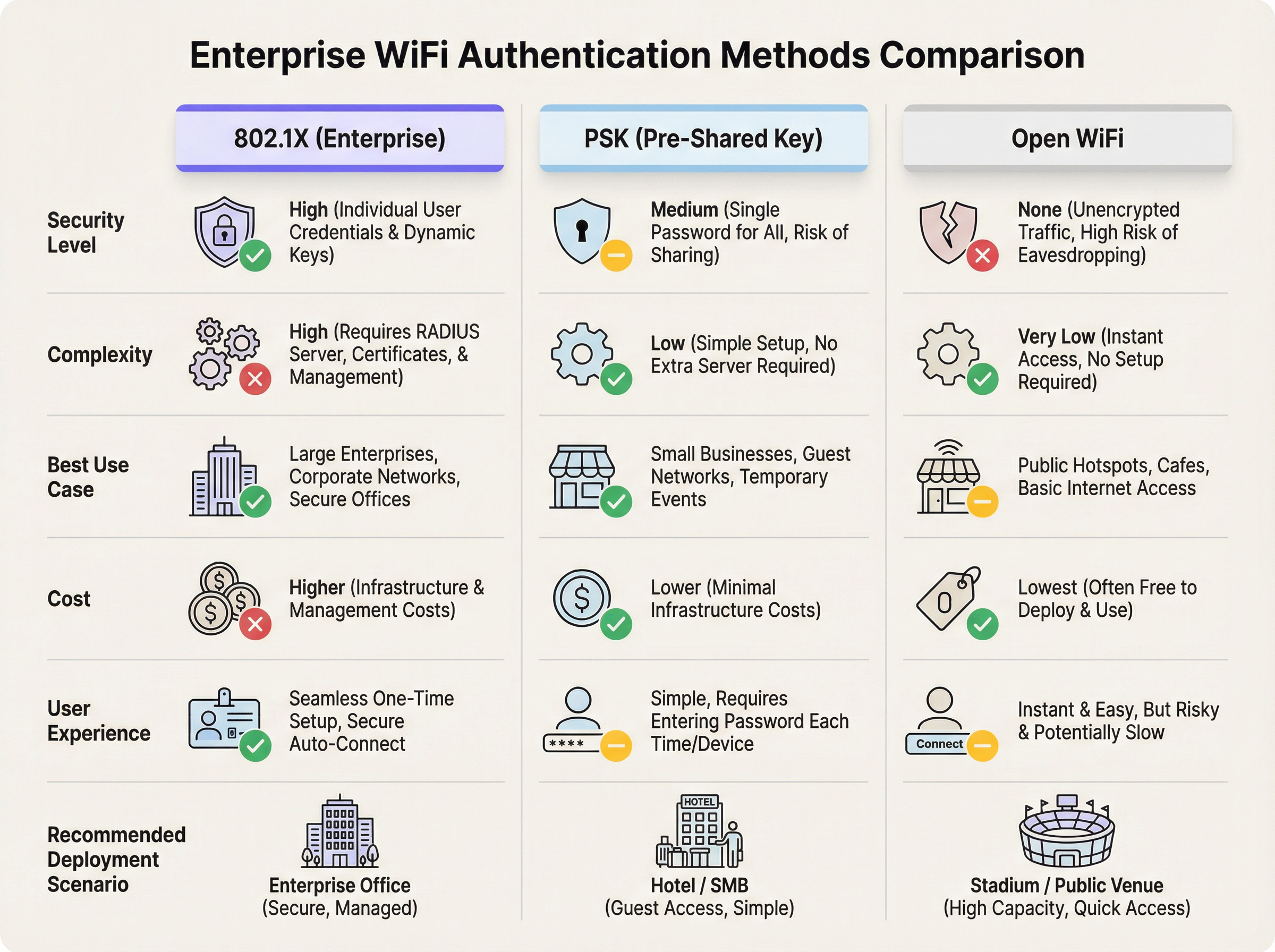
खालील तक्ता सर्व तीन मॉडेल्समधील प्रमुख तडजोडींचा (trade-offs) सारांश देतो:
| परिमाण | 802.1X (WPA2/3-Enterprise) | PSK (WPA2/3-Personal) | Open WiFi |
|---|---|---|---|
| सुरक्षा स्तर | उच्च — वैयक्तिक, डायनॅमिक कीज | मध्यम — शेअर्ड, स्टॅटिक की | काहीही नाही — अनएन्क्रिप्टेड ट्रॅफिक |
| डिप्लॉयमेंट गुंतागुंत | उच्च — RADIUS, प्रमाणपत्रे, AD | कमी — सिंगल पासफ्रेज | अत्यंत कमी — कोणतेही कॉन्फिगरेशन नाही |
| वापरकर्ता अनुभव | ऑनबोर्डिंगनंतर अखंड | सोपी पासवर्ड एंट्री | त्वरित, झिरो-फ्रिक्शन |
| वैयक्तिक उत्तरदायित्व | होय — प्रति-वापरकर्ता क्रेडेन्शियल्स | नाही — शेअर्ड की | नाही — क्रेडेन्शियल्स नाहीत |
| ॲक्सेस रद्दीकरण | AD खाते अक्षम करून त्वरित | पूर्ण की रोटेशन आवश्यक | लागू नाही |
| अनुपालन उपयुक्तता | PCI DSS, GDPR, HIPAA | मर्यादित | Captive Portal शिवाय योग्य नाही |
| आदर्श वापर प्रकरण | कॉर्पोरेट कर्मचारी, व्यवस्थापित डिव्हाइसेस | लहान अतिथी नेटवर्क्स, SMBs | मोठ्या प्रमाणावर सार्वजनिक ॲक्सेस |
| Purple एकत्रीकरण | ॲनालिटिक्स ओव्हरले, RADIUS सपोर्ट | Captive Portal, डेटा कॅप्चर | Captive Portal, संपूर्ण ॲनालिटिक्स |
अंमलबजावणी मार्गदर्शक
सिद्धांताचे व्यवहारात रूपांतर करण्यासाठी प्रत्येक मॉडेलसाठी डिप्लॉयमेंट टप्पे आणि आर्किटेक्चरल निर्णयांची स्पष्ट समज असणे आवश्यक आहे.
कर्मचारी WiFi साठी 802.1X डिप्लॉय करणे
पहिली पूर्वअट RADIUS सर्व्हर आहे. हा FreeRADIUS चालवणारा समर्पित सर्व्हर, Windows Server मधील Network Policy Server (NPS) रोल, किंवा—वाढत्या प्रमाणात सामान्य असलेली—क्लाउड-होस्टेड RADIUS सेवा असू शकते जी ऑन-प्रिमाइस पायाभूत सुविधांची गरज दूर करते. तुम्हाला एका आयडेंटिटी स्टोअरची (Active Directory, Azure AD, किंवा Google Workspace) देखील आवश्यकता आहे ज्याची RADIUS सर्व्हर चौकशी करू शकेल.
EAP प्रकाराची निवड हा पुढील महत्त्वाचा निर्णय आहे. EAP-TLS, जे सर्व्हर आणि प्रत्येक क्लायंट डिव्हाइस दोन्हीवर डिजिटल प्रमाणपत्रे वापरते, सर्वात मजबूत सुरक्षा प्रदान करते परंतु यासाठी Public Key Infrastructure (PKI) आवश्यक आहे आणि प्रशासकीय ओव्हरहेड वाढवते. PEAP-MSCHAPv2, ज्याला फक्त सर्व्हर-साइड प्रमाणपत्र आवश्यक आहे आणि क्लायंटसाठी मानक वापरकर्तानाव आणि पासवर्ड वापरते, परिपक्व PKI नसलेल्या संस्थांसाठी अधिक सामान्य पर्याय आहे. कॉर्पोरेट-व्यवस्थापित डिव्हाइसेससाठी, Mobile Device Management (MDM) प्लॅटफॉर्म किंवा Group Policy (GPO) स्वयंचलितपणे WiFi प्रोफाइल आणि प्रमाणपत्रे पुश करू शकते, ज्यामुळे अंतिम-वापरकर्ता अनुभव पूर्णपणे अखंड होतो. BYOD परिस्थितींसाठी, सेल्फ-सर्व्हिस ऑनबोर्डिंग पोर्टल आवश्यक आहे.
अतिथींसाठी Captive Portal सह PSK किंवा Open WiFi डिप्लॉय करणे
सर्वात महत्त्वाची पायरी म्हणजे नेटवर्क सेगमेंटेशन. VLANs आणि फायरवॉल नियमांचा वापर करून अतिथी ट्रॅफिक कॉर्पोरेट नेटवर्कपासून वेगळे केले पाहिजे, ज्यामध्ये अतिथी ट्रॅफिक थेट इंटरनेटवर राउट केले जाते आणि कोणत्याही अंतर्गत संसाधनांपर्यंत पोहोचण्यापासून अवरोधित केले जाते. हे तडजोड न करण्याजोगे आहे आणि PCI DSS अनुपालनासाठी ही एक पूर्वअट आहे.
Open किंवा PSK बेस लेयरमधील निवड ठिकाणाच्या संदर्भावर अवलंबून असते. हॉटेलसाठी, चेक-इन करताना प्रति-अतिथी व्युत्पन्न केलेला डायनॅमिक PSK ॲक्सेस कंट्रोलचा एक उपयुक्त पहिला स्तर प्रदान करतो. स्टेडियम किंवा रिटेल वातावरणासाठी, Open नेटवर्क ॲक्सेसिबिलिटी वाढवते. दोन्ही प्रकरणांमध्ये, Captive Portal—जिथे Purple चे प्लॅटफॉर्म त्याचे मूळ मूल्य प्रदान करते—तिथे प्रमाणीकरण, डेटा कॅप्चर, धोरण अंमलबजावणी आणि वापरकर्ता प्रतिबद्धता होते. Purple मध्ये, तुम्ही ईमेल, सोशल लॉगिन किंवा प्रायोजित ॲक्सेस कोडद्वारे प्रमाणीकरण कॉन्फिगर करू शकता, बँडविड्थ मर्यादा आणि सत्र कालावधी सेट करू शकता आणि GDPR-सुसंगत अटी व शर्ती लागू करू शकता.
सर्वोत्तम पद्धती
कोणत्याही बहु-वापरकर्ता WiFi वातावरणासाठी नेटवर्क सेगमेंटेशन ही सर्वात महत्त्वाची सुरक्षा पद्धत आहे. अतिथी आणि कर्मचारी ट्रॅफिकने कधीही VLAN शेअर करू नये. सेगमेंटेशनच्या पलीकडे, संस्थांनी सर्व नवीन हार्डवेअर डिप्लॉयमेंटवर WPA3 स्वीकारले पाहिजे, कारण ते Enterprise आणि Personal दोन्ही मोड्ससाठी WPA2 पेक्षा अर्थपूर्ण सुरक्षा सुधारणा प्रदान करते. PSK डिप्लॉयमेंटसाठी जे अद्याप 802.1X वर स्थलांतरित केले जाऊ शकत नाहीत, की रोटेशन नियमित वेळापत्रकानुसार लागू केले जावे—किमान त्रैमासिक, आणि कोणत्याही संशयित तडजोडीवर किंवा कर्मचाऱ्याच्या प्रस्थानावर त्वरित.
अतिथी नेटवर्क्ससाठी, Captive Portal ला केवळ कायदेशीर औपचारिकता न मानता एक धोरणात्मक संपत्ती मानले पाहिजे. चांगल्या प्रकारे डिझाइन केलेल्या पोर्टलद्वारे गोळा केलेला डेटा—अभ्यागत लोकसंख्याशास्त्र, परतीच्या भेटीची वारंवारता, ड्वेल टाइम, डिव्हाइस प्रकार—मार्केटिंग, ऑपरेशन्स आणि ठिकाण व्यवस्थापन टीम्ससाठी कृतीयोग्य बुद्धिमत्ता प्रदान करतो. डेटा संकलनाबद्दल वापरकर्त्यांशी पारदर्शकता हे GDPR अंतर्गत कायदेशीर दायित्व आणि विश्वास निर्माण करणारी सर्वोत्तम पद्धत दोन्ही आहे; तुमच्या पोर्टलने गोपनीयता धोरणाशी स्पष्टपणे लिंक केले पाहिजे आणि, Open नेटवर्क्ससाठी, वापरकर्त्यांना संवेदनशील व्यवहारांसाठी VPN वापरण्याचा सल्ला दिला पाहिजे.
समस्यानिवारण आणि जोखीम निवारण
802.1X डिप्लॉयमेंटमधील सर्वात सामान्य बिघाड मोड म्हणजे ॲक्सेस पॉइंट आणि RADIUS सर्व्हरमधील चुकीचे कॉन्फिगरेशन—सामान्यतः चुकीचा IP पत्ता, चुकीचा UDP पोर्ट (प्रमाणीकरणासाठी 1812, अकाउंटिंगसाठी 1813), किंवा जुळत नसलेले शेअर्ड सिक्रेट. RADIUS सर्व्हर लॉग हे पहिले निदान साधन आहेत; ते तपशीलवार नकार कारणे प्रदान करतात जे समस्येचे अचूक कारण दर्शवतात. प्रमाणपत्राशी संबंधित बिघाड—कालबाह्य झालेली प्रमाणपत्रे, अविश्वासू Certificate Authorities, किंवा चुकीचे Subject Alternative Names—हे 802.1X आउटेजचे दुसरे सर्वात वारंवार कारण आहेत आणि यासाठी शिस्तबद्ध प्रमाणपत्र जीवनचक्र व्यवस्थापन प्रक्रिया आवश्यक आहे.
PSK वातावरणासाठी, प्राथमिक जोखीम क्रेडेन्शियल लीकेज आहे. कायमस्वरूपी पासवर्ड ऐवजी PSK ला वेळ-मर्यादित ॲक्सेस कोड म्हणून हाताळणे ही निवारण धोरण आहे. Purple सारखे प्लॅटफॉर्म प्रत्येक अतिथी किंवा सत्रासाठी युनिक, वेळ-बद्ध कोड व्युत्पन्न करून हे स्वयंचलित करू शकतात, ज्यामुळे जोखमीचा पृष्ठभाग नाटकीयरित्या कमी होतो. Open नेटवर्क्ससाठी, इव्हस्ड्रॉपिंगचा (eavesdropping) धोका अंतर्निहित आहे आणि नेटवर्क स्तरावर तो दूर केला जाऊ शकत नाही; Captive Portal ने वापरकर्त्यांना हे स्पष्टपणे संप्रेषित केले पाहिजे, आणि संस्थेने हे सुनिश्चित केले पाहिजे की तिची स्वतःची अंतर्गत प्रणाली कोणत्याही परिस्थितीत अतिथी VLAN वरून ॲक्सेस करण्यायोग्य नाही.
RADIUS सर्व्हरची उच्च उपलब्धता ही एक गंभीर ऑपरेशनल चिंता आहे. 802.1X वातावरणात, जर RADIUS सर्व्हर अनरिचेबल असेल, तर कोणतेही नवीन प्रमाणीकरण यशस्वी होऊ शकत नाही. स्वयंचलित फेलओव्हरसह रिडंडंट RADIUS सर्व्हर्स, किंवा मजबूत SLA सह क्लाउड-होस्टेड RADIUS सेवा, कोणत्याही उत्पादन डिप्लॉयमेंटसाठी आवश्यक आहेत.
ROI आणि व्यावसायिक प्रभाव
योग्य प्रमाणीकरण मॉडेल निवडल्याने मिळणारा गुंतवणुकीवरील परतावा (ROI) अनेक परिमाणांमध्ये प्रकट होतो. कर्मचारी नेटवर्क्सवरील 802.1X साठी, प्राथमिक ROI ड्रायव्हर जोखीम निवारण आहे. नियामक दंड, उपाययोजना खर्च आणि प्रतिष्ठेचे नुकसान लक्षात घेता यूकेमध्ये डेटा उल्लंघनाची सरासरी किंमत £3 दशलक्षपेक्षा जास्त आहे. शेअर्ड क्रेडेन्शियल्स काढून टाकून आणि त्वरित ॲक्सेस रद्दीकरण सक्षम करून, 802.1X हल्ल्याचा पृष्ठभाग नाटकीयरित्या कमी करते. दुय्यम ड्रायव्हर ऑपरेशनल कार्यक्षमता आहे: Active Directory एकत्रीकरणाद्वारे स्वयंचलित प्रोव्हिजनिंग आणि डी-प्रोव्हिजनिंग मॅन्युअली PSK रोटेशन्स किंवा MAC ॲड्रेस व्हाईटलिस्ट व्यवस्थापित करण्याच्या तुलनेत IT टीम्सचा महत्त्वपूर्ण प्रशासकीय वेळ वाचवते.
Captive Portal असलेल्या अतिथी नेटवर्क्ससाठी, ROI व्यावसायिक आहे. एक चांगल्या प्रकारे कॉन्फिगर केलेले Purple Captive Portal WiFi ला कॉस्ट सेंटरमधून महसूल-उत्पन्न करणाऱ्या संपत्तीमध्ये रूपांतरित करते. हॉटेल चेन जी तिच्या 60% अतिथींचे ईमेल पत्ते कॅप्चर करते ती रिपीट बुकिंगमध्ये दरवर्षी हजारो पौंड किमतीचे थेट मार्केटिंग चॅनेल तयार करू शकते. रिटेल चेन ज्याला समजते की कोणते स्टोअर विभाग सर्वात जास्त ड्वेल टाइम आकर्षित करतात ती उत्पादन प्लेसमेंट आणि स्टाफिंग ऑप्टिमाइझ करू शकते. कॉन्फरन्स सेंटर जे प्रायोजक आणि प्रदर्शकांना सत्यापित फूटफॉल डेटा प्रदर्शित करू शकते ते फ्लोअर स्पेससाठी प्रीमियम दरांची मागणी करू शकते. या संदर्भात, WiFi नेटवर्क ही पायाभूत सुविधा नाही—ते एक डेटा संकलन आणि प्रतिबद्धता प्लॅटफॉर्म आहे.
संदर्भ
- IEEE Standard 802.1X-2020, "Port-Based Network Access Control" — https://standards.ieee.org/ieee/802.1X/7345/
- Wi-Fi Alliance, "WPA3 Specification" — https://www.wi-fi.org/discover-wi-fi/security
- PCI Security Standards Council, "PCI DSS v4.0" — https://www.pcisecuritystandards.org/document_library/
- UK Information Commissioner's Office, "Guide to the UK GDPR" — https://ico.org.uk/for-organisations/guide-to-data-protection/guide-to-the-general-data-protection-regulation-gdpr/
- IETF RFC 2865, "Remote Authentication Dial In User Service (RADIUS)" — https://www.rfc-editor.org/rfc/rfc2865
महत्त्वाच्या संज्ञा आणि व्याख्या
RADIUS (Remote Authentication Dial-In User Service)
A networking protocol that provides centralised Authentication, Authorization, and Accounting (AAA) management for users connecting to a network service. In an 802.1X WiFi deployment, the RADIUS server is the central validation engine that checks user credentials against a directory service and instructs the access point to grant or deny access.
IT teams encounter RADIUS whenever troubleshooting 802.1X authentication failures. It is the component most likely to be the source of connectivity issues, and its logs are the primary diagnostic tool. Network architects must plan for RADIUS server redundancy, as its unavailability prevents all new 802.1X authentications.
EAP (Extensible Authentication Protocol)
An authentication framework used within 802.1X that supports multiple authentication methods. Common types include EAP-TLS (certificate-based, highest security), PEAP-MSCHAPv2 (username/password with server-side certificate), and EAP-TTLS. The choice of EAP type determines the client authentication experience and the infrastructure required.
Network architects must select an EAP type during the design phase of an 802.1X deployment. EAP-TLS is the gold standard but requires a PKI; PEAP-MSCHAPv2 is the pragmatic choice for most enterprise deployments. The wrong choice can result in poor user experience or inadequate security.
VLAN (Virtual Local Area Network)
A logical segmentation of a physical network that creates isolated broadcast domains. Devices on different VLANs cannot communicate without traversing a router or Layer 3 switch, which can apply firewall rules to control and restrict that traffic.
VLANs are the foundational security tool for any multi-use WiFi environment. Separating guest, staff, and POS traffic onto distinct VLANs is the first and most critical step in protecting the corporate network and achieving PCI DSS compliance. IT managers should treat any flat network—where all WiFi traffic shares the same VLAN—as a critical security vulnerability.
Captive Portal
A web page that intercepts a user's first HTTP/HTTPS request upon connecting to a WiFi network and redirects them to a login or terms-acceptance page before granting broader internet access. It operates at Layer 7 of the OSI model, above the WiFi link layer.
For venue operators, the captive portal is the commercial interface of their guest WiFi. It is where legal terms are enforced, marketing consent is captured, user data is collected, and branding is displayed. Platforms like Purple provide sophisticated captive portal capabilities including social login, analytics, and CRM integration. Critically, a captive portal does not encrypt the underlying WiFi traffic.
PCI DSS (Payment Card Industry Data Security Standard)
A set of security standards mandated by the major card schemes (Visa, Mastercard, Amex) for any organisation that stores, processes, or transmits cardholder data. It includes specific requirements for network segmentation, access control, and monitoring that directly govern WiFi architecture in retail and hospitality environments.
PCI DSS is the most common compliance driver for WiFi architecture decisions in retail and hospitality. Requirement 1 (network segmentation) and Requirement 7 (access control) are directly relevant to WiFi design. A QSA (Qualified Security Assessor) audit that finds guest or staff WiFi on the same network segment as POS systems will result in a critical finding.
WPA3 (Wi-Fi Protected Access 3)
The third generation of the Wi-Fi Alliance's security certification programme, ratified in 2018. WPA3-Enterprise mandates 192-bit minimum strength security for sensitive environments. WPA3-Personal introduces Simultaneous Authentication of Equals (SAE), which replaces the 4-Way Handshake and provides forward secrecy, making offline dictionary attacks against captured handshakes infeasible.
CTOs and network architects should specify WPA3 support as a mandatory requirement in all new access point procurement. While WPA2 remains widely deployed and acceptable, WPA3 provides meaningful security improvements, particularly for PSK networks where the SAE protocol eliminates the risk of offline password cracking from captured handshakes.
Man-in-the-Middle (MitM) Attack
A cyberattack in which a malicious actor positions themselves between two communicating parties, intercepting and potentially altering the traffic without either party's knowledge. On an Open WiFi network, this attack is trivially easy to execute using widely available tools.
This is the primary threat model for Open WiFi networks and the reason they should never be used for sensitive communications. IT managers must assume that any traffic on an Open network is visible to other users on that network. The practical mitigation is user education and the promotion of VPN usage, combined with ensuring that all sensitive internal systems are inaccessible from the guest VLAN.
Active Directory (AD) / Azure AD
Microsoft's directory service for managing users, computers, and other resources within an organisation. It serves as the central identity store that RADIUS servers query to validate credentials in an 802.1X deployment. Azure AD is the cloud-hosted equivalent, used by organisations running Microsoft 365.
For the majority of enterprise organisations, Active Directory or Azure AD is the identity backbone that makes 802.1X practical. The integration between the RADIUS server and AD means that WiFi access management is fully automated: new employees get access when their AD account is created; departing employees lose access when their account is disabled. Network architects should confirm AD/Azure AD integration compatibility before selecting a RADIUS solution.
केस स्टडीज
A 200-room boutique hotel wants to provide secure WiFi for staff and seamless, high-quality internet for guests. They need to comply with GDPR and want to encourage guests to follow their social media channels. How should they architect their WiFi deployment?
The solution requires a hybrid architecture serving two distinct user populations. First, implement two primary VLANs: VLAN 10 for staff and VLAN 20 for guests, with strict firewall rules preventing any cross-VLAN traffic. For the staff network, deploy an SSID named 'Staff_Secure' using WPA2/3-Enterprise (802.1X). Integrate a cloud-hosted RADIUS server with the hotel's Microsoft 365 or Azure AD tenant. Staff authenticate with their existing work email and password, gaining access to the hotel's property management system (PMS) and back-office applications. For the guest network, deploy an SSID named 'Hotel_Guest_WiFi' using a dynamic PSK model. At check-in, the PMS automatically generates a unique PSK for each guest, valid only for the duration of their stay, and prints it on the keycard holder. When the guest connects and enters this PSK, they are redirected to a Purple captive portal. The portal presents options to authenticate via Facebook, Instagram, or email form, captures marketing consent in compliance with GDPR, and displays the hotel's branding. Post-stay, the captured email list is used for targeted re-engagement campaigns.
A national retail chain with 150 stores needs to provide in-store WiFi for customers and for staff using handheld inventory scanners. Their PCI DSS QSA has flagged the current flat network as a compliance risk. How should they redesign their network architecture?
PCI DSS compliance demands strict network segmentation as its foundational requirement. The redesign implements three VLANs across all 150 sites: VLAN 10 (Corporate/POS) for point-of-sale terminals and back-office computers, VLAN 20 (Staff_Tools) for handheld inventory scanners and tablets, and VLAN 30 (Public_Guest) for customer WiFi. The POS network (VLAN 10) is wired-only with no WiFi access permitted, satisfying the PCI DSS requirement to isolate cardholder data environments. The Staff_Tools network uses WPA2/3-Enterprise (802.1X) with EAP-TLS certificate-based authentication. Each handheld scanner is issued a unique device certificate from an internal PKI, managed via MDM. This ensures that only authorised, managed devices can access the inventory system, and any lost or stolen device can have its certificate instantly revoked. The Public_Guest network uses an Open SSID with a Purple captive portal. Customers authenticate via email or social login, and the Purple platform provides location analytics, measuring dwell time by department, visit frequency, and campaign attribution. This data is fed into the marketing team's CRM for targeted promotions.
परिस्थिती विश्लेषण
Q1. A large conference centre is hosting a 3-day technology event with 5,000 attendees. The event organisers want to provide free WiFi to all attendees and also want to be able to send a post-event survey to everyone who connected. What authentication model would you recommend, and what specific configuration would you implement?
💡 संकेत:Consider the scale, the temporary nature of the users, the operational capacity of the venue team, and the specific business objective of capturing contact data for post-event communication.
शिफारस केलेला दृष्टिकोन दाखवा
The correct recommendation is an Open WiFi network with a Captive Portal. At 5,000 users, any form of password management—whether distributing a PSK or creating individual accounts—is operationally unmanageable. An Open network provides the required frictionless access. The captive portal is the critical component for meeting the business objective: configure it to require a valid email address for access, with a clearly worded GDPR-compliant consent checkbox for post-event communications. This provides the contact list for the survey. The portal should also display the event branding and terms of use. The network should be on a completely isolated VLAN with bandwidth management policies to ensure fair usage across 5,000 concurrent users. Purple's platform would handle the captive portal, data capture, and analytics, providing the event organisers with real-time attendance data as a bonus.
Q2. Your organisation is implementing a BYOD (Bring Your Own Device) policy, allowing employees to access corporate email and internal applications from personal smartphones. Your CTO is concerned about unmanaged personal devices on the corporate network. How can 802.1X be configured to address this risk without blocking BYOD entirely?
💡 संकेत:Consider that 802.1X can do more than just validate a username and password—it can also assess the state of the connecting device before granting access.
शिफारस केलेला दृष्टिकोन दाखवा
The solution is to implement 802.1X with Network Access Control (NAC) or device posture checking capabilities. When an employee's personal device attempts to authenticate, the RADIUS server can be configured to perform a health check on the device before granting full access. This check can verify that the device has an up-to-date operating system, a screen lock enabled, and no signs of being jailbroken or rooted. Devices that pass the posture check are placed on the corporate VLAN with full access. Devices that fail are shunted to a quarantine VLAN with access only to a remediation portal that guides the user through the required security settings. This allows the organisation to embrace BYOD while enforcing a minimum security baseline. For the initial BYOD onboarding, a self-service portal that guides users through installing the required WiFi profile and accepting the MDM policy is essential for a smooth user experience.
Q3. A small accounting firm with 18 employees currently uses a single WPA2-PSK for their office WiFi. A recent security audit has flagged this as a risk, noting that three former employees still know the password. The firm uses Microsoft 365 but has no on-premise servers and no dedicated IT staff. What is the most pragmatic and cost-effective upgrade path?
💡 संकेत:The firm's existing Microsoft 365 subscription is a significant asset. Consider cloud-native solutions that eliminate the need for on-premise infrastructure.
शिफारस केलेला दृष्टिकोन दाखवा
The most pragmatic path is to implement 802.1X using a cloud-hosted RADIUS service integrated with the firm's existing Azure AD (Microsoft Entra ID) tenant, which is included in their Microsoft 365 subscription. Several vendors offer cloud RADIUS services (including those built into modern access point management platforms) that can authenticate against Azure AD without any on-premise server. The firm should replace or reconfigure their access points to use WPA2/3-Enterprise with PEAP-MSCHAPv2, pointing to the cloud RADIUS service. Employees then log in with their existing Microsoft 365 email and password. Immediately, the three former employees' access is revoked by disabling their Azure AD accounts—no password rotation required. The total additional cost is typically the cloud RADIUS service subscription, which for a firm of this size is modest. This provides a massive security upgrade with minimal capital expenditure and no requirement for on-site IT expertise.
महत्त्वाचे निष्कर्ष
- ✓802.1X (WPA2/3-Enterprise) is the only defensible authentication model for corporate staff networks, providing individual accountability, dynamic per-session encryption keys, and instant access revocation via Active Directory integration.
- ✓PSK (Pre-Shared Key) is a pragmatic choice for small, controlled guest environments, but its shared, static nature makes it unsuitable for large-scale or high-security deployments without regular key rotation and supplementary controls.
- ✓Open WiFi provides zero link-layer encryption and should only be deployed as a launchpad for a captive portal; it must never be used for any network where user privacy or corporate data security is a concern.
- ✓Network segmentation via VLANs is the non-negotiable foundation of any multi-use WiFi architecture—guest, staff, and POS traffic must be isolated from each other, and this is a hard requirement for PCI DSS compliance.
- ✓A captive portal is a business control, not a security control—it creates legal agreements, captures marketing data, enforces acceptable use policies, and provides analytics, but it does not encrypt WiFi traffic.
- ✓The right authentication model is determined by user type (staff vs. guests), compliance obligations (PCI DSS, GDPR), existing identity infrastructure (Active Directory/Azure AD), and expected scale of concurrent users.
- ✓Purple's platform is authentication-agnostic, integrating with all three models to provide a best-in-class captive portal, visitor analytics, and engagement capabilities that transform guest WiFi from a cost centre into a strategic business asset.




