

পাসওয়ার্ডহীন WiFi অথেন্টিকেশন: প্রি-শেয়ারড কী-এর বাইরে উত্তরণ
এই গাইডটি IT ম্যানেজার, নেটওয়ার্ক আর্কিটেক্ট এবং ভেন্যু অপারেশন ডিরেক্টরদের শেয়ারড WiFi পাসওয়ার্ড বর্জন এবং আইডেন্টিটি-ভিত্তিক, সার্টিফিকেট-চালিত অথেন্টিকেশনে স্থানান্তরের একটি ব্যবহারিক রোডম্যাপ প্রদান করে। এটি PSK-ভিত্তিক নেটওয়ার্কের নিরাপত্তা এবং কমপ্লায়েন্স ব্যর্থতা, 802.1X এবং EAP-TLS-এর টেকনিক্যাল আর্কিটেকচার এবং IoT ও লেগাসি ডিভাইসের জন্য একটি গুরুত্বপূর্ণ ট্রানজিশন প্রযুক্তি হিসেবে আইডেন্টিটি PSK (iPSK)-এর ভূমিকা কভার করে। হসপিটালিটি, রিটেইল এবং পাবলিক সেক্টরের ভেন্যু অপারেটররা বিনিয়োগের যৌক্তিকতা প্রমাণের জন্য কার্যকর মাইগ্রেশন কৌশল, বাস্তব-বিশ্বের ইমপ্লিমেন্টেশন সিনারিও এবং পরিমাপযোগ্য ব্যবসায়িক ফলাফল এখানে পাবেন।
🎧 এই গাইডটি শুনুন
ট্রান্সক্রিপ্ট দেখুন

এক্সিকিউটিভ সামারি
এন্টারপ্রাইজ ভেন্যুগুলোতে ওয়্যারলেস নেটওয়ার্ক সুরক্ষিত করার জন্য দুই দশকেরও বেশি সময় ধরে প্রি-শেয়ারড কী (PSK) ডিফল্ট মেকানিজম হিসেবে ব্যবহৃত হয়ে আসছে। ২০০ রুমের একটি হোটেল, একটি জাতীয় রিটেইল চেইন বা হাজার হাজার দর্শক সমাগম হওয়া একটি কনফারেন্স সেন্টারে, শেয়ারড WiFi পাসওয়ার্ড একটি পরিচিত বিষয় — যা কী কার্ডে প্রিন্ট করা থাকে, স্ক্রিনে প্রদর্শিত হয় এবং ফ্রন্ট ডেস্কে ফিসফিস করে বলা হয়। তবুও এই সর্বব্যাপী উপস্থিতি একটি গুরুতর দুর্বলতাকে ঢেকে রাখে: PSK কোনো আইডেন্টিটি, কোনো অডিট ট্রেইল এবং স্কেলে কোনো অর্থবহ রিভোকেশন ক্ষমতা প্রদান করে না।
PCI DSS, GDPR বা অভ্যন্তরীণ নিরাপত্তা ম্যান্ডেটের অধীনে কাজ করা IT লিডারদের জন্য, শেয়ারড পাসওয়ার্ড আর কোনো রক্ষণযোগ্য অবস্থান নয়। এই গাইডটি পাসওয়ার্ডহীন WiFi অথেন্টিকেশনে — বিশেষ করে IEEE 802.1X-এর সাথে EAP-TLS সার্টিফিকেট-ভিত্তিক অথেন্টিকেশনে স্থানান্তরের ব্যবসায়িক কেস এবং টেকনিক্যাল রোডম্যাপ উপস্থাপন করে, যা এন্টারপ্রাইজ অথেন্টিকেশন প্রোটোকল সমর্থন করতে পারে না এমন ডিভাইসগুলোর জন্য ট্রানজিশন মেকানিজম হিসেবে আইডেন্টিটি PSK (iPSK) দ্বারা সমর্থিত। আপনি কোনো হোটেল এস্টেট জুড়ে Guest WiFi পরিচালনা করছেন বা শত শত লোকেশন জুড়ে বিস্তৃত একটি রিটেইল নেটওয়ার্ক সুরক্ষিত করছেন না কেন, সামনের পথটি স্পষ্ট, অর্জনযোগ্য এবং পরিমাপযোগ্য।
টেকনিক্যাল ডিপ-ডাইভ
কেন এন্টারপ্রাইজ স্কেলে PSK ব্যর্থ হয়
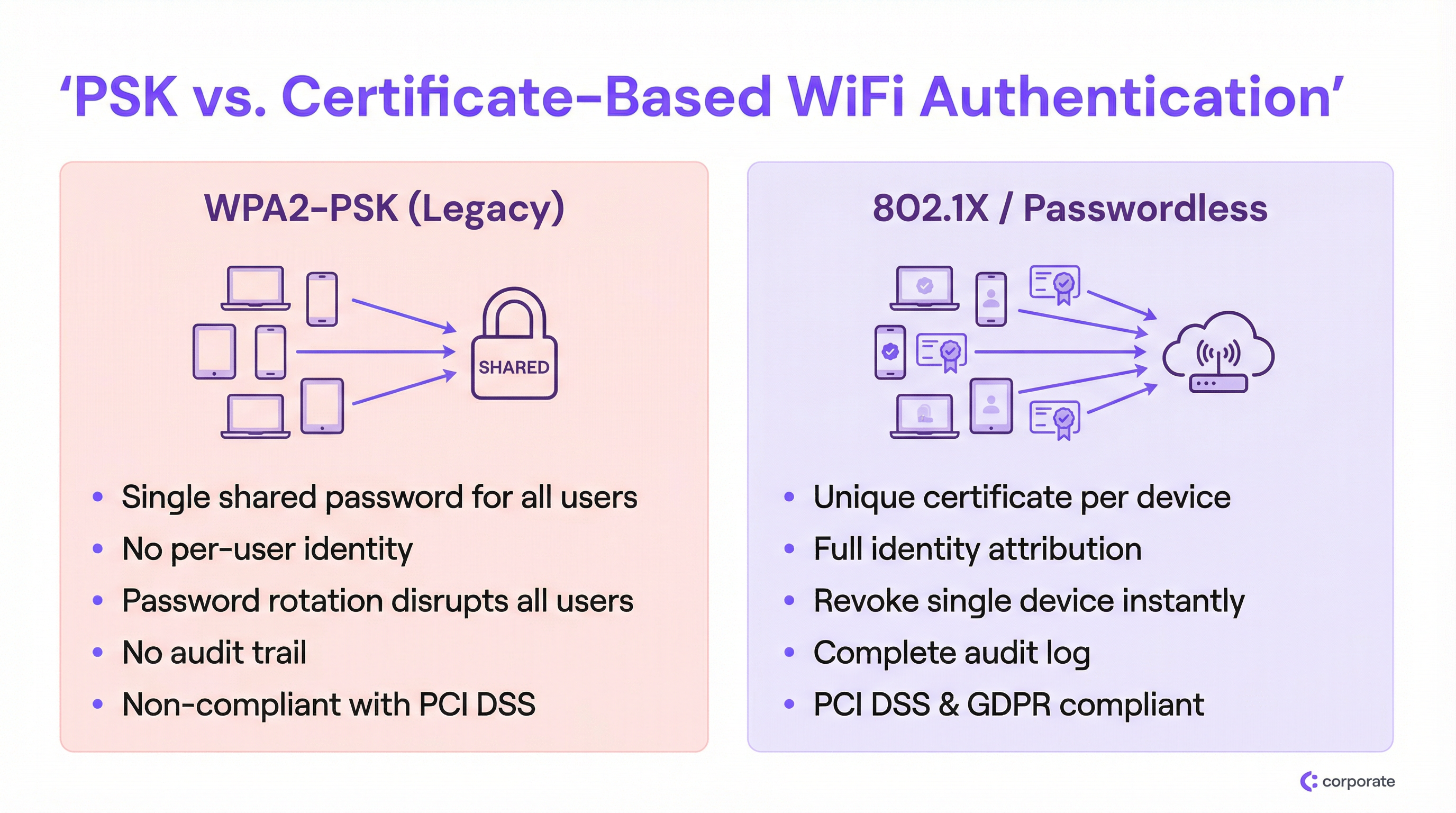
এন্টারপ্রাইজ সেটিংয়ে WPA2-PSK-এর মৌলিক ত্রুটি হলো ইউজার আইডেন্টিটি থেকে নেটওয়ার্ক অ্যাক্সেসের সম্পূর্ণ বিচ্ছিন্নতা। যখন প্রতিটি ডিভাইস একই ক্রিপ্টোগ্রাফিক কী ব্যবহার করে, তখন নেটওয়ার্ক একজন বৈধ কর্মচারী, একটি আপোসকৃত IoT ডিভাইস বা সোশ্যাল মিডিয়ার একটি ছবি থেকে পাসওয়ার্ড পাওয়া কোনো বাহ্যিক থ্রেট অ্যাক্টর-এর মধ্যে পার্থক্য করতে পারে না।
এটি তিনটি জটিল সমস্যা তৈরি করে যা ডেপ্লয়মেন্ট স্কেল করার সাথে সাথে আরও গুরুতর হয়ে ওঠে:
১. জিরো আইডেন্টিটি অ্যাট্রিবিউশন। PSK ডেপ্লয়মেন্টের অধীনে নেটওয়ার্ক লগ শুধুমাত্র MAC অ্যাড্রেস রেকর্ড করে, প্রকৃত ইউজার বা ডিভাইসের মালিককে নয়। একটি নিরাপত্তা ঘটনার সময়, এটি IT টিমকে সম্পূর্ণ অন্ধকারে রাখে। আপনি দেখতে পারেন যে একটি ডিভাইস অস্বাভাবিক আচরণ করছে; কিন্তু আপনি নির্ধারণ করতে পারেন না এটি কার ডিভাইস বা এটি কোন ব্যবসায়িক কাজ সম্পাদন করে।
২. রিভোকেশন ডিলেমা। যদি কোনো কর্মচারী প্রতিকূল পরিস্থিতিতে চলে যান বা কোনো ডিভাইস হারিয়ে যাওয়ার খবর পাওয়া যায়, তবে শেয়ারড PSK মডেলের অধীনে একমাত্র প্রতিকার হলো নেটওয়ার্কের প্রতিটি ডিভাইসের পাসওয়ার্ড পরিবর্তন করা। একটি ব্যস্ত Hospitality পরিবেশে — ৩০০টি স্টাফ ডিভাইস, ২০০টি IoT সেন্সর এবং ৫০টি পয়েন্ট-অফ-সেল টার্মিনাল সহ একটি হোটেলে — পাসওয়ার্ড রোটেশন একটি বহু-ঘণ্টার অপারেশনাল ইভেন্ট যা IT টিমগুলো যেকোনো মূল্যে এড়িয়ে চলতে চায়। এর ফলে পাসওয়ার্ডগুলো বছরের পর বছর অপরিবর্তিত থেকে যায়।
৩. কমপ্লায়েন্স ব্যর্থতা। PCI DSS রিকোয়ারমেন্ট ৮.২ ম্যান্ডেট দেয় যে কার্ডহোল্ডার ডেটা এনভায়রনমেন্টের সিস্টেমে অ্যাক্সেস অবশ্যই একজন ব্যক্তিগত ইউজার অ্যাকাউন্টের সাথে যুক্ত থাকতে হবে। একটি শেয়ারড পাসওয়ার্ড সংজ্ঞা অনুযায়ী নন-কমপ্লায়েন্ট। একইভাবে, GDPR-এর অ্যাকাউন্টেবিলিটি প্রিন্সিপাল অনুযায়ী সংস্থাগুলোকে ব্যক্তিগত ডেটা প্রসেস করা সিস্টেমে কারা অ্যাক্সেস করতে পারে তার ওপর নিয়ন্ত্রণ প্রদর্শন করতে হয়। একটি শেয়ারড WiFi পাসওয়ার্ড এমন কোনো প্রমাণ প্রদান করে না।
802.1X আর্কিটেকচার
IEEE 802.1X হলো পোর্ট-ভিত্তিক নেটওয়ার্ক অ্যাক্সেস কন্ট্রোল স্ট্যান্ডার্ড যা এন্টারপ্রাইজ WiFi নিরাপত্তার ভিত্তি। অ্যাক্সেস পয়েন্টে একটি সাধারণ পাসওয়ার্ড চেকের পরিবর্তে, 802.1X একটি তিন-পক্ষীয় অথেন্টিকেশন ফ্রেমওয়ার্ক প্রবর্তন করে:
| ভূমিকা | উপাদান | কাজ |
|---|---|---|
| Supplicant | ক্লায়েন্ট ডিভাইস (ল্যাপটপ, ফোন) | নেটওয়ার্ক অ্যাক্সেসের অনুরোধ করতে ক্রেডেনশিয়াল উপস্থাপন করে |
| Authenticator | ওয়্যারলেস অ্যাক্সেস পয়েন্ট | অথেন্টিকেশন সার্ভারে ক্রেডেনশিয়াল পাঠায়; অ্যাক্সেস সিদ্ধান্ত কার্যকর করে |
| Authentication Server | RADIUS সার্ভার | আইডেন্টিটি প্রোভাইডারের বিপরীতে ক্রেডেনশিয়াল যাচাই করে; একটি অ্যাক্সেস সিদ্ধান্ত প্রদান করে |
অ্যাক্সেস পয়েন্ট একটি পলিসি এনফোর্সমেন্ট পয়েন্ট হিসেবে কাজ করে, সিদ্ধান্ত গ্রহণকারী হিসেবে নয়। এই পৃথকীকরণ আর্কিটেকচারালি গুরুত্বপূর্ণ: এর অর্থ হলো অথেন্টিকেশন লজিক, আইডেন্টিটি ডেটা এবং অ্যাক্সেস পলিসি সবই কেন্দ্রীয়ভাবে থাকে, ডজন ডজন অ্যাক্সেস পয়েন্টে ছড়িয়ে থাকে না। মাল্টি-সাইট ডেপ্লয়মেন্টের জন্য এটি রূপান্তরমূলক। RADIUS আর্কিটেকচার অপশনগুলোর আরও গভীর অন্বেষণের জন্য আমাদের Cloud RADIUS vs On-Premise RADIUS: Decision Guide for IT Teams দেখুন।
EAP-TLS: পাসওয়ার্ডহীন WiFi অথেন্টিকেশনের গোল্ড স্ট্যান্ডার্ড
যদিও 802.1X এক্সটেনসিবল অথেন্টিকেশন প্রোটোকল (EAP)-এর মাধ্যমে একাধিক ক্রেডেনশিয়াল টাইপ সমর্থন করে, প্রকৃত পাসওয়ার্ডহীন অভিজ্ঞতা EAP-TLS (Transport Layer Security)-এর মাধ্যমে অর্জিত হয়। EAP-TLS মিউচুয়াল অথেন্টিকেশনের জন্য সম্পূর্ণ ডিজিটাল সার্টিফিকেটের ওপর নির্ভর করে — ক্লায়েন্ট সার্ভারের কাছে একটি সার্টিফিকেট উপস্থাপন করে এবং সার্ভার ক্লায়েন্টের কাছে একটি সার্টিফিকেট উপস্থাপন করে, যা উভয় দিকে বিশ্বাস স্থাপন করে।
সার্টিফিকেট লাইফসাইকেল নিম্নরূপ কাজ করে:
১. একটি সার্টিফিকেট অথরিটি (CA) — হয় অভ্যন্তরীণ (Microsoft AD CS) অথবা ক্লাউড-ভিত্তিক (SCEP/NDES via Intune) — প্রতিটি ম্যানেজড ডিভাইসে একটি ইউনিক ক্লায়েন্ট সার্টিফিকেট ইস্যু করে। ২. MDM (Intune, Jamf বা অনুরূপ) এর মাধ্যমে সার্টিফিকেটটি স্বয়ংক্রিয়ভাবে ডিভাইসে প্রোভিশন করা হয়। ৩. যখন ডিভাইসটি 802.1X SSID-তে কানেক্ট হয়, তখন এটি RADIUS সার্ভারের কাছে এই সার্টিফিকেটটি উপস্থাপন করে। ৪. RADIUS সার্ভার CA-এর ট্রাস্ট চেইনের বিপরীতে সার্টিফিকেটটি যাচাই করে এবং সার্টিফিকেট রিভোকেশন লিস্ট (CRL) বা OCSP রেসপন্ডার চেক করে। ৫. বৈধ হলে, RADIUS সার্ভার একটি Access-Accept প্রদান করে, ঐচ্ছিকভাবে VLAN অ্যাসাইনমেন্ট অ্যাট্রিবিউট সহ।
এই আর্কিটেকচার ক্রেডেনশিয়াল চুরি সম্পূর্ণভাবে নির্মূল করে। ইন্টারসেপ্ট, রিপ্লে বা ফিশ করার মতো কোনো পাসওয়ার্ড নেই। রিভোকেশন অত্যন্ত সুনির্দিষ্ট: CRL থেকে একটি সার্টিফিকেট সরিয়ে ফেলা বা আইডেন্টিটি প্রোভাইডারে (Azure AD, Okta, Google Workspace) ইউজার অ্যাকাউন্ট ডিজেবল করা অন্য কোনো ইউজারকে প্রভাবিত না করেই তাৎক্ষণিকভাবে সেই নির্দিষ্ট ডিভাইসটিকে ব্লক করে দেয়।
আইডেন্টিটি PSK (iPSK): গুরুত্বপূর্ণ ট্রানজিশন প্রযুক্তি
পূর্ণ 802.1X গ্রহণের ক্ষেত্রে সবচেয়ে উল্লেখযোগ্য বাধা হলো এন্টারপ্রাইজ ভেন্যুগুলোতে বৈচিত্র্যময় ডিভাইসের ল্যান্ডস্কেপ। স্মার্ট টিভি, ওয়্যারলেস POS টার্মিনাল, IP ক্যামেরা, এনভায়রনমেন্টাল Sensors এবং লেগাসি মেডিকেল বা ইন্ডাস্ট্রিয়াল ডিভাইসে প্রায়শই EAP-TLS সার্টিফিকেট প্রসেস করার জন্য প্রয়োজনীয় সফটওয়্যার সাপ্লিক্যান্ট থাকে না। এই ডিভাইসগুলোকে একটি শেয়ারড PSK SSID-তে বাধ্য করা পুরো মাইগ্রেশনকে ব্যাহত করবে।
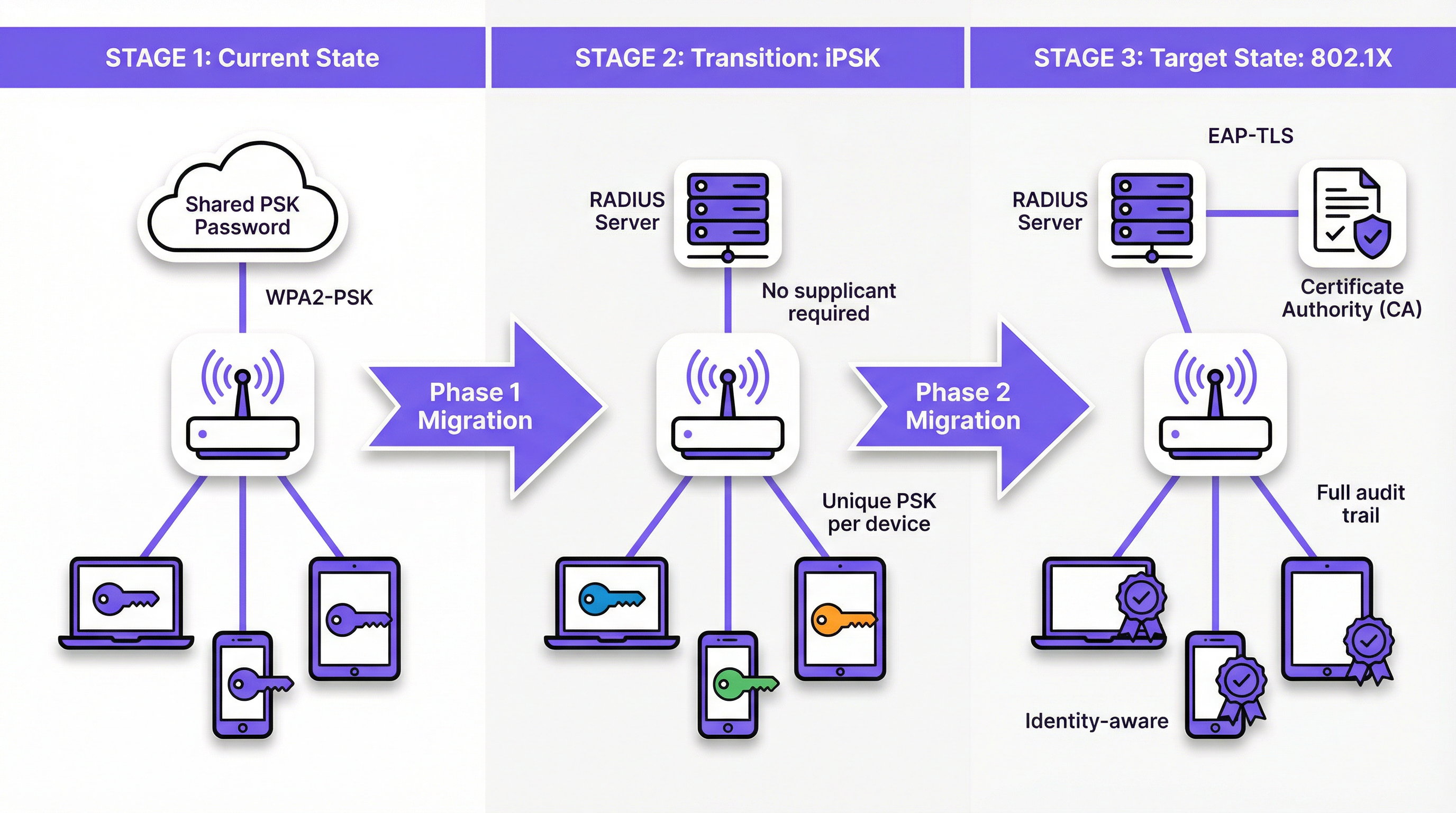
আইডেন্টিটি PSK (iPSK) — যা বিভিন্ন ভেন্ডর দ্বারা Multiple PSK (MPSK) বা Dynamic PSK (DPSK) হিসেবেও বাজারজাত করা হয় — এটি চমৎকারভাবে সমাধান করে। ডিভাইসের দৃষ্টিকোণ থেকে, এটি একটি পাসওয়ার্ড ব্যবহার করে একটি স্ট্যান্ডার্ড WPA2/WPA3-Personal নেটওয়ার্কে কানেক্ট হচ্ছে। নেটওয়ার্কের দৃষ্টিকোণ থেকে, RADIUS সার্ভার সেই নির্দিষ্ট ডিভাইসের MAC অ্যাড্রেস বা ইউজার গ্রুপের জন্য একটি ইউনিক ক্রিপ্টোগ্রাফিক কী বরাদ্দ করেছে। অ্যাক্সেস পয়েন্ট এই ম্যাপিং কার্যকর করে, নিশ্চিত করে যে প্রতিটি ডিভাইসের কী শুধুমাত্র সেই ডিভাইসের অনুমোদিত নেটওয়ার্ক সেগমেন্টে অ্যাক্সেস প্রদান করে।
একটি Retail এনভায়রনমেন্টের জন্য, এর অর্থ হলো প্রতিটি ওয়্যারলেস বারকোড স্ক্যানারের নিজস্ব ইউনিক iPSK থাকতে পারে, যা একটি ডেডিকেটেড IoT VLAN-এ বরাদ্দ করা হয়। যদি একটি স্ক্যানার চুরি হয়ে যায়, তবে শুধুমাত্র তার নির্দিষ্ট কী-টি রিভোক করা হয়। নেটওয়ার্কের বাকি অংশ অপ্রভাবিত থাকে।
ইমপ্লিমেন্টেশন গাইড
ধাপ ১: ডিসকভারি এবং সেগমেন্টেশন
যেকোনো নেটওয়ার্ক কনফিগারেশন পরিবর্তন করার আগে, আপনার WiFi Analytics প্ল্যাটফর্ম ব্যবহার করে একটি ব্যাপক ডিভাইস অডিট পরিচালনা করুন। লক্ষ্য হলো প্রতিটি কানেক্টেড ডিভাইসকে তিনটি ক্যাটাগরির একটিতে ভাগ করা:
- ম্যানেজড ডিভাইস: কর্পোরেট ল্যাপটপ, ট্যাবলেট এবং ফোন যা একটি MDM-এ এনরোল করা আছে। এগুলো পূর্ণ EAP-TLS 802.1X-এর জন্য উপযুক্ত।
- BYOD ডিভাইস: কর্মচারীদের ব্যক্তিগত ডিভাইস বা গেস্ট স্মার্টফোন। এগুলোর জন্য সার্টিফিকেট বা ইউনিক ক্রেডেনশিয়াল প্রোভিশন করতে একটি ঘর্ষণহীন অনবোর্ডিং পোর্টাল প্রয়োজন।
- হেডলেস/IoT ডিভাইস: স্মার্ট টিভি, POS টার্মিনাল, প্রিন্টার, সেন্সর এবং ইউজার ইন্টারফেস বা 802.1X সাপ্লিক্যান্ট নেই এমন যেকোনো ডিভাইস। এগুলো iPSK-এর জন্য উপযুক্ত।
এই সেগমেন্টেশন পরবর্তী প্রতিটি আর্কিটেকচারাল সিদ্ধান্তকে চালিত করে। এটি বাদ দেবেন না।
ধাপ ২: IoT এবং লেগাসি ডিভাইসের জন্য iPSK ডেপ্লয় করুন
সব হেডলেস ডিভাইসের জন্য MAC-to-PSK ম্যাপিং তৈরি করে iPSK সমর্থন করার জন্য আপনার RADIUS সার্ভার কনফিগার করুন। বেশিরভাগ এন্টারপ্রাইজ-গ্রেড RADIUS প্ল্যাটফর্ম (ক্লাউড RADIUS সমাধান সহ) এটি নেটিভলি সমর্থন করে। RADIUS অ্যাট্রিবিউট (Tunnel-Type, Tunnel-Medium-Type, Tunnel-Private-Group-ID) এর মাধ্যমে প্রতিটি ডিভাইস গ্রুপকে একটি উপযুক্ত VLAN-এ বরাদ্দ করুন।
বিশাল IoT এস্টেট সহ ভেন্যুগুলোর জন্য — যেমন শত শত স্মার্ট রুম ডিভাইস সহ একটি হোটেল — নতুন ডিভাইস চালু করার সময় iPSK প্রোভিশনিং অটোমেট করতে আপনার RADIUS সার্ভারকে প্রপার্টি ম্যানেজমেন্ট সিস্টেম (PMS) বা বিল্ডিং ম্যানেজমেন্ট সিস্টেম (BMS)-এর সাথে ইন্টিগ্রেট করুন।
ধাপ ৩: ম্যানেজড ডিভাইসের জন্য 802.1X ডেপ্লয় করুন
MDM-ম্যানেজড ডিভাইসের জন্য, মাইগ্রেশনটি এন্ড ইউজারের কাছে সম্পূর্ণ স্বচ্ছ হওয়া উচিত। আপনার MDM কনফিগার করুন যাতে নিচের বিষয়গুলো একসাথে পুশ করা যায়:
১. ক্লায়েন্ট সার্টিফিকেট (SCEP বা NDES-এর মাধ্যমে আপনার CA দ্বারা ইস্যু করা)। ২. WiFi প্রোফাইল যা 802.1X SSID, অথেন্টিকেশন মেথড হিসেবে EAP-TLS এবং সার্ভার ভ্যালিডেশনের জন্য RADIUS সার্ভার সার্টিফিকেট নির্দিষ্ট করে।
একবার প্রোফাইলটি ডেপ্লয় হয়ে গেলে, ডিভাইসগুলো ব্যাকগ্রাউন্ডে স্বয়ংক্রিয়ভাবে নতুন 802.1X SSID-তে অথেন্টিকেট হবে। ট্রানজিশন পিরিয়ডে সমান্তরালভাবে লেগাসি PSK SSID চালান এবং আপনার RADIUS লগের মাধ্যমে অ্যাডপশন মনিটর করুন।
ধাপ ৪: BYOD অনবোর্ডিং পোর্টাল
কর্মচারীদের ব্যক্তিগত ডিভাইস এবং গেস্ট অ্যাক্সেসের জন্য একটি নেটওয়ার্ক অনবোর্ডিং পোর্টাল ডেপ্লয় করুন। ইউজার এক্সপেরিয়েন্স এমন হওয়া উচিত: একটি অস্থায়ী অনবোর্ডিং SSID-তে কানেক্ট হওয়া → কর্পোরেট SSO দিয়ে অথেন্টিকেট করা → পোর্টাল স্বয়ংক্রিয়ভাবে সার্টিফিকেট এবং WiFi প্রোফাইল প্রোভিশন করা → ডিভাইসটি নির্বিঘ্নে 802.1X SSID-তে কানেক্ট হওয়া। এই প্রসেসে ইউজারের কোনো টেকনিক্যাল জ্ঞানের প্রয়োজন হওয়া উচিত নয়। গেস্ট-ফেসিং ডেপ্লয়মেন্টের ক্ষেত্রে প্রযোজ্য পোর্টাল ডিজাইন প্রিন্সিপালের জন্য Modern Hospitality WiFi Solutions Your Guests Deserve দেখুন।
ধাপ ৫: লেগাসি PSK SSID ডিকমিশন করুন
একবার মনিটরিং নিশ্চিত করলে যে সমস্ত ডিভাইস 802.1X SSID বা একটি iPSK-এনাবলড SSID-তে মাইগ্রেট করেছে, তখন লেগাসি শেয়ারড PSK নেটওয়ার্ক ডিকমিশন করার পরিকল্পনা করুন। স্টেকহোল্ডারদের আগে থেকে কাটওভারের তারিখ জানিয়ে দিন এবং প্রথম ৪৮ ঘণ্টার জন্য একটি রোলব্যাক প্ল্যান রাখুন।
বেস্ট প্র্যাকটিস
নিরাপত্তার জন্য কখনোই MAC অথেন্টিকেশন বাইপাস (MAB)-এর ওপর নির্ভর করবেন না। যদিও IoT অনবোর্ডিংয়ের জন্য MAB ব্যাপকভাবে ব্যবহৃত হয়, এটি কোনো প্রকৃত নিরাপত্তা প্রদান করে না। MAC অ্যাড্রেসগুলো প্লেইন টেক্সটে ট্রান্সমিট হয় এবং সহজেই স্পুফ করা যায়। যেকোনো অ্যাটাকার যে একটি ডিভাইসের MAC অ্যাড্রেস পর্যবেক্ষণ করতে পারে সে সেটির ছদ্মবেশ ধারণ করতে পারে। MAB-এর পরিবর্তে সর্বদা iPSK-কে প্রাধান্য দিন, যা একটি ইউনিক ক্রিপ্টোগ্রাফিক কী কার্যকর করে।
সার্টিফিকেট লাইফসাইকেল ম্যানেজমেন্ট অটোমেট করুন। সার্টিফিকেটের মেয়াদ শেষ হয়। একটি মেয়াদোত্তীর্ণ ক্লায়েন্ট সার্টিফিকেট নেটওয়ার্কের দৃষ্টিকোণ থেকে একটি রিভোক করা সার্টিফিকেটের মতোই — ডিভাইসটি কেবল কানেক্টিভিটি হারায়। আপনার PKI এবং MDM প্ল্যাটফর্মে প্রোঅ্যাক্টিভ অ্যালার্টিং ইমপ্লিমেন্ট করুন যাতে সার্টিফিকেটের মেয়াদ শেষ হওয়ার অনেক আগেই সেগুলো রিনিউ করা যায়। ৩০ দিনের রিনিউয়াল উইন্ডো সহ একটি ৯০ দিনের সার্টিফিকেট একটি সাধারণ এবং বুদ্ধিমান কনফিগারেশন।
ক্লায়েন্টে RADIUS সার্ভার সার্টিফিকেট ভ্যালিডেট করুন। একটি প্রায়শই উপেক্ষিত কনফিগারেশন হলো সাপ্লিক্যান্টকে RADIUS সার্ভারের সার্টিফিকেট ভ্যালিডেট করার নির্দেশ দেওয়া। এটি ছাড়া, ডিভাইসগুলো রোগ AP অ্যাটাকের শিকার হতে পারে যেখানে একজন অ্যাটাকার ক্রেডেনশিয়াল সংগ্রহের জন্য একটি ফেক RADIUS সার্ভার তৈরি করে। MDM দ্বারা পুশ করা WiFi প্রোফাইলে সর্বদা ট্রাস্টেড CA এবং সার্ভার সার্টিফিকেটের নাম কনফিগার করুন।
প্রথম দিন থেকেই ডায়নামিক VLAN অ্যাসাইনমেন্ট ইমপ্লিমেন্ট করুন। ইউজার এবং ডিভাইসগুলোকে তাদের আইডেন্টিটি বা গ্রুপ মেম্বারশিপের ভিত্তিতে উপযুক্ত VLAN-এ সেগমেন্ট করতে RADIUS অথরাইজেশন অ্যাট্রিবিউট ব্যবহার করুন। স্টাফ ডিভাইস, গেস্ট ডিভাইস, IoT ডিভাইস এবং POS টার্মিনাল কখনোই একটি ব্রডকাস্ট ডোমেইন শেয়ার করা উচিত নয়। এটি কোনো নিরাপত্তার আপোসের ক্ষেত্রে ল্যাটারাল মুভমেন্টকে সীমাবদ্ধ করে।
নতুন ডেপ্লয়মেন্টের জন্য WPA3-Enterprise-এর সাথে সামঞ্জস্য বজায় রাখুন। নতুন অ্যাক্সেস পয়েন্ট ডেপ্লয়মেন্টের জন্য, প্রকিউরমেন্ট রিকোয়ারমেন্টে WPA3-Enterprise (192-bit mode) নির্দিষ্ট করুন। এটি CNSA Suite-কমপ্লায়েন্ট ক্রিপ্টোগ্রাফিক অ্যালগরিদম প্রদান করে এবং লেগাসি দুর্বলতাগুলো দূর করে। হার্ডওয়্যার সিলেকশন গাইডের জন্য Wireless Access Points Definition Your Ultimate 2026 Guide দেখুন। SD-WAN ইন্টিগ্রেশন বিবেচনার জন্য The Core SD WAN Benefits for Modern Businesses দেখুন।
ট্রাবলশুটিং এবং রিস্ক মিটিগেশন
সার্টিফিকেট এক্সপায়ারেশন আউটেজ
এটি লঞ্চ-পরবর্তী 802.1X ডেপ্লয়মেন্ট ব্যর্থতার একক সবচেয়ে সাধারণ কারণ। লক্ষণ: ডিভাইসগুলো হঠাৎ করে একসাথে WiFi কানেক্টিভিটি হারায়, সাধারণত একটি নির্দিষ্ট তারিখে। মূল কারণ: ক্লায়েন্ট বা RADIUS সার্ভার সার্টিফিকেটের মেয়াদ শেষ হয়ে গেছে।
প্রতিকার: মনিটরিং ইমপ্লিমেন্ট করুন যা IT টিমকে অ্যালার্ট করবে যখন চেইনের যেকোনো সার্টিফিকেট (CA root, intermediate, server, বা ক্লায়েন্ট সার্টিফিকেটের একটি উল্লেখযোগ্য অংশ) মেয়াদ শেষ হওয়ার ৬০ দিনের মধ্যে থাকবে। MDM/SCEP-এর মাধ্যমে ক্লায়েন্ট সার্টিফিকেট রিনিউয়াল অটোমেট করুন।
RADIUS সার্ভার হাই অ্যাভেইলেবিলিটি
যদি RADIUS সার্ভার আনরিচেবল হয়, তবে কোনো ডিভাইস অথেন্টিকেট করতে পারবে না এবং পুরো ওয়্যারলেস নেটওয়ার্ক অ্যাক্সেস অযোগ্য হয়ে পড়বে। একটি হোটেল বা রিটেইল এনভায়রনমেন্টে, এটি একটি গুরুতর অপারেশনাল ব্যর্থতা।
প্রতিকার: ফেইলওভার পেয়ার হিসেবে কনফিগার করা অন্তত দুটি RADIUS সার্ভার (প্রাইমারি এবং সেকেন্ডারি) ডেপ্লয় করুন। ক্লাউড RADIUS-এর জন্য, নিশ্চিত করুন যে প্রোভাইডার একটি জিওগ্রাফিক্যালি রিডান্ড্যান্ট আর্কিটেকচার অফার করে যার SLA আপনার অপারেশনাল রিকোয়ারমেন্ট পূরণ করে। প্রাইমারি টাইমআউটের ৩-৫ সেকেন্ডের মধ্যে সেকেন্ডারি RADIUS সার্ভারে চেষ্টা করার জন্য সমস্ত অ্যাক্সেস পয়েন্ট কনফিগার করুন।
BYOD ডিভাইসে সাপ্লিক্যান্ট মিসকনফিগারেশন
যখন ইউজাররা ম্যানুয়ালি তাদের ডিভাইসগুলো 802.1X-এর জন্য কনফিগার করে (অটোমেটেড অনবোর্ডিং পোর্টাল ব্যবহারের পরিবর্তে), তারা প্রায়শই ভুল EAP টাইপ সিলেক্ট করে, সার্ভার সার্টিফিকেট ভ্যালিডেশন স্কিপ করে বা ভুল আইডেন্টিটি স্ট্রিং এন্টার করে। এটি প্রচুর পরিমাণে হেল্পডেস্ক টিকিট তৈরি করে।
প্রতিকার: ম্যানুয়াল কনফিগারেশন সম্পূর্ণভাবে নির্মূল করুন। সমস্ত BYOD ডিভাইস অবশ্যই অটোমেটেড পোর্টালের মাধ্যমে অনবোর্ড করতে হবে, যা একটি সম্পূর্ণ, ভ্যালিডেটেড WiFi প্রোফাইল পুশ করে। ইউজারদের ম্যানুয়ালি 802.1X SSID অ্যাড করার অপশনটি ডিজেবল করে দিন।
IoT ডিভাইস MAC অ্যাড্রেস রোটেশন
আধুনিক মোবাইল অপারেটিং সিস্টেমগুলো (iOS 14+, Android 10+) ডিফল্টভাবে র্যান্ডমাইজড MAC অ্যাড্রেস ব্যবহার করে, যা iPSK MAC-to-PSK ম্যাপিংকে ভেঙে দেয়।
প্রতিকার: কর্পোরেট-ম্যানেজড BYOD ডিভাইসের জন্য, কর্পোরেট SSID-তে MAC র্যান্ডমাইজেশন ডিজেবল করতে MDM ব্যবহার করুন। কনজিউমার IoT ডিভাইসের জন্য, ডিভাইসটিকে তার নেটওয়ার্ক সেটিংসে একটি পারসিস্টেন্ট MAC অ্যাড্রেস ব্যবহার করতে কনফিগার করুন। গেস্ট ডিভাইসের জন্য, একটি আলাদা অনবোর্ডিং ফ্লো ব্যবহার করুন যা MAC অ্যাড্রেস ম্যাপিংয়ের ওপর নির্ভর না করে একটি ইউনিক ক্রেডেনশিয়াল প্রোভিশন করে।
ROI এবং ব্যবসায়িক প্রভাব
পাসওয়ার্ডহীন WiFi অথেন্টিকেশনে স্থানান্তরের ব্যবসায়িক কেস একাধিক দিক থেকে বাধ্যতামূলক:
| প্রভাবের ক্ষেত্র | PSK বর্তমান অবস্থা | মাইগ্রেশন পরবর্তী অবস্থা |
|---|---|---|
| পাসওয়ার্ড রোটেশন খরচ | প্রতি রোটেশনে ৪–৮ ঘণ্টা IT সময়, সাইট সংখ্যা দ্বারা গুণিত | শূন্য — রোটেশন করার মতো কোনো শেয়ারড পাসওয়ার্ড নেই |
| অফবোর্ডিং নিরাপত্তা | ম্যানুয়াল, বিঘ্নিত, প্রায়ই বিলম্বিত | স্বয়ংক্রিয়, তাৎক্ষণিক, অন্যদের জন্য শূন্য বিঘ্ন |
| ইনসিডেন্ট রেসপন্স | ট্রাফিককে নির্দিষ্ট ইউজারের সাথে যুক্ত করা যায় না | পূর্ণ আইডেন্টিটি অ্যাট্রিবিউশন, তাৎক্ষণিক ডিভাইস আইসোলেশন |
| কমপ্লায়েন্স অবস্থা | PCI DSS Req. 8.2 এর সাথে নন-কমপ্লায়েন্ট | কমপ্লায়েন্ট; পূর্ণ অডিট ট্রেইল উপলব্ধ |
| হেল্পডেস্ক টিকিট ভলিউম | উচ্চ — পাসওয়ার্ড শেয়ারিং, রোটেশন বিভ্রান্তি | কম — স্বয়ংক্রিয় অনবোর্ডিং, ভুলে যাওয়ার মতো কোনো পাসওয়ার্ড নেই |
একটি ৫০-লোকেশন রিটেইল চেইন যা ত্রৈমাসিক ভিত্তিতে একটি শেয়ারড PSK রোটেট করে, তাদের জন্য শুধুমাত্র অপারেশনাল সেভিং — ৫০টি সাইট জুড়ে চারটি বার্ষিক পাসওয়ার্ড রোটেশন ইভেন্ট নির্মূল করা — প্রতি বছর শত শত ঘণ্টা IT সময়ের সাশ্রয় করতে পারে। কমপ্লায়েন্স রিস্ক মিটিগেশন ভ্যালু পরিমাপ করা কঠিন কিন্তু উল্লেখযোগ্যভাবে বেশি প্রভাবশালী: অপর্যাপ্ত অ্যাক্সেস কন্ট্রোল সম্পর্কিত একটি PCI DSS ব্রিচ ফাইন্ডিং-এর ফলে জরিমানা, কার্ড স্কিম পেনাল্টি এবং প্রতিকার খরচ হতে পারে যা মাইগ্রেশনের খরচকে ছাড়িয়ে যায়।
নিরাপত্তার বাইরে, আইডেন্টিটি-অ্যাওয়ার নেটওয়ার্কগুলো উল্লেখযোগ্য অপারেশনাল ইন্টেলিজেন্স আনলক করে। যখন প্রতিটি ডিভাইসের একটি আইডেন্টিটি থাকে, তখন আপনার WiFi Analytics প্ল্যাটফর্ম ডিভাইসের ধরন, ডোয়েল টাইম এবং নেটওয়ার্ক ব্যবহারের প্যাটার্ন সম্পর্কে আরও সমৃদ্ধ ডেটা সরবরাহ করতে পারে। এই ডেটা সরাসরি ভেন্যু অপ্টিমাইজেশন, স্টাফিং সিদ্ধান্ত এবং সেই ধরণের পার্সোনালাইজড এক্সপেরিয়েন্সে সাহায্য করে যা Transport হাব এবং বড় ভেন্যুগুলোর কাছ থেকে ক্রমবর্ধমানভাবে প্রত্যাশিত।
শেয়ারড পাসওয়ার্ডের বাইরে যাওয়া কেবল একটি নিরাপত্তা আপগ্রেড নয়। এটি আপনার নেটওয়ার্ক ইনফ্রাস্ট্রাকচারের অপারেশনাল ম্যাচিউরিটি এবং স্থিতিস্থাপকতায় একটি মৌলিক বিনিয়োগ।
মূল শব্দ ও সংজ্ঞা
Pre-Shared Key (PSK)
A single password shared among all users and devices to authenticate to a WiFi network using WPA2-Personal or WPA3-Personal.
The legacy default for venue WiFi. Operationally simple to deploy but fundamentally insecure at enterprise scale due to the absence of per-user identity and the impossibility of targeted revocation.
IEEE 802.1X
An IEEE standard for port-based network access control that provides an authentication mechanism for devices attempting to connect to a LAN or WLAN, requiring each device to authenticate individually against a central authentication server.
The foundational standard for enterprise WiFi security. IT teams encounter this when replacing shared passwords with identity-based access control, and it is a prerequisite for EAP-TLS deployment.
EAP-TLS (Extensible Authentication Protocol — Transport Layer Security)
An 802.1X authentication method that uses digital certificates on both the client device and the authentication server for mutual authentication, with no password involved.
The gold standard for passwordless WiFi. Considered the most secure EAP method because it eliminates credential theft entirely — there is no password to phish, replay, or brute-force.
RADIUS (Remote Authentication Dial-In User Service)
A networking protocol providing centralised Authentication, Authorisation, and Accounting (AAA) management for network access. In WiFi deployments, the RADIUS server sits between the access point and the Identity Provider.
The core infrastructure component of any 802.1X deployment. IT teams must decide between on-premise RADIUS (e.g., Microsoft NPS) and cloud RADIUS solutions, a decision that significantly impacts integration complexity and operational overhead.
Identity PSK (iPSK)
A WiFi authentication feature that assigns a unique pre-shared key to each individual device or user group via a RADIUS server, while presenting as a standard WPA2/WPA3-Personal network to connecting devices.
The critical transition technology for securing IoT and legacy devices that cannot support 802.1X supplicants. Provides per-device identity and revocation without requiring any changes to the connecting device.
Supplicant
The software component on a client device (laptop, smartphone) that implements the EAP protocol and communicates with the authenticator (access point) to present credentials during 802.1X authentication.
IoT devices, legacy POS terminals, and many consumer electronics lack a supplicant, which is the primary reason they cannot use standard 802.1X and require alternatives such as iPSK.
MAC Authentication Bypass (MAB)
A network access method that grants connectivity based solely on a device's MAC (Media Access Control) address, without any cryptographic credential.
Widely used as a fallback for headless devices but inherently insecure, as MAC addresses are broadcast in plain text and easily spoofed. Should be replaced by iPSK wherever possible.
Dynamic VLAN Assignment
A RADIUS authorisation feature that instructs the access point to place an authenticated device into a specific Virtual LAN (VLAN) based on the user's identity, group membership, or device type, as determined by the RADIUS server.
Essential for network segmentation in multi-tenant or mixed-use environments. Ensures that guest devices, corporate laptops, IoT sensors, and POS terminals are automatically isolated from each other without requiring separate physical SSIDs for each segment.
Certificate Revocation List (CRL)
A regularly published list maintained by a Certificate Authority (CA) that identifies certificates that have been revoked before their scheduled expiry date.
The mechanism by which RADIUS servers verify that a client certificate has not been revoked. IT teams must ensure RADIUS servers can reach the CRL distribution point; an inaccessible CRL can cause authentication failures or security gaps depending on the configured fail-open/fail-closed policy.
EAP-PEAP (Protected Extensible Authentication Protocol)
An 802.1X authentication method that creates an encrypted TLS tunnel and then authenticates the user with a username and password inside that tunnel.
A common stepping stone from PSK to full certificate authentication. More secure than PSK but still relies on passwords, making it vulnerable to credential theft. EAP-TLS is the preferred end-state for passwordless deployments.
কেস স্টাডিজ
A 300-room luxury hotel currently uses a single shared WPA2-PSK for all back-of-house staff devices: tablets for housekeeping, wireless POS terminals for food and beverage, and maintenance laptops. The IT Director needs to secure this network to comply with PCI DSS within the current quarter but cannot afford any downtime for operational staff. How should they approach the migration?
The migration should proceed in four steps, running the new and legacy networks in parallel throughout the transition.
Step 1 — Deploy Cloud RADIUS. Implement a cloud-based RADIUS server integrated with the hotel's Azure Active Directory. This provides the authentication backbone without requiring on-premise hardware.
Step 2 — Implement iPSK for POS Terminals and IoT. For the wireless POS terminals that cannot support 802.1X supplicants, configure the RADIUS server to issue unique iPSKs based on each terminal's MAC address. Assign all POS devices to a dedicated VLAN isolated from the general staff network. This immediately addresses PCI DSS segmentation requirements without touching the devices themselves.
Step 3 — MDM Deployment for Tablets and Laptops. Use the hotel's MDM (Intune) to silently push EAP-TLS certificates and the new 802.1X WiFi profile to the housekeeping tablets and maintenance laptops. Devices will automatically migrate to the new SSID without any user action required.
Step 4 — Monitor and Decommission. Run the legacy PSK SSID alongside the new 802.1X and iPSK SSIDs for two weeks. Monitor RADIUS authentication logs to confirm all devices have migrated. Once confirmed, disable the legacy SSID.
Expected outcome: PCI DSS compliance achieved within six weeks; zero operational downtime; IT team gains full device identity visibility and per-device revocation capability.
A national retail chain with 500 locations uses a shared WPA2-PSK for the corporate back-office WiFi network. When an area manager leaves the company, IT must coordinate a password change across all stores, which frequently results in store managers being locked out and losing access to inventory management systems during trading hours. The CISO wants to eliminate this risk entirely. What is the recommended architecture?
The solution is a full 802.1X deployment with EAP-TLS, integrated with the company's Okta Identity Provider.
Architecture:
- Deploy a cloud RADIUS service integrated with Okta via RADIUS proxy or native RADIUS protocol.
- Use Intune to push client certificates and the 802.1X WiFi profile to all corporate-managed Windows laptops and tablets across all 500 locations.
- Configure the RADIUS server to perform dynamic VLAN assignment based on Okta group membership (e.g., Store Manager, Area Manager, IT Admin).
Offboarding Integration:
- When HR deactivates a departing employee's Okta account, the RADIUS server immediately rejects any new authentication attempts from that user's certificate.
- The employee loses WiFi access across all 500 locations simultaneously, within seconds of account deactivation.
- All other employees remain connected without interruption.
BYOD Consideration:
- For employees who access the corporate WiFi on personal devices, deploy a self-service onboarding portal authenticated via Okta SSO. The portal provisions a unique certificate to the personal device, which is also tied to the Okta account and revoked automatically on offboarding.
দৃশ্যপট বিশ্লেষণ
Q1. A university campus needs to secure the wireless network in student dormitories. Students bring a mix of laptops, smartphones, gaming consoles, and smart speakers. The university wants to ensure each student's devices are isolated from other students' devices, but cannot install MDM profiles on personal equipment. Which authentication strategy should be deployed, and how should device isolation be achieved?
💡 ইঙ্গিত:Gaming consoles and smart speakers lack 802.1X supplicants. Consider how iPSK combined with dynamic VLAN assignment can achieve per-student isolation without requiring MDM.
প্রস্তাবিত পদ্ধতি দেখুন
Deploy an iPSK solution integrated with a self-service onboarding portal. Students authenticate to the portal using their university SSO credentials and register the MAC addresses of their devices (including consoles and smart speakers, which lack 802.1X supplicants). The RADIUS server generates a unique iPSK for each student and maps all registered MAC addresses to that student's key. Dynamic VLAN assignment places all devices using a given student's iPSK into a personal micro-segment or private VLAN (PVLAN), preventing lateral communication between students' devices. For laptops and smartphones that support 802.1X, the onboarding portal can optionally provision a certificate and WiFi profile for EAP-TLS, providing stronger security for those devices while maintaining iPSK compatibility for consoles and smart speakers.
Q2. A hospital is auditing its wireless network for HIPAA compliance. They discover that 50 wireless infusion pumps are connected using a shared WPA2-PSK because the vendor states the pumps do not support EAP-TLS. The security team proposes moving the pumps to MAC Authentication Bypass (MAB) on an open (unencrypted) network segment to remove the shared password from the clinical environment. Is this the correct approach? If not, what should they do instead?
💡 ইঙ্গিত:Evaluate the security implications of removing encryption versus the risk of MAC address spoofing. Consider what iPSK provides that MAB does not.
প্রস্তাবিত পদ্ধতি দেখুন
No. Moving to MAB on an open network is a significant security regression. It removes over-the-air encryption entirely, meaning all traffic from the infusion pumps — including any clinical data — is transmitted in plain text and can be intercepted by anyone within radio range. Additionally, MAC addresses are trivially spoofed, meaning an attacker could impersonate a pump to gain access to the clinical network segment. The correct approach is iPSK. The infusion pumps will connect to what appears to be a standard WPA2-PSK network, maintaining over-the-air encryption. The RADIUS server assigns a unique, complex PSK to each pump's MAC address. This provides individual device identity (each pump is distinguishable in logs), targeted revocation (a single pump can be isolated without affecting others), and maintained encryption — all without requiring any changes to the pump firmware or vendor support.
Q3. You have successfully deployed 802.1X with EAP-TLS for 2,000 corporate-managed laptops. You manually tested one laptop and it connected perfectly. You then used your MDM to push the WiFi profile to all 2,000 devices. The following morning, the helpdesk receives hundreds of calls reporting that no laptops can connect to the corporate WiFi. What are the two most likely root causes, and how do you diagnose and resolve each?
💡 ইঙ্গিত:EAP-TLS requires two things from the client: a valid client certificate to present to the server, and the ability to validate the server's certificate. Consider whether the MDM push may have delivered the WiFi profile without the necessary certificates.
প্রস্তাবিত পদ্ধতি দেখুন
The two most likely root causes are: (1) The MDM pushed the WiFi profile but failed to provision the client certificates to the devices. The profile instructs the supplicant to use EAP-TLS, but without a client certificate to present, authentication fails immediately. Diagnose by checking the MDM deployment report for certificate provisioning status and reviewing the RADIUS server logs for 'no certificate presented' errors. Resolve by ensuring the MDM certificate profile (SCEP or PKCS) is deployed as a dependency before the WiFi profile. (2) The devices do not trust the RADIUS server's certificate. The WiFi profile specifies EAP-TLS but does not include the trusted CA certificate for server validation, causing the supplicant to reject the RADIUS server's certificate. Diagnose by checking supplicant logs on an affected device for 'server certificate validation failed' errors. Resolve by adding the root CA certificate (or the specific RADIUS server certificate) to the trusted certificates section of the MDM WiFi profile. The manual test succeeded because the test device may have had the CA certificate already installed from a previous configuration, or server validation was not enforced during the manual test.
Q4. A conference centre hosts 200 events per year, ranging from day-long trade shows to week-long residential conferences. Each event has a different organiser who requires branded WiFi for their attendees. Currently, the venue creates a new shared PSK for each event. The venue's IT manager wants to move to a more scalable, secure model. What architecture would you recommend?
💡 ইঙ্গিত:Consider the temporary, event-scoped nature of access and the need for branding. Think about how iPSK combined with a captive portal can serve both requirements.
প্রস্তাবিত পদ্ধতি দেখুন
Implement a dynamic iPSK model integrated with the venue's event management system. For each event, the system automatically generates a unique iPSK scoped to the event's duration. Attendees receive this key via the event registration confirmation or the organiser's branded onboarding portal. The RADIUS server maps the event's iPSK to a dedicated VLAN for that event, ensuring complete isolation between concurrent events. When the event ends, the iPSK is automatically expired, requiring no manual cleanup. For organisers who require a branded captive portal experience, deploy a portal layer on top of the iPSK SSID that presents the organiser's branding before granting full network access. This model eliminates the manual PSK management overhead, provides per-event network isolation, and gives the IT team a complete audit trail of which devices connected to which event.
মূল বিষয়সমূহ
- ✓Shared PSKs provide zero identity attribution — the network cannot distinguish between a legitimate user and a threat actor, making audit trails and compliance impossible.
- ✓IEEE 802.1X with EAP-TLS is the enterprise standard for passwordless WiFi, replacing passwords with unique digital certificates that cannot be phished, replayed, or shared.
- ✓Identity PSK (iPSK) is the essential transition technology for IoT and legacy devices that lack 802.1X supplicants — it provides per-device identity and targeted revocation without requiring any changes to the connecting device.
- ✓Never use MAC Authentication Bypass (MAB) as a security control — MAC addresses are trivially spoofed; always prefer iPSK for headless device authentication.
- ✓Automate certificate lifecycle management via MDM and PKI integration; expired certificates are the most common cause of post-deployment 802.1X outages.
- ✓Migration should be phased: discover and segment devices first, bridge IoT to iPSK, migrate managed devices to EAP-TLS via MDM, then decommission the legacy PSK SSID.
- ✓Moving to identity-based authentication unlocks downstream benefits beyond security: richer WiFi analytics, automated offboarding, dynamic network segmentation, and a defensible compliance posture under PCI DSS and GDPR.




