

Passwortlose WiFi-Authentifizierung: Jenseits von Pre-Shared Keys
Dieser Leitfaden bietet IT-Managern, Netzwerkarchitekten und Leitern des Standortbetriebs einen praktischen Fahrplan zur Eliminierung gemeinsamer WiFi-Passwörter und zur Migration auf eine identitätsbasierte, zertifikatsgesteuerte Authentifizierung. Er behandelt die Sicherheits- und Compliance-Mängel von PSK-basierten Netzwerken, die technische Architektur von 802.1X und EAP-TLS sowie die Rolle von Identity PSK (iPSK) als kritische Übergangstechnologie für IoT- und Legacy-Geräte. Betreiber von Standorten in den Bereichen Hospitality, Retail und im öffentlichen Sektor finden hier umsetzbare Migrationsstrategien, reale Implementierungsszenarien und messbare Geschäftsergebnisse zur Rechtfertigung der Investition.
🎧 Diesen Leitfaden anhören
Transkript anzeigen

Management-Zusammenfassung
Der Pre-Shared Key (PSK) ist seit über zwei Jahrzehnten der Standardmechanismus zur Sicherung drahtloser Netzwerke in Unternehmensstandorten. In einem Hotel mit 200 Zimmern, einer nationalen Einzelhandelskette oder einem Konferenzzentrum mit Tausenden von Besuchern ist das gemeinsame WiFi-Passwort ein vertrauter Bestandteil – auf Schlüsselkarten gedruckt, auf Bildschirmen angezeigt und an Rezeptionen geflüstert. Doch diese Allgegenwart verschleiert eine kritische Schwachstelle: PSKs bieten keine Identität, keinen Audit-Trail und keine sinnvolle Widerrufsmöglichkeit in großem Maßstab.
Für IT-Leiter, die unter PCI DSS, GDPR oder internen Sicherheitsvorgaben arbeiten, ist das gemeinsame Passwort keine vertretbare Position mehr. Dieser Leitfaden stellt den Business Case und den technischen Fahrplan für die Migration zur passwortlosen WiFi-Authentifizierung vor – insbesondere IEEE 802.1X mit EAP-TLS zertifikatsbasierter Authentifizierung, unterstützt durch Identity PSK (iPSK) als Übergangsmechanismus für Geräte, die keine Enterprise-Authentifizierungsprotokolle unterstützen. Unabhängig davon, ob Sie Guest WiFi über einen Hotelbestand verwalten oder ein Einzelhandelsnetzwerk mit Hunderten von Standorten sichern, der Weg nach vorne ist klar, erreichbar und messbar.
Technischer Deep-Dive
Warum PSKs auf Unternehmensebene scheitern
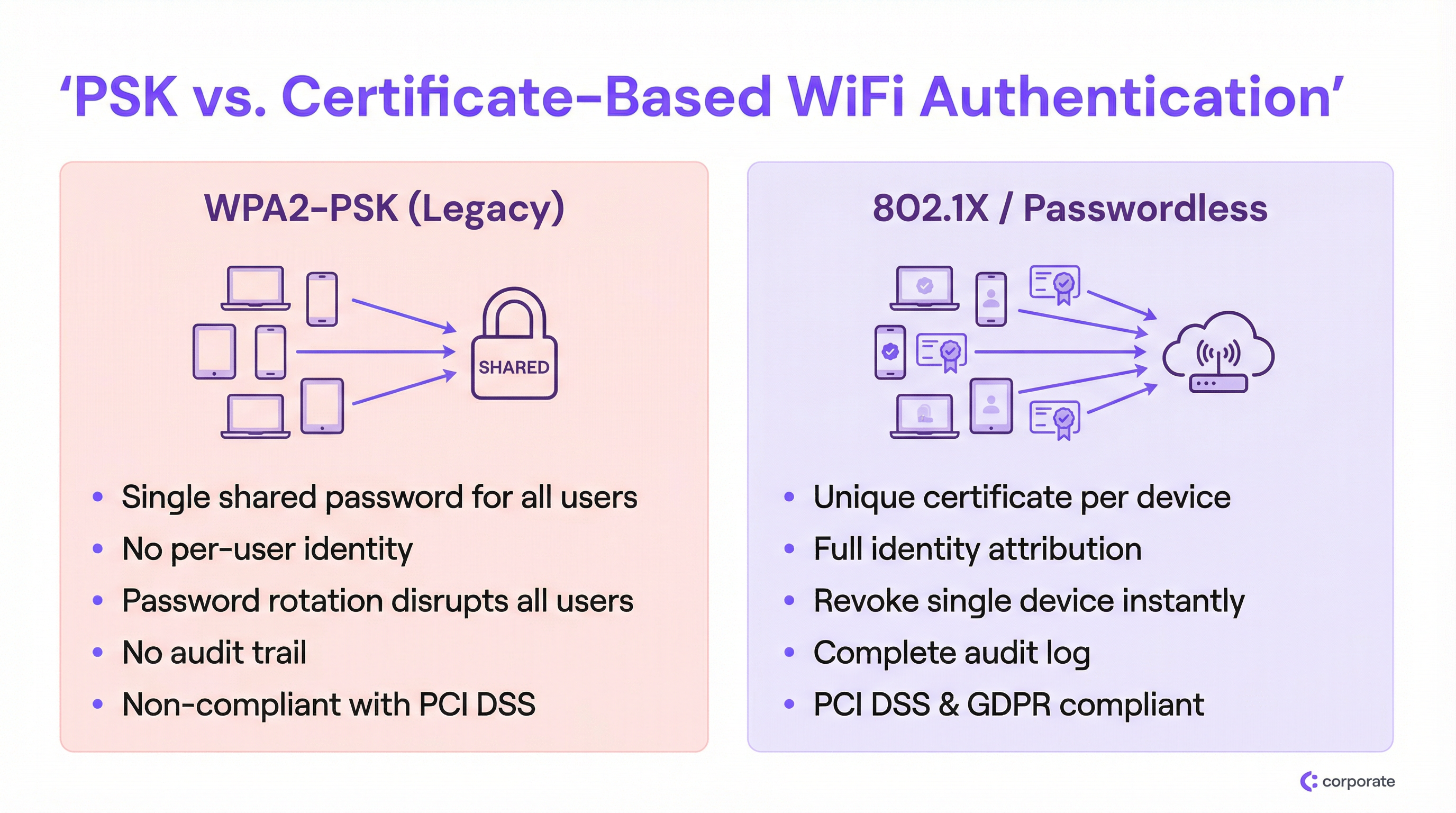
Der grundlegende Fehler von WPA2-PSK in einer Unternehmensumgebung ist die vollständige Entkopplung des Netzwerkzugriffs von der Benutzeridentität. Wenn jedes Gerät denselben kryptografischen Schlüssel verwendet, kann das Netzwerk nicht zwischen einem legitimen Mitarbeiter, einem kompromittierten IoT-Gerät oder einem externen Bedrohungsakteur unterscheiden, der das Passwort von einem Foto in den sozialen Medien erhalten hat.
Dies schafft drei sich verstärkende Probleme, die mit zunehmender Größe der Bereitstellung schwerwiegender werden:
1. Keine Identitätszuordnung. Netzwerkprotokolle unter einer PSK-Bereitstellung erfassen nur MAC-Adressen, nicht den tatsächlichen Benutzer oder Geräteeigentümer. Während eines Sicherheitsvorfalls macht dies IT-Teams völlig blind. Sie können sehen, dass sich ein Gerät anomal verhält; Sie können jedoch nicht feststellen, wem das Gerät gehört oder welche Geschäftsfunktion es erfüllt.
2. Das Widerrufs-Dilemma. Wenn ein Mitarbeiter unter schwierigen Umständen ausscheidet oder ein Gerät als verloren gemeldet wird, besteht die einzige verfügbare Abhilfe bei einem gemeinsamen PSK-Modell darin, das Passwort für jedes einzelne Gerät im Netzwerk zu ändern. In einer geschäftigen Hospitality -Umgebung – ein Hotel mit 300 Mitarbeitergeräten, 200 IoT-Sensoren und 50 Point-of-Sale-Terminals – ist eine Passwort-Rotation ein mehrstündiges betriebliches Ereignis, das IT-Teams um jeden Preis vermeiden werden. Das Ergebnis sind Passwörter, die über Jahre hinweg unverändert bleiben.
3. Compliance-Fehler. PCI DSS Anforderung 8.2 schreibt vor, dass der Zugriff auf Systeme in der Karteninhaber-Datenumgebung an ein individuelles Benutzerkonto gebunden sein muss. Ein gemeinsames Passwort ist per Definition nicht konform. In ähnlicher Weise erfordert das Rechenschaftsprinzip der GDPR, dass Organisationen die Kontrolle darüber nachweisen, wer auf Systeme zugreifen kann, die personenbezogene Daten verarbeiten. Ein gemeinsames WiFi-Passwort liefert keinen solchen Nachweis.
Die 802.1X-Architektur
IEEE 802.1X ist der Standard für die portbasierte Netzwerkzugriffskontrolle, der die WiFi-Sicherheit in Unternehmen untermauert. Anstelle einer einfachen Passwortprüfung am Access Point führt 802.1X ein Drei-Parteien-Authentifizierungs-Framework ein:
| Rolle | Komponente | Funktion |
|---|---|---|
| Supplicant | Client-Gerät (Laptop, Telefon) | Legt Anmeldedaten vor, um Netzwerkzugriff anzufordern |
| Authenticator | Wireless Access Point | Leitet Anmeldedaten an den Authentifizierungsserver weiter; setzt die Zugriffsentscheidung durch |
| Authentication Server | RADIUS-Server | Validiert Anmeldedaten gegenüber einem Identity Provider; gibt eine Zugriffsentscheidung zurück |
Der Access Point fungiert als Policy Enforcement Point, nicht als Entscheidungsträger. Diese Trennung der Zuständigkeiten ist architektonisch bedeutsam: Sie bedeutet, dass Authentifizierungslogik, Identitätsdaten und Zugriffsrichtlinien alle zentral liegen und nicht über Dutzende von Access Points verteilt sind. Für Bereitstellungen an mehreren Standorten ist dies transformativ. Für eine tiefergehende Untersuchung der RADIUS-Architekturoptionen siehe unseren Cloud RADIUS vs On-Premise RADIUS: Decision Guide for IT Teams .
EAP-TLS: Der Goldstandard für passwortlose WiFi-Authentifizierung
Während 802.1X mehrere Anmeldedatentypen über das Extensible Authentication Protocol (EAP) unterstützt, wird das wahre passwortlose Erlebnis durch EAP-TLS (Transport Layer Security) erreicht. EAP-TLS stützt sich vollständig auf digitale Zertifikate für die gegenseitige Authentifizierung – der Client legt dem Server ein Zertifikat vor, und der Server legt dem Client ein Zertifikat vor, wodurch Vertrauen in beide Richtungen aufgebaut wird.
Der Zertifikatslebenszyklus funktioniert wie folgt:
- Eine Zertifizierungsstelle (CA) – entweder intern (Microsoft AD CS) oder cloudbasiert (SCEP/NDES über Intune) – stellt jedem verwalteten Gerät ein eindeutiges Client-Zertifikat aus.
- Das Zertifikat wird dem Gerät automatisch über MDM (Intune, Jamf oder ähnlich) bereitgestellt.
- Wenn sich das Gerät mit der 802.1X SSID verbindet, legt es dieses Zertifikat dem RADIUS-Server vor.
- Der RADIUS-Server validiert das Zertifikat gegen die Vertrauenskette der CA und prüft die Zertifikatssperrliste (CRL) oder den OCSP-Responder.
- Wenn es gültig ist, gibt der RADIUS-Server ein Access-Accept zurück, optional einschließlich Attributen zur VLAN-Zuweisung.
Diese Architektur eliminiert den Diebstahl von Anmeldedaten vollständig. Es gibt kein Passwort, das abgefangen, wiederholt oder durch Phishing erlangt werden kann. Der Widerruf erfolgt chirurgisch: Das Entfernen eines Zertifikats aus der CRL oder das Deaktivieren des Benutzerkontos im Identity Provider (Azure AD, Okta, Google Workspace) blockiert sofort dieses spezifische Gerät, ohne andere Benutzer zu beeinträchtigen.
Identity PSK (iPSK): Die kritische Übergangstechnologie
Das größte Hindernis für eine vollständige 802.1X-Einführung ist die heterogene Gerätelandschaft an Unternehmensstandorten. Smart-TVs, drahtlose POS-Terminals, IP-Kameras, Umwelt- Sensors und ältere medizinische oder industrielle Geräte verfügen häufig nicht über den Software-Supplicant, der für die Verarbeitung von EAP-TLS-Zertifikaten erforderlich ist. Diese Geräte auf eine gemeinsame PSK SSID zu zwingen, würde die gesamte Migration untergraben.
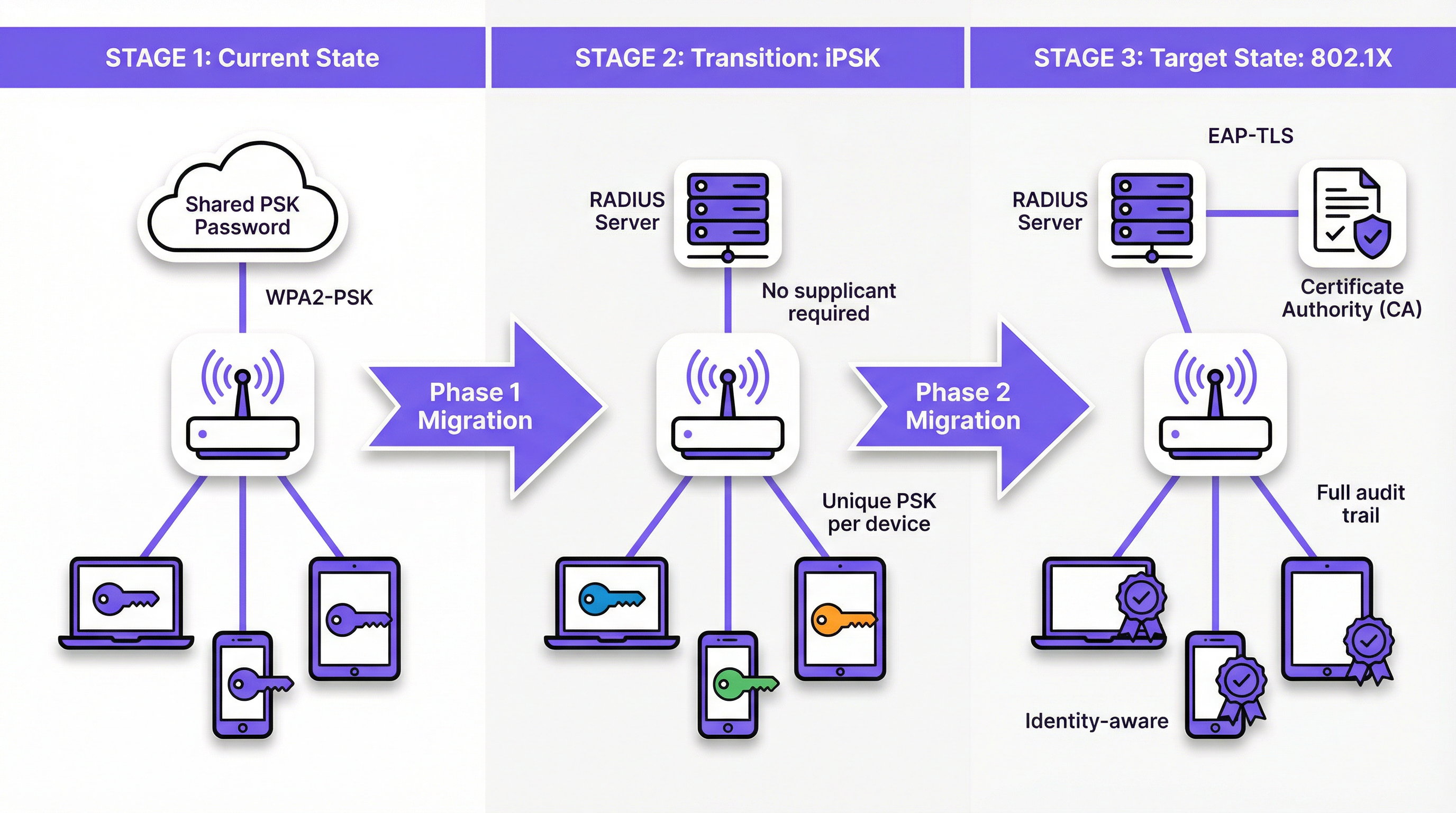
Identity PSK (iPSK) – von verschiedenen Anbietern auch als Multiple PSK (MPSK) oder Dynamic PSK (DPSK) vermarktet – löst dies elegant. Aus der Sicht des Geräts verbindet es sich mit einem Standard-WPA2/WPA3-Personal-Netzwerk unter Verwendung eines Passworts. Aus der Sicht des Netzwerks hat der RADIUS-Server der MAC-Adresse oder Benutzergruppe dieses spezifischen Geräts einen eindeutigen kryptografischen Schlüssel zugewiesen. Der Access Point setzt diese Zuordnung durch und stellt sicher, dass der Schlüssel jedes Geräts nur Zugriff auf das autorisierte Netzwerksegment dieses Geräts gewährt.
Für eine Retail -Umgebung bedeutet dies, dass jeder drahtlose Barcodescanner seinen eigenen eindeutigen iPSK haben kann, der einem dedizierten IoT VLAN zugewiesen ist. Wenn ein Scanner gestohlen wird, wird nur sein spezifischer Schlüssel widerrufen. Der Rest des Netzwerks bleibt unberührt.
Implementierungsleitfaden
Phase 1: Analyse und Segmentierung
Bevor Sie die Netzwerkkonfiguration ändern, führen Sie ein umfassendes Geräte-Audit mit Ihrer WiFi Analytics -Plattform durch. Ziel ist es, jedes verbundene Gerät in eine von drei Kategorien einzuteilen:
- Verwaltete Geräte: Unternehmens-Laptops, Tablets und Telefone, die in einem MDM registriert sind. Diese sind Kandidaten für volles EAP-TLS 802.1X.
- BYOD-Geräte: Persönliche Geräte von Mitarbeitern oder Gast-Smartphones. Diese erfordern ein reibungsloses Onboarding-Portal zur Bereitstellung von Zertifikaten oder eindeutigen Anmeldedaten.
- Headless-/IoT-Geräte: Smart-TVs, POS-Terminals, Drucker, Sensoren und alle Geräte ohne Benutzeroberfläche oder 802.1X-Supplicant. Diese sind Kandidaten für iPSK.
Diese Segmentierung bestimmt jede nachfolgende architektonische Entscheidung. Überspringen Sie diesen Schritt nicht.
Phase 2: iPSK für IoT- und Legacy-Geräte bereitstellen
Konfigurieren Sie Ihren RADIUS-Server für die Unterstützung von iPSK, indem Sie MAC-zu-PSK-Zuordnungen für alle Headless-Geräte erstellen. Die meisten RADIUS-Plattformen der Enterprise-Klasse (einschließlich Cloud-RADIUS-Lösungen) unterstützen dies nativ. Weisen Sie jede Gerätegruppe über RADIUS-Attribute (Tunnel-Type, Tunnel-Medium-Type, Tunnel-Private-Group-ID) einem entsprechenden VLAN zu.
Für Standorte mit großen IoT-Beständen – wie ein Hotel mit Hunderten von Smart-Room-Geräten – integrieren Sie Ihren RADIUS-Server in das Property Management System (PMS) oder Building Management System (BMS), um die iPSK-Bereitstellung zu automatisieren, wenn neue Geräte in Betrieb genommen werden.
Phase 3: 802.1X für verwaltete Geräte bereitstellen
Für MDM-verwaltete Geräte sollte die Migration für den Endbenutzer völlig transparent sein. Konfigurieren Sie Ihr MDM so, dass Folgendes gleichzeitig übertragen wird:
- Das Client-Zertifikat (ausgestellt von Ihrer CA über SCEP oder NDES).
- Das WiFi-Profil, das die 802.1X SSID, EAP-TLS als Authentifizierungsmethode und das RADIUS-Server-Zertifikat zur Servervalidierung angibt.
Sobald das Profil bereitgestellt ist, authentifizieren sich die Geräte automatisch im Hintergrund an der neuen 802.1X SSID. Betreiben Sie die Legacy-PSK SSID während der Übergangszeit parallel und überwachen Sie die Akzeptanz über Ihre RADIUS-Protokolle.
Phase 4: BYOD-Onboarding-Portal
Für persönliche Geräte von Mitarbeitern und den Gastzugang stellen Sie ein Netzwerk-Onboarding-Portal bereit. Die Benutzererfahrung sollte sein: Verbindung zu einer temporären Onboarding-SSID herstellen → Authentifizierung mit Unternehmens-SSO → das Portal stellt automatisch das Zertifikat und das WiFi-Profil bereit → das Gerät verbindet sich nahtlos mit der 802.1X SSID. Dieser Prozess sollte vom Benutzer keine technischen Kenntnisse erfordern. Siehe Modern Hospitality WiFi Solutions Your Guests Deserve für Portal-Designprinzipien, die für kundenorientierte Bereitstellungen gelten.
Phase 5: Die Legacy-PSK-SSID außer Betrieb nehmen
Sobald die Überwachung bestätigt, dass alle Geräte entweder auf die 802.1X SSID oder eine iPSK-fähige SSID migriert sind, planen Sie die Außerbetriebnahme des alten gemeinsamen PSK-Netzwerks. Kommunizieren Sie das Umstellungsdatum im Voraus an die Stakeholder und halten Sie für die ersten 48 Stunden einen Rollback-Plan bereit.
Best Practices
Verlassen Sie sich niemals auf MAC Authentication Bypass (MAB) für die Sicherheit. Obwohl MAB weit verbreitet für das IoT-Onboarding eingesetzt wird, bietet es keine echte Sicherheit. MAC-Adressen werden im Klartext übertragen und sind trivial zu fälschen. Jeder Angreifer, der die MAC-Adresse eines Geräts beobachten kann, kann sich als dieses ausgeben. Bevorzugen Sie immer iPSK, das einen eindeutigen kryptografischen Schlüssel erzwingt, gegenüber MAB.
Zertifikats-Lebenszyklus-Management automatisieren. Zertifikate laufen ab. Ein abgelaufenes Client-Zertifikat ist aus Sicht des Netzwerks nicht von einem widerrufenen zu unterscheiden – das Gerät verliert einfach die Verbindung. Implementieren Sie proaktive Warnmeldungen in Ihren PKI- und MDM-Plattformen, um Zertifikate rechtzeitig vor ihrem Ablaufdatum zu erneuern. Ein 90-Tage-Zertifikat mit einem 30-tägigen Erneuerungsfenster ist eine gängige und sinnvolle Konfiguration.
RADIUS-Server-Zertifikat auf Clients validieren. Eine häufig übersehene Konfiguration besteht darin, den Supplicant anzuweisen, das Zertifikat des RADIUS-Servers zu validieren. Ohne dies sind Geräte anfällig für Rogue-AP-Angriffe, bei denen ein Angreifer einen gefälschten RADIUS-Server aufstellt, um Anmeldedaten abzugreifen. Konfigurieren Sie im vom MDM übertragenen WiFi-Profil immer die vertrauenswürdige CA und den Namen des Serverzertifikats.
Dynamische VLAN-Zuweisung vom ersten Tag an implementieren. Nutzen Sie RADIUS-Autorisierungsattribute, um Benutzer und Geräte basierend auf ihrer Identität oder Gruppenmitgliedschaft in entsprechende VLANs zu segmentieren. Mitarbeitergeräte, Gastgeräte, IoT-Geräte und POS-Terminals sollten niemals eine Broadcast-Domäne teilen. Dies begrenzt die laterale Bewegung im Falle einer Kompromittierung.
Ausrichtung auf WPA3-Enterprise für neue Bereitstellungen. Geben Sie bei der Beschaffung neuer Access Points WPA3-Enterprise (192-Bit-Modus) an. Dies bietet CNSA-Suite-konforme kryptografische Algorithmen und eliminiert Legacy-Schwachstellen. Lesen Sie Wireless Access Points Definition Your Ultimate 2026 Guide für Hinweise zur Hardwareauswahl. Überlegungen zur SD-WAN-Integration finden Sie unter The Core SD WAN Benefits for Modern Businesses .
Fehlerbehebung & Risikominderung
Ausfälle durch abgelaufene Zertifikate
Dies ist die häufigste Ursache für das Scheitern von 802.1X-Bereitstellungen nach dem Start. Symptome: Geräte verlieren plötzlich massenhaft die WiFi-Verbindung, typischerweise an einem bestimmten Datum. Ursache: Client- oder RADIUS-Server-Zertifikate sind abgelaufen.
Minderung: Implementieren Sie eine Überwachung, die das IT-Team alarmiert, wenn ein Zertifikat in der Kette (CA-Root, Intermediate, Server oder ein erheblicher Anteil der Client-Zertifikate) innerhalb von 60 Tagen abläuft. Automatisieren Sie die Erneuerung von Client-Zertifikaten über MDM/SCEP.
Hochverfügbarkeit des RADIUS-Servers
Wenn der RADIUS-Server nicht erreichbar ist, kann sich kein Gerät authentifizieren, und das gesamte drahtlose Netzwerk wird unzugänglich. In einer Hotel- oder Einzelhandelsumgebung ist dies ein kritischer betrieblicher Ausfall.
Minderung: Stellen Sie mindestens zwei RADIUS-Server (primär und sekundär) bereit, die als Failover-Paar konfiguriert sind. Stellen Sie bei Cloud-RADIUS sicher, dass der Anbieter eine geografisch redundante Architektur mit einem SLA anbietet, das Ihren betrieblichen Anforderungen entspricht. Konfigurieren Sie alle Access Points so, dass sie innerhalb von 3–5 Sekunden nach einem primären Timeout den sekundären RADIUS-Server abfragen.
Fehlkonfiguration des Supplicants auf BYOD-Geräten
Wenn Benutzer ihre Geräte manuell für 802.1X konfigurieren (anstatt ein automatisiertes Onboarding-Portal zu verwenden), wählen sie häufig den falschen EAP-Typ, überspringen die Serverzertifikatsvalidierung oder geben falsche Identitätszeichenfolgen ein. Dies erzeugt ein hohes Volumen an Helpdesk-Tickets.
Minderung: Eliminieren Sie die manuelle Konfiguration vollständig. Alle BYOD-Geräte müssen über das automatisierte Portal angemeldet werden, das ein vollständiges, validiertes WiFi-Profil überträgt. Deaktivieren Sie die Option für Benutzer, die 802.1X SSID manuell hinzuzufügen.
MAC-Adress-Rotation bei IoT-Geräten
Moderne mobile Betriebssysteme (iOS 14+, Android 10+) verwenden standardmäßig randomisierte MAC-Adressen, was iPSK MAC-zu-PSK-Zuordnungen unterbricht.
Minderung: Verwenden Sie für unternehmensverwaltete BYOD-Geräte MDM, um die MAC-Randomisierung auf der Unternehmens-SSID zu deaktivieren. Konfigurieren Sie bei Consumer-IoT-Geräten das Gerät so, dass es in seinen Netzwerkeinstellungen eine persistente MAC-Adresse verwendet. Verwenden Sie für Gastgeräte einen separaten Onboarding-Flow, der eindeutige Anmeldedaten bereitstellt, anstatt sich auf die MAC-Adresszuordnung zu verlassen.
ROI & geschäftliche Auswirkungen
Der Business Case für die Migration zur passwortlosen WiFi-Authentifizierung ist in mehrfacher Hinsicht überzeugend:
| Impact Area | PSK Status Quo | Post-Migration |
|---|---|---|
| Kosten der Passwort-Rotation | 4–8 Stunden IT-Zeit pro Rotation, multipliziert mit der Anzahl der Standorte | Null – kein gemeinsames Passwort zu rotieren |
| Sicherheit beim Offboarding | Manuell, störend, oft verzögert | Automatisiert, sofort, keine Beeinträchtigung für andere |
| Incident Response | Datenverkehr kann keinem spezifischen Benutzer zugeordnet werden | Vollständige Identitätszuordnung, sofortige Geräteisolierung |
| Compliance-Status | Nicht konform mit PCI DSS Anf. 8.2 | Konform; vollständiger Audit-Trail verfügbar |
| Helpdesk-Ticket-Volumen | Hoch – Passwortweitergabe, Verwirrung bei Rotation | Niedrig – automatisiertes Onboarding, keine Passwörter zu vergessen |
Für eine Einzelhandelskette mit 50 Standorten, die einen gemeinsamen PSK vierteljährlich rotiert, kann allein die betriebliche Einsparung – durch den Wegfall von vier jährlichen Passwort-Rotationsereignissen an 50 Standorten – Hunderte von IT-Stunden pro Jahr ausmachen. Der Wert der Compliance-Risikominderung ist schwerer zu beziffern, aber deutlich wirkungsvoller: Eine PCI DSS-Verletzung im Zusammenhang mit unzureichenden Zugriffskontrollen kann zu Geldstrafen, Sanktionen der Kartengesellschaften und Sanierungskosten führen, die die Kosten der Migration bei weitem übersteigen.
Über die Sicherheit hinaus erschließen identitätsbewusste Netzwerke eine erhebliche Operational Intelligence. Wenn jedes Gerät eine Identität hat, kann Ihre WiFi Analytics -Plattform reichhaltigere Daten zu Gerätetypen, Verweilzeiten und Netzwerknutzungsmustern liefern. Diese Daten fließen direkt in die Standortoptimierung, Personalentscheidungen und die Art von personalisierten Erlebnissen ein, die von Transport -Knotenpunkten und großen Veranstaltungsorten zunehmend erwartet werden.
Der Verzicht auf das gemeinsame Passwort ist nicht nur ein Sicherheits-Upgrade. Es ist eine grundlegende Investition in die betriebliche Reife und Widerstandsfähigkeit Ihrer Netzwerkinfrastruktur.
Schlüsselbegriffe & Definitionen
Pre-Shared Key (PSK)
A single password shared among all users and devices to authenticate to a WiFi network using WPA2-Personal or WPA3-Personal.
The legacy default for venue WiFi. Operationally simple to deploy but fundamentally insecure at enterprise scale due to the absence of per-user identity and the impossibility of targeted revocation.
IEEE 802.1X
An IEEE standard for port-based network access control that provides an authentication mechanism for devices attempting to connect to a LAN or WLAN, requiring each device to authenticate individually against a central authentication server.
The foundational standard for enterprise WiFi security. IT teams encounter this when replacing shared passwords with identity-based access control, and it is a prerequisite for EAP-TLS deployment.
EAP-TLS (Extensible Authentication Protocol — Transport Layer Security)
An 802.1X authentication method that uses digital certificates on both the client device and the authentication server for mutual authentication, with no password involved.
The gold standard for passwordless WiFi. Considered the most secure EAP method because it eliminates credential theft entirely — there is no password to phish, replay, or brute-force.
RADIUS (Remote Authentication Dial-In User Service)
A networking protocol providing centralised Authentication, Authorisation, and Accounting (AAA) management for network access. In WiFi deployments, the RADIUS server sits between the access point and the Identity Provider.
The core infrastructure component of any 802.1X deployment. IT teams must decide between on-premise RADIUS (e.g., Microsoft NPS) and cloud RADIUS solutions, a decision that significantly impacts integration complexity and operational overhead.
Identity PSK (iPSK)
A WiFi authentication feature that assigns a unique pre-shared key to each individual device or user group via a RADIUS server, while presenting as a standard WPA2/WPA3-Personal network to connecting devices.
The critical transition technology for securing IoT and legacy devices that cannot support 802.1X supplicants. Provides per-device identity and revocation without requiring any changes to the connecting device.
Supplicant
The software component on a client device (laptop, smartphone) that implements the EAP protocol and communicates with the authenticator (access point) to present credentials during 802.1X authentication.
IoT devices, legacy POS terminals, and many consumer electronics lack a supplicant, which is the primary reason they cannot use standard 802.1X and require alternatives such as iPSK.
MAC Authentication Bypass (MAB)
A network access method that grants connectivity based solely on a device's MAC (Media Access Control) address, without any cryptographic credential.
Widely used as a fallback for headless devices but inherently insecure, as MAC addresses are broadcast in plain text and easily spoofed. Should be replaced by iPSK wherever possible.
Dynamic VLAN Assignment
A RADIUS authorisation feature that instructs the access point to place an authenticated device into a specific Virtual LAN (VLAN) based on the user's identity, group membership, or device type, as determined by the RADIUS server.
Essential for network segmentation in multi-tenant or mixed-use environments. Ensures that guest devices, corporate laptops, IoT sensors, and POS terminals are automatically isolated from each other without requiring separate physical SSIDs for each segment.
Certificate Revocation List (CRL)
A regularly published list maintained by a Certificate Authority (CA) that identifies certificates that have been revoked before their scheduled expiry date.
The mechanism by which RADIUS servers verify that a client certificate has not been revoked. IT teams must ensure RADIUS servers can reach the CRL distribution point; an inaccessible CRL can cause authentication failures or security gaps depending on the configured fail-open/fail-closed policy.
EAP-PEAP (Protected Extensible Authentication Protocol)
An 802.1X authentication method that creates an encrypted TLS tunnel and then authenticates the user with a username and password inside that tunnel.
A common stepping stone from PSK to full certificate authentication. More secure than PSK but still relies on passwords, making it vulnerable to credential theft. EAP-TLS is the preferred end-state for passwordless deployments.
Fallstudien
A 300-room luxury hotel currently uses a single shared WPA2-PSK for all back-of-house staff devices: tablets for housekeeping, wireless POS terminals for food and beverage, and maintenance laptops. The IT Director needs to secure this network to comply with PCI DSS within the current quarter but cannot afford any downtime for operational staff. How should they approach the migration?
The migration should proceed in four steps, running the new and legacy networks in parallel throughout the transition.
Step 1 — Deploy Cloud RADIUS. Implement a cloud-based RADIUS server integrated with the hotel's Azure Active Directory. This provides the authentication backbone without requiring on-premise hardware.
Step 2 — Implement iPSK for POS Terminals and IoT. For the wireless POS terminals that cannot support 802.1X supplicants, configure the RADIUS server to issue unique iPSKs based on each terminal's MAC address. Assign all POS devices to a dedicated VLAN isolated from the general staff network. This immediately addresses PCI DSS segmentation requirements without touching the devices themselves.
Step 3 — MDM Deployment for Tablets and Laptops. Use the hotel's MDM (Intune) to silently push EAP-TLS certificates and the new 802.1X WiFi profile to the housekeeping tablets and maintenance laptops. Devices will automatically migrate to the new SSID without any user action required.
Step 4 — Monitor and Decommission. Run the legacy PSK SSID alongside the new 802.1X and iPSK SSIDs for two weeks. Monitor RADIUS authentication logs to confirm all devices have migrated. Once confirmed, disable the legacy SSID.
Expected outcome: PCI DSS compliance achieved within six weeks; zero operational downtime; IT team gains full device identity visibility and per-device revocation capability.
A national retail chain with 500 locations uses a shared WPA2-PSK for the corporate back-office WiFi network. When an area manager leaves the company, IT must coordinate a password change across all stores, which frequently results in store managers being locked out and losing access to inventory management systems during trading hours. The CISO wants to eliminate this risk entirely. What is the recommended architecture?
The solution is a full 802.1X deployment with EAP-TLS, integrated with the company's Okta Identity Provider.
Architecture:
- Deploy a cloud RADIUS service integrated with Okta via RADIUS proxy or native RADIUS protocol.
- Use Intune to push client certificates and the 802.1X WiFi profile to all corporate-managed Windows laptops and tablets across all 500 locations.
- Configure the RADIUS server to perform dynamic VLAN assignment based on Okta group membership (e.g., Store Manager, Area Manager, IT Admin).
Offboarding Integration:
- When HR deactivates a departing employee's Okta account, the RADIUS server immediately rejects any new authentication attempts from that user's certificate.
- The employee loses WiFi access across all 500 locations simultaneously, within seconds of account deactivation.
- All other employees remain connected without interruption.
BYOD Consideration:
- For employees who access the corporate WiFi on personal devices, deploy a self-service onboarding portal authenticated via Okta SSO. The portal provisions a unique certificate to the personal device, which is also tied to the Okta account and revoked automatically on offboarding.
Szenarioanalyse
Q1. A university campus needs to secure the wireless network in student dormitories. Students bring a mix of laptops, smartphones, gaming consoles, and smart speakers. The university wants to ensure each student's devices are isolated from other students' devices, but cannot install MDM profiles on personal equipment. Which authentication strategy should be deployed, and how should device isolation be achieved?
💡 Hinweis:Gaming consoles and smart speakers lack 802.1X supplicants. Consider how iPSK combined with dynamic VLAN assignment can achieve per-student isolation without requiring MDM.
Empfohlenen Ansatz anzeigen
Deploy an iPSK solution integrated with a self-service onboarding portal. Students authenticate to the portal using their university SSO credentials and register the MAC addresses of their devices (including consoles and smart speakers, which lack 802.1X supplicants). The RADIUS server generates a unique iPSK for each student and maps all registered MAC addresses to that student's key. Dynamic VLAN assignment places all devices using a given student's iPSK into a personal micro-segment or private VLAN (PVLAN), preventing lateral communication between students' devices. For laptops and smartphones that support 802.1X, the onboarding portal can optionally provision a certificate and WiFi profile for EAP-TLS, providing stronger security for those devices while maintaining iPSK compatibility for consoles and smart speakers.
Q2. A hospital is auditing its wireless network for HIPAA compliance. They discover that 50 wireless infusion pumps are connected using a shared WPA2-PSK because the vendor states the pumps do not support EAP-TLS. The security team proposes moving the pumps to MAC Authentication Bypass (MAB) on an open (unencrypted) network segment to remove the shared password from the clinical environment. Is this the correct approach? If not, what should they do instead?
💡 Hinweis:Evaluate the security implications of removing encryption versus the risk of MAC address spoofing. Consider what iPSK provides that MAB does not.
Empfohlenen Ansatz anzeigen
No. Moving to MAB on an open network is a significant security regression. It removes over-the-air encryption entirely, meaning all traffic from the infusion pumps — including any clinical data — is transmitted in plain text and can be intercepted by anyone within radio range. Additionally, MAC addresses are trivially spoofed, meaning an attacker could impersonate a pump to gain access to the clinical network segment. The correct approach is iPSK. The infusion pumps will connect to what appears to be a standard WPA2-PSK network, maintaining over-the-air encryption. The RADIUS server assigns a unique, complex PSK to each pump's MAC address. This provides individual device identity (each pump is distinguishable in logs), targeted revocation (a single pump can be isolated without affecting others), and maintained encryption — all without requiring any changes to the pump firmware or vendor support.
Q3. You have successfully deployed 802.1X with EAP-TLS for 2,000 corporate-managed laptops. You manually tested one laptop and it connected perfectly. You then used your MDM to push the WiFi profile to all 2,000 devices. The following morning, the helpdesk receives hundreds of calls reporting that no laptops can connect to the corporate WiFi. What are the two most likely root causes, and how do you diagnose and resolve each?
💡 Hinweis:EAP-TLS requires two things from the client: a valid client certificate to present to the server, and the ability to validate the server's certificate. Consider whether the MDM push may have delivered the WiFi profile without the necessary certificates.
Empfohlenen Ansatz anzeigen
The two most likely root causes are: (1) The MDM pushed the WiFi profile but failed to provision the client certificates to the devices. The profile instructs the supplicant to use EAP-TLS, but without a client certificate to present, authentication fails immediately. Diagnose by checking the MDM deployment report for certificate provisioning status and reviewing the RADIUS server logs for 'no certificate presented' errors. Resolve by ensuring the MDM certificate profile (SCEP or PKCS) is deployed as a dependency before the WiFi profile. (2) The devices do not trust the RADIUS server's certificate. The WiFi profile specifies EAP-TLS but does not include the trusted CA certificate for server validation, causing the supplicant to reject the RADIUS server's certificate. Diagnose by checking supplicant logs on an affected device for 'server certificate validation failed' errors. Resolve by adding the root CA certificate (or the specific RADIUS server certificate) to the trusted certificates section of the MDM WiFi profile. The manual test succeeded because the test device may have had the CA certificate already installed from a previous configuration, or server validation was not enforced during the manual test.
Q4. A conference centre hosts 200 events per year, ranging from day-long trade shows to week-long residential conferences. Each event has a different organiser who requires branded WiFi for their attendees. Currently, the venue creates a new shared PSK for each event. The venue's IT manager wants to move to a more scalable, secure model. What architecture would you recommend?
💡 Hinweis:Consider the temporary, event-scoped nature of access and the need for branding. Think about how iPSK combined with a captive portal can serve both requirements.
Empfohlenen Ansatz anzeigen
Implement a dynamic iPSK model integrated with the venue's event management system. For each event, the system automatically generates a unique iPSK scoped to the event's duration. Attendees receive this key via the event registration confirmation or the organiser's branded onboarding portal. The RADIUS server maps the event's iPSK to a dedicated VLAN for that event, ensuring complete isolation between concurrent events. When the event ends, the iPSK is automatically expired, requiring no manual cleanup. For organisers who require a branded captive portal experience, deploy a portal layer on top of the iPSK SSID that presents the organiser's branding before granting full network access. This model eliminates the manual PSK management overhead, provides per-event network isolation, and gives the IT team a complete audit trail of which devices connected to which event.
Wichtigste Erkenntnisse
- ✓Shared PSKs provide zero identity attribution — the network cannot distinguish between a legitimate user and a threat actor, making audit trails and compliance impossible.
- ✓IEEE 802.1X with EAP-TLS is the enterprise standard for passwordless WiFi, replacing passwords with unique digital certificates that cannot be phished, replayed, or shared.
- ✓Identity PSK (iPSK) is the essential transition technology for IoT and legacy devices that lack 802.1X supplicants — it provides per-device identity and targeted revocation without requiring any changes to the connecting device.
- ✓Never use MAC Authentication Bypass (MAB) as a security control — MAC addresses are trivially spoofed; always prefer iPSK for headless device authentication.
- ✓Automate certificate lifecycle management via MDM and PKI integration; expired certificates are the most common cause of post-deployment 802.1X outages.
- ✓Migration should be phased: discover and segment devices first, bridge IoT to iPSK, migrate managed devices to EAP-TLS via MDM, then decommission the legacy PSK SSID.
- ✓Moving to identity-based authentication unlocks downstream benefits beyond security: richer WiFi analytics, automated offboarding, dynamic network segmentation, and a defensible compliance posture under PCI DSS and GDPR.




