

EAP-TLS-Authentifizierung erklärt: Zertifikatsbasierte WiFi-Sicherheit
EAP-TLS is the gold standard for enterprise WiFi security, replacing vulnerable password-based authentication with robust, mutually authenticated digital certificates. This guide provides IT managers and network architects with a comprehensive technical deep-dive into the EAP-TLS handshake, architectural requirements, and practical deployment strategies for mixed-device environments.
🎧 Diesen Leitfaden anhören
Transkript anzeigen
Executive Summary
Für Unternehmensumgebungen, von Firmenzentralen über Ketten im Einzelhandel bis hin zu Einrichtungen im Gesundheitswesen , ist die Sicherung des drahtlosen Zugangs nicht länger nur eine betriebliche Anforderung – sie ist ein kritisches Compliance-Mandat. In der Vergangenheit haben sich Organisationen auf PEAP-MSCHAPv2 verlassen, das einen Benutzernamen und ein Passwort innerhalb eines TLS-Tunnels sichert. In einer Zeit von grassierendem Credential Harvesting und raffinierten Phishing-Angriffen stellt die passwortbasierte Authentifizierung über WiFi jedoch eine erhebliche Schwachstelle dar.
Hier kommt EAP-TLS (Extensible Authentication Protocol - Transport Layer Security) ins Spiel. EAP-TLS stellt den Goldstandard der 802.1X-Netzwerkzugangskontrolle dar. Anstatt sich auf benutzergenerierte Passwörter zu verlassen, schreibt EAP-TLS eine gegenseitige Authentifizierung mithilfe digitaler X.509-Zertifikate vor. Sowohl das Client-Gerät als auch der Authentifizierungsserver müssen ihre Identität nachweisen, bevor ein Netzwerkzugriff gewährt wird. Dieser Ansatz eliminiert das Risiko von Datendiebstahl, mindert Man-in-the-Middle-Angriffe (MitM) und bietet ein nahtloses Zero-Touch-Verbindungserlebnis für verwaltete Geräte. Dieser technische Leitfaden untersucht die Mechanismen des EAP-TLS-Handshakes, vergleicht ihn mit älteren Methoden und skizziert eine praktische Bereitstellungsarchitektur für moderne Unternehmen.
Hören Sie sich unseren begleitenden Technical-Briefing-Podcast für einen Executive-Überblick an:
Technischer Deep-Dive
Der EAP-TLS-Handshake erklärt
Der grundlegende Vorteil von EAP-TLS liegt in seiner kryptografischen Strenge. Der Authentifizierungsprozess ist eine mehrstufige Kommunikation zwischen dem Supplicant (dem Client-Gerät), dem Authenticator (dem WiFi Access Point oder Switch) und dem Authentication Server (in der Regel ein RADIUS-Server).
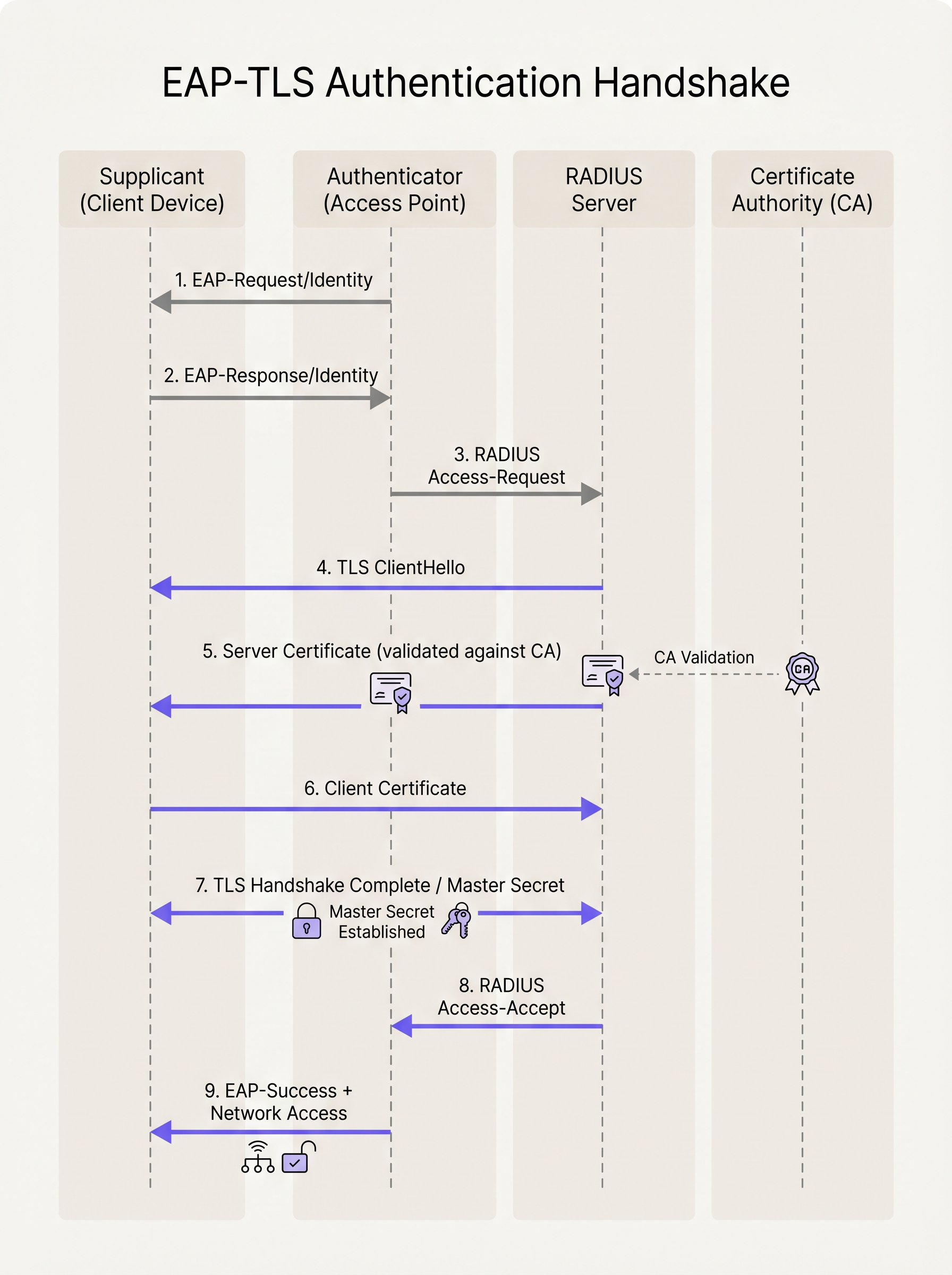
- Initialisierung: Wenn ein Gerät versucht, sich mit der SSID zu verbinden, blockiert der Access Point den gesamten Datenverkehr mit Ausnahme von EAP over LAN (EAPoL)-Frames. Der AP sendet einen
EAP-Request/Identityan das Gerät. - Identitätsantwort: Das Gerät antwortet mit einer
EAP-Response/Identity(aus Datenschutzgründen oft eine anonyme äußere Identität), die der AP an den RADIUS-Server weiterleitet. - Aufbau des TLS-Tunnels: Der RADIUS-Server initiiert den TLS-Handshake, indem er ein
TLS ServerHellozusammen mit seinem eigenen digitalen Zertifikat sendet. - Servervalidierung: Das Client-Gerät prüft das Zertifikat des Servers. Es überprüft die Gültigkeitsdaten, den Subject Alternative Name (SAN) und stellt vor allem sicher, dass das Zertifikat von einer vertrauenswürdigen Root Certificate Authority (CA) signiert wurde, die in seinem lokalen Trust Store installiert ist.
- Präsentation des Client-Zertifikats: Sobald der Server validiert ist, sendet das Client-Gerät sein eigenes X.509-Zertifikat (und optional seine Zertifikatskette) an den RADIUS-Server zurück.
- Gegenseitige Authentifizierung: Der RADIUS-Server validiert das Zertifikat des Clients anhand seiner CA- oder Identity Provider (IdP)-Integration. Er prüft auf Widerruf (über CRL oder OCSP) und verifiziert die Benutzer- oder Geräteidentität.
- Schlüsselableitung: Nach erfolgreicher gegenseitiger Validierung ist der TLS-Handshake abgeschlossen. Beide Seiten leiten unabhängig voneinander einen Master Session Key (MSK) ab.
- Netzwerkzugriff: Der RADIUS-Server sendet eine
RADIUS Access-Accept-Nachricht an den AP, die den MSK enthält. Der AP verwendet diesen Schlüssel, um die finalen WPA2/WPA3-Verschlüsselungsschlüssel (PTK/GTK) mit dem Client zu etablieren, und öffnet den Netzwerkport für den standardmäßigen IP-Datenverkehr.
EAP-TLS vs. PEAP-MSCHAPv2
Das Verständnis des Unterschieds zwischen EAP-TLS und PEAP ist für Netzwerkarchitekten, die eine Migration planen, von entscheidender Bedeutung.
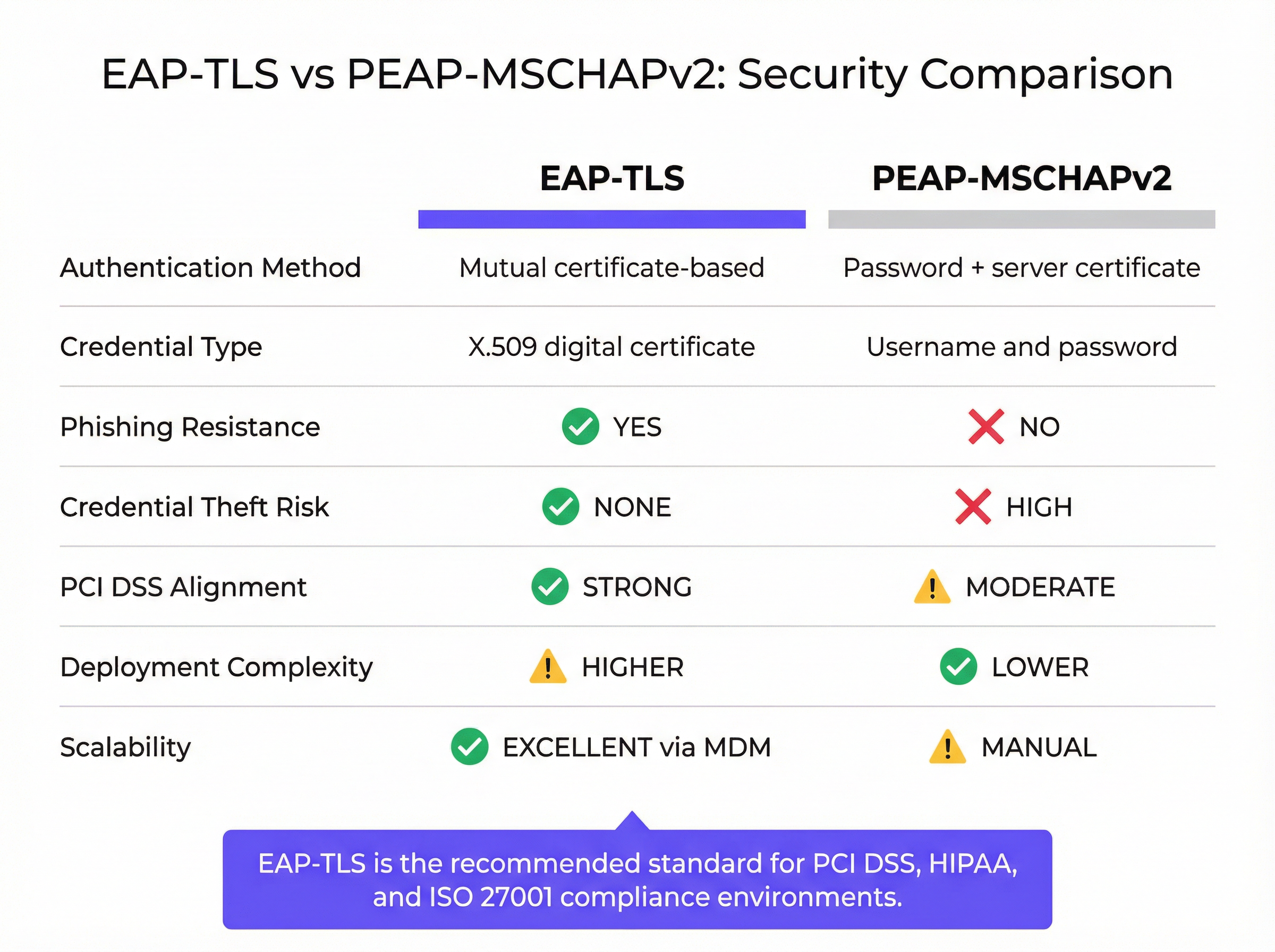
Während PEAP einen sicheren TLS-Tunnel aufbaut (serverseitige Authentifizierung), verlässt sich die innere Authentifizierung weiterhin auf MSCHAPv2, ein passwortbasiertes Protokoll. Wenn sich ein Benutzer mit einem bösartigen „Evil Twin“-Access Point verbindet und die Serverzertifikatswarnung ignoriert, kann sein gehashtes Passwort erfasst und offline geknackt werden. EAP-TLS eliminiert diesen Vektor vollständig; ohne den privaten Schlüssel, der dem Client-Zertifikat entspricht, kann sich ein Angreifer nicht authentifizieren, selbst wenn er im Besitz des Benutzerpassworts ist.
Implementierungsleitfaden
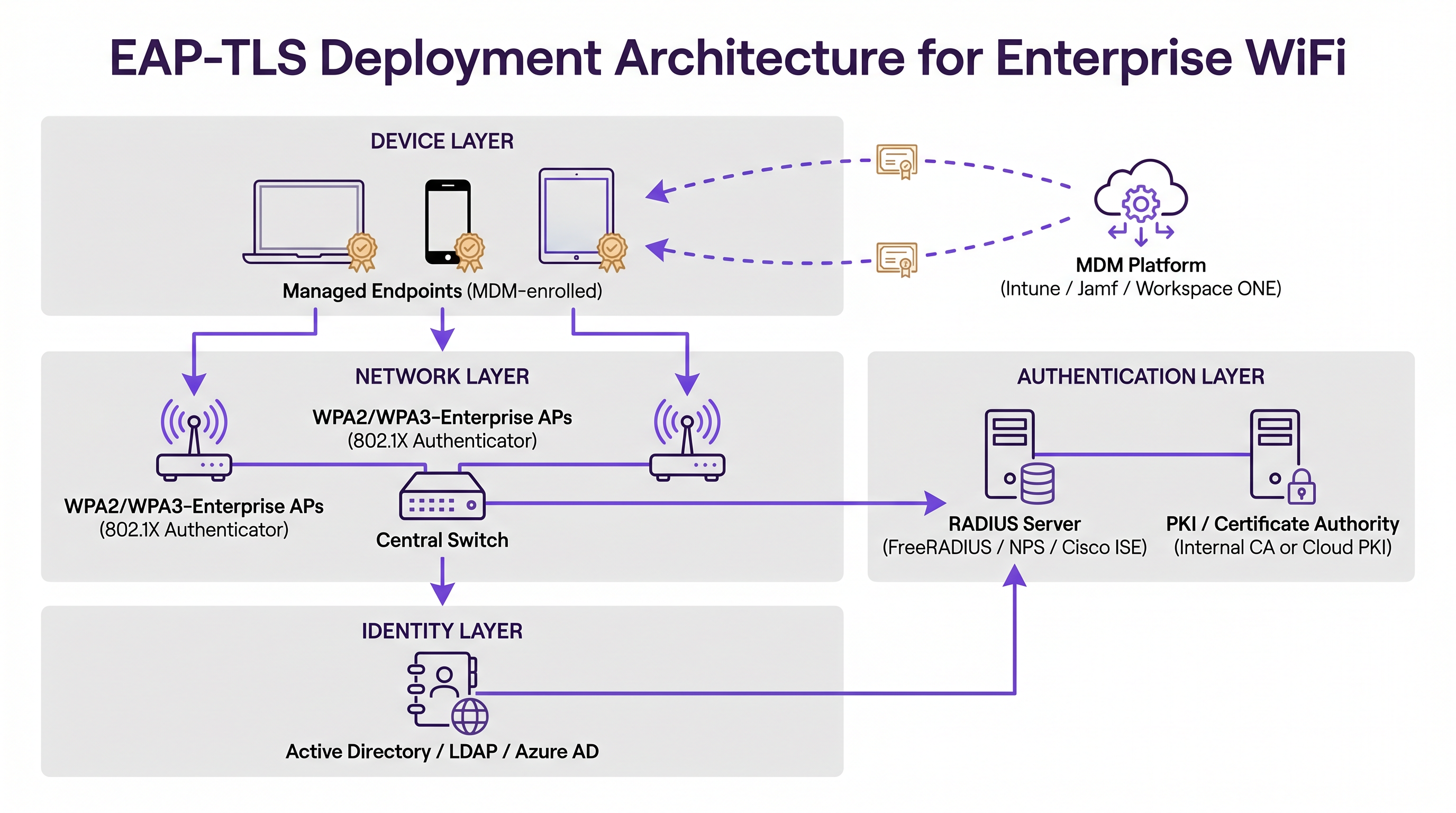
Die Bereitstellung von EAP-TLS erfordert eine Orchestrierung über drei primäre Infrastruktursäulen hinweg: die Netzwerkschicht, die Authentifizierungsschicht und die Identitäts-/Endpunktverwaltungsschicht.
1. Public Key Infrastructure (PKI)
Sie benötigen einen Mechanismus zur Ausstellung und Verwaltung von X.509-Zertifikaten. In der Vergangenheit bedeutete dies die Bereitstellung einer lokalen Microsoft Active Directory Certificate Services (AD CS)-Umgebung. Heute nutzen moderne Architekturen Cloud-PKI-Lösungen, die in Identity Provider (IdPs) wie Azure AD, Okta oder Google Workspace integriert sind. Diese Cloud-nativen CAs vereinfachen den Lebenszyklus von Ausstellung und Widerruf.
2. RADIUS-Authentifizierungsserver
Der RADIUS-Server (z. B. FreeRADIUS, Cisco ISE, Aruba ClearPass oder Cloud-basierter RADIUS) muss so konfiguriert sein, dass er EAP-TLS unterstützt. Er benötigt ein eigenes Serverzertifikat, das von einer CA signiert ist, der alle Client-Geräte vertrauen. Wenn Sie eine Integration mit einem modernen IdP vornehmen, könnte unser Leitfaden zu Okta und RADIUS: Erweiterung Ihres Identity Providers auf die WiFi-Authentifizierung besonders nützlich für Sie sein, um Cloud-Identitäten mit lokaler Netzwerk-Hardware zu verbinden.
3. Mobile Device Management (MDM)
Die größte Hürde bei der EAP-TLS-Bereitstellung ist die Bereitstellung von Zertifikaten auf Client-Geräten. Eine manuelle Installation ist nicht skalierbar. Sie müssen eine MDM-Plattform (wie Microsoft Intune, Jamf Pro oder VMware Workspace ONE) nutzen, um diesen Prozess zu automatisieren. Das MDM-Profil muss Folgendes bereitstellen:
- Das Root-CA-Zertifikat (um dem RADIUS-Server zu vertrauen).
- Das individuelle Client-Zertifikat (oft über SCEP- oder EST-Protokolle generiert).
- Das WiFi-Profil, das für die Verwendung von WPA2/WPA3-Enterprise und EAP-TLS konfiguriert ist und spezifisch auf die bereitgestellten Zertifikate verweist.
Best Practices
- Automatisieren Sie das Zertifikats-Lifecycle-Management: Zertifikate laufen ab. Wenn Ihnen ein automatisierter Erneuerungsmechanismus (wie SCEP/EST über MDM) fehlt, werden Geräte lautlos aus dem Netzwerk fallen, wenn ihre Zertifikate ablaufen, was zu massiven Spitzen bei Support-Tickets führt. Legen Sie Gültigkeitszeiträume fest, die Sicherheit (z. B. 1 Jahr) und betrieblichen Aufwand in Einklang bringen.
- Erzwingen Sie eine strikte Servervalidierung: Konfigurieren Sie Client-WiFi-Profile so, dass sie das Zertifikat des RADIUS-Servers strikt validieren. Geben Sie die genauen Servernamen und vertrauenswürdigen Root-CAs im Profil an. Erlauben Sie Benutzern nicht, Zertifikatswarnungen zu umgehen.
- Implementieren Sie einen robusten Widerruf: Stellen Sie sicher, dass Ihr RADIUS-Server Certificate Revocation Lists (CRLs) überprüft oder das Online Certificate Status Protocol (OCSP) verwendet. Wenn ein Mitarbeiter das Unternehmen verlässt oder ein Gerät verloren geht, muss der Widerruf des Zertifikats den Netzwerkzugriff sofort beenden.
- Umgang mit gemischten Geräteflotten: EAP-TLS ist perfekt für verwaltete Unternehmensgeräte. Sie werden jedoch auch auf nicht verwaltete BYOD- (Bring Your Own Device) und Gastgeräte stoßen. Stellen Sie für Gäste eine robuste Captive Portal-Lösung wie das Gast-WiFi von Purple bereit. Ziehen Sie für Mitarbeiter-BYOD ein Onboarding-Portal in Betracht, das temporär ein Zertifikat bereitstellt, oder nutzen Sie eine separate SSID mit einer anderen Authentifizierungsmethode, isoliert vom Kernnetzwerk des Unternehmens.
Fehlerbehebung & Risikominderung
Wenn EAP-TLS fehlschlägt, sind die Symptome für den Endbenutzer oft undurchsichtig. Das Gerät stellt einfach keine Verbindung her. IT-Teams müssen sich zur Diagnose auf RADIUS-Protokolle verlassen.
- Fehler: „Unknown CA“ oder „Untrusted Root“: Das Client-Gerät hat das Root-CA-Zertifikat, das das Zertifikat des RADIUS-Servers signiert hat, nicht in seinem Trust Store. Überprüfen Sie den MDM-Payload.
- Fehler: „Certificate Expired“: Entweder das Client-Zertifikat oder das Serverzertifikat hat sein
NotAfter-Datum überschritten. Überprüfen Sie die Automatisierung des Zertifikatslebenszyklus. - Fehler: „Client Certificate Not Found“: Das Gerät versucht EAP-TLS, kann aber kein gültiges Zertifikat finden, das den im WiFi-Profil angegebenen Kriterien entspricht. Stellen Sie sicher, dass das Zertifikat erfolgreich vom MDM bereitgestellt wurde und dass der Subject Alternative Name (SAN) dem erwarteten Format entspricht (z. B. User Principal Name oder MAC-Adresse).
- Clock Skew (Zeitabweichung): TLS ist auf eine genaue Zeitmessung angewiesen. Wenn die Systemuhr eines Geräts erheblich vom RADIUS-Server abweicht, schlägt die Zertifikatsvalidierung fehl, da die Zertifikate als „noch nicht gültig“ oder „abgelaufen“ erscheinen.
ROI & Geschäftsauswirkungen
Der Übergang zu EAP-TLS stellt eine signifikante Reifung der Sicherheitslage eines Unternehmens dar. Der primäre Return on Investment (ROI) ist die Risikominderung. Durch die Eliminierung der passwortbasierten WiFi-Authentifizierung reduzieren Sie die Angriffsfläche für Datendiebstahl und laterale Bewegungen innerhalb des Netzwerks drastisch. Dies ist besonders im Gastgewerbe und in Unternehmensumgebungen von entscheidender Bedeutung, in denen die Netzwerksegmentierung oberste Priorität hat.
Darüber hinaus verbessert EAP-TLS die Endbenutzererfahrung. Sobald die Bereitstellung über MDM erfolgt ist, ist die Verbindung vollständig Zero-Touch. Benutzer müssen niemals WiFi-Passwörter aktualisieren, wenn ihr Unternehmenspasswort abläuft, was Helpdesk-Anrufe im Zusammenhang mit Verbindungsproblemen reduziert. Durch die Kombination von EAP-TLS für verwaltete Mitarbeitergeräte mit intelligenten WiFi Analytics und Captive Portals für Gäste können Standorte eine sichere, leistungsstarke drahtlose Umgebung schaffen, die sowohl die betriebliche Sicherheit als auch die Kundenbindung unterstützt.
Schlüsselbegriffe & Definitionen
EAP-TLS (Extensible Authentication Protocol - Transport Layer Security)
An 802.1X authentication method that requires mutual authentication using digital certificates on both the client and the server, eliminating the need for passwords.
The most secure standard for enterprise WiFi authentication, widely mandated for compliance in high-security environments.
Supplicant
The client device (laptop, smartphone, tablet) attempting to connect to the secure network.
The supplicant software must support EAP-TLS and have access to the device's certificate store.
Authenticator
The network device (typically a WiFi Access Point or network switch) that facilitates the authentication process by passing EAP messages between the Supplicant and the Authentication Server.
The AP does not perform the authentication itself; it acts as a gatekeeper until the RADIUS server issues an Access-Accept.
RADIUS Server
Remote Authentication Dial-In User Service. The central server that validates the credentials (certificates in the case of EAP-TLS) and authorizes network access.
The RADIUS server integrates with the PKI or Identity Provider to verify the validity and revocation status of the client certificate.
PKI (Public Key Infrastructure)
The framework of roles, policies, hardware, software, and procedures needed to create, manage, distribute, use, store, and revoke digital certificates.
You need a PKI (either on-premise or cloud-based) to issue the certificates required for EAP-TLS.
X.509 Certificate
A standard format for public key certificates, digital documents that securely associate cryptographic key pairs with identities such as websites, individuals, or organizations.
This is the 'digital passport' used in EAP-TLS instead of a password.
SCEP / EST
Simple Certificate Enrollment Protocol / Enrollment over Secure Transport. Protocols used by MDM platforms to automate the request and installation of certificates onto client devices.
Crucial for scaling EAP-TLS deployments, ensuring devices receive and renew certificates without user intervention.
Evil Twin Attack
A rogue WiFi access point that masquerades as a legitimate corporate network to eavesdrop on wireless communications or harvest credentials.
EAP-TLS defeats Evil Twin attacks because the rogue AP cannot present a valid server certificate signed by the company's trusted Root CA.
Fallstudien
A large [Retail](/industries/retail) chain with 500 locations needs to secure WiFi access for their corporate-issued point-of-sale (POS) tablets. They currently use a single Pre-Shared Key (PSK) across all stores, which was recently leaked. They use Microsoft Intune for device management. How should they secure the network?
- Deploy a Cloud PKI integrated with their Azure AD environment.
- Configure Intune to use SCEP (Simple Certificate Enrollment Protocol) to automatically generate and push unique device certificates to each POS tablet.
- Push a new WiFi profile via Intune configured for WPA3-Enterprise and EAP-TLS, specifying the new client certificate and the trusted Root CA.
- Configure the central RADIUS server to authenticate the tablets based on these certificates.
- Once all tablets are successfully authenticating via EAP-TLS, disable the legacy PSK SSID.
A [Transport](/industries/transport) hub (airport) wants to provide secure WiFi for its operational staff (baggage handlers, security) using managed iPads, while keeping guest traffic completely separate.
- Implement EAP-TLS on a dedicated, hidden SSID (e.g., 'Airport-Ops-Secure') for the managed iPads, pushing certificates via their MDM platform.
- Ensure the RADIUS server maps these authenticated devices to a specific, restricted VLAN that only has access to necessary operational servers.
- Deploy a separate, open SSID (e.g., 'Airport-Free-WiFi') for passengers, utilizing a captive portal for terms-of-service acceptance and bandwidth limiting.
Szenarioanalyse
Q1. Your organisation is migrating from PEAP to EAP-TLS. During the pilot phase, several Windows laptops fail to connect. The RADIUS logs show 'Unknown CA' errors during the TLS handshake. What is the most likely cause?
💡 Hinweis:Think about the 'Mutual' part of mutual authentication. What does the client need to trust the server?
Empfohlenen Ansatz anzeigen
The client devices are missing the Root CA certificate in their local trust store that signed the RADIUS server's certificate. The MDM payload needs to be updated to ensure the Root CA is pushed to the devices alongside the client certificate.
Q2. A hotel wants to use EAP-TLS for all devices, including guest smartphones, to ensure maximum security. Is this a viable strategy?
💡 Hinweis:Consider the provisioning process for EAP-TLS.
Empfohlenen Ansatz anzeigen
No, this is not a viable strategy. EAP-TLS requires client certificates to be installed on the device. While this is easy for managed corporate devices via MDM, you cannot force guests to install certificates or MDM profiles on their personal devices. For guests, a captive portal (like Purple Guest WiFi) combined with WPA2/WPA3-Personal (or OWE) is the industry standard.
Q3. You have successfully deployed EAP-TLS. An employee reports their corporate laptop was stolen. What is the immediate technical action required to secure the network?
💡 Hinweis:How do you invalidate a digital certificate before its expiration date?
Empfohlenen Ansatz anzeigen
You must revoke the client certificate associated with that specific laptop within your PKI/CA. Ensure that your RADIUS server is configured to check the Certificate Revocation List (CRL) or use OCSP, so that the revoked certificate is immediately rejected upon the next connection attempt.
Wichtigste Erkenntnisse
- ✓EAP-TLS is the most secure 802.1X authentication method, replacing passwords with mutual certificate-based authentication.
- ✓It eliminates the risk of credential theft and Evil Twin attacks inherent in password-based protocols like PEAP-MSCHAPv2.
- ✓A successful deployment requires coordination between a PKI (to issue certificates), a RADIUS server (to authenticate), and an MDM platform (to provision devices).
- ✓Automated certificate lifecycle management (via SCEP/EST) is critical to prevent mass connectivity outages when certificates expire.
- ✓EAP-TLS is ideal for managed corporate devices; unmanaged BYOD and guest devices require separate onboarding or captive portal strategies.
- ✓Implementing EAP-TLS strongly aligns with compliance mandates like PCI DSS and ISO 27001 by securing network access control.




