

RADIUS Accounting: Tracking von Sitzungen, Nutzung und Audit-Logs
Dieser Leitfaden bietet eine umfassende technische Referenz zu RADIUS Accounting – wie Start-, Stopp- und Interim-Update-Daten von WiFi-Sitzungen aufgezeichnet werden, welche Attribute erfasst werden und wie diese Daten für Sicherheitsaudits, GDPR-Compliance und Kapazitätsplanung genutzt werden können. Er ist Pflichtlektüre für Netzwerkbetriebs- und Sicherheitsteams, die belastbare Audit-Trails von WiFi-Authentifizierungsereignissen benötigen, sowie für Standortbetreiber, die Sitzungsdaten in SIEM-Plattformen und Analytics-Dashboards integrieren möchten.
🎧 Diesen Leitfaden anhören
Transkript anzeigen
Executive Summary
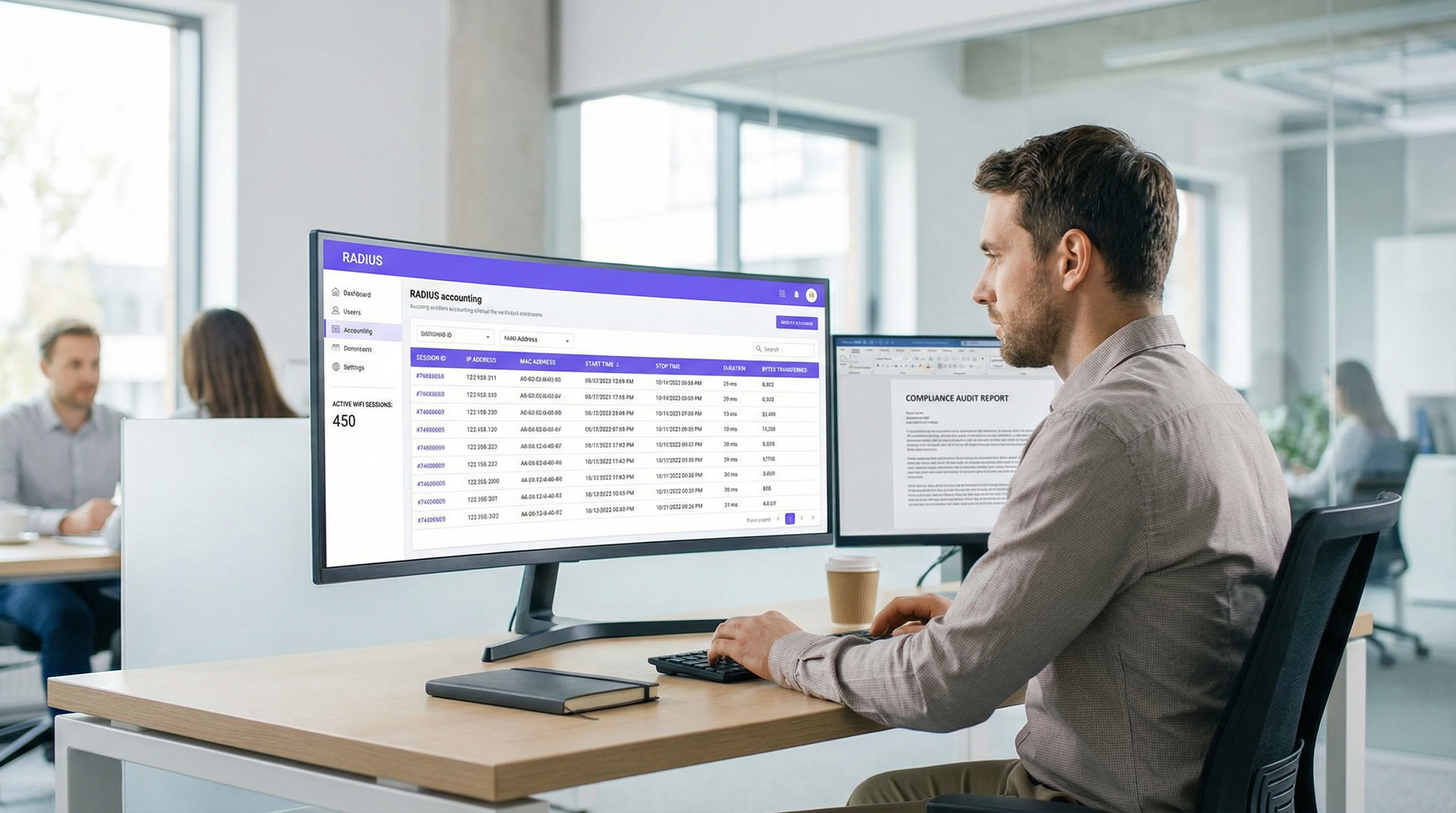
Für IT- und Netzwerkbetriebsteams in Unternehmen ist die Authentifizierung von Benutzern in einem WiFi-Netzwerk nur die halbe Miete. Sobald ein Gerät verbunden ist, ist es für die Sicherheit, Kapazitätsplanung und Einhaltung gesetzlicher Vorschriften entscheidend zu verstehen, was dieses Gerät tut – wie lange es verbunden bleibt, wie viele Daten es verbraucht und wann es die Verbindung trennt. Hier wird RADIUS Accounting unverzichtbar. Während die RADIUS-Authentifizierung das Wer und Wie des Netzwerkzugriffs regelt, zeichnet RADIUS Accounting akribisch das Was, Wann und Wie viel auf.
Dieser Leitfaden bietet einen technischen Deep-Dive in RADIUS Accounting und untersucht die Mechanismen von Start-, Stop- und Interim-Update-Paketen sowie die Attribute, die sie wertvoll machen. Er skizziert, wie Standortbetreiber im Gastgewerbe , Einzelhandel und anderen Sektoren diese Daten nutzen können, um robuste Audit-Trails zu führen, die GDPR-Compliance zu gewährleisten und verwertbare Erkenntnisse in SIEM-Plattformen oder WiFi Analytics -Systeme einzuspeisen. Durch die Beherrschung von RADIUS Accounting können Netzwerkarchitekten rohe Sitzungsprotokolle in strategische Assets verwandeln, die die betriebliche Effizienz steigern und Risiken mindern.
Technischer Deep-Dive
RADIUS Accounting vs. RADIUS-Authentifizierung
RADIUS (Remote Authentication Dial-In User Service), definiert in RFC 2865 und für Accounting in RFC 2866 erweitert, arbeitet nach einem Client-Server-Modell. In einer typischen WiFi-Bereitstellung in Unternehmen fungiert der Access Point (AP) oder Wireless LAN Controller (WLC) als Network Access Server (NAS) – der RADIUS-Client. Der RADIUS-Server (z. B. FreeRADIUS, Cisco ISE, Aruba ClearPass) empfängt und verarbeitet Anfragen.
Die Unterscheidung zwischen Authentifizierung und Accounting ist grundlegend:
| Dimension | RADIUS-Authentifizierung | RADIUS Accounting |
|---|---|---|
| Zweck | Identität verifizieren und Zugriff gewähren/verweigern | Sitzungsnutzung und Aktivität aufzeichnen |
| UDP-Port | 1812 | 1813 |
| RFC-Referenz | RFC 2865 | RFC 2866 |
| Pakettypen | Access-Request, Access-Accept, Access-Reject | Accounting-Request (Start/Stop/Interim) |
| Erfasste Daten | Anmeldedaten, VLAN-Zuweisung, Richtlinien | Sitzungsdauer, übertragene Bytes, IP-Adresse |
| Compliance-Rolle | Zugriffskontrolle | Audit-Trail, rechtmäßiges Abfangen |
Für Teams, die Guest WiFi in großem Umfang bereitstellen, sind beide Funktionen erforderlich – aber Accounting ist diejenige, die für Compliance und Nachweisbarkeit sorgt.
Die drei Accounting-Pakettypen
RADIUS Accounting basiert auf drei primären Accounting-Request-Pakettypen, die jeweils durch das Attribut Acct-Status-Type definiert sind:
Start (Acct-Status-Type = 1): Wird vom NAS gesendet, wenn ein Benutzer erfolgreich eine Verbindung herstellt und eine Sitzung beginnt. Es erstellt den Basisdatensatz in der Accounting-Datenbank und erfasst die Benutzeridentität, die MAC-Adresse des Geräts, die zugewiesene IP-Adresse und den AP, mit dem der Benutzer verbunden ist.
Interim-Update (Acct-Status-Type = 3): Wird regelmäßig während einer aktiven Sitzung gesendet. Diese Pakete liefern laufende Momentaufnahmen der aktuellen Nutzung – übertragene Bytes, Sitzungsdauer und Paketzahlen. Sie fungieren als Heartbeat, um zu bestätigen, dass die Sitzung noch aktiv ist, und bieten Einblick in lang laufende Sitzungen, ohne auf die Trennung warten zu müssen.
Stop (Acct-Status-Type = 2): Wird gesendet, wenn die Sitzung beendet wird – sei es durch eine vom Benutzer initiierte Trennung, einen AP-Neustart, einen Idle-Timeout oder einen Session-Timeout. Es enthält die endgültigen, kumulativen Statistiken für die gesamte Sitzung.
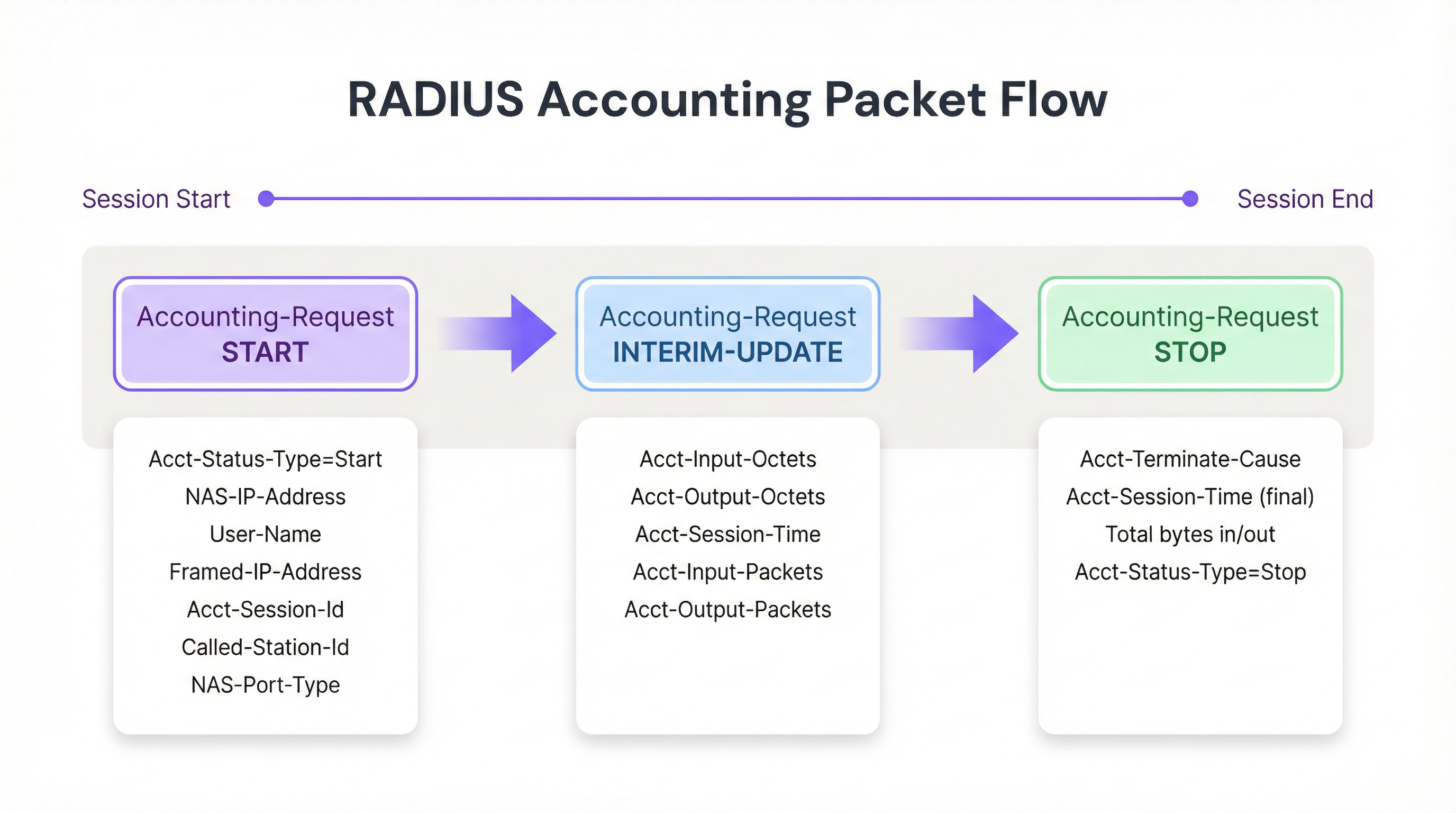
Abbildung 1: Der Lebenszyklus von RADIUS Accounting-Paketen während einer WiFi-Sitzung.
Wichtige Accounting-Attribute
Um Sitzungen effektiv zu verfolgen und belastbare Audit-Logs zu erstellen, füllt der NAS Accounting-Request-Pakete mit spezifischen Attributen. Die folgenden sind betrieblich am bedeutsamsten:
| Attribut | Beschreibung | Compliance-Relevanz |
|---|---|---|
| Acct-Session-Id | Eindeutige Sitzungskennung, generiert vom NAS | Primärschlüssel zur Korrelation von Start-, Interim- und Stop-Datensätzen |
| User-Name | Authentifizierte Identität (Benutzername oder MAC-Adresse) | Ordnet die Sitzung einem bestimmten Benutzer oder Gerät zu |
| NAS-IP-Address | IP-Adresse des meldenden AP oder WLC | Identifiziert das Netzwerksegment und den physischen Standort |
| Framed-IP-Address | Dem Client-Gerät zugewiesene IP-Adresse | Entscheidend für die Korrelation mit Firewall- und Web-Proxy-Logs |
| Calling-Station-Id | MAC-Adresse des Client-Geräts | Identität auf Geräteebene für den Audit-Trail |
| Called-Station-Id | MAC-Adresse des AP und SSID | Identifiziert das spezifische Funkmodul und Netzwerk, mit dem der Benutzer verbunden ist |
| Acct-Input-Octets | Vom Client empfangene Bytes | Bandbreitenüberwachung und Kapazitätsplanung |
| Acct-Output-Octets | An den Client gesendete Bytes | Bandbreitenüberwachung und Kapazitätsplanung |
| Acct-Session-Time | Sitzungsdauer in Sekunden | Verweildauer-Analysen und Abrechnung |
| Acct-Terminate-Cause | Grund für das Sitzungsende | Fehlerbehebung und Anomalieerkennung |
Für Teams, die mit 802.1X-Authentifizierung arbeiten, enthält das Attribut User-Name die authentifizierte Identität aus dem EAP-Austausch, was einen reichhaltigeren Audit-Trail bietet als die MAC Authentication Bypass (MAB) allein.
Implementierungsleitfaden
Die Bereitstellung einer robusten RADIUS Accounting-Infrastruktur erfordert eine sorgfältige Konfiguration sowohl auf NAS- als auch auf RADIUS-Server-Ebene. Im Folgenden wird ein herstellerneutraler Ansatz zur Einrichtung einer zuverlässigen Accounting-Pipeline beschrieben.
Schritt 1: Konfigurieren Sie den NAS (Access Points / Controller)
Die NAS-Konfiguration ist der Punkt, an dem die meisten Implementierungen scheitern. Administratoren konfigurieren die Authentifizierung oft korrekt, belassen das Accounting jedoch bei den Standardeinstellungen oder deaktivieren es vollständig.
- Accounting-Server definieren: Geben Sie die IP-Adresse des RADIUS-Servers und das Shared Secret für den UDP-Port 1813 an. Konfigurieren Sie in Hochverfügbarkeitsumgebungen einen sekundären Accounting-Server, um Datenverlust zu vermeiden, falls der primäre Server nicht erreichbar ist.
- Interim-Updates aktivieren: Dies ist der wichtigste Konfigurationsschritt überhaupt. Legen Sie ein angemessenes Intervall fest – in der Regel 10 bis 15 Minuten für Unternehmensumgebungen. Kürzere Intervalle (z. B. 1 Minute) liefern detailliertere Daten, erzeugen jedoch bei großen Installationen eine untragbare Schreiblast; längere Intervalle (z. B. 30 Minuten) reduzieren den Overhead, verzögern jedoch die Sichtbarkeit aktiver Sitzungen.
- Zeitsynchronisation sicherstellen: Konfigurieren Sie NTP auf allen NAS-Geräten und dem RADIUS-Server. Genaue Zeitstempel sind für Audit-Logs und die SIEM-Korrelation unverzichtbar. Eine Zeitabweichung von 5 Minuten kann einen Audit-Trail in einem Lawful-Intercept-Szenario ungültig machen.
Schritt 2: RADIUS-Server konfigurieren
- Datenbankintegration: Konfigurieren Sie den RADIUS-Server so, dass Accounting-Daten in einer strukturierten relationalen Datenbank (z. B. PostgreSQL, MySQL) statt in einfachen Textdateien protokolliert werden. Strukturierte Speicherung ermöglicht effiziente Abfragen, Indizierung und Integration in nachgelagerte Systeme. Stellen Sie sicher, dass Indizes für
Acct-Session-Id,User-Name,Framed-IP-Addressund den Zeitstempel des Sitzungsstarts vorhanden sind. - Datenaufbewahrungsrichtlinien: Implementieren Sie automatisierte Archivierungs- oder Bereinigungsskripte, die auf Ihre Compliance-Anforderungen abgestimmt sind. GDPR Artikel 5(1)(e) erfordert, dass Daten nicht länger als nötig aufbewahrt werden; die Vorschriften zum Lawful Intercept in vielen Rechtsordnungen (z. B. der Investigatory Powers Act 2016 im Vereinigten Königreich) können jedoch eine Aufbewahrung von bis zu 12 Monaten vorschreiben.
Schritt 3: Die Daten-Pipeline aufbauen
Um den Wert von Accounting-Daten zu maximieren, müssen diese an Analyseplattformen exportiert werden, wo sie abgefragt, korreliert und visualisiert werden können.
- SIEM-Integration: Konfigurieren Sie den RADIUS-Server oder die zugrunde liegende Datenbank so, dass Protokolle über Syslog oder eine REST API an Ihr SIEM (z. B. Splunk, Microsoft Sentinel, IBM QRadar) weitergeleitet werden. Dies ermöglicht es Sicherheitsteams, WiFi-Authentifizierungsereignisse mit Firewall-Sperren, Intrusion-Detection-Warnungen oder Data-Loss-Prevention-Triggern zu korrelieren.
- Analytics-Integration: Speisen Sie Sitzungsdaten in Plattformen wie WiFi Analytics von Purple ein, um Rohdaten und MAC-Adressen in verwertbare Erkenntnisse über Besucherfrequenz, Verweildauer und Spitzennutzungszeiten umzuwandeln. Dies ist besonders wertvoll für Betreiber in den Bereichen Einzelhandel und Gastgewerbe , die ihre Personalplanung und Infrastrukturinvestitionen an den tatsächlichen Nutzungsmustern ausrichten müssen.
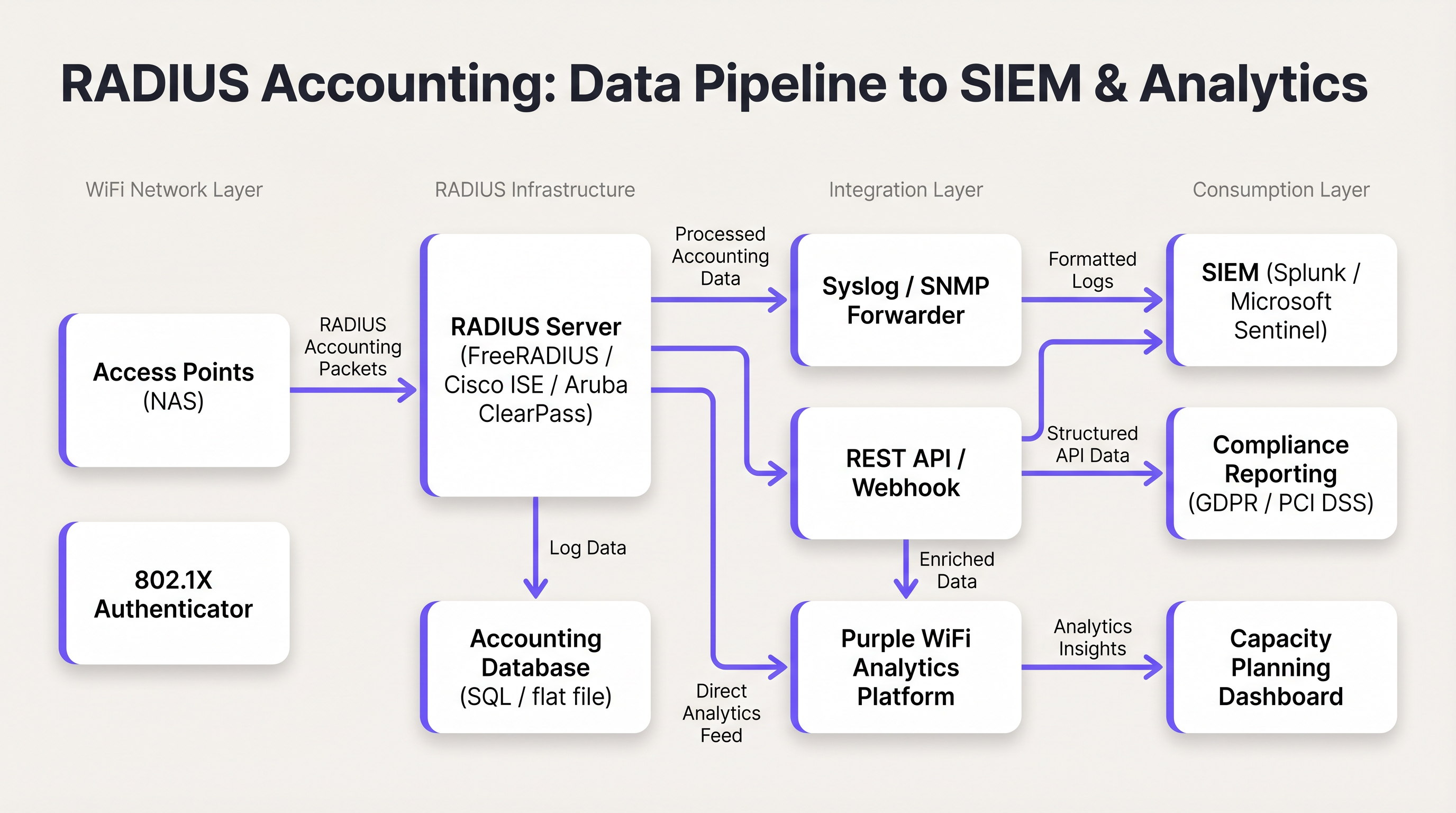
Abbildung 2: Die RADIUS-Accounting-Daten-Pipeline von Access Points zu SIEM- und Analyseplattformen.
Best Practices
Verwenden Sie immer Interim-Updates. Sich ausschließlich auf Start- und Stop-Pakete zu verlassen, führt zu betrieblichen Blindstellen. Eine unterbrochene Verbindung oder ein Stromausfall am AP kann verhindern, dass ein Stop-Paket gesendet wird, wodurch eine veraltete Sitzung auf unbestimmte Zeit in der Datenbank verbleibt. Interim-Updates bieten den Mechanismus, um diese veralteten Sitzungen zu erkennen und zu schließen. Faustregel: Wenn eine Sitzung innerhalb des zwei- bis dreifachen konfigurierten Intervalls kein Interim-Update gesendet hat, betrachten Sie sie als beendet.
Korrelieren Sie RADIUS-Accounting mit DHCP-Protokollen. Das RADIUS-Accounting liefert die Framed-IP-Address, aber die DHCP-Lease-Zeiten können in manchen Umgebungen kürzer sein als die Sitzungsdauer. Das Führen von DHCP-Protokollen neben RADIUS-Protokollen bietet einen belastbareren Audit-Trail, insbesondere an Standorten mit hoher Dichte, an denen IP-Adressen häufig wiederverwendet werden.
Sichern Sie den Transport mit RadSec. Herkömmlicher RADIUS-Verkehr wird über UDP mit minimaler Verschlüsselung übertragen – nur das Feld für das Benutzerpasswort wird verschleiert. Verwenden Sie in verteilten Umgebungen, insbesondere solchen, die sich über mehrere Standorte erstrecken oder Cloud-gehostete RADIUS-Server nutzen, RadSec (RADIUS über TLS, definiert in RFC 6614) oder IPsec-Tunnel, um Accounting-Daten während der Übertragung zu schützen. Dies ist eine Anforderung gemäß PCI DSS 4.0 für jedes Netzwerk, das Karteninhaberdaten verarbeitet.
Überwachen Sie die Accounting-Warteschlange. Wenn der RADIUS-Server nicht erreichbar ist, stellen NAS-Geräte Accounting-Pakete lokal in eine Warteschlange. Überwachen Sie die Länge dieser Warteschlange; eine volle Warteschlange führt zu verworfenen Paketen und verlorenen Audit-Daten. Konfigurieren Sie Warnmeldungen für die Warteschlangentiefe und implementieren Sie einen sekundären Accounting-Server für Hochverfügbarkeitsumgebungen.
Trennen Sie Authentifizierungs- und Accounting-Server bei großen Installationen. In Umgebungen mit mehr als 5.000 gleichzeitigen Benutzern kann die Schreiblast des Accountings die Antwortzeiten der Authentifizierung beeinträchtigen. Dedizierte Accounting-Server mit separaten Datenbankinstanzen verhindern diesen Ressourcenkonflikt.
Fehlerbehebung & Risikominderung
Das Problem veralteter Sitzungen (Stale Sessions)
Symptom: Die RADIUS-Datenbank zeigt an, dass ein Benutzer seit 48 Stunden verbunden ist, obwohl der Standort über Nacht geschlossen war.
Ursache: Das NAS hat kein Stop-Paket gesendet – in der Regel aufgrund eines Stromausfalls, eines AP-Neustarts oder einer Netzwerkunterbrechung – und das Paket wurde nie vom RADIUS-Server empfangen.
Abhilfe: Implementieren Sie ein Bereinigungsskript für tote Sitzungen auf dem RADIUS-Server. Das Skript sollte regelmäßig nach aktiven Sitzungen suchen, bei denen das letzte empfangene Paket (Start oder Interim-Update) älter als ein definierter Schwellenwert ist (z. B. das 2,5-fache des Interim-Update-Intervalls). Sitzungen, die diesen Schwellenwert überschreiten, sollten zwangsweise mit einem synthetischen Stop-Datensatz geschlossen werden, wobei die Beendigungsursache als 'Lost-Carrier' oder 'Admin-Reset'.
Hohe RADIUS-Server-CPU- und I/O-Last
Symptom: Die Antwortzeiten bei der Authentifizierung verschlechtern sich während der Stoßzeiten; der RADIUS-Server meldet eine hohe CPU- und Festplatten-I/O-Auslastung.
Ursache: Ein zu aggressives Intervall für Interim-Updates (z. B. 1 Minute) über Tausende von APs hinweg erzeugt ein nicht tragbares Volumen an Datenbank-Schreibvorgängen.
Abhilfe: Erhöhen Sie das Intervall für Interim-Updates auf 15 Minuten. Überprüfen Sie, ob die Accounting-Datenbank über geeignete Indizes verfügt. Erwägen Sie die Trennung von Authentifizierung und Accounting auf dedizierte Server-Instanzen. Prüfen Sie, ob eine Time-Series-Datenbank (z. B. InfluxDB) für hochvolumige Accounting-Daten besser geeignet ist als eine relationale Datenbank.
Fehlende Framed-IP-Address in Accounting-Datensätzen
Symptom: RADIUS-Accounting-Datensätze sind vorhanden, aber das Feld Framed-IP-Address ist leer oder fehlt, was eine IP-zu-MAC-Korrelation unmöglich macht.
Ursache: Der NAS sendet das Start-Paket möglicherweise, bevor DHCP dem Client eine IP-Adresse zugewiesen hat. Die IP ist erst nach Abschluss des DHCP-Austauschs verfügbar.
Abhilfe: Konfigurieren Sie den NAS so, dass das Senden des Start-Pakets bis nach der DHCP-Zuweisung verzögert wird, sofern die Plattform dies unterstützt. Alternativ können Sie sich auf die Interim-Update-Pakete verlassen, die nach der DHCP-Zuweisung gesendet werden und die Framed-IP-Address enthalten. Stellen Sie sicher, dass Ihre Audit-Abfragen dies berücksichtigen, indem Sie Interim-Update-Datensätze prüfen, falls der Start-Datensatz keine IP enthält.
ROI & geschäftliche Auswirkungen
Die Implementierung eines robusten RADIUS-Accountings liefert messbaren Geschäftswert in drei Dimensionen:
Compliance und Minderung rechtlicher Risiken. Im Falle eines Sicherheitsvorfalls, einer Auskunftsanfrage gemäß GDPR oder einer rechtmäßigen Überwachungsanordnung bieten präzise Accounting-Logs den notwendigen Audit-Trail, um zu identifizieren, welcher Benutzer oder welches Gerät zu einem bestimmten Zeitpunkt eine bestimmte IP-Adresse innehatte. Ohne dies drohen Organisationen potenzielle regulatorische Strafen gemäß GDPR (bis zu 4 % des weltweiten Jahresumsatzes) und Reputationsschäden. Die Kosten für die Implementierung einer ordnungsgemäßen Accounting-Infrastruktur sind ein Bruchteil der Kosten einer einzelnen behördlichen Durchsetzungsmaßnahme.
Kapazitätsplanung und Infrastruktur-ROI. Durch die Analyse von Trends bei Acct-Input-Octets und Acct-Output-Octets im Zeitverlauf können Netzwerkarchitekten Bandbreitenverbrauchsmuster, Spitzenlastzeiten und die spezifischen APs oder SSIDs identifizieren, die die höchste Last verursachen. Diese Daten fließen direkt in Entscheidungen über WAN-Upgrades und AP-Platzierungsstrategien ein und stellen sicher, dass Infrastrukturinvestitionen dort getätigt werden, wo sie die größte Wirkung erzielen. Für Transport -Knotenpunkte und große Veranstaltungsorte kann dies erhebliche Einsparungen bei den Investitionsausgaben bedeuten.
Erweiterte Analysen und Venue Intelligence. Wenn RADIUS-Sitzungsdaten mit Plattformen wie Purple's WiFi Analytics und Sensors kombiniert werden, verwandeln sich die rohen Accounting-Daten in Venue Intelligence. Metriken zur Verweildauer, die aus der Sitzungsdauer abgeleitet werden, die Identifizierung von wiederkehrenden Besuchern anhand der Calling-Station-Id-Historie und die Analyse der Spitzenbelegung aus der Anzahl gleichzeitiger Sitzungen werden verfügbar. Für Hospitality -Betreiber informieren diese Daten direkt Personalmodelle, die Platzierung von Gastronomieangeboten (F&B) und Marketing-Personalisierungsstrategien. Weitere Informationen darüber, wie die WiFi-Infrastruktur diese Funktionen unterstützt, finden Sie in unseren Leitfäden zu Wireless Access Points und Modern Hospitality WiFi Solutions .
Schlüsselbegriffe & Definitionen
RADIUS Accounting
The process of collecting and recording data about user network resource consumption, including session start and end times, data volume transferred, and IP address assignment. Defined in RFC 2866.
Essential for billing, capacity planning, GDPR compliance, and maintaining security audit trails in any enterprise WiFi deployment.
Acct-Status-Type
A RADIUS attribute (Attribute ID 40) that indicates the purpose of an accounting packet. Values include Start (1), Stop (2), and Interim-Update (3).
Used by the RADIUS server to determine whether to create a new session record, update an existing one, or close it. The most fundamental attribute in any accounting packet.
Interim-Update
A periodic RADIUS accounting packet sent by the NAS during an active session to report current usage statistics, including bytes transferred and session duration.
Critical for tracking long-lived sessions and detecting stale sessions if a client disconnects unexpectedly without sending a Stop packet.
Acct-Session-Id
A unique string generated by the NAS to identify a specific user connection instance. This value is consistent across all accounting packets (Start, Interim-Update, Stop) for the same session.
The primary key used to correlate all accounting records belonging to the same session. Without this, it is impossible to reconstruct a complete session history.
NAS (Network Access Server)
The device — typically a Wireless Access Point or Wireless LAN Controller — that controls physical access to the network and acts as the RADIUS client, generating and sending accounting packets.
The NAS is responsible for the accuracy and completeness of accounting data. Misconfiguration at the NAS level (e.g., disabled accounting, missing attributes) cannot be remediated at the RADIUS server level.
Framed-IP-Address
The IP address assigned to the client device for the duration of the session, included in RADIUS accounting packets.
Critical for correlating RADIUS accounting logs with other network logs such as firewall, web proxy, or DNS logs. The absence of this attribute makes IP-to-device correlation impossible.
Calling-Station-Id
Typically the MAC address of the client device connecting to the network, formatted as a colon-separated hexadecimal string (e.g., AA:BB:CC:DD:EE:FF).
Used to identify the specific hardware device, regardless of the IP address it is assigned. The device-layer anchor of the audit trail.
Acct-Terminate-Cause
An attribute included in Stop packets that specifies the reason a session ended. Common values include User-Request, Lost-Carrier, Idle-Timeout, Session-Timeout, and Admin-Reset.
Valuable for troubleshooting connectivity issues and for anomaly detection — for example, a high rate of Lost-Carrier terminations on a specific AP may indicate a hardware or interference problem.
RadSec
RADIUS over TLS (Transport Layer Security), defined in RFC 6614. Provides encrypted and authenticated transport for RADIUS packets, replacing the traditional UDP-based transport.
Required in any deployment where RADIUS traffic traverses untrusted networks (e.g., internet-connected cloud RADIUS servers). Increasingly mandated by PCI DSS 4.0 for cardholder data environments.
Fallstudien
A 300-room hotel with conference facilities is deploying a new guest WiFi network. The IT manager needs to ensure that the deployment meets GDPR requirements for data minimisation and audit trail completeness, while also providing the marketing team with dwell time and repeat visitor analytics. The hotel uses a cloud-hosted RADIUS server and Cisco Meraki APs.
The deployment should be configured as follows. On the Meraki dashboard, navigate to Network-wide > RADIUS servers and add the cloud RADIUS server on port 1813 with a strong shared secret. Enable accounting and set the interim update interval to 15 minutes. On the RADIUS server, configure accounting to write to a PostgreSQL database with the following schema: session_id (primary key), user_name, nas_ip, framed_ip, calling_station_id, called_station_id, session_start, session_end, input_octets, output_octets, terminate_cause. Implement a data retention policy that automatically archives records older than 12 months to cold storage and purges records older than 24 months, documented in the hotel's GDPR Record of Processing Activities. Configure a Purple WiFi Analytics integration to ingest the session data, enabling the marketing team to access dwell time reports and repeat visitor frequency dashboards. Ensure NTP is synchronised across all Meraki APs and the RADIUS server to within 1 second.
A retail chain with 150 stores needs to comply with PCI DSS 4.0 requirements for network access monitoring. Their point-of-sale terminals use MAC Authentication Bypass (MAB) on the WiFi network. The security team has received a request from their QSA (Qualified Security Assessor) to demonstrate that they can identify which specific POS terminal accessed the payment network at any given time, using only a source IP address and timestamp from a firewall log.
The solution requires a three-component integration. First, verify that all Wireless LAN Controllers are configured to include the Framed-IP-Address attribute in RADIUS accounting packets. This is not always enabled by default and must be explicitly configured. Second, integrate the RADIUS accounting database with the SIEM platform (e.g., Splunk). Create a lookup table in Splunk that maps Framed-IP-Address and session time ranges to Calling-Station-Id (MAC address). Third, create a Splunk saved search that accepts a source IP and timestamp as inputs and returns the corresponding MAC address, NAS-IP-Address (identifying the store and AP), and User-Name from the RADIUS accounting records. The QSA can then be demonstrated this workflow: given a firewall log entry showing source IP 10.5.12.44 at 14:23:07 on a specific date, the search returns the MAC address of the POS terminal, the AP it was connected to, and the store location.
Szenarioanalyse
Q1. A hotel IT manager notices that the WiFi analytics dashboard shows very few active users during the day, even though the lobby and restaurant are visibly busy. However, the historical reports for the previous day show a massive spike in data usage. The RADIUS server logs confirm that Start packets are being received, but the database shows very few Interim-Update records. What is the most likely misconfiguration, and how would you resolve it?
💡 Hinweis:Consider how data usage is reported during an active session versus at the point of disconnection.
Empfohlenen Ansatz anzeigen
The most likely cause is that Interim-Updates are disabled or not configured on the Wireless LAN Controller. Without interim updates, the RADIUS server only receives a Start packet when the user connects and a Stop packet when they disconnect. The analytics dashboard cannot display current usage because no in-session data is being reported. Once users leave and disconnect, the Stop packets arrive with the total accumulated data, causing the delayed spike in historical reports. The resolution is to enable Interim-Updates on the WLC and set an appropriate interval — 15 minutes is recommended for a hotel environment. After enabling, verify that the RADIUS server is receiving Interim-Update packets by checking the accounting database for records with Acct-Status-Type = 3.
Q2. During a security incident investigation, your SIEM has flagged that an IP address on the guest WiFi network accessed a known command-and-control server at 09:47:23 on a specific date. You need to identify the physical device responsible. Your DHCP lease time is set to 30 minutes. Describe the exact query logic you would use against the RADIUS accounting database to identify the device.
💡 Hinweis:IP addresses are not static. You must use a time-range query, not a point-in-time lookup, and account for DHCP lease recycling.
Empfohlenen Ansatz anzeigen
You must query the RADIUS accounting database for sessions where: (1) the Framed-IP-Address equals the flagged IP address, AND (2) the session_start timestamp is earlier than or equal to 09:47:23, AND (3) either the session_end timestamp is later than or equal to 09:47:23, OR the session_end is NULL (session still active at query time). If multiple sessions match (possible with a 30-minute DHCP lease), review the Interim-Update records to confirm which session was actively reporting usage at 09:47:23. The matching session record will contain the Calling-Station-Id (MAC address of the device) and the User-Name (authenticated identity, if 802.1X was used). Cross-reference the MAC address with your device inventory or DHCP server logs to identify the physical device and its owner.
Q3. You are the network architect for a conference centre that hosts events with up to 8,000 concurrent WiFi users. Your current RADIUS server is experiencing database write saturation during peak events, causing authentication delays of 3-5 seconds. Your current interim update interval is set to 2 minutes. Describe a multi-step remediation plan that addresses both the immediate performance issue and the underlying architectural risk.
💡 Hinweis:Consider both configuration changes and architectural changes. The goal is to maintain audit trail completeness while reducing write load.
Empfohlenen Ansatz anzeigen
The remediation plan should address three layers. First, as an immediate fix, increase the interim update interval from 2 minutes to 15 minutes on all Wireless Controllers. This reduces the accounting write load by approximately 87% (from one write per 2 minutes to one per 15 minutes per session), which should immediately relieve the database I/O pressure. Second, separate the authentication and accounting workloads onto dedicated server instances. The authentication server handles Access-Request/Accept/Reject packets, while a dedicated accounting server handles Accounting-Request packets and writes to a separate database. This prevents accounting write load from affecting authentication response times. Third, for the underlying architectural risk, evaluate whether a time-series database (e.g., InfluxDB or TimescaleDB) is more appropriate than a relational database for the accounting workload. Time-series databases are optimised for high-volume sequential writes and time-range queries, which matches the accounting data pattern exactly. Migrate accounting writes to the time-series database while retaining the relational database for compliance reporting queries.
Wichtigste Erkenntnisse
- ✓RADIUS accounting (RFC 2866) is distinct from authentication: it records session usage data — duration, bytes transferred, IP assignment — rather than making access control decisions.
- ✓The three packet types — Start, Interim-Update, and Stop — must all be configured and operational for a complete audit trail. Interim-Updates are the most commonly missed configuration.
- ✓The Acct-Session-Id, Framed-IP-Address, and Calling-Station-Id attributes form the minimum viable audit trail, enabling IP-to-device correlation for compliance and security investigations.
- ✓Stale sessions (caused by missing Stop packets) must be managed with a dead-session cleanup script using the 2.5x interim update interval rule.
- ✓RADIUS accounting data must be exported to a structured database and integrated with a SIEM and analytics platform to deliver its full compliance and operational value.
- ✓For PCI DSS, GDPR, and lawful intercept compliance, the ability to tie an IP address to a MAC address at a specific point in time is the core requirement that RADIUS accounting fulfils.
- ✓At scale (5,000+ concurrent users), separate authentication and accounting server instances and consider a time-series database for accounting writes to prevent performance degradation.




