

Contabilização RADIUS: Monitorização de Sessões, Utilização e Registos de Auditoria
This guide provides a comprehensive technical reference on RADIUS accounting — how it records WiFi session start, stop, and interim-update data, what attributes are captured, and how to leverage that data for security auditing, GDPR compliance, and capacity planning. It is essential reading for network operations and security teams who need defensible audit trails from WiFi authentication events, and for venue operators seeking to integrate session data into SIEM platforms and analytics dashboards.
🎧 Ouça este Guia
Ver Transcrição
Resumo Executivo
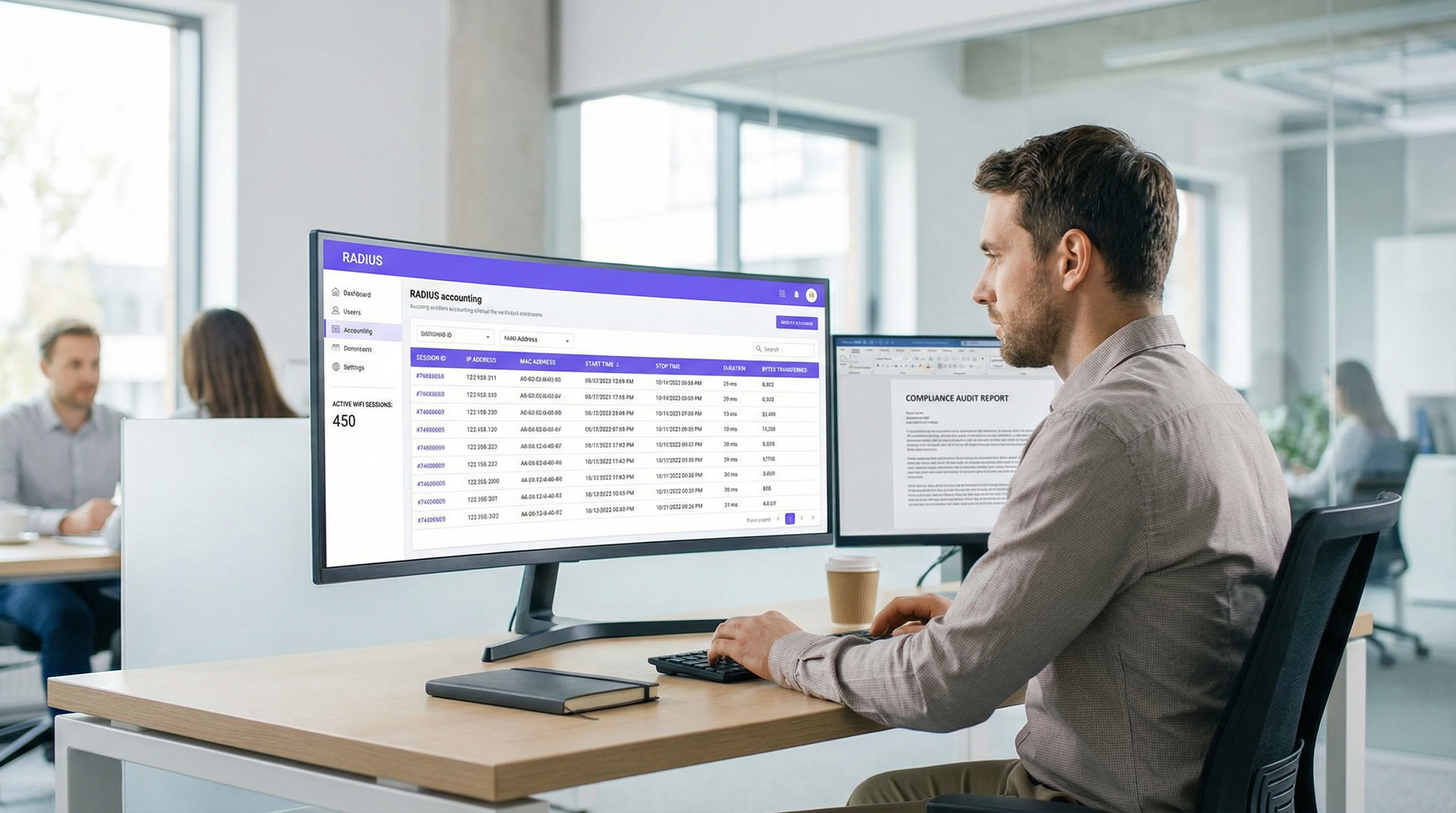
Para as equipas de TI e de operações de rede empresariais, a autenticação de utilizadores numa rede WiFi é apenas metade do desafio. Uma vez ligado um dispositivo, compreender o que este faz — quanto tempo permanece ligado, quantos dados consome e quando se desliga — é fundamental para a segurança, planeamento de capacidade e conformidade regulamentar. É aqui que a contabilização RADIUS se torna indispensável. Enquanto a autenticação RADIUS gere o quem e o como do acesso à rede, a contabilização RADIUS regista meticulosamente o quê, o quando e o quanto.
Este guia oferece uma análise técnica aprofundada da contabilização RADIUS, explorando a mecânica dos pacotes Start, Stop e Interim-Update, bem como os atributos que os tornam valiosos. Descreve como os operadores de espaços na Hotelaria , Retalho e outros setores podem tirar partido destes dados para manter registos de auditoria robustos, garantir a conformidade com o GDPR e fornecer inteligência acionável a plataformas SIEM ou sistemas de WiFi Analytics . Ao dominar a contabilização RADIUS, os arquitetos de rede podem transformar registos de sessão em bruto em ativos estratégicos que impulsionam a eficiência operacional e mitigam riscos.
Análise Técnica Aprofundada
Contabilização RADIUS vs. Autenticação RADIUS
O RADIUS (Remote Authentication Dial-In User Service), definido no RFC 2865 e expandido para contabilização no RFC 2866 , opera num modelo cliente-servidor. Numa implementação típica de WiFi empresarial, o Ponto de Acesso (AP) ou o Controlador de LAN Sem Fios (WLC) atua como o Servidor de Acesso à Rede (NAS) — o cliente RADIUS. O servidor RADIUS (por exemplo, FreeRADIUS, Cisco ISE, Aruba ClearPass) recebe e processa os pedidos.
A distinção entre autenticação e contabilização é fundamental:
| Dimensão | Autenticação RADIUS | Contabilização RADIUS |
|---|---|---|
| Objetivo | Verificar a identidade e conceder/negar acesso | Registar a utilização e atividade da sessão |
| Porta UDP | 1812 | 1813 |
| Referência RFC | RFC 2865 | RFC 2866 |
| Tipos de Pacote | Access-Request, Access-Accept, Access-Reject | Accounting-Request (Start/Stop/Interim) |
| Dados Capturados | Credenciais, atribuição de VLAN, políticas | Tempo de sessão, bytes transferidos, endereço IP |
| Papel na Conformidade | Controlo de acesso | Registo de auditoria, interceção legal |
Para as equipas que implementam Guest WiFi em grande escala, ambas as funções são necessárias — mas a contabilização é a que garante a conformidade e a capacidade de defesa.
Os Três Tipos de Pacotes de Contabilização
A contabilização RADIUS baseia-se em três tipos principais de pacotes Accounting-Request, cada um definido pelo atributo Acct-Status-Type:
Start (Acct-Status-Type = 1): Enviado pelo NAS quando um utilizador se liga com sucesso e uma sessão é iniciada. Estabelece o registo de base na base de dados de contabilização, capturando a identidade do utilizador, o endereço MAC do dispositivo, o endereço IP atribuído e o AP ao qual o utilizador se ligou.
Interim-Update (Acct-Status-Type = 3): Enviado periodicamente durante uma sessão ativa. Estes pacotes fornecem instantâneos contínuos da utilização atual — bytes transferidos, duração da sessão e contagem de pacotes. Atuam como um "heartbeat" para confirmar que a sessão continua ativa e proporcionam visibilidade sobre sessões longas sem ter de aguardar pela sua desconexão.
Stop (Acct-Status-Type = 2): Enviado quando a sessão termina — seja devido a uma desconexão iniciada pelo utilizador, reinício do AP, tempo limite de inatividade ou tempo limite da sessão. Contém as estatísticas finais e cumulativas de toda a sessão.
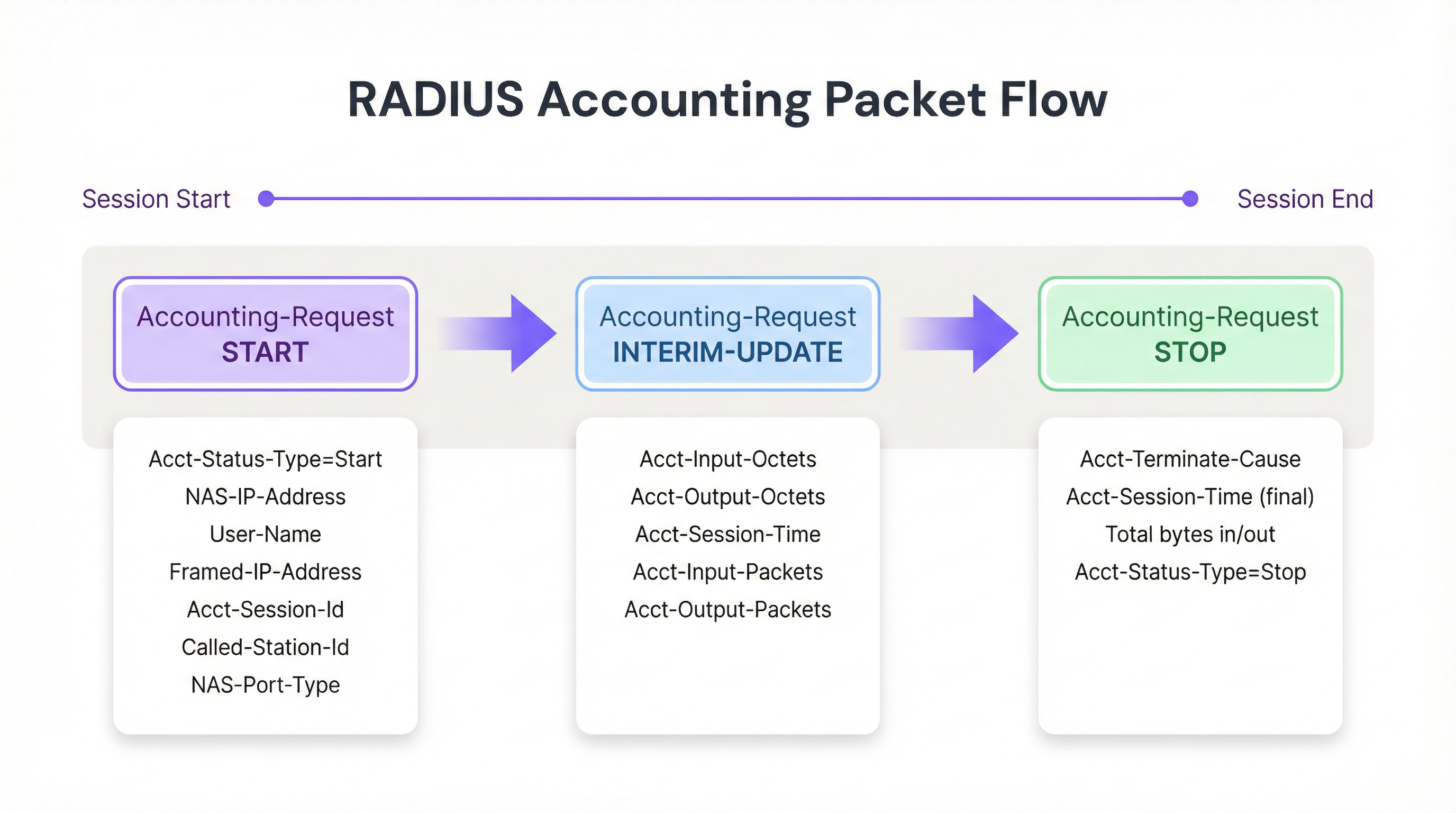
Figura 1: O ciclo de vida do pacote de contabilização RADIUS ao longo de uma sessão WiFi.
Principais Atributos de Contabilização
Para monitorizar sessões de forma eficaz e criar registos de auditoria defensáveis, o NAS preenche os pacotes Accounting-Request com atributos específicos. Os seguintes são os mais significativos a nível operacional:
| Atributo | Descrição | Relevância para a Conformidade |
|---|---|---|
| Acct-Session-Id | Identificador único de sessão gerado pelo NAS | Chave primária para correlacionar os registos Start, Interim e Stop |
| User-Name | Identidade autenticada (nome de utilizador ou endereço MAC) | Mapeia a sessão para um utilizador ou dispositivo específico |
| NAS-IP-Address | Endereço IP do AP ou WLC que reporta | Identifica o segmento de rede e a localização física |
| Framed-IP-Address | Endereço IP atribuído ao dispositivo cliente | Crítico para correlação com registos de firewall e proxy web |
| Calling-Station-Id | Endereço MAC do dispositivo cliente | Identidade na camada do dispositivo para o registo de auditoria |
| Called-Station-Id | Endereço MAC do AP e SSID | Identifica o rádio e a rede específicos aos quais o utilizador se ligou |
| Acct-Input-Octets | Bytes recebidos do cliente | Monitorização de largura de banda e planeamento de capacidade |
| Acct-Output-Octets | Bytes enviados para o cliente | Monitorização de largura de banda e planeamento de capacidade |
| Acct-Session-Time | Duração da sessão em segundos | Análise de tempo de permanência e faturação |
| Acct-Terminate-Cause | Motivo pelo qual a sessão terminou | Resolução de problemas e deteção de anomalias |
Para as equipas que trabalham com Autenticação 802.1X , o atributo User-Name conterá a identidade autenticada da troca EAP, fornecendo um registo de auditoria mais rico do que apenas o MAC Authentication Bypass (MAB).
Guia de Implementação
A implementação de uma infraestrutura robusta de contabilização RADIUS requer uma configuração cuidadosa tanto ao nível do NAS como do servidor RADIUS. A seguir, apresenta-se uma abordagem independente do fornecedor para estabelecer um pipeline de contabilização fiável.
Passo 1: Configurar o NAS (Pontos de Acesso / Controladores)
A configuração do NAS é onde a maioria das implementações falha. Os administradores configuram frequentemente a autenticação de forma correta, mas deixam a contabilização com as definições predefinidas ou totalmente desativada.
- Definir o Servidor de Contabilização: Especifique o endereço IP do servidor RADIUS e o segredo partilhado para a porta UDP 1813. Em implementações de alta disponibilidade, configure um servidor de contabilização secundário para evitar a perda de dados caso o principal fique inacessível.
- Ativar Atualizações Intermédias (Interim Updates): Este é o passo de configuração mais importante. Defina um intervalo adequado — tipicamente 10 a 15 minutos para implementações empresariais. Intervalos mais curtos (por exemplo, 1 minuto) fornecem dados mais granulares, mas geram uma carga de escrita insustentável em grande escala; intervalos mais longos (por exemplo, 30 minutos) reduzem a sobrecarga, mas atrasam a visibilidade sobre as sessões ativas.
- Garantir a Sincronização de Tempo: Configure o NTP em todos os dispositivos NAS e no servidor RADIUS. Carimbos de data/hora precisos são inegociáveis para registos de auditoria e correlação SIEM. Um desvio de relógio de 5 minutos pode invalidar um registo de auditoria num cenário de interceção legal.
Passo 2: Configurar o Servidor RADIUS
- Integração com Base de Dados: Configure o servidor RADIUS para registar os dados de contabilização numa base de dados relacional estruturada (por exemplo, PostgreSQL, MySQL) em vez de ficheiros de texto simples. O armazenamento estruturado permite consultas eficientes, indexação e integração com sistemas a jusante. Certifique-se de que existem índices para
Acct-Session-Id,User-Name,Framed-IP-Addresse o carimbo de data/hora de início da sessão. - Políticas de Retenção de Dados: Implemente scripts automatizados de arquivo ou eliminação alinhados com os seus requisitos de conformidade. O Artigo 5(1)(e) do GDPR exige que os dados não sejam mantidos por mais tempo do que o necessário; no entanto, os regulamentos de interceção legal em muitas jurisdições (por exemplo, a Investigatory Powers Act 2016 do Reino Unido) podem exigir a retenção até 12 meses.
Passo 3: Construir o Pipeline de Dados
Para maximizar o valor dos dados de contabilização, estes devem ser exportados para plataformas de consumo onde possam ser consultados, correlacionados e visualizados.
- Integração SIEM: Configure o servidor RADIUS ou a base de dados subjacente para reencaminhar os registos para o seu SIEM (por exemplo, Splunk, Microsoft Sentinel, IBM QRadar) utilizando Syslog ou uma API REST. Isto permite que as equipas de segurança correlacionem eventos de autenticação WiFi com bloqueios de firewall, alertas de deteção de intrusão ou acionadores de prevenção de perda de dados.
- Integração de Análise: Forneça dados de sessão a plataformas como o WiFi Analytics da Purple para transformar bytes em bruto e endereços MAC em informações acionáveis sobre tráfego de pessoas, tempo de permanência e períodos de pico de utilização. Isto é particularmente valioso para operadores de Retalho e Hotelaria que necessitam de alinhar o pessoal e o investimento em infraestruturas com os padrões reais de utilização.
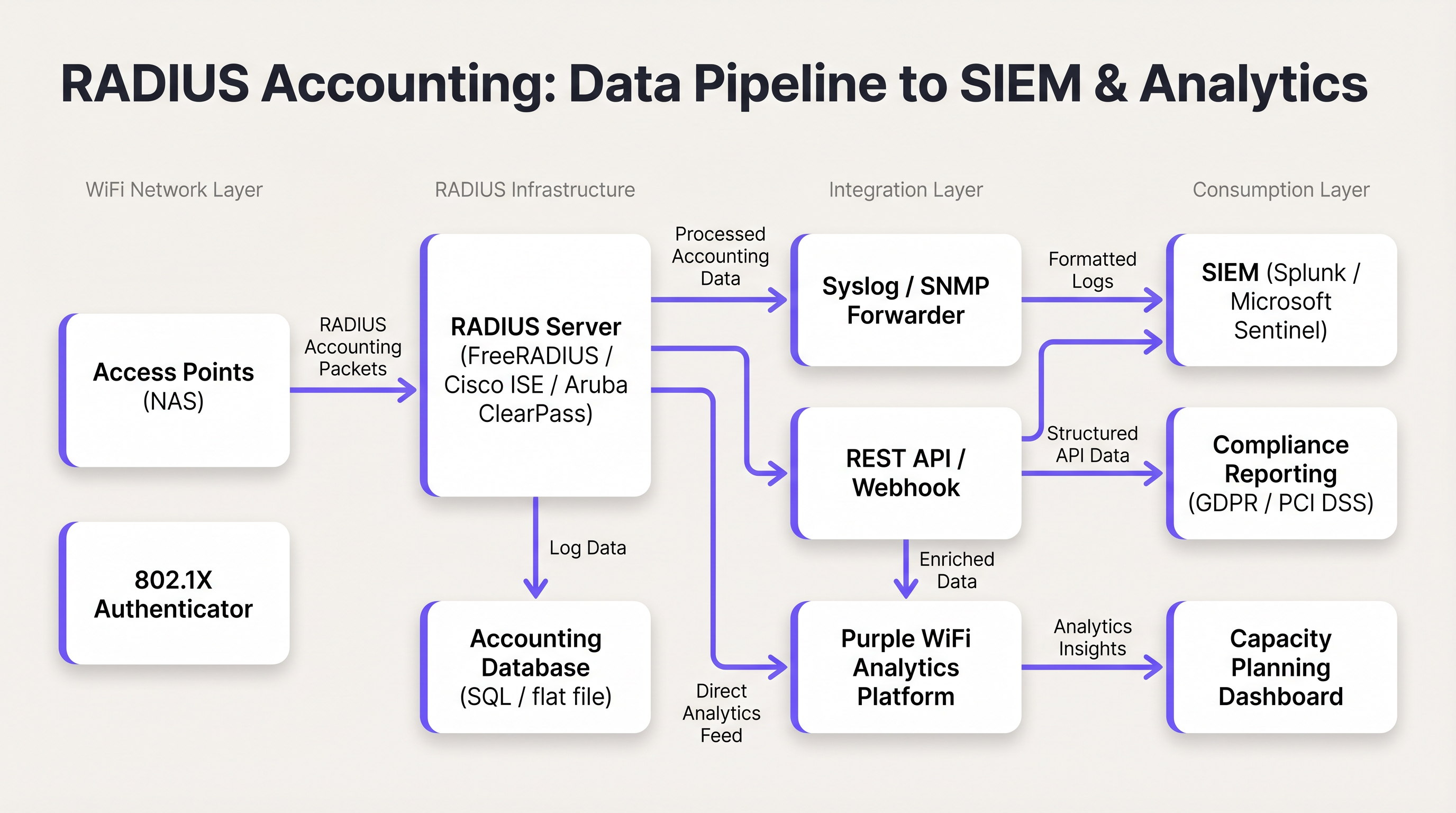
Figura 2: O pipeline de dados de contabilização RADIUS desde os Pontos de Acesso até ao SIEM e plataformas de análise.
Melhores Práticas
Utilize Sempre Atualizações Intermédias. Depender exclusivamente de pacotes Start e Stop cria pontos cegos operacionais. Uma quebra de ligação ou falha de energia no AP pode impedir o envio de um pacote Stop, deixando uma sessão órfã na base de dados indefinidamente. As atualizações intermédias fornecem o mecanismo para detetar e encerrar estas sessões órfãs. A regra de ouro: se uma sessão não enviou uma atualização intermédia num período de duas a três vezes o intervalo configurado, considere-a como terminada.
Correlacione a Contabilização RADIUS com Registos DHCP. A contabilização RADIUS fornece o Framed-IP-Address, mas os tempos de concessão DHCP podem ser mais curtos do que a duração das sessões em alguns ambientes. Manter os registos DHCP em conjunto com os registos RADIUS proporciona um registo de auditoria mais resiliente, particularmente em locais de alta densidade onde a reciclagem de endereços IP é frequente.
Proteja o Transporte com RadSec. O tráfego RADIUS tradicional é transmitido por UDP com encriptação mínima — apenas o campo da palavra-passe do utilizador é ofuscado. Em implementações distribuídas, particularmente aquelas que abrangem vários locais ou servidores RADIUS alojados na cloud, utilize RadSec (RADIUS sobre TLS, definido no RFC 6614) ou túneis IPsec para proteger os dados de contabilização em trânsito. Este é um requisito ao abrigo do PCI DSS 4.0 para qualquer rede que processe dados de titulares de cartões.
Monitorize a Fila de Contabilização. Se o servidor RADIUS ficar inacessível, os dispositivos NAS irão colocar os pacotes de contabilização em fila localmente. Monitorize o tamanho desta fila; uma fila cheia resultará na perda de pacotes e de dados de auditoria. Configure alertas para a profundidade da fila e implemente um servidor de contabilização secundário para implementações de alta disponibilidade.
Separe os Servidores de Autenticação e Contabilização em Grande Escala. Em implementações que excedam 5.000 utilizadores simultâneos, a carga de escrita da contabilização pode degradar os tempos de resposta da autenticação. Servidores de contabilização dedicados com instâncias de base de dados separadas evitam este conflito.
Resolução de Problemas e Mitigação de Riscos
O Problema das Sessões Órfãs (Stale Sessions)
Sintoma: A base de dados RADIUS mostra que um utilizador está ligado há 48 horas, mas o local esteve fechado durante a noite.
Causa Raiz: O NAS falhou o envio de um pacote Stop — tipicamente devido a uma falha de energia, reinício do AP ou interrupção da rede — e o pacote nunca foi recebido pelo servidor RADIUS.
Mitigação: Implemente um script de limpeza de sessões mortas no servidor RADIUS. O script deve analisar periodicamente as sessões ativas onde o último pacote recebido (Start ou Interim-Update) é mais antigo do que um limite definido (por exemplo, 2,5x o intervalo de atualização intermédia). As sessões que excedam este limite devem ser encerradas forçosamente com um registo Stop sintético, indicando a causa de terminação como 'Lost-Carrier' ou 'Admin-Reset'.
Elevada Carga de CPU e I/O no Servidor RADIUS
Sintoma: Os tempos de resposta da autenticação degradam-se durante as horas de ponta; o servidor RADIUS reporta uma elevada utilização de CPU e I/O de disco.
Causa Raiz: Um intervalo de atualização intermédia excessivamente agressivo (por exemplo, 1 minuto) em milhares de APs gera um volume insustentável de escritas na base de dados.
Mitigação: Aumente o intervalo de atualização intermédia para 15 minutos. Verifique se a base de dados de contabilização possui os índices adequados. Considere separar a autenticação e a contabilização em instâncias de servidor dedicadas. Avalie se uma base de dados de séries temporais (por exemplo, InfluxDB) é mais apropriada do que uma base de dados relacional para dados de contabilização de alto volume.
Framed-IP-Address em Falta nos Registos de Contabilização
Sintoma: Existem registos de contabilização RADIUS, mas o campo Framed-IP-Address está vazio ou ausente, impossibilitando a correlação IP-para-MAC.
Causa Raiz: O NAS pode estar a enviar o pacote Start antes de o DHCP ter atribuído um endereço IP ao cliente. O IP só fica disponível após a conclusão da troca DHCP.
Mitigação: Configure o NAS para atrasar o envio do pacote Start até após a atribuição de DHCP, caso a plataforma o suporte. Em alternativa, confie nos pacotes Interim-Update, que são enviados após a atribuição de DHCP e conterão o Framed-IP-Address. Certifique-se de que as suas consultas de auditoria têm isto em conta, verificando os registos Interim-Update caso o registo Start não tenha um IP.
ROI e Impacto no Negócio
A implementação de uma contabilização RADIUS robusta proporciona um valor de negócio mensurável em três dimensões:
Conformidade e Mitigação de Riscos Legais. Em caso de incidente de segurança, de um pedido de acesso do titular dos dados ao abrigo do GDPR, ou de uma ordem de interceção legal, os registos de contabilização precisos fornecem o registo de auditoria necessário para identificar qual o utilizador ou dispositivo que detinha um endereço IP específico num determinado momento. Sem isto, as organizações enfrentam potenciais sanções regulamentares ao abrigo do GDPR (até 4% da faturação anual global) e danos de reputação. O custo de implementação de uma infraestrutura de contabilização adequada é uma fração do custo de uma única ação de execução regulamentar.
Planeamento de Capacidade e ROI da Infraestrutura. Ao analisar as tendências de Acct-Input-Octets e Acct-Output-Octets ao longo do tempo, os arquitetos de rede podem identificar padrões de consumo de largura de banda, períodos de pico de utilização e os APs ou SSIDs específicos que geram a maior carga. Estes dados informam diretamente as decisões de atualização da WAN e as estratégias de colocação de APs, garantindo que o investimento em infraestruturas é direcionado para onde tem o maior impacto. Para centros de Transportes e grandes recintos, isto pode representar poupanças significativas em despesas de capital.
Análise Avançada e Inteligência de Espaços. Quando os dados de sessão RADIUS são combinados com plataformas como o WiFi Analytics e Sensores da Purple, os dados de contabilização em bruto são transformados em inteligência de espaços. Métricas de tempo de permanência derivadas da duração da sessão, identificação de visitantes recorrentes a partir do histórico de Calling-Station-Id e análise de ocupação máxima a partir da contagem de sessões simultâneas tornam-se disponíveis. Para os operadores de Hotelaria , estes dados informam diretamente os modelos de pessoal, a colocação de F&B e as estratégias de personalização de marketing. Para mais contexto sobre como a infraestrutura WiFi sustenta estas capacidades, consulte os nossos guias sobre Pontos de Acesso Sem Fios e Soluções Modernas de WiFi para Hotelaria .
Termos-Chave e Definições
RADIUS Accounting
The process of collecting and recording data about user network resource consumption, including session start and end times, data volume transferred, and IP address assignment. Defined in RFC 2866.
Essential for billing, capacity planning, GDPR compliance, and maintaining security audit trails in any enterprise WiFi deployment.
Acct-Status-Type
A RADIUS attribute (Attribute ID 40) that indicates the purpose of an accounting packet. Values include Start (1), Stop (2), and Interim-Update (3).
Used by the RADIUS server to determine whether to create a new session record, update an existing one, or close it. The most fundamental attribute in any accounting packet.
Interim-Update
A periodic RADIUS accounting packet sent by the NAS during an active session to report current usage statistics, including bytes transferred and session duration.
Critical for tracking long-lived sessions and detecting stale sessions if a client disconnects unexpectedly without sending a Stop packet.
Acct-Session-Id
A unique string generated by the NAS to identify a specific user connection instance. This value is consistent across all accounting packets (Start, Interim-Update, Stop) for the same session.
The primary key used to correlate all accounting records belonging to the same session. Without this, it is impossible to reconstruct a complete session history.
NAS (Network Access Server)
The device — typically a Wireless Access Point or Wireless LAN Controller — that controls physical access to the network and acts as the RADIUS client, generating and sending accounting packets.
The NAS is responsible for the accuracy and completeness of accounting data. Misconfiguration at the NAS level (e.g., disabled accounting, missing attributes) cannot be remediated at the RADIUS server level.
Framed-IP-Address
The IP address assigned to the client device for the duration of the session, included in RADIUS accounting packets.
Critical for correlating RADIUS accounting logs with other network logs such as firewall, web proxy, or DNS logs. The absence of this attribute makes IP-to-device correlation impossible.
Calling-Station-Id
Typically the MAC address of the client device connecting to the network, formatted as a colon-separated hexadecimal string (e.g., AA:BB:CC:DD:EE:FF).
Used to identify the specific hardware device, regardless of the IP address it is assigned. The device-layer anchor of the audit trail.
Acct-Terminate-Cause
An attribute included in Stop packets that specifies the reason a session ended. Common values include User-Request, Lost-Carrier, Idle-Timeout, Session-Timeout, and Admin-Reset.
Valuable for troubleshooting connectivity issues and for anomaly detection — for example, a high rate of Lost-Carrier terminations on a specific AP may indicate a hardware or interference problem.
RadSec
RADIUS over TLS (Transport Layer Security), defined in RFC 6614. Provides encrypted and authenticated transport for RADIUS packets, replacing the traditional UDP-based transport.
Required in any deployment where RADIUS traffic traverses untrusted networks (e.g., internet-connected cloud RADIUS servers). Increasingly mandated by PCI DSS 4.0 for cardholder data environments.
Estudos de Caso
A 300-room hotel with conference facilities is deploying a new guest WiFi network. The IT manager needs to ensure that the deployment meets GDPR requirements for data minimisation and audit trail completeness, while also providing the marketing team with dwell time and repeat visitor analytics. The hotel uses a cloud-hosted RADIUS server and Cisco Meraki APs.
The deployment should be configured as follows. On the Meraki dashboard, navigate to Network-wide > RADIUS servers and add the cloud RADIUS server on port 1813 with a strong shared secret. Enable accounting and set the interim update interval to 15 minutes. On the RADIUS server, configure accounting to write to a PostgreSQL database with the following schema: session_id (primary key), user_name, nas_ip, framed_ip, calling_station_id, called_station_id, session_start, session_end, input_octets, output_octets, terminate_cause. Implement a data retention policy that automatically archives records older than 12 months to cold storage and purges records older than 24 months, documented in the hotel's GDPR Record of Processing Activities. Configure a Purple WiFi Analytics integration to ingest the session data, enabling the marketing team to access dwell time reports and repeat visitor frequency dashboards. Ensure NTP is synchronised across all Meraki APs and the RADIUS server to within 1 second.
A retail chain with 150 stores needs to comply with PCI DSS 4.0 requirements for network access monitoring. Their point-of-sale terminals use MAC Authentication Bypass (MAB) on the WiFi network. The security team has received a request from their QSA (Qualified Security Assessor) to demonstrate that they can identify which specific POS terminal accessed the payment network at any given time, using only a source IP address and timestamp from a firewall log.
The solution requires a three-component integration. First, verify that all Wireless LAN Controllers are configured to include the Framed-IP-Address attribute in RADIUS accounting packets. This is not always enabled by default and must be explicitly configured. Second, integrate the RADIUS accounting database with the SIEM platform (e.g., Splunk). Create a lookup table in Splunk that maps Framed-IP-Address and session time ranges to Calling-Station-Id (MAC address). Third, create a Splunk saved search that accepts a source IP and timestamp as inputs and returns the corresponding MAC address, NAS-IP-Address (identifying the store and AP), and User-Name from the RADIUS accounting records. The QSA can then be demonstrated this workflow: given a firewall log entry showing source IP 10.5.12.44 at 14:23:07 on a specific date, the search returns the MAC address of the POS terminal, the AP it was connected to, and the store location.
Análise de Cenários
Q1. A hotel IT manager notices that the WiFi analytics dashboard shows very few active users during the day, even though the lobby and restaurant are visibly busy. However, the historical reports for the previous day show a massive spike in data usage. The RADIUS server logs confirm that Start packets are being received, but the database shows very few Interim-Update records. What is the most likely misconfiguration, and how would you resolve it?
💡 Dica:Consider how data usage is reported during an active session versus at the point of disconnection.
Mostrar Abordagem Recomendada
The most likely cause is that Interim-Updates are disabled or not configured on the Wireless LAN Controller. Without interim updates, the RADIUS server only receives a Start packet when the user connects and a Stop packet when they disconnect. The analytics dashboard cannot display current usage because no in-session data is being reported. Once users leave and disconnect, the Stop packets arrive with the total accumulated data, causing the delayed spike in historical reports. The resolution is to enable Interim-Updates on the WLC and set an appropriate interval — 15 minutes is recommended for a hotel environment. After enabling, verify that the RADIUS server is receiving Interim-Update packets by checking the accounting database for records with Acct-Status-Type = 3.
Q2. During a security incident investigation, your SIEM has flagged that an IP address on the guest WiFi network accessed a known command-and-control server at 09:47:23 on a specific date. You need to identify the physical device responsible. Your DHCP lease time is set to 30 minutes. Describe the exact query logic you would use against the RADIUS accounting database to identify the device.
💡 Dica:IP addresses are not static. You must use a time-range query, not a point-in-time lookup, and account for DHCP lease recycling.
Mostrar Abordagem Recomendada
You must query the RADIUS accounting database for sessions where: (1) the Framed-IP-Address equals the flagged IP address, AND (2) the session_start timestamp is earlier than or equal to 09:47:23, AND (3) either the session_end timestamp is later than or equal to 09:47:23, OR the session_end is NULL (session still active at query time). If multiple sessions match (possible with a 30-minute DHCP lease), review the Interim-Update records to confirm which session was actively reporting usage at 09:47:23. The matching session record will contain the Calling-Station-Id (MAC address of the device) and the User-Name (authenticated identity, if 802.1X was used). Cross-reference the MAC address with your device inventory or DHCP server logs to identify the physical device and its owner.
Q3. You are the network architect for a conference centre that hosts events with up to 8,000 concurrent WiFi users. Your current RADIUS server is experiencing database write saturation during peak events, causing authentication delays of 3-5 seconds. Your current interim update interval is set to 2 minutes. Describe a multi-step remediation plan that addresses both the immediate performance issue and the underlying architectural risk.
💡 Dica:Consider both configuration changes and architectural changes. The goal is to maintain audit trail completeness while reducing write load.
Mostrar Abordagem Recomendada
The remediation plan should address three layers. First, as an immediate fix, increase the interim update interval from 2 minutes to 15 minutes on all Wireless Controllers. This reduces the accounting write load by approximately 87% (from one write per 2 minutes to one per 15 minutes per session), which should immediately relieve the database I/O pressure. Second, separate the authentication and accounting workloads onto dedicated server instances. The authentication server handles Access-Request/Accept/Reject packets, while a dedicated accounting server handles Accounting-Request packets and writes to a separate database. This prevents accounting write load from affecting authentication response times. Third, for the underlying architectural risk, evaluate whether a time-series database (e.g., InfluxDB or TimescaleDB) is more appropriate than a relational database for the accounting workload. Time-series databases are optimised for high-volume sequential writes and time-range queries, which matches the accounting data pattern exactly. Migrate accounting writes to the time-series database while retaining the relational database for compliance reporting queries.
Principais Conclusões
- ✓RADIUS accounting (RFC 2866) is distinct from authentication: it records session usage data — duration, bytes transferred, IP assignment — rather than making access control decisions.
- ✓The three packet types — Start, Interim-Update, and Stop — must all be configured and operational for a complete audit trail. Interim-Updates are the most commonly missed configuration.
- ✓The Acct-Session-Id, Framed-IP-Address, and Calling-Station-Id attributes form the minimum viable audit trail, enabling IP-to-device correlation for compliance and security investigations.
- ✓Stale sessions (caused by missing Stop packets) must be managed with a dead-session cleanup script using the 2.5x interim update interval rule.
- ✓RADIUS accounting data must be exported to a structured database and integrated with a SIEM and analytics platform to deliver its full compliance and operational value.
- ✓For PCI DSS, GDPR, and lawful intercept compliance, the ability to tie an IP address to a MAC address at a specific point in time is the core requirement that RADIUS accounting fulfils.
- ✓At scale (5,000+ concurrent users), separate authentication and accounting server instances and consider a time-series database for accounting writes to prevent performance degradation.




