

Ubiquiti UniFi und Purple WiFi: Integrationsleitfaden
This guide provides a definitive technical reference for integrating the Purple WiFi intelligence platform with Ubiquiti UniFi network deployments, covering architecture, step-by-step controller configuration, and GDPR-compliant data capture. It is designed for IT managers, network architects, and operations directors who need to deploy a secure, feature-rich guest WiFi experience across hospitality, retail, events, and public-sector environments. By correctly configuring the UniFi Network Controller to leverage Purple's external captive portal, organisations can transform a standard cost centre into a valuable source of visitor analytics and marketing intelligence.
🎧 Diesen Leitfaden anhören
Transkript anzeigen

Executive Summary
Ubiquiti UniFi ist eine der weltweit am häufigsten eingesetzten Enterprise-WiFi-Plattformen und wird von Hotels, Einzelhandelsketten, Stadien und Organisationen des öffentlichen Sektors für ihre Leistung, Skalierbarkeit und Kosteneffizienz geschätzt. Die nativen Funktionen für Gastportale sind jedoch begrenzt. Die WiFi-Intelligence-Plattform von Purple schließt diese Lücke durch eine direkte Integration mit dem UniFi Network Controller über dessen External Portal Server-Funktion. Dies ermöglicht ein vollständig gebrandetes, analysegestütztes Captive Portal-Erlebnis, ohne dass zusätzliche Hardware erforderlich ist.
Dieser Leitfaden bietet eine vollständige technische Referenz für diese Integration. Er behandelt die zugrunde liegende Architektur, einen schrittweisen Konfigurationsprozess für aktuelle (v7.4+) und ältere (v7.3 und darunter) UniFi-Versionen, Best Practices für Sicherheit und Compliance sowie ein strukturiertes Framework zur Fehlerbehebung. Organisationen, die diese Integration abschließen, erhalten Zugang zu Echtzeit-Besucheranalysen, GDPR-konformer Datenerfassung, CRM-Integration und der Möglichkeit, zielgerichtete Marketingkommunikation bereitzustellen – wodurch das Gast-WiFi von einem Kostenfaktor in einen messbaren Geschäftswert verwandelt wird.
Technischer Deep-Dive
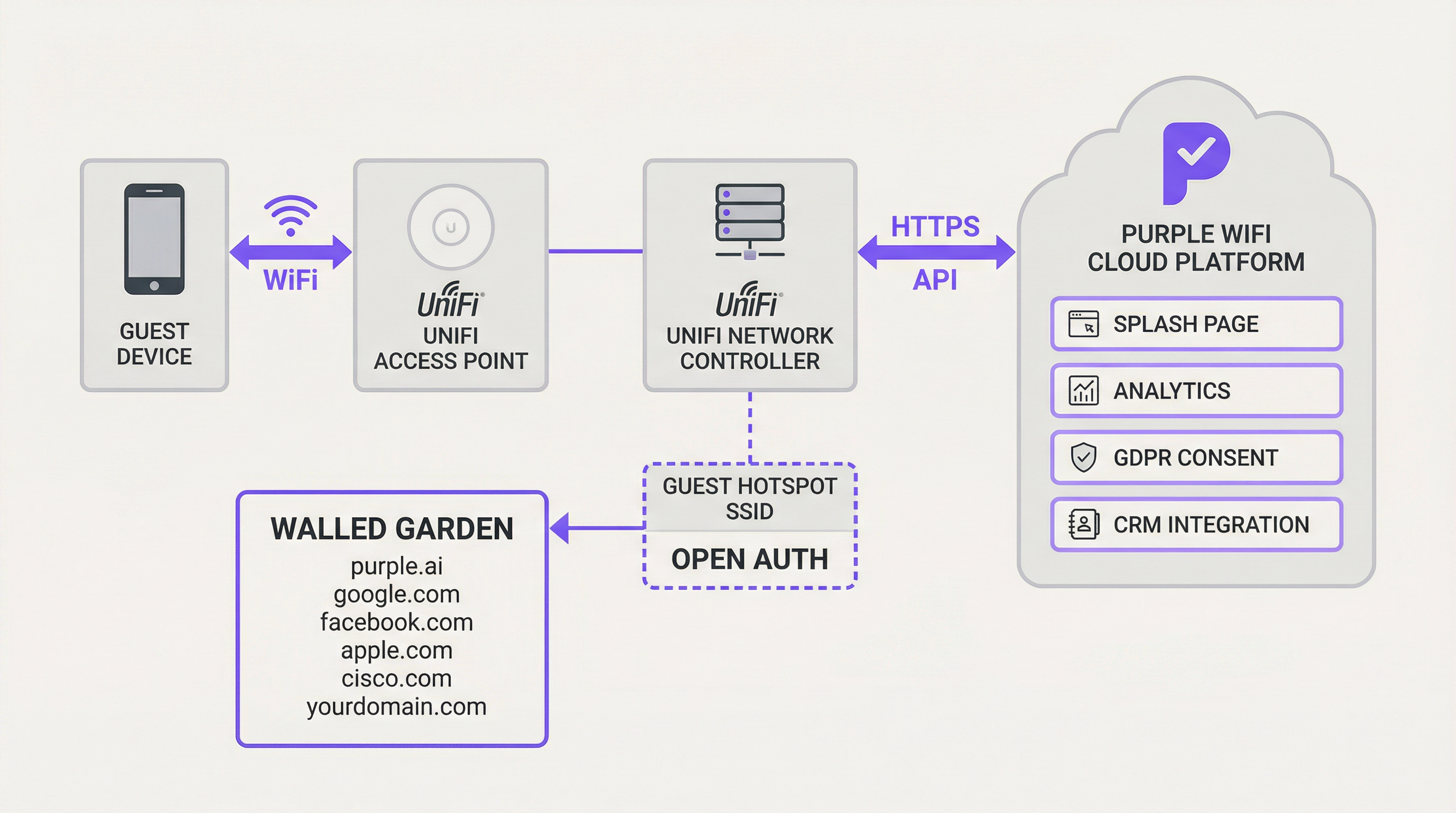
Die Integration zwischen Ubiquiti UniFi und Purple basiert auf der External Portal Server-Funktionalität von UniFi. Diese Funktion leitet Gastbenutzer vom lokalen UniFi-Controller zu einem designierten Captive Portal eines Drittanbieters um – in diesem Fall zur Purple-Plattform. Der zugrunde liegende Mechanismus beruht auf einer Reihe von HTTP-Weiterleitungen und API-Aufrufen, die den Lebenszyklus der Gastautorisierung verwalten.
Wenn sich ein Gast mit der designierten SSID mit offener Authentifizierung verbindet, versetzt der UniFi-Controller dessen Gerät in einen „ausstehenden“ (pending) Status. In diesem Status wird der gesamte HTTP-Datenverkehr abgefangen und zur URL der Purple-Splash-Page umgeleitet, wobei wichtige Parameter an den URL-Query-String angehängt werden: die MAC-Adresse des Gastes, die AP-MAC-Adresse und die Standortkennung. Die Purple-Plattform erfasst diese Parameter, präsentiert das entsprechende Login-Erlebnis und führt nach erfolgreicher Benutzerauthentifizierung – sei es über Social Login, E-Mail-Formular oder Voucher – einen sicheren HTTPS-API-Aufruf zurück an den UniFi Network Controller durch, um die MAC-Adresse des Gastes für eine festgelegte Sitzungsdauer zu autorisieren. Diese Autorisierung verschiebt das Gerät vom „ausstehenden“ in den „autorisierten“ Status und gewährt ihm Internetzugang.
Eine kritische Komponente dieser Architektur ist der Walled Garden – eine Whitelist von IP-Adressen und Domains, auf die Gastgeräte vor der Authentifizierung zugreifen dürfen. Dies ist unerlässlich, um den Zugriff auf die eigenen Domains von Purple, Social-Login-Anbieter (Facebook, Google), die CNA-Erkennungsendpunkte von Apple und alle anderen erforderlichen externen Dienste zu ermöglichen. Ohne einen korrekt konfigurierten Walled Garden wird das Captive Portal überhaupt nicht geladen.
Für fortgeschrittenere Bereitstellungen führt die PurpleConnex-Funktion von Purple die Passpoint-Unterstützung (IEEE 802.11u) ein, die einen RADIUS-Server für eine nahtlose, anmeldedatenfreie Wiederverbindung für wiederkehrende Benutzer verwendet. Dies erfordert die Konfiguration eines RADIUS-Profils innerhalb von UniFi, das auf den Authentifizierungsserver von Purple unter der IP 34.150.158.147 auf den Ports 1812 (Authentifizierung) und 1813 (Accounting) verweist.
Implementierungsleitfaden
Dieser Abschnitt bietet eine Schritt-für-Schritt-Anleitung zur Konfiguration Ihres UniFi Network Controllers für die Integration mit Purple. Die folgenden Anweisungen gelten für die UniFi Network Application Version 7.4 oder neuer. Für ältere Versionen (v7.3 und darunter) sind die Konfigurationsprinzipien identisch, aber der Navigationspfad weicht leicht ab, da hier „Profiles > Guest Hotspot“ anstelle des „Hotspot Manager“ verwendet wird.
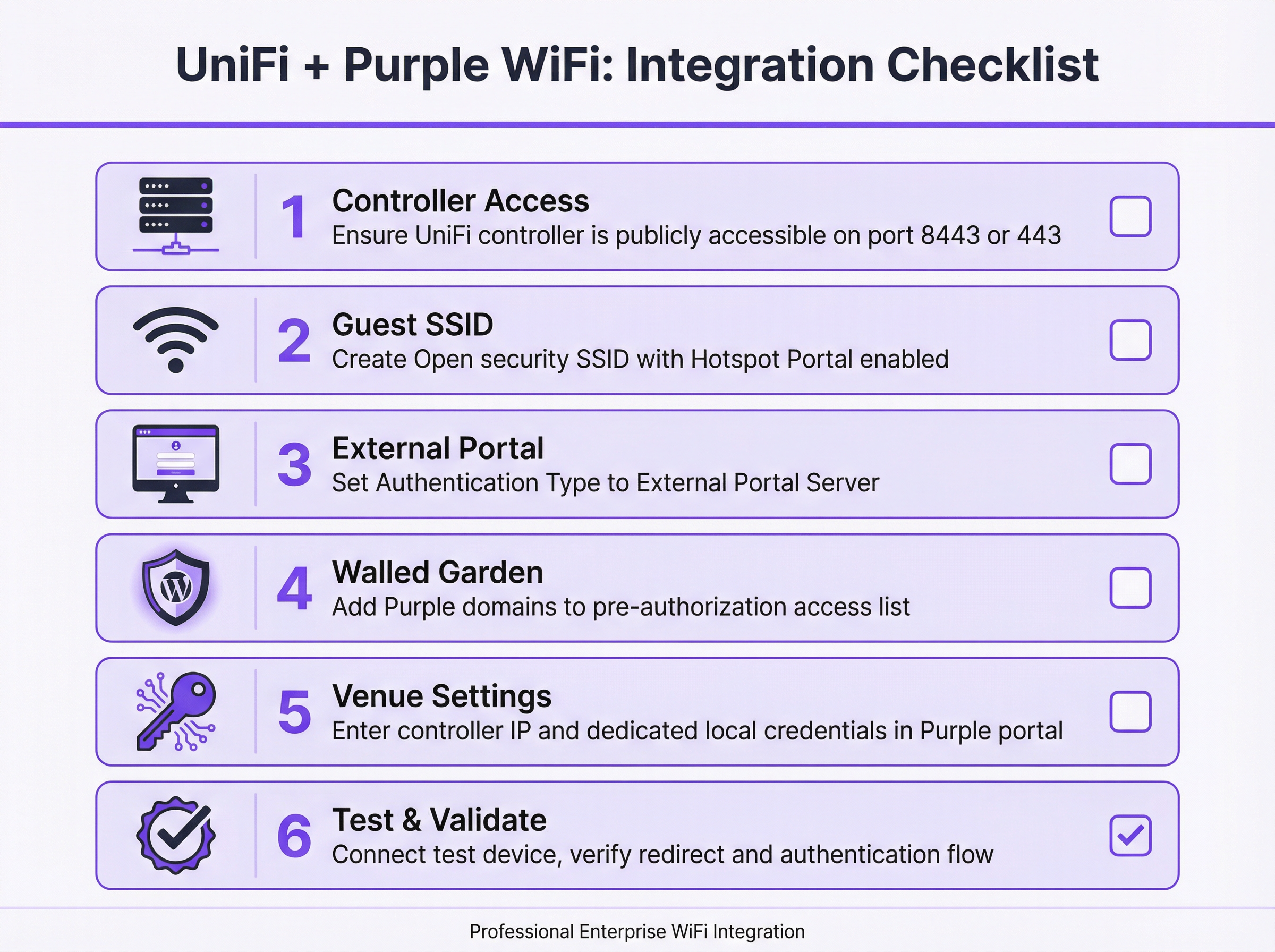
Schritt 1: Erreichbarkeit des Controllers überprüfen und herstellen. Bevor Sie mit der Konfiguration beginnen, stellen Sie sicher, dass Ihr UniFi Network Controller über das öffentliche Internet erreichbar ist. Die Cloud-Plattform von Purple muss in der Lage sein, mit der API Ihres Controllers zu kommunizieren, um Gastsitzungen zu autorisieren. Für softwarebasierte UniFi-Controller erfordert dies eine Portweiterleitungsregel auf Ihrer Firewall, die den TCP-Port 8443 auf die interne LAN-IP-Adresse des Controllers abbildet. Für hardwarebasierte Bereitstellungen – einschließlich der UniFi Dream Machine Pro (UDM Pro), UDM Special Edition, UDR und CloudKey Gen2+ – ist der relevante Port TCP 443.
Schritt 2: Ein dediziertes lokales Administratorkonto erstellen. Aus Gründen der Sicherheitshygiene sollten Sie niemals die Anmeldedaten Ihres primären Ubiquiti-Super-Admin- oder Cloud-Kontos für die Purple-API-Integration verwenden. Erstellen Sie speziell für diesen Zweck ein neues, dediziertes lokales Administratorkonto auf Ihrem UniFi-Controller. Dieses Konto sollte über vollständige Administratorrechte für den entsprechenden Standort verfügen. Die Verwendung eines dedizierten Kontos begrenzt den potenziellen Schaden bei einer Kompromittierung der Anmeldedaten und stellt sicher, dass die Integration nicht durch Änderungen an Ihrem primären Konto unterbrochen wird.
Schritt 3: Die Gast-WiFi-SSID erstellen. Navigieren Sie in der UniFi Network Application zu Settings > WiFi und klicken Sie auf Create New. Vergeben Sie einen öffentlich sichtbaren Namen (z. B. „Hotel Guest WiFi“). Setzen Sie das Security Protocol auf Open – dies ist zwingend erforderlich, damit der Umleitungsmechanismus des Captive Portal funktioniert. Weisen Sie die SSID Ihrem designierten Gast-VLAN zu. Aktivieren Sie den Schalter für das Hotspot Portal.
Schritt 4: Hotspot-Portal und externen Server konfigurieren. Navigieren Sie zu Hotspot Manager > Landing Page. Wählen Sie unter Authentication die Option External Portal Server und geben Sie die von Purple bereitgestellte IP-Adresse des externen Portals ein. Konfigurieren Sie unter Settings wie folgt: Aktivieren Sie Secure Portal, aktivieren Sie Redirect using Hostname und geben Sie die von Purple bereitgestellte Access Domain ein. Stellen Sie sicher, dass HTTPS Redirection auf Disabled gesetzt ist. Die Default Expiration der Sitzung sollte auf 8 Stunden eingestellt werden.
Schritt 5: Den Walled Garden konfigurieren. Suchen Sie in den Einstellungen des Hotspot Managers den Abschnitt Pre-Authorization Access. Fügen Sie alle Domains aus der von Purple bereitgestellten Liste hinzu. Diese Liste umfasst in der Regel die eigenen Plattform-Domains von Purple, die Domains der Social-Login-Anbieter (facebook.com, google.com, accounts.google.com), die CNA-Erkennungsendpunkte (Captive Network Assistant) von Apple sowie alle anderen Drittanbieterdienste, die auf Ihrer Splash-Page verwendet werden. Dieser Schritt ist die häufigste Fehlerquelle bei Bereitstellungen und muss mit höchster Präzision ausgeführt werden.
Schritt 6: Controller-Details im Purple-Portal eingeben. Melden Sie sich bei Ihrem Purple-Konto an und navigieren Sie zu den Einstellungen des entsprechenden Standorts (Venue). Geben Sie die öffentliche IP-Adresse oder den Hostnamen Ihres UniFi-Controllers sowie die Anmeldedaten für das in Schritt 2 erstellte dedizierte lokale Administratorkonto ein. Speichern Sie die Konfiguration. Purple wird versuchen, die Verbindung zu validieren.
Schritt 7: Testen und Validieren. Verbinden Sie sich mit einem Mobilgerät, das zuvor nicht mit dem Netzwerk verbunden war, mit der neuen Gast-SSID. Sie sollten automatisch zum Captive Portal von Purple weitergeleitet werden. Authentifizieren Sie sich mit einer der konfigurierten Methoden. Nach erfolgreicher Anmeldung sollte Ihnen der Internetzugang gewährt werden. Wenn die Weiterleitung fehlschlägt oder nach der Authentifizierung kein Internetzugang gewährt wird, lesen Sie den Abschnitt zur Fehlerbehebung weiter unten.
Best Practices
Netzwerksegmentierung ist die grundlegende Sicherheitsanforderung für jede Gast-WiFi-Bereitstellung. Die Gast-SSID muss einem dedizierten VLAN zugewiesen werden, das durch eine Firewall von allen Unternehmens- und Verwaltungsnetzwerken getrennt ist. Dies verhindert, dass Gastgeräte auf interne Ressourcen zugreifen, erfüllt die PCI-DSS-Anforderungen zur Netzwerkisolierung und begrenzt die Auswirkungen eines Sicherheitsvorfalls auf das Gastnetzwerk.
Bandbreitenmanagement ist in Umgebungen mit hoher Dichte ebenso wichtig. Die Funktion zur Ratenbegrenzung pro Benutzer von UniFi sollte so konfiguriert werden, dass angemessene Upload- und Download-Obergrenzen für Gastbenutzer festgelegt werden. Dies verhindert, dass eine kleine Anzahl von Benutzern mit hoher Bandbreitennutzung das Erlebnis für alle Gäste beeinträchtigt, was insbesondere bei Bereitstellungen in Hotels und Konferenzzentren relevant ist.
Der Walled Garden erfordert eine kontinuierliche Pflege. Social-Login-Anbieter und andere Drittanbieterdienste aktualisieren regelmäßig ihre Domainstrukturen. Eine vierteljährliche Überprüfung der Walled-Garden-Konfiguration, abgeglichen mit der neuesten von Purple empfohlenen Domainliste, ist eine bewährte betriebliche Praxis. Die mangelnde Pflege dieser Liste ist die Hauptursache für Portalausfälle nach der Bereitstellung.
Verwenden Sie für die API-Integration immer ein dediziertes lokales Administratorkonto anstelle eines mit der Cloud verknüpften Kontos. Dies ist sowohl eine Best Practice für die Sicherheit als auch eine Maßnahme zur Erhöhung der Zuverlässigkeit – Anmeldedaten für Cloud-Konten unterliegen Multi-Faktor-Authentifizierungsabläufen, die die automatisierten API-Aufrufe unterbrechen können, die Purple zur Autorisierung von Gästen durchführt.
Fehlerbehebung & Risikominderung
Die häufigste Fehlerquelle ist ein Captive Portal, das nicht geladen wird. Wenn sich ein Gast mit der SSID verbindet, aber keine Weiterleitung sieht oder die Portalseite nicht gerendert wird, ist die Fehlerursache fast immer ein unvollständiger Walled Garden. Beginnen Sie mit der Fehlerbehebung, indem Sie ein Testgerät verbinden und versuchen, zu einer bekannten HTTP-URL zu navigieren. Wenn die Weiterleitung erfolgt, die Seite aber nicht geladen wird, fügen Sie die fehlenden Domains zum Walled Garden hinzu. Überprüfen Sie außerdem, ob das DNS des Gastnetzwerks korrekt konfiguriert ist, um externe Hostnamen aufzulösen.
Der zweithäufigste Fehler ist ein Szenario, in dem sich der Gast erfolgreich auf dem Purple-Portal authentifiziert, ihm aber kein Internetzugang gewährt wird. Dies deutet auf einen Fehler in der API-Kommunikation zwischen Purple und dem UniFi-Controller hin. Die Diagnoseschritte sind: Erstens, bestätigen Sie, dass der Controller auf dem richtigen Port öffentlich erreichbar ist, indem Sie versuchen, ihn von einem externen Netzwerk aus zu erreichen; zweitens, überprüfen Sie, ob die im Purple-Portal eingegebenen lokalen Admin-Anmeldedaten korrekt sind und das Konto nicht gesperrt wurde; drittens, überprüfen Sie die Ereignisprotokolle des UniFi-Controllers auf API-Authentifizierungsfehler.
Bei Produktionsbereitstellungen ist die Verfügbarkeit des Controllers ein kritischer Risikofaktor. Wenn der UniFi-Controller offline geht, schlagen neue Gastautorisierungen fehl. Zu den Strategien zur Risikominderung gehören die Bereitstellung eines in der Cloud gehosteten UniFi-Controllers (der inhärente Redundanz bietet), die Implementierung eines hochverfügbaren Controller-Paares oder die Konfiguration von Überwachung und Alarmierung für die Verfügbarkeit des Controllers. Die Plattform von Purple reiht Autorisierungsversuche in eine Warteschlange ein und wiederholt sie, aber eine längere Ausfallzeit des Controllers führt zu einem beeinträchtigten Gasterlebnis.
Aus Compliance-Sicht unterliegen die über das Captive Portal erfassten Daten der GDPR und gleichwertigen Datenschutzbestimmungen. Die Plattform von Purple ist auf Compliance ausgelegt und bietet Einwilligungsmanagement, Tools für Auskunftsersuchen von betroffenen Personen (DSAR) und konfigurierbare Richtlinien zur Datenaufbewahrung. Die rechtliche Verantwortung für die rechtmäßige Datenverarbeitung liegt jedoch weiterhin beim Betreiber des Standorts. Stellen Sie sicher, dass Ihre Datenschutzrichtlinie auf der Splash-Page deutlich verlinkt ist, dass Sie über eine dokumentierte Rechtsgrundlage für die Datenerfassung verfügen und dass Ihre Einstellungen zur Datenaufbewahrung mit den Richtlinien Ihrer Organisation übereinstimmen.
ROI & Geschäftsauswirkungen
Die Integration von Purple mit UniFi ist nicht nur ein technisches Upgrade; es ist eine strategische Geschäftsentscheidung, die das Gast-WiFi von einem Kostenfaktor in einen leistungsstarken Vermögenswert verwandelt. Der Return on Investment ist über mehrere Schlüsseldimensionen hinweg messbar.
Business Intelligence ist der primäre Werttreiber. Purple erfasst umfangreiche, anonymisierte Daten zum Besucherverhalten – einschließlich Kundenfrequenz, Verweildauer, Besuchshäufigkeit und Bewegungsmustern. Für eine Einzelhandelskette können diese Daten direkte Erkenntnisse für Entscheidungen über das Ladenlayout, den Personalbedarf und das Timing von Werbeaktionen liefern. Für ein Hotel können sie aufzeigen, welche Einrichtungen am häufigsten und zu welchen Zeiten genutzt werden, was ein gezielteres Upselling und eine höhere betriebliche Effizienz ermöglicht.
Marketing- und Engagement-Funktionen stellen einen erheblichen sekundären Nutzen dar. Durch die Erfassung von Gastkontaktdaten mit deren Einwilligung können Organisationen eine First-Party-Marketingdatenbank aufbauen, die nicht den Einschränkungen durch die Abschaffung von Third-Party-Cookies unterliegt. E-Mail-Kampagnen nach dem Besuch, Zufriedenheitsumfragen und Einladungen zu Treueprogrammen können direkt über die Purple-Plattform automatisiert werden, was zu messbaren Verbesserungen bei den Wiederkehrerraten und dem Customer Lifetime Value führt.
Für große Veranstaltungsorte wie Stadien, Konferenzzentren und Einkaufszentren kann die operative Intelligenz, die aus Echtzeit-Frequenzanalysen und Heatmaps gewonnen wird, zu bedeutenden Effizienzsteigerungen führen – durch die Optimierung von Reinigungsplänen, Sicherheitseinsätzen und der Platzierung von Einzelhandelskonzessionen auf der Grundlage tatsächlicher Besucherbewegungsdaten anstelle von Annahmen.
In bestimmten Kontexten kann die Gast-WiFi-Infrastruktur selbst durch gestufte Zugangsmodelle, gesponserte Splash-Pages oder zielgerichtete Werbung monetarisiert werden, wodurch eine direkte Einnahmequelle entsteht, die die Kosten der Infrastrukturinvestition ausgleicht.
Schlüsselbegriffe & Definitionen
Captive Portal
A web page displayed to newly connected users of a WiFi network before they are granted broader internet access. It controls access, authenticates users, and/or presents terms of service and marketing content.
In a UniFi/Purple integration, the UniFi controller redirects the guest to the Purple-hosted captive portal, which manages the entire guest experience including authentication, consent capture, and branding.
External Portal Server
A UniFi configuration option that delegates the captive portal experience to a third-party web application, rather than using UniFi's built-in portal. The UniFi controller redirects guests to the specified external URL and relies on that system to handle authentication and to call back to the controller's API to authorise the guest.
This is the core UniFi setting that enables the Purple integration. It is found under Hotspot Manager > Landing Page > Authentication in UniFi Network v7.4+.
Walled Garden
A whitelist of IP addresses, hostnames, and domains that a guest device is permitted to access before it has been authenticated by the captive portal. Traffic to non-whitelisted destinations is blocked until the guest completes the authentication flow.
This is critical for allowing the device to load the Purple splash page itself, as well as any third-party resources it relies on, such as social login providers or payment gateways. An incomplete Walled Garden is the leading cause of captive portal failures.
RADIUS (Remote Authentication Dial-In User Service)
A networking protocol (RFC 2865) that provides centralised Authentication, Authorisation, and Accounting (AAA) management for users connecting to a network service.
While the standard Purple integration uses the UniFi API for guest authorisation, the PurpleConnex (Passpoint) feature uses RADIUS to provide a more secure and seamless connection experience for returning users, eliminating the need to re-authenticate via the captive portal.
Passpoint (IEEE 802.11u / Hotspot 2.0)
A WiFi Alliance certification programme that enables automatic, secure authentication to WiFi networks without requiring the user to manually select a network or enter credentials. Devices with a Passpoint profile connect automatically and securely using EAP-based authentication.
Purple's PurpleConnex feature leverages Passpoint to provide a seamless reconnection experience for returning guests. Once a user has authenticated once via the captive portal, subsequent visits can connect automatically without seeing the splash page again.
SSID (Service Set Identifier)
The public name of a wireless local area network (WLAN) — the network name that appears when a user searches for available WiFi connections on their device.
For a guest network integration, a dedicated SSID is created with Open security and linked to the captive portal. This is kept separate from the corporate SSID, which uses WPA2/WPA3-Enterprise authentication.
VLAN (Virtual Local Area Network)
A method of creating logically separate networks on the same physical network infrastructure. Devices on different VLANs cannot communicate with each other without a router, providing network segmentation and security isolation.
Security best practice and PCI DSS compliance require that the guest SSID be placed on its own VLAN, completely isolated from the corporate, management, and POS networks. This prevents guest devices from accessing internal resources.
WISPr (Wireless Internet Service Provider Roaming)
An industry-standard protocol that defines how a client device discovers and authenticates to a WiFi hotspot captive portal. It uses HTTP redirects and XML-based authentication messages to manage the portal interaction.
UniFi's external portal functionality is based on WISPr principles. Understanding this protocol helps network engineers troubleshoot redirect failures and understand why certain client devices (particularly iOS and Android) behave differently when connecting to captive portal networks.
Port Forwarding
A network address translation (NAT) technique that maps an external port on a router or firewall to a specific internal IP address and port, allowing external services to initiate connections to devices on a private network.
If your UniFi controller is hosted on a local network, a port forward rule must be configured to allow the Purple cloud platform to reach the controller's API. The required port is 8443 for software controllers or 443 for hardware-based controllers.
PurpleConnex
Purple's implementation of the Passpoint (IEEE 802.11u) standard, which provides a secure, seamless WiFi connection for returning users using EAP-TTLS authentication via a dedicated RADIUS server. It eliminates the need for repeat visitors to re-authenticate via the captive portal.
PurpleConnex requires additional configuration in UniFi: a RADIUS profile pointing to Purple's authentication server and a separate Passpoint-enabled SSID. It is particularly valuable in hospitality and retail environments where repeat visitors are common.
Fallstudien
A 250-room boutique hotel wants to replace its basic, unreliable guest WiFi with a premium, branded experience. Their goals are to capture guest email addresses for post-stay marketing, promote their spa and restaurant on the login page, and ensure seamless connectivity for guests with multiple devices. Their infrastructure consists of a UniFi Dream Machine Pro and 40 UniFi U6 Pro access points.
The recommended deployment integrates the UDM Pro with Purple via the External Portal Server method. A new 'Hotel Guest WiFi' SSID is created with Open security and assigned to a dedicated Guest VLAN (e.g., VLAN 20), which is firewalled from the hotel's management and POS networks. The Hotspot Portal is enabled and configured to use Purple as the external portal server. Since the UDM Pro uses port 443, a port forward rule is created on the UDM Pro's WAN interface mapping TCP 443 to the UDM Pro's LAN IP. A dedicated local administrator account ('purple-api') is created on the UDM Pro with full site privileges. In the Purple portal, a custom-branded splash page is designed featuring the hotel's logo, a simple email capture form with GDPR consent checkbox, and a prominent banner advertising the spa with a direct booking link. The Walled Garden is configured to include all Purple domains, Facebook, Google, and Apple CNA endpoints. The hotel's marketing team is given access to the Purple analytics dashboard, enabling them to track daily guest counts, peak connection times, and email capture rates. Within the first quarter, the hotel captures an average of 180 new email addresses per week, which are automatically synced to their CRM for post-stay campaign automation.
A retail chain with 20 stores across the UK, each equipped with UniFi APs managed by a single cloud-hosted UniFi controller, wants to use guest WiFi data to understand customer behaviour. The operations director needs to measure footfall, dwell time, and repeat visitor rates across all stores to inform a store layout redesign programme and evaluate the performance of in-store promotional campaigns.
The cloud-hosted UniFi controller already has a public hostname, so no port forwarding is required — this is a significant simplification of the deployment. A single guest SSID ('Brand WiFi') is configured and applied to all 20 sites via the UniFi controller's site management capabilities. The Hotspot Portal is configured to use Purple's external portal server. In the Purple portal, each of the 20 stores is configured as a separate venue, allowing for granular, store-level analytics. The splash page is designed for maximum adoption: a single 'Connect' button with a brief privacy notice, minimising friction. Within the Purple analytics platform, the operations director can view a comparative dashboard showing footfall, dwell time, and new vs. returning visitor ratios for each store. After 90 days of data collection, the analytics reveal that three stores have significantly higher dwell times than the others, correlating with a specific store layout. This insight directly informs the layout redesign programme, with the high-performing layout rolled out to all 20 stores. A promotional campaign is run across all stores simultaneously, and the Purple dashboard provides a clear before-and-after comparison of footfall and dwell time, demonstrating measurable campaign uplift.
Szenarioanalyse
Q1. A hotel IT manager has completed the UniFi/Purple integration configuration and tested it successfully in the office. However, after deploying to the live hotel environment, guests report that the captive portal page loads but the 'Login with Facebook' button does not work. What is the most likely cause and how should it be resolved?
💡 Hinweis:Consider what resources the Facebook login button needs to load and function, and whether those resources are accessible to a guest device before authentication.
Empfohlenen Ansatz anzeigen
The most likely cause is that the Facebook login domains are not included in the Walled Garden (pre-authorisation access list). When a guest device is in the 'pending' state, it can only access domains explicitly whitelisted in the Walled Garden. The Facebook login flow requires access to facebook.com, fbcdn.net, and related domains. The resolution is to add all required Facebook domains to the Walled Garden in the UniFi Hotspot Manager settings. Purple provides a maintained list of required domains for each social login provider. After updating the Walled Garden, test the Facebook login flow again with a fresh device connection.
Q2. A network architect is planning a guest WiFi deployment for a 5,000-seat conference centre that will host events with up to 3,000 simultaneous WiFi users. The venue uses a software-based UniFi controller hosted on a server in the venue's server room. What are the three most critical infrastructure considerations for ensuring the Purple integration remains reliable during peak events?
💡 Hinweis:Think about the single points of failure in the integration architecture — what happens if the controller goes offline, if the internet connection is saturated, or if the controller's hardware is underpowered?
Empfohlenen Ansatz anzeigen
The three most critical considerations are: First, controller availability and performance — the UniFi controller is a critical component in every guest authorisation. At 3,000 simultaneous users, the controller must have sufficient CPU and RAM to handle the load. Consider upgrading to a high-specification server or migrating to a cloud-hosted controller for inherent redundancy. Second, internet connectivity and port forwarding reliability — Purple's API calls to the controller must traverse the venue's internet connection. Ensure the port forward rule is on a resilient firewall and that the internet connection has sufficient capacity. A secondary internet connection with automatic failover is advisable for mission-critical events. Third, bandwidth management — with 3,000 users, implement strict per-user rate limits in UniFi to prevent bandwidth exhaustion. Without rate limiting, a small number of high-bandwidth users can degrade the experience for all guests.
Q3. An IT manager at a retail chain is asked by the legal team to ensure the guest WiFi data collection is fully GDPR-compliant. The current splash page has a simple 'Connect' button with no explicit consent mechanism. What changes need to be made to the Purple configuration, and what ongoing operational processes should be implemented?
💡 Hinweis:GDPR requires a lawful basis for processing personal data, transparency about how data will be used, and mechanisms for data subjects to exercise their rights.
Empfohlenen Ansatz anzeigen
The following changes and processes are required: On the splash page, the 'Connect' button must be replaced with an explicit opt-in mechanism. This means adding a clearly worded consent checkbox (unchecked by default) that states what data is being collected, how it will be used, and who it will be shared with. A link to the full privacy policy must be prominently displayed. The legal basis for processing should be explicit consent for marketing communications and legitimate interest for anonymised analytics. Within the Purple portal, configure data retention settings to align with the organisation's data retention policy — typically no longer than 24 months for marketing data. Enable Purple's GDPR tooling to handle data subject access requests (DSARs) and right-to-erasure requests. Operationally, implement a quarterly review process to ensure the privacy policy remains accurate, the consent wording is up to date, and data retention settings are enforced. Maintain a record of processing activities (ROPA) entry for the guest WiFi data collection.
Q4. A network engineer has configured the UniFi/Purple integration following all documented steps. When testing, the guest device connects to the SSID and is redirected to the Purple portal. The guest successfully authenticates, but is not granted internet access. The Purple portal shows the authentication as successful. What is the diagnostic process?
💡 Hinweis:If Purple shows a successful authentication but the guest has no internet access, the issue lies in the communication path between Purple and the UniFi controller.
Empfohlenen Ansatz anzeigen
This symptom indicates that Purple's API call to the UniFi controller — the call that moves the guest device from 'pending' to 'authorised' — is failing. The diagnostic process is as follows: First, verify that the UniFi controller is publicly accessible on the correct port (8443 for software, 443 for hardware) by attempting to reach the controller's management interface from an external network or using an online port checker tool. Second, log in to the Purple portal and verify that the controller IP/hostname and local admin credentials are correct. A common error is entering the controller's internal LAN IP rather than its public IP, or using cloud account credentials instead of local admin credentials. Third, check the UniFi controller's event log for any API authentication errors or failed login attempts from Purple's IP addresses. Fourth, verify that the firewall rule or port forward is correctly configured and that Purple's source IP addresses are not being blocked by any upstream security appliance.
Wichtigste Erkenntnisse
- ✓The UniFi/Purple integration uses UniFi's External Portal Server feature to redirect guests to the Purple captive portal, which handles authentication and calls back to the UniFi API to authorise guest access — no additional hardware is required.
- ✓The Walled Garden (pre-authorisation access list) is the most critical and most frequently misconfigured element of the deployment. It must include all Purple domains, social login provider domains, and Apple CNA endpoints before the portal will function correctly.
- ✓Always use a dedicated local administrator account on the UniFi controller for the Purple API integration — never use your primary Ubiquiti cloud account credentials. This is both a security best practice and a reliability requirement.
- ✓The correct API port depends on the controller type: TCP 8443 for software-based controllers, TCP 443 for hardware-based controllers (UDM Pro, UDM SE, UDR, CloudKey Gen2+). Configuring the wrong port is a common cause of API communication failures.
- ✓Network segmentation is non-negotiable: the guest SSID must be on a dedicated VLAN, firewalled from all corporate and management networks. This is required for both security and PCI DSS compliance.
- ✓The ROI of the Purple integration extends well beyond connectivity: visitor analytics, GDPR-compliant data capture, CRM integration, and targeted marketing communications transform guest WiFi into a measurable business asset.
- ✓For returning users, Purple's PurpleConnex (Passpoint/IEEE 802.11u) feature provides a seamless, credential-free reconnection experience using RADIUS-based EAP-TTLS authentication, eliminating the need to re-authenticate via the captive portal on subsequent visits.




