

Was ist ein Captive Portal und wie funktioniert es?
A comprehensive technical reference for IT managers and venue operators on the architecture, deployment, and business impact of captive portals. This guide provides actionable insights into device detection, the Captive Network Assistant (CNA), and best practices for implementation in enterprise environments.
🎧 Diesen Leitfaden anhören
Transkript anzeigen
Executive Summary
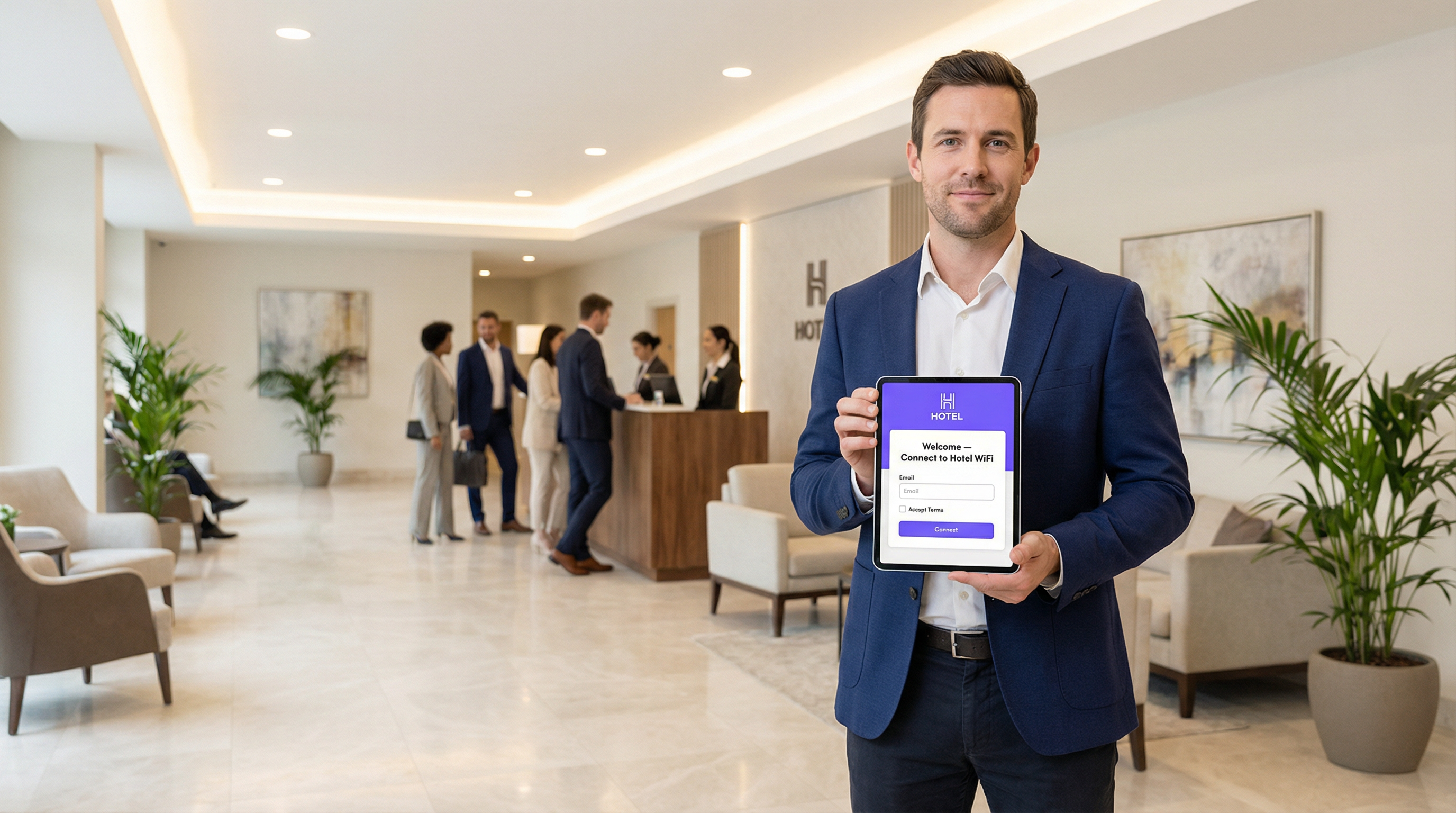
Ein Captive Portal ist die Webseite, die die Verbindung eines Nutzers zu einem öffentlichen oder Gast-WiFi-Netzwerk abfängt und ihn auffordert, eine Aktion auszuführen – wie das Akzeptieren von Nutzungsbedingungen, die Eingabe einer E-Mail-Adresse oder die Authentifizierung über ein Social-Media-Konto –, bevor vollständiger Internetzugang gewährt wird. Für IT-Manager, Netzwerkarchitekten und Betreiber von Veranstaltungsorten ist das Captive Portal ein entscheidender Kontrollpunkt für Netzwerksicherheit, rechtliche Compliance und Nutzerinteraktion. Richtig eingesetzt, verwandelt es einen einfachen Dienst in ein leistungsstarkes Instrument zur Gewinnung von Business Intelligence, zur Förderung von Marketinginitiativen und zur Verbesserung des Besuchererlebnisses. Dieser Leitfaden bietet einen technischen Deep-Dive in die zugrunde liegende Architektur von Captive Portals, einschließlich der Interzeptionsmechanismen (DNS-Hijacking und HTTP-Redirect), der Rolle des Captive Network Assistant (CNA) in modernen Betriebssystemen und der Standards (RADIUS, WISPr), die die Authentifizierung regeln. Er bietet praktische, herstellerneutrale Implementierungsrichtlinien für Unternehmensumgebungen wie Hotels, Einzelhandelsketten und Stadien mit Schwerpunkt auf Sicherheits-Best-Practices, Risikominderung und Strategien zur Messung des Return on Investment (ROI). Durch das Verständnis der technischen Nuancen und des strategischen Werts von Captive Portals können IT-Führungskräfte sicherstellen, dass ihre Gast-WiFi-Bereitstellungen sicher und konform sind sowie mit den übergeordneten Geschäftszielen übereinstimmen.
Technischer Deep-Dive
Kernarchitektur: Der Walled Garden
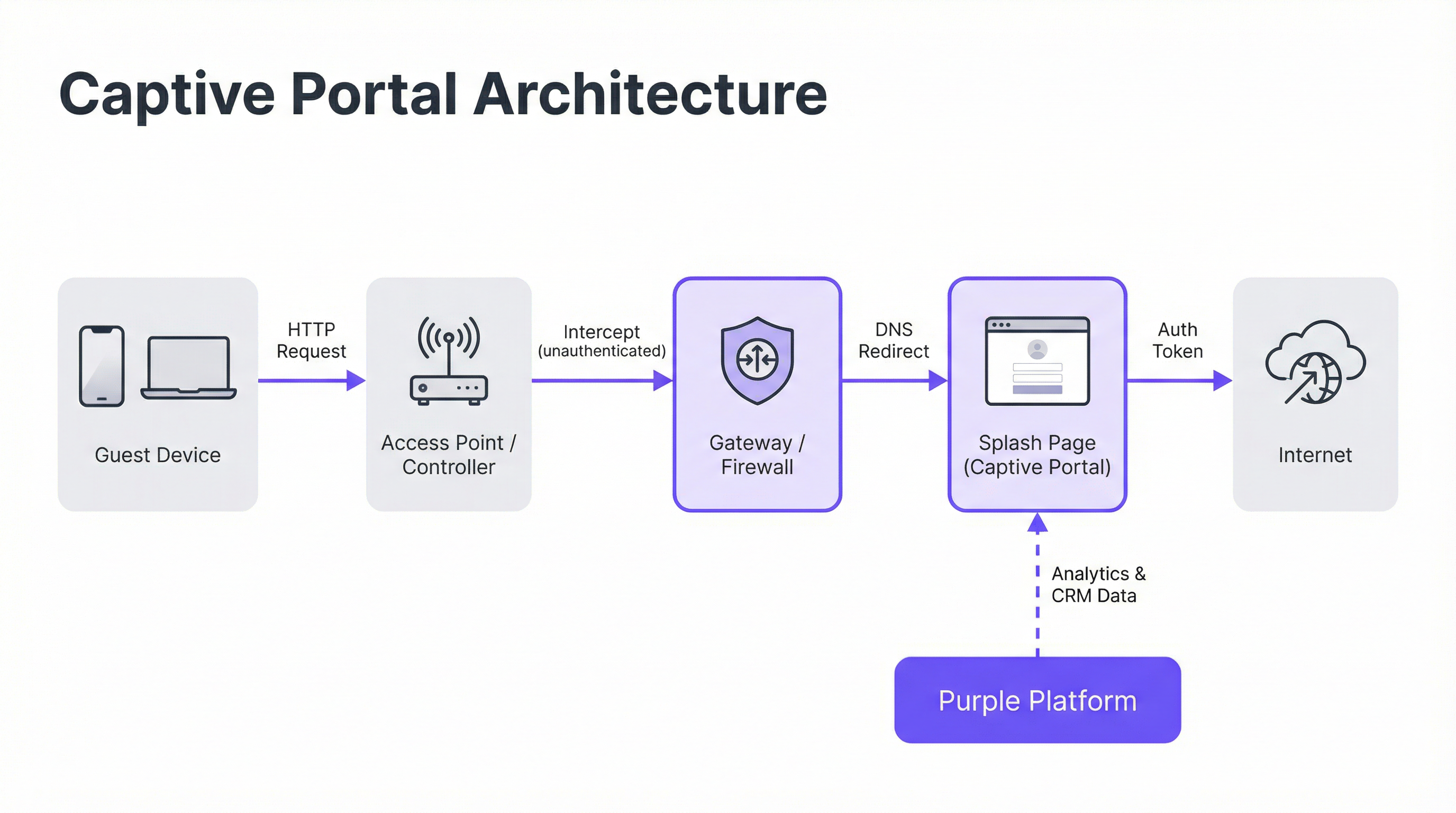
Ein Captive Portal funktioniert durch die Erstellung eines „Walled Garden“, eines eingeschränkten Netzwerkstatus, in dem der Internetzugang eines neu verbundenen Geräts beschränkt ist, bis es einen Authentifizierungsprozess abschließt. Dies wird durch zwei primäre Interzeptionsverfahren erreicht, die auf der Ebene des Netzwerk-Gateways oder Wireless-Controllers eingesetzt werden.
DNS-Hijacking: Wenn ein nicht authentifiziertes Gerät versucht, einen Domainnamen aufzulösen (z. B.
google.com), fängt das Netzwerk-Gateway die DNS-Anfrage ab. Anstatt die korrekte öffentliche IP-Adresse zurückzugeben, antwortet es mit der IP-Adresse des Captive Portal-Servers. Der Browser des Geräts initiiert dann eine Verbindung zum Portal in dem Glauben, es sei das beabsichtigte Ziel. Dies ist die gängigste Methode, da sie den Datenverkehr unabhängig vom Protokoll effektiv abfängt.HTTP-Redirect: In diesem Modell lässt das Gateway die korrekte Auflösung der DNS-Anfrage zu. Wenn das Gerät jedoch seine anfängliche HTTP-Anfrage sendet, fängt das Gateway diese ab und antwortet mit dem HTTP-Statuscode 302 „Found“, wodurch der Browser auf die URL des Captive Portals umgeleitet wird. Die Haupteinschränkung dieser Methode ist ihre Ineffektivität bei HTTPS-Datenverkehr, da die Sicherheitsprotokolle des Browsers die Umleitung verhindern und eine Zertifikatswarnung anzeigen. Moderne Systeme verwenden einen hybriden Ansatz und verlassen sich primär auf DNS-Hijacking.
Der Captive Network Assistant (CNA)
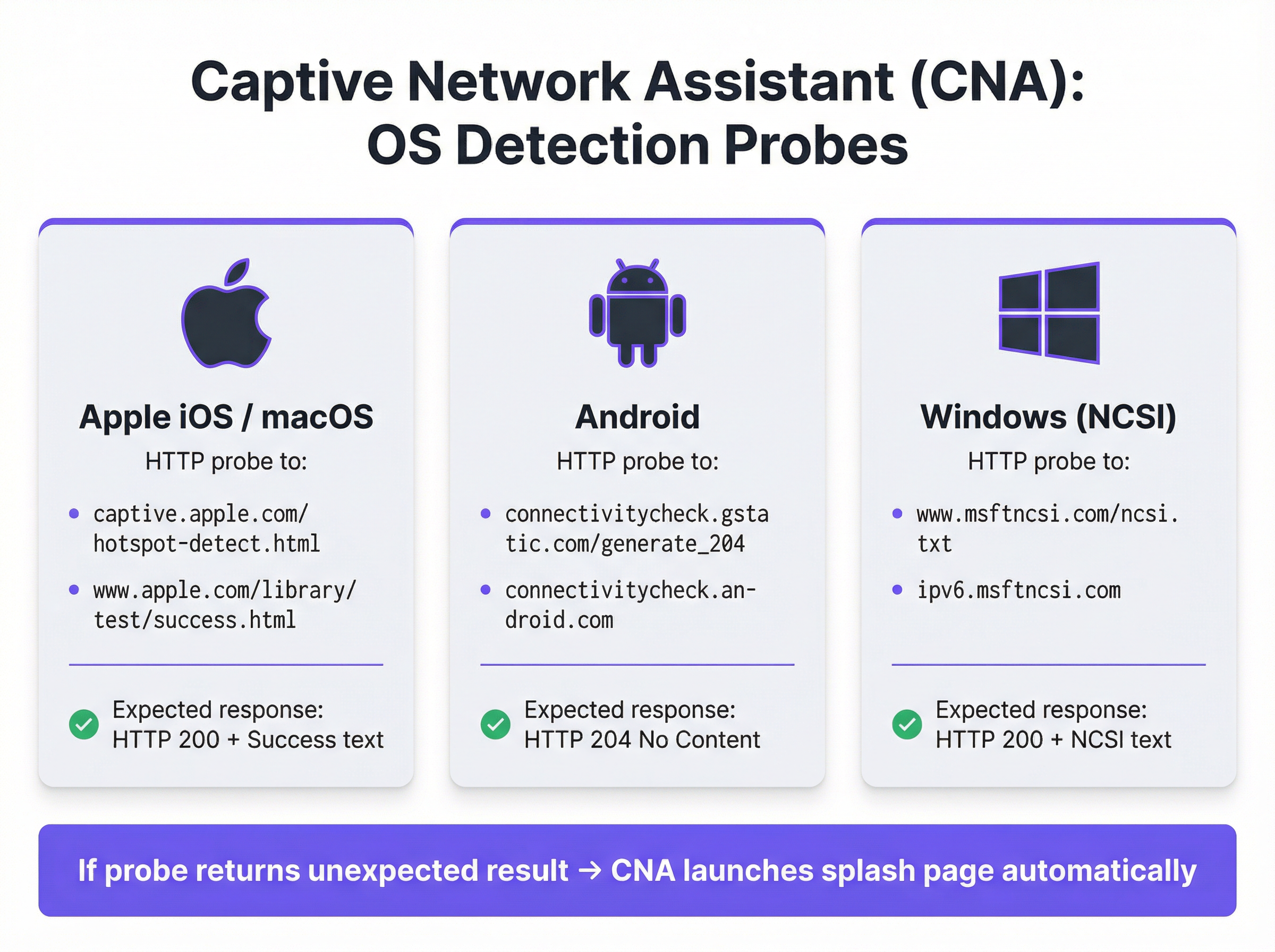
Das nahtlose, automatische Erscheinen der Splash-Page auf modernen Geräten wird durch den Captive Network Assistant (CNA) orchestriert, eine in allen gängigen Betriebssystemen integrierte Funktion. Sobald sich ein Gerät mit einem neuen WiFi-Netzwerk verbindet, führt das Betriebssystem einen „Liveness“-Test durch, indem es einen HTTP-Probe an einen fest codierten Endpunkt sendet.
- Apple (iOS & macOS): Prüft
captive.apple.com/hotspot-detect.htmlund erwartet eine HTTP-200-Antwort, die das Wort „Success“ enthält. - Android: Prüft
connectivitycheck.gstatic.com/generate_204und erwartet eine HTTP-204-Antwort („No Content“). - Windows (NCSI): Der Network Connectivity Status Indicator prüft
www.msftncsi.com/ncsi.txtund erwartet eine HTTP-200-Antwort mit dem Text „Microsoft NCSI“.
Wenn das Gateway diesen Probe abfängt und etwas anderes als die erwartete Antwort zurückgibt, schließt das Betriebssystem daraus, dass es sich hinter einem Captive Portal befindet, und startet automatisch den CNA – einen in einer Sandbox isolierten, ressourcenschonenden „Mini-Browser“ –, um die Splash-Page anzuzeigen. Dieser Prozess erspart den Nutzern das manuelle Öffnen ihres Browsers und verbessert die User Experience erheblich.
Authentifizierung und Zugriffsgewährung
Sobald der Nutzer mit der Splash-Page interagiert (z. B. durch Absenden eines Formulars), kommuniziert der Portal-Server mit dem Netzwerk-Gateway, um das Gerät zu autorisieren. Dies wird typischerweise über eines von drei Protokollen abgewickelt:
- RADIUS (Remote Authentication Dial-In User Service): Der gängigste Standard (RFC 2865), bei dem das Portal als RADIUS-Client fungiert und eine Authentifizierungsanfrage mit der MAC-Adresse des Geräts an das Gateway (das als RADIUS-Server agiert) sendet.
- WISPr (Wireless Internet Service Provider roaming): Ein XML-basiertes Protokoll für die Hotspot-Authentifizierung, dessen Verbreitung jedoch geringer ist als die von RADIUS.
- Proprietäre APIs: Viele moderne Anbieter von Netzwerk-Hardware (wie Cisco Meraki, Aruba und Ruckus) stellen RESTful APIs zur Verfügung, die eine flexiblere und granularere Kontrolle über die Geräteautorisierung ermöglichen. Dies ist die von Purple verwendete Integrationsmethode.
Nach erfolgreicher Authentifizierung verschiebt das Gateway die MAC-Adresse des Geräts vom Status „nicht authentifiziert“ in den Status „authentifiziert“, hebt die Walled-Garden-Beschränkungen auf und gewährt vollständigen Internetzugang für eine vordefinierte Sitzungsdauer.
Implementierungsleitfaden
Die Bereitstellung eines Enterprise-Grade Captive Portals erfordert eine sorgfältige Planung, die über das Design der Splash-Page hinausgeht. Befolgen Sie diese herstellerneutralen Schritte für eine erfolgreiche Implementierung.
Zugriffsrichtlinien definieren: Legen Sie Authentifizierungsmethoden (z. B. Social Login, E-Mail-/SMS-Verifizierung, Voucher-Codes), Sitzungsdauer, Idle-Timeouts und Bandbreitenlimits fest. Für ein Hotel könnte eine 24-Stunden-Sitzung mit einem Limit von 10 Mbit/s angemessen sein. Für ein stark frequentiertes Stadion ist eine 4-Stunden-Sitzung mit einem Limit von 2 Mbit/s und aggressivem Traffic-Shaping realistischer.
Den Walled Garden konfigurieren: Erstellen Sie eine umfassende Whitelist aller Domains und IP-Adressen, auf die ein nicht authentifiziertes Gerät zugreifen können muss. Dies umfasst den Portal-Server selbst, sein CDN für Assets (Bilder, CSS) und die Endpunkte für Drittanbieter von Authentifizierungen (z. B. die OAuth-Domains von Google und Facebook). Ein unvollständiger Walled Garden ist die Hauptursache für fehlgeschlagene Portal-Bereitstellungen.
Eine CNA-optimierte Splash-Page entwerfen: Die Splash-Page muss ressourcenschonend und responsiv sein. Sie sollte über eine Mobilfunkverbindung in unter 3 Sekunden laden und komplexes JavaScript oder große Frameworks vermeiden, die in der isolierten CNA-Umgebung fehlschlagen könnten. Alle Nutzeraktionen sollten innerhalb einer einzigen Seitenansicht durchführbar sein, um Probleme durch ein vorzeitiges Schließen des CNA zu vermeiden.
Integrieren der Netzwerk-Hardware: Konfigurieren Sie Ihren Wireless-Controller oder Ihr Gateway so, dass es auf Ihren Captive Portal-Server verweist. Dies beinhaltet das Festlegen der Portal-URL, das Definieren der RADIUS- oder API-Authentifizierungsparameter und das Spezifizieren des Umleitungsverhaltens. Purple bietet vorgefertigte Integrationen, die diesen Prozess für alle großen Hardware-Anbieter automatisieren.
Daten-Compliance sicherstellen: Wenn personenbezogene Daten erfasst werden, muss Ihr Portal-Ablauf explizite, granulare Zustimmungsmechanismen enthalten, die Vorschriften wie der GDPR und dem CCPA entsprechen. Die Zustimmung zu Marketingzwecken muss getrennt von der Akzeptanz der Nutzungsbedingungen erfolgen. Die Purple-Plattform umfasst ein vollständig konformes Consent-Management-Framework mit auditierbaren Protokollen.
Best Practices
- Sicherheit mit WPA2/WPA3 priorisieren: Betreiben Sie Ihre Gast-SSID immer mindestens mit WPA2-Personal-Verschlüsselung. Ein Captive Portal ist eine Kontrolle auf Anwendungsebene und verschlüsselt den Over-the-Air-Datenverkehr nicht. Die Kombination von Verschlüsselung mit einem Portal bietet mehrschichtige Sicherheit.
- Netzwerksegmentierung implementieren: Verwenden Sie VLANs, um den Gast-Datenverkehr strikt von Ihrem internen Unternehmensnetzwerk zu trennen. Ein Captive Portal bietet eine logische Trennung, aber physische oder virtuelle Segmentierung ist erforderlich, um Standards wie PCI DSS zu erfüllen.
- MAC-Adressen-Randomisierung berücksichtigen: Moderne mobile Betriebssysteme randomisieren MAC-Adressen standardmäßig, um Tracking zu verhindern. Sich bei der Erkennung wiederkehrender Besucher ausschließlich auf MAC-Adressen zu verlassen, ist nicht mehr praktikabel. Nutzen Sie Plattformen wie Purple, die fortschrittlicheres Device-Fingerprinting und profilbasierte Authentifizierung verwenden, um wiederkehrende Nutzer zu identifizieren.
- Regelmäßig überwachen und testen: Betriebssystem-Updates, insbesondere von Apple, können das CNA-Verhalten ohne Vorwarnung ändern. Etablieren Sie ein vierteljährliches Testprotokoll, um die Funktionalität Ihres Portals auf den neuesten Versionen von iOS, Android und Windows zu validieren.
Fehlerbehebung & Risikominderung
| Häufige Fehlerquelle | Ursache | Minderungsstrategie |
|---|---|---|
| Splash-Page lädt nicht | Unvollständiger Walled Garden blockiert den Zugriff auf Portal-Assets (CSS, JS, Bilder) oder Fehler bei der DNS-Auflösung. | Testen und validieren Sie alle erforderlichen Domains für den Walled Garden gründlich. Stellen Sie sicher, dass DNS im Gast-VLAN korrekt konfiguriert ist. |
| Social Logins schlagen fehl | OAuth-Anbieter-Domains (z. B. accounts.google.com) sind nicht im Walled Garden enthalten. |
Fügen Sie alle erforderlichen Authentifizierungs-Domains von Drittanbietern zum Walled Garden hinzu. Verwenden Sie Browser-Entwicklertools, um Netzwerkanfragen während des Login-Ablaufs zu verfolgen. |
| CNA-Fenster schließt sich unerwartet | Die Splash-Page versucht eine komplexe Umleitung oder das Öffnen eines neuen Tabs, was im CNA nicht unterstützt wird. | Entwerfen Sie einen Single-Page-Authentifizierungsablauf. Stellen Sie sicher, dass alle Interaktionen innerhalb der anfänglichen Portal-Seite stattfinden. |
| Nutzer werden nicht umgeleitet (HTTPS) | Das Gateway versucht einen HTTP-Redirect auf einer HTTPS-Seite, was einen Browser-Sicherheitsfehler verursacht. | Stellen Sie sicher, dass das Gateway für DNS-Hijacking konfiguriert ist, was sowohl für HTTP- als auch für HTTPS-Datenverkehr effektiv ist. |
| Schlechte Performance / Langsamer Login | Die Splash-Page ist zu groß (hochauflösende Bilder, umfangreiche JavaScript-Frameworks). | Optimieren Sie alle Assets und streben Sie eine Gesamtseitengröße von unter 500 KB an. Verzögern Sie das Laden nicht essenzieller Skripte. |
ROI & Geschäftliche Auswirkungen
Der geschäftliche Wert eines Captive Portals geht weit über die Bereitstellung von Internetzugang hinaus. Der ROI misst sich an seiner Fähigkeit, anonyme Besucher in bekannte Kunden zu verwandeln und greifbare Geschäftsergebnisse zu erzielen.
- Datenerfassung: Durch die Erfassung von E-Mail-Adressen, Social-Media-Profilen oder Umfrageantworten beim Login können Veranstaltungsorte umfangreiche CRM-Profile aufbauen. Eine Einzelhandelskette kann einen physischen Ladenbesuch einem bestimmten Kunden in ihrer Marketingdatenbank zuordnen und so die Lücke zwischen Online und Offline schließen.
- Gesteigerte Interaktion: Die Splash-Page ist ein hochsichtbares digitales Werbeschild. Hotels können Spa-Dienstleistungen oder Restaurantbuchungen bewerben. Konferenzzentren können Veranstaltungspläne und Sponsorenbotschaften anzeigen. Dieser direkte Kommunikationskanal kann zusätzliche Einnahmen generieren.
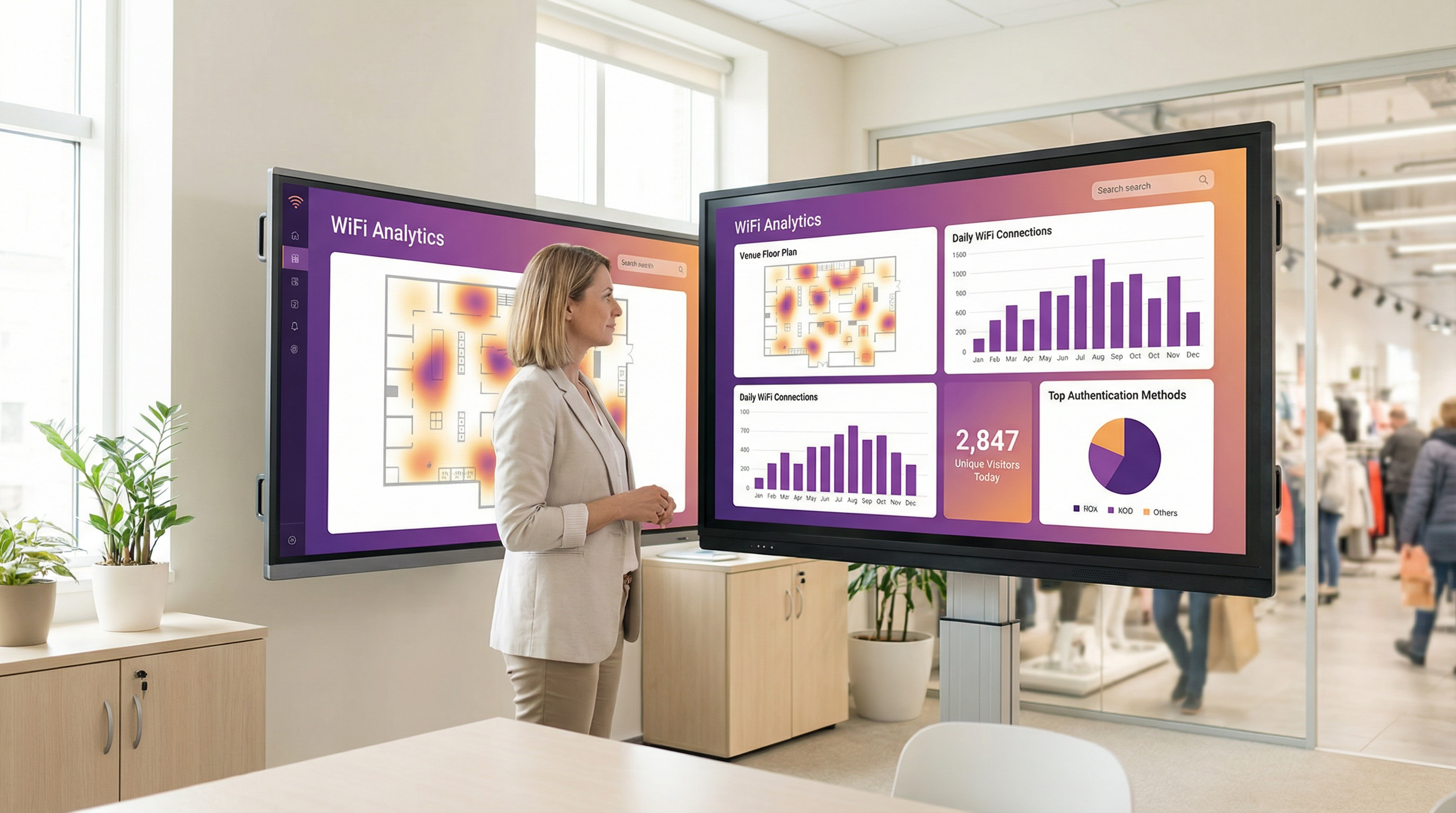
- Operational Intelligence: WiFi-Analyseplattformen wie Purple nutzen Authentifizierungsdaten, um tiefe Einblicke in das Besucherverhalten zu geben. Heatmaps zeigen Laufwege auf, Verweildauer-Analysen zeigen das Interaktionsniveau und Metriken zu wiederkehrenden Besuchern helfen bei der Messung der Loyalität. Ein Stadion kann diese Daten nutzen, um die Personalbesetzung an Verkaufsständen zu optimieren, während ein Museum die Beliebtheit von Ausstellungsstücken analysieren kann.
Durch die Nutzung einer Plattform wie Purple wird das Captive Portal zur Grundlage der Location-Intelligence-Strategie eines Veranstaltungsortes und liefert messbare Erträge in Bezug auf Marketingeffektivität, betriebliche Effizienz und Kundenzufriedenheit.
Schlüsselbegriffe & Definitionen
Captive Portal
A web page that intercepts a newly connected user's browser, requiring them to perform a specific action before being granted full internet access.
This is the primary mechanism IT teams use to control access to guest and public WiFi networks, serving as a gateway for authentication, compliance, and user engagement.
Splash Page
The specific web page or user interface that is displayed to the user by the captive portal for authentication.
This is the main user-facing component. Its design and performance are critical for user experience and for achieving business goals like data capture or marketing.
Captive Network Assistant (CNA)
A built-in operating system feature (also known as a 'mini-browser') that automatically detects a captive portal and displays the splash page.
IT teams must design splash pages specifically for the CNA's limited, sandboxed environment, as it behaves differently from a standard web browser and is a common point of failure.
Walled Garden
The list of whitelisted IP addresses and domain names that an unauthenticated user is allowed to access before completing the captive portal authentication.
A misconfigured walled garden is the most common reason for portal failures. Network architects must ensure it includes all necessary endpoints for the portal and any third-party login providers.
DNS Hijacking
An interception technique where a network gateway provides a false IP address (that of the portal server) in response to a DNS query from an unauthenticated device.
This is the core mechanism that makes captive portals work, allowing the network to redirect users to the splash page regardless of the website they are trying to visit.
RADIUS (RFC 2865)
A standard networking protocol for centralized Authentication, Authorization, and Accounting (AAA) management.
In a captive portal context, it's a common way for the portal server to tell the network gateway that a user has been authenticated and should be granted internet access.
MAC Address Randomization
An OS-level privacy feature where a device uses a different, randomly generated MAC address for each WiFi network it connects to.
This feature makes it difficult for IT teams to track unique devices over time using traditional methods. It necessitates a shift towards profile-based authentication for accurate visitor analytics.
IEEE 802.1X
An IEEE standard for port-based Network Access Control (PNAC) that provides authenticated network access to Ethernet networks and WLANs.
This is the enterprise-grade alternative to captive portals, often used for corporate devices. It offers higher security but requires client-side configuration, making it unsuitable for guest access scenarios where simplicity is key.
Fallstudien
A 200-room luxury hotel needs to replace its outdated guest WiFi system. The goal is to provide a seamless, branded login experience, offer tiered bandwidth (free for basic access, paid for premium streaming), and promote hotel amenities like the spa and restaurant directly on the splash page. The hotel uses Cisco Meraki access points.
- Deployment with Purple & Meraki: Leverage Purple's native API integration with the Cisco Meraki dashboard. Create a new SSID for guest access (e.g., 'Hotel_Guest_WiFi') and configure it with WPA2-Personal encryption. In the Meraki dashboard, set the 'Splash Page' option to 'Sign-on with' and select 'Purple'.
- Tiered Access Configuration: Within the Purple platform, create two access tiers. The 'Free' tier is configured with a 5 Mbps bandwidth cap and a 24-hour session time. The 'Premium' tier is set to 25 Mbps with no cap and requires payment via an integrated Stripe gateway.
- Splash Page Design: Use Purple's drag-and-drop editor to design the splash page. The initial view presents the 'Free' option (login with email or social media) and a prominent 'Upgrade to Premium' button. Upon successful free login, the user is redirected to a welcome page featuring a carousel of promotions for the hotel's restaurant and spa, with direct links to the booking engine.
- Compliance: Enable Purple's GDPR/CCPA consent module, ensuring separate checkboxes for 'Terms of Service' and 'Marketing Communications'.
A national retail chain with 500 stores wants to offer free guest WiFi to understand in-store customer behavior and build its marketing database. They need a scalable solution that provides centralized management and delivers analytics on footfall, dwell time, and repeat visits. The existing hardware is a mix of Aruba and Ruckus.
- Centralized Management: Deploy Purple across all 500 stores. The platform's hardware-agnostic nature allows for consistent configuration across both Aruba and Ruckus controllers from a single cloud dashboard.
- Authentication & Data Capture: Configure the splash page to require social login (Facebook or Google) or email address submission. This captures valuable demographic data and a marketing contact for every user who connects.
- Analytics & Integration: Leverage Purple's WiFi analytics suite. The platform will automatically generate dashboards for each store and at the corporate level, showing metrics like unique visitors, dwell times by zone (if location services are enabled), and repeat visitor rates. Set up a daily data export via API to feed the captured email addresses and visitor metrics directly into the company's master CRM (e.g., Salesforce).
- Scalable Deployment: Create a single splash page template and apply it to all locations. Any updates to branding or promotions can be pushed to all 500 stores simultaneously from the central dashboard.
Szenarioanalyse
Q1. You are deploying a new guest WiFi network in a conference center. A key requirement is that attendees can log in using their LinkedIn profile to facilitate networking. During testing, the LinkedIn login button on the splash page does nothing when clicked on an iPhone. What is the most likely cause and how would you troubleshoot it?
💡 Hinweis:Consider the sandboxed environment of the CNA and its network restrictions.
Empfohlenen Ansatz anzeigen
The most likely cause is an incomplete walled garden. The LinkedIn OAuth flow requires the device to access several domains (e.g., linkedin.com, static-exp1.licdn.com) to load its authentication scripts and display the login pop-up. Because the iPhone is in an unauthenticated state, the CNA is blocking these requests. To troubleshoot, I would connect a laptop to the guest SSID, open the browser's developer tools, and monitor the 'Network' tab while attempting to log in. This will reveal all the blocked domains, which must then be added to the gateway's walled garden whitelist.
Q2. A retail client wants to measure the loyalty of their in-store shoppers by tracking how many of them are repeat visitors. Their current captive portal only identifies devices by MAC address. Why is this approach flawed and what alternative strategy should you propose?
💡 Hinweis:Think about modern mobile OS privacy features.
Empfohlenen Ansatz anzeigen
This approach is flawed due to MAC address randomization, a default privacy feature in iOS, Android, and Windows that assigns a different MAC address for each WiFi network. A returning customer's phone will appear as a new device on each visit, making MAC-based loyalty tracking highly inaccurate. I would propose a shift to a profile-based authentication strategy using Purple. By requiring a social login or an email/phone number verification, we can create a persistent user profile that is independent of the device's MAC address. This allows for accurate tracking of repeat visits and builds a much richer CRM profile for the client.
Q3. A hotel is receiving complaints that its premium paid WiFi tier, which is supposed to be faster, feels no different from the free tier. The network is configured with a 5 Mbps cap on the 'Free' user profile and a 50 Mbps cap on the 'Premium' profile. Where in the network architecture would you investigate to diagnose this issue?
💡 Hinweis:Consider the entire data path from the access point to the internet egress.
Empfohlenen Ansatz anzeigen
The issue is likely not with the captive portal profiles themselves, but with a bottleneck further up the network chain. I would investigate in this order: 1. Wireless Controller/Gateway: Verify that the bandwidth shaping or Quality of Service (QoS) policies are being correctly applied to the user roles associated with the 'Free' and 'Premium' profiles. 2. Firewall: Check the firewall for any global traffic shaping policies that might be overriding the per-user rules from the controller. 3. Internet Circuit: Run a speed test from the gateway's LAN interface to confirm the total available internet bandwidth. It's possible the entire property's internet connection is saturated or performing below its subscribed speed, making the per-user caps irrelevant. 4. Access Point Saturation: In high-density areas, check the client load and channel utilization on the specific APs the complaining users are connected to. RF interference or an overloaded AP can also be a bottleneck.
Wichtigste Erkenntnisse
- ✓A captive portal is a web page that intercepts user traffic on a guest WiFi network to enforce authentication and policy.
- ✓The automatic pop-up is handled by the Captive Network Assistant (CNA), a mini-browser in all major operating systems.
- ✓Core interception works via DNS hijacking or HTTP redirect at the network gateway.
- ✓Splash pages must be designed to be lightweight and functional within the limited, sandboxed CNA environment.
- ✓A correctly configured 'walled garden' is critical for ensuring third-party social logins work correctly.
- ✓Modern OS privacy features like MAC address randomization make profile-based authentication essential for accurate visitor analytics.
- ✓A captive portal platform like Purple transforms a network access tool into a powerful asset for business intelligence, marketing, and compliance.




