
Stadium WiFi: How to Deliver Connectivity at Scale for Fans
This authoritative technical reference guide provides actionable guidance for IT managers, network architects, and venue operations directors on designing, deploying, and monetising high-density stadium WiFi networks. It covers RF architecture for extreme device density, secure authentication at scale, network segmentation, and risk mitigation - alongside practical case studies and a clear framework for measuring ROI. Venues that deploy correctly can transform their WiFi infrastructure from a cost centre into a strategic platform for fan engagement, retail media, and operational intelligence.
Video overview
Listen to this guide
View podcast transcript
Part of our core series: Guest WiFi Guide →
Stadium & arena high-density WiFi capacity planner
Size seating bowl microcell AP density, antenna beamwidth, 6 GHz channel reuse, PoE++ power budgeting, and multi-gigabit fiber uplinks for large public venues.
Venue zone AP breakdown & density sizing
Engineered for vast open bowls with extreme human body RF attenuation, severe co-channel interference risks, and massive concurrency spikes during pre-game and half-time intervals.
Why high-density WiFi is capacity-driven, not coverage-driven
In standard enterprise WiFi, an access point easily covers 2,500 m² of physical floor space. However, in a stadium bowl with 65,000 spectators, thousands of active smartphones in line-of-sight transmit probe requests and beacon responses simultaneously, causing immediate airtime exhaustion if AP cell sizes are too large.
Architecting a high-density venue or stadium WiFi network?
Purple powers seamless guest WiFi onboarding, carrier offloading with Passpoint, and real-time fan location analytics across world-renowned stadiums and entertainment arenas globally.
Executive Summary
Delivering reliable WiFi in a stadium environment is one of the most demanding challenges in network engineering. For IT managers, CTOs and venue operations directors, the goal is no longer simply to provide basic connectivity - it is to create a seamless digital fan experience while generating measurable ROI. Stadiums face extreme device density, massive usage spikes during half-time, and the need to support critical operational systems alongside visitor access. This guide outlines the technical architecture, deployment strategies and risk mitigation tactics required to deliver venue WiFi at scale. By combining robust RF design with platforms such as Purple's Guest WiFi and WiFi Analytics, venues can transform the network from a cost centre into a strategic asset driving retail media monetisation and operational intelligence. The principles set out here apply equally to Hospitality venues, Retail environments and Transport hubs - anywhere extreme density and fan engagement intersect.
Technical Deep-Dive
The RF Challenge: Extreme Density and Co-Channel Interference
The fundamental challenge of stadium WiFi is managing extreme client density within a confined physical space. The traditional enterprise deployment model - relying on omnidirectional antennas to cover large areas - fails under stadium conditions due to Co-Channel Interference (CCI). When multiple access points broadcast on the same frequency channel, devices spend most of their time waiting for clear airtime rather than transmitting data. In a seating bowl with 50,000 devices, this is catastrophic.
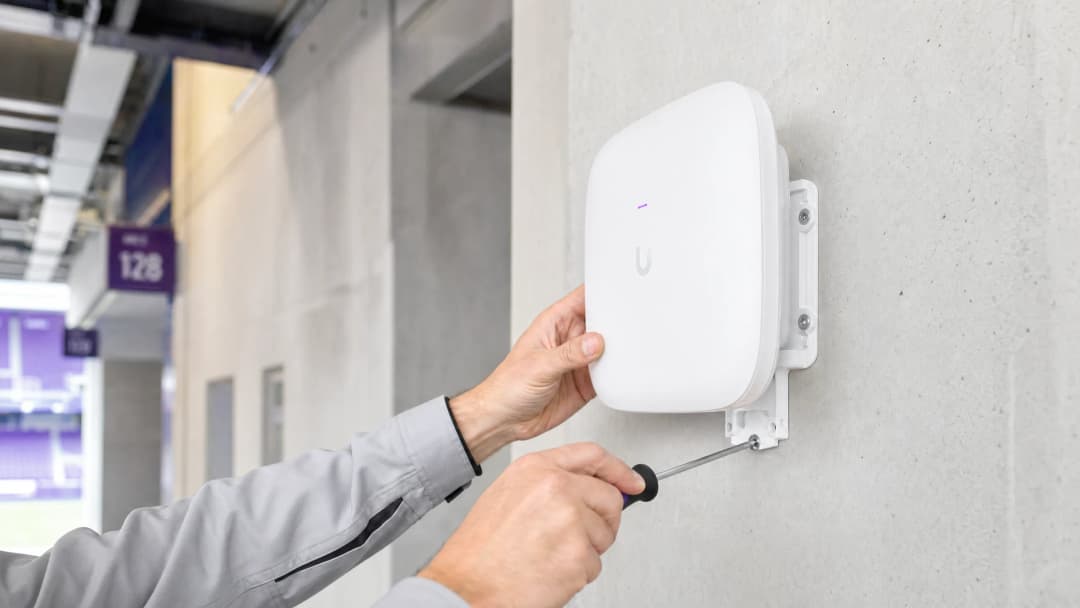
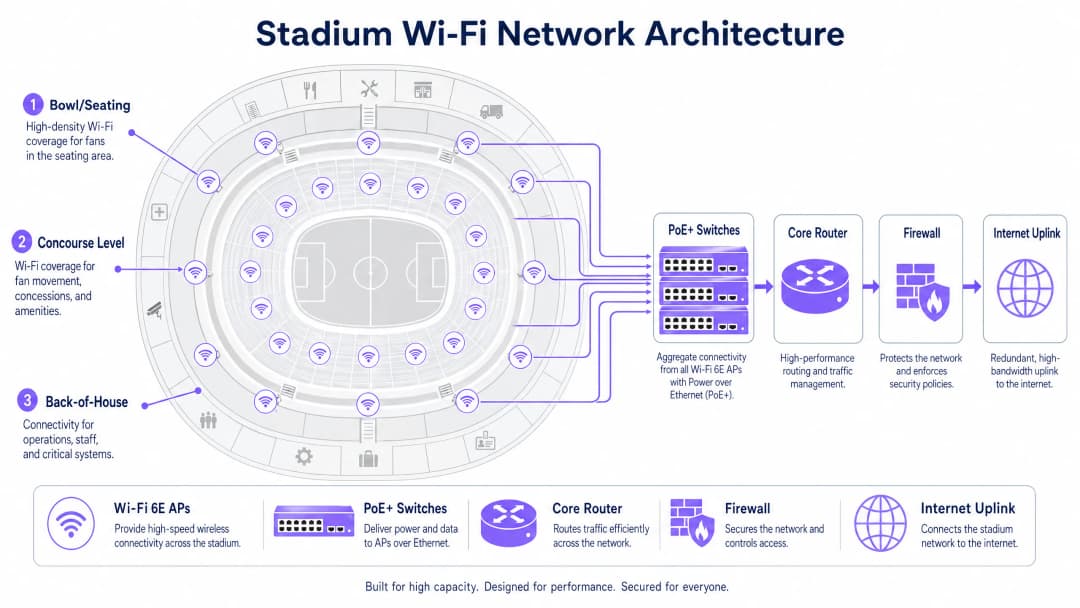
To combat CCI, network architects must design for micro-cells. This involves deploying a large number of highly directional, narrow-beam antennas - typically with beamwidths of 30 degrees or less - dividing the seating bowl into small, isolated coverage zones. Each micro-cell serves a limited number of devices, maintaining high throughput and low contention. Mounting options include under-seat enclosures (preferred for lower seating tiers) and handrail-mounted directional APs for upper tiers.
Wi-Fi 6E and Spectrum Allocation
Modern stadium deployments must leverage Wi-Fi 6E. The addition of the 6 GHz spectrum band provides up to 1,200 MHz of clean, contiguous spectrum, free from the Dynamic Frequency Selection (DFS) radar constraints that complicate 5 GHz deployments in complex environments. This allows compatible devices to use wider channels (160 MHz, or 320 MHz with Wi-Fi 7), significantly increasing throughput and reducing latency - all of which is critical for bandwidth-intensive applications such as in-seat video replays and social media sharing.
The table below summarises the key differences between the WiFi standards relevant to stadium deployments:
| Standard | Bands | Maximum Channel Width | Key Advantage for Stadiums |
|---|---|---|---|
| Wi-Fi 5 (802.11ac) | 5 GHz | 80 MHz | Broad support, but limited spectrum |
| Wi-Fi 6 (802.11ax) | 2.4 / 5 GHz | 160 MHz | OFDMA and BSS Coloring reduce interference |
| Wi-Fi 6E (802.11ax) | 2.4 / 5 / 6 GHz | 160 MHz | Clean 6 GHz spectrum with no DFS constraints |
| Wi-Fi 7 (802.11be) | 2.4 / 5 / 6 GHz | 320 MHz | Multi-Link Operation for extreme throughput |
Authentication and Security at Scale
Frictionless onboarding at scale is critical. Captive Portals, while valuable for first-party data capture, can create severe bottlenecks when 50,000 fans attempt to connect in the fifteen minutes before kick-off. The industry is moving towards profile-based authentication, and specifically OpenRoaming - a federation that allows devices to connect automatically and securely using 802.1X and WPA3-Enterprise. Purple acts as an identity provider within this ecosystem, ensuring secure, seamless access while still associating each device session with a persistent user profile for analytics purposes.
For venues that still require Captive Portal onboarding for data capture, the solution is pre-provisioned authentication: allowing devices to associate and obtain an IP address immediately, then presenting the portal asynchronously. This prevents the DHCP and association storms that occur when every device hits the portal simultaneously.
For a detailed treatment of public network security principles - directly applicable to stadium environments - see our guide Airport WiFi Security: How to Protect Passengers on Public Networks. The segmentation and DNS security principles covered there apply equally here. In addition, Protecting Your Network with Robust DNS and Security provides specific guidance on DNS-layer defences for public networks.
Got questions about your specific setup?
Our team works with venue operators, IT managers, and network engineers across 80,000 venues. Book a 20-minute call and we will show you how others like you solved it.
Implementation Guide
Step 1: Site Survey and RF Planning
Before a single cable is laid, a detailed predictive RF model of the venue must be established. Use tools such as Ekahau or iBwave to model AP placement, antenna patterns and expected coverage. Validate the model with a physical site survey, paying particular attention to the materials used in the seating bowl (concrete, metal, glass) and any sources of interference (broadcast equipment, temporary structures).
Step 2: Physical Deployment
AP deployment in the seating bowl generally falls into two categories:
Under-seat deployment: APs are mounted in ruggedised IP67-rated enclosures beneath the seats. This provides excellent line of sight to devices above, and the human bodies in the seats naturally attenuate the RF signal, reducing CCI between adjacent cells. Cabling is more complex, but RF performance is superior.
Overhead/handrail deployment: Directional APs are mounted on catwalks, handrails or fascia boards, aimed at specific seating sections. This deployment is easier to cable but requires precise antenna aiming and is more susceptible to interference in open-bowl environments.
For concourses, standard enterprise ceiling-mounted APs are appropriate, as density is lower and the environment more controlled.
Step 3: Network Segmentation
A stadium network is a multi-tenant environment. Strict traffic segmentation using VLANs and firewall policies is mandatory:
| VLAN | Purpose | Key Requirement |
|---|---|---|
| VLAN 10 | Guest/Fan WiFi | Captive Portal or OpenRoaming onboarding |
| VLAN 20 | Point of Sale/Retail | PCI DSS compliance, isolated from guest traffic |
| VLAN 30 | Operations/Staff | 802.1X authentication, restricted access |
| VLAN 40 | Building Management | Isolated, no internet access |
This segmentation principle is consistent across industries - whether deploying in a Retail environment or a Healthcare facility, separating operational traffic from guest traffic is a non-negotiable security baseline.
Step 4: Backhaul and Infrastructure Sizing
RF coverage is worthless without sufficient backhaul. Ensure your PoE+ edge switches have at least 10 Gbps uplinks to the aggregation layer, with 40 Gbps for high-density aggregation points serving the seating bowl. The core internet uplink must be sized for peak concurrent usage - a dedicated leased line plus redundant failover is standard for venues of this scale. For more on dedicated connectivity options, see What Is a Leased Line? Dedicated Business Internet.
Step 5: Analytics Integration
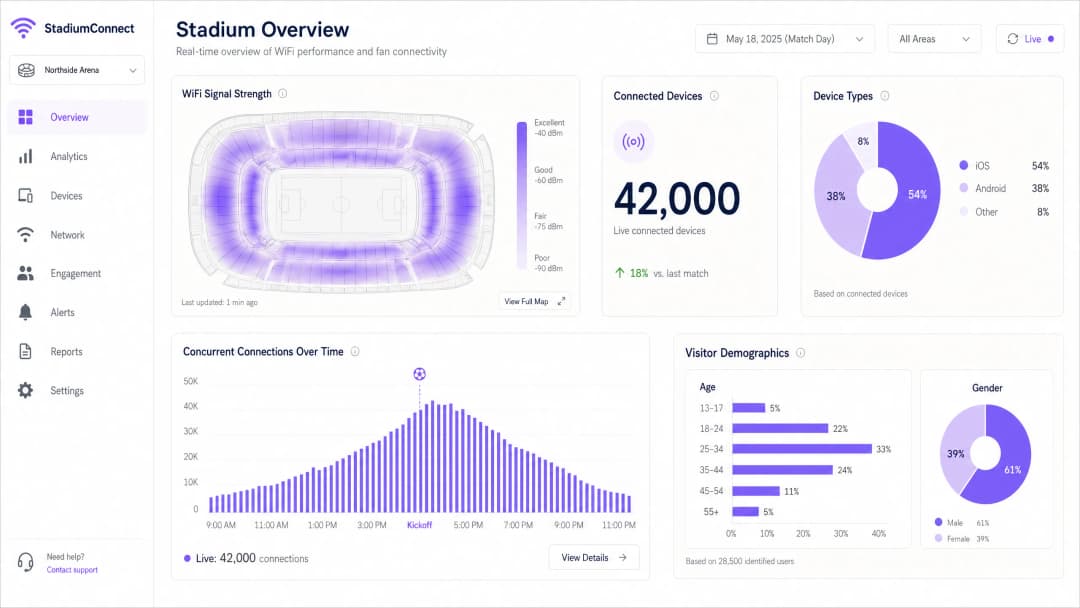
Once the network is operational, integrate it with a platform like Purple to begin capturing and processing data. Purple's WiFi Analytics platform provides real-time dashboards of device counts, signal heatmaps and visitor demographics - transforming the network into an operational intelligence layer.
Best Practices
Aggressive data rate management: Disable all legacy 802.11b and 802.11g rates. Set the minimum mandatory basic rate to 12 Mbps or 24 Mbps. This forces sticky clients to roam to a closer AP rather than clinging to a distant one with a weak signal, and prevents slow devices from consuming a disproportionate share of airtime.
Band steering: Configure APs to steer compatible devices onto the 5 GHz and 6 GHz bands, keeping the 2.4 GHz band available for IoT devices and legacy hardware.
DHCP pool sizing: Size guest VLAN subnets generously (/16 or /20) with short lease times of 30-60 minutes to reclaim IP addresses from devices that have left the venue. DHCP exhaustion is one of the most common causes of half-time connectivity failures.
Rogue AP detection: Implement rogue AP detection and containment. Personal hotspots created by fans and broadcasters can cause severe adjacent-channel interference.
DNS security: Implement DNS filtering on the guest network to block access to malicious domains and reduce the risk of malware propagation. See Protecting Your Network with Robust DNS and Security for implementation guidance.
WPA3 transition mode: Enable WPA3-SAE in transition mode to support both WPA2 and WPA3 clients simultaneously, delivering enhanced security to compatible devices without excluding legacy hardware.
Troubleshooting and Risk Mitigation
Failure Mode 1: The Half-Time Spike
Symptom: Devices show a strong WiFi signal but cannot load web pages or complete transactions.
Cause: DHCP pool exhaustion or a core network bottleneck - not an RF problem.
Solution: Verify DHCP scope utilisation in real time. Increase the subnet size and reduce lease times. Check uplink utilisation from the edge switches to the core routers. This is a Layer 3 failure, not a Layer 1/2 issue - adding more APs will not help and may worsen RF interference.
Failure Mode 2: Rogue Interference
Symptom: Sudden performance degradation in a specific seating section during an event.
Cause: A broadcaster or fan has created a hotspot or portable router on an adjacent channel.
Solution: Use the wireless controller's spectrum analysis tools to identify the interfering device. Implement a rogue AP containment policy. Consider deploying dedicated spectrum analysers for major events.
Failure Mode 3: Physical Damage
Symptom: Individual APs go offline during or after an event.
Cause: Spillages, physical impact or weather ingress into under-seat enclosures.
Solution: Specify IP67-rated enclosures for all under-seat APs. Implement real-time AP health monitoring with alerting. Keep a stock of spare APs and ensure a rapid replacement procedure is in place for match-day incidents.
Failure Mode 4: MAC Address Randomisation Breaking Analytics
Symptom: Inconsistent visitor count data; returning visitors appear as new users.
Cause: Modern iOS and Android devices randomise their MAC address for each network, preventing MAC-based tracking.
Solution: Move from MAC-based tracking to profile-based authentication. When a user authenticates via OpenRoaming or a branded app, identity is tied to a persistent profile rather than a hardware address. Purple's platform handles this natively.
ROI and Business Impact
Deploying stadium WiFi is a major capital expenditure. A 50,000-seat stadium may require 500-1,000 access points, substantial cabling infrastructure and ongoing operational costs. To justify the investment, venues must leverage the network for operational intelligence and revenue generation.
Using Purple's WiFi Analytics platform, venues can quantify ROI across multiple dimensions:
| Revenue/Saving Category | Mechanism | Indicative Impact |
|---|---|---|
| Retail media monetisation | Delivering targeted sponsor messaging to authenticated fans | New revenue stream from sponsors |
| Concessions optimisation | Footfall analytics identify queue bottlenecks and optimise staffing | Reduced queue times, increased per-head spend |
| Reduced IT support costs | Profile-based authentication cuts match-day help desk calls | Lower operational overhead |
| Safety and compliance | Real-time crowd density monitoring for evacuation planning | Risk mitigation, insurance benefits |
| Fan loyalty | Personalised engagement campaigns based on visit history | Improved season ticket renewal rates |
The wifi data collection capability of a well-deployed stadium network is a significant commercial asset. First-party data captured at authentication - with full GDPR consent - enables venues to build detailed fan profiles, powering targeted marketing, personalised in-app experiences and sponsor activations.
For venues in adjacent industries, the same principles apply: Hospitality operators use WiFi analytics to understand guest behaviour across properties, while Transport hubs leverage footfall data for retail placement and capacity planning.
Key Definitions
Co-Channel Interference (CCI)
Degradation that occurs when multiple access points transmit on the same frequency channel within range of each other, causing devices to defer transmission and wait for clear airtime.
The primary RF failure mode in high-density stadium deployments. Mitigated by micro-cell architecture and careful channel planning.
Micro-Cell Architecture
A wireless network design using highly directional, narrow-beam antennas to create small, isolated coverage zones, each serving a limited number of devices.
The mandatory design pattern for stadium seating bowls. Contrasts with traditional omnidirectional AP deployments used in office environments.
OpenRoaming
A Wireless Broadband Alliance federation that enables devices to automatically and securely connect to participating WiFi networks using 802.1X and WPA3-Enterprise, without Captive Portal interaction.
Eliminates the authentication bottleneck at large events. Purple acts as an identity provider in the OpenRoaming ecosystem.
Airtime Fairness
A wireless scheduling mechanism that allocates equal transmission time to each connected device, regardless of its connection speed, preventing slow legacy devices from consuming disproportionate airtime.
Critical in stadiums where a mix of new and old smartphones compete for the same wireless medium.
802.1X
An IEEE standard for port-based network access control, providing an authentication framework for devices connecting to a LAN or WLAN, typically using RADIUS for credential validation.
Used for secure, enterprise-grade authentication for staff devices, PoS terminals, and OpenRoaming-enabled guest devices.
PCI DSS
Payment Card Industry Data Security Standard. A mandatory compliance framework for any network that processes, stores, or transmits payment card data.
Applies to any stadium network segment supporting concession stand PoS terminals. Requires strict isolation from guest WiFi traffic.
DHCP Exhaustion
A network failure condition where the DHCP server has assigned all available IP addresses in its pool and cannot service new connection requests.
A common cause of half-time connectivity failures in stadiums. Mitigated by large subnet sizing (/16 or /20) and short lease times (30-60 minutes).
WiFi 6E
An extension of the IEEE 802.11ax (WiFi 6) standard that adds support for the 6 GHz frequency band, providing up to 1,200 MHz of additional clean spectrum.
The recommended standard for new stadium deployments. The 6 GHz band is free from DFS constraints and legacy device congestion, making it ideal for high-density environments.
BSS Colouring
A WiFi 6 mechanism that tags transmissions with a colour identifier to allow APs to distinguish between overlapping networks on the same channel, reducing unnecessary deferral.
Reduces the impact of Co-Channel Interference in dense deployments where perfect channel separation is not achievable.
WPA3-SAE
WiFi Protected Access 3 with Simultaneous Authentication of Equals. Replaces the WPA2-PSK handshake with a more secure Dragonfly key exchange, resistant to offline dictionary attacks.
The recommended security standard for guest WiFi networks. Should be deployed in transition mode to support both WPA2 and WPA3 clients.
Worked Examples
A 45,000-seat football stadium is experiencing severe connectivity failures during half-time. Users report full WiFi signal bars but cannot load web pages or complete mobile payments at concession stands. The network was deployed three years ago using 300 ceiling-mounted omnidirectional APs. What is the diagnosis and recommended remediation plan?
This is a multi-layer failure. The strong signal with no usable connectivity is the classic signature of a Layer 3 failure, not a Layer 1/2 RF problem. Immediate diagnostics: 1) Check DHCP pool utilisation - if scope utilisation exceeds 90%, IP address exhaustion is the primary cause. Increase the guest VLAN subnet from a /24 to a /16 and reduce lease times to 30 minutes. 2) Check uplink utilisation on edge switches - if 1 Gbps uplinks are saturated, upgrade to 10 Gbps. 3) Check core router CPU and memory utilisation for signs of bottlenecking. For the longer term, the omnidirectional AP deployment must be replaced with a micro-cell architecture using directional under-seat or handrail-mounted APs. The current deployment is causing severe Co-Channel Interference under load, which compounds the Layer 3 issues. Upgrade to WiFi 6E hardware during the redeployment.
A major conference centre hosting a 10,000-delegate technology summit needs to deploy temporary WiFi for a three-day large wifi network event. The venue has existing infrastructure but it was designed for 2,000 concurrent users. How should the temporary deployment be architected?
For a temporary high-density deployment: 1) Conduct a rapid site survey to identify coverage gaps and interference sources. 2) Deploy temporary high-density APs (WiFi 6 or 6E) on portable stands or clipped to existing infrastructure in the main hall and breakout rooms. Target one AP per 50-75 devices. 3) Provision a dedicated VLAN and DHCP scope for the event, sized for 15,000 devices (allowing for multiple devices per delegate). 4) Arrange a temporary bandwidth upgrade or secondary internet circuit for the event duration. 5) Integrate with Purple's Guest WiFi platform to provide a branded Captive Portal for delegate onboarding and real-time analytics. 6) Pre-stage authentication by pre-loading the event WiFi profile on delegate devices via the conference app. This is a wifi indoor event deployment pattern that prioritises rapid provisioning and monitoring over long-term infrastructure investment.
Practice Questions
Q1. You are the network architect for a 60,000-seat stadium. The venue director wants to save capital expenditure by using 150 standard enterprise omnidirectional APs mounted on the roof of the upper tier, rather than 800 directional under-seat APs. How do you advise, and what is the technical justification?
Hint: Consider the impact of Co-Channel Interference (CCI) and the physics of RF propagation in an open bowl environment.
View model answer
Advise strongly against the omnidirectional approach. In an open seating bowl, omnidirectional APs mounted at height will have overlapping coverage areas across multiple sections, creating severe Co-Channel Interference. Under load, devices will hear 5-10 APs on the same channel simultaneously, causing constant transmission deferral and effectively collapsing throughput to unusable levels. The 150-AP approach will appear to work in testing with low device counts but will fail catastrophically at capacity. The 800 directional under-seat APs create isolated micro-cells, each serving approximately 50-75 devices, with human bodies providing natural RF attenuation between cells. The higher capital cost is justified by the performance difference - the omnidirectional approach will generate significant reputational damage and costly remediation work post-deployment.
Q2. During a sold-out match, the concession stand PoS terminals are experiencing slow transaction times and occasional failures. The PoS terminals share the same physical APs as the fan guest network but are on a separate VLAN. What are the likely causes and how do you remediate?
Hint: Consider both RF-layer and network-layer causes. Think about Quality of Service (QoS) and VLAN traffic prioritisation.
View model answer
Two likely causes: 1) RF contention - the PoS terminals are competing for airtime with thousands of fan devices on the same APs. Remediation: implement QoS policies on the APs and switches to mark PoS traffic with a higher DSCP value (e.g., CS5) and prioritise it in the transmission queue. 2) Uplink saturation - if the edge switch uplinks are saturated with guest traffic, PoS packets are being dropped or delayed. Remediation: ensure PoS VLANs have guaranteed bandwidth allocation at the switch level using traffic shaping policies. For a permanent fix, consider deploying dedicated APs for the PoS network, physically separated from the guest WiFi APs, to eliminate RF contention entirely.
Q3. A venue director asks how the WiFi network can help them understand why fans are spending less at the merchandise store in the east concourse compared to the west concourse. What data does the network provide and how would you present the business case for investing in WiFi analytics?
Hint: Consider footfall analytics, dwell time, and the correlation between network data and commercial outcomes.
View model answer
Using Purple's WiFi Analytics platform, the network provides: 1) Footfall counts - how many devices pass through or enter the east concourse area. 2) Dwell time - how long devices remain in the merchandise store area. 3) Journey mapping - where fans go before and after visiting the store. If the data shows high footfall but low dwell time in the east store, it indicates queue abandonment or poor product visibility. If footfall itself is low, the issue is wayfinding or fan routing. The business case: the analytics platform converts an existing infrastructure investment into a commercial intelligence tool. The cost of the analytics licence is typically recovered within one or two events through optimised staffing, improved product placement, or targeted promotional campaigns delivered via the guest WiFi portal.
Frequently asked questions
What is the difference between under-seat and overhead catwalk WiFi deployments in stadiums?
Under-seat AP deployments install ruggedized enclosures beneath spectator seats, using human bodies as natural RF attenuators (~6-9 dB) to create tightly isolated microcells and maximize channel reuse across the seating bowl. Overhead catwalk deployments mount APs 15 to 30 meters above the bowl using narrow-beam directional patch antennas (15° to 30°), avoiding floor-level core drilling but requiring strict tilt tuning to prevent co-channel interference across seating tiers.
Why are 20 MHz channel widths recommended for stadium 5 GHz and 6 GHz WiFi?
High-density stadium design is capacity-limited by co-channel interference rather than peak single-client PHY rates. Using 20 MHz channels provides 25 non-overlapping channels in 5 GHz DFS spectrum and up to 59 non-overlapping channels in 6 GHz spectrum. Wider 40 MHz or 80 MHz channels cut the available channel count in half or quarter, causing severe co-channel contention when hundreds of APs operate within line-of-sight.
What minimum basic data rate should be configured in ultra-high-density arenas?
Enterprise stadium networks should disable all legacy data rates (1, 2, 5.5, 6, 9, and 11 Mbps) and set the minimum mandatory basic rate to 12 Mbps or 24 Mbps. This forces client probe requests and management frames to transmit at high modulation rates, drastically reducing airtime utilization and preventing distant clients from slowing down the entire RF cell.
How does Passpoint (Hotspot 2.0) alleviate stadium WiFi onboarding bottlenecks?
Passpoint (Hotspot 2.0 / OpenRoaming) leverages 802.11u and SIM-based EAP-AKA/EAP-TLS authentication to automatically connect and authenticate mobile subscribers directly to the stadium WiFi network without displaying a captive portal splash page. This offloads massive volumes of mobile traffic off congested 5G cellular macro towers instantly upon fan entry.
How does Purple enhance stadium and large-venue wireless networks?
Purple provides a hardware-agnostic venue guest WiFi, location analytics, and captive portal platform that integrates with Cisco Catalyst, Meraki, HPE Aruba, Ruckus, Juniper Mist, and Extreme Networks. Purple enables high-speed fan onboarding, SMS/social sign-in, real-time footfall flow heatmaps, dynamic concourse crowd alerts, and direct CRM data synchronization with platforms like Salesforce and HubSpot.
Continue reading in this series
How to Set Up Guest WiFi: A Secure Enterprise Configuration Guide
This authoritative guide provides IT leaders and network architects with a definitive blueprint for deploying secure enterprise guest WiFi. It covers essential architecture, WPA3 migration, VLAN segmentation, and captive portal integration to protect internal systems while capturing compliant first-party data.
How to Fix Slow WiFi Without Upgrading Your Internet Plan
A comprehensive technical reference guide for IT managers and network architects on optimising enterprise WiFi performance without increasing ISP bandwidth. Covers RF tuning, client density management, QoS implementation, and how to leverage WiFi analytics to diagnose and resolve bottlenecks.
How to Build a Campus WiFi Network: A University IT Guide
This technical guide provides a comprehensive blueprint for designing and deploying high-density campus WiFi networks, covering everything from active site surveys and access point placement to controller architecture, seamless roaming, and secure guest onboarding. It is written for IT managers, network architects, and CTOs at universities and large venues who need actionable guidance to plan and execute a wireless deployment this quarter. The guide also maps Purple's Guest WiFi and analytics platform to real integration points within the deployment lifecycle.
Got questions about your specific setup?
Our team works with venue operators, IT managers, and network engineers across 80,000 venues. Book a 20-minute call and we will show you how others like you solved it.