
WiFi para estadios: cómo ofrecer conectividad a gran escala para los aficionados
Esta guía de referencia técnica autorizada ofrece pautas prácticas para directores de TI, arquitectos de red y directores de operaciones de recintos sobre el diseño, la implantación y la monetización de redes WiFi de alta densidad en estadios. Abarca la arquitectura de RF para una densidad extrema de dispositivos, la autenticación segura a escala, la segmentación de red y la mitigación de riesgos, además de casos prácticos y un marco claro para medir el ROI. Los recintos que realizan la implantación correctamente pueden transformar su infraestructura WiFi de un centro de costes a una plataforma estratégica para el engagement de los aficionados, los medios minoristas y la inteligencia operativa.
Escuchar esta guía
Ver transcripción del podcast
Parte de nuestra serie principal: Guest WiFi Guide →
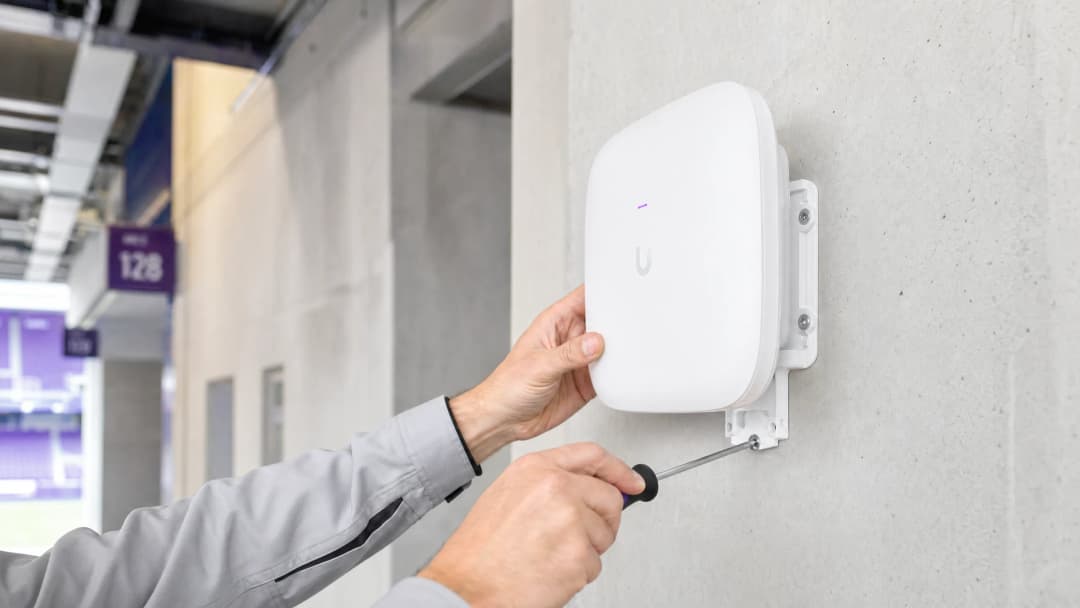
Resumen Ejecutivo
Ofrecer un WiFi fiable en el entorno de un estadio es uno de los retos más exigentes de la ingeniería de redes. Para los directores de TI, CTO y directores de operaciones de recintos, el objetivo ya no es simplemente proporcionar conectividad básica, sino crear una experiencia digital fluida para los aficionados al tiempo que se genera un ROI medible. Los estadios se enfrentan a una densidad extrema de dispositivos, picos de uso masivos durante los descansos y la necesidad de dar soporte a sistemas operativos críticos junto con el acceso de los visitantes. Esta guía detalla la arquitectura técnica, las estrategias de despliegue y las tácticas de mitigación de riesgos necesarias para ofrecer WiFi de recintos a gran escala. Al combinar un diseño de RF robusto con plataformas como Guest WiFi y WiFi Analytics de Purple, los recintos pueden transformar la red de un centro de costes a un activo estratégico que impulse la monetización de medios de venta minorista y la inteligencia operativa. Los principios aquí expuestos se aplican por igual a los sectores de la Hostelería, el Comercio minorista y el Transporte - cualquier lugar donde coincidan la densidad extrema y el compromiso de los aficionados.
Análisis Técnico Detallado
El reto de RF: Densidad extrema e interferencia cocanal
El reto fundamental del WiFi en estadios es gestionar la densidad extrema de clientes dentro de un espacio físico limitado. El modelo de despliegue empresarial tradicional - que se basa en antenas omnidireccionales para cubrir grandes áreas - falla en las condiciones de un estadio debido a la interferencia cocanal (CCI). Cuando varios puntos de acceso transmiten en el mismo canal de frecuencia, los dispositivos pasan la mayor parte del tiempo esperando tiempo de transmisión libre en lugar de transmitir datos. En una grada con 50.000 dispositivos, esto resulta catastrófico.
Para combatir la CCI, los arquitectos de redes deben diseñar microceldas. Esto implica desplegar un gran número de antenas directivas de haz estrecho y alta ganancia - normalmente con anchos de haz de 30 grados o menos - dividiendo la grada en zonas de cobertura pequeñas y aisladas. Cada microcelda da servicio a un número limitado de dispositivos, manteniendo un rendimiento alto y una baja contención. Las opciones de montaje incluyen carcasas debajo de los asientos (preferidas para las gradas inferiores) y puntos de acceso direccionales montados en pasamanos para las gradas superiores.
WiFi 6E y asignación de espectro
Las implementaciones de estadios modernos deben aprovechar WiFi 6E. La adición de la banda de espectro de 6 GHz proporciona hasta 1200 MHz de espectro limpio y contiguo, libre de las restricciones de radar de Selección Dinámica de Frecuencia (DFS) que complican las implementaciones de 5 GHz en entornos complejos. Esto permite que los dispositivos compatibles utilicen canales más anchos (160 MHz, o 320 MHz con WiFi 7), aumentando significativamente el rendimiento y reduciendo la latencia - todo lo cual es fundamental para aplicaciones de gran ancho de banda como las repeticiones de vídeo desde el asiento y el intercambio de contenidos en redes sociales.
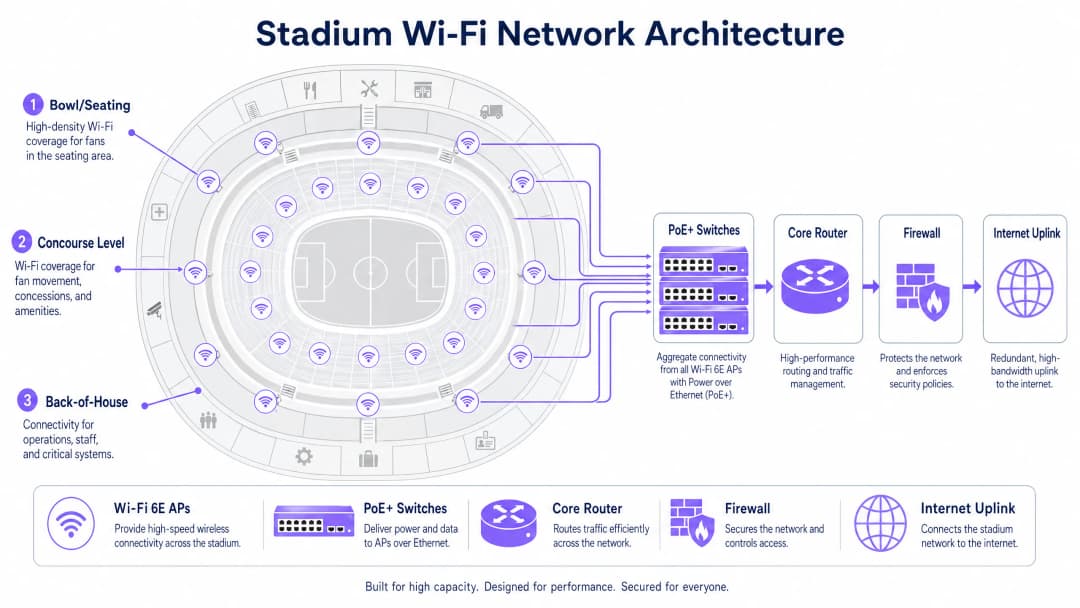
La siguiente tabla resume las diferencias clave entre los estándares de WiFi relevantes para implementaciones en estadios:
| Estándar | Bandas | Ancho de canal máximo | Ventaja clave para estadios |
|---|---|---|---|
| WiFi 5 (802.11ac) | 5 GHz | 80 MHz | Amplio soporte, pero espectro limitado |
| WiFi 6 (802.11ax) | 2.4 / 5 GHz | 160 MHz | OFDMA y BSS Coloring reducen las interferencias |
| WiFi 6E (802.11ax) | 2.4 / 5 / 6 GHz | 160 MHz | Espectro limpio de 6 GHz sin restricciones de DFS |
| WiFi 7 (802.11be) | 2.4 / 5 / 6 GHz | 320 MHz | Operación Multi-Link para un rendimiento extremo |
Autenticación y seguridad a escala
El acceso sin fricciones a escala es fundamental. Los Captive Portals, aunque valiosos para la captura de datos de primera mano, pueden crear graves cuellos de botella cuando 50 000 aficionados intentan conectarse en los quince minutos anteriores al saque inicial. El sector se está orientando hacia la autenticación basada en perfiles, y concretamente hacia OpenRoaming - una federación que permite a los dispositivos conectarse de forma automática y segura utilizando 802.1X y WPA3-Enterprise. Purple actúa como proveedor de identidad dentro de este ecosistema, garantizando un acceso seguro y sin interrupciones, al tiempo que asocia la sesión de cada dispositivo con un perfil de usuario persistente para fines analíticos.
Para los recintos que siguen requiriendo el acceso mediante Captive Portal para la captura de datos, la solución es la autenticación preaprovisionada: permitir que los dispositivos se asocien y obtengan una dirección IP inmediatamente, para luego presentar el portal de forma asíncrona. Esto evita las tormentas de DHCP y de asociación que se producen cuando todos los dispositivos acceden al portal simultáneamente.
Para un tratamiento detallado de los principios de seguridad en redes públicas - directamente aplicables a los entornos de estadios - consulte nuestra guía Airport WiFi Security: How to Protect Passengers on Public Networks. Los principios de segmentación y seguridad DNS que se tratan en ella se aplican por igual en este caso. Además, Protecting Your Network with Robust DNS and Security ofrece orientación específica sobre defensas a nivel de DNS para redes públicas.
Guía de implementación
Paso 1: Estudio de cobertura y planificación de RF
Antes de tender un solo cable, se debe establecer un modelo predictivo de RF detallado del recinto. Utilice herramientas como Ekahau o iBwave para modelar la ubicación de los AP, los patrones de antena y la cobertura esperada. Valide el modelo con un estudio físico del terreno, prestando especial atención a los materiales utilizados en el graderío (hormigón, metal, vidrio) y a cualquier fuente de interferencia (equipos de transmisión, estructuras temporales).
Paso 2: Despliegue físico
El despliegue de AP en el graderío generalmente se divide en dos categorías:
Despliegue bajo los asientos: Los AP se montan en cajas robustas con clasificación IP67 debajo de los asientos. Esto proporciona una excelente línea de visión con los dispositivos situados arriba, y los cuerpos humanos en los asientos atenúan de forma natural la señal de RF, reduciendo la CCI entre celdas adyacentes. El cableado es más complejo, pero el rendimiento de RF es superior.
Despliegue suspendido/en barandillas: Los AP direccionales se montan en pasarelas, barandillas o frontales de palcos, orientados hacia secciones de asientos específicas. Este despliegue es más fácil de cablear pero requiere una orientación precisa de la antena y es más susceptible a las interferencias en entornos de graderío abierto.
Para los vestíbulos y zonas comunes, los AP estándar de techo para empresas son adecuados, ya que la densidad es menor y el entorno está más controlado.
Paso 3: Segmentación de red
La red de un estadio es un entorno multiinquilino. Es obligatorio realizar una segmentación estricta del tráfico mediante VLAN y políticas de cortafuegos:
| VLAN | Propósito | Requisito clave |
|---|---|---|
| VLAN 10 | WiFi de invitados/aficionados | Incorporación mediante Captive Portal u OpenRoaming |
| VLAN 20 | Punto de venta/Comercio minorista | Conformidad con PCI-DSS, aislado del tráfico de invitados |
| VLAN 30 | Operaciones/Personal | Autenticación 802.1X, acceso restringido |
| VLAN 40 | Gestión del edificio | Aislado, sin acceso a internet |
Este principio de segmentación es coherente en todos los sectores: ya sea en un entorno Minorista o en un centro de Salud, separar el tráfico operativo del tráfico de invitados es una línea de base de seguridad no negociable.
Paso 4: Dimensionamiento del Backhaul y la infraestructura
La cobertura de RF no sirve de nada sin un backhaul suficiente. Asegúrese de que sus switches de acceso PoE+ tengan enlaces ascendentes de al menos 10 Gbps a la capa de agregación, con 40 Gbps para los puntos de agregación de alta densidad que dan servicio al graderío. El enlace ascendente a internet central debe estar dimensionado para el uso concurrente en picos: una línea dedicada alquilada junto con una conmutación por error redundante es el estándar para recintos de esta escala. Para obtener más información sobre las opciones de conectividad dedicada, consulte ¿Qué es una línea dedicada? Internet empresarial dedicado.
Paso 5: Integración de analíticas
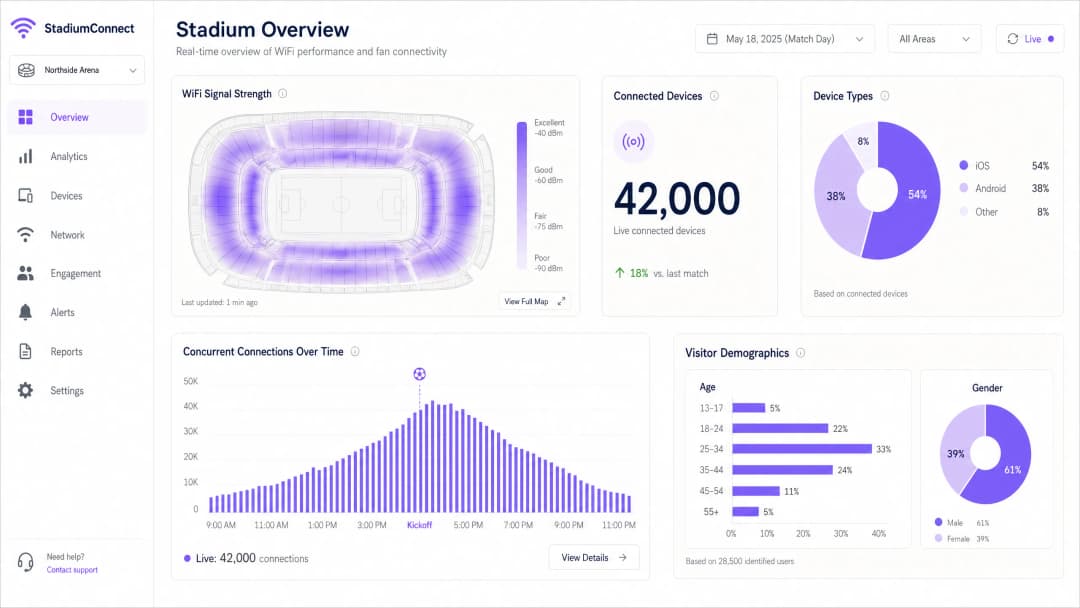
Una vez que la red esté operativa, intégrela con una plataforma como Purple para empezar a capturar y procesar datos. La plataforma de Analíticas de WiFi de Purple proporciona paneles en tiempo real de recuentos de dispositivos, mapas de calor de señales y datos demográficos de los visitantes, transformando la red en una capa de inteligencia operativa.
¿Tiene preguntas sobre su configuración específica?
Nuestro equipo trabaja con operadores de recintos, responsables de TI e ingenieros de redes en 80 000 espacios. Reserve una llamada de 20 minutos y le mostraremos cómo lo han solucionado otros profesionales como usted.
Buenas prácticas
Gestión agresiva de la tasa de datos: desactiva todas las tasas heredadas de 802.11b y 802.11g. Establece la tasa básica mínima obligatoria en 12 Mbps o 24 Mbps. Esto obliga a los clientes pegajosos a realizar un roaming hacia un AP más cercano en lugar de aferrarse a uno lejano con una señal débil, y evita que los dispositivos lentos consuman una parte desproporcionada del tiempo de transmisión.
Band steering: configura los AP para dirigir los dispositivos compatibles a las bandas de 5 GHz y 6 GHz, manteniendo la banda de 2,4 GHz disponible para dispositivos IoT y hardware heredado.
Dimensionamiento del pool de DHCP: dimensiona las subredes de las VLAN de invitados de forma generosa (/16 o /20) con tiempos de concesión cortos de 30-60 minutos para recuperar las direcciones IP de los dispositivos que han abandonado el recinto. El agotamiento de DHCP es una de las causas más comunes de fallos de conectividad durante el descanso.
Detección de AP no autorizados: implementa la detección y contención de AP no autorizados. Los puntos de acceso personales creados por aficionados y emisoras pueden causar graves interferencias de canales adyacentes.
Seguridad DNS: implementa el filtrado DNS en la red de invitados para bloquear el acceso a dominios maliciosos y reducir el riesgo de propagación de malware. Consulta Protecting Your Network with Robust DNS and Security para obtener orientación sobre la implementación.
Modo de transición WPA3: habilita WPA3-SAE en modo de transición para admitir clientes WPA2 y WPA3 simultáneamente, ofreciendo una seguridad mejorada a los dispositivos compatibles sin excluir el hardware heredado.
Resolución de problemas y mitigación de riesgos
Modo de fallo 1: el pico del descanso
Síntoma: los dispositivos muestran una señal WiFi fuerte pero no pueden cargar páginas web ni completar transacciones.
Causa: agotamiento del pool de DHCP o un cuello de botella en la red troncal, no un problema de RF.
Solución: verifica la utilización del alcance de DHCP en tiempo real. Aumenta el tamaño de la subred y reduce los tiempos de concesión. Comprueba la utilización del enlace ascendente desde los switches perimetrales a los routers troncales. Este es un fallo de Capa 3, no un problema de Capa 1/2; añadir más AP no ayudará y puede empeorar la interferencia de RF.
Modo de fallo 2: interferencia no autorizada
Síntoma: degradación repentina del rendimiento en una sección específica de asientos durante un evento.
Causa: una emisora o un aficionado ha creado un punto de acceso o un router portátil en un canal adyacente.
Solución: utiliza las herramientas de análisis de espectro del controlador inalámbrico para identificar el dispositivo que causa la interferencia. Implementa una política de contención de AP no autorizados. Considera el despliegue de analizadores de espectro dedicados para eventos importantes.
Modo de fallo 3: daño físico
Síntoma: AP individuales se desconectan durante o después de un evento.
Causa: derrames de líquidos, impactos físicos o filtraciones meteorológicas en las cajas ubicadas debajo de los asientos.
Solución: especificar cajas con clasificación IP67 para todos los AP ubicados bajo los asientos. Implementar una supervisión del estado de los AP en tiempo real con alertas. Mantener un stock de AP de repuesto y garantizar un procedimiento de sustitución rápida para incidentes durante los días de partido.
Modo de fallo 4: la aleatorización de direcciones MAC distorsiona los datos analíticos
Síntoma: datos inconsistentes en el recuento de visitantes; los visitantes recurrentes aparecen como nuevos usuarios.
Causa: los dispositivos iOS y Android modernos aleatorizan su dirección MAC para cada red, lo que impide el seguimiento basado en MAC.
Solución: pasar del seguimiento basado en MAC a la autenticación basada en perfiles. Cuando un usuario se autentica a través de OpenRoaming o de una aplicación de marca, la identidad se vincula a un perfil persistente en lugar de a una dirección de hardware. La plataforma de Purple gestiona esto de forma nativa.
ROI e impacto empresarial
Desplegar WiFi en un estadio es una inversión de capital de gran envergadura. Un estadio con capacidad para 50 000 personas puede requerir entre 500 y 1000 puntos de acceso, una infraestructura de cableado sustancial y costes operativos continuos. Para justificar la inversión, los recintos deben aprovechar la red para obtener inteligencia operativa y generar ingresos.
Al utilizar la plataforma WiFi Analytics de Purple, los recintos pueden cuantificar el ROI en múltiples dimensiones:
| Categoría de ingresos/ahorro | Mecanismo | Impacto indicativo |
|---|---|---|
| Monetización de medios de venta minorista | Envío de mensajes patrocinados dirigidos a los aficionados autenticados | Nueva vía de ingresos procedentes de patrocinadores |
| Optimización de puntos de venta de comida y bebida | Las analíticas de afluencia identifican cuellos de botella en las colas y optimizan la dotación de personal | Reducción de los tiempos de espera, aumento del gasto por persona |
| Reducción de costes de soporte de TI | La autenticación basada en perfiles reduce las llamadas al servicio de asistencia en los días de partido | Menor sobrecoste operativo |
| Seguridad y cumplimiento normativo | Supervisión de la densidad de multitud en tiempo real para la planificación de evacuaciones | Mitigación de riesgos, beneficios en los seguros |
| Fidelización de los aficionados | Campañas de captación personalizadas basadas en el historial de visitas | Mejora de las tasas de renovación de abonos de temporada |
La capacidad de wifi data collection de una red de estadio bien desplegada es un activo comercial de gran valor. Los datos de primera mano capturados durante la autenticación (con el consentimiento total de la GDPR) permiten a los recintos crear perfiles detallados de los aficionados, impulsando un marketing dirigido, experiencias personalizadas en la aplicación y activaciones de patrocinadores.
Para los recintos de sectores afines, se aplican los mismos principios: los operadores de Hospitality utilizan las analíticas de WiFi para comprender el comportamiento de los huéspedes en todos los establecimientos, mientras que los centros de Transport aprovechan los datos de afluencia para la distribución de tiendas y la planificación de la capacidad.
Definiciones clave
Interferencia de cocanal (CCI)
Degradación que se produce cuando varios puntos de acceso transmiten en el mismo canal de frecuencia dentro del alcance de los demás, lo que hace que los dispositivos aplacen la transmisión y esperen a que el tiempo de aire esté libre.
El principal modo de fallo de RF en implantaciones de alta densidad en estadios. Se mitiga mediante una arquitectura de microceldas y una cuidadosa planificación de canales.
Arquitectura Micro-Cell
Un diseño de red inalámbrica que utiliza antenas de haz estrecho muy direccionales para crear zonas de cobertura pequeñas y aisladas, cada una de las cuales da servicio a un número limitado de dispositivos.
El patrón de diseño obligatorio para las gradas de los estadios. Contrasta con los despliegues tradicionales de AP omnidireccionales que se utilizan en entornos de oficina.
OpenRoaming
Una federación de la Wireless Broadband Alliance que permite a los dispositivos conectarse de forma automática y segura a las redes WiFi participantes mediante 802.1X y WPA3-Enterprise, sin interacción con el Captive Portal.
Elimina el cuello de botella de la autenticación en los grandes eventos. Purple actúa como proveedor de identidad en el ecosistema OpenRoaming.
Airtime Fairness
Un mecanismo de programación inalámbrica que asigna el mismo tiempo de transmisión a cada dispositivo conectado, independientemente de su velocidad de conexión, evitando que los dispositivos heredados lentos consuman un tiempo de aire desproporcionado.
Crítico en los estadios, donde una mezcla de smartphones nuevos y antiguos compiten por el mismo medio inalámbrico.
802.1X
Un estándar IEEE para el control de acceso a la red basado en puertos, que proporciona un marco de autenticación para los dispositivos que se conectan a una LAN o WLAN, normalmente utilizando RADIUS para la validación de credenciales.
Se utiliza para la autenticación segura y de nivel empresarial para los dispositivos del personal, los terminales TPV y los dispositivos de invitados compatibles con OpenRoaming.
PCI-DSS
Payment Card Industry Data Security Standard. Un marco de cumplimiento obligatorio para cualquier red que procese, almacene o transmita datos de tarjetas de pago.
Se aplica a cualquier segmento de red de estadio que admita terminales TPV de puestos de venta. Requiere un aislamiento estricto del tráfico WiFi de invitados.
Agotamiento de DHCP
Una condición de fallo de red en la que el servidor DHCP ha asignado todas las direcciones IP disponibles en su grupo y no puede atender nuevas solicitudes de conexión.
Una causa común de fallos de conectividad en el descanso en los estadios. Se mitiga mediante un tamaño de subred grande (/16 o /20) y tiempos de concesión cortos (30 a 60 minutos).
WiFi 6E
Una extensión del estándar IEEE 802.11ax (WiFi 6) que añade soporte para la banda de frecuencia de 6 GHz, proporcionando hasta 1.200 MHz de espectro limpio adicional.
El estándar recomendado para nuevos despliegues en estadios. La banda de 6 GHz está libre de restricciones DFS y de la congestión de dispositivos heredados, lo que la hace ideal para entornos de alta densidad.
BSS Colouring
Un mecanismo de WiFi 6 que etiqueta las transmisiones con un identificador de color para permitir que los AP distingan entre redes superpuestas en el mismo canal, reduciendo los aplazamientos innecesarios.
Reduce el impacto de la interferencia cocanal en despliegues densos donde no se puede lograr una separación perfecta de canales.
WPA3-SAE
WiFi Protected Access 3 con Simultaneous Authentication of Equals. Reemplaza el intercambio de claves WPA2-PSK con un intercambio de claves Dragonfly más seguro y resistente a ataques de diccionario offline.
El estándar de seguridad recomendado para redes WiFi de invitados. Debe desplegarse en modo de transición para admitir clientes WPA2 y WPA3.
Ejemplos prácticos
Un estadio de fútbol con capacidad para 45.000 espectadores sufre graves fallos de conectividad durante el descanso. Los usuarios informan de que tienen todas las barras de señal WiFi pero no pueden cargar páginas web ni completar pagos móviles en los puestos de restauración. La red se implantó hace tres años utilizando 300 puntos de acceso omnidireccionales instalados en el techo. ¿Cuál es el diagnóstico y el plan de remediación recomendado?
Se trata de un fallo multicapa. La señal fuerte sin conectividad utilizable es la firma clásica de un fallo de Capa 3, no de un problema de RF de Capa 1/2. Diagnósticos inmediatos: 1) Comprobar la utilización del pool de DHCP: si la utilización del rango supera el 90%, el agotamiento de las direcciones IP es la causa principal. Aumentar la subred de la VLAN de invitados de un /24 a un /16 y reducir los tiempos de concesión (lease times) a 30 minutos. 2) Comprobar la utilización del enlace ascendente (uplink) en los switches de acceso: si los enlaces de 1 Gbps están saturados, actualizar a 10 Gbps. 3) Comprobar la utilización de la CPU y la memoria del router principal en busca de indicios de cuello de botella. A más largo plazo, la implantación de AP omnidireccionales debe sustituirse por una arquitectura de microceldas que utilice AP direccionales instalados bajo los asientos o en las barandillas. La implantación actual está provocando graves interferencias de canal adyacente bajo carga, lo que agrava los problemas de Capa 3. Actualizar al hardware WiFi 6E durante la nueva implantación.
Un importante centro de conferencias que alberga una cumbre tecnológica de 10.000 delegados necesita implantar una red WiFi temporal para un gran evento de tres días. El recinto dispone de infraestructura, pero se diseñó para 2.000 usuarios concurrentes. ¿Cómo debe diseñarse la arquitectura de la implantación temporal?
Para una implantación temporal de alta densidad: 1) Realizar un estudio rápido de cobertura (site survey) para identificar zonas sin cobertura y fuentes de interferencias. 2) Desplegar AP temporales de alta densidad (WiFi 6 o 6E) en soportes portátiles o fijados a la infraestructura existente en la sala principal y las salas de reuniones. Establecer un objetivo de un AP por cada 50-75 dispositivos. 3) Aprovisionar una VLAN y un rango DHCP dedicados para el evento, dimensionados para 15.000 dispositivos (teniendo en cuenta varios dispositivos por delegado). 4) Organizar un aumento temporal del ancho de banda o un circuito de Internet secundario para la duración del evento. 5) Integrar con la plataforma Guest WiFi de Purple para proporcionar un Captive Portal personalizado para el registro de los delegados y análisis en tiempo real. 6) Preparar la autenticación cargando previamente el perfil WiFi del evento en los dispositivos de los delegados a través de la aplicación de la conferencia. Este es un patrón de implantación de eventos WiFi en interiores que prioriza el aprovisionamiento y la monitorización rápidos sobre la inversión en infraestructura a largo plazo.
Preguntas de práctica
Q1. Usted es el arquitecto de red de un estadio de 60.000 asientos. El director del recinto quiere ahorrar costes de capital utilizando 150 AP omnidireccionales estándar para empresas montados en la cubierta de la grada superior, en lugar de 800 AP direccionales debajo de los asientos. ¿Qué le aconseja y cuál es la justificación técnica?
Sugerencia: Tenga en cuenta el impacto de la interferencia cocanal (CCI) y la física de la propagación de RF en un entorno de gradas abiertas.
Ver respuesta modelo
Aconseje firmemente en contra del enfoque omnidireccional. En una grada abierta, los AP omnidireccionales montados en altura tendrán áreas de cobertura que se solaparán en múltiples secciones, creando una grave interferencia de cocanal. Bajo carga, los dispositivos detectarán de 5 a 10 AP en el mismo canal simultáneamente, lo que provocará un aplazamiento constante de la transmisión y colapsará de forma efectiva el rendimiento a niveles inutilizables. El enfoque de 150 AP parecerá funcionar en las pruebas con pocos dispositivos, pero fallará catastróficamente a plena capacidad. Los 800 AP direccionales debajo de los asientos crean microceldas aisladas, cada una de las cuales da servicio a aproximadamente 50 - 75 dispositivos, donde los cuerpos humanos proporcionan una atenuación natural de RF entre celdas. El mayor coste de capital está justificado por la diferencia de rendimiento - el enfoque omnidireccional generará un daño reputacional significativo y costosos trabajos de remediación tras el despliegue.
Q2. Durante un partido con entradas agotadas, los terminales TPV de los puestos de comida experimentan tiempos de transacción lentos y fallos ocasionales. Los terminales TPV comparten los mismos AP físicos que la red WiFi de invitados de los aficionados, pero están en una VLAN separada. ¿Cuáles son las causas probables y cómo se solucionan?
Sugerencia: Considere tanto las causas de la capa de RF como las de la capa de red. Piense en la calidad de servicio (QoS) y en la priorización del tráfico de VLAN.
Ver respuesta modelo
Dos causas probables: 1) Contienda de RF - los terminales TPV compiten por el tiempo de transmisión con miles de dispositivos de aficionados en los mismos AP. Solución: implementar políticas de QoS en los AP y conmutadores para marcar el tráfico de TPV con un valor DSCP más alto (por ejemplo, CS5) y priorizarlo en la cola de transmisión. 2) Saturación del enlace ascendente - si los enlaces ascendentes del conmutador perimetral están saturados con el tráfico de invitados, los paquetes de TPV se descartan o se retrasan. Solución: garantizar que las VLAN de los TPV tengan una asignación de ancho de banda garantizada a nivel de conmutador mediante políticas de modelado de tráfico. Para una solución permanente, considere el despliegue de AP dedicados para la red de TPV, separados físicamente de los AP de la red WiFi de invitados, para eliminar por completo la contienda de RF.
Q3. El director de un recinto pregunta cómo puede la red WiFi ayudarle a entender por qué los aficionados gastan menos en la tienda de merchandising del pasillo este en comparación con la del pasillo oeste. ¿Qué datos proporciona la red y cómo presentaría el caso de negocio para invertir en analítica WiFi?
Sugerencia: Considere la analítica de afluencia, el tiempo de permanencia y la correlación entre los datos de red y los resultados comerciales.
Ver respuesta modelo
Utilizando la plataforma de analítica WiFi de Purple, la red proporciona: 1) Recuento de afluencia - cuántos dispositivos pasan o entran en el área del pasillo este. 2) Tiempo de permanencia - cuánto tiempo permanecen los dispositivos en el área de la tienda de merchandising. 3) Mapa de trayectorias - a dónde van los aficionados antes y después de visitar la tienda. Si los datos muestran una afluencia alta pero un tiempo de permanencia bajo en la tienda este, esto indica un abandono de la cola o una mala visibilidad del producto. Si la afluencia en sí es baja, el problema es la señalización o la ruta de los aficionados. El caso de negocio: la plataforma de analítica convierte una inversión en infraestructura existente en una herramienta de inteligencia comercial. El coste de la licencia de analítica se recupera normalmente en uno o dos eventos a través de un personal optimizado, una mejor colocación de los productos o campañas promocionales dirigidas y entregadas a través del portal de la red WiFi de invitados.
Continúe leyendo esta serie
Staff WiFi vs. Guest WiFi: mejores prácticas para la segmentación de redes corporativas
Una guía técnica completa para líderes de TI sobre cómo segmentar las redes de staff y guest WiFi. Cubre la arquitectura VLAN, la autenticación 802.1X, las políticas de firewall y el impacto empresarial de un diseño de red seguro.
Gestión de WiFi para huéspedes de hoteles: Integración de PMS, portales y estándares de marca
Esta guía técnica detalla cómo estructurar redes WiFi de hotel de nivel empresarial, centrándose en la segmentación de VLAN, la integración de PMS para la gestión automatizada de sesiones y la optimización del Captive Portal para la captura de datos conforme a GDPR.
Cómo configurar el WiFi de invitados: una guía de configuración empresarial segura
Esta guía de referencia proporciona a los líderes de TI y arquitectos de red un plan definitivo para desplegar un WiFi de invitados empresarial seguro. Cubre la arquitectura esencial, la migración a WPA3, la segmentación de VLAN y la integración de Captive Portal para proteger los sistemas internos mientras se recopilan datos de primera mano de conformidad con la normativa.
¿Tiene preguntas sobre su configuración específica?
Nuestro equipo trabaja con operadores de recintos, responsables de TI e ingenieros de redes en 80 000 espacios. Reserve una llamada de 20 minutos y le mostraremos cómo lo han solucionado otros profesionales como usted.