
स्टेडियम WiFi: प्रशंसकों के लिए बड़े पैमाने पर कनेक्टिविटी कैसे प्रदान करें
यह आधिकारिक तकनीकी संदर्भ मार्गदर्शिका IT प्रबंधकों, नेटवर्क आर्किटेक्ट्स और वेन्यू ऑपरेशंस निदेशकों को उच्च-घनत्व वाले स्टेडियम WiFi नेटवर्क के डिजाइन, परिनियोजन और मुद्रीकरण पर व्यावहारिक मार्गदर्शन प्रदान करती है। इसमें अत्यधिक डिवाइस घनत्व के लिए RF आर्किटेक्चर, बड़े पैमाने पर सुरक्षित प्रमाणीकरण, नेटवर्क सेगमेंटेशन और जोखिम शमन शामिल हैं - साथ ही व्यावहारिक केस स्टडीज और ROI को मापने के लिए एक स्पष्ट ढांचा भी है। जो वेन्यू सही ढंग से तैनात करते हैं, वे अपने WiFi बुनियादी ढांचे को एक लागत केंद्र से प्रशंसक जुड़ाव, रिटेल मीडिया और परिचालन बुद्धिमत्ता के लिए एक रणनीतिक मंच में बदल सकते हैं।
इस गाइड को सुनें
पॉडकास्ट ट्रांसक्रिप्ट देखें
हमारी मुख्य श्रृंखला का हिस्सा: Guest WiFi Guide →
कार्यकारी सारांश
स्टेडियम के माहौल में विश्वसनीय WiFi प्रदान करना नेटवर्क इंजीनियरिंग की सबसे कठिन चुनौतियों में से एक है। IT प्रबंधकों, CTO और वेन्यू ऑपरेशंस निदेशकों के लिए, लक्ष्य अब केवल बुनियादी कनेक्टिविटी प्रदान करना नहीं है—बल्कि एक सहज डिजिटल प्रशंसक अनुभव बनाना है, साथ ही निवेश पर मापने योग्य लाभ (ROI) उत्पन्न करना है। स्टेडियमों को अत्यधिक डिवाइस घनत्व, हाफ-टाइम के दौरान बड़े पैमाने पर उपयोग के शिखर, और विज़िटर एक्सेस के साथ-साथ महत्वपूर्ण परिचालन प्रणालियों का समर्थन करने की आवश्यकता का सामना करना पड़ता है। यह गाइड बड़े पैमाने पर वेन्यू WiFi प्रदान करने के लिए आवश्यक तकनीकी आर्किटेक्चर, परिनियोजन रणनीतियों और जोखिम शमन रणनीति की रूपरेखा तैयार करती है। मजबूत RF डिज़ाइन को Purple के विज़िटर WiFi और WiFi विश्लेषण जैसे प्लेटफार्मों के साथ जोड़कर, वेन्यू नेटवर्क को लागत केंद्र से एक रणनीतिक संपत्ति में बदल सकते हैं जो रिटेल मीडिया मुद्रीकरण और परिचालन बुद्धिमत्ता को बढ़ावा देती है। यहाँ बताए गए सिद्धांत आतिथ्य स्थलों, रिटेल वातावरण और परिवहन केंद्रों पर भी समान रूप से लागू होते हैं—जहाँ भी अत्यधिक घनत्व और प्रशंसकों की भागीदारी का मिलन होता है।
तकनीकी गहन विश्लेषण
RF चुनौती: अत्यधिक घनत्व और सह-चैनल हस्तक्षेप (CCI)
स्टेडियम WiFi की बुनियादी चुनौती सीमित भौतिक स्थान के भीतर अत्यधिक क्लाइंट घनत्व को प्रबंधित करना है। पारंपरिक उद्यम परिनियोजन मॉडल—जो बड़े क्षेत्रों को कवर करने के लिए सर्वदिशात्मक (omnidirectional) एंटेना पर निर्भर करते हैं—स्टेडियम की स्थितियों में सह-चैनल हस्तक्षेप (CCI) के कारण विफल हो जाते हैं। जब कई एक्सेस पॉइंट एक ही फ्रीक्वेंसी चैनल पर प्रसारण करते हैं, तो डिवाइस डेटा ट्रांसमिट करने के बजाय खाली एयरटाइम की प्रतीक्षा करने में अपना अधिकांश समय बिताते हैं। 50,000 उपकरणों वाले बैठने के क्षेत्र में, यह विनाशकारी है।
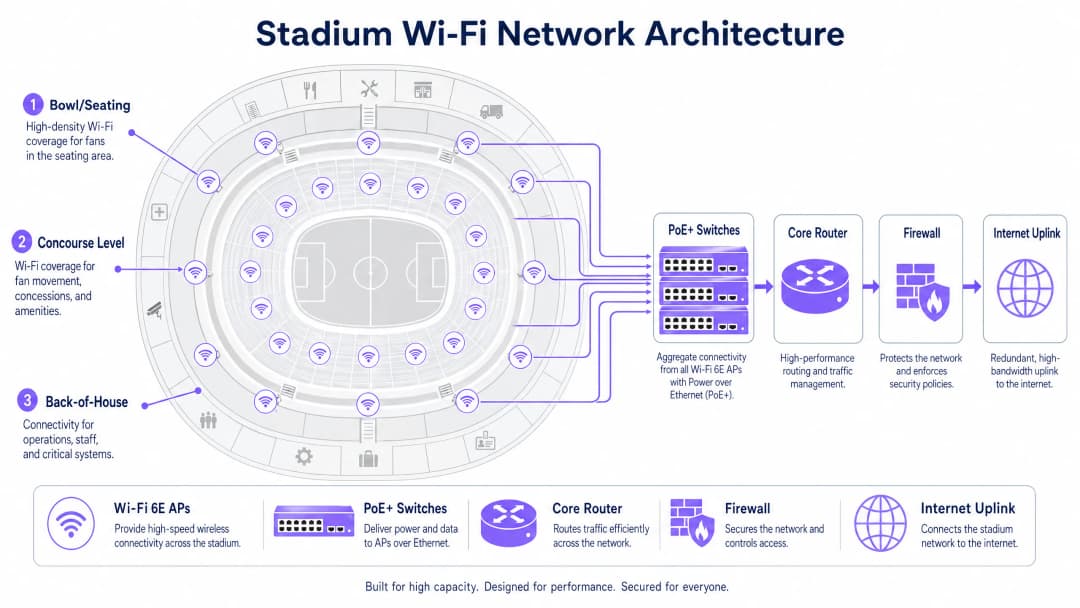
CCI से निपटने के लिए, नेटवर्क आर्किटेक्ट्स को माइक्रो-सेल डिज़ाइन करने होंगे। इसमें अत्यधिक दिशात्मक, संकीर्ण-बीम एंटेना—आमतौर पर 30 डिग्री या उससे कम की बीम चौड़ाई वाले—का उपयोग करना शामिल है, जो बैठने के क्षेत्र को छोटे, अलग-अलग कवरेज क्षेत्रों में विभाजित करते हैं। प्रत्येक माइक्रो-सेल सीमित संख्या में उपकरणों को सेवा प्रदान करता है, जिससे उच्च थ्रूपुट और कम प्रतिस्पर्धा बनी रहती है। स्थापना विकल्पों में सीट के नीचे के बाड़े (निचले बैठने के क्षेत्र के लिए पसंदीदा) और ऊपरी क्षेत्रों के लिए रेलिंग पर लगे दिशात्मक AP शामिल हैं।
WiFi 6E और स्पेक्ट्रम आवंटन
आधुनिक स्टेडियम परिनियोजन में WiFi 6E का उपयोग किया जाना चाहिए। 6 GHz स्पेक्ट्रम बैंड का जुड़ना 1,200 MHz तक का साफ, निरंतर स्पेक्ट्रम प्रदान करता है, जो डायनेमिक फ्रीक्वेंसी सिलेक्शन (DFS) रडार सीमाओं से मुक्त है जो जटिल वातावरण में 5 GHz परिनियोजन को कठिन बनाते हैं। यह संगत उपकरणों को व्यापक चैनलों (WiFi 7 के लिए 160 MHz या 320 MHz) का उपयोग करने में सक्षम बनाता है, जिससे थ्रूपुट में काफी वृद्धि होती है और विलंबता कम होती है—यह सब बैंडविड्थ-गहन अनुप्रयोगों (जैसे सीट पर वीडियो रीप्ले और सोशल मीडिया शेयरिंग) के लिए महत्वपूर्ण है।
नीचे दी गई तालिका स्टेडियम परिनियोजन से संबंधित WiFi मानकों के बीच मुख्य अंतरों को संक्षेप में प्रस्तुत करती है:
| मानक | फ्रीक्वेंसी बैंड | अधिकतम चैनल चौड़ाई | स्टेडियम के लिए मुख्य लाभ |
|---|---|---|---|
| WiFi 5 (802.11ac) | 5 GHz | 80 MHz | व्यापक रूप से समर्थित, लेकिन सीमित स्पेक्ट्रम |
| WiFi 6 (802.11ax) | 2.4 / 5 GHz | 160 MHz | OFDMA और BSS कलरिंग हस्तक्षेप को कम करते हैं |
| WiFi 6E (802.11ax) | 2.4 / 5 / 6 GHz | 160 MHz | साफ 6 GHz स्पेक्ट्रम, बिना किसी DFS सीमा के |
| WiFi 7 (802.11be) | 2.4 / 5 / 6 GHz | 320 MHz | अत्यधिक उच्च थ्रूपुट के लिए मल्टी-लिंक ऑपरेशन |
बड़े पैमाने पर प्रमाणीकरण और सुरक्षा
बड़े पैमाने पर घर्षण रहित ऑनबोर्डिंग महत्वपूर्ण है। कैप्टिव पोर्टल, हालांकि प्रथम-पक्ष डेटा कैप्चर के लिए मूल्यवान हैं, लेकिन जब 50,000 प्रशंसक मैच शुरू होने से पंद्रह मिनट पहले कनेक्ट करने का प्रयास करते हैं, तो वे एक गंभीर बाधा बन सकते हैं। उद्योग प्रोफ़ाइल-आधारित प्रमाणीकरण की ओर बढ़ रहा है, विशेष रूप से OpenRoaming—एक ऐसा संघ जो उपकरणों को 802.1X और WPA3-Enterprise का उपयोग करके स्वचालित रूप से और सुरक्षित रूप से कनेक्ट करने की अनुमति देता है। Purple इस इकोसिस्टम में एक पहचान प्रदाता के रूप में कार्य करता है, जो सुरक्षित, निर्बाध पहुंच सुनिश्चित करता है, जबकि अभी भी विश्लेषण उद्देश्यों के लिए प्रत्येक डिवाइस सत्र को एक स्थायी उपयोगकर्ता प्रोफ़ाइल के साथ जोड़ता है।
उन वेन्यू के लिए जिन्हें डेटा कैप्चर के लिए अभी भी कैप्टिव पोर्टल ऑनबोर्डिंग की आवश्यकता होती है, समाधान प्रमाणीकरण को प्री-स्टेज करना है: उपकरणों को तुरंत संबद्ध होने और IP पता प्राप्त करने की अनुमति दें, फिर एसिंक्रोनस रूप से पोर्टल प्रदर्शित करें। यह सभी उपकरणों द्वारा एक ही समय में पोर्टल तक पहुँचने पर होने वाले DHCP और एसोसिएशन तूफानों को रोकता है।
सार्वजनिक नेटवर्क सुरक्षा सिद्धांतों के विस्तृत विवरण के लिए—जो सीधे स्टेडियम के वातावरण पर लागू होते हैं—कृपया हमारी गाइड एयरपोर्ट WiFi सुरक्षा: सार्वजनिक नेटवर्क पर यात्रियों की सुरक्षा कैसे करें देखें। इसमें शामिल सेगमेंटेशन और DNS सुरक्षा सिद्धांत यहाँ भी समान रूप से लागू होते हैं। इसके अलावा, मजबूत DNS और सुरक्षा के साथ अपने नेटवर्क को सुरक्षित रखें सार्वजनिक नेटवर्क के लिए DNS-स्तरीय सुरक्षा पर विशिष्ट मार्गदर्शन प्रदान करता है।
अपने विशिष्ट सेटअप को लेकर कोई सवाल हैं?
हमारी टीम 80,000 से अधिक वेन्यू में वेन्यू ऑपरेटरों, IT मैनेजरों और नेटवर्क इंजीनियरों के साथ काम करती है। 20 मिनट का कॉल बुक करें और हम आपको दिखाएंगे कि आपके जैसे अन्य लोगों ने इसे कैसे हल किया।
कार्यान्वयन गाइड
चरण 1: साइट सर्वेक्षण और RF योजना
एक भी केबल बिछाने से पहले, वेन्यू का एक विस्तृत भविष्य कहने वाला RF मॉडल स्थापित किया जाना चाहिए। AP स्थानों, एंटीना पैटर्न और अपेक्षित कवरेज को मॉडल करने के लिए Ekahau या iBwave जैसे टूल का उपयोग करें। भौतिक साइट सर्वेक्षण के माध्यम से मॉडल को सत्यापित करें, बैठने के क्षेत्र में उपयोग की जाने वाली सामग्रियों (कंक्रीट, धातु, कांच) और किसी भी हस्तक्षेप स्रोतों (प्रसारण उपकरण, अस्थायी संरचनाएं) पर विशेष ध्यान दें।
चरण 2: भौतिक परिनियोजन
बैठने के क्षेत्र में AP परिनियोजन आमतौर पर दो श्रेणियों में आता है:
सीट के नीचे परिनियोजन: AP को सीटों के नीचे मजबूत IP67-रेटेड बाड़ों में स्थापित किया जाता है। यह ऊपर के उपकरणों के लिए उत्कृष्ट दृष्टि रेखा (line-of-sight) प्रदान करता है, और सीटों पर मौजूद मानव शरीर स्वाभाविक रूप से RF सिग्नल को कम करते हैं, जिससे आस-पास के सेल के बीच CCI कम हो जाता है। केबल बिछाना अधिक जटिल है, लेकिन RF प्रदर्शन बेहतर होता है।
ओवरहेड/रेलिंग परिनियोजन: दिशात्मक AP को कैटवॉक, रेलिंग या प्रावरणी बोर्डों पर स्थापित किया जाता है, जो विशिष्ट बैठने के क्षेत्रों की ओर इशारा करते हैं। इस परिनियोजन में केबल बिछाना आसान है, लेकिन इसके लिए सटीक एंटीना लक्ष्यीकरण की आवश्यकता होती है और यह खुले बैठने के क्षेत्र के वातावरण में हस्तक्षेप के प्रति अधिक संवेदनशील है।
कॉन्कोर्स (गलियारों) के लिए, मानक उद्यम छत-माउंट AP उपयुक्त हैं, क्योंकि वहाँ घनत्व कम होता है और वातावरण अधिक नियंत्रित होता है।
चरण 3: नेटवर्क सेगमेंटेशन
स्टेडियम नेटवर्क एक बहु-किरायेदार (multi-tenant) वातावरण है। VLAN और फ़ायरवॉल नीतियों का उपयोग करके सख्त ट्रैफ़िक सेगमेंटेशन अनिवार्य है:
| VLAN | उपयोग | मुख्य आवश्यकताएं |
|---|---|---|
| VLAN 10 | विज़िटर/प्रशंसक WiFi | कैप्टिव पोर्टल या OpenRoaming ऑनबोर्डिंग |
| VLAN 20 | पॉइंट-ऑफ-सेल/रिटेल | PCI-DSS अनुपालन, विज़िटर ट्रैफ़िक से अलग |
| VLAN 30 | संचालन/कर्मचारी | 802.1X प्रमाणीकरण, प्रतिबंधित पहुंच |
| VLAN 40 | बिल्डिंग प्रबंधन | अलग किया गया, कोई इंटरनेट एक्सेस नहीं |
यह सेगमेंटेशन सिद्धांत सभी उद्योगों में सुसंगत है—चाहे रिटेल वातावरण में तैनात किया गया हो या स्वास्थ्य सेवा सुविधाओं में, परिचालन ट्रैफ़िक को विज़िटर ट्रैफ़िक से अलग करना एक गैर-परक्राम्य सुरक्षा आधार रेखा है।
चरण 4: बैकहॉल और बुनियादी ढांचे का आकार तय करना
बिना पर्याप्त बैकहॉल के, RF कवरेज अप्रभावी है। सुनिश्चित करें कि आपके PoE+ एज स्विच में एग्रीगेशन लेयर के लिए कम से कम 10 Gbps अपलिंक हो, और बैठने के क्षेत्र की सेवा करने वाले उच्च-घनत्व एग्रीगेशन बिंदुओं के लिए 40 Gbps का उपयोग करें। कोर इंटरनेट अपलिंक को चरम समवर्ती उपयोग के लिए आकार दिया जाना चाहिए—इस पैमाने के वेन्यू के लिए निरर्थक विफलता (redundant failover) के साथ समर्पित लीज्ड लाइन मानक है। समर्पित कनेक्टिविटी विकल्पों के बारे में अधिक जानकारी के लिए, लीज्ड लाइन क्या है? समर्पित व्यावसायिक इंटरनेट देखें।
चरण 5: विश्लेषण एकीकरण
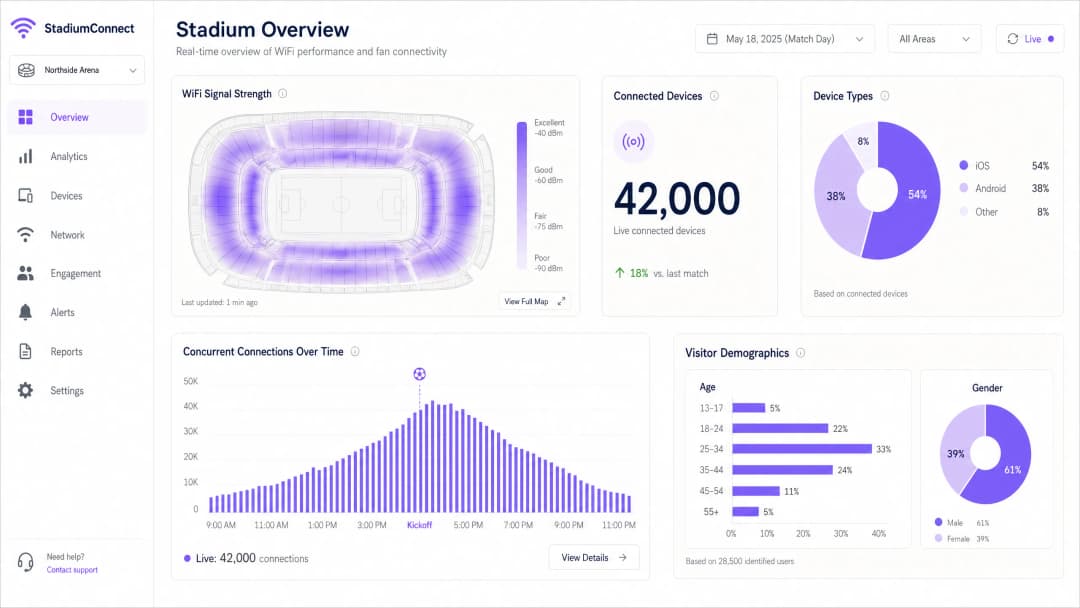
एक बार नेटवर्क चालू हो जाने पर, डेटा कैप्चर और प्रोसेसिंग शुरू करने के लिए इसे Purple जैसे प्लेटफॉर्म के साथ एकीकृत करें। Purple का WiFi विश्लेषण प्लेटफॉर्म डिवाइस काउंट, सिग्नल हीटमैप और विज़िटर जनसांख्यिकी का रीयल-टाइम डैशबोर्ड प्रदान करता है—जो नेटवर्क को एक परिचालन बुद्धिमत्ता परत में बदल देता है।
सर्वोत्तम प्रथाएं
सक्रिय डेटा दर प्रबंधन: सभी पुराने 802.11b和802.11g दरों को अक्षम करें। न्यूनतम अनिवार्य बुनियादी दर को 12 Mbps या 24 Mbps पर सेट करें। यह चिपचिपे (sticky) क्लाइंट्स को कमजोर सिग्नल वाले दूर के AP से चिपके रहने के बजाय नजदीकी AP पर रोम करने के लिए मजबूर करता है, और धीमी गति वाले उपकरणों को असंगत रूप से अधिक एयरटाइम लेने से रोकता है।
बैंड स्टीयरिंग: संगत उपकरणों को 5 GHz और 6 GHz बैंड से कनेक्ट करने के लिए AP को कॉन्फ़िगर करें, जिससे 2.4 GHz बैंड IoT उपकरणों और पुराने हार्डवेयर के लिए आरक्षित रहे।
DHCP पूल का आकार: विज़िटर VLAN सबनेट के लिए उदारतापूर्वक आकार (/16 या /20) सेट करें, और वेन्यू छोड़ने वाले उपकरणों के IP पते को पुनः प्राप्त करने के लिए 30-60 मिनट का छोटा लीज समय निर्धारित करें। DHCP समाप्त होना हाफ-टाइम कनेक्टिविटी विफलताओं के सबसे आम कारणों में से एक है।
अनधिकृत (Rogue) AP का पता लगाना: अनधिकृत AP का पता लगाने और रोकथाम को लागू करें। प्रशंसकों और प्रसारकों द्वारा बनाए गए व्यक्तिगत हॉटस्पॉट आस-पास के चैनलों पर गंभीर हस्तक्षेप का कारण बन सकते हैं।
DNS सुरक्षा: विज़िटर नेटवर्क पर DNS फ़िल्टरिंग लागू करें, दुर्भावनापूर्ण डोमेन तक पहुंच को अवरुद्ध करें और मैलवेयर फैलने के जोखिम को कम करें। कार्यान्वयन मार्गदर्शन के लिए मजबूत DNS और सुरक्षा के साथ अपने नेटवर्क को सुरक्षित रखें देखें।
WPA3 ट्रांज़िशन मोड: WPA2 और WPA3 दोनों क्लाइंट्स का एक साथ समर्थन करने के लिए ट्रांज़िशन मोड में WPA3-SAE सक्षम करें, जिससे पुराने हार्डवेयर को बाहर किए बिना संगत उपकरणों को उन्नत सुरक्षा प्रदान की जा सके।
समस्या निवारण और जोखिम शमन
विफलता मोड 1: हाफ-टाइम पीक
लक्षण: डिवाइस मजबूत WiFi सिग्नल दिखाते हैं, लेकिन वेब पेज लोड करने या लेनदेन पूरा करने में असमर्थ होते हैं।
कारण: DHCP पूल का समाप्त होना या कोर नेटवर्क की बाधा—न कि RF समस्या।
समाधान: रीयल-टाइम में DHCP रेंज उपयोग को सत्यापित करें। सबनेट का आकार बढ़ाएं और लीज का समय कम करें। एज स्विच से कोर राउटर तक अपलिंक उपयोग की जांच करें। यह लेयर 3 की विफलता है, न कि लेयर 1/2 की समस्या—अधिक AP जोड़ने से कोई मदद नहीं मिलेगी और इससे RF हस्तक्षेप और खराब हो सकता है।
विफलता मोड 2: अनधिकृत हस्तक्षेप
लक्षण: इवेंट के दौरान विशिष्ट बैठने के क्षेत्रों में अचानक प्रदर्शन में गिरावट।
कारण: प्रसारकों या प्रशंसकों ने आस-पास के चैनलों पर हॉटस्पॉट या पोर्टेबल राउटर बनाए हैं।
समाधान: हस्तक्षेप करने वाले उपकरणों की पहचान करने के लिए वायरलेस कंट्रोलर के स्पेक्ट्रम विश्लेषण टूल का उपयोग करें। अनधिकृत AP रोकथाम रणनीतियों को लागू करें। प्रमुख आयोजनों के दौरान समर्पित स्पेक्ट्रम विश्लेषक तैनात करने पर विचार करें।
विफलता मोड 3: भौतिक क्षति
लक्षण: इवेंट के दौरान या उसके बाद व्यक्तिगत AP का ऑफ़लाइन होना।
कारण: सीट के नीचे के बाड़ों में तरल पदार्थ गिरना, भौतिक प्रभाव या मौसम का प्रवेश।
समाधान: सभी सीट के नीचे वाले AP के लिए IP67-रेटेड बाड़े निर्दिष्ट करें। रीयल-टाइम AP स्वास्थ्य निगरानी और अलर्ट लागू करें। मैच-डे की घटनाओं के लिए त्वरित प्रतिस्थापन प्रक्रिया सुनिश्चित करने के लिए स्पेयर AP का स्टॉक रखें।
विफलता मोड 4: MAC एड्रेस रैंडमाइजेशन विश्लेषण को बाधित करता है
लक्षण: विज़िटर गणना डेटा में विसंगति; लौटने वाले विज़िटर नए उपयोगकर्ताओं के रूप में दिखाई देते हैं।
कारण: आधुनिक iOS और Android डिवाइस प्रत्येक नेटवर्क के लिए अपने MAC एड्रेस को रैंडमाइज करते हैं, जिससे MAC-आधारित ट्रैकिंग बाधित होती है।
समाधान: MAC-आधारित ट्रैकिंग से प्रोफ़ाइल-आधारित प्रमाणीकरण पर स्विच करें। जब उपयोगकर्ता OpenRoaming या ब्रांडेड ऐप के माध्यम से प्रमाणित होते हैं, तो पहचान हार्डवेयर पते के बजाय एक स्थायी प्रोफ़ाइल से जुड़ी होती है। Purple का प्लेटफॉर्म इसे मूल रूप से संभालता है।
निवेश पर लाभ (ROI) और व्यावसायिक प्रभाव
स्टेडियम WiFi को तैनात करना एक महत्वपूर्ण पूंजीगत व्यय (CapEx) है। 50,000 सीटों वाले स्टेडियम में 500-1,000 एक्सेस पॉइंट, व्यापक केबलिंग बुनियादी ढांचे और निरंतर परिचालन लागत की आवश्यकता हो सकती है। इस निवेश को सही ठहराने के लिए, वेन्यू को परिचालन बुद्धिमत्ता और राजस्व सृजन के लिए नेटवर्क का लाभ उठाना चाहिए।
Purple के WiFi विश्लेषण प्लेटफॉर्म का उपयोग करके, वेन्यू कई आयामों में ROI को माप सकते हैं:
| राजस्व/बचत श्रेणी | तंत्र | सांकेतिक प्रभाव |
|---|---|---|
| रिटेल मीडिया मुद्रीकरण | प्रमाणित प्रशंसकों को लक्षित प्रायोजन संदेश वितरित करना | प्रायोजकों से नया राजस्व प्रवाह |
| रियायत (Concession) अनुकूलन | कतार की बाधाओं की पहचान करने और स्टाफिंग को अनुकूलित करने के लिए फुटफॉल विश्लेषण | कतार के समय में कमी, प्रति व्यक्ति खर्च में वृद्धि |
| IT सहायता लागत में कमी | प्रोफ़ाइल-आधारित प्रमाणीकरण मैच-डे हेल्पडेस्क कॉल को कम करता है | परिचालन ओवरहेड में कमी |
| सुरक्षा और अनुपालन | निकासी योजना के लिए रीयल-टाइम भीड़ घनत्व निगरानी | जोखिम शमन, बीमा लाभ |
| प्रशंसक वफादारी | विज़िट इतिहास के आधार पर व्यक्तिगत जुड़ाव अभियान | सीजन टिकट नवीनीकरण दरों में सुधार |
एक अच्छी तरह से तैनात स्टेडियम नेटवर्क की WiFi डेटा संग्रह क्षमता एक महत्वपूर्ण व्यावसायिक संपत्ति है। प्रमाणीकरण के समय कैप्चर किया गया प्रथम-पक्ष डेटा—पूर्ण GDPR सहमति के साथ—वेन्यू को विस्तृत प्रशंसक प्रोफ़ाइल बनाने में सक्षम बनाता है, जो लक्षित विपणन, व्यक्तिगत इन-ऐप अनुभवों और प्रायोजक सक्रियणों का समर्थन करता है।
संबद्ध उद्योगों के वेन्यू के लिए भी यही सिद्धांत लागू होते हैं: आतिथ्य ऑपरेटर संपत्तियों में मेहमानों के व्यवहार को समझने के लिए WiFi विश्लेषण का उपयोग करते हैं, जबकि परिवहन केंद्र रिटेल लेआउट और क्षमता योजना के लिए फुटफॉल डेटा का लाभ उठाते हैं।
मुख्य परिभाषाएं
सह-चैनल हस्तक्षेप (Co-Channel Interference - CCI)
गिरावट जो तब होती है जब कई एक्सेस पॉइंट एक-दूसरे की सीमा के भीतर एक ही फ्रीक्वेंसी चैनल पर ट्रांसमिट करते हैं, जिससे डिवाइस ट्रांसमिशन को टालते हैं और खाली एयरटाइम की प्रतीक्षा करते हैं।
उच्च-घनत्व वाले स्टेडियम परिनियोजन में प्राथमिक RF विफलता मोड। माइक्रो-सेल आर्किटेक्चर और सावधानीपूर्वक चैनल योजना द्वारा कम किया गया।
माइक्रो-सेल आर्किटेक्चर (Micro-Cell Architecture)
एक वायरलेस नेटवर्क डिज़ाइन जो छोटे, अलग-अलग कवरेज क्षेत्र बनाने के लिए अत्यधिक दिशात्मक, संकीर्ण-बीम एंटेना का उपयोग करता है, जिनमें से प्रत्येक सीमित संख्या में उपकरणों की सेवा करता है।
स्टेडियम के बैठने वाले क्षेत्रों (seating bowls) के लिए अनिवार्य डिज़ाइन पैटर्न। कार्यालय के वातावरण में उपयोग किए जाने वाले पारंपरिक सर्वदिशात्मक AP परिनियोजन के विपरीत।
OpenRoaming
एक वायरलेस ब्रॉडबैंड एलायंस फेडरेशन जो उपकरणों को कैप्टिव पोर्टल इंटरैक्शन के बिना, 802.1X और WPA3-Enterprise का उपयोग करके भाग लेने वाले WiFi नेटवर्क से स्वचालित रूप से और सुरक्षित रूप से कनेक्ट करने में सक्षम बनाता है।
बड़े आयोजनों में प्रमाणीकरण की बाधा को समाप्त करता है। Purple, OpenRoaming इकोसिस्टम में एक पहचान प्रदाता के रूप में कार्य करता है।
एयरटाइम फेयरनेस (Airtime Fairness)
एक वायरलेस शेड्यूलिंग तंत्र जो प्रत्येक कनेक्टेड डिवाइस को उसकी कनेक्शन गति की परवाह किए बिना समान ट्रांसमिशन समय आवंटित करता है, जिससे धीमे पुराने उपकरणों को असंगत रूप से अधिक एयरटाइम लेने से रोका जा सके।
स्टेडियमों में महत्वपूर्ण जहाँ नए और पुराने स्मार्टफोन का मिश्रण एक ही वायरलेस माध्यम के लिए प्रतिस्पर्धा करता है।
802.1X
पोर्ट-आधारित नेटवर्क एक्सेस कंट्रोल के लिए एक IEEE मानक, जो LAN या WLAN से कनेक्ट होने वाले उपकरणों के लिए एक प्रमाणीकरण ढांचा प्रदान करता है, आमतौर पर क्रेडेंशियल सत्यापन के लिए RADIUS का उपयोग करता है।
कर्मचारी उपकरणों, PoS टर्मिनलों और OpenRoaming-सक्षम विज़िटर उपकरणों के लिए सुरक्षित, उद्यम-ग्रेड प्रमाणीकरण के लिए उपयोग किया जाता है।
PCI-DSS
पेमेंट कार्ड इंडस्ट्री डेटा सिक्योरिटी स्टैंडर्ड। किसी भी नेटवर्क के लिए एक अनिवार्य अनुपालन ढांचा जो भुगतान कार्ड डेटा को प्रोसेस, स्टोर या ट्रांसमिट करता है।
रियायत काउंटर PoS टर्मिनलों का समर्थन करने वाले किसी भी स्टेडियम नेटवर्क सेगमेंट पर लागू होता है। विज़िटर WiFi ट्रैफ़िक से सख्त अलगाव की आवश्यकता होती है।
DHCP समाप्ति (DHCP Exhaustion)
एक नेटवर्क विफलता की स्थिति जहां DHCP सर्वर ने अपने पूल में सभी उपलब्ध IP पते आवंटित कर दिए हैं और नए कनेक्शन अनुरोधों की सेवा नहीं कर सकता है।
स्टेडियमों में हाफ-टाइम कनेक्टिविटी विफलताओं का एक सामान्य कारण। बड़े सबनेट आकार (/16 या /20) और कम लीज समय (30-60 मिनट) द्वारा कम किया गया।
WiFi 6E
IEEE 802.11ax (WiFi 6) मानक का एक विस्तार जो 6 GHz फ्रीक्वेंसी बैंड के लिए समर्थन जोड़ता है, जो 1,200 MHz तक का अतिरिक्त साफ स्पेक्ट्रम प्रदान करता है।
नए स्टेडियम परिनियोजन के लिए अनुशंसित मानक। 6 GHz बैंड DFS बाधाओं और पुराने डिवाइस के संकुलन से मुक्त है, जो इसे उच्च-घनत्व वाले वातावरण के लिए आदर्श बनाता है।
BSS कलरिंग (BSS Colouring)
एक WiFi 6 तंत्र जो ट्रांसमिशन को एक रंग पहचानकर्ता के साथ टैग करता है ताकि AP को एक ही चैनल पर ओवरलैपिंग नेटवर्क के बीच अंतर करने की अनुमति मिल सके, जिससे अनावश्यक देरी कम हो सके।
सघन परिनियोजन में सह-चैनल हस्तक्षेप के प्रभाव को कम करता है जहां सही चैनल पृथक्करण प्राप्त करना संभव नहीं है।
WPA3-SAE
WiFi Protected Access 3 (Simultaneous Authentication of Equals के साथ)। WPA2-PSK हैंडशेक को अधिक सुरक्षित ड्रैगनफ्लाई कुंजी एक्सचेंज से बदलता है, जो ऑफ़लाइन डिक्शनरी हमलों के प्रति प्रतिरोधी है।
विज़िटर WiFi नेटवर्क के लिए अनुशंसित सुरक्षा मानक। WPA2 और WPA3 दोनों क्लाइंट्स का समर्थन करने के लिए ट्रांज़िशन मोड में तैनात किया जाना चाहिए।
हल किए गए उदाहरण
एक 45,000 सीटों वाले फुटबॉल स्टेडियम में हाफ-टाइम के दौरान गंभीर कनेक्टिविटी विफलताओं का सामना करना पड़ रहा है। उपयोगकर्ता पूर्ण WiFi सिग्नल बार की रिपोर्ट करते हैं लेकिन वेब पेज लोड नहीं कर सकते हैं या रियायत काउंटरों पर मोबाइल भुगतान पूरा नहीं कर सकते हैं। नेटवर्क को तीन साल पहले 300 सीलिंग-माउंटेड सर्वदिशात्मक (omnidirectional) AP का उपयोग करके तैनात किया गया था। निदान और अनुशंसित सुधार योजना क्या है?
यह एक बहु-परत (multi-layer) विफलता है। बिना किसी उपयोगी कनेक्टिविटी के मजबूत सिग्नल मिलना लेयर 3 की विफलता का क्लासिक संकेत है, न कि लेयर 1/2 की RF समस्या। तत्काल निदान: 1) DHCP पूल उपयोग की जांच करें - यदि स्कोप उपयोग 90% से अधिक है, तो IP पते की समाप्ति प्राथमिक कारण है। विज़िटर VLAN सबनेट को /24 से बढ़ाकर /16 करें और लीज समय को घटाकर 30 मिनट करें। 2) एज स्विच पर अपलिंक उपयोग की जांच करें - यदि 1 Gbps अपलिंक संतृप्त (saturated) हैं, तो 10 Gbps पर अपग्रेड करें। 3) बाधाओं के संकेतों के लिए कोर राउटर CPU और मेमोरी उपयोग की जांच करें। लंबी अवधि के लिए, सर्वदिशात्मक AP परिनियोजन को सीट के नीचे या रेलिंग पर लगे दिशात्मक AP का उपयोग करके माइक्रो-सेल आर्किटेक्चर से बदला जाना चाहिए। वर्तमान परिनियोजन लोड के तहत गंभीर सह-चैनल हस्तक्षेप (Co-Channel Interference) का कारण बन रहा है, जो लेयर 3 की समस्याओं को और बढ़ाता है। पुनरपरिनियोजन के दौरान WiFi 6E हार्डवेयर में अपग्रेड करें।
10,000 प्रतिनिधियों के प्रौद्योगिकी शिखर सम्मेलन की मेजबानी करने वाले एक प्रमुख सम्मेलन केंद्र को तीन दिवसीय बड़े WiFi नेटवर्क इवेंट के लिए अस्थायी WiFi तैनात करने की आवश्यकता है। वेन्यू में मौजूदा बुनियादी ढांचा है लेकिन इसे 2,000 समवर्ती उपयोगकर्ताओं के लिए डिज़ाइन किया गया था। अस्थायी परिनियोजन को कैसे आर्किटेक्ट किया जाना चाहिए?
एक अस्थायी उच्च-घनत्व परिनियोजन के लिए: 1) कवरेज अंतराल और हस्तक्षेप स्रोतों की पहचान करने के लिए एक त्वरित साइट सर्वेक्षण करें। 2) मुख्य हॉल और ब्रेकआउट कमरों में पोर्टेबल स्टैंड पर या मौजूदा बुनियादी ढांचे पर क्लिप किए गए अस्थायी उच्च-घनत्व AP (WiFi 6 या WiFi 6E) तैनात करें। प्रति 50-75 उपकरणों पर एक AP का लक्ष्य रखें। 3) इवेंट के लिए एक समर्पित VLAN और DHCP स्कोप का प्रावधान करें, जिसका आकार 15,000 उपकरणों के लिए हो (प्रति प्रतिनिधि कई उपकरणों की अनुमति देते हुए)। 4) इवेंट की अवधि के लिए एक अस्थायी बैंडविड्थ अपग्रेड या सेकेंडरी इंटरनेट सर्किट की व्यवस्था करें। 5) प्रतिनिधि ऑनबोर्डिंग और रीयल-टाइम विश्लेषण के लिए एक ब्रांडेड कैप्टिव पोर्टल प्रदान करने के लिए Purple के विज़िटर WiFi प्लेटफॉर्म के साथ एकीकृत करें। 6) कॉन्फ्रेंस ऐप के माध्यम से प्रतिनिधि उपकरणों पर इवेंट WiFi प्रोफ़ाइल को प्री-लोड करके प्रमाणीकरण को प्री-स्टेज करें। यह एक WiFi इनडोर इवेंट परिनियोजन पैटर्न है जो दीर्घकालिक बुनियादी ढांचे के निवेश पर त्वरित प्रावधान और निगरानी को प्राथमिकता देता है।
अभ्यास प्रश्न
Q1. आप 60,000 सीटों वाले स्टेडियम के नेटवर्क आर्किटेक्ट हैं। वेन्यू निदेशक 800 दिशात्मक सीट के नीचे वाले AP के बजाय ऊपरी स्तर की छत पर लगे 150 मानक उद्यम सर्वदिशात्मक (omnidirectional) AP का उपयोग करके पूंजीगत व्यय बचाना चाहते हैं। आप क्या सलाह देते हैं, और इसका तकनीकी औचित्य क्या है?
संकेत: एक खुले बैठने के क्षेत्र (open bowl) के वातावरण में सह-चैनल हस्तक्षेप (CCI) के प्रभाव और RF प्रसार की भौतिकी पर विचार करें।
मॉडल उत्तर देखें
सर्वदिशात्मक दृष्टिकोण के खिलाफ दृढ़ता से सलाह दें। एक खुले बैठने के क्षेत्र में, ऊंचाई पर लगे सर्वदिशात्मक AP के कवरेज क्षेत्र कई खंडों में ओवरलैप होंगे, जिससे गंभीर सह-चैनल हस्तक्षेप (CCI) पैदा होगा। लोड के तहत, डिवाइस एक ही समय में एक ही चैनल पर 5-10 AP सुनेंगे, जिससे लगातार ट्रांसमिशन में देरी होगी और थ्रूपुट प्रभावी रूप से अनुपयोगी स्तरों तक गिर जाएगा। 150-AP दृष्टिकोण कम डिवाइस काउंट के साथ परीक्षण में काम करता हुआ दिखाई देगा लेकिन क्षमता पर पूरी तरह से विफल हो जाएगा। 800 दिशात्मक सीट के नीचे वाले AP अलग-अलग माइक्रो-सेल बनाते हैं, जिनमें से प्रत्येक लगभग 50-75 उपकरणों की सेवा करता है, जिसमें मानव शरीर सेल के बीच प्राकृतिक RF क्षीणन (attenuation) प्रदान करते हैं। उच्च पूंजीगत लागत प्रदर्शन के अंतर से उचित है - सर्वदिशात्मक दृष्टिकोण से प्रतिष्ठा को महत्वपूर्ण नुकसान होगा और परिनियोजन के बाद महंगा सुधारात्मक कार्य करना पड़ेगा।
Q2. एक हाउसफुल मैच के दौरान, रियायत काउंटर PoS टर्मिनलों पर धीमा लेनदेन समय और कभी-कभी विफलताएं हो रही हैं। PoS टर्मिनल प्रशंसक विज़िटर नेटवर्क के समान ही भौतिक AP साझा करते हैं लेकिन एक अलग VLAN पर हैं। संभावित कारण क्या हैं और आप इसका समाधान कैसे करते हैं?
संकेत: RF-लेयर और नेटवर्क-लेयर दोनों कारणों पर विचार करें। सेवा की गुणवत्ता (QoS) और VLAN ट्रैफ़िक प्राथमिकता के बारे में सोचें।
मॉडल उत्तर देखें
दो संभावित कारण: 1) RF प्रतिस्पर्धा - PoS टर्मिनल उन्हीं AP पर हजारों प्रशंसक उपकरणों के साथ एयरटाइम के लिए प्रतिस्पर्धा कर रहे हैं। समाधान: PoS ट्रैफ़िक को उच्च DSCP मान (जैसे, CS5) के साथ चिह्नित करने और ट्रांसमिशन कतार में इसे प्राथमिकता देने के लिए AP और स्विच पर QoS नीतियों को लागू करें। 2) अपलिंक संतृप्ति (Uplink saturation) - यदि एज स्विच अपलिंक विज़िटर ट्रैफ़िक से संतृप्त हैं, तो PoS पैकेट ड्रॉप या विलंबित हो रहे हैं। समाधान: सुनिश्चित करें कि ट्रैफ़िक शेपिंग नीतियों का उपयोग करके स्विच स्तर पर PoS VLAN के लिए गारंटीकृत बैंडविड्थ आवंटन हो। स्थायी समाधान के लिए, RF प्रतिस्पर्धा को पूरी तरह से समाप्त करने के लिए विज़िटर WiFi AP से भौतिक रूप से अलग, PoS नेटवर्क के लिए समर्पित AP तैनात करने पर विचार करें।
Q3. एक वेन्यू निदेशक पूछते हैं कि WiFi नेटवर्क उन्हें यह समझने में कैसे मदद कर सकता है कि प्रशंसक पश्चिमी कॉन्कोर्स की तुलना में पूर्वी कॉन्कोर्स में मर्चेंडाइज स्टोर पर कम खर्च क्यों कर रहे हैं। नेटवर्क क्या डेटा प्रदान करता है और आप WiFi विश्लेषण में निवेश के लिए व्यावसायिक मामला (business case) कैसे प्रस्तुत करेंगे?
संकेत: फुटफॉल विश्लेषण, ड्वेल टाइम (dwell time), और नेटवर्क डेटा और व्यावसायिक परिणामों के बीच संबंध पर विचार करें।
मॉडल उत्तर देखें
Purple के WiFi विश्लेषण प्लेटफॉर्म का उपयोग करके, नेटवर्क प्रदान करता है: 1) फुटफॉल काउंट - पूर्वी कॉन्कोर्स क्षेत्र से कितने उपकरण गुजरते हैं या प्रवेश करते हैं। 2) ड्वेल टाइम - मर्चेंडाइज स्टोर क्षेत्र में उपकरण कितने समय तक रहते हैं। 3) जर्नी मैपिंग - स्टोर पर जाने से पहले और बाद में प्रशंसक कहाँ जाते हैं। यदि डेटा पूर्वी स्टोर में उच्च फुटफॉल लेकिन कम ड्वेल टाइम दिखाता है, तो यह कतार छोड़ने या खराब उत्पाद दृश्यता को इंगता करता है। यदि फुटफॉल ही कम है, तो समस्या रास्ता खोजने (wayfinding) या प्रशंसक रूटिंग की है। व्यावसायिक मामला: विश्लेषण प्लेटफॉर्म एक मौजूदा बुनियादी ढांचे के निवेश को एक व्यावसायिक खुफिया उपकरण में बदल देता है। विश्लेषण लाइसेंस की लागत आमतौर पर अनुकूलित स्टाफिंग, बेहतर उत्पाद प्लेसमेंट, या विज़िटर WiFi पोर्टल के माध्यम से वितरित लक्षित प्रचार अभियानों के माध्यम से एक या दो आयोजनों के भीतर वसूल हो जाती है।
इस श्रृंखला में आगे पढ़ें
Staff WiFi बनाम Guest WiFi: कॉर्पोरेट नेटवर्क सेगमेंटेशन के लिए सर्वोत्तम प्रथाएं
IT लीडर्स के लिए स्टाफ और गेस्ट WiFi नेटवर्क को विभाजित करने पर एक व्यापक तकनीकी गाइड। इसमें VLAN आर्किटेक्चर, 802.1X ऑथेंटिकेशन, फ़ायरवॉल नीतियां और सुरक्षित नेटवर्क डिज़ाइन का व्यावसायिक प्रभाव शामिल है।
होटल Guest WiFi Management: PMS, Portals, और ब्रांड मानकों को एकीकृत करना
यह तकनीकी मार्गदर्शिका विस्तार से बताती है कि VLAN segmentation, automated session management के लिए PMS integration, और GDPR-compliant डेटा कैप्चर के लिए captive portal अनुकूलन पर ध्यान केंद्रित करते हुए उद्यम-स्तर के होटल WiFi नेटवर्क का निर्माण कैसे किया जाए।
सुरक्षित गेस्ट WiFi कैसे सेटअप करें: एक सुरक्षित एंटरप्राइज कॉन्फ़िगरेशन गाइड
यह आधिकारिक गाइड IT लीडर्स और नेटवर्क आर्किटेक्ट्स को सुरक्षित एंटरप्राइज गेस्ट WiFi को तैनात करने का एक निश्चित खाका प्रदान करती है। इसमें अनुपालन करने वाले फर्स्ट-पार्टी डेटा को कैप्चर करते हुए आंतरिक प्रणालियों की सुरक्षा के लिए आवश्यक आर्किटेक्चर, WPA3 माइग्रेशन, VLAN सेगमेंटेशन और captive portal इंटीग्रेशन शामिल हैं।
अपने विशिष्ट सेटअप को लेकर कोई सवाल हैं?
हमारी टीम 80,000 से अधिक वेन्यू में वेन्यू ऑपरेटरों, IT मैनेजरों और नेटवर्क इंजीनियरों के साथ काम करती है। 20 मिनट का कॉल बुक करें और हम आपको दिखाएंगे कि आपके जैसे अन्य लोगों ने इसे कैसे हल किया।