
স্টেডিয়াম WiFi: কীভাবে ভক্তদের জন্য স্কেলে কানেক্টিভিটি প্রদান করবেন
এই নির্ভরযোগ্য টেকনিক্যাল রেফারেন্স গাইডটি IT ম্যানেজার, নেটওয়ার্ক আর্কিটেক্ট এবং ভেন্যু অপারেশন ডিরেক্টরদের জন্য হাই-ডেনসিটি স্টেডিয়াম WiFi নেটওয়ার্ক ডিজাইন, ডেপ্লয় এবং মনিটাইজ করার বিষয়ে কার্যকর নির্দেশনা প্রদান করে। এটি চরম ডিভাইস ঘনত্বের জন্য RF আর্কিটেকচার, স্কেলে নিরাপদ অথেন্টিকেশন, নেটওয়ার্ক সেগমেন্টেশন এবং ঝুঁকি প্রশমন কভার করে - পাশাপাশি বাস্তব কেস স্টাডি এবং ROI পরিমাপের একটি স্পষ্ট ফ্রেমওয়ার্ক প্রদান করে। যেসব ভেন্যু সঠিকভাবে ডেপ্লয় করে, তারা তাদের WiFi ইনফ্রাস্ট্রাকচারকে একটি কস্ট সেন্টার থেকে ফ্যান এনগেজমেন্ট, রিটেইল মিডিয়া এবং অপারেশনাল ইন্টেলিজেন্সের জন্য একটি কৌশলগত প্ল্যাটফর্মে রূপান্তর করতে পারে।
এই গাইডটি শুনুন
পডকাস্ট ট্রান্সক্রিপ্ট দেখুন
আমাদের মূল সিরিজের অংশ: Guest WiFi Guide →
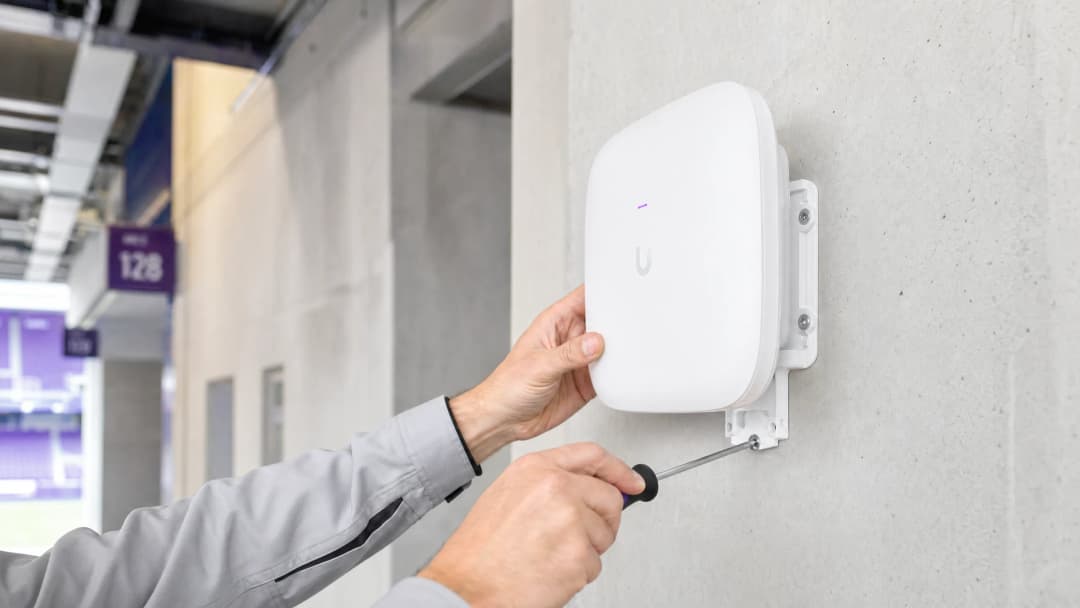
এক্সিকিউটিভ সামারি
স্টেডিয়াম পরিবেশে নির্ভরযোগ্য WiFi প্রদান করা নেটওয়ার্ক ইঞ্জিনিয়ারিংয়ের সবচেয়ে কঠিন চ্যালেঞ্জগুলোর একটি। IT ম্যানেজার, CTO এবং ভেন্যু অপারেশন ডিরেক্টরদের জন্য, লক্ষ্য এখন আর কেবল মৌলিক কানেক্টিভিটি প্রদান করা নয়—বরং একটি নিরবচ্ছিন্ন ডিজিটাল ফ্যান অভিজ্ঞতা তৈরি করা, যার পাশাপাশি পরিমাপযোগ্য ROI অর্জন করা যায়। স্টেডিয়ামগুলো চরম ডিভাইস ঘনত্ব, হাফ-টাইমের সময় ব্যাপক ব্যবহারের পিক এবং ভিজিটর অ্যাক্সেসের পাশাপাশি গুরুত্বপূর্ণ অপারেশনাল সিস্টেমগুলোকে সমর্থন করার প্রয়োজনীয়তার মুখোমুখি হয়। এই গাইডটি স্কেলে ভেন্যু WiFi প্রদানের জন্য প্রয়োজনীয় প্রযুক্তিগত আর্কিটেকচার, ডেপ্লয়মেন্ট কৌশল এবং ঝুঁকি প্রশমনের কৌশলগুলোর রূপরেখা দেয়। একটি শক্তিশালী RF ডিজাইনের সাথে Purple-এর গেস্ট WiFi এবং WiFi অ্যানালিটিক্স-এর মতো প্ল্যাটফর্মগুলোকে একত্রিত করে, ভেন্যুগুলো তাদের নেটওয়ার্ককে একটি কস্ট সেন্টার থেকে রিটেইল মিডিয়া মনিটাইজেশন এবং运营 অপারেশনাল ইন্টেলিজেন্স চালনাকারী একটি কৌশলগত সম্পদে রূপান্তর করতে পারে। এখানে বর্ণিত নীতিগুলো সমভাবে প্রযোজ্য হসপিটালিটি ভেন্যু, রিটেইল পরিবেশ এবং ট্রান্সপোর্ট হাবগুলোর জন্য—যে কোনো জায়গায় যেখানে চরম ঘনত্ব এবং ফ্যানদের সম্পৃক্ততা একসাথে ঘটে।
টেকনিক্যাল ডিপ ডাইভ
RF চ্যালেঞ্জ: চরম ঘনত্ব এবং কো-চ্যানেল ইন্টারফেয়ারেন্স
স্টেডিয়াম WiFi-এর মূল চ্যালেঞ্জ হলো সীমিত ফিজিক্যাল স্পেসের মধ্যে চরম ক্লায়েন্ট ঘনত্ব পরিচালনা করা। ঐতিহ্যবাহী এন্টারপ্রাইজ ডেপ্লয়মেন্টモデル মডেল—যা একটি বড় এলাকা কভার করার জন্য ওমনিডাইরেকショナル অ্যান্টেনার ওপর নির্ভর করে—তা স্টেডিয়ামের পরিস্থিতিতে কো-চ্যানেল ইন্টারফেয়ারেন্স (CCI)-এর কারণে ব্যর্থ হয়। যখন একাধিক অ্যাক্সেস পয়েন্ট একই ফ্রিকোয়েন্সি চ্যানেলে ব্রডকাস্ট করে, তখন设备 ডিভাইসগুলো ডেটা ট্রান্সমিট করার পরিবর্তে বেশিরভাগ সময় ফ্রি এয়ারটাইমের জন্য অপেক্ষা করে। ৫০,০০০ ডিভাইস বিশিষ্ট একটি সিটিং এরিয়াতে এটি অত্যন্ত বিপর্যয়কর।
CCI মোকাবেলা করার জন্য, নেটওয়ার্ক আর্কিটেক্টদের অবশ্যই মাইক্রো-সেল ডিজাইন করতে হবে। এর মধ্যে রয়েছে প্রচুর পরিমাণে হাই-ডাইরেকショナル, ন্যারো-বিম অ্যান্টেনা ডেপ্লয় করা—সাধারণত ৩০ ডিগ্রি বা তার কম বিম-উইডথ বিশিষ্ট—যা সিটিং এরিয়াকে ছোট, আইসোলেটেড কভারেজ জোনে বিভক্ত করে। প্রতিটি মাইক্রো-সেল একটি সীমিত সংখ্যক ডিভাইসকে সার্ভিস দেয়, যা উচ্চ থ্রুপুট এবং কম কনটেনশন বজায় রাখে। ইনস্টলেশন অপশনগুলোর মধ্যে রয়েছে সিটের নিচের এনক্লোজার (নিচের সিটিং এরিয়ার জন্য পছন্দের) এবং উপরের এরিয়াগুলোর জন্য হ্যান্ডরেলে মাউন্ট করা ডাইরেকショナル AP।
WiFi 6E এবং স্পেকট্রাম অ্যালোকেশন
আধুনিক স্টেডিয়াম ডেপ্লয়মেন্টে অবশ্যই WiFi 6E ব্যবহার করতে হবে। ৬ GHz স্পেকট্রাম ব্যান্ডের অন্তর্ভুক্তি ১,২০০ MHz পর্যন্ত পরিষ্কার, সংলগ্ন স্পেকট্রাম প্রদান করে, যা জটিল পরিবেশে ৫ GHz ডেপ্লয়মেন্টকে জটিল করে তোলা ডাইনামিক ফ্রিকোয়েন্সি সিলেকশন (DFS) রাডার সীমাবদ্ধতা থেকে মুক্তি দেয়। এটি সামঞ্জস্যपूर्ण ডিভাইসগুলোকে আরও প্রশস্ত চ্যানেল (WiFi 7-এর জন্য ১৬০ MHz বা ৩২০ MHz) ব্যবহার করার অনুমতি দেয়, যা উল্লেখযোগ্যভাবে থ্রুপুট বৃদ্ধি করে এবং লেটেন্সি কমায়—এই সবই ব্যান্ডউইথ-নিবিড় অ্যাপ্লিকেশনগুলোর জন্য (যেমন সিটে বসে ভিডিও প্লেব্যাক এবং সোশ্যাল মিডিয়া শেয়ারিং) অত্যন্ত গুরুত্বপূর্ণ।
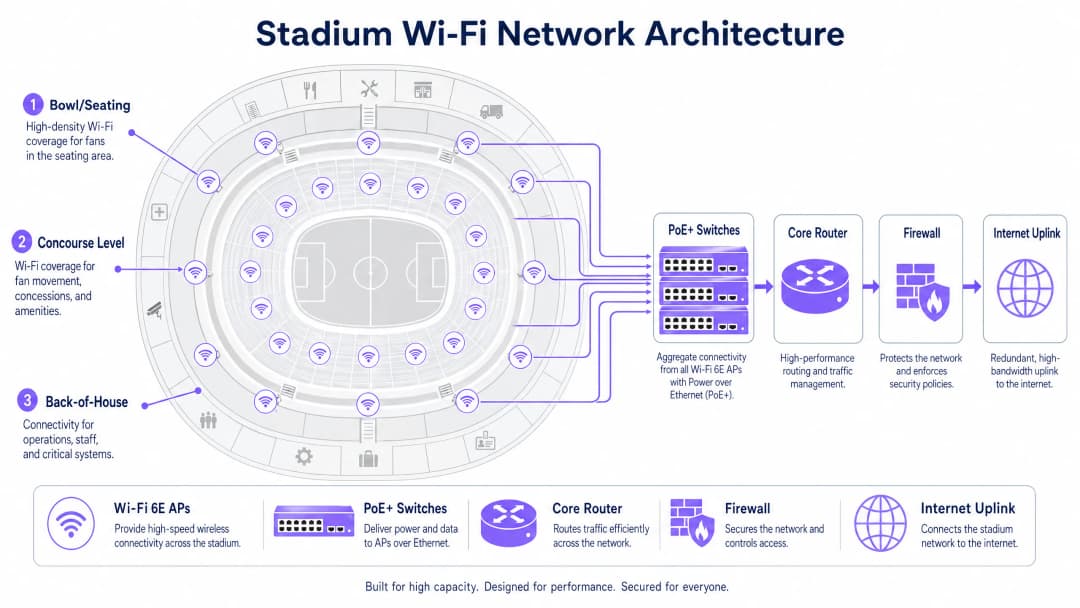
নিচের টেবিলটি স্টেডিয়াম ডেপ্লয়মেন্টের সাথে সম্পর্কিত WiFi স্ট্যান্ডার্ডগুলোর মধ্যে মূল পার্থক্যগুলো সংক্ষেপে তুলে ধরে:
| স্ট্যান্ডার্ড | ফ্রিকোয়েন্সি ব্যান্ড | সর্বোচ্চ চ্যানেল উইডথ | স্টেডিয়ামের জন্য মূল সুবিধা |
|---|---|---|---|
| WiFi 5 (802.11ac) | ৫ GHz | ৮০ MHz | ব্যাপকভাবে সমর্থিত, তবে সীমিত স্পেকট্রাম |
| WiFi 6 (802.11ax) | ২.৪ / ৫ GHz | ১৬০ MHz | OFDMA এবং BSS কালারিং ইন্টারফেয়ারেন্স কমায় |
| WiFi 6E (802.11ax) | ২.৪ / ৫ / ৬ GHz | ১৬০ MHz | পরিষ্কার ৬ GHz স্পেকট্রাম, কোনো DFS সীমাবদ্ধতা নেই |
| WiFi 7 (802.11be) | ২.৪ / ৫ / ৬ GHz | ৩২০ MHz | মাল্টি-লিঙ্ক অপারেশন অত্যন্ত উচ্চ থ্রুপুট সক্ষম করে |
স্কেলে অথেন্টিকেশন এবং সিকিউরিটি
স্কেলে ঘর্ষণহীন অনবোর্ডিং অত্যন্ত গুরুত্বপূর্ণ। ক্যাপটিভ পোর্টাল যদিও ফার্স্ট-পার্টি ডেটা ক্যাপচারের জন্য মূল্যবান, তবে খেলা শুরুর ১৫ মিনিট আগে যখন ৫০,০০০ ফ্যান একসাথে কানেক্ট করার চেষ্টা করে, তখন এটি একটি বড় ধরনের বাধা (bottleneck) তৈরি করতে পারে। ইন্ডাস্ট্রি এখন প্রোফাইল-ভিত্তিক অথেন্টিকেশন-এর দিকে ঝুঁকছে, বিশেষ করে OpenRoaming—একটি ফেডারেশন যা ডিভাইসগুলোকে 802.1X এবং WPA3-Enterprise ব্যবহার করে স্বয়ংক্রিয়ভাবে এবং নিরাপদে কানেক্ট হতে দেয়। Purple এই ইকোসিস্টেমে আইডেন্টিটি প্রোভাইডার হিসেবে নিরাপদ, নিরবচ্ছিন্ন অ্যাক্সেস নিশ্চিত করে, পাশাপাশি প্রতিটি ডিভাইস সেশনকে অ্যানালিটিক্স ব্যবহারের জন্য একটি পারসিস্টেন্ট ইউজার প্রোফাইলের সাথে যুক্ত রাখে।
যেসব ভেন্যুতে ডেটা ক্যাপচারের জন্য এখনও ক্যাপティブ পোর্টাল অনবোর্ডিং প্রয়োজন, তাদের জন্য সমাধান হলো প্রি-স্টেজড অথেন্টিকেশন: ডিভাইসগুলোকে অবিলম্বে অ্যাসোসিয়েট হতে এবং একটি IP অ্যাড্রেস পেতে দেওয়া, এবং তারপর অ্যাসিনক্রোনাসভাবে পোর্টালটি প্রদর্শন করা। এটি সমস্ত ডিভাইস একই সাথে পোর্টাল অ্যাক্সেস করার সময় DHCP এবং অ্যাসোসিয়েশন স্টর্ম প্রতিরোধ করে।
পাবলিক নেটওয়ার্ক সিকিউরিটি নীতির বিস্তারিত ব্যাখ্যার জন্য—যা সরাসরি স্টেডিয়াম পরিবেশের ক্ষেত্রে প্রযোজ্য—আমাদের গাইড এয়ারপোর্ট WiFi সিকিউরিটি: কীভাবে পাবলিক নেটওয়ার্কে যাত্রীদের সুরক্ষিত রাখবেন দেখুন। সেখানে কভার করা সেগমেন্টেশন এবং DNS সিকিউরিটি নীতিগুলো এখানেও সমভাবে প্রযোজ্য। অতিরিক্তভাবে, একটি শক্তিশালী DNS এবং সিকিউরিটির মাধ্যমে আপনার নেটওয়ার্ক সুরক্ষিত করুন পাবলিক নেটওয়ার্কের জন্য DNS-লেয়ার ডিফেন্সের নির্দিষ্ট নির্দেশনা প্রদান করে।
আপনার নির্দিষ্ট সেটআপ নিয়ে কোনো প্রশ্ন আছে?
আমাদের টিম ৮০,০০০ ভেন্যুতে ভেন্যু অপারেটর, IT ম্যানেজার এবং নেটওয়ার্ক ইঞ্জিনিয়ারদের সাথে কাজ করে। একটি ২০ মিনিটের কল বুক করুন এবং আপনার মতো অন্যরা কীভাবে এর সমাধান করেছেন তা আমরা আপনাকে দেখাব।
ইমপ্লিমেন্টেশন গাইড
ধাপ ১: সাইট সার্ভে এবং RF প্ল্যানিং
একটি কেবল বিছানোর আগেই, ভেন্যুর একটি বিস্তারিত প্রেডিক্টিভ RF модель মডেল তৈরি করা আবশ্যক। AP-এর অবস্থান, অ্যান্টেনা প্যাটার্ন এবং প্রত্যাশিত কভারেজ মডেল করতে Ekahau বা iBwave-এর মতো টুল ব্যবহার করুন। একটি ফিজিক্যাল সাইট সার্ভে দ্বারা মডেলটি যাচাই করুন, বিশেষ করে সিটিং এরিয়াতে ব্যবহৃত উপকরণ (কংক্রিট, মেটাল, গ্লাস) এবং যেকোনো ইন্টারফেয়ারেন্সের উৎসের (ব্রডকাস্ট সরঞ্জাম, অস্থায়ী কাঠামো) দিকে বিশেষ মনোযোগ দিন。
步骤2:物理部署
সিটিং এরিয়াতে AP ডেপ্লয়মেন্ট সাধারণত দুটি ক্যাটাগরিতে পড়ে:
সিটের নিচে ডেপ্লয়মেন্ট: AP-গুলো সিটের নিচে মজবুত IP67-রেটেড এনক্লোজারে ইনস্টল করা হয়। এটি উপরের ডিভাইসগুলোর জন্য চমৎকার লাইন-অফ-সাইট প্রদান করে এবং সিটে থাকা মানুষের শরীর প্রাকৃতিকভাবে RF সিগন্যালকে অ্যাটেনুয়েট (হ্রাস) করে, যা সংলগ্ন সেলগুলোর মধ্যে CCI কমায়। ক্যাবলিং করা আরও জটিল, তবে RF পারফরম্যান্স অনেক উন্নত হয়।
ওভারহেড/হ্যান্ডরেল ডেপ্লয়মেন্ট: ডাইরেকショナル AP ক্যাটওয়াক, হ্যান্ডরেল বা ফেসিয়া বোর্ডে মাউন্ট করা হয়, যা নির্দিষ্ট সিটিং এরিয়ার দিকে তাক করা থাকে। এই ডেপ্লয়মেন্টে ক্যাবলিং করা সহজ, তবে এর জন্য সুনির্দিষ্ট অ্যান্টেনা অ্যালাইমেন্টের প্রয়োজন এবং একটি ওপেন সিটিং এরিয়া পরিবেশে এটি ইন্টারফেয়ারেন্সের প্রতি বেশি সংবেদনশীল。
কনকোর্সের জন্য, স্ট্যান্ডার্ড এন্টারপ্রাইজ সিলিং-মাউন্টেড AP উপযুক্ত, কারণ সেখানে ঘনত্ব কম এবং পরিবেশ আরও নিয়ন্ত্রিত。
步骤3:网络分段
স্টেডিয়াম নেটওয়ার্ক একটি মাল্টি-টেন্যান্ট পরিবেশ। VLAN এবং ফায়ারওয়াল পলিসি ব্যবহার করে কঠোর ট্রাফিক সেগমেন্টেশন করা বাধ্যতামূলক:
| VLAN | উদ্দেশ্য | মূল প্রয়োজনীয়তা |
|---|---|---|
| VLAN 10 | গেস্ট/ফ্যান WiFi | ক্যাপティブ পোর্টাল বা OpenRoaming অনবোর্ডিং |
| VLAN 20 | পয়েন্ট-অফ-সেল/রিটেইল | PCI-DSS কমপ্লায়েন্স, গেস্ট ট্রাফিক থেকে আইসোলেটেড |
| VLAN 30 | অপারেশন/স্টাফ | 802.1X অথেন্টিকেশন, রেস্ট্রিক্টেড অ্যাক্সেস |
| VLAN 40 | বিল্ডিং ম্যানেজমেন্ট | আইসোলেটেড, কোনো ইন্টারনেট অ্যাক্সেস নেই |
এই সেগমেন্টেশন নীতিটি সমস্ত ইন্ডাস্ট্রিতে একই রকম—আপনি এটি রিটেইল পরিবেশে ডেপ্লয় করুন বা হেলথকেয়ার প্রতিষ্ঠানে, গেস্ট ট্রাফিক থেকে অপারেশনাল ট্রাফিক আলাদা করা একটি আপসহীন সিকিউরিটি বেসলাইন。
步骤4:回程与基础设施规模确定
পর্যাপ্ত ব্যাকহল না থাকলে, RF কভারেজ নিষ্ফল। নিশ্চিত করুন যে আপনার PoE+ এজ সুইচগুলোর অ্যাগ্রিগেশন লেয়ারে অন্তত ১০ Gbps আপলিঙ্ক রয়েছে এবং সিটিং এরিয়াতে সার্ভিস দেওয়া হাই-ডেনসিটি অ্যাগ্রিগেশন পয়েন্টগুলোর জন্য ৪০ Gbps ব্যবহার করুন। কোর ইন্টারনেট আপলিঙ্ক অবশ্যই পিক কনকারেন্ট ব্যবহারের ওপর ভিত্তি করে সাইজ নির্ধারণ করতে হবে—এই স্কেলের ভেন্যুগুলোর জন্য রিডান্ড্যান্ট ফেইলওভার সহ একটি ডেডিকেটেড লিজড লাইন হলো স্ট্যান্ডার্ড। ডেডিকেটেড কানেক্টিভিটি অপশন সম্পর্কে আরও তথ্যের জন্য, লিজড লাইন কী? ডেডিকেটেড এন্টারপ্রাইজ ইন্টারনেট দেখুন。
步骤5:分析集成
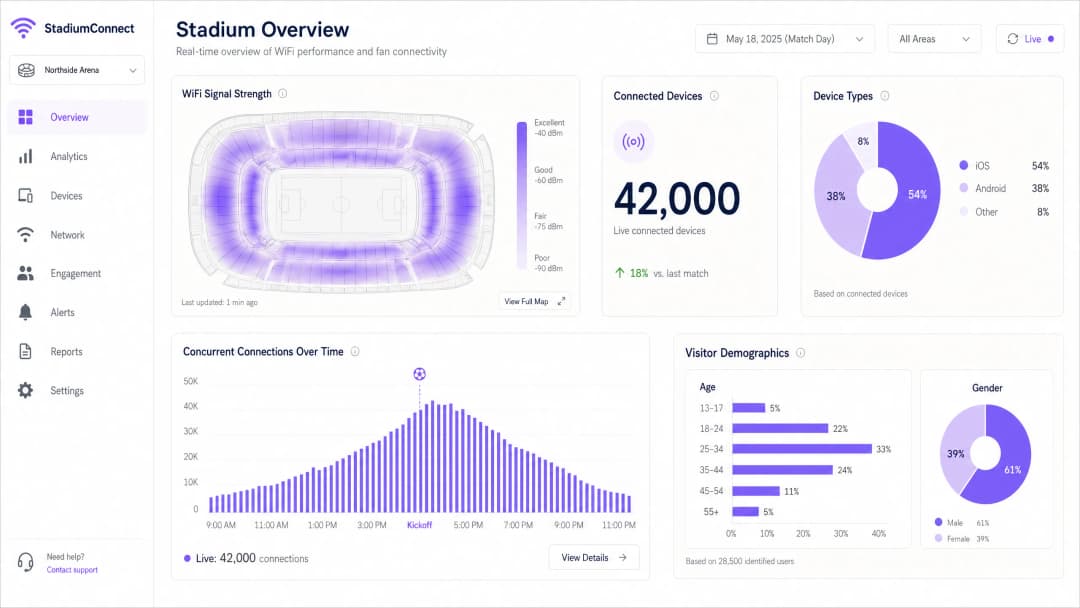
নেটওয়ার্ক চালু হয়ে গেলে, ডেটা ক্যাপচার এবং প্রসেস করা শুরু করতে Purple-এর মতো একটি প্ল্যাটফর্মের সাথে ইন্টিগ্রেট করুন। Purple-এর WiFi অ্যানালিটিক্স প্ল্যাটফর্ম ডিভাইস কাউন্ট, সিগন্যাল হিটম্যাপ এবং ভিজিটর ডেমোগ্রাফিক্সের একটি রিয়েল-টাইম ড্যাশবোর্ড প্রদান করে—যা নেটওয়ার্ককে একটি অপারেশনাল ইন্টেলিজেন্স লেয়ারে রূপান্তরিত করে。
বেস্ট প্র্যাকটিস
আক্রমনাত্মক ডেটা রেট ম্যানেজমেন্ট: সমস্ত লেগাসি 802.11b 和 802.11g রেট নিষ্ক্রিয় করুন। সর্বনিম্ন বাধ্যতামূলক বেসিক রেট ১২ Mbps বা ২৪ Mbps-এ সেট করুন। এটি স্টিকি ক্লায়েন্টদের দুর্বল সিগন্যাল সহ দূরের AP-তে আটকে না থেকে কাছাকাছি একটি AP-তে রোম করতে বাধ্য করে এবং ধীরগতির ডিভাইসগুলোকে অসম অনুপাতে এয়ারটাইম গ্রাস করা থেকে বিরত রাখে。
ব্যান্ড স্টিয়ারিং: সামঞ্জস্যপূর্ণ ডিভাইসগুলোকে ৫ GHz এবং ৬ GHz ব্যান্ডে কানেক্ট হতে নির্দেশ করতে AP-গুলোকে কনফিগার করুন, এবং IoT ডিভাইস ও লেগাসি হার্ডওয়্যারের জন্য ২.৪ GHz ব্যান্ডটি খালি রাখুন。
DHCP পুল সাইজিং: গেস্ট VLAN সাবনেটের জন্য উদারভাবে সাইজ (/১৬ বা /২০) নির্ধারণ করুন এবং ভেন্যু ছেড়ে চলে যাওয়া ডিভাইসগুলোর IP অ্যাড্রেস পুনরুদ্ধার করতে ৩০-৬০ মিনিটের একটি সংক্ষিপ্ত লিজ টাইম সেট করুন। DHCP এক্সহশন (DHCP ফুরিয়ে যাওয়া) হলো হাফ-টাইমে কানেক্টিভিটি ব্যর্থতার অন্যতম সাধারণ কারণ。
রোগ (Rogue) AP ডিটেকশন: রোগ AP ডিটেকশন এবং কনটেইনমেন্ট ইমপ্লিমেন্ট করুন। ফ্যান এবং ব্রডকাস্টারদের তৈরি করা ব্যক্তিগত হটস্পটগুলো সংলগ্ন চ্যানেলগুলোতে মারাত্মক ইন্টারফেয়ারেন্স তৈরি করতে পারে。
DNS সিকিউরিটি: গেস্ট নেটওয়ার্কে DNS ফিল্টারিং ইমপ্লিমেন্ট করুন ক্ষতিকারক ডোমেইনগুলোতে অ্যাক্সেস ব্লক করতে এবং ম্যালওয়্যার ছড়ানোর ঝুঁকি কমাতে। ইমপ্লিমেন্টেশন নির্দেশনার জন্য একটি শক্তিশালী DNS এবং সিকিউরিটির মাধ্যমে আপনার নেটওয়ার্ক সুরক্ষিত করুন দেখুন。
WPA3 ট্রানজিশন মোড: WPA2 এবং WPA3 উভয় ক্লায়েন্টকে একসাথে সমর্থন করতে ট্রানজিশন মোডে WPA3-SAE সক্ষম করুন, যা লেগাসি হার্ডওয়্যারকে বাদ না দিয়েই সামঞ্জস্যপূর্ণ ডিভাইসগুলোর জন্য উন্নত সিকিউরিটি প্রদান করে。
ট্রাবলশুটিং এবং ঝুঁকি প্রশমন
ফেইলর মোড ১: হাফ-টাইম পিক
লক্ষণ: ডিভাইসগুলো শক্তিশালী WiFi সিগন্যাল দেখায়, কিন্তু ওয়েব পেজ লোড করতে বা ট্রানজ্যাকশন সম্পন্ন করতে পারে না。
原因: DHCP পুল ফুরিয়ে যাওয়া বা কোর নেটওয়ার্কের বাধা (bottleneck)—কোনো RF समस्या নয়。
সমাধান: রিয়েল-টাইমে DHCP স্কোপ ইউটিলাইজেশন যাচাই করুন। সাবনেটের সাইজ বাড়ান এবং লিজ টাইম কমিয়ে দিন। এজ সুইচ থেকে কোর রাউটারে আপলিঙ্ক ইউটিলাইজেশন পরীক্ষা করুন। এটি একটি লেয়ার ৩ ফেইলর, লেয়ার ১/২ সমস্যা নয়—আরও AP যোগ করলে কোনো লাভ হবে না এবং এটি RF ইন্টারফেয়ারেন্সকে আরও খারাপ করতে পারে。
ফেইলর মোড ২: রোগ (Rogue) ইন্টারফেয়ারেন্স
লক্ষণ: ইভেন্টের সময়特定 সিটিং এরিয়াতে হঠাৎ পারফরম্যান্স কমে যাওয়া。
原因: ব্রডকাস্টার বা ফ্যানরা সংলগ্ন চ্যানেলে হটস্পট বা পোর্টেবল রাউটার তৈরি করেছে。
সমাধান: ওয়্যারলেস কন্ট্রোলারের স্পেকট্রাম অ্যানালাইসিস টুল ব্যবহার করে ইন্টারফেয়ারিং ডিভাইসগুলো শনাক্ত করুন। রোগ AP কনটেইনমেন্ট পলিসি ইমপ্লিমেন্ট করুন। বড় ইভেন্টগুলোর সময় ডেডিকেটেড স্পেকট্রাম অ্যানালাইজার ডেপ্লয় করার কথা বিবেচনা করুন。
ফেইলর মোড ৩: ফিজিক্যাল ড্যামেজ
লক্ষণ: ইভেন্টের সময় বা পরে পৃথক AP অফলাইনে চলে যাওয়া。
原因: তরল ছিটকে পড়া, ফিজিক্যাল ইমপ্যাক্ট বা সিটের নিচের এনক্লোজারে আবহাওয়ার কারণে পানি প্রবেশ করা。
সমাধান: সমস্ত সিটের নিচের AP-এর জন্য IP67-রেটেড এনক্লোজার নির্দিষ্ট করুন। রিয়েল-টাইম AP হেলথ মনিটরিং এবং অ্যালার্ম ইমপ্লিমেন্ট করুন। স্পেয়ার AP-এর স্টক রাখুন এবং ম্যাচ-ডের ঘটনার জন্য快速 প্রতিস্থাপন প্রক্রিয়া নিশ্চিত করুন。
ফেইলর মোড ৪: MAC অ্যাড্রেস র্যান্ডমাইজেশন অ্যানালিটিক্সকে ব্যাহত করছে
লক্ষণ: অসঙ্গতিপূর্ণ ভিজিটর কাউন্ট ডেটা; রিটার্নিং ভিজিটরদের নতুন ব্যবহারকারী হিসেবে দেখানো হচ্ছে。
原因: আধুনিক iOS এবং Android ডিভাইসগুলো প্রতিটি নেটওয়ার্কের জন্য তাদের MAC অ্যাড্রেস র্যান্ডমাইজ করে, যা MAC-ভিত্তিক ট্র্যাকিংকে বাধাগ্রস্ত করে。
解决方案: MAC-ভিত্তিক ট্র্যাকিং থেকে প্রোফাইল-ভিত্তিক অথেন্টিকেশনে স্থানান্তরিত হন। যখন কোনো ব্যবহারকারী OpenRoaming বা কোনো ব্র্যান্ডেড অ্যাপের মাধ্যমে অথেন্টিকেট করেন, তখন তাদের আইডেন্টিটি হার্ডওয়্যার অ্যাড্রেসের পরিবর্তে একটি পারসিস্টেন্ট প্রোফাইলের সাথে যুক্ত হয়। Purple-এর প্ল্যাটফর্ম নেটিভভাবে এটি পরিচালনা করে。
ROI এবং ব্যবসায়িক প্রভাব
স্টেডিয়াম WiFi ডেপ্লয় করা একটি বড় ধরনের ক্যাপিটাল এক্সপেন্ডিচার (ক্যাপেক্স)। একটি ৫০,০০০ সিটের স্টেডিয়ামে ৫০০-১,০০০টি অ্যাক্সেস পয়েন্ট, ব্যাপক ক্যাবলিং ইনফ্রাস্ট্রাকচার এবং চলমান অপারেশনাল খরচের প্রয়োজন হতে পারে。
为证明这项投资的合理性,场馆必须利用网络获取运营智能和创收。
Purple-এর WiFi অ্যানালিটিক্স প্ল্যাটফর্ম ব্যবহার করে, ভেন্যুগুলো একাধিক ডাইমেনশন থেকে ROI পরিমাপ করতে পারে:
| রেভিনিউ/সেভিংস ক্যাটাগরি | মেকানিজম | নির্দেশক প্রভাব |
|---|---|---|
| রিটেইল মিডিয়া মনিটাইজেশন | অথেন্টিকেটেড ফ্যানদের কাছে টার্গেটেড স্পনসরশিপ মেসেজ পাঠানো | স্পনসরদের কাছ থেকে নতুন রেভিনিউ স্ট্রিম |
| কনসেশন অপ্টিমাইজেশন | ফুটফল অ্যানালিটিক্স লাইনের বাধা শনাক্ত করে এবং স্টাফিং অপ্টিমাইজ করে | লাইনে অপেক্ষার সময় হ্রাস, মাথাপিছু খরচ বৃদ্ধি |
| IT সাপোর্ট খরচ হ্রাস | প্রোফাইল-ভিত্তিক অথেন্টিকেশন ম্যাচ-ডেতে হেল্পডেস্ক কল কমায় | অপারেশনাল ওভারহেড হ্রাস |
| সিকিউরিটি এবং কমপ্লায়েন্স | ইভাকুয়েশন প্ল্যানিংয়ের জন্য রিয়েল-টাইম ক্রাউড ডেনসিটি মনিটরিং | ঝুঁকি প্রশমন, ইন্স্যুরেন্সের সুবিধা |
| ফ্যান লয়্যালটি | ভিজিট হিস্ট্রির ওপর ভিত্তি করে পারসোনালাইজড এনগেজমেন্ট ক্যাম্পেইন | সিজন টিকিট রিনিউয়াল রেট বৃদ্ধি |
একটি ভালোভাবে ডেপ্লয় করা স্টেডিয়াম নেটওয়ার্কের WiFi ডেটা সংগ্রহ ক্ষমতা একটি গুরুত্বপূর্ণ ব্যবসায়িক সম্পদ। অথেন্টিকেশনের সময় ক্যাপচার করা ফার্স্ট-পার্টি ডেটা—সম্পূর্ণ GDPR সম্মতির সাথে—ভেন্যুগুলোকে বিস্তারিত ফ্যান প্রোফাইল তৈরি করতে সক্ষম করে, যা টার্গেটেড মার্কেটিং, পারসোনালাইজড ইন-অ্যাপ অভিজ্ঞতা এবং স্পনসর অ্যাক্টিভেশনকে সমর্থন করে。
পার্শ্ববর্তী ইন্ডাস্ট্রির ভেন্যুগুলোর জন্যও একই নীতি প্রযোজ্য: হসপিটালিটি অপারেটররা বিভিন্ন প্রপার্টিতে গেস্টদের আচরণ বুঝতে WiFi অ্যানালিটিক্স ব্যবহার করে, আর ট্রান্সপোর্ট হাবগুলো রিটেইল লেআউট এবং ক্যাপাসিটি প্ল্যানিংয়ের জন্য ফুটফল ডেটা ব্যবহার করে।
মূল সংজ্ঞাসমূহ
Co-Channel Interference (CCI)
পারফরম্যান্সের অবনতি যা ঘটে যখন একাধিক অ্যাক্সেস পয়েন্ট একে অপরের রেঞ্জের মধ্যে একই ফ্রিকোয়েন্সি চ্যানেলে ট্রান্সমিট করে, যার ফলে ডিভাইসগুলো ট্রান্সমিশন স্থগিত করতে এবং ফ্রি এয়ারটাইমের জন্য অপেক্ষা করতে বাধ্য হয়।
হাই-ডেনসিটি স্টেডিয়াম ডেপ্লয়মেন্টে প্রাথমিক RF ফেইলর মোড। মাইক্রো-সেল আর্কিটেকচার এবং সতর্ক চ্যানেল প্ল্যানিংয়ের মাধ্যমে প্রশমিত করা হয়।
Micro-Cell Architecture
একটি ওয়্যারলেস নেটওয়ার্ক ডিজাইন যা ছোট, আইসোলেটেড কভারেজ জোন তৈরি করতে অত্যন্ত ডাইরেকশনাল, ন্যারো-বিম অ্যান্টেনা ব্যবহার করে, যার প্রতিটি সীমিত সংখ্যক ডিভাইসকে সার্ভিস দেয়।
স্টেডিয়াম সিটিং বোলের জন্য obligatoire ডিজাইন প্যাটার্ন। অফিস পরিবেশে ব্যবহৃত ঐতিহ্যবাহী ওমনিডাইরেকশনাল AP ডেপ্লয়মেন্টের বিপরীত।
OpenRoaming
একটি ওয়্যারলেস ব্রডব্যান্ড অ্যালায়েন্স ফেডারেশন যা ডিভাইসগুলোকে ক্যাপটিভ পোর্টাল ইন্টারঅ্যাকশন ছাড়াই 802.1X এবং WPA3-Enterprise ব্যবহার করে অংশগ্রহণকারী WiFi নেটওয়ার্কগুলোর সাথে স্বয়ংক্রিয়ভাবে এবং নিরাপদে কানেক্ট হতে সক্ষম করে।
বড় ইভেন্টগুলোতে অথেন্টিকেশনের বাধা (bottleneck) দূর করে। Purple এই OpenRoaming ইকোসিস্টেমে একটি আইডেন্টিটি প্রোভাইডার হিসেবে কাজ করে।
Airtime Fairness
একটি ওয়্যারলেস শিডিউলিং মেকানিজম যা প্রতিটি কানেক্টেড ডিভাইসকে তার কানেকশন স্পিড নির্বিশেষে সমান ট্রান্সমিশন সময় বরাদ্দ করে, যা ধীরগতির লেগাসি ডিভাইসগুলোকে অসম অনুপাতে এয়ারটাইম গ্রাস করা থেকে বিরত রাখে।
স্টেডিয়ামগুলোতে অত্যন্ত গুরুত্বপূর্ণ যেখানে নতুন এবং পুরানো স্মার্টফোনের মিশ্রণ একই ওয়্যারলেস মিডিয়ামের জন্য প্রতিযোগিতা করে।
802.1X
পোর্ট-ভিত্তিক নেটওয়ার্ক অ্যাক্সেস কন্ট্রোলের জন্য একটি IEEE স্ট্যান্ডার্ড, যা LAN বা WLAN-এর সাথে কানেক্ট হওয়া ডিভাইসগুলোর জন্য একটি অথেন্টিকেশন ফ্রেমওয়ার্ক প্রদান করে, সাধারণত ক্রেডেনশিয়াল ভ্যালিডেশনের জন্য RADIUS ব্যবহার করে।
স্টাফ ডিভাইস, PoS টার্মিনাল এবং OpenRoaming-সক্ষম গেস্ট ডিভাইসগুলোর জন্য নিরাপদ, এন্টারপ্রাইজ-গ্রেড অথেন্টিকেশনের জন্য ব্যবহৃত হয়।
PCI DSS
পেমেন্ট কার্ড行业 ডেটা সিকিউরিটি স্ট্যান্ডার্ড। যেকোনো নেটওয়ার্ক যা পেমেন্ট কার্ড ডেটা প্রসেস, স্টোর বা ট্রান্সমিট করে, তার জন্য একটি obligatoire কমপ্লায়েন্স ফ্রেমওয়ার্ক।
কনসেশন স্ট্যান্ড PoS টার্মিনালগুলোকে সমর্থনকারী যেকোনো স্টেডিয়াম网络 সেগমেন্টের ক্ষেত্রে প্রযোজ্য। গেস্ট WiFi ট্রাফিক থেকে কঠোর আইসোলেশন প্রয়োজন।
DHCP Exhaustion
একটি নেটওয়ার্ক ফেইলর অবস্থা যেখানে DHCP সার্ভার তার পুলের সমস্ত উপলব্ধ IP অ্যাড্রেস বরাদ্দ করে ফেলেছে এবং নতুন কানেকশনের অনুরোধগুলো সার্ভিস দিতে পারছে না।
স্টেডিয়ামগুলোতে হাফ-টাইমে কানেক্টিভিটি ব্যর্থতার একটি সাধারণ কারণ। বড় সাবনেট সাইজিং (/১৬ বা /২০) এবং সংক্ষিপ্ত লিজ টাইম (৩০-৬০ মিনিট) দ্বারা প্রশমিত করা হয়।
WiFi 6E
IEEE 802.11ax (WiFi 6) স্ট্যান্ডার্ডের একটি বর্ধিত রূপ যা ৬ GHz ফ্রিকোয়েন্সি ব্যান্ডের জন্য সমর্থন যোগ করে, যা ১,২০০ MHz পর্যন্ত অতিরিক্ত পরিষ্কার স্পেকট্রাম প্রদান করে।
নতুন স্টেডিয়াম ডেপ্লয়মেন্টের জন্য প্রস্তাবিত স্ট্যান্ডার্ড। ৬ GHz ব্যান্ডটি DFS সীমাবদ্ধতা এবং লেগাসি ডিভাইসের কনজেশন থেকে মুক্ত, যা এটিকে হাই-ডেনসিটি পরিবেশের জন্য আদর্শ করে তোলে।
BSS Colouring
একটি WiFi 6 মেকানিজম যা ট্রান্সমিশনগুলোকে একটি কালার আইডেন্টিফায়ার দিয়ে ট্যাগ করে যাতে AP-গুলো একই চ্যানেলে ওভারল্যাপ করা নেটওয়ার্কগুলোর মধ্যে পার্থক্য করতে পারে, যা অপ্রয়োজনীয় বিলম্ব কমায়।
ঘন ডেপ্লয়মেন্টে কো-চ্যানেল ইন্টারফেয়ারেন্সের প্রভাব কমায় যেখানে নিখুঁত চ্যানেল সেপারেশন অর্জন করা সম্ভব নয়।
WPA3-SAE
WiFi Protected Access 3 with Simultaneous Authentication of Equals। এটি WPA2-PSK হ্যান্ডশেককে একটি আরও নিরাপদ Dragonfly কি এক্সচেঞ্জ দ্বারা প্রতিস্থাপন করে, যা অফলাইন ডিকশনারি অ্যাটাক প্রতিরোধী।
গেস্ট WiFi নেটওয়ার্কগুলোর জন্য প্রস্তাবিত সিকিউরিটি স্ট্যান্ডার্ড। WPA2 এবং WPA3 উভয় ক্লায়েন্টকে সমর্থন করতে ট্রানজিশন মোডে ডেপ্লয় করা উচিত।
সমাধানকৃত উদাহরণসমূহ
একটি ৪৫,০০০ সিটের ফুটবল স্টেডিয়ামে হাফ-টাইমের সময় মারাত্মক কানেক্টিভিটি ব্যর্থতা দেখা দিচ্ছে। ব্যবহারকারীরা সম্পূর্ণ WiFi সিগন্যাল বার রিপোর্ট করছেন কিন্তু ওয়েব পেজ লোড করতে বা কনসেশন স্ট্যান্ডে মোবাইল পেমেন্ট সম্পন্ন করতে পারছেন না। নেটওয়ার্কটি তিন বছর আগে ৩০০টি সিলিং-মাউন্টেড ওমনিডাইরেকশনাল AP ব্যবহার করে ডেপ্লয় করা হয়েছিল। এর ডায়াগনোসিস এবং প্রস্তাবিত প্রতিকার পরিকল্পনা কী?
এটি একটি মাল্টি-লেয়ার ফেইলর। কোনো ব্যবহারযোগ্য কানেক্টিভিটি ছাড়া শক্তিশালী সিগন্যাল থাকা হলো একটি লেয়ার ৩ ফেইলরের ক্লাসিক লক্ষণ, এটি লেয়ার ১/২ RF সমস্যা নয়। তাৎক্ষণিক ডায়াগনোসিস: ১) DHCP পুল ইউটিলাইজেশন পরীক্ষা করুন - যদি স্কোপ ইউটিলাইজেশন ৯০% অতিক্রম করে, তবে IP অ্যাড্রেস ফুরিয়ে যাওয়া এর প্রধান কারণ। গেস্ট VLAN সাবনেট একটি /২৪ থেকে একটি /১৬-এ বৃদ্ধি করুন এবং লিজ টাইম ৩০ মিনিটে কমিয়ে দিন। ২) এজ সুইচগুলোতে আপলিঙ্ক ইউটিলাইজেশন পরীক্ষা করুন - যদি ১ Gbps আপলিঙ্কগুলো স্যাচুরেটেড (পরিপূর্ণ) থাকে, তবে ১০ Gbps-এ আপগ্রেড করুন। ৩) কোনো বাধার (bottleneck) লক্ষণের জন্য কোর রাউটারের CPU এবং মেমরি ইউটিলাইজেশন পরীক্ষা করুন। দীর্ঘমেয়াদের জন্য, ওমনিডাইরেকশনাল AP ডেপ্লয়মেন্টকে অবশ্যই সিটের নিচে বা হ্যান্ডরেলে মাউন্ট করা ডাইরেকশনাল AP ব্যবহার করে একটি মাইক্রো-সেল আর্কিটেকচার দ্বারা প্রতিস্থাপন করতে হবে। বর্তমান ডেপ্লয়মেন্টটি লোডের অধীনে মারাত্মক কো-চ্যানেল ইন্টারফেয়ারেন্স তৈরি করছে, যা লেয়ার ৩ সমস্যাগুলোকে আরও জটিল করে তোলে। রিডেপ্লয়মেন্টের সময় WiFi 6E হার্ডওয়্যারে আপগ্রেড করুন।
১০,০০০ ডেলিগেটের একটি টেকনোলজি সামিট হোস্টকারী একটি বড় কনফারেন্স সেন্টারে তিন দিনের একটি বড় WiFi নেটওয়ার্ক ইভেন্টের জন্য সাময়িক WiFi ডেপ্লয় করতে হবে। ভেন্যুর বিদ্যমান ইনফ্রাস্ট্রাকচার রয়েছে তবে এটি ২,০০০ কনকারেন্ট ব্যবহারকারীর জন্য ডিজাইন করা হয়েছিল। সাময়িক ডেপ্লয়মেন্টটি কীভাবে আর্কিটেক্ট করা উচিত?
একটি সাময়িক হাই-ডেনসিটি ডেপ্লয়মেন্টের জন্য: ১) কভারেজ গ্যাপ এবং ইন্টারফেয়ারেন্সের উৎসগুলো শনাক্ত করতে একটি দ্রুত সাইট সার্ভে পরিচালনা করুন। ২) মেইন হল এবং ব্রেকআউট রুমগুলোতে পোর্টেবল স্ট্যান্ডে বা বিদ্যমান ইনফ্রাস্ট্রাকচারের সাথে ক্লিপ করে সাময়িক হাই-ডেনসিটি AP (WiFi 6 বা WiFi 6E) ডেপ্লয় করুন। প্রতি ৫০-৭৫টি ডিভাইসের জন্য একটি AP লক্ষ্য করুন। ৩) ইভেন্টের জন্য একটি ডেডিকেটেড VLAN এবং DHCP স্কোপের ব্যবস্থা করুন, যার সাইজ ১৫,০০০ ডিভাইসের জন্য উপযুক্ত (প্রতি ডেলিগেটের জন্য একাধিক ডিভাইস বিবেচনা করে)। ৪) ইভেন্টের মেয়াদের জন্য একটি সাময়িক ব্যান্ডউইথ আপগ্রেড বা সেকেন্ডারি ইন্টারনেট সার্কিটের ব্যবস্থা করুন। ৫) ডেলিগেট অনবোর্ডিং এবং রিয়েল-টাইম অ্যানালিটিক্সের জন্য একটি ব্র্যান্ডেড ক্যাপটিভ পোর্টাল প্রদান করতে Purple-এর গেস্ট WiFi প্ল্যাটফর্মের সাথে ইন্টিগ্রেট করুন。৬) কনফারেন্স অ্যাপের মাধ্যমে ডেলিগেটদের ডিভাইসে ইভেন্ট WiFi প্রোফাইলটি প্রি-লোড করে অথেন্টিকেশন প্রি-স্টেজ করুন। এটি একটি WiFi ইনডোর ইভেন্ট ডেপ্লয়মেন্ট প্যাটার্ন যা দীর্ঘমেয়াদী ইনফ্রাস্ট্রাকচার বিনিয়োগের চেয়ে দ্রুত প্রভিশনিং এবং মনিটরিংকে অগ্রাধিকার দেয়।
অনুশীলনী প্রশ্নসমূহ
Q1. আপনি একটি ৬০,০০০ সিটের স্টেডিয়ামের নেটওয়ার্ক আর্কিটেক্ট। ভেন্যু ডিরেক্টর ৮০০টি ডাইরেকশনাল সিটের নিচের AP-এর পরিবর্তে আপার টিয়ারের ছাদে মাউন্ট করা ১৫০টি স্ট্যান্ডার্ড এন্টারপ্রাইজ ওমনিডাইরেকশনাল AP ব্যবহার করে ক্যাপিটাল এক্সপেন্ডিচার বাঁচাতে চান। আপনি কী পরামর্শ দেবেন এবং এর টেকনিক্যাল যৌক্তিকতা কী?
ইঙ্গিত: একটি ওপেন বোল পরিবেশে কো-চ্যানেল ইন্টারফেয়ারেন্স (CCI) এবং RF প্রপাগেশনের ফিজিক্সের প্রভাব বিবেচনা করুন।
মডেল উত্তর দেখুন
ওমনিডাইরেকশনাল পদ্ধতির তীব্র বিরোধিতা করে পরামর্শ দিন। একটি ওপেন সিটিং বোলে, উঁচুতে মাউন্ট করা ওমনিডাইরেকশনাল AP-গুলোর একাধিক সেকশন জুড়ে ওভারল্যাপিং কভারেজ এরিয়া থাকবে, যা মারাত্মক কো-চ্যানেল ইন্টারফেয়ারেন্স তৈরি করবে। লোডের অধীনে, ডিভাইসগুলো একই সাথে একই চ্যানেলে ৫-১০টি AP শুনতে পাবে, যার ফলে ক্রমাগত ট্রান্সমিশন বিলম্বিত হবে এবং থ্রুপুট কার্যকরভাবে অব্যবহারযোগ্য স্তরে নেমে যাবে। ১৫০-AP পদ্ধতিটি কম ডিভাইস কাউন্ট সহ টেস্টিংয়ের সময় কাজ করছে বলে মনে হবে কিন্তু পূর্ণ ক্ষমতায় এটি মারাত্মকভাবে ব্যর্থ হবে। ৮০০টি ডাইরেকশনাল সিটের নিচের AP আইসোলেটেড মাইক্রো-সেল তৈরি করে, যার প্রতিটি প্রায় ৫০-৭৫টি ডিভাইসকে সার্ভিস দেয়, যেখানে মানুষের শরীর সেলগুলোর মধ্যে প্রাকৃতিক RF অ্যাটেনুয়েশন প্রদান করে। উচ্চতর ক্যাপিটাল খরচ পারফরম্যান্সের পার্থক্যের দ্বারা যুক্তিযুক্ত - ওমনিডাইরেকশনাল পদ্ধতিটি ডেপ্লয়মেন্টের পরে উল্লেখযোগ্য সুনামের ক্ষতি এবং ব্যয়বহুল প্রতিকারমূলক কাজের জন্ম দেবে।
Q2. একটি সোল্ড-আউট ম্যাচের সময়, কনসেশন স্ট্যান্ডের PoS টার্মিনালগুলোতে ধীরগতির ট্রানজ্যাকশন টাইম এবং মাঝে মাঝে ব্যর্থতা দেখা দিচ্ছে। PoS টার্মিনালগুলো ফ্যান গেস্ট নেটওয়ার্কের মতো একই ফিজিক্যাল AP শেয়ার করে কিন্তু একটি আলাদা VLAN-এ রয়েছে। সম্ভাব্য কারণগুলো কী এবং কীভাবে আপনি এর প্রতিকার করবেন?
ইঙ্গিত: RF-লেয়ার এবং নেটওয়ার্ক-লেয়ার উভয় কারণ বিবেচনা করুন। Quality of Service (QoS) এবং VLAN ট্রাফিক প্রায়োরিটাইজেশন সম্পর্কে ভাবুন।
মডেল উত্তর দেখুন
দুটি সম্ভাব্য কারণ: ১) RF কনটেনশন - PoS টার্মিনালগুলো একই AP-তে হাজার হাজার ফ্যান ডিভাইসের সাথে এয়ারটাইমের জন্য প্রতিযোগিতা করছে। প্রতিকার: PoS ট্রাফিককে একটি উচ্চতর DSCP ভ্যালু (যেমন, CS5) দিয়ে চিহ্নিত করতে এবং ট্রান্সমিশন কিউতে এটিকে অগ্রাধিকার দিতে AP এবং সুইচগুলোতে QoS পলিসি ইমপ্লিমেন্ট করুন। ২) আপলিঙ্ক স্যাচুরেশন - যদি এজ সুইচ আপলিঙ্কগুলো গেস্ট ট্রাফিক দ্বারা স্যাচুরেটেড থাকে, তবে PoS প্যাকেটগুলো ড্রপ বা বিলম্বিত হচ্ছে। প্রতিকার: ট্রাফিক শেপিং পলিসি ব্যবহার করে সুইচ লেভেলে PoS VLAN-গুলোর জন্য গ্যারান্টিযুক্ত ব্যান্ডউইথ বরাদ্দ নিশ্চিত করুন। একটি স্থায়ী সমাধানের জন্য, RF কনটেনশন সম্পূর্ণরূপে দূর করতে গেস্ট WiFi AP থেকে ফিজিক্যালি আলাদা PoS নেটওয়ার্কের জন্য ডেডিকেটেড AP ডেপ্লয় করার কথা বিবেচনা করুন।
Q3. একজন ভেন্যু ডিরেক্টর জানতে চান যে, কীভাবে WiFi নেটওয়ার্ক তাদের এটি বুঝতে সাহায্য করতে পারে যে কেন ফ্যানরা পশ্চিম কনকোর্সের তুলনায় পূর্ব কনকোর্সের মার্চেন্ডাইজ স্টোরে কম খরচ করছেন। নেটওয়ার্কটি কী ডেটা প্রদান করে এবং WiFi অ্যানালিটিক্সে বিনিয়োগের জন্য আপনি কীভাবে বিজনেস কেস উপস্থাপন করবেন?
ইঙ্গিত: ফুটফল অ্যানালিটিক্স, ডোয়েল টাইম এবং নেটওয়ার্ক ডেটা ও বাণিজ্যিক ফলাফলের মধ্যে পারস্পরিক সম্পর্ক বিবেচনা করুন।
মডেল উত্তর দেখুন
Purple-এর WiFi অ্যানালিটিক্স প্ল্যাটফর্ম ব্যবহার করে, নেটওয়ার্কটি প্রদান করে: ১) ফুটফল কাউন্ট - কতগুলো ডিভাইস পূর্ব কনকোর্স এলাকা দিয়ে অতিক্রম করে বা প্রবেশ করে। ২) ডোয়েল টাইম - ডিভাইসগুলো মার্চেন্ডাইজ স্টোর এলাকায় কতক্ষণ থাকে। ৩) জার্নি ম্যাপিং - স্টোর ভিজিট করার আগে এবং পরে ফ্যানরা কোথায় যান। যদি ডেটা দেখায় যে পূর্ব স্টোরে ফুটফল বেশি কিন্তু ডোয়েল টাইম কম, তবে এটি লাইনে দীর্ঘ অপেক্ষার কারণে চলে যাওয়া বা দুর্বল প্রোডাক্ট ভিজিবিলিটি নির্দেশ করে। যদি ফুটফল নিজেই কম হয়, তবে সমস্যাটি হলো ওয়েফাইন্ডিং বা ফ্যান রাউটিং। বিজনেস কেস: অ্যানালিটিক্স প্ল্যাটফর্মটি একটি বিদ্যমান ইনফ্রাস্ট্রাকচার বিনিয়োগকে একটি বাণিজ্যিক ইন্টেলিজেন্স টুলে রূপান্তরিত করে। অ্যানালিটিক্স লাইসেন্সের খরচ সাধারণত গেস্ট WiFi পোর্টালের মাধ্যমে পাঠানো অপ্টিমাইজড স্টাফিং, উন্নত প্রোডাক্ট প্লেসমেন্ট বা টার্গেটেড প্রমোショナル ক্যাম্পেইনের মাধ্যমে এক বা দুটি ইভেন্টের মধ্যেই উঠে আসে।
এই সিরিজে পড়া চালিয়ে যান
Staff WiFi বনাম Guest WiFi: কর্পোরেট নেটওয়ার্ক সেগমেন্টেশনের সেরা অনুশীলনসমূহ
স্টাফ এবং গেস্ট WiFi নেটওয়ার্ক পৃথকীকরণের বিষয়ে IT লিডারদের জন্য একটি ব্যাপক প্রযুক্তিগত নির্দেশিকা। এতে VLAN আর্কিটেকচার, 802.1X অথেনটিকেশন, ফায়ারওয়াল পলিসি এবং নিরাপদ নেটওয়ার্ক ডিজাইনের ব্যবসায়িক প্রভাব অন্তর্ভুক্ত রয়েছে।
হোটেল গেস্ট WiFi ম্যানেজমেন্ট: PMS, পোর্টাল, এবং ব্র্যান্ড স্ট্যান্ডার্ডের একীকরণ
এই প্রযুক্তিগত নির্দেশিকাতে এন্টারপ্রাইজ-গ্রেড হোটেল WiFi নেটওয়ার্কগুলি কীভাবে আর্কিটেক্ট করা যায় সে সম্পর্কে বিস্তারিত জানানো হয়েছে, যেখানে VLAN সেগমেন্টেশন, স্বয়ংক্রিয় সেশন ম্যানেজমেন্টের জন্য PMS ইন্টিগ্রেশন এবং GDPR-সম্মত ডেটা সংগ্রহের জন্য Captive Portal অপ্টিমাইজেশানের উপর ফোকাস করা হয়েছে।
কীভাবে Guest WiFi সেট আপ করবেন: একটি সুরক্ষিত এন্টারপ্রাইজ কনফিগারেশন গাইড
এই নির্ভরযোগ্য গাইডটি IT লিডার এবং নেটওয়ার্ক আর্কিটেক্টদের সুরক্ষিত এন্টারপ্রাইজ guest WiFi স্থাপনের জন্য একটি সুনির্দিষ্ট ব্লুপ্রিন্ট প্রদান করে। এটি কমপ্লায়েন্ট ফার্স্ট-পার্টি ডেটা সংগ্রহ করার সাথে সাথে অভ্যন্তরীণ সিস্টেমগুলিকে সুরক্ষিত রাখতে প্রয়োজনীয় আর্কিটেকচার, WPA3 মাইগ্রেশন, VLAN সেগমেন্টেশন এবং captive portal ইন্টিগ্রেশন কভার করে।
আপনার নির্দিষ্ট সেটআপ নিয়ে কোনো প্রশ্ন আছে?
আমাদের টিম ৮০,০০০ ভেন্যুতে ভেন্যু অপারেটর, IT ম্যানেজার এবং নেটওয়ার্ক ইঞ্জিনিয়ারদের সাথে কাজ করে। একটি ২০ মিনিটের কল বুক করুন এবং আপনার মতো অন্যরা কীভাবে এর সমাধান করেছেন তা আমরা আপনাকে দেখাব।