
कैंपस WiFi नेटवर्क कैसे बनाएं: एक यूनिवर्सिटी IT गाइड
यह तकनीकी गाइड हाई-डेंसिटी कैंपस WiFi नेटवर्क को डिजाइन और तैनात करने के लिए एक व्यापक ब्लूप्रिंट प्रदान करती है, जिसमें एक्टिव साइट सर्वे और एक्सेस पॉइंट प्लेसमेंट से लेकर कंट्रोलर आर्किटेक्चर, सीमलेस रोमिंग और सुरक्षित गेस्ट ऑनबोर्डिंग तक सब कुछ शामिल है। यह यूनिवर्सिटी और बड़े वेन्यू के IT मैनेजरों, नेटवर्क आर्किटेक्ट्स और CTOs के लिए लिखा गया है, जिन्हें इस तिमाही में वायरलेस डिप्लॉयमेंट की योजना बनाने और उसे लागू करने के लिए व्यावहारिक मार्गदर्शन की आवश्यकता है। यह गाइड डिप्लॉयमेंट लाइफसाइकल के भीतर वास्तविक इंटीग्रेशन पॉइंट्स पर Purple के Guest WiFi और एनालिटिक्स प्लेटफॉर्म को भी मैप करती है।
इस गाइड को सुनें
पॉडकास्ट ट्रांसक्रिप्ट देखें
हमारी मुख्य श्रृंखला का हिस्सा: Guest WiFi Guide →
कार्यकारी सारांश
यूनिवर्सिटी IT टीमों और वेन्यू ऑपरेटरों के लिए, कैंपस WiFi नेटवर्क अब कोई सहायक सुविधा नहीं हैं - वे महत्वपूर्ण बुनियादी ढांचे हैं। आधुनिक उच्च शिक्षा वातावरण को हाई-डेंसिटी, हाई-थ्रूपुट वाले वायरलेस नेटवर्क की आवश्यकता होती है जो प्रति उपयोगकर्ता कई डिवाइस, अधिक बैंडविड्थ वाले एप्लिकेशन और विस्तृत भौतिक स्थानों में सुचारू आवाजाही का समर्थन करते हैं। यह गाइड एक अत्यधिक लचीला कैंपस वायरलेस नेटवर्क बनाने के लिए आवश्यक तकनीकी आर्किटेक्चर, परिनियोजन रणनीति और परिचालन सर्वोत्तम प्रथाओं की रूपरेखा तैयार करती है। हम व्यावहारिक निष्पादन पर ध्यान केंद्रित करते हैं - RF प्लानिंग और एक्सेस पॉइंट (AP) चयन से लेकर कंट्रोलर आर्किटेक्चर और सुरक्षित ऑनबोर्डिंग तक - यह सुनिश्चित करते हुए कि आपका परिनियोजन ROI, अनुपालन और एक आसान उपयोगकर्ता अनुभव प्रदान करे। चाहे आप एक ही बिल्डिंग में परिनियोजन कर रहे हों या मल्टी-साइट कैंपस में, यहाँ दिए गए सिद्धांत hospitality, retail, healthcare, और transport वातावरण पर भी समान रूप से लागू होते हैं।
तकनीकी गहन विश्लेषण: आर्किटेक्चर और मानक
कैंपस वायरलेस नेटवर्क बनाने के लिए टोपोलॉजी के प्रति एक संरचित दृष्टिकोण और आधुनिक वायरलेस मानकों के पालन की आवश्यकता होती है। आर्किटेक्चर के स्तर पर लिए गए निर्णय इसके बाद आने वाली हर चीज़ की स्केलेबिलिटी, सुरक्षा और प्रदर्शन को निर्धारित करते हैं।
थ्री-टियर आर्किटेक्चर
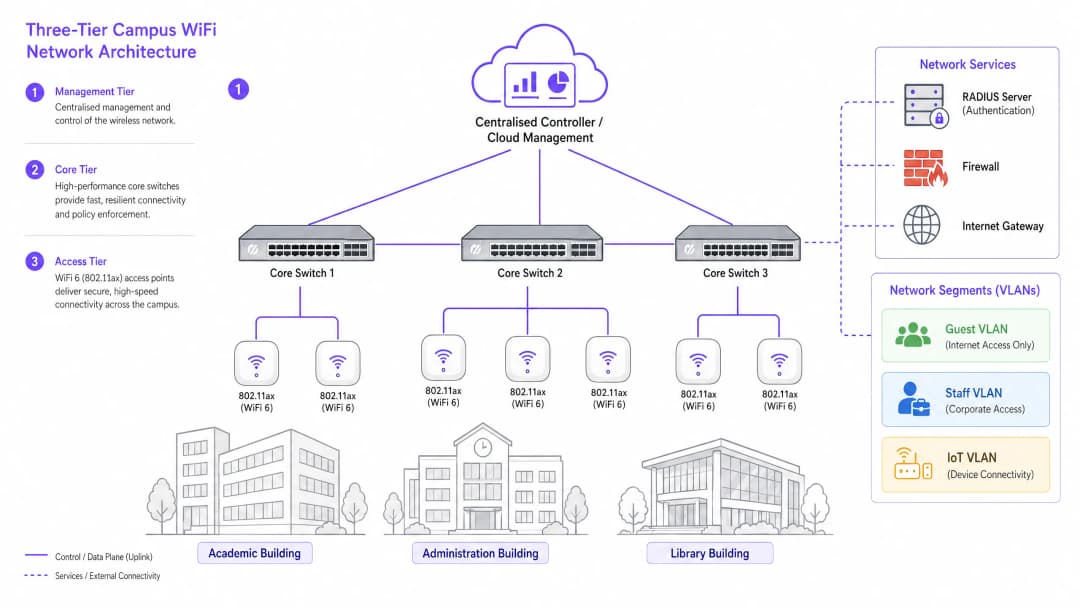
एंटरप्राइज-ग्रेड कैंपस नेटवर्क स्केलेबिलिटी, लचीलेपन और प्रदर्शन को सुनिश्चित करने के लिए एक स्तरित, थ्री-टियर आर्किटेक्चर का उपयोग करते हैं। ये तीन टियर इस प्रकार हैं:
मैनेजमेंट/कोर टियर: नेटवर्क का केंद्रीय तंत्रिका तंत्र। इसमें हाई-कैपेसिटी कोर राउटिंग स्विच और केंद्रीय WLAN कंट्रोलर शामिल हैं (चाहे वे ऑन-प्रिमाइसेस परिनियोजित हों या क्लाउड-मैनेज्ड)। कंट्रोलर सभी AP के लिए RF प्रबंधन, रोमिंग हैंडऑफ़, वैश्विक नीति प्रवर्तन और फर्मवेयर प्रबंधन को संभालता है। क्लाउड-मैनेज्ड कंट्रोलर नए परिनियोजन के लिए प्रमुख विकल्प बन गए हैं, जो मल्टी-साइट प्रबंधन को सरल बनाते हैं और ऑन-प्रिमाइसेस हार्डवेयर लागत को कम करते हैं।
डिस्ट्रिब्यूशन टियर: एक्सेस टियर से ट्रैफ़िक को एकत्रित करता है, राउटिंग नीति लागू करता है, और कोर में डेटा पास होने से पहले रिडंडेंसी प्रदान करता है। छोटे परिसरों में, यह टियर अक्सर कोर में ही समाहित हो जाता है।
एक्सेस टियर: नेटवर्क का किनारा, जिसमें पावर ओवर ईथरनेट प्लस (PoE+) एज स्विच और वायरलेस AP स्वयं शामिल हैं। नए परिनियोजन के लिए, PoE+ न्यूनतम मानक है, क्योंकि WiFi 6 AP अपने पूर्ववर्तियों की तुलना में काफी अधिक बिजली की खपत करते हैं।
वायरलेस मानक और फ़्रीक्वेंसी बैंड
आधुनिक डिप्लॉयमेंट को 802.11ax (WiFi 6) या WiFi 6E पर मानकीकृत होना चाहिए। WiFi 6 महत्वपूर्ण हाई-डेंसिटी क्षमताएं पेश करता है, जिसमें ऑर्थोगोनल फ्रीक्वेंसी-डिवीजन मल्टीपल एक्सेस (OFDMA) शामिल है, जो एक सिंगल AP को सब-चैनलों पर एक साथ कई क्लाइंट्स को सेवा देने की अनुमति देता है, और टारगेट वेक टाइम (TWT), जो IoT डिवाइसों पर बैटरी की खपत को कम करता है। WiFi 6E इन क्षमताओं को 6GHz बैंड में विस्तारित करता है, जो पुराने डिवाइसों के हस्तक्षेप से मुक्त निरंतर स्पेक्ट्रम का एक विशाल हिस्सा प्रदान करता है - जो व्याख्यान कक्षों और सम्मेलन हॉलों जैसे हाई-डेंसिटी वाले वातावरण में एक महत्वपूर्ण लाभ है।
| मानक | बैंड | अधिकतम थ्रूपुट | मुख्य विशेषताएं | सर्वोत्तम उपयोग का मामला |
|---|---|---|---|---|
| 802.11n (WiFi 4) | 2.4GHz / 5GHz | 600 Mbps | MIMO | केवल लीगेसी सपोर्ट |
| 802.11ac (WiFi 5) | 5GHz | 3.5 Gbps | MU-MIMO | मौजूदा डिप्लॉयमेंट |
| 802.11ax (WiFi 6) | 2.4GHz / 5GHz | 9.6 Gbps | OFDMA, TWT | नए कैंपस डिप्लॉयमेंट |
| 802.11ax (WiFi 6E) | 2.4 / 5 / 6GHz | 9.6 Gbps | 6GHz स्पेक्ट्रम | हाई-डेंसिटी, भविष्य के लिए सुरक्षित |
सुरक्षा और प्रमाणीकरण
सुरक्षा बहुस्तरीय होनी चाहिए। कर्मचारियों और नामांकित छात्रों के लिए, विश्वविद्यालय के पहचान प्रदाता (एक्टिव डायरेक्ट्री, LDAP, या क्लाउड पहचान सेवा) से जुड़े 802.1X/EAP प्रमाणीकरण को अनिवार्य करें। यह एन्क्रिप्टेड, क्रेडेंशियल-आधारित एक्सेस प्रदान करता है जो ISO 27001 और Cyber Essentials जैसे मानकों की आवश्यकताओं को पूरा करता है। अस्थायी उपयोगकर्ताओं - अतिथि शिक्षाविदों, सम्मेलन प्रतिनिधियों और जनता के सदस्यों के लिए - एक सुरक्षित Captive Portal आवश्यक है। एक मजबूत Guest WiFi समाधान को एकीकृत करना GDPR-अनुरूप ऑनबोर्डिंग, कस्टमाइज़ेबल स्प्लैश पेज और WiFi Analytics के माध्यम से परिचालन रूप से मूल्यवान अंतर्दृष्टि एकत्र करने की क्षमता सुनिश्चित करता है। सभी वायरलेस ट्रैफ़िक को वर्तमान मानक WPA3 के साथ एन्क्रिप्ट किया जाना चाहिए, जो अपने पूर्ववर्ती WPA2 की तुलना में ब्रूट-फोर्स हमलों के खिलाफ कहीं अधिक मजबूत सुरक्षा प्रदान करता है। अपने एक्सेस पॉइंट की सुरक्षा स्थिति की व्यापक समीक्षा के लिए, हमारा Access Point Security: Your 2026 Enterprise Guide देखें।
अपने विशिष्ट सेटअप को लेकर कोई सवाल हैं?
हमारी टीम 80,000 से अधिक वेन्यू में वेन्यू ऑपरेटरों, IT मैनेजरों और नेटवर्क इंजीनियरों के साथ काम करती है। 20 मिनट का कॉल बुक करें और हम आपको दिखाएंगे कि आपके जैसे अन्य लोगों ने इसे कैसे हल किया।
कार्यान्वयन गाइड: सर्वेक्षण से लेकर डिप्लॉयमेंट तक
कैंपस नेटवर्क को डिप्लॉय करना एक चरणबद्ध प्रक्रिया है जो एक भी केबल खींचने या एक AP माउंट करने से पहले सावधानीपूर्वक योजना बनाने की मांग करती है।
चरण 1: सक्रिय साइट सर्वेक्षण (Active Site Survey)
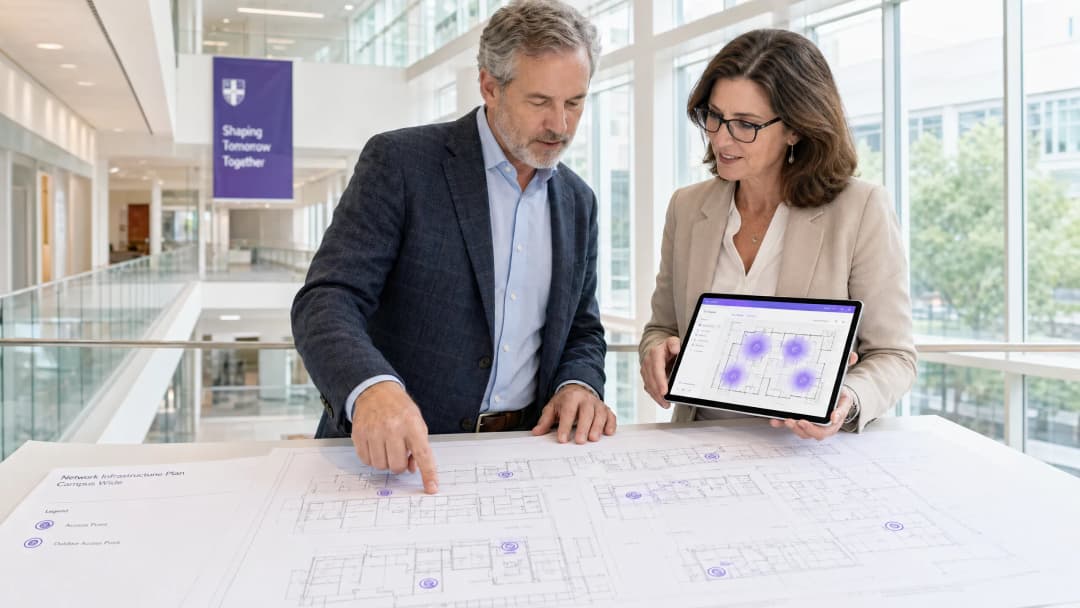
जटिल कैंपस वातावरण के लिए, फ़्लोर प्लान का उपयोग करके एक प्रेडिक्टिव सर्वेक्षण पर्याप्त नहीं है। आपको एक सक्रिय, ऑन-साइट RF सर्वेक्षण करना होगा। पुराने विश्वविद्यालयों की निर्माण सामग्री - मोटी चिनाई, धातु की जाली, प्रबलित कंक्रीट - सिग्नल को अप्रत्याशित तरीकों से कमजोर करती है। सर्वेक्षण RF डेड ज़ोन की पहचान करता है और कवरेज और क्षमता दोनों के लिए इष्टतम AP प्लेसमेंट निर्धारित करने में मदद करता है। इसका परिणाम एक मान्य हीट मैप होना चाहिए जो हर मंजिल के लिए सिग्नल की ताकत, चैनल उपयोग और हस्तक्षेप के स्तर को दिखाता है।
चरण 2: क्षमता योजना (Capacity Planning)
ऐतिहासिक रूप से, नेटवर्क को कवरेज के लिए डिज़ाइन किया गया था - यह सुनिश्चित करना कि सिग्नल हर कोने तक पहुंचे। आज, डिज़ाइन कैपेसिटी से संचालित होता है। 300 सीटों वाले लेक्चर थिएटर में, प्रति छात्र तीन डिवाइस मान लें: एक लैपटॉप, एक स्मार्टफोन और एक टैबलेट। इसके लिए सिंगल ओमनीडायरेक्शनल AP पर निर्भर रहने के बजाय कमरे को ज़ोन करने के लिए डायरेक्शनल एंटेना वाले हाई-डेंसिटी AP की आवश्यकता होती है, जो जल्दी ही ओवरलोड हो जाएगा। हाई-डेंसिटी डिप्लॉयमेंट के लिए सामान्य नियम लेक्चर थिएटर के माहौल में प्रति 25-30 समवर्ती (concurrent) उपयोगकर्ताओं पर एक AP का है।
चरण 3: AP प्लेसमेंट और चैनल प्लानिंग
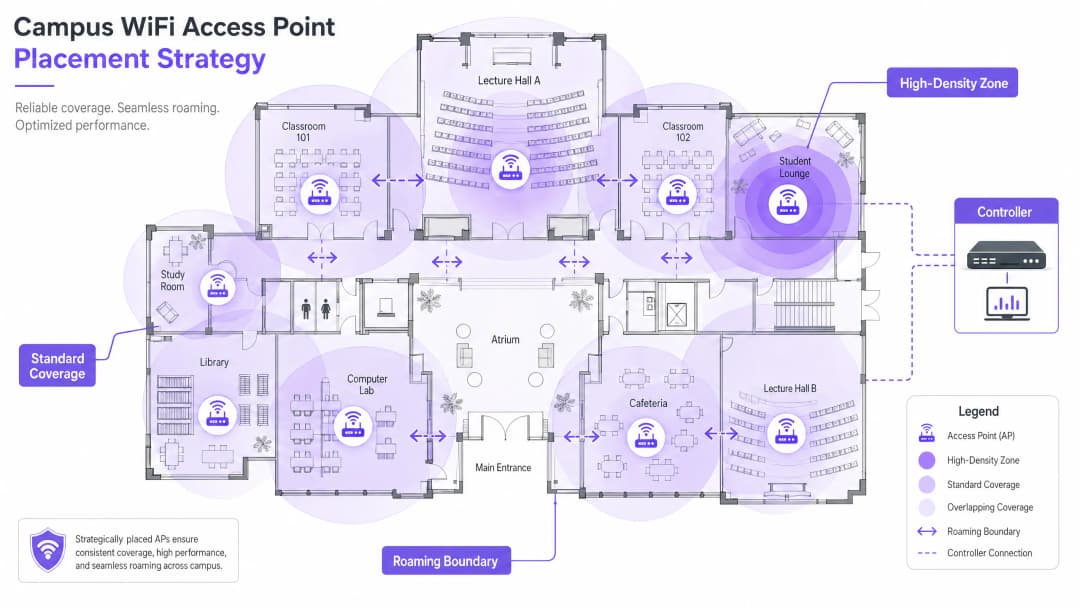
को-चैनल इंटरफेरेंस (CCI) को कम करने के लिए सावधानीपूर्वक चैनल प्लानिंग आवश्यक है। नॉन-ओवरलैपिंग चैनलों का उपयोग करें (2.4GHz पर 1, 6, और 11; 5GHz और 6GHz पर डायनेमिक असाइनमेंट)। सुनिश्चित करें कि AP रणनीतिक रूप से रखे गए हैं - उन्हें सस्पेंडेड सीलिंग के ऊपर या एयर कंडीशनिंग डक्ट्स के पीछे लगाने से बचें, जिससे परफॉर्मेंस खराब होती है। ऊंची छतों वाले स्थानों के लिए, नीचे की ओर मुख वाले डायरेक्शनल एंटेना वाले AP का उपयोग करें।
चरण 4: सीमलेस रोमिंग कॉन्फ़िगर करना
जैसे ही उपयोगकर्ता इमारतों के बीच चलते हैं, उनके कनेक्शन AP के बीच सीमलेस रूप से हैंडऑफ होने चाहिए। फास्ट रोमिंग ट्राइफेक्टा लागू करें: 802.11k (पड़ोसी रिपोर्ट), 802.11v (BSS ट्रांजिशन मैनेजमेंट), और 802.11r (फास्ट BSS ट्रांजिशन)। साथ मिलकर, ये मानक क्लाइंट डिवाइसों को इंटेलिजेंट रोमिंग निर्णय लेने और सेकंड के बजाय मिलीसेकंड में ऑथेंटिकेशन हैंडऑफ पूरा करने की अनुमति देते हैं - जो VoIP और रियल-टाइम एप्लिकेशन्स के लिए महत्वपूर्ण है।
ट्रांसमिट पावर को ट्यून करना भी उतना ही महत्वपूर्ण है। यदि Tx पावर बहुत अधिक है, तो क्लाइंट डिवाइस करीबी AP पर रोमिंग करने के बजाय दूर के AP से चिपके रहते हैं ("स्टिकी क्लाइंट")। ओवरलैपिंग लेकिन उचित आकार के कवरेज सेल बनाने के लिए ट्रांसमिट पावर को कम करें, और डिवाइसों को कमजोर कनेक्शन छोड़ने और रोमिंग करने के लिए मजबूर करने के लिए लीगेसी डेटा दरों (1, 2, 5.5 Mbps) को अक्षम करें।
चरण 5: VLAN सेगमेंटेशन और पॉलिसी एनफोर्समेंट
प्रत्येक उपयोगकर्ता वर्ग के लिए समर्पित VLAN बनाएं: स्टाफ, छात्र, मेहमान, और IoT डिवाइस। IoT डिवाइस (बिल्डिंग मैनेजमेंट सिस्टम, सुरक्षा कैमरे, डिजिटल साइनेज) को कभी भी उपयोगकर्ता उपकरणों के साथ नेटवर्क सेगमेंट साझा नहीं करना चाहिए। VLAN के बीच सख्त फ़ायरवॉल नियम लागू करें, केवल न्यूनतम आवश्यक संचार की अनुमति दें। DNS-स्तर की सुरक्षा और दुर्भावनापूर्ण डोमेन से सुरक्षा के लिए, हमारा गाइड देखें कि कैसे मजबूत DNS और सुरक्षा के साथ अपने नेटवर्क की रक्षा करें।
कैंपस परिवेश के लिए सर्वोत्तम अभ्यास
निम्नलिखित वेंडर-न्यूट्रल सिफारिशें बड़े वायरलेस डिप्लॉयमेंट के लिए उद्योग-मानक अभ्यास का प्रतिनिधित्व करती हैं।
बैंड स्टीयरिंग: सक्षम क्लाइंट डिवाइसों को कम भीड़भाड़ वाले 5GHz या 6GHz बैंड पर धकेलें, और 2.4GHz को लीगेसी डिवाइसों और लॉन्ग-रेंज IoT सेंसर के लिए आरक्षित रखें। अधिकांश आधुनिक कंट्रोलर ऑटोमैटिक बैंड स्टीयरिंग का समर्थन करते हैं।
न्यूनतम RSSI थ्रेशोल्ड: कंट्रोलर को उन क्लाइंट्स से कनेक्शन अस्वीकार करने के लिए कॉन्फ़िगर करें जिनकी सिग्नल शक्ति एक निश्चित थ्रेशोल्ड (आमतौर पर -75 dBm) से नीचे गिर जाती है। यह कमजोर-सिग्नल वाले क्लाइंट्स को AP पर अन्य सभी के अनुभव को खराब करने से रोकता है।
वायरलेस घुसपैठ रोकथाम (WIPS): अनधिकृत APs (छात्रों या कर्मचारियों द्वारा लगाए गए व्यक्तिगत राउटर, जो हस्तक्षेप का कारण बनते हैं और सुरक्षा कमजोरियां पैदा करते हैं) का पता लगाने और उन्हें रोकने के लिए कंट्रोलर पर WIPS सक्षम करें।
आउटडोर कवरेज: दिशात्मक एंटेना वाले मजबूत, मौसम-रोधी APs का उपयोग करके नेटवर्क को आहातों और बाहरी बैठने के क्षेत्रों तक विस्तारित करें। आउटडोर APs को अत्यधिक तापमान, नमी और छेड़छाड़ का सामना करने में सक्षम होना चाहिए।
DHCP लीज प्रबंधन: उच्च-टर्नओवर वाले क्षेत्रों (कैफेटेरिया, लाइब्रेरी) में, IP एड्रेस समाप्त होने से रोकने के लिए गेस्ट नेटवर्क DHCP लीज समय को घटाकर एक या दो घंटे करें।
उच्च शिक्षा पर Purple का ध्यान तेजी से बढ़ रहा है - शिक्षा के VP Tim Peers के टीम में शामिल होने और कैंपस नेटवर्क रणनीति के लिए इसके क्या मायने हैं, इसके बारे में पढ़ें।
समस्या निवारण और जोखिम शमन
अच्छी तरह से डिज़ाइन किए गए नेटवर्क में भी परिचालन संबंधी समस्याएं आती हैं। नीचे सबसे आम विफलता के तरीके और उनके शमन दिए गए हैं।
| विफलता का तरीका | लक्षण | मूल कारण | शमन |
|---|---|---|---|
| स्टिकी क्लाइंट्स | मजबूत सिग्नल के बावजूद खराब प्रदर्शन | ट्रांसमिट पावर बहुत अधिक; लेगेसी दरें सक्षम | ट्रांसमिट पावर कम करें; 11 Mbps से नीचे की दरों को अक्षम करें |
| DHCP समाप्ति | उपयोगकर्ता कनेक्ट नहीं हो पा रहे हैं | लीज का समय बहुत लंबा; सबनेट बहुत छोटा | लीज का समय कम करें; सबनेट बढ़ाएं |
| सह-चैनल हस्तक्षेप | पूरी मंजिल पर धीमा थ्रूपुट | खराब चैनल योजना | गतिशील चैनल असाइनमेंट लागू करें |
| अनधिकृत APs | हस्तक्षेप; सुरक्षा अलर्ट | अनधिकृत व्यक्तिगत राउटर | WIPS सक्षम करें; नियमित RF ऑडिट करें |
| प्रमाणीकरण विफलताएं | उपयोगकर्ता लॉग इन नहीं कर पा रहे हैं | RADIUS सर्वर ओवरलोडेड या गलत कॉन्फ़िगर किया गया | अनावश्यक RADIUS तैनात करें; प्रमाणीकरण लॉग की निगरानी करें |
ROI और व्यावसायिक प्रभाव
विश्वविद्यालय नेतृत्व और कार्यक्रम स्थल संचालन निदेशकों के लिए, एक उच्च-प्रदर्शन नेटवर्क का ROI बुनियादी कनेक्टिविटी से कहीं अधिक है। एक मजबूत कैंपस वायरलेस नेटवर्क सीधे आधुनिक शिक्षण उपकरणों, डिजिटल कैंपस पहलों और परिचालन दक्षता कार्यक्रमों का समर्थन करता है।
WiFi Analytics का लाभ उठाने से फुटफॉल, ठहरने के समय और स्थान के उपयोग पर कार्रवाई योग्य इंटेलिजेंस मिलती है। यह डेटा एस्टेट निर्णयों को सूचित कर सकता है (कम उपयोग की जाने वाली इमारतों या चरम-मांग वाले स्थानों की पहचान करना) और वास्तविक ऑक्यूपेंसी डेटा के आधार पर HVAC उपयोग को अनुकूलित कर सकता है, जिससे मापने योग्य ऊर्जा बचत होती है। ये वही एनालिटिक्स रणनीतियां हैं जो रिटेल और हॉस्पिटैलिटी वातावरण में ऑपरेटरों द्वारा तैनात की जाती हैं, जिन्हें अब तेजी से कैंपस सेटिंग्स में लागू किया जा रहा है।
उन संगठनों के लिए जो अपनी व्यापक डिजिटल सहभागिता रणनीति के हिस्से के रूप में गेस्ट WiFi तैनात कर रहे हैं, एक अच्छी तरह से कॉन्फ़िगर किया गया Guest WiFi प्लेटफ़ॉर्म मार्केटिंग ऑटोमेशन, पूर्व छात्र सहभागिता और विज़िटर अनुभव पहलों का भी समर्थन करता है। छोटे स्थानों या सैटेलाइट परिसरों के लिए, हमारा गाइड how to set up a WiFi hotspot for your business एक व्यावहारिक शुरुआती बिंदु प्रदान करता है।
ब्रीफिंग सुनें
मुख्य परिभाषाएं
802.11ax (WiFi 6)
वायरलेस नेटवर्किंग के लिए वर्तमान IEEE मानक, जिसे विशेष रूप से OFDMA, MU-MIMO और TWT के माध्यम से उच्च-घनत्व वाले वातावरण में दक्षता और प्रदर्शन को बेहतर बनाने के लिए डिज़ाइन किया गया है।
बिना प्रदर्शन में गिरावट के बड़ी मात्रा में समवर्ती उपकरणों का समर्थन करने के लिए आधुनिक कैंपस डिप्लॉयमेंट के लिए आवश्यक है।
Co-Channel Interference (CCI)
हस्तक्षेप जो तब होता है जब एक ही क्षेत्र में कई एक्सेस पॉइंट एक ही चैनल पर काम करते हैं, जिससे डिवाइसों को ट्रांसमिट करने से पहले खाली एयरटाइम की प्रतीक्षा करनी पड़ती है।
खराब चैनल प्लानिंग के कारण CCI अधिक हो जाता है, जिससे सिग्नल की ताकत मजबूत होने पर भी नेटवर्क थ्रूपुट गंभीर रूप से कम हो जाता है।
VLAN (Virtual Local Area Network)
एक लॉजिकल सबनेटवर्क जो डिवाइसों के एक समूह को एक साथ लाता है, और उनके ट्रैफ़िक को उसी भौतिक नेटवर्क इन्फ्रास्ट्रक्चर पर मौजूद अन्य डिवाइसों से अलग करता है।
सुरक्षा और प्रदर्शन के लिए महत्वपूर्ण; गेस्ट, स्टाफ, छात्र और IoT ट्रैफ़िक को अलग करने से लैटरल मूवमेंट रुकता है और कंजेशन कम होता है।
802.1X
पोर्ट-आधारित नेटवर्क एक्सेस कंट्रोल के लिए एक IEEE मानक, जो RADIUS सर्वर के माध्यम से LAN या WLAN से जुड़ने वाले डिवाइसों के लिए क्रेडेंशियल-आधारित प्रमाणीकरण तंत्र प्रदान करता है।
कैंपस नेटवर्क पर स्टाफ और नामांकित छात्रों के लिए सुरक्षित, एंटरप्राइज-ग्रेड प्रमाणीकरण के लिए अनिवार्य मानक।
Captive Portal
एक वेब पेज जिससे नेटवर्क एक्सेस दिए जाने से पहले किसी सार्वजनिक-एक्सेस नेटवर्क के उपयोगकर्ता को इंटरैक्ट करना होता है, आमतौर पर इसका उपयोग सेवा की शर्तों को स्वीकार करने, प्रमाणीकरण और डेटा कैप्चर के लिए किया जाता है।
कैंपस नेटवर्क पर गेस्ट ऑनबोर्डिंग के लिए उपयोग किया जाता है; व्यावसायिक मूल्य के लिए इसका GDPR-compliant होना और एक एनालिटिक्स प्लेटफॉर्म के साथ एकीकृत होना आवश्यक है।
OFDMA (Orthogonal Frequency-Division Multiple Access)
OFDM का एक मल्टी-यूज़र संस्करण जो एक सिंगल एक्सेस पॉइंट को एक ही ट्रांसमिशन के भीतर विभिन्न सब-चैनलों पर एक साथ कई क्लाइंट्स को सेवा देने की अनुमति देता है।
एक प्रमुख WiFi 6 विशेषता जो लेक्चर हॉल जैसे उच्च-घनत्व वाले वातावरण में दक्षता में नाटकीय रूप से सुधार करती है।
Sticky Client
एक वायरलेस डिवाइस जो कमजोर सिग्नल वाले दूर के AP से जुड़ा रहता है, भले ही मजबूत सिग्नल वाला पास का AP उपलब्ध हो, क्योंकि क्लाइंट रोमिंग शुरू करने में संकोच करता है।
प्रभावित उपयोगकर्ता के लिए खराब प्रदर्शन और दूर के AP पर अनावश्यक लोड का कारण बनता है; उचित RF ट्यूनिंग और लेगेसी डेटा दरों को अक्षम करके इसे कम किया जा सकता है।
RSSI (Received Signal Strength Indicator)
प्राप्त रेडियो सिग्नल के पावर स्तर का एक माप, जिसे आमतौर पर dBm (डेसिबल रिलेटिव टू वन मिलीवाट) में व्यक्त किया जाता है, जहां शून्य के करीब के मान मजबूत सिग्नल का संकेत देते हैं।
कवरेज सीमाओं को निर्धारित करने के लिए साइट सर्वे के दौरान और न्यूनतम कनेक्शन थ्रेशोल्ड सेट करने के लिए कंट्रोलर कॉन्फ़िगरेशन के दौरान उपयोग किया जाता है।
PoE+ (Power over Ethernet Plus)
एक IEEE 802.3at मानक जो मानक ईथरनेट केबलिंग पर 30 वॉट तक की पावर प्रदान करता है, जो बिना किसी अलग बिजली आपूर्ति के WiFi 6 एक्सेस पॉइंट्स को बिजली देने के लिए पर्याप्त है।
WiFi 6 APs का उपयोग करने वाले नए कैंपस डिप्लॉयमेंट के लिए आवश्यक न्यूनतम PoE मानक।
हल किए गए उदाहरण
एक रसेल ग्रुप यूनिवर्सिटी 500 समवर्ती छात्र कनेक्शनों का समर्थन करने के लिए ग्रेड II सूचीबद्ध, 19वीं सदी की लाइब्रेरी को अपग्रेड कर रही है। इमारत में मोटी पत्थर की दीवारें, ऊंची छतें और अलंकृत आंतरिक विभाजन हैं। IT टीम को वायरलेस डिप्लॉयमेंट के लिए क्या रुख अपनाना चाहिए?
स्टेप 1: एक एक्टिव, ऑन-साइट RF सर्वे कमीशन करें - पत्थर की दीवारों और अनियमित फ्लोर प्लान के कारण प्रेडिक्टिव मॉडलिंग अत्यधिक गलत होगी। मान्य हीट मैप बनाने के लिए प्रोफेशनल WiFi सर्वे सॉफ्टवेयर का उपयोग करें। स्टेप 2: रीडिंग एरिया की ओर नीचे की ओर केंद्रित डायरेक्शनल पैच एंटेना के साथ हाई-डेंसिटी WiFi 6 APs तैनात करें, जिससे ऊंची छतों से सिग्नल बाउंस होने से बचा जा सके। प्रति 25 समवर्ती उपयोगकर्ताओं पर एक AP का लक्ष्य रखें। स्टेप 3: यूनिवर्सिटी के Active Directory से जुड़े 802.1X के माध्यम से छात्र पहुंच के लिए एक समर्पित VLAN लागू करें, और आने वाले शोधकर्ताओं और सार्वजनिक उपयोगकर्ताओं के लिए एक कैप्टिव पोर्टल के साथ एक अलग गेस्ट VLAN लागू करें। स्टेप 4: उपयुक्त आकार के कवरेज सेल बनाने के लिए AP ट्रांसमिट पावर को ट्यून करें, जिससे छात्र जब रीडिंग रूम के बीच चलें तो स्टिकी क्लाइंट्स से बचा जा सके। स्टेप 5: रोमिंग लागू करने के लिए लेगेसी डेटा रेट्स (1, 2, 5.5 Mbps) को अक्षम करें। स्टेप 6: सेंट्रलाइज्ड विजिबिलिटी और RF ऑप्टिमाइजेशन के लिए क्लाइंट-मैनेज्ड कंट्रोलर तैनात करें।
एक प्रीमियर लीग फुटबॉल स्टेडियम को मैच के दिनों में 40,000 समवर्ती कनेक्शनों के लिए WiFi कवरेज प्रदान करने की आवश्यकता है, साथ ही प्रशंसकों के मूवमेंट और ड्वेल टाइम पर इवेंट-डे एनालिटिक्स की एक सेकेंडरी आवश्यकता भी है।
स्टेप 1: विशिष्ट बैठने के सेक्शन के लिए माइक्रो-सेल बनाने के लिए अत्यधिक डायरेक्शनल एंटेना के साथ अंडर-सीट APs तैनात करें - इस डेंसिटी में यही एकमात्र व्यावहारिक दृष्टिकोण है। स्टेप 2: डेंस RF वातावरण में को-चैनल इंटरफेरेंस को समाप्त करने के लिए अधिकांश APs पर 2.4GHz रेडियो को अक्षम करें; सभी ट्रैफिक को 5GHz और 6GHz पर बाध्य करें। स्टेप 3: हाफ-टाइम के दौरान प्रशंसकों के कॉनकोर्स के माध्यम से चलने पर तेजी से रोमिंग की सुविधा के लिए 802.11k/v/r को सक्षम करें। स्टेप 4: सुरक्षित, हाई-थ्रूपुट ऑनबोर्डिंग के लिए Purple के Guest WiFi प्लेटफॉर्म के माध्यम से एक कैप्टिव पोर्टल लागू करें, जो प्रशंसकों के मूवमेंट और ड्वेल टाइम पर ऑप्ट-इन एनालिटिक्स डेटा कैप्चर करता है। स्टेप 5: प्रशंसकों, परिचालन कर्मचारियों, ब्रॉडकास्ट उपकरण और पॉइंट-ऑफ-सेल सिस्टम के लिए अलग VLAN के साथ नेटवर्क को सेगमेंट करें। स्टेप 6: पेमेंट नेटवर्क सेगमेंट पर PCI-DSS अनुपालन सुनिश्चित करें।
अभ्यास प्रश्न
Q1. आप एक नए विश्वविद्यालय के छात्रावास ब्लॉक में APs तैनात कर रहे हैं। इमारत में लंबे केंद्रीय गलियारे हैं जिनके दोनों ओर छात्रों के कमरे हैं, जो ठोस कंक्रीट की दीवारों से अलग हैं। क्या आपको APs को केंद्रीय गलियारों में रखना चाहिए या अलग-अलग छात्रावास के कमरों के भीतर?
संकेत: कंक्रीट की दीवारों और फायर डोर्स के कारण होने वाले एटेन्यूएशन (सिग्नल की कमी), और प्रति कमरे आवश्यक क्षमता पर विचार करें।
मॉडल उत्तर देखें
कमरों के भीतर APs तैनात करें, वॉल-प्लेट APs का उपयोग करें जो दीवार पर फ्लश माउंट होते हैं और इन-रूम ईथरनेट पोर्ट के माध्यम से जुड़ते हैं। गलियारे में तैनाती के परिणामस्वरूप कंक्रीट की दीवारों और भारी फायर डोर्स के कारण कमरों में खराब सिग्नल पहुंचता है, और यह प्रति छात्र कई डिवाइसों के लिए आवश्यक प्रति-कमरा क्षमता प्रदान करने में विफल रहता है। वॉल-प्लेट APs प्रत्येक कमरे के लिए एक समर्पित, उच्च-गुणवत्ता वाला कनेक्शन प्रदान करते हैं और छात्र आवास के लिए यह उद्योग-मानक दृष्टिकोण हैं।
Q2. विश्वविद्यालय के कैफेटेरिया में उपयोगकर्ता दोपहर के भोजन के समय धीमी WiFi गति की रिपोर्ट कर रहे हैं, भले ही उनके डिवाइस पूर्ण सिग्नल शक्ति बार दिखा रहे हों। इसके दो सबसे संभावित कारण क्या हैं, और आप प्रत्येक की जांच कैसे करेंगे?
संकेत: सिग्नल की ताकत क्षमता के बराबर नहीं होती है। RF वातावरण और समवर्ती उपयोगकर्ताओं की संख्या दोनों पर विचार करें।
मॉडल उत्तर देखें
दो सबसे संभावित कारण हैं: (1) AP क्षमता ओवरलोड - लंच के व्यस्त समय के दौरान डिवाइसों की अत्यधिक संख्या के कारण APs पर बहुत अधिक दबाव पड़ जाता है। प्रत्येक AP पर क्लाइंट काउंट और थ्रूपुट उपयोग की जांच करने के लिए कंट्रोलर डैशबोर्ड देखकर इसकी जांच करें। यदि APs 80+ क्लाइंट्स को सेवा प्रदान कर रहे हैं, तो अतिरिक्त APs या हाई-डेंसिटी AP अपग्रेड की आवश्यकता है। (2) को-चैनल इंटरफेरेंस - कैफेटेरिया में कई APs एक ही चैनल पर काम कर रहे हैं, जिससे डिवाइसों को खाली एयरटाइम का इंतजार करना पड़ता है। स्पेक्ट्रम एनालाइज़र या कंट्रोलर के RF हेल्थ डैशबोर्ड का उपयोग करके इसकी जांच करें। डायनेमिक चैनल असाइनमेंट को सक्षम करके और नॉन-ओवरलैपिंग चैनल एलोकेशन सुनिश्चित करके इसका समाधान करें।
Q3. आपकी यूनिवर्सिटी एक प्रमुख अंतरराष्ट्रीय कॉन्फ्रेंस की मेजबानी कर रही है जिसमें 800 प्रतिनिधि शामिल होंगे, जिनमें से सभी को तीन दिनों के लिए WiFi एक्सेस की आवश्यकता होगी। यह कॉन्फ्रेंस एक ऐसी इमारत में आयोजित की जा रही है जो आम तौर पर 200 कर्मचारियों को सेवा प्रदान करती है। आप इस अस्थायी नेटवर्क अपग्रेड को कैसे संभालेंगे?
संकेत: अस्थायी क्षमता वृद्धि और कॉन्फ्रेंस प्रतिनिधियों व स्थायी कर्मचारियों के बीच सुरक्षा अलगाव दोनों पर विचार करें।
मॉडल उत्तर देखें
मुख्य कॉन्फ्रेंस हॉल और ब्रेकआउट रूम में अस्थायी हाई-डेंसिटी APs तैनात करें, और यदि पोर्ट क्षमता अपर्याप्त है, तो इन्हें अस्थायी PoE+ स्विच के माध्यम से मौजूदा स्विचिंग इंफ्रास्ट्रक्चर से जोड़ें। कर्मचारी नेटवर्क से पूरी तरह से अलग एक समर्पित कॉन्फ्रेंस VLAN बनाएं, जिसका अपना DHCP स्कोप और इंटरनेट ब्रेकआउट हो। प्रतिनिधि ऑनबोर्डिंग के लिए एक गेस्ट WiFi प्लेटफॉर्म के माध्यम से एक ब्रांडेड Captive Portal तैनात करें, जो इवेंट के बाद के विश्लेषण के लिए ऑप्ट-इन डेटा कैप्चर करे। तीन दिवसीय इवेंट के दौरान IP एड्रेस रोटेशन को मैनेज करने के लिए DHCP लीज टाइम को घटाकर दो घंटे करें। कॉन्फ्रेंस के बाद, अस्थायी APs को हटा दें और कॉन्फ्रेंस VLAN को बंद कर दें।
इस श्रृंखला में आगे पढ़ें
Staff WiFi बनाम Guest WiFi: कॉर्पोरेट नेटवर्क सेगमेंटेशन के लिए सर्वोत्तम प्रथाएं
IT लीडर्स के लिए स्टाफ और गेस्ट WiFi नेटवर्क को विभाजित करने पर एक व्यापक तकनीकी गाइड। इसमें VLAN आर्किटेक्चर, 802.1X ऑथेंटिकेशन, फ़ायरवॉल नीतियां और सुरक्षित नेटवर्क डिज़ाइन का व्यावसायिक प्रभाव शामिल है।
होटल Guest WiFi Management: PMS, Portals, और ब्रांड मानकों को एकीकृत करना
यह तकनीकी मार्गदर्शिका विस्तार से बताती है कि VLAN segmentation, automated session management के लिए PMS integration, और GDPR-compliant डेटा कैप्चर के लिए captive portal अनुकूलन पर ध्यान केंद्रित करते हुए उद्यम-स्तर के होटल WiFi नेटवर्क का निर्माण कैसे किया जाए।
सुरक्षित गेस्ट WiFi कैसे सेटअप करें: एक सुरक्षित एंटरप्राइज कॉन्फ़िगरेशन गाइड
यह आधिकारिक गाइड IT लीडर्स और नेटवर्क आर्किटेक्ट्स को सुरक्षित एंटरप्राइज गेस्ट WiFi को तैनात करने का एक निश्चित खाका प्रदान करती है। इसमें अनुपालन करने वाले फर्स्ट-पार्टी डेटा को कैप्चर करते हुए आंतरिक प्रणालियों की सुरक्षा के लिए आवश्यक आर्किटेक्चर, WPA3 माइग्रेशन, VLAN सेगमेंटेशन और captive portal इंटीग्रेशन शामिल हैं।
अपने विशिष्ट सेटअप को लेकर कोई सवाल हैं?
हमारी टीम 80,000 से अधिक वेन्यू में वेन्यू ऑपरेटरों, IT मैनेजरों और नेटवर्क इंजीनियरों के साथ काम करती है। 20 मिनट का कॉल बुक करें और हम आपको दिखाएंगे कि आपके जैसे अन्य लोगों ने इसे कैसे हल किया।