
Come progettare una rete WiFi universitaria: Guida IT per i campus
Questa guida tecnica offre un progetto completo per la progettazione e l'implementazione di reti WiFi ad alta densità per campus universitari, coprendo ogni aspetto, dalle indagini attive sul sito e il posizionamento degli access point fino all'architettura dei controller, al roaming continuo e all'onboarding sicuro degli ospiti. È scritta per IT manager, network architect e CTO di università e grandi strutture che necessitano di una guida pratica per pianificare ed eseguire un'implementazione wireless in questo trimestre. La guida mappa inoltre la piattaforma di analytics e Guest WiFi di Purple sui punti di integrazione reali all'interno del ciclo di vita dell'implementazione.
Ascolta questa guida
Visualizza trascrizione del podcast
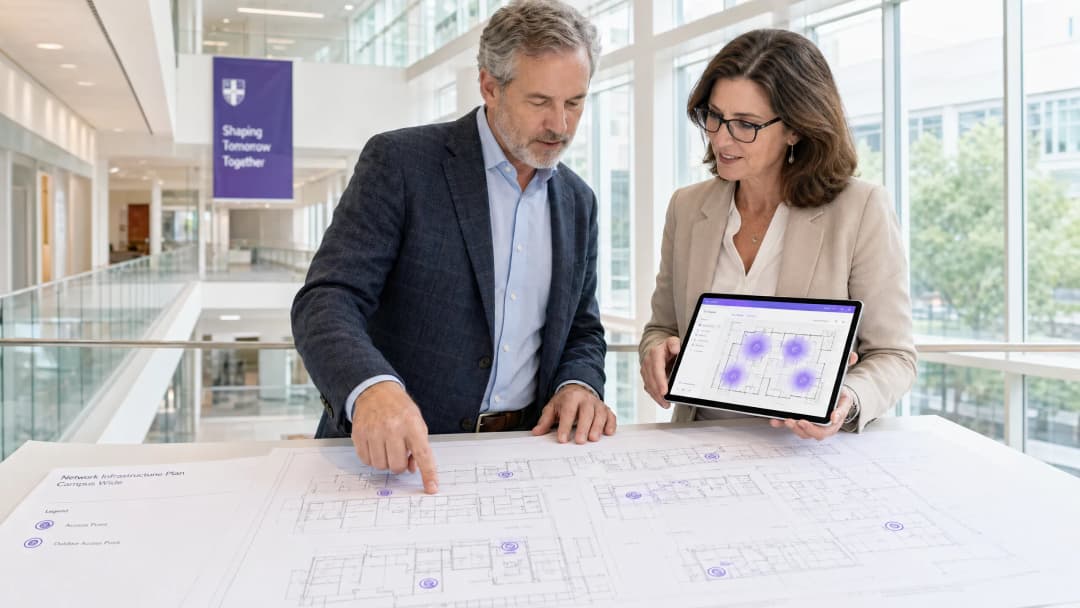
Sintesi Esecutiva
Per i team IT universitari e i gestori di sedi fisiche, le reti WiFi di campus non sono più un servizio accessorio - costituiscono un'infrastruttura critica. Il moderno ambiente dell'istruzione superiore richiede reti wireless ad alta densità e ad alta velocità di trasmissione in grado di supportare più dispositivi per utente, applicazioni ad uso intensivo di banda e spostamenti fluidi attraverso spazi fisici molto estesi. Questa guida delinea l'architettura tecnica, la strategia di implementazione e le migliori pratiche operative necessarie per creare una rete wireless di campus altamente resiliente. Ci concentriamo sull'esecuzione pratica - dalla pianificazione RF e la selezione degli access point (AP) all'architettura dei controller e all'onboarding sicuro - assicurando che la tua implementazione offra ROI, conformità e un'esperienza utente fluida. Sia che si tratti di un singolo edificio o di un campus multi-sito, i principi qui esposti si applicano ugualmente agli ambienti dell' ospitalità , del retail , della sanità e dei trasporti .
Approfondimento Tecnico: Architettura e Standard
La creazione di una rete wireless di campus richiede un approccio strutturato alla topologia e l'adesione ai moderni standard wireless. Le decisioni prese in fase di progettazione dell'architettura determinano la scalabilità, la sicurezza e le prestazioni di tutto ciò che segue.
L'Architettura a Tre Livelli
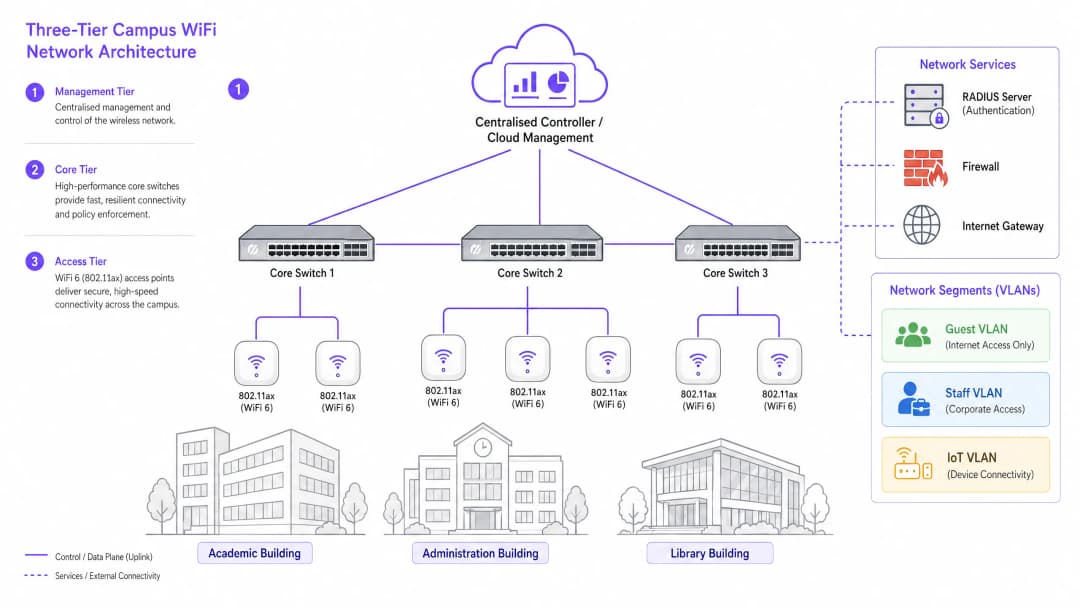
Le reti di campus di livello enterprise utilizzano un'architettura strutturata a tre livelli per garantire scalabilità, resilienza e prestazioni. I tre livelli sono i seguenti:
Livello di Gestione/Core: Il sistema nervoso centrale della rete. Include switch di routing core ad alta capacità e il controller WLAN centrale (sia esso distribuito on-premises o gestito in cloud). Il controller gestisce la regolazione RF per tutti gli AP, i passaggi di roaming, l'applicazione delle policy globali e la gestione del firmware. I controller gestiti in cloud sono diventati la scelta predominante per le nuove installazioni, semplificando la gestione multi-sito e riducendo i costi dell'hardware on-premises.
Livello di Distribuzione: Aggrega il traffico proveniente dal livello di accesso, applica le policy di routing e fornisce ridondanza prima che i dati vengano trasmessi al core. Nei campus più piccoli, questo livello viene spesso accorpato a quello core.
Livello di Accesso: Il perimetro della rete, composto dagli switch di rete PoE+ e dagli AP wireless stessi. Per le nuove installazioni, il PoE+ rappresenta lo standard minimo, poiché gli AP WiFi 6 richiedono una quantità di energia significativamente superiore rispetto ai loro predecessori.
Standard Wireless e Bande di Frequenza
Le distribuzioni moderne dovrebbero standardizzarsi su 802.11ax (WiFi 6) o WiFi 6E. Il WiFi 6 introduce funzionalità critiche ad alta densità, tra cui l'Orthogonal Frequency-Division Multiple Access (OFDMA), che consente a un singolo AP di servire più client contemporaneamente su sub-canali, e il Target Wake Time (TWT), che riduce il consumo di batteria sui dispositivi IoT. Il WiFi 6E estende queste funzionalità nella banda a 6GHz, fornendo una vasta gamma di spettro contiguo privo di interferenze da parte di dispositivi legacy - un vantaggio significativo in ambienti ad alta densità come aule magne e sale conferenze.
| Standard | Bande | Throughput Max | Caratteristiche Chiave | Miglior Caso d'Uso |
|---|---|---|---|---|
| 802.11n (WiFi 4) | 2.4GHz / 5GHz | 600 Mbps | MIMO | Solo supporto legacy |
| 802.11ac (WiFi 5) | 5GHz | 3.5 Gbps | MU-MIMO | Distribuzioni esistenti |
| 802.11ax (WiFi 6) | 2.4GHz / 5GHz | 9.6 Gbps | OFDMA, TWT | Nuove distribuzioni di campus |
| 802.11ax (WiFi 6E) | 2.4 / 5 / 6GHz | 9.6 Gbps | Spettro 6GHz | Alta densità, a prova di futuro |
Sicurezza e Autenticazione
La sicurezza deve essere strutturata a livelli. Per il personale e gli studenti iscritti, richiedi l'autenticazione 802.1X/EAP collegata all'identity provider dell'università (Active Directory, LDAP o un servizio di identità cloud). Questo fornisce un accesso crittografato basato su credenziali che soddisfa i requisiti di standard come ISO 27001 e Cyber Essentials. Per gli utenti temporanei - accademici in visita, delegati di conferenze e pubblico generico - è necessario un Captive Portal sicuro. L'integrazione di una solida soluzione di Guest WiFi garantisce un onboarding conforme al GDPR, splash page personalizzabili e la possibilità di raccogliere informazioni di valore operativo attraverso WiFi Analytics . Tutto il traffico wireless dovrebbe essere crittografato con WPA3, lo standard attuale, che offre una protezione molto più forte contro gli attacchi brute-force rispetto al suo predecessore, WPA2. Per una revisione completa dello stato di sicurezza dei tuoi access point, consulta la nostra Access Point Security: Your 2026 Enterprise Guide .
Guida all'Implementazione: Dal Rilevamento alla Distribuzione
La distribuzione di una rete di campus è un processo a fasi che richiede una pianificazione meticolosa prima che venga tirato un singolo cavo o montato un AP.
Fase 1: Rilevamento Attivo del Sito
Per ambienti di campus complessi, un rilevamento predittivo basato sulle planimetrie non è sufficiente. È necessario condurre un rilevamento RF attivo e in loco. I materiali da costruzione delle università più vecchie - muratura spessa, rete metallica, cemento armato - attenuano il segnale in modi imprevedibili. Il rilevamento identifica le zone d'ombra RF e aiuta a determinare il posizionamento ottimale degli AP sia per la copertura che per la capacità. Il risultato dovrebbe essere una mappa di calore convalidata che mostri la potenza del segnale, l'utilizzo dei canali e i livelli di interferenza per ogni piano.
Fase 2: Pianificazione della Capacità
Storicamente, le reti erano progettate per la copertura - garantendo che il segnale raggiungesse ogni angolo. Oggi, la progettazione è guidata dalla capacità. In un'aula magna da 300 posti, ipotizza tre dispositivi per studente: un laptop, uno smartphone e un tablet. Ciò richiede AP ad alta densità con antenne direzionali per suddividere l'ambiente in zone, piuttosto che affidarsi a un singolo AP omnidirezionale, che si sovraccaricherebbe rapidamente. La regola empirica per le installazioni ad alta densità è di un AP ogni 25-30 utenti contemporanei negli ambienti delle aule magne.
Fase 3: Posizionamento degli AP e Pianificazione dei Canali
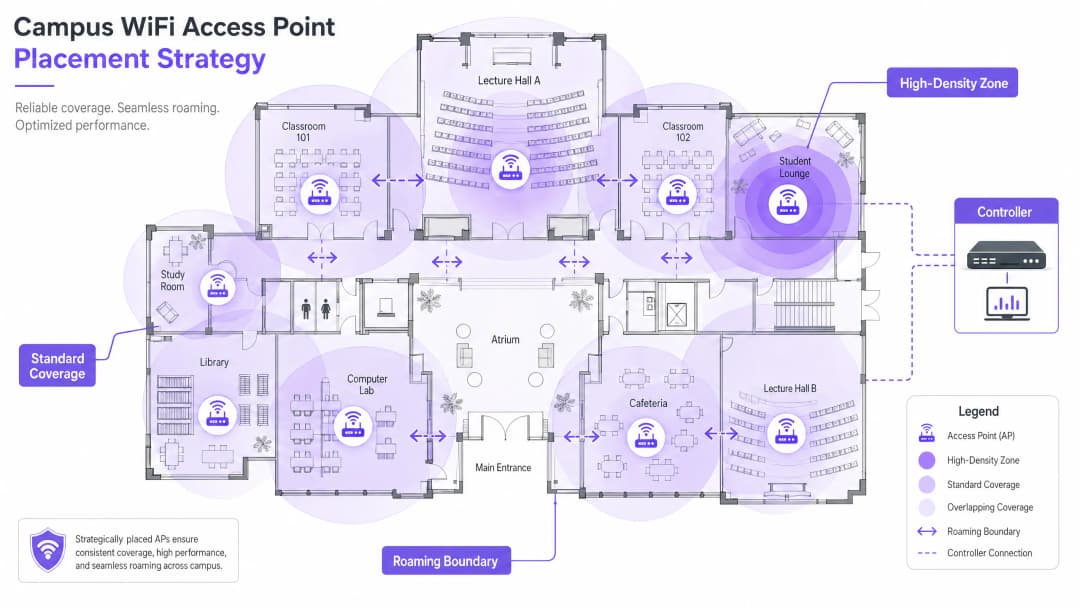
Una pianificazione attenta dei canali è essenziale per ridurre al minimo l'interferenza co-canale (CCI). Utilizza canali non sovrapposti (1, 6 e 11 su 2.4GHz; assegnazione dinamica su 5GHz e 6GHz). Assicurati che gli AP siano posizionati strategicamente - evita di montarli sopra i controsoffitti o dietro i condotti dell'aria condizionata, il che degrada le prestazioni. Per gli spazi con soffitti alti, utilizza AP con antenne direzionali rivolte verso il basso.
Fase 4: Configurazione del Roaming Senza Interruzioni
Mentre gli utenti si spostano tra gli edifici, le loro connessioni devono passare senza problemi da un AP all'altro. Implementa la tripletta del roaming veloce: 802.11k (report dei vicini), 802.11v (gestione della transizione BSS) e 802.11r (transizione BSS veloce). Insieme, questi standard consentono ai dispositivi client di prendere decisioni di roaming intelligenti e di completare i passaggi di autenticazione in millisecondi anziché in secondi - fondamentale per il VoIP e le applicazioni in tempo reale.
Regolare la potenza di trasmissione è altrettanto importante. Se la potenza Tx è troppo alta, i dispositivi client rimangono agganciati ad AP lontani ("client appiccicosi") invece di effettuare il roaming verso uno più vicino. Riduci la potenza di trasmissione per creare celle di copertura sovrapposte ma di dimensioni adeguate, e disabilita le velocità di trasmissione dati legacy (1, 2, 5.5 Mbps) per costringere i dispositivi a interrompere le connessioni deboli e a effettuare il roaming.
Fase 5: Segmentazione VLAN e Applicazione delle Policy
Crea VLAN dedicate per ciascuna classe di utenti: personale, studenti, ospiti e dispositivi IoT. I dispositivi IoT (sistemi di gestione degli edifici, telecamere di sicurezza, segnaletica digitale) non devono mai condividere un segmento di rete con i dispositivi degli utenti. Applica regole di firewall rigide tra le VLAN, consentendo solo la comunicazione minima necessaria. Per la sicurezza a livello DNS e la protezione contro i domini dannosi, consulta la nostra guida su come proteggere la tua rete con un DNS robusto e la sicurezza .
Best Practice per Ambienti Campus
Le seguenti raccomandazioni, indipendenti dai fornitori, rappresentano lo standard del settore per le grandi installazioni wireless.
Band steering: Spingi i dispositivi client compatibili sulle bande meno congestionate a 5GHz o 6GHz, riservando la banda a 2.4GHz per i dispositivi legacy e i sensori IoT a lungo raggio. La maggior parte dei controller moderni supporta il band steering automatico.
Soglie RSSI minime: configurare il controller per rifiutare le connessioni da client la cui forza del segnale scende al di sotto di una soglia definita (tipicamente -75 dBm). Ciò impedisce ai client con segnale debole di compromettere l'esperienza di tutti gli altri utenti sull'AP.
Wireless Intrusion Prevention (WIPS): abilitare il WIPS sul controller per rilevare e contenere AP non autorizzati (router personali collegati da studenti o personale, che causano interferenze e introducono vulnerabilità di sicurezza).
Copertura esterna: estendere la rete a cortili e aree salotto all'aperto utilizzando AP robusti e resistenti alle intemperie con antenne direzionali. Gli AP esterni devono resistere a temperature estreme, umidità e manomissioni.
Gestione dei lease DHCP: nelle aree ad alto ricambio (mense, biblioteche), ridurre i tempi di lease DHCP della rete guest a una o due ore per evitare l'esaurimento degli indirizzi IP.
L'attenzione di Purple per l'istruzione superiore sta crescendo rapidamente - leggi l'annuncio del VP of Education Tim Peers che entra a far parte del team e cosa significa per la strategia della rete del campus.
Risoluzione dei problemi e mitigazione dei rischi
Anche le reti ben progettate riscontrano problemi operativi. Di seguito sono riportati i casi di guasto più comuni e le relative mitigazioni.
| Caso di guasto | Sintomo | Causa principale | Mitigazione |
|---|---|---|---|
| Client persistenti (sticky clients) | Prestazioni scarse nonostante il segnale forte | Potenza di trasmissione troppo alta; velocità legacy abilitate | Ridurre la potenza di trasmissione; disabilitare le velocità inferiori a 11 Mbps |
| Esaurimento DHCP | Gli utenti non riescono a connettersi | Tempi di lease troppo lunghi; sottorete troppo piccola | Ridurre i tempi di lease; ampliare la sottorete |
| Interferenza co-canale | Rendimento lento su un intero piano | Scarsa pianificazione dei canali | Implementare l'assegnazione dinamica dei canali |
| AP non autorizzati | Interferenze; avvisi di sicurezza | Router personali non autorizzati | Abilitare WIPS; eseguire audit RF regolari |
| Errori di autenticazione | Gli utenti non riescono ad accedere | Server RADIUS sovraccarico o configurato in modo errato | Distribuire RADIUS ridondanti; monitorare i log di autenticazione |
ROI e impatto sul business
Per la dirigenza universitaria e i direttori delle operazioni delle strutture, il ROI di una rete ad alte prestazioni va ben oltre la connettività di base. Una solida rete wireless di campus supporta direttamente i moderni strumenti didattici, le iniziative di campus digitale e i programmi di efficienza operativa.
Sfruttare i WiFi Analytics fornisce informazioni utili su affluenza, tempo di permanenza e utilizzo dello spazio. Questi dati possono supportare le decisioni sulla gestione immobiliare (identificando edifici sottoutilizzati o spazi a picco di domanda) e ottimizzare l'uso del sistema HVAC in base ai dati di occupazione reali, offrendo risparmi energetici misurabili. Queste sono le stesse strategie analitiche implementate dagli operatori nei settori del retail e dell' hospitality , ora sempre più applicate ai contesti universitari.
Per le organizzazioni che distribuiscono il WiFi per gli ospiti come parte di una più ampia strategia di engagement digitale, una piattaforma di Guest WiFi ben configurata supporta anche l'automazione del marketing, il coinvolgimento degli ex studenti e le iniziative dedicate all'esperienza dei visitatori. Per i siti più piccoli o i campus secondari, la nostra guida su come configurare un hotspot WiFi per la tua attività offre un punto di partenza pratico.
-
Ascolta il briefing
Definizioni chiave
802.11ax (WiFi 6)
L'attuale standard IEEE per le reti wireless, progettato specificamente per migliorare l'efficienza e le prestazioni in ambienti ad alta densità attraverso OFDMA, MU-MIMO e TWT.
Essenziale per le moderne installazioni nei campus per supportare un volume elevato di dispositivi simultanei senza compromettere le prestazioni.
Co-Channel Interference (CCI)
Interferenza che si verifica quando più access point nella stessa area operano sullo stesso canale, costringendo i dispositivi ad attendere che il canale sia libero prima di trasmettere.
Una scarsa pianificazione dei canali porta a un'elevata CCI, che riduce drasticamente la velocità di trasmissione della rete anche quando la potenza del segnale è forte.
VLAN (Virtual Local Area Network)
Una sottorete logica che raggruppa un insieme di dispositivi, isolando il loro traffico da quello di altri dispositivi presenti sulla stessa infrastruttura di rete fisica.
Cruciale per la sicurezza e le prestazioni; la separazione del traffico di ospiti, personale, studenti e IoT impedisce i movimenti laterali e riduce la congestione.
802.1X
Uno standard IEEE per il Network Access Control basato su porte, che fornisce un meccanismo di autenticazione basato su credenziali per i dispositivi che si connettono a una LAN o WLAN tramite un server RADIUS.
Lo standard obbligatorio per l'autenticazione sicura di livello enterprise per il personale e gli studenti registrati sulle reti dei campus.
Captive Portal
Una pagina web con cui l'utente di una rete ad accesso pubblico deve interagire prima che gli venga concesso l'accesso alla rete, tipicamente utilizzata per l'accettazione dei termini di servizio, l'autenticazione e l'acquisizione dei dati.
Utilizzato per l'onboarding degli ospiti sulle reti dei campus; deve essere conforme al GDPR e integrato con una piattaforma di analytics per generare valore operativo.
OFDMA (Orthogonal Frequency-Division Multiple Access)
Una versione multi-utente di OFDM che consente a un singolo access point di servire contemporaneamente più client su diversi sotto-canali all'interno della stessa trasmissione.
Una funzionalità chiave del WiFi 6 che migliora drasticamente l'efficienza in ambienti ad alta densità come le aule universitarie.
Sticky Client
Un dispositivo wireless che rimane connesso a un AP distante con un segnale debole, anche quando è disponibile un AP più vicino con un segnale più forte, a causa della riluttanza del client ad avviare un roaming.
Causa scarse prestazioni per l'utente interessato e un carico non necessario sull'AP distante; si attenua con una corretta regolazione RF e disabilitando i data rate obsoleti.
RSSI (Received Signal Strength Indicator)
Una misurazione del livello di potenza di un segnale radio ricevuto, tipicamente espressa in dBm (decibel rispetto a un milliwatt), dove i valori più vicini allo zero indicano un segnale più forte.
Utilizzato durante i site survey per determinare i limiti di copertura e durante la configurazione dei controller per impostare le soglie minime di connessione.
PoE+ (Power over Ethernet Plus)
Uno standard IEEE 802.3at che eroga fino a 30 watt di potenza su un cablaggio Ethernet standard, sufficienti ad alimentare gli access point WiFi 6 senza la necessità di un alimentatore separato.
Lo standard PoE minimo richiesto per le nuove implementazioni nei campus che utilizzano AP WiFi 6.
Esempi pratici
Un'università del Russell Group sta aggiornando una biblioteca del XIX secolo, classificata come edificio storico di interesse storico culturale (Grade II), per supportare 500 connessioni simultanee di studenti. L'edificio presenta spessi muri in pietra, soffitti alti e pareti divisorie interne decorate. Come dovrebbe procedere il team IT per l'implementazione della rete wireless?
Fase 1: Commissionare un'indagine RF attiva in loco - la modellazione predittiva sarebbe altamente imprecisa a causa dei muri in pietra e della planimetria irregolare. Utilizzare un software professionale per indagini WiFi per generare mappe di calore convalidate. Fase 2: Distribuire AP WiFi 6 ad alta densità con antenne patch direzionali focalizzate verso il basso nelle aree di lettura, evitando il rimbalzo del segnale sui soffitti alti. Prevedere un AP ogni 25 utenti simultanei. Fase 3: Implementare una VLAN dedicata per l'accesso degli studenti tramite 802.1X collegata all'Active Directory dell'università, e una VLAN guest separata con un captive portal per i ricercatori in visita e gli utenti pubblici. Fase 4: Regolare la potenza di trasmissione degli AP per creare celle di copertura della dimensione appropriata, evitando client persistenti (sticky client) quando gli studenti si spostano tra le sale di lettura. Fase 5: Disabilitare le velocità di trasmissione dati legacy (1, 2, 5.5 Mbps) per forzare il roaming. Fase 6: Distribuire un controller gestito in cloud per la visibilità centralizzata e l'ottimizzazione RF.
Uno stadio di calcio della Premier League deve fornire copertura WiFi per 40.000 connessioni simultanee nei giorni delle partite, con il requisito secondario di raccogliere dati analitici sul movimento dei tifosi e sui tempi di permanenza durante i giorni degli eventi.
Fase 1: Installare AP sotto i sedili con antenne altamente direzionali per creare microcelle per specifiche sezioni di posti a sedere - questo è l'unico approccio praticabile a questa densità. Fase 2: Disabilitare le radio a 2.4GHz sulla maggior parte degli AP per eliminare l'interferenza co-canale nell'ambiente RF denso; forzare tutto il traffico a 5GHz e 6GHz. Fase 3: Abilitare 802.11k/v/r per facilitare il roaming rapido quando i tifosi si spostano attraverso i corridoi durante l'intervallo. Fase 4: Implementare un captive portal tramite la piattaforma Guest WiFi di Purple per un onboarding sicuro e ad alto rendimento, catturando dati analitici basati sul consenso (opt-in) sul movimento e sui tempi di permanenza dei tifosi. Fase 5: Segmentare la rete con VLAN separate per i tifosi, il personale operativo, le apparecchiature di trasmissione e i sistemi di pagamento (point-of-sale). Fase 6: Garantire la conformità PCI DSS sul segmento di rete dedicato ai pagamenti.
Domande di esercitazione
Q1. Stai installando degli AP in un nuovo blocco di dormitori universitari. L'edificio presenta lunghi corridoi centrali con le stanze degli studenti su entrambi i lati, separate da solidi muri di cemento. Dovresti posizionare gli AP nei corridoi centrali o all'interno delle singole stanze?
Suggerimento: Considera l'attenuazione causata dai muri di cemento e dalle porte tagliafuoco, nonché la capacità richiesta per ciascuna stanza.
Visualizza risposta modello
Installa gli AP all'interno delle stanze degli studenti, utilizzando AP a parete (wall-plate AP) che si montano a filo muro e si collegano tramite la porta Ethernet presente nella stanza. Le installazioni nei corridoi causano una scarsa penetrazione del segnale nelle stanze a causa dei muri in cemento e delle pesanti porte tagliafuoco, e non riescono a fornire la capacità necessaria per supportare i molteplici dispositivi di ciascun studente. Gli AP a parete offrono una connessione dedicata e di alta qualità per ogni stanza e rappresentano l'approccio standard del settore per gli alloggi studenteschi.
Q2. Gli utenti della mensa universitaria segnalano una velocità del WiFi ridotta durante l'ora di pranzo, nonostante i loro dispositivi mostrino il massimo delle barre di potenza del segnale. Quali sono le due cause più probabili e come faresti a indagare su ciascuna di esse?
Suggerimento: La potenza del segnale non equivale alla capacità. Considera sia l'ambiente RF che il numero di utenti simultanei.
Visualizza risposta modello
Le due cause più probabili sono: (1) Sovraccarico di capacità degli AP - gli AP sono sopraffatti dall'elevato numero di dispositivi simultanei durante l'ora di punta del pranzo. Esaminare il problema controllando la dashboard del controller per verificare il numero di client per AP e l'utilizzo della larghezza di banda. Se gli AP servono più di 80 client, è necessario aggiungere altri AP o effettuare un upgrade con AP ad alta densità. (2) Interferenza co-canale - più AP nella caffetteria operano sullo stesso canale, costringendo i dispositivi ad attendere che lo spettro radio sia libero. Esaminare il problema utilizzando un analizzatore di spettro o la dashboard dello stato RF del controller. Risolvere abilitando l'assegnazione dinamica dei canali e garantendo un'allocazione dei canali non sovrapposti.
Q3. La vostra università ospita un'importante conferenza internazionale con 800 delegati, tutti bisognosi di accesso WiFi per tre giorni. La conferenza si tiene in un edificio che normalmente serve 200 dipendenti. Come approcciate il potenziamento temporaneo della rete?
Suggerimento: Considerare sia l'aumento temporaneo della capacità sia la separazione di sicurezza tra i delegati della conferenza e il personale permanente.
Visualizza risposta modello
Distribuire AP temporanei ad alta densità nella sala conferenze principale e nelle sale riunioni, collegati all'infrastruttura di switching esistente tramite switch PoE+ temporanei se la capacità delle porte è insufficiente. Creare una VLAN dedicata alla conferenza, completamente isolata dalla rete del personale, con il proprio scope DHCP e breakout internet. Distribuire un Captive Portal personalizzato tramite una piattaforma WiFi per ospiti per l'onboarding dei delegati, acquisendo dati di consenso per l'analisi post-evento. Ridurre i tempi di lease DHCP a due ore per gestire la rotazione degli indirizzi IP durante i tre giorni dell'evento. Al termine della conferenza, rimuovere gli AP temporanei e dismettere la VLAN della conferenza.
Continua a leggere questa serie
Staff WiFi vs. Guest WiFi: Best Practices for Corporate Network Segmentation
Una guida tecnica completa per i leader IT sulla segmentazione delle reti WiFi per il personale e gli ospiti. Copre l'architettura VLAN, l'autenticazione 802.1X, le policy dei firewall e l'impatto aziendale di una progettazione di rete sicura.
Soluzioni WiFi per appartamenti: una guida completa per le aziende
Questa guida copre l'architettura, l'implementazione e il business case per le soluzioni WiFi per appartamenti nelle proprietà Build to Rent e nelle unità abitative plurifamiliari. Spiega come la tecnologia Identity Pre-Shared Key (iPSK) crei bolle di rete sicure e isolate per ogni residente, supportando al contempo i dispositivi intelligenti e l'IoT. Gli sviluppatori immobiliari, i proprietari e gli operatori BTR troveranno indicazioni pratiche per l'implementazione, dati sul ROI e scenari di implementazione pratici.
Cox business managed WiFi: a comprehensive guide for businesses
Questa guida spiega in dettaglio come gli sviluppatori immobiliari e gli operatori BTR possano implementare reti scalabili e sicure utilizzando Cox Business managed WiFi. Copre l'architettura di rete, l'implementazione di hardware indipendente dai fornitori e l'impatto aziendale del passaggio della connettività da problema operativo a infrastruttura affidabile.