
How to Build a Campus WiFi Network: A University IT Guide
This technical guide provides a comprehensive blueprint for designing and deploying high-density campus WiFi networks, covering everything from active site surveys and access point placement to controller architecture, seamless roaming, and secure guest onboarding. It is written for IT managers, network architects, and CTOs at universities and large venues who need actionable guidance to plan and execute a wireless deployment this quarter. The guide also maps Purple's Guest WiFi and analytics platform to real integration points within the deployment lifecycle.
Listen to this guide
View podcast transcript
Part of our core series: Guest WiFi Guide →
Executive Summary
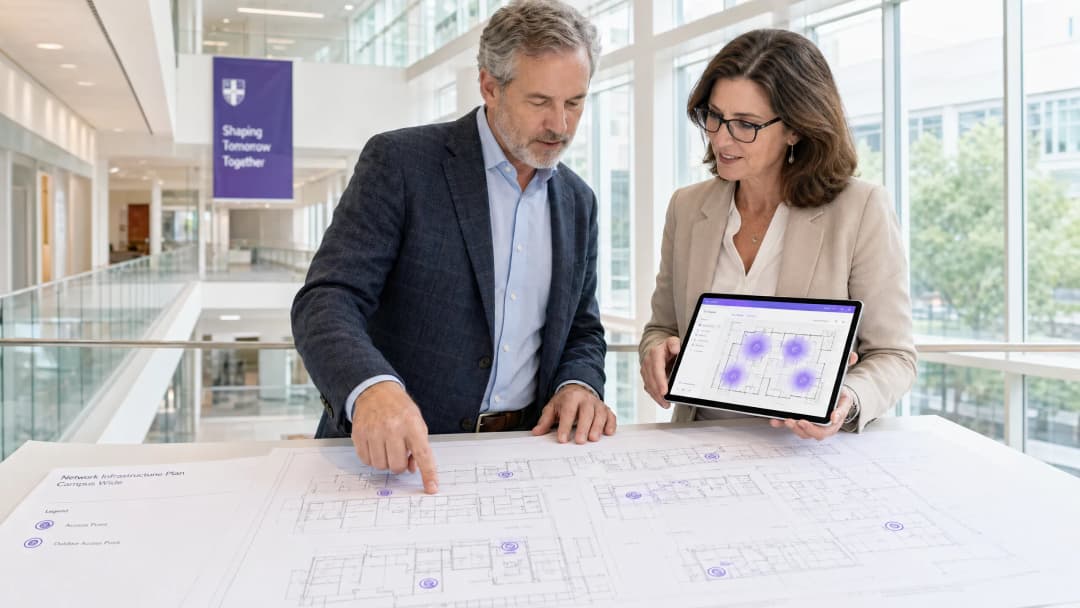
For university IT teams and venue operators, campus WiFi networks are no longer an ancillary facility - they are critical infrastructure. The modern higher education environment demands high-density, high-throughput wireless networks that support multiple devices per user, bandwidth-hungry applications, and seamless movement across expansive physical spaces. This guide outlines the technical architecture, deployment strategy, and operational best practices needed to build a highly resilient campus wireless network. We focus on practical execution - from RF planning and access point (AP) selection to controller architecture and secure onboarding - ensuring your deployment delivers ROI, compliance, and a smooth user experience. Whether you are deploying across a single building or a multi-site campus, the principles here apply equally to hospitality, retail, healthcare, and transportation environments.
Technical Deep-Dive: Architecture and Standards
Building a campus wireless network requires a structured approach to topology and adherence to modern wireless standards. The decisions made at the architecture stage determine the scalability, security, and performance of everything that follows.
The Three-Tier Architecture
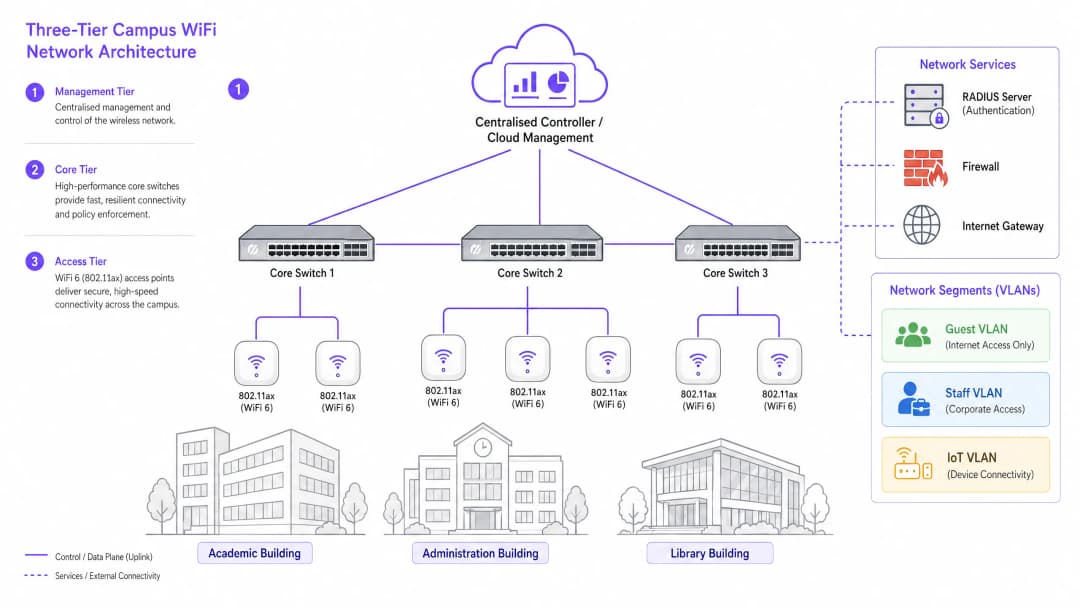
Enterprise-grade campus networks use a layered, three-tier architecture to ensure scalability, resilience, and performance. The three tiers are as follows:
Management/Core Tier: The central nervous system of the network. This includes high-capacity core routing switches and the central WLAN controller (whether deployed on-premises or cloud-managed). The controller handles RF management for all APs, roaming handoffs, global policy enforcement, and firmware management. Cloud-managed controllers have become the dominant choice for new deployments, simplifying multi-site management and reducing on-premises hardware costs.
Distribution Tier: Aggregates traffic from the access tier, applies routing policy, and provides redundancy before data is passed to the core. In smaller campuses, this tier is often collapsed into the core.
Access Tier: The edge of the network, comprising Power over Ethernet Plus (PoE+) edge switches and the wireless APs themselves. For new deployments, PoE+ is the minimum standard, as WiFi 6 APs draw significantly more power than their predecessors.
Wireless Standards and Frequency Bands
Modern deployments should standardize on 802.11ax (WiFi 6) or WiFi 6E. WiFi 6 introduces critical high-density capabilities, including Orthogonal Frequency-Division Multiple Access (OFDMA), which allows a single AP to serve multiple clients simultaneously on sub-channels, and Target Wake Time (TWT), which reduces battery drain on IoT devices. WiFi 6E extends these capabilities into the 6GHz band, providing a huge swathe of contiguous spectrum free from legacy-device interference - a significant advantage in high-density environments such as lecture halls and conference centers.
| Standard | Bands | Max Throughput | Key Features | Best Use Case |
|---|---|---|---|---|
| 802.11n (WiFi 4) | 2.4GHz / 5GHz | 600 Mbps | MIMO | Legacy support only |
| 802.11ac (WiFi 5) | 5GHz | 3.5 Gbps | MU-MIMO | Existing deployments |
| 802.11ax (WiFi 6) | 2.4GHz / 5GHz | 9.6 Gbps | OFDMA, TWT | New campus deployments |
| 802.11ax (WiFi 6E) | 2.4 / 5 / 6GHz | 9.6 Gbps | 6GHz spectrum | High density, future-proofing |
Security and Authentication
Security must be layered. For staff and enrolled students, mandate 802.1X/EAP authentication tied to the university's identity provider (Active Directory, LDAP, or a cloud identity service). This provides encrypted, credential-based access that satisfies the requirements of standards such as ISO 27001 and Cyber Essentials. For transient users - visiting academics, conference delegates, and members of the public - a secure Captive Portal is required. Integrating a robust Guest WiFi solution ensures CCPA/CPRA-compliant onboarding, customizable splash pages, and the ability to gather operationally valuable insight through WiFi Analytics. All wireless traffic should be encrypted with WPA3, the current standard, which offers far stronger protection against brute-force attacks than its predecessor, WPA2. For a comprehensive review of your access points' security posture, see our Access Point Security: Your 2026 Enterprise Guide.
Got questions about your specific setup?
Our team works with venue operators, IT managers, and network engineers across 80,000 venues. Book a 20-minute call and we will show you how others like you solved it.
Implementation Guide: From Survey to Deployment
Deploying a campus network is a phased process that demands meticulous planning before a single cable is pulled or an AP is mounted.
Phase 1: Active Site Survey
For complex campus environments, a predictive survey using floor plans is not enough. You must conduct an active, on-site RF survey. The building materials of older universities - thick masonry, metal mesh, reinforced concrete - attenuate signal in unpredictable ways. The survey identifies RF dead zones and helps determine optimal AP placement for both coverage and capacity. The output should be a validated heat map showing signal strength, channel utilization, and interference levels for every floor.
Phase 2: Capacity Planning
Historically, networks were designed for coverage - making sure the signal reached every corner. Today, design is driven by capacity. In a 300-seat lecture theater, assume three devices per student: a laptop, a cell phone, and a tablet. This calls for high-density APs with directional antennas to zone the room, rather than relying on a single omnidirectional AP, which would quickly become overloaded. The rule of thumb for high-density deployments is one AP per 25-30 concurrent users in lecture theater environments.
Phase 3: AP Placement and Channel Planning
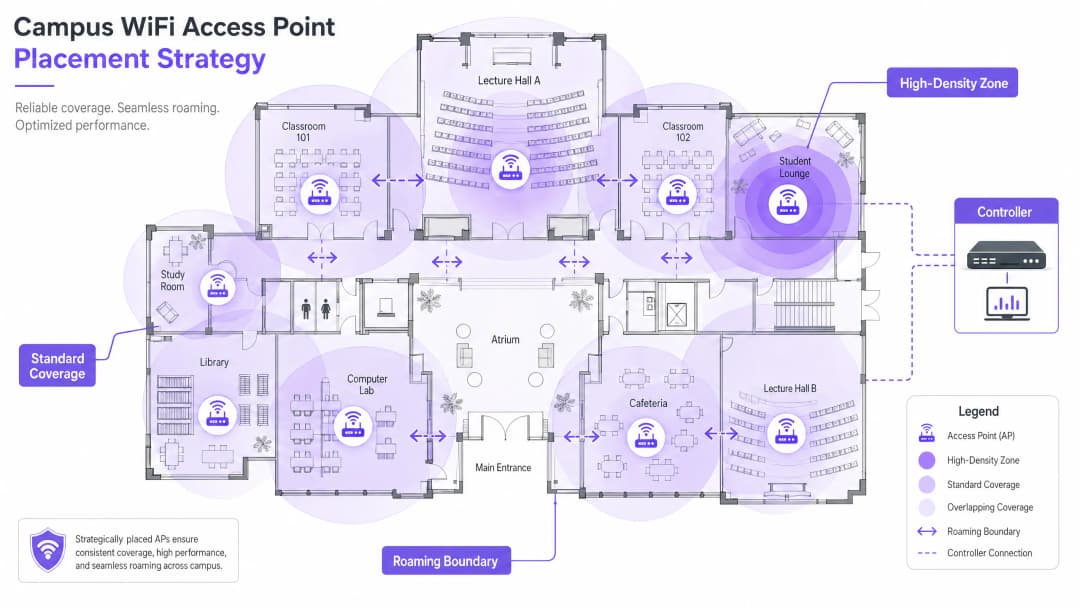
Careful channel planning is essential to minimize co-channel interference (CCI). Use non-overlapping channels (1, 6, and 11 on 2.4GHz; dynamic assignment on 5GHz and 6GHz). Ensure APs are placed strategically - avoid mounting them above suspended ceilings or behind air conditioning ducts, which degrades performance. For spaces with high ceilings, use APs with downward-facing directional antennas.
Phase 4: Configuring Seamless Roaming
As users move between buildings, their connections must hand off seamlessly between APs. Implement the fast roaming trifecta: 802.11k (neighbor reports), 802.11v (BSS transition management), and 802.11r (fast BSS transition). Together, these standards allow client devices to make intelligent roaming decisions and complete authentication handoffs in milliseconds rather than seconds - critical for VoIP and real-time applications.
Tuning transmit power is equally important. If Tx power is too high, client devices cling to distant APs ("sticky clients") instead of roaming to a closer one. Reduce transmit power to create overlapping but appropriately sized coverage cells, and disable legacy data rates (1, 2, 5.5 Mbps) to force devices to drop weak connections and roam.
Phase 5: VLAN Segmentation and Policy Enforcement
Create dedicated VLANs for each user class: staff, students, guests, and IoT devices. IoT devices (building management systems, security cameras, digital signage) must never share a network segment with user devices. Apply strict firewall rules between VLANs, permitting only the minimum necessary communication. For DNS-level security and protection against malicious domains, see our guide on how to protect your network with robust DNS and security.
Best Practices for Campus Environments
The following vendor-neutral recommendations represent industry-standard practice for large wireless deployments.
Band steering: Push capable client devices onto the less congested 5GHz or 6GHz bands, reserving 2.4GHz for legacy devices and long-range IoT sensors. Most modern controllers support automatic band steering.
Minimum RSSI thresholds: Configure the controller to reject connections from clients whose signal strength falls below a defined threshold (typically -75 dBm). This prevents weak-signal clients from degrading the experience for everyone else on the AP.
Wireless Intrusion Prevention (WIPS): Enable WIPS on the controller to detect and contain rogue APs (personal routers plugged in by students or staff, which cause interference and introduce security vulnerabilities).
Outdoor coverage: Extend the network to quadrangles and outdoor seating areas using ruggedized, weatherproof APs with directional antennas. Outdoor APs must withstand temperature extremes, moisture, and tampering.
DHCP lease management: In high-churn areas (cafeterias, libraries), shorten guest network DHCP lease times to one or two hours to prevent IP address exhaustion.
Purple's focus on higher education is growing rapidly - read about VP of Education Tim Peers joining the team and what it means for campus network strategy.
Troubleshooting and Risk Mitigation
Even well-designed networks encounter operational issues. Below are the most common failure modes and their mitigations.
| Failure Mode | Symptom | Root Cause | Mitigation |
|---|---|---|---|
| Sticky clients | Poor performance despite strong signal | Transmit power too high; legacy rates enabled | Reduce transmit power; disable rates below 11 Mbps |
| DHCP exhaustion | Users cannot connect | Lease times too long; subnet too small | Shorten lease times; enlarge the subnet |
| Co-channel interference | Slow throughput across a whole floor | Poor channel planning | Implement dynamic channel assignment |
| Rogue APs | Interference; security alerts | Unauthorized personal routers | Enable WIPS; conduct regular RF audits |
| Authentication failures | Users cannot log in | RADIUS server overloaded or misconfigured | Deploy redundant RADIUS; monitor auth logs |
ROI and Business Impact
For university leadership and venue operations directors, the ROI of a high-performance network extends far beyond basic connectivity. A robust campus wireless network directly supports modern teaching tools, digital campus initiatives, and operational efficiency programs.
Leveraging WiFi Analytics provides actionable intelligence on foot traffic, dwell time, and space utilization. This data can inform facilities decisions (identifying under-utilized buildings or peak-demand spaces) and optimize HVAC usage based on real occupancy data, delivering measurable energy savings. These are the same analytics strategies deployed by operators in retail and hospitality environments, now increasingly applied to campus settings.
For organizations deploying guest WiFi as part of a broader digital engagement strategy, a well-configured Guest WiFi platform also supports marketing automation, alumni engagement, and visitor experience initiatives. For smaller sites or satellite campuses, our guide on how to set up a WiFi hotspot for your business offers a practical starting point.
Listen to the Briefing
Key Definitions
802.11ax (WiFi 6)
The current IEEE standard for wireless networking, designed specifically to improve efficiency and performance in high-density environments through OFDMA, MU-MIMO, and TWT.
Essential for modern campus deployments to support a high volume of concurrent devices without performance degradation.
Co-Channel Interference (CCI)
Interference that occurs when multiple access points in the same area operate on the same channel, causing devices to wait for clear airtime before transmitting.
Poor channel planning leads to high CCI, which severely degrades network throughput even when signal strength is strong.
VLAN (Virtual Local Area Network)
A logical subnetwork that groups a collection of devices, isolating their traffic from other devices on the same physical network infrastructure.
Crucial for security and performance; separating guest, staff, student, and IoT traffic prevents lateral movement and reduces congestion.
802.1X
An IEEE standard for port-based Network Access Control, providing a credential-based authentication mechanism for devices connecting to a LAN or WLAN via a RADIUS server.
The mandatory standard for secure, enterprise-grade authentication for staff and enrolled students on campus networks.
Captive Portal
A web page that a user of a public-access network must interact with before network access is granted, typically used for terms of service acceptance, authentication, and data capture.
Used for guest onboarding on campus networks; must be CCPA/CPRA-compliant and integrated with an analytics platform for operational value.
OFDMA (Orthogonal Frequency-Division Multiple Access)
A multi-user version of OFDM that allows a single access point to simultaneously serve multiple clients on different sub-channels within the same transmission.
A key WiFi 6 feature that dramatically improves efficiency in high-density environments like lecture halls.
Sticky Client
A wireless device that remains connected to a distant AP with a weak signal, even when a closer AP with a stronger signal is available, due to the client's reluctance to initiate a roam.
Causes poor performance for the affected user and unnecessary load on the distant AP; mitigated by proper RF tuning and disabling legacy data rates.
RSSI (Received Signal Strength Indicator)
A measurement of the power level of a received radio signal, typically expressed in dBm (decibels relative to one milliwatt), where values closer to zero indicate a stronger signal.
Used during site surveys to determine coverage boundaries and during controller configuration to set minimum connection thresholds.
PoE+ (Power over Ethernet Plus)
An IEEE 802.3at standard that delivers up to 30 watts of power over standard Ethernet cabling, sufficient to power WiFi 6 access points without a separate power supply.
The minimum PoE standard required for new campus deployments using WiFi 6 APs.
Worked Examples
A prestigious research university is upgrading a historic, 19th-century library to support 500 concurrent student connections. The building features thick stone walls, high ceilings, and ornate internal partitions. How should the IT team approach the wireless deployment?
Step 1: Commission an active, on-site RF survey - predictive modeling will be highly inaccurate due to the stone walls and irregular floor plan. Use professional WiFi survey software to generate validated heat maps. Step 2: Deploy high-density WiFi 6 APs with directional patch antennas focused downward into reading areas, avoiding signal bounce off high ceilings. Target one AP per 25 concurrent users. Step 3: Implement a dedicated VLAN for student access via 802.1X linked to the university's Active Directory, and a separate guest VLAN with a captive portal for visiting researchers and public users. Step 4: Tune AP transmit power to create appropriately sized coverage cells, preventing sticky clients as students move between reading rooms. Step 5: Disable legacy data rates (1, 2, 5.5 Mbps) to enforce roaming. Step 6: Deploy a cloud-managed controller for centralized visibility and RF optimization.
A major league football stadium needs to provide WiFi coverage for 40,000 concurrent connections on game days, with a secondary requirement for event-day analytics on fan movement and dwell times.
Step 1: Deploy under-seat APs with highly directional antennas to create micro-cells for specific seating sections - this is the only viable approach at this density. Step 2: Disable 2.4GHz radios on the majority of APs to eliminate Co-Channel Interference in the dense RF environment; force all traffic to 5GHz and 6GHz. Step 3: Enable 802.11k/v/r to facilitate rapid roaming as fans move through concourses during halftime. Step 4: Implement a captive portal via Purple's Guest WiFi platform for secure, high-throughput onboarding, capturing opt-in analytics data on fan movement and dwell times. Step 5: Segment the network with separate VLANs for fans, operations staff, broadcast equipment, and point-of-sale systems. Step 6: Ensure PCI DSS compliance on the payment network segment.
Practice Questions
Q1. You are deploying APs in a new university dormitory block. The building has long central corridors with student rooms on either side, separated by solid concrete walls. Should you place APs in the central corridors or inside the individual dorm rooms?
Hint: Consider the attenuation caused by concrete walls and fire doors, and the capacity required per room.
View model answer
Deploy APs inside the dorm rooms, using wall-plate APs that mount flush to the wall and connect via the in-room Ethernet port. Corridor deployments result in poor signal penetration into rooms due to concrete walls and heavy fire doors, and fail to provide the per-room capacity needed for multiple devices per student. Wall-plate APs provide a dedicated, high-quality connection for each room and are the industry-standard approach for Student Housing.
Q2. Users in the university cafeteria are reporting slow WiFi speeds during the lunch period, despite their devices showing full signal strength bars. What are the two most likely causes, and how would you investigate each?
Hint: Signal strength does not equal capacity. Consider both the RF environment and the number of concurrent users.
View model answer
The two most likely causes are: (1) AP capacity overload - the APs are overwhelmed by the sheer number of concurrent devices during the lunch rush. Investigate by checking the controller dashboard for client counts per AP and throughput utilization. If APs are serving 80+ clients, additional APs or a high-density AP upgrade is required. (2) Co-Channel Interference - multiple APs in the cafeteria are operating on the same channel, causing devices to wait for clear airtime. Investigate using a spectrum analyzer or the controller's RF health dashboard. Resolve by enabling dynamic channel assignment and ensuring non-overlapping channel allocation.
Q3. Your university is hosting a major international conference with 800 delegates, all of whom will need WiFi access for three days. The conference is held in a building that normally serves 200 staff. How do you approach the temporary network uplift?
Hint: Consider both the temporary capacity increase and the security separation between conference delegates and permanent staff.
View model answer
Deploy temporary high-density APs in the main conference hall and breakout rooms, connected to the existing switching infrastructure via temporary PoE+ switches if port capacity is insufficient. Create a dedicated conference VLAN, completely isolated from the staff network, with its own DHCP scope and internet breakout. Deploy a branded Captive Portal via a guest WiFi platform for delegate onboarding, capturing opt-in data for post-event analytics. Reduce DHCP lease times to two hours to manage IP address churn across the three-day event. After the conference, remove temporary APs and decommission the conference VLAN.
Continue reading in this series
Staff WiFi vs. Guest WiFi: Best Practices for Corporate Network Segmentation
A comprehensive technical guide for IT leaders on segmenting staff and guest WiFi networks. It covers VLAN architecture, 802.1X authentication, firewall policies, and the business impact of secure network design.
Hotel Guest WiFi Management: Integrating PMS, Portals, and Brand Standards
This technical guide details how to architect enterprise-grade hotel WiFi networks, focusing on VLAN segmentation, PMS integration for automated session management, and captive portal optimisation for GDPR-compliant data capture.
How to Set Up Guest WiFi: A Secure Enterprise Configuration Guide
This authoritative guide provides IT leaders and network architects with a definitive blueprint for deploying secure enterprise guest WiFi. It covers essential architecture, WPA3 migration, VLAN segmentation, and captive portal integration to protect internal systems while capturing compliant first-party data.
Got questions about your specific setup?
Our team works with venue operators, IT managers, and network engineers across 80,000 venues. Book a 20-minute call and we will show you how others like you solved it.