
Apartment WiFi solutions: a comprehensive guide for businesses
This guide covers the architecture, deployment, and business case for apartment WiFi solutions in Build to Rent and multi-dwelling unit properties. It explains how Identity Pre-Shared Key (iPSK) technology creates secure, isolated network bubbles for each resident while supporting smart devices and IoT. Property developers, landlords, and BTR operators will find actionable deployment guidance, ROI data, and worked implementation scenarios.
Video overview
Listen to this guide
View podcast transcript
Part of our core series: Multi-Tenant WiFi Guide →
Executive summary
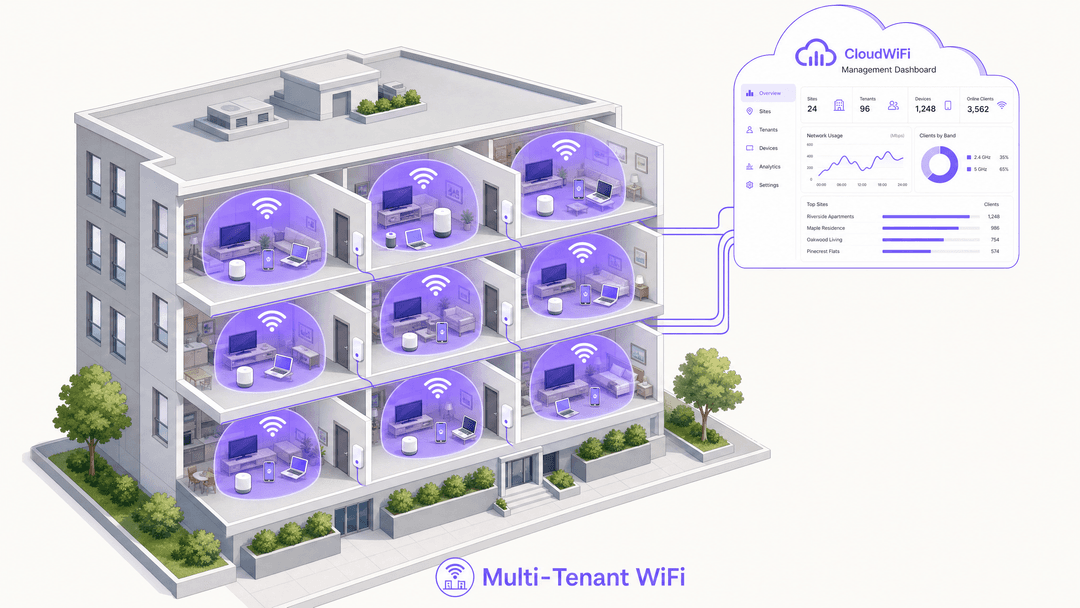
Multi-tenant WiFi is not guest WiFi. In Build to Rent (BTR) and multi-dwelling unit (MDU) environments, residents expect an at-home network experience from day one. They need smart televisions, game consoles, and IoT devices to discover each other seamlessly while remaining completely isolated from the apartment next door. Standard captive portals and shared passwords fail on both counts.
The technical answer is Identity-Based Networks using iPSK (Identity Pre-Shared Key). This architecture assigns each resident a unique WiFi key, which the cloud RADIUS server uses to dynamically place every device into a private VLAN. The result is a secure, persistent network bubble that follows the resident throughout the property.
For property developers and BTR operators, deploying managed WiFi as a software overlay on enterprise hardware converts a cost centre into a revenue-generating amenity. According to Parks Associates (2025), 70% of MDU owners report that WiFi helps attract residents and almost 80% say it increases property value. Rent premiums of £15-30 per unit per month are achievable in the UK BTR market, according to Purple's own deployment data.
This guide covers the technical architecture, a five-phase deployment process, real-world scenarios, and the compliance requirements your legal team will ask about.
Technical deep-dive
The device isolation problem
In a standard Guest WiFi deployment, client isolation is absolute. Every device is separated from every other device to prevent lateral movement across the network. This is the correct behaviour for a hotel lobby or Retail environment where users are transient and unknown to each other.
In a residential environment, this breaks the service. A resident's smartphone cannot communicate with their Chromecast on the local network. Their smart speaker cannot discover their smart bulbs. Their games console cannot find the television. The network is technically functional but practically useless for modern residential living.
The alternative - disabling client isolation on a shared SSID - creates a far worse problem. Every resident's devices become visible to every other resident in the building. A device in unit 101 can browse the file shares of a device in unit 405. This is unacceptable in a residential environment where residents have an ongoing relationship with the property and a reasonable expectation of privacy.
The iPSK architecture
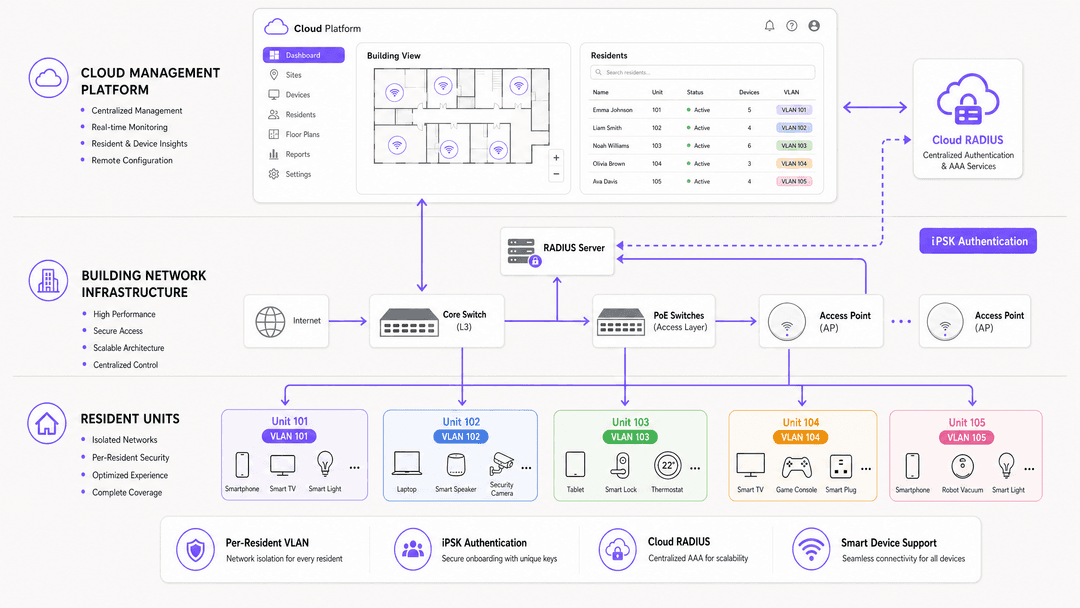
iPSK (Identity Pre-Shared Key) - called PPSK by HPE Aruba and Personal Private Network by Cisco Meraki - solves this by decoupling the SSID from the encryption key. Instead of a single building-wide password, the network supports thousands of unique passphrases on a single SSID.
When a device associates with an access point, the AP forwards the passphrase to the cloud RADIUS server. The RADIUS server authenticates the specific key, looks up the resident profile, and returns a dynamic VLAN assignment via a RADIUS Access-Accept message. The AP places the device into that VLAN immediately.
The result is a per-resident WiFi bubble:
- Every device using Resident A's key discovers every other device on that key. Their phone finds their Chromecast. Their smart speaker pairs with their smart bulbs. Their console connects to their television.
- No device on Resident A's key can see any device on a different key. Resident B's devices are invisible, even though both residents share the same physical access point.
- When Resident A moves out, Purple revokes their key. No other resident is affected. No building-wide password rotation is required.
Standards and security
This architecture is built on well-established industry standards:
| Standard | Role in the architecture |
|---|---|
| IEEE 802.1X | Framework for dynamic VLAN assignment via RADIUS |
| WPA3-Personal | Individualised encryption per resident, mitigating offline dictionary attacks |
| RADIUS (RFC 2865) | Authentication, authorisation, and accounting via cloud RADIUS |
| VLAN (IEEE 802.1Q) | Logical traffic isolation between resident segments |
| mDNS (RFC 6762) | Device discovery within the resident's VLAN bubble |
The architecture aligns with GDPR and CCPA requirements. Tenant traffic is logically separated, and individual resident behaviour analytics within private units are restricted by design. Aggregate common-area utilisation data - occupancy by floor, peak usage hours - is generally permissible and operationally useful.
Hardware compatibility
Purple operates as a hardware-agnostic cloud overlay. The cloud RADIUS integrates with access points from Cisco Meraki, HPE Aruba, Ruckus, Juniper Mist, Ubiquiti UniFi, Cambium, Extreme, and Fortinet. You do not need to replace existing infrastructure. You point your access points at Purple's cloud RADIUS endpoint and configure the SSID to use WPA2/WPA3-Enterprise authentication.
Got questions about your specific setup?
Our team works with venue operators, IT managers, and network engineers across 80,000 venues. Book a 20-minute call and we will show you how others like you solved it.
Implementation guide
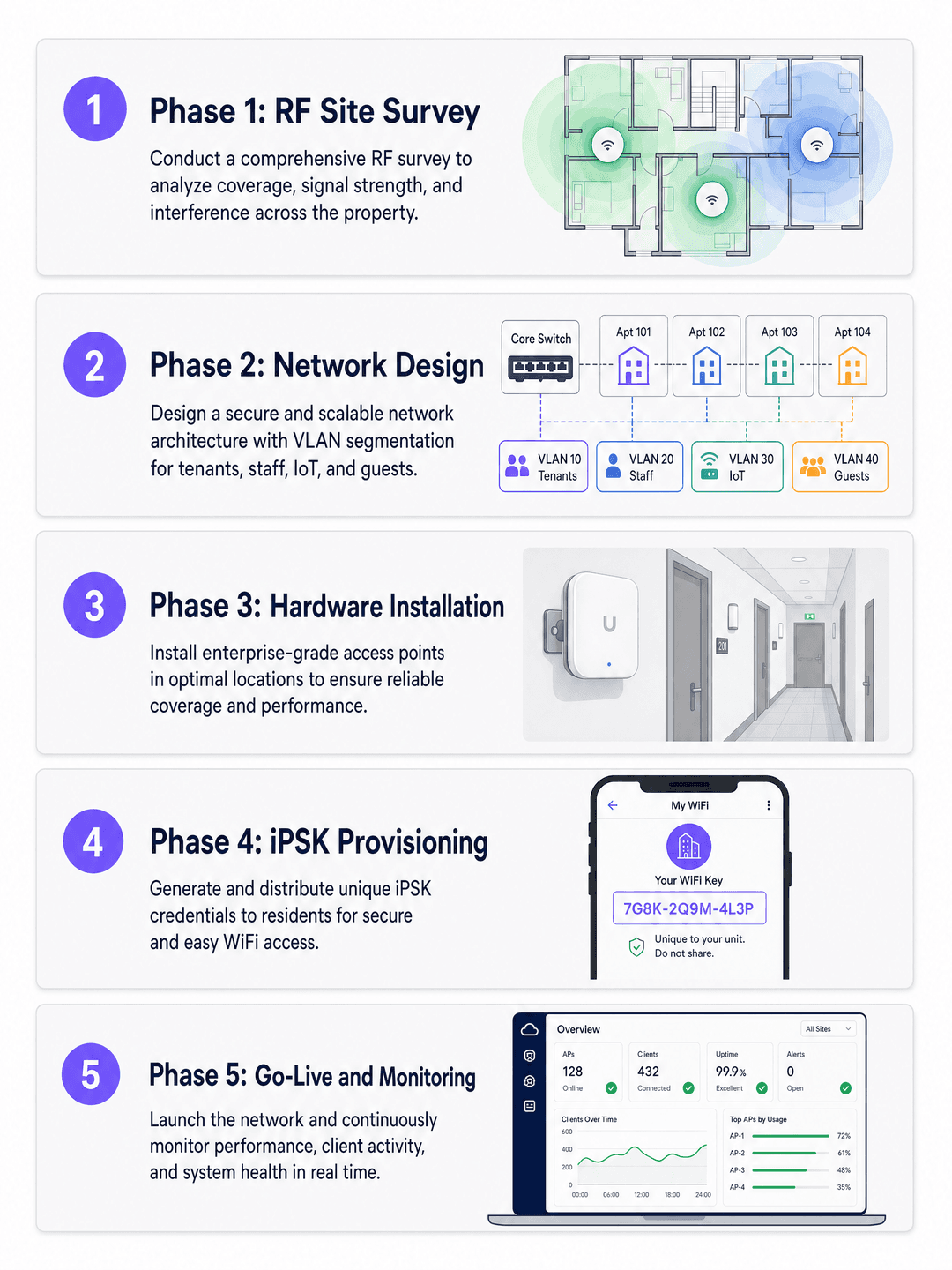
A multi-tenant WiFi deployment follows five phases. Skipping any phase - particularly the RF survey and identity provider integration - is the most common cause of post-deployment support issues.
Phase 1: RF site survey
Do not rely solely on predictive modelling. BTR and MDU environments contain dense concrete and masonry walls that attenuate 5GHz and 6GHz signals heavily. Conduct an active RF site survey using a spectrum analyser to identify interference sources, coverage gaps, and co-channel interference from neighbouring buildings.
Access point placement decisions:
- In-unit placement (ceiling or wall) provides the strongest signal but requires cable runs into each apartment.
- Corridor placement with directional antennas reduces cabling cost but requires careful RF design to avoid inter-unit interference.
- Target -65 dBm or better at the furthest point in each unit.
Phase 2: Network design
Design the switching infrastructure to support dynamic VLAN pooling. A 200-unit building with 15-25 devices per household requires a DHCP scope of at least 5,000 addresses. Use /22 or /21 subnets per VLAN pool. Ensure your core and distribution switches support the required number of VLANs - most enterprise switches support 4,094 VLANs per IEEE 802.1Q.
Configure DHCP snooping and ARP inspection on all access-layer switches to prevent rogue DHCP servers and ARP spoofing. Implement rate limiting per VLAN to prevent a single resident from saturating the uplink.
For a detailed comparison of PPSK deployment models, see our guide on PPSK: comparing features and deployment models.
Phase 3: Hardware installation
Install PoE switches at each distribution point. Use Cat6A cabling to all access point locations to support WiFi 6E and WiFi 7 speeds. Label all ports and document the physical topology - this is essential for remote troubleshooting.
For common areas (lobbies, gyms, coworking spaces), deploy access points on a separate SSID for Guest WiFi to handle visitor traffic. This keeps visitor traffic off the resident network entirely. For more on this three-SSID design pattern, see Three SSIDs to rule them all: guest, Passpoint, and IoT WiFi.
Phase 4: iPSK provisioning and identity integration
Integrate Purple with your Property Management System (PMS) or identity provider - Microsoft Entra ID, Okta, or Google Workspace. When a lease is signed, the integration automatically generates an iPSK and delivers it to the resident via email or the resident portal. When the lease terminates, Purple revokes the key automatically.
This zero-touch provisioning eliminates manual IT intervention for onboarding and offboarding. In a 200-unit building with 30% annual turnover, that is approximately 60 move-in and move-out events per year - each one handled without a support ticket.
Phase 5: Go-live and monitoring
Before go-live, test the following scenarios on each access point model in the deployment:
- A phone and a Chromecast on the same iPSK can discover each other.
- A phone and a Chromecast on different iPSKs cannot discover each other.
- A headless IoT device (smart plug) connects using the iPSK without a browser.
- A resident's devices roam seamlessly between access points without re-authentication.
Post-launch, monitor the Purple dashboard for authentication failures, DHCP exhaustion warnings, and AP health. Set alerts for any AP with more than 50 associated clients, which indicates a coverage gap elsewhere.
Best practices
Never use a shared PSK across multiple units without per-client isolation and rate shaping. The moment residents can see each other's devices, the service is compromised and the operator faces a GDPR liability.
Automate the credential lifecycle. Tie network access directly to the lease. Purple revokes access at lease end without any manual intervention, eliminating the security risk of former residents retaining network access.
Prioritise 5GHz and 6GHz. Design the network for 5GHz and 6GHz primary coverage. Reserve 2.4GHz for legacy IoT devices only. In dense MDU environments, 2.4GHz co-channel interference from neighbouring buildings is severe.
Plan for IoT density. Assume 15-25 devices per household as a baseline. A 200-unit building has 3,000-5,000 devices on the network at any moment. Size your DHCP pools, switching capacity, and uplink bandwidth accordingly.
Test mDNS reflection before launch. This is the single most common configuration error in multi-tenant deployments. Verify that mDNS is reflected within each resident's VLAN but not across VLANs.
For a first-impression perspective on the resident onboarding experience, see How to make a great first impression with your Guest WiFi.
Troubleshooting and risk mitigation
Chromecast and smart home pairing failures
Symptom: Residents report that their phone cannot find their smart speaker or casting device.
Root cause: mDNS reflection is either disabled or configured to broadcast across the entire subnet rather than being restricted to individual VLANs.
Fix: Enable mDNS reflection within each resident VLAN. Verify that the access point is not enforcing absolute client isolation within the dynamic VLAN. Test with an Apple TV, a Sonos speaker, and a Chromecast - these three cover the main discovery protocols in use.
Console NAT type errors
Symptom: Gamers report Strict NAT (PlayStation) or Type 3 NAT (Nintendo Switch), preventing online multiplayer.
Root cause: Symmetric NAT at the gateway prevents peer-to-peer UDP hole-punching required by gaming platforms.
Fix: Implement per-resident CGNAT with UPnP enabled. Avoid network-wide symmetric NAT. Test with a PlayStation 5 and an Xbox Series X before go-live.
IP address exhaustion
Symptom: Devices fail to obtain an IP address, particularly during peak evening hours.
Root cause: DHCP pool sized for device count at a single point in time, not for the churn of short-lived leases from IoT devices.
Fix: Use Purple's free iPSK Subnet Designer to calculate appropriate subnet sizes. Implement aggressive DHCP lease times of four to eight hours for IoT devices. Monitor DHCP pool utilisation in the Purple dashboard.
Rogue access points
Symptom: Residents install their own consumer routers, causing channel interference and degrading the managed network.
Fix: Enable rogue AP detection on the managed access points. Communicate clearly to residents at move-in that the managed network provides the same at-home experience they would get from a consumer router, including full IoT and smart home support. The managed network is the better option - make that case in the resident welcome pack.
ROI and business impact
Treating WiFi as a managed amenity transforms the property's financial model. The data below is drawn from Parks Associates (2025) and ASK4's Building a True Home study (2025).
| Metric | Data point | Source |
|---|---|---|
| MDU owners who say WiFi attracts residents | 70% | Parks Associates, 2025 |
| MDU owners who say WiFi increases property value | 80% | Parks Associates, 2025 |
| Renters more likely to move in if WiFi is bundled | 77% | ASK4, 2025 |
| Renters who say poor WiFi affects lease renewal | 84% | ASK4, 2025 |
| Renters who expect WiFi ready within days of move-in | 93% | ASK4, 2025 |
| BTR rent premium per unit per month | £15-30 | Purple deployment data |
| Reduction in void periods | 5-10 days | Purple deployment data |
When deployed as a software overlay on owned hardware, managed WiFi is consistently NOI-positive. The model deteriorates when WiFi is bundled with a third-party broadband contract that captures the revenue uplift. Owning the infrastructure and using Purple as the management layer keeps the value with the operator.
Beyond the direct financial return, WiFi analytics provide building utilisation data - occupancy by wing, peak usage hours, common area dwell time - that feeds directly into facilities management and maintenance scheduling. Purple's WiFi Analytics platform exports this data to existing dashboards via API.
For Hospitality operators managing mixed-use BTR developments with hotel-style amenities, the same Purple platform handles both the resident Multi-Tenant WiFi and the visitor Guest WiFi from a single management console.
Key Definitions
iPSK (Identity Pre-Shared Key)
A security architecture that allows multiple unique passphrases on a single SSID. The specific passphrase presented by a device is used by the RADIUS server to assign that device to a specific VLAN and network policy.
The core technology enabling per-resident network isolation in multi-tenant WiFi. Also called PPSK (HPE Aruba) or Personal Private Network (Cisco Meraki).
VLAN (Virtual Local Area Network)
A logical subnetwork that groups devices and isolates their traffic from other devices on the same physical infrastructure, defined by IEEE 802.1Q.
The mechanism that prevents a resident in unit 101 from seeing devices in unit 102, even when both units connect to the same physical access point.
mDNS (Multicast DNS)
A protocol defined in RFC 6762 that allows devices to discover services on a local network without a central DNS server, using multicast UDP on port 5353.
Required for Chromecast, Apple TV, Sonos, and smart home hubs to function. Must be reflected within each resident's VLAN but blocked between VLANs.
Dynamic VLAN assignment
The process by which a RADIUS server instructs a network switch or access point to place a device into a specific VLAN based on its authentication credentials, returned in the RADIUS Access-Accept message.
The mechanism that routes a resident's device into their personal network bubble upon connection.
BTR (Build to Rent)
Purpose-built residential developments designed specifically for long-term rental rather than sale, typically offering professional management and amenity packages.
The primary market for multi-tenant WiFi in the UK. The BTR sector grew 16% in the 12 months to Q1 2025, according to the British Property Federation.
NOI (Net Operating Income)
A real estate financial metric calculated as total property revenue minus all operating expenses, excluding debt service and capital expenditure.
Managed WiFi increases NOI by generating rent premiums, reducing void periods, and lowering IT support costs.
Headless device
A network-connected device that lacks a screen or web browser, such as a smart plug, game console, smart speaker, or IP camera.
These devices cannot authenticate via captive portals. They require iPSK or MAC authentication to connect to enterprise networks. They represent the majority of IoT devices in modern apartments.
CGNAT (Carrier-Grade NAT)
A method of sharing a single public IP address among multiple private IP addresses, commonly used by ISPs and MDU operators to conserve IPv4 address space.
Must be configured correctly in MDU environments. Symmetric CGNAT breaks online gaming consoles that require Open or Type 2 NAT for peer-to-peer connections.
RADIUS (Remote Authentication Dial-In User Service)
A networking protocol defined in RFC 2865 that provides centralised authentication, authorisation, and accounting for network access.
The authentication engine behind iPSK. Purple operates a cloud RADIUS service with 99.999% uptime, eliminating the need for on-premise RADIUS servers.
Worked Examples
A 250-unit Build to Rent development needs to provide seamless WiFi for residents from move-in day. The developer wants residents to connect smart TVs and game consoles easily, but the IT team is concerned about broadcast traffic flooding the network if all 250 units share a single subnet. The property management system is built on Microsoft Entra ID.
Deploy a single property-wide SSID using Purple's Identity-Based Networks with iPSK. Integrate Purple's cloud RADIUS with Microsoft Entra ID via SCIM provisioning. When a lease is signed in the PMS, the integration creates a resident account in Entra ID and triggers Purple to generate a unique iPSK. Purple emails the key to the resident before move-in day. On arrival, the resident enters the key on their phone. All subsequent devices - smart TV, console, laptop, smart speaker - use the same key. The RADIUS server places every device into a dedicated VLAN (e.g., VLAN 101 for unit 101). mDNS reflection within VLAN 101 allows the phone to discover the Chromecast. The console receives a NAT type of Open via per-VLAN UPnP. At lease end, the Entra ID account is deactivated, Purple revokes the iPSK, and the VLAN is released back to the pool. No IT intervention required.
A purpose-built student accommodation (PBSA) provider experiences severe network congestion during move-in week in September. Students arrive with five to seven devices each, the helpdesk is overwhelmed with captive portal failures, and students cannot connect their games consoles or smart TVs. The existing network uses a single shared SSID with a captive portal.
Replace the captive portal with an iPSK architecture deployed on the existing Ruckus access points. Two weeks before move-in, the student portal generates a unique iPSK for each student and displays it in their account dashboard. Students arrive, enter their key on their phone, and connect immediately. Subsequent devices - laptop, console, smart TV - use the same key without any browser interaction. The Ruckus cloud controller receives the VLAN assignment from Purple's RADIUS server and places each student into their own micro-segment. The helpdesk load drops to near zero because there is no captive portal session to expire and no shared password to reset.
Practice Questions
Q1. You are upgrading the network for a 300-unit luxury apartment complex. The property manager wants to offer a premium WiFi tier. Residents are complaining that they cannot connect their new smart home hubs to the existing 802.1X network. The IT team is reluctant to lower security standards. How do you resolve this?
Hint: Consider the authentication capabilities of consumer IoT devices and whether 802.1X is the right protocol for headless devices.
View model answer
Migrate the network from standard 802.1X to an iPSK architecture. Consumer IoT devices and smart home hubs do not support 802.1X supplicants, making them impossible to connect securely on a traditional enterprise network without MAC authentication bypass (which is weaker than iPSK). With iPSK, residents connect headless devices using a standard WPA2/WPA3 personal passphrase. The RADIUS server dynamically assigns them to their secure, isolated VLAN. Security is maintained - each resident has a unique key, and VLANs prevent cross-tenant access - while the user experience matches a home network.
Q2. During a pilot deployment of a multi-tenant WiFi solution across 20 units, a resident reports that they can see their neighbour's Apple TV on their iPhone's AirPlay menu. The network uses iPSK with dynamic VLAN assignment. What is the most likely configuration error and how do you fix it?
Hint: Review how mDNS operates and how it should be scoped in a multi-tenant deployment.
View model answer
The most likely cause is that mDNS reflection is configured to broadcast across the entire subnet rather than being restricted to individual VLANs. Verify that the cloud RADIUS is returning a unique VLAN ID for each resident's iPSK and that the access point is correctly tagging traffic to those VLANs. Then check the mDNS proxy or reflector configuration - it should reflect mDNS queries only within the originating VLAN, not across all VLANs. Test by connecting a phone and an Apple TV to two different iPSKs and confirming that AirPlay discovery fails between them.
Q3. A BTR operator wants to bundle managed WiFi into the rent across a portfolio of 15 buildings. They are concerned about the ongoing IT support costs, particularly for resident move-ins and move-outs. The portfolio has approximately 40% annual resident turnover. How do you minimise the operational overhead?
Hint: Consider the integration points between the WiFi platform and the existing property management system.
View model answer
Integrate Purple directly with the property management system via API or SCIM provisioning. When a lease is signed, the PMS triggers Purple to generate an iPSK and deliver it to the resident automatically. When the lease terminates, the PMS triggers Purple to revoke the key. With 40% annual turnover across 15 buildings, this automation handles hundreds of provisioning events per year without any IT intervention. The only manual step is the initial integration setup. Post-integration, the IT team's role is monitoring the Purple dashboard for anomalies, not managing individual credentials.
Q4. A network architect is designing the switching infrastructure for a new 400-unit BTR development. Each unit is expected to have 20 devices on average. The architect is considering whether to use one VLAN per unit or one VLAN per floor. Which approach is correct and why?
Hint: Consider the privacy requirements and the broadcast domain implications of each approach.
View model answer
Use one VLAN per unit. A per-floor VLAN places all residents on the same floor in the same broadcast domain, meaning their devices are visible to each other. This violates the privacy requirement that residents cannot see neighbouring devices. It also creates a larger broadcast domain, increasing the risk of broadcast storms and ARP flooding. One VLAN per unit, dynamically assigned via iPSK and RADIUS, provides complete isolation between residents while keeping broadcast domains small. A 400-unit building requires 400 VLANs, well within the 4,094 VLAN limit of IEEE 802.1Q. Size the DHCP pool for each VLAN to accommodate 20-25 devices with a /27 or /26 subnet.
Continue reading in this series
How to deploy iPSK on Cisco Meraki, HPE Aruba and Ruckus
This hands-on reference guide shows how to deploy iPSK on Cisco Meraki, MPSK on HPE Aruba Central and DPSK on Ruckus SmartZone, with a short UniFi PPSK appendix. It focuses on key issuance, VLAN or policy placement, RADIUS decision flows and revocation tests that prove a deployment works in a live venue.
Bulk internet agreement vs managed WiFi: which model fits your building
A practical procurement reference for property, IT and operations leaders comparing resident-paid retail broadband, a bulk internet agreement and managed WiFi. It clarifies ownership, resident move-in, security, cost scope and contractual exit, using US bulk-internet framing and UK equivalents.
Cox business managed WiFi: a comprehensive guide for businesses
This guide details how property developers and BTR operators can deploy scalable, secure networks using Cox Business managed WiFi. It covers network architecture, vendor-neutral hardware deployment, and the business impact of transitioning connectivity from an operational headache to reliable infrastructure.
Got questions about your specific setup?
Our team works with venue operators, IT managers, and network engineers across 80,000 venues. Book a 20-minute call and we will show you how others like you solved it.